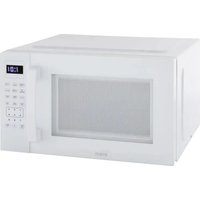
MT150V0W - Oven Avanti - Free user manual and instructions
Find the device manual for free MT150V0W Avanti in PDF.


| Product Type | Microwave Oven |
| Brand | Avanti |
| Model | MT150V0W |
| Capacity | 1.5 cu ft (42.5 L) |
| Output Power | 1000 W |
| Power Consumption | 1500 W, 120 V ~ 60 Hz |
| Operating Frequency | 2450 MHz |
| Cavity Dimensions (H x W x D) | 24.0 x 36.0 x 40.3 cm (9.44 x 14.19 x 15.88 in) |
| Net Weight | 18.1 kg (40 lb) |
| Cooking Mechanism | Turntable (glass) |
| Control Panel | Electronic with digital display |
| Preprogrammed Cooking Programs | Popcorn, Baked Potato, Pizza, Beverage, Frozen Dinner, Reheat |
| Defrost | By weight (4 oz to 50 oz) or by time |
| Kitchen Timer | Yes, up to 99 min 99 s |
| Express Cooking | 1 to 6 minutes + add 30 seconds |
| Child Safety | Child Lock (long press STOP/CANCEL) |
| Door Opening Function | Two-step (safety) or one-step (disablable) |
| Cleaning | Damp cloth, mild detergent; glass tray and roller ring washable |
| Available Replacement Parts | Glass tray, roller assembly, bulb (replacement by technician) |
| Repairability | Have it serviced by qualified service personnel |
| Warranty | 1 year parts and labor (limited), 2 years parts, 7 years magnetron |
Frequently Asked Questions - MT150V0W Avanti
User questions about MT150V0W Avanti
0 question about this device. Answer the ones you know or ask your own.
Ask a new question about this device
Download the instructions for your Oven in PDF format for free! Find your manual MT150V0W - Avanti and take your electronic device back in hand. On this page are published all the documents necessary for the use of your device. MT150V0W by Avanti.
USER MANUAL MT150V0W Avanti
natural_image
Front view of a modern microwave oven with control panel and display (no visible text or symbols)Models : MT150V0W / MT150V3S

Register this and other avanti® products through our website: https://www.avantiproducts.com/pages/product-registration Product registration is not required to activate warranty.
Important Safeguards 2
Installation Instructions .... 3
Precautions 3-4
Electrical Grounding Instructions 5
Operating Instructions 5
Control Panel 6
Operation Procedure 6
Two Step Door Opening Function 7
Special Oven Features 8-11
Cooking Techniques 12
Care & Maintenance 12
Warranty 13
SAVE THIS INSTRUCTION MANUAL FOR FUTURE REFERENCE
IMPORTANT SAFEGUARDS
When using electrical appliances, basic safety precautions should always be followed to reduce the risk of fire, electric shock, and/or injury to persons including the following:
- Precautions to avoid possible exposure to excessive microwave energy.
- This appliance must be grounded. Connect only to properly grounded outlet. See GROUNDING INSTRUCTIONS.
- Install or locate the appliance only in accordance with the provided installation instructions.
- When cleaning surfaces of door and oven that comes together on the closing door, use only mild, nonabrasive soaps, or detergents applied with a sponge or soft cloth.
- Liquids, such as water, coffee, or tea are able to be overheated beyond the boiling point without appearing to be boiling. Visible bubbling or boiling when the container is removed from the microwave oven is not always present. THIS COULD RESULT IN VERY HOT LIQUIDS SUDDENLY BOILING OVER WHEN THE CONTAINER IS DISTURBED OR AUTENSIL IS INSERTED INTO THE LIQUID.
- Some products such as whole eggs and sealed containers-(for example, closed glass jars) may explode and should not be heated in microwave oven.
- Use this microwave oven only for its intended use as described in this manual.
- Do not use corrosive chemicals or vapors in this appliance. This type of oven is specifically designed to heat, cook, or dry food. It is not designed for industrial or laboratory use.
- As with any appliance, close supervision is necessary when used by children.
- Do not operate this microwave oven if it has a damaged cord or plug, if it is not working properly, or if it has been damaged or dropped.
- To reduce the risk of fire in the oven cavity:
- Do not overcook food. Carefully attend microwave oven if paper, plastic, or combustible materials are placed inside the oven to facilitate cooking.
- Remove wire twist-ties from bags before placing bag in oven.
- If materials inside the oven should ignite, keep oven door closed, turn oven off at the wall switch, or shut off power at the fuse or circuit breaker panel.
- Do not use the cavity for storage purposes. Do not leave paper products, cooking utensils, or food in the cavity when not in use.
- Only qualified service personnel should service this appliance. Contact the nearest authorized service facility for examination, repair or adjustment.
- Do not cover or block any openings on this appliance.
- Do not use this microwave oven to heat corrosive chemicals (for example, sulfides and chlorides). Vapors from such corrosive chemicals may interact with the contact and springs of the safety interlock switches thereby rendering them inoperable.
- Do not immerse cord or plug in water.
- Keep cord away from heated surfaces.
- Do not let cord hang over edge of table or counter.
- Never clean appliance parts with flammable fluids. The fumes can create a fire hazard or explosion.
- Do not store or use gasoline or any other flammable vapors and liquids in the vicinity of this or any other appliance. The fumes can create a fire hazard or explosion.
SAVE THESE INSTRUCTIONS HOUSEHOLD USE ONLY
Congratulations on your purchase of an Avanti® 0.7 cu. ft. Microwave Oven!
INSTALLATION INSTRUCTIONS
Remove the exterior and interior packing.
Check to be sure you have all of the following parts:
- Glass Tray
• Turntable Roller Assembly (Roller or Roller Ring) - Instruction Manual
Inspect the oven after unpacking for any visual damage such as:
- Misaligned Door
- Damaged Door
• Dents or Holes in Door Window and Screen
• Dents in Cavity
If any of the above is visible, DO NOT use the oven.
- When positioning the microwave oven, it should be set on a flat, steady surface.
- Do not block air vents. If they are blocked during operation, the oven may overheat and eventually cause oven failure.
- Poor television reception and radio interference may result if the oven is located close to a TV, radio, antenna, or antenna wire. Position the oven as far from them as possible.
- Clean the interior surface with lukewarm water using a soft cloth.
- Keep the oven away from hot air, steam or splashing liquids when choosing a place to locate it, otherwise, the unit's operation may be adversely affected, causing it to break down.
- Direct sunlight may affect the acrylic coating and heat sources may increase electrical consumption.
- Plug the appliance into an exclusive properly installed-grounded wall outlet. Do not under any circumstances cut or remove the third (ground) prong from the power cord. Any questions concerning power and or grounding should be directed toward a certified electrician or an authorized Avanti Products service center.
• DO NOT place anything on the top of the oven. - Keep the oven at least 5 inches away from both sidewalls and away from rear wall to ensure the proper ventilation.
- DO NOT remove the turn-table drive shaft.
PRECAUTIONS TO AVOID POSSIBLE EXPOSURE TO EXCESSIVE MICROWAVE ENERGY
A. Do not attempt to operate this oven with the door-open since open-door operation can result in harmful exposure to microwave energy. It is important not to defeat or tamper with the safety interlocks.
B. Do not place any object between the oven front face and the door or allow soil or cleaner residue to accumulate on sealing surfaces.
C. Do not operate the oven if it is damaged. It is particularly important that the oven door close
properly and that there is no damage to the: (1) Door (bent), (2) Hinges and latches (broken or loosened), (3) Door seals and sealing surfaces.
D. The oven should not be adjusting or repaired by anyone except properly qualified service personnel.
GENERAL USE
- DO NOT attempt to tamper with or make any adjustments or repairs to door, control panel or any other part of the oven. Do NOT remove outer panel from oven. Repairs should only be done by qualified service personnel.
- DO NOT operate the oven empty. The microwave energy will reflect continuously throughout the oven if no food or water is present to absorb energy.
- If a fire occurs in the oven, touch the START/PAUSE pad and LEAVE THE DOOR CLOSED. Disconnect the power cord, or shut off power at the fuse or circuit breaker panel.
- DO NOT attempt to dry clothes, newspapers or other materials in oven. They may catch on fire.
- DO NOT use recycled paper products, as they may contain impurities, which may cause sparks and/or fires when used.
-
DO NOT hit or strike control panel. Damage to controls may occur.
-
METAL CONTAINERS or dishes with metallic rims should not be used. Arcing may occur.
• METAL TWIST-TIES may not be used in the microwave oven. - DO NOT use SEALED JARS or NARROW NECK bottles for cooking or reheating. They may shatter.
- DO NOT use CONVENTIONAL THERMOMETERS in the microwave oven. They may cause arcing.
- Use only those labeled "Microwave Safe" and follow all directions. Check the food in several places.
- Remove PLASTIC STORE WRAPS before cooking or defrosting in the oven.
RECOMMENDED
- Microwave browning dish – Use to brown exterior of small items such as steaks, chops, or pancakes. Follow the directions provided with your browning dish.
- Microwaveable plastic wrap – Use to retain steam. Leave a small opening for some steam to escape and avoid placing it directly on the food.
- Paper towels and napkins – Use for short-term heating and covering; these absorb excess moisture and prevent splattering. Do not use recycled paper towels, which may contain metal and could ignite.
FOOD UTENSILS
- Never use your microwave oven for HOME CANNING. The oven is not designed to permit proper canning. Improperly canned food may spoil and be dangerous to consume.
- COOKING TIMES are approximate. Factors that may affect cooking are starting temperature, altitude, volume, size and shape of food and utensils used. As you become familiar with the oven, you will be able to adjust for these factors.
- It is better to UNDERCOOK RATHER THAN OVERCOOK foods. If food is undercooked, it can always be returned to the oven for further cooking. If food is overcooked, nothing can be done. Always start with minimum cooking times.
- SMALL QUANTITIES of food or foods with LOW MOISTURE content can burn, dry out or catch on fire if cooked too long.
- DO NOT boil eggs in their shell. Pressure may build up and the eggs will explode.
- Potatoes, apples, egg yolks, whole acorn squash and sausage are examples of food with NONPOROUS SKINS. These must be pierced before cooking to prevent bursting.
- POPCORN must be popped in a microwave corn popper. Microwave popped corn produces a lower yield than conventional popping. DO NOT use oven for popcorn unless popped in a microwave approved popcorn utensil or unless it's commercially packaged and recommended especially for microwave ovens.
• DO NOT use oil unless specified by the manufacturer.
• DO NOT attempt to deep fat fry in your oven. - HEATED LIQUIDS can ERUPT if not mixed with air. DO NOT heat liquids in your microwave oven without first stirring.
- Food Utensils
ELECTRICAL GROUNDING INSTRUCTIONS
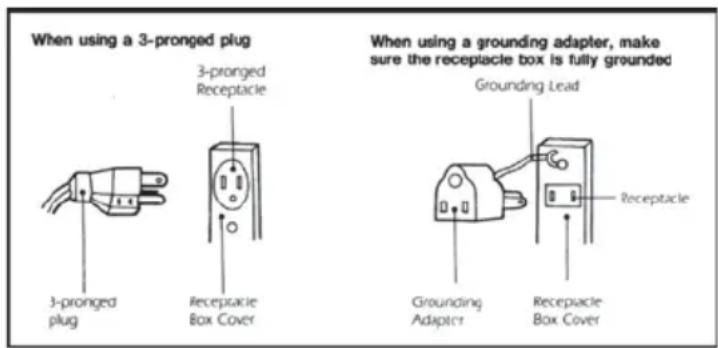
This appliance must be grounded. In the event of an electrical short circuit, grounding reduces the risk of electrical shock by providing an escape wire for the electric current. This appliance is equipped with a cord having a grounding wire with a grounding plug. The plug must be inserted into an outlet that is properly installed and grounded.
WARNING
This appliance must be grounded. In the event of an electrical short circuit, grounding reduces the risk of electrical shock by providing an escape wire for the electric current. This appliance is equipped with a cord having a grounding wire with a grounding plug. The plug must be inserted into an outlet that is properly installed and grounded.
The power cord of this appliance is equipped with a three-prong plug which mates with standard three prong wall outlets to minimize the possibility of electrical shock.
Do not under any circumstances cut or remove the third ground prong from the power cord supplied.
Do not use the extension cord. If the power supply cord is too short, have a qualified electrician or serviceman to install an outlet near the appliance.
This appliance requires a standard 115/120 Volts A.C. \~/60Hz electrical outlet with three-prong ground.
The cord should be secured behind the appliance and not left exposed or dangling to prevent accidental injury.
Although your oven is provided with safety features, it is important to observe the following:
- It is important not to defeat or tamper with safety interlocks.
- Do not place any object between the oven front face and the door or allow residue to accumulate on sealing surfaces. Wipe the sealing area frequently with a mild detergent, rinse and wipe dry. Never use abrasive powders or pads.
- When opened, the door must not be subjected to strain, for example, a child hanging on an opened door or any load which could cause the oven to fall forward and cause injury and damage the door.
- Do not operate the oven if it is damaged, until it has been repaired by a qualified service person. It is particularly important that the oven closes properly and that there is no damage to the:
- Door (bent)
- Hinges and latches (broken or loosened)
- Door seals and sealing surfaces
- The oven should not be adjusted or repaired by anyone except properly qualified service personnel.
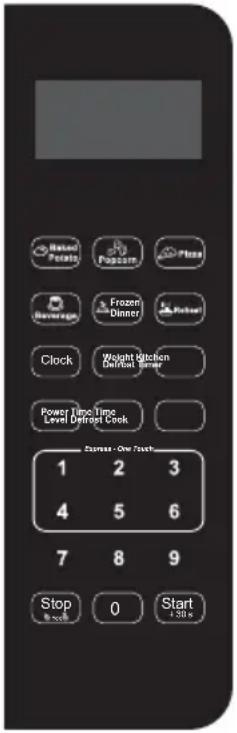
CONTROL PANEL
Follow the applicable instructions for operation and control, which are given in "HOW TO SET THE OVEN CONTROLS" on page 11.
 | UNIT FEATURES UNIT SPECIFICATIONS | ||
| PRE-PROGRAMMED COOKING METHODS | Power Consumption: | 120V ~ 60Hz 1500W | |
| BAKED POTATO | Output (Watts): | 1000W | |
| POPCORN | Operation Frequency: | 2450MHz | |
| PIZZA | Unit Dimensions (HxWxD): | 13.25 x 21.50 x 17.60 | |
| BEVERAGE | |||
| FROZEN DINNER | |||
| REHEAT | Oven Cavity Dimensions (HxWxD): | 9.4375 x 14.1875 x 15.875 | |
| WEIGHT DEFROST | |||
| TIME DEFROST | Oven Capacity: | 1.5 cu. ft | |
| CLOCK | Cooking Uniformity: | Turntable | |
| KITCHEN TIMER | Net Weight: | 40 lbs | |
OPERATION PROCEDURE
Plug the power supply cord into a standard 3-pronged 15 Amps, 120Volts A.C.\~/60Hz.
- After placing the food in a suitable container, open the oven door and put it on the glass tray. The glass tray and roller guide must always be in place during cooking.
- Shut the door. Make sure that it is firmly closed.
- The oven door can be opened at any time during operation by first pressing the STOP/CANCEL button then pulling on the door handle or pushing the door release button. (see two-step door opening function instructions below for more information). The oven will automatically shut off. To restart the oven, close the door and then touch START / STOP.
- Each time a pad is touched, a BEEP will sound to acknowledge the touch. Three BEEPS indicates the oven does not accept the entry, check and try again.
- The oven automatically cooks on high power and defrosts on low power.
- When the oven is first plugged in the display will show "1:00", if you prefer to change the clock, touch CLOCK to reset the clock.
- When the START / STOP pad is touched during the oven operation, the oven stops cooking. If the oven door is opened during the oven operation, all information is retained.
- If the START / STOP pad is touched and the oven does not operate, check the area between the door and door seal for obstructions and make sure the door is closed securely. The oven will not start cooking until the door is completely closed and the program has been set.
| CONTROL PANEL FEATURE DISPLAY | DESCRIPTION Electronic display shows Cooking Time, Cooking Power, Time Remaining in Cooking Cycle, and the Present Time. |
| PRE-PROGRAMMED COOKING MODES | BAKED POTATO / BEVERAGE / PIZZA / POPCORN / FROZEN DINNER / REHEAT Allow you to reheat or cook food automatically without entering power level or time. |
| POWER | Use to set power level |
| DEFROST | Touch to set the weight of the food to be defrosted. The oven automatically sets the defrosting time and power level. |
| KITCHEN TIMER | In standby mode, press this button to enter the timer mode, the countdown and function icon and "00:00" will be displayed on the display screen. Press the 0 - 9 number buttons to select the desired time. |
| NUMBER PADS (0-9) | Touch to set times or amounts. |
| CLOCK | Touch to set the clock. |
| STOP / Cancel | Clears all previous settings if touched before cooking starts. Or returns to standby mode during cooking. |
| START / +30 SEC | Touch to start. |
| +30 SECONDS | Add an additional 30 seconds to current cook cycle. |
TWO-STEP DOOR OPENING FUNCTION
For safety, this microwave requires a 2-step process to open the door. This safety door lock feature reduces the risks to young children by reducing the likelihood of them handling hot food and beverage items. If the two-step door opening function is enabled, it is not possible to open the oven door during cooking cycles or briefly after. You will need to follow the Opening Door with Safety Lock Enabled instructions below.
When the Safety Lock is enabled, you must complete the 2-step process each time you open the door. If there are no young children in your household, or disabilities make it difficult for adults to operate the 2-step door latch, refer to the instructions below to disable the safety lock feature and convert the door to a 1-step push button latch.
Opening Door with Safety Lock Enabled:
- When the microwave is in use or has recently finished cooking, press STOP/CANCEL button, then press the door latch release button on the front of the microwave.
- If the microwave is inactive or has been at least 30 minutes since the last cooking cycle, you will be able to open the oven door.
Disabling the Safety Lock: Press the START+STOP+POWER buttons simultaneously to turn the function On or Off. The display will show "ON" of "Off."
Note: In the event of a power failure or when the product is powered on, it will automatically default to the two-step door safety function.
Caution: Turning off this function will enable you to open the oven door at any time.
Time Defrost: Used to defrost frozen foods by time. This cycle starts at medium – high power, then automatically reduces to medium – low and then to low as the food thaws. TIME DEFROST indicator light and cook indicator light will both come on during the defrost cycle.
KITCHEN TIMER: Use for timing things without oven function. A long beep will sound at the end of the elapsed time.
AUTO ALERT: After a DEFROST or COOK PROGRAM has completed, the oven will automatically continue to sound three beeps and then three beeps every three minutes until the oven door is opened or the STOP/CANCELpad is touched.
CHILD PROOF LOCK: Use to prevent unsupervised operation of the oven by children.
The CHILD PROOF LOCK indicator will be lit on the display and the oven cannot be operated while the CHILD PROOF LOCK is set.
SETTING CHILD LOCK: To set, press and hold STOP/CANCEL for 3 seconds. LOCK is indicated on the display. To cancel, press and hold STOP/CANCEL pad for 3 seconds. LOCK indication disappears.
STOP/Cancel: Touch to cancel the selected power level, cook or defrost times previously programmed. The time of day clock is not cancelled.
START/+30 SEC: Touch to start the defrost or cook programs. The cook indicator light and the oven light will come on and the cooling fan will operate.
NOTE: END OF OPERATION- Display will show "END".
- Three beeps will sound, the cook indicator light will go out and will show "END" on display window until the door is opened and the time of day will return to the display window. The oven light and cooking fan will turn off.
- The oven will automatically continue to sound three beeps every three minutes until the oven door is opened or the STOP/CANCEL pad is touched.
NOTE: TO INTERRUPT OPERATION -Open the oven door.
• The oven immediately stops.
- If no further cooking is required, touch the STOP/CANCEL pad.
- To continue cooking, close the oven door and touch the START/+30 SEC pad. The oven will restart
| HOW TO SET THE OVEN CONTROLS | |
| AUDIBLE SIGNALSDURING OVEN SETTINGS | ONE SIGNAL: Oven accepts the entry.TWO SIGNALS: Oven does not accept the entry, check and try again. |
SETTING THE CLOCK
The CLOCK and the "0" button are not combined to one single button. The clock function is a 12-hour system. To set the clock follow the steps below:
- While in stand-by mode, press "Clock" button for approximately 3 seconds.
- Using the number pads enter the correct time. (The digital clock will allow a setting of 1:00 to 12:59). You must press at least 3 numbers (1 for hour and two for minutes)
- Once the desired time is entered, press the START / +30 Sec to auto exit the clock setting mode.
NOTE: When a setting is less than four numbers (0:00), press START/+30 SEC to confirm the setting. You don't need to press START/+30 SEC pad when a setting is 4 numbers(00:00), cause the setting of 4 numbers is confirmed and exited the clock setting mode directly. You can check the clock time while cooking is in progress by touching the CLOCK pad.
SETTING THE KITCHEN TIMER
- Touch TIMER.
- Enter the desired amount of time by touching the number pads. Time is in minutes and seconds and set from left to right.
- Display will show the desired setting: (00:05 for 5 seconds / 24:05 for 24 minutes and 5 seconds)
- Touch Start / +30 Sec to start the countdown.
Note: Time countdown can be seen in display for 5 seconds before clock or cooking time is returned to display. Touch timer button and then STOP / CANCEL to cancel the timer during the countdown process.
SETTING A COOKING PROGRAM
EXPRESS COOK: Use the EXPRESS COOK button (1-6) for choosing time and then pessing "Start+30S"
| Number Pad | Cook Time |
| 11 Minutes | |
| 2 2 Minutes | |
| 3 3 Minutes | |
| 4 4 Minutes | |
| 5 5 Minutes | |
| 6 6 Minutes |
ADD 30 SECONDS: Touch this button for quick 30 second cook time. Pressing this button during a set cook cycle will add 30 seconds to the current time. Every time the button is pressed an additional 30 seconds will be added to the current cook time.
NOTE: During the EXPRESS COOK, AND TIME DEFROST, you can add 30 seconds each time the button is pressed.
A. One-stage Cooking Press time cook button and then press the number pad to choose the time or press it to choose power.
-
Use the number pads to set a cooking time. You can set a cooking time from one second to 99 minutes and 99 seconds.
-
Press the START/+30 Sec button to start the cooking process.
| Power Pad | Cooking Power |
| HIGH | 90%,100% |
| M. HIGH | 70%,80% |
| MED | 50%60% |
| M. LOW | 30%40% |
| LOW | 10%,20% |
TIME DEFROST
- Touch DEFROST twice to select (dEF2).
- Enter desired defrosting time by touching correct number pads. Digital timer sets minutes and seconds from left to right so a single digit can be set (5 for 5 seconds) or up to 4 digits (2405 for 24 minutes 5 seconds).
- Touch START/+30 Sec.
NOTE: After time has elapsed three signals sound and END appears in display. Touch STOP/CANCEL pad or open door to clear END before starting another cooking function.
DEFROST BY WEIGHT
- Touch DEFROST pad.
- Enter weight.
- Touch START/+30 sec pad.
NOTE: Weight must be in pounds and ounces. The set weight range of defrost by weight is from 4 oz to 50 oz. If label gives weight in pounds only, change the fraction of a pound to ounces using the following chart. (See page 11).
QUICK COOK (PRE-PROGRAMMED) SETTINGS
The QUICK COOK settings allow you to cook or reheat food automatically without entering power level or time. For smaller portions, simply touch the applicable pad and start. For larger portions, push the pad repeatedly.
POPCORN
- Touch POPCORN
| AMOUNT COOKING TIME | |
| 3.5oz. min. sec2 | 20 |
- Touch START/+30 sec.
BAKED POTATO
For each potato about 3.5 – 5.3 ounces: 1. Touch BAKED POTATO once for each potato to be cooked
| 9oz | 7 minutes |
| 18oz | 10 minutes |
| 27oz | 14 minutes |
- Touch START/+30 sec.
PIZZA
Reheating a slice (or two thin ones) of pizza:
- Touch PIZZA once for each slice of pizza to be reheated.
| AMOUNT COOKING TIME | |
| 7oz | 1 min. 30 sec. |
| 14oz | 3 min. 00 sec . |
- Touch START/+30 sec.
BEVERAGE
For each cup about 8.5 oz : 1. Touch BEVERAGE once for each cup to be heated.
| 1 cup 1 min 30 sec |
| 2 cups 2 min 30 sec |
| 3 cups 3 min 30 sec |
- Touch START/+30 sec.
CONTINUED NEXT PAGE
REHEAT
- Touch REHEAT
| 7oz | 2 min 40 sec |
| 14oz | 4 min 20 sec |
| 21oz | 6 min 00 sec |
| 28oz | 8 min 00 sec |
| 35oz | 9 min 00 sec |
- Touch START/+30 Sec.
NOTE: Place in dish or casserole slightly larger than the amount indicated. Continue to heat with variable power and time if at the end of sensor reheat the food is not sufficiently hot.
NOTE: This setting lets you reheat a dinner plate of chilled leftovers with good results.
FROZEN DINNER
For one or two small frozen dinners:
- Touch FROZEN DINNER once for each dinner to heat.
| 7 07minutes | |
| 140Z | 7 minutes |
- Touch START/+30 sec.
CONVERTING FRACTIONS OF A POUND TO OUNCES
| Fractions of a Pound | Ounces |
| Less than .03 0 | |
| .03 to .09 1 | |
| .10 to .15 2 | |
| .16 to .21 3 | |
| .22 to .27 4 | |
| .28 to .34 5 | |
| .35 to .40 6 | |
| .41 to .46 7 | |
| .47 to .53 8 | |
| .54 to 59 9 | |
| .60 to .65 10 | |
| .66 to .71 11 | |
| .72 to .78 12 | |
| .79 to .84 13 | |
| .85 to .90 14 | |
| .91 to .97 15 | |
| above .97 go | to next even |
Maximum weight for defrosting is 50 oz. Turn food over when oven signals twice. Touch START/+30 SEC to resume defrosting. After total defrosting time, 3 signals sound and END appears in display. Touch STOP/CANCEL or open oven door to clear END before starting another cooking function.
COOKING TECHNIQUES
Your microwave makes cooking easier than conventional cooking, provided you keep these considerations in mind.
STIRRING - Stir foods such as casseroles and vegetables while cooking to distribute heat evenly. Food at the outside of the dish absorbs more energy and heats more quickly, so stir from the outside to the center. The oven will turn off when you open the door to stir your food.
ARRANGEMENT - Arrange unevenly shaped foods, such as chicken pieces or chops, with the thicker, meatier parts toward the outside of the turntable where they receive more microwave energy. To prevent overcooking, place delicate areas, such as asparagus tips, toward the center of the turntable.
TURNING - Turn foods over midway through cooking to expose all parts to microwave energy. This is especially important with large foods such as roasts.
STANDING - Foods cooked in the microwave build up internal heat and continue to cook for a few minutes after heating stops. Let foods stand to complete cooking, especially foods such as cakes and whole vegetables. Roasts need this time to complete cooking in the center without overcooking the outer areas. All liquids, such as soup or hot chocolate, should be shaken or stirred when cooking is complete. Let liquids stand a moment before serving. When heating baby food, stir well at removal and test the temperature before serving.
ADDING MOISTURE - Microwave energy is attracted to water molecules. Food that is uneven in moisture content should be covered or allowed to stand so that the heat disperses evenly. Add a small amount of water to dry food to help them cook.
CARE AND MAINTENANCE
CLEANING YOUR APPLIANCE
- Turn the oven off and remove the power plug from the wall socket before cleaning.
- Keep the inside of the oven clean. When food splatters or spilled liquids adhere to oven walls, wipe with a damp cloth. Mild detergent may be used if the oven gets very dirty. The use of harsh detergent or abrasives is not recommended.
- The outside oven surfaces should be cleaned with a damp cloth. To prevent damage to the operating parts inside the oven, water should not be allowed to seep into the ventilation openings.
- Do not allow the control panel to become wet. Clean with a soft, damp cloth. Do not use detergents, abrasives or spray-on cleaners on the control panel. When cleaning the control Panel, leave oven door open to prevent oven from accidentally turning on.
- If steam accumulates inside or around the outside of the oven door, wipe with a soft cloth. This may occur when the microwave oven is operated under high humidity conditions and in no way indicates malfunction of the unit.
- It is occasionally necessary to remove the glass tray for cleaning. Wash the tray in warm sudsy water or in a dishwasher.
- The roller ring and oven cavity floor should be cleaned regularly to avoid excessive noise. Simply wipe the bottom surface of the oven with mild detergent, water or window cleaner and dry. The roller ring may be washed in mild sudsy water or dishwasher. Cooking vapors collect during repeated use but in no way affect the bottom surface or roller ring wheels. When removing the roller ring from cavity floor for cleaning, be sure to replace it in the proper position.
- Remove odors from your oven by combining a cup of water with the juice and skin of one lemon in a deep microwavable bowl. Microwave for 5 minutes. Wipe thoroughly and dry with a soft cloth.
- When it becomes necessary to replace the oven light, please consult a dealer to have it replaced.
| YOUR AVANTI PRODUCT WARRANTY | Staple your sales receipt here. Proof of original purchase date is needed to obtain service under warranty. |
| WHAT IS COVERED - LIMITED ONE - YEAR WARRANTYAvanti Products warrants that the product is free from defects in materials and/or workmanship for a period of twelve (12) months from the date of purchase by the original owner. The foregoing timeline begins to run upon the date of purchase, and shall not be stalled, tolled, extended, or suspended for any reason whatsoever unless described in detail in the warranty document. For one year from the date of purchase by the original owner, Avanti products will, at its option, repair or replace any part of the product which proves to be defective in material or workmanship under normal use. Avanti Products will provide you with a reasonably similar product that is either new or factory refurbished. During this period Avanti Products will provide all parts and labor necessary to correct such defects free of charge, so long as the product has been installed and operated in accordance with the written instructions in this manual. In rental or commercial use, the warranty period is 90 days. All Avanti appliances of 3.5 cubic feet capacity or less must be brought/sent to the appliance service center for repair. | |
| LIMITED TWO YEAR WARRANTYDuring the second year of use, Avanti Products will furnish, as needed a replacement part at no charge in exchange for any original part, which fails due to a defect in material or workmanship. All labor and transportation charges are the responsibility of the consumer.LIMITED SEVEN YEAR WARRANTYFor an additional 6-year period beyond the first year of the general coverage of this warranty, Avanti Products will replace a magnetron tube, which fails due to a defect in material or workmanship. All labor and transportation charges are the responsibility of the consumer. | |
| WARRANTY EXCLUSIONS / WHAT IS NOT COVERED:The warranty coverage described herein excludes all defects or damage that are not the direct fault of Avanti Products, including without limitation, one or more of the following: | |
| ·A failure to comply with any applicable state, local, city, or county electrical, plumbing and/or building codes, regulations, or laws, including failure to install the product in strict conformity with local fire and building codes and regulations.Any external, elemental and/or environmental forces and factors, including without limitation, rain, wind, sand, floods, fires, mud slides, freezing temperatures, excessive moisture or extended exposure to humidity, lightning, power surges, structural failures surrounding the appliance, and acts of God. | |
| ·Content losses of food or other content due to spoilage.·Incidental or consequential damages·Parts and labor costs for the following will not be considered as warranty:·Inner door panels, door shelves, door rails, and/or door supports.·Light bulbs and/or plastic housing.·Plastic cabinet liners.·Shipping and handling costs associated with the replacement of the unit. | ·Repairs performed by unauthorized servicers.·Service calls that are related to external problems, such as abuse, misuse, inadequate electrical power, accidents, fire, floods, or any other acts of God.·Failure of the product if it is used for other than it intended purpose.·The warranty does not apply outside the Continental USA.·Surcharges including but not limited to, any after hour, weekend, or holiday service calls, tolls, ferry trip charges, or mileage expense for service calls to remote areas. |
| In no event shall Avanti Products have any liability or responsibility whatsoever for damage to surrounding property, including cabinetry, floors, ceilings, and other structures and/or objects around the product. Also excluded from this warranty are scratches, nicks, minor dents, and other cosmetic damages on external surfaces and exposed parts; Products on which the serial numbers have been altered, defaced or removed; service visits for customer education, or visits where there is nothing wrong with the product; correction of installation problems (you are solely responsible for any structure and setting for the product, including all electrical, plumbing and/or other connecting facilities, for proper foundation/flooring, and for any alterations including without limitation cabinetry, walls, floors, shelving etc., as well as the resetting of breakers or fuses. | |
| OUT OF WARRANTY PRODUCTAvanti Products is under no obligation, at law or otherwise, to provide you with any concessions, including repairs, pro-rates, or product replacement, once this warranty has expired. | |
| English - 13 Warranty - Microwave | |
avanti®
natural_image
Front view of a modern microwave oven with control panel and display (no visible text or symbols)UTILISATION DE VOTRE MICRO-ONDES
| 70Z | 4 minutes |
| 140Z | 7 minutes |
natural_image
Front view of a modern microwave oven with control panel and display (no visible text or symbols)Modelos : MT150V0W / MT150V3S


- SAVE THIS INSTRUCTION MANUAL FOR FUTURE REFERENCE
- IMPORTANT SAFEGUARDS
- When using electrical appliances, basic safety precautions should always be followed to reduce the risk of fire, electric shock, and/or injury to persons including the following:
- SAVE THESE INSTRUCTIONS HOUSEHOLD USE ONLY
- INSTALLATION INSTRUCTIONS
- PRECAUTIONS TO AVOID POSSIBLE EXPOSURE TO EXCESSIVE MICROWAVE ENERGY
- GENERAL USE
- RECOMMENDED
- FOOD UTENSILS
- ELECTRICAL GROUNDING INSTRUCTIONS
- WARNING
- Although your oven is provided with safety features, it is important to observe the following:
- CONTROL PANEL
- OPERATION PROCEDURE
- TWO-STEP DOOR OPENING FUNCTION
- Opening Door with Safety Lock Enabled:
- SETTING THE CLOCK
- SETTING THE KITCHEN TIMER
- SETTING A COOKING PROGRAM
- TIME DEFROST
- DEFROST BY WEIGHT
- QUICK COOK (PRE-PROGRAMMED) SETTINGS
- POPCORN
- BAKED POTATO
- PIZZA
- BEVERAGE
- CONTINUED NEXT PAGE
- REHEAT
- FROZEN DINNER
- For one or two small frozen dinners:
- COOKING TECHNIQUES
- CARE AND MAINTENANCE
- CLEANING YOUR APPLIANCE
- avanti®
- UTILISATION DE VOTRE MICRO-ONDES
Brand : Avanti
Model : MT150V0W
Category : Oven