MK42SSP - Oven Avanti - Free user manual and instructions
Find the device manual for free MK42SSP Avanti in PDF.


| Product Type | Oven |
| Brand | Avanti |
| Model | MK42SSP |
| Dimensions (H x W x D) | 24" x 24" x 20" |
| Weight | 60 lbs |
| Power Supply | 240V / 60Hz, 3500W |
| Oven Type | Electric |
| Capacity | 4.5 cu ft |
| Functions | Bake, Broil, Convection, Keep Warm |
| Cleaning Method | Manual with damp cloth |
| Safety Features | Child Lock, Automatic Shutoff, Cool Touch Door |
| Installation Type | Built-in |
| Finish | Stainless Steel |
| Number of Racks | 2 |
| Temperature Range | 150°F - 550°F |
| Timer | Yes, up to 99 minutes |
| Interior Light | Yes |
| Door Type | Drop-down |
| Energy Consumption | 2.5 kWh |
| Certifications | UL, CSA |
| Warranty | 1 year limited |
Frequently Asked Questions - MK42SSP Avanti
User questions about MK42SSP Avanti
0 question about this device. Answer the ones you know or ask your own.
Ask a new question about this device
Download the instructions for your Oven in PDF format for free! Find your manual MK42SSP - Avanti and take your electronic device back in hand. On this page are published all the documents necessary for the use of your device. MK42SSP by Avanti.
USER MANUAL MK42SSP Avanti
natural_image
Line drawing of a microwave oven with control knobs and tray (no text or symbols)(Unit appearance may vary)
BEFORE USE, PLEASE READ AND FOLLOW ALL SAFETY RULES AND OPERATING INSTRUCTIONS.
Avanti has a policy of continuous improvement on its products and reserves the right to change materials and specifications without notice.
Avanti Products, A Division of The Mackle Co., Inc.
P.O. Box 520604 - Miami, Florida 33152
www.avantiproducts.com
TABLE OF CONTENTS
Important Safety Instructions 3
Help Us Help You 4
Parts and Features 5
Installation Instructions 6
Before Using Your Appliance 6
Installation of Your Appliance 6
Electrical Connection 6
Operating Your Appliance 7
Control Panel 7
Using Your Oven 8 – 10
Care and Maintenance 11
Cleaning Your Appliance 11
Storing Your Appliance 11
Troubleshooting Guide 12
Service for Your Appliance 12
Your Avanti Products Warranty 13
Instrucciones en Español 14 – 18
Registration Information / Registration Card 19
IMPORTANT SAFETY INSTRUCTIONS
| WARNING | To reduce the risk of fire, electrical shock, or injury when using your appliance, follow these basic precautions: |
| When using electrical appliances, basic safety precautions should always be followed including the following:READ ALL INSTRUCTIONS, PRODUCT LABELS AND WARNINGS BEFORE USING THE APPLIANCE.Do not touch hot surfaces, use handles or knobs. Always use oven mitts when handling hot materials and allow metal parts to cool before cleaning. Allow the unit to cool thoroughly before putting in or taking off parts.When the unit is not in use and before cleaning, unplug the appliance from the wall outlet. Make sure the appliance is turned off before unplugging.To protect against risk of electrical shock, do not immerse the appliance in water or any other liquids.Don't leave children alone or unattended where the appliance is hot or in operation. This appliance is not designed to be used by children.Never use your appliance for heating the room. Your oven is not designed to heat your kitchen.Do not operate this or any appliance with a frayed or damaged cord or plug, after the appliance malfunctions, is dropped or has been damaged in any manner.Do not use attachments not recommended by the manufacturer; they may cause fire, electric shock or personal injury.Do not use outdoors or for commercial purposes.Do not use this appliance for other than its intended use.Do not let the cord dangle over the edge of a tabletop, countertop or to touch hot surfaces.Do not place the appliance near a hot gas, electric burner or in a heated oven.Extreme caution should be used when using containers constructed of other than metal or glass.A fire may occur if the appliance is covered or touching flammable materials, including curtains, draperies, walls, etc., when in operation. Do not store any items on top of the appliance when in operation.Do not store any materials, other than manufacturer's recommended accessories in this unit when not in use.Do not place any flammable materials in the appliance, such as paper, cardboard, plastic or any materials that may catch fire or melt.Never clean the appliance with flammable liquids. The fumes can create a fire hazard or explosion.Do not cover the appliance with metal foil. This will cause overheating of the appliance.Oversized foods or metal utensils must not be inserted in the appliance as they may create a fire or risk of electrical shock.Do not clean with metal scouring pads. Pieces can break off the pad and touch electrical parts involving a risk of electrical shock.When broiling, use extreme caution when removing tray or disposing of hot grease.To turn this appliance off, return all controls to the "0" / "OFF" position, then remove the plug from wall outlet.Cooked food can be very hot, especially pastry filling. Handle with care.Never pick up a flaming pan. Turns the controls off. Smother a flaming pan on a surface unit by covering the pan completely with a well fitting lid.Do not use water on grease fires. Flaming grease outside a pan can be put out by covering it with baking soda, multipurpose dry chemical, or fire extinguisher. Flame in the oven can be smothered completely by closing the oven door and turning the oven off or by using baking soda, multipurpose dry chemical, or fire extinguisher.This Unit Is For Household Use Only- SAVE THESE INSTRUCTIONS - | |
HELP US HELP YOU...
Read this guide carefully.
It is intended to help you operate and maintain your new appliance properly.
Keep it handy to answer your questions. If you don't understand something or you need more assistance, please call:
Avanti Customer Service 800-220-5570
Keep proof of original purchase date (such as your sales slip) with this guide to establish the warranty period.
Write down the model and serial numbers.
You'll find them on a label located on the back side of the unit.
Please write these numbers here:
Date of Purchase
Model Number
Serial Number
Use these numbers in any correspondence or service calls concerning your appliance.
If you received a damaged appliance, immediately contact the dealer (or builder) that sold you the appliance.
Save time and money. Before you call for service, check the Problem Solver Guide. It lists causes of minor operating problems that you can correct yourself.
IF YOU NEED SERVICE
We're proud of our service and want you to be pleased. If for some reason you are not happy with the service you receive, here are some steps to follow for further assistance.
FIRST, contact the people who serviced your appliance. Explain why you are not pleased. In most cases, this will solve the problem.
NEXT, if you are still not pleased, write all the details, including your telephone number, and send it to:
Customer Service
Avanti Products
10880 NW 30 Street
Miami, FL 33172 USA
PARTS AND FEATURES
text_image
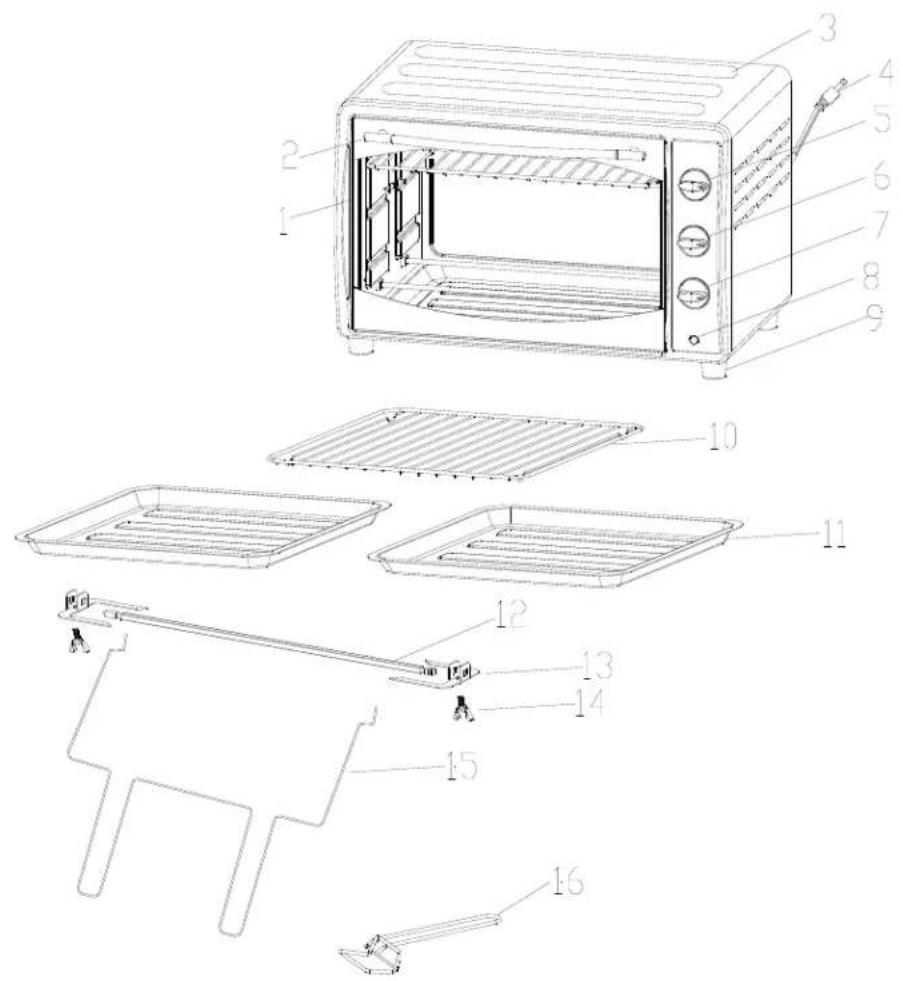
Technical diagram of a microwave oven with numbered parts for identification and assembly reference.| 1 Glass Door 9 Foot (Total 4) | ||
| 2 Door Handle 10 Oven Rack | ||
| 3 Housing 11 Bake / Broil / Drip Pan (Total 2) | ||
| 4 Power Cord 12 Rotisserie Rod | ||
| 5 Temperature Selector Knob 13 Rotisserie Forks (Total 2) | ||
| 6 Function Selector Knob 14 Rotisserie Fork Screws (Total 2) | ||
| 7 Timer Selector Knob 15 Rotisserie Handle | ||
| 8 Power Indicator Light 16 Tray Handle |
INSTALLATION INSTRUCTIONS
Before Using Your Appliance
- Remove the exterior and interior packing.
- Check to be sure you have all of the following parts:
• 2 Bake/Broil/Drip Pan • 1 – Rotisserie Rod
• 1 Oven Rack • 2 – Rotisserie Forks with Screws
• 1 Tray Handle • 1 – Rotisserie Handle
• 1 Instruction Manual
- Remove all the items inside your oven and clean the interior surface with lukewarm water using a soft cloth.
- Do not attempt to repair or replace any part of your oven unless it is specially recommended in this manual.
• This appliance requires 1700W and should be the only appliance operating on the circuit.
NOTICE BEFORE YOU USE THIS OVEN FOR THE FIRST TIME: THE HEATING ELEMENTS HAVE A PROTECTIVE COATING, WHICH MUST BE BURNED OFF BEFORE USE. TO DO THIS, OPEN THE OVEN DOOR AND SET THE TEMPERATURE TO MAX. LEAVE THE APPLIANCE SWITCHED ON FOR APPROXIMATELY 15 MINUTES. IT IS IMPORTANT TO ENSURE ADEQUATE VENTILATION DURING PERIOD AS A BURNING SMELL IS NORMAL DURING THIS PROCESS.
Installation of Your Appliance
Select a location for the appliance. The location should be in an open area on a flat counter where the plug will reach an outlet.
- When positioning the appliance, it should be set on a flat, steady surface.
- Do not block air vents. If they are blocked during operation, the oven may overheat and eventually cause the appliance failure.
- Keep the appliance away from hot air, steam or splashing liquids when choosing a place to locate it, otherwise, the unit's operation may be adversely affected, causing it to break down.
- Direct sunlight may affect the acrylic coating and heat sources may increase electrical consumption.
- Plug the appliance into an exclusive properly installed grounded wall outlet. Any questions concerning power should be directed toward a certified electrician or an authorized Avanti Products service center.
- Do not place anything on the top of the broiler oven and automatic toaster.
- Keep the appliance at least 5 inches away from rear wall to ensure the proper ventilation.
Electrical Connection
- The appliance has a polarized plug (One blade is wider than the other), to reduce the risk of electric shock, this plug is intended to fit into the polarized outlet only one way. If the plug does not fit fully into the outlet, reserve the plug. If it still does not fit, contact a qualified electrician. Do not attempt to modify the plug in any way.
- A short power cord is provided to reduce the hazards resulting from entanglement or tripping over a longer cord. An extension cord may be used with care, however, be sure the marked electrical rating is at least as great as the rating of this appliance. The extension cord should be positioned such that it does not drape over the counter or tabletop where it can be pulled on by children or tripped over. The electrical rating of this appliance is listed on the bottom panel of the appliance.
OPERATING YOUR APPLIANCE
Control Panel
text_image
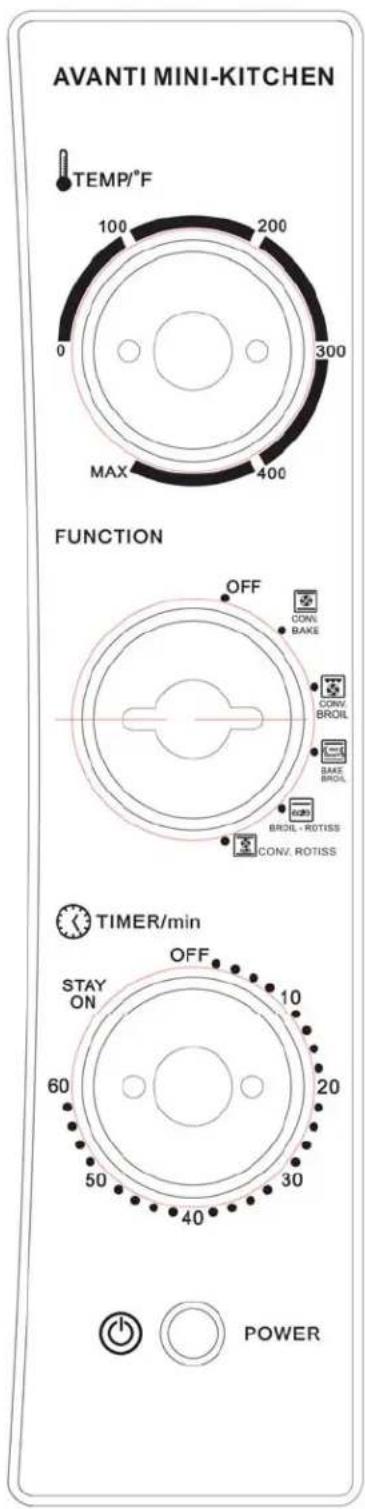
AVANTI MINI-KITCHEN TEMP/°F 100 200 0 300 MAX 400 FUNCTION OFF CONV. BAKE CONV. BROIL BAS BROIL BROIL - ROTISS CONV. ROTISS TIMER/min STAY ON 60 OFF 10 20 50 30 40 POWERTEMPERATURE CONTROL KNOB
Turn the knob clockwise to select the desired temperature up to MAX. To switch off the heating elements of oven turn the temperature control to the "0" setting position.
FUNCTION SELECTOR KNOB
There are five (5) functions:
Select the appropriate function for your use.
 | CONVECTION BAKE |
 | CONVECTION BROIL |
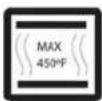 | BAKE BROIL |
 | BROIL ROTISSERIE |
 | CONVECTION ROTISSERIES |
TIMER SELECTOR KNOB
You can set cooking time up to 60 minutes. It will automatically turn the oven OFF at the end of the cooking time selected with the sound of a bell signal.
To switch off the oven turn the timer selector to the "OFF" setting position.
For cooking times greater than 60 minutes you can use the "STAY ON" position, the oven will operate in the selected function until you turn the TIMER selector knob to the "OFF" position.
POWER INDICATOR LIGHT
The indicator will come ON when the oven is in use.
Using Your Oven
Be sure that the temperature is in the "0" position and the timer control knob is in the "OFF" position before plugging the cord into the outlet for use and when unplugging the appliance after use.
Preheating The Oven
Turn the function selector control knob to the desired function either CONV. BAKE or CONV. BROIL. Turn the temperature control knob to the desired temperature.
Turn the timer selector knob to the "20 minutes marking" for the oven to preheat.
NOTE:
For cooking times greater than 60 minutes, you can turn the time control knob in a counter-clockwise motion to the "STAY ON" position.
When using the “STAY ON” position, the oven will continue to operate in the selected function and temperature as previously selected until the timer selector knob is turned in a clockwise motion to the “OFF” position.

Convection Bake
- Both the TOP and BOTTOM heating elements are used.
• Fan is used continuously (ON) - PREHEATING THE OVEN IS SUGGESTED WHEN USING THIS FUNCTION
Convection baking offers fast and more efficient cooking times when compared to standard conventional baking. Convection bake provides a better overall and even result as the convection fan continuously circulates the heated air around the food being cooked giving an even coverage and application of heat.
Convection baking can be used for all types of food but the best results will be seen in the overall taste and quality of baked goods (breads, cookies etc).
Both the TOP and BOTTOM heating elements will cycle ON and OFF to maintain the appropriate heat exposure and temperature.
USING THE CONVECTION BAKE FUNCTION
- Arrange the food accordingly on the baking rack.
- Turn the function selector knob to the Convection Bake function (icon as shown).
- Turn the temperature selector knob to the desired oven temperature.
- Turn the timer selector knob to the desired cooking time (Maximum 60 minutes).
- At the end of the cooking time a bell signal will sound and the oven will turn off automatically.
• After the cooking time has finished, open the door completely and carefully remove the food.
 | Convection Broil | ||
| Only the TOP heating element is used.Fan is used continuously (ON)NO PREHEATING PERIOD IS REQUIRED TO USE THIS FUNCTION | |||
| This function is best used to quickly defrost frozen foods or ingredients in preparation for further cooking either in this oven or by other any other method.The convection fan circulates the air heated by the TOP heating element (lower wattage output is used in this function) around the food. This method of defrosting is faster, more efficient, and most importantly more hygienic than most other forms of defrosting.USING THE CONVECTION BROIL FUNCTIONArrange the food on the broiler pan. Place the broiler pan on the oven rack.Turn the function selector knob to the CONVECTION BROIL function (icon as shown).Turn the temperature selector knob to the 250°F oven temperature.Turn the timer selector knob to the desired cooking time (Maximum 60 minutes).Always cook food promptly after thawing.At the end of the cooking time a bell signal will sound and the oven will turn off automatically.After the cooking time has finished, open the door completely and carefully remove the food. | |||
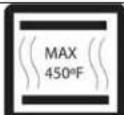 | Bake Broil | ||
| Both the TOP and BOTTOM heating elements are used.Fan is not used (OFF)NO PREHEATING PERIOD IS REQUIRED TO USE THE TOAST FUNCTION | |||
| Both the TOP and BOTTOM heating elements will cycle ON and OFF to maintain the appropriate heat exposure and temperature.USING THE BAKE BROIL FUNCTIONPlace the bread to be toasted directly on the rack in the center of the oven and close the door.Turn the function selector knob to the BAKE BROIL function (icon as shown).Turn the timer selector knob to either the appropriate shade of toast (Light, Medium, or Dark) (icon as shown) or select the appropriate time cooking time as required (maximum 60 minutes).At the end of the cooking time a bell signal will sound and the oven will turn off automatically.After the cooking time has finished, open the door completely and carefully remove the food. | |||
 | Broil Rotisserie | ||
| Only the TOP heating element is used.Fan is not used (OFF)Rotating Rotisserie is used (ON)PREHEATING THE OVEN IS SUGGESTED WHEN USING THIS FUNCTION | |||
| Rotisserie - Broiling is a method of cooking tender cuts of meat by direct heat under the broil element of the oven. The direct high heat cooks quickly and gives the food a rich, brown appearance.Rotisserie - Broiling is best suited for meats, fish, and/or poultry in cuts up to 1" thick.USING THE BROIL ROTISSERIE FUNCTIONMount the food to be cooked on the rotisserie rod. For best results the food should be placed in the center of the rod. Secure the food using the rotisserie forks and tighten the fork screws to hold the item in place while cooking.Place the broiler pan on the oven rack to collect the natural dripping of grease and juices while cooking.Close the door to the first notch leaving approximately a 3 inch gap. This will ensure adequate airflow during broiling.Turn the function selector knob to the Broil Rotisserie function (icon as shown).Turn the temperature selector knob to the desired oven temperature.Turn the timer selector knob to the desired cooking time (Maximum 60 minutes).At the end of the cooking time a bell signal will sound and the oven will turn off automatically.After the cooking time has finished, open the door completely and carefully remove the food. | |||
 | CONVECTION ROTISSERIE | ||
| Both the TOP and BOTTOM heating elements are used.Fan is used continuously (ON)Rotating Rotisserie is used (ON)PREHEATING THE OVEN IS SUGGESTED WHEN USING THIS FUNCTION | |||
| Convection Rotisserie offers fast and more efficient cooking times when compared to standard conventional rotisserie. Convection roasting provides a better overall and even result as the convection fan continuously circulates the heated air around the food being cooked giving an even coverage and application of heat. This function also gives you the option to use the rotating rotisserie to provide an even more efficient application of heat.USING THE CONVECTION ROTISSERIE FUNCTIONMount the food to be cooked on the rotisserie rod. For best results the food should be placed in the center of the rod. Secure the food using the rotisserie forks and tighten the fork screws to hold the item in place while cooking. Place the broiler pan on the oven rack to collect the natural dripping of grease and juices while cooking. If you prefer to roast the food in a fixed position (ie in a pan)If you would prefer to roast the food in a fixed position (ie in a pan), arrange the food on the broiler pan. Place the broiler pan on the oven rack.Turn the function selector knob to the Convection Rotisserie function (icon as shown).Turn the temperature selector knob to the desired oven temperature.Turn the timer selector knob to the desired cooking time (Maximum 60 minutes).When broiling, the food should be turned over about half-way during the selected cooking time.At the end of the cooking time a bell signal will sound and the oven will turn off automatically.After the cooking time has finished, open the door completely and carefully remove the food. | |||
CARE AND MAINTENANCE
▶ Cleaning Your Appliance
Before cleaning your appliance, unplug it and allow it to cool.
Remove the crumb tray, wire rack and drip/baking pan.
Use a damp cloth to wash the inside with warm water and a mild detergent. Do not Immerse in Water!
Abrasive cleaners, scrubbing brushes and chemical cleaners may damage the continuous clean coating on this unit.
Wash the crumb tray, wire rack, drip/baking pan and metal handling tool with a mild detergent solution.
The glass oven door should be cleaned regularly with a non-abrasive liquid cleaner.
Rinse with a damp cloth and then a dry one.
The outside of the appliance should be cleaned with mild detergent and warm water.
CAUTION
Failure to unplug the appliance could result in electrical shock or personal injury.
Storing Your Appliance
Allow the appliance to cool completely before storing. If storing the appliance for long periods of time make certain that the appliance is clean and free of food particles. Store the appliance in a dry location such as on a table or countertop or in a cupboard shelf. Other than the recommended cleaning, no further user maintenance should be necessary.
PROBLEMS WITH YOUR APPLIANCE?
You can solve many common appliance problems easily, saving you the cost of a possible service call.
Try the suggestions below to see if you can solve the problem before calling the servicer.
TROUBLESHOOTING GUIDE
| PROBLEMS | POSSIBLE CAUSES/SOLUTIONS |
| Appliance does not operate. | Unit not plugged in. Plug the unit into a 120V AC electrical outlet.The circuit breaker tripped or a blown fuse.Be sure that the temperature, function and timer selectors are set. |
| Only one heating element is heating up. | Function setting selection determines which heating element will operate.When toasting, make sure the oven is not set to CONV.BROIL or CONV.BAKE setting. |
| Heating elements are not heating up. | Heating elements will cycle ON and OFF maintain proper heat. Make sure function selector is positioned to the desired cooking setting. |
| Overcooked/undercooked Foods | Incorrect temperature setting. You may have to adjust the temperature to desired position.Rack placement. Rack may need to be adjusted to accommodate different foods. |
| Burnt Smell | Food build-up inside appliance, on heating elements or in drip/baking pan. Refer to “Cleaning Your Appliance” |
SERVICE FOR YOUR APPLIANCE
We are proud of our customer service organization and the network of professional service technicians that provide service on your Avanti appliances. With the purchase of your Avanti appliance, you can be confident that if you ever need additional information or assistance, the Avanti Products Customer Service team will be here for you. Just call us toll-free.
AVANTI PRODUCTS CUSTOMER SERVICES
| Product Information800-323-5029 | Whatever your questions are about our products, help is available. |
| Part Orders800-220-5570 | You may order parts and accessories that will be delivered directly to your home by personal check, money order, Master Card, or Visa. |
| In-Home Repair Service800-220-5570 | An Avanti Products authorized service center will provide expert repair service, scheduled at a time that is convenient for you. Our trained servicers know your appliance inside and out. |
YOUR AVANTI WARRANTY
| LENGTH OF WARRANTY | WE WILL PAY FOR |
| FULL ONE YEAR WARRANTY FROM DATE OF PURCHASE ON ALL PARTS EXCEPT GLASS PARTS, AND/OR PARTS DAMAGED AS A RESULT OF MISUSE OR LACK OF REASONABLE CARE. | REPLACEMENT PARTS AND REPAIR LABOR TO CORRECT DEFECTS IN MATERIALS OR WORKMANSHIP. SERVICE MUST BE PROVIDED BY AN AUTHORIZED SERVICE COMPANY. |
| FULL 30-DAY WARRANTY FROM DATE OF PURCHASE ON GLASS PARTS AND FINISH OF PORCELAIN ENAMEL, PAINTED OR BRIGHT METAL FINISHED PARTS | REPLACEMENT PARTS AND REPAIR LABOR TO CORRECT DEFECTS IN MATERIAL OR WORKMANSHIP. SERVICE MUST BE PROVIDED BY AN AUTHORIZED SERVICE COMPANY. |
CARRY IN SERVICE ONLY.
CUSTOMER WILL BE RESPONSIBLE FOR ALL TRANSPORTATION CHARGES TO AND FROM THE AUTHORIZED SERVICE COMPANY, ALSO MAKE SURE TO SEND A COPY OF PROOF OF PURCHASE WHEN SENDING THE UNIT FOR SERVICE REPAIRS.
AVANTI PRODUCTS SHALL NOT BE LIABLE FOR INCIDENTAL OR CONSEQUENTIAL DAMAGES.
Some states do not allow the exclusion or limitation of incidental or consequential damages, so this exclusion or limitation may not apply to you. This warranty gives you specific legal rights, and you may also have other rights that vary from state to state.
This warranty is not valid outside the Continental United States.
Thank you for purchasing this fine Avanti product. Please fill out this form and return it to the following address within 100 days from the date of purchase and receive these important benefits:
Avanti Products, A Division of The Mackle Co., Inc. P.O.Box 520604 – Miami, Florida 33152
Protect your product:
We will keep the model number and date of purchase of your new Avanti product on file to help you refer to this information in the event of an insurance claim such as fire or theft.
➢ Promote better products:
We value your input. Your responses will help us develop products designed to best meet your future needs.
(detach here)
Avanti Registration Card
| Name Model # Serial # | |
| Address Date Purchased Store / Dealer Name | |
| City State Zip E-mail Address | |
| Area Code Phone Number Occupation | |
| Did You Purchase An Additional Warranty As your Primary Residence, Do You: | |
| □ Extended □ None | □ Own □ Rent |
| Your | |
| Reason for Choosing This Avanti Product: Please indicate the most important factors That influenced your decision to purchase this product: | □ under 18 □ 18-25 □ 26-30 □ 31-35 □ 36-50 □ over 50 Marital Status: □ Married □ Single |
| □ Price □ Product Features □ Avanti Reputation □ Product Quality □ Salesperson Recommendation □ Other: □ Friend / Relative Recommendation □ Warranty □ Other: | Is This Product Used In The: □ Home □ Business How Did You Learn About This Product: □ Advertising □ In-Store Demo □ Personal Demo |
Comments:
Age:
VER 02-09142010
PRINTED IN CHINA