
IPOD 2ND GENERATION - Mp3 player APPLE - Free user manual and instructions
Find the device manual for free IPOD 2ND GENERATION APPLE in PDF.



| Product Type | MP3 Player with LCD Screen |
| Brand | Apple |
| Model | iPod 2nd Generation |
| Storage Capacity | 10 GB or 20 GB (depending on version) |
| Power Source | Built-in Rechargeable Lithium-ion Battery |
| AC Charger | USB Power Adapter, AC input 100-240V 50/60Hz, DC output 5V 1A |
| Connectivity | Dock Port (30-pin connector), headphone jack, wired remote |
| Display | Backlit Monochrome Screen |
| Main Functions | Audio playback (MP3, AAC, WAV, etc.), library organization, playlists, contacts and calendar management (via iTunes) |
| Charging | Via USB power adapter or USB cable to computer |
| Battery Life | Approximately 8 hours of continuous playback |
| Weight | 158 g (10 GB version) |
| Dimensions | 104 x 61 x 11 mm |
| Care and Cleaning | Clean with a soft, dry cloth; avoid liquids and moisture |
| Safety | Do not open the AC adapter; unplug before cleaning; avoid heat sources and liquids |
| Spare Parts and Repairability | Battery not user-replaceable; repair possible via Apple or authorized centers |
| Compatibility | Requires iTunes on Mac or PC; USB cable and AC adapter included |
| General Information | Disposal according to WEEE regulations; do not dispose with household waste |
Frequently Asked Questions - IPOD 2ND GENERATION APPLE
User questions about IPOD 2ND GENERATION APPLE
0 question about this device. Answer the ones you know or ask your own.
Ask a new question about this device
Download the instructions for your Mp3 player in PDF format for free! Find your manual IPOD 2ND GENERATION - APPLE and take your electronic device back in hand. On this page are published all the documents necessary for the use of your device. IPOD 2ND GENERATION by APPLE.
USER MANUAL IPOD 2ND GENERATION APPLE
iPod USB Power Adapter
iPod USB Power Adapter
The iPod USB Power Adapter is for use with iPod shuffle, and with all iPods with Dock Connectors.
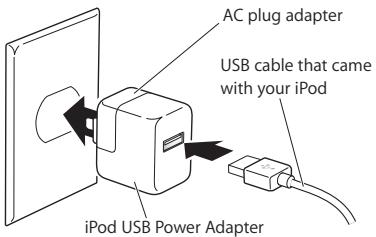
Note: Your power adapter may look different from the one pictured here.
Connect your iPod to the power adapter using the USB cable that came with your iPod. If you have an original iPod shuffle, you can connect it directly to the power adapter.
Then extend the electrical prongs (if necessary) and plug the adapter into an electrical outlet to charge the iPod battery.
You can also connect the power adapter to an iPod Dock and place iPod in the Dock.
For information on charging times, see the manual that came with your iPod.
Important: If your power adapter has retractable prongs, be sure to extend them completely before you plug the adapter into the outlet.
Safety
- The only way to shut off power to your power adapter completely is to disconnect it from the power source.
- Always leave space around your power adapter. Don't use it in a location where airflow around the power adapter is obstructed, such as a bookcase.
- When connecting or disconnecting your power adapter, always hold it by its sides. Keep your fingers away from the metal part of the plug.
- Before connecting the USB cable to the power adapter, make sure there are no foreign objects inside the power adapter's USB port.
-
The power adapter is a high-voltage component and should not be opened for any reason, even when iPod is off.
-
Never force a connector into the power adapter USB port. If the connector and port do not join with reasonable ease, make sure that the connector matches the port and that you have positioned the connector correctly in relation to the port.
- Keep your power adapter away from sources of liquid, such as drinks, washbasins, bathtubs, shower stalls, rain, and so on.
- Take care not to spill any food or liquid on the power adapter. If you do, unplug the power adapter before cleaning up the spill. In case of a spill, you may have to send your equipment to Apple for service.
- Do not attempt to open your power adapter or disassemble it. You run the risk of electric shock and voiding the limited warranty. No user-serviceable parts are inside.
- If the power adapter appears to be damaged or does not function properly, go to www.apple.com/support for instructions on how to obtain warranty service.
Specifications
- Input: AC 100-240 volts (V), 50/60 hertz (Hz)
Output: DC 5V, 1 A
iPod USB Power Adapter
Disposal and Recycling Information
When this product has reached the end of its useful life, please dispose of it according to your local environmental laws and guidelines.
For information about Apple's recycling program, go to www.apple.com/environment/summary.html.
European Union—Disposal Information:

The symbol above means that according to local laws and regulations your product should be disposed of separately from household waste. When this product reaches its end of life, take it to a collection point designated by local authorities. Some collection points accept products for free. The separate collection and recycling of your product at the time of disposal will help conserve natural resources and ensure that it is recycled in a manner that protects human health and the environment.
Apple and the Environment
At Apple, we recognize our responsibility to minimize the environmental impacts of our operations and products.
For more information, go to www.apple.com/environment/summary.html.
www.apple.com/ipod/support
© 2006 Apple Computer, Inc. All rights reserved.
Apple, the Apple logo, and iPod are trademarks of Apple Computer, Inc., registered in the U.S. and other countries.
Shuffle is a trademark of Apple Computer, Inc.
0Z034-3775-A
Printed in XXXX
Brand : APPLE
Model : IPOD 2ND GENERATION
Category : Mp3 player