
iPod Nano 4th generation - Mp3 player APPLE - Free user manual and instructions
Find the device manual for free iPod Nano 4th generation APPLE in PDF.



| Product Type | MP3 Player |
| Brand | Apple |
| Model | iPod Nano 4th Generation |
| Storage Capacity | 4GB or 8GB |
| Display | 2-inch Color LCD with 320x240 resolution |
| Dimensions | 90.7 x 38.7 x 6.2 mm (3.57 x 1.52 x 0.24 inches) |
| Weight | 36.8 grams (1.3 ounces) |
| Battery Type | Built-in rechargeable lithium-ion |
| Battery Life (Audio) | Up to 24 hours |
| Battery Life (Video) | Up to 4 hours |
| Connectivity | USB 2.0, 3.5mm headphone jack |
| Input Method | Click Wheel |
| Supported Audio Formats | AAC, MP3, WAV, Apple Lossless, AIFF, Audible |
| Supported Video Formats | H.264 video up to 640x480, 30 fps |
| Photo Formats | JPEG, BMP, GIF, TIFF, PNG |
| Operating System | iPod OS (Apple proprietary) |
| Color Options | Silver, Black, Purple, Blue, Green, Yellow, Orange, Red, Pink |
| Accessories Included | Earbuds, USB cable, Dock adapter |
| Repair / Service | Battery replacement and screen repair available through Apple or third-party services |
Frequently Asked Questions - iPod Nano 4th generation APPLE
User questions about iPod Nano 4th generation APPLE
0 question about this device. Answer the ones you know or ask your own.
Ask a new question about this device
Download the instructions for your Mp3 player in PDF format for free! Find your manual iPod Nano 4th generation - APPLE and take your electronic device back in hand. On this page are published all the documents necessary for the use of your device. iPod Nano 4th generation by APPLE.
USER MANUAL iPod Nano 4th generation APPLE
6 iPod nano at a Glance 7 Using iPod nano Controls 11 Using iPod nano Menus 13 Disabling iPod nano Controls 14 Connecting and Disconnecting iPod nano 17 About the iPod nano Battery
Chapter 2 20 Setting Up iPod nano
20 Using iTunes 21 Importing Music into Your iTunes Library 24 Organizing Your Music 25 Using Genius in iTunes 26 Purchasing or Renting Videos and Downloading Video Podcasts 27 Adding Music to iPod nano 31 Adding Videos to iPod nano
Chapter 3 34 Listening to Music
34 Playing Music and Other Audio 38 Using Genius on iPod nano 39 Setting iPod nano to Shuffle Songs 42 Watching and Listening to Podcasts 43 Listening to Audiobooks 43 Listening to FM Radio
Chapter 4 44 Watching Videos
44 Watching and Listening to Videos on iPod nano 45 Watching Videos on a TV Connected to iPod nano
Chapter 5 47 Photo Features
47 Importing Photos
50 Viewing Photos
Chapter 6 53 More Settings, Extra Features,
and Accessories
53 Using iPod nano as an External Disk 54 Using Extra Settings 58 Syncing Contacts, Calendars, and To-Do Lists 60 Storing and Reading Notes 60 Recording Voice Memos 61 Using Spoken Menus for Accessibility 62 Learning About iPod nano Accessories
Chapter 7 64 Tips and Troubleshooting
64 General Suggestions 69 Updating and Restoring iPod Software
Chapter 8 70 Safety and Cleaning
70 Important Safety Information 72 Important Handling Information
Chapter 9 73 Learning More, Service, and Support
Index 76
About iPod nano
Congratulations on choosing iPod nano. With iPod nano, you can take your music, video, and photo collections with you wherever you go.
To use iPod nano, you put music, videos, photos, and other files on your computer and then add them to iPod nano.
![graph LR A["手机"] --> B["Laptop with monitor"] C["电脑"] --> B D["笔记本电脑"] --> B E["显示器"] --> B](/content/2026/06/1405596/images/3ffee5b17edadd9f71cbb77bb0d005e9d3837d02dc8164e053d929bedc382181.jpg)
Read this guide to learn how to:
- Set up iPod nano to play music, music videos, movies, TV shows, podcasts, audiobooks, and more.
- Use iPod nano as your pocket photo album, portable hard drive, alarm clock, game console, and voice memo recorder. • View video and photo slideshows on your TV. • Get the most out of all the features in iPod nano.
What's New in iPod nano
- Genius, which automatically creates playlists of songs from your library that go great together
- A motion sensor that lets you control certain functions by rotating or shaking iPod nano • Full-screen photo viewing in portrait or landscape format
- Quick browsing for songs based on the album or artist you're listening to
- Direct access to more options from the Now Playing screen
- New voice recording options
- Improved accessibility with spoken menus
iPod nano Basics
Read this chapter to learn about the features of iPod nano, how to use its controls, and more.
iPod nano at a Glance
Get to know the controls on iPod nano:
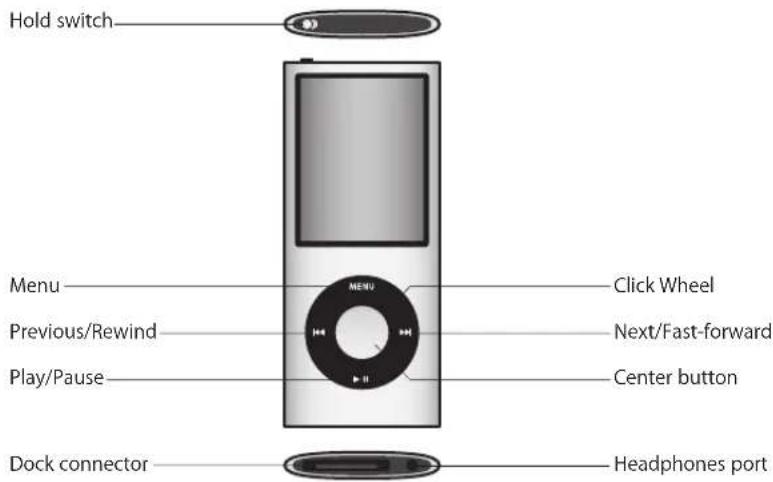
Using iPod nano Controls
The controls on iPod nano are easy to find and use. Press any button to turn on iPod nano. The main menu appears.
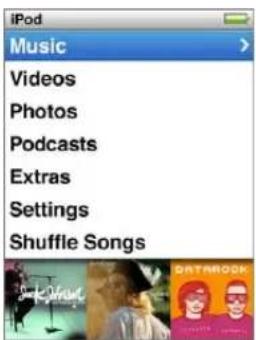
Use the Click Wheel and Center button to navigate through onscreen menus, play songs, change settings, and get information. Move your thumb lightly around the Click Wheel to select a menu item. To choose the item, press the Center button. To go back to the previous menu, press Menu on the Click Wheel.
Here's what else you can do with iPod nano controls.
| To Do this | |
| Turn on iPod nano | Press any button. |
| Turn off iPod nano | Press and hold Play/Pause (▶II). |
| Turn on the backlight | Press any button or use the Click Wheel. |
| Disable the iPod nano controls(so nothing happens if you press them accidentally) | Slide the Hold switch to HOLD (an orange bar appears). |
| Reset iPod nano(if it isn't responding) | Slide the Hold switch to HOLD and back again. Press the Menu and Center buttons at the same time for about 6 seconds, until the Apple logo appears. |
| Choose a menu item | Scroll to the item and press the Center button. |
| Go back to the previous menu | Press Menu. |
| Go directly to the main menu | Press and hold Menu. |
| Browse for a song | From the main menu, choose Music. |
| Browse for a video | From the main menu, choose Videos. |
| Play a song or video | Select the song or video and press the Center button or Play/Pause (▶II). iPod nano must be ejected from your computer to play songs and videos. |
| Pause a song or video | Press Play/Pause (▶II) or unplug your headphones. |
| Change the volume | From the Now Playing screen, use the Click Wheel. |
| Play all the songs in a playlist or album | Select the playlist or album and press Play/Pause (▶II). |
| Play all songs in random order | From the main menu, choose Shuffle Songs. You can also shuffle songs by shaking iPod nano. |
| Enable or disable Shake for shuffling songs | Choose Settings >Playback, choose Shake, and then select Shuffle or Off. |
| Skip to any point in a song or video | From the Now Playing screen, press the Center button to show the scrubber bar (a diamond icon on the bar shows the current location), and then scroll to any point in the song or video. |
| Skip to the next song or chapter in an audiobook or podcast | Press Next/Fast-forward (▶I). |
| Start a song or video over | Press Previous/Rewind (◀◀). |
| Play the previous song or chapter in an audiobook or podcast | Press Previous/Rewind (◀◀) twice. |
| Fast-forward or rewind a song | Press and hold Next/Fast-forward (▶I) or Previous/Rewind (◀◀). |
| Create a Genius playlist | Play or select a song, and then press and hold the Center button until a menu appears. Select Start Genius, and then press the Center button (Start Genius appears only if there is Genius data for the song). |
| Save a Genius playlist | Create a Genius playlist, select Save Playlist, and then press the Center button. |
| Play a saved Genius playlist | From the Playlist menu, select a Genius playlist, and then press Play/Pause (▶II). |
| Add a song to the On-The-Go playlist | Play or select a song, and then press and hold the Center button until a menu appears. Select “Add to On-The-Go,” and then press the Center button. |
| Access additional options | Press and hold the Center button until a menu appears. |
| Find the iPod nano serial number | From the main menu, choose Settings > About and press the Center button until you see the serial number, or look on the back of iPod nano. |
Browsing Music Using Cover Flow
You can browse your music collection using Cover Flow, a visual way to flip through your library. Cover Flow displays your albums alphabetically by artist name.

You can activate Cover Flow from the main menu, any music menu, or the Now Playing screen.
To use Cover Flow:
1 Rotate iPod nano 90 degrees to the left or the right. Cover Flow appears.
2 Use the Click Wheel to move through your album art.
3 Select an album and press the Center button.
4 Use the Click Wheel to select a song, and then press the Center button to play it.

You can also browse quickly through your albums in Cover Flow by moving your thumb quickly on the Click Wheel.
Note: Not all languages are supported.
To browse quickly in Cover Flow:
1 Move your thumb quickly on the Click Wheel, to display a letter of the alphabet on the screen.
2 Use the Click Wheel to navigate through the alphabet until you find the first letter of the artist you're looking for.
Albums by various artists and by artists beginning with a symbol or number appear after the letter "Z."
3 Lift your thumb momentarily to return to normal browsing.
4 Select an album and press the Center button.
5 Use the Click Wheel to select a song, and then press the Center button to play it.
Scrolling Quickly Through Long Lists
You can scroll quickly through a long list by moving your thumb quickly on the Click Wheel.
Note: Not all languages are supported.
To scroll quickly:
1 Move your thumb quickly on the Click Wheel, to display a letter of the alphabet on the screen.
2 Use the Click Wheel to navigate through the alphabet until you find the first letter of the item you're looking for.
Items beginning with a symbol or number appear after the letter "Z."
3 Lift your thumb momentarily to return to normal scrolling.
4 Use the Click Wheel to navigate to the item you want.
Searching Music
You can search iPod nano for songs, playlists, album titles, artist names, audio podcasts, and audiobooks. The search feature doesn't search videos, notes, calendar items, contacts, or lyrics.
Note: Not all languages are supported.
To search for music:
1 From the Music menu, choose Search.
2 Enter a search string by using the Click Wheel to navigate the alphabet and pressing the Center button to enter each character.
iPod nano starts searching as soon as you enter the first character, displaying the results on the search screen. For example, if you enter "b," iPod nano displays all music items containing the letter "b." If you enter "ab," iPod nano displays all items containing that sequence of letters.
To enter a space, press the Next/Fast-forward button.
To delete the previous character, press the Previous/Rewind button.
3 Press Menu to display the results list, which you can now navigate.
Items appear in the results list with icons identifying their type: song, video, artist, album, audiobook, or podcast.
To return to Search (if Search is highlighted in the menu), press the Center button.
Using iPod nano Menus
When you turn on iPod nano, you see the main menu. Choose menu items to perform functions or go to other menus. Icons along the top of the screen show iPod nano status.
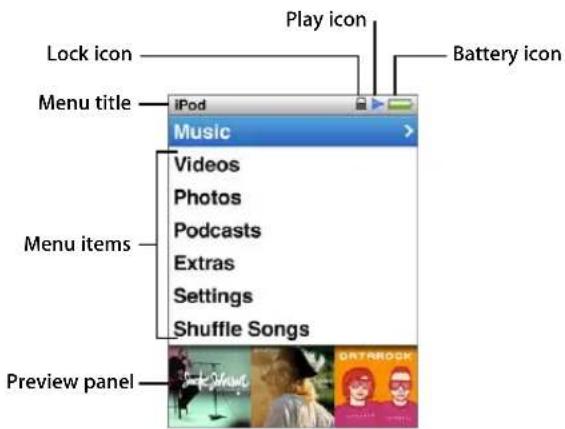
Display item Function
| Menu title Displays the title of the current menu. | |
| Lock icon The Lock icon appears when the Hold switch (on the top of iPod nano) is set to HOLD. This indicates that the iPod nano controls are disabled. | |
| Play icon The Play ( ▶) icon appears when a song, video, or other item is playing. The Pause (I) icon appears when the item is paused. | |
| Battery icon The Battery icon shows the approximate remaining battery charge. | |
| Menu items Use the Click Wheel to scroll through menu items. Press the Center button to choose an item. An arrow next to a menu item indicates that choosing it leads to another menu or screen. | |
| Preview panel Displays album art, photos, and other items and information relating to the menu item selected. |
Adding or Removing Items on the Main Menu
You might want to add often-used items to the iPod nano main menu. For example, you can add a Songs item to the main menu, so you don't have to choose Music before you choose Songs.
To add or remove items on the main menu:
1 Choose Settings > General > Main Menu.
2 Select each item you want to appear in the main menu. A checkmark indicates which items have been added.
Turning Off the Preview Panel
The preview panel at the bottom of the main menu, which displays album art, photo thumbnails, available storage, and other information, can be turned off to allow more space for menu items.
To turn off the preview panel:
- Choose Settings > General > Main Menu > Preview Panel and then choose Off.
To turn the preview panel on again, choose Settings > General > Main Menu > Preview Panel, and then choose On.
The preview panel only displays art for a category if iPod nano contains at least four items with art in the category.
Setting the Font Size in Menus
iPod nano can display text in two different sizes, standard and large.
To set the font size:
- Choose Settings > General > Font Size, and then press the Center button to select Standard or Large.
Setting the Language
iPod nano can be set to use different languages.
To set the language:
- Choose Settings > Language, and then choose a language from the list.
Setting the Backlight Timer
You can set the backlight to turn on and illuminate the screen for a certain amount of time when you press a button or use the Click Wheel. The default is 10 seconds.
To set the backlight timer:
- Choose Settings > General > Backlight Timer, and then choose the time you want. Choose "Always On" to prevent the backlight from turning off (choosing this option decreases battery performance).
Setting the Screen Brightness
You can adjust the brightness of the iPod nano screen by moving a slider.
To set the screen brightness:
- Choose Settings > General > Brightness, and then use the Click Wheel to move the slider. Moving it to the left dims the screen; moving it to the right increases the screen brightness.
You can also set the brightness during a slideshow or video. Press the Center button to display or dismiss the brightness slider.
Turning Off the Click Wheel Sound
When you scroll through menu items, you can hear a clicking sound through the headphones and through the iPod nano internal speaker. If you like, you can turn off the Click Wheel sound through the headphones, the speaker, or both.
To turn off the Click Wheel sound:
- Choose Settings > General and set Clicker to Off.
To turn the Click Wheel sound on again, set Clicker to Speaker, Headphones, or Both.
Getting Information About iPod nano
You can get details about your iPod nano, such as the amount of space available, the number of songs, videos, photos, and other items, and the serial number, model, and software version.
To get information about iPod nano:
- Choose Settings > About, and press the Center button to cycle through the screens of information.
Resetting All Settings
You can reset all the items on the Settings menu to their default setting.
To reset all settings:
- Choose Settings > Reset Settings, and then choose Reset.
Disabling iPod nano Controls
If you don't want to turn iPod nano on or activate controls accidentally, you can disable them with the Hold switch. The Hold switch disables all Click Wheel controls, and also disables functions that are activated by movement, such as shaking to shuffle and rotating to enter or exit Cover Flow.
To disable iPod nano controls:
Slide the Hold switch to HOLD (so you can see the orange bar).
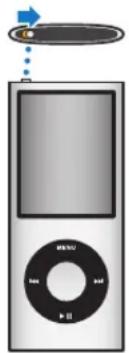
If you disable the controls while using iPod nano, the song, playlist, podcast, or video that's playing continues to play. To stop or pause, slide the Hold switch to enable the controls again.
Connecting and Disconnecting iPod nano
You connect iPod nano to your computer to add music, videos, photos, and files, and to charge the battery. Disconnect iPod nano when you're done.
Important: The battery doesn't charge when your computer is in sleep mode.
Connecting iPod nano
To connect iPod nano to your computer:
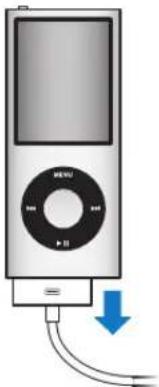
Plug the included iPod Dock Connector to USB 2.0 cable into a high-powered USB 2.0 port on your computer, and then connect the other end to iPod nano.
If you have an iPod Dock, you can connect the cable to a USB 2.0 port on your computer, connect the other end to the Dock, and then put iPod nano in the Dock.
Note: The USB port on most keyboards doesn't provide enough power. Connect iPod nano to a USB 2.0 port on your computer.
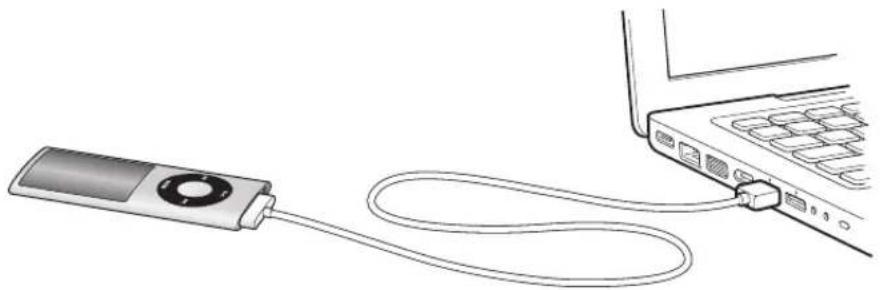
By default, iTunes syncs songs on iPod nano automatically when you connect it to your computer. When iTunes is finished, you can disconnect iPod nano. You can sync songs while your battery is charging.
If you connect iPod nano to a different computer and it's set to sync music automatically, iTunes prompts you before syncing any music. If you click Yes, the songs and other audio files already on iPod nano will be erased and replaced with songs and other audio files on the computer iPod nano is connected to. For information about adding music to iPod nano and using iPod nano with more than one computer, see Chapter 2, "Setting Up iPod nano," on page 20.
Disconnecting iPod nano
It's important not to disconnect iPod nano while it's syncing. You can see if it's OK to disconnect iPod nano by looking at the iPod nano screen.
Important: Don't disconnect iPod nano if you see the "Connected" or "Synchronizing" messages. You could damage files on iPod nano. If you see one of these messages, you must eject iPod nano before disconnecting it.
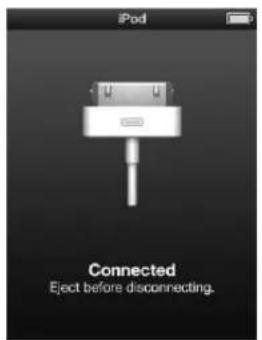

If you see one of these messages, you must eject iPod nano before disconnecting it

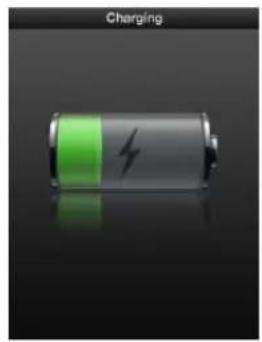
If you see the main menu or a large battery icon, you can disconnect iPod nano.
If you set iPod nano to manage songs manually (see "Managing iPod nano Manually" on page 29) or enable iPod nano for disk use (see "Using iPod nano as an External Disk" on page 53), you must always eject iPod nano before disconnecting it.
To eject iPod nano:
- Click the Eject (▲) button next to iPod nano in the list of devices in the iTunes source list.

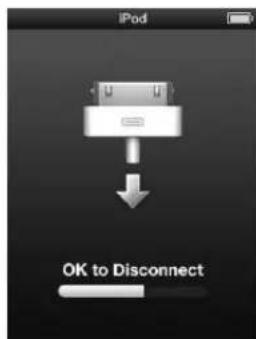
You can safely disconnect iPod nano while either of these messages is displayed.
If you're using a Mac, you can also eject iPod nano by dragging the iPod nano icon on the desktop to the Trash.
If you're using a Windows PC, you can also eject iPod nano in My Computer or by clicking the Safely Remove Hardware icon in the Windows system tray and selecting iPod nano.
To disconnect iPod nano:
1 Unplug the headphones if they're attached.
2 Disconnect the cable from iPod nano. If iPod nano is in the Dock, simply remove it.
About the iPod nano Battery
iPod nano has an internal, non-user-replaceable battery. For best results, the first time you use iPod nano, let it charge for about three hours or until the battery icon in the status area of the display shows that the battery is fully charged. If iPod nano isn't used for a while, the battery might need to be charged.
Note: iPod nano continues to use battery power after it's been turned off.
The iPod nano battery is 80-percent charged in about one and a half hours, and fully charged in about three hours. If you charge iPod nano while adding files, playing music, watching videos, or viewing a slideshow, it might take longer.
Charging the iPod nano Battery
You can charge the iPod nano battery in two ways:
- Connect iPod nano to your computer.
- Use the Apple USB Power Adapter, available separately.
To charge the battery using your computer:
- Connect iPod nano to a USB 2.0 port on your computer. The computer must be turned on and not in sleep mode.
If the battery icon on the iPod nano screen shows the Charging screen, the battery is charging. If it shows the Charged screen, the battery is fully charged.
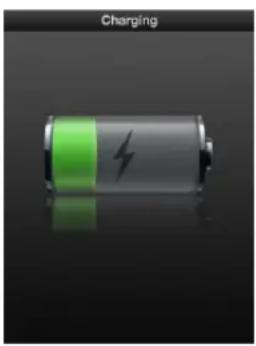
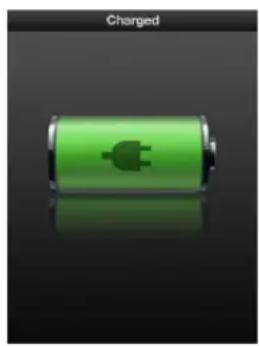
If you don't see the Charging screen, iPod nano might not be connected to a high-power USB port. Try another USB port on your computer.
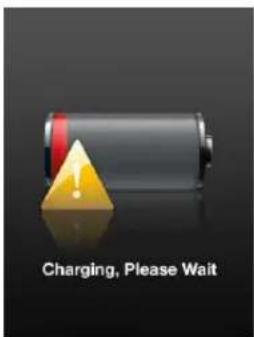
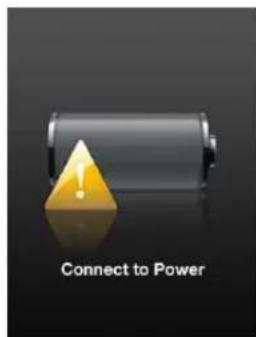
Important: If a "Charging, Please Wait" or "Connect to Power" message appears on the iPod nano screen, the battery needs to be charged before iPod nano can communicate with your computer. See "If iPod nano displays a "Connect to Power" message" on page 66.
If you want to charge iPod nano when you're away from your computer, you can purchase the Apple USB Power Adapter.
To charge the battery using the Apple USB Power Adapter:
1. Connect the AC plug adapter to the power adapter (they might already be connected).
2. Connect the iPod Dock Connector to USB 2.0 cable to the power adapter, and plug the other end of the cable into iPod nano.
3. Plug the power adapter into a working electrical outlet.
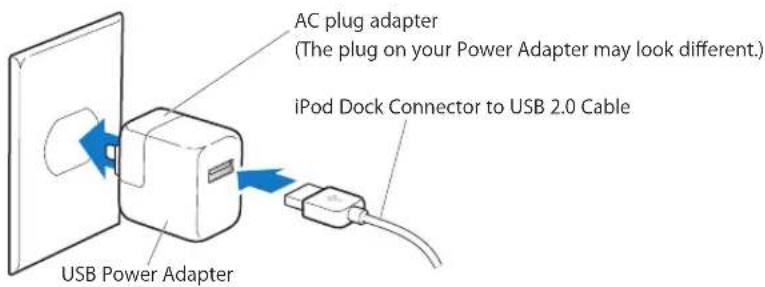
WARNING: Make sure the power adapter is fully assembled before plugging it into an electrical outlet.
Understanding Battery States
When iPod nano isn't connected to a power source, a battery icon in the top-right corner of the iPod nano screen shows approximately how much charge is left.

Battery less than 20% charged

Battery about halfway charged

Battery fully charged
If iPod nano is connected to a power source, the battery icon changes to show that the battery is charging or fully charged.

Battery charging (lightning bolt)

Battery fully charged (plug)
You can disconnect and use iPod nano before it's fully charged.
Note: Rechargeable batteries have a limited number of charge cycles and might eventually need to be replaced. Battery life and number of charge cycles vary by use and settings. For information, go to www.apple.com/batteries.
Improving Battery Performance with Energy Saver
Energy Saver can extend the time between battery charges by turning off the iPod nano screen when you aren't using the controls.
To turn Energy Saver on or off:
- Choose Settings > Playback > Energy Saver, and then select On or Off.
Setting Up iPod nano
2
To set up iPod nano, you use iTunes on your computer to import, buy, and organize your music, video, podcasts, audiobooks, games, and other media content. Then you connect iPod nano to your computer and sync it to your iTunes library.
Using iTunes
iTunes is the software application you use with iPod nano. iTunes can sync music, audiobooks, podcasts, and more with iPod nano. When you connect iPod nano to your computer, iTunes opens automatically.
This guide explains how to use iTunes to download songs and other audio and video to your computer, create personal compilations of your favorite songs (called playlists), sync them to iPod nano, and adjust iPod nano settings.
iTunes also has a feature called Genius that creates instant playlists of songs from your iTunes library that go great together. You can sync Genius playlists that you create in iTunes to iPod nano, and you can create Genius playlists on iPod nano. To use Genius, you need iTunes 8.0 or later and an iTunes Store account.
iTunes has many other features. You can burn your own CDs that play in standard CD players (if your computer has a recordable CD drive); listen to streaming Internet radio; watch videos and TV shows; rate songs according to preference; and much more.
For information about using these iTunes features, open iTunes and choose Help > iTunes Help.
If you already have iTunes 8.0 installed on your computer and you've set up your iTunes library, you can skip ahead to the next section, "Syncing iPod nano." To learn how to set up Genius in iTunes, see "Using Genius in iTunes" on page 25.
Importing Music into Your iTunes Library
To listen to music on iPod nano, you first need to get that music into iTunes on your computer.
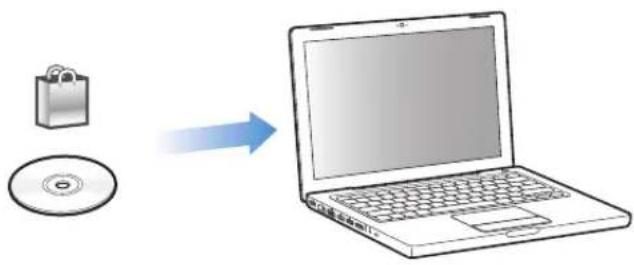
There are three ways of getting music and other audio into iTunes:
• Purchase music, audiobooks, and videos, or download podcasts online from the iTunes Store.
- Import music and other audio from audio CDs.
- Add music and other audio that's already on your computer to your iTunes library.
Purchasing Songs and Downloading Podcasts Using the iTunes Store If you have an Internet connection, you can easily purchase and download songs, albums, audiobooks, and videos online using the iTunes Store. You can also subscribe to and download podcasts.
To purchase music online using the iTunes Store, you set up an Apple account in iTunes, find the songs you want, and then buy them. If you already have an Apple account, or if you have an America Online (AOL) account (available in some countries only), you can use that account to sign in to the iTunes Store and buy songs.
You don't need an iTunes Store account to download or subscribe to podcasts.
To sign in to the iTunes Store:
■ Open iTunes and then:
- If you already have an iTunes account, choose Store > Sign In.
- If you don't already have an iTunes account, choose Store > Create Account and follow the onscreen instructions to set up an Apple account or enter your existing Apple account or AOL account information.
You can browse or search the iTunes Store to find the album, song, or artist you're looking for. Open iTunes and select iTunes Store in the source list.
- To browse the iTunes Store, choose a category (for example, Music) on the left side of the main page in the iTunes Store. You can choose a genre, look at new releases, click one of the featured songs, look at Top Songs and more, or click Browse under Quick Links in the main iTunes Store window.
- To browse for podcasts, click the Podcasts link on the left side of the main page in the iTunes Store.
- To search the iTunes Store, type the name of an album, song, artist, or composer in the search field.
- To narrow your search, type something in the search field, press Return or Enter on your keyboard, and then click links in the Search Bar at the top of the results page. For example, to narrow your search to songs and albums, click the Music link.
- To search for a combination of items, click Power Search in the Search Results window.
- To return to the main page of the iTunes Store, click the Home button in the status line at the top of the window.
To buy a song, album, music video, or audiobook:
1 Select iTunes Store in the source list, and then find the item you want to buy.
You can double-click a song or other item to listen to a portion of it and make sure it's what you want. (If your network connection is slower than 128 kbps, choose iTunes > Preferences, and in the Store pane, select the "Load complete preview before playing" checkbox.)
2 Click Buy Song, Buy Album, Buy Video, or Buy Book.
The song or other item is downloaded to your computer and charged to the credit card listed on your Apple or AOL account.
To download or subscribe to a podcast:
1 Select iTunes Store in the source list. 2 Click the Podcasts link on the left side of the main page in the iTunes Store. 3 Browse for the podcast you want to download.
- To download a single podcast episode, click the Get Episode button next to the episode.
- To subscribe to a podcast, click the Subscribe button next to the podcast graphic. iTunes downloads the most recent episode. As new episodes become available, they are automatically downloaded to iTunes when you connect to the Internet.
For more information, see "Adding Podcasts to iPod nano" on page 30 and "Watching and Listening to Podcasts" on page 42.
Adding Songs Already on Your Computer to Your iTunes Library
If you have songs on your computer encoded in file formats that iTunes supports, you can easily add the songs to iTunes.
To add songs on your computer to your iTunes library:
- Drag the folder or disk containing the audio files to Library in the iTunes source list (or choose File > Add to Library and select the folder or disk). If iTunes supports the song file format, the songs are automatically added to your iTunes library.
You can also drag individual song files to iTunes.
Note: Using iTunes for Windows, you can convert nonprotected WMA files to AAC or MP3 format. This can be useful if you have a library of music encoded in WMA format. For more information, open iTunes and choose Help > iTunes Help.
Importing Music From Your Audio CDs Into iTunes
Follow these instructions to get music from your CDs into iTunes.
To import music from an audio CD into iTunes:
1 Insert a CD into your computer and open iTunes.
If you have an Internet connection, iTunes gets the names of the songs on the CD from the Internet (if available) and lists them in the window.
If you don't have an Internet connection, you can import your CDs and, later, when you're connected to the Internet, choose Advanced > Get CD Track Names. iTunes will bring in the track names for the imported CDs.
If the CD track names aren't available online, you can enter the names of the songs manually. See "Entering Song Names and Other Details" below.
With song information entered, you can browse for songs in iTunes or on iPod by title, artist, album, and more.
2 Click to remove the checkmark next to any song you don't want to import.
3 Click the Import button. The display area at the top of the iTunes window shows how long it will take to import each song.
By default, iTunes plays songs as they are imported. If you're importing a lot of songs, you might want to stop the songs from playing to improve performance.
4 To eject the CD, click the Eject (▲) button.
You cannot eject a CD until the import is done.
5 Repeat these steps for any other CDs with songs you want to import.
Entering Song Names and Other Details
To enter CD song names and other information manually:
1 Select the first song on the CD and choose File > Get Info.
2 Click Info.
3 Enter the song information.
4 Click Next to enter information for the next song.
5 Click OK when you finish.
Adding Lyrics
You can enter song lyrics in plain text format into iTunes so that you can view the song lyrics on iPod nano while the song is playing.
To enter lyrics into iTunes:
1 Select a song and choose File > Get Info. 2 Click Lyrics. 3 Enter song lyrics in the text box. 4 Click Next to enter lyrics for the next song. 5 When you finish, click OK.
For more information, see "Viewing Lyrics on iPod nano" on page 35.
Adding Album Artwork
Music you purchase from the iTunes Store includes album artwork, which iPod nano can display. You can add album artwork automatically for music you've imported from CDs, if the CDs are available from the iTunes Store. You can add album artwork manually if you have the album art on your computer.
To add album artwork automatically:
- Choose Advanced > Get Album Artwork.
You must have an iTunes Store account to add album artwork automatically.
To add album artwork to iTunes manually:
1 Select a song and choose File > Get Info. 2 Click Artwork. 3 Click Add, navigate to the artwork file, and click Choose. 4 Use the slider to adjust the size of the artwork. 5 Click Next to add artwork for the next song or album. 6 Click OK when you finish.
For more information, see "Viewing Album Artwork on iPod nano" on page 36.
Organizing Your Music
Using iTunes, you can organize songs and other items into lists, called playlists, in any way you want. For example, you can create playlists with songs to listen to while exercising, or playlists with songs for a particular mood.
You can also create Smart Playlists that update automatically based on rules you define. When you add songs to iTunes that match the rules, they automatically get added to the Smart Playlist.
You can create as many playlists as you like using any of the songs in your iTunes library. Adding a song to a playlist or later removing it doesn't remove it from your library.
To create a playlist in iTunes:
1 Click the Add (+) button or choose File > New Playlist.
2 Type a name for the playlist.
3 Click Music in the Library list, and then drag a song or other item to the playlist.
To select multiple songs, hold down the Shift key or the Command (⌘) key on a Mac, or the Shift key or the Control key on a Windows PC, as you click each song.
To create a Smart Playlist:
- Choose File > New Smart Playlist and define the rules for your playlist.
Note: To create playlists on iPod nano when iPod nano isn't connected to your computer, see "Creating On-The-Go Playlists on iPod nano" on page 37.
Using Genius in iTunes
Genius automatically creates playlists containing songs in your library that go great together. To use Genius on iPod nano, you first need to set up Genius in iTunes. Genius is a free service, but an iTunes Store account is required (if you don't have one, you can set one up when you turn on Genius).
To set up Genius:
1 In iTunes, choose Store > Turn On Genius.
2 Follow the onscreen instructions.
iTunes collects anonymous information about your library and compares it with all songs available at the iTunes Store and with the libraries of other iTunes Store customers. The amount of time this takes can vary according to the size of your library, connection speed, and other factors.
3 Connect and sync iPod nano.
You can now use Genius on iPod nano (see page 38).
To create a Genius playlist in iTunes:
1 Click Music in the Library list or select a playlist.
2 Select a song.
3 Click the Genius button at the bottom of the iTunes window.
4 To change the maximum number of songs included in the playlist, choose a number from the pop-up menu.
5 To save the playlist, click Save Playlist. You can add and remove items from a saved Genius playlist. You can also click Refresh to create a new playlist based on the same original song.
Genius playlists created in iTunes can be synced to iPod nano like any iTunes playlist. See "Syncing Music From Selected Playlists to iPod nano" on page 28.
Purchasing or Renting Videos and Downloading Video Podcasts
To purchase videos—movies, TV shows, and music videos—or rent movies online from the iTunes Store (part of iTunes and available in some countries only), you sign in to your iTunes Store account, find the videos you want, and then buy or rent them.
A rented movie expires 30 days after you rent it or 24 hours after you begin playing it, whichever comes first. Expired rentals are deleted automatically.
Note: These terms apply to U.S. rentals. Rental terms vary among countries.
To browse videos in the iTunes Store:
1 In iTunes, select iTunes Store in the source list.
2 Click an item (Movies, TV Shows, or Music Videos) in the iTunes Store list on the left.
You can also find some music videos as part of an album or other offer.
You can view movie trailers or TV show previews. Videos in iTunes and in the iTunes Store have a display ( ) icon next to them.
To buy or rent a video:
1. Select iTunes Store in the source list, and then find the item you want to buy or rent.
2. Click Buy Video, Buy Episode, Buy Season, Buy Movie, or Rent Movie.
Purchased videos appear when you select Movies or TV Shows (under Library) or Purchased (under Store) in the source list. Rented videos appear when you select Rented Movies (under Library).
Some items have other options, such as TV shows that let you buy a season pass for all episodes.
To download a video podcast:
Video podcasts appear alongside other podcasts in the iTunes Store. You can subscribe to them and download them just as you would other podcasts. You don't need an iTunes Store account to download podcasts. See "Purchasing Songs and Downloading Podcasts Using the iTunes Store" on page 21.
Converting Your Own Videos to Work with iPod nano
You can view other video files on iPod nano, such as videos you create in iMovie on a Mac or videos you download from the Internet. Import the video into iTunes, convert it for use with iPod nano, if necessary, and then add it to iPod nano.
iTunes supports all the video formats that QuickTime supports. For more information, choose Help > QuickTime Player Help from the QuickTime Player menu bar.
To import a video into iTunes:
Drag the video file to your iTunes library.
Some videos may be ready for use with iPod nano after you import them to iTunes. If you try to add a video to iPod nano (see "Syncing Videos Automatically" on page 31), and a message says the video can't play on iPod nano, then you must convert the video for use with iPod nano.
To convert a video for use with iPod nano:
1. Select the video in your iTunes library.
2 Choose Advanced > "Convert Selection to iPod."
Depending on the length and content of a video, converting it for use with iPod nano can take several minutes to several hours.
When you convert a video for use with iPod nano, the original video remains in your iTunes library.
For more about converting video for iPod nano, go to www.info.apple.com/kbnum/n302758.
Adding Music to iPod nano
After your music is imported and organized in iTunes, you can easily add it to iPod nano.

To set how music is added from your computer to iPod nano, you connect iPod nano to your computer, and then use iTunes preferences to choose iPod nano settings.
You can set iTunes to add music to iPod nano in three ways:
- Sync all songs and playlists: When you connect iPod nano, it's automatically updated to match the songs and other items in your iTunes library. Any other songs on iPod nano are deleted.
- Sync selected playlists: When you connect iPod nano, it's automatically updated to match the songs in playlists you select in iTunes.
- Manually add music to iPod nano: When you connect iPod nano, you can drag songs and playlists individually to iPod nano, and delete songs and playlists individually from iPod nano. Using this option, you can add songs from more than one computer without erasing songs from iPod nano. When you manage music yourself, you must always eject iPod nano from iTunes before you can disconnect it.
Syncing Music Automatically
By default, iPod nano is set to sync all songs and playlists when you connect it to your computer. This is the simplest way to add music to iPod nano. You just connect iPod nano to your computer, let it add songs, audiobooks, videos, and other items automatically, and then disconnect it and go. If you added any songs to iTunes since the last time you connected iPod nano, they are synced with iPod nano. If you deleted songs from iTunes, they are removed from iPod nano.
To sync music with iPod nano:
■Simply connect iPod nano to your computer. If iPod nano is set to sync automatically, the update begins.
Important: The first time you connect iPod nano to a computer, a message asks if you want to sync songs automatically. If you accept, all songs, audiobooks, and videos are erased from iPod nano and replaced with songs and other items from that computer. If you don't accept, you can still add songs to iPod nano manually without erasing any of the songs already on iPod nano.
While music is being synced from your computer to iPod nano, the iTunes status window shows progress, and you see a sync icon next to the iPod nano icon in the source list.
When the update is done, a message in iTunes says "iPod update is complete."
Syncing Music From Selected Playlists to iPod nano
Setting iTunes to sync selected playlists to iPod nano is useful if the music in your iTunes library doesn't all fit on iPod nano. Only the music in the playlists you select is synced to iPod nano.
To set iTunes to sync music from selected playlists to iPod nano:
1 In iTunes, select iPod nano in the source list and click the Music tab. 2 Select "Sync music" and then choose "Selected playlists."
3 Select the playlists you want.
4 To include music videos and display album artwork, select those options.
5 Click Apply.
If "Sync only checked songs and videos" is selected in the Summary pane, iTunes syncs only items that are checked.
Managing iPod nano Manually
Setting iTunes to let you manage iPod nano manually gives you the most flexibility for managing music and video on iPod nano. You can add and remove individual songs (including music videos) and videos (including movies and TV shows). Also, you can add music and video from multiple computers to iPod nano without erasing items already on iPod nano.
Setting iPod nano to manually manage music and video turns off the automatic sync options in the Music, Movies, and TV Shows panes. You cannot manually manage one and automatically sync another at the same time.
To set iTunes to let you manage music and video on iPod nano manually:
1 In iTunes, select iPod nano in the source list and click the Summary tab.
2 In the Options section, select "Manually manage music and video."
3 Click Apply.
When you manage songs and video yourself, you must always eject iPod nano from iTunes before you disconnect it.
To add a song, video, or other item to iPod nano:
1 Click Music or another Library item in the iTunes source list.
2 Drag a song or other item to iPod nano in the source list.
To remove a song, video, or other item from iPod nano:
1 In iTunes, select iPod nano in the source list.
2 Select a song or other item on iPod nano and press the Delete or Backspace key on your keyboard.
If you manually remove a song or other item from iPod nano, it isn't deleted from your iTunes library.
To create a new playlist on iPod nano:
1 In iTunes, select iPod nano in the source list, and then click the Add (+) button or choose File > New Playlist.
2 Type a name for the playlist.
3 Click an item, such as Music, in the Library list, and then drag songs or other items to the playlist.
To add songs to or remove songs from a playlist on iPod nano:
- Drag a song to a playlist on iPod nano to add the song. Select a song in a playlist and press the Delete key on your keyboard to delete the song.
If you set iTunes to manage music manually, you can reset it later to sync automatically.
To reset iTunes to sync all music automatically on iPod nano:
1 In iTunes, select iPod nano in the source list and click the Music tab. 2 Select "Sync music" and then choose "All songs and playlists." 3 Click Apply.
The update begins automatically.
If "Only sync checked items" is selected in the Summary pane, iTunes syncs only items that are checked in your Music and other libraries.
Adding Podcasts to iPod nano
The settings for adding podcasts to iPod nano are unrelated to the settings for adding songs. Podcast update settings don't affect song update settings, and vice versa. You can set iTunes to automatically sync all or selected podcasts, or you can add podcasts to iPod nano manually.
To set iTunes to update the podcasts on iPod nano automatically:
1 In iTunes, select iPod nano in the source list and click the Podcasts tab. 2 In the Podcasts pane, select "Sync ... episodes" and choose the number of episodes you want in the pop-up menu. 3 Click "All podcasts" or "Selected podcasts." If you click "Selected podcasts," also select the podcasts in the list that you want to sync. 4 Click Apply.
When you set iTunes to sync iPod nano podcasts automatically, iPod nano is updated each time you connect it to your computer.
Note: If "Only sync checked items" is selected in the Summary pane, iTunes syncs only items that are checked in your Podcasts and other libraries.
To manually manage podcasts:
1 In iTunes, select iPod nano in the source list and click the Summary tab. 2 Select "Manually manage music and videos" and click Apply. 3 Select the Podcasts library in the source list and drag the podcasts you want to iPod nano.
Adding Videos to iPod nano
You add movies and TV shows to iPod nano much the same way you add songs. You can set iTunes to sync all movies and TV shows to iPod nano automatically when you connect iPod nano, or you can set iTunes to sync only selected playlists. Alternatively, you can manage movies and TV shows manually. Using this option, you can add videos from more than one computer without erasing videos already on iPod nano.
Note: Music videos are managed with songs, under the Music tab in iTunes. See "Adding Music to iPod nano" on page 27.

Important: You can view a rented movie on only one device at a time. For example, if you rent a movie from the iTunes Store and add it to iPod nano, you can only view it on iPod nano. If you transfer the movie back to iTunes, you can only view it there and not on iPod nano. All standard time limits apply to rented movies added to iPod nano.
Syncing Videos Automatically
By default, iPod nano is set to sync all videos when you connect it to your computer. This is the simplest way to add videos to iPod nano. You just connect iPod nano to your computer, let it add videos and other items automatically, and then disconnect it and go. If you added any videos to iTunes since the last time you connected iPod nano, they are added to iPod nano. If you deleted videos from iTunes, they are removed from iPod nano.
You can set iPod nano to sync videos automatically when you connect it to your computer.
To sync videos to iPod nano:
- Simply connect iPod nano to your computer. If iPod nano is set to sync automatically, the syncing begins.
Important: The first time you connect iPod nano to a different computer and have the automatic sync option set, a message asks if you want to sync songs and videos automatically. If you accept, all songs, videos, and other items are deleted from iPod nano and replaced with the songs, videos, and other items in the iTunes library on that computer. If you don't accept, you can still add videos to iPod nano manually without deleting any of the videos already on iPod nano.
iTunes includes a feature to sync purchased items from iPod nano to another computer. For more information, see iTunes Help.
While videos are being synced from your computer to iPod nano, the iTunes status window shows progress and the iPod nano icon in the source list flashes red.
When the update is done, a message in iTunes says "iPod update is complete."
Syncing Selected Videos to iPod nano
Setting iTunes to sync selected videos to iPod nano is useful if you have more videos in your iTunes library than will fit on iPod nano. Only the videos you specify are synced with iPod nano. You can sync selected videos or selected playlists that contain videos.
To set iTunes to sync unwatched or selected movies to iPod nano:
1 In iTunes, select iPod nano in the source list and click the Movies tab. 2 Select "Sync movies." 3 Select the movies or playlists you want.
Unwatched movies: Select "... unwatched movies" and choose the number you want from the pop-up menu.
Selected movies or playlists: Click "Selected ..., " choose "movies" or "playlists" from the pop-up menu, and then select the movies or playlists you want.
4 Click Apply.
If "Only sync checked items" is selected in the Summary pane, iTunes syncs only movies that are checked.
To set iTunes to sync most recent episodes or selected TV shows to iPod nano:
1 In iTunes, select iPod nano in the source list and click the TV Shows tab. 2 Select "Sync ... episodes" and choose the number of episodes you want from the pop-up menu. 3 Click "Selected ..." and choose "TV shows" or "playlists" from the pop-up menu. 4 Select the movies or playlists you want to sync. 5 Click Apply.
If "Only sync checked items" is selected in the Summary pane, iTunes syncs only TV shows that are checked.
Managing Videos Manually
Setting iTunes to let you manage iPod nano manually gives you the most flexibility for managing videos on iPod nano. You can add and remove movies, TV shows, and other items individually. You can also add videos from multiple computers to iPod nano without removing videos already on iPod nano. See "Managing iPod nano Manually" on page 29.
If you set iTunes to manage movies and TV shows manually, you can reset iTunes later to sync them automatically. If you set iTunes to sync automatically after you've been manually managing iPod nano, you lose any items on iPod nano that aren't part of your iTunes library.
To set iTunes to sync all movies automatically on iPod nano:
1 In iTunes, select iPod nano in the source list and click the Movies tab.
2 Select "Sync movies" and then select "All movies."
3 Click Apply.
If "Only sync checked items" is selected in the Summary pane, iTunes syncs only movies that are checked.
To set iTunes to sync all TV shows automatically on iPod nano:
1 In iTunes, select iPod nano in the source list and click the TV Shows tab.
2 Select "Sync ... episodes" and choose "all" from the pop-up menu.
3 Select "All TV shows."
4 Click Apply.
If "Only sync checked items" is selected in the Summary pane, iTunes syncs only TV shows that are checked.
Adding Video Podcasts to iPod nano
You add video podcasts to iPod nano the same way you add other podcasts (see "Adding Podcasts to iPod nano" on page 30). If a podcast has a video component, the video plays when you choose it from Podcasts.
Listening to Music
3
After you set up iPod nano, you can listen to songs, podcasts, audiobooks, radio, and more. Read this chapter to learn about listening on the go.
Playing Music and Other Audio
Use the Click Wheel and Center button to browse for a song or music video.
To browse for and play a song:
- Choose Music, browse for a song or music video, and press the Play/Pause button.
Note: When you browse for music videos in the Music menu, you only hear the music. When you browse for them in the Videos menu, you also see the video.
When a song is playing, the Now Playing screen appears. The following table describes the elements on the Now Playing screen of iPod nano.
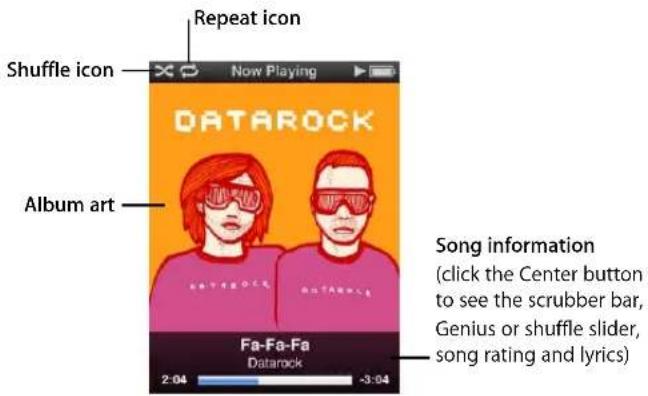
Now Playing screen item Function
| Shuffle (✗) icon | Appears if iPod nano is set to shuffle songs or albums. |
| Repeat (↔) icon | Appears if iPod nano is set to repeat all songs. The Repeat Once (○) icon appears if iPod nano is set to repeat one song. |
| Album art Shows the album art, if it's available. | |
Now Playing screen item Function
| Song information Displays the song title, artist, and album title. | |
| Song time progress bar | Shows the elapsed and remaining times for the song that's playing. |
| Scrubber bar Allows you to quickly navigate to a different part of the track. | |
| Genius slider Creates a Genius playlist based on the current song (doesn't appear if Genius information isn't available for the current song). | |
| Shuffle slider Allows you to shuffle songs or albums directly from the Now Playing screen. | |
| Song Rating Displays stars if you rate the song. | |
| Lyrics Displays the lyrics of the song that's playing (doesn't appear if you didn't enter the song's lyrics). | |
To change the playback volume:
- When you see the progress bar, use the Click Wheel to change the volume.
To listen to a different part of a song:
1 Press the Center button until you see the scrubber bar. 2 Use the Click Wheel to move the diamond along the scrubber bar.
To return to the previous menu:
■From any screen, press the Menu button to return to the previous menu.
Viewing Lyrics on iPod nano
If you enter lyrics for a song in iTunes (see "Adding Lyrics" on page 24) and then add the song to iPod nano, you can view the lyrics on iPod nano. Lyrics will not appear if you did not enter them.
To view lyrics on iPod nano while a song is playing:
On the Now Playing screen, press the Center button until you see the lyrics. You can scroll through the lyrics as the song plays.
Rating Songs
You can assign a rating to a song (from 1 to 5 stars) to indicate how much you like it. You can use song ratings to help you create Smart Playlists automatically in iTunes.
To rate a song:
1 Start playing the song. 2 From the Now Playing screen, press the Center button until the five rating bullets appear. 3 Use the Click Wheel to choose a rating (represented by stars).
Note: You cannot assign ratings to video podcasts.
Viewing Album Artwork on iPod nano
By default, iTunes displays album artwork on iPod nano. If the artwork is available, you'll see it on iPod nano in Cover Flow, in the album list, and when you play music from the album.
To set iTunes to display album artwork on iPod nano:
1 Connect iPod nano to your computer. 2 In iTunes, select iPod nano in the source list and click the Music tab. 3 Select "Display album artwork on your iPod."
To see album artwork on iPod nano:
- Hold iPod nano horizontally to view Cover Flow, or play a song that has album artwork. For more information about album artwork, open iTunes and choose Help > iTunes Help.
Accessing Additional Commands
Some iPod nano commands can be accessed directly from the Now Playing screen and some menus.
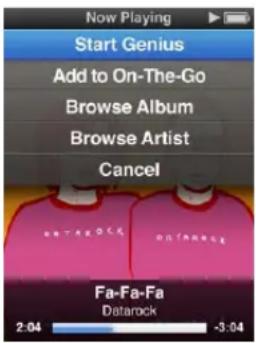
To access additional commands:
- Press and hold the Center button until a menu appears, select a command, and then press the Center button again.
Browsing Songs by Album or Artist
When you're listening to a song, you can browse more songs by the same artist or all the songs in the current album.
To browse songs by album:
1 From the Now Playing screen, press and hold the Center button until a menu appears. 2 Choose Browse Album, and then press the Center button.
You see all the songs from the current album that are on iPod nano. You can select a different song or return to the Now Playing screen.
To browse songs by artist:
1 From the Now Playing screen, press and hold the Center button until a menu appears.
2 Choose Browse Artist, and then press the Center button.
You see all the songs by that artist that are on iPod nano. You can select a different song or return to the Now Playing screen.
Creating On-The-Go Playlists on iPod nano
You can create playlists on iPod nano, called On-The-Go Playlists, when iPod nano isn't connected to your computer.
To create an On-The-Go playlist:
1 Select a song, and then press and hold the Center button until a menu appears.
2 Choose "Add to On-The-Go."
3 To add more songs, repeat steps 1 and 2.
4 Choose Music > Playlists > On-The-Go to browse and play your list of songs.
You can also add a group of songs. For example, to add an album, highlight the album title, press and hold the Center button until a menu appears, and then choose "Add to On-The-Go."
To play songs in the On-The-Go playlist:
- Choose Music > Playlists > On-The-Go, and then choose a song.
To remove a song from the On-The-Go playlist:
1 Select a song in the playlist and hold down the Center button until a menu appears.
2 Choose "Remove from On-The-Go," and then press the Center button.
To clear the entire On-The-Go playlist:
- Choose Music > Playlists > On-The-Go > Clear Playlist, and then click Clear.
To save the On-The-Go playlist on iPod nano:
- Choose Music > Playlists > On-The-Go > Save Playlist.
The first playlist is saved as "New Playlist 1" in the Playlists menu. The On-The-Go playlist is cleared. You can save as many playlists as you like. After you save a playlist, you can no longer remove songs from it.
To copy On-The-Go playlists from iPod nano to your computer:
If iPod nano is set to update songs automatically (see "Syncing Music Automatically" on page 28) and you create an On-The-Go playlist, the playlist is automatically copied to iTunes when you connect iPod nano. The new On-The-Go playlist appears in the list of playlists in iTunes. You can rename, edit, or delete the new playlist, just as you would any playlist.
Using Genius on iPod nano
When iPod nano isn't connected to your computer, Genius can still automatically create instant playlists of songs that go great together. To use Genius, you need to set up Genius in the iTunes Store, and then sync iPod nano to iTunes. You can also create Genius playlists in iTunes and add them to iPod nano.
To set up Genius in iTunes, see "Using Genius in iTunes" on page 25.
To make a Genius playlist with iPod nano:
1 Select a song, and then press and hold the Center button until a menu appears. You can select a song from a menu or playlist, or you can start from the Now Playing screen.
You can select a song from a menu or playlist, or you can start from the Now Playing screen.
2 Choose Start Genius, and then press the Center button. The new playlist appears.
Start Genius doesn't appear if any of the following apply:
- You haven't set up Genius in iTunes and then synced iPod nano to iTunes.
- Genius doesn't recognize the song you've selected.
- Genius recognizes the song but there aren't at least ten similar songs in your library.
4 To change the playlist to a new one based on the same song, choose Refresh. If you refresh a saved playlist, the new playlist replaces the previous one. You can't recover the previous playlist.
The playlist is saved with the song title and artist of the song you used to make the playlist.
4 To change the playlist to a new one based on the same song, choose Refresh. If you refresh a saved playlist, the new playlist replaces the previous one. You can't recover the previous playlist.
You can also start Genius from the Now Playing screen by pressing the Center button until you see the Genius slider, and then using the Click Wheel to move the slider to the right. The Genius slider won't appear if Genius doesn't recognize the song that's playing.
Genius playlists saved on iPod nano sync to iTunes when you connect iPod nano to your computer.
To play a Genius playlist:
- Choose Music > Playlists and choose the playlist.
Setting iPod nano to Shuffle Songs
You can set iPod nano to play songs, albums, or your entire library in random order.
To set iPod nano to shuffle and play all your songs:
- Choose Shuffle Songs from the iPod nano main menu.
iPod nano begins playing songs from your entire music library in random order, skipping audiobooks and podcasts.
To set iPod nano to always shuffle songs or albums:
1 Choose Settings from the iPod nano main menu.
2 Set Shuffle to either Songs or Albums.
When you set iPod nano to shuffle songs by choosing Settings > Shuffle, iPod nano shuffles songs within the list (for example, album or playlist) you choose to play.
When you set iPod nano to shuffle albums, it plays all the songs on an album in order, and then randomly selects another album in the list and plays through it in order.
You can also set iPod nano to shuffle songs directly from the Now Playing screen by clicking the Center button until the shuffle slider appears, and then using the Click Wheel to set iPod nano to shuffle songs or albums.
To shuffle songs while a song is playing or paused:
■ Shake iPod nano from side to side. A new song starts to play.
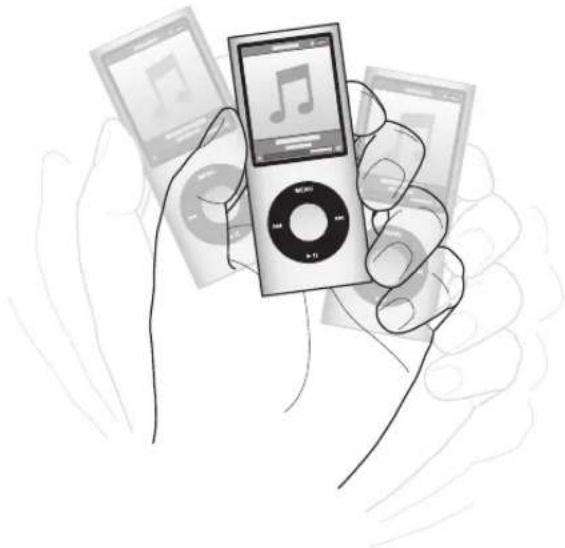
Shaking to shuffle doesn't change your shuffle settings, whether you set them by choosing Settings > Shuffle or by using the shuffle slider.
To disable shaking:
- Choose Settings > Playback > Shake and select Off.
To turn shaking on again, choose Settings > Playback > Shake, and then select On.
Shaking is also disabled when the Hold switch is in the HOLD position, or if the display is off. If iPod nano is off, you can't turn it on by shaking it.
Setting iPod nano to Repeat Songs
You can set iPod nano to repeat a song over and over, or repeat songs within the list you choose to play.
To set iPod nano to repeat songs:
- Choose Settings from the iPod nano main menu.
• To repeat all songs in the list, set Repeat to All. • To repeat one song over and over, set Repeat to One.
Customizing the Music Menu
You can add items to or remove them from the Music menu, just as you do with the main menu. For example, you can add a Compilations item to the Music menu, so you can easily choose compilations that are put together from various sources.
To add or remove items in the Music menu:
1. Choose Settings > General > Music Menu. 2. Select each item you want to appear in the Music menu. A checkmark indicates which items have been added. To revert to the original Music menu settings, choose Reset Menu.
Setting the Maximum Volume Limit
You can set a limit for the maximum volume on iPod nano and assign a combination to prevent the setting from being changed.
To set the maximum volume limit for iPod nano:
1 Choose Settings > Playback > Volume Limit.
The volume control shows the current volume.
2 Use the Click Wheel to select the maximum volume limit. 3 Press the Center button to set the maximum volume limit.
A triangle on the volume bar indicates the maximum volume limit.
To require a combination to change the maximum volume:
1 After setting the maximum volume, use the Click Wheel to select Lock and then press the Center button.
2 In the screen that appears, enter a combination.
To enter a combination:
- Use the Click Wheel to select a number for the first position. Press the Center button to confirm your choice and move to the next position.
- Use the same method to set the remaining numbers of the combination. You can use the Next/Fast-forward button to move to the next position and the Previous/Rewind button to move to the previous position. Press the Center button in the final position to confirm the entire combination.
The volume of songs and other audio may vary depending on how the audio was recorded or encoded. See "Setting Songs to Play at the Same Volume Level" on page 42 for information about how to set a relative volume level in iTunes and on iPod nano. Volume level may also vary if you use different earphones or headphones. With the exception of the iPod Radio Remote, accessories that connect through the iPod Dock Connector don't support volume limits.
If you set a combination, you must enter it before you can change or remove the maximum volume limit.
To change the maximum volume limit:
1 Choose Settings > Playback > Volume Limit. 2 If you set a combination, enter it by using the Click Wheel to select the numbers and pressing the Center button to confirm them. 3 Use the Click Wheel to change the maximum volume limit. 4 Press the Play/Pause button to accept the change.
To remove the maximum volume limit:
1 If you're currently listening to iPod nano, press Pause. 2 Choose Settings > Playback > Volume Limit. 3 If you set a combination, enter it by using the Click Wheel to select the numbers and pressing the Center button to confirm them. 4 Use the Click Wheel to move the volume limit to the maximum level on the volume bar. This removes any restriction on volume. 5 Press the Play/Pause button to accept the change.
If you forget the combination, you can restore iPod nano. See "Updating and Restoring iPod Software" on page 69.
Setting Songs to Play at the Same Volume Level
iTunes can automatically adjust the volume of songs, so they play at the same relative volume level. You can set iPod nano to use the iTunes volume settings.
To set iTunes to play songs at the same sound level:
1 In iTunes, choose iTunes > Preferences if you're using a Mac, or choose Edit > Preferences if you're using a Windows PC.
2 Click Playback and select Sound Check, and then click OK.
To set iPod nano to use the iTunes volume settings:
- Choose Settings and set Sound Check to On.
If you haven't activated Sound Check in iTunes, setting it on iPod nano has no effect.
Using the Equalizer
You can use equalizer presets to change the sound on iPod nano to suit a particular music genre or style. For example, to make rock music sound better, set the equalizer to Rock.
To use the equalizer to change the sound on iPod nano:
- Choose Settings > Playback > EQ, and then choose an equalizer preset.
If you assigned an equalizer preset to a song in iTunes and the iPod nano equalizer is set to Off, the song plays using the iTunes setting. See iTunes Help for more information.
Crossfading Between Songs
You can set iPod nano to fade out at the end of each song and fade in at the beginning of the song following it.
To turn on crossfading:
- Choose Settings > Playback > Audio Crossfade and select On.
Note: Songs that are grouped for gapless playback play without gaps even when crossfading is on.
Watching and Listening to Podcasts
Podcasts are downloadable audio or video shows you get at the iTunes Store. You can listen to audio podcasts and watch video podcasts. Podcasts are organized by shows, episodes within shows, and chapters within episodes. If you stop watching or listening to a podcast and go back to it later, the podcast begins playing from where you left off.
To watch or listen to a podcast:
1 From the main menu, choose Podcasts, and then choose a show.
Shows appear in reverse chronological order so that you can watch or listen to the most recent one first. You see a blue dot next to shows and episodes you haven't watched or listened to yet.
2 Choose an episode to play it.
The Now Playing screen displays the show, episode, and date information, along with elapsed and remaining time. Press the Center button to see more information about the podcast. If the podcast includes artwork, you also see a picture. Podcast artwork can change during an episode.
If the podcast has chapters, you can press the Next/Fast-forward or Previous/Rewind button to skip to the next chapter or the beginning of the current chapter in the podcast.
For more information about podcasts, open iTunes and choose Help > iTunes Help. Then search for "podcasts."
Listening to Audiobooks
You can purchase and download audiobooks from the iTunes Store or from audible.com and listen to them on iPod nano.
Use iTunes to add audiobooks to iPod nano the same way you add songs. If you stop listening to an audiobook on iPod nano and go back to it later, the audiobook begins playing from where you left off. iPod nano skips audiobooks when set to shuffle.
If the audiobook you're listening to has chapters, you can press the Next/Fast-forward or Previous/Rewind button to skip to the next chapter or the beginning of the current chapter.
You can play audiobooks at speeds faster or slower than normal.
To set audiobook play speed:
- Choose Settings > Playback > Audiobooks and choose a speed, or press and hold the Center button from the Now Playing window.
Setting the play speed affects only audiobooks purchased from the iTunes Store or audible.com.
Listening to FM Radio
You can listen to radio using the optional iPod Radio Remote accessory for iPod nano. iPod Radio Remote attaches to iPod nano using the Dock connector cable. When you're using iPod Radio Remote, you see a Radio menu item on the iPod nano main menu. For more information, see the iPod Radio Remote documentation.
Watching Videos
You can use iPod nano to watch TV shows, movies, video podcasts, and more. Read this chapter to learn about watching videos on iPod nano and on your TV.
You can view and listen to videos on iPod nano. If you have an AV cable from Apple (available separately at www.apple.com/ipodstore), you can watch videos from iPod nano on your TV.
Watching and Listening to Videos on iPod nano
Videos you add to iPod nano appear in the Videos menus. Music videos also appear in Music menus.
To watch a video on iPod nano:
- Choose Videos and browse for a video. Select a video and then press Play/Pause.
To watch the video, hold iPod nano horizontally. If you rotate iPod nano to the left or right, the video adjusts accordingly.
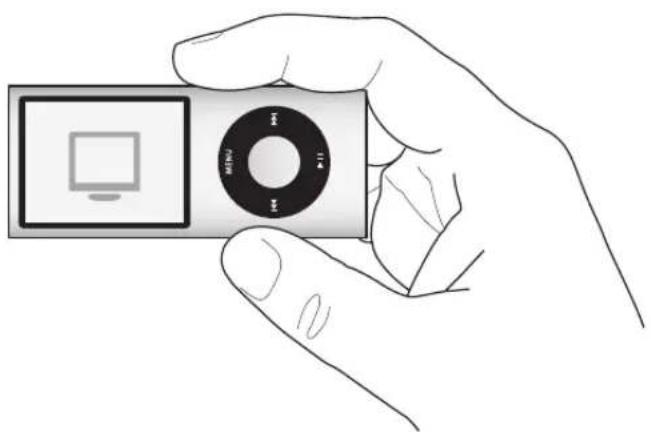
When you play a video on iPod nano, you see and hear the video.
To just listen to a music video:
- Choose Music and browse for a music video.
When you play the video, you hear it but don't see it.
When you play a playlist that includes video podcasts, you hear the podcasts but don't see them.
To watch a video podcast:
■From the main menu, choose Podcasts and then choose a video podcast.
See "Watching and Listening to Podcasts" on page 42 for more information.
Watching Videos on a TV Connected to iPod nano
If you have an AV cable from Apple, you can watch videos on a TV connected to your iPod nano. First you set iPod nano to display videos on a TV, then connect iPod nano to your TV, and then play a video.
Note: Use the Apple Component AV Cable, the Apple Composite AV Cable, or the Apple AV Connection Kit. Other similar RCA-type cables might not work. You can purchase the cables at www.apple.com/ipodstore.
To set iPod nano to display videos on a TV:
- Choose Videos > Settings, and then set TV Out to Ask or On.
If you set TV Out to Ask, iPod nano gives you the option of displaying videos on TV or on iPod nano every time you play a video.
You can also set video to display full screen or widescreen, and set video to display on PAL or NTSC devices.
To set TV settings:
- Choose Videos > Settings, and then follow the instructions below.
To set Do this
| Video to display on a TV Set TV Out to Ask or On. | |
| Video to display on PAL or NTSC TVs | Set TV Signal to PAL or NTSC.PAL and NTSC refer to TV broadcast standards. Your TV might use either of these, depending on the region where it was purchased.If you aren't sure which your TV uses, check the documentation that came with your TV. |
| The format of your external TV | Set TV Screen to Widescreen for 16:9 format or Standard for 4:3 format. |
| Video to fit to your screen Set “Fit to Screen” to On.If you set “Fit to Screen” to Off, widescreen videos display in letterbox format on iPod nano or a standard (4:3) TV screen. | |
| Alternate audio to play Set Alternate Audio to On. | |
To set Do this
Captions to display Set Captions to On.
Subtitles to display Set Subtitles to On.
To use the Apple Component AV Cable to connect iPod nano to your TV:
1 Plug the red, green, and blue video connectors into the component video input (Y, Pb, and Pr) ports on your TV.
You can also use the Apple Composite AV cable. If you do, plug in the yellow video connector into the video input port on your TV. Your TV must have RCA video and audio ports.
2 Plug the white and red audio connectors into the left and right analog audio input ports, respectively, on your TV.
3 Plug the iPod Dock Connector into your iPod nano or Universal Dock.
4 Plug the USB connector into your USB Power Adapter or your computer to keep your iPod nano charged.
5 Turn on iPod nano and your TV or receiver to start playing.
Make sure you set TV Out on iPod nano to On.
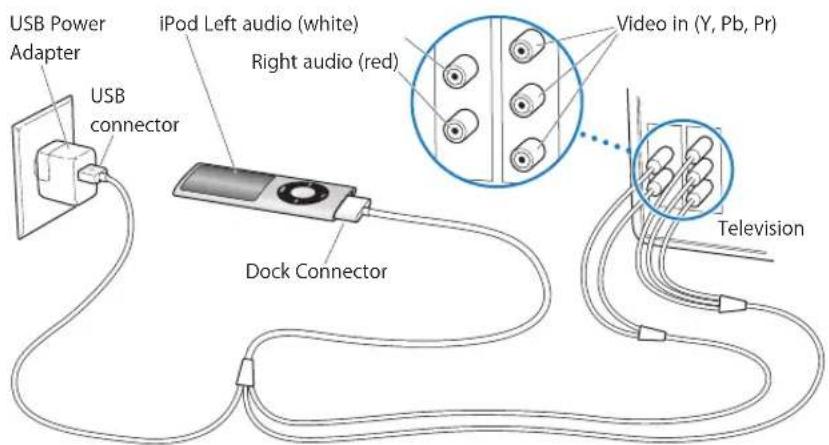
Note: The ports on your TV or receiver may differ from the ports in the illustration.
To watch a video on your TV:
1 Connect iPod nano to your TV (see above). 2 Turn on your TV and set it to display from the input ports connected to iPod nano. See the documentation that came with your TV for more information. 3 On iPod nano, choose Videos and browse for a video.
Photo Features
5
You can import digital photos to your computer and add them to iPod nano. You can view your photos on iPod nano or as a slideshow on your TV. Read this chapter to learn about importing and viewing photos.
Importing Photos
You can import digital photos from a digital camera to your computer, and then add them to iPod nano for viewing. You can connect iPod nano to your TV and view photos as a slideshow with music.
Importing Photos from a Camera to Your Computer
You can import photos from a digital camera or a photo card reader.
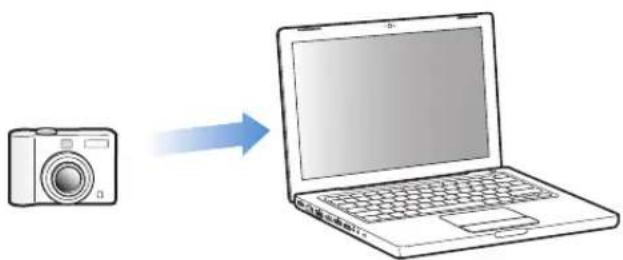
To import photos to a Mac using iPhoto:
1. Connect the camera or photo card reader to your computer. Open iPhoto (located in the Applications folder) if it doesn't open automatically.
2. Click Import.
Images from the camera are imported into iPhoto.
You can import other digital images into iPhoto, such as images you download from the web. For more information about importing and working with photos and other images, open iPhoto and choose Help > iPhoto Help.
iPhoto is available for purchase as part of the iLife suite of applications at www.apple.com/ilife. iPhoto might already be installed on your Mac, in the Applications folder.
If you don't have iPhoto, you can import photos using Image Capture.
To import photos to a Mac using Image Capture:
1. Connect the camera or photo card reader to your computer.
2. Open Image Capture (located in the Applications folder) if it doesn't open automatically.
3. To choose specific items to import, click Download Some. Or to download all items, click Download All.
To import photos to a Windows PC:
■ Follow the instructions that came with your digital camera or photo application.
Adding Photos From Your Computer to iPod nano
You can add photos to iPod nano from a folder on your hard disk. If you have a Mac and iPhoto 6 or later, you can sync iPhoto albums automatically. If you have a Windows PC and Adobe Photoshop Album 2.0 or later, or Adobe Photoshop Elements 4.0 or later, you can sync photo collections automatically.
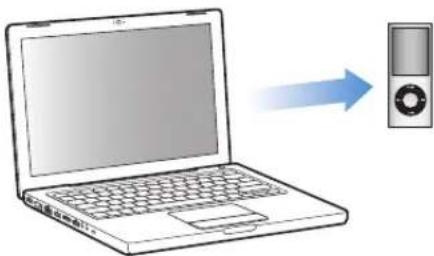
Adding photos to iPod nano the first time might take some time, depending on how many photos are in your photo library.
To sync photos from a Mac or Windows PC to iPod nano using a photo application:
1 In iTunes, select iPod nano in the source list and click the Photos tab.
2 Select "Sync photos from: ..."
- On a Mac, choose iPhoto from the pop-up menu.
- On a Windows PC, choose Photoshop Album or Photoshop Elements from the pop-up menu.
Note: Some versions of Photoshop Album and Photoshop Elements don't support collections. You can still use them to add all your photos.
3 If you want to add all your photos, select "All photos and albums." If you want to keep your photos organized by event, select "...events" and choose an option from the pop-up menu. If you want to add photos from only certain albums, select "Selected albums" and select the albums you want.
4 Click Apply.
Each time you connect iPod nano to your computer, photos are synced automatically.
To add photos from a folder on your hard disk to iPod nano:
1 Drag the images you want into a folder on your computer.
If you want images to appear in separate photo albums on iPod nano, create folders inside the main image folder, and drag images into the new folders.
2 In iTunes, select iPod nano in the source list and click the Photos tab.
3 Select "Sync photos from ..."
4 Choose "Choose Folder" from the pop-up menu and select your image folder.
5 Click Apply.
When you add photos to iPod nano, iTunes optimizes the photos for viewing. Full-resolution image files aren't transferred by default. Adding full-resolution image files is useful, for example if you want to move them from one computer to another, but isn't necessary for viewing the images at full quality on iPod nano.
To add full-resolution image files to iPod nano:
1 In iTunes, select iPod nano in the source list and click the Photos tab.
2 Select "Include full-resolution photos."
3 Click Apply.
iTunes copies the full-resolution versions of the photos to the Photos folder on iPod nano.
To delete photos from iPod nano:
1 In iTunes, select iPod nano in the source list and click the Photos tab.
2 Select "Sync photos from: ..."
- On a Mac, choose iPhoto from the pop-up menu.
- On a Windows PC, choose Photoshop Album or Photoshop Elements from the pop-up menu.
3 Choose "Selected albums" and deselect the albums you no longer want on iPod nano.
4 Click Apply.
Adding Photos from iPod nano to a Computer
If you add full-resolution photos from your computer to iPod nano using the previous steps, they're stored in a Photos folder on iPod nano. You can connect iPod nano to a computer and put these photos on the computer. iPod nano must be enabled for disk use (see "Using iPod nano as an External Disk" on page 53).
To add photos from iPod nano to a computer:
1 Connect iPod nano to the computer.
2 Drag image files from the Photos folder or DCIM folder on iPod nano to the desktop or to a photo editing application on the computer.
You can also use a photo editing application, such as iPhoto, to add photos stored in the Photos folder. See the documentation that came with the application for more information.
To delete photos from the Photos folder on iPod nano:
1 Connect iPod nano to the computer.
2 Navigate to the Photos folder on iPod nano and delete the photos you no longer want.
Viewing Photos
You can view photos on iPod nano manually or as a slideshow. If you have an optional AV cable from Apple (for example, Apple Component AV Cable), you can connect iPod nano to your TV and view photos as a slideshow with music.
Viewing Photos on iPod nano
To view photos on iPod nano:
1 On iPod nano, choose Photos > All Photos. Or choose Photos and a photo album to see only the photos in the album. Thumbnail views of the photos might take a moment to appear.
2 Select the photo you want and press the Center button.
3 To view photos, hold iPod nano vertically for portrait format, or horizontally for landscape format.
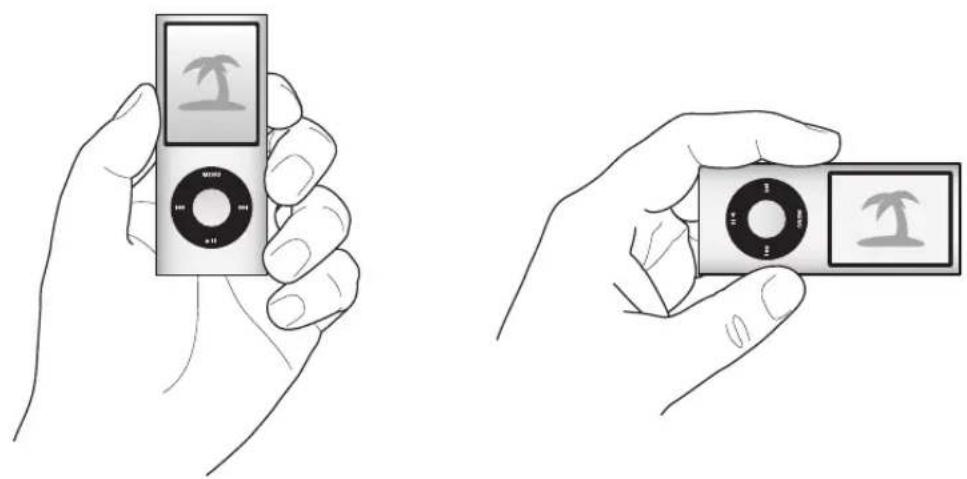
From any photo-viewing screen, use the Click Wheel to scroll through photos (if you're viewing a slideshow, the Click Wheel controls music volume only). Press the Next/Fast-forward or Previous/Rewind button to skip to the next or previous screen of photos. Press and hold the Next/Fast-forward or Previous/Rewind button to skip to the last or first photo in the library or album.
Viewing Slideshows
You can view a slideshow, with music and transitions if you choose, on iPod nano. If you have an optional AV cable from Apple, you can view the slideshow on your TV.
To set slideshow settings:
- Choose Photos > Settings, and then follow these instructions:
To set Do this How long each slide is shown Choose Time Per Slide and pick a time.
| The music that plays during slideshows | Choose Music and choose a playlist or Now Playing. If you're using iPhoto, you can choose From iPhoto to copy the iPhoto music setting. Only the songs that you've added to iPod nano play. |
| Slides to repeat Set Repeat to On. | |
| Slides to display in random order | Set Shuffle Photos to On. |
| Slides to display with transitions | Choose Transitions and choose a transition type. |
| Slideshows to display on iPod nano | Set TV Out to Ask or Off. |
To set Do this
| Slideshows to display on TV Set TV Out to Ask or On. | |
| If you set TV Out to Ask, iPod nano gives you the option of showing slideshows on TV or on iPod nano every time you start a slideshow. | |
| Slides to show on PAL or NTSC TVs | Set TV Signal to PAL or NTSC.PAL and NTSC refer to TV broadcast standards. Your TV might use either of these, depending on the region where it was purchased.If you aren't sure which your TV uses, check the documentation that came with your TV. |
To view a slideshow on iPod nano:
■Select any photo, album, or roll, and press the Play/Pause button. Or select any full-screen photo and press the Center button. To pause, press the Play/Pause button. To skip to the next or previous photo, press the Next/Fast-forward or Previous/Rewind button.
When you view a slideshow, the Click Wheel controls just the music volume. You can't use the Click Wheel to scroll through photos during a slideshow.
To connect iPod nano to your TV:
1 Connect the optional Apple Component or Composite AV cable to iPod nano.
Use the Apple Component AV Cable, Apple Composite AV Cable, or Apple AV Connection Kit. Other similar RCA-type cables won't work. You can purchase the cables at www.apple.com/ipodstore.
2 Connect the audio connectors to the ports on your TV (for an illustration, see page 46).
Your TV must have RCA video and audio ports.
To view a slideshow on your TV:
1. Connect iPod nano to your TV (see above).
2. Turn on your TV and set it to display from the input ports connected to iPod nano. See the documentation that came with your TV for more information.
3. On iPod nano, select any photo or album and press the Play/Pause button. Or select any full-screen photo and press the Center button. To pause, press the Play/Pause button. To skip to the next or previous photo, press the Next/Fast-forward or Previous/Rewind button.
If you selected a playlist in Photos > Settings > Music, the playlist plays automatically when you start the slideshow. The photos display on your TV and advance automatically according to settings in the Slideshow > Settings menu.
More Settings, Extra Features, and Accessories
iPod nano can do a lot more than play songs. And you can do a lot more with it than listen to music.
Read this chapter to find out more about the extra features of iPod nano, including how to use it as an external disk, alarm, or sleep timer; play games; show the time of day in other parts of the world; display notes; and sync contacts, calendars, and to-do lists. Learn about how to use iPod nano as a stopwatch and to lock the screen, and about the accessories available for iPod nano.
Using iPod nano as an External Disk
You can use iPod nano as an external disk to store data files.
You won't see songs you add using iTunes in the Mac Finder or in Windows Explorer. And if you copy music files to iPod nano in the Mac Finder or Windows Explorer, you won't be able to play them on iPod nano.
To enable iPod nano as an external disk:
1. In iTunes, select iPod nano in the source list and click the Summary tab. 2. In the Options section, select "Enable disk use." 3. Click Apply.
When you use iPod nano as an external disk, the iPod nano disk icon appears on the desktop on Mac, or as the next available drive letter in Windows Explorer on a Windows PC.
Note: Clicking Summary and selecting "Manually manage music and videos" in the Options section also enables iPod nano to be used as an external disk. Drag files to and from iPod nano to copy them.
If you use iPod nano primarily as a disk, you might want to keep iTunes from opening automatically when you connect iPod nano to your computer.
To prevent iTunes from opening automatically when you connect iPod nano to your computer:
1 In iTunes, select iPod nano in the source list and click the Summary tab. 2 In the Options section, deselect "Open iTunes when this iPod is connected." 3 Click Apply.
Using Extra Settings
You can set the date and time, clocks in different time zones, and alarm and sleep features on iPod nano. You can use iPod nano as a stopwatch or to play games, and you can lock the iPod nano screen.
Setting and Viewing the Date and Time
The date and time are set automatically from your computer's clock when you connect iPod nano, but you can change the settings.
To set date and time options:
1 Choose Settings > Date & Time. 2 Choose one or more of the following options:
To Do this
| Set the date Choose Date. Use the Click Wheel to change the selected value.Press the Center button to move to the next value. | |
| Set the time Choose Time. Use the Click Wheel to change the selected value.Press the Center button to move to the next value. | |
| Specify the time zone Choose Time Zone and use the Click Wheel to select a city in another time zone. | |
| Display the time in 24-hour format | Choose 24 Hour Clock and press the Center button to turn the 24-hour format on or off. |
| Display the time in the title bar | Choose Time in Title and press the Center button to turn the option on or off. |
Adding Clocks for Other Time Zones
To add clocks for other time zones:
1 Choose Extras > Clocks. 2 On the Clocks screen, click the Center button and choose Add. 3 Choose a region and then choose a city.
The clocks you add appear in a list. The last clock you added appears last.
To delete a clock:
1 Choose Extras > Clocks. 2 Choose the clock.
3 Press the Center button.
4 Choose Delete.
Setting Alarms
You can set an alarm for any clock on iPod nano.
To use iPod nano as an alarm clock:
1 Choose Extras > Alarms.
2 Choose Create Alarm and set one or more of the following options:
To do this: Turn the alarm on. Choose Alarm and choose On.
| Set the date Choose Date. Use the Click Wheel to change the selected value.Press the Center button to move to the next value. |
| Set the time Choose Time. Use the Click Wheel to change the selected value.Press the Center button to move to the next value. |
Set a repeat option: Choose Repeat and choose an option (for example, "weekdays").
| Choose a sound Choose Alerts or a playlist. If you choose Alerts, select Beep to hear the alarm through the internal speaker. If you choose a playlist, you'll need to connect iPod nano to speakers or headphones to hear the alarm. |
Name the alarm: Choose Label and choose an option (for example, "Wake up").
If you sync calendar events with alarms to iPod nano, the events appear in the Alarms menu.
To delete an alarm:
1 Choose Extras > Alarms.
2 Choose the alarm and then choose Delete.
Setting the Sleep Timer
You can set iPod nano to turn off automatically after playing or other content for a specific period of time.
To set the sleep timer:
1 Choose Extras > Alarms.
2 Choose Sleep Timer and choose how long you want iPod nano to play.
Using the Stopwatch
You can use the stopwatch as you exercise to track your overall time and, if you're running on a track, your lap times. You can play music while you use the stopwatch.
To use the stopwatch:
1 Choose Extras > Stopwatch.
2 Press Play/Pause to start the timer.
3 Press the Center button to record lap times. The two most recent lap times appear above the overall time. All lap times are recorded in the log.
4 Press Play/Pause to stop the overall timer. To start the timer again, press Play/Pause.
To start a new stopwatch session, press the Menu button and then choose New Timer.
To review or delete a logged stopwatch session:
1 Choose Extras > Stopwatch.
The current log and a list of saved sessions appear.
2 Choose a log to view session information.
iPod nano stores stopwatch sessions with dates, times, and lap statistics. You see the date and time the session started; the total time of the session; the shortest, longest, and average lap times; and the last several lap times.
3 Press the Center button and choose Delete Log to delete the chosen log, or Clear Logs to delete all current logs.
Playing Games
iPod nano comes with three games: Klondike, Maze, and Vortex.
To play a game:
- Choose Extras > Games and choose a game.
When you play a game created for previous versions of iPod nano, you're first shown how iPod nano controls work in the game you're about to play.
You can purchase additional games from the iTunes Store (in some countries) to play on iPod nano. After purchasing games in iTunes, you can add them to iPod nano by syncing them automatically or by managing them manually.
Many games can be played in portrait or landscape mode.
To buy a game:
1 In iTunes, select iTunes Store in the source list. 2 Choose iPod Games from the iTunes Store list. 3 Select the game you want and click Buy Game.
To sync games automatically to iPod nano:
1 In iTunes, select iPod nano in the source list and click the Games tab. 2 Select "Sync games."
3 Click "All games" or "Selected games." If you click "Selected games," also select the games you want to sync.
4 Click Apply.
Locking the iPod nano Screen
You can set a combination to prevent iPod nano from being used by someone without your permission. If you lock iPod nano while it isn't connected to a computer, you must then enter a combination to unlock and use it.
This combination is different from the Hold button, which just prevents iPod nano buttons from being pressed accidentally. The combination prevents another person from using iPod nano.
To set a combination for iPod nano:
1 Choose Extras > Screen Lock.
2 On the New Combination screen, enter a combination:
- Use the Click Wheel to select a number for the first position. Press the Center button to confirm your choice and move to the next position.
- Use the same method to set the remaining numbers of the combination. You can use the Next/Fast-forward button to move to the next position and the Previous/Rewind button to move to the previous position. Press the Center button in the final position.
3 On the Confirm Combination screen, enter the combination to confirm it, or press Menu to exit without locking the screen.
When you finish, you return to the Screen Lock screen, where you can lock the screen or reset the combination. Press the Menu button to exit without locking the screen.
To lock the iPod nano screen:
- Choose Extras > Screen Lock > Lock.
If you just finished setting your combination, Lock will already be selected on the screen. Just press the Center button to lock iPod.
When the screen is locked, you see a picture of a lock.
You might want to add the Screen Lock menu item to the main menu so that you can quickly lock the iPod nano screen. See "Adding or Removing Items on the Main Menu" on page 11.
When you see the lock on the screen, you can unlock the iPod nano screen in two ways:
- Press the Center button to enter the combination on iPod nano. Use the Click Wheel to select the numbers and press the Center button to confirm them. If you enter the wrong combination, the lock remains. Try again.
- Connect iPod nano to the primary computer you use it with, and iPod nano automatically unlocks.
Note: If you try these methods and you still can't unlock iPod nano, you can restore iPod nano. See "Updating and Restoring iPod Software" on page 69.
To change a combination you've already set:
1 Choose Extras > Screen Lock > Reset. 2 On the Enter Combination screen, enter the current combination. 3 On the New Combination screen, enter and confirm a new combination.
If you can't remember the current combination, the only way to clear it and enter a new one is to restore the iPod nano software. See "Updating and Restoring iPod Software" on page 69.
Syncing Contacts, Calendars, and To-Do Lists
iPod nano can store contacts, calendar events, and to-do lists for viewing on the go.
You can use iTunes to sync the contact and calendar information on iPod nano with Address Book and iCal.
If you're using Windows XP, and you use Windows Address Book or Microsoft Outlook 2003 or later to store your contact information, you can use iTunes to sync the address book information on iPod nano. If you use Microsoft Outlook 2003 or later to keep a calendar, you can also sync calendar information.
To sync contacts or calendar information using Mac OS X v10.4.11 or later:
1 Connect iPod nano to your computer. 2 In iTunes, select iPod nano in the source list and click the Contacts tab. 3 Do one of the following:
- To sync contacts, in the Contacts section, select "Sync Address Book contacts," and select an option:
- To sync all contacts automatically, select "All contacts."
- To sync selected groups of contacts automatically, select "Selected groups" and select the groups you want to sync.
- To copy contacts' photos to iPod nano, when available, select "Include contacts' photos."
When you click Apply, iTunes updates iPod nano with the Address Book contact information you specified.
- To sync calendars, in the Calendars section, select "Sync iCal calendars," and choose an option:
- To sync all calendars automatically, choose "All calendars."
- To sync selected calendars automatically, choose "Selected calendars" and select the calendars you want to sync.
When you click Apply, iTunes updates iPod nano with the calendar information you specified.
To sync contacts or calendars using Windows Address Book or Microsoft Outlook for Windows:
1 Connect iPod nano to your computer.
2 In iTunes, select iPod nano in the source list and click the Contacts tab.
3 Do one of the following:
- To sync contacts, in the Contacts section, select "Sync contacts from" and choose Windows Address Book or Microsoft Outlook from the pop-up menu. Then select which contact information you want to sync.
- To sync calendars from Microsoft Outlook, in the Calendars section, select "Sync calendars from Microsoft Outlook."
4 Click Apply.
You can also add contact and calendar information to iPod nano manually. iPod nano must be enabled as an external disk (see "Using iPod nano as an External Disk" on page 53).
To add contact information manually:
1 Connect iPod nano and open your favorite email or contacts application. You can add contacts using Palm Desktop, Microsoft Outlook, Microsoft Entourage, and Eudora, among others.
2 Drag contacts from the application's address book to the Contacts folder on iPod nano. In some cases, you might need to export contacts and then drag the exported file or files to the Contacts folder. See the documentation for your email or contacts application.
To add appointments and other calendar events manually:
1 Export calendar events from any calendar application that uses the standard iCal format (filenames end in .ics) or vCal format (filenames end in .vcs).
2 Drag the files to the Calendars folder on iPod nano.
To add to-do lists to iPod nano manually, save them in a calendar file with an .ics or .vcs extension.
To view contacts on iPod nano:
- Choose Extras > Contacts.
To sort contacts by first or last name:
- Choose Settings > General > Sort Contacts, and then select First or Last.
To view calendar events:
- Choose Extras > Calendars > All Calendars, and then choose a calendar.
To view to-do lists:
- Choose Extras > Calendars > To Do's.
Storing and Reading Notes
You can store and read text notes on iPod nano if it's enabled as an external disk (see "Using iPod nano as an External Disk" on page 53).
1 Save a document in any word-processing application as a text (.txt) file. 2 Place the file in the Notes folder on iPod nano.
To view notes:
- Choose Extras > Notes.
Recording Voice Memos
You can record voice memos using an optional iPod nano-compatible microphone (available for purchase at www.apple.com/ipodstore). You can set chapter marks while you record, store voice memos on iPod nano and sync them with your computer, and add labels to voice memos.
Voice memos cannot be longer than two hours. If you record for more than two hours, iPod nano automatically starts a new voice memo to continue your recording.
To record a voice memo:
1 Connect a microphone to the Dock connector port on iPod nano.
The Voice Memos item appears in the main menu.
2 To begin recording, choose Voice Memo > Start Recording. 3 Hold the microphone a few inches from your mouth and speak. To pause recording, press the Menu button.
Choose Resume to continue recording.
4 When you finish, press Menu and then choose "Stop and Save." Your saved recording is listed by date and time.
To set chapter marks:
While recording, press the Center button whenever you want to set a chapter mark.
During playback, you can go directly to the next chapter by pressing the Next/Forward button. Press the Previous/Rewind button once to go to the start of the current chapter, and twice to go to the start of the previous chapter.
To label a recording:
1 Choose Voice Memos > Recordings, and then choose a saved recording.
2 Choose Label, and then choose a label for the recording.
You can choose Podcast, Interview, Lecture, Idea, Meeting, or Memo. To remove a label from a recording, choose None.
To play a recording:
In the main menu, choose Voice Memos and select the recording.
You won't see a Voice Memos menu item if you've never connected a microphone to iPod nano.
To sync voice memos with your computer:
Voice memos are saved in a Recordings folder on iPod in the WAV file format. If you enable iPod nano for disk use, you can drag voice memos from the folder to copy them.
If iPod nano is set to sync songs automatically (see "Syncing Music Automatically" on page 28) voice memos on iPod nano are automatically synced as an album in iTunes (and removed from iPod nano) when you connect iPod nano. The new Voice Memos playlist appears in the source list.
Using Spoken Menus for Accessibility
iPod nano features optional spoken menus, enabling visually impaired users to browse through their iPod nano content more easily.
iTunes generates spoken menus using voices that are included in your computer's operating system or that you may have purchased from third parties. Not all voices from computer operating systems or third parties are compatible with spoken menus, and not all languages are supported.
You must enable spoken menus in iTunes before you can activate them on iPod nano.
To enable spoken menus in iTunes:
1 Connect iPod nano to your computer.
2 In iTunes, select iPod nano in the source list and click the Summary tab.
3 Select "Enable spoken menus for accessibility."
In Mac OS X, if you have VoiceOver turned on in Universal Access preferences, this option is selected by default.
4 Click Apply.
After iPod nano syncs with iTunes, spoken menus are enabled and activated on your iPod nano. iPod nano takes longer to sync if spoken menus are being enabled.
To deactivate spoken menus on iPod nano:
- Choose Settings > Spoken Menus and then choose Off.
To turn spoken menus on again, choose Settings > General > Spoken Menus, and then choose On.
Note: The Spoken Menus option appears in the Settings menu on iPod nano only if spoken menus have been enabled in iTunes.
Learning About iPod nano Accessories
iPod nano comes with some accessories, and many other accessories are available. To purchase iPod nano accessories, go to www.apple.com/ipodstore.
Available accessories include:
• Apple Headphones with Remote and Mic
• Apple In-Ear Headphones with Remote and Mic
• Nike + iPod Sport Kit
• Apple Universal Dock
• Apple Component AV Cable
• Apple Composite AV Cable
• Apple AV Connection Kit
• Apple USB Power Adapter
• Apple USB/FireWire Adapter
• iPod In-Ear Headphones
• iPod Radio Remote
• World Travel Adapter Kit
• iPod Socks
• iPod Earphones
- Third-party accessories—such as speakers, headsets, cases, car stereo adapters, power adapters, and more
To use the earphones included with iPod nano:
- Plug the earphones into the Headphones port. Then place the earbuds in your ears as shown.
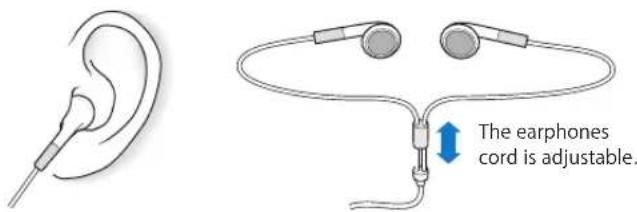
WARNING: Permanent hearing loss may occur if earbuds or headphones are used at high volume. You can adapt over time to a higher volume of sound that may sound normal but can be damaging to your hearing. If you experience ringing in your ears or muffled speech, stop listening and have your hearing checked. The louder the volume, the less time is required before your hearing could be affected. Hearing experts suggest that to protect your hearing:
- Limit the amount of time you use earbuds or headphones at high volume.
- Avoid turning up the volume to block out noisy surroundings.
- Turn the volume down if you can't hear people speaking near you.
For information about setting a maximum volume limit on iPod, see "Setting the Maximum Volume Limit" on page 40.
Tips and Troubleshooting
7
Most problems with iPod nano can be solved quickly by following the advice in this chapter.
The 5 Rs: Reset, Retry, Restart, Reinstall, Restore
Remember these five basic suggestions if you have a problem with iPod nano. Try these steps one at a time until your issue is resolved. If one of the following doesn't help, read on for solutions to specific problems.
- Reset iPod nano. See "General Suggestions," below.
- Retry with a different USB port if you cannot see iPod nano in iTunes.
- Restart your computer, and make sure you have the latest software updates installed.
- Reinstall iTunes software from the latest version on the web.
- Restore iPod nano. See "Updating and Restoring iPod Software" on page 69.
General Suggestions
Most problems with iPod nano can be solved by resetting it. First, make sure iPod nano is charged.
To reset iPod nano:
1. Toggle the Hold switch on and off (slide it to HOLD and then back again). 2. Press and hold the Menu and Center buttons for at least 6 seconds, until the Apple logo appears.
If iPod nano won't turn on or respond
- Make sure the Hold switch isn't set to HOLD.
- The iPod nano battery might need to be recharged. Connect iPod nano to your computer or to an Apple USB Power Adapter and let the battery recharge. Look for the lightning bolt icon on the iPod nano screen to verify that iPod nano is receiving a charge.
To charge the battery, connect iPod nano to a USB 2.0 port on your computer.
- Try the 5 Rs, one by one, until iPod nano responds.
If you want to disconnect iPod nano, but you see the message "Connected" or "Sync in Progress"
- If iPod nano is syncing music, wait for it to complete.
- Select iPod nano in the iTunes source list and click the Eject (▲) button.
- If iPod nano disappears from the list of devices in the iTunes source list, but you still see the "Connected" or "Sync in Progress" message on the iPod nano screen, disconnect iPod nano.
- If iPod nano doesn't disappear from the list of devices in the iTunes source list, drag the iPod nano icon from the desktop to the Trash (if you're using a Mac) or, if you're using a Windows PC, eject the device in My Computer or click the Safely Remove Hardware icon in the system tray and select iPod nano. If you still see the "Connected" or "Sync in Progress" message, restart your computer and eject iPod nano again.
If iPod nano isn't playing music
- Make sure the Hold switch isn't set to HOLD.
- Make sure the headphone connector is pushed in all the way.
- Make sure the volume is adjusted properly. A maximum volume limit might have been set. You can change or remove it by using Settings > Volume Limit. See "Setting the Maximum Volume Limit" on page 40.
- iPod nano might be paused. Try pressing the Play/Pause button.
- Make sure you're using iTunes 8.0 or later (go to www.apple.com/ipod/start). Songs purchased from the iTunes Store using earlier versions of iTunes won't play on iPod nano until you upgrade iTunes.
- If you're using the iPod Universal Dock, make sure the iPod nano is seated firmly in the Dock and make sure all cables are connected properly.
If you connect iPod nano to your computer and nothing happens
- Make sure you have installed the latest iTunes software from www.apple.com/ipod/start.
- Try connecting to a different USB port on your computer.
Note: A USB 2.0 port is recommended to connect iPod nano. USB 1.1 is significantly slower than USB 2.0. If you have a Windows PC that doesn't have a USB 2.0 port, in some cases you can purchase and install a USB 2.0 card. For more information, go to www.apple.com/ipod.
- iPod nano might need to be reset (see page 64).
- If you're connecting iPod nano to a portable or laptop computer using the iPod Dock Connector to USB 2.0 Cable, connect the computer to a power outlet before connecting iPod nano.
- Make sure you have the required computer and software. See "If you want to double-check the system requirements" on page 68.
- Check the cable connections. Unplug the cable at both ends and make sure no foreign objects are in the USB ports. Then plug the cable back in securely. Make sure the connectors on the cables are oriented correctly. They can be inserted only one way. Try restarting your computer.
- If none of the previous suggestions solves your problems, you might need to restore iPod nano software. See "Updating and Restoring iPod Software" on page 69.
If iPod nano displays a "Connect to Power" message
This message may appear if iPod nano is exceptionally low on power and the battery needs to be charged before iPod nano can communicate with your computer. To charge the battery, connect iPod nano to a USB 2.0 port on your computer.
Leave iPod nano connected to your computer until the message disappears and iPod nano appears in iTunes or the Finder. Depending on how depleted the battery is, you may need to charge iPod nano for up to 30 minutes before it will start up.
To charge iPod nano more quickly, use the optional Apple USB Power Adapter.
If iPod nano displays a "Use iTunes to restore" message
- Make sure you have the latest version of iTunes on your computer (download it from www.apple.com/ipod/start).
- Connect iPod nano to your computer. When iTunes opens, follow the onscreen prompts to restore iPod nano.
- If restoring iPod nano doesn't solve the problem, iPod nano may need to be repaired. You can arrange for service at the iPod Service & Support website: www.apple.com/support/ipod
If songs or data sync more slowly over USB 2.0
- If you sync a large number of songs or amount of data using USB 2.0 and the iPod nano battery is low, iPod nano syncs the information at a reduced speed in order to conserve battery power.
- If you want to sync at higher speeds, you can stop syncing and keep the iPod nano connected so that it can recharge, or connect it to the optional iPod USB 2.0 Power Adapter. Let iPod nano charge for about an hour, and then resume syncing your music or data.
If you can't add a song or other item to iPod nano
The song may have been encoded in a format that iPod nano doesn't support. The following audio file formats are supported by iPod nano. These include formats for audiobooks and podcasting:
• AAC (M4A, M4B, M4P, up to 320 Kbps)
- Apple Lossless (a high-quality compressed format) • MP3 (up to 320 Kbps) • MP3 Variable Bit Rate (VBR) • WAV • AA (audible.com spoken word, formats 2, 3, and 4) • AIFF
A song encoded using Apple Lossless format has full CD-quality sound, but takes up only about half as much space as a song encoded using AIFF or WAV format. The same song encoded in AAC or MP3 format takes up even less space. When you import music from a CD using iTunes, it's converted to AAC format by default.
Using iTunes for Windows, you can convert nonprotected WMA files to AAC or MP3 format. This can be useful if you have a library of music encoded in WMA format.
iPod nano doesn't support WMA, MPEG Layer 1, MPEG Layer 2 audio files, or audible.com format 1.
If you have a song in iTunes that isn't supported by iPod nano, you can convert it to a format iPod nano supports. For more information, see iTunes Help.
If iPod nano displays a "Connect to iTunes to activate Genius" message:
You haven't activated Genius in iTunes, or you haven't synced iPod nano since you activated Genius in iTunes. See "Using Genius in iTunes" on page 25.
If iPod nano displays a "Genius is not available for the selected song" message:
Genius is activated but doesn't recognize the song you selected to start a Genius playlist. New songs are added to the iTunes Store Genius database all the time, so try again soon.
If you accidentally set iPod nano to use a language you don't understand
You can reset the language.
1 Press and hold Menu until the main menu appears. 2 Choose the sixth menu item (Settings). 3 Choose the last menu item (Reset Settings). 4 Choose the first item (Reset) and select a language.
Other iPod nano settings, such as song repeat, are also reset.
Note: If you added or removed items from the iPod nano main menu (see "Adding or Removing Items on the Main Menu" on page 11) the Settings menu item may be in a different place. If you can't find the Reset Settings menu item, you can restore iPod nano to its original state and choose a language. See "Updating and Restoring iPod Software" on page 69.
If you can't see videos or photos on your TV
- You must use RCA-type cables made specifically for iPod nano, such as the Apple Component or Apple Composite AV cables, to connect iPod nano to your TV. Other similar RCA-type cables won't work.
- Make sure your TV is set to display images from the correct input source (see the documentation that came with your TV for more information).
- Make sure all cables are connected correctly (see "Watching Videos on a TV Connected to iPod nano" on page 45).
- Make sure the yellow end of the Apple Composite AV Cable is connected to the video port on your TV.
- If you're trying to view a video, choose Videos > Settings and set TV Out to On, and then try again. If you're trying to view a slideshow, choose Photos > Slideshow Settings and set TV Out to On, and then try again.
- If that doesn't work, choose Videos > Settings (for video) or Photos > Settings (for a slideshow) and set TV Signal to PAL or NTSC, depending on which type of TV you have. Try both settings.
If you want to double-check the system requirements
To use iPod nano, you must have:
•One of the following computer configurations:
• A Mac with a USB 2.0 port
• A Windows PC with a USB 2.0 or a USB 2.0 card installed
• One of the following operating systems:
• Mac OS X v10.4.11 or later
- Windows Vista
• Windows XP Home or Professional with Service Pack 3 or later
• iTunes 8.0 or later (iTunes can be downloaded from www.apple.com/ipod/start)
If your Windows PC doesn't have a USB 2.0 port, you can purchase and install a USB 2.0 card. For more information about cables and compatible USB cards, go to www.apple.com/ipod.
On the Mac, iPhoto 6 or later is recommended for adding photos and albums to iPod nano. This software is optional. iPhoto might already be installed on your Mac. Check the Applications folder.
On a Windows PC, iPod nano can sync photo collections automatically from Adobe Photoshop Album 2.0 or later, and Adobe Photoshop Elements 4.0 or later, available at www.adobe.com. This software is optional.
On both Mac and Windows PC, iPod nano can sync digital photos from folders on your computer's hard disk.
If you want to use iPod nano with a Mac and a Windows PC
If you're using iPod nano with a Mac and you want to use it with a Windows PC, you must restore the iPod software for use with the PC (see "Updating and Restoring iPod Software" on page 69). Restoring the iPod software erases all data from iPod nano, including all songs.
You cannot switch from using iPod nano with a Mac to using it with a Windows PC without erasing all data on iPod nano.
If you lock the iPod nano screen and can't unlock it
Normally, if you can connect iPod nano to the computer it's authorized to work with, iPod nano automatically unlocks. If the computer authorized to work with iPod nano is unavailable, you can connect iPod nano to another computer and use iTunes to restore iPod software. See the next section for more information.
If you want to change the screen lock combination and you can't remember the current combination, you must restore the iPod software and then set a new combination.
Updating and Restoring iPod Software
You can use iTunes to update or restore iPod software. It's recommended that you update iPod nano to use the latest software. You can also restore the software, which puts iPod nano back to its original state.
- If you choose to update, the software is updated, but your settings and songs aren't affected.
- If you choose to restore, all data is erased from iPod nano, including songs, videos, files, contacts, photos, calendar information, and any other data. All iPod nano settings are restored to their original state.
1 Make sure you have an Internet connection and have installed the latest version of iTunes from www.apple.com/ipod/start.
2 Connect iPod nano to your computer.
3 In iTunes, select iPod nano in the source list and click the Summary tab.
The Version section tells you whether iPod nano is up to date or needs a newer version of the software.
4 Click Update to install the latest version of the software.
5 If necessary, click Restore to restore iPod nano to its original settings (this erases all data from iPod nano). Follow the onscreen instructions to complete the restore process.
Safety and Cleaning
8
Read the following important safety and handling information for Apple iPods.

Read all safety information below and operating instructions before using iPod to avoid injury.
Keep the iPod Safety Guide and the features guide for your iPod handy for future reference.
Important Safety Information
WARNING: Failure to follow these safety instructions could result in fire, electric shock, or other injury or damage.
Handling iPod: Do not bend, drop, crush, puncture, incinerate, or open iPod.
Avoiding water and wet locations: Do not use iPod in rain, or near washbasins or other wet locations. Take care not to spill any food or liquid into iPod. In case iPod gets wet, unplug all cables, turn iPod off, and slide the Hold switch (if available) to HOLD before cleaning, and allow it to dry thoroughly before turning it on again.
Repairing iPod: Never attempt to repair iPod yourself. iPod does not contain any user-serviceable parts. For service information, choose iPod Help from the Help menu in iTunes or go to www.apple.com/support/ipod. The rechargeable battery in iPod should be replaced only by an Apple Authorized Service Provider. For more information about batteries, go to www.apple.com/batteries.
Using the Apple USB Power Adapter (available separately): If you use the Apple USB Power Adapter (sold separately at www.apple.com/ipodstore) to charge iPod, make sure that the power adapter is fully assembled before you plug it into a power outlet. Then insert the Apple USB Power Adapter firmly into the power outlet. Do not connect or disconnect the Apple USB Power Adapter with wet hands. Do not use any power adapter other than an Apple iPod power adapter to charge your iPod.
The iPod USB Power Adapter may become warm during normal use. Always allow adequate ventilation around the iPod USB Power Adapter and use care when handling.
Unplug the iPod USB Power Adapter if any of the following conditions exist:
• The power cord or plug has become frayed or damaged.
• The adapter is exposed to rain, liquids, or excessive moisture.
• The adapter case has become damaged.
• You suspect the adapter needs service or repair.
• You want to clean the adapter.
Avoiding hearing damage: Permanent hearing loss may occur if earbuds or headphones are used at high volume. Set the volume to a safe level. You can adapt over time to a higher volume of sound that may sound normal but can be damaging to your hearing. If you experience ringing in your ears or muffled speech, stop listening and have your hearing checked. The louder the volume, the less time is required before your hearing could be affected. Hearing experts suggest that to protect your hearing:
• Limit the amount of time you use earbuds or headphones at high volume.
- Avoid turning up the volume to block out noisy surroundings.
- Turn the volume down if you can't hear people speaking near you.
For information about how to set a maximum volume limit on iPod, see "Setting the Maximum Volume Limit" on page 40.
Using headphones safely Use of headphones while operating a vehicle is not recommended and is illegal in some areas. Be careful and attentive while driving. Stop using iPod if you find it disruptive or distracting while operating any type of vehicle or performing any other activity that requires your full attention.
Avoiding seizures, blackouts, and eye strain If you have experienced seizures or blackouts, or if you have a family history of such occurrences, please consult a physician before playing video games on iPod (if available). Discontinue use and consult a physician if you experience: convulsion, eye or muscle twitching, loss of awareness, involuntary movements, or disorientation. When watching videos or playing games on iPod (if available), avoid prolonged use and take breaks to prevent eye strain.
Important Handling Information
NOTICE: Failure to follow these handling instructions could result in damage to iPod or other property.
Carrying iPod iPod contains sensitive components, including, in some cases, a hard drive. Do not bend, drop, or crush iPod. If you are concerned about scratching iPod, you can use one of the many cases sold separately.
Using connectors and ports Never force a connector into a port. Check for obstructions on the port. If the connector and port don't join with reasonable ease, they probably don't match. Make sure that the connector matches the port and that you have positioned the connector correctly in relation to the port.
Keeping iPod within acceptable temperatures Operate iPod in a place where the temperature is always between 0° and 35° C (32° to 95° F). iPod play time might temporarily shorten in low-temperature conditions.
Store iPod in a place where the temperature is always between -20° and 45°C (-4° to 113° F). Don't leave iPod in your car, because temperatures in parked cars can exceed this range.
When you're using iPod or charging the battery, it is normal for iPod to get warm. The exterior of iPod functions as a cooling surface that transfers heat from inside the unit to the cooler air outside.
Keeping the outside of iPod clean To clean iPod, unplug all cables, turn iPod off, and slide the Hold switch (if available) to HOLD. Then use a soft, slightly damp, lint-free cloth. Avoid getting moisture in openings. Don't use window cleaners, household cleaners, aerosol sprays, solvents, alcohol, ammonia, or abrasives to clean iPod.
Disposing of iPod properly For information about the proper disposal of iPod, including other important regulatory compliance information, see "Regulatory Compliance Information" on page 74.
Learning More, Service, and Support
You can find more information about using iPod nano in onscreen help and on the web.
The following table describes where to get more iPod-related software and service information.
| To learn about Do this | |
| Service and support, discussions, tutorials, and Apple software downloads | Go to: www.apple.com/support/ipodnano |
| Using iTunes Open iTunes and choose Help > iTunes Help.For an online iTunes tutorial (available in some areas only), go to: www.apple.com/support/itunes | |
| Using iPhoto (on Mac OS X) Open iPhoto and choose Help > iPhoto Help. | |
| Using iCal (on Mac OS X) Open iCal and choose Help > iCal Help. | |
| The latest information on iPod nano | Go to: www.apple.com/ipodnano |
| Registering iPod nano | To register iPod nano, install iTunes on your computer and connect iPod nano. |
| Finding the iPod nano serial number | Look at the back of iPod nano or choose Settings > About and press the Center button. In iTunes (with iPod nano connected to your computer), select iPod nano in the source list and click the Settings tab. |
| Obtaining warranty service First follow the advice in this booklet, the onscreen help, and online resources. Then go to: www.apple.com/support/ipodnano/service | |
Regulatory Compliance Information
FCC Compliance Statement
This device complies with part 15 of the FCC rules. Operation is subject to the following two conditions: (1) This device may not cause harmful interference, and (2) this device must accept any interference received, including interference that may cause undesired operation. See instructions if interference to radio or TV reception is suspected.
Radio and TV Interference
This computer equipment generates, uses, and can radiate radio-frequency energy. If it is not installed and used properly—that is, in strict accordance with Apple's instructions—it may cause interference with radio and TV reception.
This equipment has been tested and found to comply with the limits for a Class B digital device in accordance with the specifications in Part 15 of FCC rules. These specifications are designed to provide reasonable protection against such interference in a residential installation. However, there is no guarantee that interference will not occur in a particular installation.
You can determine whether your computer system is causing interference by turning it off. If the interference stops, it was probably caused by the computer or one of the peripheral devices.
If your computer system does cause interference to radio or TV reception, try to correct the interference by using one or more of the following measures:
- Turn the TV or radio antenna until the interference stops.
- Move the computer to one side or the other of the TV or radio.
- Move the computer farther away from the TV or radio.
- Plug the computer in to an outlet that is on a different circuit from the TV or radio. (That is, make certain the computer and the TV or radio are on circuits controlled by different circuit breakers or fuses.)
If necessary, consult an Apple Authorized Service Provider or Apple. See the service and support information that came with your Apple product. Or, consult an experienced radio/TV technician for additional suggestions.
Important: Changes or modifications to this product not authorized by Apple Inc. could void the EMC compliance and negate your authority to operate the product.
This product was tested for EMC compliance under conditions that included the use of Apple peripheral devices and Apple shielded cables and connectors between system components.
It is important that you use Apple peripheral devices and shielded cables and connectors between system components to reduce the possibility of causing interference to radios, TV sets, and other electronic devices. You can obtain Apple peripheral devices and the proper shielded cables and connectors through an Apple Authorized Reseller. For non-Apple peripheral devices, contact the manufacturer or dealer for assistance.
Responsible party (contact for FCC matters only):
Apple Inc. Corporate Compliance
1 Infinite Loop, M/S 26-A
Cupertino, CA 95014-2084
Industry Canada Statement
This Class B device meets all requirements of the Canadian interference-causing equipment regulations.
VCCI Class B Statement
Voluntary Control Council for Interference by Information Technology Equipment (VCCI) Statement
Korea Class B Statement
Class B Equipment (for home use) - This device has been tested and found to comply with the requirements for Class B digital devices under the Korean Electromagnetic Compatibility Regulations.
The rechargeable battery in iPod nano should be replaced only by an authorized service provider. For battery replacement services go to: www.apple.com/support/ipod/service/battery
Disposal and Recycling Information
Your iPod must be disposed of properly according to local laws and regulations. Because this product contains a battery, the product must be disposed of separately from household waste. When your iPod reaches its end of life, contact Apple or your local authorities to learn about recycling options.
For information about Apple's recycling program, go to: www.apple.com/environment/recycling
European Union—Disposal Information:

This symbol means that according to local laws and regulations your product should be disposed of separately from household waste. When this product reaches its end of life, take it to a collection point designated by local authorities. Some collection points accept products for free. The separate collection and recycling of your product at the time of disposal will help conserve natural resources and ensure that it is recycled in a manner that protects human health and the environment.
Apple and the Environment
At Apple, we recognize our responsibility to minimize the environmental impacts of our operations and products.
For more information, go to:
www.apple.com/environment
© 2008 Apple Inc. All rights reserved. Apple, the Apple logo, FireWire, iCal, iLife, iPhoto, iPod, iPod Socks, iTunes, Mac, Macintosh, and Mac OS are trademarks of Apple Inc., registered in the U.S. and other countries. Finder, the FireWire logo, and Shuffle are trademarks of Apple Inc. iTunes Store is a service mark of Apple Inc., registered in the U.S. and other countries. NIKE is a trademark of NIKE, Inc. and its affiliates and is used under license. Other company and product names mentioned herein may be trademarks of their respective companies.
Mention of third-party products is for informational purposes only and constitutes neither an endorsement nor a recommendation. Apple assumes no responsibility with regard to the performance or use of these products. All understandings, agreements, or warranties, if any, take place directly between the vendors and the prospective users. Every effort has been made to ensure that the information in this manual is accurate. Apple is not responsible for printing or clerical errors.
The product described in this manual incorporates copyright protection technology that is protected by method claims of certain U.S. patents and other intellectual property rights owned by Macrovision Corporation and other rights owners. Use of this copyright protection technology must be authorized by Macrovision Corporation and is intended for home and other limited viewing uses only unless otherwise authorized by Macrovision Corporation. Reverse engineering or disassembly is prohibited.
Apparatus Claims of U.S. Patent Nos. 4,631,603, 4,577,216, 4,819,098 and 4,907,093 licensed for limited viewing uses only. 019-1343/2008-09
Index
A
accessing additional options 8
accessories for iPod 62
adding album artwork 24
adding menu items 11, 40
adding music
disconnecting iPod 15
from more than one computer 28, 31
manually 29
methods 27
On-The-Go playlists 37
tutorial 73
adding photos
about 47
all or selected photos 48, 49
automatically 48
from computer to iPod 48
from iPod to computer 50
full-resolution image 49
address book, syncing 58
Adobe Photoshop Album 68
Adobe Photoshop Elements 68
alarms
deleting 55
setting 55
album, browsing by 36
album artwork
adding 24
viewing 36
albums, purchasing 22
artist, browsing by 37
audiobooks
purchasing 22
setting play speed 43
AV cables 45, 46, 52
B
backlight
setting timer 12
turning on 7,12
battery
charge states when disconnected 19
charging 17
Energy Saver 19
improving performance 19
rechargeable 19
replacing 19
very low 66
viewing charge status 17
brightness setting 12
browsing
by album 36
by artist 37
iTunes Store 21
podcasts 22
quickly 9,10
songs 7,34
videos 7
with Cover Flow 9
buttons
Center 7
disabling with Hold switch 7
Eject 16
buying. See purchasing
C
calendar events, syncing 58
Center button, using 7, 34
Charging, Please Wait message 66
charging the battery
about 17
using the iPod USB Power Adapter 18
using your computer 17
when battery very low 66
cleaning iPod 72
Click Wheel
browsing songs 34
turning off the Click Wheel sound 13
using 7
clocks
adding for other time zones 54
settings 54
close captions 46
compilations 40
component AV cable 45, 46, 52
composite AV cable 45, 46, 52
computer
adding photos to iPod 48
charging the battery 17
connecting iPod 14
getting photos from iPod 50
importing photos from camera 47
problems connecting iPod 65
requirements 68
connecting iPod
about 14
charging the battery 17
to a TV 46,52
contacts
sorting 59
syncing 58
controls
disabling with Hold switch 13
using 7
converting unprotected WMA files 67
converting videos for use with iPod 27
Cover Flow 9
customizing the Music menu 40
D
data files, storing on iPod 53
date and time
setting 54
viewing 54
determining battery charge 19
diamond icon on scrubber bar 8
digital photos. See photos
disconnecting iPod
about 14
during music update 15
ejecting first 15
instructions 16
troubleshooting 65
disk, using iPod as 53
displaying time in title bar 54
downloading
podcasts 22
video podcasts 26
See also adding; syncing
E
Eject button 16
ejecting before disconnecting 15
Energy Saver 19
external disk, using iPod as 53
F
fast-forwarding a song or video 8
file formats, supported 66
finding your iPod serial number 8
fit video to screen 45
font size, setting 12
full-resolution images 49
G
games 56
Genius 8, 25, 38
creating a playlist 8, 38
playing a playlist 8, 38
saving a playlist 8, 38
using in iTunes 25
using on iPod nano 38
getting help 73
getting information about your iPod 13
getting started with iPod 68
H
handling information 70
hearing loss warning 63
help, getting 73
Hold switch 7, 13
iCal, getting help 73
Image Capture, importing photos to a Mac 48
images. See photos
importing contacts, calendars, and to-do lists. See syncing
importing photos
from camera to computer 47
See also adding photos
importing videos 27
iPhoto
getting help 47, 73
importing photos from camera 47
recommended version 68
iPod Dock 14
iPod Dock Connector 14
iPod Updater application 69
iPod USB power adapter 17
iTunes
ejecting iPod 16
getting help 73
setting not to open automatically 53
Sound Check 42
Store 21
iTunes Library, adding songs 22
iTunes Store
browsing 21
browsing videos 26
searching 22
signing in 21
L
language
resetting 67
specifying 12
letterbox 45
library, adding songs 22
lightning bolt on battery icon 17
locating your iPod serial number 8
locking iPod screen 57
lyrics
adding 24
viewing on iPod 35
M
Mac OS X operating system 68
Main menu
Adding or removing items 11
Opening 7
Settings 11, 40
Main menu, returning to 7
Managing iPod manually 29
Manually adding 29
Maximum volume limit, setting 40
Memos, recording 60
Menu items
Adding or removing 11, 40
Choosing 7
Returning to main menu 7
Returning to previous menu 7
Modifying playlists 29
movies
syncing 33
syncing selected 32
See also videos
music
iPod not playing 65
purchasing 22
rating 35
setting for slideshows 51
tutorial 73
See also adding music; songs
Music menu, customizing 40
music videos
syncing 29
See also videos
N
navigating quickly 10
notes, storing and reading 60
Now Playing screen
moving to any point in a song or video 8
scrubber bar 8
NTSC TV 45, 52
0
On-The-Go playlists
copying to computer 37
making 37, 38
rating songs 35
saving 37
operating system requirements 68
P
PAL TV 45, 52
pausing
a song 7
a video 7
phone numbers, syncing 58
photo collections, adding automatically 48
photo library 48
photos
adding and viewing 47
deleting 49, 50
full-resolution 49
importing to Windows PC 48
importing using Image Capture 48
syncing 48, 49
viewing on iPod 50
playing
games 56
songs 7
videos 7
playlists
adding songs 8, 29
making on iPod 37, 38
modifying 29
On-The-Go 37, 38
setting for slideshows 52
plug on battery icon 17
podcasting 42
podcasts
browsing 22
downloading 22
downloading video podcasts 26
listening 42
subscribing 22
updating 30
ports
RCA video and audio 46, 52
USB 68
power adapter safety 71
Power Search in iTunes Store 22
previous menu, returning to 7
problems. See troubleshooting
purchasing songs, albums, audiobooks 22
purchasing videos 26
Q
quick navigation 10
R
radio accessory 43
random play 8
rating songs 35
RCA video and audio ports 46, 52
rechargeable batteries 19
recording voice memos 60
registering iPod 73
relative volume, playing songs at 42
removing menu items 11, 40
repairing iPod 70
replacing battery 19
replaying a song or video 8
requirements
computer 68
operating system 68
reset all settings 13
resetting iPod 7, 64
resetting the language 67
restore message 66
restoring iPod software 69
rewinding a song or video 8
S
Safely Remove Hardware icon 16
safety considerations
setting up iPod 70
safety information 70
saving On-The-Go playlists 37
screen lock 57
scrolling quickly 10
scrubber bar 8
searching
iPod 10
iTunes Store 22
Select button. See Center button
serial number 8, 13
serial number, locating 73
service and support 73
sets of songs. See playlists
setting combination for iPod 57
settings
about your iPod 13
alarm 55
audiobook play speed 43
backlight timer 12
brightness 12
Click Wheel sound 13
date and time 54
language 12
main menu 11,40
PAL or NTSC TV 45, 52
playing songs at relative volume 42
repeating songs 40
reset all 13
shuffle songs 39
sleep timer 55
slideshow 51
TV 45
volume limit 40
shuffling songs on iPod 8, 39
sleep mode and charging the battery 17
sleep timer, setting 55
slideshows
background music 51
random order 51
setting playlist 52
settings 51
viewing on iPod 52
software
getting help 73
iPhoto 68
iPod Updater 69
support versions 68
updating 69
songs
adding to On-The-Go playlists 8
browsing 7
browsing and playing 34
entering names 23
fast-forwarding 8
pausing 7
playing 7
playing at relative volume 42
purchasing 22
rating 35
repeating 40
replaying 8
rewinding 8
shuffling 8,39
skipping ahead 8
viewing lyrics 24
See also music
sorting contacts 59
Sound Check 42
spoken menus 61
standard TV 45
stopwatch 55, 56
storing
data files on iPod 53
notes on iPod 60
subscribing to podcasts 22
supported operating systems 68
suppressing iTunes from opening 53
syncing
address book 58
movies 33
music 27
music videos 29
photos 48, 49
selected movies 32
selected videos 32
to-do lists 58
TV shows 33
videos 31
See also adding
T
third-party accessories 62
time, displaying in title bar 54
timer, setting for backlight 12
time zones, clocks for 54
title bar, displaying time 54
to-do lists, syncing 58
transitions for slides 51
troubleshooting
connecting iPod to computer 65
cross-platform use 69
disconnecting iPod 65
iPod not playing music 65
iPod won't respond 64
resetting iPod 64
restore message 66
safety considerations 70
setting incorrect language 67
slow syncing of music or data 66
software update and restore 69
TV slideshows 68
unlocking iPod screen 69
turning iPod on and off 7
tutorial 73
TV
connecting to iPod 46, 52
PAL or NTSC 45, 52
settings 45
viewing slideshows 46, 52
TV shows
syncing 33
See also videos
U
unlocking iPod screen 57, 69
unresponsive iPod 64
unsupported audio file formats 67
updating and restoring software 69
USB 2.0 port
recommendation 68
slow syncing of music or data 66
USB port on keyboard 14
Use iTunes to restore message in display 66
V
video captions 46
video podcasts
downloading 26
viewing on a TV 45
videos
adding to iPod 31
browsing 7
browsing in iTunes Store 26
converting 27
fast-forwarding 8
importing into iTunes 27
pausing 7
playing 7
purchasing 26
replaying 8
rewinding 8
skipping ahead 8
syncing 31
viewing on a TV 45
viewing on iPod 44
viewing album artwork 36
viewing lyrics 35
viewing photos 50
viewing slideshows
on a TV 46,52
on iPod 52
settings 51
troubleshooting 68
voice memos
recording 60
syncing with your computer 60
volume
changing 7
setting maximum limit 40
W
warranty service 73
widescreen TV 45
Windows
importing photos 48
supported operating systems 68
troubleshooting 69
WMA files, converting 67


- CHAPTER 2 20 SETTING UP IPOD NANO
- CHAPTER 3 34 LISTENING TO MUSIC
- CHAPTER 4 44 WATCHING VIDEOS
- CHAPTER 5 47 PHOTO FEATURES
- CHAPTER 6 53 MORE SETTINGS, EXTRA FEATURES
- AND ACCESSORIES
- CHAPTER 7 64 TIPS AND TROUBLESHOOTING
- CHAPTER 8 70 SAFETY AND CLEANING
- CHAPTER 9 73 LEARNING MORE, SERVICE, AND SUPPORT
- ABOUT IPOD NANO
- WHAT'S NEW IN IPOD NANO
- IPOD NANO BASICS
- IPOD NANO AT A GLANCE
- USING IPOD NANO CONTROLS
- BROWSING MUSIC USING COVER FLOW
- TO USE COVER FLOW
- TO BROWSE QUICKLY IN COVER FLOW
- SCROLLING QUICKLY THROUGH LONG LISTS
- TO SCROLL QUICKLY
- SEARCHING MUSIC
- TO SEARCH FOR MUSIC
- USING IPOD NANO MENUS
- ADDING OR REMOVING ITEMS ON THE MAIN MENU
- TO ADD OR REMOVE ITEMS ON THE MAIN MENU
- TURNING OFF THE PREVIEW PANEL
- TO TURN OFF THE PREVIEW PANEL
- SETTING THE FONT SIZE IN MENUS
- TO SET THE FONT SIZE
- SETTING THE LANGUAGE
- TO SET THE LANGUAGE
- SETTING THE BACKLIGHT TIMER
- TO SET THE BACKLIGHT TIMER
- SETTING THE SCREEN BRIGHTNESS
- TO SET THE SCREEN BRIGHTNESS
- TURNING OFF THE CLICK WHEEL SOUND
- GETTING INFORMATION ABOUT IPOD NANO
- RESETTING ALL SETTINGS
- DISABLING IPOD NANO CONTROLS
- CONNECTING AND DISCONNECTING IPOD NANO
- CONNECTING IPOD NANO
- DISCONNECTING IPOD NANO
- TO EJECT IPOD NANO
- TO DISCONNECT IPOD NANO
- ABOUT THE IPOD NANO BATTERY
- CHARGING THE IPOD NANO BATTERY
- TO CHARGE THE BATTERY USING YOUR COMPUTER
- TO CHARGE THE BATTERY USING THE APPLE USB POWER ADAPTER
- UNDERSTANDING BATTERY STATES
- IMPROVING BATTERY PERFORMANCE WITH ENERGY SAVER
- SETTING UP IPOD NANO
- USING ITUNES
- IMPORTING MUSIC INTO YOUR ITUNES LIBRARY
- TO SIGN IN TO THE ITUNES STORE
- TO BUY A SONG, ALBUM, MUSIC VIDEO, OR AUDIOBOOK
- TO DOWNLOAD OR SUBSCRIBE TO A PODCAST
- ADDING SONGS ALREADY ON YOUR COMPUTER TO YOUR ITUNES LIBRARY
- TO ADD SONGS ON YOUR COMPUTER TO YOUR ITUNES LIBRARY
- IMPORTING MUSIC FROM YOUR AUDIO CDS INTO ITUNES
- TO IMPORT MUSIC FROM AN AUDIO CD INTO ITUNES
- ENTERING SONG NAMES AND OTHER DETAILS
- ADDING LYRICS
- TO ENTER LYRICS INTO ITUNES
- ADDING ALBUM ARTWORK
- TO ADD ALBUM ARTWORK AUTOMATICALLY
- TO ADD ALBUM ARTWORK TO ITUNES MANUALLY
- ORGANIZING YOUR MUSIC
- TO CREATE A PLAYLIST IN ITUNES
- TO CREATE A SMART PLAYLIST
- USING GENIUS IN ITUNES
- TO SET UP GENIUS
- TO CREATE A GENIUS PLAYLIST IN ITUNES
- PURCHASING OR RENTING VIDEOS AND DOWNLOADING VIDEO PODCASTS
- TO BROWSE VIDEOS IN THE ITUNES STORE
- TO BUY OR RENT A VIDEO
- TO DOWNLOAD A VIDEO PODCAST
- CONVERTING YOUR OWN VIDEOS TO WORK WITH IPOD NANO
- TO IMPORT A VIDEO INTO ITUNES
- TO CONVERT A VIDEO FOR USE WITH IPOD NANO
- ADDING MUSIC TO IPOD NANO
- YOU CAN SET ITUNES TO ADD MUSIC TO IPOD NANO IN THREE WAYS
- SYNCING MUSIC AUTOMATICALLY
- TO SYNC MUSIC WITH IPOD NANO
- SYNCING MUSIC FROM SELECTED PLAYLISTS TO IPOD NANO
- TO SET ITUNES TO SYNC MUSIC FROM SELECTED PLAYLISTS TO IPOD NANO
- MANAGING IPOD NANO MANUALLY
- TO CREATE A NEW PLAYLIST ON IPOD NANO
- TO RESET ITUNES TO SYNC ALL MUSIC AUTOMATICALLY ON IPOD NANO
- ADDING PODCASTS TO IPOD NANO
- TO SET ITUNES TO UPDATE THE PODCASTS ON IPOD NANO AUTOMATICALLY
- TO MANUALLY MANAGE PODCASTS
- ADDING VIDEOS TO IPOD NANO
- SYNCING VIDEOS AUTOMATICALLY
- SYNCING SELECTED VIDEOS TO IPOD NANO
- TO SET ITUNES TO SYNC UNWATCHED OR SELECTED MOVIES TO IPOD NANO
- TO SET ITUNES TO SYNC MOST RECENT EPISODES OR SELECTED TV SHOWS TO IPOD NANO
- MANAGING VIDEOS MANUALLY
- ADDING VIDEO PODCASTS TO IPOD NANO
- LISTENING TO MUSIC
- PLAYING MUSIC AND OTHER AUDIO
- TO BROWSE FOR AND PLAY A SONG
- TO CHANGE THE PLAYBACK VOLUME
- TO LISTEN TO A DIFFERENT PART OF A SONG
- TO RETURN TO THE PREVIOUS MENU
- VIEWING LYRICS ON IPOD NANO
- TO VIEW LYRICS ON IPOD NANO WHILE A SONG IS PLAYING
- RATING SONGS
- TO RATE A SONG
- VIEWING ALBUM ARTWORK ON IPOD NANO
- TO SEE ALBUM ARTWORK ON IPOD NANO
- ACCESSING ADDITIONAL COMMANDS
- TO ACCESS ADDITIONAL COMMANDS
- BROWSING SONGS BY ALBUM OR ARTIST
- TO BROWSE SONGS BY ALBUM
- TO BROWSE SONGS BY ARTIST
- CREATING ON-THE-GO PLAYLISTS ON IPOD NANO
- TO CREATE AN ON-THE-GO PLAYLIST
- TO PLAY SONGS IN THE ON-THE-GO PLAYLIST
- TO REMOVE A SONG FROM THE ON-THE-GO PLAYLIST
- TO CLEAR THE ENTIRE ON-THE-GO PLAYLIST
- TO SAVE THE ON-THE-GO PLAYLIST ON IPOD NANO
- TO COPY ON-THE-GO PLAYLISTS FROM IPOD NANO TO YOUR COMPUTER
- USING GENIUS ON IPOD NANO
- TO MAKE A GENIUS PLAYLIST WITH IPOD NANO
- SETTING IPOD NANO TO SHUFFLE SONGS
- TO DISABLE SHAKING
- SETTING IPOD NANO TO REPEAT SONGS
- TO SET IPOD NANO TO REPEAT SONGS
- CUSTOMIZING THE MUSIC MENU
- TO ADD OR REMOVE ITEMS IN THE MUSIC MENU
- SETTING THE MAXIMUM VOLUME LIMIT
- TO SET THE MAXIMUM VOLUME LIMIT FOR IPOD NANO
- TO REQUIRE A COMBINATION TO CHANGE THE MAXIMUM VOLUME
- TO CHANGE THE MAXIMUM VOLUME LIMIT
- TO REMOVE THE MAXIMUM VOLUME LIMIT
- SETTING SONGS TO PLAY AT THE SAME VOLUME LEVEL
- TO SET ITUNES TO PLAY SONGS AT THE SAME SOUND LEVEL
- TO SET IPOD NANO TO USE THE ITUNES VOLUME SETTINGS
- USING THE EQUALIZER
- TO USE THE EQUALIZER TO CHANGE THE SOUND ON IPOD NANO
- CROSSFADING BETWEEN SONGS
- TO TURN ON CROSSFADING
- WATCHING AND LISTENING TO PODCASTS
- TO WATCH OR LISTEN TO A PODCAST
- LISTENING TO AUDIOBOOKS
- TO SET AUDIOBOOK PLAY SPEED
- LISTENING TO FM RADIO
- WATCHING VIDEOS
- WATCHING AND LISTENING TO VIDEOS ON IPOD NANO
- TO WATCH A VIDEO ON IPOD NANO
- TO JUST LISTEN TO A MUSIC VIDEO
- TO WATCH A VIDEO PODCAST
- WATCHING VIDEOS ON A TV CONNECTED TO IPOD NANO
- TO SET IPOD NANO TO DISPLAY VIDEOS ON A TV
- TO SET TV SETTINGS
- TO SET DO THIS
- TO USE THE APPLE COMPONENT AV CABLE TO CONNECT IPOD NANO TO YOUR TV
- TO WATCH A VIDEO ON YOUR TV
- PHOTO FEATURES
- IMPORTING PHOTOS
- IMPORTING PHOTOS FROM A CAMERA TO YOUR COMPUTER
- TO IMPORT PHOTOS TO A MAC USING IPHOTO
- TO IMPORT PHOTOS TO A MAC USING IMAGE CAPTURE
- TO IMPORT PHOTOS TO A WINDOWS PC
- ADDING PHOTOS FROM YOUR COMPUTER TO IPOD NANO
- TO SYNC PHOTOS FROM A MAC OR WINDOWS PC TO IPOD NANO USING A PHOTO APPLICATION
- TO ADD PHOTOS FROM A FOLDER ON YOUR HARD DISK TO IPOD NANO
- TO ADD FULL-RESOLUTION IMAGE FILES TO IPOD NANO
- TO DELETE PHOTOS FROM IPOD NANO
- ADDING PHOTOS FROM IPOD NANO TO A COMPUTER
- TO ADD PHOTOS FROM IPOD NANO TO A COMPUTER
- TO DELETE PHOTOS FROM THE PHOTOS FOLDER ON IPOD NANO
- VIEWING PHOTOS
- VIEWING PHOTOS ON IPOD NANO
- TO VIEW PHOTOS ON IPOD NANO
- VIEWING SLIDESHOWS
- TO SET SLIDESHOW SETTINGS
- TO VIEW A SLIDESHOW ON IPOD NANO
- TO CONNECT IPOD NANO TO YOUR TV
- TO VIEW A SLIDESHOW ON YOUR TV
- MORE SETTINGS, EXTRA FEATURES, AND ACCESSORIES
- IPOD NANO CAN DO A LOT MORE THAN PLAY SONGS. AND YOU CAN DO A LOT MORE WITH IT THAN LISTEN TO MUSIC
- USING IPOD NANO AS AN EXTERNAL DISK
- TO ENABLE IPOD NANO AS AN EXTERNAL DISK
- TO PREVENT ITUNES FROM OPENING AUTOMATICALLY WHEN YOU CONNECT IPOD NANO TO YOUR COMPUTER
- USING EXTRA SETTINGS
- SETTING AND VIEWING THE DATE AND TIME
- TO SET DATE AND TIME OPTIONS
- ADDING CLOCKS FOR OTHER TIME ZONES
- TO DELETE A CLOCK
- SETTING ALARMS
- TO USE IPOD NANO AS AN ALARM CLOCK
- TO DELETE AN ALARM
- SETTING THE SLEEP TIMER
- TO SET THE SLEEP TIMER
- USING THE STOPWATCH
- TO USE THE STOPWATCH
- TO REVIEW OR DELETE A LOGGED STOPWATCH SESSION
- PLAYING GAMES
- TO PLAY A GAME
- TO BUY A GAME
- TO SYNC GAMES AUTOMATICALLY TO IPOD NANO
- LOCKING THE IPOD NANO SCREEN
- TO SET A COMBINATION FOR IPOD NANO
- TO LOCK THE IPOD NANO SCREEN
- WHEN YOU SEE THE LOCK ON THE SCREEN, YOU CAN UNLOCK THE IPOD NANO SCREEN IN TWO WAYS
- TO CHANGE A COMBINATION YOU'VE ALREADY SET
- SYNCING CONTACTS, CALENDARS, AND TO-DO LISTS
- TO SYNC CONTACTS OR CALENDAR INFORMATION USING MAC OS X V10.4.11 OR LATER
- TO SYNC CONTACTS OR CALENDARS USING WINDOWS ADDRESS BOOK OR MICROSOFT OUTLOOK FOR WINDOWS
- TO ADD CONTACT INFORMATION MANUALLY
- TO ADD APPOINTMENTS AND OTHER CALENDAR EVENTS MANUALLY
- TO VIEW CONTACTS ON IPOD NANO
- TO SORT CONTACTS BY FIRST OR LAST NAME
- TO VIEW CALENDAR EVENTS
- TO VIEW TO-DO LISTS
- STORING AND READING NOTES
- TO VIEW NOTES
- RECORDING VOICE MEMOS
- TO RECORD A VOICE MEMO
- TO SET CHAPTER MARKS
- TO LABEL A RECORDING
- TO PLAY A RECORDING
- TO SYNC VOICE MEMOS WITH YOUR COMPUTER
- USING SPOKEN MENUS FOR ACCESSIBILITY
- TO ENABLE SPOKEN MENUS IN ITUNES
- TO DEACTIVATE SPOKEN MENUS ON IPOD NANO
- LEARNING ABOUT IPOD NANO ACCESSORIES
- TO USE THE EARPHONES INCLUDED WITH IPOD NANO
- TIPS AND TROUBLESHOOTING
- MOST PROBLEMS WITH IPOD NANO CAN BE SOLVED QUICKLY BY FOLLOWING THE ADVICE IN THIS CHAPTER
- THE 5 RS: RESET, RETRY, RESTART, REINSTALL, RESTORE
- GENERAL SUGGESTIONS
- TO RESET IPOD NANO
- IF IPOD NANO WON'T TURN ON OR RESPOND
- IF YOU WANT TO DISCONNECT IPOD NANO, BUT YOU SEE THE MESSAGE "CONNECTED" OR "SYNC IN PROGRESS
- IF IPOD NANO ISN'T PLAYING MUSIC
- IF YOU CONNECT IPOD NANO TO YOUR COMPUTER AND NOTHING HAPPENS
- IF IPOD NANO DISPLAYS A "CONNECT TO POWER" MESSAGE
- IF IPOD NANO DISPLAYS A "USE ITUNES TO RESTORE" MESSAGE
- IF SONGS OR DATA SYNC MORE SLOWLY OVER USB
- IF YOU CAN'T ADD A SONG OR OTHER ITEM TO IPOD NANO
- IF YOU CAN'T SEE VIDEOS OR PHOTOS ON YOUR TV
- IF YOU WANT TO DOUBLE-CHECK THE SYSTEM REQUIREMENTS
- IF YOU WANT TO USE IPOD NANO WITH A MAC AND A WINDOWS PC
- IF YOU LOCK THE IPOD NANO SCREEN AND CAN'T UNLOCK IT
- UPDATING AND RESTORING IPOD SOFTWARE
- SAFETY AND CLEANING
- READ THE FOLLOWING IMPORTANT SAFETY AND HANDLING INFORMATION FOR APPLE IPODS
- IMPORTANT SAFETY INFORMATION
- IMPORTANT HANDLING INFORMATION
- LEARNING MORE, SERVICE, AND SUPPORT
- YOU CAN FIND MORE INFORMATION ABOUT USING IPOD NANO IN ONSCREEN HELP AND ON THE WEB
- REGULATORY COMPLIANCE INFORMATION
- FCC COMPLIANCE STATEMENT
- RADIO AND TV INTERFERENCE
- INDUSTRY CANADA STATEMENT
- VCCI CLASS B STATEMENT
- KOREA CLASS B STATEMENT
- DISPOSAL AND RECYCLING INFORMATION
- EUROPEAN UNION—DISPOSAL INFORMATION
- APPLE AND THE ENVIRONMENT
- INDEX
- A
- B
- C
- D
- E
- F
- G
- H
- L
- M
- N
- P
- Q
- R
- S
- T
- TV
- U
- V
- W
Brand : APPLE
Model : iPod Nano 4th generation
Category : Mp3 player