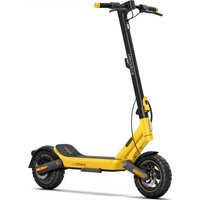
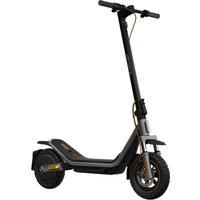
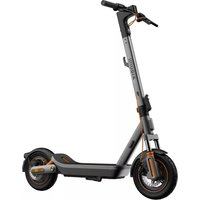
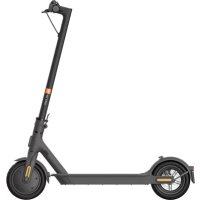
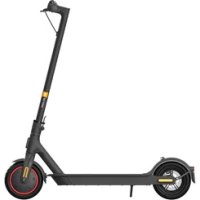
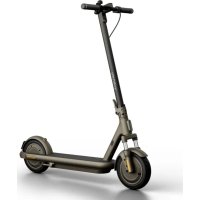
USER MANUAL Electric Scooter 6 Ultra Xiaomi
Xiaomi Electric Scooter 6 Ultra User Manual ·01
For detailed e-manual, please go to www.mi.com/global/support/user-guide.
Read this manual carefully before use, and retain it for future reference.
This appliance is not intended for use by persons (including children) with reduced physical, sensory or mental capabilities, or lack of experience and knowledge, unless they have been given supervision or instruction concerning use of the appliance by a person responsible for their safety.
Children should be supervised to ensure that they do not play with the appliance.
This vehicle is a personal electric scooter with pure electric propulsion. The scooter is intended for riders older than 16 years.
Do not ride the scooter if you suffer from reduced physical, sensorial or mental capabilities. Riders with a lack of experience or knowledge should ride carefully. Children should not play with the scooter or spare parts of it, nor should cleaning or maintenance be done by children.
Do not ride in traffic lanes or residential areas where vehicles and pedestrians are both allowed.
This electric scooter is a leisure device. However, when entering a public area, it is considered a vehicle subject to possible risks. For your own safety, please follow the instructions in the manual as well as local traffic laws and regulations.
At the same time, you should understand that risks cannot be entirely avoided as others may violate traffic regulations and ride incautiously, and you are exposed to road accidents just as when you are walking or biking. The higher the speed, the longer the stopping distance. On a smooth surface, the scooter may slip, lose balance, and even result in a fall. Be cautious when riding. Do not speed and keep a safe distance from other road users, especially when riding in unfamiliar areas.
Respect pedestrians' Right of Way. Try not to startle them while driving, especially children. When you ride from behind pedestrians, ring your bell to give them a heads-up and slow your scooter down to pass from their left, and keep to the right at a low speed while riding past them (applicable to countries where vehicles ride on the right). When you ride past pedestrians, keep the lowest speed or get off the vehicle.
Closely follow the safety instructions in the manual especially in China and countries that lack relevant laws and regulations regarding electric scooters. Xiaomi Communications Co., Ltd. shall not be liable for any financial losses, physical injuries, accidents, legal disputes and other interest conflicts resulting from actions that violate user instructions.
Riding at high speed or a speed that is not appropriate or adequate for the situation (bad weather conditions, bad surface conditions, or the like) may lead into a potential loss of stability or loss of control. To reduce any risk, you must follow all instructions in this manual. Be careful when assembling or disassembling the scooter, as it may fall over and cause injury.
- Do not lend your scooter to anyone who does not know how to operate it. And when you do lend it to your friends, please take responsibility to ensure they know how to operate it and wear the safety gear.
- Check the scooter before every use. Regularly check the tightness of the bolts, in particular the wheel axles, the folding system, the steering system, and the brake shaft. When you notice loose parts, low battery alerts, flat tires, excessive wear, strange sounds, malfunctions, or other abnormal conditions, stop riding immediately and call for professional support.
- Always park the scooter with the kickstand on an even and stable surface. The scooter must be placed with the stand against the slope to prevent it from tipping over. Never place the scooter with the front facing down the slope, as the stand may close and tip the machine. Once the scooter is on its stand, check its stability to avoid any risk of falling (due to slip, wind, or slight jolt). Do not park the scooter in a busy area, but rather along a wall. If possible, always choose to park your scooter on flat ground.
- Wear a helmet, elbow pads, and knee pads in case of a fall to avoid injury. Poor driving can lead to falls or serious accidents. Store the electric scooter indoors when not in use. Read the user manual and ride the electric scooter carefully. You should only operate the electric scooter after you have understood and applied all the safety rules. The scooter operator will be responsible for any damage or injury caused by failure to follow the instructions in the user manual. For a better driving experience, it is recommended to conduct regular maintenance of the product. Please read the user manual before charging the battery. DO NOT ride in rain or puddles. Required age of driver: 16 to 50 years. Not allowed for children.
- Do not touch the brake system, as it could cause injuries due to sharp edges. The brake may become hot in use. Do not touch after use.
- The A-weighted emission sound pressure level is less than 70 dB(A).
- The use of the machine results in the transmission of vibrations throughout the driver's body. • The mechanical vibrations transmitted by the scooter are less than 2.5 m/s². The uncertainty of measurement: 1.5 m/s².
- When the scooter starts moving, place both feet on the deck and gently press the accelerator. The accelerator can only be used when the scooter's speed exceeds the starting speed. You can set the speed at 3, 4, or 5 km/h in the Xiaomi Home app.
- To avoid inappropriate use, it is necessary to start coasting the scooter to activate the motor and the accelerator. When the scooter has stopped, the accelerator does not work.
- Accessories and any additional items which are not approved by the manufacturer shall not be used. • To ride safely, you must be able to clearly see what is in front of you and you must be clearly visible to others.
- Keep plastic covering away from children to avoid suffocation. • To prevent inappropriate use of the scooter, lock the rear wheel with a padlock when parked.
- City traffic has many obstacles to cross, such as curbs or steps. It is recommended to avoid jumping over obstacles. It is important to anticipate and adapt your trajectory and speed to those of a pedestrian before crossing these obstacles. It is also recommended to get off the vehicle when these obstacles become dangerous due to their shape, height, or slipperiness.
- Do not modify or transform the vehicle, including the steering tube and sleeve, stem, folding mechanism, and brake.
- Eliminate any sharp edges caused by use. • In all cases, take care of yourself and others.
- Turn on the headlight and slow down when riding at night.
- Make sure the folding mechanism of your scooter is working properly before riding.
- Ensure that the battery is sufficiently charged before riding. If not, recharge it.
- When passing through a place designated for pedestrians who have the right-of-way, such as a crosswalk, get off and walk alongside the scooter.
- Do not keep your feet on the rear mudguard.
- Do not use a mobile phone or wear earphones when operating the scooter.
- Do not accelerate when going downhill, and brake in time to slow down. On steep slopes, step off the scooter and push it.
- W is for walking mode, with a maximum speed of about 6 km/h; the taillight turns on when this mode is enabled. Walking mode is only for pedestrian zones. Do not use walking mode outside of pedestrian zones. D is for standard mode, with a maximum speed of about 15 km/h. S is for sport mode, with a maximum speed of about 25 km/h; it is recommended to use this mode only after mastering riding skills.
- Do not modify or repair batteries.
- Do not use the battery or charger with other electrical equipment for which they were not designed.
- Never use a charger with an output charging voltage different from the input charging voltage of the scooter or battery-operated equipment – this could cause a fire.
- If you use a charger with the wrong voltage output or have the wrong batteries in the scooter or battery-operated equipment, you could cause a fire or explosion.
- Before and after any use and before charging, check both the scooter or battery-operated equipment and charging device for any signs of damage including:
- cracked or broken parts of the case of the charger, or scooter or battery-operated equipment battery enclosure
- discolouration of the charger case or battery enclosure that may show overheating has occurred
- water ingress
- bulging of battery pack or enclosure
- damaged charger cords (cuts, exposed internal wires, severe kinks, discolouration, melting and pulled out of plugs or connectors parts).
Using scooter or battery operated equipment
- Charge during the day when you're home and alert to any signs of electrical failure.
- Follow the manufacturer's instructions for charging and use.
- Charge away from the effects of the weather, and where you can monitor the scooter or battery-operated equipment to check if anything abnormal is occurring (e.g. smoke, popping noises, flames, venting of gasses).
- Switch off the charger when the batteries for scooters, skateboards or bikes are fully charged and follow manufacturers' instructions for other battery-operated equipment (some equipment can be left on charge in their specific charging stations/devices – such as robot vacuum cleaners, other battery vacuum cleaners, electric toothbrushes). • Install and regularly test a working smoke alarm where charging occurs.
- Keep the scooter or battery-operated equipment and charger in an area clear from clutter so any heat generated during charging can safely dissipate and keep away from any flammable products like loose papers, clothes, bedding, couches or curtains.
Disposal of batteries
- Don't put rechargeable lithium-ion batteries in household rubbish, normal recycle bins or in kerbside hard waste collection.
• Students, workers, and visitors to facilities such as schools, places of work, businesses, and places of interest may start to use electric bikes, scooters, skateboards, and similar transport devices. Storing a large number of these devices together increases the potential safety risk that needs to be considered. - While storage and charging of these battery-operated devices can be performed safely, individuals in control of these locations should consider the ways they provide storage and any charging facilities for these devices. - Consider the following when assessing storage and charging facilities for e-scooters, e-bikes, and similar devices, where multiple units may be stored and charged: - Storage location:
- Choose a cool, dry, and sheltered location to store devices, while ensuring adequate ventilation.
- Avoid placing storage areas near other buildings to prevent the spread of fire if there is an incident. Keep them away from children's play areas and flammable materials.
- Building type:
- Where possible, consider using concrete or brick buildings for storage rather than timber buildings, as they pose less risk of the spread of fire if there is an incident.
- Avoid using storage areas under the building to store and charge devices if there are important functions taking place above (do not store under school classrooms or under locations where flammable materials or work processes are likely to occur). If the functions being performed above the storage area are not considered critical and under-building storage and/or charging is used, consider the building material type or adding barriers to reduce the spread of fire should any incident occur.
- Spacing and piling:
Arrange devices with sufficient spacing to prevent them from being piled up or stacked on top of each other. This will prevent the devices from overheating and reduce cascading effects if an incident occurs.
- Charging controls:
- Ensure all manufacturer-specified requirements for charging are met.
- If charging during business, work, or school hours, ensure the chargers match the specific device brand/model. Avoid using general chargers or allowing staff/students to swap chargers.
- Don't allow charging overnight or when the business/building is unoccupied (unless you have suitable safety requirements in place, including suitable locations/rooms, fire alarms, and sprinklers).
- Ensure the location is monitored if charging is occurring.
- Prohibit charging of modified devices.
- Regularly check for damage and avoid charging if any issues are identified.
- Maintain clear spaces around charging e-bikes and e-scooters to prevent overheating.
- Safety measures:
- Install smoke detectors in the storage area and consider fire sprinkler systems.
- Keep exits clear, particularly from the charging of devices.
- Restrict access to the building or location where charging occurs.
- Before accepting the devices for storing and/or charging, ensure the devices comply with the relevant safety standards.
- This appliance contains batteries that are only replaceable by skilled persons.
WARNING! Never use the product close to a water source.
WARNING! Stop using the product when damaged.
D□+ D-□-C detachable power supply part
Original instructions
Product Overview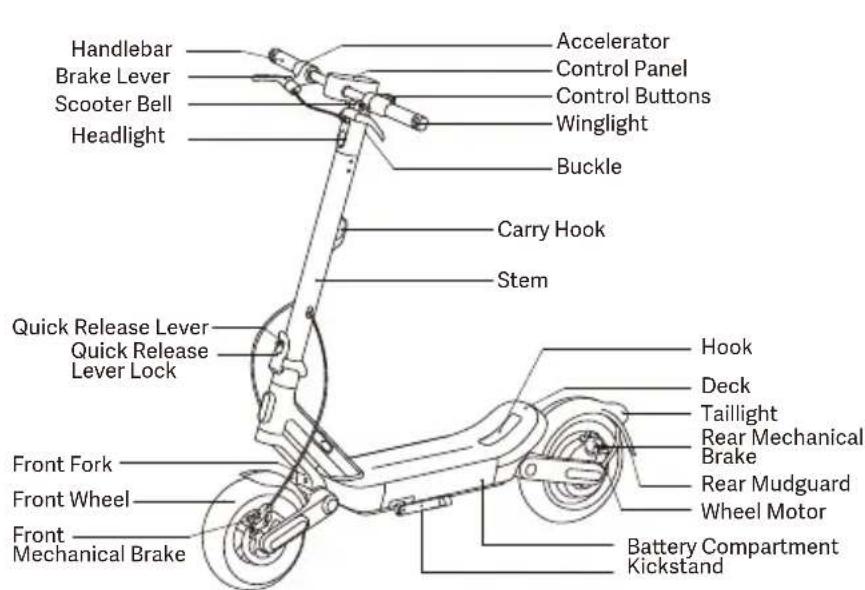
Control Panel & Control Buttons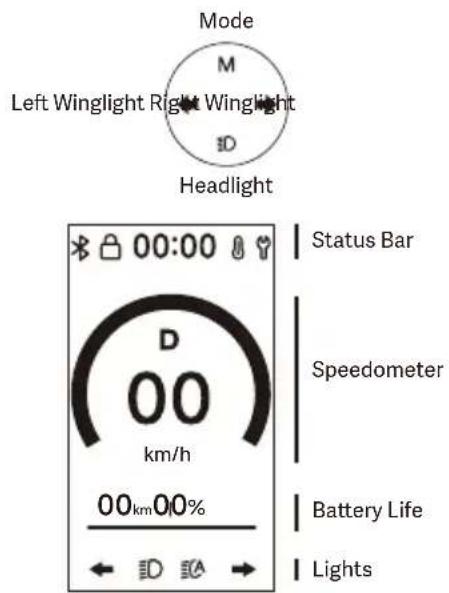
Charge Your Scooter
The scooter is fully charged when the LED on the battery charger changes from red (charging) to green (fully charged). Notes:
- Do not charge the scooter if the charging port, power adapter, or power outlet is wet.
- When the scooter is not being charged or after the charging is complete, make sure the rubber flap is inserted tightly into the charging port to prevent water from getting in.
- WARNING: Do not charge non-rechargeable batteries. Use only the DT4813CT-DM battery. Use only the NBW54D601D3D or purchase the HBCPJ01XB battery charger. Never use a non-original battery charger. The scooter's bottom cover should only be opened by professionals or qualified service center personnel. Ensure the charger is properly connected to the scooter. Charge the scooter indoors and never expose it to rain.
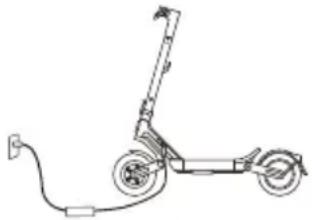


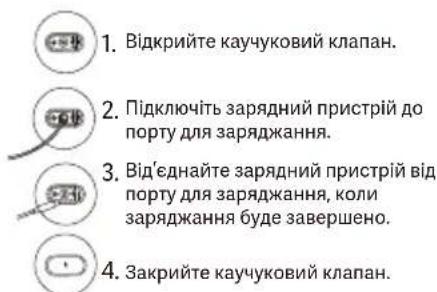
- Lift up the rubber flap.
- Connect the battery charger to the charging port.
- Disconnect the battery charger from the charging port when charging is completed.
- Put back the rubber flap.
Care & Maintenance
Cleaning and Storage
If you see stains on the scooter's body, wipe them off with a damp cloth. If the stains cannot be scrubbed off, put on some toothpaste, and brush them with a toothbrush, then wipe them off with a damp cloth.
Notes: Do not clean the scooter with alcohol, gasoline, kerosene or other corrosive and volatile chemical solvents to prevent serious damage. Do not wash the scooter with a high-pressure water spray. During cleaning, make sure that the scooter is turned off, the charging cable is unplugged, and the rubber flap is closed as water leakage may result in electric shock or other major problems.
When the scooter is not in use, keep it indoors where it is dry and cool. Do not put it outdoors for a long time. Excessive sunlight, overheating and overcooling can accelerate tire aging and compromise the scooter and the battery pack's lifespan.
Tire Maintenance
It is recommended to check the tire pressure every month, and the recommended tire pressure is 45–50 psi. Regular inflation can prolong the tire service life and effectively prevent blowouts.
The tires should be installed by a professional. Disassembling the wheels is complex, and doing it incorrectly could lead to instability of the scooter or other issues.
- Please contact an authorized repairer if the product is still under manufacturer guarantee. You can ask for the list of the authorized repairers from the customer service available at www.mi.com.
- If the product is no longer under guarantee you can contact any specialized repairer of your choice.
- Should you have questions, you can contact Xiaomi's customer service available at www.mi.com.
Battery and Charging Precautions
Do not remove the battery. Removing the battery is complicated and can alter the operation of the machine. You can contact an authorized repairer if the product is still under warranty. If the product is not under warranty, you can contact any specialized
repairer of your choice. You can ask for the list of authorized repairers from the customer service available at www.mi.com. Should you have questions, you can contact the customer service available at www.mi.com. Do not use battery packs of other models or brands, as there may be a safety risk.
Do not disassemble, squeeze, or puncture the product. Do not touch its battery contacts. Do not disassemble or poke the outer casing. Do not place the product into water or fire, nor expose it to temperatures above 50°C (including heat sources such as stoves). Avoid metal objects from touching the battery contacts, since this may result in short circuits, physical injury, or even death.
Any water getting into the battery may cause damage to the internal circuits, risk of fire, or even explosion. If there is any suspicion of water getting into the battery, immediately stop using the battery and return it to the after-sales service for inspection.
Only use the original battery charger to avoid potential damage or fire.
Improper disposal of used batteries can seriously pollute the environment. Observe local regulations when disposing of this battery pack. Do not discard this battery pack at will, to protect the natural environment.
Fully charge after every use, in order to extend its battery life.
Do not leave the scooter or the battery in an environment where the ambient temperature is higher than 45°C or lower than -20°C for an extended period of time, such as in a car under direct sunlight. Do not throw the battery pack into fire as it may lead to battery failure, battery overheating, and even another fire. If the scooter is expected to be left idle for more than 30 days, please fully charge the battery and place it in a dry and cool place. Keep in mind to recharge it every 60 days to protect the battery from potential damage, and such damage is beyond limited warranty.
The scooter shall only be used with original batteries and charging of the scooter shall only be done by the original battery charger supplied with the scooter (or any compatible battery model or battery charger model approved by the manufacturer). Always charge before exhausting the battery to prolong the battery's service life. The battery pack performs well at normal temperature, and poorly when it is below 0°C. For instance, when it is below 0°C, the riding range is only half or less at normal state. When the temperature rises, the riding range restores. For detailed information, please refer to Xiaomi Home app.
- The external flexible cable of this battery charger cannot be replaced; if the cord is damaged, the battery charger must be discarded and replaced with a new one. Should you have questions, you can contact Xiaomi's customer service at www.mi.com.
- A fully-charged scooter can remain on in standby mode for about 120 to 180 days. The built-in intelligent chip will keep a log of its charging and discharging records. Damage caused by not charging for a long time is irreversible and is beyond limited warranty. Once the damage is done, the battery cannot be recharged (non-professionals are forbidden to dismantle the battery pack, as it may cause electric shock, short circuit, or even major safety accidents).
- In case of accident, blockage, or breakdown, do not try to repair it yourself. Contact an authorized repairer if the product is still under guarantee. If not, you can contact any specialized repairer of your choice. You can ask for the list of authorized repairers from the customer service at www.mi.com. For any questions, please contact Xiaomi's customer service at www.mi.com.
Efforts have been made to simplify the wording in the user materials. When an action appears too complicated for a user, he/she is advised to contact an authorized or specialized repairer or Xiaomi's customer service.
Maintenance of the Charger
Do not maintain or repair the charger yourself, as this may cause danger. It is recommended that you use the charger according to the instructions. If you find that the charger is faulty, you can contact an authorized repairer if the product is still guaranteed. If the product is not guaranteed, you can contact any specialized repairer of your choice. You can ask for the list of authorized repairers from the customer service at www.mi.com. For any further questions, you can contact the customer service at www.mi.com.
WARNING! As with any mechanical component, a vehicle is subject to high stresses and wear. The various materials and components may react differently to wear or fatigue. If the expected service life for a component has been exceeded, it may break suddenly, therefore risking causing injuries to the user. Cracks, scratches, and discoloration in the areas subject to high stresses indicate that the component has exceeded its service life, and please contact an authorized or specialized repairer or Xiaomi's customer service.
Scooter Maintenance Schedule (Recommended):
Maintaining the scooter regularly can help keep the scooter neat and in good condition, avoid safety hazards, minimize breakdowns, slow down the deterioration of the scooter, and extend the scooter's service life.
| Item | Service Object | Actions | Every 3 months | Every 500 km/6 months | Every 1000 km/1 year | Every 3000 km/2 years |
| Tires | Tire Pressure | Inflate the tire until its pressure reaches 45–50 psi. | √√√√ | | | |
| Tire Tread Wear | Check whether the tire is cracked, deformed, worn, etc. | | √√√ | | |
| Screws | Handlebar Assembly Screws | Tighten the screws connecting the handlebar and the stem (recommended torque: 3.5 ± 0.2 N·m). | √√√√ | | | |
| Tighten the accelerator lever screw (recommended torque: 2.7 ± 0.3 N·m). | | | √ | √ |
| Tighten the brake lever screw (recommended torque: 5 ± 0.5 N·m). | | | √ | √ |
| Functions | Brake Adjustment | Notes:· Before adjusting, make sure the scooter is turned off and not charging.· If the brake is too tight, rotate the brake adjusting screw counterclockwise; if the brake is too loose, rotate the brake adjusting screw clockwise. | | √√√ | | |
| Charging | Charge the scooter at a suitable temperature. The indicator on the battery charger is red when the scooter is charging, and turns green when the scooter is fully charged. The control panel will show the charging status simultaneously during charging. | | √√√ | | |
| Steering | Turn the handlebar 45° to the left and right to make sure the turning angle is correct and the steering is free from resistance and stagnation. | | | √ | √ |
| Important Components | Battery Assembly | Fully charge the scooter before leaving it unused for a long time, and turn it on to charge every 60 days. | | | | √ |
Assembly and Set-up
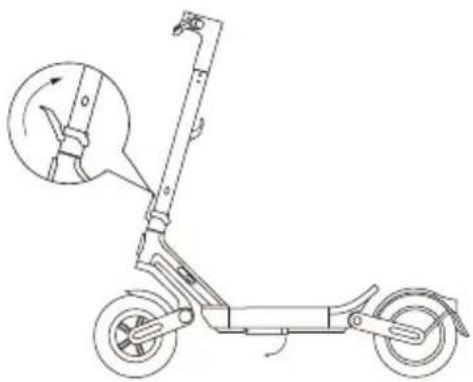
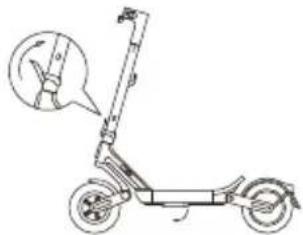
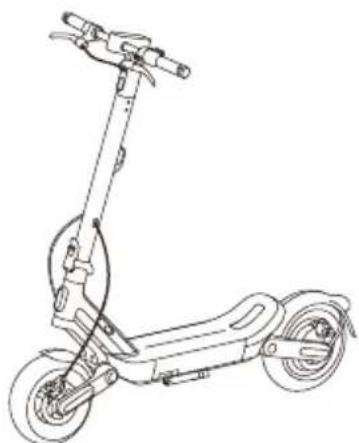
- Put down the kickstand and lift the stem until it is completely upright. Then lift the quick release lever so that it is flush against the stem.
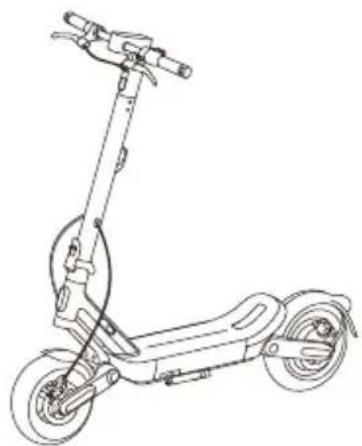
- Insert the handlebar into the stem, ensuring the handlebar is oriented correctly.
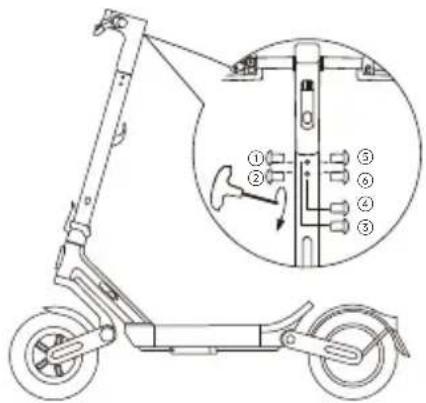
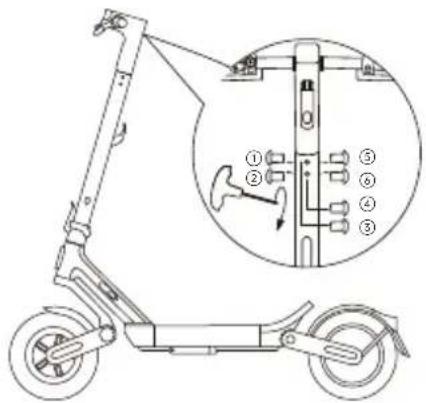
- Following the order as illustrated, use the included hex key to pre-tighten the screws, then fully secure them.
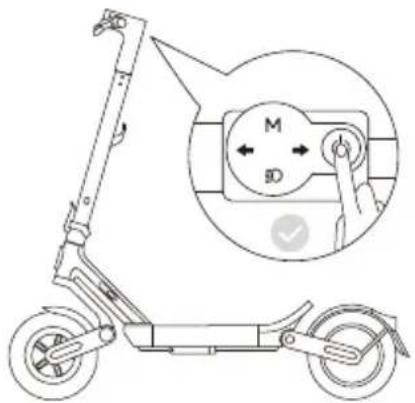
- Once the scooter is fully assembled, press the power button to turn the scooter on. Press and hold the power button for 2–3 seconds to turn it off.
Fold/Unfold & Carry
Folding
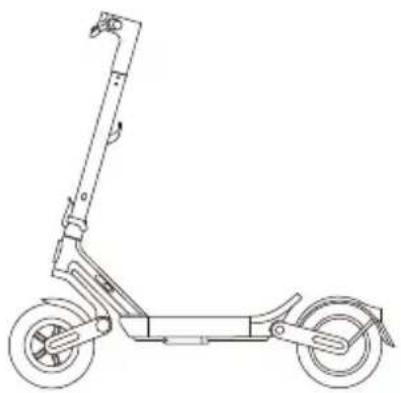
- Before folding, ensure the scooter is turned off and not charging. Hold the stem and pull out the buckle on the handlebar.
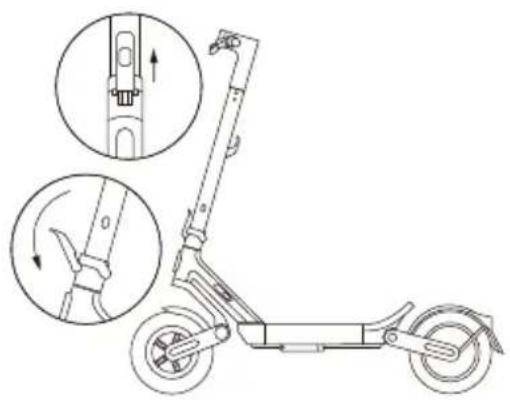
- Lift the quick release lever lock, then pull the quick release lever outward.
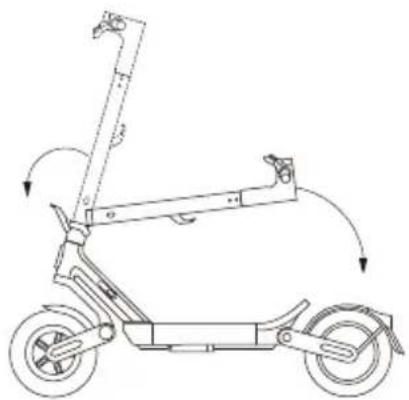
- Pull the quick release lever all the way down, then fold the stem.
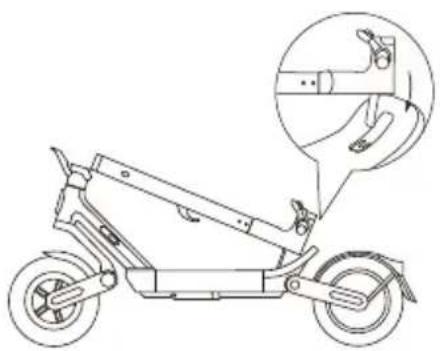
- Align the handlebar with the center of the back of the deck, then secure the buckle on the handlebar to the hook at the back of the deck.
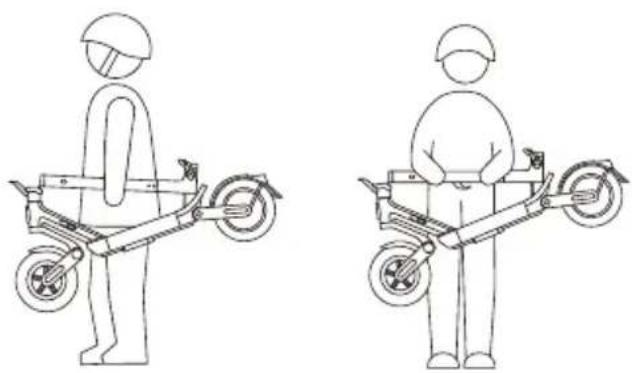
Carrying
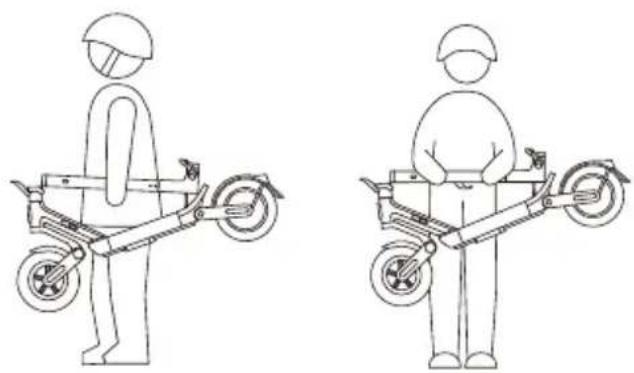
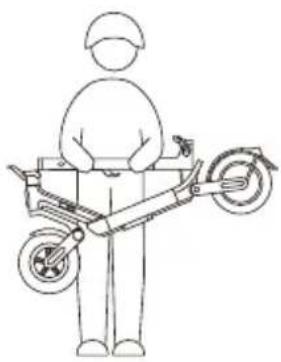
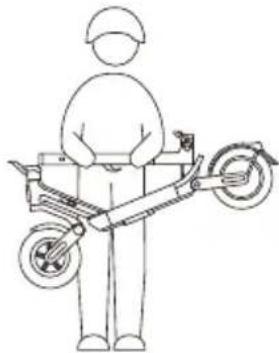
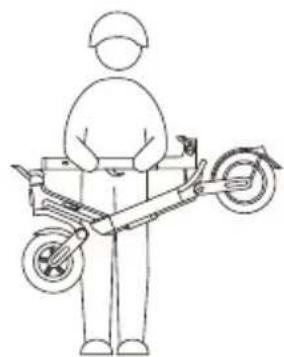
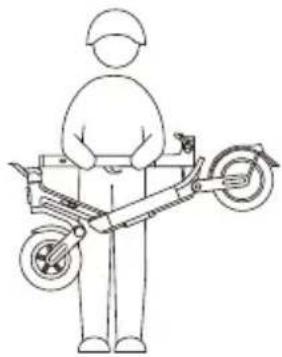
Hold the stem with either one hand or both hands to carry.
Unfolding
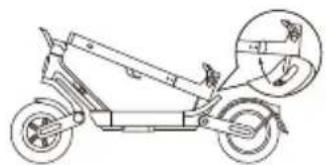
- When unfolding the scooter, gently push the buckle forward to release it from the hook.
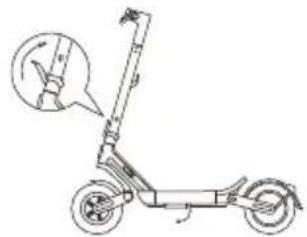
- Hold the stem and pull it upward until it stands upright. Then push the quick release lever down so that it is flush against the stem.
Apple's Find My Feature
Adding a device to the Find My app
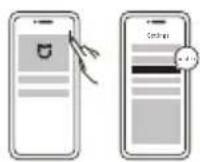
Method A:
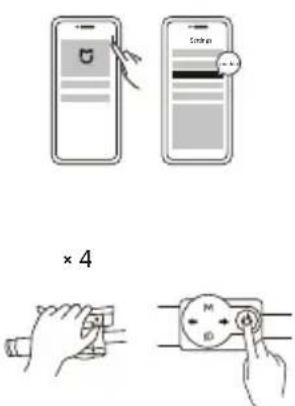
- Connect the scooter to the Xiaomi Home app.
- Go to Settings > Find My, tap Find My, and then tap Agree to enable Find My.
- Open the Find My app. Tap + > Add Other Item, then select the scooter.
- Follow the instructions to add the scooter to the Find My app.
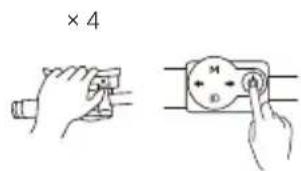
Method B:
- Open the Find My app on your iOS device. Tap + > Add Other Item.
- Turn on the scooter and unlock it, squeeze the left brake lever four times consecutively, and then press the power button once to enable pairing.
- Open the Find My app, select the scooter, and follow the instructions to add it to Find My.
Resetting
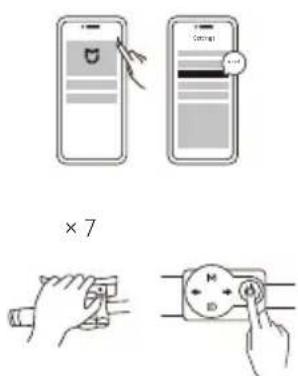
Method A:
- Open the Xiaomi Home app and connect the scooter.
- Go to Settings > Find My, tap Find My, and then tap Agree to reset Find My.
- Open the Find My app and delete the scooter manually.
Method B:
- Turn on and unlock the scooter.
- Squeeze the left brake lever seven times consecutively, and then press the power button to reset.
- Open the Find My app and delete the scooter manually.
Note: After resetting, you will no longer be able to use the Find My app to locate this scooter.
Max. Quantity of Connected Devices
Xiaomi Electric Scooter 6 Ultra can be connected to a maximum of 2 iOS devices (with same account).
SN Look up (Only for special conditions)
Any iOS user can connect to the vehicle by Apple Find My app, and then check vehicle's SN by squeezing brake lever by 5 times and pressing power button once. The SN will display on the Apple Find My app.
Enable & Disable Find My Beacon
Owner can enable & disable Find My Beacon by squeezing brake lever by 10 times and pressing power button once in unlocked status (position information).
Nearby Status and Separated Status
If the vehicle has been paired with Find My, when the owner leaves away from the vehicle or turns off the Bluetooth of his or her mobile device after a riding, the vehicle will automatically enter Nearby status after a short period of time. After a long period of time, the vehicle will enter Separated status. When owner gets close to the vehicle with the mobile device, the Bluetooth of the device will automatically connect with the vehicle and the vehicle will enter Connected status. If the vehicle is in Separated status, non-owner can connect to this vehicle via Find My app, and use the method mentioned above to check the SN. Owners can still use Find My to find the vehicle.
Firmware Update
Owner can update the firmware after connecting the electric scooter to Xiaomi Home App. Non-owner is not allowed to update the firmware.
Only users of Apple devices need to read this Apple Find My app instruction.
Use of the Works with Apple badge means that a product has been designed to work specifically with the technology identified in the badge and has been certified by the product manufacturer to meet Apple Find My network product specifications and requirements. Apple is not responsible for the operation of this device or use of this product or its compliance with safety and regulatory standards.
Apple, Apple Watch, iPad, iPadOS, iPod touch, Mac, and macOS are trademarks of Apple Inc., registered in the U.S. and other countries. IOS is a trademark or registered trademark of Cisco in the U.S. and other countries and is used under license.
Copyright Statement
We reserve all rights associated with all texts, images, photos, audios, animations, videos, layout designs, and other intellectual properties are under legal protection. They may not be reproduced for commercial use or distribution, or be used on other sites or apps after modification.
Trademark Statement
xiaomi is the trademark of Xiaomi Inc. All rights reserved. Other trademarks mentioned herein may be registered trademarks of their respective owners.
All the described functions and instructions were up to date at the time of printing this manual. However, the actual product may vary due to improved functions and design.
Manufacturer: Xiaomi Communications Co., Ltd.
Address: #019, 9th Floor, Building 6, 33 Xi'erqi Middle Road, Haidian District, Beijing, 100085, China
For details about collection, storage and use of user data, see the privacy policy of Xiaomi Inc. at https://privacy.mi.com/all
Product Statement
Familiarity with the scooter makes riding easier. So, please kindly note that:
- Read the scooter user materials carefully before riding the vehicle.
- Do not allow anyone who has not read the scooter user materials to use your scooter.
- Correctly install all parts as instructed in the user manual. Improper installation may lead to loss of control, collisions, and falls. Turn off the power before installation and maintenance. To avoid accidents when riding the scooter, make sure bolts and screws are tightened. Tighten all parts properly. If the parts are too loose or too tight, it may cause vehicle damage or malfunction.
- Do not charge the product when the socket is wet. To charge the product, insert the power cable into a correct socket (100–240 V/50–60 Hz), and keep it away from children, pets, and flammable materials.
- Do not place the battery in an environment where the ambient temperature is higher than 45°C (113°F) or lower than -20°C (-4°F).
- Do not use the battery if it is damaged, has a strange odor, emits smoke, or gets overheated. Keep a leaking battery away from other objects.
- Do not try to open or dismantle the batteries and damaged supply cord because they contain hazardous materials inside. If the supply cord is damaged, contact our after-sales service team if you are in doubt.
- Recharge the scooter in time to avoid damaging the battery. A fully-charged scooter can remain on in standby mode for about 120 to 180 days while an undercharged scooter can remain on in standby mode for about 30 to 60 days.
- Do not charge if the charging port, power adapter, or power outlet is wet. Read the user manual carefully before charging.
- When the user plugs the charger into the socket, the LED indicator on the charger will light up red, indicating that the charger is charging the electric scooter's battery. The scooter is fully charged when the LED on the charger changes from red (float charging) to green (trickle charging). At this point, you need to unplug the charger from the socket to stop charging.
WARNING: For the purposes of recharging the battery, only use the detachable supply unit provided with this appliance. Do not use a battery charger from any other product. Keep a safe distance from the surrounding combustibles when charging.
- Do not press or knock the battery and avoid serious drops or strong vibration of the battery. If these conditions occur, or liquid infiltrates into or splashes into the product, it may cause damage to the battery or circuit or short circuit. Stop using immediately and dispose of properly.
- Ask your dealer or customer service for training materials. Familiarize yourself with the scooter before riding outdoors. The more you practice, the safer you will be when riding in a new environment. Remember the following essentials: Start with the basic exercises like going forward, turning, stopping in open places without barriers (≥ 10 m × 10 m, or 32.8 ft × 32.8 ft), and keeping your body relaxed. It is advisable for you to practice for the first time under instructions of an experienced user or a coach. When you have mastered the basic skills, practice riding through narrow areas, and then turning and stopping. After you can precisely control the vehicle in narrow spaces and on various surfaces, you can start to ride on roads. If your scooter is updated, start again with the basics.
- Examine the scooter every time before you ride it. Ensure that there are no loose or damaged parts.
- Look around before and during riding and braking to avoid injury, damaging the surrounding environment, or injuring others.
- Ensure that the tire pressure is within the range specified in the parameter table. Overly high pressure will raise the risk of loss of control, collisions, and falls. Too low pressure will damage the tire.
- Check the tire pressure at least twice a month or every time you ride a long distance to avoid instability, accidents, and tire damage.
- If the tire becomes loose, stop riding immediately and check the tire.
- Check the tightness of the brake cable regularly to avoid the risk of the brakes being out of position or malfunctioning due to loose brake cables. You shall be responsible for any damage caused by improper maintenance.
- Step on the scooter from either side and wear professional protective gear. • Always wear shoes. Never ride barefoot, in high-heels or sandals.
- Do not immerse the battery or vehicle in water. Avoid long exposure to rain and do not clean the vehicle with high pressure water as water may get into the charging port. If your scooter has already been exposed to rain, use a soft, dry cloth to wipe it down. Stop using the vehicle immediately and contact the after-sales service department if any issue occurs. Do not perform other operations except wiping the body, because improper care and cleaning will void the warranty.
- Braking performance and friction between the tire and road deteriorates in wet conditions, so it is harder to control the speed and easier to lose control. Slow down and brake early when it is wet weather.
- Recharge the battery when the low-battery icon is displayed because the scooter may not have adequate power to maintain a high-speed riding.
- Keep vigilant at all times even if it is easy for you to ride the scooter. Do not go over obstacles or ride on rugged or wet roads, loose surfaces, or slopes.
- Watch out for surface changes on roads and grass.
- Be careful when turning and do not turn too fast.
- Do not take the risk of riding on steep slopes, rugged surfaces or other surfaces that you did not encounter before.
- Do not ride on motorways. Obey the traffic rules, let pedestrians go first, and never run a red light.
- Respect the rights of motorcycle drivers, cyclists, pedestrians and other people. • Take precautions during riding and be aware of your safety, traffic and pedestrians. Avoid high traffic areas or overcrowded areas.
- In any case, pay attention to your riding route and the speed while respecting the code of the road, the code of the sidewalk, and the most vulnerable road users such as pedestrians and cyclists. Be prepared to respond to any of these dangers: vehicles decelerating or turning in front of or behind you; opening car doors; people crossing the road; children and pets near the road; and distractions like potholes, manhole covers, rail lines, construction, debris, and so on.
- Ride on designated cycle tracks or the road edge if possible. Go in a direction allowed by traffic regulations or that specified by local government and laws.
- Stop when you see a stop sign or at traffic lights. Get off slowly and watch the traffic. Please keep in mind that there is a risk of colliding with other vehicles when you are riding the scooter. Allow automobiles to go first even when you are riding on your dedicated path.
- Do not seek thrills by holding onto other vehicles to get pulled along.
- This vehicle is not intended for acrobatic use.
- Do not ride in bad weather, low visibility, or after intense physical exertion.
- Do not ride alone in remote areas. Even when you are accompanied by someone else, ensure that people know your destination and the time you expect to return.
- Be aware of the height added by your helmet and by standing on your scooter. Be careful when you ride indoors, through doorways, or in other low-height places.
- Do not wear loose clothing that might get trapped in the wheel.
- Wear protective eyewear when riding to protect your eyes against dirt, dust, and insects. Use darker lenses when it is bright and clearer lenses when it is dim.
- Do not carry passengers or children. • The scooter is not a medical instrument. Do not ride the scooter if you cannot get on or off the vehicle without assistance.
- Do not ride the scooter on stairs, in elevators, or through revolving doors.
- Do not ride the scooter in low visibility conditions.
- Do not ride the scooter on highways unless it is allowed by law.
- Do not divert the use of scooter, such as to transport cargo.
- Slow down and give way to pedestrians, bicycles, and automobiles when approaching or passing through crossroads, motorways, corners, and gates.
- Remain vigilant when you ride the scooter as you do with another means of transport. Do not ride the scooter when you are ill or under the influence of alcohol or drugs.
- Do not use your phone or perform other tasks when riding because you need to be aware of your surroundings all the time.
- Note that the scooter is designed for people between the ages of 16–50. Parents are advised not to allow their minor children to ride the scooter.
- Do not make emergency stops, especially on smooth surfaces, to avoid skidding and falling.
- The vehicle may slide if it is parked and powered on, so turn the power off when you park. Do not park the scooter in no-parking areas, such as emergency exit and fire escape.
- In summer, store the scooter in a safe place where the temperature is below 45°C (113°F). Do not leave it under direct sunlight for an extended time.
- In winter, store the vehicle in a safe place where the temperature is not lower than -10°C (14°F). After storing the vehicle in sub-zero temperatures, move it to and place it in a place with room temperature for at least half an hour before charging it.
- Do not modify the scooter.
- Know and comply with the law in the place you ride the scooter.
- If your scooter needs repair or test, has errors or malfunction, or if you need to replace vehicle parts, contact our after-sales support department if you are in doubt.
- The data and parameters of the scooter vary with models, and are subject to change without notice.
- Any load attached to the handlebar will affect the stability of the vehicle.
- Switch off the vehicle or into a certain non-operational mode during charging.
- The scooter shall be used by one person only. We shall not be liable to any customer for any claims, responsibilities or losses arising from or as a consequence of the customer's violation of the preceding provisions. Riders shall be responsible for any unforeseen or unavoidable risks during riding. You may choose to accept the preceding provisions and start to use the product, or not to accept the preceding provisions and return the product. You must keep the returned product and its package in a condition that does not affect resale of the product. To resell your scooter, remember to hand this Legal Statement together to the buyer, because it is a statutory part of the vehicle. If you have any questions, please feel free to contact us. Thank you again for choosing our products.
European Union Compliance Statement
Battery recycling information for the European Union

Batteries or packaging for batteries are labeled in accordance with European Directive 2006/66/EC and amendment 2013/56/EU concerning batteries and accumulators and waste batteries and accumulators. The Directive determines the framework for the return and recycling of used batteries and accumulators as applicable throughout the European Union. This label is applied to various batteries to indicate that the battery is not to be thrown away, but rather reclaimed upon end of life per this Directive.
In accordance with the European Directive 2006/66/EC and amendment 2013/56/EU, batteries and accumulators are labeled to indicate that they are to be collected separately and recycled at end of life. The label on the battery may also include a chemical symbol for the metal concerned in the battery (Pb for lead, Hg for mercury, and Cd for cadmium). Users of batteries and accumulators must not dispose of batteries and accumulators as unsorted municipal waste, but use the collection framework available to customers for the return, recycling, and treatment of batteries and accumulators. Customer participation is important to minimize any potential effects of batteries and accumulators on the environment and human health due to the potential presence of hazardous substances.
Before placing electrical and electronic equipment (EEE) in the waste collection stream or in waste collection facilities, the end user of equipment containing batteries and/or accumulators must remove those batteries and accumulators for separate collection.
Waste Electrical and Electronic Equipment (WEEE) Directive

All products bearing this symbol are waste electrical and electronic equipment (WEEE as in Directive 2012/19/EU) which should not be mixed with unsorted household waste. Instead, you should protect human health and the environment by handing over your waste equipment to a designated collection point for the recycling of waste electrical and electronic equipment, appointed by the government or local authorities. Correct disposal and recycling will help prevent potential negative consequences to the environment and human health. Please contact the installer or local authorities for more information about the location as well as terms and conditions of such collection points.
Restriction of Hazardous Substances Directive (RoHS)
This Xiaomi Communications Co., Ltd. product, with included parts (cables, cords, and so on) meets the restriction of the use of certain hazardous substances in electrical and electronic equipment 2011/65/EU Annex II and its amendment Directive (EU) 2015/863.

This device meets the EU requirements on the limitation of exposure of the general public to electromagnetic fields by way of health protection.
Hereby, Xiaomi Communications Co., Ltd. declares that the radio equipment type: DDHBC01XB is in compliance with Directive 2014/53/EU and 2006/42/EC. The full text of the EU declaration of conformity is available at the following https://www.mi.com/global/support/terms/declaration.
The scooter contains a rechargeable lithium-ion battery pack, and improper disposal of these batteries will cause harm to the environment. Follow the steps below to remove the batteries before disposing of the scooter and discard the batteries properly
- Before removing the batteries, it is better to use them up and make sure the scooter is disconnected from power. Then unscrew the bottom cover of the scooter to remove it.
- Unplug the battery connector, and then remove the batteries. Do not damage the battery case to avoid any risk of injuries.
- Discard the removed batteries at a professional recycling facility.
Troubleshooting
| Error Code | Error Description Solution | on | Relevant Part |
| 10 | Control panel communication error | The scooter cannot be ridden normally. Try restarting it. If the issue persists, contact the after-sales service team. | Control panel |
| 11 | Controller error | The scooter cannot be ridden normally for the time being due to controller overload, please use the scooter after the error icon disappears. | Controller |
| 21 | Battery error | The scooter cannot be ridden normally. Try restarting it. If the issue persists, contact the after-sales service team. | Battery |
| 12 | Controller error | The scooter cannot be ridden normally. Try restarting it. If the issue persists, contact the after-sales service team. | Controller |
| 28 |
| 29 |
| 40 |
| 45 | Overheated | The scooter cannot be ridden normally. Try restarting it, and use after the error icon disappears. | Controller; Motor |
| 18 | Motor locked | The scooter cannot be ridden normally. Try restarting it. If the issue persists, contact the after-sales service team. | Motor |
| 14 | Accelerator error | Please check if the accelerator has returned to the original position, otherwise the scooter cannot be ridden normally. If the error persists after getting the accelerator back in place, it indicates a loose or damaged accelerator cable. Please contact the after-sales service team for detection and repair in time. | Accelerator |
| 15 | Left brake lever cable error | Please check if the brake lever has returned to the original position, otherwise the scooter cannot be ridden normally. If the error persists after getting the brake lever back in place, it indicates a loose or damaged brake lever cable. Please contact the after-sales service team for detection and repair in time. | Left brake lever cable |
| 16 | Right brake lever cable error | Please check if the brake lever has returned to the original position, otherwise the scooter cannot be ridden normally. If the error persists after getting the brake lever back in place, it indicates a loose or damaged brake lever cable. Please contact the after-sales service team for detection and repair in time. | Right brake lever cable |
| 24 | Battery errorTurning off soon | If the scooter is in use, the speed will gradually reduce to 0.Try restarting it. If the issue persists, replug the charger. | Battery |
| 39 |
| 53 |
| 59 |
| 61 |
| 58 | Battery error | If the issue occurs during charging, unplug the charger, check whether the charger or charging cable is damaged, and then try again with a compatible charger or charging cable. | Battery |
| 54 | High battery temperature | Charging paused due to high temperature. Resume when temperature drops below 40°C. | Battery |
| 55 | Low battery temperature | Charging paused due to low temperature. Resume when temperature rises above 8°C. | Battery |
| 56 | High battery temperature | Ride after temperature returns to normal. | Battery |
| 71 | High battery temperatureTurning off soon | Ride after temperature returns to normal. | Battery |
| 57 | Low battery temperature | Ride after temperature returns to normal. | Battery |
| 72 | Low battery temperatureTurning off soon | Ride after temperature returns to normal. | Battery |
Safety Warning
CAUTION
Danger! Read user manual before use.
CAUTION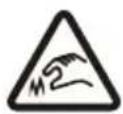
Sharp Edges. Do not touch the sharp edges or corner.
CAUTION CAUTION
Do not disassemble battery cover, hazardous energy inside.
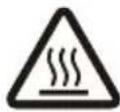
Hot Surface! Do not touch the surface near this symbol.
WARNING WARNING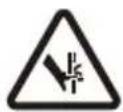
Pinch Point Crush Hazard
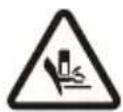
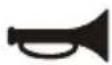
Audible warning to alert people
WARNING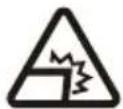
Sharp Parts
Do not adjust the brake too tight. Light

For indoor use only.

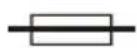
Fuse-link

The appliance is intended to be usable up to the maximum altitude of 5000 m.
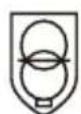
SMPS incorporating a short-circuit-proof safety isolating transformer (inherently or non-inherently)

SMPS (Switch mode power supply unit)
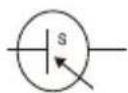
To indicate that the power supply unit shall not be used, if pins of the plug part are damaged.
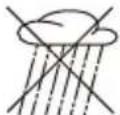
Do not expose to moisture.

Russia Approval


To reduce the risk of injury, user must read instruction manual
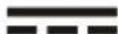
Direct Current

Battery Recycling

Class II Equipment

GOST Certification in Russia
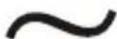
Alternating Current
Warranty Notice
As a Xiaomi consumer, you benefit under certain conditions from additional warranties. Xiaomi offers specific consumer warranty benefits which are in addition to, and not instead of, any legal warranties provided by your national consumer law. The duration and conditions related to the legal warranties are provided by respective local laws. For more information about the consumer warranty benefits, please refer to Xiaomi's official website https://www.mi.com/global/support/warranty. Except as prohibited by laws or otherwise promised by Xiaomi, the after-sales services shall be limited to the country or region of the original purchase. Under the consumer warranty, to the fullest extent permitted by law, Xiaomi will, at its discretion, repair, replace or refund your product. Normal wear and tear, force majeure, abuse or damage caused by the user's negligence or fault are not warranted. The contact person for the after-sale service may be any person in Xiaomi's authorized service network, Xiaomi's authorized distributors or the final vendor who sold the products to you. If in doubt please contact the relevant person as Xiaomi may identify.
The present warranties do not apply in Hong Kong and Taiwan.
Products which were not duly imported and/or were not duly manufactured by Xiaomi and/or were not duly acquired from Xiaomi or a Xiaomi's official seller are not covered by the present warranties. As per applicable law you may benefit from warranties from the non-official retailer who sold the product. Therefore, Xiaomi invites you to contact the retailer from whom you purchased the product.
Disclaimer
The user materials are published by Xiaomi or its local affiliated company. Improvements and changes to the materials necessitated by typographical errors, inaccuracies of current information, or improvements to programs and/or equipment, may be made by Xiaomi at any time and without notice. Such changes will, however, be incorporated into new online editions of the user materials (please see details at https://www.mi.com/global/support/user-guide). All illustrations are for illustration purposes only and may not accurately depict the actual device.


Address: #019, 9th Floor, Building 6, 33 Xi'erqi Middle Road, Haidian District, Beijing, 100085, China

Method A:
Address: #019, 9th Floor, Building 6, 33 Xi'erqi Middle Road, Haidian District, Beijing, 100085, China


Address: #019, 9th Floor, Building 6, 33 Xi'erqi Middle Road, Haidian District, Beijing, 100085, China
Anju West Road, Huzhen Town, Jinyun County, Lishui City, Zhejiang Province, P.R. China
Anju West Road, Huzhen Town, Jinyun County, Lishui City, Zhejiang Province, P.R. China
To view the detailed manual online, visit https://www.mi.com/global/support/user-guide.

- When unfolding the scooter, gently push the buckle forward to release it from the hook.
Method A:
Address: #019, 9th Floor, Building 6, 33 Xi'erqi Middle Road, Haidian District, Beijing, 100085, China

Address: #019, 9th Floor, Building 6, 33 Xi'erqi Middle Road, Haidian District, Beijing, 100085, China

Care and maintenance
Address: #019, 9th Floor, Building 6, 33 Xi'erqi Middle Road, Haidian District, Beijing, 100085, China


Care and maintenance
- Lower the parking foot and raise the handlebar until it is fully upright. Then lift the quick-release lever so that it rests against the handlebar.
- Insert the scooter handlebar into the stem, making sure it is correctly oriented.
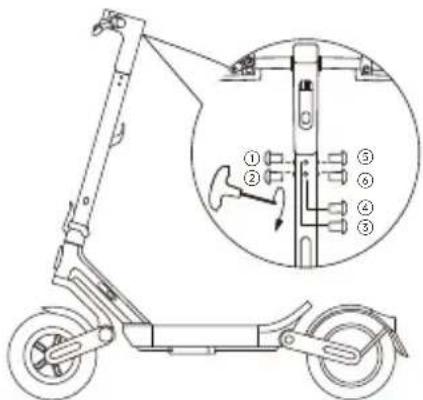
- Following the order shown, use the provided hex key to tighten the screws, then fully secure them.
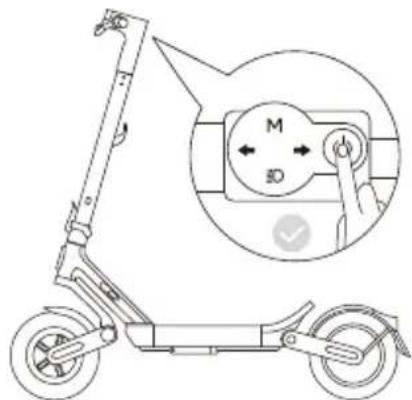
- Before folding, make sure the scooter is turned off and not charging. Hold the stem and pull out the buckle on the scooter handlebar.
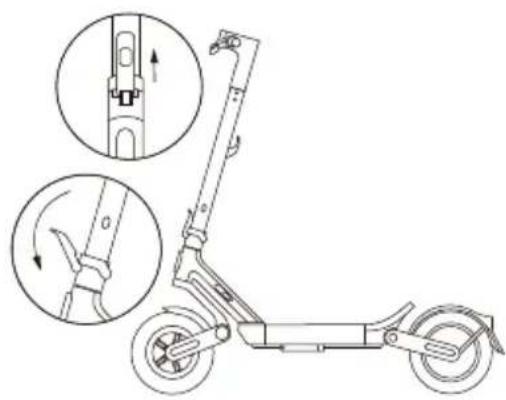
- Lift the lock of the quick-release lever, then pull the quick-release lever outward.
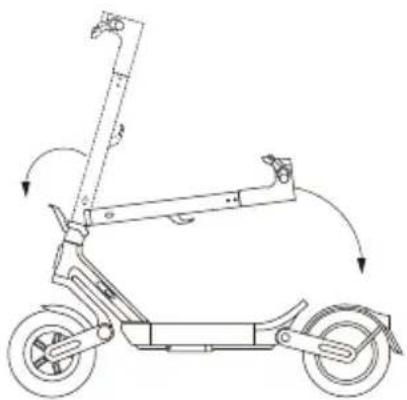
- Fully pull the quick-release lever down, then fold the handlebar.
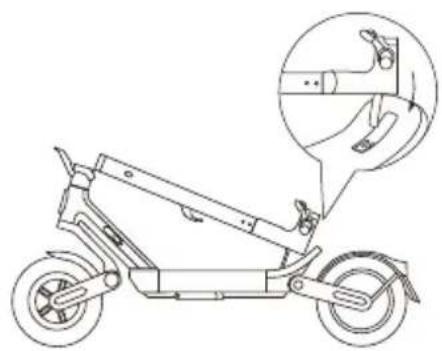
- Align the scooter handlebar with the center of the rear part of the platform, then hook the clasp from the scooter handlebar onto the hook on the rear part of the platform.
Carrying
- Hold the handlebar and pull it up until it is upright. Then press the quick-release lever down to fit against the handlebar.
Address: #019, 9th Floor, Building 6, 33 Xi'erqi Middle Road, Haidian District, Beijing, 100085, China
Personal Data Statement
For more information about the collection, storage, and use of user data, please refer to the privacy policy of Xiaomi Inc. at https://privacy.mi.com/all
Product Declaration


Care and Maintenance
Cleaning and Storage
If you see stains on the scooter body, wipe them with a damp cloth. If the stains cannot be rubbed off, apply toothpaste and brush them with a toothbrush, then wipe them with a damp cloth.
- Lower the stand and raise the stem until it is fully upright. Then lift the quick-release lever so that it is flush with the stem.
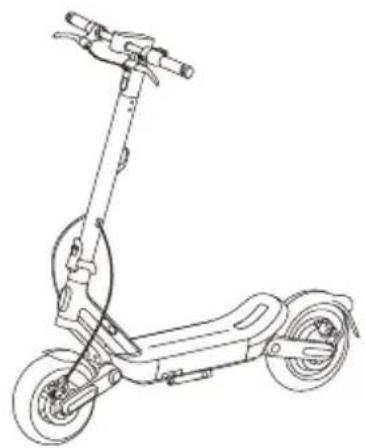
- Insert the handlebar into the stem, making sure the handlebar is correctly oriented.
- Before folding, make sure the scooter is turned off and not charging. Firmly hold the stem and pull out the clasp on the handlebar.
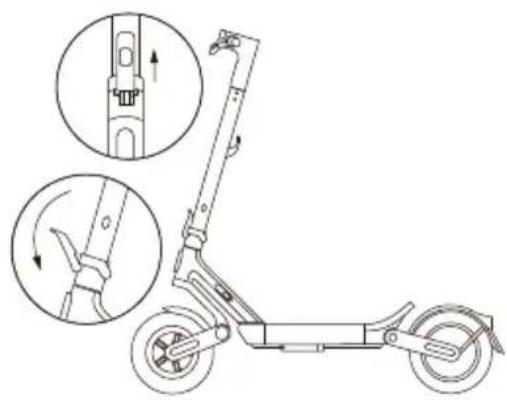
- Lift the lock of the quick-release lever and pull the quick-release lever outward.
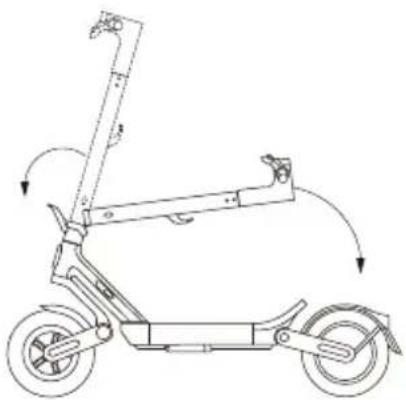
- Pull the quick-release lever all the way out, then fold the stem.
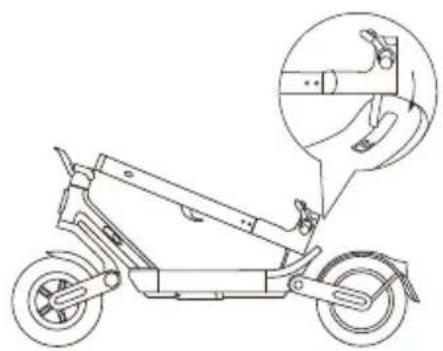
Hold the stem with one hand or both hands for carrying.
Unfolding
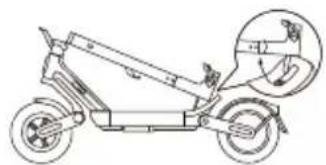
- Hold the stem firmly and pull it upward until it is upright. Then push the quick-release lever down so that it is flush with the stem.
Apple Find My feature
Adding the device to the Find My app
Method A:
- Connect the scooter to the Xiaomi Home app.
- Go to Settings: > Find My, tap Find My, and then tap Agree to enable Find My.
- Open the Find My app. Tap + > Add Another Item Ⓞ, and then select the scooter.
- Follow the instructions to add the scooter to the Find My app.
Method B:
Method A:
- Open the Xiaomi Home app and connect the scooter.
- Go to Settings: > Find My, tap Find My, and then tap Agree to reset Find My.
- Open the Find My app and manually delete the scooter. Method B:
- Turn on the scooter and unlock it.
- Press the left brake lever seven times in a row, then press the power button to reset.
- Open the Find My app and manually delete the scooter.
Address: #019, 9th Floor, Building 6, 33 Xi'erqi Middle Road, Haidian District, Beijing, 100085, China


Address: #019, 9th Floor, Building 6, 33 Xi'erqi Middle Road, Haidian District, Beijing, 100085, China

Method A:
Address: #019, 9th Floor, Building 6, 33 Xi'erqi Middle Road, Haidian District, Beijing, 100085, China


Address: #019, 9th Floor, Building 6, 33 Xi'erqi Middle Road, Haidian District, Beijing, 100085, China


Care and maintenance
Address: #019, 9th Floor, Building 6, 33 Xi'erqi Middle Road, Haidian District, Beijing, 100085, China

- Lift the rubber cover.

- Connect the battery to the charging port.

Address: #019, 9th Floor, Building 6, 33 Xi'erqi Middle Road, Haidian District, Beijing, 100085, China


Address: #019, 9th Floor, Building 6, 33 Xi'erqi Middle Road, Haidian District, Beijing, 100085, China

Address: #019, 9th Floor, Building 6, 33 Xi'erqi Middle Road, Haidian District, Beijing, 100085, China
Address: #019, 9th Floor, Building 6, 33 Xi'erqi Middle Road, Haidian District, Beijing, 100085, China
For further information, please go to www.mi.com
Manufacturer: Xiaomi Communications Co., Ltd.
Address: #019, 9th Floor, Building 6, 33 Xi'erqi Middle Road, Haidian District, Beijing, 100085, China
Made in China
Manufacturer: Xiaomi Communications Co., Ltd.
Address: #019, 9th Floor, Building 6, 33 Xi'erqi Middle Road, Haidian District, Beijing, 100085, China
Made in China
Address: #019, 9th Floor, Building 6, 33 Xi'erqi Middle Road, Haidian District, Beijing, 100085, China
Address: #019, 9th Floor, Building 6, 33 Xi'erqi Middle Road, Haidian District, Beijing, 100085, China
Made in China
Address: #019, 9th Floor, Building 6, 33 Xi'erqi Middle Road, Haidian District, Beijing, 100085, China
Made in China
Address: #019, 9th Floor, Building 6, 33 Xi'erqi Middle Road, Haidian District, Beijing, 100085, China
Made in China
Address: #019, 9th Floor, Building 6, 33 Xi'erqi Middle Road, Haidian District, Beijing, 100085, China
Address: #019, 9th Floor, Building 6, 33 Xi'erqi Middle Road, Haidian District, Beijing, 100085, China
Made in China
Detailed information available at www.mi.com
Manufacturer: Xiaomi Communications Co., Ltd.
Address: #019, 9th Floor, Building 6, 33 Xi'erqi Middle Road, Haidian District, Beijing, 100085, China
Made in China
Address: #019, 9th Floor, Building 6, 33 Xi'erqi Middle Road, Haidian District, Beijing, 100085, China
Place of manufacture: China
Address: #019, 9th Floor, Building 6, 33 Xi'erqi Middle Road, Haidian District, Beijing, 100085, China
Address: #019, 9th Floor, Building 6, 33 Xi'erqi Middle Road, Haidian District, Beijing, 100085, China
Made in China
Address: #019, 9th Floor, Building 6, 33 Xi'erqi Middle Road, Haidian District, Beijing, 100085, China
Made in China
Address: #019, 9th Floor, Building 6, 33 Xi'erqi Middle Road, Haidian District, Beijing, 100085, China
Made in China
Address: #019, 9th Floor, Building 6, 33 Xi'erqi Middle Road, Haidian District, Beijing, 100085, China
Made in China
Address: #019, 9th Floor, Building 6, 33 Xi'erqi Middle Road, Haidian District, Beijing, 100085, China
Made in China
Address: #019, 9th Floor, Building 6, 33 Xi'erqi Middle Road, Haidian District, Beijing, 100085, China
Made in China
EU REP.
Xiaomi Technology Netherlands B.V.
E5, WTC The Hague, Prinses Beatrixlaan 582, 2595 BM, The Hague, The Netherlands
contact@support.mi.com
UK REP.
Xiaomi Technology UK Limited
Us & Co Stratford Floor Br40-11-12-13-14, 11 Burford Road, London, England, E15 2ST
contact@support.mi.com
ES REP
Xiaomi Technology Spain S.L
PASEO CASTELLANA, 259-C TORRE DE CRISTAL, PLANTA 29, MADRID, 28046.
ID REP
PT. Xiaomi Communications Indonesia
One Pacific Place, Suite 9-H,I,J,K, Jalan Jenderal Sudirman Kav. 52-53 Lot, 3 & 5, Kota Adm. Jakarta Selatan,
User Manual Version: V1.0
Original instructions
www.mi.com
www.mi.com/global/support/user-guide
PAP
131001-0405 V1.0
Finished size: 140*140mm
Binding method: glue binding