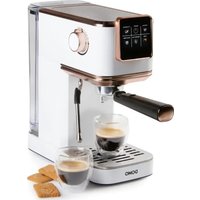
DO1178K - Coffee machine DOMO - Free user manual and instructions
Find the device manual for free DO1178K DOMO in PDF.


| Product Type | Espresso coffee machine |
| Brand | DOMO |
| Model | DO1178K |
| Power Supply | 220-240 V ~ 50/60 Hz |
| Main Functions | Espresso, Lungo, Double Espresso, Iced Coffee, Steam for milk froth, Hot water |
| Pod Compatibility | E.S.E. pods and Nespresso®/Starbucks® capsules |
| Descaling | Automatic with indicator light (every 2 to 4 weeks) |
| Maintenance | Removable parts washable with hot water (not dishwasher safe) |
| Included Accessories | Scoop with tamper, portafilter, 2 filters (small and large), pod holder, capsule holder, retaining clip |
| Warranty | 2 years |
| Certifications | Compliant with European safety, health and environment standards |
Frequently Asked Questions - DO1178K DOMO
User questions about DO1178K DOMO
0 question about this device. Answer the ones you know or ask your own.
Ask a new question about this device
Download the instructions for your Coffee machine in PDF format for free! Find your manual DO1178K - DOMO and take your electronic device back in hand. On this page are published all the documents necessary for the use of your device. DO1178K by DOMO.
USER MANUAL DO1178K DOMO
natural_image
Modern white and copper-colored espresso machine with glass cups and digital display (no visible text or symbols)NL Handleiding Espressomachine
EN Instruction booklet Espresso machine
Read all instructions carefully.
Save this instruction manual for future reference.
⚠PRODUCTSPECIFIEKE WAARSCHUWINGEN
BEDIENING
flowchart
graph LR
    A["1: Stover, Air, Gas"] --> B["2: Presser, Hand Press"]
    B --> C["3: Reaction vessel with lid, Pump, Valve"]
    C --> D["4: Down valve, Valve with lid, Pump, Valve"]
    D --> E["5: Process valve with lever, Valve with lid, Valve"]
Tips
natural_image
Line drawing of a glass beaker with ice cubes and a hand pouring liquid from it (no text or symbols)KOFFIE MET PODS
De podhouder is compatibel met Easy Serving Espresso Pods (E.S.E.-pods).
natural_image
Line drawing of a microwave oven with lid and base components (no text or symbols)KOFFIE MET CAPSULES
STOOMPIJPJE

natural_image
Simple line drawing of a mechanical component with an arrow indicating direction (no text or symbols)HEETWATERFUNCTIE
REINIGING EN ONDERHOUD
natural_image
Symbol of a trash bin crossed out by two crossed lines, with a solid black rectangle below (no text or labels)⚠AVERTISSEMENTS SPÉCIFIQUES AU PRODUIT
PANNEAU DE COMMANDE
AVANT LA PREMIÈRE UTILISATION
natural_image
Simple line drawing of a container with a piping bag (no text or symbols)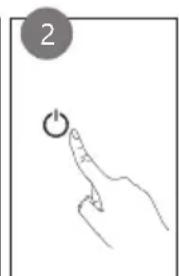
natural_image
Hand holding a finger pressing a button with an 'Power' icon (no text or symbols present)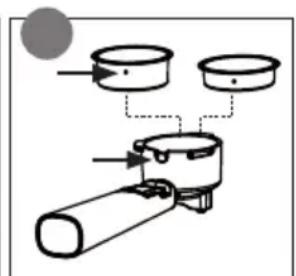
natural_image
Diagram of two identical mechanical devices with directional arrows indicating motion or movement (no text or symbols)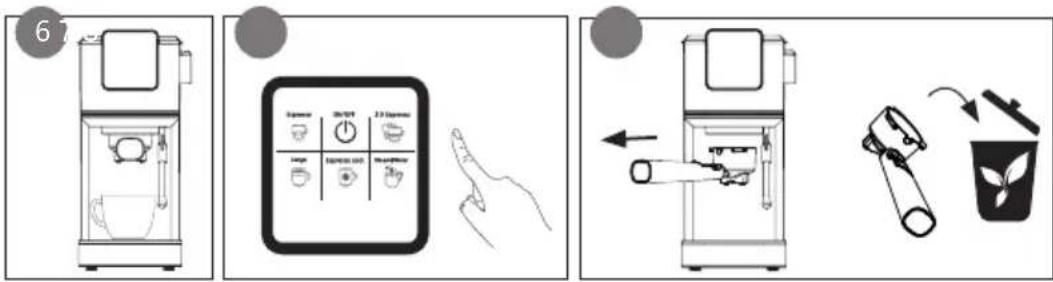
Conseils
natural_image
Line drawing of a beverage container with ice cubes and a hand pouring liquid (no text or symbols)CAFÉ EN DOSETTES
natural_image
Line drawing of a microwave oven with lid and base components (no text or symbols)CAFÉ EN CAPSULES
TUYAU DE VAPEUR
natural_image
Simple line drawing of a mechanical component with an arrow indicating direction (no text or symbols)FONCTION EAU CHAUDE
NETTOYAGE ET ENTRETIEN
natural_image
Symbol of a trash bin with crossed lines indicating no waste or discharge, and a solid black rectangle below (no text or labels)BEDIENFELD
flowchart
graph LR
    A["1: Stover, Air, Heat"] --> B["Step 1: Pressing down steam"]
    B --> C["Step 2: Hand presser, presser, valve"]
    C --> D["Step 3: Pressing into pot, valve, and tray"]
    D --> E["Step 4: Valve assembly, valve, and tray"]
    E --> F["Step 5: Valve assembly, valve, and tray"]
    F --> G["Final processing unit"]
Tipps
natural_image
Line drawing of a glass beaker with ice cubes and a hand pouring liquid (no text or symbols)KAFFEE MIT PODS
natural_image
Line drawing of a kitchen appliance with three components stacked vertically (no text or symbols)KAFFEE MIT KAPSELN
DAMPFDÜSE
natural_image
Simple line drawing of a mechanical component with an arrow indicating direction (no text or symbols)HEISSWASSERFUNKTION
Phase 2: Spülen
Thank you very much for placing your trust in DOMO. We hope you enjoy your new purchase.
All our products undergo strict quality control before reaching you. If you still experience any problems with your device, we sincerely regret that. We have collected the most frequently asked questions about our devices on our webshop. Scan the QR code and have a look!

If you cannot find a solution to your problem there, do not hesitate to contact our customer service via info@linea2000.be. Our staff will do everything they can to assist you!
This device has a warranty period of 2 years from the date of purchase. During this warranty period, the distributor will assume responsibility for any defects that can be shown to be the result of material, construction or manufacturing errors. Such defects will be remedied by repair or replacement of the device. The 2-year warranty period will be suspended during the repair period and will continue after the repair has taken place for the remaining duration of the warranty period. The warranty will be honoured if proof of purchase clearly showing the date of purchase is provided. If your device becomes defective within the 2-year warranty period, please return it with your proof of purchase to the store you purchased it from or follow the procedure of the relevant webshop if you bought it online.
The warranty does not cover damage to the device, accessories or parts caused by:
• normal wear and tear from use;
• non-compliance with the instructions for use, maintenance and cleaning in the manual;
- incorrect connection, e.g. electrical voltage too high;
- incorrect, heavy-handed or abnormal use;
• repairs or alterations carried out by the consumer or unauthorised third parties;
- use of parts or accessories not recommended nor supplied by the distributor.
SAFETY INSTRUCTIONS
When using electrical appliances, basic safety precautions should always be taken, including the following. Any injury or damage caused by failure to comply with these rules are at your own risk. Neither the manufacturer, importer, or the supplier may be held liable.
- Read all instructions carefully.
• Make sure all packaging materials and promotional stickers have been removed before using the appliance for the first time. Make sure children cannot play with the packaging materials. -
This appliance is only suitable for use in domestic and similar environments, such as:
-
staff kitchen areas in shops, offices and other working environments;
- farm houses;
- by clients in hotels, motels and other residential type environments;
• bed and breakfast type environments.
• Children should be supervised to ensure that they do not play with the appliance.
- This appliance can be used by children aged from 16 years and above and persons with reduced physical, sensory or mental capabilities or lack of experience and knowledge if they have been given supervision or instruction concerning use of the appliance in a safe way and understand the hazards involved.
• Children shall not play with the appliance.
- Cleaning and user maintenance shall not be made by children unless they are older than 16 or supervised.
- Keep the appliance and its cord out of reach of children younger than 16 years.
- All repairs should be carried out by the manufacturer or its aftersales service.
▲ELECTRICAL WARNINGS
- In order to avoid a hazard this appliance must not be supplied through an external switching device, such as a timer or a
separate remote control, or connected to a circuit that is regularly switched on and off by the utility.
- The appliance must be disconnected from its power source when not in use, during service and when replacing parts. If present, first turn all the buttons to the 'off' position, then pull the plug out of the socket by grasping the plug itself. Never pull the cord or appliance to remove the plug from the socket.
- Before use, check carefully that the electric tension and frequency of the power net at your home match the indications on the rating label of the appliance.
- The appliance must be plugged into an appropriate outlet that is installed and grounded in accordance with local installation regulations.
- Do not let the power supply cord hang over the edge of a counter, or touch hot surfaces.
- Keep the power cord away from hot parts and don't cover the appliance.
- Unwrap the cord completely to prevent overheating of the cord. Do not allow the power cord supply to run underneath or around the unit.
- For safety reasons, never use the appliance if the cord, plug, or appliance itself is damaged, or after a malfunction of the appliance. Return the appliance to the DOMO Service Department or its service agent for examination, repair, or electrical or mechanical adjustment. Do not try to repair the appliance yourself.
⚠️INSTALLATION
- Do not place near flammable materials, gases or explosives.
- Do not use or store this appliance outdoors.
• Always use the appliance on a steady, dry and level surface.
- Never place this appliance near a gas stove or electrical stove or in a place where it may come into contact with a warm appliance.
⚠ USE
- Do not use this appliance for other than intended use.
- Never leave the appliance unattended while it is functioning.
- Do not operate the appliance with wet hands.
- The use of accessories that are not recommended or sold by the manufacturer can cause fire, electrical shock or injuries. Only use the utensils delivered with the appliance.
⚠ CLEANING AND MAINTENANCE
- To protect against electrical shock or burns, do not immerse unit, cord, or plug in water or other liquid.
- Failure to maintain this appliance in a clean condition could adversely affect the life of the appliance and possibly result in a hazardous situation.
⚠PRODUCTSPECIFIC WARNINGS
- Do not overfill the appliance. Never add water above the maximum level marked on the water tank.
- Do not spill any liquid on the connector.
- Do not move the appliance while in use or when still hot. Allow to cool before moving the appliance.
- Do not remove the portafilter or the water reservoir while making coffee or steaming milk.
- Caution should also be taken while removing the porta-filter since the metal parts will be hot.
- The steam from the steam nozzle is hot. Be careful not to get burned.
- Only touch the appliance by its buttons and handles. Other surfaces may become hot during use.
- Never use the appliance without water.
- Turn off the appliance before removing the water reservoir.
- The top of the appliance can be used as a cup warmer. This plate gets hot when in use. Do not touch it.
- Do not place the unit in a cabinet when in use.
SAVE THESE INSTRUCTIONS FOR FUTURE REFERENCE
All images and descriptions in this manual are purely indicative and may differ slightly from the actual device.
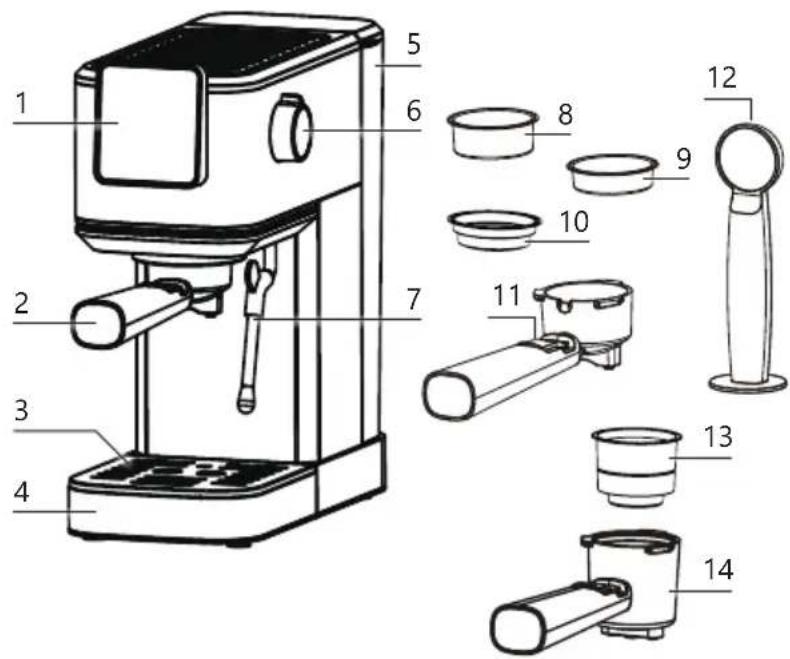
PARTS
- Control panel
- Portafilter
- Drip tray grille
- Drip tray
- Water reservoir
- Rotary knob (steam/water)
- Steam nozzle
- Large filter
- Small filter
- Pod holder
- Retainer clip portafilter
- Measuring scoop with tamper
- Capsule holder
- Capsule portafilter
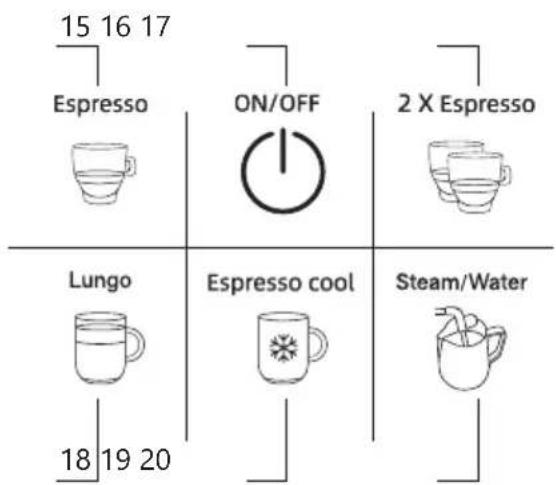
CONTROL PANEL
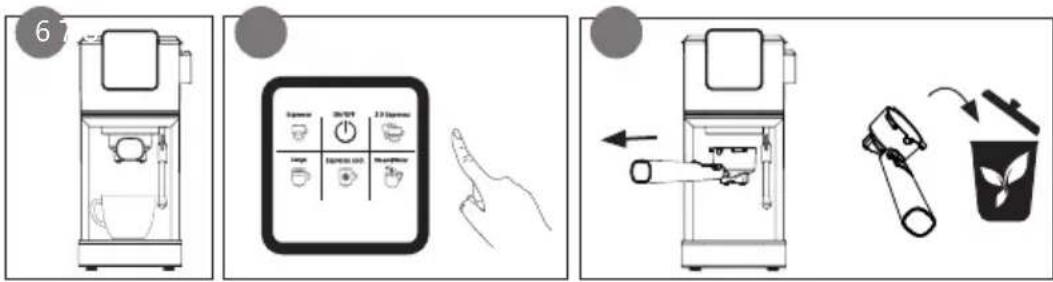
- Espresso button
- On/off button
- Dual espresso button
- Lungo button
- Iced coffee "Espresso cool" button
- Steam/hot water button
BEFORE THE FIRST USE
- Remove all packaging materials and any promotional stickers.
- Check that all accessories for the device are present and that the unit is not damaged.
- Flush out the pipes. First, allow the water to run through without adding ground coffee to the filter of the portafilter. See section: 'use/coffee'. Afterwards, throw away the water.
- Flush out the steam nozzle. See section: 'use/hot water feature'. Afterwards, throw away the water.
- Clean all parts with a moist cloth.
USE
COFFEE
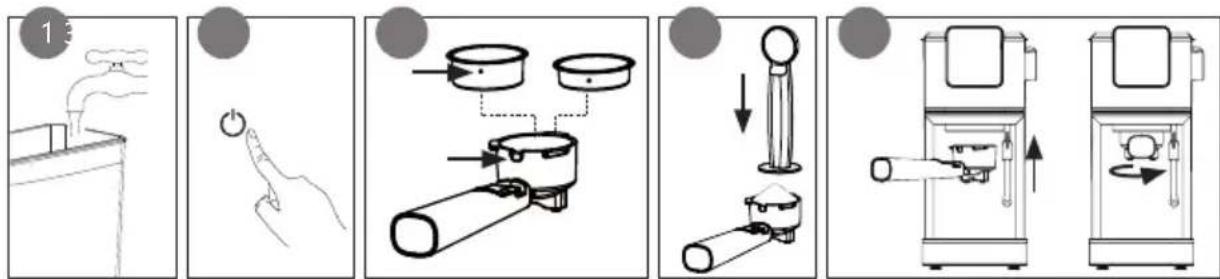
- Fill the water reservoir with the desired amount of water. Make sure if the level is within the 'MIN' and 'MAX' indicators on the reservoir. The reservoir is removable. Open the lid; lift the reservoir out of the appliance to fill it and then carefully place it back in the appliance.
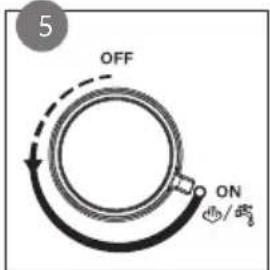
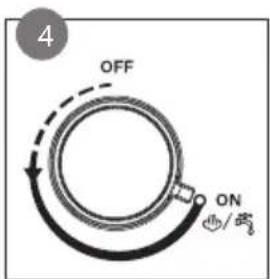
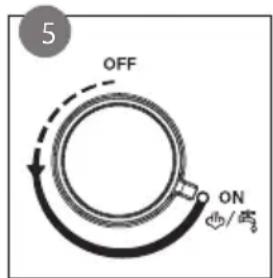
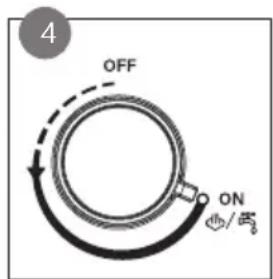
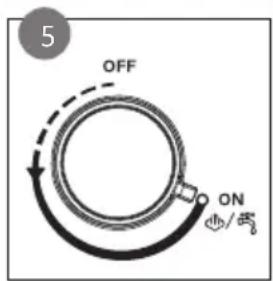
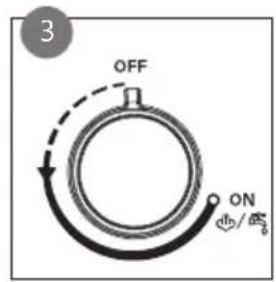
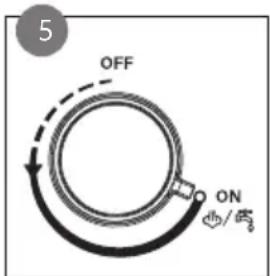
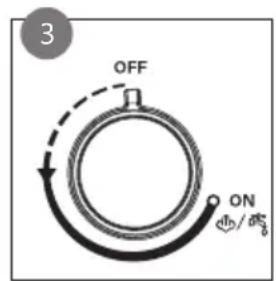
It is recommended to rinse the water tank each time before putting it back into the appliance. Turn the dial to 'ON' and run water through the steam nozzle for 5 seconds. Then turn the dial back to 'OFF'.
-
Plug the power cord into a socket. Make sure that the steam knob is in the off position. Press the on-off button.
-
Select the desired filter: the small filter for an espresso or a Lungo, the large filter for 2 cups, iced coffee or a double espresso. Place the filter in the portafilter. Make sure the dot on the filter is aligned with the groove in the portafilter.
-
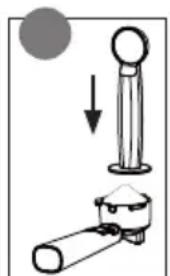
Fill the filter with fresh, finely ground espresso coffee using the measuring spoon (1 scoop for the small filter, 2 scoops for the large filter). Press the ground coffee firmly and evenly using the presser on the back side of the measuring spoon. Remove any excess coffee from the edge. We recommend you fill the filter to 3 mm from the edge.
-
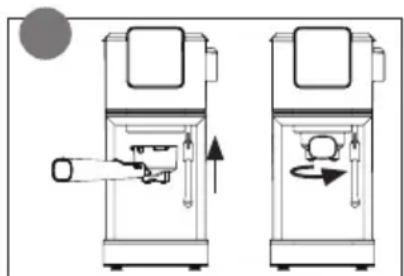
Place the portafilter under the brew group. Hold the handle so that it connects correctly to the open-lock symbol on the appliance and fits into the groove. Turn it slowly to the right, to the closed-lock symbol on the appliance.
-
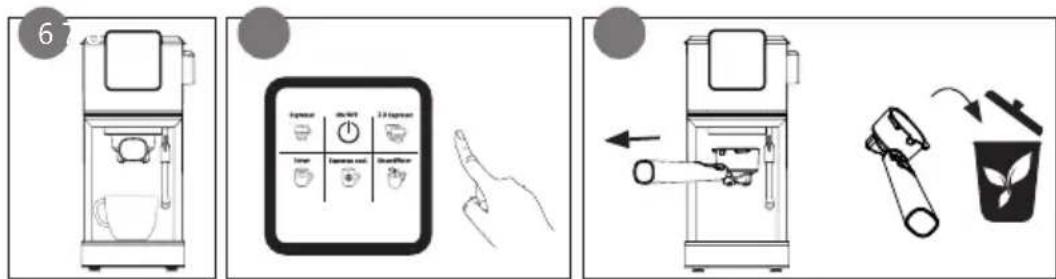
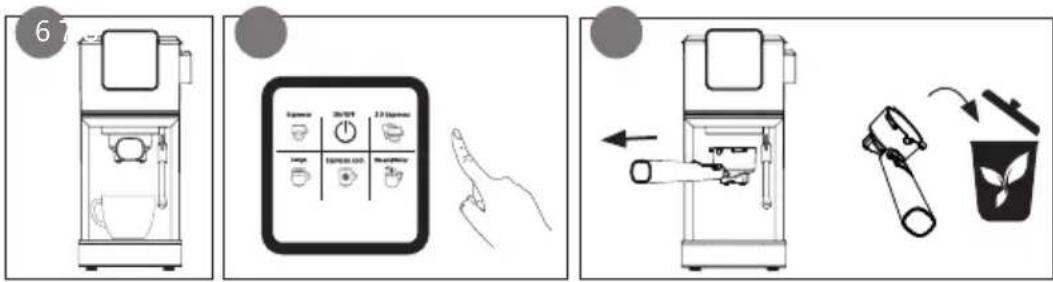
Place 1 or 2 cups on the drip tray underneath both spouts.
-
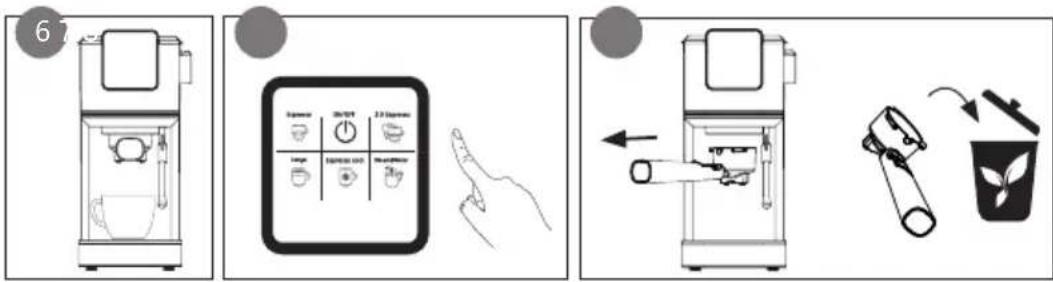
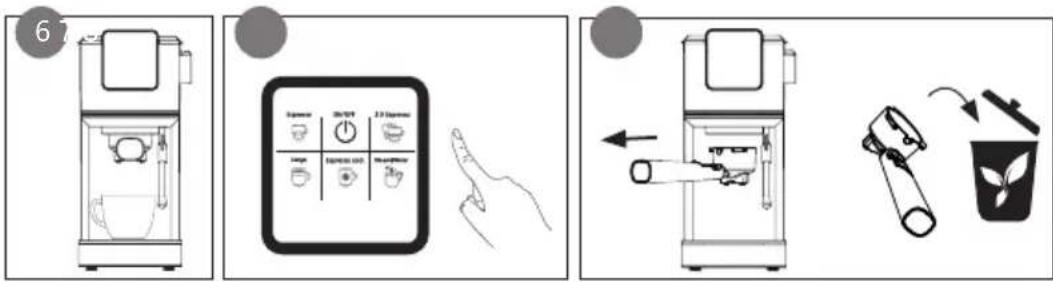
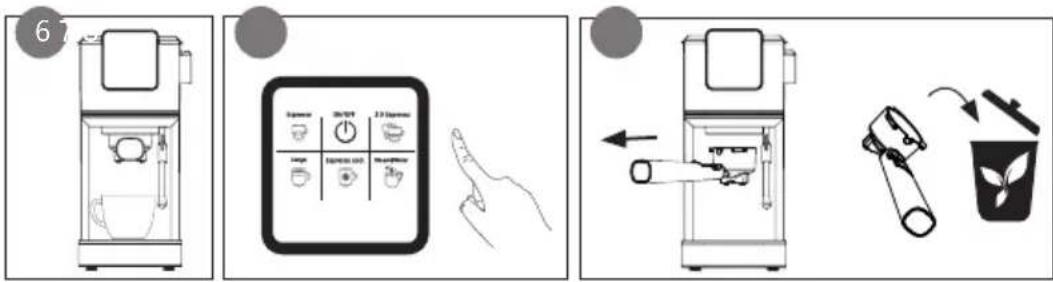
Press the button for the desired type of coffee. The image will blink on the display while the unit heats up. Preparation is in progress as long as the image of the selected coffee remains visible. You will hear a signal as soon as your coffee is ready.
-
Remove the portafilter from the appliance. Place the retainer clip against the filter and bang the coffee grounds out of the filter. Clean the portafilter and filter and dry it off for the next use.
flowchart
graph LR
    A["1: Stover, Air, Gas"] --> B["Step 1: Pressing into chimney"]
    B --> C["Step 2: Hand presser, presser, valve assembly"]
    C --> D["Step 3: Stopping cup, pan, lid"]
    D --> E["Step 4: Valve assembly, valve assembly"]
    E --> F["Step 5: Valve assembly, valve assembly"]
    F --> G["Final processing unit"]
Tips
- A clean coffee maker is essential to make great tasting coffee. Clean the appliance regularly according to the guidelines. Always use fresh, cold water in the coffee maker.
• Store coffee in a dry and cool place.
- The drip catcher can be removed to fit a large cup under the portafilter.
• Always make sure that the ground coffee is evenly spread out in the filter. This improves the permeation effect.
- Pressing the ground coffee with the tamper is an important process and affects the flavour of your espresso. If the coffee is firmly pressed, the water will flow through more slowly and you will get a stronger flavour with more cream.
- To achieve the optimal coffee temperature, we recommend that you heat up the unit and the cup. Use the same method as for preparing coffee, but do not add ground coffee to the filter of the portafilter.
ICED COFFEE
The unit has to be cold in order to prepare iced coffee. Let it cool down first if you just made a hot cup of coffee. Wait 15 minutes. Next, run cold water through the steam nozzle to cool the boiler. Switch on the unit, place a cup under the steam nozzle and turn the dial to the (ON) position. Allow ±2 bags of water to flow and turn the dial back to the (OFF) position. The unit is now ready for use.
Espresso cool

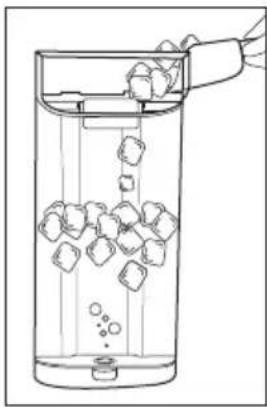
Add ice cubes to the water tank. Follow the usual steps for preparing coffee as described under use. For preparation, select "Espresso cool".
natural_image
Line drawing of a glass beaker with ice cubes and bubbles, no text or symbols presentCOFFEE WITH PODS
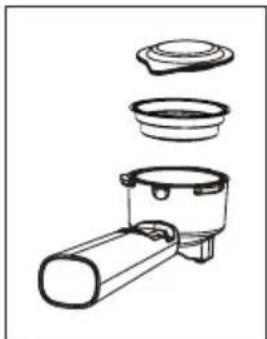
The pod holder is compatible with Easy Serving Espresso Pods (E.S.E. pods).
- Place the pod holder in the portafilter. Make sure the dot on the pod holder is aligned with the groove in the portafilter. Place the E.S.E. pod in the pod holder.
- Prepare the coffee following the instructions in the 'Coffee' section. Choose the Espresso method.
- Remove the portafilter from the device. Remove the pod from the pod holder. Clean and dry the portafilter and pod holder before using them again.
natural_image
Diagram of a kitchen appliance with three labeled parts (no text or symbols)COFFEE WITH CAPSULES
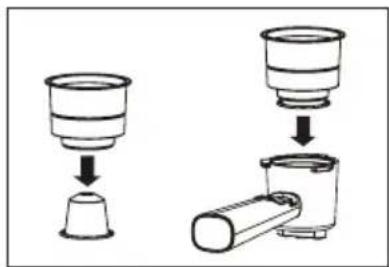
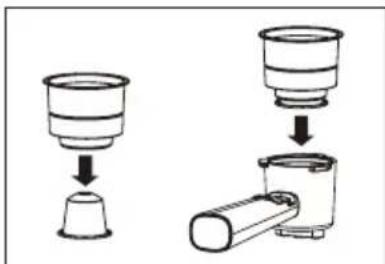
The capsule portafilter is compatible with Nespresso® and Starbucks® capsules, among others.
- Place the capsule in the capsule holder and press firmly. Place the capsule holder in the capsule portafilter.
- Prepare the coffee following the instructions in the 'Coffee' section. Choose the Espresso method.
- Remove the portafilter from the device. Remove the capsule holder from the capsule portafilter. Remove the capsule. Clean and dry the portafilter and capsule holder before using them again.
STEAM NOZZLE
You use the steam nozzle to froth milk to achieve the perfect cappuccino or latte.
- Fill the water reservoir.
-
Insert the plug in the power socket. Make sure that the steam dial is in the off position. Press the on/off button.
-
Fill a jug with cold, full-cream milk. ( ± 100 ml milk for 1 cappuccino) Be careful not to overfill the milk jug. Frothing the milk will increase its volume.
-
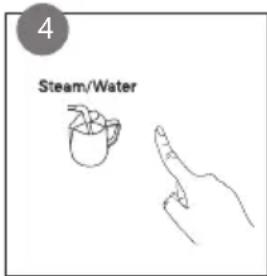
Briefly press the steam/hot water button. The image will blink on the display while the unit heats up. If the image remains visible, the unit has reached the right temperature.
-
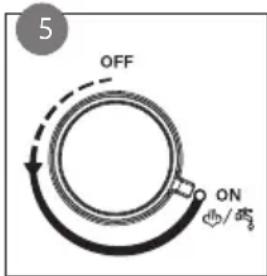
Point the steam nozzle over the drip tray. Slowly turn the dial to ON and wait 10 seconds or until all the water has left the steam nozzle.
-
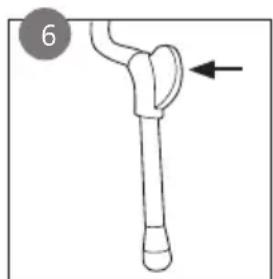
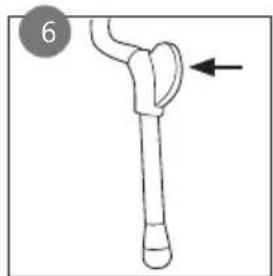
Turn the steam nozzle towards the milk jug. Bring the milk jug up to the steam wand and insert the steam nozzle a few millimetres into the milk.
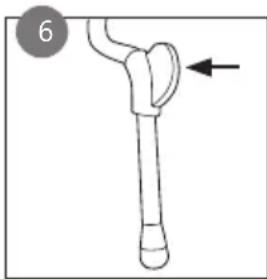
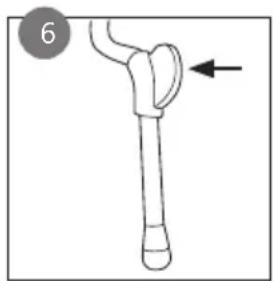
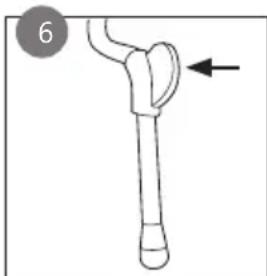
CAUTION: The steam nozzle itself and the emerging steam are hot. Do not touch the steam nozzle, use the black handle instead.
- As the milk expands in volume, keep lowering the jug slightly until the steam nozzle tip is just below the surface of the milk. If you insert the steam nozzle too deeply into the milk, it heats the milk but does not froth air into the milk and no foam will form.
⚠️Do not use the steam feature for more than 5 minutes at a time.
-
When you obtain the desired amount of foam, turn the rotary knob to the off-position.
-
Clean the steam nozzle after every use.
⚠️ ATTENTION: the steam nozzle may still be really hot.
natural_image
Simple line drawing of a mechanical component with an arrow indicating direction (no text or symbols)HOT WATER FEATURE
-
Fill the water reservoir. Insert the plug in the power socket and press the on/off button.
-
Place a cup under the steam nozzle.
-
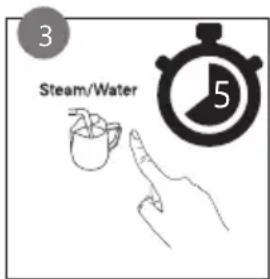
Press and hold the steam/hot water button for 5 seconds. The image will blink on the display while the unit heats up. If the image remains visible, the unit has reached the right temperature.
-
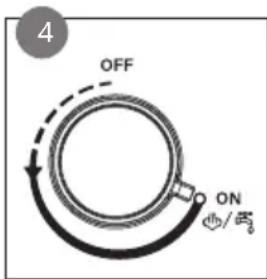
Turn the rotary knob (steam/water) to ON. Hot water will flow from the steam nozzle.
-
When you have enough water, turn the dial to the off position.
CLEANING AND MAINTENANCE
-
Before cleaning the unit, pull the plug out of the power socket and let the unit cool down.
-
Clean all removable parts (filters, portafilter, measuring scoop with tamper, drip tray, and grille) with clean warm water after use. Dry off the parts before putting them back.
⚠️ These parts are not dishwasher-safe.
-
Wipe the unit housing clean with a soft, damp cloth to remove stains.
-
Flush the unit regularly by brewing without putting ground coffee in the filter.
-
Wipe the steam nozzle down with a soft, damp cloth. Rinse the steam nozzle after each use with hot water. You can clear the pipe opening using a needle.
⚠️Do not immerse unit, cord, or plug in water or other liquid.
⚠️ Never use aggressive or abrasive cleaning agents.
DESCALING
When?
If the Espresso and Lungo buttons flash at the same time, the unit needs to be descaled. Descale the unit regularly, on average every 2 to 4 weeks. Regularly descaling ensures the quality of your coffee will be consistent, lowers energy consumption, and extends the espresso machine's working life.
How?
- Fill the water reservoir with water and descaling product for espresso machines up to the MAX, diluted according to the instructions on the product packaging.
- Place the portafilter with filter but without ground coffee in the unit.
- Place a collection container of at least 1 litres under the brew head and the steam nozzle. Remove the drip tray if necessary.
- Insert the plug in the power socket, turn on the unit.
Phase 1: descaling
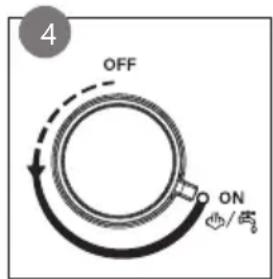
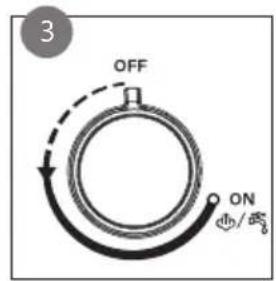
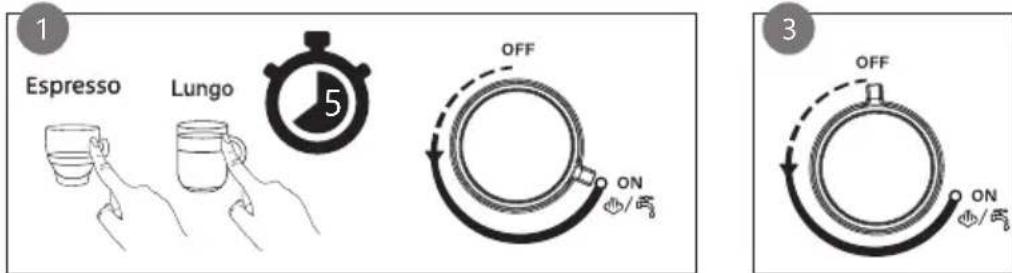
- Press the Espresso and Lungo buttons simultaneously for 5 seconds. Followed quickly by turning the knob to the ON position. The Espresso image flashes and the Lungo image is highlighted on the display.
- The descaling solution runs through the steam nozzle first. The unit stops after several minutes, at which point the steam nozzle has stopped emitting water.
- Next, turn the knob to the (OFF) position. The rest of the descaling solution passes through the unit and the portafilter. This will take several minutes.
- When the Lungo image on the display flashes while the Espresso image is highlighted, the process has completed and the water tank is empty.
- Empty the collection container. Now put the collection container back in.
Phase 2: rinsing
- The unit must now be flushed with clean water to ensure no lime residue remains. Rinse the water reservoir and fill it with clean water.
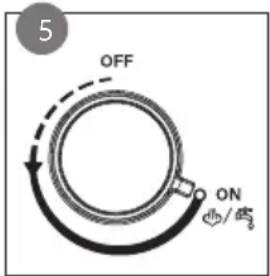
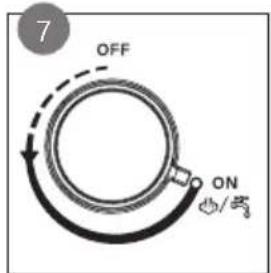
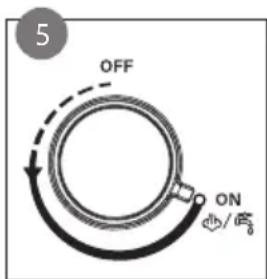
- Turn the knob to the ON position. While rinsing, the Espresso image is highlighted and the Lungo image flashes. The water runs through the steam nozzle first. The unit stops after several
minutes, at which point the steam nozzle has stopped emitting water.
- Next, turn the knob to the (OFF) position. The rest of the water now flows through the unit and the portafilter. This will take several minutes.
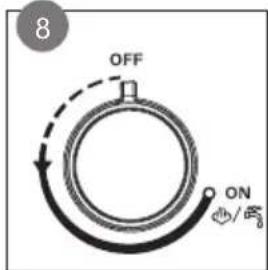
- Descaling is complete once all the water has passed through the system. You will hear a signal and all the icons will light up on the display.
- Remove the portafilter and rinse it with running water. Make sure it's dry before using again.
Procedure interrupted
If the descaling procedure is interrupted during phase 1 (descaling), unplug the unit and reinsert the plug. Start the procedure from the top.
If the descaling procedure is interrupted during phase 2 (rinsing), remove the water tank. Rinse the tank with water, fill the tank with water and return to the unit. Allow the water to run through the brew head without adding ground coffee to the filter of the portafilter.
PROBLEMS AND SOLUTIONS
| PROBLEMS SOLUTIONS | |
| The coffee no longer flows. | There is no water in the reservoir. Fill the water reservoir.The ground coffee is too fine or was compressed too tightly. Empty the filter, rinse it under water and refill it with coffee.Descale the appliance. See section: 'cleaning and maintaining/descaling'. |
| No or little steam comes out of the steam nozzle. | There is no water in the reservoir. Fill the water reservoir.To use the steam feature on the appliance, you must first press the steam/hot water button before turning the dial to ON.The steam nozzle is blocked. Descale the appliance. See section: 'cleaning and maintaining/descaling'. You can clear the pipe opening using a needle. |
| Water leaks underneath the appliance. • This happens when you add too much water to the reservoir. Make sure you don't overfill past the MAX indicator.The drip tray is full of water. Empty the tray. | |
| Water leaks past the filter. | There is ground coffee on the edge of the filter. Remove the excess coffee from the rim. |
| The filter is stuck in the portafilter. | Make sure the dot on the filter is aligned with the groove in the portafilter. Turn the filter until the small recess is turned to the side of the handle. |
| During descaling, the water is emitted first through the brew head and not through the steam nozzle. | • You forgot to turn the dial to the ON position. When the water stops being emitted, switch the appliance off again and start the descaling procedure again. See section: ‘cleaning and maintenance/descaling’. |
GUIDELINES
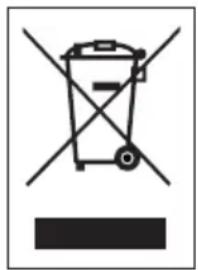
This symbol on the product or on its packaging indicates that this product may not be treated as household waste. Instead it must be brought to the applicable collection point for recycling of electrical and electronic equipment. By ensuring this product is disposed of correctly, you will help prevent potential negative consequences for the environment and human health, which could otherwise be caused by inappropriate waste handling of this product. For more detailed information about recycling of this product, please contact your local city office, your household waste disposal service or the shop where you purchased the product.

The packaging is recyclable. Please treat the packaging ecologically.

This appliance conforms to all European requirements in the areas of safety, health, and environmental protection.
The EU declaration concerning this appliance can be requested at any time from info@linea2000.be
GARANTIA
Estimado cliente,
PANEL DE CONTROL
natural_image
Line drawing of a glass with ice cubes being poured into it, no text or symbols presentCAFÉ EN MONODOSIS
natural_image
Line drawing of a microwave oven with three labeled components (no text or symbols)CAFÉ EN CÁPSULAS
TUBO DE VAPOR
natural_image
Simple line drawing of a mechanical tool or device with an arrow pointing to a curved component (no text or symbols)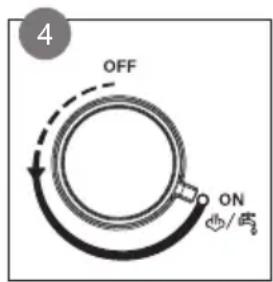
natural_image
Symbol of a trash bin crossed with no text or numbers, representing waste sorting or disposal (no text present)PANNELLO DI CONTROLLO
PRIMA DELL'USO
flowchart
graph LR
    A["1: Stover"] --> B["Hand press"]
    B --> C["Pressure gauge"]
    C --> D["Close-up of stove with lid"]
    D --> E["Close-up of cup holder"]
    E --> F["Close-up of tray with handle"]
    F --> G["Downward valve"]
    G --> H["Downward valve with handle"]
    H --> I["Final output"]
Suggerimenti
natural_image
Line drawing of a glass beaker with ice cubes and a hand pouring liquid (no text or symbols)CAFFÈ A CIALDE
natural_image
Line drawing of a microwave oven with lid and base components (no text or symbols)CAFFÈ A CAPSULE
TUBO VAPORE/ACQUA CALDA

natural_image
Simple line drawing of a mechanical component with an arrow indicating direction (no text or symbols)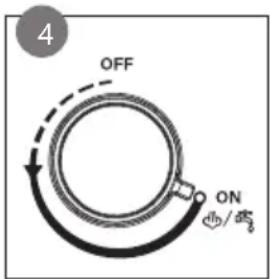
natural_image
Symbol of a trash bin crossed with no text or numbers, representing waste sorting or disposal (no text present)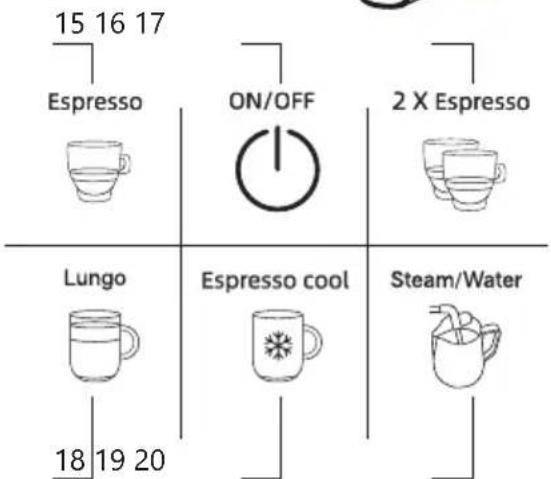
PŘED PRVNÍM POUŽITÍM
Tipy
natural_image
Line drawing of a glass beaker with ice cubes and a hand pouring liquid from a container (no text or symbols)KÁVA Z KÁVOVÉHO POLŠTÁŘKU
natural_image
Exploded view diagram of a kitchen appliance showing internal components (no text or labels)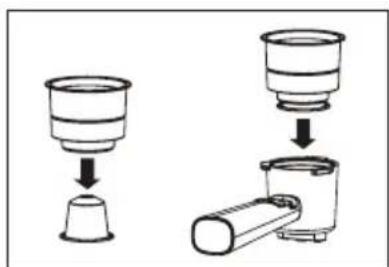
natural_image
Diagram showing two steps of a food item being processed, with no visible text or symbols.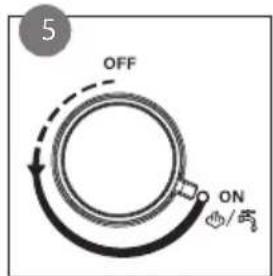
natural_image
Simple line drawing of a mechanical component with an arrow indicating direction (no text or symbols)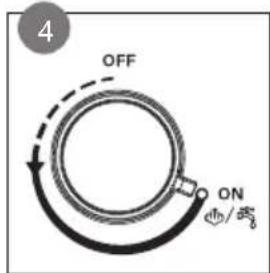

ČIŠTĚNÍ A ÚDRŽBA
OVLÁDACÍ PANEL
PRED PRVÝM POUŽITÍM
natural_image
Simple line drawing of a container with a chimney emitting steam (no text or symbols)
natural_image
Hand holding a finger pressing a button with a power symbol (no text or labels)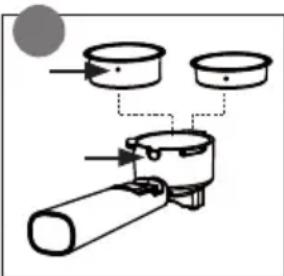
natural_image
Diagram of a mechanical assembly with three cylindrical components and a cylindrical shaft (no text or labels)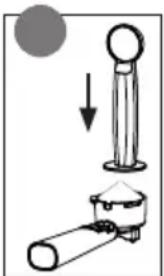
natural_image
Diagram showing a mechanical setup with a cylindrical component and a conical base, no text or symbols present.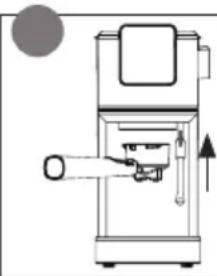
natural_image
Technical line drawing of a mechanical device with no visible text or symbols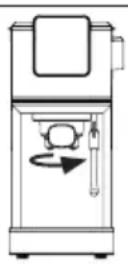
Tipy
natural_image
Line drawing of a glass beaker with ice cubes being poured into it, no text or symbols presentKÁVA Z KÁVOVÉHO VANKÚŠIKA
natural_image
Diagram of a microwave oven with three labeled components (no text or symbols)KÁVA Z KAPSULE
Hlavica na kapsule je kompatibilná s kapsulami Nespresso® a Starbucks®.
- Vložte kapsulu do držiaka a pevne zatlačte, vložte držiak kapsúl do hlavice na kapsule.
- Pripravte kávu podl'a popisu v kapitole „káva“. Zvol'te prípravu espressa.
- Vyberte hlavicu zo spotrebiča. Vyberte držiak z hlavice. Vyberte kapsulu. Pred d'alším použitím vyčistite a vysušte hlavicu aj držiak kapsúl.
PARNÉ TRYSKA
natural_image
Simple line drawing of a mechanical component with an arrow indicating direction (no text or symbols)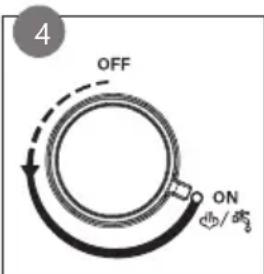
ČISTENIE A ÚDRŽBA
Fáza 2: preplachovanie
natural_image
Symbol of a trash bin crossed out by two crossed lines, with a blank rectangular base (no text or numbers present)Looking for extra accessories or you have a broken piece?
ORDER the original DOMO accessories and parts on our webshop.

Webshop

natural_image
Stack of sheets of paper with a circular inset showing a small object, no visible text or symbols
natural_image
Two white plastic electrical connectors with ports and mounting brackets (no visible text or symbols)
natural_image
White rectangular container with black interior, no visible text or symbols
natural_image
Clear glass coffee maker with black handle and lid (no text or symbols visible)
- ⚠PRODUCTSPECIFIEKE WAARSCHUWINGEN
- BEDIENING
- Tips
- KOFFIE MET PODS
- KOFFIE MET CAPSULES
- STOOMPIJPJE
- HEETWATERFUNCTIE
- REINIGING EN ONDERHOUD
- ⚠AVERTISSEMENTS SPÉCIFIQUES AU PRODUIT
- PANNEAU DE COMMANDE
- AVANT LA PREMIÈRE UTILISATION
- Conseils
- CAFÉ EN DOSETTES
- CAFÉ EN CAPSULES
- TUYAU DE VAPEUR
- FONCTION EAU CHAUDE
- NETTOYAGE ET ENTRETIEN
- BEDIENFELD
- Tipps
- KAFFEE MIT PODS
- KAFFEE MIT KAPSELN
- DAMPFDÜSE
- HEISSWASSERFUNKTION
- Phase 2: Spülen
- SAFETY INSTRUCTIONS
- ▲ELECTRICAL WARNINGS
- ⚠️INSTALLATION
- ⚠ USE
- ⚠ CLEANING AND MAINTENANCE
- ⚠PRODUCTSPECIFIC WARNINGS
- SAVE THESE INSTRUCTIONS FOR FUTURE REFERENCE
- PARTS
- CONTROL PANEL
- BEFORE THE FIRST USE
- USE
- COFFEE
- ICED COFFEE
- COFFEE WITH PODS
- COFFEE WITH CAPSULES
- STEAM NOZZLE
- HOT WATER FEATURE
- CLEANING AND MAINTENANCE
- DESCALING
- When?
- How?
- Phase 1: descaling
- Phase 2: rinsing
- Procedure interrupted
- GUIDELINES
- GARANTIA
- PANEL DE CONTROL
- CAFÉ EN MONODOSIS
- CAFÉ EN CÁPSULAS
- TUBO DE VAPOR
- PANNELLO DI CONTROLLO
- PRIMA DELL'USO
- Suggerimenti
- CAFFÈ A CIALDE
- CAFFÈ A CAPSULE
- TUBO VAPORE/ACQUA CALDA
- PŘED PRVNÍM POUŽITÍM
- Tipy
- KÁVA Z KÁVOVÉHO POLŠTÁŘKU
- ČIŠTĚNÍ A ÚDRŽBA
- OVLÁDACÍ PANEL
- PRED PRVÝM POUŽITÍM
- KÁVA Z KÁVOVÉHO VANKÚŠIKA
- KÁVA Z KAPSULE
- PARNÉ TRYSKA
- ČISTENIE A ÚDRŽBA
- Fáza 2: preplachovanie
Brand : DOMO
Model : DO1178K
Category : Coffee machine