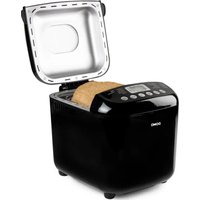
B3978 - Bread maker DOMO - Free user manual and instructions
Find the device manual for free B3978 DOMO in PDF.


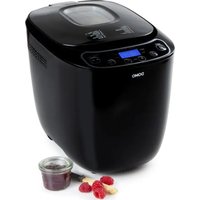
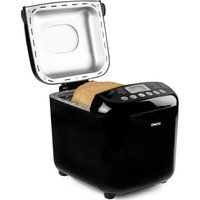
| Product type | Bread machine |
| Brand | DOMO |
| Model | B3978 |
| Maximum dough capacity | 1000 g |
| Available bread weights | 500 g, 750 g, 1000 g |
| Number of programs | 17 programs |
| Programs | Normal, Rapid, Sweet, French, Italian, Whole wheat, Raisin/Nut, Rye, Brioche, Sourdough, Gluten free, Sandwich, Pizza dough, Pasta dough, Kneading, Baking, Homemade |
| Crust color | Light, Medium, Dark |
| Delay timer | Up to 15 hours |
| Keep warm | 60 minutes |
| Memory function | 10 minutes after power outage |
| Kneading hook | Removable, with extraction tool included |
| Baking pan | Non-stick |
| Viewing window | Yes, glass window in lid |
| Included accessories | Measuring cup, measuring spoon, extraction hook |
| Cleaning and maintenance | Do not immerse the appliance. Clean the pan by hand with hot water, not dishwasher. Dry thoroughly after each use. |
| Safety | Unplug before cleaning. Do not use if cable damaged. Keep away from children. Do not cover during operation. |
| Spare parts and repairability | Spare parts available on order via DOMO webshop. Repairs by manufacturer or authorized service center only. |
| Warranty | 2 years from date of purchase, upon presentation of proof of purchase. |
| Customer service | +32 14 21 71 91 / info@linea2000.be (Mon-Thu 8:30am-5pm, Fri 8:30am-4:30pm) |
Frequently Asked Questions - B3978 DOMO
User questions about B3978 DOMO
0 question about this device. Answer the ones you know or ask your own.
Ask a new question about this device
Download the instructions for your Bread maker in PDF format for free! Find your manual B3978 - DOMO and take your electronic device back in hand. On this page are published all the documents necessary for the use of your device. B3978 by DOMO.
USER MANUAL B3978 DOMO
natural_image
Black and white photo of a black Domo air fryer with digital display and control buttons (no visible text or symbols on the device itself)NL Handleiding Broodbakmachine
EN Instruction booklet Bread maker
Read all instructions carefully.
Save this instruction manual for future reference.
⚠PRODUCTSPECIFIEKE WAARSCHUWINGEN

F. Start- pauze/stop
natural_image
Symbol of a trash bin with crossed lines indicating no waste or discharge, and a solid black rectangle below (no text or labels)natural_image
Recycling symbol with three chasing arrows forming a triangle (no text or labels)⚠️ AVERTISSEMENTS SPÉCIFIQUES AU PRODUIT
6. Pain complet (whole wheat)
10. Levain (Sourdough)
natural_image
Symbol of a trash bin with crossed lines indicating no waste or discharge, and a solid black rectangle below (no text or labels)F. Start- Pause/Stop
6. Vollkorn (whole wheat)
natural_image
Symbol of a trash bin crossed with two crossed lines and a solid black rectangle below (no text or labels)Thank you for your confidence in DOMO. We do hope you enjoy your new purchase. Before reaching you, all our products undergo a strict quality inspection. Should you still encounter problems with your appliance, then we are truly sorry and will do everything possible to resolve the situation quickly. Do not hesitate to contact our customer service. Our staff will do all they can to help you!
+32 14 21 71 91 info@linea2000.be

Monday - Thursday: 8.30 - 12.00 and 13.00 - 17.00
Friday: 8.30 - 12.00 and 13.00 - 16.30
This device has a warranty period of 2 years from the date of purchase. During this warranty period, the distributor will assume responsibility for any defects that can be shown to be the result of material, construction or manufacturing errors. Such defects will be remedied by repair or replacement of the device. The 2-year warranty period will be suspended during the repair period and will continue after the repair has taken place for the remaining duration of the warranty period. The warranty will be honoured if proof of purchase clearly showing the date of purchase is provided. If your device becomes defective within the 2-year warranty period, please return it with your proof of purchase to the store you purchased it from or follow the procedure of the relevant webshop if you bought it online.
The warranty does not cover damage to the device, accessories or parts caused by:
• normal wear and tear from use;
• non-compliance with the instructions for use, maintenance and cleaning in the manual;
- incorrect connection, e.g. electrical voltage too high;
- incorrect, heavy-handed or abnormal use;
• repairs or alterations carried out by the consumer or unauthorised third parties;
- use of parts or accessories not recommended nor supplied by the distributor.
SAFETY INSTRUCTIONS
When using electrical appliances, basic safety precautions should always be taken, including the following. Any injury or damage caused by failure to comply with these rules are at your own risk. Neither the manufacturer, importer, or the supplier may be held liable.
- Read all instructions carefully.
- Make sure all packaging materials and promotional stickers have been removed before using the appliance for the first time. Make sure children cannot play with the packaging materials.
-
This appliance is only suitable for use in domestic and similar environments, such as:
-
staff kitchen areas in shops, offices and other working environments;
- farm houses;
- by clients in hotels, motels and other residential type environments;
- bed and breakfast type environments.
- Children should be supervised to ensure that they do not play with the appliance.
- This appliance can be used by children aged from 16 years and above and persons with reduced physical, sensory or mental capabilities or lack of experience and knowledge if they have been given supervision or instruction concerning use of the appliance in a safe way and understand the hazards involved.
• Children shall not play with the appliance.
- Cleaning and user maintenance shall not be made by children unless they are older than 16 or supervised.
- Keep the appliance and its cord out of reach of children younger than 16 years.
- All repairs should be carried out by the manufacturer or its aftersales service.
▲ELECTRICAL WARNINGS
- In order to avoid a hazard this appliance must not be supplied through an external switching device, such as a timer or a
separate remote control, or connected to a circuit that is regularly switched on and off by the utility.
- The appliance must be disconnected from its power source when not in use, during service and when replacing parts. If present, first turn all the buttons to the 'off' position, then pull the plug out of the socket by grasping the plug itself. Never pull the cord or appliance to remove the plug from the socket.
- Before use, check carefully that the electric tension and frequency of the power net at your home match the indications on the rating label of the appliance.
- The appliance must be plugged into an appropriate outlet that is installed and grounded in accordance with local installation regulations.
- Do not let the power supply cord hang over the edge of a counter, or touch hot surfaces.
- Keep the power cord away from hot parts and don't cover the appliance.
- Unwrap the cord completely to prevent overheating of the cord. Do not allow the power cord supply to run underneath or around the unit.
- For safety reasons, never use the appliance if the cord, plug, or appliance itself is damaged, or after a malfunction of the appliance. Return the appliance to the DOMO Service Department or its service agent for examination, repair, or electrical or mechanical adjustment. Do not try to repair the appliance yourself.
⚠️INSTALLATION
- Do not place near flammable materials, gases or explosives.
- Do not use or store this appliance outdoors.
• Always use the appliance on a steady, dry and level surface.
- Never place this appliance near a gas stove or electrical stove or in a place where it may come into contact with a warm appliance.
⚠ USE
- Do not use this appliance for other than intended use.
- Do not operate the appliance with wet hands.
- The use of accessories that are not recommended or sold by the manufacturer can cause fire, electrical shock or injuries. Only use the utensils delivered with the appliance.
⚠ CLEANING AND MAINTENANCE
- To protect against electrical shock or burns, do not immerse unit, cord, or plug in water or other liquid.
- Failure to maintain this appliance in a clean condition could adversely affect the life of the appliance and possibly result in a hazardous situation.
⚠️PRODUCTSPECIFIC WARNINGS

The appliance can become hot during use. Keep the power cord away from hot parts and don't cover the appliance.
- Do not place objects on the appliance and do not cover it, when it's activated, to reduce the risk of fire.
- The bread maker can become warm. Only touch the handles and buttons of the appliance and use, if necessary, oven mitts.
- Make sure the appliance is fully cooled down and pull the plug out of the wall socket, before adding or taking out the parts from the appliance.
- Do not move the bread maker, if the appliance contains warm ingredients or liquids.
- Avoid contact with the rotating kneading paddle, when the appliance is activated, to reduce the risk of injury.
- Please turn off the appliance and remove the plug from the socket, when you want to clean the appliance or when it's not in use.
- Do not use the bread maker as storage for food or kitchen utensils.
- Do not clean the appliance with a cleaning sponge. Small parts of the sponge can get in touch with the electrical parts and cause electrical shocks.
- Do not use the bread maker to dry food or other objects.
- The total weight of all the ingredients cannot be higher than 1000 g.
SAVE THESE INSTRUCTIONS FOR FUTURE REFERENCE
All images and descriptions in this manual are purely indicative and may differ slightly from the actual device.
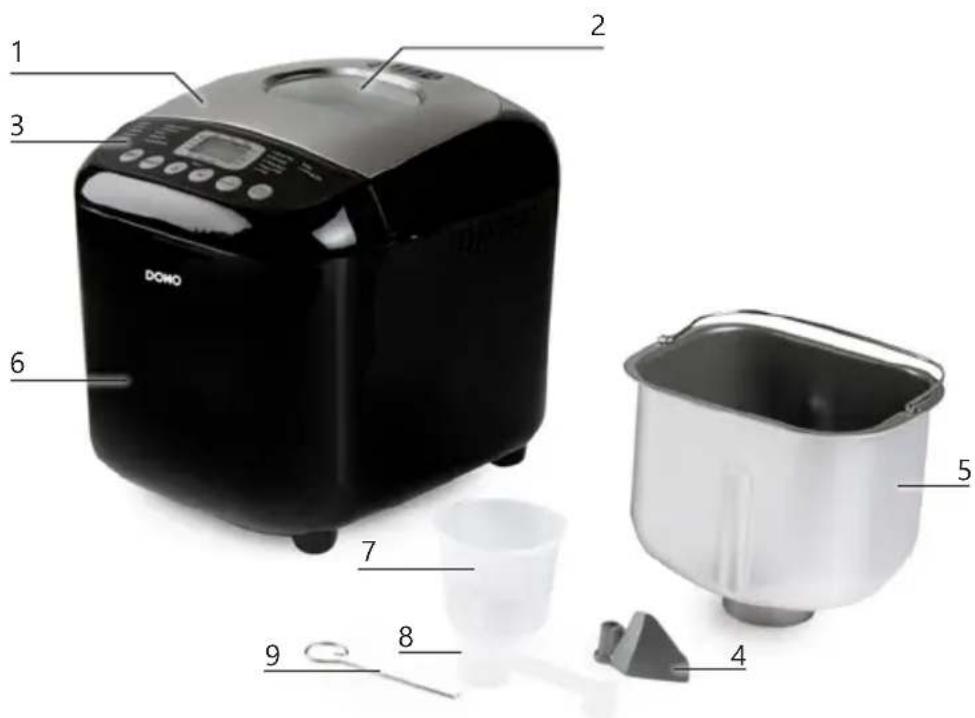
PARTS
- Lid
- Viewing window
- Control panel
- Kneading paddle
- Bread pan
- Housing
- Measuring cup
- Measuring spoon
- Hook for removing the kneading paddle
BEFORE THE FIRST USE
- Remove all packaging materials and any promotional stickers.
- Clean your bread maker, bread pan and kneading paddle with a damp cloth. The bread pan and the kneading paddle both have a non-stick coating to prevent dough from sticking to it. You must therefore never clean these parts with cleaning products, a sponge or a dishwashing brush. A damp cloth will do to clean them. Remove the protective film from the display.
- It is perfectly common and harmless for your appliance to emit a bit of smoke when you use it for the first time.
- Before the first use it is recommended to first bake with an empty bread pan with the program BAKE. This for 10 minutes. Afterwards, let everything cool down and clean the parts again.
- Before using for the first time, grease the non-stick coating of the loaf tin and the kneading paddle with a little butter or margarine.
- Place the breadmaker on a stable surface, far enough removed from the edge. Ensure adequate ventilation around the appliance.
- The result may be affected by the ambient temperature where the breadmaker is used. Keep the room temperature between 15^ and 34^ .
USE
BASIC RECIPE
The recipe below is for a loaf of simple white bread. Put the ingredients in the loaf tin in the order listed below.
- 370 ml water
- 1 tsp salt
- 1 tbsp sugar
- 630 g flour
- 5 g of dried yeast
INGREDIENTS
Baking a great bread will largely depend on 3 main factors: quality, freshness and correct measurement of quantities.
Caution: never exceed the maximum capacity of your bread maker! (1000 g) Never use more than these maximum quantities of the following ingredients for 1 baking session:
• Water: 460 ml max.
- Flour: 715 g max.
- Yeast: 22 g fresh yeast or 4+1/4 teaspoons dry yeast max.
Flour
Flour is the basic component of bread. The weight of the flour varies, depending on the type of flour used. It is therefore absolutely necessary that you weigh the right quantity on a pair of scales. Please make sure you buy a variety of flour which is suitable for bread making. Check the packaging.
Gluten
Gluten is a natural ingredient of flour and stimulates the bread to rise.
Yeast
Yeast is a micro-organism found on several vegetable foodstuffs. Yeast converts sugars into alcohol and carbon dioxide. This ability is ideal for the bread to rise and to make it lighter and easier to digest. We recommend the use of dry yeast for this bread maker. This (granular) yeast is easier to work with, keeps for a longer time than fresh yeast and generally gives you a better result as well.
Starter
Also known as sourdough starter or sourdough culture. A mixture of flour and water is naturally fermented. This starter is a natural way for you to develop a yeast culture for your bread, since you will not be using regular yeast for sourdough bread.
Salt
Salt does not only lend the bread a certain flavour but equally regulates the activity of the yeast, strengthens the dough and prevents the bread from rising too hard.
Butter / oil
Butter and oil improve the general taste of the bread and equally soften it. Butter or oil should both be at room temperature when you add them to the other ingredients.
Sugar
Sugar is the nutritional source for the yeast and is of great importance for the bread's rising process. You can use plain white sugar, brown sugar, syrup or honey. Sugar lends the bread a certain soft and delicate flavour, increases its nutritional value and also renders the bread less perishable. Attention: you should not use unrefined sugar or sugar lumps, when you want to make e.g. cinnamon bread, for they can damage the non-stick coating of the bread pan.
Water
When the flour mixes with the water, the gluten will form and air can no longer enter, thus enabling the bread to rise. At normal temperature you should use tepid water (± 20 à 25 °C) to make bread: cold water will not activate the yeast and warm water will achieve the opposite result.
Milk
Milk adds greatly to the colour of the bread (brown for the crust, creamy on the inside), improves the overall taste of the bread and increases its nutritional value. Should you choose to use fresh milk, do not forget to reduce the amount of water, in order to maintain the right level of humidity.
Attention: do not use fresh milk if you are going to choose the baking program with the time delay function, for the milk could turn sour.
Other ingredients
Always use fresh ingredients. When you want to use nuts, sunflower seeds, dried fruit or similar ingredients, we recommend that they be soaked in water and dried before adding them to the dough. Always ensure these ingredients are not too large, for they may damage the non-stick coating.
CONTROL PANEL
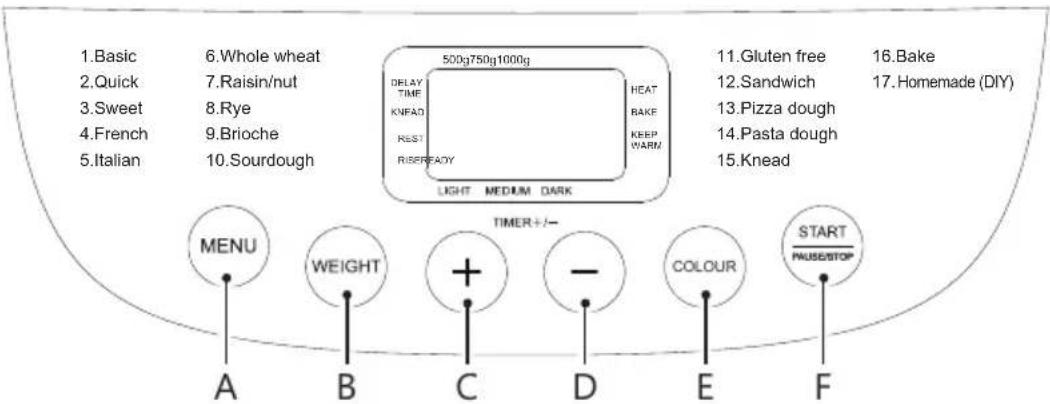
Controller
A. Menu: program selection
B. Weight: choose weight (size) of bread
C. + : increase time
D. - : decrease time
E. Colour: how brown the crust is
F. Start-pause/stop: on/off button
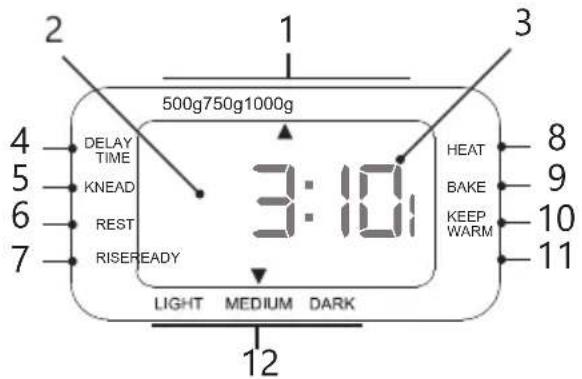
Display
- Choose weight (size) of bread
- Menu
- Time remaining in minutes
- Program phase: timer
- Program phase: kneading
- Program phase: resting
- Program phase: rising
- Program phase: heating
- Program phase: baking
- Program phase: warming
-
Program phase: ready
-
Browning of the crust: light, medium, dark
A. 'MENU' BUTTON
This button is used to select the desired baking program. With every touch of this button, you will hear a bleeping signal, thus indicating a change in the selected type. The selected program and the corresponding baking time will appear on the display.
B. 'WEIGHT' BUTTON
You use this button to select the weight of the bread you wish to make, either 500, 750 or 1000 g. Do bear in mind that the added sum of the ingredients listed in the recipe is about the weight of the bread you are about to make.
C. + AND D. -
You can select delayed start and set the timer for certain programs using these buttons. You can adjust the program time for the other programs.
E. 'COLOUR' BUTTON
You use this button to determine whether you want a light, medium or dark crust.
For recipes you try out for the first time, we advise you to choose the medium crust colour.
F. START-PAUSE/STOP
You start the selected program, or pause/cancel a running program using this button. Press briefly to pause a program. Press the button again to resume. If the button is no longer being pressed, operation will automatically resume after a 3-minute pause.
To end a program, press the button for a few seconds until you hear a beep.
PROGRAMS
Program times:
Program 500 g 750 g 1000 g
| 1. Basic 3:05 3:10 3:15 |
| 2. Quick 2:10 2:15 2:20 |
Program 500 g 750 g 1000 g
| 3. Sweet 3:35 3:40 3:45 | |
| 4. French 3:35 3:40 3:45 | |
| 5. Italian 3:05 3:10 3:15 | |
| 6. Whole wheat 4:05 4:10 4:15 | |
| 7. Raisin/nut 3:05 3:10 3:15 | |
| 8. Rye 4:05 4:10 4:15 | |
| 9. Brioche 3:35 3:40 3:45 | |
| 10. Sourdough 4:35 4:40 4:45 | |
| 11. Gluten free 3:05 3:10 3:15 | |
| 12. Sandwich 3:00 3:05 3:10 | |
| 13. Pizza dough 0:45* | |
| 14. Pasta dough | 0:20* |
| 15. Knead 0:08* | |
| 16. Bake | 0:30* |
17. Homemade (DIY)
*Programs that do not allow you to choose the weight of the bread.
The time on the display is indicated in hours and minutes.
1. Basic
This is the program most commonly used to make a regular white loaf of bread.
2. Quick
For kneading, rising and baking bread with baking soda or baking powder. The result usually is a smaller bread with a denser texture. It is recommended that you briefly stir the ingredients with a wooden spoon before you press start.
3. Sweet
This program is suitable for making raisin bread, sugar bread, chocolate bread, etc.
4. French
With this type of baking program, the time to knead and to rise will be longer than this of the first program. The result is a crisper crust and a lighter texture.
5. Italian
Make a tasty Mediterranean bread with this program. You can add additional ingredients such as herbs, sun-dried tomatoes, olives, etc.
6. Whole wheat
This program is most suitable for the confection of heavier types of bread, such as wholemeal bread or multi-grain bread. Generally, these types of bread tend to be slightly smaller than regular white bread, due to the bigger weight of the flour. It is best not to use the time delay function with this program, since the results might not be as good.
7. Raisin/nut bread
Use this program to add ingredients such as raisins or nuts. It is best to add these ingredients after kneading, you will hear a beep.
8. Rye
This program is ideal for loaves with a heavier variety of grain such as rye. The bread itself is also firmer and heavier than normal bread.
9. Brioche
This program is suitable for breads with additional ingredients that have a high sugar, fat, and protein content (e.g. chocolate, sugar, etc.). These ingredients create a darker crust. The rising program phase will take more time, giving you a light and airy result.
10. Sourdough
Sourdough is a bread dough that doesn't contain baker's yeast. The dough rises thanks to fermentation. This process gives sourdough bread a slightly sour taste and better shelf life. To make sourdough bread, you need leaven (or levain starter) in lieu of yeast. For this programme, use a fresh, homemade sourdough starter. If you prefer to use a ready-made mix or a sachet of sourdough starter, we recommend using the French or Basic programme.
11. Gluten free
This is the program for making gluten free bread. The dough of a gluten free bread is moister and has the consistency of a batter. Therefore, the dough should not be kneaded or allowed to rise for too long. The baking time, on the other hand, is longer. It is better not to use delayed programming with this program, as this can lead to results that are not as good. It is best to add all the ingredients at the beginning.
12. Sandwich
Select this program to make a very light white dough suitable for e.g. little bread rolls. Please note! With this program you cannot set a crust colour, the machine will do so itself.
13. Pizza dough
You can only have the machine knead the dough and let it rise with this program. You can bake the dough in the oven afterwards. This programme is ideal for pizza dough or bread rolls.
14. Pasta dough
You can only have the machine knead the dough with this program. Perfect for pasta dough.
15. Knead
The machine will only knead the dough during this program; it won't bake it or let it rise. You can use this program to knead pizza dough, for example. You can adjust the operation time using the + and - buttons.
16. Bake
For ready-made dough which you perhaps had already made in advance. This program can only be used for the final stage of the baking process. This program also allows you to reheat bread that you had already baked.
17. Homemade
Can be programmed with your personalised time settings. See 'Set up Homemade' under the Use section.
OPERATING INSTRUCTIONS
-
Take the bread pan out of the bread maker, by turning it a quarter of a turn anticlockwise. You can lift the bread pan out, straight up, by pulling the handle.
-
Place the kneading paddle on the axis in the bread pan. Please position the kneading paddle carefully and appropriately, so all ingredients can be sufficiently mixed and kneaded.
-
When putting the ingredients into the bread pan, please do so in the following manner and order:
• Water / milk (± 20 - 25°C)
- Butter / oil
- Eggs (optional)
- Salt (salt on one side)
- Sugar (put the sugar on the opposite side)
- Flour
- Yeast (concentrate the yeast in a little hole in the middle)
⚠️ Make sure the yeast is kept away from the sugar, salt and water, for the yeast might be activated before all ingredients have been properly blended and kneaded. Additional ingredients, such as nuts, herbs, dried fruits, etc., can be added afterwards. See the 'Adding additional ingredients' section.
-
Remove all remnants of the ingredients on the outside of the bread pan. Put the bread pan back in the bread maker. Turn the bread pan clockwise so it locks into place.
-
Close the lid.
-
Plug in the appliance.
-
Select the program you require, using the 'menu' button. Each input is confirmed by a bleeping signal.
-
Set the colour of the crust using the Colour button. You can choose between light, medium, or dark. Set the size of the bread (500 g, 750 g, or 1000 g) with the Weight button.
-
Program the time delay function, if so desired.
-
Press the 'start-pause/stop' button. The colon will start flashing, which indicates the bread maker has started the process. When you have programmed the time delay function, the program will start after the programmed time delay has expired.
-
The machine will beep when the bread is ready. The display shows 0:00. Press and hold start-pause/stop for a few seconds. The machine will beep again to confirm that you have stopped the program. If you do not stop the program with this button, the bread will be kept warm for another 60 minutes thanks to the warming function. Remove the plug from the socket and open the machine lid.
⚠️Remove the loaf tin using oven mitts.
- Allow the bread to cool down for approximately 10 minutes. Turn the bread pan upside down above the sink and gently shake it to remove the bread. Should you have difficulty removing the bread from the bread pan, carefully turn the kneading paddle at the bottom of the bread pan until the bread comes loose.
⚠️ Please make sure the bread and the bread pan are never placed on the exterior of the appliance. Nor must they ever be placed directly on a plastic table-cloth.
⚠️ Never use sharp objects to remove the bread so as not to damage the non-stick coating of the loaf tin.
- If the kneading paddle should get stuck in the bread, try and remove it as gently as you can. If necessary, you can allow the bread to cool down a little more so you can remove the kneading paddle with your hands afterwards. Beware that you only touch the kneading paddle with your hands if it has sufficiently cooled down. We recommend that you wait 15 to 20 minutes before cutting the bread.
WARMING FUNCTION
In case you should not make it home in time, the bread maker will continue to heat the bread for another 60 minutes. This additional time is not included in the program time. Press the 'start-
pause/stop' button for a few seconds, if you want to interrupt this part of the process. If you leave the bread in the bread maker for more than an hour, it will become moist.
Rinse the bread pan immediately with warm water, after you've taken out the bread, to make sure the kneading paddle don't keep stuck to the axle.
Do not activate the bread maker, if the appliance hasn't cooled down or warmed up yet.
ADDING ADDITIONAL INGREDIENTS
During the kneading process of the following programs, there will be a beep (10x) after kneading: Normal, French, Whole Wheat, Sweet, Gluten free, Fast, Raisins/Nuts, Rye, Brioche, Italian, Sourdough, Sandwich. This beep indicates that you can add additional ingredients such as raisins, nuts, seeds, etc. Open the lid, add the additional ingredients, then close the lid.
MEMORY FUNCTION
If the appliance fails due to a power failure, the memory function will work for 10 minutes.
This way, you do not have to restart the program when the power is back. If the outage lasts longer than 10 minutes, the program will be cancelled.
SETTING HOMEMADE
"Homemade" is reserved for your own baking program. You can determine the time for all program phases yourself. If you want to skip certain phases, set the time to 0:00.
- Select program 17 using the Menu button.
- Press the weight button to start programming. The time and the program phase arrow will flash on the display. See the table of program phases and default time settings below.
- Set the desired time for each phase using the + (increase time) and - (decrease time) buttons. Confirm the selected time by pressing the Weight button.
- When all phases have been completed, you will see the total duration of the program on the display. You can then start the set program by pressing the Start button. If you press the start button while setting the phases, the programming will stop early.
If desired, you can also have this program start delayed; see 'Delayed programming'.
| Program phases Display | Default setting Adjustable time lock | |
| Knead 1 Knead 0:20 0-30 min. | ||
| Rest 1 Rest 0:20 0-30 min. | ||
| Knead 2 Knead 0:05 0-30 min. | ||
| Rest 2 Rest 0:10 0-30 min. | ||
| Knead 3 Knead 0:05 0-25 min. | ||
| Rise 1 Rise 1:00 0-60 min. | ||
| Rise 2 Rise 0:40 0-60 min. | ||
| Rise 3 Rise 1:00 0-60 min. | ||
| Bake Bake 1:00 0-80 min. | ||
| Warming function | Keep Warm | 1:00 0-60 min. |
REMOVING THE KNEADING PADDLE BEFORE BAKING
You can remove the kneading paddle, after the dough has been kneaded for the last time.
- Shortly press the 'start-pause/stop' button to interrupt the baking process.
- Open the lid and take out the bread pan. Take out the dough with floured hands and remove the kneading paddle.
- Place the dough back in the bread pan, place the loaf tin in the appliance and close the lid.
- Press the 'start-pause/stop' button. The program will be continued.
TIME DELAY FUNCTION
You can program the machine so that the preparation will be completed at a time of your choice.
- Calculate the time difference between the time you start the program and the time you want the preparation to be ready. The bread maker will automatically add the duration of the program cycles to this.
- By pressing the keys, the time will increase or decrease by 10 minutes at a time.
- "Delay time" is highlighted by an arrow on the display.
- Delayed programming is not available for kneading and baking. The programme time will be adjusted if you press the + and - buttons for kneading and baking.
- You can set this timer up to 15 hours in advance.
Example:
The time is 9 am and you want your bread to be ready by 5 pm. Put all ingredients in the bread pan.
Place the bread pan in your bread maker. Close the lid and select the program using the MENU button. Press the Colour button to set the crust colour and choose the desired weight of the bread. Press the + button until 8:00 appears on the display. After all, 8 hours will have passed from the moment you pressed the start button to the moment the bread should be ready (5 p.m.).
Press the start button. The colon will start flashing on the display and "Delay time" is highlighted by an arrow on the display. The time will now count down until the time is reached when the bread maker has to start kneading. The bread maker will now run through the entire set program so that the bread is ready at the chosen time.
Caution: Do not use the timer program if you are using ingredients that have a limited shelf life, such as fresh milk, eggs, yoghurt, cheese and fresh fruit.
TIP
- Please make sure your ingredients are at room temperature and that they are carefully weighed.
- You can verify the freshness of your yeast by submitting it to the following test: dissolve 1 teaspoonful of sugar in half a cup of lukewarm water and subsequently add the yeast to this mixture. If the substance starts bubbling and boiling after a few minutes, you can be sure that you are using fresh yeast.
-
Salt breaks the effect of the yeast and sugar exactly does the opposite. If you are not allowed to use either sugar or salt for dietary reasons, you must not add the other ingredient either. Your bread will not contain sugar or salt.
-
Homemade bread, made with this bread maker, does not contain any preservatives and is therefore perishable. If you wrap the bread in a vacuum package after cooling down, you will be able to keep it for a few days. Of course you can also freeze the bread.
- Grease the axle in the loaf tin with a little butter to ensure that the kneading paddle comes off easier.
- The order in which you add the ingredients is important. Wet ingredients first, then dry and finally the yeast.
CLEANING AND MAINTENANCE
⚠️Do not immerse unit, cord, or plug in water or other liquid. ⚠️Never use aggressive or abrasive cleaning agents.
- Before cleaning your bread maker, please make sure it's no longer activated, it has sufficiently cooled down and the plug has been disconnected from the power socket.
- Clean the appliance thoroughly after each use. If the loaf tin, axle in the loaf tin, and kneading paddle are not clean before use, this may affect the operation and service life of the bread maker.
- Thoroughly dry the appliance and all parts. Leave the lid open for half an hour so that all parts are sufficiently dry before storage or reuse.
⚠ Attention: Never submerge the appliance in water.
EXTERIOR
Clean the outside of the appliance and the lid with a damp cloth or sponge. Take out the bread pan before you start cleaning. If necessary, you can clean the outside of the appliance using a mild detergent.
INSIDE
The inside of the device can be carefully cleaned with a slightly damp cloth. Be careful when cleaning the heater element.
LOAF TIN
Remove the loaf tin from the machine by turning it a quarter turn counter-clockwise using the handle and lifting straight up. The loaf tin can be cleaned with warm water. Make sure that you do not damage the non-stick coating. If it is not possible to remove the dough hook from the loaf tin, let the tin cool completely. Pour a little warm water into the loaf tin so that the dough hook is under water. The water will now ensure that the sticky particles dissolve and the dough hook can be removed.
Do not use detergents or washing up brushes as they can damage the non-stick coating of the loaf tin. The loaf tin is not suitable for cleaning in the dishwasher.
PROBLEMS AND SOLUTIONS
| PROBLEM SOLUTION | |
| I am not getting the desired result. • The composition of the dough is very important to achieve a good result. Also, different brands of flour can give different results. The best way to learn to use the device is to use it. We recommend that you try the basic recipe. A ready-made bread mix is another great way to get started.The ingredients have not been accurately weighed.The ingredients are not fresh.The ingredients are not at room temperature. | |
| Can I check whether the dough is working during the process? | • The dough should look like a smooth, elastic round ball. After 5 to 10 minutes (during kneading), open the lid and touch the top of the dough ball with your fingers. The dough should stick to your fingers a little. If the dough is too sticky, it is too moist and you need to add some flour. If the dough does not stick at all, it is too dry and you need to add a little water.⚠Do not open the lid while rising. This could cause the bread to collapse. |
| I want to bake several loaves of bread one after the other. | • Allow the appliance to cool for 20 minutes with the lid open. A heated device will cause the yeast to start working too quickly, which will harm the result. |
| The bread has collapsed. • If the bread seems to have collapsed on all sides, this means that the dough was too moist. Try adding a little less water. When using preserved fruit or vegetables, drain it well and rub dry before using. It has been soaked for a long time, meaning it will contain excess moisture.You can try using a lighter flour variety.It may also have risen too much. The dough has risen so much that it cannot cope with the rising. Try to add a little less yeast (1 to 2 grams). | |
| The inside of the loaf is not ready. • This is usually | the result of using heavierflours, such as rye flour or wholemeal flour.Try using one more kneading processwhen using these types of flours. When thebread maker has finished the first kneadingprocess, stop the machine. Then reset theunit and press Start. The machine will startkneading again; there will now be a largeramount of air in the dough.Too much liquid.Wrong programme selected. |
| The bottom of the bread is too thick. • You left the | bread in the appliance a bitlonger with the warming function on. Thewater will evaporate, giving you a thickerbottom. Remove the bread from theappliance immediately after the program. |
| The bread has overflowed. • You used too much yeast. | The yeast has been too strongly activated,e.g. by too much sugar or too high atemperature.You used too much dough. Do not usemore than 1000 g. |
| H:HH appears on the display. • The unit is still too hot. Allow the applianceto cool first. | |
| E:EO appears on the display. • There is a problem with the temperaturesensor. Contact your dealer or anauthorised service centre. | |
| Why can’t I add extra ingredients at the start ofthe program? | • The extra ingredients (such as currants ornuts), will be kneaded to pieces and thebread will not be kneaded properly. It willalso affect the rising. Only add the extraingredients once the appliance beeps, afterkneading/rising. |
| Can I use milk instead of water? • Yes! Always make sure that the completevolume of moisture is correct. The ratio ofmilk and water makes no difference. | |
| The crust is sometimes lighter and sometimes darker. | • These can be selected with the ‘Colour’button. Preparations with more sugar willalso make the crust darker. |
| The bread machine is kneading slower than normal. | • This can happen with heavy flours, causingthe engine to work harder. However, thisis not a problem for the machine. Add atablespoon of liquid. |
| The kneading paddle is stuck in the baking mould. | Remove the bread from the mould. Fill the mould with warm water and leave to soak for 15 minutes. The stuck dough will come loose. |
| There is condensation on the inside of the inspection window. | This is normal. This is due to the heat. |
| I used a ready-made mix, but the bread still came out wrong. | Before sending the device in for repair, we recommend that you try the basic recipe again. Ready-made mixes can sometimes also contain ingredients that produce poor results. |
| The bread is hollow inside. • Too much liquid, too much yeast or no salt.The ingredients are not at room temperature. | |
| The bread flattens or crumbles when cut. • The bread is too warm. Let it cool for 15-30 minutes before cutting. | |
| The appliance smells burnt during use. • Ingredients were spilled on the outside of the loaf tin or onto the heating element. Switch off the appliance, let it cool down and clean the inside of the appliance. | |
| The motor makes an unusual noise and the ingredients are not mixed well. | Check that the dough hook and loaf tin are properly installed.You used too much dough. Do not use more than 1000 g. |
GUIDELINES
natural_image
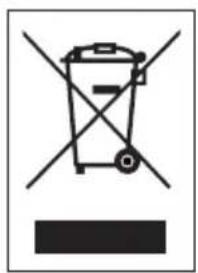
Symbol of a trash bin crossed with two crossed lines and a black rectangle below (no text or labels)This symbol on the product or on its packaging indicates that this product may not be treated as household waste. Instead it must be brought to the applicable collection point for recycling of electrical and electronic equipment. By ensuring this product is disposed of correctly, you will help prevent potential negative consequences for the environment and human health, which could otherwise be caused by inappropriate waste handling of this product. For more detailed information about recycling of this product, please contact your local city office, your household waste disposal service or the shop where you purchased the product.

The packaging is recyclable. Please treat the packaging ecologically.

This appliance conforms to all European requirements in the areas of safety, health, and environmental protection.
The EU declaration concerning this appliance can be requested at any time from info@linea2000.be
GARANTIA
Estimado cliente,
5. Italiano (Italian)
6. Integral (Whole wheat)
10. Masa madre (Sourdough)
natural_image
Symbol of a trash bin crossed with two crossed lines, no text or numbers present- Integrale (whole wheat)
- Pasta madre (Sourdough)
- Senza glutine (Gluten free)
natural_image
Symbol of a trash bin with crossed lines indicating no waste, and a solid black rectangle below (no text or labels)natural_image
Symbol of a trash bin crossed with two crossed lines and a solid black rectangle below (no text or labels)- Taliansky chlieb (Italian)
natural_image
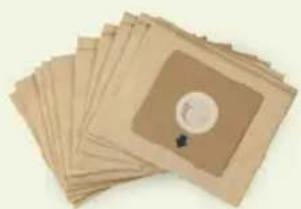
Symbol of a trash bin crossed with two crossed lines, no text or numbers presentLooking for extra accessories or you have a broken piece?
ORDER the original DOMO accessories and parts on our webshop.
Webshop

natural_image
Stack of sheets of paper with a circular inset showing a small object, no visible text or symbols
natural_image
Two white plastic electrical connectors with mounting holes (no text or symbols visible)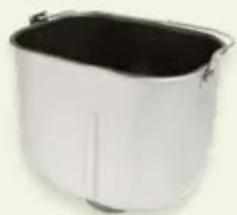
natural_image
White rectangular container with black interior, no visible text or symbols
natural_image
Clear glass coffee maker with black handle and lid (no text or symbols visible)
- ⚠PRODUCTSPECIFIEKE WAARSCHUWINGEN
- Start- pauze/stop
- ⚠️ AVERTISSEMENTS SPÉCIFIQUES AU PRODUIT
- Pain complet (whole wheat)
- Levain (Sourdough)
- Start- Pause/Stop
- Vollkorn (whole wheat)
- SAFETY INSTRUCTIONS
- ▲ELECTRICAL WARNINGS
- ⚠️INSTALLATION
- ⚠ USE
- ⚠ CLEANING AND MAINTENANCE
- ⚠️PRODUCTSPECIFIC WARNINGS
- SAVE THESE INSTRUCTIONS FOR FUTURE REFERENCE
- PARTS
- BEFORE THE FIRST USE
- USE
- BASIC RECIPE
- INGREDIENTS
- Flour
- Gluten
- Yeast
- Starter
- Salt
- Butter / oil
- Sugar
- Water
- Milk
- Other ingredients
- CONTROL PANEL
- Controller
- Display
- 'MENU' BUTTON
- 'WEIGHT' BUTTON
- + AND D. -
- 'COLOUR' BUTTON
- START-PAUSE/STOP
- PROGRAMS
- Program times:
- Homemade (DIY)
- Basic
- Quick
- Sweet
- French
- Italian
- Whole wheat
- Raisin/nut bread
- Rye
- Brioche
- Sourdough
- Gluten free
- Sandwich
- Pizza dough
- Pasta dough
- Knead
- Bake
- Homemade
- OPERATING INSTRUCTIONS
- WARMING FUNCTION
- ADDING ADDITIONAL INGREDIENTS
- MEMORY FUNCTION
- SETTING HOMEMADE
- REMOVING THE KNEADING PADDLE BEFORE BAKING
- TIME DELAY FUNCTION
- Example:
- TIP
- CLEANING AND MAINTENANCE
- EXTERIOR
- INSIDE
- LOAF TIN
- GUIDELINES
- GARANTIA
- Italiano (Italian)
- Integral (Whole wheat)
- Masa madre (Sourdough)
Brand : DOMO
Model : B3978
Category : Bread maker