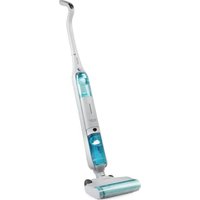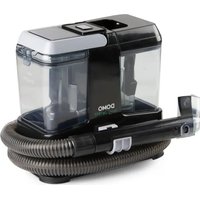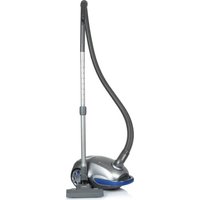
DO1128S - Vacuum Cleaner DOMO - Free user manual and instructions
Find the device manual for free DO1128S DOMO in PDF.


User questions about DO1128S DOMO
0 question about this device. Answer the ones you know or ask your own.
Ask a new question about this device
Download the instructions for your Vacuum Cleaner in PDF format for free! Find your manual DO1128S - DOMO and take your electronic device back in hand. On this page are published all the documents necessary for the use of your device. DO1128S by DOMO.
USER MANUAL DO1128S DOMO
natural_image
Black vacuum cleaner with attached cable, shown against white background (no text or symbols visible)DO1128S
| Handleiding Stofzakloze stofzuiger | |
| Mode d'emploi Aspirateur sans sac | |
| Gebrauchsanleitung Beutelloser Staubsauger | |
| Instruction booklet Bagless vacuum cleaner |

natural_image
Two symbolic icons: a warning triangle with an exclamation mark and an open book with stacked books (no text or labels)Read all instructions carefully - save this instruction manual for future reference.
| NL Nederlands 3 | |
| FR Français 12 | |
| DE Deutsch 21 | |
| EN English 30 |
GARANTIE
Geachte klant,
⚠PRODUCTSPECIFIEKE WAARSCHUWINGEN
natural_image
Close-up of a black vacuum cleaner with a hose and cable connector (no visible text or symbols)TELESCOPISCHE BUIS
natural_image
Close-up of a hand holding a digital camera with a label and arrow pointing to it (no visible text or symbols)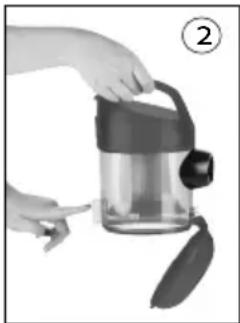
natural_image
Person holding a transparent container with a handle and spool, no visible text or symbolsnatural_image
Exterior view of a modern cylindrical device with internal components and directional arrows (no text or symbols)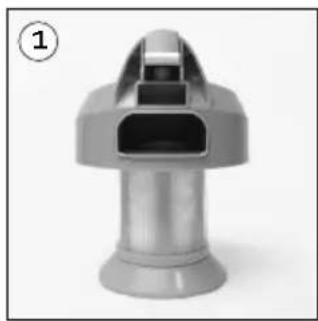
natural_image
3D rendered image of a metallic mechanical component with a conical top and flange (no text or symbols visible)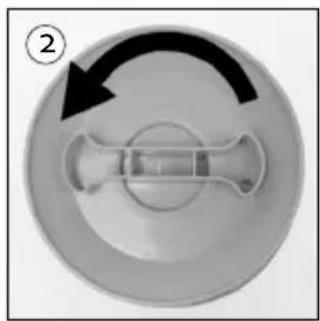
natural_image
Circular diagram with a central cross-shaped component and an arrow indicating rotation (no text or symbols)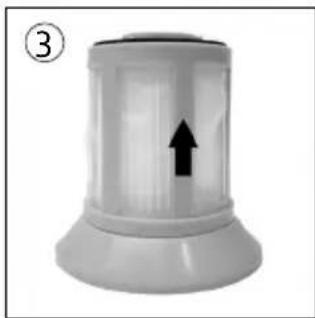
natural_image
White cylindrical object with a black upward arrow, labeled with number 3 (no text or symbols on the object itself)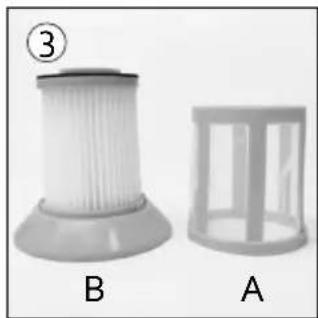
natural_image
Two types of plastic filter components labeled A and B, shown side by side (no text or symbols on the objects themselves)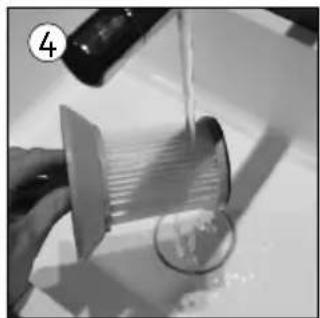
natural_image
Close-up of hands pouring liquid from a bottle onto a glass with a circular object nearby (no visible text or symbols)DE FILTER ACHTER HET STOFRESERVOIR REINIGEN OF VERVANGEN
natural_image
Close-up of a black plastic mechanical component with a white arrow pointing to a small feature (no text or symbols visible)HEPA-FILTER REINIGEN OF VERVANGEN VOOR DE LUCHTUITLAAT
natural_image
Front view of a black electronic device with a perforated grille and indicator lights, labeled with number 1 (no text or symbols on the device itself)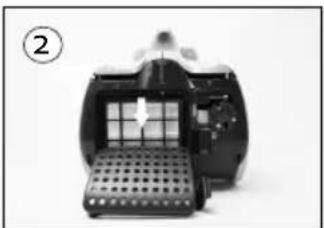
natural_image
Close-up of a mechanical device with a perforated base and internal grid structure (no visible text or symbols)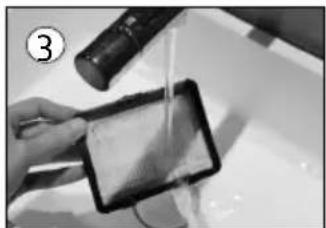
natural_image
Person using a tablet device with liquid, no visible text or symbolsOPGELET
natural_image
Close-up of a black and silver compact vacuum cleaner with a handle attachment (no visible text or symbols)VEELGESTELDE VRAGEN
text_image
Prohibition sign depicting a trash bin crossed with a diagonal line, indicating no waste or discharge.natural_image
Recycling symbol icon with three chasing arrows forming a triangle (no text or labels)⚠️ AVERTISSEMENTS SPÉCIFIQUES AU PRODUIT
natural_image
Close-up of a black vacuum cleaner with a hose and nozzle, no visible text or symbolsTUBE TÉLESCOPIQUE
natural_image
Close-up of a hand holding a black handheld device with a circular logo, no visible text or symbols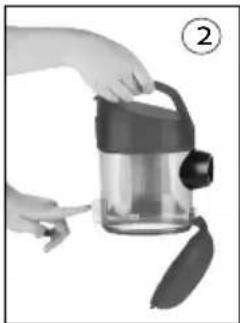
natural_image
Person holding a transparent container with a handle and leaf, no visible text or symbolsnatural_image
Exterior view of a modern cylindrical device with internal components and directional arrows (no text or symbols)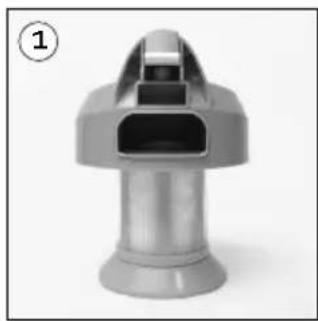
natural_image
3D rendered image of a metallic mechanical component with a conical top and flange (no text or symbols visible)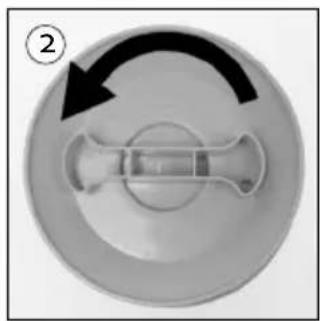
natural_image
Circular mechanical component with a central shaft and curved arrow, no visible text or symbols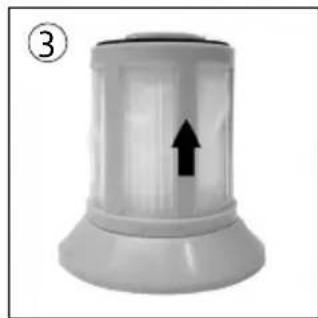
natural_image
3D rendered image of a cylindrical device with an upward arrow, labeled with number 3 (no text or symbols on the device itself)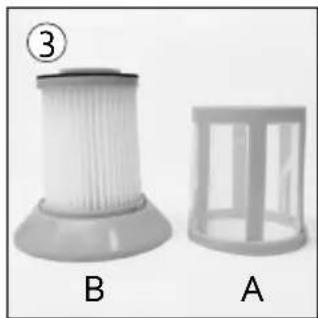
natural_image
Two types of plastic filter components labeled A and B, shown side by side (no text or symbols on the objects themselves)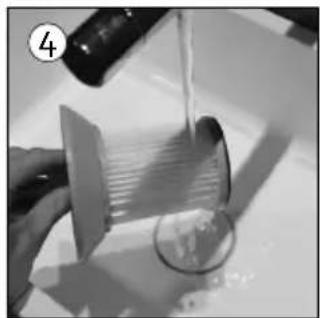
natural_image
Close-up of a hand pouring liquid from a bottle onto a cylindrical container (no visible text or symbols)natural_image
Close-up of a black plastic mechanical component with a white arrow pointing to a small feature (no text or symbols visible)NETTOYER OU REMPLACER LE FILTRE HEPA DEVANT L'ÉVACUATION D'AIR
natural_image
Close-up of a device's front panel showing internal components and a white arrow indicating a specific area (no text or symbols present)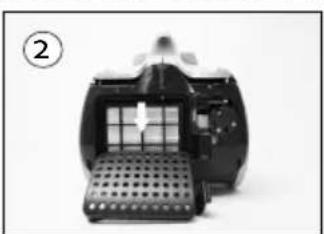
natural_image
Close-up of a mechanical device with a perforated base and internal grid structure (no visible text or symbols)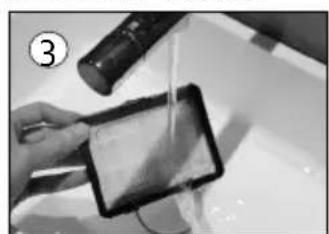
natural_image
Person pouring liquid from a small container into a dark rectangular container (no visible text or symbols)ATTENTION
natural_image
Close-up of a black vacuum cleaner with attached mechanical components (no visible text or symbols)QUESTIONS FRÉQUENTES
text_image
Prohibition sign with crossed-out trash bin and no text, indicating no waste or disposal restrictionnatural_image
Recycling symbol icon (three chasing arrows) inside a rounded square frame, no text or labels present.natural_image
Close-up of a black vacuum cleaner with a hose and cable connector (no visible text or symbols)TELESKOPROHR
natural_image
Close-up of a hand holding a digital camera with a handle, no visible text or symbols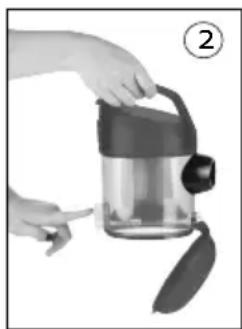
natural_image
Person holding a transparent container with a handle and leaf, no visible text or symbolsnatural_image
Exterior view of a modern cylindrical water dispenser device (no visible text or symbols)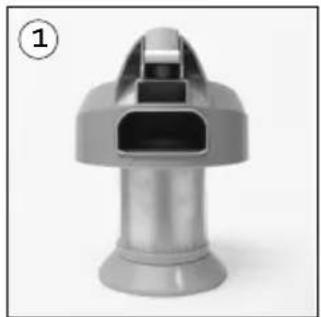
natural_image
3D rendered image of a metallic mechanical component with a conical top and cylindrical base (no text or symbols visible)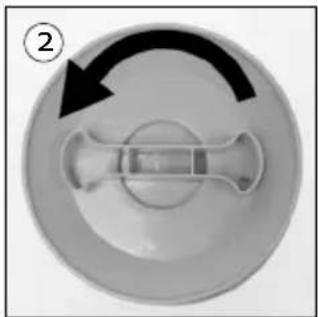
natural_image
Circular object with a central cross-shaped feature and an arrow indicating rotation (no text or symbols)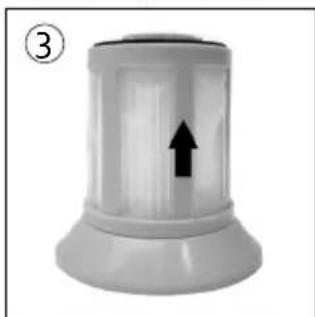
natural_image
White cylindrical object with a black upward arrow inside, labeled with number 3 (no text or symbols on the object itself)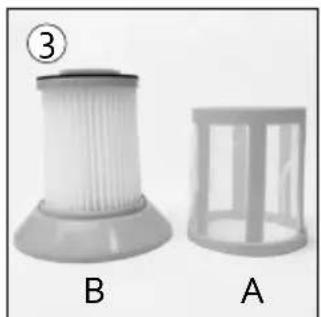
natural_image
Two plastic filter structures labeled A and B, shown side by side without any text or symbols on the surfaces.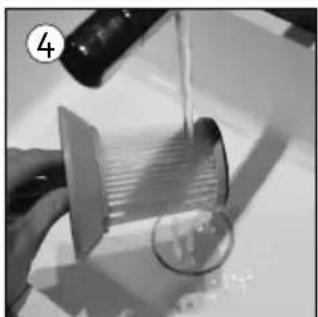
natural_image
Close-up of a hand holding a transparent plastic sheet with a magnified inset showing internal structure (no text or symbols visible)DEN FILTER HINTER DEM STAUBBEHÄLTER REINIGEN ODER ERSETZEN
natural_image
Close-up of a black plastic mechanical component with a white arrow pointing to a small inset detail (no text or symbols visible)HEPA-FILTER VOR DEM LUFTAUSLASS REINIGEN ODER ERSETZEN
natural_image
Close-up of a device rear panel showing a perforated grille and a button, with an arrow pointing to the grille (no text or symbols visible)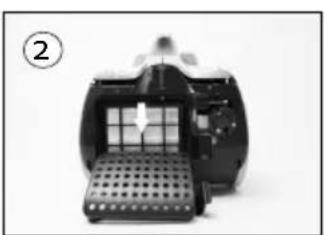
natural_image
Close-up of a mechanical device with a perforated base and internal grid structure (no visible text or symbols)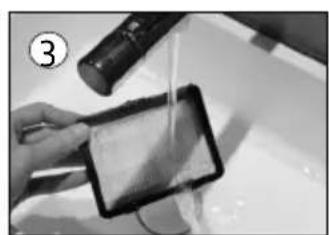
natural_image
Person using a handheld device to clean or wash liquid, no visible text or symbolsACHTUNG
natural_image
Close-up of a black and silver compact vacuum cleaner with a handle, no visible text or symbolstext_image
Prohibition sign depicting a trash bin crossed with a diagonal line, indicating no waste or discharge.natural_image
Recycling symbol icon (three chasing arrows) inside a rounded square border, no text or labels present.All of our products are always submitted to a strict quality control before they are sold to you.
Should you nevertheless experience problems with your device, we sincerely regret this.
In that case, we kindly request you to contact our customer service.
Our staff will gladly assist you.

+32 14 21 71 91

info@linea2000.be
Monday – Thursday: 8.30 – 12.00 and 13.00 – 17.00
Friday: 8.30 - 12.00 and 13.00 - 16.30
This appliance has a two year warranty period. During this period the manufacturer is responsible for any failures that are the direct result of construction failure. When these failures occur the appliance will be repaired or replaced if necessary. The warranty will not be valid when the damage to the appliance is caused by wrong use, not following the instructions or repairs executed by a third party. The guarantee is issued with the original till receipt. All parts, which are subject to wear, are excluded from the warranty. If your device breaks down within the 2-year warranty period, you can return the device together with your receipt to the shop where you purchased it.
The guarantee on accessories and components that are liable to wear-and-tear is only 6 months.
The guarantee and responsibility of the supplier and manufacturer lapse automatically in the following cases:
· If the instructions in this manual have not been followed.
· In case of incorrect connection, e.g. electrical voltage that is too high.
· In case of incorrect, rough or abnormal use.
· In case of insufficient or incorrect maintenance.
· In case of repairs or alterations to the device by the consumer or non-authorised third parties.
- If the customer used parts or accessories that are not recommended or provided by the supplier / manufacturer.
SAFETY INSTRUCTIONS
When using electrical appliances, basic safety precautions should always be taken, including the following:
- Read all instructions carefully. Keep this manual for future reference.
- Make sure all packaging materials and promotional stickers have been removed before using the appliance for the first time. Make sure children cannot play with the packaging materials.
- This appliance is intended to be used in household and similar applications such as:
· staff kitchen areas in shops, offices and other working environments;
· farm houses;
- by clients in hotels, motels and other residential type environments;
- bed and breakfast type environments.
- Children should be supervised to ensure that they do not play with the appliance.
- This appliance can be used by children aged from 16 years and above and persons with reduced physical, sensory or mental capabilities or lack of experience and knowledge if they have been given supervision or instruction concerning use of the appliance in a safe way and understand the hazards involved.
· Children shall not play with the appliance.
- Cleaning and user maintenance shall not be made by children unless they are older than 16 or supervised.
- Keep the appliance and its cord out of reach of children younger than 16 years.
- All repairs should be carried out by the manufacturer or its aftersales service.
- Any injury or damage caused by failure to comply with these rules are at your own risk. Neither the manufacturer, importer, or the supplier may be held liable.
▲ELECTRICAL WARNINGS
- In order to avoid a hazard this appliance must not be supplied through an external switching device, such as a timer or a separate remote control, or connected to a circuit that is regularly switched on and off by the utility.
- The appliance must be disconnected from its power source when not in use, during service and when replacing parts. Allow to cool before putting on or taking off parts, and before cleaning the appliance. To disconnect, turn controls to “OFF” or “o” position, then remove the plug from the wall. Never pull the cord or appliance to remove the plug from the socket.
- Before use, check carefully that the electric tension and frequency of the power net at your home match the indications on the rating label of the appliance.
- The appliance must be plugged into an appropriate outlet that is installed and grounded in accordance with local installation regulations.
- Do not let the power supply cord hang over the edge of a counter, or touch hot surfaces.
- Keep the power cord away from hot parts and don't cover the appliance.
- Unwrap the cord completely to prevent overheating of the cord. Do not allow the power cord supply to run underneath or around the unit.
- Do not operate this appliance with a damaged cord or plug or in the event the appliance malfunctions or has been damaged in any manner. Return the appliance to the DOMO Service Department or its service agent for examination, repair, or electrical or mechanical adjustment. Do not try to repair the appliance yourself.
⚠️INSTALLATION
· Do not place near flammable materials, gases or explosives.
· Do not use or store this appliance outdoors.
· Always use the appliance on a steady, dry and level surface.
- Never place this appliance near a gas stove or electrical stove or in a place where it may come into contact with a warm appliance.
⚠ USE
· Do not use this appliance for other than intended use.
- Only use the appliance for domestic use. The manufacturer cannot be held responsible for accidents that result from improper use of the appliance or not following the instructions described in this manual.
· Never leave the appliance unattended while it is functioning.
· Do not operate the appliance with wet hands.
- The use of accessories that are not recommended or sold by the manufacturer can cause fire, electrical shock or injuries.
Only use the utensils delivered with the appliance.
⚠ CLEANING AND MAINTENANCE
- To protect against electrical shock or burns, do not immerse unit, cord, or plug in water or other liquid.
- Failure to maintain this appliance in a clean condition could adversely affect the life of the appliance and possibly result in a hazardous situation.
⚠️PRODUCT-SPECIFIC WARNINGS
- Do not pull the cord. Do not use the cord as a handle. Do not jam the cord between a door or do not pull it around corners or sharp edges. Do not run the vacuum cleaner over the cord. Keep the cord away from hot surfaces.
- Do not touch the plug or the vacuum cleaner when you have wet hands.
- Do not put any objects in the openings of the vacuum cleaner. Do not use the appliance when an opening is blocked.
- Keep hair, loose clothing, fingers and other body parts away from openings of the vacuum cleaner and from moving parts.
- Be extra careful when cleaning stairs.
- Never use the vacuum cleaner to pick up any water, combustible or inflammable liquids like gasoline, or do not use the appliance in places where such substances might be present.
- Remove large and sharp objects from the floor before vacuuming it to prevent possible damage.
- Hold the plug while rewinding the cord onto the cord reel. Do not let the plug whip back and forth during rewinding.
· Unplug the appliance before connecting the hose. - Do not pick up any burning or smoking objects, like cigarettes, matches or hot ashes.
· Do not use the vacuum cleaner without dust bag and/or filter.
SAVE THESE INSTRUCTIONS FOR FUTURE REFERENCE
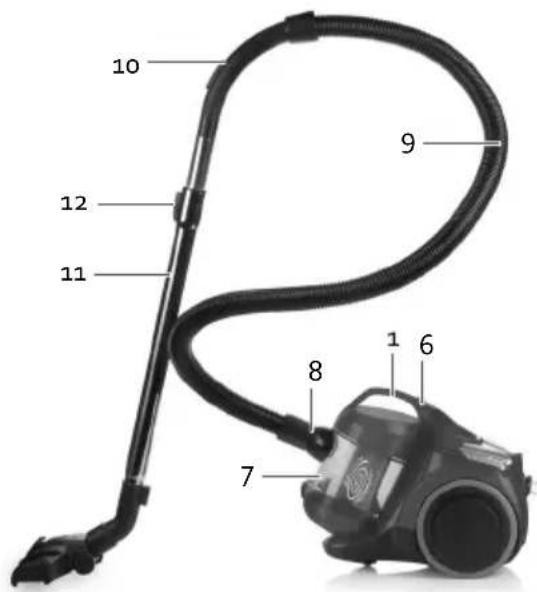
PARTS
- Handle
- On/off button
- Button for cord roll-up system
- Air outlet with HEPA filter
- Storage position
- Button to remove the dust reservoir
- Dust reservoir
- Connector for the hose
- Flexible hose
- Handle for hose with valve
- Telescopic tube
- Sliding button for tube length
- Floor nozzle
- Button to extend/retract brushes
- Crevice vacuum cleaner/Duster
- Button to empty the dust reservoir
- Filter dust reservoir
text_image
10 12 11 9 8 7 1 6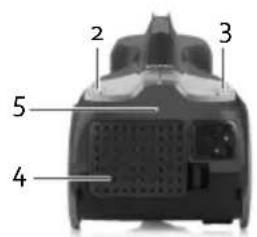
text_image
2 3 5 4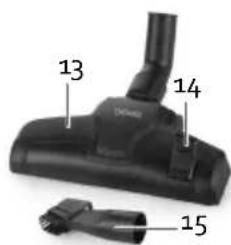
text_image
13 14 15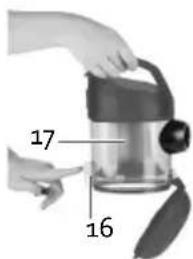
text_image
17 16ASSEMBLY
Always unplug the appliance from the socket before removing or connecting parts. Make sure that the dust reservoir is always in the correct position.
FLEXIBLE HOSE
- Assembly: Insert the flexible hose coupler into the connection opening at the front of the vacuum cleaner and tighten.
- Disassembly: To unlock, unscrew the flexible hose from the connection opening at the front of the vacuum cleaner.
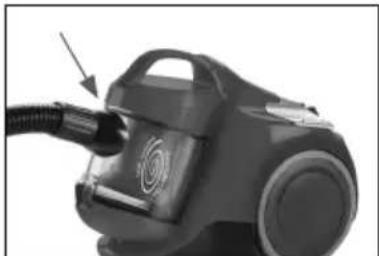
natural_image
Close-up of a black vacuum cleaner with a hose and nozzle, no visible text or symbolsTELESCOPIC TUBE
- Put the handle of the hose into the telescopic tube.
- Set the telescopic tube to the desired length. To do this, push the slide button forward and pull out the bottom part of the tube to make it longer. Release the slide button and let the tube snap into place.
- Attach the floor nozzle to the telescopic tube by firmly sliding the tube into the nozzle.
USE
-
Unwind the cord to a substantial length and plug in the vacuum cleaner. The yellow label on the cord indicates the maximum length of the cord, that should not be exceeded.
-
To turn the vacuum cleaner on and off, press the foot pedal with the Ⓑ symbol.
-
The suction can be controlled using the valve on the handle of the hose. The appliance has a strong suction force. This could cause the end of the floor nozzle to attach to the floor. If you want to reduce the suction force, you can slide open the valve on the handle of the hose.
· Carpets: ensure that the switch on the floor nozzle is set to

- Hard floors: ensure that the switch on the floor nozzle is set to .

- When you have finished vacuuming, unplug the vacuum cleaner and automatically rewind the cord by pressing the foot pedal with the symbol. Make sure that the plug does not whip back and forth while rewinding the cord, by guiding the cord with your hand. This to prevent possible damage.
2-IN-1 CREVICE ATTACHMENT
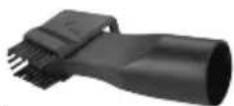
You can use the 2-in-1 crevice cleaner for hard-to-reach places such as radiators, crevices, corners, between cushions, etc. Click the brush up for furniture, shelves, etc.
CLEANING AND MAINTENANCE
EMPTYING AND CLEANING THE DUST RESERVOIR
Empty the dust reservoir regularly. Make sure that the dust in the dust reservoir does not exceed the maximum level.
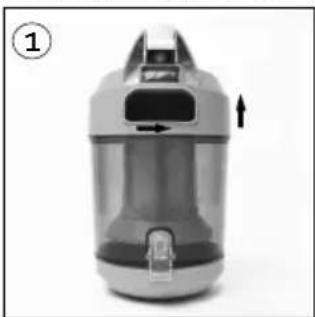
- Take the handle of the vacuum cleaner and press the button. Carefully remove the dust reservoir from the vacuum cleaner.
- Hold the dust reservoir above the dustbin. Press the button to empty the dust reservoir. The bottom will click open and the dust will fall out.
- If necessary, wipe the dust reservoir clean with a soft, damp cloth.
- Once the dust is removed, close the bottom until you hear it click.
To prevent losing suction after emptying the dust reservoir, it is essential that the long interior filter is checked for blockages.
- To do this, completely remove the dust reservoir by unscrewing the handle counter-clockwise. Keep an eye on the slots of the dust reservoir.
- Unscrew the filter from the handle.
- Remove the outer filter (A) from the HEPA filter (B) by pulling it up.
- All parts may be cleaned under running water. Make sure all parts are completely dry before reassembling and using the vacuum cleaner again.
natural_image
Exterior view of a modern water purifier device (no text or symbols visible)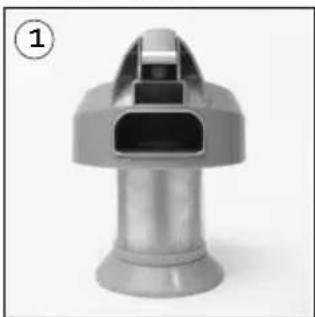
natural_image
3D rendered image of a metallic mechanical component with a conical top and flange (no text or symbols visible)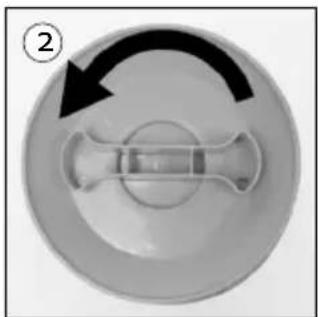
natural_image
Circular mechanical component with a central shaft and arrow indicating rotation (no text or symbols)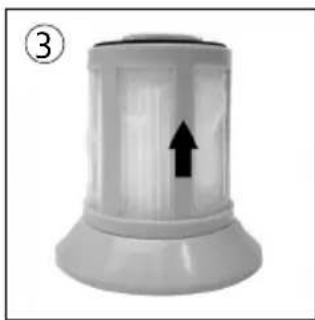
natural_image
White cylindrical object with a black upward arrow, labeled with number 3 (no text or symbols on the object itself)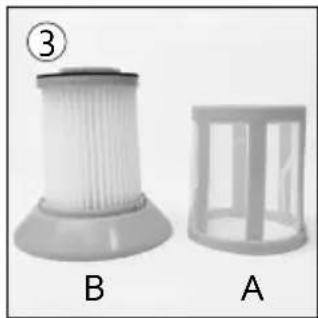
natural_image
Two types of plastic filter components labeled A and B, shown side by side (no text or symbols on the objects themselves)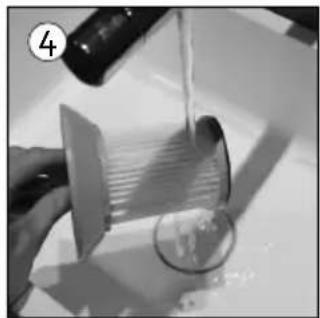
natural_image
Close-up of a hand pouring liquid from a bottle onto a glass with a paper sheet (no text or symbols visible)CLEANING OR REPLACING THE FILTER BEHIND THE DUST CONTAINER
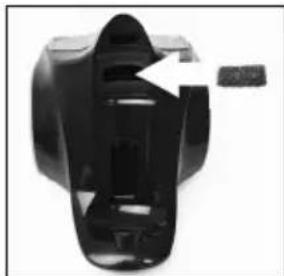
- Remove the dust container from the vacuum cleaner. There is a filter in front of the engine.
- Remove this filter from the opening and clean it under running water or replace it if necessary.
- Make sure the filter is completely dry before replacing and using the vacuum cleaner again.
natural_image
Close-up of a black plastic mechanical component with a white arrow pointing to a small feature (no text or symbols visible)CLEANING OR REPLACING THE HEPA FILTER IN FRONT OF THE AIR OUTLET
- At the back of the unit there is a grille for the HEPA filter. You can easily remove it by pushing the grille cover to the left and removing the grille from the device.
- To remove the HEPA filter from the unit, push the cover down.
- Clean the filter under running water or replace it if necessary. Make sure the filter is completely dry before putting it back into the vacuum cleaner and using the unit again.
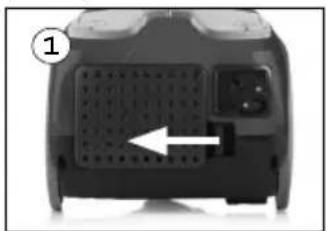
natural_image
Close-up of a device's front panel showing a perforated grille and button, with an arrow pointing to the grille (no text or symbols visible)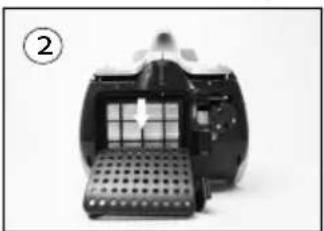
natural_image
Close-up of a mechanical device with a perforated base and internal grid structure (no visible text or symbols)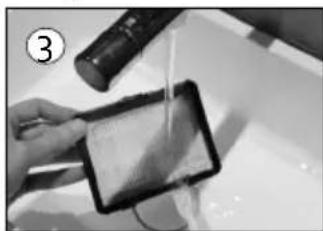
natural_image
Person using a handheld device to interact with a screen (no visible text or symbols)PLEASE NOTE:
- The appliance has 3 filters. In a normal cleaning session, it is sufficient to tap out the filters. It is recommended that you thoroughly clean the filters under tepid running water 3 to 4 times per year. Make sure that it is completely dry before putting it back in the appliance. You can also replace them if necessary. Avoid direct sunlight or intense overheating. Never put the filters in the washing appliance to prevent deformation. Do not use abrasive or cleaning products and wash from the bottom of the filter.
· Make sure that all components are correctly assembled before using the vacuum cleaner again.
- Always use the vacuum cleaner with the filters intact. If you do not do this, you may lose suction force or damage the motor.
- Unplug the plug before cleaning the filters.
· Do not use a hairdryer to dry the filters.
STORAGE
You can easily store the vacuum cleaner by sliding the telescopic tube with floor nozzle into the storage position. This keeps the tube upright.
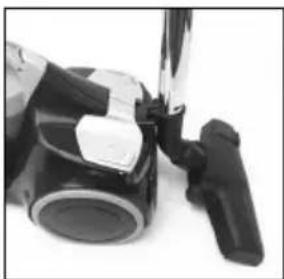
natural_image
Close-up of a black and silver compact vacuum cleaner with a handheld device (no visible text or symbols)FREQUENTLY ASKED QUESTIONS
| Problem Cause Solution | ||
| The appliance does not start. | The appliance is not plugged in. | Put the plug in the socket. |
| The appliance is not turned on. Press the on/off switch. | ||
| The power socket is not live, i.e. there is no voltage. | Try another power socket or check the fuses in the fuse box. | |
| The appliance stops working. | The appliance has overheated, so the safety was tripped. This can be caused by dirty filters or a blockage. | Allow the appliance to cool completely. When the appliance has cooled down, it will function again. Clean the filters and check that the hose is not clogged. |
| The suction is too weak. | The appliance is not correctly assembled, so the suction is being lost. | Check that everything is assembled correctly. Remove all of the accessories and then replace them step by step in their place. |
| The dust reservoir is full. Empty the dust reservoir and make sure that it does not exceed the maximum level. | ||
| The hose is clogged. Insert the hose in the reverse manner (with the handle) in the suction opening of the appliance. The clog will be suctioned to the other side, which will free the hose. | ||
| The filters are dirty. Carefully clean the filters as described in this manual. It is very important that you already thoroughly clean the filters. | ||
| The valve on the handle of the hose is open. | Close the valve. | |
| The filters are congested. Over time, the pores in the filters will become congested. Replace the filters. | ||
| There is a burning smell from the appliance. | The appliance is overheated. Immediately switch off the appliance and let the appliance cool down. Clean the dust reservoir and the filters. | |
ENVIRONMENTAL GUIDELINES
text_image
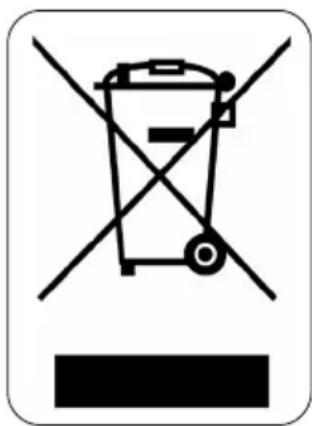
Prohibition sign depicting a trash bin crossed out by a diagonal line, indicating no waste or discharge.This symbol on the product or on its packaging indicates that this product may not be treated as household waste. Instead it must be brought to the applicable collection point for recycling of electrical and electronic equipment. By ensuring this product is disposed of correctly, you will help prevent potential negative consequences for the environment and human health, which could otherwise be caused by inappropriate waste handling of this product. For more detailed information about recycling of this product, please contact your local city office, your household waste disposal service or the shop where you purchased the product.


natural_image
Recycling symbol icon (three chasing arrows) inside a rounded square frame, no text or labels present.The packaging is recyclable. Please treat the packaging ecologically.
DOM@Webshop
BESTEL
de originele Domo-accessoires en -onderdelen online via:
COMMANDEZ
natural_image
Black-and-white photo collage showing four different kitchen utensils: milk bottles, folded paper sheets, clear glass pitcher, and a rectangular bowl (no text or symbols visible)of scan hier:
ou scannez ici:
oder hier scannen:
or scan here: