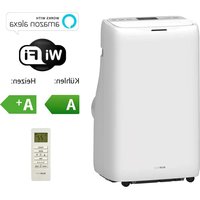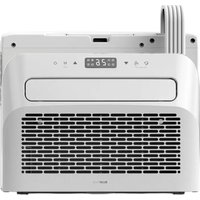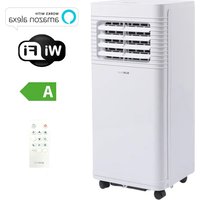
BPPAC14000FW - Air Conditioning BLUEPALM - Free user manual and instructions
Find the device manual for free BPPAC14000FW BLUEPALM in PDF.


User questions about BPPAC14000FW BLUEPALM
0 question about this device. Answer the ones you know or ask your own.
Ask a new question about this device
Download the instructions for your Air Conditioning in PDF format for free! Find your manual BPPAC14000FW - BLUEPALM and take your electronic device back in hand. On this page are published all the documents necessary for the use of your device. BPPAC14000FW by BLUEPALM.
USER MANUAL BPPAC14000FW BLUEPALM
natural_image
Line drawing of a large industrial air conditioner unit with cooling fans and wheels (no text or symbols)HERZLICHEN GLÜCKWUNSCH! VIELEN DANK, DASS SIE SICH FÜR EIN PRODUKT VON BLUEPALM ENTSCHIEDEN HABEN.
text_image
Warning symbols including no hand, flame, open book, warning sign, and lightning bolttext_image
Technical diagram of an air conditioning unit with numbered components and labeled parts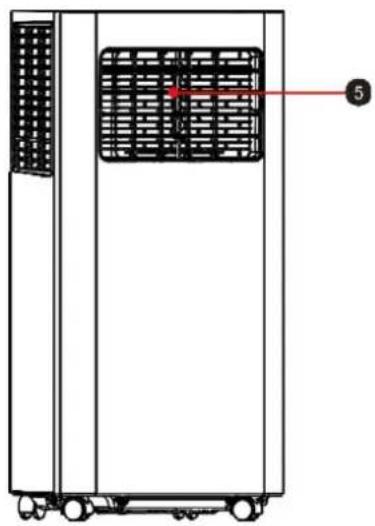
natural_image
Technical line drawing of a vertical industrial or storage unit with a grid-patterned panel and a numbered label (5), no readable text or symbols beyond the label.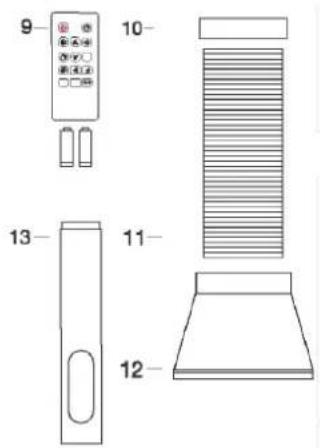
text_image
9 10 13 11 12natural_image
Line drawing of a battery pack with internal components and battery assembly (no text or symbols)Symbolbild
BLUEPALM
natural_image
Technical line drawing of an air duct system with cooling fans and a pipe connection (no text or labels)Abb.1
Fensterschiene Montage
natural_image
Pure diagram of a door with double-headed arrows indicating direction, no text or symbols presentAbb. 3
BLUEPALM
natural_image
Diagram showing two configurations of a portable air conditioner unit with airflow direction arrows (no text or symbols)Anmerkung:
natural_image
Technical line drawing of a portable air conditioner unit with a circular no-smoking symbol (no text or labels)text_image
Diagram of a remote control panel with labeled icons for power, switches, and temperature/°C functionBLUEPALM
4) Betriebsmodus
natural_image
Line drawing of a server rack with ventilation grilles and a bucket pouring liquid into it (no text or symbols)Timer
natural_image
Line drawing of an air conditioning unit with cooling fans and a bowl, no text or symbols presentHinweise:
natural_image
Diagram of a server rack with ventilation slots and a bucket pouring liquid into it (no text or symbols)text_image
Diagram showing two configurations of a heat exchanger unit with red arrows indicating direction, alongside its exploded view.Wartung
text_image
QR code with a blue house icon in the center, likely linking to a digital service or application.Scan QR code
Registrierung
text_image
09:17 我的家... Learn abeu DIY homep Add Device Create Scene Add Quick Toggle Card Scan All Devices Edit 09:17 Add Device Turn on Bluetooth Bluetooth makes your device more disposable Add Manually Electrical Air Conditioning Lighting Sensors Air Create or 3RD+40+71 Air Conditioning (N=7) Deutment (Opted) 09:17 Select 2.4 GHz Wi-Fi Network and enter password. If your Wi-Fi is 5GHz, please set it to be 2.4GHz. Common router setting method Wi-Fi - 60Hz Wi-Fi - 2.4GHz XK001 Select Wi-Fi 123456789 Next 09:17 Reset the device Press and hold the off-set button for a second unit the indicator while should be the user menu! Select the status of the indicator light or hear the beep: Blink Stevily Blink Quikry 09:21 Connect your mobile phone to the device's hotspot Connect your phone to the hotspot shown please: WLAN SmartLife-XXX/X SL-XXX “添到” Wants to Join WLAN Network “SmartLife-E75B”? Cancel Join Go to Connect 10:12 Add Device (weaker) posted successfully by PortaspH AR Conditioner/... Adele successfully DoneBLUEPALM
text_image
WORKS WITH amazon alexa works with the Google AssistantBLUEPALM
natural_image
Line drawing of a large industrial air conditioner unit with ventilation grilles and wheels (no text or symbols)FÉLICITATIONS! MERCI D'AVOIR CHOISI UN PRODUIT BLUEPALM.
BLUEPALM


text_image
Warning symbols including no hand, flame, open book, warning triangle, and lightning bolttext_image
Technical diagram of an industrial air conditioning unit with numbered components and labeled parts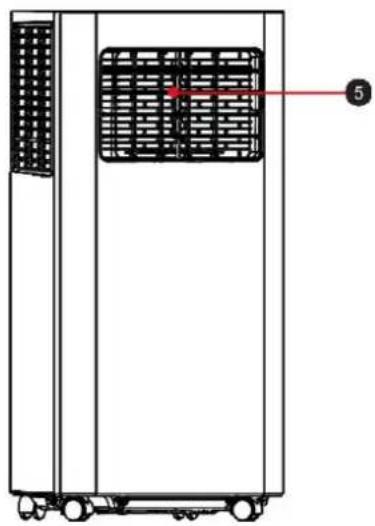
natural_image
Technical line drawing of a vertical industrial machine with a grid-patterned panel and labeled component (no text or symbols beyond label)
text_image
9 10 13 11 12natural_image
Technical line drawing of an air conditioning unit with a coiled hose and ventilation slots (no text or symbols)Fig.1
natural_image
Pure diagram of a door with double-headed arrows indicating vertical motion, no text or symbols presentFig. 3
BLUEPALM
natural_image
Diagram showing two views of a double-door air conditioner unit with airflow direction arrows (no text or symbols)Note :
natural_image
Technical line drawing of a vertical air conditioner unit connected to a circular switch symbol (no text or labels)PANNEAU DE COMMANDE ET TÉLÉCOMMANDE
text_image
Diagram of a mobile device control panel with icons and labels, including power, alarm, and climate symbols.BLUEPALM
natural_image
Line drawing of a multi-chamber refrigerator with a bucket inserted, showing internal ventilation and a connecting rod (no text or symbols)Minuteur
natural_image
Line drawing of a large industrial air conditioner unit with cooling fans and ventilation grilles, plus a small bowl on the side (no text or symbols)Indications :
natural_image
Diagram of a server rack with a bucket being inserted, showing internal ventilation and scroll (no text or labels)NETTOYAGE ET ENTRETIEN
text_image
Diagram showing two configurations of a heat exchanger unit with labeled parts and directional arrows indicating flow or movement.text_image
QR code with a blue house icon in the center, likely linking to a digital service or application.Scan QR code
Inscription
text_image
09:17 我的家... Learn about DIY Homep Add Device Creste Scene Add Quick Toggia Card Scan All Devices Edit Add Device Turn on Bluetooth Bluetooth makes any device more accessible Add Manually Decidual Air Conditioning Lighting Sensors Air Conditioner Air Conditioner Air Conditioner Large Home Appliances Select 2.4 GHz Wi-Fi Network and enter password. If your Wi-Fi is 5GHz, please set it to be 2.4GHz. Common router setting method Wi-Fi - 5GHz Wi-Fi - 2.4GHz XK001 Select Wi-Fi 123456789 Next 09:17 Reset the device Press and hold the RESET button for 5 seconds until the indicator lights (subject to the user master) Select the status of the indicator light or hear the beep: Blink Slowly Blink Quicky 09:21 Connect your mobile phone to the device's hotspot Connect your phone to the hotspot shown below: WLAN ✓ SmartLife-XXXX ✓ SL-XXXX “涂料” Wants to Join WLAN Network "SmartLife-C760"? OK to Connect 10:12 Add Device I device using a smart device by: Portaspitt Air Conditioner(... Adds successfully) DoneBLUEPALM
text_image
my WiFi Cable Anticipation All Devices Device center Wireless Solder Wireless One Square Main One Mode Type Access 12 Big Frontlight Bluetooth Spent-Up Duration Mode Data reserve All Devices Devices to be added: 1 Air Conditioner Add Enter Wi-Fi Information Choose Wi-Fi and enter password Xiaomi 12 Pro 1234567890 Next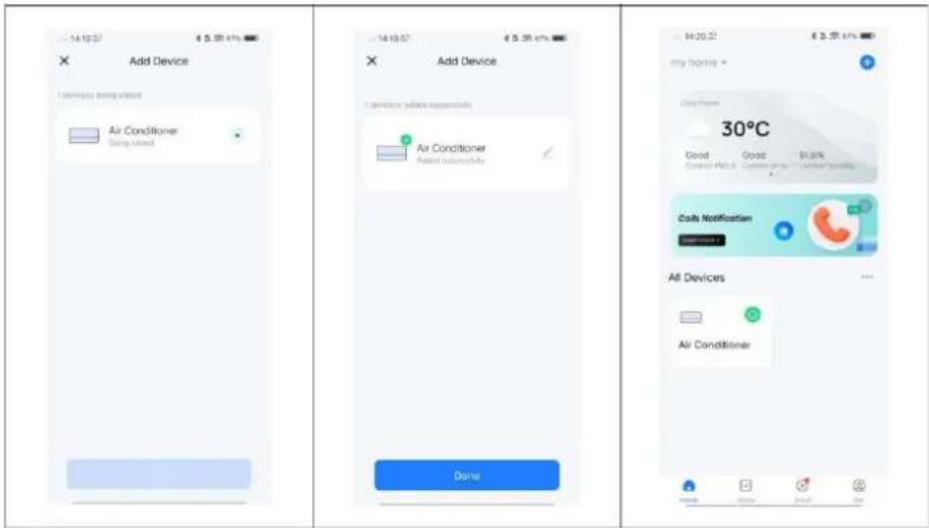
text_image
Add Device Air Conditioner Doing used Done Add Device Air Conditioner Made successfully Done M20.22 € 3.75 61% my home Copy Home 30°C Good Good 81.6% Cost of PDS & Customer prices 100% normality Caily Notification All Devices Air Conditionertext_image
WORKS WITH amazon alexa works with the Google AssistantBLUEPALM
natural_image
Line drawing of a large industrial air conditioner unit with ventilation grilles and wheels (no text or symbols)CONGRATULAZIONI! GRAZIE PER AVER SCELTO UN PRODOTTO BLUEPALM.
BLUEPALM


text_image
Warning symbols including no hand, flame, open book, exclamation mark, and lightning bolttext_image
Labeled diagram of an industrial air conditioning unit with numbered components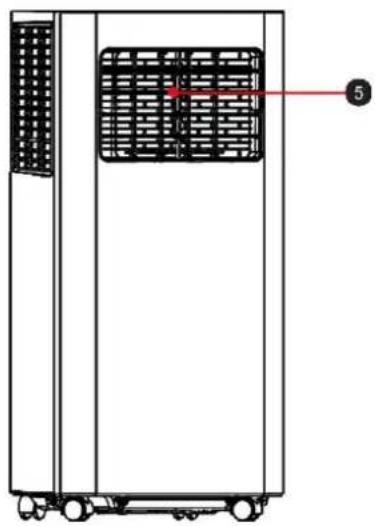
natural_image
Technical line drawing of a vertical industrial machine with a grid-patterned panel and labeled component (no text or symbols beyond label)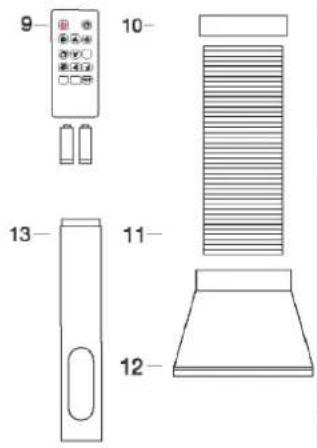
text_image
9 10 13 11 12natural_image
Line drawing of a battery pack with internal components and battery stack (no text or symbols)Immagine simbolo
BLUEPALM
natural_image
Technical line drawing of an air conditioning unit with a coiled hose and ventilation slots (no text or symbols)Fig.1
natural_image
Pure diagram of a door with double-headed arrows indicating direction, no text or symbols presentFig. 3
BLUEPALM
natural_image
Diagram showing two views of a small air conditioner unit with airflow direction indicators (no text or symbols)Osservazione:
natural_image
Technical line drawing of a portable air conditioner unit with a circular no-smoking symbol (no text or labels)PANNELLO DI CONTROLLO E TELECOMANDO
text_image
Diagram of a mobile device control panel with icons and labels, including power, alarm, and climate indicators.BLUEPALM
natural_image
Line drawing of a server rack with ventilation grilles and a bucket pouring liquid into it (no text or symbols)METODI DI DRENAGGIO
Drenaggio periodico
natural_image
Line drawing of a large industrial air conditioner unit with cooling fans and a bowl of water (no text or symbols)Note:
natural_image
Diagram of a server rack with a bucket and cable, no text or symbols presenttext_image
Diagram showing two configurations of a heat exchanger unit with labeled parts and directional arrows indicating flow or movement.BLUEPALM
IMMAGAZZINAMENTO
text_image
QR code with a blue house icon in the center, likely linking to a digital service or website.Scan QR code
Registrazione
text_image
09:17 我的家... Learn abeu DIY homep Add Device Creste Scene Add Quick Toggle Card Scan All Devices Edit 09:17 Add Device Turn on Bluetooth Bluetooth makes your device more disconstruals Acid Manually Electrical Air Conditioning Lighting Sensor Air Conditioner AIR+50-31 Air Conditioner AIR+20 Air Conditioner Outlet New Home Appliances 09:17 Reset the device Press and hold the RESET button for 5 seconds until the indicator lights (subject to the user menu) Select the status of the indicator light or hear the beep: Stink Slowy Black Qulody 09:21 Connect your mobile phone to the device's hotspot Connect your phone to the hotspot down below: WLAN ✓ SmartLife-XXXX ✓ SL-XXXX "涂鸦" Wants to Join WLAN Network "SmartLife-E760"? Cancel Join On to Connect 09:17 Select 2.4 GHz Wi-Fi Network and enter password. If your Wi-Fi is 5GHz, please set it to be 2.4GHz. Common order setting method ✓ Wi-Fi - 5GHz ✓ Wi-Fi - 2.4GHz XK001 Select Wi-Fi 123456789 Next 10:12 Add Device I device using mixed networking. PortaspH Air Conditioner(... Does successfully DoneBLUEPALM
text_image
Play E-mail Class Application All Devices Device center Add Add home - Cash Availability All Devices Devices to be added: 1 Air Conditioner Add Enter Wi-Fi Information Choose Wi-Fi and enter password Xiaomi 12 Pro 1234567890 Add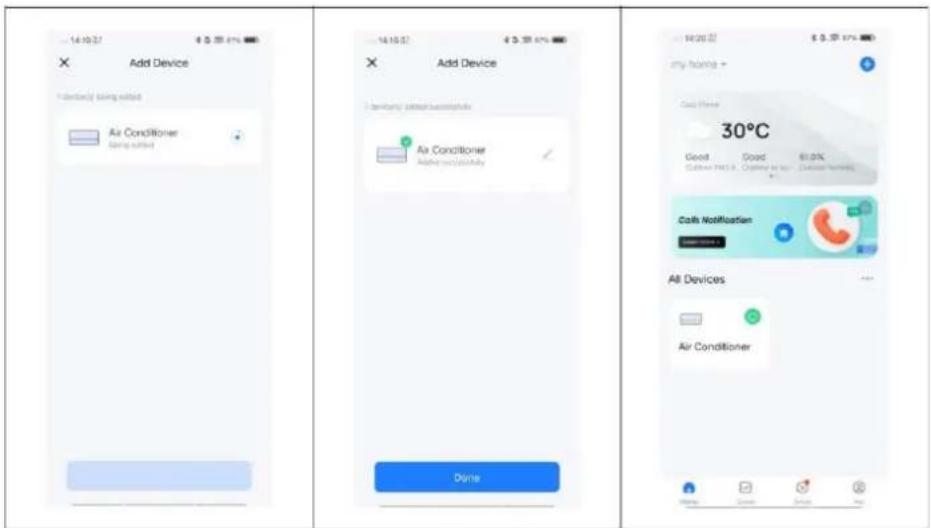
text_image
Add Device Air Conditioner Air Conditioner Air Conditioner Air Conditioner Air Conditioner Air Conditioner Air Conditioner Air Conditioner Air Conditioner Air Conditioner Air Conditioner Air Conditioner Air Conditioner Air Conditioner Air Conditioner Air Conditioner Air Conditioner Air Conditioner Air Conditioner Air Conditioner Air Conditioner Air Conditioner Air Conditioner Air Conditioner Air Conditioner Air Conditione Air Conditione Air Conditione Air Conditione Air Conditione Air Conditione Air Conditione Air Conditione Air Conditione Air Conditione Air Conditione Air Conditione Air Conditione Air Conditione Air Conditione Air Conditione Air Conditione Air Conditione Air Conditione Air Conditione Air Conditione Air Conditione Air Conditione Air Conditione Air Conditione Air Condition e Air Condition e Air Condition e Air Condition e Air Condition e Air Condition e Air Condition e Air Condition e Air Condition e Air Condition e Air Condition e Air Condition e Air Condition e Air Condition e Air Condition e Air Condition e Air Condition e Air Condition e Air Condition e Air Condition e Air Condition e Air Condition e Air Condition e Air Condition e Air Condition e Air Conditionetext_image
WORKS WITH amazon alexa works with the Google AssistantBLUEPALM
natural_image
Line drawing of a large industrial air conditioner unit with ventilation grilles and control panel (no text or symbols)GEFELICITEERD! BEDANKT VOOR HET KIEZEN VAN EEN PRODUCT VAN BLUEPALM.
BLUEPALM


text_image
Warning symbols including hand, flame, open book, exclamation mark, and lightning bolttext_image
Technical diagram of an industrial air conditioning unit with numbered components and labeled parts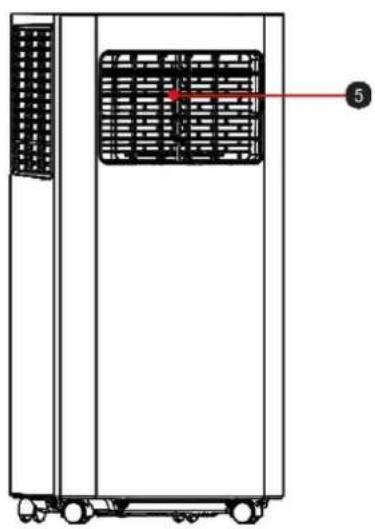
natural_image
Technical line drawing of a vertical industrial machine with a grid-patterned panel and labeled component (no text or symbols beyond the label)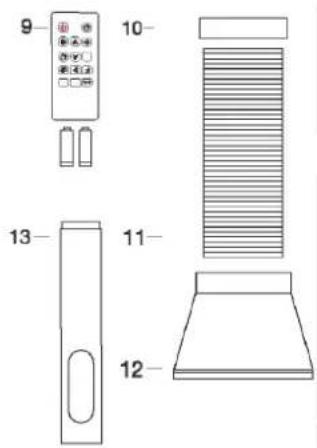
text_image
9 10 13 11 12natural_image
Line drawing of a battery pack with internal components and battery assembly (no text or symbols)Symbool afbeelding
BLUEPALM
natural_image
Technical line drawing of an air conditioning unit with a coiled hose and ventilation slots (no text or symbols)Fig.1
Vensterrail installatie
natural_image
Pure diagram of a door with double-headed arrows indicating direction, no text or symbols presentFig. 3
BLUEPALM
Airconditioning installeren
natural_image
Diagram showing two configurations of a portable air conditioner unit with airflow direction indicators (no text or symbols)Opmerking:
natural_image
Technical line drawing of a portable air conditioner unit with a circular stop symbol (no text or labels)BEDIENINGSPANEELE EN AFSTANDSBEDIENING
text_image
Diagram of a mobile device control panel with labeled icons and numbered labels pointing to function keys.BLUEPALM
4) Bedrijfsmodus
natural_image
Line drawing of a server rack with ventilation grilles and a bucket pouring liquid into it (no text or symbols)Timer
natural_image
Line drawing of an industrial air conditioner unit with cooling fans and a bowl (no text or symbols)Opmerkingen:
natural_image
Line drawing of a server rack with a bucket being inserted, no text or symbols presentREINIGING EN ONDERHOUD
text_image
Diagram showing two configurations of a heat exchanger unit with labeled parts and directional arrows indicating flow or movement.BLUEPALM
text_image
QR code with a blue house icon in the center, likely linking to a digital service or application.Scan QR code
Registratie
text_image
09:17 我的家... Learn about DIY Homep Add Device Creste Scene Add Quick Toggia Card Scan All Devices Edit 09:17 Add Device Turn on Bluetooth Bluetooth makes any device more accessible 09:17 Select 2.4 GHz Wi-Fi Network and enter password. If your Wi-Fi is 5GHz, please set it to be 2.4GHz. Common router setting method Wi-Fi - 5GHz Wi-Fi - 2.4GHz XK001 Select Wi-Fi 123456789 Add Manually Decidual Air Conditioning Lighting Sensors Air Conditioner Air Conditioner Air Conditioner Large Home Appliances Next 09:17 Reset the device Press and hold the RESET button for 5 seconds until the indicator white (subject to the user memory) Select the status of the indicator light or hear the beep: Blink Slowly Blink Quicky 09:21 Connect your mobile phone to the device's hotspot Connect your phone to the hotspot shown below: WLAN ✓ SmartLife-XXXX ✓ SL-XXXX "涂鸦" Wants to Join WLAN Network "SmartLife-E760"? OK to Connect 10:12 Add Device I device using a smart device by: Portaspitt Air Conditioner(... Able successivity DoneBLUEPALM
text_image
My Home Cable Availability All Devices Shortcut carrier RMS33 Singer Browser Ultra Bowl Music Box Music Xylar Baptom 12 Big Fastlight Bluetooth GreenUp Vicadem Music Color returner Air Conditioner Add Device to be added: 1 Enter Wi-Fi Information Choose Wi-Fi and enter password Xiaomi 12 Pro 1234567990 Next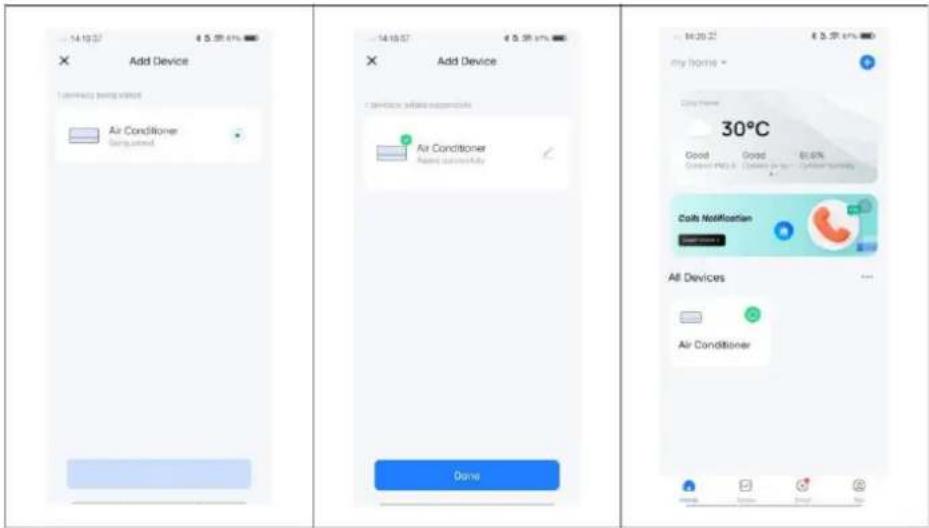
text_image
Add Device Air Conditioner Air Conditioner Air Conditioner Air Conditioner Air Conditioner Air Conditioner Dome 30°C Good Good 81.6% Costy Notification All Devices Air Conditionertext_image
WORKS WITH amazon alexa works with the Google AssistantBLUEPALM
| Technische gegevens WiFi | |
| Draadloze technologie: | Wifi (WLAN) |
| Radiofrequentie | 2412 MHz-2472 MHz |
| BLE-frequentie | 2402 MHz-2480 MHz |
| Modulatietype | 802.11b: DSSS802.11g: OFDM802.11n (20 MHz): OFDM |
| Vaste frequentie-software | SecureCRT.exe |
| Antenneversterking | 2,5 dBi |
| Antennetype | PCB |
| Zendvermogen | :520dBm |
natural_image
Line drawing of a large industrial air conditioner unit with ventilation grilles and wheels (no text or symbols)GRATTIS!
TACK FÖR ATT DU VALDE EN PRODUKT FRÅN BLUEPALM.
BLUEPALM


text_image
Warning symbols including no hand, flame, open book, exclamation mark, and lightning bolttext_image
Technical diagram of an industrial server rack with numbered components for identification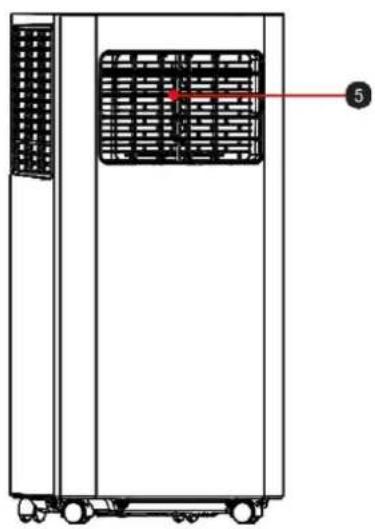
natural_image
Technical line drawing of a rectangular industrial machine with internal grid structure and labeled component (no text or symbols)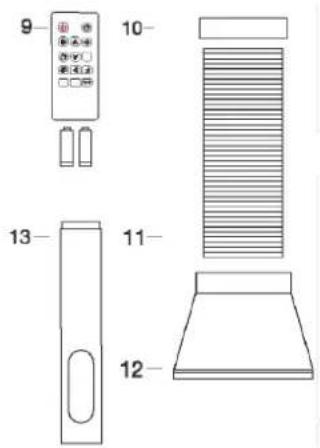
text_image
9 10 13 11 121) Bärhandtag
2) Luftintagsgaller
3) Kontrollpanel
4) Rullhjul
5) Justerbara ventilationsluckor
6) Avluftningsventil
7) Vattenavlopp
8) Luftintagsgaller
9) 2×AAA-batterier + fjärrkontroll
10) Avluftsslangadapter
11) Avluftsslang
12) Fönsteradapter
13) Fönsterlist
INSTALLATION OCH INSTÄLLNING
natural_image
Diagram of a battery pack with internal components and battery assembly (no text or symbols)BLUEPALM
natural_image
Technical line drawing of a mechanical device with internal components and a pipe fitting (no text or symbols)Fig. 1
Fönsterlistmontering
natural_image
Pure diagram of a door with double-headed arrows indicating direction, no text or symbols presentFig. 3
BLUEPALM
Installera luftkonditioneringsapparaten
natural_image
Diagram showing two views of a small air conditioner unit with airflow direction arrows, no text or symbols present.Anmärkning:
natural_image
Technical line drawing of a portable air conditioner unit with a circular stop symbol (no text or labels)MANÖVERPANEL OCH FJÄRRKONTROLL
text_image
Diagram of a remote control panel with labeled icons and temperature/°F settingsBLUEPALM
4) Driftläge
natural_image
Line drawing of a server rack with ventilation grilles and a bucket pouring liquid into it (no text or symbols)Timer
natural_image
Line drawing of an air conditioner unit with cooling fans and a bowl (no text or symbols)Anmärkningar:
natural_image
Diagram of a server rack with a bucket and cable inserted, no text or symbols presentRENGÖRING OCH UNDERHÅLL
text_image
Diagram showing two configurations of a heat exchanger unit with labeled components and red directional arrows indicating flow or movement.Underhåll
text_image
QR code with a blue house icon in the center, likely linking to a digital service or application.Scan QR code
Registrering
text_image
09:17 我的家... Learn about DIY homep Add Device Croste Scene Add Quick Toggle Card Scan All Devices Edit 09:17 Add Device Turn on Bluetooth Bluetooth makes your device more accessible Acid Manually Electrical Air Conditioning Lighting Sensors Create an BLED+H-CL Air Conditioner (W-CL) Controlor Zetael Large Home Appliances 09:17 Reset the device Press and hold the RESET button for 6 seconds until the indicator while (subject to the user manual) Select the status of the indicator light or hear the beep: Blink Slow/yr Blink Quickly 09:21 Connect your mobile phone to the device's hotspot Connect your phone to the hotspot shown below: WLAN ✓ SmartLife-XXXX ✓ SL-XXXX “添利” Wants to Join WLAN Network "SmartLife-E75B"? Cancel Join Go to Connect 09:17 Select 2.4 GHz Wi-Fi Network and enter password. If your Wi-Fi is 5GHz, please set it to be 2.4GHz. Common router setting method ✓ Wi-Fi - 5GHz ✓ Wi-Fi - 2.4GHz XK001 Select Wi-Fi 123456789 Next 10:12 Add Device University added network only PortescIt Air Conditioner(... Adds successfully Donetext_image
My Device Cable Notification All Devices Shorted center Green LED Sensors Browser Hi-Fi Smart Minds Dark Mode Rear Air Control Firelight Diage SpeedUp Vaccines Watts Deep Options Cable Notification All Devices Devices to be added: 1 Air Conditioner Add Enter Wi-Fi information Choose Wi-Fi and enter password Xiaomi 12 Pro 1234567890 Host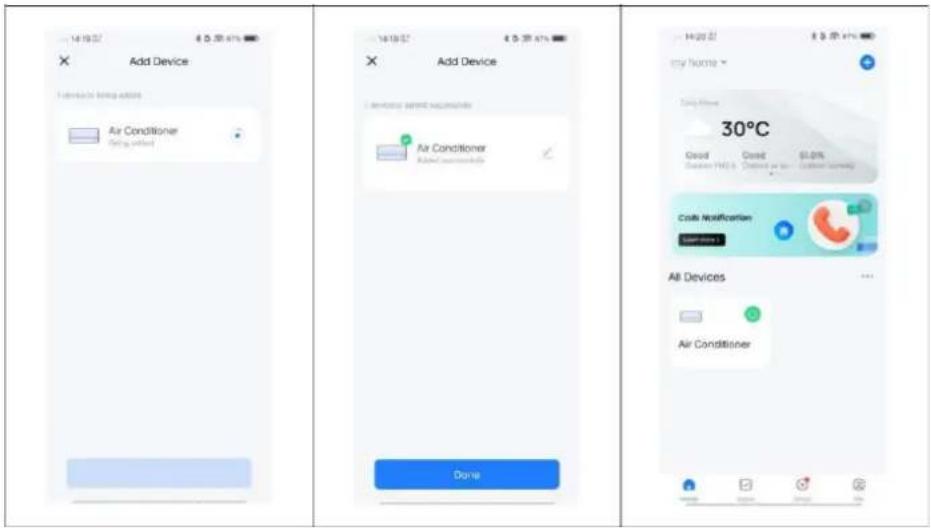
text_image
Add Device Air Conditioner (Not using this) Add Device Air Conditioner Added currently Done Help my home * 30°C Good Good 60.0% Costs Notification All Devices Air ConditionerWORKS WITH amazon alexa

works with the Google Assistant
BLUEPALM
| Tekniska data WiFi | |
| Trådlös teknik: | Wifi (WLAN) |
| Radiofrekvens | 2412 MHz–2472 MHz |
| BLE-driftfrekvens | 2402 MHz–2480 MHz |
| Modulationstyp | 802.11b: DSSS802.11g: OFDM802.11n (20 MHz): OFDM |
| Fastfrekvensprogramvara | SecureCRT.exe |
| Antennförstärkning | 2,5 dBi |
| Antenn | PCB |
| Överföringseffekt | :520 dBm |
| Teknisk information | |
| Artikelnummer | BPPAC14000FW |
| Kylkapacitet | 14 000 BTU / 4 100 W |
| Max. effektförbrukning | 1 575 W |
| Ingångsspänning | 220–240 V~ |
| Frekvens | 50 Hz |
| WIFI-överföringsfrekvens: | 2,4 GHz |
| Sändningseffekt: | max. 100 mW |
| Köldmedium/fyllning/GWP | R290/0,250 kg/3 |
| Energieffektivitet EER | 2,60 |
| Energieffektivitetsklass | A |
| Luftcirkulation | 460 m^3/h |
| Ljudnivå (ljudeffekt) | 65 dB(A) |
| Vikt | 27,5 kg |
| Mått | 365 x 320 x 745 mm |
| Kontaktadresser för ytterligare information | Schuss Home Electronic GmbHScheringgasse 3, A-1140 WienTel: +43 (1) 97 0 21 – 0Servicelinje: +43 (1) 97 0 21 – 502https://schuss-home.at/FB-nr: 236974 t / FB-domstol: Wien |
BLUEPALM
natural_image
Line drawing of a blue industrial air conditioner unit with ventilation grilles and cooling fans (no text or symbols)GRATULUJEME! DĚKUJEME, ŽE JSTE SI VYBRALI PRODUKT OD SPOLEČNOSTI BLUEPALM.
BLUEPALM


text_image
Warning symbols including no hand, flame, open book, and warning triangletext_image
Technical diagram of an industrial air conditioning unit with numbered components and labeled parts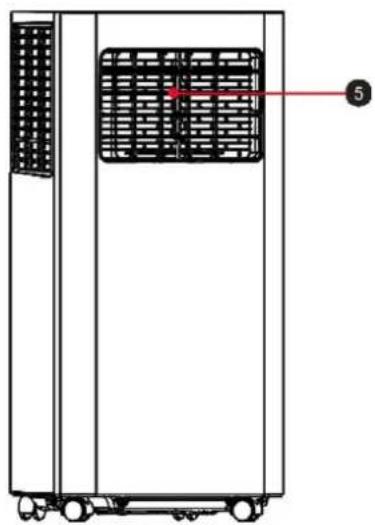
natural_image
Technical line drawing of a vertical industrial machine with a grid-patterned panel and labeled component (no text or symbols beyond label)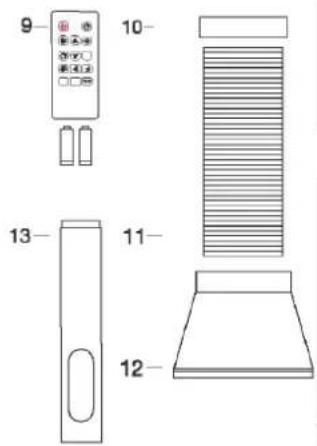
text_image
9 10 11 12 13natural_image
Technical line drawing of a battery pack with internal components and battery assembly (no text or symbols)BLUEPALM
natural_image
Technical line drawing of an air conditioning unit with a coiled hose and ventilation slots (no text or symbols)Obr.1
natural_image
Pure diagram of a door with double-headed arrows indicating direction, no text or symbols presentObr. 3
natural_image
Diagram showing two views of a small air conditioner unit with airflow direction indicators (no text or symbols)Poznámka:
natural_image
Technical line drawing of a portable air conditioner unit with a circular no-smoking symbol (no text or labels)OVLÁDACÍ PANEL A DÁLKOVÉ OVLÁDÁNÍ
text_image
Diagram of a remote control panel with labeled icons and temperature/°F settingsBLUEPALM
4) Provozní režim
natural_image
Line drawing of a server rack with ventilation grilles and a bucket pouring liquid into it (no text or symbols)natural_image
Technical line drawing of a large industrial air conditioner unit with cooling fans and a bowl (no text or symbols)•
Poznámky:
natural_image
Diagram of a server rack with a bucket and cable, no text or symbols presentČIŠTĚNÍ A ÚDRŽBA
text_image
Diagram showing two configurations of a heat exchanger unit with labeled components and directional arrows indicating flow or movement.BLUEPALM
SKLADOVÁNÍ
text_image
QR code with a blue house icon in the center, likely linking to a digital service or application.Scan QR code
Registrace
text_image
09:17 我的家... Learn about DIY Homep Add Device Creste Scene Add Quick Toggia Card Scan All Devices Edit 09:17 Add Device Turn on Bluetooth Bluetooth makes any device more accessible 09:17 Select 2.4 GHz Wi-Fi Network and enter password. If your Wi-Fi is 5GHz, please set it to be 2.4GHz. Common router setting method Wi-Fi - 5GHz Wi-Fi - 2.4GHz XK001 Select Wi-Fi 123456789 Add Manually Decidual Air Conditioning Lighting Sensors Air Conditioner Air Conditioner Air Conditioner Large Home Appliances Next 09:17 Reset the device Press and hold the RESET button for 5 seconds until the indicator white (subject to the user memory) Select the status of the indicator light or hear the beep: Blink Slowly Blink Quicky 09:21 Connect your mobile phone to the device's hotspot Connect your phone to the hotspot shown below: WLAN ✓ SmartLife-XXXX ✓ SL-XXXX "涂鸦" Wants to Join WLAN Network "SmartLife-E760"? OK to Connect 10:12 Add Device I device using a smart device by: Portaspitt Air Conditioner(... Able successivity DoneBLUEPALM
text_image
my home? Cable Antihatuation All Devices Delete center Wireless Sensing Browser One Store Mids One Mode Snap Access 12 Big Password Bluetooth Add All Devices Devices to be added: 1 Air Conditioner Add Enter Wi-Fi Information Choose Wi-Fi and enter password: Xiaomi 12 Pro 1234567890 Next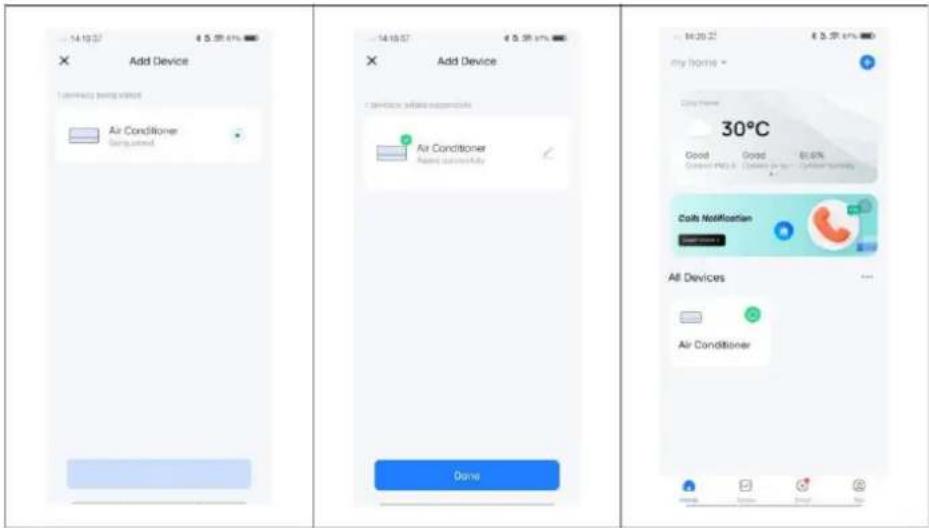
text_image
Add Device Air Conditioner Air Conditioner Air Conditioner Air Conditioner Air Conditioner Air Conditioner Dome 30°C Good Good 81.6% Costy Notification All Devices Air ConditionerAplikace funguje také s Amazon Alexa a Google Assistant.

text_image
WORKS WITH amazon alexa works with the Google AssistantBLUEPALM
natural_image
Line drawing of a large industrial air conditioning unit with ventilation grilles and wheels (no text or symbols)GRATULUJEME! ĎAKUJEME, ŽE STE SI VYBRALI PRODUKT OD SPOLOČNOSTI BLUEPALM.
BLUEPALM


text_image
Warning symbols including no hand, flame, open book, exclamation mark, and lightning bolttext_image
Technical diagram of an industrial air conditioning unit with numbered components and labeled parts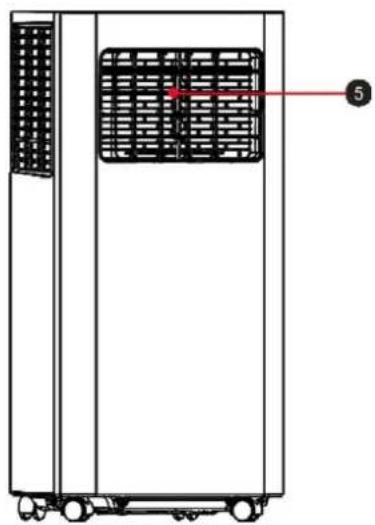
natural_image
Technical line drawing of a vertical industrial machine with a grid-patterned panel and labeled component (no text or symbols beyond label)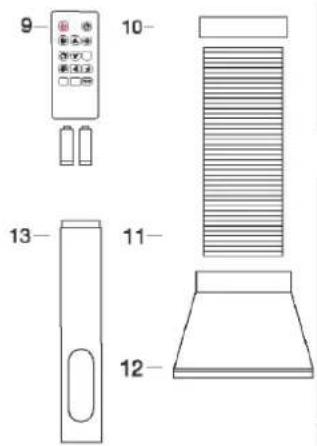
text_image
9 10 11 12 13natural_image
Technical line drawing of a battery pack with internal components and battery casing (no text or symbols)BLUEPALM
natural_image
Technical line drawing of an air conditioning unit with a coiled hose and ventilation slots (no text or symbols)Obr.1
natural_image
Pure diagram of a door with double-headed arrows indicating direction, no text or symbols presentObr. 3
natural_image
Diagram showing two views of a small air conditioner unit with airflow direction arrows (no text or symbols)Poznámka:
natural_image
Technical line drawing of a portable air conditioner unit with a circular no-smoking symbol (no text or labels)OVLÁDACÍ PANEL A DIAL'KOVÉ OVLÁDANIE
text_image
Diagram of a remote control panel with labeled icons and temperature/°F settingsBLUEPALM
natural_image
Line drawing of a server rack with ventilation grilles and a bucket pouring liquid into it (no text or symbols)Časovač
natural_image
Line drawing of an industrial air conditioner unit with cooling fans and a bowl (no text or symbols)Poznámky:
natural_image
Diagram of a server rack with heat exchangers and a bucket, no text or symbols presentČISTENIE A ÚDRŽBA
text_image
Diagram showing two configurations of a heat exchanger unit with labeled parts and directional arrows indicating flow or movement.BLUEPALM
SKLADOVANIE
text_image
QR code with a blue house icon in the center, likely linking to a digital service or application.Scan QR code
Registrácia
text_image
09:17 我的家... Learn abeu DIY homep Add Device Creste Scene Add Quick Toggle Card Scan All Devices Edit 09:17 Add Device Turn on Bluetooth Bluetooth makes your device more disconstruals Acid Manually Electrical Air Conditioning Lighting Sensor Air Conditioner AIR+50-31 Air Conditioner AIR+20 Air Conditioner Outlet New Home Appliances 09:17 Reset the device Press and hold the RESET button for 5 seconds until the indicator lights (subject to the user menu) Select the status of the indicator light or hear the beep: Stink Slowly Black Qulody 09:21 Connect your mobile phone to the device's hotspot Connect your phone to the hotspot down below: WLAN ✓ SmartLife-XXXX ✓ SL-XXXX "涂鸦" Wants to Join WLAN Network "SmartLife-E760"? Cancel Join On to Connect 09:17 Select 2.4 GHz Wi-Fi Network and enter password. If your Wi-Fi is 5GHz, please set it to be 2.4GHz. Common locker setting method ✓ Wi-Fi - 5GHz ✓ Wi-Fi - 2.4GHz XK001 Select Wi-Fi 123456789 Next 10:12 Add Device I device may not receive it. PortaspH Air Conditioner(... Does successfully DoneBLUEPALM
Automatické pridanie zariadenia
text_image
My Home Cable Availability All Devices Shortcut carrier RMS33 Singer Browser Ultra Bowl Music Box Music Xylar Baptom 12 Big Fastlight Bluetooth GreenUp Vicadem Music Color returner Hi/Hi/Hi/Hi/Hi/Hi/Hi/Hi/Hi/Hi/Hi/Hi/Hi/Hi/Hi/Hi/Hi/Hi/Hi/Hi/Hi/Hi/Hi/Hi/Hi/Hi/Hi/Hi/Hi/Hi/Hi/Hi/Hi/Hi/Hi/Hi/Hi/Hi/Hi/Hi/Hi/Hi/Hi/Hi/Hi/Hi/Hi/Hi/Hi/Hi/Hi/ Devices to be added: 1 Air Conditioner Add Enter Wi-Fi Information Choose Wi-Fi and enter password Xiaomi 12 Pro 1234567990 Next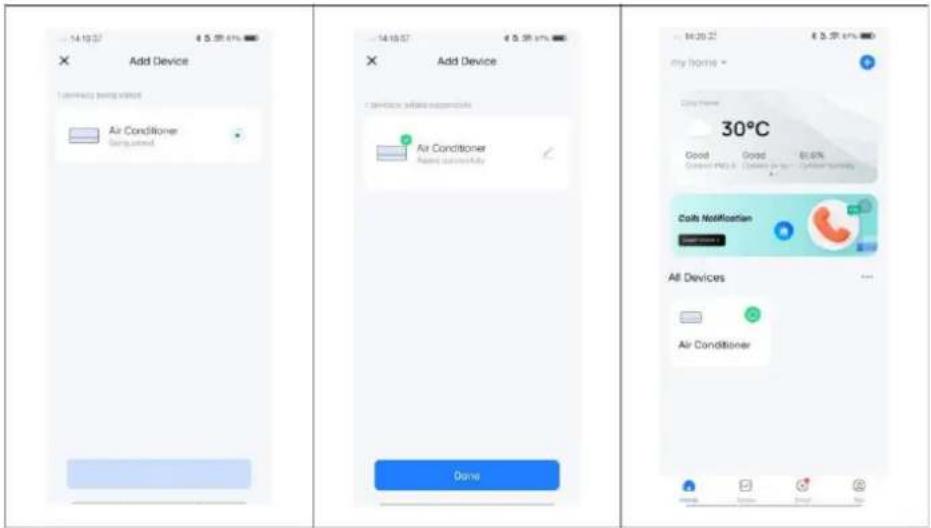
text_image
Add Device Air Conditioner Getting Add Device Air Conditioner Made successfully Done 30°C Good Good 80.6% Current HVAC - Current Air - Current Humidity Daily Notification Air Devices Air ConditionerAplikácia funguje aj s Amazon Alexa a Google Assistant.

text_image
WORKS WITH amazon alexa works with the Google AssistantBLUEPALM
| Technické údaje WiFi | |
| Bezdrôtová technológia: | Wifi (WLAN) |
| Frekvencia rádiového prevádzky | 2412 MHz – 2472 MHz |
| Pracovná frekvencia BLE | 2402 MHz – 2480 MHz |
| Typ modulácie | 802.11b: DSSS802.11g: OFDM802.11n (20 MHz): OFDM |
| Softvér s pevnou frekvenciou | SecureCRT.exe |
| Zosilnenie antény | 2,5 dBi |
| Typ antény | PCB |
| Prenosový výkon | :520 dBm |
natural_image
Line drawing of a blue industrial air conditioner unit with ventilation grilles and control panel (no text or symbols)FELICITĂRI! VĂ MULTUMIM PENTRU CĂ AȚI ALES UN PRODUS DE LA BLUEPALM.
RO

text_image
Warning symbols including no hand, flame, open book, exclamation mark, and lightning bolttext_image
Technical diagram of an industrial air conditioning unit with numbered components and labeled parts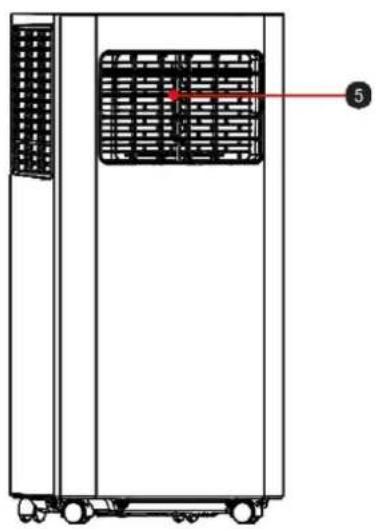
natural_image
Technical line drawing of a vertical industrial machine with a grid-patterned panel and labeled component (no text or symbols beyond the label)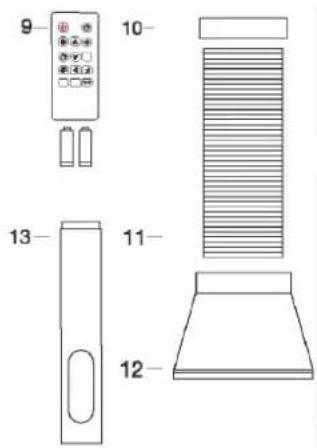
text_image
9 10 13 11 121) Mâner de transport
text_image
Diagram showing battery assembly with labeled components and battery arrangementSimbol imagine
BLUEPALM
natural_image
Technical line drawing of a mechanical ventilation unit with internal ductwork and ventilation slots (no text or symbols)Fig.1
natural_image
Pure diagram of a door with double-headed arrows indicating direction, no text or symbols presentFig. 3
natural_image
Diagram showing two views of a small air conditioner unit with airflow direction arrows (no text or symbols)Observatie:
natural_image
Technical line drawing of a vertical air conditioner unit with a circular no-smoking symbol (no text or labels)PANOU DE CONTROL ŞI TELECOMANDĂ
text_image
Diagram of a mobile device control panel with labeled icons and labels 7 and 8 pointing to specific symbols.BLUEPALM
4) Modul de functionare
natural_image
Line drawing of a server rack with ventilation grilles and a bucket pouring liquid into it (no text or symbols)Cronometru
natural_image
Line drawing of an industrial air conditioning unit with fan, control panel, and water tank (no text or symbols)Note:
natural_image
Diagram of a server rack with a bucket inserted, showing internal ventilation and a connecting rod (no text or labels)text_image
Diagram showing two configurations of a heat exchanger unit with labeled components and directional arrows indicating flow or movement.BLUEPALM
DEPOZITARE
text_image
QR code with a blue home icon in the center, likely linking to a digital service or application.Scan QR code
Înregistrare
text_image
09:17 我的家... Add Device Learn abeu DIY homep Crosie Scene Add Quick Toggle Card Scan All Devices Edit 09:17 Add Device Turn on Bluetooth Bluetooth makes your device more disposable Acid Manually Electrical Air Conditioning Options Sensors Air Condenser Air Condenser Large Home Appliance 09:17 Reset the device Press and hold the RESET button for 5 seconds until the indicator white (subject to the user master) Select the status of the indicator light or hear the beep: Blink Slowly Black Quolly 09:21 Connect your mobile phone to the device's hotspot Connect your phone to the heater shown below: WLAN ✓ SmartLife-XXXX ✓ SL-XXXX "涂料" Wants to Join WLAN Network "SmartLife-E760"? Cancel Join On to Connect 09:17 Select 2.4 GHz Wi-Fi Network and enter password. If your Wi-Fi is 5GHz, please set it to be 2.4GHz, Common router setting method × Wi-Fi - 5GHz ✓ Wi-Fi - 2.4GHz × XK001 Select Wi-Fi 123456789 Next 10:12 Add Device I device added successfully by Fortasplt Air Conditioner/... Add successivity DoneBLUEPALM
text_image
my home? Cable Authentication All Devices Shortcut center Wireless Settings Browser One Store Mids One Mode Snap Access 12 Big Password Bluetooth Speed-Up Windows Phone Data release My Home? Cable Authentication All Devices Devices to be added: 1 Air Conditioner Add Enter Wi-Fi Information Choose Wi-Fi and enter password: Xiaomi 12 Pro 1234567890 Next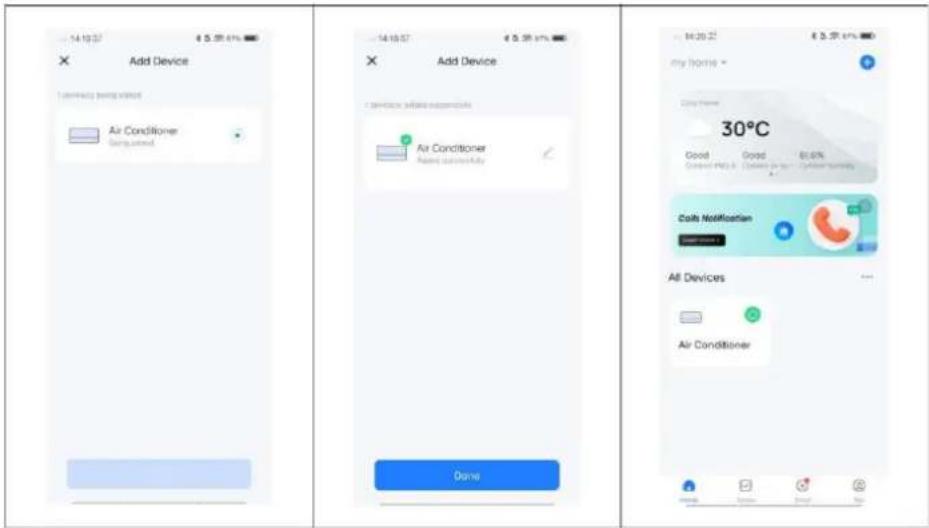
text_image
Add Device Air Conditioner Air Conditioner Air Conditioner Air Conditioner Air Conditioner Air Conditioner Dome 30°C Good Good 81.6% Costy Notification All Devices Air Conditionertext_image
WORKS WITH amazon alexa works with the Google AssistantBLUEPALM
natural_image
Line drawing of a blue industrial machine with ventilation grilles and wheels (no text or symbols)CONGRATULATIONS! THANK YOU FOR CHOOSING A PRODUCT FROM BLUEPALM.
BLUEPALM


Current operating instructions and other languages
Download the latest operating instructions in various languages via the link www.schuss-home.at/downloads or scan the QR code shown. Follow the instructions on the website.

PLEASE READ THE OPERATING INSTRUCTIONS CAREFULLY BEFORE STARTING ASSEMBLY, INSTALLATION, OPERATION OR MAINTENANCE. PROTECT YOURSELF AND OTHERS BY FOLLOWING THE SAFETY INSTRUCTIONS. FAILURE TO FOLLOW THE INSTRUCTIONS COULD RESULT IN PERSONAL INJURY AND/OR PROPERTY DAMAGE AND/OR INVALIDATE THE WARRANTY!
IMPORTANT SAFETY INFORMATION, LOCATION AND TO THE ELECTRICAL CONNECTION.

text_image
Warning symbols including no hand, flame, open book, exclamation mark, and lightning warning sign- Please read all instructions carefully before using the appliance.
- Only use this appliance in accordance with the guidelines in the operating instructions. Any other use not recommended by the manufacturer could result in fire, electric shock or personal injury.
- This appliance is intended exclusively for the air conditioning of living spaces in households and must not be used for any other purpose.
- The appliance is not suitable for continuous and precision operation and should not be used for cooling electrical systems (e.g. in server rooms).
- It is forbidden to adapt or modify the characteristics of this appliance in any way and only use spare parts and accessories recommended by the manufacturer (failure to do so will invalidate the guarantee and warranty).
- For any repairs to the appliance, mains plug or cable, always and only contact customer service centres authorised by the manufacturer. You can find the customer service centres online at https://schuss-home.at/.
BLUEPALM
-
Remove the packaging and ensure that the air conditioner is not damaged. If in doubt, do not use the air conditioner and contact the service centre or your dealer.
-
Keep children away from packaging material. Choking hazard if swallowed!
-
If the power supply cable is damaged, it must be replaced by the manufacturer or an authorised service centre in order to avoid all possible risks.
-
The appliance must be installed in accordance with local installation and operating regulations for electrical systems.
-
The electrical socket into which you connect the appliance must not be defective or loose and must be suitable for the required current load and, above all, reliably earthed. If in doubt, have your electrical installation checked by a qualified electrician.
-
Before connecting to the mains, you must check that the type of current and mains voltage correspond to the information on the appliance rating plate on the back.
-
Avoid using an extension cable, as this could overheat and cause a fire.
-
Do not twist or kink the mains cable.
-
This appliance may only be used by adults.
-
Children under the age of 8 and persons with reduced physical, mental, sensory or intellectual capabilities or lack of experience and knowledge may only use this appliance if they have been given supervision and instruction concerning use of the appliance in a safe way and if the hazards involved have been clearly described.
-
Do not allow children to play with the packaging and make sure that children do not play with the appliance.
-
Do not use the air conditioner outdoors.
-
Do not use the appliance with wet hands.
-
Never operate the appliance in rooms where gas, oil or sulphur are present.
-
Do not place the appliance near heat sources (e.g. next to heating systems and gas boilers) and avoid direct sunlight.
-
Maintain a minimum distance of at least 50 cm from flammable substances (e.g. alcohol, etc.) or pressurised containers (e.g. spray containers).
-
Do not use the air conditioner in the vicinity of water or high humidity, e.g. in a damp cellar, next to a swimming pool, bathtub or shower. Ensure that no water enters the appliance.
-
Do not place any heavy or hot objects on the appliance and never cover the appliance.
-
Never insert fingers, pens or other objects into the appliance and ensure that the air inlet and outlet are never blocked.
-
Always switch off the appliance before disconnecting the mains plug.
-
Do not pull on the mains cable to disconnect the appliance from the mains. Always pull on the plug to disconnect the mains cable. Do not touch the plug with wet hands to avoid electric shocks.
BLUEPALM
- Unplug the appliance when not in use, before cleaning, maintenance or moving from one place to another.
- If the appliance is faulty, switch it off using the on/off button on the control panel and contact the customer hotline.
- Keep the air conditioner in good condition by maintaining and cleaning the appliance.
- The air filter must be cleaned at least once a week.
- Store the appliance upright in a safe, dry place that is inaccessible to children when it is not in use. Do not cover the appliance with plastic packaging.
- Store the appliance in a room without any operating sources of ignition (e.g. open fire, an operating gas appliance or an electric heater with an open heat source).
- The air conditioner must be transported in an upright position or slightly on its side. Empty the internal condensation container beforehand. Wait at least one hour after transporting the appliance before switching it on.
- For any repairs to the appliance, mains plug or cable, always and only contact customer service centres authorised by the manufacturer.
- Do not use any means to accelerate or eliminate the defrosting process, the appliance will do this automatically.
- If you have any questions about maintenance, you can contact the customer hotline/service centre authorised by the manufacturer.

WARNING
The main switch and the On/Off switch should not be used as the sole means of disconnecting the power supply. Always disconnect the mains plug before starting maintenance work or moving the appliance.
To avoid the risk of electric shock, disconnect the plug from the socket when the appliance is not in use and before cleaning.
BLUEPALM
SPECIFIC INFORMATION ON THE REFRIGERANT R290
- R290 is a refrigerant in accordance with EC environmental regulations.
- The refrigerant is odourless.
- The appliance must be installed in a room where there are no sources of ignition during operation (e.g.: open fire, operating gas and electrical appliances with an open heat source)
- Do not perforate or burn the air conditioner.
- Ensure that the cooling circuit is not drilled into.
- Non-ventilated rooms in which the appliance is installed, operated or stored must be constructed in such a way that any refrigerant losses do not accumulate. This prevents the risk of fire or explosion caused by ignition of the refrigerant by electric ovens, cookers or other ignition sources.
- The device must be stored in such a way that no mechanical damage can occur.
- Persons working on or intervening in a refrigeration circuit must be in possession of a valid certificate issued by an authorised authority, which certifies their expertise in handling refrigerants by means of an assessment specification recognised by the industry associations.
- Repairs must be carried out in accordance with the instructions of the appliance manufacturer. Repair and maintenance work that requires the intervention of other specialised personnel must be carried out under the supervision of the specialist responsible for handling flammable refrigerants.
BLUEPALM
Recycling, disposal, declaration of conformity
 | RECYCLINGThe packaging materials can be recycled. It is therefore recommended to dispose of them in sorted waste |
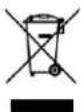 | DISPOSALThe "crossed-out wheelie bin" symbol requires the separate disposal of waste electrical and electronic equipment (WEEE). Electrical and electronic equipment may contain hazardous and environmentally harmful substances. Therefore, do not dispose of them in unsorted residual waste, but at a designated collection point for waste electrical and electronic equipment. This will help to protect resources and the environment. For further information, please contact your dealer or the local authorities. Directive 2012/19/EU |
 | BATTERY DISPOSALIn accordance with current legislation on batteries, accumulators and related waste, the crossed-out wheelie bin symbol on the battery indicates that it is prohibited to dispose of used batteries in household waste. Batteries and accumulators contain highly polluting substances. The user is obliged to dispose of used batteries at the collection points in the municipality or in the appropriate containers. The service is free of charge. In this way, the legal requirements are complied with and the environment is protected.These symbols can be found on batteries:Li = battery contains lithiumAl = battery contains alkaliMn = battery contains manganeseCR 2025 (Li); AA (Al, Mn); AAA (Al, Mn) |
 | DECLARATION OF CONFORMITYWe hereby confirm that this product complies with the essential requirements, regulations and directives of the EU. You can view the detailed declaration of conformity at any time under the following link:https://www.schuss-home.at/downloads |
Errors and technical modifications excepted.
BLUEPALM
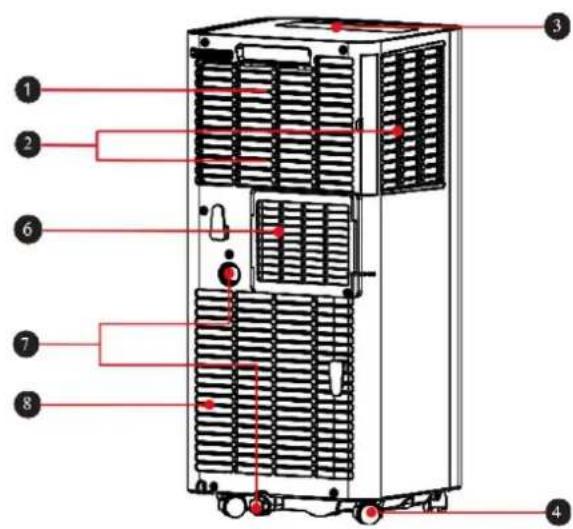
SCHEMATIC REPRESENTATION
text_image
Technical diagram of an industrial air conditioning unit with numbered components and labeled parts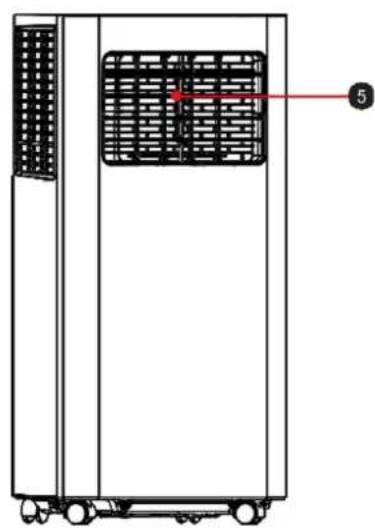
natural_image
Technical line drawing of a vertical industrial machine with a grid-patterned panel and labeled component (no text or symbols beyond label)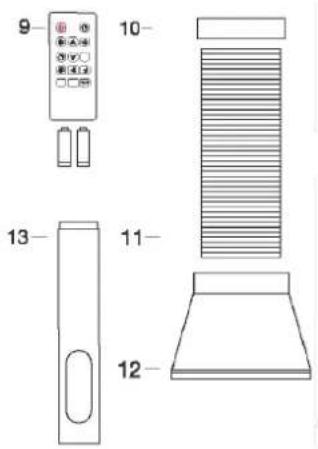
text_image
9 10 13 11 121) Carrying handle
2) Air inlet grille
3) Control panel
4) castors
5) Adjustable ventilation flaps
6) Exhaust air outlet
7) Water drain
8) Air inlet grille
9) 2 × AAA batteries + remote control
10) Exhaust air hose adapter
11) Exhaust air hose
12) Window adapter
13) Window track
INSTALLATION AND SETTING
- Caution: Before using the mobile air conditioner for the first time, leave it to stand for at least two hours.
- Only transport and move the appliance in an upright position.
- Place the air conditioner on a level, flat and dry surface and keep a minimum distance of 50 cm around the appliance to ensure optimum air circulation.
Remote control
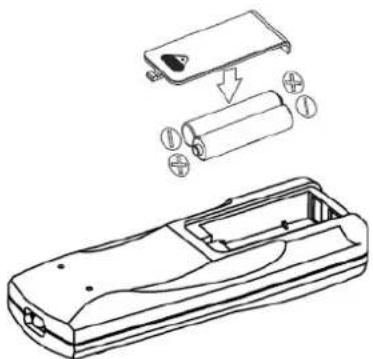
Make sure that the batteries are inserted correctly before using the remote control.
The steps for installation are as follows:
- Slide open the cover on the back of the remote control to open it.
- Insert two new AAA batteries (DC1.5V) and ensure that the poles are correctly aligned.
• Make sure that the batteries are firmly inserted.
natural_image
Technical line drawing of a handheld device with battery and battery pack components (no text or symbols)Symbol image
BLUEPALM
Warning:
- Only AAA DC 1.5V batteries may be used. Never use rechargeable batteries or other types of batteries.
• Always replace both batteries: never mix new and old batteries. - Please remove the batteries if the device will not be used for a longer period of time.
Installing the exhaust air hose
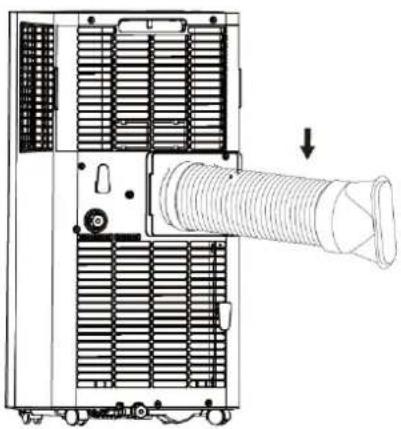
- Screw the exhaust air hose (with adapter) to the exhaust air outlet at the rear of the appliance (anti-clockwise, fig. 1).
natural_image
Technical line drawing of an air conditioning unit with a coiled tube and cooling fan (no text or symbols)Fig. 1
Window track installation
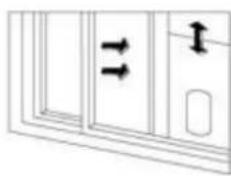
Open the window halfway and attach the window track to the window frame (see Figures 2 and 3). Installation can be carried out in a horizontal or vertical direction.
- Adjust the window track to the size of the window by aligning its ends with the window frame and fixing it in place.
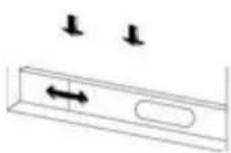
Fig. 2
natural_image
Pure diagram of a door with double-headed arrows indicating vertical motion, no text or symbols presentFig. 3
BLUEPALM
Install air conditioning unit
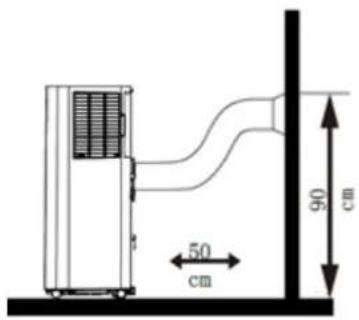
Place the appliance with the exhaust air hose fitted near the window. Observe the minimum distance of 50 cm between the appliance and neighbouring walls or objects (Fig. 4).
Notes:
- The flat end of the exhaust air hose must be properly engaged.
- The air hose must not be twisted or have large bends (more than 45^ ). Do not place any obstacles near the air inlet or air outlet of the system.
- Pull the ends of the exhaust air hose apart and connect the flat end of the connected exhaust air hose to the oval opening on the window rail.
text_image
50 cm 90 cm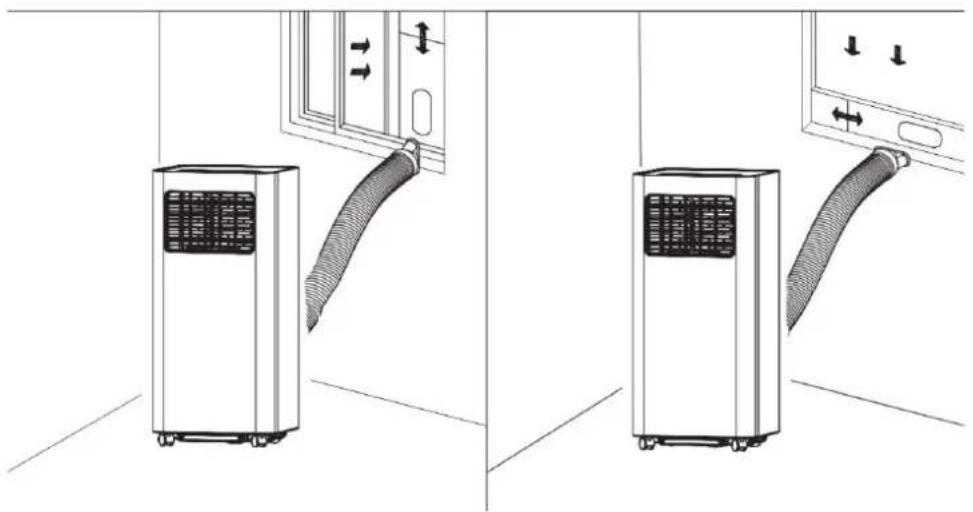
natural_image
Diagram showing two views of a small air conditioner unit with airflow direction arrows (no text or symbols)Remark:
- The exhaust air hose can be extended from 28 cm to 150 cm; its length is designed to fit this product. Do not extend it any further and do not replace it with another hose, as this could negatively affect the function of the air conditioner.
• Always leave the air outlet free to protect the appliance from overheating.
BLUEPALM
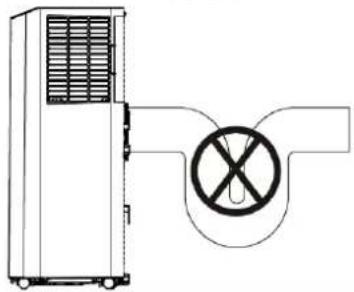
Note:
It is important that the exhaust air pipe is not kinked. Incorrect installation will impair the operation of the air conditioning system.
Prevent sharp bends in the exhaust air pipe.
Ensure that the air can flow out of the exhaust air pipe unhindered.
natural_image
Technical line drawing of a portable air conditioner unit with a circular no-smoking symbol (no text or labels)CONTROL PANEL AND REMOTE CONTROL
Control panel & remote control
text_image
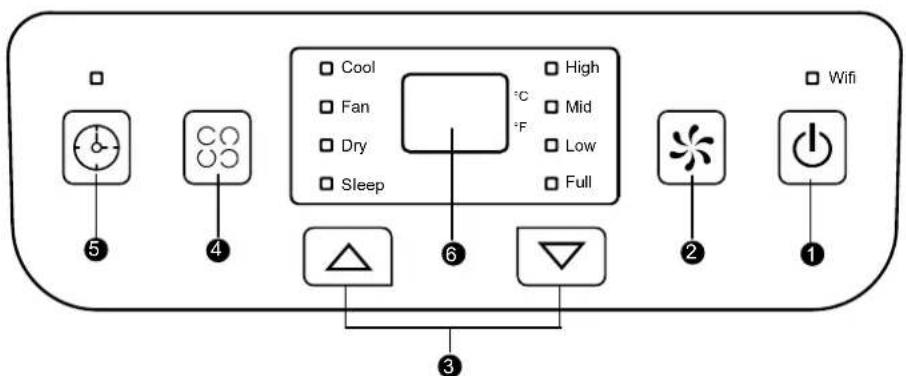
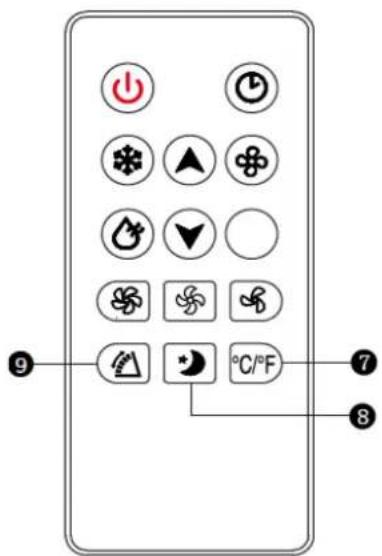
Cool Fan Dry Sleep High Mid Low Full 3 6 3 2 1 5 4 Wifi1) On/off button
• To switch the device on and off.
- In cooling or fan mode to select between high and low wind speed.
- The button cannot be used in "Dry" mode as the lowest wind speed is pre-programmed.
3) Up and down buttons
- To adjust the temperature or timer settings (increase/decrease).
- To switch between degrees Celsius and Fahrenheit, press both buttons simultaneously.
4) Operating mode
- To select a mode, press this button, the following modes are available: cool, dry or ventilate.
text_image
Diagram of a remote control panel with icons and labels, including power, thermal, and climate indicators.BLUEPALM
5) Timer button
- When the air conditioner is switched on, press the button to activate the switch-off timer switch-off programme. If the appliance is in sleep mode, the TIMER button activates the automatic switch-on programme.
- After pressing the button, the display flashes; the time is set by pressing the up and down buttons.
- The time setting window is between 1 and 24 hours and the adjustment is made at intervals of 1 hour.
6) Display
7) °C/°F button
- For adjusting the temperature display between ^ and ^ .
8) SLEEP button
- Press this button to select SLEEP mode.
9) Swivelling function button
- Press this button to activate the swivelling function.
OPERATING INSTRUCTIONS
COOLING
- Press the MODE button until the COOL indicator light lights up on the display.
- Press the UP/DOWN buttons to set the temperature in the range from 16 °C to 30 °C.
- Press the SPEED button to select the desired fan speed (HIGH or LOW).
VENTILATE
- Press the MODE button until the FAN indicator light illuminates.
- You can set the fan speed using the SPEED button. HIGH and LOW are selected cyclically (High> Low> High).
- The temperature cannot be set.
DRYING
- Press the MODE button until the DRY indicator light illuminates.
- You cannot set the fan speed and temperature in this mode.
- Unscrew the drain cover of the container and open the bottom drain plug.
- Connect one end of the drainage hose to the drain opening
BLUEPALM
- Place the other end of the hose in a bucket or similar container. container.
- Note: Please remove the exhaust air hose in dry mode, otherwise the performance will be impaired and the water full alarm "FL" will sound.
Timer
- In sleep mode, you can activate the automatic switch-on programme (1 to 24 hours) by pressing the TIMER button. The TIMER indicator light lights up and the display starts to flash.
- When the air conditioner is switched on, press the TIMER button to activate the automatic switch-off programme. The TIMER indicator light lights up and the display flashes.
natural_image
Diagram of a refrigerator with a bucket inserted, showing internal ventilation and a bucket pouring into the air (no text or labels)DRAINAGE METHODS
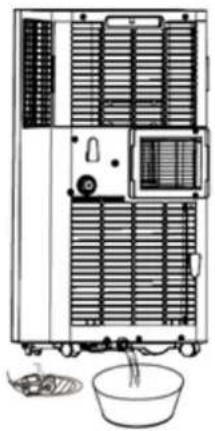
Periodic drainage
- If the appliance stops because the floor pan is full, switch it off and disconnect the mains plug.
- Note: Move the air conditioner carefully, otherwise the water inside may overflow.
- Place a bucket under the water outlet on the back of the appliance.
- Unscrew the drain plug and pull the floor drain plug so that the water can flow automatically into the container.
natural_image
Line drawing of a multi-level industrial or laboratory equipment unit with ventilation grilles and a bowl (no text or symbols)Notes:
- Keep the container drain cover and the plug within reach.
- You can tilt the appliance slightly backwards.
- If the water tank does not take up all the water at once, close the floor drain plug early enough to prevent water from flowing onto the floor or carpet.
- When no more water is leaking, insert the floor drain plug and close the container drain cover again.
BLUEPALM
Note: Do not forget to reinsert the floor drain plug before switching the system back on.
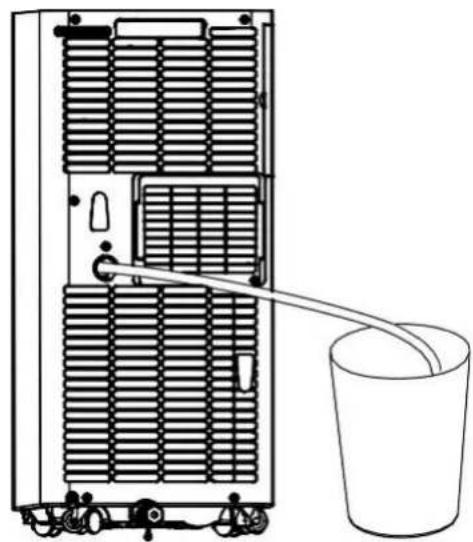
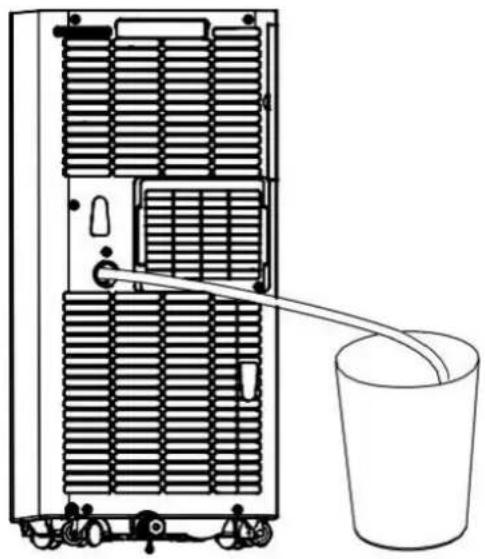
Continuous emptying
- Can only be used in cooling and dehumidifying mode.
- Unscrew the container drain cover and open the floor drain plug.
- Connect one end of the drainage hose to the drain opening
- Place the other end of the hose in a bucket.
natural_image
Diagram of a server rack with heat exchangers and a bucket, no text or symbols presentCLEANING AND MAINTENANCE
Switch off the appliance before cleaning and maintenance work and remove the plug from the socket.
Cleaning
- Wipe the appliance with a slightly damp, soft cloth. Do not use any chemical solvents such as gas, alcohol or similar.
- If the appliance is very dirty, also use a little neutral detergent.
Maintenance
If the filter frame and filter are dusty, the performance of the air conditioning system will be reduced. Clean the filter every fortnight.
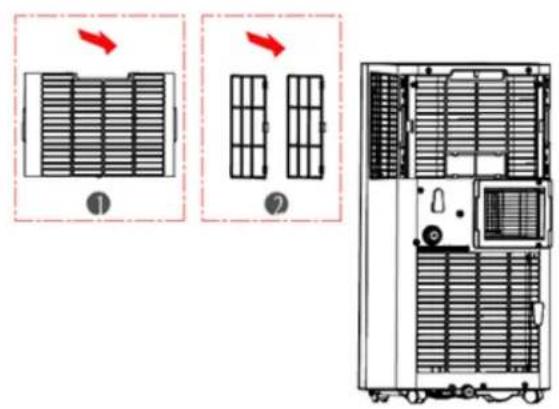
text_image
Diagram showing two configurations of a heat exchanger unit with labeled parts and directional arrows indicating flow or movement.- Carefully pull out the filter frames by the handle in the direction of the arrow, as shown in the picture.
- First remove filter unit 1 and then filter unit 2.
- Wash the air filter by carefully soaking it in warm water (approx. 40 °C) with a neutral detergent. Rinse the filter and leave it to dry in a shady place.
- Replace the filter after cleaning.
- Insert filter unit 2 first, and then filter unit 1.
BLUEPALM
STORAGE
- Unscrew the drain cover and open the cap. Drain all the residual water into a basin or swivel the appliance slightly backwards to direct the water into a container.
- Leave the appliance running in FAN mode (ventilate) for half a day in a warm and dry room to prevent mould from forming in the appliance.
- Switch off and unplug the appliance, wrap the power cable around the cable holder and replace the cap and drain cover plate.
- Dismantle the exhaust air hose and store it.
- Remove the batteries from the remote control.
- Cover the appliance with a plastic film. Store the air conditioner in a clean, dry and dust-free place, out of the reach of children.
TROUBLESHOOTING
| Problem | Possible cause | Solution |
| E1 is displayed | Fault in the exhaust air hose system temperature sensor | Check the sensor and the affected circuit |
| E2 is displayed | Room temperature error Sensor | Check the sensor and the affected circuit |
| E4 is displayed | Protection against freezing | The ambient temperature must exceed 8°C. |
| The device does not work | No power | Insert the plug and switch on the device |
| Display shows FL | Empty the water tank | |
| It's not cold enough | Direct sunlight | Close the curtains |
| Doors and windows are open, the room is full of people or there are other heat sources. sources | Close doors and windows or add another air conditioning unit | |
| The filters are dirty | Clean or replace the Filters | |
| Air inlet/air outlet is blocked stuffs | Remove all Foreign body | |
| The noise level is too high | The cooling unit is unevenly po positioned | Set the device to a level surface |
BLUEPALM
| The compressor is not working | The overheating protection is active | Allow the appliance to cool down for 3 minutes before you switch it on again |
- Do not attempt to disassemble or repair the appliance yourself. Unqualified attempts to repair the appliance may result in serious personal injury or considerable material damage and will invalidate any warranty claims.
- If problems occur that are unknown or the recommended solution does not work, please contact a specialist.
Smart Home Wi-Fi Connection Guide
IMPORTANT
Please note that only 2.4GHz networks are supported!
Transmission power: max. 100mW
App installation
Download the "Smart life" app from the Play Store (Android) or the App Store (iOS). The following QR code will take you directly to the app download:

text_image
QR code with a blue house icon in the center, likely linking to a digital service or application.Scan QR code
Registration
If you do not yet have a Smart Life account, you can register or log in with a verification code that will be sent to you via SMS.
To register:
- Navigate to the registration area in the app.
- The system will automatically detect your country or region. You also have the option of selecting the country code manually. Enter your mobile phone number or email address and tap "Continue."
- If you choose the mobile phone number option, enter the verification code you received via SMS. Then set a password and tap "Confirm" to complete the registration.
BLUEPALM
Adding a device manually:
- When the air conditioner is in standby mode, press and hold the FAN button on the control panel for 3 seconds to enter Wi-Fi connection mode. The Wi-Fi signal light will start flashing.
- Open the Smart Home app and tap "+" in the upper right corner to add a new device via the network.
- Make sure the operating light is flashing, tap "Confirm" that the light is flashing, and follow the instructions on the screen.
- Select the Wi-Fi network (note: the network must be in the 2.4 GHz band) and enter the password. The device will start the pairing process and connect to the app.
- Once the device has been successfully configured, the air conditioner will be displayed on the Smart Home page. Tap on it to access the device controls.
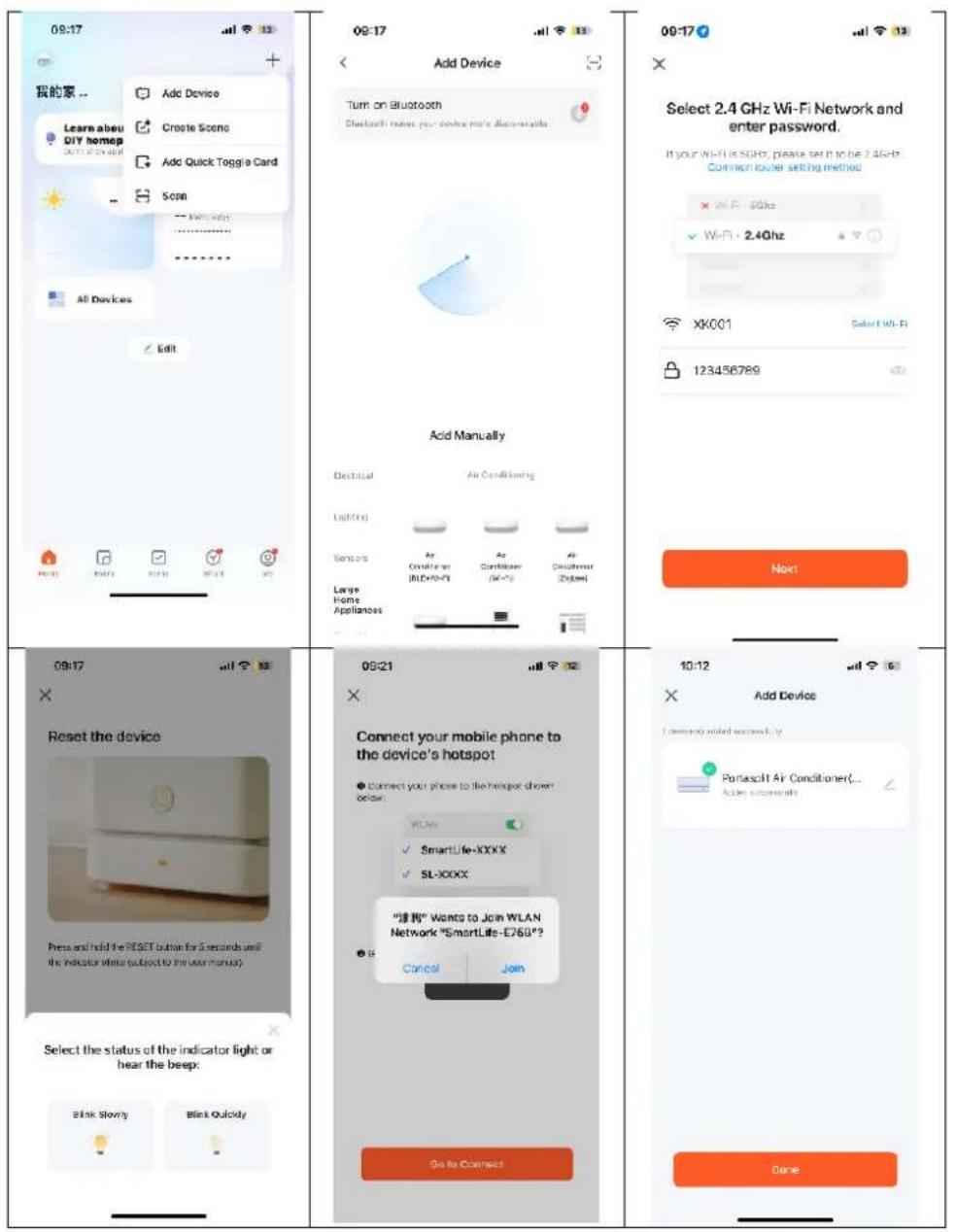
text_image
09:17 我的家... Learn abeu DIY homep Add Device Create Scene Add Quick Toggle Card Scan All Devices Edit 09:17 Add Device Turn on Bluetooth Bluetooth index per device more discontents Add Manually Electrical Air Conditioning Lighting Sensors As Controler AIR-60Hz As Controler Air-70 Large Home Appliances 09:17 Reset the device Press and hold the RESET button for 5 seconds until the indicator while (subject to the user menu) Select the status of the indicator light or hear the beep: Blink Slowy Blink Quickly 09:21 Connect your mobile phone to the device's hotspot Connect your phone to the handset shown below: WLAN ✓ SmartLife-XXXX ✓ SL-XXXX "请勿" Wants to Join WLAN Network "SmartLife-E760"? Cancel Join Go to Connect 09:17 Select 2.4 GHz Wi-Fi Network and enter password. If your Wi-Fi is SGHz, please set it to be 2.4GHz. Common router setting method × Wi-Fi 60Hz ✓ Wi-Fi - 2.4Ghz XK001 Select Wi-Fi 123456789 Next 10:12 Add Device I currently added successfully. Portasclit Air Conditioner(... Add successify) DoneBLUEPALM
Adding a device automatically
- Make sure the device is in standby mode before connecting.
- Press the "FAN" button for 3 seconds to switch to Wi-Fi connection mode, and the Wi-Fi signal light will start flashing.
■ Activate Bluetooth on your phone. - Open the app and wait a moment until the device is automatically detected and displayed.
- Click the "Add" button to connect.
- Enter the WiFi SSID (WiFi connection name), enter the WiFi password, and click "Next" to continue with the setup. (Note: The network must be in the 2.4 GHz band.)
- When the progress bar is complete, the device pairing interface will be displayed and the device will be successfully connected.
- Click the "Done" button to go to the device control interface.
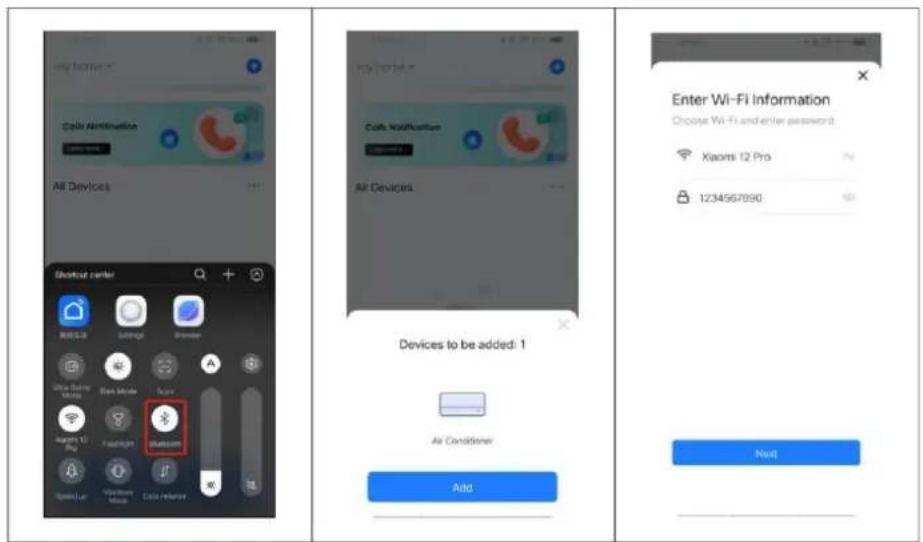
text_image
my home? Cable Authentication All Devices Shortcut center Wireless Sensing Browser One Store Mids One Store Mouse A Windows 12 Big Password Bluetooth Add Devices to be added: 1 Air Conditioner Add Enter Wi-Fi Information Choose Wi-Fi and enter password: Xiaomi 12 Pro 1234567890 Next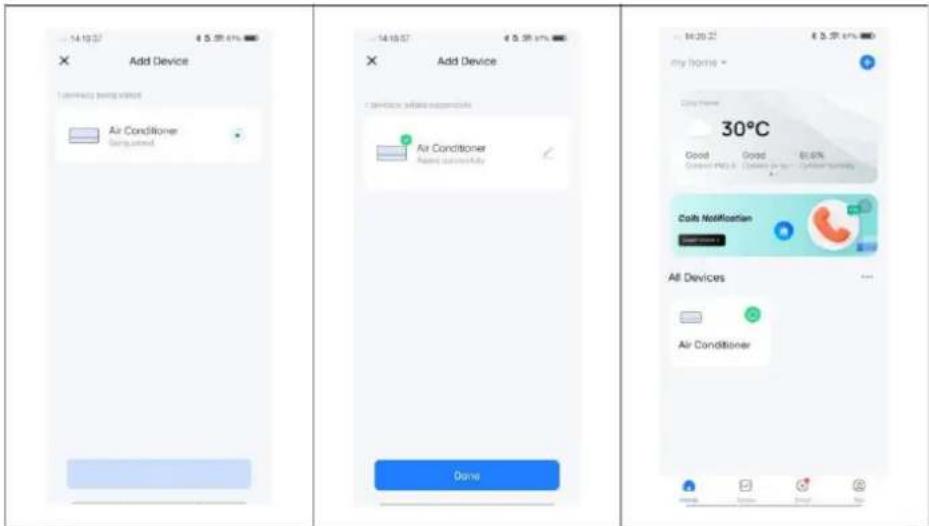
text_image
Add Device Air Conditioner Disinjected Add Device Air Conditioner Disinjected Done 30°C Good Good 80.6% Control PCLR 100% Control PCLR 200% Control PCLR Costs Notification All Devices Air ConditionerThe application also works with Amazon Alexa and Google Assistant.

text_image
WORKS WITH amazon alexa works with the Google AssistantBLUEPALM
| Technical Specifications WiFi | |
| Wireless technology: | WiFi (WLAN) |
| Radio operating frequency | 2412MHz-2472MHz |
| BLE operating frequency | 2402 MHz–2480 MHz |
| Modulation type | 802.11b: DSSS802.11g: OFDM802.11n (20 MHz): OFDM |
| Fixed frequency software | SecureCRT.exe |
| Antenna gain | 2.5 dBi |
| Antenna type | PCB |
| Transmission power | :520dBm |
| Technical information | |
| Item number | BPPAC14000FW |
| Cooling capacity | 14,000BTU / 4.100W |
| Max. Power consumption | 1.575W |
| Input voltage | 220-240V~ |
| Frequency | 50Hz |
| WIFI transmission frequency: | 2.4 GHz |
| Transmission power: | max. 100 mW |
| Refrigerant/charging/GWP | R290/0.250kg/3 |
| Energy efficiency EER | 2.60 |
| Energy efficiency class | A |
| Air circulation | 460 m^3/h |
| Noise level (sound power) | 65 dB(A) |
| Weight | 27.5 kg |
| Dimensions | 365x320x745mm |
| Contact addresses for further information | Schuss Home Electronic GmbHScheringgasse 3, A-1140 ViennaTel: +43 (1) 97 0 21 - 0Service line: +43 (1) 97 0 21 - 502https://schuss-home.at/FB-No.: 236974 t / FB-Court: Vienna |
BLUEPALM
| Requirements for information on single-pipe and two-pipe air conditioning units | P | ||
| Information identifying the model(s) to which the information relates: | |||
| Description | Symbol | Value | Unit |
| Rated cooling capacity | P_rated for cooling | 4.101 | kW |
| Rated capacity for heating | P_rated for heating | - | kW |
| Nominal power consumption for cooling | P_EER | 1.570 | kW |
| Nominal power consumption for heating | P_COP | - | kW |
| Nominal energy efficiency ratio | EER_d | 2.612 | - |
| Nominal coefficient of performance | COP_d | - | - |
| Information identifying the model(s) to which the information relates [please complete]: | |||
| Description | Symbol | Value | Unit |
| Power consumption in thermostat off mode | P_TO | N/A | W |
| Power consumption in standby P mode | P_SB | 0.78 | W |
| Power consumption of devices with one or two channels (specify separately for cooling and heating) | Q_SD | SD: 1.570 (cooling) | kWh/h |
| Sound power level | L_WA | 64.8 | dB(A) |
| Global warming potential | GWP | 3 | kg CO_2 eq. |
| Contact details for further information | Schuss Home Electronic GmbH Scheringgasse 31140 Vienna, AustriaTel.: +43 (1) 97 0 21 - 0www.bluepalm.at | ||
BLUEPALM
WARRANTY
With this quality product from BLUEPALM, you have made a decision in favour of innovation, durability and reliability.
This BLUEPALM appliance is guaranteed for 2 years from the date of purchase in Austria!
If, contrary to expectations, service work on your device should nevertheless be necessary during this period, we hereby guarantee you a free repair (spare parts and labour) or (at Schuss's discretion) replacement of the product. If neither repair nor replacement is possible for economic reasons, we reserve the right to issue a time value credit note.
In the case of air conditioners, please always contact the customer hotline as a first step (see sticker on the appliance or front page of the operating instructions); in the case of fans, please contact your specialist dealer or us directly. We would like to point out that any repair work not carried out by an authorised workshop in Austria will immediately invalidate this guarantee.
This guarantee does not cover
• Repair or replacement of parts due to normal wear and tear
- Damage due to non-compliance with the operating instructions
• Devices that are used - even partially - for commercial purposes
• Devices mechanically damaged by external influences (fall, impact, breakage, improper use, etc.) as well as signs of aesthetic wear and tear.
• Devices that have been handled improperly
• Devices that have not been opened by our authorised service workshop.
• Damage caused by improperly closed condensation drain valves on air conditioning units or incorrectly inserted water tanks.
• Unfulfilled consumer expectations.
• Damage caused by force majeure, water, lightning, overvoltage.
• Devices where the type designation and/or serial number on the device has been changed, deleted, made illegible or removed.
- services outside our authorised workshops, the transport costs to an authorised workshop or to us and back, as well as the associated risks.
We would like to emphasise that within the warranty period, a lump sum of € 60 (indexed based on CPI 2010, June 2015) will be charged in the event of operating errors or if no error is detected.
The provision of a warranty service (repair or replacement of the appliance) does not extend the absolute warranty period of 2 years from the date of purchase.
The 2-year guarantee is only valid on presentation of the proof of purchase (must include the name and address of the dealer as well as the complete appliance designation) and the corresponding guarantee certificate, on which the appliance type and the serial number (visible on the box and on the back or bottom of the appliance) must be noted! Without the warranty certificate, only the statutory warranty applies!
We expressly point out that the statutory warranty rights are not affected by this guarantee and remain unaffected.
Schuss Home Electronic GmbH and its vicarious agents shall only be liable for damages in the event of gross negligence or wilful intent. Liability for loss of profit, expected but unrealised savings, consequential damage and damage arising from third-party claims is excluded. Damage to or for recorded data is always excluded from the liability for damages.
Congratulations on your choice. We hope you enjoy using your BLUEPALM appliance!
ADDRESS
Schuss Home Electronic GmbH
1140 Vienna, Scheringgasse 3
Tel.: +43 (0)1/ 970 21
Type designation: ....
Serial number: ....
In the event of a warranty claim, this warranty certificate must be handed over together with the device to the authorised service workshop or the dealer from whom you purchased the device!
BLUEPALM
WICHTIG!
These instructions are only for the BLUEPALM-Service center!
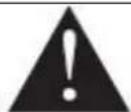
A Service or repairing of the device must only be performed by a qualified technician who is allowed to handle the R290 refrigerant.
Do not attempt to repair or open the case of the air conditioner yourself, this leads to the immediate loss oft he warranty.
INSTRUCTIONS FOR REPAIRING APPLIANCES CONTAINING R290
1 GENERAL INSTRUCTIONS
1.1 Checks to the area
Prior to beginning work on systems containing flammable refrigerants, safety checks are necessary to ensure that the risk of ignition is minimized. For repair to the refrigerating system, the following precautions shall be complied with prior to conducting work on the system.
1.2 Work procedure
Work shall be undertaken under a controlled procedure so as to minimize the risk of a flammable gas or vapor being present while the work is being performed.
1.3 General work area
All maintenance staff and others working in the local area shall be instructed on the nature of work being carried out. Work in confined spaces shall be avoided. The area around the workspace shall be sectioned off. Ensure that the conditions within the area have been made safe by control of flammable material.
1.4 Checking for presence of refrigerant
The area shall be checked with an appropriate refrigerant detector prior to and during work, to ensure the technician is aware of potentially flammable atmospheres. Ensure that the leak section equipment being used is suitable for use with flammable refrigerants, i.e. non sparking, adequately sealed or intrinsically safe.
1.5 Presence of fire extinguisher
If any hot work is to be conducted on the refrigeration equipment or any associated parts, appropriate fire extinguishing equipment shall be available to hand. Have a dry powder or CO 2 fire extinguisher adjacent to the charging area.
1.6 No ignition sources
BLUEPALM
No person carrying out work in relation to a refrigeration system which involves exposing any pipe work that contains or has contained flammable refrigerant shall use any sources of ignition in such a manner that it may lead to the risk of fire or explosion. All possible ignition sources, including ecigarette smoking, should be kept sufficiently far away from the site of installation, repairing, removing and disposal, during which flammable refrigerant can possibly be released to the surrounding space. Prior to work taking place, the area around the equipment is to be surveyed to make sure that there are no flammable hazards or ignition risks. "No Smoking" signs shall be displayed.
1.7 Ventilated area
Ensure that the area is in the open or that it is adequately ventilated before breaking into the system or conducting any hot work. A degree of ventilation shall continue during the period that the work is carried out. The ventilation should safely disperse any released refrigerant and preferably expel it externally into the atmosphere.
1.8 Checks to the refrigeration equipment
Where electrical components are being changed, they shall be fit for the purpose and to the correct specification. At all times the manufacturer's maintenance and service guidelines shall be followed. If in doubt consult the manufacturer's technical department for assistance. The following checks shall be applied to installations using flammable refrigerants: the charge size is in accordance with the room size within which the refrigerant containing parts are installed; the ventilation machinery and outlets are operating adequately and are not obstructed; if an indirect refrigerating circuit is being used, the secondary circuit shall be checked for the presence of refrigerant; marking to the equipment continues to be visible and legible. Markings and signs that are illegible shall be corrected; refrigeration pipe or components are installed in a position where they are unlikely to be exposed to any substance which may corrode refrigerant containing components, unless the components are constructed of materials which are inherently resistant to being corroded or are suitably protected against being so corroded.
1.9 Checks to electrical devices
Repair and maintenance to electrical components shall include initial safety checks and component inspection procedures. If a fault exists that could compromise safety, then no electrical supply shall be connected to the circuit until it is satisfactorily dealt with. If the fault cannot be corrected immediately but it is necessary to continue operation, an adequate temporary solution shall be used. This shall be reported to the owner of the equipment so all parties are advised.
Initial safety checks shall include: Those capacitors are discharged: this shall be done in a safe manner to avoid possibility of sparking; that there no live electrical components and wiring are exposed while charging, recovering or purging the system; that there is continuity of earth bonding.
2 REPAIRS TO SEALED COMPONENTS
2.1 During repairs to sealed components, all electrical supplies shall be disconnected from the equipment being worked upon prior to any removal of sealed covers, etc. If it is absolutely necessary to have an electrical supply to equipment during servicing, then a permanently operating form of leak detection shall be located at the most critical point to warn of a potentially hazardous situation.
2.2 Particular attention shall be paid to the following to ensure that by working on electrical components, the casing is not altered in such a way that the level of protection is affected.
This shall include damage to cables, excessive number of connections, terminals not made to original specification, damage to seals, incorrect fitting of glands, etc. Ensure that apparatus is mounted securely. Ensure that seals or sealing materials have not degraded such that they no longer serve the purpose of preventing the ingress of flammable atmospheres. Replacement parts shall be in accordance with the manufacturer's specifications.
NOTE The use of silicon sealant may inhibit the effectiveness of some types of leak detection equipment. Intrinsically safe components do not have to be isolated prior to working on them.
3 REPAIR TO INTRINSICALLY SAFE COMPONENTS
BLUEPALM
Do not apply any permanent inductive or capacitance loads to the circuit without ensuring that this will not exceed the permissible voltage and current permitted for the equipment in use.
Intrinsically safe components are the only types that can be worked on while live in the presence of a flammable atmosphere. The test apparatus shall be at the correct rating. Replace components only with parts specified by the manufacturer. Other parts may result in the ignition of refrigerant in the atmosphere from a leak.
4 CABLING
Check that cabling will not be subject to wear, corrosion, excessive pressure, vibration, sharp edges or any other adverse environmental effects. The check shall also take into account the effects of aging or continual vibration from sources such as compressors or fans.
5 DETECTION OF FLAMMABLE REFRIGERANTS
Under no circumstances shall potential sources of ignition be used in the searching for or detection of refrigerant leaks. A halide torch (or any other detector using a naked flame) shall not be used.
6 LEAK DETECTION METHODS
The following leak detection methods are deemed acceptable for systems containing flammable refrigerants. Electronic leak detectors shall be used to detect flammable refrigerants, but the sensitivity may not be adequate, or may need recalibration. (Detection equipment shall be calibrated in a refrigerant-free area.) Ensure that the detector is not a potential source of ignition and is suitable for the refrigerant used. Leak detection equipment shall be set at a percentage of the LFL of the refrigerant and shall be calibrated to the refrigerant employed and the appropriate percentage of gas (25 % maximum) is confirmed. Leak detection fluids are suitable for use with most refrigerants but the use of detergents containing chlorine shall be avoided as the chlorine may react with the refrigerant and corrode the copper pipe-work. If a leak is suspected, all naked flames shall be removed/extinguished. If a leakage of refrigerant is found which requires brazing, all of the refrigerant shall be recovered from the system, or isolated (by means of shut off valves) in a part of the system remote from the leak. Oxygen free nitrogen (OFN) shall then be purged through the system both before and during the brazing process.
7 REMOVAL AND EVACUATION
When breaking into the refrigerant circuit to make repairs – or for any other purpose – conventional procedures shall be used. However, it is important that best practice is followed since flammability is a consideration. The following procedure shall be adhered to: remove refrigerant; purge the circuit with inert gas; evacuate; purge again with inert gas; open the circuit by cutting or brazing. The refrigerant charge shall be recovered into the correct recovery cylinders. The system shall be “flushed” with OFN to render the unit safe. This process may need to be repeated several times. Compressed air or oxygen shall not be used for this task. Flushing shall be achieved by breaking the vacuum in the system with OFN and continuing to fill until the working pressure is achieved, then venting to atmosphere, and finally pulling down to a vacuum. This process shall be repeated until no refrigerant is within the system. When the final OFN charge is used, the system shall be vented down to atmospheric pressure to enable work to take place. This operation is absolutely vital if brazing operations on the pipework are to take place.
Ensure that the outlet for the vacuum pump is not close to any ignition sources and there is ventilation available.
8 CHARGING PROCEDURES
In addition to conventional charging procedures, the following requirements shall be followed.
- Ensure that contamination of different refrigerants does not occur when using charging equipment. Hoses or lines shall be as short as possible to minimize the amount of refrigerant contained in them.
• Cylinders shall be kept upright. - Ensure that the refrigeration system is earthed prior to charging the system with refrigerant.
- Label the system when charging is complete (if not already).
• Extreme care shall be taken not to overfill the refrigeration system. - Prior to recharging the system it shall be pressure tested with OFN. The system shall be leak Tested on completion of charging but prior to commissioning. A follow up leak test shall be Carried out prior to leaving the site.
9 DECOMMISSIONING
Before carrying out this procedure, it is essential that the technician is completely familiar with the equipment and all its detail. It is recommended good practice that all refrigerants are recovered safely. Prior to the task being carried
BLUEPALM
out, an oil and refrigerant sample shall be taken in case analysis is required prior to re-use of reclaimed refrigerant. It is essential that electrical power is available before the task is commenced.
- Become familiar with the equipment and its operation.
- Isolate system electrically.
- Before attempting the procedure ensure that :mechanical handling equipment is available, if required, for handling refrigerant cylinders; all personal protective equipment is available and being used correctly; the recovery process is supervised at all times by a competent person; recovery equipment and cylinders conform to the appropriate standards.
- Pump down refrigerant system, if possible.
- If a vacuum is not possible, make a manifold so that refrigerant can be removed from various parts of the system.
- Make sure that cylinder is situated on the scales before recovery takes place.
- Start the recovery machine and operate in accordance with manufacturer's instructions.
- Do not overfill cylinders. (No more than 80 % volume liquid charge).
- Do not exceed the maximum working pressure of the cylinder, even temporarily.
- When the cylinders have been filled correctly and the process completed, make sure 11. that the cylinders and the equipment are removed from site promptly and all isolation
- valves on the equipment are closed off.
- Recovered refrigerant shall not be charged into another refrigeration system
- unless it has been cleaned and checked.
10 LABELLING
Equipment shall be labelled stating that it has been de-commissioned and emptied of refrigerant. The label shall be dated and signed. Ensure that there are labels on the equipment stating the equipment contains flammable refrigerant.
11 RECOVERY
When removing refrigerant from a system, either for servicing or decommissioning, it is recommended good practice that all refrigerants are removed safely. When transferring refrigerant into cylinders, ensure that only appropriate refrigerant recovery cylinders are employed. Ensure that the correct number of cylinders for holding the total system charge is available. All cylinders to be used are designated for the recovered refrigerant and labelled for that refrigerant (i.e. special cylinders for the recovery of refrigerant). Cylinders shall be complete with pressure relief valve and associated shut-off valves in good working order. Empty recovery cylinders are evacuated and, if possible, cooled before recovery occurs.
The recovery equipment shall be in good working order with a set of instructions concerning the equipment that is at hand and shall be suitable for the recovery of flammable refrigerants. In addition, a set of calibrated weighing scales shall be available and in good working order. Hoses shall be complete with leak-free disconnect couplings and in good condition. Before using the recovery machine, check that it is in satisfactory working order, has been properly maintained and that any associated electrical components are sealed to prevent ignition in the event of a refrigerant release. Consult manufacturer if in doubt.
The recovered refrigerant shall be returned to the refrigerant supplier in the correct recovery cylinder, and the relevant Waste Transfer Note arranged. Do not mix refrigerants in recovery units and especially not in cylinders.
If compressors or compressor oils are to be removed, ensure that they have been evacuated to an acceptable level to make certain that flammable refrigerant does not remain within the lubricant. The evacuation process shall be carried out prior to returning the compressor to the suppliers. Only electric heating to the compressor body shall be employed to accelerate this process. When oil is drained from a system, it shall be carried out safely.
Competence of service personnel
General
Special training additional to usual refrigerating equipment repair procedures is required when equipment with flammable refrigerants is affected.
In many countries, this training is carried out by national training organizations that are accredited to teach the relevant national competency standards that may be set in legislation. The achieved competence should be documented by a certificate.
BLUEPALM
Training
The training should include the substance of the following:
Information about the explosion potential of flammable refrigerants to show that flammables may be dangerous when handled without care.
Information about potential ignition sources, especially those that are not obvious, such as lighters, light switches, vacuum cleaners, electric heaters.
Information about the different safety concepts:
Unventilated – (see Clause GG.2) Safety of the appliance does not depend on ventilation of the housing. Switching off the appliance or opening of the housing has no significant effect on the safety. Nevertheless, it is possible that leaking refrigerant may accumulate inside the enclosure and flammable atmosphere will be released when the enclosure is opened.
Ventilated enclosure – (see Clause GG.4) Safety of the appliance depends on ventilation of the housing. Switching off the appliance or opening of the enclosure has a significant effect on the safety. Care should be taken to ensure a sufficient ventilation before.
Ventilated room – (see Clause GG.5) Safety of the appliance depends on the ventilation of the room. Switching off the appliance or opening of the housing has no significant effect on the safety. The ventilation of the room shall not be switched off during repair procedures. Information about the concept of sealed components and sealed enclosures according to IEC 60079-15:2010.
Information about the correct working procedures:
1. Commissioning
o Ensure that the floor area is sufficient for the refrigerant charge or that the ventilation duct is assembled in a correct manner.
o Connect the pipes and carry out a leak test before charging with refrigerant.
o Check safety equipment before putting into service.
2. Maintenance
o Portable equipment shall be repaired outside or in a workshop specially equipped for servicing units with flammable refrigerants.
o Ensure sufficient ventilation at the repair place.
Be aware that malfunction of the equipment may be caused by refrigerant loss and a refrigerant leak is possible.
Discharge capacitors in a way that won't cause any spark. The standard procedure to short circuit the capacitor terminals usually creates sparks.
o Reassemble sealed enclosures accurately. If seals are worn, replace them.
o Check safety equipment before putting into service.
- Repair o Portable equipment shall be repaired outside or in a workshop specially equipped for servicing units with flammable refrigerants.
o Ensure sufficient ventilation at the repair place.
o Be aware that malfunction of the equipment may be caused by refrigerant loss and a refrigerant leak is possible.
o Discharge capacitors in a way that won't cause any spark.
When brazing is required, the following procedures shall be carried out in the right order:
- Remove the refrigerant. If the recovery is not required by national regulations, drain the refrigerant to the outside. Take care that the drained refrigerant will not cause any danger. In doubt, one person should guard the outlet. Take special care that drained refrigerant will not float back into the building.
• Evacuate the refrigerant circuit.
- Purge the refrigerant circuit with nitrogen for 5 min.
- Evacuate again.
- Remove parts to be replaced by cutting, not by flame.
• Purge the braze point with nitrogen during the brazing procedure.
- Carry out a leak test before charging with refrigerant.
• Reassemble sealed enclosures accurately. If seals are worn, replace them.
- Check safety equipment before putting into service.
BLUEPALM
- Decommissioning o If the safety is affected when the equipment is put out of service, the refrigerant charge shall be removed before decommissioning.
o Ensure sufficient ventilation at the equipment location.
o Be aware that malfunction of the equipment may be caused by refrigerant loss and a refrigerant leak is possible.
o Discharge capacitors in a way that won't cause any spark.
Remove the refrigerant. If the recovery is not required by national regulations, drain the refrigerant to the outside. Take care that the drained refrigerant will not cause any danger. In doubt, one person should guard the outlet. Take special care that drained refrigerant will not float back into the building.
o Evacuate the refrigerant circuit.
o Purge the refrigerant circuit with nitrogen for 5 min.
o Evacuate again.
o Fill with nitrogen up to atmospheric pressure.
o Put a label on the equipment that the refrigerant is removed.
- Disposal o Ensure sufficient ventilation at the working place.
Remove the refrigerant. If the recovery is not required by national regulations, drain the refrigerant to the outside. Take care that the drained refrigerant will not cause any danger. In doubt, one person should guard the outlet. Take special care that drained refrigerant will not float back into the building.
o Evacuate the refrigerant circuit.
o Purge the refrigerant circuit with nitrogen for 5 min.
o Evacuate again.
o Cut out the compressor and drain the oil.
Transportation, marking and storage for units that employ flammable refrigerants Transport of equipment containing flammable refrigerants
Attention is drawn to the fact that additional transportation regulations may exist with respect to equipment containing flammable gas. The maximum number of pieces of equipment or the configuration of the equipment, permitted to be transported together will be determined by the applicable transport regulations.
Marking of equipment using signs
Signs for similar appliances used in a work area generally are addressed by local regulations and give the minimum requirements for the provision of safety and/or health signs for a work location.
All required signs are to be maintained and employers should ensure that employees receive suitable and sufficient instruction and training on the meaning of appropriate safety signs and the actions that need to be taken in connection with these signs.
The effectiveness of signs should not be diminished by too many signs being placed together. Any pictograms used should be as simple as possible and contain only essential details.
Disposal of equipment using flammable refrigerants See national regulations.
Storage of equipment/appliances
The storage of equipment should be in accordance with the manufacturer's instructions. Storage of packed (unsold) equipment Storage package protection should be constructed such that mechanical damage to the equipment inside the package will not cause a leak of the refrigerant charge. The maximum number of pieces of equipment permitted to be stored together will be determined by local regulations.
BLUEPALM
EU-DECLARATION OF CONFORMITY
SCHUSS HOME ELECTRONIC
This declaration of conformity is issued under the sole responsibility of the manufacturer.
(1)
Schuss Home Electronic GmbH
Scheringgasse 3
1140 Wien, AUSTRIA
(II)
Declares, that the product
Manufacturer
Hersteller
is conformity with following directives, norms and/or regulations:
DIRECTIVE 2014/53/EU OF THE EUROPEAN PARLIAMENT AND OF THE COUNCILof 16 April 2014
on the harmonisation of the laws of the Member States relating to the making available on the market of radio equipment and repealing Directive 1999/5/EC EU L 153/62 22.5.2014
Article 3.1(a) Safety:
EN 60335-2-40:2003+A11:2004+A12:2005+A1:2006+A2:2009+A13:2012
EN 60335-1:2012+A11:2014+A13:2017+A1:2019+A14:2019+A2:2019
EN62233: 2008
Article 3.1(a) Health:
EN 50665:2017, EN 62311:2008
Article 3.1(b) EMC:
EN 301 489-1 V2.2.3
EMC Directive (EMC): 2014/30/EU Directive of the European Parliament and of the Council of 26 February 2014 on the harmonisation of the laws of the Member States relating to electromagnetic compatibility; Official Journal of the EU L96, 29/03/2014, p. 79–106
BLUEPALM
Scharl, Alexander Senior product and purchasing manager i.V.
Name, Funktion / name, function
Unterschrift / signature
Declaration reference:
SCHUSS HOME ELECTRONIC GMBH
Scheringgasse 3, 1140 Wien, AUSTRIA