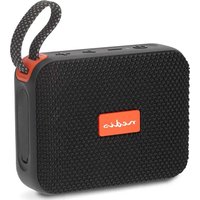
SPBT0526BK - Bluetooth speaker NEDIS - Free user manual and instructions
Find the device manual for free SPBT0526BK NEDIS in PDF.


| Product type | Portable Bluetooth speaker |
| Brand | Nedis |
| Model | SPBT0526BK |
| Power supply | Rechargeable lithium-ion battery (USB‑C 5 V/1‑3 A) |
| Estimated battery life | Approximately 8 hours |
| Connectivity | Bluetooth |
| Playback modes | Bluetooth, microSD card (MP3) |
| Hands‑free function | Yes (built-in microphone) |
| TWS (True Wireless Stereo) | Yes (pairing of two identical speakers) |
| Lighting modes | Yes, switching by double press on Play/Pause |
| Dimensions (approx.) | 20 × 10 × 10 cm |
| Weight (approx.) | 500 g |
| Color | Black |
| Material | ABS plastic, fabric |
| Package contents | Speaker, USB‑C cable, quick start guide |
| Warranty | 2-year limited warranty (household use) |
| Care and cleaning | Wipe with a soft, dry cloth |
| Safety | Do not immerse, do not open, charge with 5 V adapter only |
| Spare parts and repairability | No user-serviceable parts |
| Intended use | Indoors only, household applications |
Frequently Asked Questions - SPBT0526BK NEDIS
User questions about SPBT0526BK NEDIS
0 question about this device. Answer the ones you know or ask your own.
Ask a new question about this device
Download the instructions for your Bluetooth speaker in PDF format for free! Find your manual SPBT0526BK - NEDIS and take your electronic device back in hand. On this page are published all the documents necessary for the use of your device. SPBT0526BK by NEDIS.
USER MANUAL SPBT0526BK NEDIS
Compact sized easily to be taken with you
SPBT0526BK
natural_image
Line drawing of a portable electronic device with buttons and a handle (no text or symbols)

https://cdn.nedis.com/manuals/html/spbt0526bk
EN Quick start guide 4
DE Kurzanleitung 7
For more information, scan the QR code on the front page to see the extended manual.
Intended use
This product is intended as a speaker for playing music from your device via Bluetooth ^® or from a MicroSD card.
The product is intended for indoor use only.
This product is intended to be used in household and similar applications such as kitchen areas.
The product is not intended for professional use.
Any modification of the product may have consequences for safety, warranty and proper functioning.
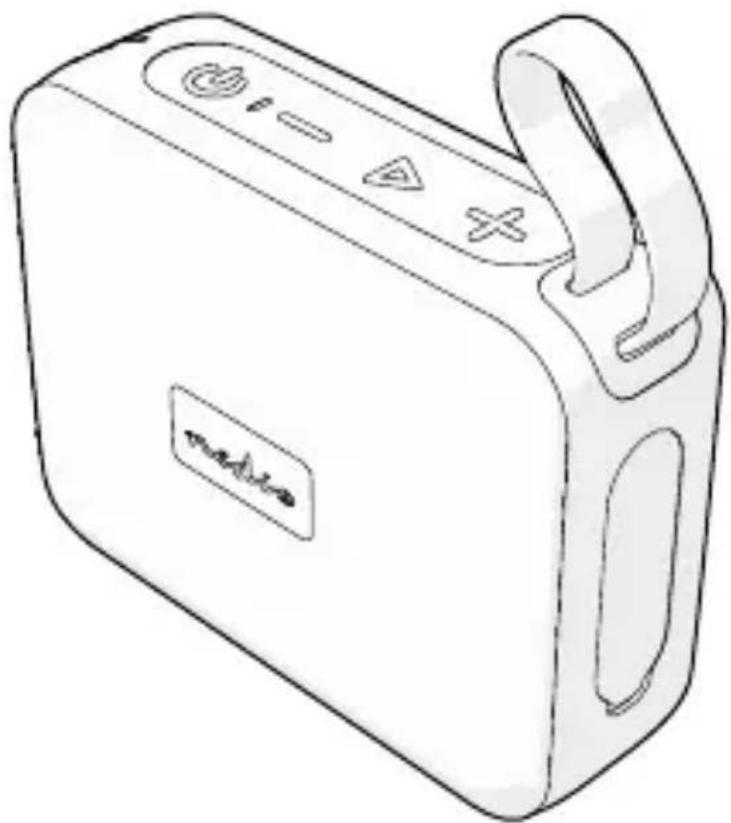
Main parts (image A)
1 Power/Mode button
2 Indicator LED
3 Volume down/previous track button
4 Play/pause button
5 Volume up/next track button
6 Carrying handle
7 USB-C charging port
8 MicroSD card slot
9 USB – USB-C charging cable
Safety instructions
Ensure you have fully read and understood the instructions in this document before you install or use the product. Keep the packaging and this document for future reference.
WARNING
- Only use the product as described in this document.
- Do not use the product if a part is damaged or defective. Replace a damaged or defective product immediately.
- Do not drop the product and avoid bumping.
- Only charge the product with the included charging cable.
- Only charge the product via a 5V/1–3A power adapter or a PC.
-
Do not immerse the product in water or other liquids.
-
Do not expose the product to water, rain, moisture, or high humidity.
- Do not open the product, there are no user serviceable parts inside.
- This product may only be serviced by a qualified technician for maintenance to reduce the risk of electric shock.
- Do not let children play with the packaging material. Always keep the packaging material out of the reach of children.
- Do not expose cells or batteries to heat or fire. Avoid storage in direct sunlight.
- Do not leave the product on prolonged charge when not in use.
- After extended periods of storage, it may be necessary to charge and discharge rechargeable cells or batteries several times to obtain maximum performance.
Check the contents of the package
Check that all parts are present and that no damage is visible on the parts. If parts are missing or damaged, contact the service desk via: service@nedis.com
Charging the product
Only use the provided USB-C charging cable. Only charge the product via a 5V/1–3A power adapter or a PC. The product is delivered with a partially charged battery. For optimal battery life, fully charge the battery before using the product for the first time.
- Plug the USB-C charging cable A ⑨ into the USB-C charging port A ⑦.
- Plug the other end of the USB-C charging cable A ⑨ into a 5V/1-3A power adapter.
- Plug the power adapter into a power outlet. The indicator LED A 2 lights up red.
The indicator LED A2 turns off when the product is fully charged.
Playing music from a Bluetooth® audio source
-
Press and hold the power/mode button A ① for 3 seconds to switch on the product. The indicator LED A② flashes blue. The product automatically enters Bluetooth® pairing mode.
-
Activate Bluetooth® on your audio device and connect with the product (SPBT0526BK).
The indicator LED A② lights up blue to indicate pairing is successful.
Playing music from a microSD card
- Insert a MicroSD card into the MicroSD card slot A 8.
Music from your MicroSD card starts to play automatically.
- Press the power/mode button A 1 to switch back to Bluetooth® mode.
Switching between light modes
Double press the play/pause button A④ to switch between different light modes.
Playing music
- Press the play/pause button A4 to play or pause music.
- Press the volume up or down button A 3 A 5 to adjust the volume.
- Press and hold the volume up or down button A③A⑤ tochangethe song.
Pairing two speakers with TWS
TWS only works with two speakers of the same type.
-
Switch on both speakers.
-
Long press the play/pause button A 4 on one of the speakers. The speaker makes a sound.
The speaker starts to pair automatically.
Answering phone calls
-
Press the play/pause button A 4 to answer or finish a phone call.
-
Long press the play/pause button A 4 to reject a call.
Warranty
This product is intended for domestic use. Any changes and/or modifications to the product will invalidate the warranty. We can't accept any liability for damage caused by improper use of the product. Normal wear and tear is excluded from warranty.
Disclaimer
Due to the constant development of our products in terms of function and design, we reserve the right to make changes to the product without notice. All logos, brands and product names are trademarks or registered trademarks of their respective holders and are hereby recognized as such.
Disposal
natural_image
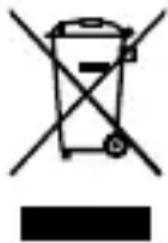
Symbol of a trash bin with crossed lines indicating no waste, and a solid black rectangle below (no text or labels)The product is designated for separate collection at an appropriate collection point. Do not dispose of the product with household waste.
For more information, contact the retailer or the local authority responsible for the waste management.
EU Declaration of Conformity
We declare that this product is in compliance with the relevant EU legislation. The EU declaration of Conformity is available on our website or can be obtained upon request.

Kurzanleitung
SPBT0526BK
natural_image
Symbol of a trash bin with crossed lines indicating no waste or restriction, and a solid black rectangle below (no text or labels)natural_image
Simple line drawing of a trash bin with crossed lines and a blank rectangular base (no text or symbols)natural_image
Symbol of a trash bin crossed with no text or labelsnatural_image
Symbol of a trash bin crossed with no text or numbers, representing waste sorting or disposal (no text present)natural_image
Symbol of a trash bin crossed with no text or numbers, accompanied by a black rectangular block below (no readable text or symbols)natural_image
Simple line drawing of a trash bin with crossed lines and a blank rectangular base (no text or symbols)natural_image
Symbol of a trash bin with crossed lines indicating no waste or discharge (no text or labels)natural_image
Symbol of a trash bin crossed with no text or numbers, representing waste sorting or disposal (no text present)natural_image
Symbol of a trash bin with crossed-out lines and a solid black rectangle below (no text or labels)natural_image
Two black-and-white icons: a recycling symbol with a person and a trash can, next to a stylized 'F' icon (no text or numbers present)v01/12-2025