
FLOW 4VIO - Hand blender BEHRINGER - Free user manual and instructions
Find the device manual for free FLOW 4VIO BEHRINGER in PDF.


User questions about FLOW 4VIO BEHRINGER
0 question about this device. Answer the ones you know or ask your own.
Ask a new question about this device
Download the instructions for your Hand blender in PDF format for free! Find your manual FLOW 4VIO - BEHRINGER and take your electronic device back in hand. On this page are published all the documents necessary for the use of your device. FLOW 4VIO by BEHRINGER.
USER MANUAL FLOW 4VIO BEHRINGER
FLOW 4V AND FLOW 4VIO
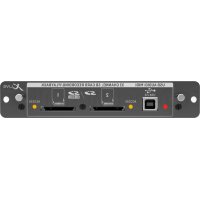
StageConnect I/O Extender for FLOW 4V Mixers, 4 Microphone Preamps supporting 32-Bit Float Recording, 2 Headphone Outputs and USB Audio/MIDI
Digital Audio Mixer for Video Production, 4 Inputs, SD Recording, BT Remote App and BT Monitoring, StageConnect Interface for Optional Remote I/O
2 FLOW 4V AND FLOW 4V Q Quick Start Guide 3
EN Safety Instructions
Please read these safety instructions carefully and pay close attention to any warning symbols displayed on the product and their related safety information in this instruction.
Terminals marked with this symbol carry electrical current of sufficient magnitude to constitute risk of electric shock. Use only high-quality professional speaker cables with 16" TS or twist-locking plugs pre-installed. All other installation or modification should be performed only by qualified personnel.
This symbol, wherever it appears, alerts you to the presence of uninsulated dangerous voltage inside the enclosure voltage that may be sufficient to constitute a
risk of shock
This symbol, wherever it appears, alerts you to important operating and maintenance instructions. Please read full manual.
Caution To reduce the risk of electric shock, do not remove the top cover (or the rear section). No user service able parts inside.
Refer servicing to qualified personnel.
Caution To reduce the risk of fire or electric shock, do not expose this appliance to rain and moisture. The apparatus shall not be exposed to microring or splashing liquids and no objects filled with liquids, such as vases, shall be placed on the apparatus.
Caution These service instructions are for use by qualified service personnel only. To reduce the risk of electric shock do not perform any servicing other than that contained in the operation instructions. Repairs have to be performed by qualified service personnel.
Warning Please refer to the information on the exterior of bottom enclosure for electrical and safety information before installing or operating the device.
Warning To prevent possible hearing damage, do not listen at high volume levels for long periods. As a guide to setting the volume level, check that you can still hear your own voice, when speaking normally while listening with the headphones.
- Read and keep these instructions. Need all warnings and index all instructions.
- Do not use this apparatus near water (if applicable). Clean only with dry cloth.
-
Do not block ventilation openings (if applicable). Do not install in a confined space. Install only according to manufacturer's instructions.
-
Do not install near any heat sources such as radiators, heat registers, stores or other apparatus (including amplifiers) that produce heat. Do not place naked flame sources, such as lighted candies, on the apparatus.
-
Do not defeat the safety purpose of the polarized or grounding-type plug. A polarized plug has two blades with one wider than the other (only for USA and Canada). A grounding-type plug has two blades and a third grounding plug. The wide blade or the third plug are provided for your safety. If the provided plug does not fit into your outlet, consult an electrician for replacement of the obsolete outlet.
-
[ll applicable] Protect the power cord from being walked on or pinched particularly as plugs, convenience receptacles, and the point where they get from the apparatus.
-
Use only attachments and accessories recommended by the manufacturer.

stands, tripods, brackets, or tables specified by the manufacturer, or sold with the apparatus
is used, use caution when moving the cart/apparatus combination to avoid injury from tip ever.
-
Unplug during storms, or if not in use for a long period.
-
Refer all servicing to qualified service personnel. Servicing is required when the apparatus has been damaged in any way, such as power-supply cord or plug is damaged, liquid has been spilled or objects have fallen into the apparatus, the apparatus has been exposed to rain or moisture, does not operate normally, or has been dropped.
-
(If applicable): The apparatus with protective earthing terminal shall be connected to a MANS socket outlet with a protective earthing connection.
-
(If applicable/Where the MAJKS plug or an appliance coupler is used as the disconnect device, the disconnect device shall remain readily operable.)
Internal or external voltage selector switches (if applicable). should only be reset and re-equipped with proper plug or alternative voltage by a qualified service technician. Do not attempt to alter this yourself.
-
Class II Wiring (if applicable: to reduce the risk of electric shock, the cisternal wiring connected to the terminals with "Class II Wiring" requires Class II wiring installed by an instructed person or the use of ready-made leads or cards.
-
Class I Wiring (if applicable): To reduce the risk of electric shock, the external wiring connected to the terminals with "Class I Wiring" requires Class I wiring installed by an instructed person or the use of roads-made leads or cards.
-
Operating temperature range 5° to 45°C (41° to 113°F).
17. LEGAL DISCLAIMER
The information contained in this Quick Start Guide and accompanying manual is provided for general guidance only. While every effort has been made to ensure the accuracy and reliability of the content at the time of publication, Music Tribe Global Brands Ltd. ("Music Tribe") makes no representations or warranties, express or implied, as to the completeness, accuracy, or suitability of the information, descriptions, illustrations, or technical specifications herein.
Music Tribe accepts no liability for any direct, indirect, incidental, or consequential loss or damage arising from reliance on the information contained in this document, including but not limited to loss of data, income, profits, or business opportunities. Use of the product remains the sole responsibility of the user.
Product features, design, specifications, and visual representations may be updated or modified without prior notice in the interest of continuous product improvement. All third-party trademarks referenced in this guide are the property of their respective owners, Midas, Bank Tchink, Lab Gruppen, Lake Tanney, Turbanana, TC Electronic, TC Helicon, Behringer, Bagera, Aston Macphones, and Coastude are trademarks or registered trademarks of Music Tribe Global Brands Ltd.
© 2025 Music Tribe Global Brands Ltd. All rights reserved. No part of this document may be reproduced, transmitted, or used in any form or by any means without prior written permission from Music Tribe.
LIMITED WARRANTY
For the terms, conditions, and limitations applicable to your product, including coverage, exclusions, and the duration of the limited warranty, please refer to the complete Music Tribe Limited Warranty Policy, available online at community.musictribe.com/support
Please retain your proof of purchase, as it may be required for warranty service.
4 FLOW 4V AND FLOW 4V Q Quick Start Guide 5
BESCHRÄNKTE GARANTIE
6 FLOW 4V AND FLOW 4V Q Quick Start Guide 7
8 FLOW 4V AND FLOW 4V Q Quick Start Guide 9
12 FLOW 4V AND FLOW 4VQ Quick Start Guide 13
安全说明
FLOW 4V AND FLOW 4VIO
1. Introduction to FLOW 4V and FLOW 4VIO
1.1. Field Recorder, StageConnect I/O Extension, USB Audio Interface
FLOW 4V is a 10-track field recorder equipped with four onboard dual-stage preamps with extreme dynamic range. It also functions as a standalone 32-bit float USB audio interface and an I/O box for other StageConnect devices. Record and mix line level signals using the stereo AUX input. FLOW 4V can be expanded with four additional remote inputs via StageConnect using FLOW 4V10.
FLOW 4V10 is an I/O box featuring four onboard dual-stage preamps and two 1/4" TRS outputs. Similar to FLOW 4V, FLOW 4V10 can also serve as a standalone USB audio interface and I/O box for other StageConnect devices.
1.2. Dual-stage preamps
The new dual-stage preamp and A/D conversion delivers a stunning 142dB dynamic range for microphone or line level sources.
Highly optimized input circuitry ensures an optimal signal-to-noise ratio and prevents audio clipping without requiring manual gain adjustments. Input levels can be trimmed digitally for added flexibility.
1.3. Mounting options
Both the FLOW 4V and FLOW 4V10 feature standard 1 12 threaded mounting points, allowing them to be attached to cameras and video equipment. Anti-rotation holes prevent accidental movement or loosening when mounted to professional video equipment, ensuring a secure and stable setup.
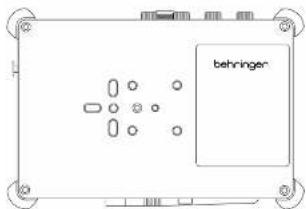
Securely stack the FLOW 4V and 4VIO using the integrated 14^ captive screw. Push and turn the screw head on the bottom of the device using the included wrench to secure it to any other device. The matching hex wrench can be found behind the antenna on FLOW 4V.
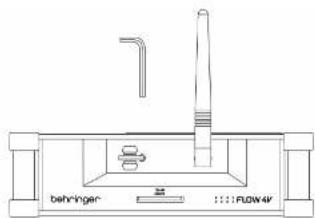
Both models also come with a microphone stand clip. The clip can be screwed onto the bottom, allowing the devices to be attached to any 12 " microphone stand (dia. \~16 mm).
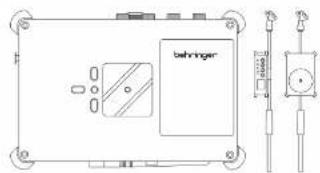
2. Front, side and rear panels
2.1. FLOW 4V
Front Panel
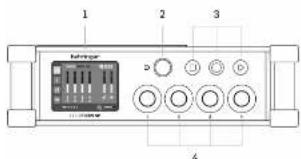
- Touchscreen for swipe and tap-based interactions
- Multi-purpose knob navigates and adjusts the selected parameter on the touchscreen
- STOP/RECORD/PLAY controls for recording on SD cards. Note that the behavior of the transport controls depends on the Timecode Mode and Pre-Roll settings. Please refer to section 5.2 for details.[AV11.1]
- Controls for immediate access to channel levels 1-4
Left Side Panel
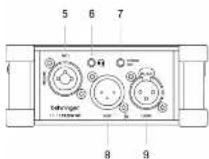
5. MIC/LINE input 1[JH12.1][AV13.1]
6. PHONES IS TRIS jack for both monitoring and talkback (TRRS connector: Tip = left out, 1st ring = right out, 2nd Ring = headset microphone input; Sleeve = ground).
^1 ^2 stereo line output (MAIN MIX), for connecting to camera audio input
8. StageConnect HOST port, providing power and clock sync to other StageConnect devices
9. StageConnect CLIENT port, for receiving remote power and connecting to a SC HOST device
NOTE: Use either the HOST or CLIENT StageConnect ports to connect a FLOW 4V to a 4VIO, depending on where DC power is applied.
Right Side Panel
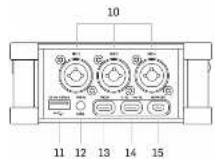
10. MIC/LIKE inputs 2-4
11. USB A port for automatic recording backup on USB flash drives
12. Stereo AIDUR or input for external timecode SYNC in Free Run mode
13. USB-C port for audio transmission or power delivery
14. USB C port for power delivery (USB PO 5-15 VDC, 3A)
15. Micro-HDMI port enables the FLOW 4V to follow a camera's reconting status (HDMI-CEC).
Rear Panel
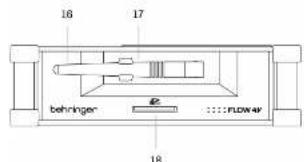
- Bluetooth antenna for remote control and tailback
B. Hex wrench, 3 mm (included) - SD card slot for recording multitrack sessions on FAT32-formatted cards
2.2. FLOW 4VIO
Front Panel
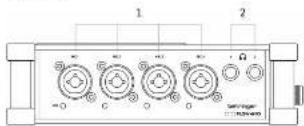
1. MIC/LINE inputs 1-4
2. 1/4" TRS PHONES OUTPUTS 1 and 2 (StageConnect downstream channels 1-2 and 3-4 from FLOW 4V)
Left Panel
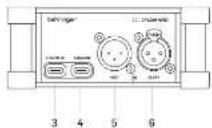
3. USB C port for power delivery (USB PD 5-15 VDC, 3A)
4. USB-C port for audio transmission or power delivery
5. StageConnect HOST port, providing power and clock sync to other StageConnect devices
6. StageConnect CLIENT port, for receiving remote power and connecting to a SC-HOST device
Right Panel
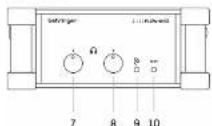
7. Headphone output 1 level contr
8. Headphone output 7 level control
9. StageConnect status LED
(Red = disconnected, green = OK, yellow = occasional transmission errors)
10. DC IN power LED
3. User Interface Navigation
The graphic user interface is organized into the following sections:
-
Channels 1-4 (1-8 when 4VIO is connected), Aux Input, USB Input and Talkback
-
Meters / Main Mix (pictured below)
-
SD Recorder
-
Settings
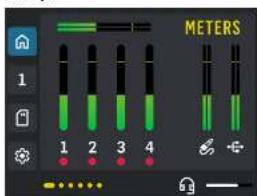
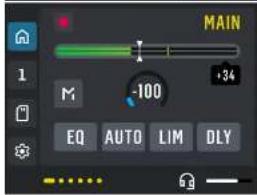
To navigate:
- Swipe vertically to select channels.
- Swipe horizontally to move between the processing screens.
- Tap on the mixer icon to open the main overview and its processing.
- Tap on the SD card icon to open the recorder pages.
- Tap on the gear icon to open the general settings and preferences.
The multi-purpose knob to the right of the LCD is used as follows:
- Turn the knob to navigate through on-screen parameters. A blue frame around the element indicates the selection.
- Press the knob, accessing the selected parameter, then rotate to adjust its value.
- Press the knob again to exit the parameter editing and go back to navigation.
Note: Parameters can also be selected directly by tapping on the touchscreen. Some parameter values can also be adjusted immediately with touch and drag gestures. However, the multipurpose knob as described above will yield more precise adjustment.
4. Signal Flow and Processing
4.1. USB / BT Channel
The USB / BT channel supports both recording and playback of different signals. The Source switch on the bottom of the USB In screen selects the signal that is monitored.
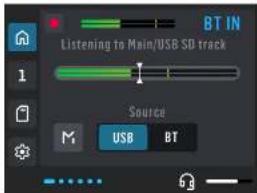
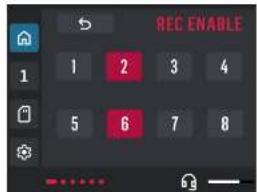
To record the USB or Bluetooth signal, select it in the Record Enable screen. Note that only one can be active at the same time.
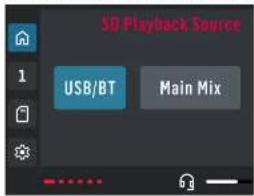
During playback, the channel can be used to monitor the recorded MAIL MIX or the stereo USB/Bluetooth signal (depending on which one was recorded). Select the playback signal on the SD Playback Source screen.
4.2. AUX IN / SYNC Channel
The AUXIR channel hosts the stereo signal connected to the 12 'TRS jack.
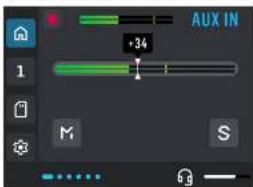
Additionally, the AUX IN channel can receive a synchronization signal via the tip of the N^+ TRS connector. See Section 5.1 for more details.
4.3. Channel Processing
FLOW 4V's four local channels (MIC/LINE 1-4) as well as FLOW 4VIO's additional four channels (MIC/LINE 5-8) offer the following processing options.
- Filter: low-cut and high-cut filter with adjustable cut-off frequencies
-
Tone EQ: one-knob tone control for balancing bass against treble ranges easily using TII-EQ
• Dynamics, choose ONE from the following: -
Expander with adjustable threshold
- One-knob Compressor with a single intensity control
- Limiter with adjustable threshold
- Pre-fader delay for time-aligning various input sources before the mix
4.4. METERS / MAIN MIX
-
FLOW 4V's MAIN MIX bus provides the following processing options:
• 3 band EO featuring: -
Low shelf filter @ 50 Hz
- Mid band @ 1kHz, q=0.25
• High shelf filter @ 14 kHz
- Limiter with an adjustable threshold
- Post-fader delay for aligning the audio output to a delayed video
4.4.1 AUTOMIX
The AUTOMIX panel on the MAHs MIX screen can assign individual channels to the automizer. This is especially useful in situations where mic signals all contain acoustic bleed between the other channels (e.g. panel discussions or interviews). AUTOMIX automatically shares the overall gain between all open mics, giving preference to the highest active channel, while attenuating all others
4.5. PHONES OUTPUT AND STEREO OUT (FLOW 4V)
The STEREO OUT 1/8" connector (TRS) carries the post-fader MAIN MIX signal. The PHONES 1/8" connector (TRBS) provides a copy of the MAIN MIX, either pre- or post-fader. When SOLO is active, the solo bus replaces the MAIN MIX. Talkback is always summed with either the MAIN MIX or the solo bus in the PHONES output.
4.6. PHONES OUTPUTS (FLOW 4V10)
When connected to a FLOW 4V, PHONES OUTPUT 1 mirrors the FLOW 4V's STEREO OUT, while PHONES OUTPUT 2 mirrors the FLOW 4V's PHONES output.
18 FLOW AND FLOW
EN
5. SD Recording/Playback
Access the SD recorder by tapping the SD icon on the lower left corner of the display. The first screen offers transport controls. The current session and total number of sessions are displayed in the lower-right corner. If the SD card contains more than 99 sessions, only the current session number is shown.
To avoid card fragmentation, it is recommended to format the SD card directly on the FLOW 4V before starting a new series of recordings.
Swipe left to access the second screen to record-enable individual channels.
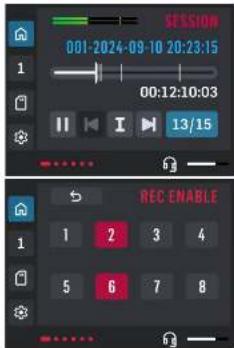
Record-enabled [JD29.1] channels are recorded onto the SD card inserted into the rear panel of the FLOW 4V.
| SD recording channels Source | |
| 1-4 Local Inputs 1-4 | |
| 5-8 Stageconnect Inputs 1-4 | |
| 9-10 AUK In, stereo | |
| 11 12 USB / BT, stereo | |
| 13-14 Talkback, stereo | |
| 15-16 Main Mix, stereo | |
During playback, each recorded channel is routed to its corresponding input channel on FLOW 4V.
The USB/BT channel can play back either the recorded USB/Bluetooth stereo signal or the recorded Main Mix, selectable in the SOURCE menu.
The AUX IN channel can be set to play back StageConnect inputs 5-6 or 7-8 coming from FLOW 4V10.
See sections 4.1 and 4.2 for details on source selection for the USB/RT and AUX IN channels.
Markers
To add markers while recording in Free Run Timetode mode, press the Record button. To add markers while recording in Time of Day or Ret Run Timetode modes, press the Play button. Please refer to section 5.2 for details.[AV30.1]
To add markers during playback, first select the marker button (blue) and then press in the multi-function knob on the right of the display.
To delete a marker, pause playback and navigate to the desired marker. When the playback position aligns with a marker, the marker button switches to a delete function.
Each session can contain up to 99 markers.
LiveSessions
Use the LiveSessions app to convert the multi-track WAV file recorded on FLOW 4V into individual single-channel WAV files. LiveSessions also allows for trimming of WAVs to relevant sections and editing markers post-recording.
Back-up to USB flash drive
When a USB flash drive is inserted into the USB-A port, a backup of the SD card recording will be made each time recording is stopped.
Warning: Do not remove the storage media, SD Card or USB drive, while the "busy" sign on the display is indicating ready/write activity. Interrupting the closure of files may result in unusable or lost recordings.
5.1. Timecode Modes
Swipe right twice from the SD Recorder screen to access the TIMECODE screen. Three modes are available:
REC RUN: The Omeclock runs only when recording and restarts with each new recording.
TIME OF DAY: The timecode matches the current date and time. Tap the time or date to adjust the internal clock.
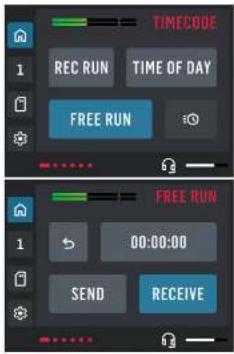
FREE RUN: timecode runs continuously. Tap on the clock icon to access the following options:
• 00:00:00:00: Resets the timescode.
- SEND a timescode synchronization signal to the STEREO OUT.
- RECEIVE an incoming SMPTE timecode signal on the tip connector of the AUX IN.
5.2. Transport Controls
The behavior of the transport controls depends on the Timecode Mode and Pre-roll settings.
When Pre-Roll is enabled, the five seconds preceding the moment the Record button is pressed are included in the recording.
Free Run / Time of Day
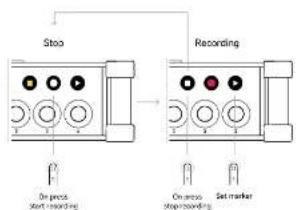
• Pre-Roll is not active
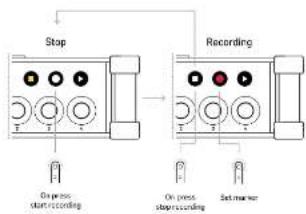
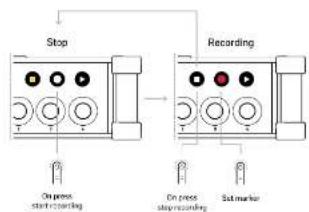
- Pressing the Record button while the transport is stopped starts the recording. The button lights up solid red to indicate active recording.
- Pressing the Play button while recording creates a new marker. - Pressing the Stop button stops the recording.
- Pre Roll is active
- Pressing the Record button starts the pre-roll period. The button blinks red to indicate the pre-roll is running.
- Pressing the Record button during the pre-roll period starts the recording. The button lights up solid red to indicate active recording.
- Pressing the Stop button stops the pre-roll and recording.
Quick Star Guide 19
EN
If Pre-Roll is not active
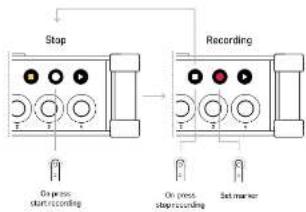
flowchart
graph TD
    A["Stop"] --> B["On press start recording"]
    C["Recording"] --> D["On press stop recording"]
    C --> E["Set marker"]
If Pre-Roll is active
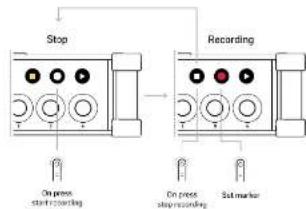
Rec Run
- Pre-Roll is not available
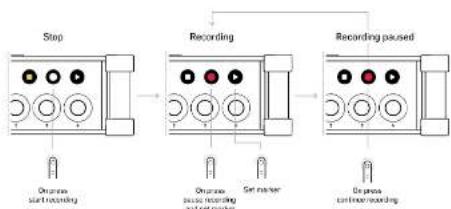
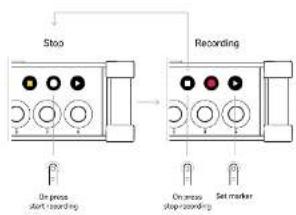
- Pressing the Record button while the transport is stopped starts the recording. The button lights up solid red to indicate active recording.
- Pressing the Record button while recording pauses the recording and creates a new marker. The button blinks to indicate that the recording is paused.
- Pressing the Record button while the recording is paused starts the recording again. The button lights up solid red to indicate active recording
- Pressing the Play button while recording creates a new market.
- Pressing the Stop button stops the recording.
flowchart
graph LR
    A["Stop"] --> B["Recording"]
    B --> C["Recording paused"]
    A --> D["On press start recording"]
    B --> E["On press issue recording and set number"]
    C --> F["On press timeframe recording"]
6. USB Audio and Power
Both FLOW-IV and FLOW-AVID are powered via USB using either of the two USB-C ports. However, USB audio can only be transmitted through the designated USB-C port AUDIO.
USB recording or streaming is possible in 2 modes, Recording or Mining.
- Recording Mode: Input channels and the MAIN MIX are recorded before the processing and level controls, useful for mixing in post-production
- Mixing Mode: Input channels and the MAIN MIX are recorded after applying levels and processing in FLOW 4V, useful for live streaming applications
USB recording channels Source
| 1-2 Main (Max stereo) | |
| 3-4 AUX (N stereo) | |
| 5-6 USB / OT (stereo) | |
| 7-8 Talkback (stereo) | |
| 9-12 Local Inputs 1-4 | |
| 13-16 StageConnect Inputs 1-4 |
Additionally, two channels are played back in the opposite direction, from the computer to the FLOW 4V via USB Output 1-2, and they can be mixed and monitored on the USB/8T channel.
7. AUX IN and Timecode SYNC
The stereo signal connected to the AUX IN 12 TRS connector is routed to the AUX IN channel on FLOW-4V.
This AUX/SYNC input can temporarily receive a timecode synchronization signal on its tip connector. To synchronize FLOW 4V to this external clock signal, select the FREE RUN timecode mode and tap on RECEIVE.
8. Tallback
Talkback can be received via a Bluetooth audio connection or through 1/8" THRS PHONES jack using headphones with an integrated microphone. Both signals are summed and sent to the PHONES output, allowing communication with the recording engineer or production assistants.
The Talkback signal is also transmitted over StageConnect channels 3–4, making it available to other connected devices. Additionally, the Talkback signal can be recorded separately alongside the input channels to the SD card or via USB, making it available for post-production and editing.
9. StageConnect I/O options
FLOW4V and FLOW4VIO each feature StageConnect HOST and CLIENT ports, allowing integration in various setups. Both units appear on the StageConnect bus with 4 inputs and 4 outputs.
On FLOW IV, the StageConnect input channels 1-4 are routed to processing channels 5-8. The MAIN MIX is sent over StageConnect output channels 1-2, while the PHONES mix is sent over StageConnect output channels 3-4.
On FLOW 4V10, the StageConnect input channels 1-2 and 3-4 are routed to the stereo PHONES OUTPUT 1 and 2, respectively. The NICLINE 1-4 inputs are sent over StageConnect output channels 1-4.
When used as a StageConnect HOST and supplied with 12 V via USB-PB, both FLOW 4V and FLOW 4VIO can remotely power a StageConnect CLIENT device over an XLR cable (DMX recommended). This allows flexible placement of the power supply on either end of the connection.
10. Setup Examples
FLOW-4V and FLOW 4VIO offer great flexibility through StageConnect and USB connectivity. Below are a few setup examples to illustrate their versatility and inspire some creativity.
10.1. FLOW 4V and FLOW 4VIO
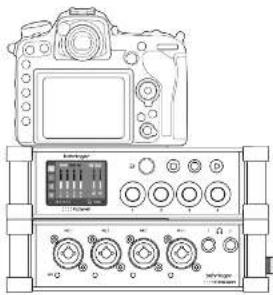
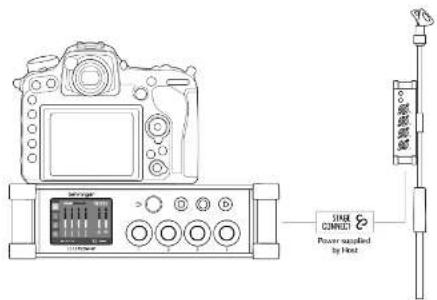
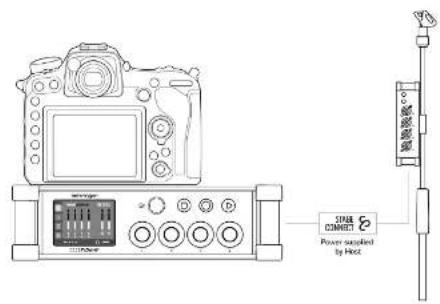
The simplest setup pairs the FLOW 4V with AWD. Even within this basic configuration, there are many placement options, for example, stacking both units together either on their own or mounted beneath a camera, or placing one unit under the camera and the other on a mic stand closer to the sound source.
In all configurations, FLOW 4V and 4VIO are connected via StageConnect. Only one device requires external power; the other is powered through StageConnect(UAV90.1). The powered device becomes the StageConnect HOST, and the device receiving power over StageConnect becomes StageConnect CLIENT.
EN
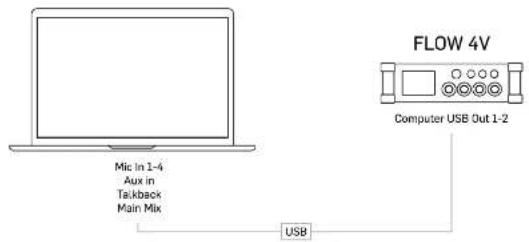
10.2. FLOW 4V/4VIO as USB audio interface
FLOW 4V can function as a 10-input USB audio interface, with 2 output channels from the computer to FLOW 4V. Power can be supplied to FLOW 4V either via USB Power Delivery (USB-PO) from a computer or through a USB power bank.
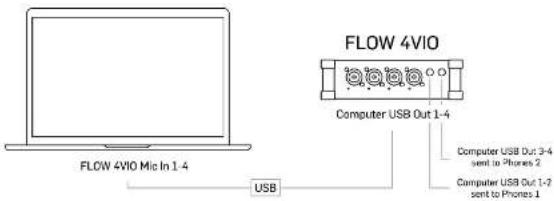
FLOW 4VIO can function as a 4 in / 4 out USB audio interface.
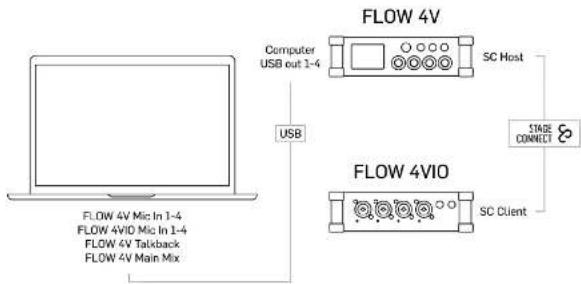
FLOW 4V and 4VIO combined function as a 14 input / 4 output USB audio interface.
flowchart
graph TD
    A["Laptop"] -->|USB| B["Flow 4V"]
    A -->|USB| C["Flow 4VIO"]
    B --> D["Computer USB out 1-4"]
    C --> E["SC Client"]
    D --> F["SC Host"]
    E --> G["STAGE CONNECT"]
    style A fill:#f9f,stroke:#333
    style B fill:#ccf,stroke:#333
    style C fill:#ccf,stroke:#333
    style D fill:#dfd,stroke:#333
    style E fill:#dfd,stroke:#333
    style F fill:#dfd,stroke:#333
    style G fill:#dfd,stroke:#333
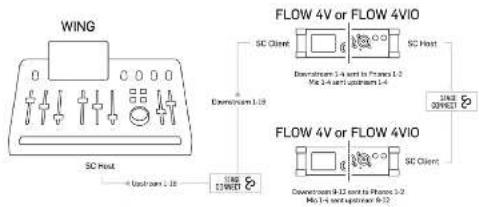
10.3. FLOW 4V/4VIO as StageConnect I/O Box
FLOW 4V and FLOW 4V10 can function as an I/O boxes for both live and studio applications. Up to two FLOW 4V/4V10 units can be daisy chaired.
flowchart
graph TD
    A["WING"] --> B["SC Host"]
    B --> C["4-Output L18"]
    D["FLOW 4V or FLOW 4VIO"] --> E["SC Client"]
    D --> F["SC Host"]
    D --> G["Direct"]
    D --> H["Direct"]
    D --> I["Direct"]
    D --> J["Direct"]
    D --> K["Direct"]
    D --> L["Direct"]
    D --> M["Direct"]
    D --> N["Direct"]
    D --> O["Direct"]
    D --> P["Direct"]
    D --> Q["Direct"]
    D --> R["Direct"]
    D --> S["Direct"]
    D --> T["Direct"]
    D --> U["Direct"]
    D --> V["Direct"]
    D --> W["Direct"]
    D --> X["Direct"]
    D --> Y["Direct"]
    D --> Z["Direct"]
    D --> AA["Direct"]
    D --> AB["Direct"]
    D --> AC["Direct"]
    D --> AD["Direct"]
    D --> AE["Direct"]
    D --> AF["Direct"]
    D --> AG["Direct"]
    D --> AH["Direct"]
    D --> AI["Direct"]
    D --> AJ["Direct"]
    D --> AK["Direct"]
    D --> AL["Direct"]
    D --> AM["Direct"]
    D --> AN["Direct"]
    D --> AO["Direct"]
    D --> AP["Direct"]
    D --> AQ["Direct"]
    D --> AR["Direct"]
    D --> AS["Direct"]
    D --> AT["Direct"]
    D --> AU["Direct"]
    D --> AV["Direct"]
    D --> AW["Direct"]
    D --> AX["Direct"]
    D --> AY["Direct"]
    D --> AZ["Direct"]
    D --> BA["Direct"]
    D --> BB["Direct"]
    D --> BC["Direct"]
    D --> BD["Direct"]
    D --> BE["Direct"]
    D --> BF["Direct"]
    D --> BG["Direct"]
    D --> BH["Direct"]
    D --> BI["Direct"]
    D --> BJ["Direct"]
    D --> BK["Direct"]
    D --> BL["Direct"]
    D --> BM["Direct"]
    D --> BN["Direct"]
    D --> BO["Direct"]
    D --> BP["Direct"]
    D --> BQ["Direct"]
    D --> BR["Direct"]
    D --> BS["Direct"]
    D --> BT["Direct"]
    D --> BU["Direct"]
    D --> BV["Direct"]
    D --> BW["Direct"]
    D --> BX["Direct"]
    D --> BY["Direct"]
    D --> BZ["Direct"]
    D --> CA["Direct"]
    D --> CB["Direct"]
    D --> CC["Direct"]
    D --> CD["Direct"]
    D --> CE["Direct"]
    D --> CF["Direct"]
    D --> CG["Direct"]
    D --> CH["Direct"]
    D --> CI["Direct"]
    D --> CJ["Direct"]
    D --> CK["Direct"]
    D --> CL["Direct"]
    D --> CM["Direct"]
    D --> CN["Direct"]
    D --> CO["Direct"]
    D --> CP["Direct"]
    D --> CQ["Direct"]
    D --> CR["Direct"]
    D --> CS["Direct"]
    D --> CT["Direct"]
    D --> CU["Direct"]
    D --> CV["Direct"]
    D --> CW["Direct"]
    D --> CX["Direct"]
    D --> CY["Direct"]
    D --> CZ["Direct"]
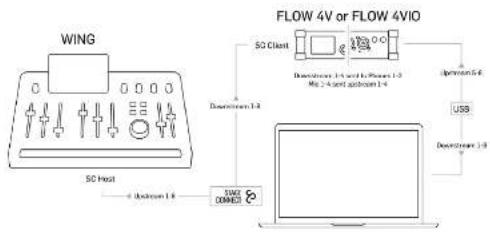
10.4. FLOW 4V/4VIO as StageConnect I/O Box and USB interface
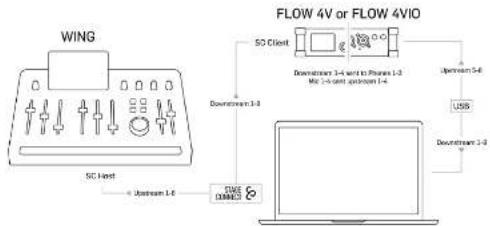
FLOW 4V;4VIO can be used as USB Interface and StageConnect I/O box at the same time, providing additional USB I/O to WIKG or other StageConnect Hosts.
flowchart
graph TD
    A["WING"] --> B["SC Host"]
    B --> C["100k OM/DCM"]
    C --> D["Flow 4V or Flow 4VIO"]
    D --> E["SO Client"]
    E --> F["Downstream 1-3 and 2-4 Power 1-3"]
    E --> G["Upstream 5-6"]
    E --> H["USB"]
    H --> I["Downstream 1-3"]
When used as USB Interfaces and StageConnect I/O boxes, up to two FLOW 4V/4VIO devices can be combined.
flowchart
graph TD
    A["WING"] --> B["SC Host"]
    B --> C["USB Interface"]
    C --> D["Flow 4V or Flow 4VIO"]
    D --> E["SO Client"]
    E --> F["Downstream 1-3"]
    E --> G["Downstream 1-4"]
    E --> H["Downstream 1-5"]
    E --> I["Downstream 1-6"]
    E --> J["Downstream 1-7"]
    E --> K["Downstream 1-8"]
EN
FLOW 4V AND FLOW 4VIO
1. FLOW 4V and FLOW 4VIO 简介
导航方式:
Quick Star Guide
4.2.AUX IN/SYNC通道
Free Run / Time of Day
- Pre-Roll 未启用
If Pre-Roll is not active
If Pre-Roll is active
Rec Run
- Pre-Roll 不可用
flowchart
graph LR
    A["Stop"] --> B["Recording"]
    B --> C["Recording passed"]
    A --> D["On press start recording"]
    B --> E["On press pass recording and set number"]
    C --> F["On press end recording"]
6. USB 音频与电源
| USB recording channels Source | |
| 1-2 | Main Mix (位体声) |
| 3-4 | 800 Hz (位体声) |
| 5-6 | USB / 87 (位体声) |
| 7.8 Talkback 立体声1 | |
| 9-12本域输入1-4 | |
| 13-16 | StageConnect 输入1-6 |
9. StageConnect I/O 选项
10.1. FLOW 4V and FLOW 4VIO
flowchart
graph TD
    A["CN"] --> B["FLOW 4V Mic In 1-4"]
    A --> C["FLOW 4VIO Mic In 1-4"]
    A --> D["FLOW 4V Talkback"]
    A --> E["FLOW 4V Main Mix"]
    B --> F["Computer USB out 1-4"]
    C --> G["Flow 4V"]
    D --> H["Flow 4V"]
    E --> I["Flow 4V"]
    F --> J["SC Host"]
    G --> K["SC Client"]
    H --> L["STAGE CONNECT"]
10.3. 将 FLOW 4V/4VIO 用作 StageConnect I/O Box
flowchart
graph TD
    A["WING"] --> B["SC Host"]
    B --> C["Channel 1.18"]
    C --> D["Flow 4V or FLOW 4VIO"]
    D --> E["SC Client"]
    D --> F["SC Host"]
    D --> G["Channel 3-4 port to Phaseo 1-2<br>Mio 3-4 port upstream 1-4"]
    D --> H["Channel 3-4 port to Phaseo 2-2<br>Mio 3-4 port upstream 6-22"]
    D --> I["Channel 3-4 port to Phaseo 3-2<br>Mio 3-4 port upstream 6-22"]
flowchart
graph TD
    A["WING"] --> B["SC Host"]
    B --> C["Flow 4V or Flow 4VIO"]
    C --> D["SD Client"]
    D --> E["Downstream 1-4 to Process 1-2<br>Mio 1-3 sent approom 1-4"]
    C --> F["Downstream 1-4"]
    C --> G["Downstream 1-3"]
    C --> H["Upstream 5-6"]
    C --> I["USB"]
    C --> J["Downstream 1-3"]
    B --> K["UPstream 1-4"]
Specifications
| FLOW 4V FLOW 4V10 | ||
| General specs | ||
| Frequency Range L:1 dB @ 5 Hz - 22 kHz | ||
| Frame Rate (fsst 25.58, 24, 25, 30, 50, 60 Hz) | ||
| Mic Inputs | ||
| Type 4 x XLR 2 % TRS combo jacks, balanced | ||
| Dynamic Range 142 dB (W, weight-in) | ||
| Max. Input Level +18 dBu | ||
| Noise Floor -140 dBPS (unweighted) | ||
| DIN (20 Hz to 25 kHz -130 dBu unweighted) | ||
| Distortion (THD-1K) ≤ 620 Ω, 0.005% @ -92 dBu, 0.002% @ +10 dBu | ||
| Constallix rejection | -110 dB | |
| Impedance XLR: 10 kJ bar, /5 kJ umbar. | ||
| Max. Gain | +70 dB | |
| Phantom power - 48 V, switchable | ||
| AUX IN | ||
| Type | 1 x % TRS jack, stereo | N/A |
| Distortion (THD-4H) | 0.008% @ -6 dBu in | |
| Max. Input Level | +24 dBu | |
| Impedance | 10 dB | |
| HEADSET IN/OUT | ||
| Type | 1 x % TRS jack, stereo + micro | N/A |
| Impedance | 40Ω | |
| Max. Input Level | -10 dBu | |
| 110 mW ≤ 30Ω | ||
| Max. Output Level | 110 mW ≤ 25Ω | |
| 75 mW @ 100Ω | ||
| STUDIO OUT | ||
| Type | 1 x % TRS jack, stereo | N/A |
| Impedance | 100Ω | |
| Max. Output Level | +4.6 dBu | |
| PHONES OUTPUTS | ||
| Type | kVA | 2 x % TRS jack, stereo |
| Max. Output Level (30 Ω load) | 22 mW | |
| Distortion (THD-8, 30 Ω load) | 0.005% | |
| USB Audio Interface | ||
| Type | USB 2.0 | |
| Connector | Type C | |
| Sample Rate | 48 bitc | |
| Bit Depth | 24-bit / 32-bit float | |
| Channels at Host | 2 in / 2 out | 4 in / 4 out |
| StageConnect | ||
| Audio channels | 8 upstream / 8 downstream | |
| Sample Rate | 44.1 / 48 dB | |
| Bit Depth | 34bit | |
| Phantom Fiber | 12 V DC / 18 W | |
| Latency | 6 samples | |
| Cable length | up to 45 m with 115 Ω 30dB cable | |
| HOME | ||
| Type | Micro HDMI | N/A |
| CCC | Camera control I/O Start | |
EN
| FLOW: 4V FLOW: 4V00 | ||
| Bluetooth | ||
| Frequency range: 240Ω/Hz - 2765 MHz | N/A | |
| Channel number | 79 | |
| Version | Bluetooth 4-2 Dual Mode | |
| Compatibility | Suspents ISOPI 1.2 profile | |
| Max Communication range | 12 m (without interference) | |
| Max Output power | 5% dBm | |
| Gain | 134.45% | |
| Power Supply / Voltage | ||
| Connector | USB-C | |
| Power Supply / Voltage | USB-C PB 5-ISWDC, 34, Power Adaptor included | |
| Power Consumption | 10 W | 8 W |
| Dimensions / Weight | ||
| Dimensions [Hz x W x D], 35 x 134 x 125 mm | ||
| Weight | 800 g | 750 g |
EN
Other important information
ES
EN Important information
1. Product Registration
To ensure optimal service and support, we encourage you to register your Music Index product immediately after purchase at musicdisc.com. Registration allows us to provide faster and more efficient assistance in the event of a service request or warranty claim. It also ensures that you receive important product updates, safety notices, and documentation relevant to your product.
During registration, you will also have access to the full terms and conditions of our Limited Warranty.
Please note that warranty coverage and consumer rights may vary by country or jurisdiction. Refer to the terms applicable in your region at the time of registration or via our support portal.
IT
- Technical Support and Malfunctions If you experience a malfunction or require assistance, and a Music Tribe Authorized Reseller is not available in your area, please refer to the list of Authorized Fulfillers available under the "Support" section at musictribe.com.
If your country is not listed, we recommend using our Online Support resources as a first step, which may help resolve your issue without the need for a return. For warranty-related matters, please ensure you submit an online warranty claim before returning the product. Unauthorized returns or unregistered claims may result in processing delays or denial of warranty coverage.
3. Unauthorized Repairs and Modifications
To preserve warranty coverage, do not open, disassemble, or attempt to repair the product yourself. Repairs or modifications performed by unauthorized persons or service centers will void the warranty and may compromise product safety or performance.
Before connecting your unit to a power source, ensure that the input voltage matches the rating indicated on your product. Incorrect voltage may cause permanent damage and void the warranty.
If the fuse requires replacement, only use fuses of the same type and rating. Use of incorrect fuses may create a fire or safety hazard and will invalidate all warranty protection.
- Proper Use and Environment Ensure that your Music Tribe product is used in accordance with the product manual and within the recommended operating conditions. Exposure to excessive moisture, dust, heat, or impact may result in malfunction and void the warranty.
ES
Other important information

Ważna informacja

FLOW 4V AND FLOW 4VIO
Responsible Party Name: Empower Tribe Innovations
US Inc
Address: 901 Grier Dr. Las Vegas, NV,
89119, USA
Email Address:
governance@empowertribe.com
FLOW 4V AND FLOW 4VIO
This equipment has been tested and found to comply with the limits for a Class B digital device, pursuant to part 15 of the FCC Rules. These limits are designed to provide reasonable protection against harmful interference in a residential installation. This equipment generates, uses and can radiate radio frequency energy and, if not installed and use in accordance with the instructions, may cause harmful interference to radio communications. However, there is no guarantee that interference will not occur in a particular installation. If this equipment does cause harmful interference to radio or television reception, which can be determined by turning the equipment off and on, the user is encouraged to try to correct the interference by one or more of the following measures:
• Recorient or relocate the receiving antenna.
- Increase the separation between the equipment and receiver.
- Connect the equipment into an outlet on a circuit different from that to which the receiver is connected.
- Consult the dealer or an experienced radio/TV technician for help.
This equipment complies with Part 15 of the FCC rules. Operation is subject to the following two conditions:
(1) this device may not cause harmful interference, and (2) this device must accept any interference received, including interference that may cause undesired operation.
Important information:
Changes or modifications to the equipment not expressly approved by Music Tribe can void the user's authority to use the equipment.
Caution!
The manufacturer is not responsible for any radio or TV interference caused by unauthorized modification to this equipment. Such modifications could void the user authority to operate the equipment.
FCC RF Radiation Exposure Statement:
-
This transmitter must not be co-located or operating in conjunction with any other antenna or transmitter.
-
This equipment complies with FCC RF radiation exposure limits set forth for an uncontrolled environment. This equipment should be installed and operated with minimum distance of 20 centimeters between the radiator and your body.
Caution!
This device contains licence-exempt transmitter(s)/receiver(s) that comply with Innovation, Science and Economic Development Canada's licence-exempt BSS(s). Operation is subject to the following two conditions:
-
This device may not cause interference.
-
This device must accept any interference, including interference that may cause undesired operation of the device.
This equipment complies with IC radiation exposure limits set forth for an uncontrolled environment. This equipment should be installed and operated with minimum distance 20cm between the radiator and your body.
Précaution!
Hereby, Music Tribe declares that this product is in compliance with Directive 2014/53/EU, Directive 2014/30/EU, Directive 2014/35/EU, Directive 2011/65/EU and Amendment 2015/863/EU, Directive 2012/19/EU, Regulation 519/2012 REACH SYHC and Directive 1907/2005/EC..
Full text of EU DoC is available at https://community.musictribe.com/
DU Representative: Empower Tribe Innovations DE GmbH
Address: Odn-S-Henke-Straise 43, 47877 Wilrich, Germany
UK Representative: Empower Tribe Innovations UK Ltd.
Address: 5 Brindley Road Old Trailord, Manchester, United Kingdom, M16 90N
Correct disposal of this product. This symbol indicates that this product must not be disposed of with household waste, according to the WEEE Directive (2012/19/DU) and your national law. This product should be taken to a collection center licensed for the recycling of waste electrical and electronic equipment (EEF). The mishandling of this type of waste could have a possible negative impact on the environment and human health due to potentially hazardous substances that are generally associated with EEE. At the same
time, your cooperation in the correct disposal of this product will contribute to the efficient use of natural resources. For more information about where you can take your waste equipment for recycling, please contact your local city office, or your household waste collection service.
We Hear You
- FLOW 4V AND FLOW 4VIO
- EN Safety Instructions
- LEGAL DISCLAIMER
- LIMITED WARRANTY
- BESCHRÄNKTE GARANTIE
- 安全说明
- Introduction to FLOW 4V and FLOW 4VIO
- Field Recorder, StageConnect I/O Extension, USB Audio Interface
- Dual-stage preamps
- Mounting options
- Front, side and rear panels
- FLOW 4V
- FLOW 4VIO
- Front Panel
- Left Panel
- Right Panel
- User Interface Navigation
- Signal Flow and Processing
- USB / BT Channel
- AUX IN / SYNC Channel
- Channel Processing
- METERS / MAIN MIX
- AUTOMIX
- PHONES OUTPUT AND STEREO OUT (FLOW 4V)
- PHONES OUTPUTS (FLOW 4V10)
- EN
- SD Recording/Playback
- Markers
- LiveSessions
- Back-up to USB flash drive
- Timecode Modes
- Transport Controls
- Free Run / Time of Day
- Rec Run
- USB Audio and Power
- AUX IN and Timecode SYNC
- Tallback
- StageConnect I/O options
- Setup Examples
- FLOW 4V and FLOW 4VIO
- FLOW 4V/4VIO as USB audio interface
- FLOW 4V/4VIO as StageConnect I/O Box
- FLOW 4V/4VIO as StageConnect I/O Box and USB interface
- FLOW 4V and FLOW 4VIO 简介
- 4.2.AUX IN/SYNC通道
- USB 音频与电源
- StageConnect I/O 选项
- 将 FLOW 4V/4VIO 用作 StageConnect I/O Box
- Other important information
- ES
- EN Important information
- Product Registration
- IT
- Unauthorized Repairs and Modifications
- Ważna informacja
- US Inc
- 89119, USA
- Important information:
- Caution!
- FCC RF Radiation Exposure Statement:
- Précaution!
Brand : BEHRINGER
Model : FLOW 4VIO
Category : Hand blender