KD8178CD - Fridge Atag - Free user manual and instructions
Find the device manual for free KD8178CD Atag in PDF.


User questions about KD8178CD Atag
0 question about this device. Answer the ones you know or ask your own.
Ask a new question about this device
Download the instructions for your Fridge in PDF format for free! Find your manual KD8178CD - Atag and take your electronic device back in hand. On this page are published all the documents necessary for the use of your device. KD8178CD by Atag.
USER MANUAL KD8178CD Atag
Operating instructions
Freezer for integrated use, door-on-door
Mode d'emploi
text_image
Diagram of a refrigerator with numbered compartments and labeled storage areas, showing front and back views.Fig. 1
(1) Bedienings- en contro- lepaneel
(5) Typeplaatje
(2) NoFrost-installatie (6) Lades
(3) Koudeaccu (7) VarioSpace*
(4) Info-systeem (8) Stelpootjes
text_image
Diagram showing hand positioning of a device into a rack with labeled parts 1 and 2Fig. 3
text_image
Diagram showing file transfer or storage operation with labeled arrows and numbered boxesFig. 4
text_image
Diagram showing a hand holding a tool interacting with a panel, labeled with arrows 1 and 2 indicating direction or movement.5.11 VarioSpace
text_image
Diagram showing a multi-level rack with labeled components and directional arrows indicating movement or flow.text_image
Diagram showing a mechanical assembly with labeled parts and directional arrows, including numbered annotations 1 and 2.text_image
Technical diagram showing a mechanical assembly with numbered components and directional arrows indicating motion or assembly.5.13 Info-systeem
natural_image
Line drawing of a cabinet drawer with drawers open, showing internal compartments and handle (no text or symbols)
VOORZICHTIG
→ Fast-Freeze is ingeschakeld.
▶ Om de levensmiddelen snel af te koelen, draait de compressor langer. Dit is normaal.
De inverter knippert regelmatig om de 15 seconden\*.
text_image
Diagram of a refrigerator with numbered compartments and labeled buttons, showing front and back views.Fig. 1
text_image
Diagram showing hand positioning of a device with labeled parts and directional arrows indicating movement or forceFig. 3
text_image
Diagram showing file transfer or storage operation with labeled components and directional arrows indicating movementFig. 4
text_image
Diagram showing a hand holding a labeled object with arrows indicating direction, likely illustrating a mechanical or electrical component.5.11 VarioSpace
text_image
Diagram showing three stacked server racks with labeled buttons and directional arrows indicating data flow or movement.text_image
Diagram showing a mechanical assembly with labeled parts and directional arrows, including numbered annotations 1 and 2.text_image
Diagram showing a mechanical assembly with numbered components and an inset magnified view of a bracket detail.5.13 Info-System
(1) Fertiggerichte, Eiscreme
(4) Wurst, Brot
1 Appliance at a glance.... 17
1.1 Description of appliance and equipment.... 17
1.2 Range of appliance use.... 17
1.3 Conformity.... 18
1.4 Saving energy.... 18
2 General safety information.... 18
3 Controls and displays.... 18
3.1 Operating and control elements.... 18
3.2 Temperature display.... 18
4 Putting into operation.... 19
4.1 Transporting the appliance.... 19
4.2 Installing the appliance.... 19
4.3 Disposing of packaging.... 19
4.4 Connecting the appliance.... 19
4.5 Switching on the appliance.... 19
5 Control.... 20
5.1 Brightness of the temperature display.... 20
5.2 Child proofing.... 20
5.3 Door alarm.... 20
5.4 Temperature alarm.... 20
5.5 Freezing food.... 20
5.6 Thawing food.... 20
5.7 Setting the temperature.... 20
5.8 Fast-Freeze....21
5.9 Drawers....21
5.10 Shelves....2
5.11 VarioSpace.... 2
5.12 Pull-out rails.... 2
5.13 Information system.... 2
5.14 Cold storage accumulators.... 22
6 Maintenance.... 22
6.1 Defrosting with NoFrost.... 22
6.2 Cleaning the appliance.... 22
6.3 Customer service.... 22
7 Malfunction.... 22
8 Decommissioning.... 23
8.1 Switching off the appliance.... 23
8.2 Taking the appliance out of service.... 23
9 Disposing of the appliance.... 23
The manufacturer works constantly on the further development of all the types and models. Therefore please understand that we have to reserve the right to make design, equipment and technical modifications.
To get to know all the benefits of your new appliance, please read the information contained in these instructions carefully.
The instructions apply to several models. Differences may occur. Text relating only to specific appliances is marked with an asterisk (*).
Instructions for action are marked with a ▶, the results of action are marked with a ▶
1 Appliance at a glance
1.1 Description of appliance and equipment
Note
The as-delivered arrangement of shelves, drawers or baskets is for optimal energy efficiency.
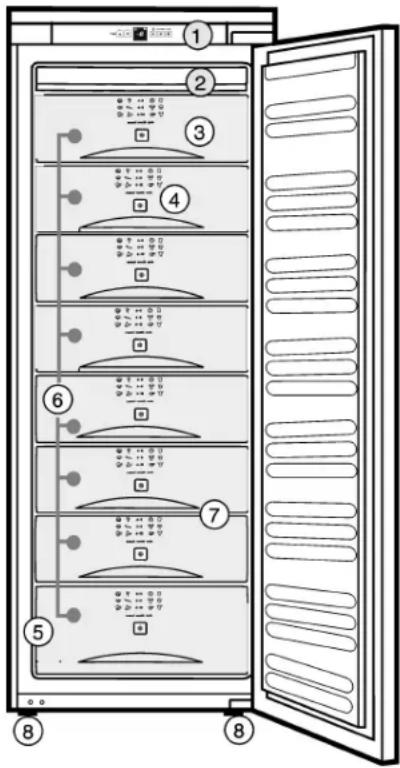
text_image
Diagram of a refrigerator with numbered compartments and labeled status indicators for each panel.(1) Operating and control elements
(2) NoFrost (6) Drawers
(3) Cold storage accumulator
(4) Information system (8) Height-adjustable feet
(5) Type plate
(7) VarioSpace
1.2 Range of appliance use
The appliance is suitable solely for cooling food in a domestic environment or similar. This includes use in, for example
- in staff kitchenettes, bed and breakfast establishments,
- by guests in country homes, hotels, motels and other forms of accommodation,
- in catering and similar services in the wholesale trade
Use the appliance solely as is customary within a domestic environment. All other types of use are inadmissible. The appliance is not suitable for storing and cooling medicines, blood plasma, laboratory preparations or similar substances and products covered by the 2007/47/EC Medical Devices Directive. Misuse of the appliance can result in the stored products suffering harm or perishing. Furthermore, the appliance is not suitable for operation in potentially explosive atmospheres.
The appliance is set to operate within specific ambient temperature limits according to its climate rating. The correct climate rating for your appliance is indicated on the type plate.
Note
▶ Compliance with the ambient temperatures indicated is required, otherwise the cooling performance is reduced.
| Climate rating | for ambient temperatures |
| SN, N | up to 32 °C |
| ST | up to 38 °C |
| T | up to 43 °C |
The appliance will function properly in ambient temperatures of down to 5 °C.
1.3 Conformity
The refrigerant circuit has been tested for leaks. When installed, this appliance complies with the relevant safety provisions and EC directives 2006/95/EC and 2004/108/EC.
1.4 Saving energy
- Always ensure good ventilation. Do not cover ventilation openings or grille.
- Do not place appliance in areas of direct sunlight or next to a stove, heater or similar object.
- The energy consumption depends on the installation conditions, e.g. the ambient temperature (see 1.2).
- Keep the time the appliance is open to a minimum.
- The lower the temperature setting, the higher the power consumption.
- Store food logically. (see Appliance at a glance).
- Ensure that all food is well packed and covered for storage. This will prevent frost from forming.
- First cool warm food to room temperature before storing it.
2 General safety information
Danger for the user:
- This appliance is not designed for persons (including children) with physical, sensory or mental impairment or persons not having sufficient experience and knowledge, unless they are instructed in the use of the appliance and are initially supervised by a person responsible for their safety. Keep children under supervision to ensure they do not play with the appliance.
- In case of a fault, pull out the mains plug (not by pulling the connecting cable) or switch off the fuse.
- Have any repairs to or intervention in the appliance, and any change of the mains power cable, carried out by the customer service only or by other specialised personnel trained for the purpose.
- When disconnecting the appliance from the supply, always take hold of the plug. Do not pull the cable.
- Install and connect the appliance only as instructed.
- Please keep these instructions in a safe place and pass them on to any subsequent owners.
Fire hazard:
- The refrigerant R 600a is environmentally friendly but flammable. Escaping refrigerant may ignite.
- Do not damage the refrigerant circuit pipes.
- Do not allow naked flames or ignition sources to enter the appliance.
- Do not use any electrical appliances in the interior (e.g. steam cleaners, heaters, ice cream maker etc.).
- If refrigerant escapes: eliminate naked flames or sources of ignition from the vicinity. Pull out the power plug. Ventilate the area well. Notify customer service.
- Do not store explosives or sprays using combustible propellants such as butane, propane, pentane, etc. in the appliance. Respective spray cans can be identified by reference to the contents printed on the can or by a flame symbol. Gases possibly escaping may ignite due to electrical components.
- Only store high-percentage alcohol in tightly sealed, upright containers. Alcohol possibly escaping may ignite due to electrical components.
Danger of tipping and falling:
- Do not misuse the plinth, drawers, doors etc. as a step or for support. This applies particularly to children.
- Use the appliance only in the built-in state.
Danger of food poisoning:
- Do not consume food which has been stored too long.
Danger of frostbite, numbness and pain:
- Avoid lasting skin contact with cold surfaces or refrigerated/frozen food or take protective steps, e.g. wear gloves. Do not consume ice cream, water ice or ice cubes immediately and do not consume them too cold.
Please observe the specific information in the other sections:
 | DANGER identifies a situation involving direct danger which, if not obviated, may result in death or severe bodily injury. | |
 | WARNING identifies a dangerous situation which, if not obviated, may result in death or severe bodily injury. | |
 | CAUTION identifies a dangerous situation which, if not obviated, may result in minor or medium bodily injury. | |
| NOTICE identifies a dangerous situation which, if not obviated, may result in damage to property. | ||
| Note identifies useful information and tips. | ||
3 Controls and displays
3.1 Operating and control elements
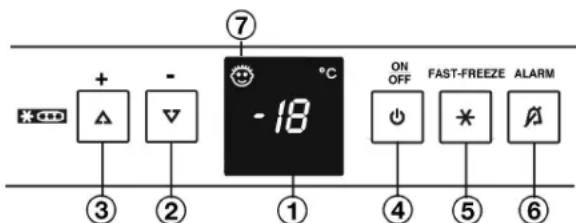
text_image
+ - 7 -18 °C ON OFF FAST-FREEZE ALARM ③ ② ① ④ ⑤ ⑥Fig. 2
(1) Temperature display (5) FastFreeze button
(2) “-” setting button (6) Alarm button
(3) “+” setting button (7) Child lock symbol
(4) On/Off button
3.2 Temperature display
The following are displayed in normal operation:
- the warmest freezing temperature
The temperature display flashes:
- the temperature setting is being changed
- after switch-on the temperature is not yet cold enough
- the temperature has risen several degrees
Dashes flash in the display:
- the freezer temperature is above 0 °C.
The following displays indicate malfunction. Possible causes and corrective action (see Malfunction).
- nA
- F0 to F5
4 Putting into operation
4.1 Transporting the appliance

CAUTION
Risk of injury and danger of damage as a result of incorrect transport!
▶ Transport the appliance in a packed condition.
▶ Transport the appliance upright.
▶ Do not transport the appliance without assistance.
4.2 Installing the appliance
In the event that the appliance is damaged, contact the supplier immediately before connecting to the mains.
The floor at the site must be flat and level.
Do not install the appliance in a location where it is exposed to direct radiation of the sun, next to a cooker, heater and similar.
Do not install the appliance without assistance.
Standard EN 378 specifies that the room in which you install your appliance must have a volume of 1 m ^2 per 8 g of R 600a refrigerant used in the appliance. If the room in which the appliance is installed is too small, a flammable gas-air mixture may form in the event of a leakage in the refrigeration circuit. The quantity of refrigerant used in your appliance is indicated on the type plate on the inside of the appliance.
Fit the appliance in stable kitchen units only.
The following ventilation gaps must be observed:
☐ The depth of the ventilation channel at the rear of the unit must be at least 38 mm.
☐ There must be a ventilation space of at least 200 cm ^2 in the plinth and at the top of the unit.
□ Basically the principle applies: the larger the ventilation space, the more energy-saving the appliance is in operation.

WARNING
Fire hazard due to dampness!
If live parts or the mains lead become damp this may cause short circuits.
The appliance is designed for use in enclosed areas. Do not operate the appliance outdoors or in areas where it is exposed to splash water or damp conditions.

WARNING
Fire hazard due to refrigerant!
The refrigerant R 600a is environmentally friendly but flammable. Escaping refrigerant may ignite.
▶ Do not damage the piping of the refrigeration circuit.

WARNING
Fire hazard and danger of damage!
▶ Do not place appliances emitting heat e.g. microwaves, toasters etc. on the appliance!
▶ Detach the connecting cable from the rear of the appliance, removing the cable holder at the same time because otherwise there will be vibratory noise!
After installation:
▶ Remove all transit supports.
▶ Unscrew the red transport lock. Close the vacated retaining hole using the stopper (60).
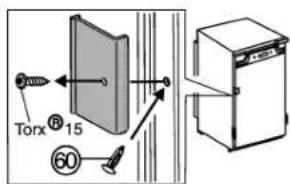
text_image
Torx® 15 60▶ Dispose of packaging material (see 4.3).
Note
▶ Clean the appliance (see 6.2).
If the appliance is installed in a very damp environment, condensate may form on the outside of the appliance.
▶ Always see to good ventilation at the installation site.
4.3 Disposing of packaging

WARNING
Danger of suffocation due to packing material and plastic film! ▶ Do not allow children to play with packing material.
The packaging is made of recyclable materials:
- corrugated board/cardboard
- expanded polystyrene parts
- polythene bags and sheets
- polypropylene straps
- nailed wooden frame with polyethylene panel*
▶ Take the packaging material to an official collecting point.

4.4 Connecting the appliance
NOTICE
Risk of damage to the electronic control system!
▶ Do not use stand-alone inverters (conversion of d.c. to a.c./three-phase) or energy saving plugs.

WARNING
Fire and overheating hazard!
▶ Do not use extension cables or multiple socket outlets.
The type of current (alternating current) and voltage at the installation site have to conform with the data on the type plate (see Appliance at a glance).
Connect the appliance only with a properly installed socket outlet with earthing contact. The socket outlet must be fused with 10 A or higher.

It must be easily accessible so that the appliance can be quickly disconnected from the supply in an emergency. It must be outside the area of the rear of the appliance.
▶ Check the electrical connection.
▶ Plug in the power plug.
4.5 Switching on the appliance
Put the appliance into operation about 2 hours before first loading food to be frozen.
Do not load food to be frozen before the temperature display reads -18 °C.
▶ Press On/Off button Fig. 2 (4).
The temperature display flashes until the temperature is sufficiently cold. If the temperature is above 0 °C, dashes flash. If it is below, the set temperature flashes.
5 Control
5.1 Brightness of the temperature display
You can adjust the brightness of the temperature display to the light conditions of the room in which the appliance is installed.
5.1.1 Adjusting the brightness
The brightness can be adjusted between h1 (minimum luminance) and h5 (maximum luminance).
▶ To activate the setting mode: Press the Fast Freeze button Fig. 2 (5) for about 5 seconds.
The Fast Freeze button flashes. The display indicates c.
▶ Using the "+" setting button Fig. 2 (3) and "-" setting button Fig. 2 (2), select h
▶ To confirm: Briefly press the Fast Freeze button Fig. 2 (5).
▶ To make the display brighter: Press the "+" setting button Fig. 2 (3).
▶ To make the display darker: Press the "-" setting button Fig. 2 (2).
▶ To confirm: Press the Fast Freeze button Fig. 2 (5).
The brightness is adjusted to the new value.
▶ To deactivate the setting mode: Press the On/Off button Fig. 2 (4).
-or-
▶ Wait for 5 minutes.
The temperature is indicated again in the temperature display.
5.2 Child proofing
The child-proofing function enables you to make sure that the appliance is not inadvertently switched off by playing children.
5.2.1 Setting the child lock
▶ To activate the setting mode: Press the Fast Freeze button Fig. 2 (5) for about 5 seconds.
The Fast Freeze button flashes. The display indicates c.
▶ To confirm, briefly press the Fast Freeze button Fig. 2 (5).
▶ To switch on: Using the "+" setting button Fig. 2 (3) or "-" setting button Fig. 2 (2), select c1.
▶ To switch off: Using the "+" setting button Fig. 2 (3) or "-" setting button Fig. 2 (2), select c0.
▶ To confirm: Press the Fast Freeze button Fig. 2 (5).
▷ When the child lock symbol Fig. 2 (7) shines, the child lock is activated.
▶ To deactivate the setting mode: Press On/Off button Fig. 2 (4).
-or-
▶ Wait for 5 minutes.
The temperature is indicated again in the temperature display.
5.3 Door alarm
If the door is open longer then 60 s, the audible alarm sounds. The audible alarm is automatically silenced when the door is closed.
5.3.1 Muting the door alarm
The audible alarm can be muted when the door is open. The sound switch-off function is active as long as the door is left open.
▶ Press alarm button Fig. 2 (6).
▷ The door alarm is silenced.
5.4 Temperature alarm
The audible alarm sounds if the freezer temperature is not cold enough.
The temperature display flashes at the same time.
The cause of the temperature being too high may be:
- warm fresh food was placed inside
- too much warm ambient air flowed in when rearranging and removing food
- power failure for some time
- the appliance is faulty
The audible alarm is automatically silenced and the temperature display stops flashing when the temperature is sufficiently cold again.
Note
Food may be spoilt if the temperature is not cold enough.
▶ Check the quality of the food. Do not consume spoiled food.
5.4.1 Muting the temperature alarm
The audible alarm can be muted. When the temperature is sufficiently cold again, the alarm function is active again.
▶ Press alarm button Fig. 2 (6).
▷ The audible alarm is silenced.
5.5 Freezing food
The rating plate indicates the maximum quantity of fresh food you can freeze within 24 hours (see Appliance at a glance) under "Freezing capacity ... kg/24h".
The maximum load for the top drawer is 5 kg and for the other drawers 25 kg each.
The shelves can each be loaded with 35 kg of frozen food.
A vacuum is generated after the door is closed. After closing the door, wait for about 1 minute and then it opens more easily.

CAUTION
Risk of injury due to broken glass!
Bottles and cans containing drinks may burst when being frozen. This applies particularly to sparkling drinks.
▶ Do not freeze bottles and cans containing drinks!
In order that the food is rapidly frozen through to the core, do not exceed the following quantities per pack:
- Fruit, vegetables up to 1 kg
- Meat up to 2.5 kg
Pack the food in portions in freezer bags, reusable plastic, metal or aluminium containers.
5.6 Thawing food
- at room temperature
- in a microwave oven
- in a conventional or fan oven
▶ Food once thawed should be re-frozen only in exceptional cases.
5.7 Setting the temperature
The appliance is pre-set for normal operation.
The temperature can be set between -14 °C and -28 °C, the recommended temperature is -18 °C.
▶ To set the temperature higher: press "+" button Fig. 2 (3).
▶ To set the temperature lower: press “-” button Fig. 2 (2).
▷ When the button is pressed the first time, the previous value is indicated in the temperature display.
▶ To change the temperature in 1 °C steps: briefly press the button.
-or-
▶ To change the temperature continuously: hold down the button.
The value is displayed flashing during the setting operation.
The actual temperature is displayed about 5 s after the last press of a button. The temperature slowly adjusts to the new value.
5.8 Fast-Freeze
With this function you can freeze fresh food quickly through to the core. The appliance operates with maximum refrigeration. The noise of the refrigeration unit may be temporarily louder as a result.
The maximum amount of fresh food which can be frozen in 24 h is indicated on the type plate under "freezing capacity ... kg/24h". This amount varies according to the model and climate rating.
You have to activate FastFreeze in good time, depending on how much fresh food is to be frozen: about 6 hours before placing the food inside in case of small amounts and about 24 hours in advance in case of the maximum amount of food to be frozen.
You do not have to activate Fast-Freeze in the following cases:
- when placing frozen food in the freezer
- when freezing up to approx. 2 kg fresh food daily
5.8.1 Freezing with Fast-Freeze
▶ Briefly press the Fast-Freeze button Fig. 2 (5) once.
The Fast-Freeze button Fig. 2 (5) shines.
The freezer temperature drops, the appliance operates with maximum refrigerating performance.
For a small amount of food:
▶ wait about 6 h.
▶ Place the fresh food in the top drawers. For the maximum amount of food:
▶ wait about 24 h.
▶ Place wrapped food straight on the shelves and, once frozen, put it into the drawers.
Fast-Freeze is automatically deactivated. Depending on the quantity placed inside, after 30 h at the earliest, 65 h at the latest.
▷ Freezing is concluded.
The Fast-Freeze button Fig. 2 (5) is dark.
The appliance continues to operate in the energy-saving, normal mode.
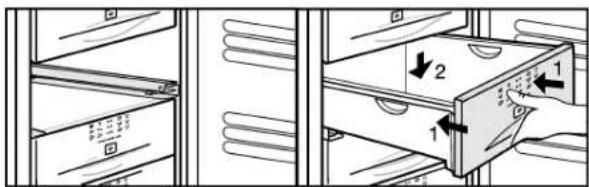
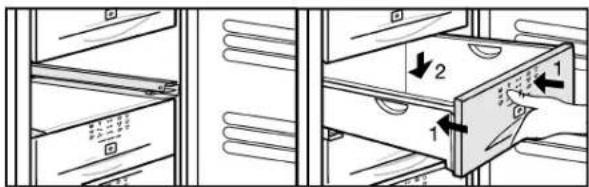
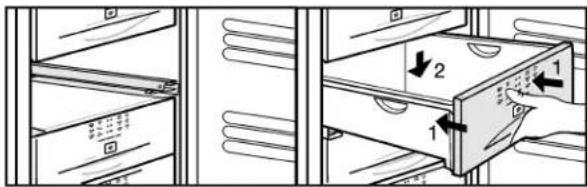
5.9 Drawers
Note
The energy consumption increases and the cooling performance decreases if there is insufficient ventilation.
For appliances with NoFrost:
Leave the bottom drawer in the appliance!
▶ Always keep the air slits of the fan free at the rear wall!
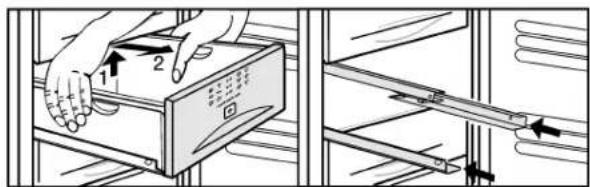
text_image
Diagram showing hand positioning of a device with numbered arrows indicating movement or assembly stepsFig. 3
text_image
Diagram showing file transfer or storage operation with labeled arrows and numbered compartmentsFig. 4
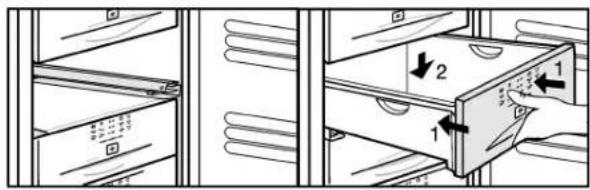
▶ To store frozen food directly on the shelves: raise the drawer at the back and pull it out forwards.
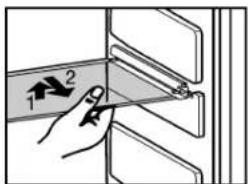
5.10 Shelves
▶ To remove the shelf: lift up at the front and pull out.
▶ To put the shelf back: simply push in as far as it will go.
text_image
Diagram showing a hand holding a labeled object with arrows indicating direction, likely illustrating a mechanical or electrical component.5.11 VarioSpace
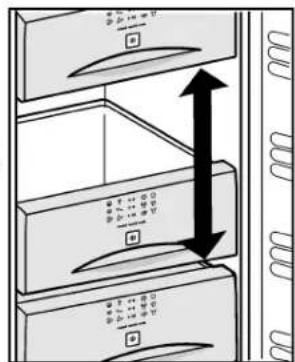
Apart from being able to remove the drawers, you can also remove the shelves, creating space for large items of frozen food. Poultry, meat, large pieces of game and high bakery products can be frozen in one piece and prepared.
text_image
Diagram showing server rack with labeled ports and directional arrows indicating movement or flowThe maximum load for the top drawer is 5 kg and for the other drawers 25 kg each.
The shelves can each be loaded with 35 kg of frozen food.
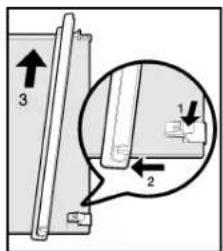
5.12 Pull-out rails
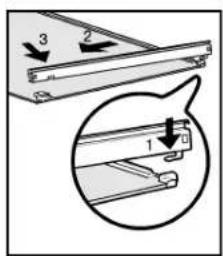
▶ To remove the pull-out rail: press down the front snap-fit devices and push the pull-out rail away, sideways and backwards.
text_image
Diagram showing a mechanical assembly with labeled parts and directional arrows, including numbered annotations 1 and 2.▶ To fit the pull-out rail: engage at the back and snap into place at the front.
text_image
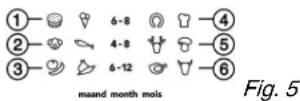
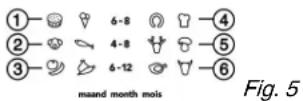
Technical diagram showing a mechanical assembly with numbered components and directional arrows indicating motion or assembly.5.13 Information system
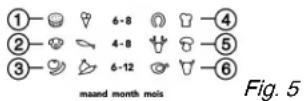
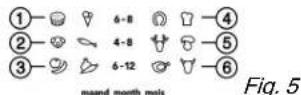
(1) Ready-made meals, ice cream (4) Sausages, bread
(2) Pork, fish (5) Game, mushrooms
(3) Fruit, vegetables (6) Poultry, beef/veal
The figures indicate the storage time in months for several types of frozen food in each case. Storage times given are guide times.
5.14 Cold storage accumulators
The cold storage accumulators prevent the temperature from rising too fast in the event of power failure.
5.14.1 Using cold storage accumulators
▶ Place the cold storage accumulators in the top freezer compartment to save space.
▶ Place the frozen cold storage accumulators on the frozen food in the upper front area of the freezer compartment.

text_image
W100 W110 W120 W130 W140 W150 W160 W170 W180 W190 W200 W210 W220 W230 W240 W250 W260 W270 W280 W290 W3006 Maintenance
6.1 Defrosting with NoFrost
The NoFrost system automatically defrosts the appliance.
The moisture condenses on the evaporator, is periodically defrosted and evaporates.
The appliance does not have to be manually defrosted.
6.2 Cleaning the appliance
Before cleaning:

CAUTION
Risk of injury and damage as a result of hot steam! Hot steam may damage the surfaces and cause burns.
▶ Do not use any steam cleaners!
NOTICE
Incorrect cleaning damages the appliance!
▶ Do not use cleaning agents in concentrated form.
▶ Do not use any scouring or abrasive sponges or steel wool.
▶ Do not use any cleaning agents containing sand, chloride, chemicals or acid.
▶ Do not use chemical solvents.
▶ Do not damage or remove the type plate on the inside of the appliance. It is important for the customer service.
▶ Do not pull off, bend or damage cables or other components.
▶ Do not allow any cleaning water to enter the drain channel, ventilation grille or electrical parts.
▶ Empty the appliance.
▶ Pull out the plug.
- Use soft cleaning cloths and a multi-purpose cleaning agent with neutral pH value.
- Only use food compatible cleaning and care agents on the inside of the appliance.
Interior:
Cleaning inner and outer plastic surfaces:
▶ Clean surfaces by hand with lukewarm water and a little washing-up liquid.
Items of equipment:
▶ Clean items of equipment by hand with lukewarm water and a little washing-up liquid.
After cleaning:
▶ Wipe dry the appliance and items of equipment.
▶ Connect the appliance and switch it on again. When the temperature is sufficiently cold:
▶ Put the food back inside.
6.3 Customer service
First check whether you can correct the fault yourself by reference to the list (see Malfunction). If this is not the case, please contact the customer service whose address is given in the enclosed customer service list.

WARNING
Risk of injury if repair work is not carried out professionally!
▶ Have any repairs and action - not expressly specified - on the appliance and mains cable carried out by service personnel only. (see Maintenance)
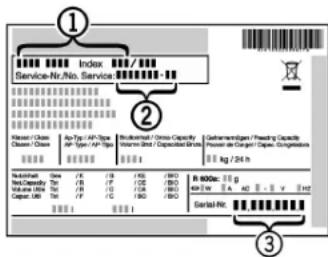
▶ Read the appliance designation Fig. 6 (1), service No. Fig. 6 (2) and serial No. Fig. 6 (3) off the type plate located inside the appliance on the left-hand side.
text_image
Index Service-Nr./No. Service Kleiner / Class Class / Class An Type / AP Type AP Type / AP Type Buckload - Opium Capacity Volumen Unit / Capacitividades Geherrungen/ Framing Capacity Prozess der Gasier Capex, Gasgassions kg / 24 L Nordnet Name / K 1/8 / 100 / 300 1/100 / 300 Volume / Mio. / Kg 1/12 / 100 / 300 Capex / Mio. / Kg 1/16 / 100 / 300 R 6000x: 1 kg Mio. / Kg A. A. A. B. V 400 Gerbalt Nr.Fig. 6
▶ Notify the customer service, specifying the fault, appliance designation Fig. 6 (1), service No. Fig. 6 (2) and serial No. Fig. 6 (3).
This will help us to provide you with a faster and more accurate service.
▶ Keep the appliance closed until the customer service arrives.
▷ The food will stay cool longer.
▶ Pull out the mains plug (not by pulling the connecting cable) or switch off the fuse.
7 Malfunction
Your appliance is designed and manufactured for a long life span and reliable operation. If a malfunction nonetheless occurs during operation, check whether it is due to a handling error. In this case you will have to be charged for the costs incurred, even during the warranty period. You may be able to rectify the following faults yourself:
Appliance does not work.
→ The appliance is not switched on.
▶ Switch on the appliance.
→ The power plug is not properly inserted in the wall socket.
▶ Check power plug.
→ The fuse of the wall socket is not in order.
▶ Check fuse.
The compressor runs for a long time.
→ The compressor switches to a low speed when little cold is needed. Although the running time is increased as a result, energy is saved.
▶ This is normal in energy-saving models.
→ Fast-Freeze is activated.
The compressor runs for longer in order to rapidly cool the food. This is normal.
The inverter regularly flashes every 15 seconds\*.
→ The inverter is equipped with a diagnostic LED.
▶ The flashing is normal.
Excessive noise.
→ Speed-controlled* compressors may produce varying running noise due to different speed steps.
▶ The sound is normal.
A bubbling and gurgling noise.
→ This noise comes from the refrigerant flowing in the refrigeration circuit.
▶ The sound is normal.
A quiet clicking noise.
→ The noise is produced whenever the refrigeration unit (motor) automatically switches on or off.
▶ The sound is normal.
A hum. It is briefly a little louder when the refrigeration unit (the motor) switches on.
→ The refrigeration increases automatically when Fast-Freeze is activated, fresh food has just been placed in the appliance or the door has been left open for a while.
▶ The sound is normal.
→ The ambient temperature is too high.
▶ Solution: (see 1.2)
A low hum.
→ The sound is produced by air flow noise of the fan.
▶ The sound is normal.
The temperature display indicates: F0 to F5.
→ There is a fault.
▶ Contact the customer service (see Maintenance).
The temperature display indicates: nA
→ The freezer temperature rose too high over the last hours or days due to a power failure or power interruption. When the power interruption is over, the appliance will continue to operate in the last temperature setting.
▶ Press alarm button Fig. 2 (6)
The warmest temperature reached during the power failure will appear in the temperature display for about 60 s. After that, the actual temperature in the freezer will re-appear.
▶ To prematurely cancel the display of the warmest temperature: press alarm button Fig. 2 (6).
▶ Check the quality of the food. Do not consume spoiled food. Do not re-freeze thawed food.
The temperature is not cold enough.
→ The door of the appliance is not properly closed.
▶ Close the door of the appliance.
→ Insufficient ventilation.
▶ Clear ventilation grilles.
→ The ambient temperature is too high.
▶ Solution: (see 1.2).
→ The appliance was opened too frequently or for too long.
▶ Wait until the appliance reaches the required temperature itself. If not, contact the customer service. (see Maintenance).
→ Too much fresh food was placed inside without Fast-Freeze.
▶ Solution: (see 5.8)
→ The temperature is incorrectly set.
▶ Set to a colder temperature and check after 24 h.
→ The appliance is too close to a heat source.
▶ Solution: (see Putting into operation).
→ The appliance was not inserted properly into the recess.
▶ Check whether the appliance was inserted correctly and the door closes properly.
8 Decommissioning
8.1 Switching off the appliance
▶ Press On/Off button Fig. 2 (4) for about 2 s.
The temperature display is dark.
8.2 Taking the appliance out of service
▶ Empty the appliance.
▶ Pull out the power plug.
▶ Clean the appliance (see 6.2).
▶ Leave the door open to prevent odour.

9 Disposing of the appliance
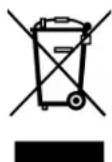
The appliance contains some reusable materials and should be disposed of properly - not simply with unsorted household refuse. Appliances which are no longer needed must be disposed of in a professional and appropriate way, in accordance with the current local regulations and laws.
When disposing of the appliance, ensure that the refrigeration circuit is not damaged to prevent uncontrolled escape of the refrigerant it contains (data on type plate) and oil.
▶ Disable the appliance.
▶ Pull out the plug.
▶ Cut through the connecting cable.
Sommaire
text_image
Diagram of a refrigerator with numbered compartments and labeled storage areas, showing front and back views.Fig. 1
text_image
Diagram showing hand positioning of a device with numbered arrows indicating movement or assembly stepsFig. 3
text_image
Diagram showing file transfer or storage mechanism with labeled components and directional arrowsFig. 4
text_image
Diagram showing a hand holding a tool interacting with a panel, labeled with arrows and numbers 1 and 2.5.11 VarioSpace
text_image
Diagram showing three stacked server racks with labeled buttons and directional arrows indicating data flow or movement.text_image
Technical diagram showing a mechanical assembly with labeled parts and directional arrows indicating motion or assembly.text_image
Technical diagram showing a mechanical assembly with numbered components and directional arrows indicating motion or assembly.5.13 Système info