
DISCO ROBO - Electronic toy LOGICOM - Free user manual and instructions
Find the device manual for free DISCO ROBO LOGICOM in PDF.



User questions about DISCO ROBO LOGICOM
0 question about this device. Answer the ones you know or ask your own.
Ask a new question about this device
Download the instructions for your Electronic toy in PDF format for free! Find your manual DISCO ROBO - LOGICOM and take your electronic device back in hand. On this page are published all the documents necessary for the use of your device. DISCO ROBO by LOGICOM.
USER MANUAL DISCO ROBO LOGICOM
natural_image
Stylized cartoon face with a smiling expression, wearing a helmet-like frame (no text or symbols)EN INSTRUCTION MANUAL
FR MANUEL D'UTILISATION
NL HANDLEIDING
IT INSTRUZIONI OPERATIVE
SAFETY AND GENERAL INFORMATION

- WARNING! Not suitable for children under 36 months. Small parts. Choking hazard.
- If small parts are ingested by a child, seek medical attention immediately.
-
This product is intended for children of 4 years and over (4+)
-
Please read this user guide carefully and follow the safety instructions when operating the device.
- Keep the device away from your face.
- The DISCOROBO must be used under parent supervision.
- The DISCOROBO is recommended for indoor use only.
- Do not use this device near water. Do not place any items containing liquid on top of the device.
- Do not install your device near a heat source such as radiators, heat registers, stoves or other equipment, including amplifiers, which produce heat.
- Never attempt to repair a damaged device yourself. You must consult a qualified repair technician
- Do not dispose of the device or batteries in fire. There is a serious risk of explosion and/or release of highly toxic chemicals. Please follow the recycling instructions mentioned in the "RECYCLING" chapter.
- Do not expose the device to extended periods of sunshine or low temperatures.
- Do not submerge the device in water and do not use in damp or wet locations.
- The volume of the audio source should not be at a level which could damage the user's hearing.
BATTERY SAFETY
In exceptional circumstances, batteries may leak and cause chemical burns or damage the product. To prevent the batteries leaking, please follow the recommendations below:
- Non-rechargeable batteries should not be recharged.
- Rechargeable batteries should be removed from the product before being recharged.
- Do not mix alkaline, standard (zinc-carbon) or rechargeable (nickel-cadmium) batteries.
- Do not mix new and used batteries.
- Only batteries of the same or equivalent type should be used.
- The batteries should be inserted observing the correct polarity.
- Used batteries should be removed from the product.
- The power terminals should not be short circuited.
- Do not leave batteries where a child or pet can play with them or swallow them. If ingested, seek medical attention immediately.
- Do not dispose of batteries in a fire or bin. Ask your local dealer for special measures concerning recycling.
- Do not open the batteries, the contained electrolyte is corrosive and may burn hands, skins and eyes, and is toxic if swallowed.
INSERTING THE BATTERIES INTO THE DISCOROBO
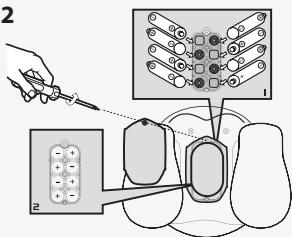
DISCOROBO requires 8 AA batteries (not supplied)
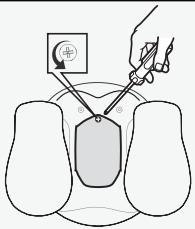
The battery compartment is located on the underside of the DISCOROBO.
To insert the batteries into the robot, use a crosshead screwdriver (not supplied with the DISCOROBO)
1
text_image
Diagram illustrating a medical or surgical procedure with labeled components and a magnified view of the device.To insert the batteries into the robot, use a crosshead screwdriver (not supplied with the DISCOROBO)
2
text_image
Diagram illustrating a medical procedure with labeled steps and corresponding illustrations of surgical instruments and devices.Insert the 8 AA batteries observing the markings as indicated on the diagram above
3
natural_image
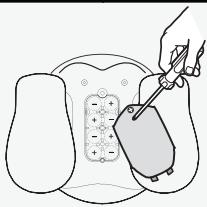
Illustration of a hand using a tool to interact with a device on a device panel (no text or symbols visible)Tighten the cover screws in a clockwise direction to close the battery compartment.
text_image
I dance to your music TASY DiscoRobo's facial expressions convey its emotions OFF ON Press the ON/OFF button to switch on or turn off your DiscoRobo Battery compartmentDISCOROBO is easy to use.
To switch it on:
- Place the DISCOROBO near an audio source
- Press the ON/OFF button
- Start the music on your audio source. The robot dances to the rhythm of the music
To switch it off:
- Turn the music off on your audio source. The robot stops dancing.
- Press the ON/OFF button
IMPORTANT NOTES
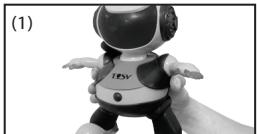
- Always hold the DISCOROBO by its stomach. (1)
- For best performance, always place the robot on a large, flat, smooth surface away from any edges.
- To return the robot to its initial position, hold down the ON/OFF button for around 2 seconds when turning off the robot. (2)
- For best performance, place the DISCOROBO close to the sound source. (3)
- Place the sound source behind the DISCOROBO for better sound detection. (3)
- Loud ambient noises such as a door slamming or people shouting may affect the DISCOROBO and prevent it following the rhythm of the music. (4)
- Using the DISCOROBO with poor quality sound sources, such as smartphone, tablet or laptop speakers, is not recommended. The DISCOROBO may not react to the music due to insufficient bass volumes.
natural_image
Black and white photo of a humanoid robot with a headlamp and 'TESV' label, no visible text or symbols on the robot itself.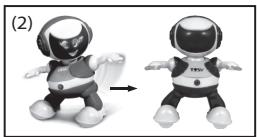
natural_image
Two cartoon robot figures in different poses, one standing and one in a dynamic pose (no text or symbols)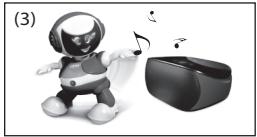
natural_image
Illustration of a robot playing with musical notes next to a VR headset (no text or symbols)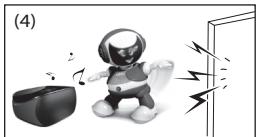
natural_image
Illustration of a robot interacting with a device and sound waves near a doorway (no text or symbols)- Change the DISCOROBO's batteries when you notice one of the following: if its face flashes continuously, if the robot's movements are slower than usual or if its movements do not follow the rhythm of the music.
SMARTPHONE APPLICATION
You can interact with your DISCOROBO using the DiscoRobo application available on Google Play, Apple Store and Lstore.
This application allows you to control the movements of your DISCOROBO with your smartphone.
Invent sequences of movement which your DISCOROBO can automatically replicate.
To download the application, visit the Android store (Google Play, Lstore) or iOS store (Apple Store) and search for "DiscoRobo".
For more information on the various functions, go directly to the DiscoRobo application and read the start-up tutorial.
FAQ
| Why is the DISCOROBO not dancing? | - Check that the batteries inserted into the DiscoRobo are not flat- Check that the battery compartment is properly closed- Check that the volume of the sound source is not too low- Move the DiscoRobo closer to the sound source |
| Why are the robot's facial expressions not changing? | - Check that the batteries inserted into the DISCOROBO are not flat- Check that the battery compartment is properly closed |
CLEANING
Clean the DiscoRobo with a slightly damp cloth or anti-static wipe.
Note: Never use cleaning products. They may damage the device. Never use a dry cloth. This may cause a build up of static.
DECLARATION OF CONFORMITY
CE
We, importer of the TOSY brand, LOGICOM SA, 55 rue de Lisbonne, 75008 PARIS, France, hereby declare that the DISCOROBO dancing robot conforms to the applicable essential requirements, particularly those of Directives 2009/48/EC on the safety of toys, 2004/108/EC on electromagnetic compatibility and 2011/65/EC on the restriction of the use of certain hazardous substances in electrical and electronic equipment, in application of the following European standards:
EN 71-1:2011 "Safety of toys – Part 1: mechanical and physical properties"
EN 71-2:2011 "Safety of toys – Part 2: flammability"
EN 71-3:2013 "Safety of toys – Part 3: migration of certain elements"
EN 62115:2005/A11:2012/AC:2013 "Electric toys – Safety"
EN 55022:2010/AC:2011 Class B
EN 55014-1:2006/A2:2011
EN 55024:2010
EN 55014-2:1997/A2:2008
This conformity applies as long as the product for which it is awarded is used according to the instructions provided in the user guide. Any unauthorised modification of the product voids this declaration of conformity.
Paris, 28 August 2013
Bernard Bessis

natural_image
Simple line drawing of a hand holding a pen, no text or symbols present
The symbol shown here and on the product means that the product is classed as Electrical or Electronic Equipment and should not be disposed with other household or commercial waste at the end of its working life.
The Waste Electrical and Electronic Equipment (WEEE) Directive (2012/19/EC) has been put in place to recycle products using best available recovery and recycling techniques to minimise the impact on the environment, treat any hazardous substances and avoid the increasing landfill.
Product disposal instructions for residential users: If you no longer use the device, remove and dispose of the batteries, as well as the device, in compliance with the local recycling procedures. For more information please contact your local authority or the retailer where the product was purchased.
Product disposal instructions for business users: Business users should contact their suppliers and check the terms and conditions of the purchase contract and ensure that this product is not mixed with other commercial waste for disposal.
WARRANTY AND AFTER-SALES SERVICE
SCOPE OF WARRANTY
The LOGICOM provider warranty is valid for normal use of the device, as described as part of the instructions.
This warranty excludes damage caused by external circumstances.
Specifically, the warranty does not apply if the device is damaged as a result of a bump or drop, an operating error, a connection that does not comply with these instructions, or i inadequate protection against heat, humidity, or freezing temperatures.
The legal warranty for hidden defects applies in compliance of your local regulation
Manufactured by:

© 2011 TOSY Robotics JSC. All rights reserved.
No.7, Lane 538, Lang Road, Hanoi, Vietnam
Tel: +84.4.62753387 - Fax: +84.4.37764077
Email: info@tosy.com - Website: www.tosy.com
Imported by:
LOGICOM®
LOGICOM SA - 55 Rue de Lisbonne - 75008 PARIS FRANCE
Tel: +33 1 48 63 77 64 - Fax: +33 1 48 63 72 47
Email : contact@logicom-europe.com - www.logicom-europe.com
SECURITE ET INFORMATION GENERALES

text_image
Diagram illustrating a medical or surgical procedure with labeled components and a magnified view of the device.text_image
Diagram illustrating a medical procedure with labeled steps and corresponding illustrations of surgical instruments and devices.natural_image
Illustration of a hand using a screwdriver to adjust or install a device on a device panel (no text or symbols visible)natural_image
Black-and-white photo of a humanoid robot with a headlamp and 'TESV' branding, no visible text or symbols on the robot itself.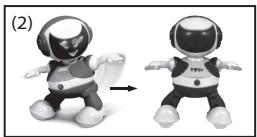
natural_image
Two cartoon robot figures in different poses, one with a helmet and the other with a 'TEN' shirt, shown side by side (no text or symbols on the figures themselves)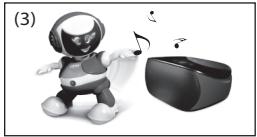
natural_image
Illustration of a robot playing with musical notes next to a VR headset (no text or symbols)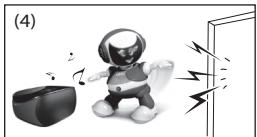
natural_image
Illustration of a cartoon robot interacting with a device and sound waves near a doorway (no text or symbols)APPLICATION SMARTPHONE
natural_image
Simple line drawing of a hand holding a pen, no text or symbols present
CHAMP D'APPLICATION DE LA GARANTIE
© 2011 TOSY Robotics JSC. All rights reserved.
No.7, Lane 538, Lang Road, Hanoi, Vietnam
Tel: +84.4.62753387 - Fax: +84.4.37764077
Email: info@tosy.com - Website: www.tosy.com
Importé par :
LOGICOM®
LOGICOM SA - 55 Rue de Lisbonne - 75008 PARIS FRANCE
Tel: +33 1 48 63 77 64 - Fax: +33 1 48 63 72 47
Email : contact@logicom-europe.com - www.logicom-europe.com
VEILIGHEID EN ALGEMENE INFORMATIE

text_image
Diagram illustrating a medical or surgical procedure with labeled components and a magnified view of the device.text_image
Diagram illustrating a medical procedure with labeled steps and corresponding images of tissue or organ structures.natural_image
Illustration of a hand using a tool to interact with a device on a device panel (no text or symbols visible)SMARTPHONE-APPLICATIE
natural_image
Simple line drawing of a hand holding a pen or stylus (no text or symbols)
© 2011 TOSY Robotics JSC. All rights reserved.
No.7, Lane 538, Lang Road, Hanoi, Vietnam
Tel: +84.4.62753387 - Fax: +84.4.37764077
Email: info@tosy.com - Website: www.tosy.com
Geïmporteerd door:
LOGICOM®
LOGICOM SA - 55 Rue de Lisbonne - 75008 PARIS FRANCE
Tel: +33 1 48 63 77 64 - Fax: +33 1 48 63 72 47
Email : contact@logicom-europe.com - www.logicom-europe.com
text_image
Diagram illustrating a medical or surgical procedure with labeled components and a magnified view of the device.text_image
Diagram illustrating a medical procedure with labeled components and a magnified view of tissue samples, likely for surgical or diagnostic purposes.natural_image
Illustration of a hand using a tool to interact with a device on a device panel (no text or symbols visible)natural_image
Black and white photo of a humanoid robot with a helmet and 'TESV' label, no visible text or symbols on the robot itself.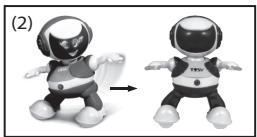
natural_image
Two cartoon robot figures in different poses, one with a helmet and the other with a 'TEN' shirt, shown side by side (no text or symbols on the figures themselves)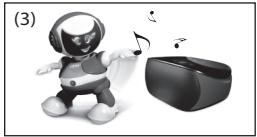
natural_image
Illustration of a robot playing with musical notes next to a VR headset (no text or symbols)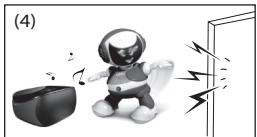
natural_image
Illustration of a robot interacting with a device and sound waves, next to a doorway (no text or symbols)APPLICAZIONE SMARTPHONE
natural_image
Simple line drawing of a hand holding a pen, no text or symbols present

© 2011 TOSY Robotics JSC. All rights reserved.
No.7, Lane 538, Lang Road, Hanoi, Vietnam
Tel: +84.4.62753387 - Fax: +84.4.37764077
Email: info@tosy.com - Website: www.tosy.com
Importato da:
LOGICOM®
LOGICOM SA - 55 Rue de Lisbonne - 75008 PARIS FRANCE
Tel: +33 1 48 63 77 64 - Fax: +33 1 48 63 72 47
Email : contact@logicom-europe.com - www.logicom-europe.com
text_image
Diagram illustrating a medical or surgical procedure with labeled components and a magnified view of the device.text_image
Diagram illustrating a medical procedure with labeled steps and corresponding illustrations of surgical instruments and devices.natural_image
Illustration of a hand using a tool to adjust or install a device on a device panel (no text or symbols visible)natural_image
Black and white photo of a humanoid robot with a helmet and 'TESV' label, no visible text or symbols on the robot itself.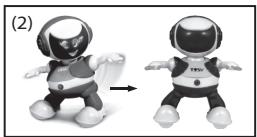
natural_image
Two cartoon robot figures in different poses, one with a helmet and the other with a 'TEN' shirt, shown side by side (no text or symbols on the figures themselves)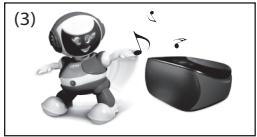
natural_image
Illustration of a robot playing with musical notes next to a VR headset (no text or symbols)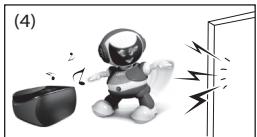
natural_image
Illustration of a robot interacting with a device and sound waves, next to a doorway (no text or symbols)© 2011 TOSY Robotics JSC. All rights reserved.
No.7, Lane 538, Lang Road, Hanoi, Vietnam
Tel: +84.4.62753387 - Fax: +84.4.37764077
Email: info@tosy.com - Website: www.tosy.com
Importiert von:
LOGICOM®
LOGICOM SA - 55 Rue de Lisbonne - 75008 PARIS FRANKREICH
Tel: +33 1 48 63 77 64 - Fax: +33 1 48 63 72 47
Email : contact@logicom-europe.com - www.logicom-europe.com