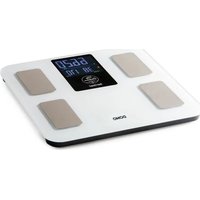
DO9305W - Scale DOMO - Free user manual and instructions
Find the device manual for free DO9305W DOMO in PDF.


| Product Type | Connected Bathroom Scale |
| Brand | DOMO |
| Model | DO9305W |
| Maximum Capacity | 180 kg |
| Power Supply | 3 AAA batteries (1.5 V) |
| Display | Digital Screen |
| Units of Measurement | kg / lb (selectable) |
| Connectivity | Bluetooth 4.0+ |
| Mobile App | MovingLife (iOS and Android) |
| Main Functions | Weight measurement, body composition analysis (BMI, fat, etc.) via the app |
| Electrodes | Yes (for body analysis) |
| Non-slip Feet | Yes |
| Material | Tempered glass / plastic |
| Dimensions (approx.) | 30 x 30 x 3 cm |
| Weight (approx.) | 1.5 kg |
| Cleaning | Slightly damp soft cloth |
| Maintenance | Keep electrodes clean, replace used batteries |
| Safety | Do not immerse, do not use with a pacemaker or medical implants |
| Storage Temperature | Dry place, away from moisture and sunlight |
| Warranty | 2 years |
| Spare Parts | Available on the DOMO webshop |
| Repairability | Repairs by the manufacturer or authorized service center |
| Package Contents | Scale, manual, batteries |
| Intended Use | Domestic and similar environments |
Frequently Asked Questions - DO9305W DOMO
User questions about DO9305W DOMO
0 question about this device. Answer the ones you know or ask your own.
Ask a new question about this device
Download the instructions for your Scale in PDF format for free! Find your manual DO9305W - DOMO and take your electronic device back in hand. On this page are published all the documents necessary for the use of your device. DO9305W by DOMO.
USER MANUAL DO9305W DOMO
natural_image
Plain gray rectangular surface with no visible text, symbols, or markings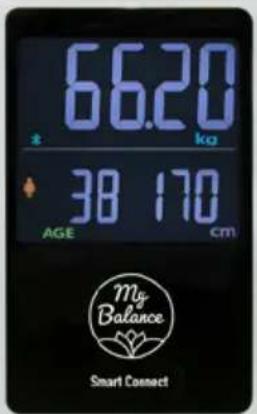
natural_image
Plain gray rectangular surface with no visible text, symbols, or markings
natural_image
Plain gray rectangular surface with no visible text, symbols, or markings
natural_image
Plain gray rectangular surface with rounded corners and no visible text, symbols, or markings.DOMO
EN Instruction booklet My Balance personal scale
ES Manual de instrucciones Báscula personal My Balance
Read all instructions carefully.
Save this instruction manual for future reference.
⚠PRODUCTSPECIFIEKE WAARSCHUWINGEN
natural_image
Simple line drawing of a digital balance scale with feet and legs, no text or symbols presentEENHEID WIJZIGEN
natural_image
Symbol of a trash bin crossed with no text or numbers, representing waste sorting or disposal (no text present)natural_image
Recycling symbol with three chasing arrows forming a triangle (no text or labels)⚠ AVERTISSEMENTS SPÉCIFIQUES AU PRODUIT
natural_image
Simple line drawing of a digital balance scale with feet and legs, no text or symbols presentCHANGER L'UNITÉ
natural_image
Symbol of a trash bin crossed out by two crossed lines, with a solid black rectangle below (no text or labels)natural_image
Simple line drawing of a digital balance scale with feet and legs, no text or symbols presentEINHEIT ÄNDERN
natural_image
Symbol of a trash bin crossed with no text or numbers, representing environmental protection (no text present)
RICHTLINIEN
Thank you very much for placing your trust in DOMO. We hope you enjoy your new purchase.
All our products undergo strict quality control before reaching you. If you still experience any problems with your device, we sincerely regret that. We have collected the most frequently asked questions about our devices on our webshop. Scan the QR code and have a look!
If you cannot find a solution to your problem there, do not hesitate to contact our customer service via info@linea2000.be. Our staff will do everything they can to assist you!
This device has a warranty period of 2 years from the date of purchase. During this warranty period, the distributor will assume responsibility for any defects that can be shown to be the result of material, construction or manufacturing errors. Such defects will be remedied by repair or replacement of the device. The 2-year warranty period will be suspended during the repair period and will continue after the repair has taken place for the remaining duration of the warranty period. The warranty will be honoured if proof of purchase clearly showing the date of purchase is provided. If your device becomes defective within the 2-year warranty period, please return it with your proof of purchase to the store you purchased it from or follow the procedure of the relevant webshop if you bought it online.
The warranty does not cover damage to the device, accessories or parts caused by:
• normal wear and tear from use;
• non-compliance with the instructions for use, maintenance and cleaning in the manual;
- incorrect connection, e.g. electrical voltage too high;
- incorrect, heavy-handed or abnormal use;
• repairs or alterations carried out by the consumer or unauthorised third parties;
- use of parts or accessories not recommended nor supplied by the distributor.
SAFETY INSTRUCTIONS
When using electrical appliances, basic safety precautions should always be taken, including the following. Any injury or damage caused by failure to comply with these rules are at your own risk. Neither the manufacturer, importer, or the supplier may be held liable.
- Read all instructions carefully.
- Make sure all packaging materials and promotional stickers have been removed before using the appliance for the first time. Make sure children cannot play with the packaging materials.
-
This appliance is only suitable for use in domestic and similar environments, such as:
-
staff kitchen areas in shops, offices and other working environments;
- farm houses;
- by clients in hotels, motels and other residential type environments;
• bed and breakfast type environments.
• Children should be supervised to ensure that they do not play with the appliance.
- This appliance can be used by children aged from 16 years and above and persons with reduced physical, sensory or mental capabilities or lack of experience and knowledge if they have been given supervision or instruction concerning use of the appliance in a safe way and understand the hazards involved.
• Children shall not play with the appliance.
- Cleaning and user maintenance shall not be made by children unless they are older than 16 or supervised.
- Keep the appliance and its cord out of reach of children younger than 16 years.
- All repairs should be carried out by the manufacturer or its aftersales service.
⚠️INSTALLATION
- Do not place near flammable materials, gases or explosives.
- Do not use or store this appliance outdoors.
• Always use the appliance on a steady, dry and level surface.
- Never place this appliance near a gas stove or electrical stove or in a place where it may come into contact with a warm appliance.
⚠ USE
- Do not use this appliance for other than intended use.
⚠️ CLEANING AND MAINTENANCE
- To protect against electrical shock or burns, do not immerse the appliance in water or other liquid.
- Failure to maintain this appliance in a clean condition could adversely affect the life of the appliance and possibly result in a hazardous situation.
⚠️PRODUCTSPECIFIC WARNINGS
- People with a pacemaker or other medical implants must not use this device.
- The use of this device is not recommended for growing children, pregnant women, dialysis patients or individuals with symptoms of fluid retention (oedema).
- The body composition data is intended for reference only. It must not be used for medical diagnoses or treatments and is not suitable for use in medical facilities.
SAVE THESE INSTRUCTIONS FOR FUTURE REFERENCE
All images and descriptions in this manual are purely indicative and may differ slightly from the actual device.
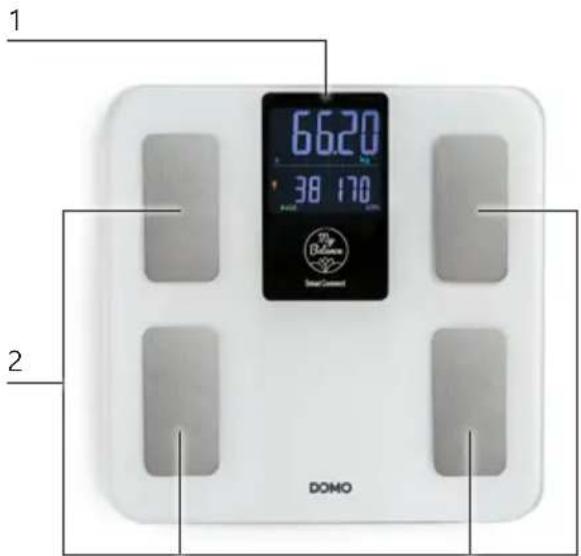
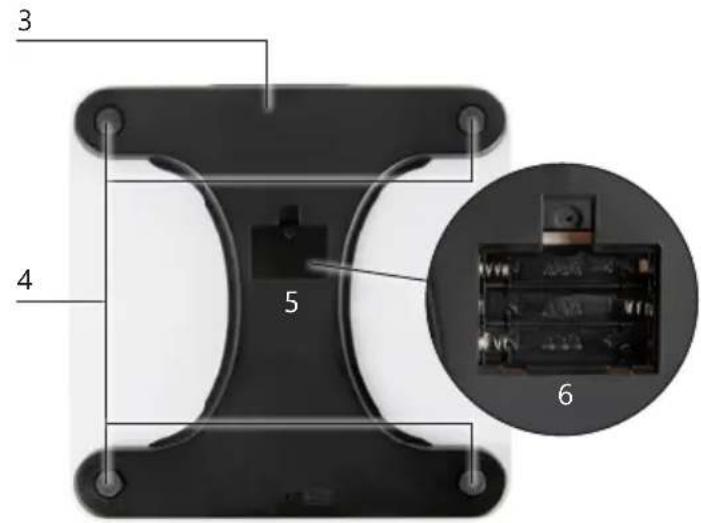
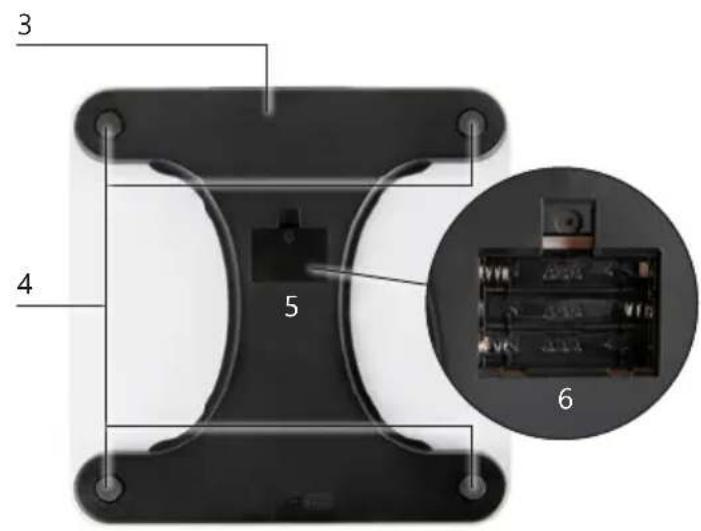
PARTS
- Display
- Electrodes
- Unit button
- Anti-slip feet
- Battery cover
- Battery compartment
Z
BEFORE THE FIRST USE
- Remove all packaging materials and any promotional stickers.
INSERTING BATTERIES
- Open the battery cover on the underside of the device.
- Insert the batteries into the compartment according to the indicated polarity (+ and -).
- Close the battery cover firmly so that it clicks into place.
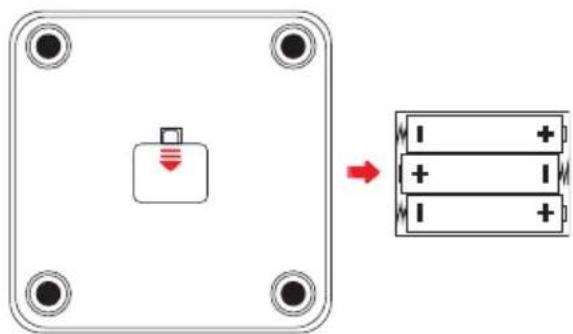
⚠️ Use only batteries of the correct type: 3× AAA.
⚠️ Replace all batteries at the same time and do not mix old and new batteries.
⚠️ Remove the batteries if the device will not be used for a long period to prevent leakage.
INSTALLING THE APP
This scale is designed to be used with the accompanying app "MovingLife". When you use the app, you gain access to advanced measurements such as body composition, BMI, body fat percentage and more. Without the app, the scale only measures your weight. For a complete overview of your health and progress, we recommend installing the app and pairing it with the scale.
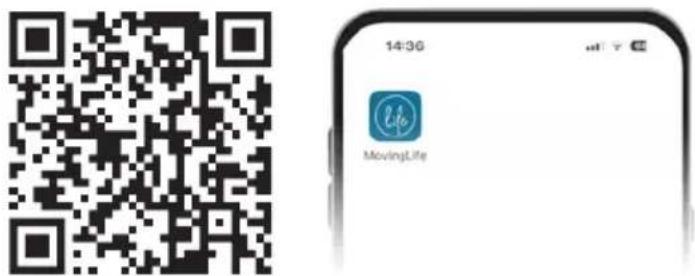
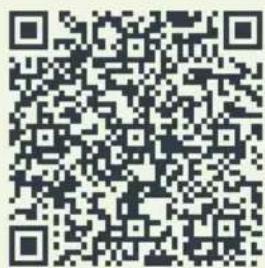
- Install the MovingLife app via the QR code below or download it from the App Store or Google Play.
-
Open the app and create an account.
-
Connect the scale to the app by following the instructions in the app.
⚠️ Before pairing, make sure Bluetooth is enabled on your smartphone and that the scale is switched on. Do this by gently tapping the device with your foot until the display lights up.
⚠️ To ensure accurate measurements, it is important to enter your personal details (gender, age and height) correctly.
natural_image
Simple line drawing of a digital balance scale with feet and a 0.0 mark (no text or symbols)CHANGING THE UNIT
On the underside of the scale there is a button to change the weight unit. Press the button to switch between kg and lb.
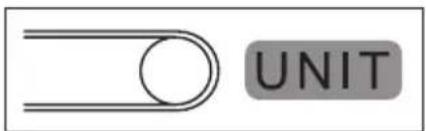
⚠️ Using the scale with the app? Then manage the measurement units via the app settings.
USE
- Open the MovingLife app and check that the correct user is selected.
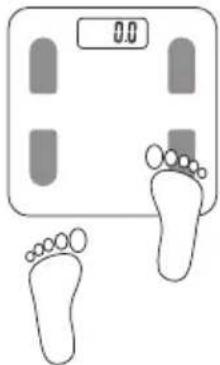
- Activate the scale by gently tapping it with your foot until the display lights up.
- Wait until your age and height appear on the display. The scale is now ready for measurement.
- Stand barefoot on the scale, making sure to touch the electrodes.
- Remain standing until the weight and measurement data are stable and flashing.
- The data is automatically sent to your smartphone.
- After transmission, the scale will display your weight and measurement data for a few seconds, then switch off automatically.
⚠️ Without an active connection to the app, only your weight will be measured. Open the app before measuring. Once your age and height appear on the display, the app is connected.
TIPS
• Measure at the same time of day for more accurate results.
- Do not use the scale in an environment with strong electromagnetic radiation or vibrations.
- Has the scale been unused for a long time? Tap first to reset the display to zero and let the device switch off automatically. Then tap again to weigh.
- Stand barefoot on the electrodes and remain firmly in the centre of the scale. Do not stand on the edge of the scale – this may cause falls.
- Avoid measurements immediately after intense exercise, overeating or dehydration: results will be less reliable.
• Measurements are less accurate for children under 18, adults over 70 and professional athletes. - Do not drop the scale and avoid shocks: it is a precision instrument.
CLEANING AND MAINTENANCE
- Clean the scale with a soft, slightly damp cloth.
- Keep the electrodes free from dust and dirt for accurate measurements.
- Store the device in a dry place, away from moisture and direct sunlight.
⚠️Do not immerse the appliance in water or other liquid.
⚠️ Never use aggressive or abrasive cleaning agents.
⚠️ Replace empty batteries in good time to prevent leakage and damage to the device.
PROBLEMS AND SOLUTIONS
| PROBLEMS SOLUTIONS | |
| The app does not receive measurement data from the scale. | Check that the Bluetooth icon is visible on the scale's display. Ensure Bluetooth is enabled on your smartphone and that the scale is within range. Switch Bluetooth off and on again and reconnect to the scale.Restart the app.Replace the batteries if they are nearly empty. |
| Cannot connect to the scale. • Make sure only one smartphone is connected to the scale at a time.Check that your device supports Bluetooth 4.0 or higher. | |
| The display does not respond. • Check the batteries and replace them if necessary.Contact customer service at the point of purchase or at DOMO. | |
| DISPLAY MESSAGE MEAN | NG |
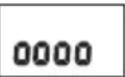 | Measurement in progressMake sure your bare feet are on the electrodes and remain standing on the scale until the measurement is complete. |
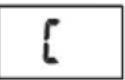 | Repeat measurement requiredAn error has occurred. Please perform the measurement again. |
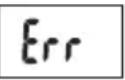 | OverloadThe weight on the scale exceeds the maximum capacity (180 kg).Step off to prevent damage. |
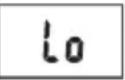 | Low batteriesThe batteries are almost empty. Replace them in time to ensure proper operation. |
GUIDELINES
natural_image
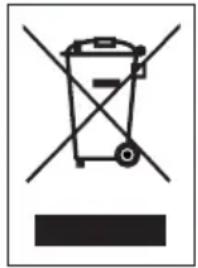
Symbol of a trash bin crossed with no text or numbers, representing waste sorting or disposal (no text present)This symbol on the product or on its packaging indicates that this product may not be treated as household waste. Instead it must be brought to the applicable collection point for recycling of electrical and electronic equipment. By ensuring this product is disposed of correctly, you will help prevent potential negative consequences for the environment and human health, which could otherwise be caused by inappropriate waste handling of this product. For more detailed information about recycling of this product, please contact your local city office, your household waste disposal service or the shop where you purchased the product.

The packaging is recyclable. Please treat the packaging ecologically.

This appliance conforms to all European requirements in the areas of safety, health, and environmental protection.
The EU declaration concerning this appliance can be requested at any time from info@linea2000.be
GARANTIA
Estimado cliente,
natural_image
Simple line drawing of a digital balance scale with feet and legs, no text or symbols presentCAMBIO DE UNIDAD
natural_image
Symbol of a trash bin crossed out by two crossed lines, with a solid black rectangle below (no text or labels)natural_image
Simple line drawing of a digital scale with feet and a foot, no text or symbols presentCAMBIO DELL'UNITÀ DI MISURA
natural_image
Symbol of a trash bin crossed with no text or numbers, representing waste sorting or disposal (no text present)natural_image
Simple line drawing of a digital scale with feet and legs, no text or symbols presentZMĚNA JEDNOTKY
natural_image
Symbol of a trash bin crossed with two crossed lines and a black rectangular base (no text or numbers)natural_image
Simple line drawing of a digital balance scale with feet and legs, no text or symbols presentZMENA JEDNOTKY
natural_image
Symbol of a trash bin crossed with two crossed lines and a black rectangle below (no text or labels)Looking for extra accessories or you have a broken piece?
ORDER the original DOMO accessories and parts on our webshop.
Webshop

natural_image
Stack of sheets of paper with a circular inset showing a small object, no visible text or symbols
natural_image
Two white plastic electrical connectors with ports and mounting brackets (no visible text or symbols)
natural_image
White rectangular container with black interior, no visible text or symbols
natural_image
Clear glass coffee maker with black handle and lid (no text or symbols visible)
- ⚠PRODUCTSPECIFIEKE WAARSCHUWINGEN
- EENHEID WIJZIGEN
- ⚠ AVERTISSEMENTS SPÉCIFIQUES AU PRODUIT
- CHANGER L'UNITÉ
- EINHEIT ÄNDERN
- RICHTLINIEN
- SAFETY INSTRUCTIONS
- ⚠️INSTALLATION
- ⚠ USE
- ⚠️ CLEANING AND MAINTENANCE
- ⚠️PRODUCTSPECIFIC WARNINGS
- SAVE THESE INSTRUCTIONS FOR FUTURE REFERENCE
- PARTS
- BEFORE THE FIRST USE
- INSERTING BATTERIES
- INSTALLING THE APP
- CHANGING THE UNIT
- USE
- TIPS
- CLEANING AND MAINTENANCE
- GUIDELINES
- GARANTIA
- CAMBIO DE UNIDAD
- CAMBIO DELL'UNITÀ DI MISURA
- ZMĚNA JEDNOTKY
- ZMENA JEDNOTKY
Brand : DOMO
Model : DO9305W
Category : Scale