
DO9098W - Scale DOMO - Free user manual and instructions
Find the device manual for free DO9098W DOMO in PDF.


| Product type | Digital kitchen scale |
| Brand | DOMO |
| Model | DO9098W |
| Color | White |
| Dimensions (L x W x H) | 22 x 15 x 2 cm |
| Net weight | 350 g |
| Maximum capacity | 5 kg |
| Precision | 1 g |
| Measurement units | g / kg / lb / oz |
| Power supply | 2 AAA batteries (1.5 V) not included |
| Main functions | Weighing, tare, auto-off |
| Display | Backlit LCD screen |
| Platform | Tempered glass |
| Non-slip feet | Yes |
| Low battery indicator | Yes |
| Auto-off | After 2 minutes of inactivity |
| Safety | Do not immerse, use on a flat and stable surface |
| Care and cleaning | Clean with a soft, damp cloth, avoid abrasive products |
| Spare parts and repairability | Not available, device not user-serviceable |
| Warranty | 2 years |
| Package contents | Scale, user manual |
Frequently Asked Questions - DO9098W DOMO
User questions about DO9098W DOMO
0 question about this device. Answer the ones you know or ask your own.
Ask a new question about this device
Download the instructions for your Scale in PDF format for free! Find your manual DO9098W - DOMO and take your electronic device back in hand. On this page are published all the documents necessary for the use of your device. DO9098W by DOMO.
USER MANUAL DO9098W DOMO
natural_image
Green rectangular digital kitchen appliance with two square cutouts on top (no text or symbols visible)GARANTIEVOORWAARDEN
CONDITIONS DE GARANTIE
This appliance has a two year warranty period. During this period the manufacturer is responsible for any failures that are the direct result of construction failure. When these failures occur the appliance will be repaired or replaced if necessary. The warranty will not be valid when the damage to the appliance is caused by wrong use, not following the instructions or repairs executed by a third party. The warranty will only be valid if the warranty application has been completed by the dealer at the time of purchase. All parts, which are subject to wear, are excluded from the warranty.
ZÁRUKA
RECYCLAGE-INFORMATIE
natural_image
Symbol of a trash bin crossed with no text or numbers, representing waste sorting or disposal (no text present)RECYCLING INFORMATIONEN
natural_image
Recycling symbol icon with three chasing arrows forming a triangle (no text or labels)RECYCLING INFORMATION
This symbol on the product or on its packaging indicates that this product may not be treated as household waste. Instead it must be brought to the applicable collection point for recycling of electrical and electronic equipment. By ensuring this product is disposed of correctly, you will help prevent potential negative consequences for the environment and human health, which could otherwise be caused by inappropriate waste handling of this product. For more detailed information about recycling of this product, please contact your local city office, your household waste disposal service or the shop where you purchased the product.
The packaging is recyclable. Please treat package ecologically.

natural_image
Symbol of a trash bin crossed with no text or numbers, representing waste sorting or disposal (no text present)
INFORMACE O RECYKLACI ODPADU
natural_image
Recycling symbol composed of three chasing arrows forming a triangle (no text or labels)VEILIGHEIDSINSTRUCTIES
This appliance may be used by children from the age of 8 and up, and also by persons with a physical or sensory limitation, as well as mentally limited persons or persons with a lack of experience and knowledge. But only on the condition that these persons have received the necessary instructions on how to use this appliance in a safe way and know the dangers that can occur by using this appliance.
Children cannot be allowed to play with the appliance. Maintenance and cleaning of the appliance may not be done by children, unless they are older than 8 years old and are under supervision.
Keep the appliance out of reach of children younger than 8 years old.
This appliance is suitable to be used in a household environment and in similar surroundings such as:
- Kitchen for personnel of shops, offices or other similar professional surroundings
- Farms
- Hotel or motel rooms and other surroundings with a residential character
- Guest rooms or similar
TIPS FOR USE AND MAINTENANCE
- The glass platform can be slippery when wet. Keep the platform dry.
- Stand still during weighing.
- Do not bump into the scale, do not drop it and avoid shocks.
- Be careful with the scale, as it is a precision instrument.
- Clean the scale with a damp cloth and do not allow any water to run into the scale.
- Do not use any chemical or abrasive cleaning products.
- Put the scale in a cool place with dry air.
• Always keep the scale in a horizontal position. - If the scale does not switch on, put it in another spot with stronger light.
- Do not use the appliance for commercial ends.
ENERGY SUPPLY

- This scale operates on solar power. It also functions with daylight or lamplight. When the scale is standby, the 0 will blink on the display.
- Do not cover the solar panels during use.
- If the light is too faint, the scale will switch off due to a lack of energy. Move the scale to another spot with brighter light and wait until the scale switches on automatically to continue weighing.
- The scale should not be placed in a spot with light fainter than 70 lux to function optimally.
OPERATION
- Place the scale on a hard, flat surface and avoid carpet or soft surfaces to guarantee the precision of the scale. Also make sure that there is nothing underneath the scale before weighing.
- Make sure that the scale is placed in the light - sunlight or lamplight - and that the solar panels of the scale are not covered. If the LCD screen does not display a blinking 0, turn on the light or move the scale to another place with an illumination no fainter than 70 lux. The scale will switch on again after approximately 60 to 90 seconds. The stronger the light, the less time the scale will need.
- The scale needs to be in standby. You will recognize the standby mode by the blinking 0 on the LCD display.
- Calmly step on to the scale. The display will show a dash -, which means that the scale is weighing. Wait for about 3 seconds. The scale will now indicate your weight.
- You will be able to read your weight from the LCD display during approximately 12 seconds.
CHANGING THE WEIGHING UNIT
You can choose the weighing unit in which your weight is indicated. Use the switch at the bottom of the scale to change the weighing unit to kilo (kg), stone (st) or pound (lb).

OVERLOAD

The scale will indicate overload with the error "Err".
The maximum weight is 150kg. In case of overload, step off the scale to avoid damaging.
ERROR DURING WEIGHING

If the display shows “C” when you step off the scale, there has been an error during weighing. Weigh again.
DŮLEŽITÉ


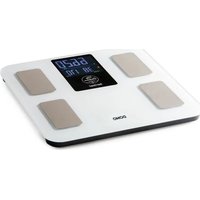
Brand : DOMO
Model : DO9098W
Category : Scale