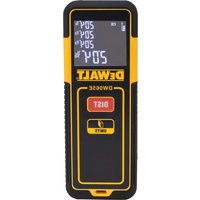
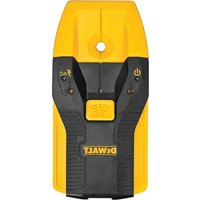
DW065E - Rangefinder DEWALT - Free user manual and instructions
Find the device manual for free DW065E DEWALT in PDF.


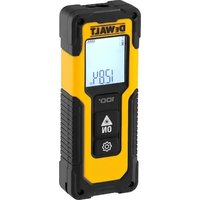
| Product type | Laser distance meter |
| Brand | DeWALT |
| Model | DW065E |
| Measurement range | 15 cm to 20 m (6 in to 65 ft) |
| Measurement accuracy | ± 3 mm (± 1/8 in) |
| Smallest displayed unit | ± 1 mm (± 1/16 in) |
| Laser class | Class 2 (IEC/EN60825-1:2014) |
| Laser type | ≤ 1.0 mW @ 620-690 nm |
| Power supply | 2 AAA batteries (not included) |
| Battery life | Up to 3000 measurements |
| Automatic laser/backlight off | After 30 seconds |
| Automatic device off | After 90 seconds |
| Measurement functions | Distance, area, volume, continuous measurement |
| Measurement units | Decimal feet, fractional feet, meters, inches |
| Dimensions (H x D x L) | 118 x 43 x 26 mm (4.64 x 1.69 x 1.02 in) |
| Weight (without batteries) | 71 g (2.5 oz) |
| Operating temperature | 0 °C to +40 °C (32 °F to 104 °F) |
| Storage temperature | -25 °C to +70 °C (-13 °F to 158 °F) |
| Warranty | 3 years (limited) |
| Maintenance | Clean with a soft, dry cloth; do not use solvents |
| Safety | Class 2 laser - do not look directly into the beam |
| Spare parts / repairability | Contact DeWALT customer service for repairs |
Frequently Asked Questions - DW065E DEWALT
User questions about DW065E DEWALT
0 question about this device. Answer the ones you know or ask your own.
Ask a new question about this device
Download the instructions for your Rangefinder in PDF format for free! Find your manual DW065E - DEWALT and take your electronic device back in hand. On this page are published all the documents necessary for the use of your device. DW065E by DEWALT.
USER MANUAL DW065E DEWALT
Contents
- User Safety
- Battery Safety
- Setup (Load Batteries)
- Operation
- Warranty
- Specifications
- Error Codes
Retain all sections of this manual for future reference.
User Safety

WARNING:
Carefully read the Safety Instructions and Product Manual before using this product. The person responsible for the product must ensure that all users understand and adhere to these instructions.

WARNING:
The following label information is placed on your laser tool to inform you of the laser class for your convenience and safety.
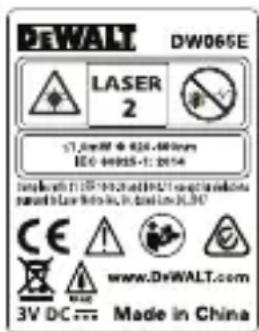
The DW065E tool emits a visible laser beam, as shown in Figure A. The laser beam emitted is Laser Class 2 per IEC 60825-1 and complies with 21 CFR 1040.10 and 1040.11 except for deviations pursuant to Laser Notice No. 50, dated June 24, 2007.

WARNING:
While the laser tool is in operation, be careful not to expose your eyes to the emitting laser beam (red light source). Exposure to a laser beam for an extended time period may be hazardous to your eyes. Do not look into the beam with optical aids.

WARNING: To reduce the risk of injury, user must read the Product User manual, Laser Safety, and Battery Safety manuals.
FCC Compliance
This device complies with Part 15 of the FCC Rules. Operation is subject to the following two conditions: (1) This device may not cause harmful interference, and (2) this device must accept any interference received, including interference that may cause undesired operation.
FCC Statement
This equipment has been tested and found to comply with the limits for a Class B digital device, pursuant to part 15 of the FCC rules. These limits are designed to provide reasonable protection against harmful interference in a residential installation. This equipment generates, uses, and can radiate radio frequency energy and, if not installed and used in accordance with the instructions, may cause harmful interference to radio communications. However, there is no guarantee that interference will not occur in a particular installation. If this equipment does cause harmful interference to radio or television reception, which can be determined by turning the equipment off and on, the user is encouraged to try to correct the interference by one or more of the following measures:
- Reorient or relocate the receiving antenna.
- Increase the separation between the equipment and the receiver.
- Connect the equipment into an outlet on a different circuit (not the circuit to which the receiver is connected).
- Consult the dealer or an experienced radio/TV technician for help.
Canada, Industry Canada (IC) Notices
Class B digital circuitry of this device complies with Canadian ICES-003. This device complies with Industry Canada license-exempt RSS standard(s). Operation is subject to the following two conditions: (1) this device may not cause interference, and (2) this device must accept any interference, including interference that may cause undesired operation of the device.
Under Industry Canada regulations, the radio transmitter(s) in this device may only operate using an antenna of a type and maximum (or lesser) gain approved for the transmitter by Industry Canada. To reduce potential radio interference to other users, the antenna type and its gain should be so chosen that the equivalent isotropically radiated power (e.i.r.p.) is not more than that necessary for successful communication.
DeWalt, Slough, Berkshire SL1 3YD, UK herewith declares that the product DW065E is in compliance with the essential requirements and all other provisions
of Directive 1999/S/EC. Please contact DeWalt for DoC.
Battery Safety

WARNING: Batteries can explode or leak and cause serious injury or fire. To reduce the risk:
ALWAYS follow all instructions and warnings on the battery label and package.
DO NOT short any battery terminals.
DO NOT charge alkaline batteries.
DO NOT mix old and new batteries. Replace all of them at the same time with new batteries of the same brand and type.
DO NOT mix battery chemistries.
DO NOT dispose of batteries in fire.
ALWAYS keep batteries out of reach of children.
ALWAYS remove batteries if the device will not be used for several months.
NOTE: Ensure that the recommended batteries are used.
NOTE: Ensure the batteries are inserted in the correct manner, with the correct polarity.
Setup (Load Batteries)
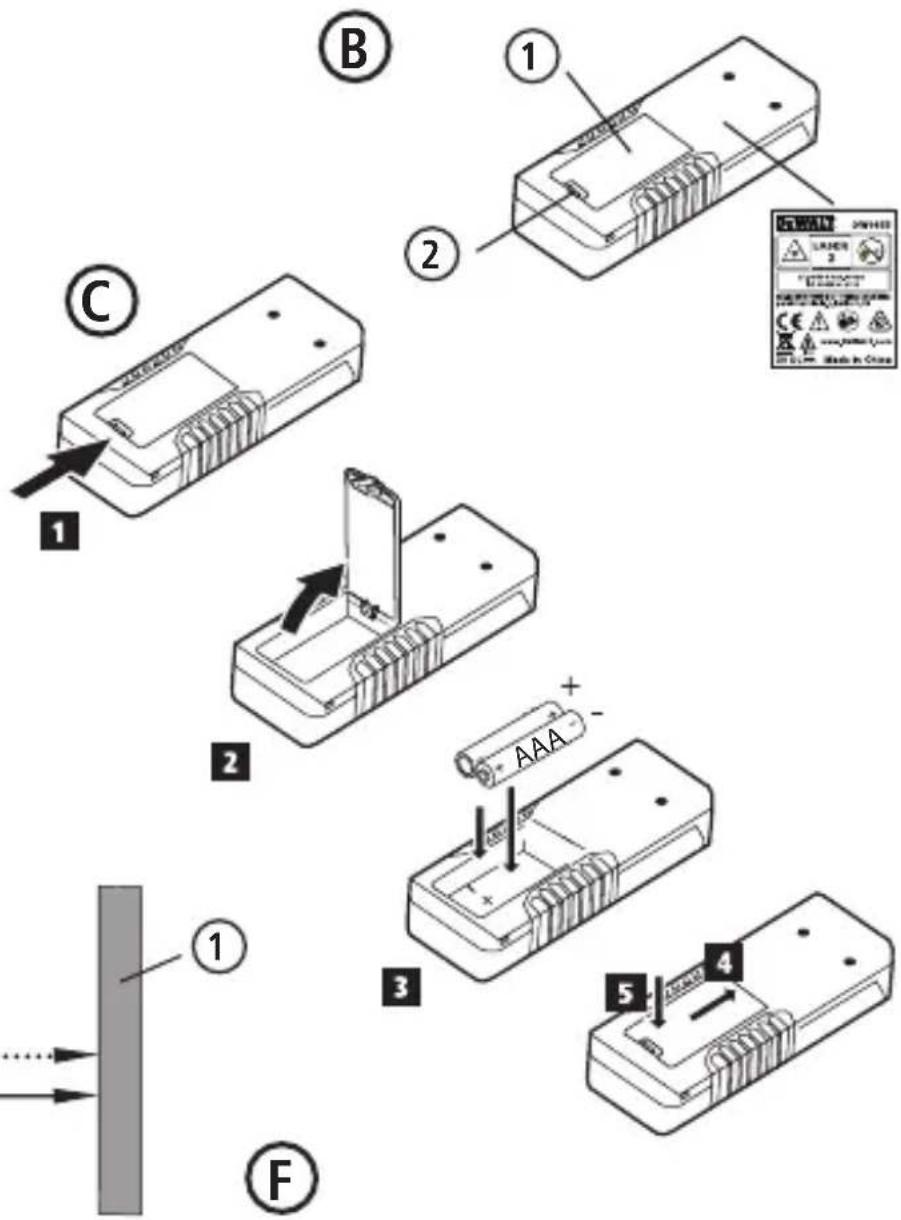
- Locate the battery compartment latch on the back of the DW065E tool (Figure B #2).
- Using your finger, pull the latch up to unlock and remove the battery door (Figure C #1 and #2).
- Insert two AAA batteries, making sure to position the - and + ends of each battery as noted inside the battery compartment (Figure C #3).
- Slide the pins at the bottom of the battery door into the notches in the battery compartment (Figure C #4).
- Push the battery door down until it snaps in place (Figure C #5).
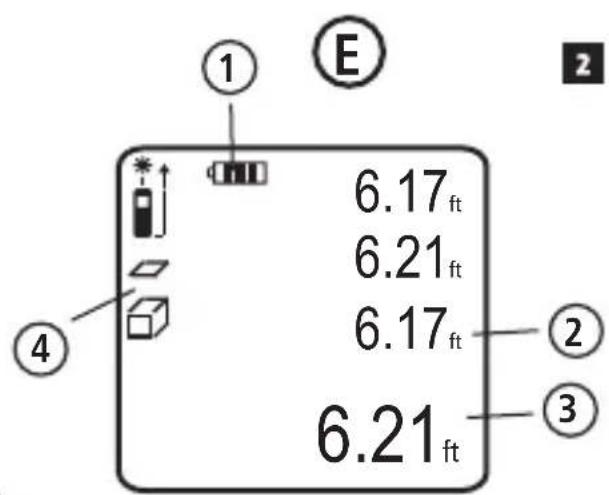
When the tool is ON, the battery level appears in the display window (Figure E #1).
Operation
Measuring the Distance to a Wall or Object
- Click (Figure A #3) to turn on the tool.
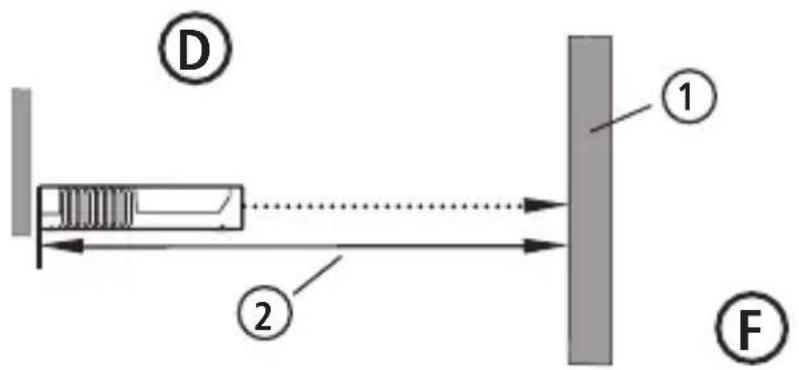
- Point the laser at the top of the tool (Figure A #1) toward the wall or object whose distance you need to measure (Figure D #1).
- Click measure the distance from the bottom
of the tool to the wall or object (Figure D #2).
- At the bottom of the display window (Figure A #2), view the current measurement (Figure E #3).
To take a new measurement, click Diff move the current measurement up to the previous line on the display window (Figure E #3). Then repeat steps 2-4.
Measuring Distances Continuously
To take a series of measurements as you move around, change to Continuous Measure mode.
- Click Figure A #3) to turn on the tool.
- Point the laser at the top of the tool (Figure A #1) toward the wall or object whose distance you need to measure (Figure D #1).
- Click and hold 4 seconds to turn on the Continuous Measure mode.
- At the bottom of the display window (Figure A #2), view the current measurement (Figure E #3), which will keep changing as you move the tool.
- To take the current measurement (from the bottom of the tool to the wall or object) and exit Continuous Measure mode, click Figure E #3).
To take a new measurement, click to move the current measurement up to the previous line on the display window. Then repeat steps 2-5.
Measuring Area
You can measure the area of a wall, floor, or object.
- Click (Figure A #3) to turn on the tool.
- Click to show on the display window (Figure E #4).
-
Measure the width.
-
Point the top of the tool at one side of the target (wall, floor, or object).
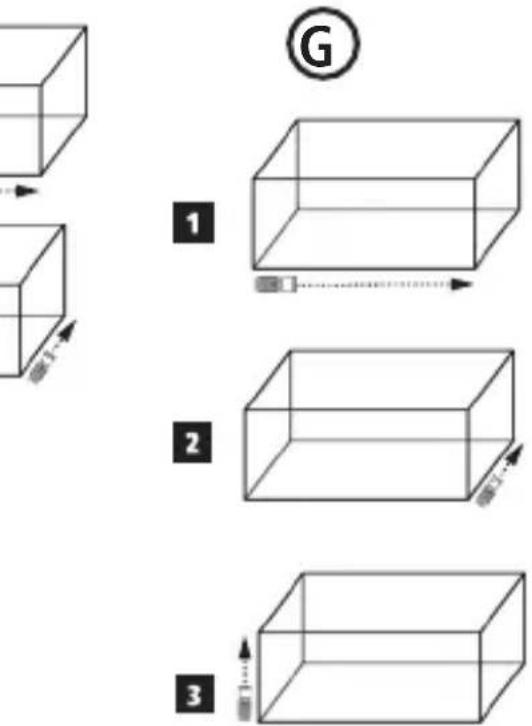
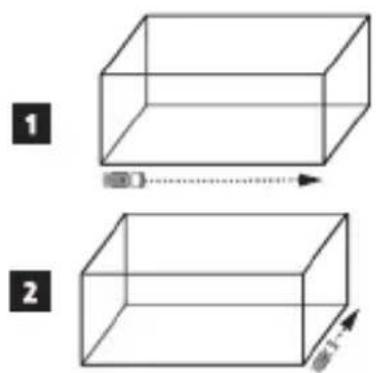
- Position the bottom of the tool at one end of the target and point the laser dot across the width (Figure F #1).
-
Click to display the width measurement at the top of the display window.
-
Measure the length.
- Position the bottom of the tool at one end of the target and point the laser dot across the length (Figure F #2).
- Click to display the length measurement on the second line of the display window.
- View the Area measurement at the bottom of the display window (Figure E #3).
Measuring Volume
You can measure the volume of a room or object.
- Click (Figure A #3) to turn on the tool.
- Click twice to show on the display window (Figure E #4).
-
Measure the width.
-
Point the top of the tool at one side of the target (room or object).
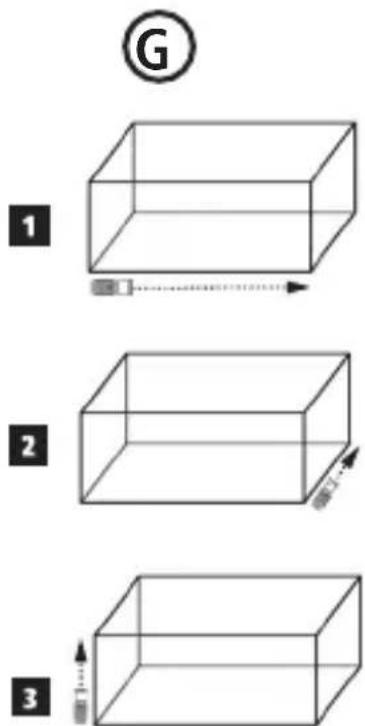
- Position the bottom of the tool at one end of the target and point the laser dot across the width (Figure F #1).
-
Click display the width measurement at the top of the display window.
-
Measure the length.
-
Position the bottom of the tool at one end of the target and point the laser dot across the length (Figure F #2).
-
Click 📄 display the length measurement on the second line of the display window.
-
Measure the height.
-
Positon the bottom of the tool at one end of the target and point the laser dot across the height (Figure F #3).
-
Click to take the measurement.
-
View the Volume measurement at the bottom of the display window (Figure E #3).
Changing the Unit of Measure
Once the current measurement is taken (the device is not in Continuous Measure mode), you can change the unit of measure from decimal ft (6.21 ft) to fractional ft (6'02"9/16), fractional ft to meters (1.894 m), meters to inches (74 9/16 in), or inches to decimal ft.
Press and hold until you see the measurement change (2-3 seconds).
Turning Off the Tool
The tool can be turned off in either of these ways:
- Press and hold for several seconds (until the display window clears).
- If you do not use the tool for 120 seconds, it will automatically turn off.
Three Year Limited Warranty
DeWALT will repair, without charge, any defects due to faulty materials or workmanship for three years from the date of purchase. This warranty does not cover part failure due to normal wear or tool abuse. For further detail of warranty coverage and warranty repair information, visit www.DeWALT.com or call 1–800–4-DeWALT (1–800–433–9258). This warranty does not apply to accessories or damage caused where repairs have been made or attempted by others. This warranty gives you specific legal rights and you may have other rights which vary in certain states or provinces.
In addition to the warranty, DeWALT tools are covered by our:
1 YEAR FREE SERVICE
DeWALT will maintain the tool and replace worn parts caused by normal use, for free, any time during the first year after purchase.
90 DAY MONEY BACK GUARANTEE
If you are not completely satisfied with the performance of your DeWALT Power Tool, Laser, or Nailer for any reason, you can return it within 90 days from the date of purchase with a receipt for a full refund - no questions asked.
RECONDITIONED PRODUCT: Reconditioned product is covered under the 1 Year Free Service Warranty. The 90 Day Money Back Guarantee and the Three Year Limited Warranty do not apply to reconditioned product.
FREE WARNING LABEL REPLACEMENT: If your warning labels become illegible or are missing, call 1-800-4-DeWALT or visit your local service center for a free replacement.
Specifications
| Range 6in to 65ft (15cm to 20m) | |
| Measuring Accuracy* ± 1/8in (± 3mm)* | |
| Smallest Unit Displayed ± 1/16in (± 1mm) | |
| Laser Class Class 2 (IEC/EN60825-1: 2014) | |
| Laser Type ≤ 1.0mW @ 620-690nm | |
| Laser/Backlight Automatic Switch-off After 30s | |
| Unit Automatic Switch-off After 90s | |
| Continuous Measuring Yes | |
| Area/Volume Yes | |
| Battery Life (2 x AAA) Up to 3000 Measurements | |
| Dimension (H x D x W) 4.64 x 1.69 x 1.02in (118 x 43 x 26mm) | |
| Weight (without Batteries) | 2.5oz (71g) |
| Storage Temperature Range | -13°F ~ 158°F (-25°C ~ +70°C) |
| Operating Temperature Range | 32°F ~ 104°F (0°C ~ +40°C) |
| *Measuring Accuracy depends on the current conditions:Under favorable conditions (good target surface and room temperature), up to 33ft (10m).Under unfavorable conditions (bright sunlight, a very weak reflecting target surface, or large temperature fluctuations), the error can increase by to ± 0.003 in/ft (± 0.25mm/m) for distances over 33ft (10m). | |
Error Codes
E
If INFO appears on the display window with a Code number, perform the corresponding Corrective Action.
| Code | Description Corrective Action | |
| 101 | Received Signal Too Weak, Measuring Time Too Long | Use the target plate or change the target surface. |
| 102 | Received Signal Too High Target is too reflective. Use the target plate or change the target surface. | |
| 201 | Too Much Background Light Reduce the background light on the target area. | |
| 202 | Laser Beam Interrupted Remove the obstacle and repeat the measurement. | |
| 203 | Insufficient Power Replace the batteries. | |
| 301 | Temperature Too High | Allow the device to cool down to a temperature within the specified Operating Temperature Range. |
| 302 | Temperature Too Low | Allow the device to warm up to a temperature within the specified Operating Temperature Range. |
| 401 | Hardware Error Switch the device or/off several times. If the error still occurs, return the defective device to the Service Center or distributor. Refer to the Warranty. | |
| 402 | Unknown Error Contact the Service Center or distributor. Refer to the Warranty. | |
Notes:
Contenido
© 2016 DeWalt Industrial Tool Co.,
701 East Joppa Road,
Towson, MD 21286
Made in China
097349
October 2016
www.dewalt.com
- Contents
- User Safety
- WARNING:
- FCC Compliance
- FCC Statement
- Canada, Industry Canada (IC) Notices
- Battery Safety
- Setup (Load Batteries)
- Operation
- Measuring the Distance to a Wall or Object
- Measuring Distances Continuously
- Measuring Area
- Measuring Volume
- Changing the Unit of Measure
- Turning Off the Tool
- Three Year Limited Warranty
- YEAR FREE SERVICE
- DAY MONEY BACK GUARANTEE
- Error Codes
- Notes:
- Contenido
Brand : DEWALT
Model : DW065E
Category : Rangefinder