
H-4601 - Scale Uline - Free user manual and instructions
Find the device manual for free H-4601 Uline in PDF.


User questions about H-4601 Uline
0 question about this device. Answer the ones you know or ask your own.
Ask a new question about this device
Download the instructions for your Scale in PDF format for free! Find your manual H-4601 - Uline and take your electronic device back in hand. On this page are published all the documents necessary for the use of your device. H-4601 by Uline.
USER MANUAL H-4601 Uline
ULINE H-4601 LOW PROFILE FLOOR SCALE PRINTER
1-800-295-5510 uline.com
text_image
SEL P S LFSAFETY

WARNING! Avoid using the printer in any harsh environment.
- Only trained professionals are allowed to do repair work.
- Turn power off before connecting or disconnecting the power source.
- Do not spill liquids on the printer.
SETUP
PREPARATION
- Carefully remove contents from the package.
- Connect the interface cable (included) from the printer to the RS-232 serial port of the indicator. Tighten the screws on both sides.
NOTE: All-weather and stainless steel indicators require hardwiring to connect to printer. See Hardwiring instructions on page 2. - Turn the printer's on/off switch to the off position.
- Plug in the power adapter from the printer to a surge-protected power outlet.
- Turn the printer's on/off switch to the on position.

PRINTER SETUP WITH LP-7510 / DISPLAY INDICATOR
- With the LP-7510 display on and displaying weight, press the PRINT and HOLD buttons at the same time to get into Setup. Display should now show C DI.
a. Use the UNITS and COUNT buttons to move the flashing digit left or right.
b. Use the TARE and ZERO buttons to increase and decrease the flashing digit.
- Change the display to show C16 and press the PRINT (Enter) button.
a. Display shows the date in Y/M/D format.
b. Enter the correct date and press the PRINT (Enter) button.
- Display shows C /7. Press the PRINT (Enter) button.
a. Display shows the time in H/M/S format.
b. Enter the correct time and press the PRINT (Enter) button.
- Display shows C 18. Press the PRINT (Enter) button.
a. Display shows C 18 and a number on the right.
b. Change the number on the right to "2" and press the PRINT (Enter) button. The number 2 indicates that the printer is connected.
- Display shows C 19. Press the PRINT (Enter) button.
a. Display shows C 19 and a number on the right.
b. Change the number on the right to a "3" and press the PRINT (Enter) button. The number 3 signifies the 9600 BaudRate.
SETUP CONTINUED
- Display shows C 20. Change this to C 30 and press the PRINT (Enter) button.
a. Display shows C 30 and a number on the right. C 30 is short for Code 30, which signifies the date format.
b. Change the number on the right to achieve desired date format (see below) and press the PRINT (Enter) button.
- #1 = mm.dd.yy
- #2 = dd.mm.yy
- #3 = yy.mm.dd
-
Press the TOTAL button twice to exit.
-
Display is now set up to match the printer. Press the PRINT button on the LP-7510 display and the printer should print.
HARDWIRING

NOTE: Hardwiring is required to connect all-weather and stainless steel indicators to the printer. These instructions do not apply to standard floor scale indicators.
- Cut the RS-232 (9 pin) end of the factory cable off and strip back. There will be three wires: red, black and green.
- Remove the back from the readout and locate the the terminal strip marked: RXD, TXD, GRND.

NOTE: The green wire is TXD, black is GRND and red is RXD.
-
Replace the back on panel on the readout.
-
Power the read out up and while in weight mode, press and hold the PRINT and HOLD keys for approximately two seconds. The meter will show COI and the 1 will be flashing.
- Press ZERO five times. The 6 will be flashing.
- Press UNITS once. The 0 will be flashing.
- Press ZERO twice. The meter will display C16.
- Press PRINT once. This will allow the date setup. Left to right will be Year/Month/Date. Use the four arrow keys to program the date. Once set, press PRINT twice.
- Use arrow keys to program in the time. This is in 24 hour time only. Once set, press PRINT twice.
- Meter will display C18. Press ZERO until the screen shows C18 6.
- Press PRINT twice. Screen will read C19 3. If it does not end in 3, press the ZERO key until it does.
- Press PRINT once. Screen will read C20.
- Press UNITS once. The 2 will be flashing.
- Press ZERO key once. Screen will read C30.
- Press PRINT key once. Screen will read C30 0.
- Press ZERO key once. Screen will read C30 I.
- Press PRINT key once.
- Press TOTAL key once. The screen will revert back to weight mode and printer will be ready to use.

NOTE: If printer does not print, switch the green and red wires.
PRINTING
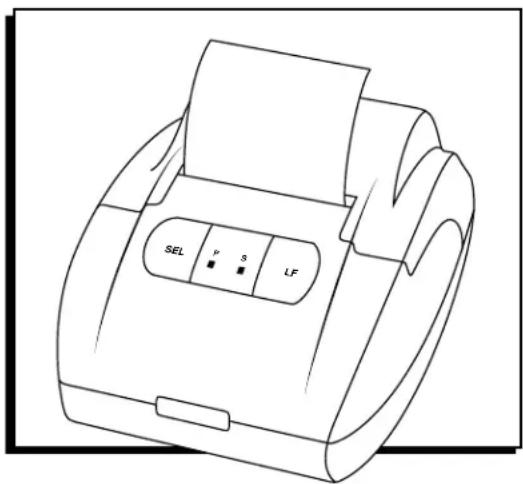
- To change the printing mode, press the SEL button on the printer once and the green status light should be on. If the green status light is already on, then pressing the SEL button is not necessary because the printer is already in printing mode.
-
Press the PRINT button on the indicator and the printer should start printing. Remember to set up the indicator correctly to enable the printing function.
-
Repeat step 2 to print multiple readings from the indicator.
- After printing is done, press the SEL button once to exit the printing mode. The green status light should now turn off.
- To roll paper out, press the LF (Line Feed) button. Press LF button again to stop line feed.
TROUBLESHOOTING
| OPERATING ISSUE RECOMMENDATIONS | |
| The printer is not working. Ensure the printer is connected to power.Ensure the thermal paper inside the printer is placed correctly.Ensure the cover of the printer is closed completely.Ensure the indicator is set up to have the print function activated. | |
Call Uline Customer Service at 1-800-295-5510 for any technical questions or issues.
text_image
SEL P S LFSEGURIDAD

text_image
SEL P S LFSÉCURITÉ


