
HL-1850 - Laser printer BROTHER - Free user manual and instructions
Find the device manual for free HL-1850 BROTHER in PDF.


| Product Type | Monochrome Laser Printer |
| Print Resolution | 300, 600 or 1200 dpi (HQ1200) |
| Standard Memory | 16 MB |
| Maximum Memory | 144 MB (100-pin DIMM module) |
| Standard Tray Capacity (Tray 1) | 250 sheets (80 g/m²) |
| Multi-Purpose Tray Capacity | 100 sheets (80 g/m²) |
| Optional Lower Tray (Tray 2) | 250 sheets |
| Supported Paper Sizes | A4, Letter, Legal, 8.5x13", B5, Executive, A5, A6, B6 |
| Media Types | Plain paper, recycled, heavy, thick, transparencies, labels, envelopes, cardstock |
| Duplex Printing | Automatic (standard) |
| Connectivity | Parallel (IEEE 1284), USB, optional network (NC-4100h) |
| Emulation Modes | HP LaserJet, BR-Script 3 (PostScript level 3), EPSON FX-850, IBM Proprinter XL |
| Special Features | Toner saving, reprint last job, secure printing, reprint |
| Display | Backlit LCD panel (green/red/orange) |
| Control Panel | Buttons: Go, Job Cancel, Reprint, +, -, Set, Back |
| Power Supply | 100-120 V AC or 220-240 V AC, 50/60 Hz |
| Operating Temperature | 10°C to 32.5°C |
| Operating Humidity | 20% to 80% (without condensation) |
| Maintenance | Toner cartridge replacement, drum replacement, corona wire cleaning |
| Available Options | Lower tray (LT-500), network card (NC-4100h), DIMM memory, IrDA interface (IR-1000) |
Frequently Asked Questions - HL-1850 BROTHER
User questions about HL-1850 BROTHER
0 question about this device. Answer the ones you know or ask your own.
Ask a new question about this device
Download the instructions for your Laser printer in PDF format for free! Find your manual HL-1850 - BROTHER and take your electronic device back in hand. On this page are published all the documents necessary for the use of your device. HL-1850 by BROTHER.
USER MANUAL HL-1850 BROTHER
Imprimante laser Brother
Série HL-1800
GUIDE DE L'UTILISATEUR
natural_image
Line drawing of a hand pressing down the internal structure of a printer (no text or symbols)
Attention
natural_image
Technical line drawing of a printer internal structure (no text or symbols)TABLE DES MATIERES
Conventions typographiques .... ii
Interface IrDA (IR-1000) 4-16
Polices optionnelles (BS-3000) 4-17
CHAPITRE 5 ENTRETIEN PERIODIQUE
BOUR. DUPLEX....6-17
BOURRAGES 6-20
Fig. 1-1
Fig. 1-2
Fig. 1-3
natural_image
Line drawing of a printer with an open drawer and black arrow indicating a process (no text or symbols)Fig. 1-6
natural_image
Line drawing of a hand inserting into a device into a rack, with an inset magnified view showing internal structure (no text or symbols)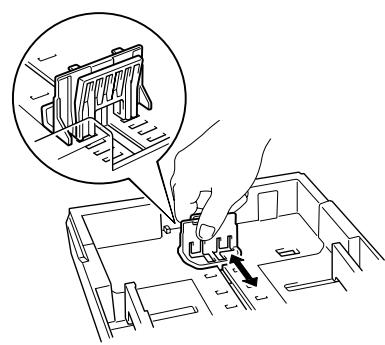
natural_image
Technical line drawing of a mechanical assembly with a hand operating a workpiece, showing internal components and a magnified inset (no text or symbols)Fig. 1-7
natural_image
Line drawing of a mechanical assembly with a hand inserting a component into a housing, showing an inset close-up of a door (no text or symbols present)Fig. 1-8
3.
natural_image
Line drawing of a hand pressing down on a computer drive casing (no text or symbols)Fig. 1-9
Remarque
natural_image
Technical line drawing of a mechanical component with an inset detail showing a close-up view (no text or symbols)4.
natural_image
Line drawing of a hand printing a document into a printer (no text or symbols present)Fig. 1-10
5.
natural_image
Line drawing of a printer with a hand pressing down on the page, showing a black downward arrow (no text or symbols present)Fig. 1-11
natural_image
Line drawing of a printer with an open lid and internal components, showing a hand pressing down (no text or symbols)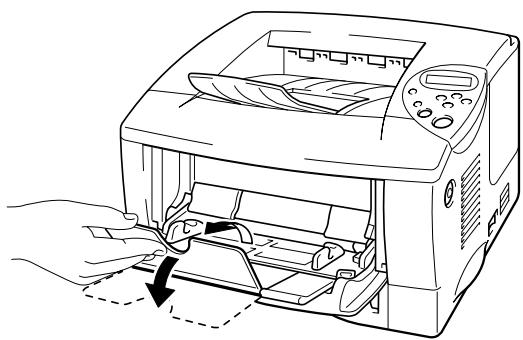
natural_image
Line drawing of a printer with hands operating the lid and outlet (no text or symbols)Fig. 1-12

natural_image
Line drawing of a printer with paper being inserted, showing internal components and a magnified inset (no text or symbols)Fig. 1-13
Remarque
natural_image
Line drawing of a printer with a close-up inset showing the mechanism of fastening or locking a seatbelt (no text or symbols present)Fig. 1-14
Remarque
natural_image
Line drawing of a printer with a hand inserting paper into it (no text or symbols)natural_image
Line drawing of a computer printer with a hand inserting a rack into the case (no text or symbols)Fig. 1-15
natural_image
Line drawing of a hand inserting a device into a rack with arrows indicating motion (no text or symbols)Fig. 1-16
natural_image
Five-step line drawings of a folded envelope with a handle, showing folding and discoling steps (no text or symbols)Fig. 1-17
natural_image
Line drawing of two hands holding a stack of cards (no text or symbols visible)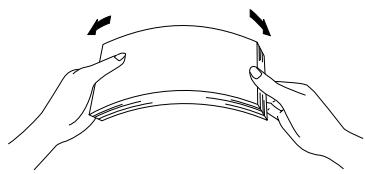
natural_image
Illustration of two hands holding a folded paper or sheet, with arrows indicating fold direction (no text or symbols)natural_image
Line drawing of a printer with hands operating it, showing a black downward arrow indicating compression or disassembly (no text or symbols present)Fig. 1-18
natural_image
Line drawing of a printer with an inset showing a close-up view of the printer's internal structure (no text or symbols present)Fig. 1-21
Remarque
natural_image
Line drawing of a printer with paper feed and paper tray (no text or symbols)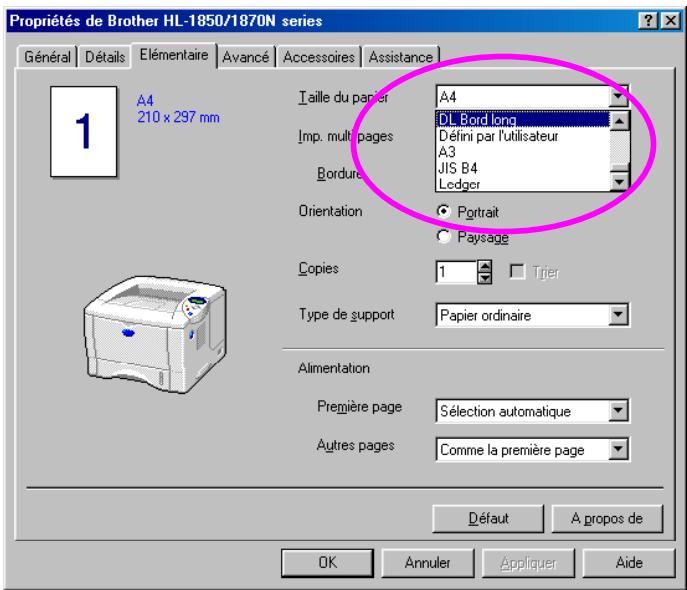
natural_image
Line drawing of a printer with an inset showing hand positioning on the spine (no text or symbols)Fig. 1-21
Remarque
natural_image
Line drawing of a printer with an inset close-up showing the printer's internal structure (no text or symbols present)Fig. 1-24
Remarque
natural_image
Line drawing of a printer with a close-up inset showing hand pressing down on the cover (no text or symbols)Fig. 1-25
natural_image
Line drawing of a computer monitor with a hand inserting a cable into the case, showing a magnified inset of the cable being inserted (no text or symbols present)Fig. 1-26
Remarque
natural_image
Illustration of a hand inserting a device into a computer case, with an inset showing the right-hand rule (no text or symbols present)Fig. 1-27
Remarque
♦ BRAdmin professional
Bac multi-usage Bac MU
natural_image
Line drawing of a printer being inserted into a box, showing internal components and base (no text or symbols)Fig. 4-2
natural_image
Line drawing of a computer monitor with ventilation slots and a black arrow pointing to the door (no text or symbols)Fig. 4-3
natural_image
Technical line drawing of a microwave oven with a screwdriver inserted, showing internal components and a close-up inset (no text or symbols)
natural_image
Technical line drawing of a vehicle front panel showing internal components and mounting brackets (no text or symbols)Fig. 4-4
natural_image
Technical line drawing of a vehicle interior showing internal components and mounting brackets (no text or symbols)Fig. 4-5
natural_image
Line drawing of a microwave oven with a screwdriver inserted, showing internal components and a close-up inset of the lid (no text or symbols)Fig. 4-7
natural_image
Technical line drawing of a computer case with an open door and internal compartments (no text or symbols)Fig. 4-8
♦ Mémoire minimum requise
HL-1850 (y compris mémoire interne de 16 Moctets)
Modes d'émulation HP LaserJet, EPSON FX-850 et IBM Proprinter XL
| 300 ppp | 600 ppp | HQ1200 | |
| A4/Letter | Standard | Standard | Standard |
| Legal | Standard | Standard | Standard |
Mode BR-Script 3
| 300 ppp | 600 ppp | HQ1200 | |
| A4/Letter | Standard | Standard | Standard |
| Legal | Standard | Standard | Standard |
Impression duplex
| 300 ppp | 600 ppp | HQ1200 | |
| HP LaserJet | Standard | Standard | 32 Moctets |
| BR-Script 3 | Standard | Standard | 32 Moctets |
natural_image
Line drawing of a computer monitor with ventilation grilles and a black arrow indicating the right side (no text or symbols)Fig. 4-9
natural_image
Line drawing of a microwave oven with a screwdriver inserted, showing internal components and a close-up inset (no text or symbols)
natural_image
Technical line drawing of a vehicle front panel showing internal components and mounting brackets (no text or symbols)Fig. 4-10
natural_image
Diagram of a server rack with cable routing and directional arrows indicating movement (no text or symbols)Fig. 4-11
natural_image
Technical line drawing showing two views of a device's internal structure, one with an open door opening and the other with a magnified inset highlighting a switch (no text or symbols present)Fig. 4-12
natural_image
Illustration of hands operating a computer with a magnified inset showing the interior air vent (no text or symbols)Fig. 5-1

natural_image
Line drawing of a printer with hands operating the lid and outlet (no text or symbols)Fig. 5-2

Attention
natural_image
Diagram showing mechanical assembly with two circular insets illustrating different components (no text or labels)natural_image
Illustration of hands assembling a mechanical component with an inset magnified view showing a hand holding a tool (no text or symbols present)Fig. 5-3
Attention
natural_image
Line drawing of hands holding a tray with a directional arrow indicating movement (no text or symbols)Fig. 5-4

Attention
natural_image
Diagram of a device with a hand operating a button, showing a curved arrow indicating rotation (no text or symbols present)Fig. 5-5

Attention
natural_image
Illustration of a hand pressing down on a mechanical component (no text or symbols visible)
natural_image
Line drawing of a hand inserting into a device into a rack (no text or symbols)
natural_image
Illustration of a hand placing a plastic drawer into a rack, with three inset views showing internal compartments (no text or symbols present)Fig. 5-6

Attention
natural_image
Line drawing of a printer with hands operating the lid (no text or symbols)Fig. 5-8
Remarque
natural_image
Diagram showing a machine processing material with two circular insets illustrating the process (no text or symbols present)natural_image
Diagram showing a device with a button and a magnified view of a button (no text or symbols)
natural_image
Diagram showing a device with a button and a magnified view of a button (no text or symbols)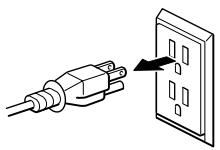
natural_image
Illustration of a hand pressing down on a printer into a slot, with a gray X symbol indicating no text or symbols.
Attention
natural_image
Diagram showing a printer's internal structure with two circular insets illustrating mechanical components (no text or labels)natural_image
Line drawing of a printer with an arrow indicating a process or insertion, no text or symbols presentFig. 6-1
natural_image
Line drawing of hands installing or adjusting a toaster into a plastic tray (no text or symbols)Fig. 6-2

natural_image
Line drawing of a printer being inserted into a rack, with a hand holding the tray (no text or symbols present)Fig. 6-3
natural_image
Line drawing of hands installing or opening a device into a plastic case (no text or symbols present)Fig. 6-4
natural_image
Line drawing of a printer with paper being inserted, showing mechanical components and a hand holding a paper (no text or symbols present)Fig. 6-5
natural_image
Line drawing of a printer with paper feed and paper holder (no text or symbols)Fig. 6-6
BOUR. INTERNE
BOUR. INTERNE
natural_image
Illustration of hands operating a microwave oven with a magnified inset showing the interior wall detail (no text or symbols)Fig. 6-7
natural_image
Line drawing of a hand inserting a printer into a microwave oven (no text or symbols)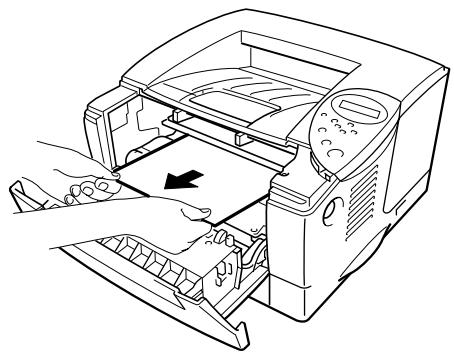
natural_image
Line drawing of a printer's internal structure showing hands operating the lid and base panel (no text or symbols)Fig. 6-8
natural_image
Line drawing of a printer with hands operating the interior (no text or symbols)Fig. 6-9
BOUR. ARR.
BOUR. ARR.
natural_image
Diagram of a printer with two circular insets showing mechanical components and motion indicators (no text or symbols)natural_image
Line drawing showing two steps of a printer press operation: one being opened, the other closed with arrows indicating press direction (no text or symbols present)Fig. 6-10
natural_image
Line drawing of a computer tower with a hand inserting a cable into the case (no text or symbols)Fig. 6-11

Attention
natural_image
Technical line drawing of a mechanical device interior showing internal components (no text or symbols)
natural_image
Line drawing of a computer printer with an open lid and internal slots, showing hand placement (no text or symbols)Fig. 6-12

natural_image
Line drawing of a computer printer with a hand inserting a slot into the cover (no text or symbols)Fig. 6-13
natural_image
Line drawing of a computer monitor with a hand inserting a cable into the case (no text or symbols)Fig. 6-14
natural_image
Line drawing of a computer printer with a hand inserting a cable into the cover (no text or symbols)Fig. 6-15
natural_image
Illustration of a computer tower with an open storage tray and a hand inserting a device (no text or symbols visible)Fig. 6-16
natural_image
Line drawing of a hand inserting a component into a computer tower (no text or symbols)Fig. 6-17
natural_image
Line drawing of a computer tower with an open drawer and a hand holding the tray (no text or symbols)Fig. 6-18
Remarque
natural_image
Line drawing of hands installing or adjusting a microwave oven into a plastic case (no text or symbols present)Fig. 6-19
natural_image
Line drawing of hands operating a computer with a magnified inset showing the close-up of the button (no text or symbols)Fig. 6-20
natural_image
Line drawing of a hand inserting a printer into a microwave oven (no text or symbols)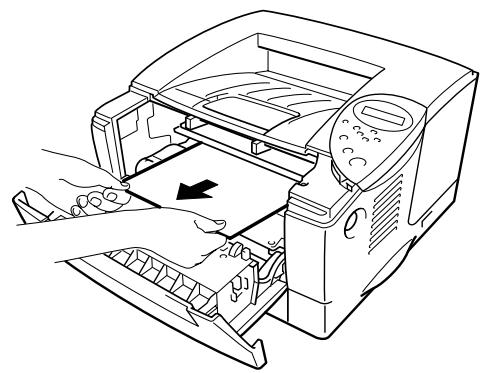
natural_image
Line drawing of a printer's internal structure showing hand placement and paper feed (no text or symbols)Fig. 6-21
natural_image
Line drawing of a computer with a hand inserting a card into a rack (no text or symbols)Fig. 6-22
natural_image
Line drawing of a printer with a hand inserting a slot into the cover (no text or symbols)Fig. 6-23
Taches blanches
Taches noires
natural_image
Line drawing of hands holding a mechanical component over a sheet of paper (no text or symbols)Fig. 6-31
natural_image
Illustration of a hand operating a mechanical component next to a rolled-up photo of a printer (no text or symbols visible)Fig. 6-32
natural_image
Line drawing of a mechanical component with internal parts, resting on a textured surface (no text or symbols)Fig. 6-33
Taches blanches
- Bermuda Script
- Germany
- San Diego
- US Roman
LetterGothic16.66 Medium, Italique, Gras, Italique-gras
- OCR-A
- OCR-B

Mode BR-Script 3
Polices vectorielles :
- Atlanta Book, BookOblique, Demi, DemiOblique
- Alaska, Extra-gras
• Antique Oakland, Oblique, Gras - Bermuda Script
- BR Dingbats
- BR Symbol
• Brougham, Oblique, Gras, Gras-oblique - Brussels Maigre, Italique-maigre, Demi, Demi-italique
• Calgary MediumItalic
• Cleveland Condensed - Connecticut
• Copenhagen Roman, Italique, Gras, Italique-gras - Germany
• Guatemala Antique, Italique, Gras, Italique-gras
• Helsinki, Oblique, Gras, Gras-oblique
• Helsinki Narrow, Oblique, Gras, Gras-oblique
• Letter Gothic, Oblique, Gras - Maryland
- Oklahoma, Oblique, Gras, Gras-oblique
• Portugal Roman, Italique, Gras, Italique-gras - San Diego
• Tennessee Roman, Italique, Gras, Italique-gras - US Roman
• Utah, Oblique, Gras, Gras-oblique - Utah Condensed, Oblique, Gras, Gras-oblique
Roman Extension (0E)
ISO8859 / 7 Latin / Grec (12N)
Grec8 (8G)
Windows Grec (9G)
PC-851 Grec (10G)
PC8 Latin / Grec (12G)
PC-869 Grec (11G)
PC8 Grec alternatif (437G) (14G)
Russe-GOST (12R)
Ukrainien (14R)
ISO8859 / 5 Latin / Cyrillic (10N)
PC-855 Cyrillique (10R)
PC-866 Cyrillique (3R)
PC8 Bulgare (13R)
Windows Cyrillique (9R)
Mode EPSON
ASCII AMÉRICAIN
PC-8
PC-8 D/N
PC-850
PC-852
PC-860
PC-863
PC-865
PC-8 Turc
Allemand
ASCII ANGLAIS I
Français I
Danois I
Italien
Espagnol
Suédois
Japonais
Norvégien
Danois II
ASCII ANGL. II
Français II
Néerlandais
Sud-africain
Mode IBM
PC-8
PC-8 D/N
PC-850
PC-852
PC-860
PC-863
PC-865
PC-8 Turc
Remarque
HP LaserJet IIP/6P, EPSON FX-850, IBM Proprinter XL
PC-8
| 0 | 1 | 2 | 3 | 4 | 5 | 6 | 7 | 8 | 9 | A | B | C | D | E | F | |
| 0 | ▶ | 0 | @ | P | ` | p | Ç | É | á | L | ⊥ | ≡ | ||||
| 1 | ◎ | ◀ | ! | 1 | A | Q | a | q | ü | æ | í | ⊥ | = | ± | ||
| 2 | ◎ | ‡ | " | 2 | B | R | b | r | é | Æ | ó | T | ≥ | |||
| 3 | ♥ | !! | # | 3 | C | S | c | s | â | ô | ú | | | | | ≤ | ||
| 4 | ♦ | ¶ | 4 | D | T | d | t | ä | ö | ñ | - | - | \Sigma | ∫ | ||
| 5 | ♣ | § | % | 5 | E | U | e | u | à | ò | Ñ | = | + | \sigma | ∫ | |
| 6 | ♠ | - | & | 6 | F | V | f | v | å | û | a | + | = | \mu | ÷ | |
| 7 | • | ‡ | ' | 7 | G | W | g | w | ç | ù | o | \neg | | | \tau | \approx | |
| 8 | ☐ | ↑ | ( | 8 | H | X | h | x | ê | ÿ | ¿ | \neg | \neg | \Phi | ° | |
| 9 | ○ | ↓ | ) | 9 | I | Y | i | y | ë | Ö | - | \neg | \neg | \Theta | · | |
| A | ◎ | → | * | : | J | Z | j | z | è | Ü | - | || | \neg | \Omega | · | |
| B | ♂ | ← | + | ; | K | [ | k | ï | ¢ | \frac{1}{2} | \neg | \neg | \delta | \sqrt{n} | ||
| C | ♀ | \leftarrow | , | < | L | \ | l | | | î | £ | \frac{1}{4} | \neg | | | \infty | ||
| D | ♪ | ↔ | - | = | M | ] | m | ì | ¥ | i | \neg | = | \phi | ^{2} | ||
| E | ♪ | ▲ | . | > | N | ^ | n | ~ | Ä | Pt | « | \neg | \neq | \epsilon | ■ | |
| F | ※ | ▼ | / | ? | O | _ | o | \triangle | Å | f | » | \neg | \pm | \neg$ |
PC-850
| 0 | 1 | 2 | 3 | 4 | 5 | 6 | 7 | 8 | 9 | A | B | C | D | E | F | |
| 0 | ▶ | 0 | @ | P | ` | p | Ç | É | á | └ | ð | Ó | - | |||
| 1 | ◎ | ◀ | ! | 1 | A | Q | a | q | ü | æ | í | ⊥ | Đ | ß | ± | |
| 2 | ⊗ | ‡ | " | 2 | B | R | b | r | é | Æ | ó | ─ | Ê | Ô | ||
| 3 | ♥ | !! | # | 3 | C | S | c | s | â | ô | ú | | | ─ | È | Ò | 34 |
| 4 | ♦ | ¶ | 4 | D | T | d | t | ä | ö | ñ | + | - | È | õ | ¶ | |
| 5 | ♣ | § | % | 5 | E | U | e | u | à | ò | Ñ | Â | + | ι | Õ | § |
| 6 | ♠ | - | & | 6 | F | V | f | v | å | û | a | Â | ã | Í | μ | ÷ |
| 7 | • | ‡ | ' | 7 | G | W | g | w | ç | ù | o | Â | Ã | Î | þ | |
| 8 | ☐ | ↑ | ( | 8 | H | X | h | x | ê | ÿ | ¿ | ◎ | └ | Ï | þ | ° |
| 9 | ○ | ↓ | ) | 9 | I | Y | i | y | ë | Ö | ® | ─|| | ─| | ─ | Û | .. |
| A | ◎ | → | * | : | J | Z | j | z | è | Ü | ¬ | ─|| | ─| | ─ | Û | · |
| B | ♂ | ← | + | ; | K | [ | k | ï | ø | \frac{1}{2} | ─| | ─| | ■ | Ù | 1 | |
| C | ♀ | └ | , | < | L | \ | l | | | î | £ | \frac{1}{4}$ | ─| | ─| | ■ | ÿ | 3 |
| D | ♪ | ⇔ | - | = | M | ] | m | } | ì | ø | ¡ | ¢ | = | | | Ÿ | 2 |
| E | ♪ | ▲ | . | > | N | ^ | n | ~ | Ä | × | « | ¥ | ─| | Ì | - | ■ |
| F | ※ | ▼ | / | ? | O | _ | o | △ | Å | f | » | ─| | α | ■ |
◆ EPSON FX-850
US ASCII
| 0 | 1 | 2 | 3 | 4 | 5 | 6 | 7 | 8 | 9 | A | B | C | D | E | F | |
| 0 | 0 | @ | P | ` | p | 0 | @ | P | ` | p | ||||||
| 1 | ! | 1 | A | Q | a | q | ! | 1 | A | Q | a | q | ||||
| 2 | " | 2 | B | R | b | r | " | 2 | B | R | b | r | ||||
| 3 | # | 3 | C | S | c | s | # | 3 | C | S | c | s | ||||
| 4 | 4 | D | T | d | t | 4 | D | T | d | t | ||||||
| 5 | % | 5 | E | U | e | u | % | 5 | E | U | e | u | ||||
| 6 | & | 6 | F | V | f | v | & | 6 | F | V | f | v | ||||
| 7 | ' | 7 | G | W | g | w | ' | 7 | G | W | g | w | ||||
| 8 | ( | 8 | H | X | h | x | ( | 8 | H | X | h | x | ||||
| 9 | ) | 9 | I | Y | i | y | ) | 9 | I | Y | i | y | ||||
| A | * | : | J | Z | j | z | * | : | J | Z | j | z | ||||
| B | + | ; | K | [ | k | { | + | ; | K | [ | k | { | ||||
| C | , | < | L | \ | l | | | , | < | L | \ | l | | | ||||
| D | - | = | M | ] | m | } | - | = | M | ] | m | } | ||||
| E | . | > | N | ^ | n | ~ | . | > | N | ^ | n | ~ | ||||
| F | / | ? | O | _ | o | / | ? | O | _ | o |
©2002 Brother Industries Ltd.
Responsible Party : Brother International Corporation 100 Somerset Corporate Boulevard Bridgewater, NJ 08807-0911, U.S.A. TEL : (908) 704-1700
declares, that the products
Product Name : Brother Laser Printer HL-1850, HL-1870N
Model Numbers : HL-18
Product Options : ALL
complies with Part 15 of the FCC Rules. Operation is subject to the following two conditions: (1) This device may not cause harmful interference, and (2) this device must accept any interference received, including interference that may cause undesired operation.
This equipment has been tested and found to comply with the limits for a Class B digital device, pursuant to Part 15 of the FCC Rules. These limits are designed to provide reasonable protection against harmful interference in a residential installation. This equipment generates, uses, and can radiate radio frequency energy and, if not installed and used in accordance with the instructions, may cause harmful interference to radio communications. However, there is no guarantee that interference will not occur in a particular installation. If this equipment does cause harmful interference to radio or television reception, which can be determined by turning the equipment off and on, the user is encouraged to try to correct the interference by one or more of the following measures:
- Reorient or relocate the receiving antenna.
- Increase the separation between the equipment and receiver.
- Connect the equipment into an outlet on a circuit different from that to which the receiver is connected.
- Consult the dealer or an experienced radio/TV technician for help.
Important
A shielded interface cable should be used in order to ensure compliance with the limits for a Class B digital device.
Changes or modifications not expressly approved by Brother Industries, Ltd. could void the user's authority to operate the equipment.
This Class B digital apparatus complies with Canadian ICES-003.
This printer is certified as a Class 1 laser product under the U.S. Department of Health and Human Services (DHHS) Radiation Performance Standard according to the Radiation Control for Health and Safety Act of 1968. This means that the printer does not produce hazardous laser radiation.
Since radiation emitted inside the printer is completely confined within protective housings and external covers, the laser beam cannot escape from the machine during any phase of user operation.
U.S. Food and Drug Administration (FDA) has implemented regulations for laser products manufactured on and after August 2, 1976. Compliance is mandatory for products marketed in the United States. One of the following labels on the back of the printer indicates compliance with the FDA regulations and must be attached to laser products marketed in the United States.
MANUFACTURED:
Brother Corporation (Asia) Ltd. Brother Buji Nan Ling Factory
Gold Garden Ind., Nan Ling Village, Buji, Rong Gang, Shenzhen, CHINA
This product complies with FDA radiation performance standards, 21 CFR
Subchapter J
MANUFACTURED:
BROTHER INDUSTRIES LTD.
15-1 Naeshiro-cho Mizuho-ku Nagoya, 467-8561 Japan
This product complies with FDA radiation performance standards, 21 CFR
Subchapter J
Attention
KLASS 1 LASER APPARAT
This product is also designed for IT power system with phase to phase voltage 230 V.
If the power cord supplied with this printer is not suitable for your electrical outlet, remove the plug from the mains cord and fit an appropriate three-pin plug. If the replacement plug is intended to take a fuse then fit a fuse with the same rating as the original.
If a moulded plug is severed from the power cord then it should be destroyed because a plug with cut wires is dangerous if plugged into a live socket outlet. Do not leave it where a child might find it.
In the event of replacing the plug fuse, fit a fuse approved by ASTA to BS1362 with the same rating as the original fuse.
Always replace the fuse cover. Never use a plug with the cover omitted.
WARNING - THIS PRINTER MUST BE EARTHED.
The wires in the mains cord are coloured in accordance with the following code :
Green and yellow: Ground
Blue: Neutral
Brown: Live
The colours of the wiring in the power lead of this printer may not correspond with the markings which identify the terminals in your plug. If you need to fit a different plug, proceed as follows.
Remove a length of the cord outer sheath, taking care not to damage the coloured insulation of the wires inside.
Cut each of the three wires to the appropriate length. If the construction of the plug permits, leave the green and yellow wire longer than the others so that, in the event that the cord is pulled out of the plug, the green and yellow wire will be the last to disconnect.
Remove a short section of the coloured insulation to expose the wires.
The wire which is coloured green and yellow must be connected to the terminal in the plug which is marked with the letter “E” or by the earth symbol or coloured green or green and yellow.
The wire which is coloured blue must be connected to the terminal which is marked with the letter “N” or coloured black or blue.
The wire which is coloured brown must be connected to the terminal which is marked with the letter “L” or coloured red or brown.
The outer sheath of the cord must be secured inside the plug. The coloured wires should not hang out of the plug.
Brother Industries Ltd.,
15-1, Naeshiro-cho, Mizuho-ku,
Nagoya 467-8561, Japon
Usine
Brother Corporation (Asia) Ltd.,
Brother Buji Nan Ling Factory,
Gold Garden Ind., Nan Ling Village,
Chine
Usine
Brother Industries Ltd.,
Kariya Plant,
5, Kitajizoyama, Noda-cho,
Kariya-shi, Aichi-ken 448-0803 Japon
Quality Management Dept.
Information & Document Company
A
Accessoires 5-2
Adresse IP 3-29
Alimentation.... 1-5
Alimentation manuelle 1-36
Apple LaserWriter.... 2-19
B
bac duplex 1-4
Bac multi-usage.... 1-3, 1-17, 1-23
Bourrages 6-6
BRAdmin professional 2-17
BR-Script 3 2-1
C
câble parallèle 1-2
Storage Manager.... 2-17
support d'impression 1-7, A-5
supports d'impression 1-9
T
tambour 5-2, 5-11
TCP/IP 3-26
- Imprimante laser Brother
- Série HL-1800
- GUIDE DE L'UTILISATEUR
- Attention
- TABLE DES MATIERES
- CHAPITRE 5 ENTRETIEN PERIODIQUE
- 3.
- Remarque
- 4.
- 5.
- ♦ BRAdmin professional
- ♦ Mémoire minimum requise
- HL-1850 (y compris mémoire interne de 16 Moctets)
- BOUR. INTERNE
- BOUR. ARR.
- Mode BR-Script 3
- Polices vectorielles :
- Mode EPSON
- Mode IBM
- HP LaserJet IIP/6P, EPSON FX-850, IBM Proprinter XL
- ◆ EPSON FX-850
- Important
- MANUFACTURED:
- A
- B
- C
- T
Brand : BROTHER
Model : HL-1850
Category : Laser printer