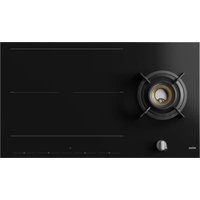
IG29571SVA - Cooker Atag - Free user manual and instructions
Find the device manual for free IG29571SVA Atag in PDF.


User questions about IG29571SVA Atag
0 question about this device. Answer the ones you know or ask your own.
Ask a new question about this device
Download the instructions for your Cooker in PDF format for free! Find your manual IG29571SVA - Atag and take your electronic device back in hand. On this page are published all the documents necessary for the use of your device. IG29571SVA by Atag.
USER MANUAL IG29571SVA Atag
| G20/20mbarG25.3/25mbar | |
| 6,0kW6,0kWWokbrander |

WAARSCHUWING!
Informations, consels, astuces, ourecommendations

ATTENTION!
Attention-danger

RACCORDEMENTAUGAZ
Attention-raccordementaugaz

RISQUEDECHOCÉLECTRIQUE!
Sécuritéanti-surchauffedesfoyersd'induction
Supportadaptateurpourwok
Ébullitionoucuissonal'eau
Appuyezsurlatoucheduchronometre.
| G20/20mbarG25.3/25mbar | |
| 6,0kW6,0kWWok-Brenner |

WARNING!
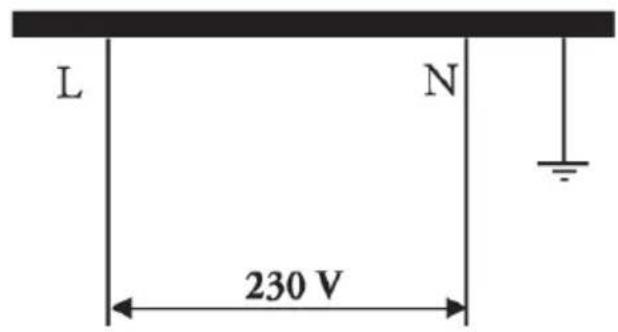
2Phasen-2Nullanschlüsse(NurNL)*1Phase-1Nullans
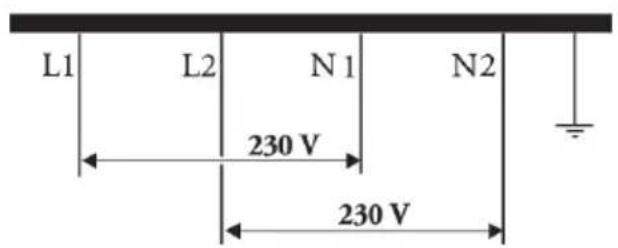
HINWEIS!
18Inductioncooking.
18Operationofthetouchkeysand sliders......
19Howinductionworks.
19Inductionsounds
20Pansforinductioncooking
22Wokburneruse.
22Pans
22Wokrfogmationaccordngtoregulation(EU)...
23 Part 6 Part 4
23Wokburnerposition
24Operation
24StartPreparing
24Standardcooking.
26CookingwiththePLUSmenu
28CookingwithCelsius ^ Cooking™
29
CookingwithCelsius ^ Cooking™ cookware andprograms.
Step-by-Stepcookingguideon
CelsiusCooking.com.
34Childlock
35Timerfunc
36Operation
38Wokburn
38Ignitionar
39Connectl
39Connectl
41Firmware
42Settings.
46Maintena
46Cleaning
46Cleaning
47Troubles
47General...
47Troublesh
52Technica
52
52Complian
53Installation
53Safety....
56Preparative
57Built-in....
58Gasconne
59Electrical
62Connectir
63Environn
63Disposal
64Yournote
The following symbols are used throughout themanual, and they havethe following meanings:

INFORMATION!
Information, advice, tip, or recommendation

WARNING!
Warning-generaldanger

GASCONNECTION!
Warning-gasconnection

ELECTRICSHOCK!
Warning-dangerofelectricshock

HOTSURFACE!
Warning-dangerofhotsurface

DANGEROFFIRE!
Warning-dangeroffire
Itisimportantthatyoucarefullyreadtheinstructions.
WARNING!
READCAREFULLYANDKEEPITFORFUTUREREFERENCE!
General
Themanufacturercannotbeheldliableforanydamageresulting fromfailuretofollowthesafetyinstructionsand warnings.
Damagecausedbyincorrectconnection,incorrectfitting,orincorrect useisnotcoveredbythewarranty.
WARNING!
-
Thisappliancecanbeusedbychildrenagedfrom8yearsand aboveandpersonswithreducedphysical,sensoryormental capabilitiesorlackofexperienceandknowledgeiftheyhave beengivensupervisionorinstructionconcerninguseofthe applianceinasafewayandunderstandthehazardsinvolved.
-
Thisapplianceandtheaccessiblepartswillbecomehotduring use.Donottouchhotparts.Kepchldrenyoungerthan8away fromtheapplianceunlesstheyareundercontinuous supervision.
-
Childrenshallnotplaywiththeappliance.Cleaninganduser maintenanceshallnotbemadebychildrenwithoutsupervision.
NOTE!
CAUTION! The cooking process has supervised. Ashort term cooking process has supervised continuously.
DANGEROFFIRE!
WARNING:Dangeroffire:donotstoreitemsonthecooking surfaces.
DANGEROFFIRE!
WARNING: Cooking with fatoroilonahob without supervision can bedangerousandcanleadtoa fire.
- NEVERtrytoextinguishafirewithwater. Instead, switch the applianceoffandthencoverthe flameswith,forexample, alid orafireblanket.
- Neverflambéunderacookerhood. Thehighflamescancause afire, evenifthecookerhoodisswitchedoff.
WARNING!
Useonlyhobguardsdesignedbythemanufacturerofthecooking applianceorindicatedbytheappliancemanufacturerinthe instructionsforuseassuableorhobguardsincorporatedinthe appliance.Theuseofinnappropriateguardscancauseaccidents.
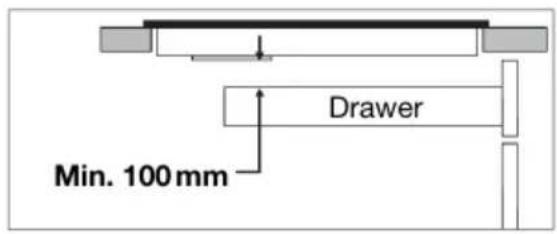
- Ifadrawerunderneaththeapplianceis permitted(seethe installationinstructions),withoutanintermediatebottom,this shouldnotbeusedtostorehighlyflammableobjects/materials. Ensurethatthereisadequateclearanceofafewcentimetres betweenthebottomofthehobandthecontentsofanydrawers.
Thehobisonlytobeusedforthepreparationoffood. - Thisapplianceisonlydesignedforhouseholduse.
- Theapplianceisnotdesignedforheatingrooms.
- Donotwarmclosedtinsonthehob. Therewillbeabuild-upof pressurethatwillcausetinstoexplode. Youmightgetinjuredorscalded.
- Nevercovertheappliancewithaclothorsomethingsimilar.Ifthe applianceisstillhotorisswitchedon,thereisariskoffire.
- Donotusetheapplianceerasaworktop. Theappliance may accidentallybeswitchedonorstillbehot, whichmeansobjectscouldmelt, becomehotorcatchfire.
- Donotusetheapplianceintemperaturesbelow 5^ C .
- The appliances should not be placed outdoors.
Safety
- Whenyouusethehobforthefirsttime,youwillnoticea“new smell”. Don’t worry, this is normal. If the kitchen is well ventilated, thesmellwillsoon disappear.
- Theapplianceisnotintendedtobeoperatedbymeansofan externaltimeroseparateremotecontrolsystem.
- Neveropenthecasingoftheappliance.
- Neveruseasteamcleanerforcleaningtheappliance.
Onlycleantheappliancewhenswitchedoff. The steamofasteam cleaner could reach the conducting partsandcauseanelectrical short.
- Theceramictopisextremelystrongbutnotunbreakable. Forexample,aspicejarorsharputensilfallingonitcouldcause ittobreak.
- ThehobisfittedwithaWi-Fimodulethatallowstheapplianceto connecttoamobiledevicessuchasasmartphoneortablet. Itofferstomonitorthecookinghobstatusviathemobiledevice. Forsafetyreasons,itisnotpossibletotremotelycontrol,turnon orturnoffthehob.Themonitoringfunctionviamobiledeviceshall notbeusedtorreplacethepersonalsupervisionofthecooking processdirectlyatthehob.
- Ifyoudecidetodiscontinueusingtheappliancebecauseofafault,werecommendyoucutoffthecableafterremovingtheplugfromtheplugsocket.Taketheappliancetoyourmunicipality'swastedisposalsite.
WARNING!
WARNING: If the surface is cracked, switch off the appliance to avoid the possibility of electric shock.
Ceramicglassplatebroke
- Shutimmediately offfallburners and any electrical heating element and isolate the appliance from the power supply.
- Donottouchtheappliancesurface.
-
Donotusetheappliance.
-
Donotkeepobjectsthatchildrenmightfindinteresting in cupboardsaboveorbehindtheappliance.
- Thecookingzones/burnersheatupduringuseandstayhot for awhileafterwards.Keepyoungchildrenawayfromthehobduring andimmediatelyaftercooking.
Gasburners

WARNING!
Prolongedintensiveuseoftheappliancemaycallforadditional ventilation,foreampleopeningofawindow,ormoreeffective ventilation,foreampleincreasingthelevelofmechanical ventilationwherepresent.
CAUTION: The use of gas cooking appliances in the production of heat, moisture and product of combustion in the room in which it is installed. Ensure that the kitchen is well ventilated especially when the appliance is in use: keep natural ventilation holes open to install mechanical ventilation device (mechanical extractor hood).
- Theburnercomponentsarehotduringandimmediatelyafteruse. Donottouchthem, and avoid contact with non-heatresistant materials.
- Neverimmersehotburnercapsandpansupportsincoldwater. Rapidcoolingcandamagetheenamel.
- Thedistancebetweenthepanandaknoborn-heatresistant wallshouldalwaysbegreaterthanonecentimetre.Inthecase ofsmallerdistances,thehightemperaturemaycausetheknobs orwalltodiscolourand/ordeform.
- Alwaysusethepansupportsandsuitablecookware.
- Alwaysplacethepanonthepansupport. Placingthepandirectly ontheburnercapcanresultindangeroussituations.
- Aluminiumtraysorfoilarenotsuitableascookingutensils. Theycanburnintotheburnercapsandpansupports.
Safety
- Thehobcanonlyfunctioneffectivelyiftheburnercomponents havebeenassembledusingtheguideridges.Ensurethat the pansupports Lieproperlyagainststeachotherandflatonthedrip tray.Onlythencanthepansbespositionedstably.
- Keepovenglovesorovenclothsawayfromtheflame.
- Donotusegriddleplatesorbakingplates.
- Cleantheburnerpartsregularlyforthesafeandcorrectoperation oftheburners.
- Missingrubberfeetfromthepansupportscancausescratches onthedriptrayorpoorcombustionoftheburner.lftherubber feetaremissiveing,pleasecontactourservicedepartment.
Inductioncookingzonesandcookingareas
- Donotplacemetalobjectssuchasknives,forks,spoons,and lidsonthesurfaceofthecookinghof;theymaybecomehot.
- Assoonasyouremovethepanfromthehob, thecookingprocess willstopautomatically. Getintothehabitofswitchingoffthe cookingzoneorhobmanuallytoavoidunintentionallyswitching ontheappliance.
- Afteruse, switchoffthehobeblement using the controls and don't rely only on the hepandetector.
- Rememberthatifthehobisusedinahighsetting,theheating timewillbeveryshort.Donotleavethehobunattendedifyouare usingazoneinahighsetting.
- Whentheinductionhobisinuse,keepobjectsthataresensitive tomagneticfields(creditcards,bankcards, discs, watchesand similaritems)awayfromthehob. Weadviseanyonewitha pacemakertoconsulttheircardiologistfirst.
- Neverusealuminiumfoilforcooking, and neverplaceproducts packagingaluminiumonthehob. Thealuminiumwouldmelt andirreparablydamageyourdevice.
Safeuse
Temperaturesafetyinductionzones
- Thehobisfittedwithacoolingfanwhichcoolstheeelectroniccomponentsduringcooking. Thefanmayoperatorawhile,evenaftertheendofthecookingprocess.
- Thecookinghobisalsofittedwithanoverheatingprotectorwhichprotectstheelectronic componentsfromdamage.Theprotectoroperatesinseveralways.Whenthecookingzone temperaturegetsveryhigh, thecookingpowerisautomaticallyreduced.lfthisdoesnot suffice, thecookingzonepowercontinuestodecrease,untilthesafetymechanismsswitchthecooking zonecompletely. Whenthecookinghobiscooledown, itstotalpowerwillbeavailableagain.
Cookingtimelimiter

WARNING!
Thecooking-timelimiterisasaftefunctionofyourcookingappliance.Itwilloperateifyouforget toswitchoffyourhob.
Dependingonthesettingyouhavechosen, thecookingtimewillbelimitedasfollows:
| Cookingsettings | Thecookingzoneorwokburnerswitchesoff automaticallyafter: |
| 9hours1and2 | |
| 6hours3,4and5 | |
| 4hours6,7and8 | |
| 3hours9 | |
| 2hours10 | |
| 1hour11and12 |
Thecooking-timelimiterswitchesthecookingzonesoffifthetimeinthetablehaselapsed.
| Cookingsettings | Thecookingzoneswitchestosetting12 automaticallyafter: |
| 10minutesboost |
NOTE!
- TheCooking-timelimiterforthespecificcookingzoneisresetaftertheuserhaschanged thecookinglevelofthespecificcookingzone.
- Cookingzonerelatedtimerstakepriorityoverthecooking-timelimiter.
Powermanagement
The induction part of this hobisequipped withasmartpowermanagementsystem. This system ensures a maximum permissible power cannot be exceeded for safety reasons.
- Thesmartpowermanagementsystemwillarrangethepowerdistributionacrossthezones automatically. This meansthehobcouldautomaticallydecreasethepowerononezonewhen thepowerlevelofanotherzoneisincreased. Thelevelofactivityofthepowermanagement systemdependsontheavailablepowerperelectricalphase,thesettingofthecurrentlimiter andtheconnectedload.
- Thepowerlevelofonezonecanaffectthepowerofanotherzoneeasthemaximumavailable powerisdistributedamongthezones.lfthecombinedzonesreachthemaximumavailable powerwhenanewpowerlevelisset, thepowerlevelsofoneormorezonesareautomatically reducedwithinthepowerlimit. This is indicated by the flashing oftherelevantcontrol element.
- Interventionbythesmartpowermanagementsystemismorelikelywhenthecurrentlimiteris settoalowerlevel.
- The current limiter setting must be set according to your connection and circuit breakers by a registered and qualified installer (see 'Current limiter' for the details on currents and electrical installation).
Dearcustomer!
Please read the operating instructions before use. They include general tips, information about the settings and adjustments you can make, and the best way to take care of your appliance.
The manual also serves as reference material for service technicians. Please, therefore, stick the applianceidentificationcardinthespaceprovidedatthebackofthemanual.Theappliance identificationcardcontainsalltheinformationthattheservicetechnicianwillneedinordertorespond appropriatelytoyounearedsandquestions.
TIP!
You can find themostrecentversionoftheinstructionsforuseonourwebsite.
Enjoyyourcooking!
Theseinstructions
These instructions are written for:
- Theuser;toquicklybecomefamiliarandmakeoptimaluseoftheappliance.
- Aninstaller; to install the appliance in accordance with the applicable standards.
The table below gives you information on the different chapters you can find in order in these instructions.
| PurposePageChapter | ||
| Pictograms used | Explainsthepictogramsusedintheseinstructions.3 | |
| Safety | 4 | Providesinformation, warningsandtipsonusingtheappliance safelysothatyouwillnotgethurtandthedevicewillnot malfunction. Alwaysreadthissectionthoroughlybefore using theappliance. |
| Your gas-induction hob | 11 | Describestheavailablefunctionsoftheappliance.Thetables clearlyshowwhatthedifferentkeyscanbeusedfor. Thevariouspossibledisplaysandmessagesontheappliance arealsoexplained. |
| Induction use | 18 | Thischapterfindsinformationontheoperationanduseof induction.Youwillalsofindadviceonthecookwaretobe usedandinformationoncookinglevels. |
| Operation | 24 | Itgivestoupstep-by-stepinformationonhowtooperatethe device. Thestepsincludelustrationsthatabestofaleft-side drawingsshowingtheaction(whichkeytotouch)anda right-sideddrawingshowingthereactionofthedevice. |
| ConnectLife and Wi-Fi | Refertothissectionifyouwanttoconnecttheapplianceto Wi-Fiyourhome.Italsodescribeshowtousethe ConnectLifeappandhowtoupdatetheappliancefirmware. | |
| Settings | 42 | Youcanfullycustomisetheinductionzonesofthis gas-inductionhobtoyourcookingstyle!Severalsettings can beadjusted. Thischapteralsocontainssettingsforthe installer. |
Yourgas-inductionmob
Tablecontinuedfromlastpage
| PurposePageChapter | ||
| Maintenance | Providesinformationoncleaningandmaintainingyourdevice.46 | |
| Troubleshooting | 47 | Iftheappliancedoesnotworkcorrectlyyordisplayscunclear messages,pleaserefertothissection. |
| Technical data | 52 | Describesthetechanicaldataandspecificationsofyour appliance. |
| Environmental aspects | 63 | Itgivesyoupackaginginformationandhowtodisposeofthe appliancesponsiblyattheendofitslife. |
| Installation | 53 | Thischaperisintendedfortheinstaller.Onlyaqualified installermayinstallthisappliance. |
Description
Sincetheappliancesforwhichtheseinstructionsweredrawnupmayhavedefterequipment, somefunctionsorequirementmaybedescribedinthemanualthatmaynotbepresentinyour appliance.
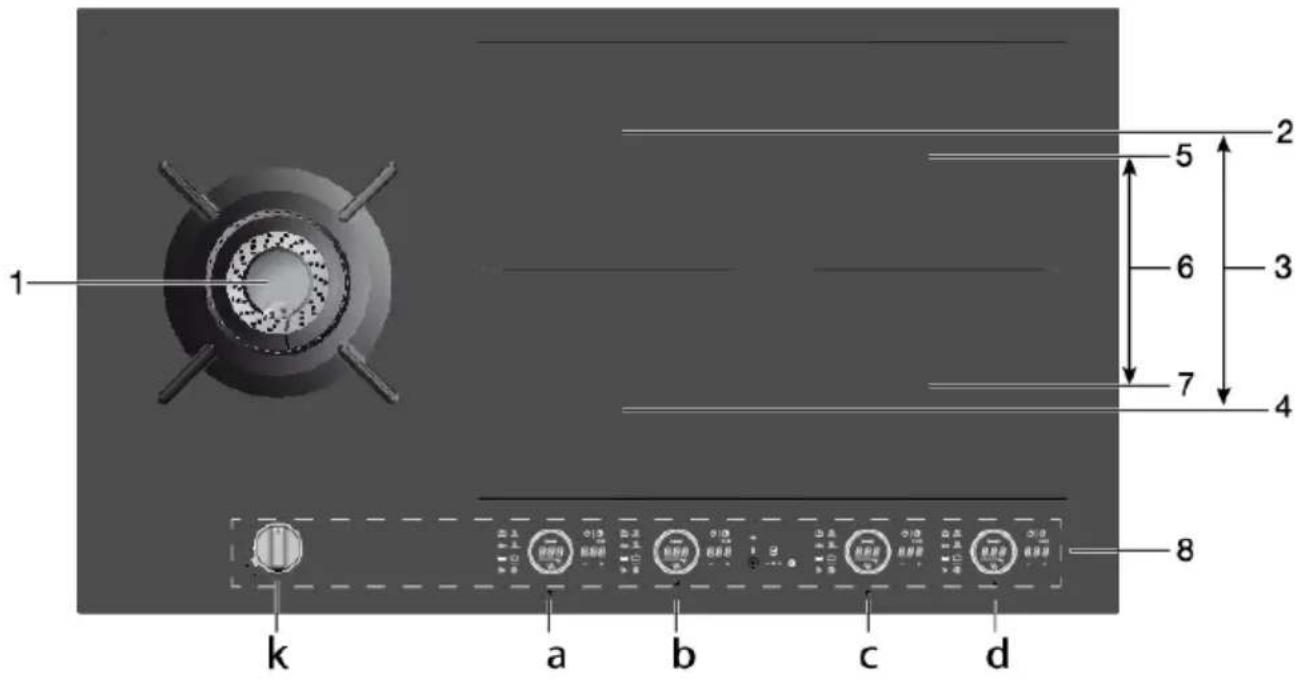
1.FusionVolcanowokburner(gas)tobeoperatedwith'k'
2.BridgeInductionCookingzone18x22cm/max.2.3kW/max.3.7kW(boost)tobeoperated with 'b'
3 Connected Bridgeinductioncookingzones(2and4)controlwith'a'
4.BridgelnductionCookingzone18x22cm/max.2.3kW/max.3.7kW(boost)tobeoperated with'a'
5.BridgelnductionCookingzone18x22cm/max.2.3kW/max.3.7kW(boost)tobeoperated with'd'
6. Connected Bridge induction cooking zones (5 and 7) to be operated with 'c'
7.BridgeInductionCookingzone18x22cm/max.2.3kW/max.3.7kW(boost)tobeoperated with 'c'
8. Controlpanel(visibleonlywhenthehobisturnedon)

INFORMATION!
Themaximumpoweroutputisdependingonthethetypeofcookwareusedandthethermalcondition oftheappliance.
Yourgas-inductionhob
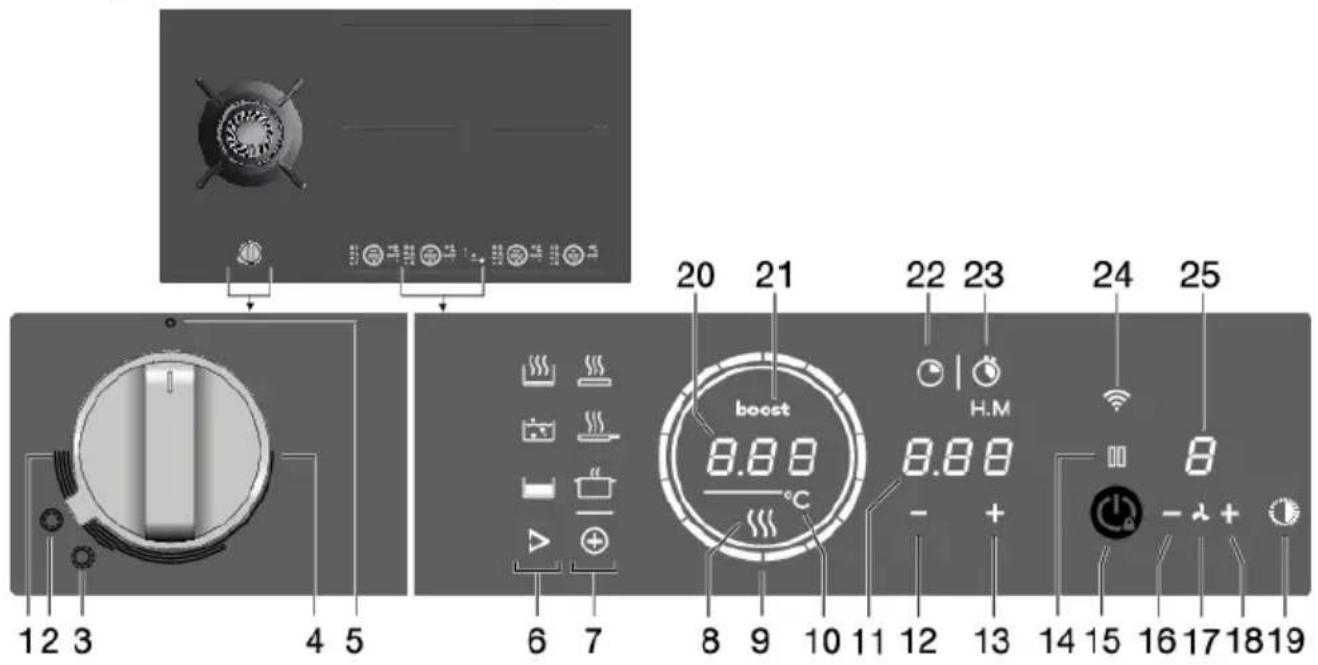
Controlpanel
1.Highsetting
2.Woksetting(wokburner)
3.Roastingsetting(wokburner)
4.Lowsetting
5.0position
6. TouchkeytostartCelsius ^ Cooking™ programs
7. TouchkeytostartPLUSprograms
8.ResidualHeatindication
9.Slidecontrol(12settings)/Hobstandbyindication
10.DegreesCelsiusindicationforCelsius ^ Cooking™ andPLUSprograms.
11.Displaytimefunction
12. Timesetting-(minus)touchkey
13. Timesetting+ (plus)touchkey
14.Pausetouchkey
15. On/Off and Childlocktouchkey
16.Extractionhood(linked)lowerextraction-(minus)touchkey
17.Extractionhood(linked)extractiontouchkey
18.Extractionhood(linked)switchonandhigherextraction+(plus)touchkey
19.Extractionhood(linked)lightingtouchkey
20.Displaycookingsettings/Textdisplay
21. Boostindicator
22.Count-downtimertouchkey
23. Touchkeyfordisplaycookingtime-stopwatch
24.Wi-Fi/connectivitytouchkey
25.Extractionhood(linked)displayextractionlevel
Explanationofthetouchkeysfunction
| Touchkey/slider | Description(seechapter'Operation') |
| On/Off | Switchingthobon/off Theappliancecanbeswitchedonandoffwiththeon/offkey. |
| Childlock Thecookingzonescanbelockedandunlockedtopreventthemfrom beingswitchedoninadvertently.Touchtheon/offkeyforapproximately 3seconds. | |
| Slidecontrol(12settings) | Sliderinnercircle •Hobswitchedonindication. •Ifthehobisswitchedoffandatleastoneofthecookingzones is stillhot,theinnercircleremainsilluminated.Whenthetemperature ofthehobdropsbelow65°C,theinnercirclealsogoesout. |
| Slideroutercircle •Settingcookingzonepowerlevels. •SettingtemperatureforCelsius°CookingTMandPLUSfunction. | |
| Pause | Pause Thepausefunctioncanbeusedtopausetheoperationoftheentire cookinghobforupto10minutes.Thisgivesyoutimetosafelyclean thecookinghobwithoutlosingyoursettings. |
| Wi-Fi | Wi-Fi ThecookinghobisequippedwithaWi-Fimodulethatallowsthe appliancetoconnecttoamobiledevicessuchasasmartphoneor tablet.Itofferstomonitorthecookinghobstatusviathemobiledevice.Itisnotpossibletromotelycontrol,turnon,orturnoffthecookinghob forsafetyreasons. Themonitoringfunctionviamobiledevicesshallnotbeusedtodirectly replacethecookingprocesspersonalsupervisiononthecookinghob. |
| Count-downtimer | Count-downtimer Thecount-downtimermakensthecookingprocessesasierbysettingthe cookingtimefortheselectedcookingzone.Whenthetimesetonthe timerexpires,thecookingzonewillautomaticallyswitchoffandemit anacousticsignal.Youcanswitchofftheacousticsignalbytouching thecount-downtimerkey;alternatively,itwillswitchoffautomatically afterawhile.Youcansetthecount-downtimerindependentlyforall cookingzones. |
| Stopwatch | Cookingtimedisplay-stopwatch Thestopwatchcanbeusedtoseehowlongyouhavebeen continuouslycookingontheselectedcookingzoneandstartscounting automaticallyinthebackground. |
Tablecontinuedfrom/lastpage
| Touchkey/slider | Description(seechapter'Operation') |
| - + Extractionhood(linked) | Operationlinkedextractionhood IfyouownacompatibleRFEnabledhood,itcanbeconnectedtothe inductionpartofyourmob.Topairandcustomizethebehaviourofyour hoodseechapter'Settings'.Parameterthisusedforpairing,while hStandhSceffecttthebehaviourofyourhoodsoyoucancustomize itacceedingtoyourkitchenhabbits. |
Programfunctionexplanation
| Program | Description(seechapter'Operation') | |
| Celsius°CookingTMOnlyvisibleasaCelsius°CookingTMpanorprobeisdetected. | HeatingupandfryingThisprogramistoreachhightemperaturesrapidly.Highpanbottomtemperaturescanbereached.Alwaysaddoilorbutterbeforestartingit.Forhealthycookingdon'texceedthesmokepointoftheusedoil. | |
| Boiling/cookingwithwaterWiththisprogram,thewatergetstoboilquickly.Alwayssaddwaterbeforestarting. | ||
| SlowcookingousvideThisprogramistocontroltomediumtemperatures,preventinghighbottomtemperatures.Largerquantitiesandthickerdishesneedtoeb stirredoccasionallytoensureahomogeneousheatdistribution. | ||
| PLUS(Automaticcookingprograms) | GrillThisfunctionisexclusivelyforBridgelnductioncookingzones,thatarelinkedtocreateonelargercookingzone.GrillingisoptimizedforATAGinductionaccessoriesgrillplateandteppanyaki.Butitwillalsoworkwithdifferentcookware,butperhapslessaccurate. | |
| Frying/wokWiththisfunction,youcancookvegetables,fish,bacon,meat,friedpotatoes,oreggsinbutteroroil. | ||
| Heatingup/keepingwarmWiththisfunctionyoucan,forexample,meltchocolate(45°C),keepfoodwarm(70°C),simmer(94°C)orbringittoboil(100°C). | ||
Hobrecallfunction
Thisfeatureallowsyoutorecallallthesettingsofthecookingzonesifthehobwasaccidentally switchedoff.
Within6seconds, the hobmustbeswitchedbackon. Pressinganywhereonthesliderwithin 6seconds recallsallthesettingsfrombeforethelastswitchingoffoftheappliance.
Panmovefunction
Ifyouremovethepanfromanactivecookingzoneandwithin6secondsplaceitonadifferent cookingzone,youcantransferallthetimerandcooking-relatedsettingstothenewcookingzone bytouchingthesliderofthenewcookingzone.Toindicatethispossibility,thenewcookingzone displayscopiedsettingsontheslider.Whentheconfirmationisdone,thepreviouscookingzoneis deactivated.
Indicationsonthedisplay
| StatusIndisplay | |
| - | Powerlevel'0'foracookingzone. |
| 12 | Powerlevelthatissetforacookingzone;1=low/12=high. |
| boost | Boostfunctionalactive. |
| L | Thelockingfunctionisactivated;thecontrolpanelislocked. |
| Residualheatindicator:Thehobhasaresidualheatindicatorforeachcooking zone showwhich cooking zones are hot after the cooking zoneisturnedoff. Although the hobisswitchedoff, the indicator will remainonaslongasthe cooking zone ishot! Avoidtouching those cooking zones when this indicator islit. | |
| HOTSURFACE! | |
| Danger! Riskofburns. | |
| E | ErrorCode;Seechapter 'Troubleshooting'. |
| °C | Degrees Celsius indication for Celsius ° CookingTM and PLUS programs. |
Inductioncooking

Inductioncookingisfast
Tostartwith, you will besurprised by the speed of induction cooking. Especially athighersettings, foodsandliquidswillcometoaboilvery rapidly. It is bestnottoleavepansunattendedtoavoidthemboiling overorboilingdry. With induction cooking, there is no heat loss, and the handlestaycool.
Thepowerleveladjustsitself
Ininductioncooking,onlythezoneonwhichthepanisplacedisused.Ifyouuseasmallpanona largezone,thezonewilladjustthepowertothepan'sdiameter.Thepowerwillthusbelow,and itwilltakealongerbeforethefoodcomestoaboil.

INFORMATION!
- Grainsofsandmaycausescratchesthatyoucannotremove. Therefore,onlyputpanswithcleanbaseonthecooking surfaceandalwayspickpansuptomovethem.
- Donotusethehobasaworktop.
- Alwayskeepethelidonthepanwhencooking, inordertoavoid energyloss.
Operationofthetouchkeysand sliders
- Thetouchcontrolsmaytakesomegettingusedtoifyouareusedtoother(rotary)controls.
Placethetipofyourfingerflatonthecontroltoachievethebestresults. - The touch sensors only react to the light pressure of a fingertip. Do not operate the controls with anyotherobjects.
- The cooking hob is operated by a slider. You can either touch the selected part of the slider or slideinacirculararmotionclockwisetoincreaseoranti-clockwisetodecreasethepowerlevel andtemperature.
- To set the cooking zone power level, touch the desired spot on the slider. As you touch the slider, theselectedpowerlevelwillappearonthecookingzonedisplayunit.
- Theselectedpartofthesliderwillbefullylit.
- Donotuseanyobjectstooperatethesslider.
Howinductionworks
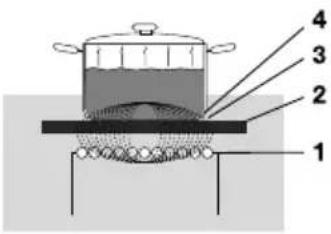
Thecoil(1)inthehob(2)generatesamagneticfield(3).Byplacinga panwithanironbase(4)onthecoil,acurrentisinducedinthebase ofthepan.
Easy
The electronic controls are accurate and easy to set. On the lowest setting, you can melt chocolate directly in the pan, for example, or cooking ingredients that you would normally heat in aubain-Marie.
Fast
Thanks to the induction hob's high power levels, bringing food to the boil is very quick. Cooking food takes just as long as those types of cooking.
Clean
Thehobiseasytoclean.Because the cooking zones donotgetanyhotterthanhepansthemelves, foodspills cannot burn into the glass.
Safe
Theheatisgeneratedinthepanitself.Theglasstopdoesnotgetanyhottherthanhepan.Thismeans that the cooking zone is considerably cooler than aceramicchob,forexample.
Onceapanhasbeenremoved, the cookingzonecoolsdownquickly.
Capacitydistributionofcookingzones
Depending on the hob model, the cooking zones can affect each other. Whenever cooking zones are switched simultaneously, the available capacity is shared automatically between them.
Whenthemaximumcapacityofthecombinationofcookinglevelsisreachedduringsetting,oneormorezonesareautomaticallyreducedtothehighestpossiblesettingatthatmoment. Thisisindicated bytheflashingofftherelevantcontrolelement.
Inductionsounds
Tickingsound
Alighttickingsounddiscausedbythecapacitylimiteronthefrontandbackzones.Asoftticking soundcanalsooccuratlowersettings.
Panmakessounds
Thepancanmakesoundsduringcooking. Thisiscausedbytheenergyflowingfromthehobtothe pan. Thisisnormalforcertainpans, particularly athighsettings. Thisisnotharmfulforthepansor the Hob.
Ventilatormakessounds
Theapplianceisfittedwithaventilatorinordertoincreasethelifespanofelectroniccomponents. Ifyouusetheapplianceintensively,theventilatorwillbeswitchedonandyouwillhearahumming sound.Theventilatorcanalsomakesoundsafteryouhaven'tswitchedofftheappliance.
Pansforinductioncooking
Inductioncookingrequiresaparticulartypeofpanintermsofquality.
- Pansthavethavealreadybeenusedforcookingonagashobarenolongersuitableforuseon aninduction Hob.
- Onlyusepansthataresuitableforelectricandinductioncookingwith:
-athickbaseofaminimumof2.25mm;
-aflatbase.
TIP!
You can use amagnettocheck whetheryour pansaresuitable. Apanissuableifthebase of the panis attracted by themagnet.
| UnsuitableSuitable | |
| EarthenwareSpecialstainlesssteelpans | |
| StainlesssteelClassInduction | |
| PorcelainSolidanemelledpans | |
| CopperEnamelledcast-ironpans | |
| Plastic | |
| Aluminium |

WARNING!
Becarefulwiththinenamelledsheetsteelpans:
- theenamemaycome loose from the steelathigh settingsifthepanboilsdry;
- highpowerlevelsettingsmaycausethebaseofthepantowarp.
Neverusepanswithamisshapenbase.Aholloworroundedbasecaninterferewiththeoperation oftheoverheatingprotection,causingtheappliancetobecometoohot. Thismayleadtothe glasstopcrackingandthepanbasemelting.Damagecausedbyusingunsuitablepansorboiling dryisexcludedfromtheguarantee.
Pandiameter
Theminiumdiameterforthepanbaseis12cm.Ifapanistoosmall,thezonewillnotwork.
Pressurecookers
Inductioncookingisveryssuitableforpressurecookers.Thefast-reactingcookingzonebringes the pressurecookertopressurequickly.Assoonasyouswitchoffacookingzone,thedishstops cookingimmediately.
Pandetection
Thecookingzoneautomaticallydetectsasuitablepanplacedonacookingzone.Thecookingzone displaylightsup.
Integratedpanrecognition
Ifacertainpowerlevelissetforacookingzoneandthereisno(suitable)panonthecookingzone, thecookingzonewillnotdeliveranypower. Afteracertainperiod, thecookingzonewillswitchoff automatically.
Grillplates
ThehobhasaGrillfunction(dependingonthemodel)forusingagrillplate.Thefunctionkeepsthe grillplateatanidealtemperatureforgrilling.
Cookingsettings
Because the settings depend on the quantity and composition of the panandits contents, the table below is intended as a guideline only.
| PurposeLevel | |
| Usesettings1-5to: | •simmerbouillon, •stewmeats, •simmervegetables, •meltchocolate, •poach, •meltcheese. |
| Usesettings6-9to: | •completethecookingoflargequantities, •defrosthardvegetables, •frythickslicesofbreadedmeat. |
| Usesettings10-11to: | •frythickpancakes, •frybacon(fat), •cookrawpotatoes, •makebreadedfish, •cookthroughfish, •frythinslicesofbreadedmeat. |
| Usesetting12to: | •searmeats, •cookfish, •cookomelettes, •fryboiledpotatoes, •deepfryfoods. |
| Usesettingboostto: | •bringliquidstoaboilquickly, •shrinkgreens, •heatoilandfat, •wok. |
Pans
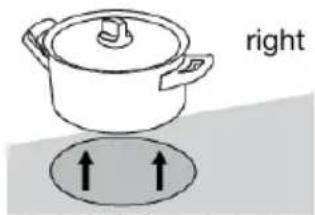
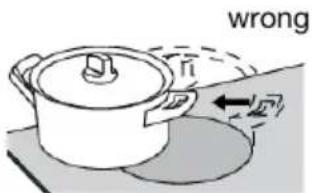
Alwaysensurethattheflamesremainunderthepan.Alotofenergyislostwhenflamesburnaround theoutsideofthepan.Thehandscouldalsobecome toohot.
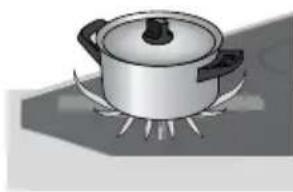
wrong
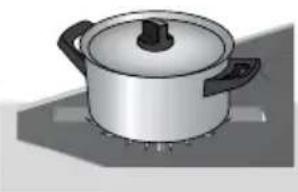
right
Suitablecookware
Onlyusecookwarewithasuitablediameter.Thecookwaremustnotprotrudeovertheedgeofth hob.Neverusesmallcookwareonlargeburners.Theflamesmustnottouchthesidesofthecookware. Refertothetable.
| MinimumpanbottomdiameterBulMaximumpanbottom diameter | |
| 30cm22cmWokburner |
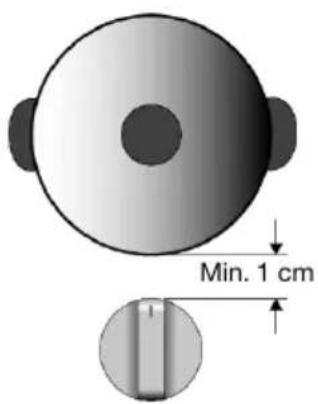
WARNING!
Thedistancebetweenthepanandaknoborn-non-heatresistantwall shouldalwaysbegreaterthanonecentimetre. Inthecaseofsmaller distances, thehightemperaturemaycausetheknobsorwallto discolourand/ordeform.
Wokring
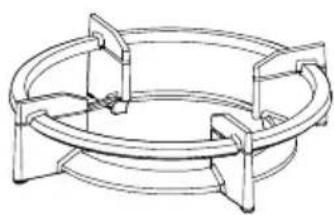
Wok ring
Thewokringforusewiththewokburnersuppliedorobtainableasan accessoryprovidesextrastabilityforwokswitharoundbase.
NOTE!
Onlyusethewokringonthewoksettingincombinationwitha (round-based)wok. Thewokringmaydiscolourifusedonthe searingsetting.
Pansupport
Placethepansupportvertically,withoutslidingitovertheglasstop.Usethepositioningnotchestop positiontheponsupportontheglasstop.
Wokburnerposition
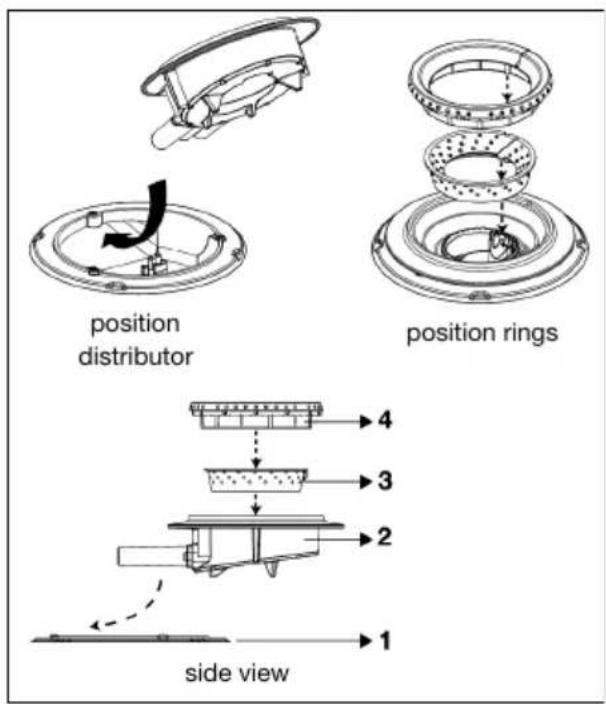
Placethewokburnerinthecorrectway. Placingthewokburnerpartsincorrectlycan resultinapoorlyfunctioningburner.
- Placetheburnerdistributor(2) in the burnerhousing(1).
- Use the deposition of the stochoplathe innerring(3) ontheburnerdistributer(2).
3.Usethepositioningnotchestoplacethe outerring(4)ontheburnerdistributor(2).
StartPreparing
Threecookingmodesareavailable:
1.Standardcookingwithpowerlevels.
2.CookingwiththePLUSmenu.
3.CookingwithCelsius ^ Cooking™ bymeasuring cookware temperature (available depending on themodel)
Standardcooking
- Placeapanonacookingzone.
- Touchtheon/offkeytoswitchchonthob.

- Asingleaudiosignalsounds.
- Theinneringswilllightup.
- All the sliders light up; then they gradually go out. The slider only remains lit for the selected cookingzonesonwhichyouhaveplacedapan.
3.Slidewithyourfingerovertheslidecontrol(clockwise)ortapwithyourfingerontheslidecontrol tosetthedesiredsetting.
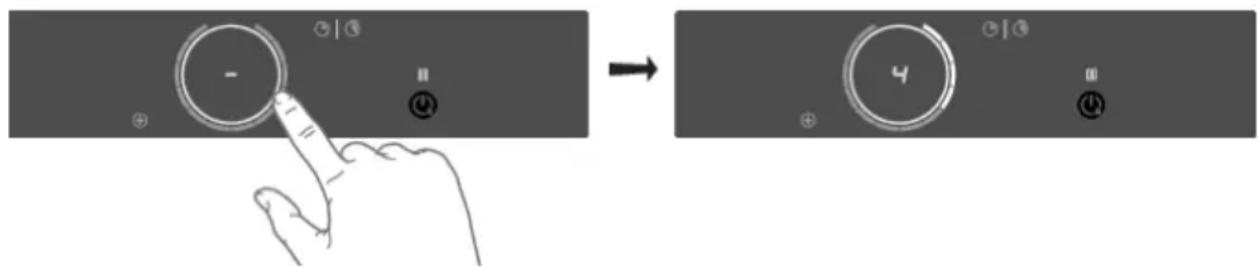
-
Thecookingzonestartsautomaticallyatthesettingthathasbeenset.
-
Setahigherorlowersettingbyslidingovertheslidecontrolwithyourfingerorbytapping on theslidecontrol.
-
The cooking zones have 12 settings. There is also a 'boost' setting.
-
Removethepanortouchthesliderfor3secondstoswitchthecookingzoneoff.
NOTE!
Whennocookingzoneisactivefor60seconds, the cooking hob will poweroff.
Boost
You can use the 'boost' function for cooking at the highest power level during a short time (max. 10minutes). Afterthemaximumboosttimehaspassed, thepowerwillbereductossetting12.
- Placeapanonacookingzone.
- Touchlevel12ofthesliderorslidealonglevel12tosettheboostlevel. Touchlevel12twiceif 'AutoBoost'isoff(refertochapter'Settings').

12' and 'boost' appear in the display.
- If 'Auto Boost' is active, boost is automatically activated when power level 12 is selected (consultchapter'Settings').
- Todeactivatetheboostfortheselectedcookingzone,againtouchlevel12ontheslider.
NOTE!
Toavoidoverheating, the electronic controlsystem may automatically deactivate boost prematurely and decrease the power level to 12.
If there is no suitable panon the cooking zone, the set level of temperature will flash. After one minute, the cooking zone will be switched off.
CookingwiththePLUSmenu
ThePLUSmenuallowscookingwithsemi-automaticprograms,enablingtemperaturecookingfor allkindsofcookwarethatfittheprogram'spurpose.
-
TouchthePLUSmenukeytodisplaytheprogramline:keepingwarm/heatingup,frying/wok, andgrill.
-
WhenselectingtheGrillprogram, you must use agrillplate that covers twolinked cooking zones.
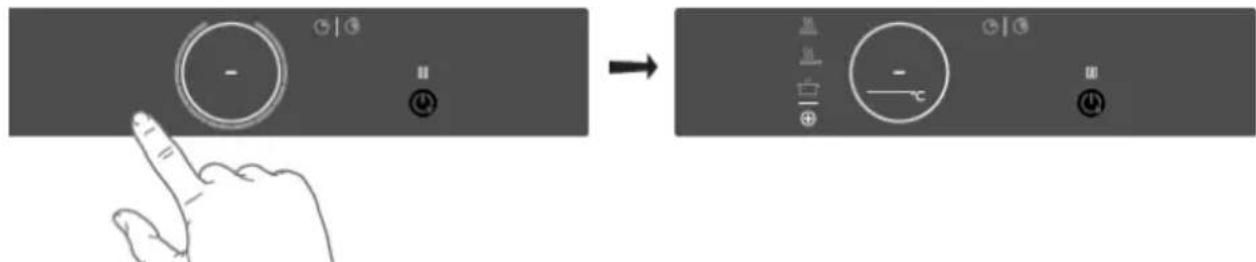
- Select the desired program and temperaturerange by touching therelevantsymbol. You can also toggle through themenuortemperatureby long-pressing the relating touchkey.
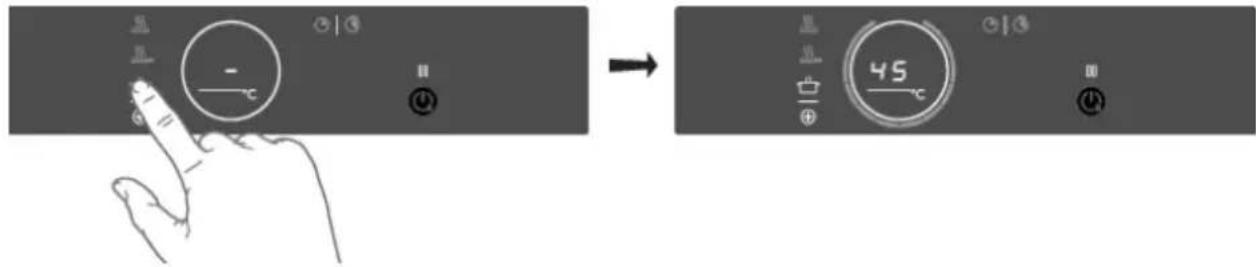
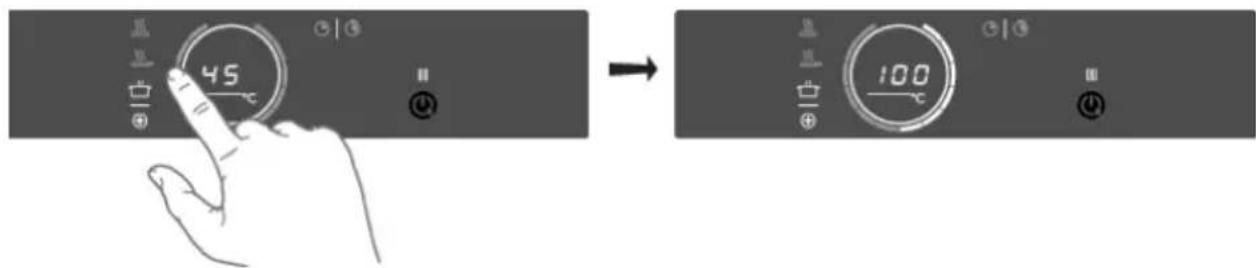
When the program mortemperatureselectiondoesnotchangefor3seconds, the program is activated. TodeactivateaPLUSprogram, press the active program key for about three seconds, select a powerlevelmanually.
NOTE!
Alwaysaddwater,oilorbutterbeforestartingaprogram;donotuseanemptytanorpot.
KeepingwarmandHeatingup
| UseTemperature(℃) | |
| meltchocolate45 | |
| heatingup/keepingwarm70 | |
| simmervegetables94 | |
| bringfoodorliquidtotheboilquickly100 |
Frying/wok
| UseTemperature(℃) | |
| fish,bacon,friedegg,vegetablesinbutter140/160 | |
| schnitzel,sausages,jacketpotatoes180/200 | |
| wok220 |
Grill
This functionisexclusivelyforconnectedBridgelnductioncookingzonesthatarecombinedtoform alargercookingzone.
GrillingisoptimizedforATAGinductionaccessories:thegrillplateandtheteppanyaki.Itwillalso workwithdifferentcookware,butperhapsslessaccurate.
Somefunctionsareindicatingtheheatuptime,countingdown.Intheheating-upstage,theslider andthesettemperaturewillflash.Whenthesettemperaturewisreached,ashortbeepwillbeemitted, andthesliderwillbeconstantlylit.Youmaythenstartcooking.
ThesensorwhichmeasuressthemperaturewhilecookingwithinthePLUSmenuprogramsislocated intheglassbelowthecookware.Becauseofthis,thereisalwaysanoffsetbetweenthesetpointand theactualtemperatureofthecontentinsidethecookware.Thetemperatureofthecontentinside thecookwareisthereforealsodependentonfactorssuchasthetypeofpan,thevolumeofliquid andwhetheralidisplacedonthepan.
NOTE!
Uptoatemperatureof 94^ , the programs allow the hobotreach and maintain the set temperature automatically by measuring the glasssurfacetemperature. This will avoid liquids overflowing and burning on the bottom of the pan.
NOTE!
From 100^ Contheseprogramswillheatcookwarewithdifferenttimedpowersteps. Theset temperatureservesasanindicationoftheapproximatelytobereachedtemperaturerange. Someonemustalwaysbepresenttosupervisethecookingprocess.
NOTE!
For more accuracy, Celsius Cooking™ cookware such as Frying Pan, Chef's Pot or the Probe is recommended, with separate functions for it (see chapter 'Cooking with Celsius Cooking™').
NOTE!
Startingthesemenufunctionsatthebeginningofthecookingprocesswillgivethebestresults.
Analreadyhotsurfacewillinfluencetheperformance.
CookingwithCelsius ^ Cooking™
Introduction
WelcometoCelsius CookingTM.
In order to get the most out of these and explore what's possible with Celsius Cooking™, you can also buy some additional connected equipment that will help you gain total control over temperatures and timings.
Additionalaccessoriesareincludedwithsomemodels.
ThisequipmentletsyouunlockthefullpowerofCelsius ^ Cooking™,readingandcommunicating exactinformationaboutthe temperatureof your ingredients,givingperfectresults.The equipment is:
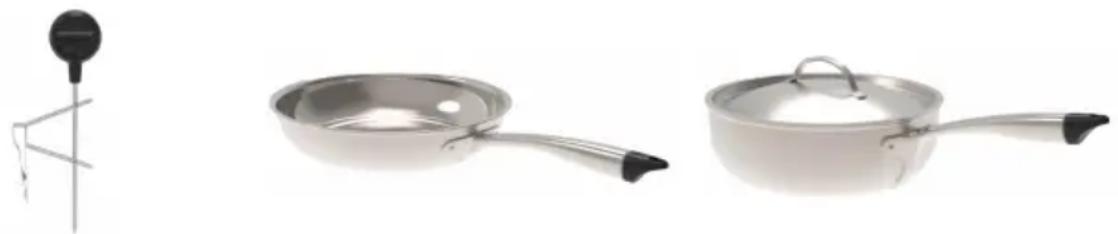
Chef'spotFryingpanProbe
Findoutmoreatwww.celsiuscooking.com, www.atag.nl/www.atag.be.
CookingwithCelsius ^ Cooking™ cookwareandprograms
This option involves cooking using either the Celsius Cooking™ cookware (frying pan or pot's) that continuously measures the temperature inside the cookware or the Celsius Cooking™ temperature probe. Alluse Bluetooth connectionstosend information about the temperature to the cooking hob.
Preparingthesystem
Beforeyoustartcooking,pleasemakesureyoucompletealthepreparationsteps. Otherwise,you mayrunintodifficultiesorinadvertentlycauseddamagetohesystem.
Using Celsius Cooking™ ensures the cookware is always at the right temperature needed to prepare the foodyouarecooking.
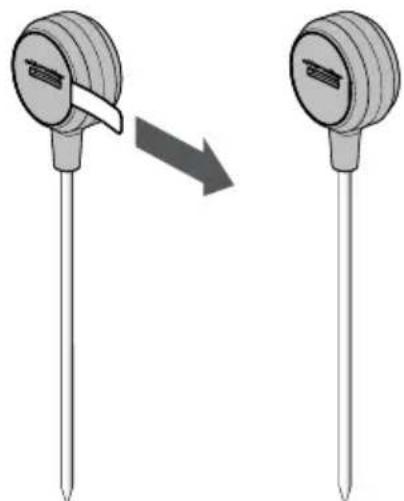
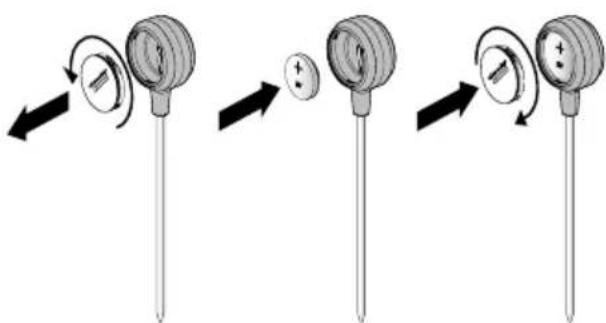
PrepareCelsius ^ Cooking ^TM Probe
1.Pullthebatteryprotectionaboutofthe Celsius ^ CookingTMProbehousing.
2. The Celsius Cooking™ Probe is ready to be used. If necessary, replace the battery.
BatteryinstallationCelsius CookingTM Probe
1.Unscrewandremovethebatterycover andreplacethebattery(negative(-)side goesinfirst).
2. Replace the battery cover. Donot overtighten.
InserttheCelsius CookingTM Probeintoacookingpan
The Celsius ^ Cooking™ Probe can be used with different types and sizes of pans. Due to the use of asuspensionbracketwithdifferentholes, the Probecanbesuspendedindifferentways.
Operation
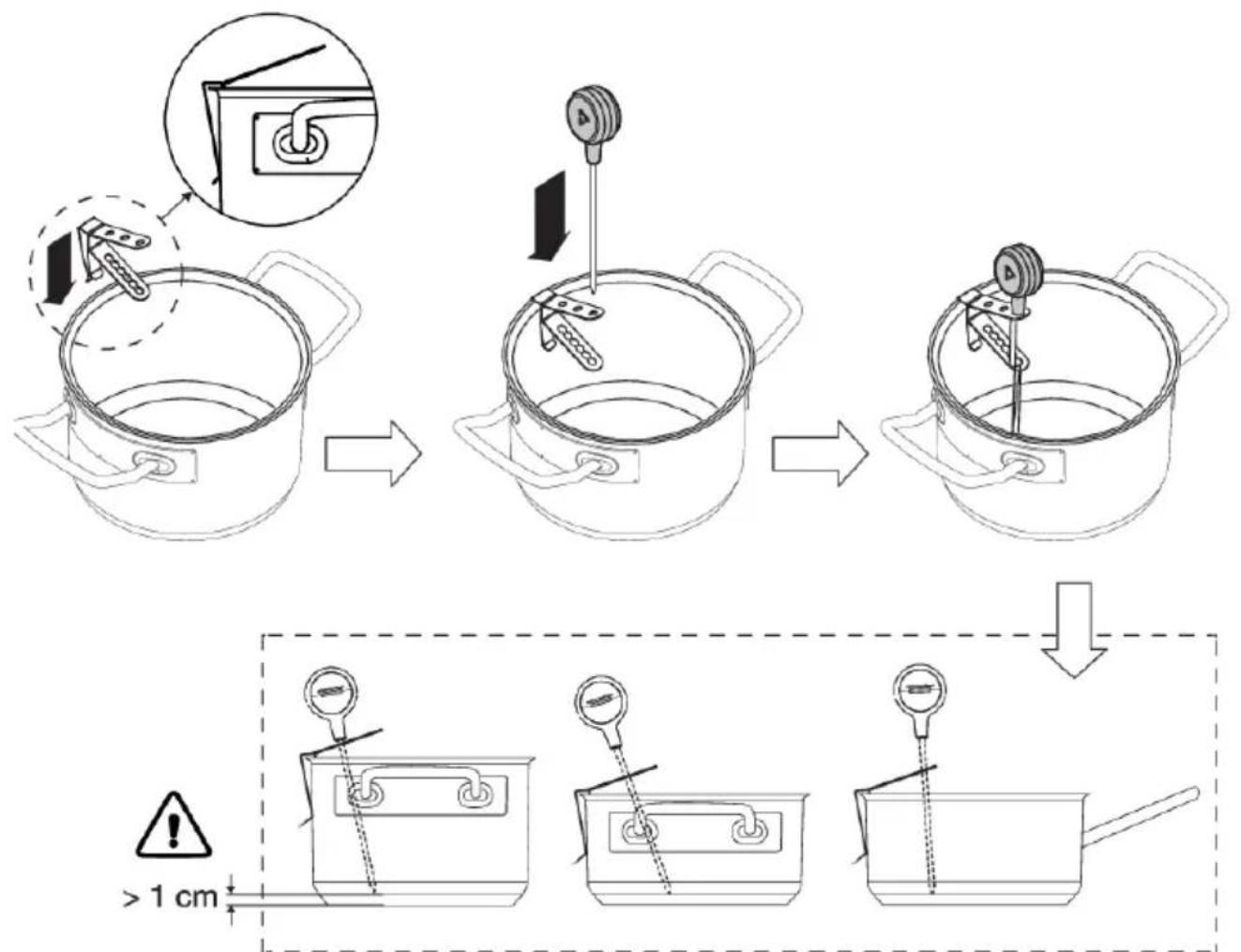
1.Slidethesuspensionbracketoverthepanedge.
2.Inserttheprobeintohesuspensionbracketfromabove.
NOTE!
- Leaveaminimumdistanceof1cmbetweenthepanbaseandthemeasuringpointofthe probe!
- Incasetheconnectivitybetweencookwareandthehobisunstable, thiscouldbeduetoa lowbattery. Inthosecases, werecommendchangingthebattery.
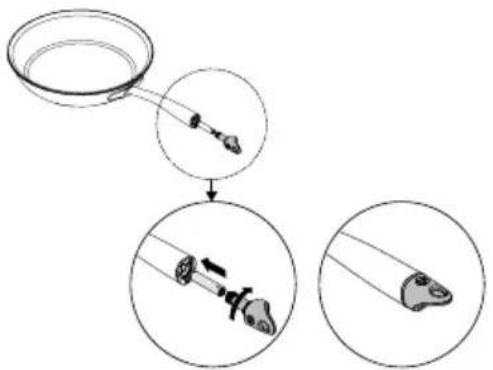
Celsius ^ Cooking™Cookware
1.InsertanAAAbatteryinthepanhandle (negative(-)endgoesinfirst).
2.Insertthehandleendintothepanhandle andturnitaquartertosecure.
NOTE!
Donotexchangethehandlecapofachef's pot(31620)withthatofafryingpan(31619) orviceversa.
Assigningthecookwaretothecookingzone
Switchonthehobandwaituntiltheendofthestart-upanimation.
Place the Celsius ^ Cooking™ cookware or a regular pan fitted with the Celsius ^ Cooking™ probe on thedesiredcookingzone. Afterithasbeendetected,quicklytaptwicewithyourfingertiponthe sensorintheendcaportheprobehousingtoactivateit. ThentheCelsius ^ Cooking™modekey will immediately light up. To assign the probe, the Celsius ^ Cooking™ mode key will light upon every possiblecookingzone.PresstheCelsius ^ Cooking™modekeyofthedesiredcookingzone. The Celsius ^ Cooking™menuwillbeopened.Withashortpressagain,itcanbeclosed.
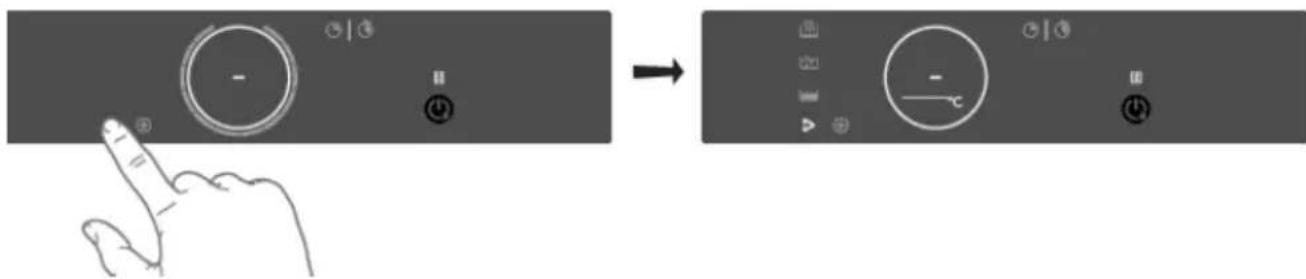
CookingwiththeembeddedCelsius CookingTMprograms
The hob comes along with integrated Celsius ^ Cooking™ programs, optimized for Celsius ^ Cooking™ cookware. With the opened menu, 3 different cooking methods can be chosen, with different temperatures. If the probe is used, only two suitable Celsius ^ Cooking™ methods are shown. Use the onethat fits the desired purpose:
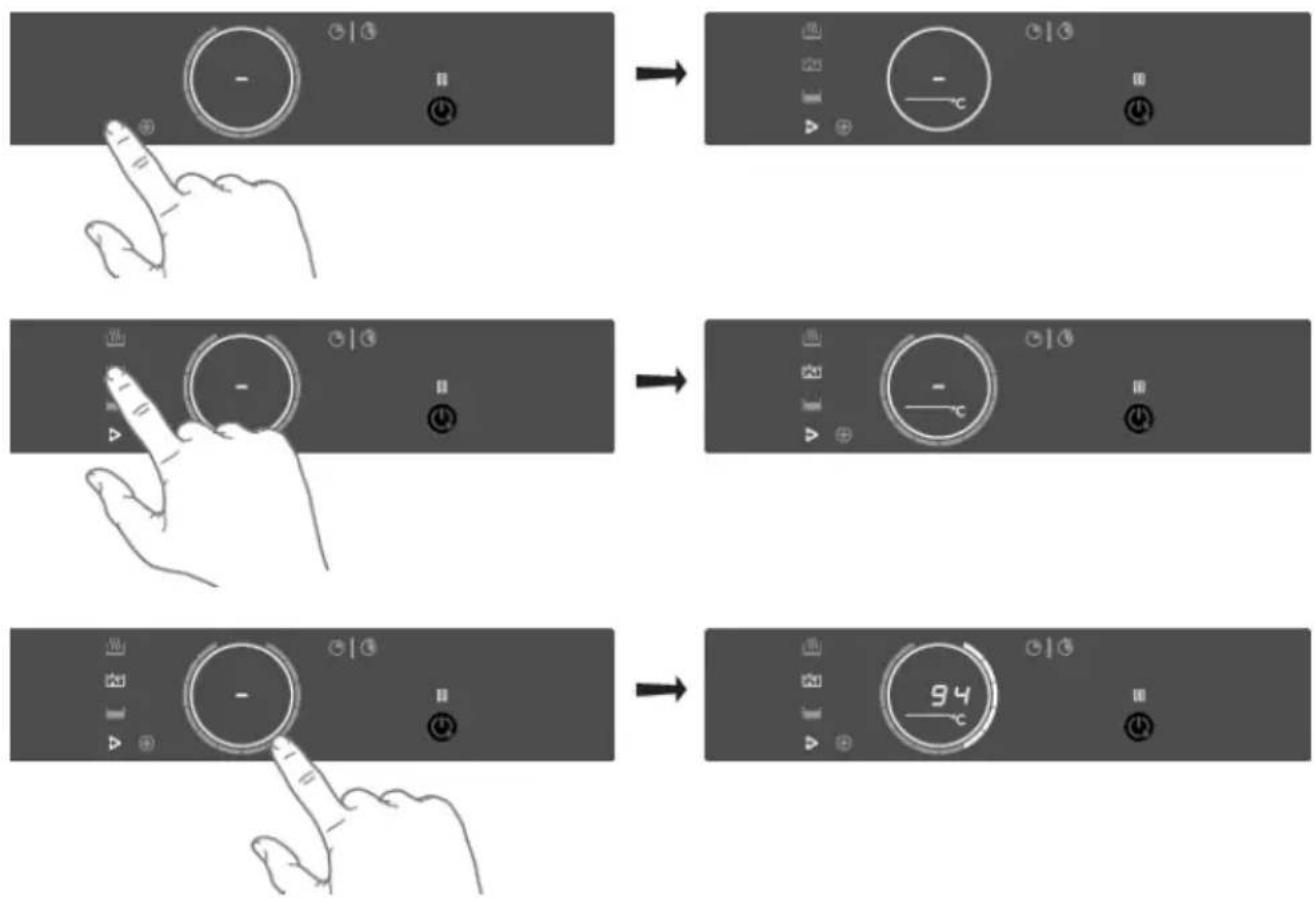
Heatingupandfrying
Thisprogramistrengthhightemperaturesrapidly.Highpanbottomtemperaturescanbereached. Always add oil or butter before starting it. For healthy cooking don't exceed the smoke point of the usedoil.
Boilingorcookingwithwater
Withthisprogram,thewatergetstoboilquickly.Alwaysaddwaterbeforestarting.
Slowcookingorsousvide
Thisprogramistocontroltomediumtemperatures, preventinghighbottomtemperatures. Larger quantitiesandthickerdishesneedtobestirredoccasionallytoensureahomogeneousheat distribution.
Using the probe as cooking thermometer
WhenaCelsius ^ Cooking™ probeisuseditcanalsobeseusedasathermometertojustmonitore.g. thecoretemperatureofacertaintdish. This can be done on normal level cookingorPLUSmenu programs. Tousetheprobeastermometer, liftup the panyouwanttouseforafewseconds, place it back on the zone and activate the probebytapping. Whenthe Celsius ^ Cooking™ symbolappears on the display, touchit.

INFORMATION!
PleasemakesurethattheapplianceisalreadyswitchedonbeforeplacingtheCelsius ^ Cooking™ cookwaresothatthesystemcanclearlyidentifyitsposition.
TIP!
WhentheCelsius ^ Cooking™Probeisrecognizedonacookingzone,itcanalsobeusedasa thermometer. Thedisplaythenshowsthemperatureinsteadofthepowerlevel.Asthepower levelchanges, itistemporarilydisplayedinplaceoftheactualtemperature.
Proberemovaldetection
If the probe is moved out during cooking, the hob will detect that and stop heating. When placed back, the user can confirm that by touching the now blinking Celsius Cooking™ mode button, or it might getre-detected automatically.
E.g. adding cold water to the pot might trigger this detection too!
Step-by-StepcookingguideonCelsiusCooking.com

Thebest-tastingfoodispreparedatthertemperatureandfortherightlengthoftime.Theabilitytosettemperatureinsteadofpowerlevelssupportedbyhow-to(video)guidanceletsyoucreatechef-likemealscookedtoperfection.TheCelsiusCooking.Comwebsiteisfullofinspiringrecipeswithstep-by-stepinstructionsbasedonchef=testedtechniquesguidingyoutop preparedeliciously,fail-proofrecipesoverandoveragain.
CelsiusCooking.com
- Whether you are a chef or a beginner, CelsiusCooking.com is going to help you cook better food moreoftenbyactingasyourguideinthekitchen. You'lllearnnewtechniques,novelcombinations, andgainconfidenceinmoderificultdishes. Instead of just cooking atapowerlevel,youwill be cookingatanexacttemperaturelevel.
- Our recipes lead you through the process of 'Mise en place' where you'll gather and prepare all of your ingredients in advance. This is particularly important following threecipes on Celsius Cooking.comaseachrecipe hasbeencarefullytimedtogiveyoutheperfectresults.
- Just follow the steps. The timing and temperature guide will make sure your food is prepared to perfection. It may take some getting used to, but you will end up with an even better meal.
Switchingoffthecookingzone
Switching off a Celsius ^ Cooking™ controlled zone is possible by setting the temperature to zero (0). The display will show a dash. Alternatively, touch the Slider or the Celsius ^ Cooking™ key from the zone to be switched off for at least 3 seconds to deactivate the Celsius ^ Cooking™ mode completely.

INFORMATION!
While the Celsius Cooking™ probe is used to control the temperature of the content inside an area (e.g. water or soup), the Celsius Cooking™ cookware is controlled on the bottom of the temperature. Duetothis, there is always a set between the onset and the end of the time period. The Duetothis, therefore, is a set of events that takes place in the time period.
Bridgelnductionzone
TheBridgelnductionzonescanbelinkedtogether.Thiscreatesonelargezonethatcanbeused,forexample,foralargefishpanorvariouspanssatthesamepower.
- Pan position recognition is activated automatically after the appliance is switched on. When a panisplacedonthehob, thepanrecognitionfunctionrecognizesitspositionandautomatically bridgesthecookingzonesdependingonthesizethepan(onlyifthehobwasalreadyswitched on).
- IftheBridgelnductionzonesarelinked,theycannotbesettoboostand,themenufunctions cannotbeused.
- Use a fish pan or other pan covering at least one of the Bridge Induction zones in the middle.
ConnectingBridgelnductionzones
-
Placealargepanonbothcookingzonessothatbothzonesarewellcovered.
-
If thebrd (auto-connecting) function is active, the zones are automatically (consult chapter 'Settings').
-
Touchtheslidersofbbothleftorbothrightcookingzones.
Operation

-
Thepowerleveltemperaturearedisplayedsimultaneouslyonbothconnectedcooking zones.
-
Usetheslider of the front cooking zoneosetthedesiredcookingsettingforthelinkedcooking zones.
- Touchbothslidersagaintounlinkthecookingzones.
Pause
Thepausefunctioncanbeusedtopausetheoperationoftheentirecookinghobforcupto10minutes. Thus, you can walk away from the applianceorsafelyclean the cooking hob, within an short period, without losing your settings.
Switchingonthepause
Atleastonecookingzonemustbeactive.
Touchthepausekey.
- You will hear as shortbeep.
- Thesettingsallactivehobsarereducedtolevel2.
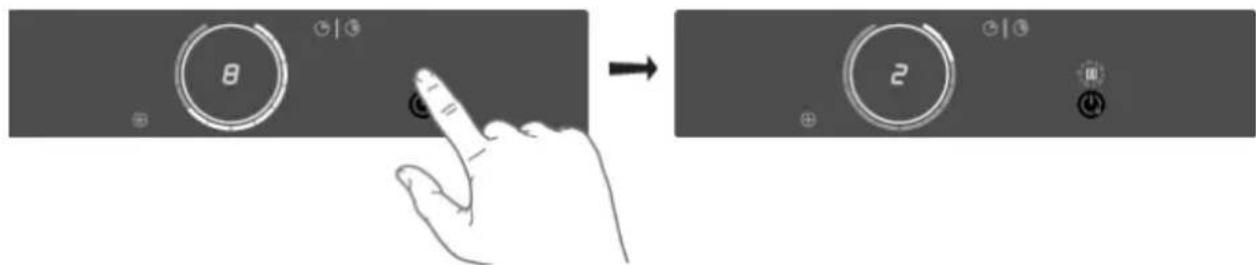
- Alltimerfunctionsarepaused.
- Thepausekeyflashes.
- Allkeysareinactiveexceptthepauseandon/off-key.
Ifnokeyistouchedwithin10minutes,allactivehobsautomaticallyturnoff.
Celsius ^ Cooking™ programsarenotpausedsinceautomaticallyoperated.
Switchingoffthepause
Touchthepausekeyagainwithin10minutes.
- Thehobcontinuestooperatewiththesamesettings.
Childlock
Thecookingzonescanbelockedtopreventthemfrombeingswitchedoninadvertently.
-
Touchtheon/offkeytoswitchchonthob.
-
Touchtheon/offkeyforapproximately3seconds.
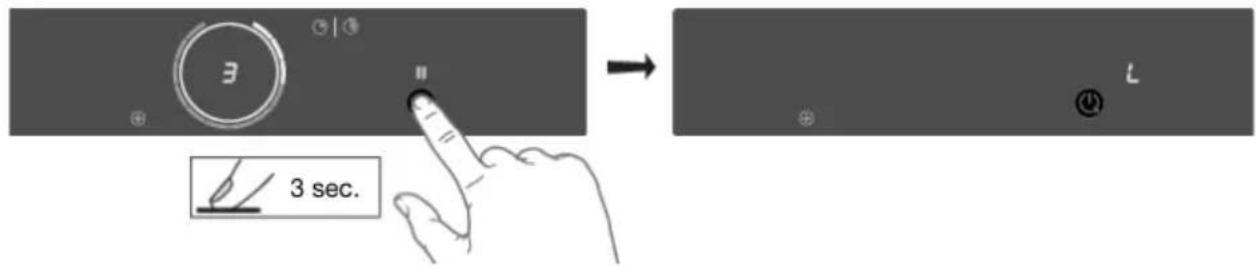
- Theindication'L'appearsonthedisplayandthehobcontrolsarelocked.
3.Proceedinthesamewaytounlockthecontrols.
- When touching and holding the on/off key, 'L' appears on the display and then disappears. The controls are unlocked.
Timerfunctions
Everycookingzonehastwotimers:account-downtimerandastopwatch(count-uptimer).

Count-downtimer
Thecount-downtimermakesthecookingprocessesasierbysettingthecookingtimefortheselected cookingzone. Whenthetimesetonthetimerexpires, thecookingzonewillautomaticallyswitchoff andemitanacousticsignal. Youcanswitchofftheacousticsignalbytouchingthecount-downtimer key; alternatively, itwillswitchoffautomaticallyafter awhile. Youcansethecount-downtimer independentlyforallcookingzones.
Settingthecount-downtimer
- Touch the count-downtimerkeyforthedesiredactivecookingzone.

- Thecount-downtimerkeyand000willflashonthecookingzonedisplayunit.
2.Setthedesiredcookingtimewith+(plus)and-(minus)touchkeys.
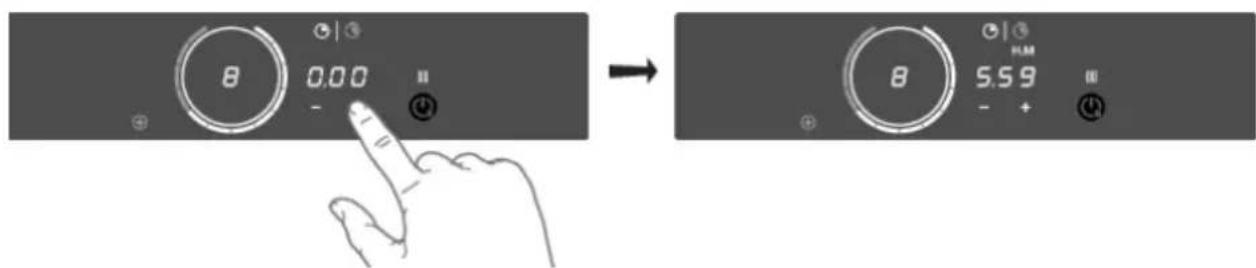
- Touchthe-(minus)keytoincreaseasethetimeinhours. Touchthe+ (plus)keytoincreaseasethe timeinminutes. Then, ifdesired, touchthe-(minus)keytodecreasesethetimeinminutes.
- If the time is not set within five seconds, the count-down timer is disabled.
Operation
3.Ifdesired,repeatthesamestepstosetthecount-downtimerforanotheractivecookingzone.
- When a Celsius ^ Cooking™ program is active, the timer will start counting down when the program reaches the desired temperature.
TIP!
If you move the pan from the cooking zone, all timer functions set forth that cooking zone will be paused.
Deactivatingthecount-downtimer
Longtouchthecount-downtimerkeyforthedesiredactivecookingzone.
- Thetimerisswitchedoff.
- Deactivating the count-downtimeralarm.
- When the set time expires, alarm will be sounded, the key for the relevant cooking zone will flash, and0:00willflashonthecount-downtimerdisplayunit.
- Toacknowledgeandstopthealarm, touchthecount-downtimerkey, orremovethepanfrom thecookingzone.

Cookingtimedisplay-stopwatch
Thestopwatchcanbeusedtoehowlongyouhavebeencontinuouslycookingontheselected cookingzoneandstartscountingautomaticallyinthebackground.
Touchthestopwatchkey.
- Thestopwatchtimewillbedisplayedonthecookingzonedisplayunit.
- Thestopwatchcanberesetifyyoupresssthestopwatchkeyfor3seconds.
Operationofthelinkedextractionhood
IfyouwnacpatibleRFenabledhood,itcanbeconnectedtotheinductionpartofyour Hob.
To pair and customize the behaviour of your hood see chapter 'Settings'. Parameter hth is used for pairing, whilehStandhSceffectthebehaviourofyourhoodsoyoucancustomizeitaccordingto yourkitchenhabbits.
Switchingextractiononandoff
- Touchthe + (plus)keyforahigherfansetting. Touchthe + (plus)keyfor1 secondtoselect the highestsetting.
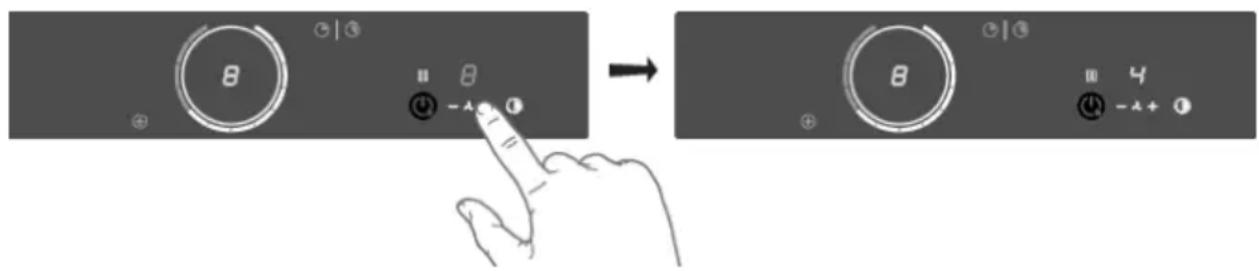
- Touchthe-(minus)keytoselectalowersetting.
- To switch off the cooker hood, press and hold the 'Fan' key for 1 second.
Switchingthelightonandoff
- Touchthelightingkey.
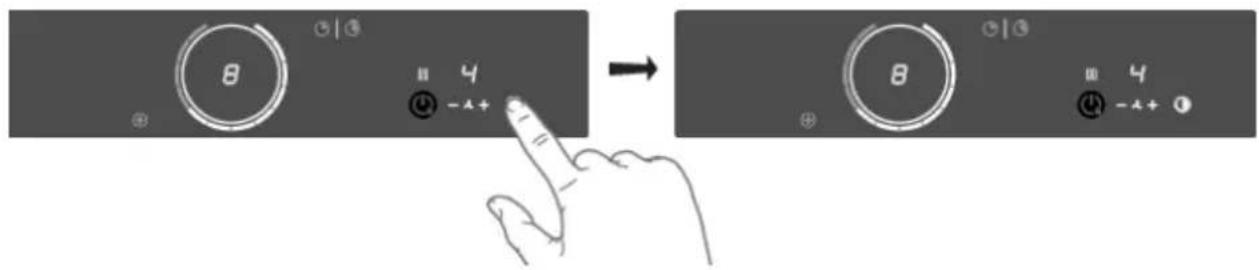
- Thelightswitchesonatmaximumstrength.
2.Longtouchthelightingkeytosetthelightingstrength.
3. Shorttouchthelightingkeytoturnoffthelight.
Changingthecolourlightingtemperature
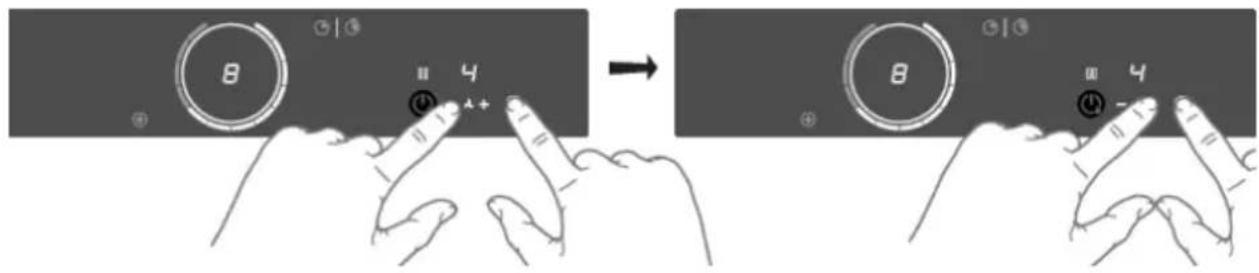
1.Youcanadjustthelightingtemperature.
2. Long touch the lighting key and simultaneously the - (minus) key to make the light 'colder' or the+(plus)keytoselecta'warmer'light.
Automaticextraction
The extraction module has three automatic extraction settings (see chapter 'Settings'):
- SynchroStart(Settings)
This setting allows the induction hobto automatically activate the light so the connected hood every timethe induction hobisturnedon. Depending on the value you set, the ventilation will automatically start at that speed level when any cooking zone is activated.
SynchroControl(Settings)
InadditiontoSynchroStart, the hoodwill becontrolled automatically depending on the current highestivated cookinglevel.
SynchroStop(Settings)
Theightswillbeswitchedofftogetherwiththehobandthefanwill,withadelay,alsobeswitched off.
Ignitionandadjustment
Theburnerisfullyadjustablebetweenhighandlowsettings.
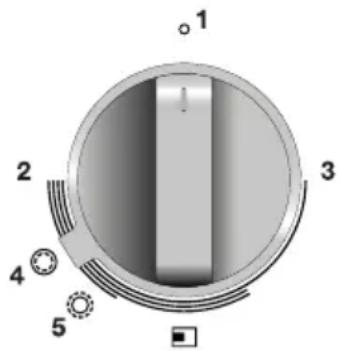
1.Pressthecontrolknobandturnitanticlockwise.Theburnerwill ignite.
2. Keep the control knob fully depressed for at least 3 seconds between high and low settings. The thermocouplesafetypilothas been activated.
3.Turnthewokcontrolknobtothelowsetting(3).
4. If desired, turnthewokselectorringtotheroastingsetting(5). The innerring(woksetting)willswitchoffandtheouterring(roasting setting)willswitchon.
5. Thewokburnerwillswitchautomaticallytothewoksettingifthe controlknobofthewokburnerissetto0.
NOTE!
Itispossibletoswitchbetweenwoksettingandroastingsettingandbackduringcooking.
If the control knob is in the offsetting (0-setting) these selectorring cannot be changed to the roatingsetting. Always turn this knob back completely to 0.

ConnectLife-appandWi-Ficonnection
ThehobisequippedwithaWi-Fimodulethatalowstheappliancetoconnecttotheinternetviayour home network and to use it with the ConnectLife-app, installed on a mobile device like a smartphone. ortablet.
TheappisavailableontheAppleAppStoreandGooglePlayStore.Youwillneedtheapptoconnect thehobtoyournetwork. After your user account is paired with the cooking hob, the app can be used to monitor the status of the cooking hob bandenablestoupdateits firmware (see chapter 'Firmware Update').
You can find direct links for the different storestothe ConnectLife-appunder www.connectlife.io/getstartedandmoreinformationaboutthesystem, support, available functionalities, and additional options under www.connectlife.io.
Forsafetyreasons,itisnotpossibletotremotelycontrol,turnonorturnoffthehob.
Preparation
Make sure you know the name/SSID of your router's Wi-Fi network and its password ^1) .
- Make sure you have the label with the QR code of the appliance unique ID ('AUID') accessible -youneedtoscanitwithyourmobiledevicewhentheApppromptstodoso.
- Make sure that Wi-Fi is activated on the hob by checking if the Wi-Fi key is visible when the hob is on.
Elsesee"ActivateWi-Fi".

InstalltheConnectLife-apponamobiledevice-scantheQR codetofindit.
- LaunchtheApp.Pleaseregisterifyyoudon'thaveanaccountyet.
- Loginwithyouraccount.
- TheAppwillneedaccesssthemobile'slocationtosearchforWi-Fi networksandtothecameratoscanQRcodes.
Wi-FiConnectionsetup
You will first connect your mobile device directly to the appliance via Wi-Fi, and then use this connection to share the data of your Wi-Fi home network. The hobcanthenconnecttothe home network.
1.LaunchtheConnectLife-app.
2. Select "Add appliances" in "Appliances", choose "Home appliances", and follow the instructions.
3.ScantheQRcodewiththeAUIDcodewhenaskedortypeitin.
Proceedontheappliance:
4.Switchthonthehob.
5. TouchtheWi-Fikeyfor3secondstoentertheWi-Fimenu(onlypossiblewhenNOTcooking).
6. When 'C' (connection) Connection Setup Mode is shown in the display, touch the Wi-Fi key to activatetheConnectionsetup.When'C'flashestheConnectionsetup 2) starts.
1) NOTE:only2,4Ghznetworksaresupported
2) NOTE: will bedeactivatedafter5minuteswhenunsuccessful
ProceedonthemobiledeviceintheConnectLife-app:
- Connect your mobile device to Wi-Fi network of the appliance when asked.
- When your mobile asks whether to keep the connection, despite internet connection, choose yes.
9.FollowtheinstructionsintheConnectLife-app.
TheuseraccountssignedinonthemobiledeviceusedfortheConnectionsetupwillautomatically be paired with the cloud. If you'd like to pair another account, e.g. on a second user's mobile device see "Pairingadditionaluser".
Forsafetyreasons,onlypaireduserscancommunicatewiththe Hob.
ActivateWi-Fi
1.Switchoffthehob.
2. Touchtheon/offkeyfor5seconds.
- Ashortbeepwillbeemitted. The Wi-Fikeywillappear.
Wi-Fimenu
ActivateWi-FitoenabletheWi-Fimenu. Thehobmustbeswitchedon.
-
TouchtheWi-Fikeyfor3secondstoopentheWi-Fimenu.
-
Depending on the Wi-Fi state, there are 1 to 3 options available in the menu: 'C' (connection) to set up a connection, 'P' (pair) to pair an additional user, and 'U' (unpair) to unpair all users.
-
Use the + (plus) and - (minus) keystoswitch between them, if more than 1 option is available.
- TouchtheWi-Fikeytoconfirmtheselectedoption.
-
Touchtheon/offkeyortouchtheslidertoclosethemenu.
-
Ifnókeyispressedwithin60seconds,themenuwillbeswitchedoffautomatically.
Connectionsetup
- Selectoption'C'intheWi-Fimenu.
The appliance is in "Connection Setup Mode" for 5 minutes.
- 'C' will flash, and the + (plus) and - (minus) keys will be switched off.
- On the mobile app, start the process to 'Add appliances' and follow the instructions to set up thenetwork.
Pairingadditionaluser
This option requires that the connection setup has been performed successfully and the hobis connected to the cloud (Wi-Fikey is constantly fulllit).
- Selectoption'P'intheWi-Fimenu.
The appliance is in "Pairing Mode" for 3 minutes.
The Wi-Fi key will flash, and the + (plus) and - (minus) keys will be off.
- On the mobile app, start the process to 'Add appliances' and follow the instructions to pair the appliance.
Unpairallusers
This option requires that the connection setup has been performed successfully and the hobis connected to the cloud (Wi-Fikey is constantly fulllit).
-
Select option 'U' in the Wi-Fi menu to unpair all users and disconnect from the cloud.
-
TheWi-Fikeywillflash3times.
The hob will delete all paired users and disconnects from the cloud ("unpair").
SwitchingoffWi-Fi
1.EntertheWi-Fimenuaseexplainedin'Wi-Fimenu'.
2. TouchtheWi-Fikeyfor3secondstodeactivateWi-Fi.
- Ashortbeepwillbeemitted. The Wi-Fikeywillbeoff.
FirmwareUpdate
ThecookinghobisequippedwithaWi-Fimodulethatyoucouldusetoreceiveupdatesofthe appliancefirmware(forexample,improvedfunctionupdatesafety-relevantupdates).Thisrequires thathecookinghobisconnectedtothecloudandpairedwitharegistereduseraccountonthe
ConnectLife-app. If this is not yet established, consult chapter 'ConnectLife and Wi-Fi'.
When new firmware is available, a notification is sent to the ConnectLife-app. Please follow the instructions.
To start the update process, the cooking hob needs to have the FoA setting set to ON in the settings menu (see 'Settings'). This confirms your presence at the cooking hob. After 90 minutes, this setting is automatically resettoOFF.
AftertheFoAsettingonthecookinghobissettoON,starttheupdateprocessoryour
ConnectLife-app. The cooking hob will switch OFF. As an indication, the Wi-Fi symbol flashes during theprocess.Dependingontheconfiguration,theupdateprocesscantakeupto60minutes.
NOTE!
During the update process, you cannot use the hob. The hob will restart several times and will not respond for periods. Makesure that the powers supply and the Wi-Ficonnction are not interrupted during the update.
Iftheupdatefails, thehobwillremainonthepreviousfirmwareversionandoperateasusual. Tryagain afterashortperiodoftime. Iftheupdatecontinuestofail, pleasegetintouchwiththeservice departmentforfurtherassistance.
If the hobisnotrespondingafterupdating, it may not have completed the update. Wait for the update process to complete. If the hob still does not respond after awhile, please contact the service department for further assistance.
Settings
Youcantailorthebehaviourofthisinductionhobtosuityourcookingstyle!Therearevarioussettings availableforadjustment.
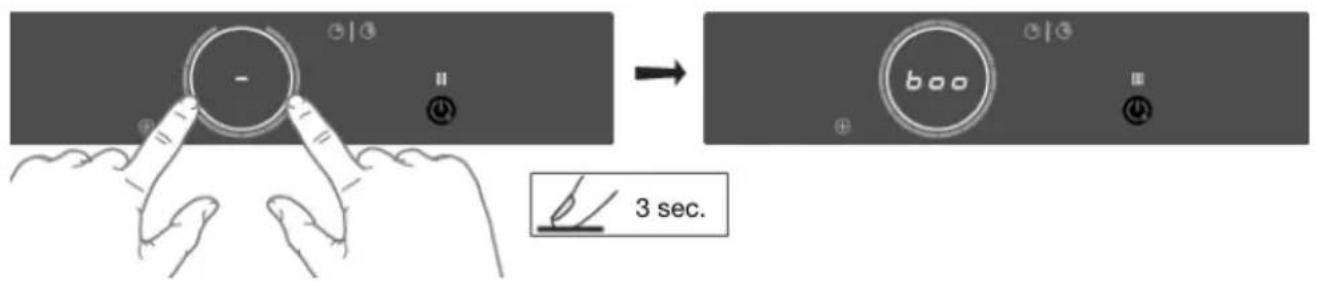
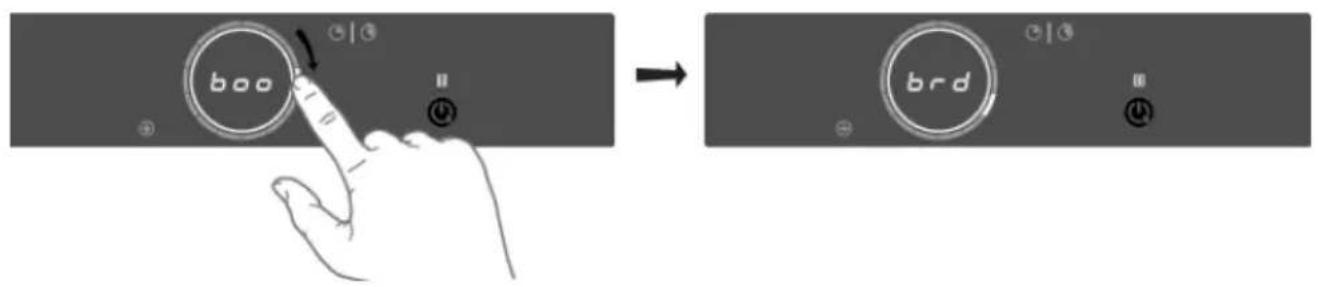
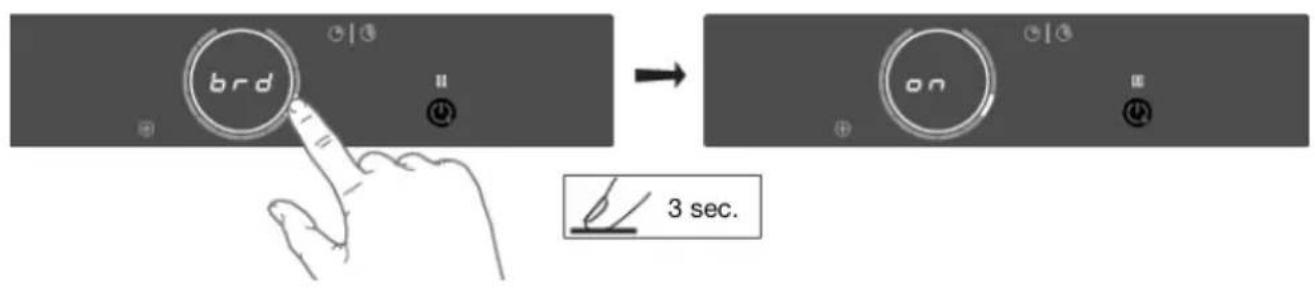
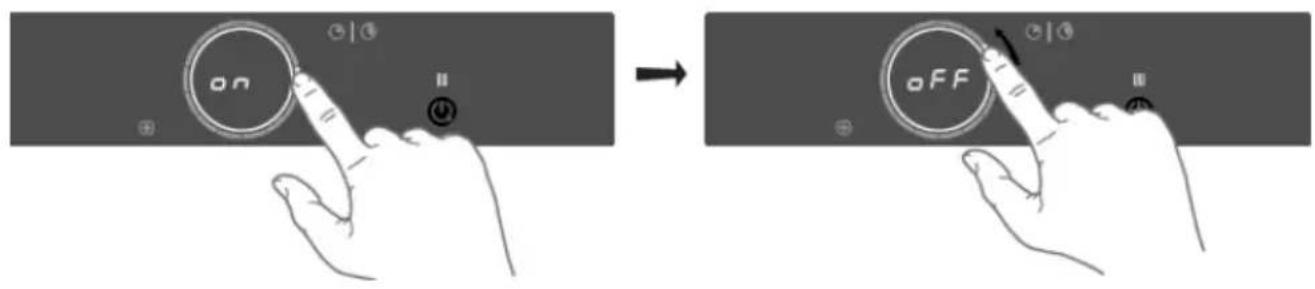
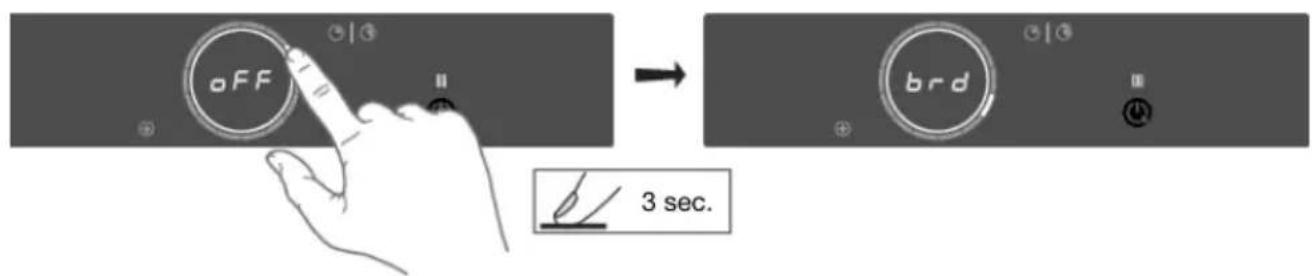
While there are no opansanyzone, touchanyslider with twofingers and keepittouched for 3seconds. Different settings can now be toggled through using the slider. Toviewor changea particular setting, touch the highlighted element of the slider with one finger and keep it touched for 3seconds. Now you can choose to change or disable that setting. Todhis, toggle the desired value. After 3secondsofinactivity, thenewsetting will be confirmed.
NOTE!
Topreventunintentionaladjustmentofthe'Con-connectedpower',Consettingmustbeconfirmed whenchangedbytouchingthesliderfor3seconds.Achangewhoutconfirmationwillnotbe implemented!
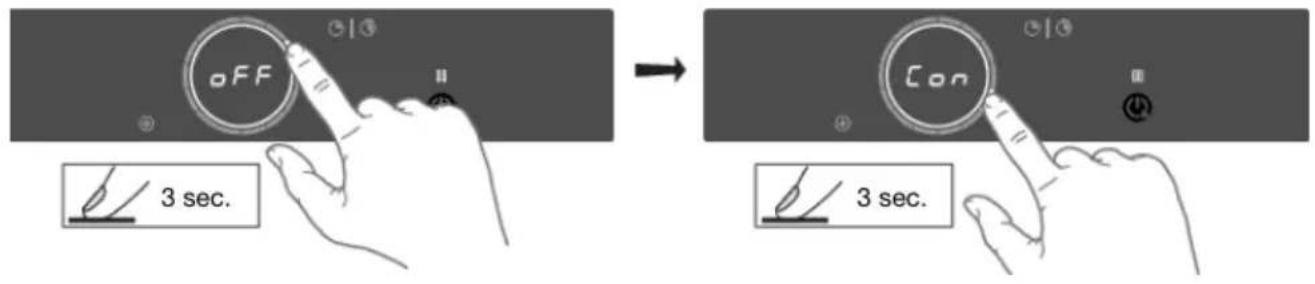
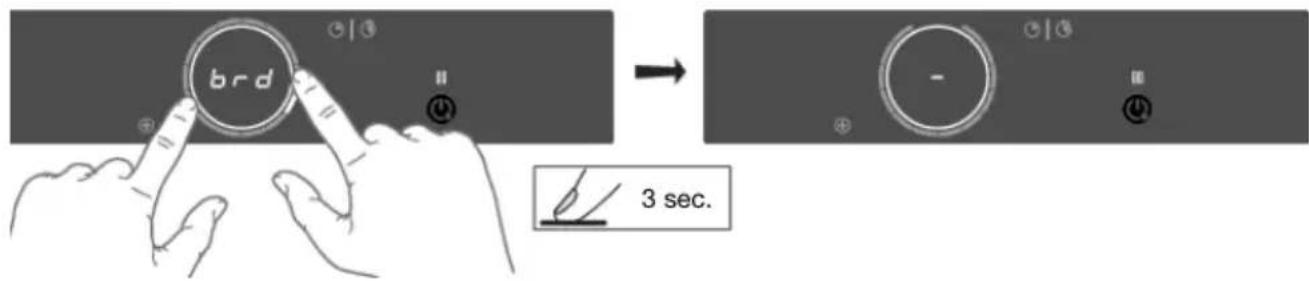
Toexitthemenu,touchwithtwofingersanywherethesliderfor3seconds.
Thefollowingsettingsareavailable dependongonthemodel).
| boo-Autoboot AutomaticBoost activation | Whileon,boostisautomaticallyactivatedwhenpowerlevel12isactivated. Whileoff,theboostisactivatedbyslidingpastthepowerlevel12or touchingpowerlevel12twice. |
| brd-Autobridge Automaticcoupling | Whileon,whenanewpanisdetectedontwoconnectedBridgInduction cookingzones, the cookingzonesareautomaticallyconnectedintoone bigcookingzone.Whileoff,connectingmustbedemonuallyby pressingontheslandersoftwoBridgInductioncookingzonesatthesame time. |
| rEC-Recovery function Recoveryfunction | Whileon,therecoveryfunctionisactiveand,settingscanbemovedfrom onecookingzonetotheotherwhenapanswitchesposition. |
| Atl-Autotimer Automaticstopwatch timer | Whileon,thestopwatch(count-uptimer)startscountinginthebackground wheneveracookingzoneisactivated.Whileoff,thestopwatchmustbe activatedmanuallyandstartscountingfrom0:00. |
| ACL - Auto child lock Autochildlock | While on, the hob is automatically locked at every switch off. |
| Snd-Soundvolume Soundvolume | Soundvolumehas4differentoptions.L3(high),L2(medium),L1(low), off(onlyerrorandalarmsounds). |
| SEn-Keysensitivity Keyresponsiveness | Keyresponsivenesshas3differentspeedoptions.L3(quick),L2(medium), L1(slow). |
Settings
Tablecontinuedfrom/lastpage
| hth-Hob-to-hood pairing(RF) Hoodcontrol | IfyouownacompatablehoodwithRFconnectivity,youcanpairittoyour inductionmob!Todoso,setthisparametertoon.Hoodcontroliconswill startblinking.Younowhave5minutestoactivatethepairingonyourRF hood.Oncethehooddispairedtoyouinductionmob,thehoodcontrol iconswillstopblinking. |
| hSt-Hob-to-hood (SynchroStartLevel) HoodStartLevel | Thissettingallowstheinductionmobtoautomaticallyactivatethelightsof theconnectedhoodeverytimetheinductionmobisturnedon.Dependingonthevalueyouset,theventilationwillautomaticallystartat thatspeedlevelwhenanycookingzoneisactivated. |
| hSc-Hob-to-hood (SynchroControl, responseLevel) HoodresponseLevel | Thissettingallowstheinductionmobtoautomaticallyactivatethelightsof theconnectedhoodeverytimetheinductionmobisturnedon.Whileon, thehoodwillbecontrolledautomaticallydependingonthecurrenthighest activatedcookinglevel.Ifyoumanuallychangeanyhoodrelatedsettings, thehoodturnstomanualcontrolfortherestofthiscookingsession.Theresponselevelcanbeset:L3(high),L2(medium),L1(low),off. |
| hSP-Hob-to-hood (SynchroStopLevel) HoodStopLevel | Thissettingallowstheinductionmobtoautomaticallydeactivatethelightsoftheconnectedhoodeverytimetheinductionmobisturnedoff.Dependingonthevalueyouset,theventilationwillswitchtothatatspeed levelandstopwithadelay. |
| btP-Bluetoothpairing Bluetoothdevice pairing | TopairaBluetoothdevice,setthissettingtoon.Younowhave3minutes topairanewBluetoothdevicetothisinductionmob. |
| btC-Bluetoothclear Bluetoothclearpaired devices | Tounpair,alltheBluetoothdevicessetthissettingtoClr.Allyour connectedBluetoothdevicesarenowunpaired. |
| Flr-Displayfirmware version Firmwareversion | Todisplaythecurrentsoftwareversionsofthehob.TheUlsoftwareversion andtheCelsius°CookingTM softwareversionwillbeshownifferentiating order. |
| FoA-Firmwareupdate overtheair Firmwareupdatevia Wi-Fi | Toreceivefirmwareupdatesforthecookingmob,youneedtobepaired tothecookinghobviathemobileapp.Youwillreceiveanotification,or youcancheckavailablefirmwareupdatesonthemobileappmenufor updates.Inordertostartthefirmwareupdateviathemobileapp,setthissettingto ontoconfirmyourpresenceatthecookingmob.Formoreinformation,see chapter"ConnectLifeandWi-Fi".After10min,thissettingisautomatically resettoff. |
Tablecontinuedfromlastpage
| Con-Connection power Currentlimiter connectiontopower grid) | Ifyou'relectricalwiringorcircircuitbreakersdonotmeetthespecifiedcurrent drawontheratingplate, thecurrentlimitercanbeactivatedbyreducing thevalueofthissetting.Doingsomaycauseareducedperformance of theinductionhub. Thefollowingnumberingformatofthesettingisavailable:X.XX. Thenumberlefttothedotrepresentsthenumberofconnectedphases, whilethenumberberrighttothedotpresentstheelectricalcurrentper phaseinAmpere. NOTE! Topreventunintentionaladjustmentofthe'Con-connectedpower', Consettingmustbeconfirmedwhenhangedbytouchingtheslider for3seconds.Achangewithoutconfirmationwillnotbeimplemented! |
| WARNING! Theappliancemustalwaysbesettotheactualorlowerratingofthe electricalwiringorcircircuitbreakers.Thissettingcanonlybesetbyan authorisedexpert. | |
| dE-Demomode DemoModeforDealer ShowroomsWhenset,this | Indemomode,theappliancewillactasusual,withoutthepossibilityto heatthecookware. swillbeindicatedaftersswitchingontheppliancewitha short"d"indication. Withoutanyuserinteraction,theappliancewillautomaticallyswitchoff after10minutes. |
Cleaningglassstop
TIP!
Activatethechildlockbeforecleaningthehob.
Dailycleaning
- Although food spills cannot burn into the glass, we never the less recommend you clean the hob immediately after use.
- Fordailycleaning,adampclothwithamildcleaningagentisbest.
- Dryoffwithkitchenpaperoradryteatowel.
Stubbornstains
- Stubborn stains can also be removed with a mild cleaning agent, washing-up liquid, for example.
- Removewatercirclesandlimescalewithcleaningvinegar.
- Tracesofmetals(causedbyslidingpans)canbedifficulttoremove.Specialproductsare availableforthis.
- Use a glass scraper to remove food spills. Melted plastic and sugar are also best removed with aglassscraper.
NOTE!
- Neveruseabrasives.Theseleavescratchesinwhichdirtandlimescalecanaccumulate.
- Neveruseanythingsharpsuchassteelwoolorscourers.
Cleaningwokburnerelements
NOTE!
Burnerpartssshouldnotbecleanedinthedishwasher.
Dishwasherdetergentscancrodeburnerparts!
Persistentstainsonename(pansupports,burnercaps)
Persistentstainscanbestberemovedwithafluiddetergentoraplasticscouringsponge.Never usescouringpowder,scouringpads,sharpobjectstoraggressivecleaningproducts.
Brasswokburnerparts
Somewokburnerpartsaremadeofbrass.Itisnotunusuallytoeeachangeinthecolourofthe brassasaresultofthehightemperaturesinvolvedinwokuse.
TIP!
Consultthewebsiteforadditionalmaintenanceandcleaninginstructions!
General
NOTE!
If you notice a crack in the glassstop (however small), switch off the hob immediately, unplug the hob, and close off the gassupply.
ThencontacttheServiceDepartment.
Troubleshootingtable
If your hob does network properly, it does not always mean that it is defective. Makes sure to check the points mentioned below in the table, or visit our website for more information.
| SolutionPossiblecauseSymptom | ||
| Charactersappearinthedisplayswhentheapplianceisconnectedforthefirsttime. | routine. | Normaloperation.Thisisthestandardset-up |
| minutesafterthobhasbeenswitchedoff. | Normaloperation.Thehobiscoolingdown.Tb | |
| Aslightsmellisnoticeablethefirstfewtimesthehobisused. | Thewapplianceisheatingup. | Thisisnormalanddisappearsafterthobhasbeenusedafewtimes.Ventilatehetekitchen. |
| Youcanhearatickingsoundinyourhab. | limiteronthefrontandbackzones.Asofttingkingsoundcanaalsooccuratlowersettings. | Normaloperation.Thisiscausedbythecapac |
| Circleofpanbottomremainsvisibleaftercleaning. | Contaminatedpanbottomusedonthecookingzone. | Cleantheinductionhobwithaceramicobcleanerandremovethedirt/greasefromthepanbottom. |
| Thepansmakenoisewhilecooking. | Thisiscausedbytheenergyflowingfromthehobtothesaucepan. | Thisisnormalforcertainpans,particularlyathighsettings.Thisisnotharmfultothepansorthehob. |
| Youhaven'twitchedacookingzoneon,butthedisplaykeepsflashing. | Thepanyouareusingisnotsuiteforinductioncookingorhasdiameteroflessthan12cm. | Useasuitablepan(seechapter‘Inductionuse'). |
| workingandyouhearasignal. | Thepresettimehasended.Acookinewith theodhyattpressingthe-or+keyonthetimer. | |
| Thehobisnotworkingandnothingappearsinthedisplay. | Thereisnopowersupplyduetoadefectivecableorafaultyconnection. | Checkthefusesortheelectricswitch(ifthereisnoplug). |
| residualheatindicatorisshown. | Zoneisoverheated.Zonestopsuninfectedaobhascooleddown,cookingcanbecontinued. | |
Troubleshooting
Tablecontinuedfromlastpage
| SolutionPossiblecauseSymptoms | ||
| Afuseblowssasoonasthehob isswitchedon. | Theapplianceisincorrectly connected. | Checktheelectrical connections. |
| Celsius°Cooking™keyis blinking,togetherwithset cookingmethodkeyand display. | Celsius°Cooking™cookwareis assignedtowrongcooking zone. | Removecookwareandassign again. |
| Unstableconnectionbetween cookwareandhub. | Lowbatteryofcookwareor unstablebluetoothconnection. | Switchoffthecooktopfor10 secondsand/orchangethe battery. |
| SetCelsius°Cooking™cooking methodkeyisblinkingtogether withsettemperatureshow whileusingtheprobe. | Celsius°Cooking™Probeis removedornotintouchwith the content.Orthetemperaturehas fallenrapidly,e.g.duetoadding coldwater. | PlaceProbebackoreposition -presscookingmethodkeyif probe isn'tautodetect. |
| Afuseblowssasoonasthehob isswitchedon. | Theapplianceisincorrectly connected. | Checktheelectrical connections. |
| Theceramicglassplatebroke. | Pulltheplugoutofthesocket. Contactyourinstaller. | |
| Please note!Donothrowa brokenceramicglassplatein theglassrecyclingbinbuttake thistotheMunicipality'swaste recyclingcentre. |
Errorcodes
| SolutionPossiblecauseSymptomE | |||
| Er03appearsondisplay.Er03orhaswateronit. | Cleanthecontrolpanel.Thecontrolpar | ||
| E2appearsondisplay.E2 | Emptypanwasheatedonthecookingzone. | Waitforcookingzoneto cooldownnforfillthepanwithfoodstuff. | |
| U400 | U400appearsondisplay withcontinuoussound tone. | Voltageofthemainsistoohigh. | Connecttheapplianceinaccordanceteratingplateandinstructions. |
| E7 | E7appearsondisplay aftersettinguptheWi-Fi connection. | FailedtoconnecttoWi-Fi network. | Trytoconnectthedevicetoyournetworkagain.Makesurethatnewdevicescanconnecttothenetwork(e.g.MACaddressfilteringisdisabled). |
Tablecontinuedfromlastpage
| SolutionPossiblecauseSymptomE | |||
| E8appearondisplay.E8 | Ventilatorisblocked(eg possiblebyiteminthe drawer). | Unblocktheventilator; disconnectappliance frommainvoltagefor 10sec. | |
| E65 | Celsius°Cooking™keyis blinking,togetherwith E65. | Non-Celsius°Cooking™ cookwareisnot supported. | UseCelsius°Cooking™ cookware. |
| E66 | E66isblinkingtogether with the Celsius°Cooking™key. | cookwarewasnotfound (emptybattery,outof range,etc.). | Replacebattery.Celsius°Cooking™ |
| E67 | E67isblinkingtogether with the Celsius°Cooking™key. | Celsius°Cooking™ cookwaremissing. | Ifhandlecapismounted correctly;Replacebattery. |
NOTE!
Incaseofothererrorcodes:pleasewritedowntheerrorcodeandcontacttheservicedepartment.
Troubleshooting
| SolutionPossiblecauseSymptom | ||
| TroubleshootingWi-Fi | ||
| Wi-Fiturnedoff.Wi-Ficonnnotsh | Thehobmustbeswitchedoff,then touchtheon/offkeyandholdfitfor 5seconds. | |
| Homenetworkissues.Wi-Fisetup | Ifetachatyourhomenetworksignal isstrongandinternetconnectionis working. | |
| Homenetworkisnot displayedduringconnection setup. | Thehomenetworkisnoton 2.4GHz,thenetworkis hidden,orthesignalstrength istoweak. | Pleasecheckthenetworksettings. Ensurea2.4GHzandvisiblenetwork. Ifthesignalistoowek,trytomovethe networkrouterclosertotheappliance. |
| Cookinghobisshown disconnectedonthemobile app | Wi-Fiisdisabledorhome networkissues. | EnsurethatWi-Fiisenabled,andthe internetconnectionofyourhome networkisworking.Repeatthe connectionsetupnecessary. |
| Differentcauses.OtherWi-Fip | IfetachisbletheWi-Fiandenableit again.Checkthattheinternet connectioninyourhomenetworkis working.Repeattheconnectionsetup ifnecessary.Furthertroubleshootingavailableon www.connectlife.ioorcontactthe serviceddepartment. | |
| Firmwareupdateprocess failed. | Internetconnectionlostor powersupplyterminated. | Ensurethopowersupplyisnot terminatedandastableinternet connectionbeforeetryingagain. Iffailedagain,contacttheservice department. |
| SolutionPossiblecauseSymptom | ||
| Wokburner | ||
| Thereisasmellofgasnear theappliance. | Theapplianceconnectionis leaking. | Turnoffthemaingassupplyvalve.Contactyourinstaller. |
Tablecontinuedfromlastpage
| SolutionPossiblecauseSymptom | ||
| Theburnerdoesnotignite. | notcorrect. | Contactyourinstaller.Theelectricalconnectionis |
| Fusedefective/fuseswitched offinfusecupboard. | Replacethefuseorswitchthefuse againinthefusebox. | |
| Clean/drythesparkplug.Sparkplug(1)dirty/damp. | ||
| Burnerpartsnotplaced correctly. | Usethecentringnotchestoputthe burnerpartstogether. | |
| Burnerpartsdirty/damp. | Clean/drytheburnerparts.Makesure thattheoutflowholesareopen. | |
| closed. | Openthemaingasvalve.Maingassupplyvalve | |
| Consultyougassupplier.Faultingasmains. | ||
| Gasbottleortankisempty. | Connectanewgasbottleorhavethe tankrefilled. | |
| Thewrongtypeofgasused. | Checkwhetherthegasusedissuable fortheappliance.Contactyourinstaller ifitisnotcorrect. | |
| Theburnerdoesn'tburn evenly. | Burnerpartsnotplaced correctly. | Usethecentringnotchestoputthe burnerpartstogether. |
| Burnerpartsdirty/damp. | Clean/drytheburnerparts.Makesure thattheoutflowholesareopen. | |
| Thewrongtypeofgasused. | Checkwhetherthegasusedissuable fortheappliance.Contactyourinstaller ifitisnotcorrect. | |
| igniting. | Clean/drythethermocouple.Thermocouple(2)isdir | |
| Ceramicglassplatebroke | Closethegasmainswitchandpullthe plugoutofthesocket.Contactyour installer. | |
| Pleasanote!Donotthrowabreaken ceramicglassplateintheglass recyclingbinbuttakethistothe Municipality'swasterecyclingcentre. |
Informationaccordingtoregulation(EU)66/2014
MeasurementsaccordngEN60350-2/EN30-2-1
| Modelidentification | IG2957xSVBIG2957xSVA | |
| Typeofhob | GasinductionhobGasinductionhol | |
| Numberofelectriccookingzonesand/orareas | 4 | 4 |
| Heatingtechnology | Inductioncooking zonesandcooking areas | Inductioncooking zonesandcooking areas |
| Fornon-circularcookingzonesorareas:length andwidthofusefulsurfaceareaperelectric heatedcookingzoneorarea | 22.0x18.0cm22.0x18.0cm | |
| Energyconsumptionpercookingzoneorarea calculatedperkg(EC _electriccooking)inWh/kg | 193.6193.6 | |
| Numberofgasburners | 1 | 1 |
| Energieefficiencypergasburner(EE gasburner ) in % | 56.556.5 |
Complianceinformation
| HSCIM-1moduleRadioequipmenttype | |
| 2402.0-2480.0MHzOperatingfrequencyrange | |
| <10dBmEIRPaverage(calculated)Maximumoutputpower | |
| G1DEmissiontype: |
| Wi-FimoduleRadioequipmenttype | |
| 2412-2472MHz(16channels)Operatingfrequencyrange | |
| 17.7dBmEIRPaverage(calculated)Maximumoutputpower | |
| Maximumantennagain | 2.7dBi |
ATAG, with this, declares that the gas-induction hob including radio equipment complies with Directive 2014/53/EU.
ThefulltextoftheEUdeclarationofconformityisavailableatthefollowinginternetaddress: www.celsiuscooking.com/DoC.
Safety
Ifthesafetyinstructionsand warningsarenotfollowed, the manufacturer cannot beholdresponsibleforanyresultingdamage.
- This appliances should only be connected by are registered installer.
- Priortoinvestment,ensurethatthelocaldistributionconditions (voltage,frequency,natureofthegasandgaspressure)andthe adjustmentoftheappliancearecompatible.
- Thevoltage, frequency, power, type of gas and the country for which the appliance has been designed to show nonthe appliancerating plate.
- Check the appliance for transport damage. Donot connect a damaged appliance.
- Thewallsandtheworktopsurroundingtheappliancemustbe heatresistantuptoatleast 105^ .
- Theworktopintowhichthehobisfittedshouldbeflat.
Electricalconnection
- Thisappliancemustbeearthyed.
- Theelectricalconnectionmustcomplywithnationalandlocal regulations.
- Forclasslappliances, check that your home's electrical system provides propergarthing.
- Thewallplugsocketandplugshouldalwaysbeaccessible.
- Ifastationaryapplianceisnotfittedwithasupplycordanda plug,orwithothermeansfordisconnectionfromthesupplymains havingacontactseparationinalpolesthatprovidefull disconnectionunderovervoltagecategoryllconditions,the meansfordisconnectionmustbeincorporatedinthefixedwiring inaccordancewiththewiringrules. Thisisalsoapplicablefor applianceswithasupplycordandplugwhentheplugisnot accessibleafterinstallingtheappliance.Usinganomnipolar switchwithacontactseparationofatleast3mmfittedinthefixed wiringwillfulfilthisrequirement.
Installation
- Thesupplycordmusthangfreelyandshouldnotbefedthrough adrawer.
- Forconnecting,useanapprovedcablewiththecorrectcable diametersappropriatefortheconnection.Thecablecasingsshould bemadeofrubber(preferablyoftheH05V2V2orH07V2V2type).
- Beforeconnectingtheappliance, makesurethevoltageindicated ontheratingplateconformstothevoltageinyourpowermains.
- Theconnectionsshouldbeadjustedtothecurrentandfuses.
- The appliances should not be connected to themainsviaa multi-plugapterorextensioncable,asthesafeuseofthe equipmentcannotbeguaranteed.
- Afterinstallation, the partscarryingelectricalcurrentandinsulated partsshallbeprotectedagainstcontact.


WARNING!
Failurescrewsorfastenersforinstallationasdescribed intheinstallationinstructionsmayresultinelectricshock.
Gasconnection
- Gas connection 1/2" ISO 228 / ISO 7-1 / EN 10226-1 (1/2" ISO 228/1/2"ISO228FRonly).
- Thegasconnectionmustcomplywithnationalandlocal regulations.Seeappliancelabelfortechnicalgasdata.
- This applianceisnotconnectedtoacombustionproducts evacuationdevice.Itshallbeinstalledandconnected in accordancewithcurrentinstallationregulations.Particularattention shallbegiventotherelevantrequirementsregardingventilation.
- Werecommendthatthegashobbeconnectedbymeansofafixedpipe.Connectionusingaspeciallydesignedsafetyhoseisalsopermitted.
Thepipebehindtheovenmustbemadeentirelyoutofmetal. -
Asafetyhosemaynotbebentandmustnotcomeintocontact withmovingpartsof kitchenunits.
-
Thegassupplyvalvemustalwaysbeplacedinaneasily accessibleposition.
- ThisappliancecannotbeconvertedfromnaturalgastoLPGnor fromLPGtonaturalgas(noconversionkitsareavailableforthis model).
Service
- Disconnecttheappliancefromthemainssupplybeforestarting anyrepairwork.
- Faultypartsmayonlybereplacedbyoriginalparts. Themanufacturercanonlyguaranteethatoriginalpartsmeet safetyrequirements.
- Ifthesupplycordisdamaged, it mustbereplacedby the manufacturer, its service agents similarly qualified persons in ordertoavoidahazard.
Preparationsforinstallation
Freespacearoundtheappliance
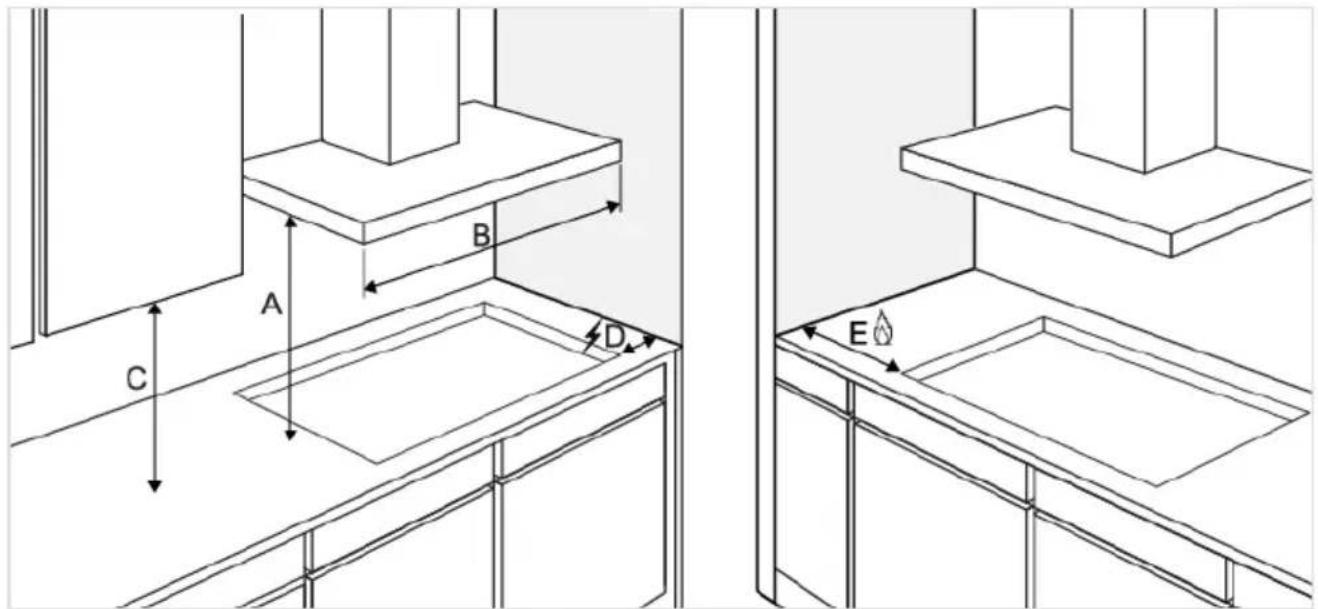
- For optimal hob performance, a ventilation gap of ≥6 mm is advised.
Built-in
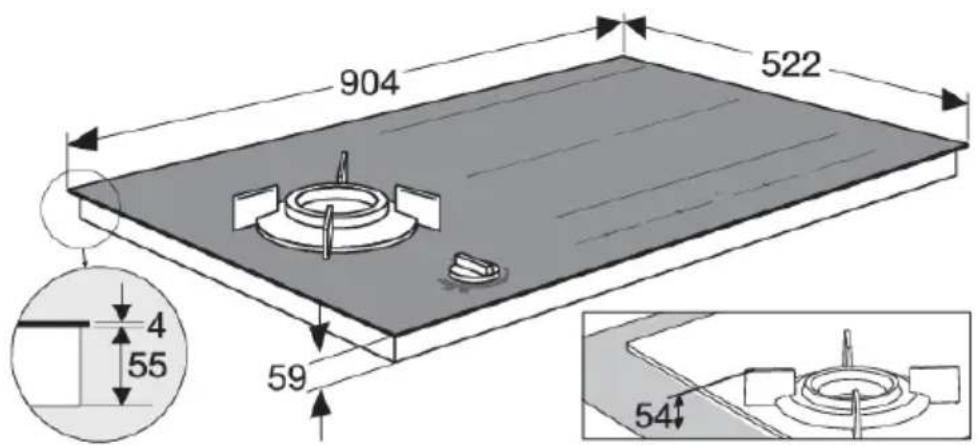
Appliancdimensions
Installation
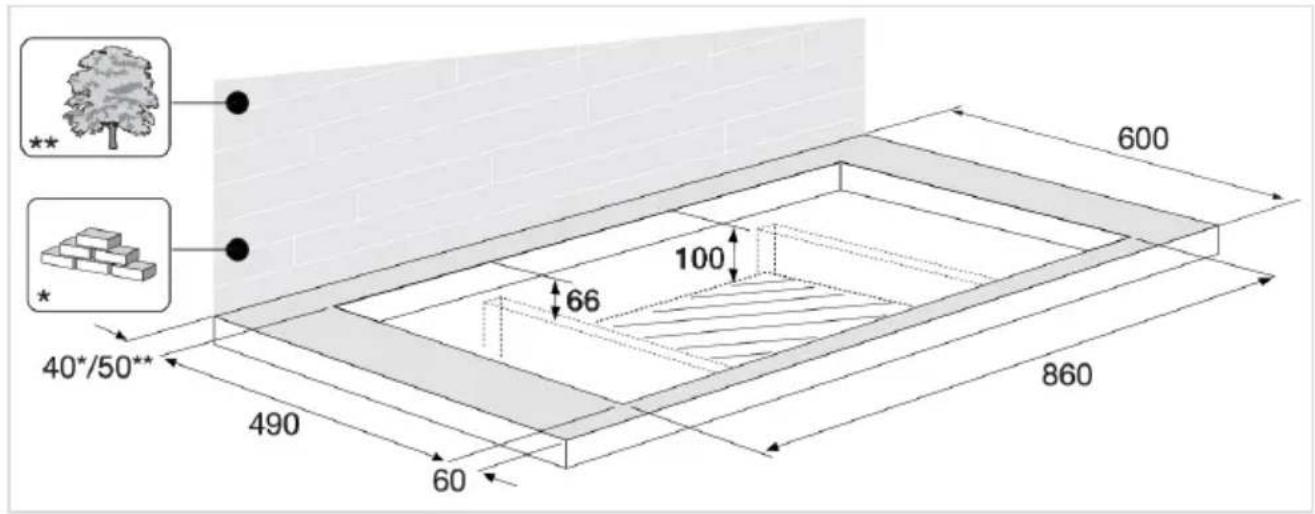
Cut-outintheworktop
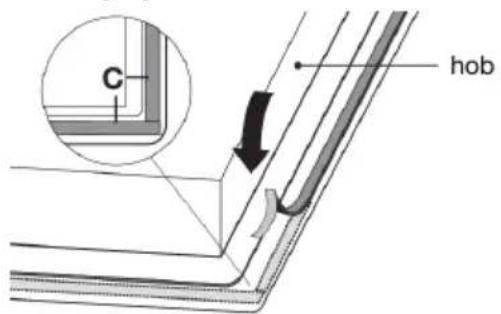
Sealingtape
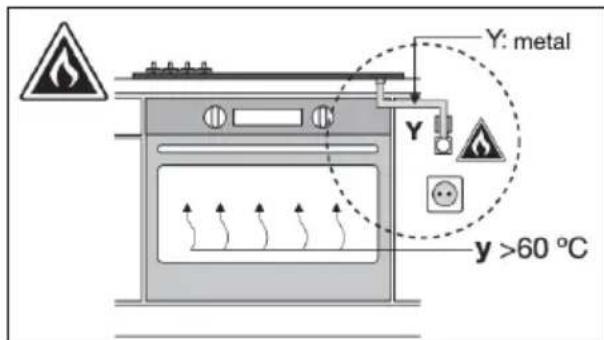
Gasconnection
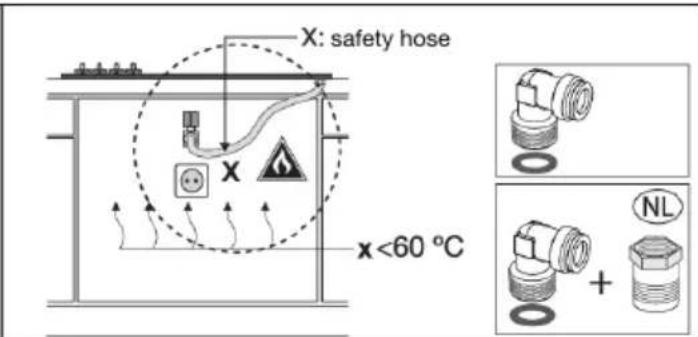
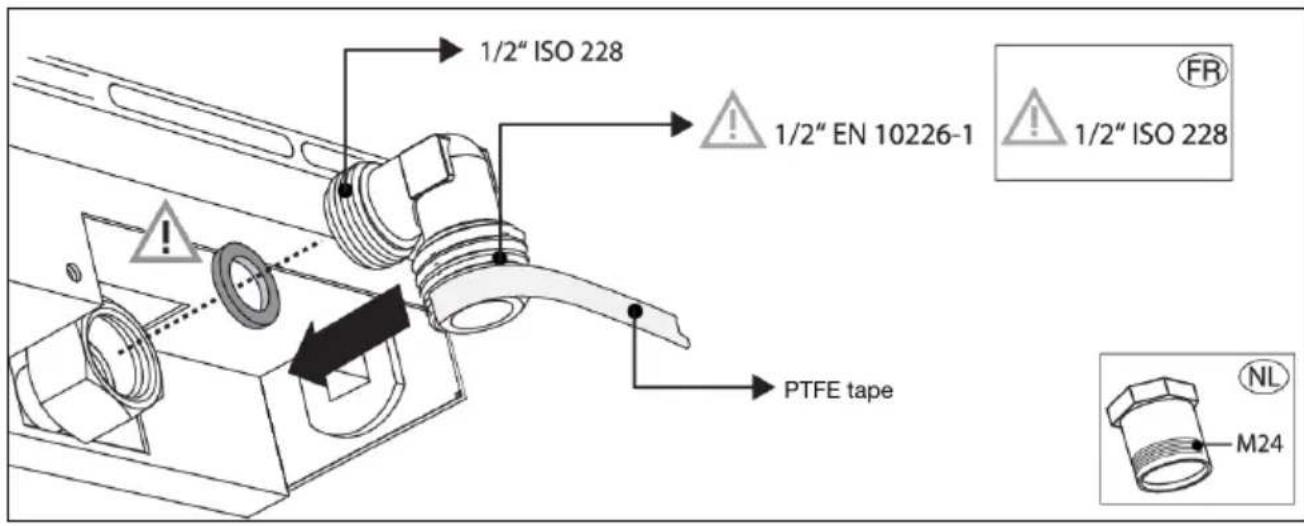
| G20/20mbarG25.3/25mbar | |
| 6.0kW6.0kWWokburner |

WARNING!
This appliance cannot be converted from natural gasto LPGnorfrom LPGtonatural gas (no conversion kits are available forththis model).
Electricalconnection
Determiningtheexistingelectricalconnection
NOTE!
Checkthevoltage.Beforeconnectingtheappliance, makesurethevoltagespecifiedonthereatingplateconformstothevoltageofyourpowermains. Thevoltageofyourpowermains (220-240VbetweenLandN)shouldbecheckedbyanexpertusinganappropriatemasuring device.
Checkthevoltagespresentasindicatedinthediagramsbelow.
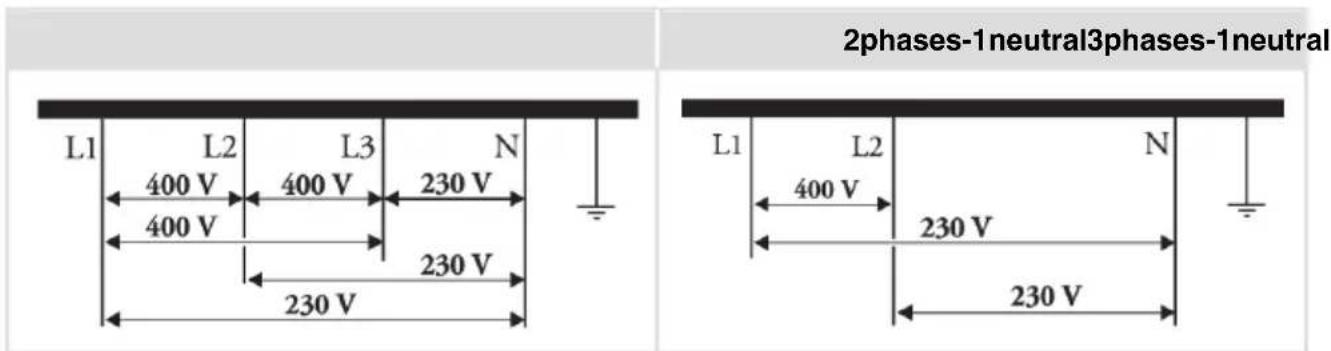
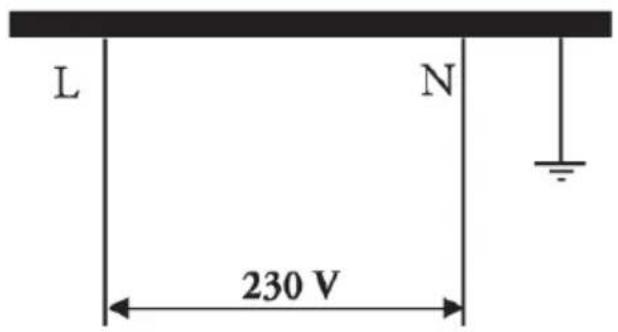
2phases-2neutral(onlyforNL)*1phase-1neutral
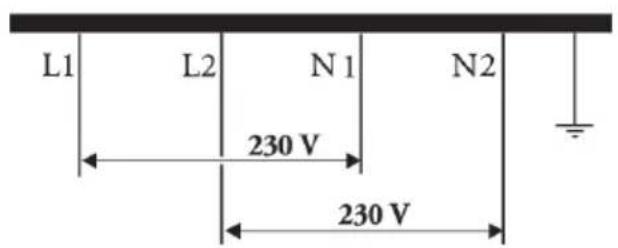
NOTE!
*The2phases(L1andL2)shouldbesecuredbyonlyoneandthesameearthleakagebreaker. RunningL1/N1threwadifferentearthleakagebreakerthanL2/N2isnotallowed.
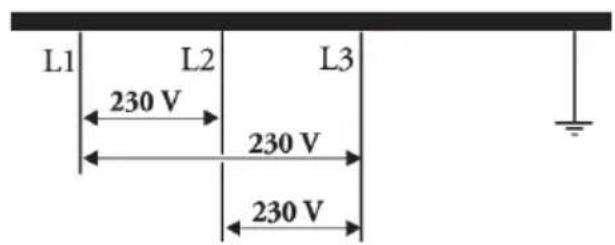
1phase(onlyforBE)3phases(onlyforBE)
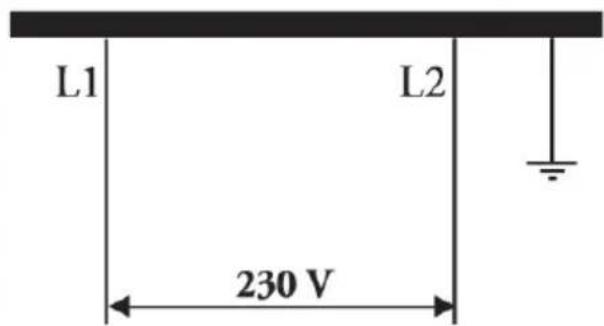
Connectiondiagram
NOTE!
Consulttthewiringdiagramssonthebottomoftheappliance.
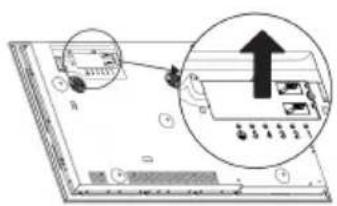
- Open the coverage of the connection terminal box.

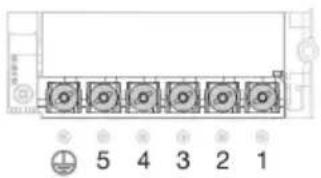
- Runthepowercordthroughacordstrainrelief(clamp)which protectssthecablefrombeingpulledout.
- Connectthewiresaccordngtoyourtypeofappliance.
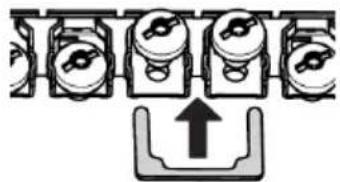
- Makethenecessaryconnectionsbetweentheterminalsusingthesuppliedterminalbridges.
- Theterminalbridgesareprovidedseperately.
Currentlimiter
See chapter 'Settings', under parameter Con - Current limiter to set the parameter. This parameter mustbesetbeforeanynpanisplacedonthehoborcookingzoneactivated.

WARNING!
Currentlimitersettingmustbesetaccordngtoyourconnectionandcircuitbreakersbya registered and qualified installer. Please read the safety regulations and the installation instructions carefully.
NOTE!
SettingalowervalueoftheCurrentlimiterparametermaycausereducedperformanceofthe induction Hob.
Seetheconnectiondiagramsforthevoltagebetweenthephaseandneutralconductorsandvoltage betweenthephaseconductors.
Powercordcorecrosssectionalareashouldbeatleast1,5mm forthefollowingcurrentlimiter settingswhichshouldbeadjustedtoyourcircuitbreakers:
| settings | ConnectiontypeCurrentlimiter | Powercord Type | Numberandcross sectionofPowercord wires |
| 5x1.5mm H05V2V2-F3phases-1neu | |||
| 5x1.5mm H05V2V2-F3phases-1neu | |||
| 5x1.5mm H05V2V2-F3phases-1neu | |||
| 5x1.5mm H05V2V2-F3phases-1neu | |||
| 4x1.5mm H05V2V2-F2phases-1neu | |||
| 4x1.5mm H05V2V2-F2phases-1neu | |||
| 4x1.5mm H05V2V2-F2phases-1neu | |||
| 4x1.5mm H05V2V2-F2phases-1neu | |||
| 4x1.5mmH05V2V2-F2phases-1neu | |||
| 5x1.5mm H05V2V2-F2phases-2neu | |||
| 4x1.5mm H05V2V2-F3phases(onlyf | |||
| 4x4.0mm H05V2V2-F2phases-1neu | |||
| 3x6.0mm H05V2V2-F1phase-1neutr |
Installation
Tablecontinuedfromlastpage
| 3x6.0mm H05V2V2-F1phase-1neutr | |||
| 3x4.0mm H05V2V2-F1phase-1neutr | |||
| 3x4.0mm H05V2V2-F1phase-1neutr | |||
| 3x2.5mm H05V2V2-F1phase-1neutr | |||
| 3x1.5mm H05V2V2-F1phase-1neutr |
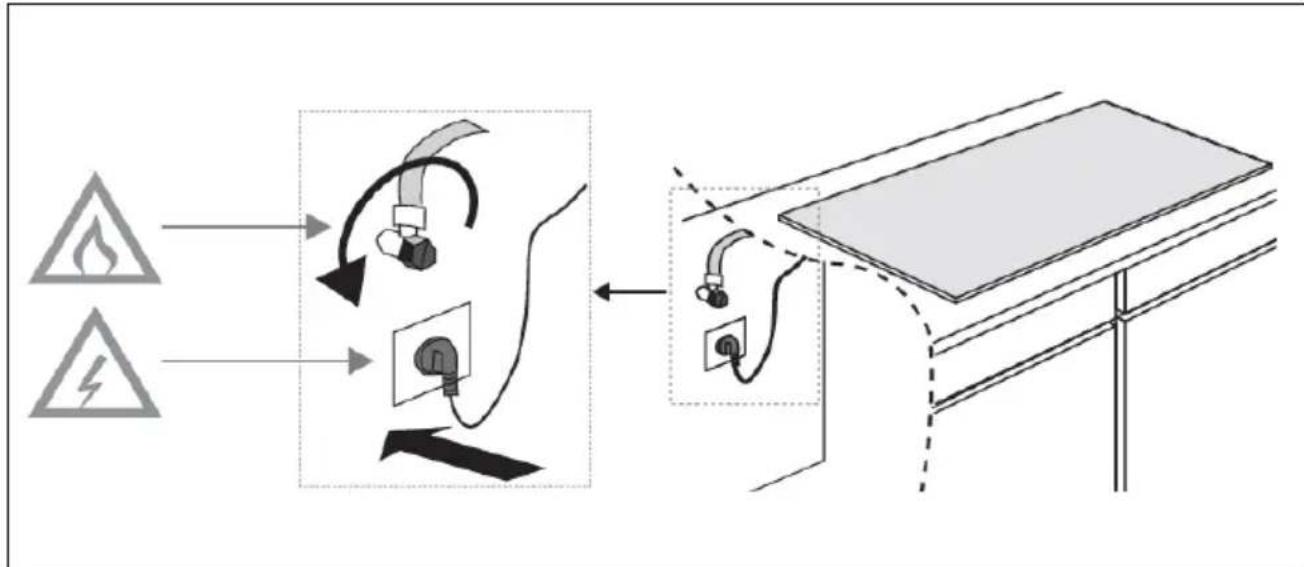
Connecting&testing
WARNING!
Checkifconnectionsaregastight.
Disposal of the appliance and packaging
Sustainable materialshavebeenusedduringthemanufactuereofthisappliance.Thisappliancemust be disposedresponsiblyattheendofitsservicelife. Askyourlocalauthoritiesformoreinformation abouthowtodothis.
Theappliancepackagingisrecyclable.Thefollowingmayhavebeenused:
cardboard;
polyethylenefilm(PE);
CFC-freepolystyrene(PSrigidfoam).
Disposeofthesematerialsinaresponsiblemannerandinaccordancewithgovernmentregulations.
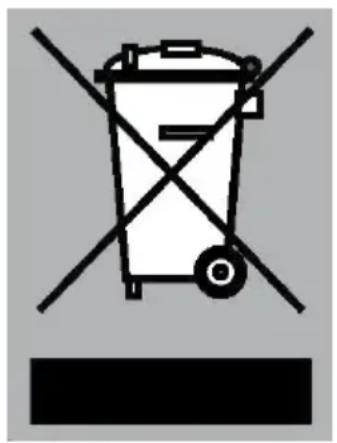
Theproducthasbeenmarkedwithacrossed-outdustbinsymbolto
remindyouoftheobligationtodisposeofelectricalhousehold
appliancesseparately.Thismeansthatheappliancemaynotbe
includedwithnormaldomesticrefuseattheendofitsservicelife.
Theappliancemustbetakentoaspecialmunicipalcentreforseparated
wastecollectionortoadealerprovidingthisservice.
Aseparatecollectionofhouseholdapplianceshelpstoppreventany potentialnegativeimpactonteenvironmentandonhumanhealth causedbyimproperdisposal.Itensuressthatthematerialsofwhichthe applianceiscomposedcanberecoveredtoobtainsignificantssavings inenergyandrawmaterials.
NOTE!
Please note! Donot throw abrokenceramic glassplate in the glass recycling bin but take this tothe Municipality's swasterecyclingcentre.

Declarationofconformity
Weherebydeclare that our productssatisfy the applicable European directives, ordersandregulations, as wellastherequirements stated inthereferencedstandards.
Theapplianceidentificationcardislocatedonthebottomoftheappliance.
Sticktheapplianceidentificationcardhere.
ATAG
www.atag.nl
www.atag.be