DW7214MT - Dishwasher Atag - Free user manual and instructions
Find the device manual for free DW7214MT Atag in PDF.


User questions about DW7214MT Atag
0 question about this device. Answer the ones you know or ask your own.
Ask a new question about this device
Download the instructions for your Dishwasher in PDF format for free! Find your manual DW7214MT - Atag and take your electronic device back in hand. On this page are published all the documents necessary for the use of your device. DW7214MT by Atag.
USER MANUAL DW7214MT Atag
natural_image
Blank gray rectangular image with no visible text, symbols, or markingsGEBRUIKSAANWIJZING
Vaatwasser
NL
DW7214MT
3Uwvaatwasser......
text_image
Diagram showing a valve control mechanism with directional arrows and a close-up of the valve assembly.natural_image
Illustration of a food tray with cutlery and utensils arranged in rows (no text or symbols)natural_image
Mechanical assembly diagram showing a yellow component being inserted into a cylindrical shaft (no text or symbols visible)Bovenkorf
natural_image
Diagram of a grid-based infrastructure with two black arrows indicating directional movement or flow, no readable text or symbols present.natural_image
3D wireframe model of a mechanical assembly with no visible text or symbolsOnderkorf
natural_image
Illustration of a multi-tiered kitchen appliance basket with cutlery and utensils (no text or symbols)Verstelbarebordensteunen
natural_image
Technical diagram of a steel rebar structure with directional arrows indicating movement or force (no text or symbols present)natural_image
Diagram of a vehicle chassis with yellow robotic arms and black directional arrows indicating motion (no text or symbols)Vazen-enflessenhouder
natural_image
3D technical diagram of a mechanical assembly with grid lines and structural components (no visible text or symbols)natural_image
Illustration showing a hand using a tool to cut a building interior, with two circular insets illustrating the same architectural views (no text or symbols present)Voegvaatwasmiddeltoe
text_image
QR code image with a central logo, likely linking to a digital resource or website.ScandeQR-codeofzoeknaarConnectLifeinuwfavorieteappstoreomde ConnectLife-apptedownloaden.
SelecteerenstarteenprogrammaindeappConnectLife.
text_image
L R Groffiltertext_image
L R Fijnfilternatural_image
Technical diagram showing a mechanical component with highlighted section and arrow, no visible text or symbolsnatural_image
Mechanical component with mounting holes and arrows indicating features (no text or symbols)natural_image
Mechanical component diagram showing a lever mechanism with directional arrows indicating motion (no text or symbols)natural_image
Mechanical assembly diagram showing a rotating component with a curved arrow indicating rotational motion (no text or symbols present)Onderstesproeiarm
natural_image
Mechanical assembly diagram showing a rotating shaft mounted on a base with an upward arrow indicating motion (no text or symbols present)Schoonmakenvandebuitenkantvandevaatwasser
Deurendeurafdichting
natural_image
Blank gray rectangular image with no visible text, symbols, or markingsNOTICED'UTILISATION
Lave-vaisselle
FR
DW7214MT
25Un Doisheestechniquesetperformances
Avantlepremierlavage

ATTENTION!
Avantlepremierlavage
natural_image
Cross-sectional diagram of a food storage tray with various kitchen utensils and dishes (no text or labels)natural_image
3D technical illustration of a firearm internal structure with yellow component and directional arrow (no text or symbols)Paniersupérieur
natural_image
Diagram of a grid-based infrastructure with two black arrows indicating directional movement or flow, no readable text or symbols present.natural_image
3D wireframe diagram of a mechanical or structural assembly with no visible text, numbers, or symbols.natural_image
Illustration of a multi-tiered kitchen appliance basket with cutlery and utensils (no text or symbols)Picotsàassiettesréglables
natural_image
Technical diagram of a steel rebar structure with directional arrows indicating movement or force (no text or symbols present)natural_image
Diagram of a vehicle chassis with structural framework and directional arrows indicating movement or force (no text or symbols present)natural_image
3D wire mesh diagram of a vehicle chassis with structural components and highlighted parts (no text or symbols)natural_image
Illustration showing a hand using a tool to cut a 3D architectural structure, with two circular insets illustrating the same components (no text or symbols present)text_image
DETEMENT RINSE AIDAppuyez pour ouvrir
text_image
QR code image with a central logo, likely linking to a digital resource or website.natural_image
Technical diagram showing a mechanical component with highlighted section and arrow, no visible text or symbolsnatural_image
Diagram of a mechanical component with four arrows pointing to circular features on a curved surface (no text or symbols)natural_image
Mechanical component diagram showing a lever with two arrows indicating rotational motion (no text or symbols)natural_image
Mechanical assembly diagram showing a rotating component with a curved arrow indicating rotational motion (no text or symbols present)natural_image
Mechanical assembly diagram showing a rotating blade mounted on a base with an upward arrow indicating motion (no text or symbols present)natural_image
Blank gray rectangular image with no visible text, symbols, or markingsGEBRAUCHSANWEISUNG
Geschirrspüler
DE
DW7214MT
natural_image
Cross-sectional diagram of a food storage tray with various kitchen utensils and dishes (no text or labels)natural_image
Mechanical assembly diagram showing a yellow component being inserted into a cylindrical device (no text or symbols visible)ObererKorb
natural_image
Diagram of a grid-based infrastructure with two black arrows indicating directional movement or flow, no readable text or symbols present.natural_image
3D wireframe diagram of a structural framework with no visible text or symbolsnatural_image
Illustration of a multi-tiered kitchen appliance basket with cutlery and utensils (no text or symbols)natural_image
Technical diagram of a steel structure with rebar and anchor bolts, showing directional arrows (no text or symbols)natural_image
Diagram of a vehicle chassis with structural beams and yellow components, no visible text or symbolsnatural_image
3D technical diagram of a mechanical assembly with grid framework and highlighted components (no text or symbols)natural_image
Illustration showing a hand using a tool to cut a 3D architectural structure, with two circular insets illustrating the same components (no text or symbols present)text_image
QR code image with a central logo, likely linking to a digital resource or website.text_image
L R Feinfilternatural_image
Technical illustration of a mechanical component with highlighted internal structure (no text or symbols)natural_image
Mechanical component with four black arrows pointing to circular features on a metallic base (no text or symbols)natural_image
Diagram of a mechanical component with directional arrows indicating rotation or movement (no text or symbols)ReinigungundPflege
ObererSprüharm
natural_image
Mechanical assembly diagram showing a rotating component with a curved arrow indicating rotational motion (no text or symbols present)UntererSprüharm
natural_image
Mechanical assembly diagram showing a rotating shaft mounted on a base with an upward arrow indicating motion (no text or symbols present)natural_image
Blank gray rectangular image with no visible text, symbols, or markingsUSERMANUAL
Dishwasher
EN
DW7214MT
3Yourdishwasher......
4Safetyinstructions......
5Childlock......
5Installation....
5Overflowguard......
5Padkagiof existingWiFi/Turnonexisting......
5DisWofial
5Symbolsontheappliance......
6Beforewashingforthefirsttime......
6Waterhardness......
7Basicsettings......
8Topuprinseaid......
8Topupsalt......
9Topupautodose......
10Greenerdishwashing......
10Saveenergyandwater......
11 Loadingthedishwasher......
11Fragiledishes......
11 Loadingaffectstheresults......
11 Thedishwasher'sbaskets......
12Topcutlerytray......
13Upperbasket......
15Lowerbasket......
16Cutlerybasket......
18Usingthedishwasher......
18Adddetergent......
19On/Off......
19Selectprogram....
20Selectprogrammode......
21Selection....
21Start/Stop......
22Statuslight......
22Ifyouwanttoloadmoredishes......
22Powerfailure......
23Oncetheprogramhasfinished......
23Thebestdryingresults......
23Unloadingthedishwasher......
24Programchart......
25Connectl
25Connectt
26Remotec
26Remotest
26Pairmore
26
26Removea
27Settings.
30Careando
30Topuprins
30Topupsal
30Topupaut
30Cleanthea
31Cleanthef
32Cleaningt
33Cleantheo
33RunSelf-c
34Removeb
35Wintersto
36Troubles
37General...
43WiFi
44Installatio
44Safetyinst
45Setup.....
45Drainage
45Connectio
46Electrical
47Service...
47Informatic
47Contactyc
47Sparepar
47Numbero
48Technica
48Technical
48Informatic
48Informatic
48Declaratic
text_image
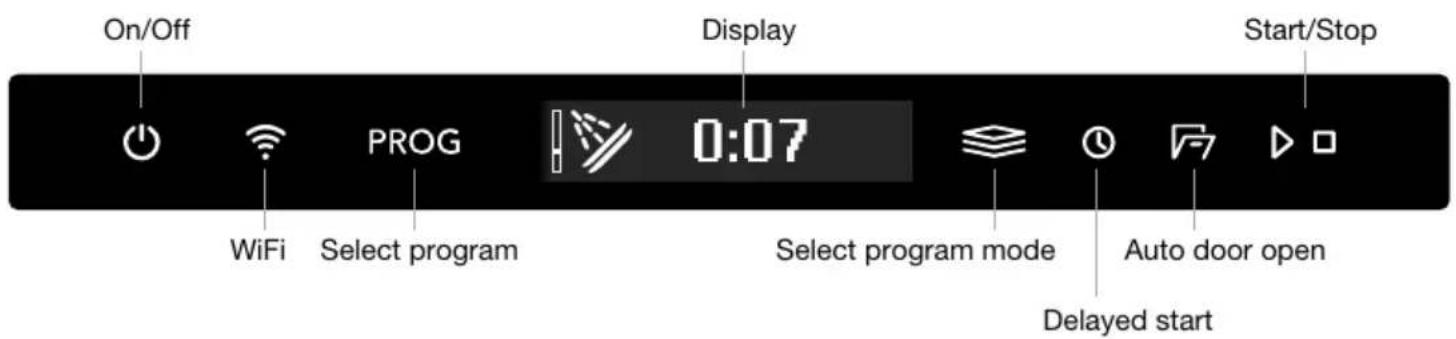
On/Off WiFi PROG 0:07 Display Select program mode Select program mode Auto door open Delayed start Start/StopSymbols on the display:
Auto door open
※ Top up rinse aid
S Top up salt
Auto dose activated
^+ Top up auto dose
Connected to cloud (Flashes when connecting) Remote control active
Text on the display:
Clean the filters
Run Self-cleaning
See the chapter Care and cleaning.
Installthedishwasher,seethechapterInstallation.Thenopenthedoorandpress.

"First time setup." is shown on the display the first time the dishwasher is switched on. It is important that you choose her right setting to ensure good dishwashing results. Seepage6.
You can remote control this dishwasher with your smartphone/tablet. Connect the dishwasherto your wireless network and pair with your smartphone/tablett be able to remote control and start the dishwasher using the ConnectLife app. The app can be used to find information, change settings and monitored dishwasher. (Thedishwasher can always be used without the app.)
Safetyinstructions
- Readtheusermanualandkeepitinasafeplace!
•Numberofstandardplacesettings:14 - Neverusethedishwasherforanypurposeotherthanthat specifiedintheseoperatinginstructions.
- Donotloadthedishwasherdoorordishwasherbasketswith anythingotherthandishes.
- Neverleavethedishwasherdooropenassomeonemaytripon it. Pushthebasketsintoavoidriskingthedishwashertipping over.
- Useonlydishwasherdetergent!
- Thismachine can be used by children aged 8 and upwards, and by people with reduced physical capacity, mental ability, memory loss or lacking experience and knowledge. These individuals must be supervised when using the machine or have instructions on how to set the machine and understand their risk that can occur. Cleaning of the machine must not be carried out by children without supervision.
- Damagedsupplycordmustonlybereplacedbythe manufacturer'sservicecentreorsomeonesimilarlyprofessionally qualified.
- Onlyusethedishwasherinhousehold-typeenvironmentsfor dishwashinghouseholddishes. Allotheruseisprohibited.
- Neverplacedisheswithsolventresiduesinthedishwasherdue totheriskofexplosion.Normaydishesthatcontainash,waxor lubricantsbewashedinthedishwasher.
- Childrenmustbewatched.Donotallowchildrentouseorplay withthedishwasher.Beespeciallyvigilantwhenthedoorisopen. Somedetergentmayremaininside!Afteraddingdetergent,always startthedishwasherimmediately.
WARNING!
Knivesandotherpointeditemsmustbeplacedwiththepoints downinthecutlerybasketorhorizontallyinotherbaskets.
WARNING!
Childrenmustbesupervised-dishwasherdetergentiscorrosive!
Childlock
You can activate the Automaticchildlocksetting to prevent children from starting the dishwasher. See the chapter Settings. You can also temporarily activate and deactivate the Child lock function. Press and hold and forth three seconds.
Installation
SeethechapterInstallation.
Overflowguard
Theoverflowguardstartspumpingoutthewaterandturnsoffthewatersupplyifthewaterlevelin thedishwasherexceedsthenormallevel.Iftheoverflowguardstriggered,F54(Overfillingwater) appearsonthedisplay.Turnoffthewatertapandcontactyournearestservicecentre.(Toavoid waterleakageoutsidethedishwasher,donotremovetheplugfromthewallsocketuntilthewater taponthesupplylinehasbeenturnedoff!)
Packaging
Theouterpackagingprotectstheproductduringtransport. Thepackagingmaterialisrecyclable. Separatethedifferentpackagingmaterialstohelpreducerawmaterialuseandwaste. Yourdealer cantakethepackagingforrecyclingordirectyoutothenearestrecyclingcentre. Thepackaging iscomprisedof:
- Corrugatedcardboardmadefromupto 100% recycledmaterial.
- Expandedpolystyrene(EPS)withnoaddedchlorineorfluorine.
•Supportsmadefromuntreatedwood. - Protectiveplasticmadefrompolyethylene(PE).
Disposal
Thedishwashermanufacturedandlabelledforrecycling.Whenthedishwasherhasreachedthe endofitsservicelifeandistobedisposedof,itshouldimmediatelybemadeunusable.Pulloutthe powercableandcutitasshortaspossible.Removethelightsource/lightsources.
Contact your local authority for information about where and how your dish washers should be correctly recycled.
Symbolsontheappliance
Readtheusermanual.
Recycleaselectricalwaste.
CE ApprovedinaccordancewiththerelevantEUdirectives.
UK CA ApprovedinaccordancewiththerelevantUKlegalrequirements.
Beforewashingforthefirsttime
Waterhardness
Inordertoachievegooddishwashingresults,thedishwasherneedssoftwater(waterwithlowmineral content).Hardwaterleavesawhitecoatingondishesandthedishwasher.
Checkingwaterhardness
Waterhardness is specified using German degrees of water hardness (°dH), French degrees of water hardness (°fH), English degrees of water hardness (°eH) or millimoles per litre (mmol/l).
Awatersupplywithawaterhardnessinexcessof5°dH(9°fH/6°eH/0.9mmol/l)mustbesoftened. Thisisdoneautomaticallywiththeaidofthebuilt-inwatersoftener.Inorderforthewatersoftener tofunctionproperly,itssettingsmustbeadjustedtothehardnessofthewatersupply.Onceyou haveadjustedthewatersoftenersettings,adddetergentandrinseaidindosessuitableforsoft water.
Contact the local water work to check the water hardness in your area.
Makeanoteofthewaterhardness: ____
| Recommendedsettingmmol/l°eH°fH°dH | ||||
| 00.0-0.90-60-90-5 | ||||
| 11.0-1.47-1010-146-8 | ||||
| 21.5-2.011-1415-209-11 | ||||
| 32.1-2.515-1821-2512-14 | ||||
| 42.6-3.419-2426-3415-19 | ||||
| 53.5-4.325-3035-4320-24 | ||||
| 64.4-5.231-3644-5225-29 | ||||
| 75.3-7.037-4953-7030-39 | ||||
| 87.1-8.850-6171-8840-49 | ||||
| 98.9628950 |
If the water hardness exceeds 50^ dH ( 89^ fH/62°eH/8.9 mmol/l), were recommend connecting an external watersoftener.
Increasedconsumptionduringregeneration
Thedishwasher's built-in watersofteneris regularly regenerated to maintain its function. Regeneration extend the dish washing program and increases energy and water consumption. Just how often the dish washer's watersofteneris regenerated depends on these selected setting.
Example: If the Ecoprogram is run with a water hardness of 14^ dH ( 25^ fH/ 18^ eH/2.5mmol/l), the watersofteneris regenerated at regular intervals (after 7 dishwashing cycles), energy consumption increases by 0.015 kWh, and water consumption increases by 2.3 litres, while the program time is extended by 3 minutes. Regeneration takes placed during the program's mainwash.
WARNING!
Hardwaterleavesawhitecoatingondishesandinsidethedishwasher.Itisthereforeimportant thatyouselecttherightsettingforthewatersoftener!SeeWaterhardness.
Neverrunthedishwasherwithanemptysaltcompartmentifthewatersupplyhasawaterhardness inexcessof5°dH(9°fH/6°eH/0.9mmol/l).
Basicsettings
Openthedoor.Press.
"First time setup." is shown on the display. It is important that you choose the right settings to ensure gooddishwashing results.
Selectsettingwith. Confirmselectedsettingwith.
| Settings | ||
| Selectthelanguagetobeshownonthedisplay.Language1. | ||
| 2. | Setlevelofrinseaid0/1/2/3/4/5Pre-selectedatfactory:4 | Dryingisfasterandabetterresultisachievedifyouuserinseaid.Youwillalsoachieveabetterdishwashingresultwithclearandspotlessdishes.Therinseaiddispensercanbeadjustedbetween0(Off)and5(Highdosage). |
| 3. | Setwaterhardness0/1/2/3/4/5/6/7/8/9Pre-selectedatfactory:4 | Adjustingthewatersoftener.Selectasettingdependingonthehardnessofthewatersupply.Itisimportantthatthissettingiscorrect!Forawatersupplywithahardnessabove 5^ dH( 9^ fH/ 6^ eH/0.9mmol/l),fillwithsalt.Forawatersupplywithahardnessbelow 6^ dH( 10^ fH/ 7^ eH/1.0mmol/l),select0.Thewatersoftenerisdeactivatedandnosaltneedstobeadded. |
| 4. | TABOn/Off(All-in-onedetergent)Pre-selectedatfactory:Off | Activatethesettingwhenusingall-in-onedetergentcontainingrinseaid.(Alsoappliestodishwasherdetergentgelforautomaticdosingthatcontainsrinseaid.)Thissettingreducestherinseaiddosageandaffectshowoftenthedishwasher'sbuilt-insoftenerisregenerated. |
| 5. | AutodoseOff,15-40mlPre-selectedatfactory:Off | Activatethissettigifyouwanttouseautomaticdosingofdetergent.Theexactdosagedependsonwhichprogramisrunning.FortheAutoprogram,thedosagealsodependsonhowdirtythedishesare. |
Tochangetheselectedsetting,seethechapterSettings.
Beforewashingforthefirsttime
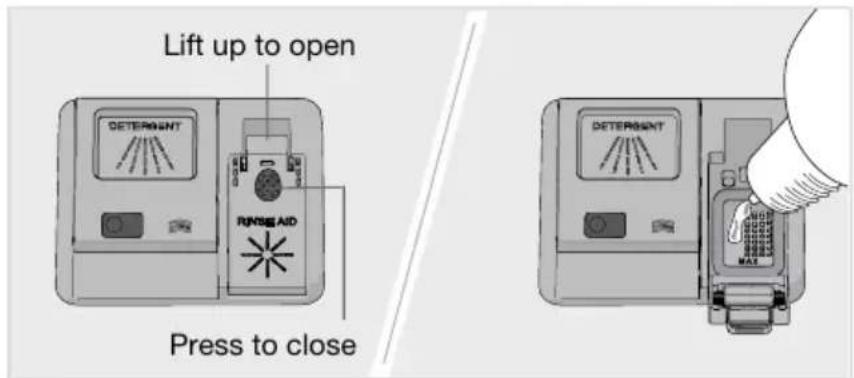
\* Topuprinseaid
TopuptherinseaidcompartmentwithrinseaidifyouhaveselectedRinseaid1-5.
text_image
Lift up to open DETERMSANT RUNSSE AID Press to close DETERMSANT MAX- Opentherinseaaidcompartmentlid.
- CarefullytopupwithrinseaidtothelevelmarkedMAX.
3.Wipeupanysplashesofrinseaidaroundthecompartment. - Closethelidfirmly.
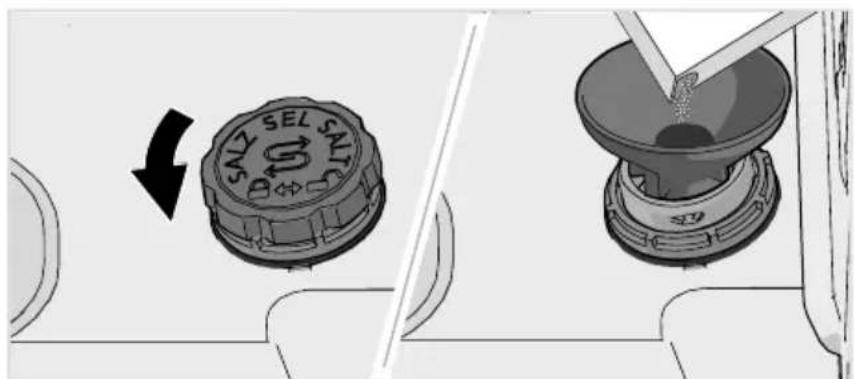
S Topupsalt
Forawatersupplywithahardnessabove5°dH(9°fH/6°eH/0.9mmol/l),fillwithsalt.
AddsalttothesaltcompartmentifyouhaveselectedWaterhardness1-9.
text_image
SALZ SEL SALTAS- Removethesaltcompartmentlidbyturningitanticlockwise.
- Placethefunnelsuppliedwiththedishwasherinthesaltcompartmenttop-uphole.Before washingforthefirsttime,pourinabout1lofwater.(Waterisonlyneededthefirsttime.)
- Addenoughsalttofillthesaltcompartment(max.750gram). Usespecialdishwashersalt.
- Wipeawayexcesssaltandturnthelidclockwiseuntilintheclosedposition.
WARNING!
Inordertoavoidruststainsadishwashingprogrammustbestartedinmediatelyafteradding salt.
Neverpourdishwasherdetergentintothesaltcompartment. Thisdestroysthewatersoftener!
Beforewashingforthefirsttime

Topupautodose
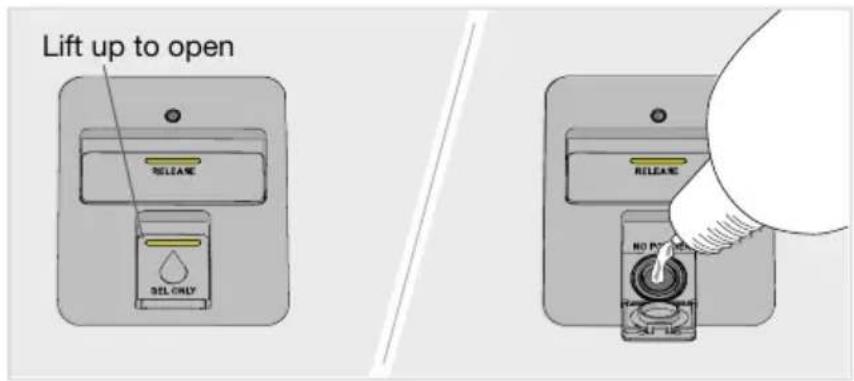
FilltheautomaticdosingcompartmentwithdishwasherdetergentgelifyouhaveactivatedtheAuto dosesetting.
text_image
Lift up to open RELEASE SEL ONLY RELEASE NO POWER SIFT- Opentheliidoftheautomaticdosingcompartmentfordishwasherdetergentgel.
- CarefullyaddishwasherdetergentgeltothelevelmarkedMAX.
- Cleanup any excess dish washer detergent gel outside the compartment.
- Closethelidfirmly.
NOTE!
Useonlydishwasherdetergentgelintheautomaticdosingcompartment!Donotusedishwasher detergentpowder.Washingupliquidmustnotbeusedasthefoamthatformspreventsthe dishwasherfromoperatingeffectively.
Somethickdishwasherdetergentgelsarenotsuitablefortheautomaticdosingcompartment. Addverythickdishwasherdetergentgelintothemanualdetergentcompartment.Seethedetergent manufacturer'srecommendations.
Dishwasherdetergentgelhasamilderformulathandishwasherdetergentpowderorall-in-one detergentwithbleachingagent. Thismeansthatdishwasherdetergentgelmayprovelesseffective atremovingstainscausedby,forexample,lipstickandtea/coffee.Ifnecessary,onsuchoccasions dishwasherdetergentpowderorall-in-onedetergentwithbleachingagentcanbeaddedtothe manualdetergentcompartment(whenAutodoseisactivated).SeeAdddetergent.
Dosingofdishwasherdetergentgel
DishwasherdetergentgelisdispensedduringthemainwashforallprogramsexceptSelf-cleaning. Alittleextradishwasherdetergentgelisalsodispensedduringtheprewashinthefollowingprograms:
Auto, Intensive, Timeprogram(2:00, 2:30)
Greenerdishwashing
Saveenergyandwater
When using a dishwasher a residential setting, less energy and water are generally used compared to washing the dishes by hand.
Donotrinseunderrunningwater
Donotrinsethedishesunderrunningwaterasthiswillleadtoincreasedenergyandwater consumption.Simplyscrapeofflargefoodparticlesbeforeloadingthedishwasher.
Chooseagreendetergent
Readtheenvironmentaldeclarationonthepackaging!
Toomuchdetergent, rinseaidandsaltcanresultinlesseffectivedishwashingandalsoentailgreater environmentalimpact.
Runafullyloadeddishwasher
Saveenergyandwaterbywaitinguntilthedishwasherisfullbeforerunningaprogram(seenumber ofstandardplacesettings).UsetheRinseandholdprogramtorinsethedishesifthereareany unpleasantodours.
YoucanalsousetheAnti-odourprogramtopreventbadodoursfromdirtydishesleftinthe dishwasher.
Runprogramsatalowertemperature
Ifthedishesareonlyslightlydirty,youcanselectaprogramwithalowtemperature.
Selectdishwashingprogram—Eco
This program is suitable for washing normally soiled dishes and isth most effective program in terms of combined energy and water consumption. This program is used to assess compliance with EU legislation on one codesign.
Thedishwashingprogramisdesignedforaneffectivewashasusingaslittleenergyandwateras possible. The program washesatalowtemperatureforalongtime.
Selection-Autodooropen
BetterdryingresultsareachievedifyouusetheAutodooropenoption,whichautomaticallyopens thedishwasherdoor.Waituntilthedishwasherindicatesthattheprogramhasendedandthedishes havecooledbeforeunloadingthedishwasher.
Connecttocoldwater
Connectthedishwashertothecoldwatersupplyifthebuildingisheatedusingoil,electricityorgas.
Connecttohotwater
Connectthedishwashertothehotwatersupply(max.70°C)ifthebuildingisheatedusingan energy-efficientmeanssuchasdistrictheating,solarpowerorgeothermalpower.Choosingahot waterconnectionreducethedishwasher'senergyconsumption.
NOTE!
Donotexceedthepermittedwatersupplytemperature.Certainmaterialsusedinsomecookware cannot withstand high heat. See Fragile dishes in the chapter Loading the dishwasher.
Fragiledishes
Somecookwareisnotdishwashersafe. This can be for several reasons. Somematerials cannot withstand high heat, others can be damaged by dishwasher detergent.
Exercisecautionwith,forexample,handmadeitems,fragiledecoration,crystal/glassware,silver,copper,tin,aluminium,woodandplastic.Lookforthe"Dishwashersafe"marking.
Fragiledecoration
Porcelainwithdecorationontopoftheglazing(theitemsfeelrough)shouldnotbewashedina dishwasher.
Crystal/Glass
Dryingisfasterandabetterresultisachievedifyouuserinseaid.Youwillalsoachieveabetterdishwashingresultwithclearandspotlessdishes.
Hand-paintedglassware, as well as antique and very fragile items, should not bewashed in dishwasher.
Silver
Silverandstainlesssteelitemsshouldnotcomeintocontact, asthesilvercanbecomediscoloured.
Inordertoavoidmarksandtarnishing, separatedishesmadefromdifferentmetals,suchassilver, stainlesssteelandaluminium.
Aluminium
Aluminiumcanloseitsshineifwashedinadishwasher. However, goodqualityaluminiumpanscan bewashedinadishwasher, even if some of the shinewillbelost.
Cutlerywithgluedhandles
Sometypesofgluearenotdishwashersafe.Insuchcases,thehandlesmayloosen.
Loadingaffectstheresults
Loadthedishescarefullytoensurethebestwashinganddryingresultswiththelowestpossible energyandwaterconsumption.Giveyourdishwasherthebestchancetoreachandcleanallsurfaces, aswellastodrythedishesasthoroughlyaspossible.
- Allidirtysurfacesshouldfaceinwardsanddownwards!
- Dishesshouldnotbeplacedinoroneachother.
- Angle dishes with hollows, such as cups, so that the rinse water will run off. This is also important for plastic items.
- Make sure small items cannot fall through the dishwasher basket; place them in the top cutlery tray.
NOTE!
Checkthatthesprayarmscanrotatefreely.
Thedishwasher'sbaskets
Thedishwasherisequippedwithatopcutlerytray,anupperbasketandalowerbasketwithacutlery basket.
Theappearanceofthebasketsmaydifferdependingonthedishwashersetup.
Loadingthedishwasher
Topcutlerytray
Thetopcutlerytrayhasspaceforcutlery,ladles,whisks,servingcutleryandsimilaritems.
Avoidplacingtallobjectsinthetopcutlerytray.Theycanblockthetopsprayarm.
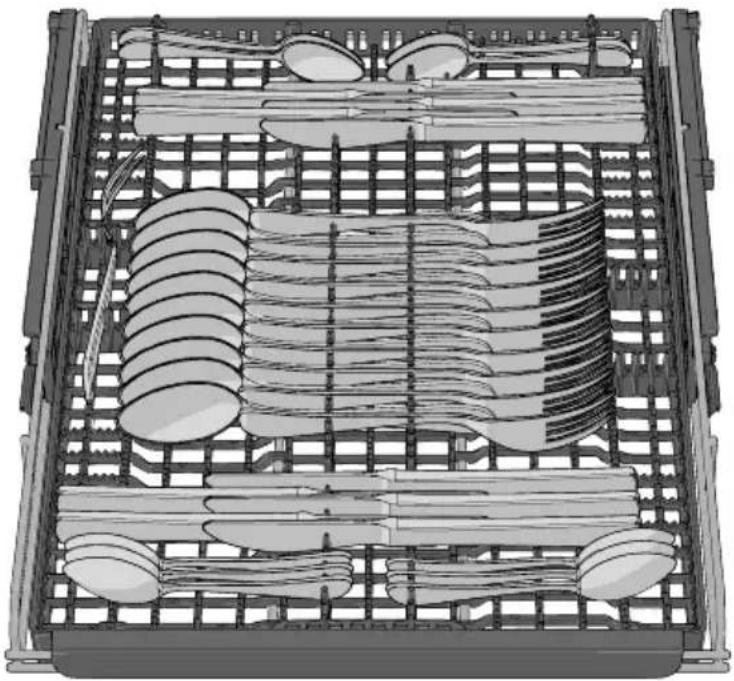
natural_image
Top-down technical illustration of a mechanical assembly with gears, rods, and spoons (no text or symbols)Raisingthetopcutlerytray
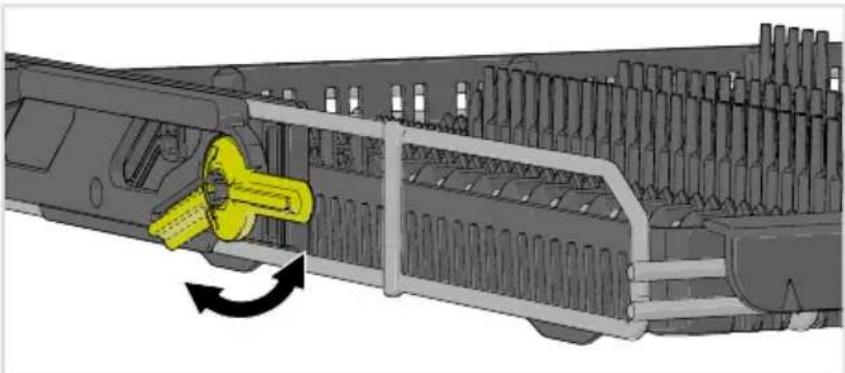
- Pulloutthetopcutlerytray.
- Pullforwardthetwolockinghandlesoneithersidetoraisethetopcutlerytray.
Loweringthetopcutlerytray
- Makesuretheupperbasketisinthelowestposition.
- Pulloutthetopcutlerytray.
3.Slidethetwolockinghandlesoneithersidedownwardsandbackwardstolowerthetopcutlery tray.
natural_image
Mechanical assembly diagram showing a yellow component being inserted into a main gun (no text or symbols visible)Upperbasket
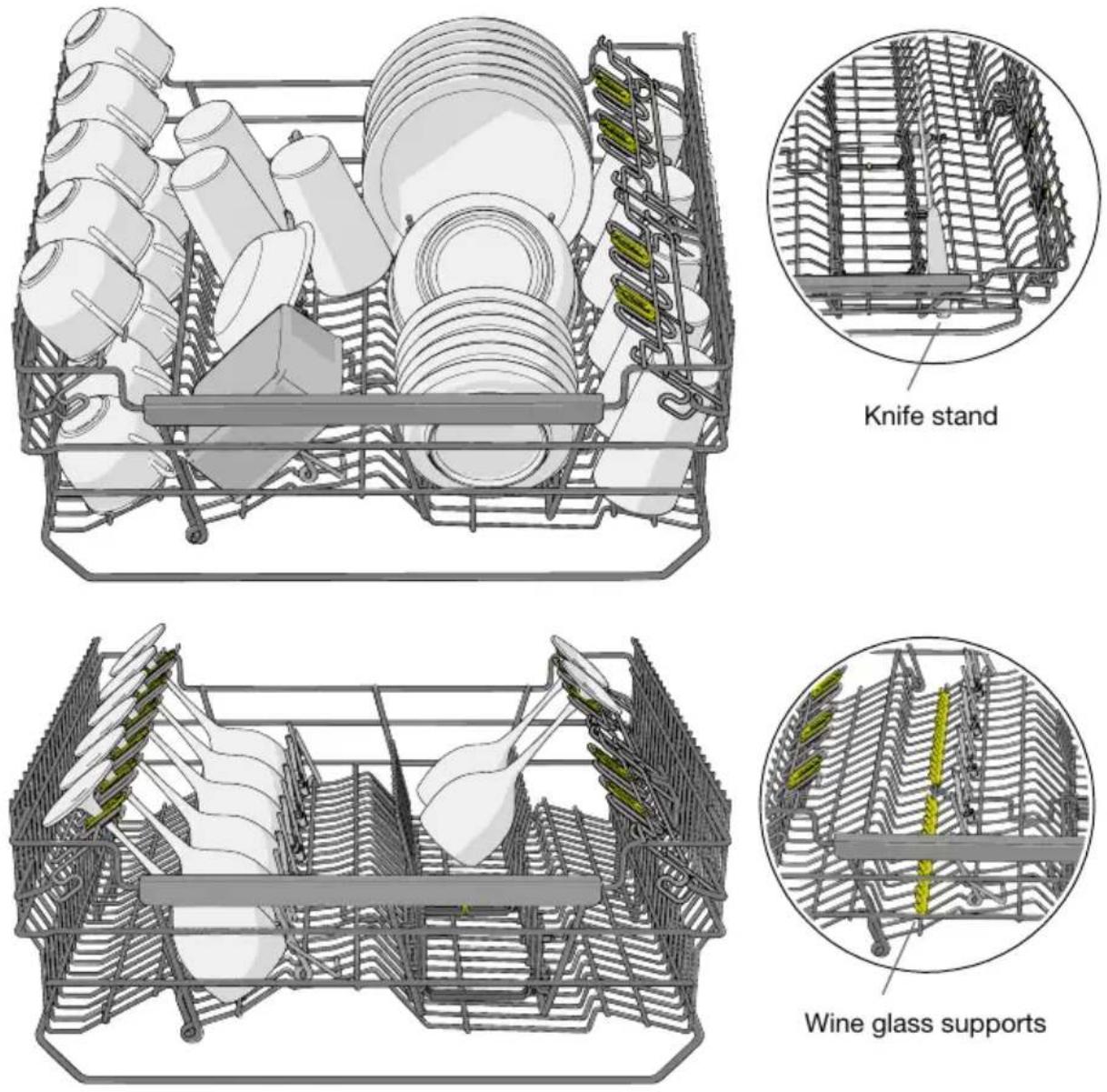
Placeglasses,cups,bowls,sideplatesandsaucersintheupperbasket.Alldirtysurfaceshould faceinwardsanddownwards!Wineglassesareplacedonthewineglassshelfandknivesare placedintheknifestandontheright.
Loadingthedishwasher
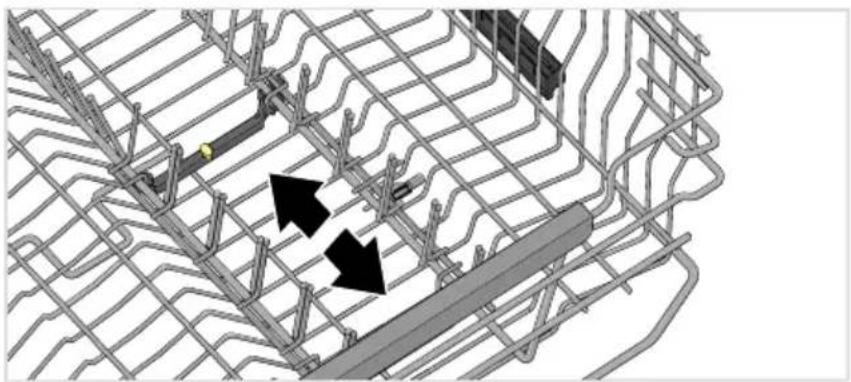
Adjustableplatesupports
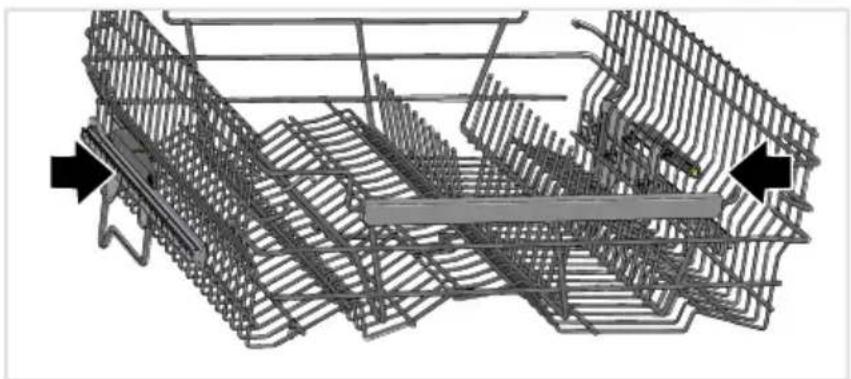
The adjustable plates supports can be pushed together to suit the dishes.
natural_image
Diagram of a grid-based infrastructure with two black arrows indicating directional movement or flow, no readable text or symbols present.Raisingtheupperbasket
- Pullouttheupperbasket.
- Grabthesides of the upper basket with both hands and lift it up.
Loweringtheupperbasket
- Pullouttheupperbasket.
- Grabthesides of the upper basket with both hands and push in the two locking handle to lower the upper basket.
natural_image
3D wireframe model of a mechanical assembly with no visible text or symbolsLowerbasket
Placeplates, sideplates, serving dishes, pots and cutlery (inthecutlery basket) in the lower basket.
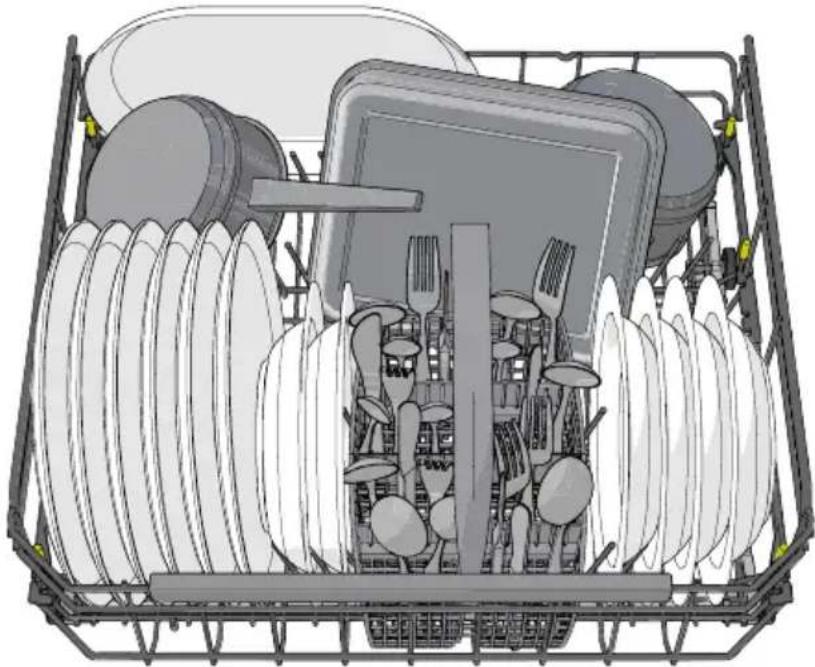
natural_image
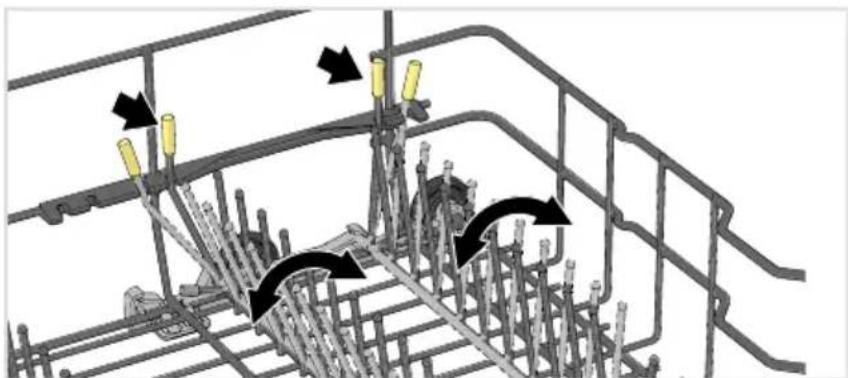
Illustration of a multi-tiered kitchen appliance basket with cutlery and utensils (no text or symbols)Adjustableplatesupports
Theadjustableplatesupportscanbeadjustedtosuitthedishes.Releasetheplatesupportsby pushingtheminwardsbeforerepositioningthem.Theplatesupportscanalsobefoldeddownto makeiteasiertoloadpotsandbowls.
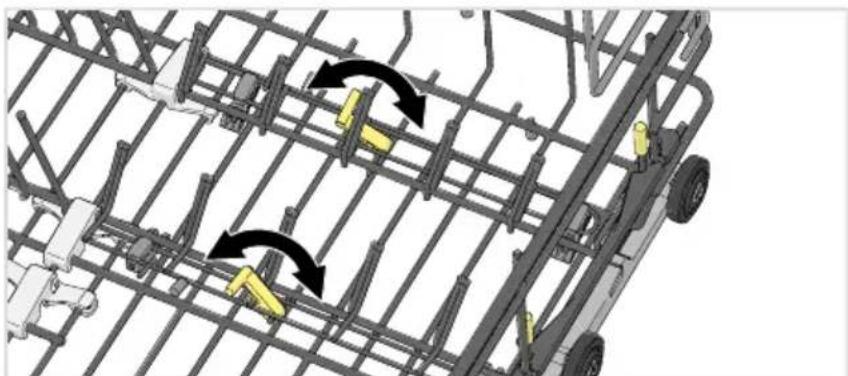
natural_image
Technical diagram of a steel rebar structure with directional arrows indicating movement or force (no text or symbols present)Atthebackoftherightsideofthelowerbasket,theplatesupportscanbepushedtogethertoprovide morespacefor,forexample,stonewareoradeeppan.
natural_image
Diagram of a vehicle's roof structure with yellow robotic arms and black directional arrows indicating motion (no text or symbols)Loadingthedishwasher
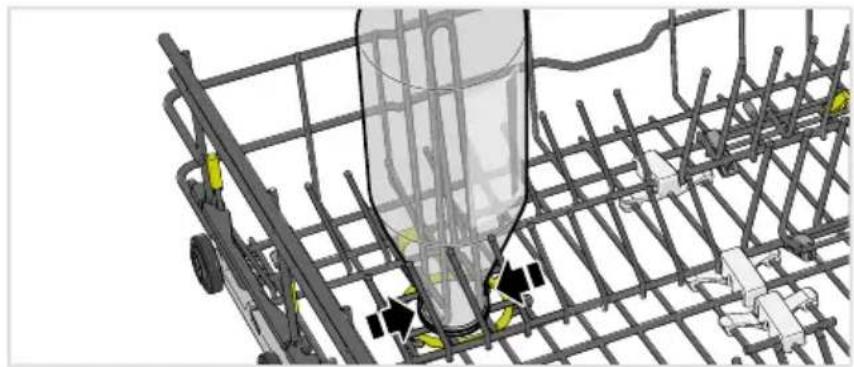
Vaseandbottleholder
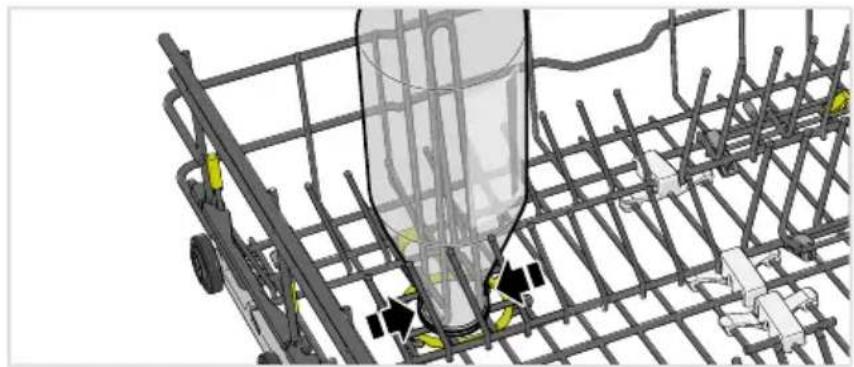
natural_image
3D technical diagram of a steel rebar cage with internal components and mounting points (no text or symbols)Adaptablepowerzones
Thedishwasher'stwoadaptablepowerzonescanbeopenedintwodifferentpositionsorturned off.
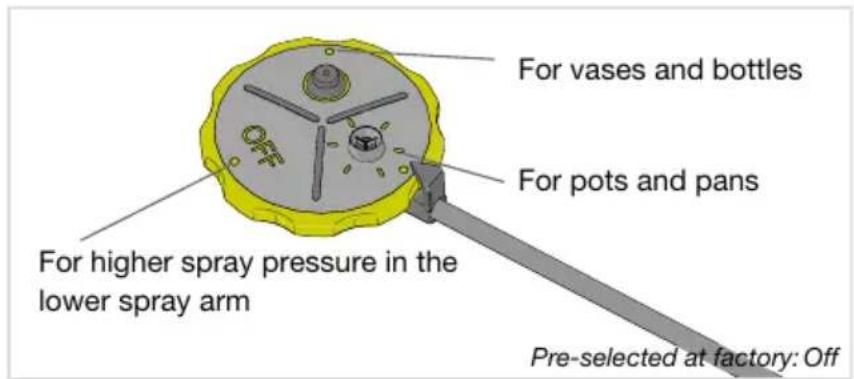
text_image
For vases and bottles For pots and pans For higher spray pressure in the lower spray arm Pre-selected at factory: OffLeavethepowerzonesopenifyouwantanincreasedwaterflowwhere,forexample,youhave placed pots and pans or vases and bottles. Turn the dishwasher's power zones off if you want greater spraypressureinthelowersprayarm.
Washinglargeplates
You can adjust the lower basket for plates with diameter of 25-31 cm by moving the adjustable plates supports and their fixture to increase the distance between the inner rows.
Cutlerybasket
Placecutlerywiththehandlesfacingdown,exceptforknives,andspreadthemoutasmuchas possible.Ensurethatspoonsdonotstackinsideeachother.
Thecutlerybasketisbestplacedinthemiddleatthefrontofthelowerbaskettobestutilise dishwashingperformancefromtheuniquesprayzoneintendedforthecutlerybasket.
WARNING!
Knivesandotherpointeditemsmustbeplacedhorizontallyinthedishwasher'sspecialcutlery baskets.
Fold-downsectionforsmallitems
Thecutlerybaskethasafold-downsectioninthemiddleforsmallitemsorsmallshafts(suchas electricwhiskattachments).
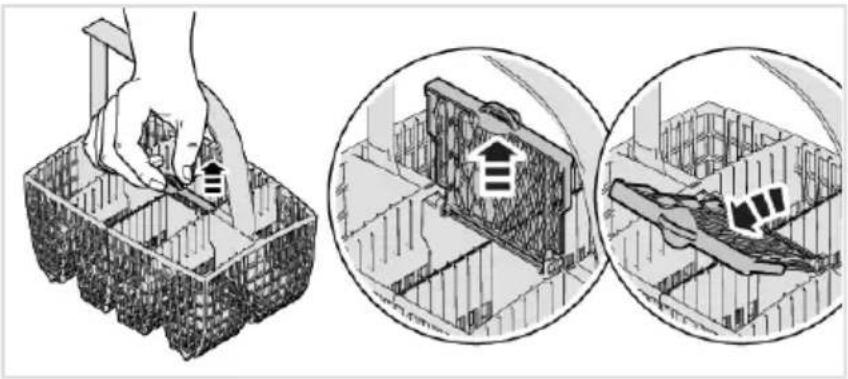
natural_image
Illustration showing a hand using a tool to cut a building interior, with two circular insets illustrating the same architectural views (no text or symbols present)Usingthedishwasher
Adddetergent
Youhavetwooptionsforaddingdetergent-manualorautomatic.ToactivateAutodose,seethe chapter Settings.Themanualdetergentcompartmentcanbeusedasasupplementevenwhen Autodoseisactivated(e.g.fordishwasherdetergentwithbleachingagentoriftheautomaticdosing compartmentisempty).
Followtheinstructionsonthedetergentpackaging. Thisdishwasherisfittedwithawatersoftener, sousedetergentandrinseaiddosessuitableforsoftwater.
Manualdetergentcompartment
Donotaddetergenttothemanualdetergentcompartmentwhenusingautomaticdetergentdosing! Toomuchdetergentcanresultinlesseffectivedishwashingandalsoentailsgreaterenvironmental impact.
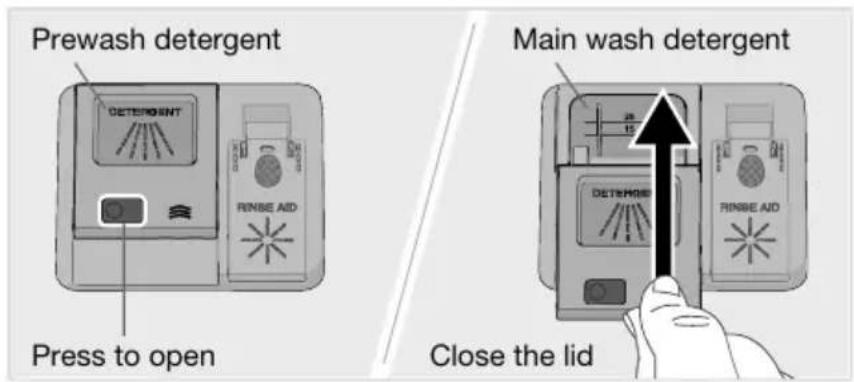
text_image
Prewash detergent DETERMS RINBE AID Press to open Main wash detergent DETERMS RINBE AID Close the lidThe detergent compartment must bedry when adding detergent. There is one compartment for the prewash and one forth them in wash. If dishwasher detergent powder or dishwasher detergent gel is used, you can add small amount of the detergent to the prewash compartment. Contact the detergent manufacturer if you have questions about the detergent.
NOTE!
Useonlydishwasherdetergent!Washingupliquidmustnotbeusedasthefoamthatforms preventsthedishwasherfromoperatingeffectively.
All-in-onedetergent
Therearemanytypesofall-in-onedetergentsonthemarket.Readthroughthedirectionsforthese productscarefully.
Activate the TAB setting when using an all-in-on-detergent that contains rinse aid.
Dishwashertabletsarenotrecommendedforprogramslastinglessthan75minutes.Usedishwasher detergentpowderordishwasherdetergentgelinstead.
NOTE!
Optimalwashinganddryingresultsareachievedbyusingdishwasherdetergenttogetherwith separatelydispensedrinseaidandsalt.

text_image
On/Off PROG 0:07 Select program Select program mode Start/Stop Select option
On/Off
Openthedoorandpress.Alsbturnonthewatertapifitisturnedoff.
PROG Selectprogram
Ecoisalwayspre-selected. Toselectanotherprogram, pressuntilthe desiredprogram is shownonthedisplay.
Selectaprogramtosuitthetypeofdishesandhowdirtytheyare.

Eco
Thisprogramissuitableforwashingnormallysoileddishesandisthemosteeffectiveprogramin termsofcombinedenergyandwaterconsumption. Thisprogramisusedtoassesscompliancewith EUlegislationonecodesign.
YoucanreadmoreaboutgreenerdishwashinginthechapterGreenerdishwashing.
Forheavilysoileddisheswithalotofgrease,aprogramwithhighertemperatureshouldbeused.

Auto
Thedishwashercanmeasurehowdirtythedishesareandadjustwaterconsumptionandtemperature accordingly.Whennewlyinstalled,theprogramneedstoberunfivetimesbeforeitisfullyadapted andcanprovidethebestresults.
If Autodose is activated, the dosage of dishwasher detergent gel is also adjusted.

Intensive
Aprogramwithahightemperaturefordissolvinggreaseonverydirtydishes,suchaspans,casserole dishesandovendishes.Ifthesedishesdonotcompletelyfillthedishwasher,youcanaddplates andotherdishes.

Quickpro 1)
Afastandeffectiveprogramforslightlydriedleftovers.(Thisprogramisnotintendedforburntfood, suchasonovendishes.)
The Autodooropenoption is important for ensuring the best drying results.
1) When combined with Speed, the program is shortened (39 minutes).

Timeprogram
The program adapt to the specified running time or finish time. With this program it is important to choose times suited to how dirty the dishes are.
Presstøsetthedesiredprogramtime.
Slightlydirtydishes0:15-0:45
Normallydirtydishes1:00-1:30
Verydirtydishes2:00-2:30

Hygiene
Thisprogramisidealtousewheredemandsonhygieneareextrahigh, e.g. forbabybottles and cuttingboards. Thetemperatureishighbothinthemainwashandinthefinalrinse.

Rinseandhold
Usedtorinsedisheswhileyouwaitforthedishwashertobecomefullyloaded.

Self-cleaning
Self-cleaningprogramforhygieniccleaningofthedishwashertub,sprayarmsandspraypipes.
Thisprogramshouldberun(withnodishesinthemachine)usingdishwasherdetergentorcitric acid – add it to the dishwasher's manual detergent compartment. (Detergent is not automatically dispensedwiththeAutodosefunction.)Specialdishwashercleanersarealsoavailableonthe market. For the removal of limescale deposits, see Dishwasher tub in the chapter Care and cleaning.

Anti-odour ^2)
This program prevents bad odours from dirty dishes left in the dishwasher. Only the dishwasher's fanisactivated(atregularintervalsduringaperiodof72hours).

Selectprogrammode
Presstscrollthroughtheavailableprogrammodes. Thesymbolisdimlylitinavailableprogram modes, and glowsbrighterwhenaprogrammodehasbeenactivated. (Theprogrammodesyou canselectvarybetweenprograms.)
▶▶ Speed
The program time is shortened, but the dish washer uses more energy.
Green
Thedishwasheruseslessenergyandwater.
Night
Lowernoiselevelduringthedishwashingprogram. The program time is extended.
2) ActivateOdourcontrolinthedishwasher'sSettingsmenu.SeetheSettingschapter.
Selection
Availableoptionsaredimlylit.Selecttheoptions(,)toactivstethem.Theoptionsglowbrighter whenactivated.(Theoptionsyoucanselectvarybetweenprograms.)
Delayedstart
WhenyouselectDelayedstart, the dishwasher will start 1-24 hours after you have pressed and closed the door.

- PressofcetoactivateDelayedstart.Pressseveraltimes,orholditin,tosetthedesired numberofhours.
- Press and closetedoor. Thetimercountsdownandthedishwasherstartsaftertheselected delay.
If you want to cancel the Delayed start option, open the do or then press and hold for three seconds.
Autodooropen
Thedishwasherdooropensautomatically, which shorten the program time and improves the drying results. Wait until the dishwasher indicates that the program has ended and the dishes have cooled before unloading the dishwasher.
The drying time of the Autodoor open option varies (from 5 to 90 minutes) depending on the model, program and temperature of the final rinse.
The Autodooropenoption is pre-selected for some programs.
NOTE!
Forthebestdryingresults, donotclosethedoorbeforethedryingphasehasfinishedandthe machinehasautomaticallyswitchedoff.

WARNING!
Thedishwasherdoormustnotbeblockedorclosedwhenopenedautomatically.Doingsomay damagethedorlockmechanism.Waitatleast5minutesbeforeclosingthedoor.
▷ □ Start/Stop
Press the display shows "Program started". This indicates that the dishwasher is ready to start. Closetedoor properly, other-wise dishwasher will not start.
If the dishwasher is not started, the door is not closed within 2 minutes of the last time the control panel was pressed, them machines switches off.
Toremotestartthedishwasher,seethechapterConnectLife.
Stoppingorchangingaprogram
If you want to change program after starting the dish washer, opened door then press and hold for three seconds. Add more detergentifth elid of the detergent dispenser has opened. Then select anew program, press and closed the door.

Usingthedishwasher
Remainingtime
Onceyouhaveselectedaprogram,programmodeandoptions,thetimetheprogramtookwhen lastusedisdisplayed.
Statuslight
Thestatuslightatthebottomonthedishwasherprovidesinformationbymeansof3differentcolours.
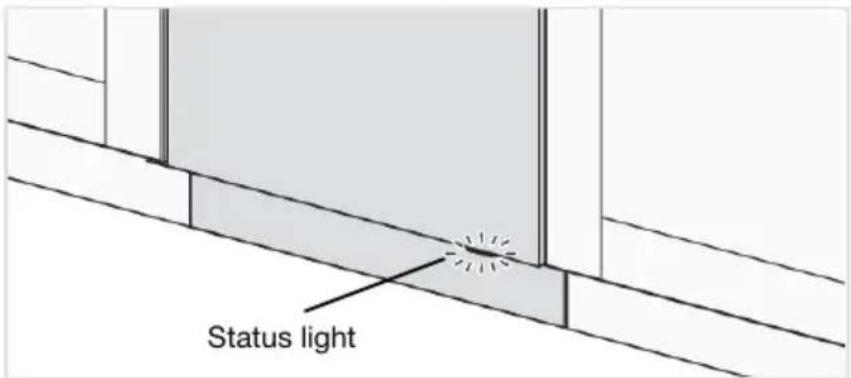
text_image
Status lightBlue-Loadmore
Theprogramhasstarted, butyoucanstillloadmoredishes.
Red-Donotload
Youshouldnotloadmoredishes(riskofpoorerdishwashingresult).
Green-Unload
Thedishwashingprogramisfinished.Thestatuslightstaysonfor15minutes.
Flashingred
Aflashinglightindicatesthatthedoorhasbeenopenedwhileaprogramisinprogress.Ifitflashes whenthedoorisclosed,anerrorhasoccurred.SeethechapterTroubleshooting.
Flashingblue/green
Thestatuslightflashesblue/greentoindicatethatremotestartisactivated.
Ifyouwanttoloadmoredishes 3)
Openthedoor. Thedishwasherstopsautomatically. Addthedishesandclosethedoor. Aftera while, thedishwashercontinuestheprogram.
If the dish washing program was removed, the interrupted program will continue on the door is closed. You can monitor the dishwasher using the ConnectLife app and remote stop the program, although you will not be able to remain start it again.
Powerfailure
If the dishwasher is turned off due to a power failure when adish washing program is running, the program continues when power is restored. If the power is cut during drying, the program is interrupted.
Ifthedishwashingprogramwasremotestartedandhasnotended,theprogramwillcontinueonce thepowerisrestored.YoucanmonitorthedishwasherusingtheConnectLifeappandremotestop theprogram,althoughyouwillnotbeabletoremotestartitagain.
3) You should not load more dishes if the status light is red.
If you opened the door form more than 2 minutes during drying, the program will be interrupted.
Oncetheprogramhasfinished
Theendoftheprogramisindicatedbyoneshortsignalfromthebuzzer. Thechapter Settings describeshowtochangethisfunction.
Moreover, the end of the program is indicated by the status light turning green.
Oncethedishwasherdoorisopenedandtheprogramhasfinished"Programdone"appearsonthe display.
Thedishwasherswitchesoffautomaticallyaftertheprogramends.Shutoffthewatertapaftereach use(ifrequiredbyyourinsurancecompany).
Thebestdryingresults
- Fullyloadthedishwasher.
- Angle dishes with hollows, such as cups, so that the rinse water will run off. This is also important for plastic items.
- Topupwithrinseaidorincreasetherinseaiddosagesetting.
- Activate the Autodooropenoption.
- Allowthedishestocoolbeforeunloadingthedishwasher.
Unloadingthedishwasher
Hotporcelainismorefragile.Leavethedishestocoolinthedishwasherbeforeunloadingthem.
Unloadthelowerbasketfirsttoavoidanywaterdropsfromtheupperbasketfallingontothedishesinthelowerbasket.
Program chart 49°C 0°C-1 70°C2 60°C
| Program | Programmode /Option | ofprewashes | MainwashNumber ofrinses | Final rinse | Consumptionvalues 1) | ||||
| Coldwater 2) | Hotwater 3) | Watercons. (liter) | |||||||
| Dishwashing time (approx. hrs:min) | Energy (approx.kWh) | Dishwashing time (approx. hrs:min) | Energy (approx.kWh) | ||||||
| Eco 4) | 5) | 9.20.33:050.643:1547°C249°C | |||||||
| Auto | 5) | 11.5-18.50.6-1.01:50-2:500°C-1.42:10-3 | |||||||
| 16.01.22:301.62:5070°C270°C2Intensiv. | |||||||||
| Quickpro | 5) | 14.50.70:591.10:5965°C360°C | |||||||
| 10.0-16.50.2-1.00:15-2:300.3-1.40:15-2 | |||||||||
| 10.50.90:451.31:0570°C270°CHygiene | |||||||||
| Rinseandhold | 3.50.010:070.010:071 | ||||||||
| 10.00.60:451.01:0570°C270°CSelf-clea | |||||||||
| 72h | Anti-odour | 0.272:000.272:00 | |||||||
1) Consumption values vary depending on the temperature of the incoming water, room temperature, load size, selected additional functions and more. The values for the Eco program are
accurate, others are indicative only.
2) Connectiontocoldwater,approx.15°C.
3) Connectiontohotwater, approx. 60°C.
4) This program is suitable for washing normally soiled dishes and is the most effective program in terms of combined energy and water consumption. This program is used to assess compliance with EUlegislationonecodesign.
5) Autodooropen
ConnectLifeisasmarthomeplatformthatconnectspeople,devicesandservices.TheConnectLife applicationincludesadvanceddigitalservicesandcarefreesolutionsthatallowuserstomonitor andcontrolappliances,receivenotificationsfromasmartphone,andupdatesoftware(supported featuresmayvarydependingonyourapplianceandtheregion/countryinwhichyouarelocated).
Toconnectyoursmartdevice,youneedahomeWi-Finetwork(only2.4GHznetworksaresupported) andasmartphoneequippedwiththeapplicationConnectLife.

text_image
QR code image with a central logo, likely linking to a digital resource or website.TodownloadtheConnectLifeapplication,scantheQRcodeorsesearchfor ConnectLifeinyourfavouriteappstore.
- InstalltheConnectLifeapplicationandcreateanaccount.
- IntheConnectLifeapplication, gotothe» Adddevices«menuandselecttheappropriatetype ofdevice. ThenscantheQRcode(itcanbefoundontheserialnumberplateoftheappliance; youcanalsoentertheAUID/SNnumbermanually).
- The application thenguidesyouthroughtheentireprocessofconnectingtheapplianceto your smartphone.
- After a successful connection, the appliance can be operated remotely via the mobile application.

text_image
WiFi PROG 0:07 On/Off Display Start/StopConnecttoanetworkandpair
Connectthedishwashertoyourwirelessnetworkandpairwithyoursmartphone/tablet.(Thiscan alsobedonefromthedishwasher'sSettingsmenu.)
- In the ConnectLife application, go to the »Add devices« menu and select the appropriate type of device. ThenscantheQRcode(itcanbefoundontheserialnumberplateoftheappliance; youcanalsoentertheAUID/SNnumbermanually).
- Openthedishwasherdoorandpress.
- Onthedishwasher'scontrolpanel:PresstoactivatetheWiFimodule.
- On the dishwasher's control panel: Press and hold 📋 for 3 seconds to initiate Connection setup.

Networksymbolonthedisplay
Flashing0.5secon/off
Thedishwasherisreadytobeconnectedtoyourwirelessnetworkor pairedwithyoursmartphone/tablet.
Thedishwasherisconnectedtoyourwirelessnetwork.Flashing 1.0secon/off
Thedishwasherisconnectedtoyourwirelessnetworkandthecloud.Glows
Remotecontrolthedishwasher
Thedishwasher'snetworksymbolisshownonthedisplaywhenthedishwasherispairedwitha smartphone/tablet. You can use the ConnectLife app to monitor the dishwasher and change settings.

Remotestartthedishwasher
Toremotestartthedishwasher, press. Remotestartactivated will appear on the dishwasher's display. Closethedoor. The status light will flash blue/greento indicate that remotestartis activated.
IntheConnectLifeapp,selectandstartaprogram.
If the door is not closed within 2 minutes, them machines switches off.
NOTE!
Thedishwashercanalwaysbeusedwithouttheapp.Whenthedishwasher'scontrolpanelis pressed, commandsfromtheConnectLifeappareblockedfor10seconds.
Pairmoredevices
Pairmoredevices/userswiththedishwasher.(Thiscanalsobedonefromthedishwasher'sSettings menu.)
- In the ConnectLife application, go to the »Add devices« menu and select the appropriate type of device. ThenscantheQRcode(itcanbefoundontheserialnumberplateoftheappliance; youcanalsoentertheAUID/SNnumbermanually).
- Openthedishwasherdoorandpress.
- Onthedishwasher'scontrolpanel:Pressandholdfor4secondstoinitiateAdddevice.
TurnoffexistingWiFi/TurnonexistingWiFi
Afterconnectingthedishwashertoyourlocalnetwork,youcanselect TurnoffexistingWiFi to deactivate the connection. Select Turn on existing WiFi to reconnect to the same network. (This can also bedonefromthedishwasher'sSettingsmenu.)
- On the dishwasher's control panel: Press and hold 📞 for 8 seconds to select Turn off existing WiFi.BrieflypresstoselectTurnonexistingWiFiagain.
Removealldevices
Remove all connected devices/users.(This can also be done from the dish washer's Settings menu.)
- On the dishwasher's control panel: Press and hold 📤 until Add device is shown on the display. Onceacountdownhasbegun,pressandholdfor3seconds.Removealldevicesindicates thatalldevices/usershavebeenerased.
Doyouhavequestions?Pleasevisitusatwww.connectlife.ioorcontactusathello@connectlife.io.
Openthedoorandpress.
Toopenthedishwasher'sSettingsmenu, press until Settingsmenu is shown on the display and confirm your selection with.
Toexitthedishwasher'sSettingsmenu,selectExitandconfirmyourselectionwith.

text_image
For settings: Press Select setting Confirm current setting| AlternativesSettings | |||
| Youcanchoosethelanguageusedforthedisplay.Language1. | |||
| WiFistatus | ThecurrentWiFiistatusisshownonthedisplay.Network2.Connectthedishwashertoyourwirelessnetworktobeabletoremote controlthedishwasherusingtheConnectLifeapp. | ||
| TurnoffexistingWiFi/TurnonexistingWiFiWiFiconnectionAfterconnectingthedishwashertoyourlocalnetwork,youcanselectTurnoffexistingWiFimodeactivatetheconnection.SelectTurnonexistingWiFitoconnecttothesamenetwork. | |||
| Connectionsetup | Connectthedishwashertoyourwirelessnetworkandpairwithyour smartphone/tablet.•IntheConnectLifeapplication,gotothe»Adddevices«menuand selecttheappropriatetypeofdevice.ThenscantheQRcode(it canbefoundontheserialnumberplateoftheappliance;youcan alsoentertheAUID/SNnumbermanually).•SelectConnectionsetup. | ||
| Pairmoredevices/userswiththedishwasher.Adddevice•IntheConnectLifeapplication,gotothe»Adddevices«menuand selecttheappropriatetypeofdevice.ThenscantheQRcode(it canbefoundontheserialnumberplateoftheappliance;youcan alsoentertheAUID/SNnumbermanually).•SelectAdddevice. | |||
| Remove all devices | Select Remove all devices to remove all connected devices/users. | ||
| WiFi factory reset | Select WiFi factory reset to restore the default factory settings. | ||
| SelectExittoexitthemenuforNetwork,press. ≈ | |||
Exit
| AlternativesSettings | |||
| On/OffAutomaticchildlock | YoucanactivatetheAutomaticchildlock settingtopreventchildrenfromstartingthe dishwasher.Totemporarilydeactivateoractivatethe Automaticchildlocksetting,pressandhold ≈ andforthreeseconds. | ||
| Foradjustingthecontrastofthedisplay.Contrast 1/2/3/4Di: | |||
| ProgramInfoscreen T/S | Youcanselectwhichinformationisshown onthedisplay.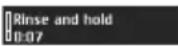 | T-Text | T-Text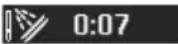 | S-Symbol | S-Symbol | ||
| Feedback0/1/2/3Sound5. | Abeepconfirmsthatthecontrolpanelhas beenpressed. | ||
| Notification0/1/2/3 | Thebuzzerindicateswhenadishwashing programhasended.Errormessagesarealwaysindicatedbya loudbuzzer. | ||
| 0/1/2/3/4/5Rinseaid6. | Settingforrinseaiddosage.Therinseaid dispensercanbeadjustedbetween0(Off) and5(Highdosage).Increasetherinseaiddosage:•Ifthedisheshavewatermarks.Decreasetherinseaiddosage:•Ifthedisheshaveastickywhite/bluefilm.•Ifthedishesarestreaked.•Build-upoffoam.Ifyouhaveverysoft water,therinseaidcanbediluted50:50 withwater. | ||
| 0/1/2/3/4/5/6/7/8/9Waterhardnessingthewatersoftener.Selectasetting dependingonthehardnessofthewater supply.Itisimportantthatthissettingis correct!SeeWaterhardnessinthechapterBefore washingforthefirsttime.Forawatersupplywithahardnessabove 5°dH(9°fH/6°eH/0.9mmol/l),fillwithsalt.Forawatersupplywithahardnessbelow 6°dH(10°fH/7°eH/1.0mmol/l),select0. Thewatersoftenerisdeactivatedandnosalt needstobadded. | |||
| 8. | (All-in-onedetergent) | On/OffTAB | Activatethesettingwhenusingall-in-one detergentcontainingrinseaid.(Alsoapplies todishwasherdetergentgelforautomatic dosingthatcontainsrinseaid.) Thissettingreducestherinseaiddosage andaffectshowoftenthedishwasher's built-insoftenerisregenerated. |
| Off, 15-40m/Autodose9. | Activatethissettingifyouwanttouse automaticdosingofdetergent.Theexactdosagedependsonwhich programisrunning.FortheAutoprogram, thedosagealsodependsonhowdirtythe dishesare. | ||
| On/OffSuperrinse10. | TheSuperrinsefunctionrinsesthedishesan extratwotimes.Theprogramtimeisextendedandthe dishwasherusesmoreenergyandwater.Activatedinthefollowingprograms:IntensiveQuickproHygiene | ||
| 11. | poweroff | On/OffInteriorlightat | Selectwhethertheinteriorlightistobe switchedonwhenthedishwasheristurned offandthedoorisopened.(Ifistured on,theinteriorlightisalwaysswitchedon whenthedoorisopened.) |
| On/OffOdourcontrol12. | WhenOdourcontrolisactivated, Anti-odourcanbeselectedfromtheprogram table. | ||
| Anyerrormessages.Failurereadout13.Whencontactingyourservicecentre,you maybeaskedtoprovidethemostrecent errormessages. | |||
| Restoresallsettingstothefactorydefaults.Factoryreset14SelectFactoryresetandpress. ▷ □ | |||
| 15. | Exit | Toexitthedishwasher'sSettingsmenu, selectExitandpress. ≈ | |
Careandcleaning
\* Topuprinseaid
Whetherinseaidneedstoppingup,thesymbollightsonthedisplay.
Seethechapter Beforewashingforthefirsttime.
S Topupsalt
Whenthesaltneedstoppingup,thesymbollightsonthedisplay.
SeethechapterBeforewashingforthefirsttime.
^+ Topupautodose
Whenthedishwasherdetergentgelneedstoppingup,thesymbolappearsonthedisplay.(Youcan run1-2washprogramsbeforethecompartmentiscompletelyempty.)
SeethechapterBeforewashingforthefirsttime.
Cleantheautomaticdosingcompartment
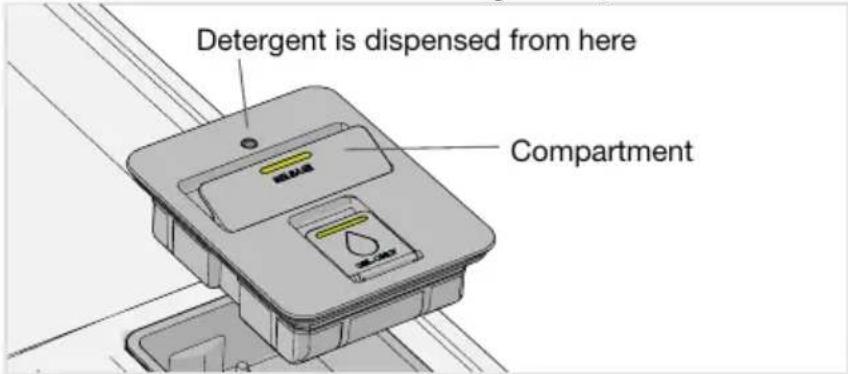
text_image
Detergent is dispensed from here Compartment- The compartment can be lifted out for cleaning and refilling.
2.Checkthatthedispensingholeisnotblocked.Cleanthecompartmentwithhotwater.
NOTE!
Important-refitthecompartment. Thedishwashermustnotbeusedwithouttheautomaticdosing compartmentinplace!
Cleanthefilters
Coarsefilter
The coarsefiltertrapslargerfoodparticles, which cannot get past the drainage pump. Empty the coarse filter when necessary. It should be cleaned at regular intervals depending on how often the dishwasher is used.
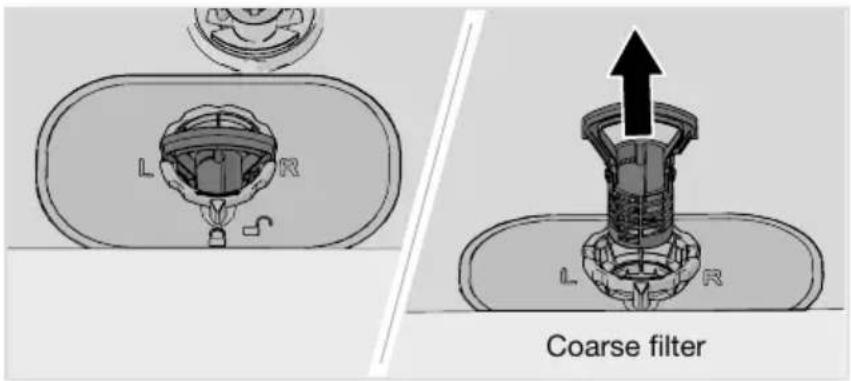
text_image
L R Coarse filter- Liftthecoarsefilterbythehandle.
- Emptythecoarsefilter.
- Refitthecoarsefilter. Pressitdownuntilclicksintoplace.
Finefilter
Debristhatcollectsonthefinefilterisautomaticallyrinsedawayduringeachwash.Cleanthefine filterwhennecessary.Itshouldbecleanedatregularintervalsdependingonhowoftenthedishwasher isused.

text_image
L R Fine filter- Turnthelockingringanticlockwiseandliftthefinefilterstraightup.
- Cleanthefinefilter.
- Refitthefinefilterandturnthelockingringclockwisetoitsstopposition. Checkthattheedges sealproperly.
Remembertorefitthecoarsefilter!
Careandcleaning
NOTE!
Dishwashing results may be affected if the coarse and fine filters are incorrectly fitted. The dishwasher must not be used without the filters in place!
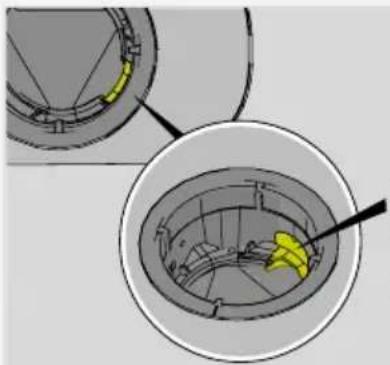
natural_image
Technical diagram showing a mechanical component with highlighted section and arrow, no visible text or symbolsCheck that the yellow drainage pump stop (on the right in the bottom drain) is in place.
Cleaningthesprayarms
Holesandbearingscansometimesbecomeblocked.Removeanydebrisusingapinorthelike. Thesprayarmsalsohaveholesunderneath.
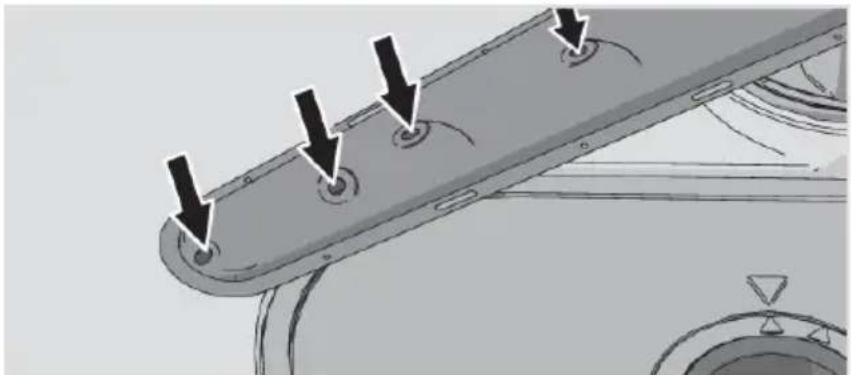
natural_image
Mechanical component with mounting holes and arrows indicating assembly or inspection (no text or symbols)Tofacilitatecleaningyoucanremovethesprayarms.Remembertofitthemfirmlybackintoplace afterwards.
Topsprayarm
- Pull out the top cutlery tray. Push up on the top spray arm while turning it anticlockwise to release it.
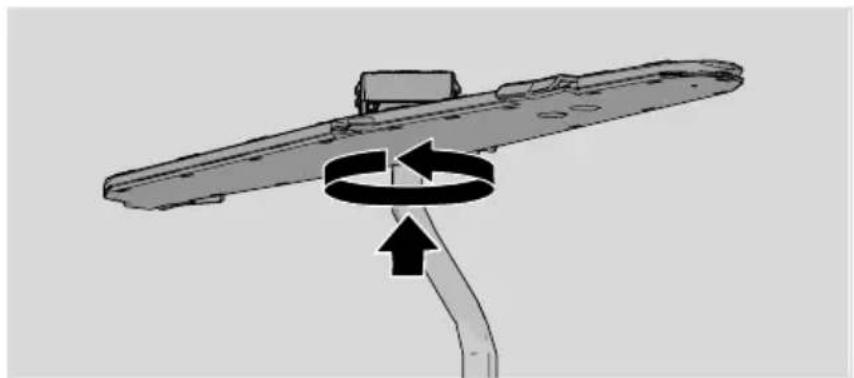
natural_image
Diagram of a mechanical component with directional arrows indicating rotation or movement (no text or symbols)Uppersprayarm
•Pullouttheupperbasket.
- Unscrewthesprayarmbearingsanticlockwisetoremovethesprayarmfromtheupperbasket.
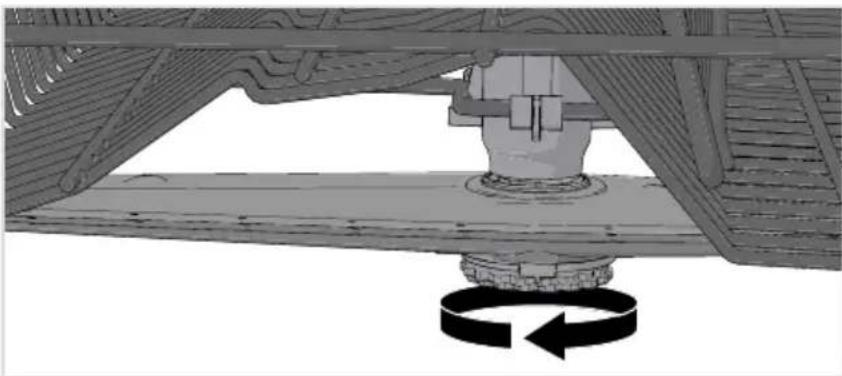
natural_image
Mechanical assembly diagram showing a rotating component with rotational arrow (no text or symbols)Lowersprayarm
•Pullthelowersprayarmstraightuptoreleaseit.
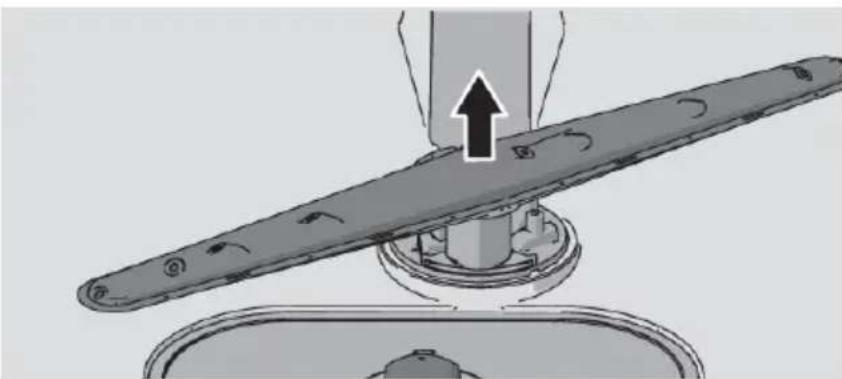
natural_image
Mechanical assembly diagram showing a lever mechanism with an upward arrow indicating motion (no text or symbols present)Cleantheoutsideofthedishwasher
Dooranddoorseal
Openthedoor.Cleanthesidesofthedoorandthedoorsealregularlywithaslightlydampcloth. Cleanthedoorsealatthelowerfrontedgeofthedishwasherwithawashing-upbrush.
Controlpanel
Keepthecontrolpanelclean.Ifnecessary,wipeitwithadryorslightlydampcloth.Neveruse cleaningproducts-theymayscratchthesurface.
RunSelf-cleaning
Dishwashertub
Thedishwashertubismadeofstainlesssteelandiskeptcleanthroughnormaluse(whenused regularly).
If you have hardwater, limescale deposits may build up in the dish washer. If this happens, run the Self-cleaning program with twotablespoon of citric acid in the dish washer's manual detergent compartment (with nodishes in the machine). Special dish washer cleaners are also available on themarket.
Careandcleaning
Removeblockages
Unblockingthedrainagepump
If the dishwasher still contains water after the program has finished, something may be blocking the drainage pump, which results in the error message Water outlet fault or BLDC drain pump fault.
- Turnoffthemachineusingandemovetheplugfromthewallsocket.
- Removethecoarsefilterandthefinefilter.
- Scoopoutthewaterfromthedishwashertub.
- In order to inspect the drainage pump, removal the yellow drainage pump stop on the right in the bottom drain. (Use airofliers if necessary.)
- Turnthepumpwheellocatedbehindthedrainagepumpstopbyhand.Carefullyremoveany sharpitems,suchasglass.
- Refitthedrainagepumpstopalongwiththefineandcoarsefilters.
7.Plugthemachineinagain.
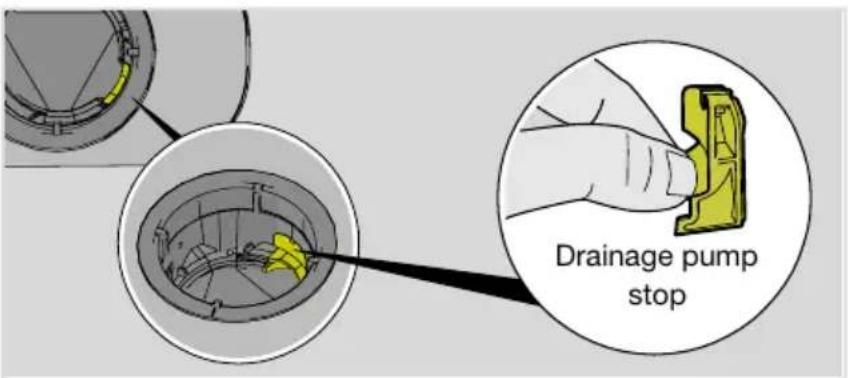
text_image
Drainage pump stopNOTE!
Donotforgettorefitthedrainagepumpstop.
Unblockingtheinlethosefilter
Ifthewatersupplycontainssmallparticles, theouterfilterontheinlethosemaybecomeblocked, whichresultsintheWaterinletfaulterrormessage.
- Turnoffthemachineusingandremovetheplugfromthewallsocket.
- Turnoffthewatertap.
- Unscrewtheinlethose.
- Carefully remove the outer filter from the inlethose and clean it.
- Refitthefilterandcheckthatthegasketiscorrectlypositioned.
- Screw the inle those firmly into place.
7.Plugthemachineintothewallsocketandturnonthewatertap.Allowthepressuretosettlefor awhileandcheckthattheconnectioniswatertight.
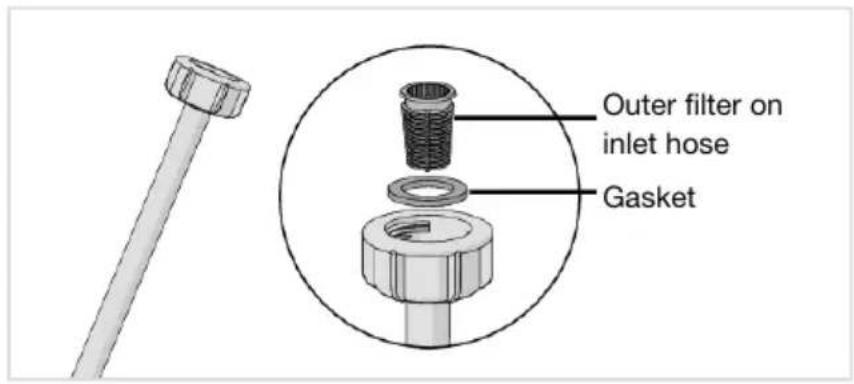
text_image
Outer filter on inlet hose GasketWinterstorage/Transport
Storethedishwasherabovefreezingtemperatureandavoidlongtransportdistancesinverycold weather. Transportthedishwasheruprightorlayingonitsback.
Beforetransportingauseddishwasher,orbeforeprolongedstorage,watermustfirstberemoved fromthemachine.RuntheSelf-cleaningprogram.
Troubleshooting
| ActionErrormessages | ||
| Overfillingwater1F10 | Unblockingthedrainagepump.SeethechapterCareand cleaning.Iftheproblempersists,contactyournearestservice centre. | |
| WateroutletfaultF11 | See"Waterremainsinthedishwasher"under"Problem"inthe tablebelow.Iftheproblempersists,contactyournearestservice centre. | |
| Waterinletfault1F12 | Checkthatthewatertapison.Checkthattheouterfilteronthe inlethoseisnotblocked.SeeUnblockingtheinlethosefilterin thechapterCareandcleaning.Iftheproblempersists,contact yournearestservicecentre. | |
| Turnoffthewatertapandcontactyournearestservicecentre.InletvalveleakageF | ||
| Heaterfault1F41 | Turnoffthewatertap.Removetheplugfromthewallsocketand contactyournearestservicecentre. | |
| Contactyournearestservicecentre.DiverterfaultF45 | ||
| WaterlevelfaultF52 | Cleanthecoarseandfinefilters.Checkthattheouterfilteronthe inlethoseisnotblocked.Iftheproblempersists,contactyour nearestservicecentre. | |
| Turnoffthewatertapandcontactyournearestservicecentre.Overfillingwater2FToavoidwaterleakageoutsidethedishwasher,donotremove theplugfromthewallsocketuntilthewatertaponthesupplyline hasbeenturnedoff! | ||
| Contactyournearestservicecentre.CirculationpumpfaultF56 | ||
| Waterinletfault2F67 | Checkthatthewatertapison.Checkthattheouterfilteronthe inlethoseisnotblocked.SeeUnblockingtheinlethosefilterin thechapterCareandcleaning.Iftheproblempersists,contact yournearestservicecentre. | |
| BLDCdrainpumpfaultF68 | See"Waterremainsinthedishwasher"under"Problem"inthe tablebelow.Iftheproblempersists,contactyournearestservice centre. | |
Pressanybuttontocleartheerrormessage.
General
| ActionPossiblecausesProblem | ||
| Thecontrolpaneldoesnotreact whenpressed. | paneltoosoonafteropeningthe door. | Waitamomentthentryagain.Youhavepresse |
| ChildlockorAutomaticchild lockisactivated. | SeethechapterSafety instructions. | |
| Thedoorisclosed. | Openthedor.Thecontrol panelonlyreactstousewhen thedoorisopen. | |
| Dirtonthecontrolpanel. | Cleanwithadryorslightlydamp cloth. | |
| Thecontrolpanelrequires calibration. | Turnoffthewatertap.Remove theplugfromthewallsocket andwaitfor60seconds.Then plugtheappliancebackintothe wallsocketandturnonthe watertap. | |
| Cannotclosedoor. | Thebasketsarenotcorrectly positioned. | Checkthatthebasketsare correctlypositionedhorizontally. |
| Checkthatthedishesarenot blockingthebasketsfrom slidingproperlyintoplace. | ||
| Thedoorlockdoesnotclickinto placeandlock. | Openthedor.Pressandhold PROG anduntil"Autodoor openrecovery"isshownonthe display,waituntilthemessage disappears.Closethedoorand checkthatthedoorlockis working. |
Troubleshooting
| ActionPossiblecausesProblem | ||
| Thedishwasherdoesnotstart. | hasnotbeenpressed. | Pressandthedisplay shows"Programstarted". |
| Check.Thedoorisnotproperlyclosed. | ||
| Thedishwasherhasbeen openedwhileaprogramisin progress. | Closethedoorandwait.Aftera while,thedishwashercontinues theprogram. | |
| Thedoorlockhasnotclicked intoplaceandlocked. | Openthedor.PressandholdPROG anduntil"Autodoor openrecovery"isshownonthe display,waituntilthemessage disappears.Closethedoorand checkthatthedoorlockis working. | |
| CheckwhethertheDelayedstart optionhasbeenselected. | Pressandholdforthree secondsifyouwanttocancel theDelayedstartoption. | |
| wallsocket. | Check.Theplugisnotpluggedintothe | |
| tripped. | Check.Afuse/circuitbreakerhasbeen | |
| Thedishesarenotclean. | Thesprayarmsarenotrotating freely. | Checkthatthedishesarenot blockingthesprayarms. |
| Sprayarmholesorbearings blocked. | Cleanthesprayarms.Seethe chapterCareandcleaning. | |
| Unsuitabledishwashing program. | Selectaprogramwithahigh temperaturetodissolvegrease onverydirtydishes,suchas Intensive. | |
| Incorrectdetergentdosage. | Doseaccordingtowater hardness.Fartoomuchorfar toolittledetergentresultsin poorerdishwashingresults. | |
| perishableproduct. | Avoidlargepackages.Olddetergent.Deterg | |
| Autodoseisactivated,but dishwasherdetergentgelisnot dispensed. | Tocheckthatdetergentis dispensed,pressandhold andbrivesecondsymbolwillflashonthe displayandthestatuslightwill turnred.Nowcheckwhether anydishwasherdetergentgel hasbeendispensed. | |
| Dishesloadedincorrectly. | Donotcoverporcelainwith largebowlsorthelike.Avoid placingverytallglassesinthe cornersofthebaskets.Seethe chapterLoadingthe dishwasher. | |
| overduringtheprogram. | Placedishestositsteady.Glassesandcupsh | |
| Cleanthecoarseandfinefilters.Thefiltersare | ||
| Thefiltersarenotfittedcorrectly. | Checkthatthefiltersarefitted correctly.SeethechapterCare andcleaning. | |
| Drainagepumpstopmissing. | Checkthattheyellowdrainage pumpstop(ontherightinthe bottomdrain)isinplace.See thechapterCareandcleaning. |
Troubleshooting
| ActionPossiblecausesProblem | ||
| Spotsonstainlesssteelorsilver. | Somefoodstuffs,suchas mustard,mayonnaise,lemon, vinegar,saltanddressings,can causespotsonstainlesssteelif leftfortoolong. | Rinseoffthesetypesof foodstuffsifnotstartingthe dishwasherimmediately.Use theRinseandholdprogram. |
| Allstainlesssteelcancause spotsonsilveriftheycomeinto contactduringdishwashing. Aluminiumcanalsocausespots ondishes. | Inordertoavoidmarksand tarnishing,separatedishes madefromdifferentmetals, suchassilver,stainlesssteel andaluminium. | |
| Spotsorfilmsonthedishes. | setting. | SeethechapterSettings.Incorrectrinseaidd |
| ThesettingTABisactivatedand all-in-onedetergentwith insufficientdryingeffectisbeing used. | Switchall-in-onedetergentsor deactivatethesettingTABand topupwithsaltandseparate rinseaid.SeeRinseaidinthe chapterSettings. | |
| Saltcompartmentempty. | Topupwithsalt.Seethe chapterCareandcleaning. | |
| Incorrectwatersoftenersetting. | SeeWaterhardnessinthe chapterSettings. | |
| Thewatersoftenerisleaking salt. | Checkthatthesaltcompartment lidistightenedclockwisetoits endposition.Otherwisecontact yournearestservicecentre. | |
| Toohightemperatureand/ortoo muchdetergentcancause etchingoncrystal. Unfortunately,thiscannot be repaired,onlyprevented. | Washcrystalatalow temperatureandwitha conservativeamountof detergent.Contactthedetergent manufacturer. | |
| Thedisheshaveasticky white/bluefilm. | Rinseaiddosagesettingtoo high. | Reducethdosage.Seethe chapterSettings.Ifyouhave verysoftwater,youmaywantto dilutetherinseaaid50:50with water. |
| Spotsleftafterwashing. | Lipstickandtea/coffeestains canbedifficulttoremove. | Useadetergentwitha bleachingagent. |
| Dishwasherdetergentgelis beingused.Ifnecessary,on suchoccasionsdishwasher detergentpowderorall-in-one detergentwithbleachingagent canbeaddedtothemanual detergentcompartment(when Autodoseisactivated).See Adddetergent. | ||
| Detergentresidueinthe detergentcompartmentafter dishwashing. | The detergentcompartmentwas dampwhenaddingdetergent. | The detergentcompartment mustbedrywhenadding detergent. |
| The detergentcompartmenthas beenblocked. | Checkthatthedishesarenot preventingthedetergent compartmentfromopening. | |
| Rattlingsoundwhen dishwashing. | Thedishesarenotcorrectly placedorthesprayarmsarenot rotatingfreely. | Checkthatthedishesare placedsecurely.Spinthespray armstomakesuretheycan rotate. |
| dishwasher. | Cleanthecoarseandfinefilters.Thefiltersare | |
| Thefiltersarenotfittedcorrectly. | Checkthatthefiltersarefitted correctly.SeethechapterCare andcleaning. | |
| Debrisinthedrainagepump. | Cleanthedrainagepump.See thechapterCareandcleaning. | |
| Drainagepumpstopmissing. | Checkthattheyellowdrainage pumpstop(ontherightinthe bottomdrain)isinplace.See thechapterCareandcleaning. | |
| Kinkindrainagehose. | Checkthatthehoseisfreefrom kinksandsharpbends. | |
| Blockeddrainagehose. | Disconnectthedrainagehose whereitconnectstothesink unit'swatertrap.Checkthatno debrisfasfastenedandthatthe connectionhasaninner diameterofatleast14mm. |
Troubleshooting
| ActionPossiblecausesProblem | ||
| Badodourindishwasher. | Dirtaroundthesealsandin corners. | Cleanwithwashing-upbrush andlowfoamingcleaner. |
| Lowtemperatureprogramshave beenselectedforaprolonged period. | Runaprogramwithahigh temperatureonceortwicea month.Orrunaself-cleaning program.SeeSelf-cleaningin thechapterUsingthe dishwasher. | |
| Greasedepositsinthe dishwasher. | Lowtemperatureprogramshave beenselectedforaprolonged period. | Selectaprogramwithahigh temperaturetodissolvegrease onverydirtydishes,suchas Intensive.Orrunaself-cleaning programonceortwiceamonth.SeeSelf-cleaninginthechapterUsingthedishwasher. |
| Thedishesarenotdryenough. | TheAutodooropenoptionisnot activated. | ActivatetheAutodooropen option. |
| loaded. | Fullyloadthedishwasher.Thedishwasherisr | |
| Rinseaidneedstoppingupor dosageissettoolow. | Topupwithrinseaidorincrease therinseaiddosagesetting. | |
| ThesettingTABisactivatedand all-in-onedetergentwith insufficientdryingeffectisbeing used. | Switchall-in-onedetergentsor deactivatethesettingTABand topupwithsaltandseparate rinseaid.SeeRinseaidinthe chapterSettings. |
WiFi
| ActionPossiblecausesProblem | ||
| Thedishwasher'snetwork symbol does not appear on the display. | Thedishwasherisnot connected to your wireless network. | Connectthedishwashertoyour wireless network. Seethe chapter ConnectLife. |
| ActivateWiFiconnection.WiFiconnection isc See TurnoffexistingWiFi/Turn onexistingWiFiinthechapter ConnectLife. | ||
| Connectionsetup Failed | Thedishwashercannotaccess yourwirelessnetwork. Orthe routerisnotconnectedtothe internet. | Checkthattherouteris connectedtotheinternet. |
| Makesureyourwirelessnetwork isusing2.4GHzandisvisible. Trymovingtheroutercloserto thedishwasherifthesignalis tooweak. | ||
| Sealsotroubleshootingat www.connectlife.io. Iftheproblempersists,contact yournearestservicecentre. | ||
| Adddevice Failed | Yoursmartphone/tabletisnot connectedtoyourwireless network. Ortherouterisnot connectedtotheinternet. | Checkthattherouteris connectedtotheinternet. |
| Checkthatyour smartphone/tabletisconnected toyourwirelessnetwork. | ||
| Sealsotroubleshootingat www.connectlife.io. Iftheproblempersists,contact yournearestservicecentre. | ||
| disconnectedintheConnectLife app. | ActivateWiFiconnection.WiFiconnection isc See TurnoffexistingWiFi/Turn onexistingWiFiinthechapter ConnectLife. | |
| Sealsotroubleshootingat www.connectlife.io. Iftheproblempersists,contact yournearestservicecentre. | ||
| Softwareupdatefailed. | Thenetworkconnectionwaslost orthedishwasherlostpower duetoapowerfailure. | Makesurethatthepowersupply isnotinterruptedandthatthe networkconnectionisstable beforetryingagain. Ifthe problempersists,contact your nearestservicecentre. |
Installation
It is important that you read through hand follow the instructions and directions below. Conduct installation and connection in accordance with these separate installation instructions.
[mm]
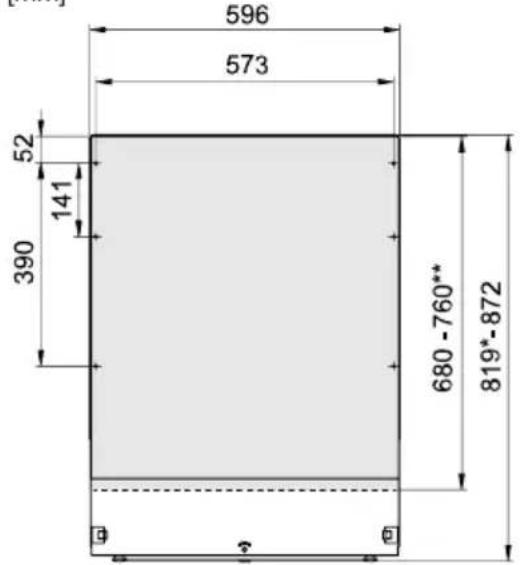
text_image
596 573 52 141 390 680 -760** 819*-872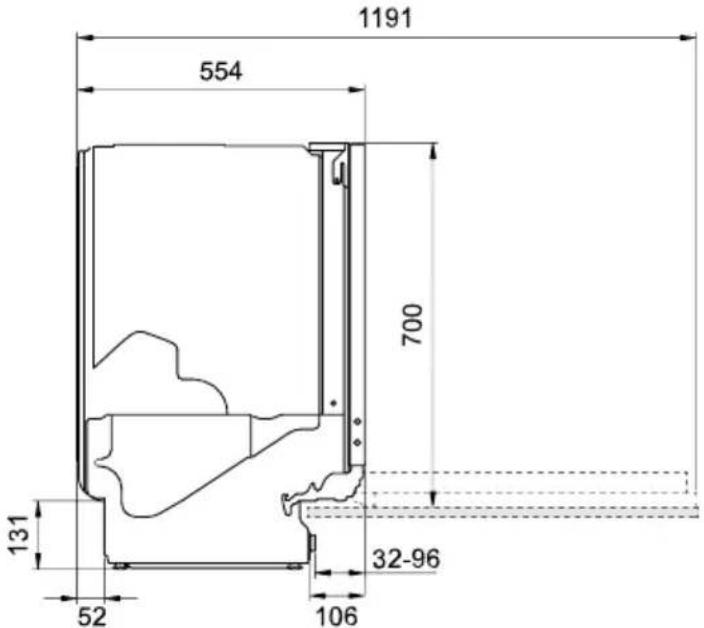
text_image
1191 554 700 131 52 32-96 106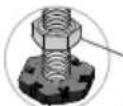
*Remove the locking nuts when installing in a recess measuring 820-821 mm.
**Cover door length.
Nominal dimensions. Actual measurements may vary.
Safetyinstructions
- Connectionstoelectricity,wateranddrainagemustbeperformedbyaqualifiedprofessional.
- Always follow applicable regulations for water, drainage and electricity.
•Takecareduringinstallation!Wearprotectivegloves!Theremustalwaysbetwopeople! - Placeadriptrayonthefloorbeneaththedishwashertopreventdamagefromanywaterleaks.
- Before-screwingthedishwasherintoplace,testthedishwasherbyrunningtheRinseandhold program.Checkthatthedishwasherfillswithwateranddrains.Checkalsothatnoneofthe connectionsleak.

WARNING!
Theventilationopeninginthelowerpartofthedoormustnotbeblockedbyarug,carpetor similarfurnishing.

WARNING!
Turnoffthewatersupplywheninstallingthedishwasher!
Theplugmustbedisconnectedorpowertothesocketturnedoffwhiletheworkiscarriedout!
Setup
- Therecessandconnectiondimensionsareincludedintheseparateinstallationinstructions.
Check that all dimensions are correct before starting the installation. Not that the height of the cover door can be adjusted to match other fittings. - Make sure the area on which the dishwasher is to be installed is firm. Adjust the adjustable feet so that the dishwasher is level. Tight enthelocknuts.
- If the dishwasher is built-in the surrounding furnishings must be resistant to any condensation fromthedishwasher.
- Mounttheprotectivefilmbeneaththeworktopanduparoundtheedge. The function of the protective filmistoprotecttheworktopfrommoisture. (Theprotectivefilmisintheenclosed plasticbag.)
- Check that the machine is installed such that the door opens freely, otherwise door lock functionality may be disrupted.
- Note that the door springs may need adjusting after a cover door has been fitted. Adjust the left and rightdoorspringsequallyuntilthedoorisevenlybalanced.
Drainageconnection
Thisdishwasherissuitableforinstallinginaraisedrecess(toattainanergonomicworkingheight).
Thismeansthatthedishwashercanbeplacedsothatthedrainagehoserunstoalowerlevelthan thebottomofthedishwasher, suchasbyroutingitdirectlytoafloordrain.
Thedrainagehosecanalsobeconnectedtoaconnectionnippleonthesinkunit'swatertrap. The connectionnipplemusthaveaninternaldiameterofatleast14mm.
Thedrainagehose may be extended by a maximum of 2.5m (thetotallength of the drainage hose must not exceed 4.5m). Any joints and connecting pipes must have an internal diameter of least 14mm.
Nopartofthedrainagehosemaybemorethan950mmabovethebottomofthedishwasher.
Attachthedrainagehosewithahoseclamp.Ensurethatthedrainagehosehasnokinks.
Connectiontowatersupply
Useonlytheinlethosesuppliedwiththedishwasher.Donotre-useoldorothersparehoses.
Thesupplypipemustbefittedwithawatertap(stopcock).Thewatertapmustbeeasilyaccessible, sothatthewatercanbeshutofffifthedishwasherhastobemoved.
Oncetheinstallationiscomplete,turnonthewatertapandallowthepressuretosettleforawhile.
Check that all connections are watertight.
Connecttocoldwater
Connectthedishwashertothecoldwatersupplyifthebuildingisheatedusingoil,electricityorgas.
Connecttohotwater
Connectthedishwashertothehotwatersupply(max.70°C)ifthebuildingisheatedusingan energy-efficientmeanssuchasdistrictheating,solarpowerorgeothermalpower.Choosingahot waterconnectionreducethedishwasher'senergyconsumption.
NOTE!
Donotexceedthepermittedwatersupplytemperature.Certainmaterialsusedinsomecookware cannot withstand high heat. See Fragile dishes in the chapter Loading the dishwasher.
Installation
Electrical connection
Informationabouttheelectricalconnectioncanbefoundontheserialnumberplate. This specification must match the electricity supply.
Thedishwashermustbeconnectedtoanearthedsocket.
Theelectricwallsocketmustbeplacedoutsideoftheinstallationareatobeeasilyaccessibleafter installingthedishwasher.Donotuseanextensioncord!
Informationaboutyourproduct
ThereisaQRcodeontheserialnumberplate.Scanthecodetoviewinformationaboutyourproduct.
Contactyournearestservicecentre
Read the chapter Troubleshooting before contacting the service centre. If you have encountered a problem that you cannot resolve, please contact your nearest service centre for professional help, see www.atag.nl/www.atag.be. Our website also has information about spare part availability and what you can repair yourself.
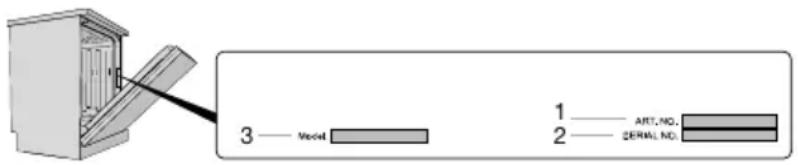
Whenmakingcontact, providethedetailsontheserialnumberplate. Include thearticlenumber(1) and theserialnumber(2).
Pleasenotethatnon-professionalrepairsmayriskusersafetyandaffectthewarranty.
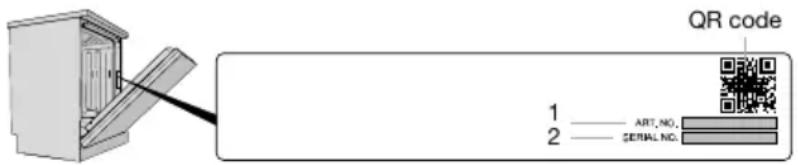
text_image
QR code 1 —— ART, NO., 2 —— SERIAL NO.Spareparts
The following spare parts are available for at least seven years after the model is longer manufactured: Motor, circulation and drainage pump, heating element, pipes and hoses, valves, filters and aquastops, door attachment components, circuit boards, electronic display, pressure sensor, thermostats and sensors, software including restore programs.
The following spare parts are available for at least ten years after the model is no longer manufactured: Doorhinges and seals, other seals, spray arms, drain filters, wire baskets and plastic accessories such as baskets and lids.
Numberofcycles
PressandholdandRIO3secondstoshowNumberofcyclesonthedisplay.
Technicaldataandenergylabelling
Technicaldata
Weight:
Numberofstandardplacesettings:
819-872mmHeight:
596mmWidth:
554mmDepth:
50kg 1)
142)
0.03-1.0MPaWaterpressure:
SeetheserialnumberplateElectricalconnection:
SeetheserialnumberplateRatedpower:
2.4GHzFrequencyband,WiFimodule:
≤1WMaximumtransmitpower, WiFimodule:
1) Weightcanvaryduetodifferentspecifications.
2) InaccordancewiththeEN60436standard.
Informationforconsumers
Informationaboutyourapplianccanbefoundatwww.atag.nl/www.atag.be.Youcanalsofind informationintheEUProductRegistrationdatabaseforEnergyLabelling,EPREL.ScantheQRcode ontheenergylabelsuppliedwiththedishwasher(orgotohttps://eprel.ec.europa.euandsearch forthemodelname).
This appliance contains alight source/light sources of energy efficiency class D. Light sources are available as spare parts and can be replaced, without damage to the dish washer, by your nearest service centre or as similarly qualified professional.
Informationfortestinstitute
InformationaboutthisproductcanbefoundintheEuropeanProductDatabaseforEnergyLabelling, EPREL,andcanalsobeorderedbye-maildishwashers@appliance-development.com.
Therequest should include the detail on the serial number plate. Include the article number(1), the serial number(2) and the model name(3).
text_image
3 — Model 1 — ART.NO. 2 — SERIAL.NO.Declarationofconformity
The company declares that the device with the function Connect life complies with the essential requirements and other relevant provisions of Directive 2014/53/EU. The detailed Declaration of Conformity can be found at the web address https://auid.connectlife.ioonthepageofyourdevice among the additional documents.
ATAG
www.atag.nl•www.atag.be