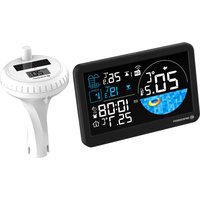
Spa Pool Sensor 15130 - Weather Station BRESSER - Free user manual and instructions
Find the device manual for free Spa Pool Sensor 15130 BRESSER in PDF.


| Product Type | Weather station with pool sensor |
| Model | Spa Pool Sensor 15130 |
| Brand | Bresser |
| Power - Main unit | AC adapter included (EU plug) + CR2032 backup battery |
| Power - Outdoor sensor | 2 AA/LR6 batteries |
| Display | VA screen with adjustable backlight (3 levels) |
| Time reception | DCF (auto), manual adjustment possible |
| Indoor temperature | Range 0°C to 50°C |
| Outdoor temperature (pool) | Range -40°C to 70°C |
| Sensor transmission range | 80 meters (clear line of sight) |
| Radio frequency | 433 MHz |
| Sensor channels | 3 channels, cyclic display possible |
| Functions | Alarm with snooze, high/low temperature alert, temperature trend, low battery indicator, 12/24h format, °C/°F display |
| Additional features | Automatic daylight saving time (DST), adjustable time zone |
| Cleaning and maintenance | Dry cloth, remove batteries if not used for a long time |
| Safety | Choking, electrocution, chemical burn (batteries) risks; do not immerse in water |
| Warranty | 2 years standard, extension possible via registration |
| Package contents | Main unit, pool sensor, AC adapter, 2 AA batteries |
| Certifications | CE (Directive 2014/53/EU) |
Frequently Asked Questions - Spa Pool Sensor 15130 BRESSER
User questions about Spa Pool Sensor 15130 BRESSER
0 question about this device. Answer the ones you know or ask your own.
Ask a new question about this device
Download the instructions for your Weather Station in PDF format for free! Find your manual Spa Pool Sensor 15130 - BRESSER and take your electronic device back in hand. On this page are published all the documents necessary for the use of your device. Spa Pool Sensor 15130 by BRESSER.
USER MANUAL Spa Pool Sensor 15130 BRESSER
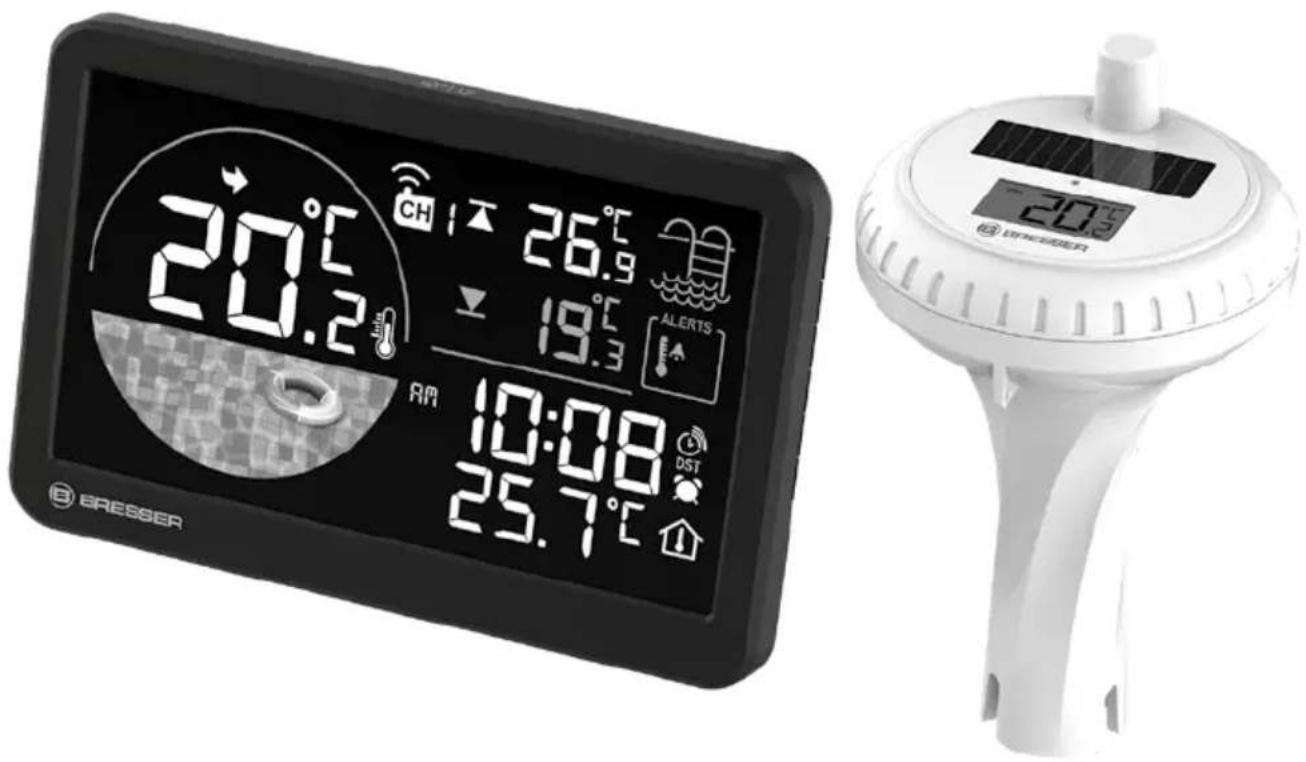
Spa / Pool Sensor with Solar Panel and Monitor
DE BEDIENUNGSANLEITUNG
EN INSTRUCTION MANUAL
FR MODE D'EMPLOI
NL HANDLEIDING
IT MANUALE DI ISTRUZIONI
ES MANUAL DE INSTRUCCIONES
EN Visit our website via the following QR Code or web link to find further information on this product or the available translations of these instructions.
MANUAL DOWNLOAD:
natural_image
Simple shield icon with a checkmark inside, no text or symbols presentGARANTIE · WARRANTY · GARANTÍA · GARANZIA
www.bresser.de/warranty_terms


- About this manual 12
- General safety instructions 12
- Scope of delivery 13
- Features 13
- Parts Overview 15
- Getting started/Power supply 15
- Time setting 16
- Manual time setting 16
- Alarm setting 16
- Backlight 16
- Temperature alert 16
- Low battery indicator 17
- Temperature trend 17
- Outdoor sensor 17
- Technical data 18
- Cleaning and Maintenance 18
- Disposal 18
- EC Declaration of Conformity 18
- Warranty & Service 19
1. ABOUT THIS MANUAL
This instruction manual is to be considered part of the device. Before using the device, please read the safety instructions and the user manual carefully.
Keep this user manual for future reference. If the device is sold or passed on, the instruction manual must be provided to the new owner/user of the product.
2. GENERAL SAFETY INSTRUCTIONS
- RISK OF CHOKING! Keep packaging material, like plastic bags and rubber bands, out of the reach of children, as these materials pose a choking hazard.
- RISK OF ELECTRIC SHOCK! This device contains electronic components that operate via a power source (power supply and/or batteries). Children should only use the device under adult supervision. Only use the device as described in the manual; otherwise, you run the risk of an electric shock.
- RISK OF CHEMICAL BURN! Leaking battery acid can lead to chemical burns. Avoid contact of battery acid with skin, eyes and mucous membranes. In the event of contact, rinse the affected region immediately with a plenty of water and seek medical attention.
- RISK OF FIRE/EXPLOSION! Do not expose the device to high temperatures. Use only the supplied power supply or the recommended batteries. Do not short-circuit the device or batteries or throw them into a fire! Excessive heat or improper handling could trigger a short circuit, a fire, or an explosion.
- Use only the recommended batteries. Always replace weak or empty batteries with a new, complete set of batteries at full capacity. Do not use batteries from different brands or with different capacities. Remove the batteries from the unit if it has not been used for a long time.
- The manufacturer is not liable for damage related to improperly installed batteries!
- Do not use rechargeable batteries (accumulators).
- Do not disassemble the device. In the event of a defect, please contact your dealer. The dealer will contact the Service Centre and can send the device in to be repaired, if necessary.
- Check this device, cables and connections for damage before use.
- Do not immerse the unit in water.
- Do not subject the unit to excessive force, shock, dust, extreme temperature or high humidity, which may result in malfunction, shorter electronic life span, damaged batteries and distorted parts.
- Place your device so that it can be disconnected from the power supply at any time. The power outlet should always be near your appliance and should be easily accessible, as the plug of the power cord serves as a disconnect device from the mains supply.
- To disconnect the unit from the mains, always pull the mains plug and never pull the cable!
3. SCOPE OF DELIVERY
Main unit, Pool sensor, Power adaptor, 2x AA/LR6 batteries
4. FEATURES
- Time with DCF
- Outdoor temperature for swimming pool
- 12/24HR
- Indoor temperature
- DST
- alarm with snooze
- C/F
- Low battery indicator
- Temperature alert
- Temperature trend
- 3 channels for sensor
- With VA display
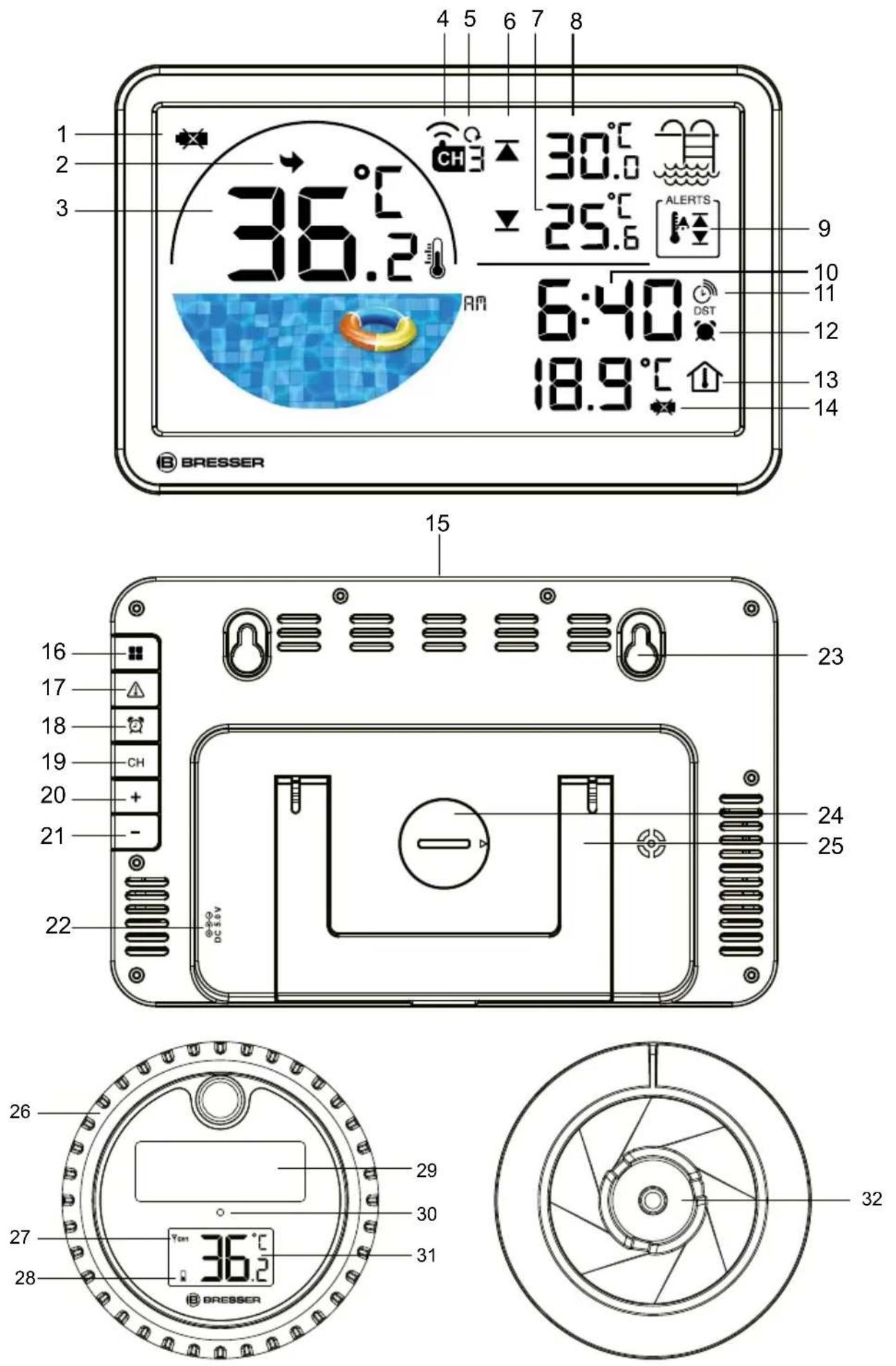
5. PARTS OVERVIEW
- Low battery indicator for outdoor sensor
- Temperature trend
- Swimming pool thermometer
- Channel
- Cycle display
- Max and Min icon - High and low temperatuer alert icon
- Min temperature - Low temperature alert value
- Max temperature - High temperature alert value
- Temperature alert
- Time with DCF
- DST
- Alarm
- Indoor temperature
- Low battery indicator for main unit
- button (set snooze function/ display brightness)
- -tton
- button
- button
- button
- button
- button
- Input power supply
- Hanging hole
- Battery cover (coin cell)
- Stand
- Battery compartment cover
- Sensor channel
- Sensor low battery indicator
- Solar panel
- LED indicator
- Sensor temperature
- Temperature sensor
6. GETTING STARTED/ POWER SUPPLY
Main unit
- Insert the DC connector into the connection socket of the main unit.
- Insert the mains plug into the power outlet.
- The device switches on automatically after it has been connected to the cable.
Note: The device can only be powered by power adaptor. The cell battery is only for the data back up function. (For example, the data will not be lost even if you unplug the power.)
Pool sensor
- Remove the battery compartment cover by unscrewing the top head of the pool sensor.
- Insert the batteries into the battery compartment. Ensure that the battery polarity (+/-) is correct.
- Screw the head of the pool sensor back on and make sure that it is properly closed.
Note: After switching on the main unit, it starts to receive the DCF signal and the backlight switches off. If the reception was successful, the backlight switches on again.
7. TIME SETTING
After the power is restored, the unit automatically searches for the radio signal. It takes approximately 3-8 minutes for this process to complete.
If the radio signal is received correctly, the time is set automatically and the reception symbol is displayed. If no radio signal is received, proceed as follows:
-
Press and hold the button on the main unit for approx. 3 seconds to activate reception of the radio signal. Reception is now initialized again.
-
If still no radio signal is received, the time must be set manually.
8. MANUAL TIME SETTING
- Press and hold the button for approx. 3 seconds to enter to the time setting mode.
- Digits to be set are flashing.
- Press or button to change the value.
- Press button to confirm and continue to the next setting.
- Settings order: DCF ON/OFF>DST ON/OFF>Time zone (+12 to -12)>12/24H format>Hour > Minute
- At last, press the button to save the settings and exit the setting mode.
Note: automatically recognized when DCF is detected
At Time Zone (+/- xx; e.g. +/- 12h)--(+12 to -12)
- In normal mode, press the button to select the temperature unit in °C or °F.
9. ALARM SETTING
- In normal mode, press button to enter the alarm mode. Press the button again to turn on or turn off the alarm. If the Alarm is turned on, the button will display.
- In normal mode, press and hold the 🎨 button for approx. 3 seconds to enter the alarm time setting mode, Digits to be set are flashing. Press +r - button to change the value. Setting order is: Alarm hour>Alarm Minute.
- Finally press the button to save the settings and exit the Alarm setting mode.
Note: The values change faster if you hold the arrow keys.
- When the alarm sounds, press the ☺ button to activate the snooze function. The alarm sounds again after 5 minutes.
- The alarm sound will keep for 2 minutes, before stop the alarm press the button to activate the snooze function.
- When the alarm sounds, press any other key to stop the alarm until the set alarm time is reached again.
10. BACKLIGHT
When powered by the adaptor, press the 🎨zz | 🎨 button to select the backlight level. It has 3 levels of backlighting (high, medium, low).
11. TEMPERATURE ALERT
- In normal mode, press button to turn on or turn off the alert, if the temperature alert is turned on, the icon will display.
-
In normal model, Press and hold the ⚠ button for approx. 3 seconds to enter the alert setting mode.
-
Press the or button to set the temperature alert.
- Press button to confirm and continue to the next setting.
- Settings order: Outdoor high temperature >Outdoor low temperature.
- Press the button to select the channel, then press and hold the button to set the temperature and humidity alert for the right channel.
- During the alert, press any button to stop the alarm sound, but the alert icon will still flash (Because the temperature/humidity is still above/under the alert setting value)
- Press the button twice to turn off the alert, then the icon will stop blinking, or if the temperature/humidity changes to a value that does not reach the alert, the icon will also stop blinking.
12. LOW BATTERY INDICATOR
- When the level of the batteries in the main unit or in the wireless sensor reaches a critical level, the battery level symbol appears in the appropriate area on the display.
- When replacing one set of batteries, always remove the batteries from the other part of the unit and reinsert them in the correct order.
- Replace the batteries to be changed in the corresponding part of the device with a completely new set with full capacity. This ensures that the connection between the devices will be reestablished again correctly.
- The battery symbol is only displayed when the batteries are empty. No battery symbol is displayed when the batteries are full.
13. TERMPERATURE TREND
Compare with last 1 hour if the temperature increase 1 degree, will display
Compare with last 1 hour if the temperature decrease 1 degree will display
Compare with last 1 hour if the temperature increase or decrease within 1 degree will display.
14. OUTDOOR SENSOR
After Power on the main unit, it will start to receive the outdoor signal, the ⏻ symbol will start to flash.
Once received successfully, the main unit will show outdoor temperature and the ⬇ will display.
In normal mode press button to select the channel, the setting order is Channel 1 > Channel 2 > Channel 3 > Cycle display.
If the outdoor sensor did not connect with main unit for more than 3 minutes, press and hold the button for approx. 3 seconds to reset values and search for an RF signal.
In normal mode, press + button to select °C / °F.
In normal mode press Button to select the channel, the setting order is Channel 1 > Channel 2 > Channel 3 > Cycle display
15. TECHNICAL DATA
Main unit
- DCF
- Batteries: 1x CR2032 battery
• EU power adaptor incl.
• Temperature measuring unit: °C / °F
• Temperature display range: 0°C – 50°C
Outdoor sensor
- Batteries: 2x AA batteries
• Temperature measuring unit: °C / °F
• Temperature display range: -40^ - 70^
• Transmitter range: 80 meters - 433MHZ
- Tolerance values:
- At -40^ -20^ = ± 4^
- At -20^ 0^ = ± 2^
- At 0^ +50^ = ± 1^
16. CLEANING AND MAINTENANCE
Before cleaning the device, disconnect it from the power supply (remove batteries)!
Only use a dry cloth to clean the exterior of the device. To avoid damaging the electronics, do not use any cleaning fluid.
Protect the device from dust and moisture. The batteries should be removed from the unit if it has not been used for a long time.
17. DISPOSAL

Dispose of the packaging materials properly, according to their type, such as paper or cardboard.
Contact your local waste-disposal service or environmental authority for information on the proper disposal.

Do not dispose of electronic devices in the household garbage!
As per Directive 2012/19/EU of the European Parliament on waste electrical and electronic equipment and its adaptation into German law, used electronic devices must be collected separately and recycled in an environmentally friendly manner.
18. EC DECLARATION OF CONFORMITY
CE Hereby, Bresser GmbH declares that the equipment type with article number 14978 is in compliance with Directive: 2014/53/EU. The full text of the EU declaration of conformity is available at the following internet address: http://www.bresser.de/download/15130/CE/15130_CE.pdf
19. WARRANTY & SERVICE
The regular warranty period is 2 years and begins on the day of purchase. To benefit from an extended voluntary warranty period as stated on the gift box, registration on our website is required. You can consult the full warranty terms as well as information on extending the warranty period and details of our services at www.bresser.de/warranty_terms.
EN
TABLE DES MATIÈRES
Please contact the service centre fi rst for any questions regarding the product or claims, preferably by e-mail.
E-Mail: service@bresseruk.com
Telephone*: +44 1342 837 098
BRESSER UK Ltd.
Suite 3G, Eden House
Enterprise Way
Edenbridge, Kent TN8 6HF
Great Britain
*Number charged at local rates in the UK (the amount you will be charged per phone call will depend on the tariff of your phone provider); calls from abroad will involve higher costs.
FR BE
- Spa / Pool Sensor with Solar Panel and Monitor
- GARANTIE · WARRANTY · GARANTÍA · GARANZIA
- ABOUT THIS MANUAL
- GENERAL SAFETY INSTRUCTIONS
- SCOPE OF DELIVERY
- FEATURES
- PARTS OVERVIEW
- GETTING STARTED/ POWER SUPPLY
- Main unit
- Pool sensor
- TIME SETTING
- MANUAL TIME SETTING
- ALARM SETTING
- BACKLIGHT
- TEMPERATURE ALERT
- LOW BATTERY INDICATOR
- TERMPERATURE TREND
- OUTDOOR SENSOR
- TECHNICAL DATA
- Outdoor sensor
- CLEANING AND MAINTENANCE
- DISPOSAL
- EC DECLARATION OF CONFORMITY
- WARRANTY & SERVICE
- TABLE DES MATIÈRES
- BRESSER UK Ltd.
- FR BE
Brand : BRESSER
Model : Spa Pool Sensor 15130
Category : Weather Station