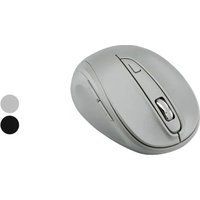
USER MANUAL TFM 4 C3 TRONIC
OWIM GmbH & Co. KG
Stiftsbergstraße 1
74167 Neckarsulm
GERMANY
Model No.: HG06607A, HG06607E
Version: 03/2025
IAN 491107_2410
8
FUNKMAUS / WIRELESS MOUSE / SOURIS SANS FIL TFM 4 C3
DE AT CH
FUNKMAUS
Operation and safety notes
FR BE
SOURIS SANS FIL
natural_image
Simple line diagram showing a mechanical or electrical component connected to a numbered label (9), with no visible text or symbols.

WARNUNG! EXPLOSIONSGEFAHR!

TRAGEN SIE SCHUTZHANDSCHUHE!

natural_image
Line drawing of a device casing with handle, panel, and button (no text or symbols)
Bedienung
natural_image
Hand inserting a device into a cable (no text or symbols visible)
Warnings and symbols used ...... Page 42
Introduction Page 44
Intended use ...... Page 45
Trademark notices.... Page 45
Scope of delivery Page 46
Safety notes.... Page 46
Safety instructions for batteries .... Page 49
Description of parts.... Page 54
Technical data Page 55
Before use.... Page 56
Setting up your mouse - inserting/
replacing the battery ...... Page 57
Operation.... Page 58
Software installation Page 60
Storage when not in use ...... Page 63
Cleaning Page 63
Troubleshooting Page 64
Disposal.... Page 65
Simplified EU declaration of conformity ..... Page 67
Warranty Page 68
Warranty claim procedure.... Page 69
Service Page 70
| Warnings and symbols usedThe following symbols and warnings are used in the operating instructions, on the packaging and on the product: |
 | DANGER! This symbol with the signal word “DANGER” indicates a hazard with a high level of risk which, if not avoided, will result in serious injury or death. |
 | WARNING! This symbol with the signal word “WARNING” indicates a hazard with a medium level of risk which, if not avoided, could result in serious injury or death. |
 | CAUTION! This symbol with the signal word “CAUTION” indicates a hazard with a low level of risk which, if not avoided, could result in minor or moderate injury. |
 | ATTENTION! This symbol with the signal word “Attention” indicates a possible property damage. |
 | NOTE: This symbol with the signal word “NOTE” provides additional useful information. |
 | Direct current / voltage |
 | Warning against optical radiation |
 | This action sign indicates to wear suitable protective gloves! Follow the instructions to avoid hands striking or being struck by objects or being in contact with thermal or chemical materials! |
 | WARNING! EXPLOSION HAZARD! A warning with this symbol and word “WARNING! EXPLOSION HAZARD” indicates the potential threat of explosion.Failure to observe this warning may result in serious or fatal injuries and potential property damage. Follow the instructions in this warning to prevent serious injuries, a danger to life or property damage! |

CE mark indicates conformity with relevant EU directives applicable for this product.

Safety Information
Instructions for use
WIRELESS MOUSE
● Introduction
We congratulate you on the purchase of your new product. You have chosen a high quality product. The instructions for use are part of the product. They contain important information concerning safety, use and disposal. Before using the product, please familiarise yourself with all of the safety information and instructions for use. Only use the product as described and for the specified applications. If you pass the product on to anyone else, please ensure that you also pass on all the documentation with it.
- Intended use
This WIRELESS MOUSE (hereinafter referred to as “product”) is an information technology device and is designed as an input device for computers. This product is not intended for use in companies or for other commercial uses (e.g. office productivity applications). Use this product only in the home for private purposes Any other use is considered improper. Any claims resulting from improper use or due to unauthorised modification of the product will be considered unwarranted. Any such use is at your own risk.
● Trademark notices
- USB® is a registered trademark of USB Implementers Forum, Inc.
- Windows ^ is a registered trademark of Microsoft Corporation in the United States and other countries.
- The TRONIC trademark and trade name is the property of their respective owners.
- Any other names and products are trademarks or registered trademarks of their respective owners.
- Scope of delivery
1 Wireless optical mouse
1 USB dongle
2 AA batteries (LR6)
1 Short manual

Safety notes
Before using the product, please familiarize yourself with all of the safety instructions and instructions for use! When passing this product on to others, please also include all the documents!
⚠ WARNING! DANGER TO LIFE AND RISK OF ACCIDENT FOR INFANTS AND CHILDREN!
⚠️ DANGER! RISK OF SUFFOCATION! Never leave children unsupervised with the packaging material. The packaging material poses a suffocation hazard. Children frequently underestimate the dangers. The packaging material is not a toy.
This product may be used by children age 8 years and up, as well as by persons with reduced physical, sensory or mental capacities or lacking experience and/or knowledge, so long as they are supervised or instructed in the safe use of the product and understand the associated risks. Do not allow children to play with the product. Cleaning and user maintenance should not be performed by children without supervision. The product is not a toy.
⚠️ DANGER! Some of the provided parts can be swallowed. if a part is swallowed, seek immediate medical attention.
⚠ WARNING! Radio interference
- Switch the product off on aeroplanes, in hospitals, service rooms (e.g. boiler room, electric supply room), or near medical electronic systems. The wireless signals transmitted could impact the functionality of sensitive electronics.
- Keep the product at least 20 cm from pacemakers or implantable cardioverter defibrillators, as the electromagnetic radiation may impair the functionality of pacemakers.
The radio waves transmitted could cause interference in hearing aids.
Do not place the product near flammable gasses or potentially explosives areas (e.g. paint shops) with the wireless components on, as the radio waves emitted can cause explosions and fire.
The range of the radio waves varies by environmental conditions. In the event of wireless data transmission, unauthorised third parties receiving the data cannot be excluded.
● Safety instructions for batteries

DANGER TO LIFE! Keep batteries out of reach of children. If accidentally swallowed seek immediate medical attention.
■ Swallowing may lead to burns, perforation of soft tissue, and death. Severe burns can occur within 2 hours of ingestion.

WARNING! EXPLOSION HAZARD!

Never recharge non-rechargeable batteries. Do not short-circuit batteries or open them. Overheating, fire or bursting can be the result. Never throw batteries into fire or water. Do not exert mechanical loads to batteries.
Risk of batteries leakage
Avoid extreme environmental conditions and temperatures, which could affect batteries, e.g. radiators / direct sunlight.
In the event of a leakage of batteries, immediately remove them from the product to prevent damage.
Avoid contact of leaked chemicals with skin, eyes and mucous membranes. In the event of contact with battery acid, thoroughly flush the affected area with plenty of clean water and seek immediate medical attention.
WEAR PROTECTIVE GLOVES!

Leaked or damaged batteries can cause burns on contact with the skin. Wear suitable protective gloves at all times if such an event occurs.
- Both batteries must always be replaced at the same time.
- Insert batteries according to polarity marks (+) and (−) on the battery and the product.
- Never try to recharge the batteries and under no circumstances throw them into fire.
- Clean the contacts on the battery and in the battery compartment before inserting!
■ Remove exhausted batteries from the product immediately.
■ Only use the specified type of battery!
■ Remove the battery when the product is not to be used for a long time.
- Improper use may cause explosions and danger to life.
ATTENTION! RISK OF PROPERTY DAMAGE
- Check the product before every use! Discontinue use if any damage to the product is detected!
■ Sudden temperature changes may cause condensation inside the product. In this case, allow the product to acclimate for some time before using it again to prevent short circuits!
- Do not operate the product near heat sources, e.g. radiators or other devices emitting heat!
- Do not throw the product into fire and do not expose to high temperatures.
- Never open the product!! It has no internal parts requiring maintenance.
ATTENTION! Ensure that
no direct heat sources (e.g. heating) can affect the product.
any contact with splashed and dripping water and corrosive liquids is avoided and the product is not operated in the vicinity of water. In particular, the product should never be submerged in liquid; do not place any vessels filled with liquid, for example, vases or drinks, on or near the product.
the product is not used in the immediate vicinity of magnetic fields (e.g. speakers).
- no fire sources (e.g. burning candles) are placed on or near the product.
no objects are inserted into the interior of the product.
the product is never subjected to excessive shocks and vibrations.

Do not look directly into the light beam. Do not look at the light beam with optical devices either.
i NOTE:
The user must take regular breaks during the use of the product, in case of pain in the hands, arms or shoulder and neck area the work must be interrupted and some stretching exercises must be done.
The OWIM GmbH & Co. KG is not responsible for interference with radios or televisions due to unauthorised modification of the product.
The user of the product is fully responsible for correcting interference caused by such unauthorised modification of the product, as well as replacement of such products.
It is necessary to repair the product if they have been damaged in any way, for example, if the housing is damaged, if liquid or objects have penetrated the product or if the product has been exposed to rain or moisture.
Repair work is also required if the product is not working properly or has been dropped. If smoke is produced, or there are any unusual sounds or smells, remove the batteries from the product. In such cases, the product should not be used until they have been inspected by authorised service personnel. Only have the product repaired by qualified personnel. Never open the housing of the product.
● Description of parts
1 Right mouse button
2 DPI button
3 Backward button
4 Forward button
5 Left mouse button
6 Scroll wheel and middle mouse button
7 Battery compartment cover
8 Short manual
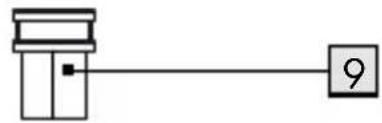
9 USB dongle
10 2 x AA batteries (LR6)
● Technical data
Voltage supply: 2 x 1.5 V, AA batteries (LR6)
Operation time: 3 to 6 months (Alkaline battery)
Operating Systems: Windows
® 8 or above
Resolution: 1000 / 1500 / 2000 dpi
Wireless range: 5 m
Radio frequency band: 2405 MHz - 2480 MHz
Max. transmitted power: 0.63 mW
USB version: 2.0
Hardware: 1 free USB port available
Operating temperature: 5 to 35 °C
Storage temperature: 0 to 45 °C
Storage humidity: 10 to 70 % RH
Dimension (L x W x H): approx. 102 x 67 x 41 mm
Net weight:
approx. 65 g
The specification and design may be changed without notification.
Before use

NOTE:
Before use, verify the package contents are complete and undamaged!
☐ All parts have to be unpacked and the packaging material has to be removed completely.
☐ If functional or other defects occur, please contact the service department listed either by telephone or by e-mail.
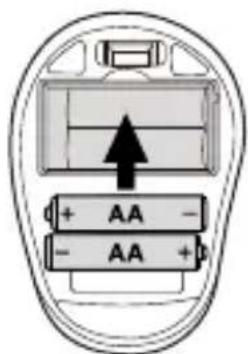
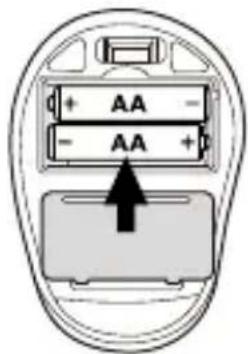
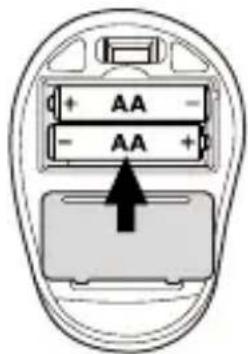
- Setting up your mouse – inserting/ replacing the battery
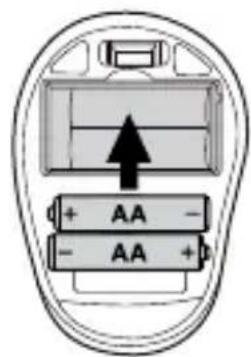
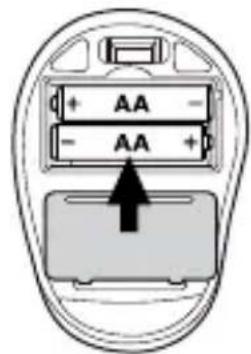
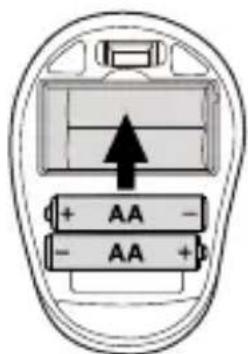
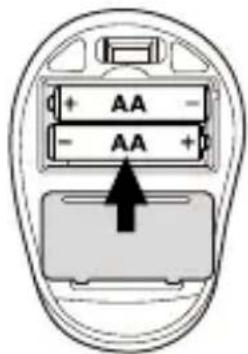
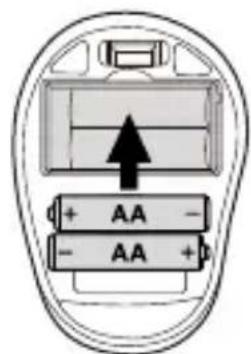
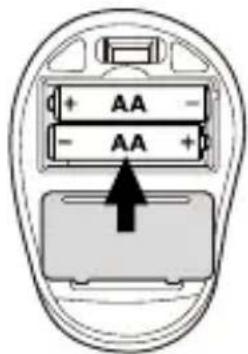
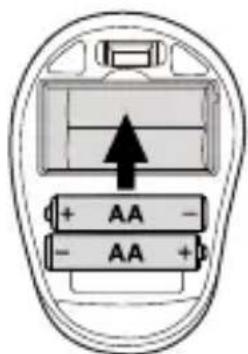
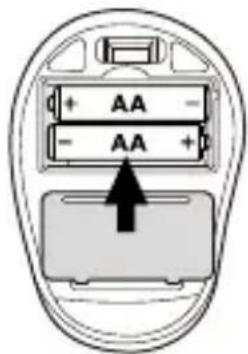
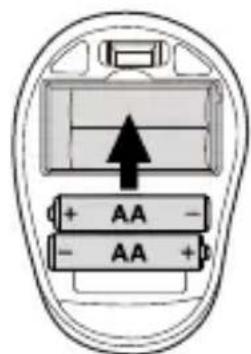
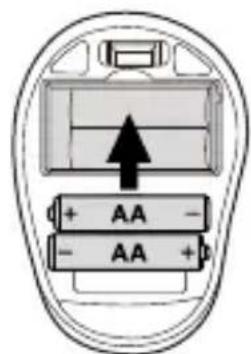
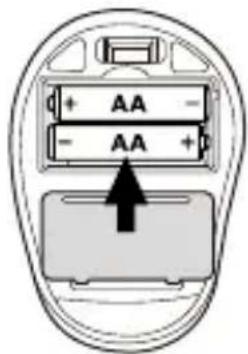
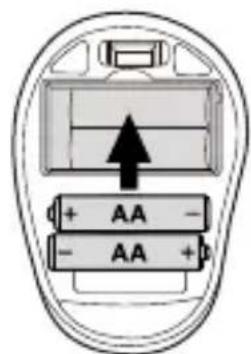
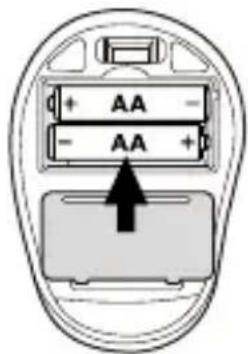
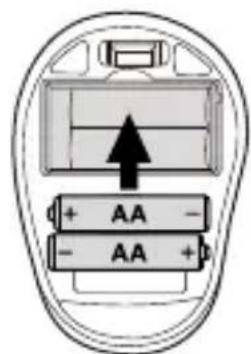
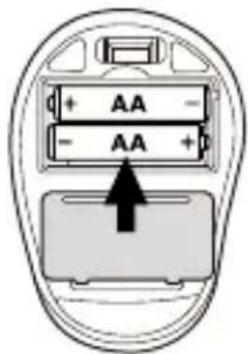
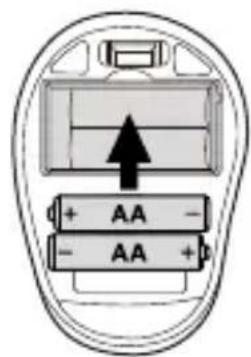
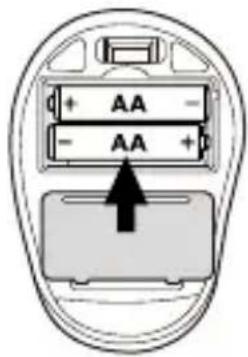
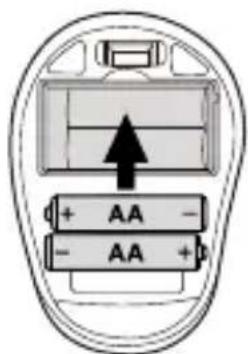
☐ Remove the battery compartment cover 7.
☐ Insert 2 AA (LR6) batteries 10 into the battery compartment.
☐ Ensure that the polarities are correct (+/-).
☐ Reinsert the battery compartment cover 7 and push it down until it locks in place.

natural_image
Simple line drawing of a device casing with handle, panel, and button (no text or symbols)
Operation
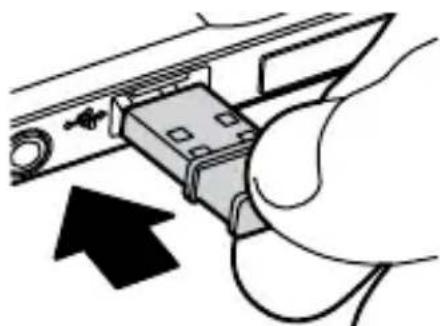
Connecting the USB dongle 9 : Slot the USB dongle 9 into a spare USB port on your computer.
□ Turn your computer on.
☐ The necessary drivers are automatically installed.
natural_image
Hand inserting a USB into a device panel, showing cable routing and a black arrow indicating direction (no text or symbols)
Provides traditional mouse click functions.
2 DPI button: (1000 / 1500 / 2000 - Click button once, then change DPI setting to next DPI value). The default DPI setting is 1500 dpi. Choose a setting that is comfortable for you.
Click button once to move backward.
Click button once to move forward.
Provides traditional mouse functions like click, double click and drag.
Roll up or down to scroll through pages or documents.

● Software installation

NOTE:
☐ The software is not compatible with MAC OS.
☐ You can also download the mouse installation software at www.Lidl-service.com. At this Lidl service website you have to input the product number IAN 491107_2410 to search for the software to download.
Software installation
- Start the file "TFM 4 C3 Mouse Setup.exe" by double-clicking.
- Follow the installation instructions to complete the whole installation process.
- After installing and running the application software program, you will find the below user interface.
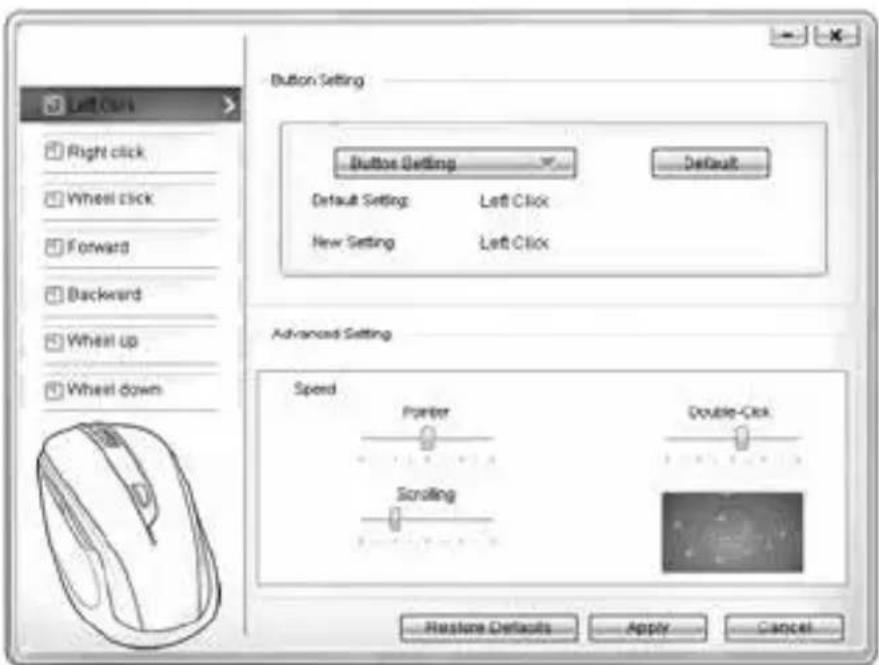
The software is used to configure the mouse buttons.
☐ Select on left column for which button you would like to change its setting. Here you can now setup each one button setting for those five individual buttons' function.
☐ Click on "Button Setting" and then select one function from the menu.
☐ To activate the changes, click the "Apply" button.
☐ With the button "Restore Defaults" you can put the buttons of the wireless mouse back to the initial delivery state.
In the "Advanced setting" section you can find the settings for the mouse cursor speed (Pointer), scroll speed (Scrolling) and double-click speed. The settings correspond to the settings in your operating system.
□ Pointer
□ Scrolling
□ Double-Click
● Storage when not in use
☐ Batteries must be removed before storage.
☐ Store the product in a dry indoor location protected from direct sunlight, preferably in its original packaging.
● Cleaning
☐ Switch the product off before cleaning!
☐ No acid, chafing or solvent cleaning agents should be used or the product can be damaged.
☐ Only clean the outside of the product using a soft, dry cloth!
☐ At persistent soiling, a mild cleaning agent can be used.
● Troubleshooting
Problem Solution
The product does not work properly.
Option 1: Check if the battery is properly fitted.
Option 2: The battery needs to be replaced by a new one.
Option 3: Remove any other mouse connected to your computer and reconnect your mouse.
Option 4: Highly reflective or transparent surfaces affect the correct function of the mouse. Place the mouse on a suitable surface, e.g. mouse pad.
● Disposal
Packaging:
The packaging is made of environmentally friendly materials, which you be disposed through your local recycling facilities.

Observe the marking of the packaging materials for waste separation, which are marked with abbreviations (a) and numbers (b) with following meaning: 1–7: plastics/20–22: paper and fibreboard/80–98:composite materials.
Product:

Contact your local refuse disposal authority for more details of how to dispose of your worn-out product.
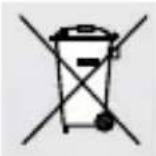
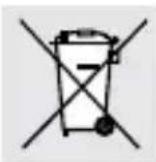
The adjacent symbol of a crossed out dustbin on wheels indicates this product is subject to directive 2012/19/EU. This directive states at the end of the life this product must not be disposed of through regular household refuse but must be returned to special collection sites, recycling depots or waste management companies.
This disposal is free of charge to you.
Protect the environment and dispose of properly.

The product incl. accessories, manual and packaging materials are recyclable and are subject to extended producer responsibility.
Dispose them separately, following the illustrated Info-tri (sorting information), for better waste treatment.
The Triman logo is valid in France only.
Batteries/accumulators:
Environmental damage through incorrect disposal of the batteries/accumulators!
Defective or exhausted batteries/rechargeable batteries must be recycled in accordance with DIRECTIVE 2023 / 1542. Return batteries/rechargeable batteries to the appropriate local collection facilities.
66 GB/IE
The symbol showing the crossed-out bin on batteries or rechargeable batteries means that such batteries must not be disposed of in domestic waste. Remove the batteries/battery pack from the product before disposing of them/it. They may contain toxic heavy metals and are subject to hazardous waste regulations.
The chemical symbols of the heavy metals are: Cd = cadmium, Hg = mercury, Pb = lead.
OWIM GmbH & Co. KG, Stiftsbergstraße 1, 74167 Neckarsulm, GERMANY hereby declares that the product WIRELESS MOUSE, HG06607A & HG06607E, conforms to the directives 2014/53/EU, 2011/65/EU and the REGULATION 2023/1542.
The full text of the EU declaration of conformity is available at the following internet address: www.owim.com
CE
Warranty
The product has been manufactured to strict quality guidelines and meticulously examined before delivery. In the event of material or manufacturing defects you have legal rights against the retailer of this product. Your legal rights are not limited in any way by our warranty detailed below.
The warranty for this product is 3 years from the date of purchase. The warranty period begins on the date of purchase. Keep the original sales receipt in a safe location as this document is required as proof of purchase.
Any damage or defects already present at the time of purchase must be reported without delay after unpacking the product.
Should the product show any fault in materials or manufacture within 3 years from the date of purchase, we will repair or replace it – at our choice – free of charge to you. The warranty period is not extended as a result of a claim being granted. This also applies to replaced and repaired parts.
This warranty becomes void if the product has been damaged, or used or maintained improperly.
The warranty covers material or manufacturing defects. This warranty does not cover product parts subject to normal wear and tear, thus considered consumables (e.g. batteries, rechargeable batteries, tubes, cartridges), nor damage to fragile parts, e.g. switches or glass parts.
● Warranty claim procedure
To ensure quick processing of your claim, observe the following instructions:
Make sure to have the original sales receipt and the item number (IAN 491107_2410) available as proof of purchase.
You can find the item number on the rating plate, an engraving on the product, on the front page of the instruction manual (bottom left), or as a sticker on the rear or bottom of the product.
If functional or other defects occur, contact the service department listed below either by telephone or by e-mail.
Once the product has been recorded as defective you can return it free of charge to the service address that will be provided to you. Ensure to enclose the proof of purchase (sales receipt) and a short, written description outlining the details of the defect and when it occurred.

Service
GB
Service Great Britain
Tel.:08000569216
E-Mail:owim@lidl.co.uk
IE
Service Ireland
Tel.:1800200736
E-Mail:owim@lidl.ie
natural_image
Line drawing of a mobile phone case with display and control buttons (no text or symbols)
- Fonctionnement
natural_image
Hand inserting a USB into a device panel, showing cable routing and a black arrow indicating direction (no text or symbols)
Piles/accumulateurs:
⚠ WAARSCHUWING! Radiostoringen
WAARSCHUWING!! EXPLOSIEGEVAAR!

natural_image
Top-down schematic of a device casing with handle, panel, and scroll (no text or symbols)
Gebruik
natural_image
Hand inserting a USB into a device panel, showing cable routing and a black arrow indicating direction (no text or symbols)
1 Rechtermuisknop:
natural_image
Line drawing of a device casing with handle, buttons, and a small screen (no text or symbols)
Obstuga
natural_image
Hand inserting a USB into a device panel, showing cable routing and a black arrow indicating direction (no text or symbols)
POUŽÍVEJTE OCHRANNÉ RUKAVICE!

natural_image
Simple line drawing of a device casing with handle, panel, and scroll (no text or symbols)

Používání
natural_image
Hand inserting a device into a cable (no text or symbols visible)
1 Pravé tlačitko myši:
POUŽÍVAJTE OCHRANNÉ RUKAVICE!

natural_image
Simple line drawing of a device casing with handle, panel, and scroll (no text or symbols)
Používanie
natural_image
Hand inserting a USB into a device panel, showing cable routing and a black arrow indicating direction (no text or symbols)
natural_image
Simple line drawing of a device casing with handle, panel, and scroll (no text or symbols)
- Funcionamiento
□ Conectar la llave USB 9 :
natural_image
Hand inserting a USB into a device panel with cable (no text or symbols visible)
natural_image
Two black-and-white pictograms: one showing a person sweeping the basket, the other showing a trash bin with crossed-out boxes (no text or symbols)
ADVARSEL! EKSPLOSIONSFARE!

natural_image
Simple line drawing of a device casing with handle, panel, and scroll (no text or symbols)
Betjening
natural_image
Hand inserting a USB into a device panel, showing cable routing and a black arrow indicating direction (no text or symbols)
1 Højremuseknap:
● Softwareinstallation
i BEMARK:
Batterier/akkumulatorer:
Dimensioni (L x P x A): circa 102 x 67 x 41 mm
natural_image
Simple line drawing of a device casing with handle, panel, and scroll (no text or symbols)
Funzionamento
natural_image
Hand inserting a device into a cable (no text or symbols visible)
1 Tasto destro del mouse:
natural_image
Line drawing of a mobile phone case with display and control buttons (no text or symbols)
Működés
natural_image
Hand inserting a USB into a device (no text or symbols visible)
1 Jobbegérgomb: