AP-T200 - Air purifier HOMEDICS - Free user manual and instructions
Find the device manual for free AP-T200 HOMEDICS in PDF.


| Product Type | Smart Air Purifier |
| Brand | Homedics |
| Model | AP-T200 |
| Power Supply | 24 V DC, 2.5 A, 60 W (adapter model PP-APT200ADPT) |
| Filtration System | True HEPA 3-in-1: pre-filter, True HEPA filter, activated carbon filter |
| True HEPA Filter Efficiency | Removes up to 99.97% of particles 0.3 microns |
| UV-C Technology | Reduces bacteria, viruses, and mold in the air |
| Recommended Coverage Area | 324 sq ft (30.1 m²) |
| Clean Air Delivery Rate (CADR) | Up to 1,570 sq ft per hour at maximum speed |
| Noise Level | 26-60 dBA |
| Connectivity | Wi-Fi, Homedics Home app, compatible with Amazon Alexa and Google Assistant |
| Additional Features | Aromatherapy tray (3 pads included), auto mode, sleep mode, air quality indicator (PM2.5) |
| Filter Maintenance | Clean pre-filter with vacuum every month; replace True HEPA filter every 12 months |
| Particle Sensor Maintenance | Clean with vacuum every month |
| UV-C Bulb Lifespan | Approximately 10,000 hours |
| Replacement Parts | True HEPA filter: AP-T200FL; UV-C bulb: PP-APT200UVBLB; adapter: PP-APT200ADPT; aroma pads: UHE-PAD1 |
| Warranty | 3-year limited warranty |
| Weight | Not specified in manual |
| Dimensions | Not specified in manual |
Frequently Asked Questions - AP-T200 HOMEDICS
User questions about AP-T200 HOMEDICS
0 question about this device. Answer the ones you know or ask your own.
Ask a new question about this device
Download the instructions for your Air purifier in PDF format for free! Find your manual AP-T200 - HOMEDICS and take your electronic device back in hand. On this page are published all the documents necessary for the use of your device. AP-T200 by HOMEDICS.
USER MANUAL AP-T200 HOMEDICS
smart air purifier T200
powered by Homedics Home app
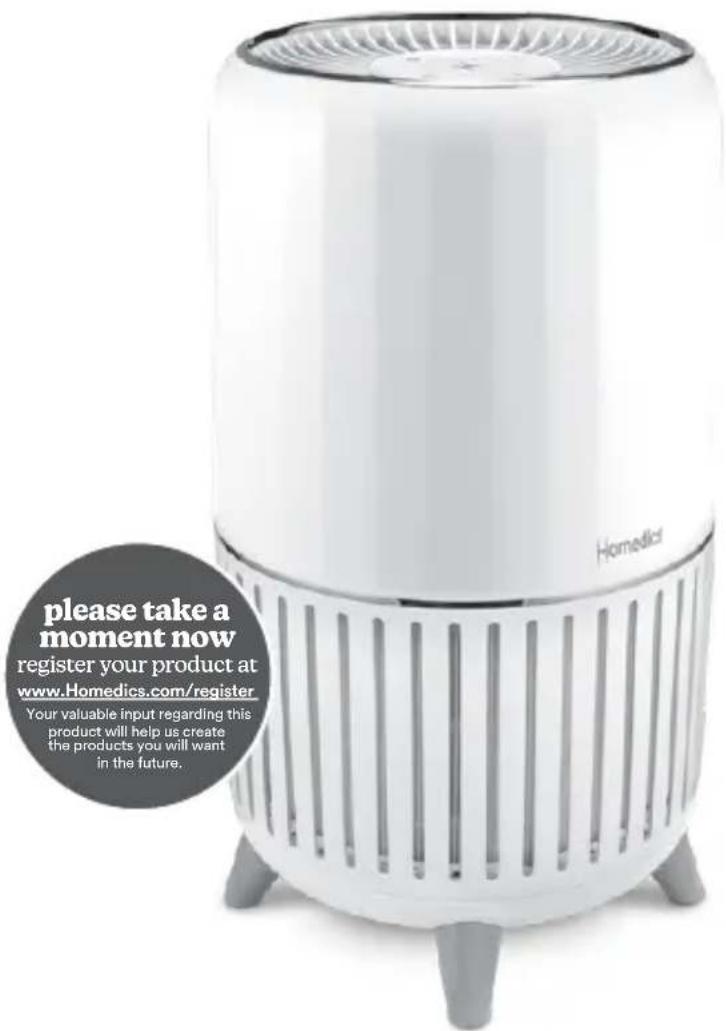
INSTRUCTION MANUAL AND WARRANTY INFORMATION
3-year limited warranty
AP-T200 | L-03031, Rev 2
IMPORTANT SAFETY INSTRUCTIONS:
WHEN USING ELECTRICAL PRODUCTS, ESPECIALLY WHEN CHILDREN ARE PRESENT, BASIC SAFETY PRECAUTIONS SHOULD ALWAYS BE FOLLOWED, INCLUDING THE FOLLOWING:
READ ALL INSTRUCTIONS BEFORE USING.
DANGER - TO REDUCE THE RISK OF ELECTRIC SHOCK:
- Always unplug the air purifier from the electrical outlet immediately after using and before cleaning or replacing filters.
- Keep cord away from heated surfaces.
- Always place the air purifier on a firm, level surface.
- Always place the air purifier at least 6 inches away from walls and 3 feet from heat sources, such as stoves, radiators, or heaters.
- DO NOT reach for an appliance that has fallen into water. Unplug it immediately.
- DO NOT place or store appliance where it can fall or be pulled into a tub or sink.
DO NOT place in or drop into water or other liquid. - Keep dry — DO NOT operate in wet or moist conditions.
- Check your air purifier cord and plug connections. Faulty wall outlet connections or loose plugs can cause the outlet or plug to overheat. Be sure the plug fits tightly in the outlet.
WARNING - TO REDUCE THE RISK OF BURNS, ELECTRIC SHOCK, FIRE, OR INJURY TO PERSONS:
- Always unplug the air purifier when not in use.
- DO NOT operate the air purifier with a damaged cord or plug, or after the air purifier malfunctions, or has been dropped or damaged in any manner. Return to a Homedics Service Center for examination, electrical or mechanical adjustment, or repair.
- This air purifier is not intended for use in bathrooms, laundry areas, or similar moist indoor locations.
- DO NOT run cord under carpeting. Do not cover cord with throw rugs, runners, or similar coverings.
- DO NOT route cord under furniture or appliances. Arrange cord away from traffic areas where it can be tripped over.
- To disconnect the air purifier, first turn controls to the off position, then remove plug from outlet.
- DO NOT tilt or move the air purifier while it is in operation. Shut off and remove plug from outlet before moving.
- DO NOT insert or allow foreign objects to enter any ventilation or exhaust opening as this may cause an electric shock or fire, or damage the air purifier.
- DO NOT block air intakes or exhaust in any manner. Do not use on any soft surface, like a bed, where openings may become blocked.
- Use this air purifier only for its intended use as described in this manual. Any other use not recommended by the manufacturer may cause fire, electric shock, or injury to persons.
DO NOT use outdoors. - WARNING: To reduce the risk of fire, electric shock or injury to persons: DO NOT use replacement parts that have not been recommended by the manufacturer (e.g. parts made at home using a 3D printer).
- This product is intended for household use only.
- Only use power supply provided with this product. Use of any other power supply may cause risk of fire, electric shock, or injury to persons, or damage to the product. Use only AC Adapter bearing the Part #: PP-APT200ADPT.
- This product complies with the maximum allowable concentration of ozone of 0.050 parts per million by volume (ppmv) in a 24-hour period.
- WARNING - Skin or eye damage may result from directly viewing the light produced by the lamp in this apparatus. Always disconnect power before relamping or servicing. Replace lamp with Homedics lamp model no. PP-APT200UVBLB at Homedics.com.
SAVE THESE IMPORTANT INSTRUCTIONS FOR EASY REFERENCE.

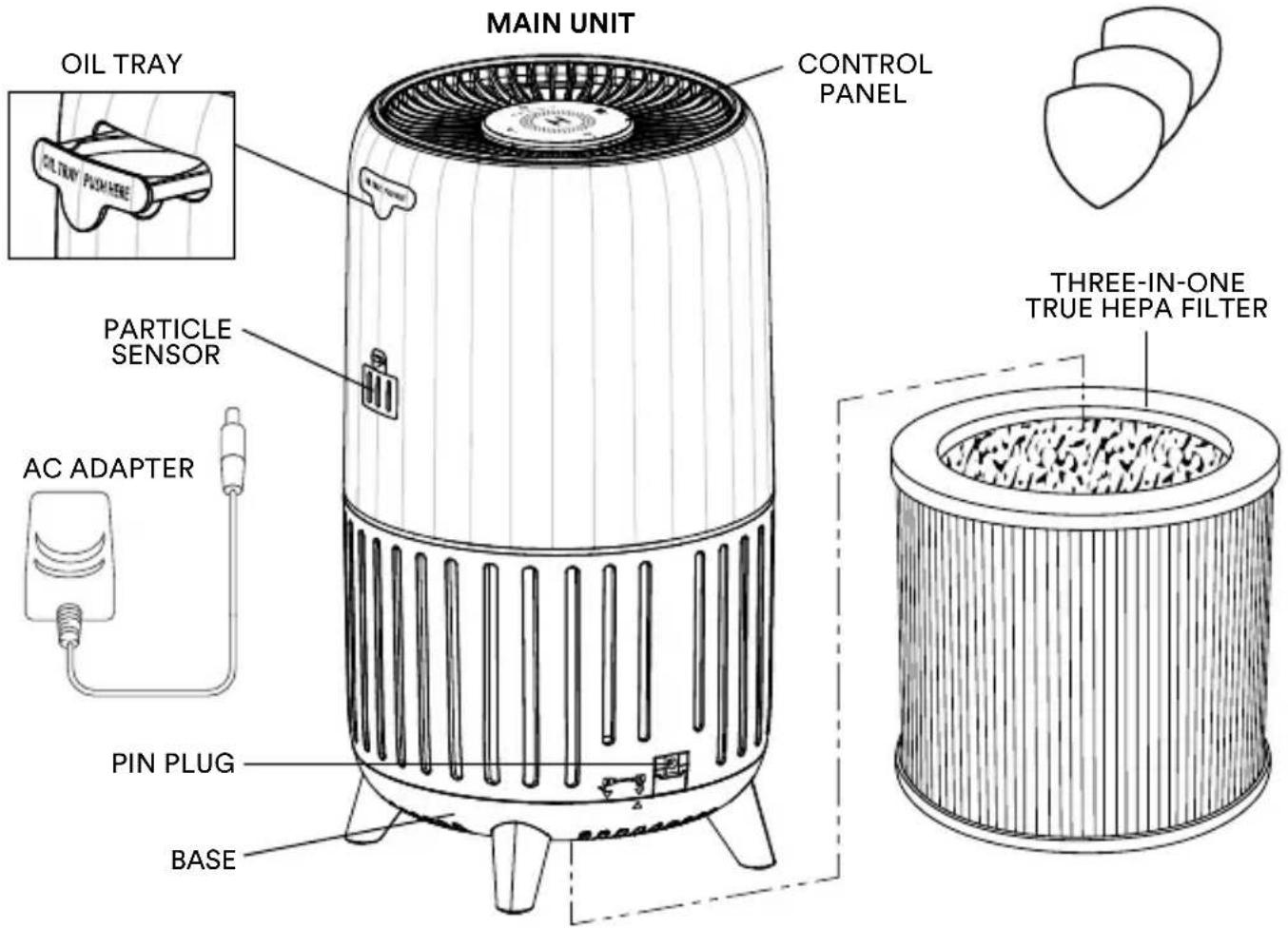
GETTING TO KNOW YOUR AIR PURIFIER
HOW TO OPERATE
BEFORE TURNING THE AIR PURIFIER ON
- Take the air purifier out of the box and remove the clear protective plastic bag.
- Place the air purifier on a firm, level surface.
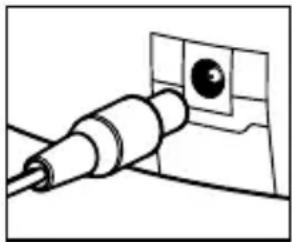
- Insert single pin plug into the back of the air purifier, then plug the adapter into a 120-volt AC electrical outlet.

POWER BUTTON
Turns the air purifier on/off.
LIGHTS ON/OFF, WI-FI PAIRING
Press the Light/Wi-Fi button to turn the control panel lights on/off. Press and hold to enter Wi-Fi pairing mode until you hear a beep.

FAN SPEED
When Auto Mode "A" is selected, the fan speed automatically adjusts based on indoor air quality. The room air quality PM2.5 particle value is color-coded as:
- Green (good) - operates on fan speed 1.
- Yellow (moderate) - operates on fan speed 2.
- Orange (unhealthy for sensitive groups) - operates on fan speed 3.
- Red (unhealthy) - operates on fan speed 3.
To exit auto mode, select a different speed.
When sleep is selected, the fan speed is set to a minimum speed lower than speed 1. The lights will automatically turn off after a few seconds. To exit sleep, select another fan speed.
Press fan speed 1-3 to manually select desired fan speed.

REPLACE FILTER RESET
After replacing the True HEPA filter, press and hold the replace filter reset button until the replace filter light turns off.
HOW TO CONNECT THE MOBILE APP

- Download the Homedics Home app in the App Store® or on Google Play store or scan the QR code.
- Open the Homedics Home app. If you already have an account, log in. To create a new account, tap Sign Up.
- Press the power button to turn the air purifier on.
- Follow the in-app instructions to add your air purifier.
4a. Login or Register 4b. Add New Device 4c. Enter Pairing Mode 4d. Connect to Wi-Fi
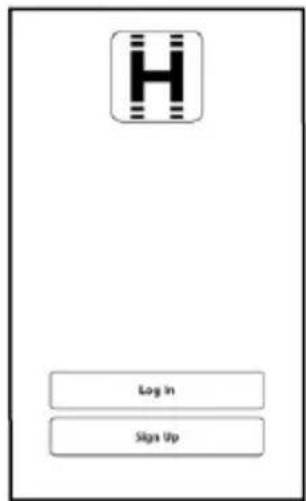
If you have an existing Homedics Home account, please login, otherwise register and then login.
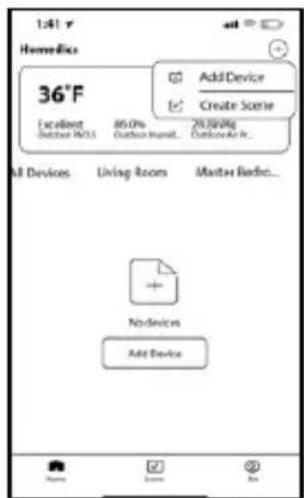
Press the "+" or "add device" on the home screen to pair a new a device.
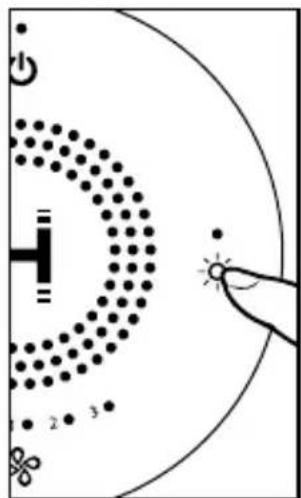
Press and hold the Light/Wi-Fi button for 3 seconds to enter pairing mode. You will hear a beep.
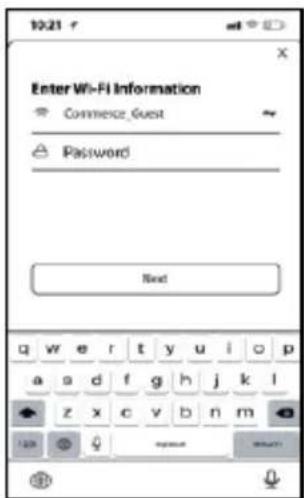
Enter Wi-Fi name and password and press Next. If no password is required, press Next.
LINK TO AMAZON ALEXA OR GOOGLE ASSISTANT
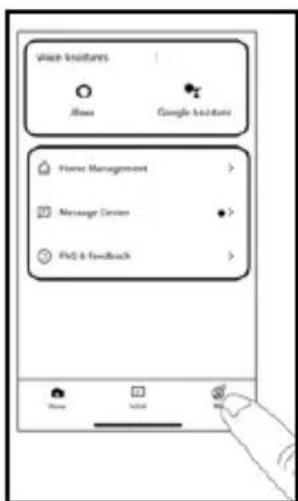
In the Homedics Home app, tap Me at the bottom of the right screen.
Select Alexa (under Voice Assistants and follow the in-app instructions.
Select Google Assistant under Voice Assistants and follow the in-app instructions.
HOW TO USE THE OIL TRAY
WARNING: Putting oil anywhere but the oil tray will damage the air purifier.
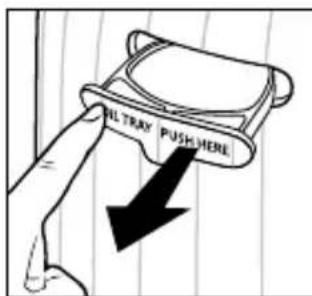
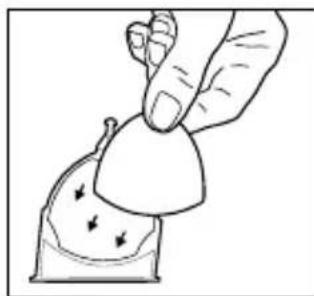
-
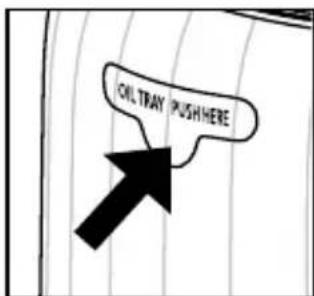
The oil tray is located on the side of the air purifier.
-
Push to open and remove the tray.
-
Use the 1 preinstalled essential oil pad in the oil tray (3 total included).
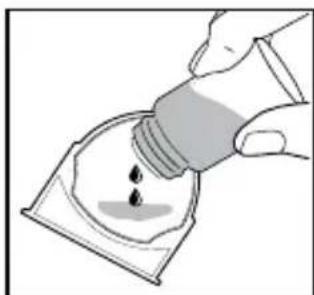
- Add 5-7 drops of essential oil to the pad. You may use more or less depending on personal preference. WARNING: Only place essential oil on the pad and NOT directly into the tray.
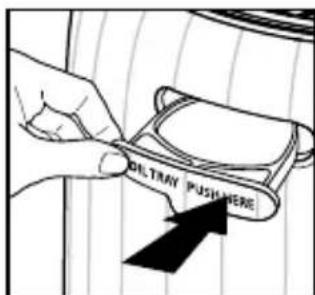
- Place the oil tray back in its compartment and push to close. The scent will start automatically when the air purifier is turned on.
NOTE: For use with the included Homedics essential oil pads only.
NOTE: Do not leave a used essential oil pad in the oil tray if it will be out of use for a long period of time.
ARE ESSENTIAL OILS SAFE TO USE AROUND PETS?
We should always exercise caution when using essential oils around our pets. Keep all essential oil and aromatherapy products (like diffusers) out of reach of pets. Keep open bottles away from pets to avoid internal consumption. We do not recommend the topical use of essential oils on pets, as they have a strong sense of smell and cannot get rid of the oil if they don't like it or it is disturbing them. When diffusing essential oils around pets, always diffuse in a well-ventilated area and leave an option for them to remove themselves from the space, such as leaving a door open. Every animal is different, so carefully observe how each animal responds when introducing an essential oil for the first time. If irritation occurs, discontinue the use of the essential oil. We recommend seeking medical attention if ingestion of essential oil occurs.
HOW TO REPLACE THE FILTER
REPLACE FILTER LIGHT
The replace filter light illuminates when it is time to replace the True HEPA filter based on the air purifier's hours of use.
REPLACING THE TRUE HEPA FILTER
For optimal performance, replace every 12 months under normal usage conditions based on 12 hours per day for 365 days.
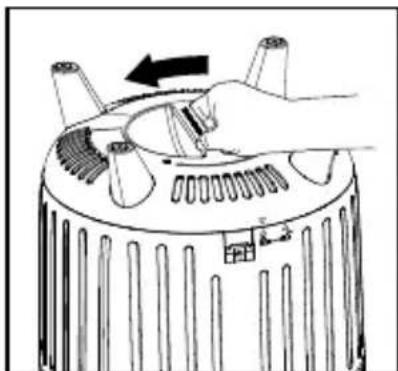
1. Unplug the air purifier. Turn the air purifier upside down and turn the base to the left.
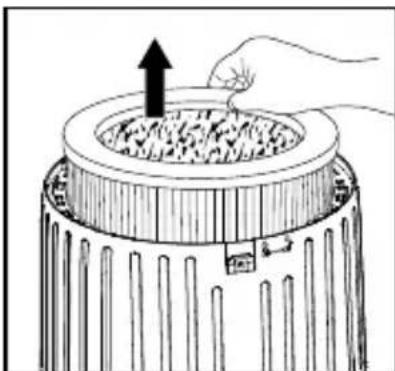
2. Remove the old filter.
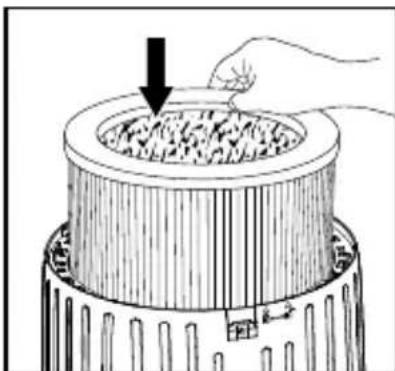
3. Insert the new filter into the filter compartment.
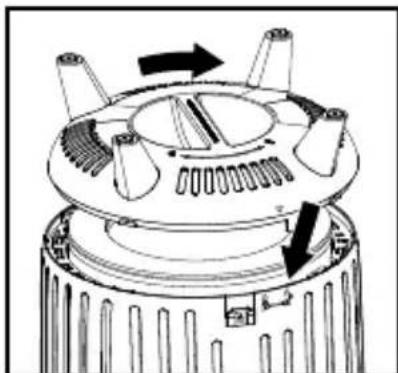
4. Reinstall the base by aligning the arrows and turning to the right until it locks into place.
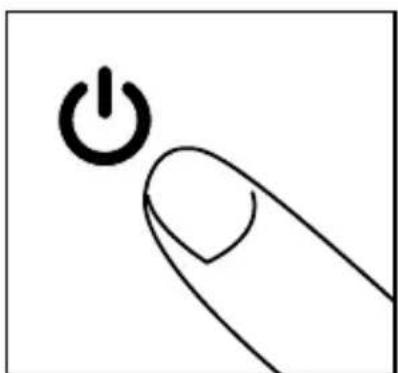
5. Plug the power cord into a standard AC outlet. Turn the air purifier on.
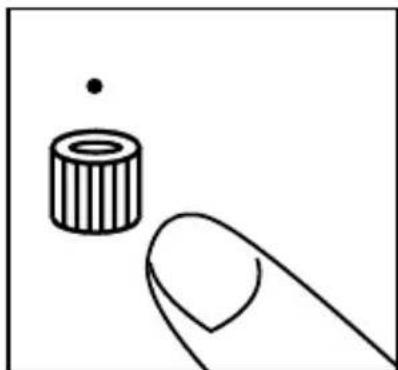
6. Press and hold the filter reset button until the replace filter light turns off.
HOW TO CLEAN AND CARE HOW TO CLEAN THE PARTICLE SENSOR
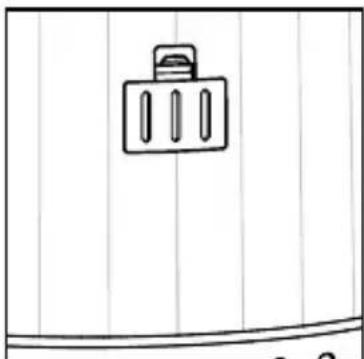
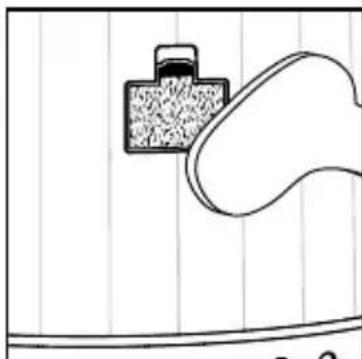
NOTE: The particle sensor needs to be vacuumed monthly under normal usage.
- Unplug the air purifier.
- Remove the particle sensor door.
- Vacuum the particle sensor using the brush attachment of your vacuum cleaner.
- Reattach the particle sensor door.
- Plug the power cord into a household electrical outlet.
HOW TO CLEAN THE PREFILTER
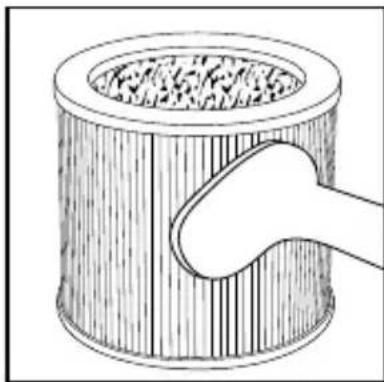
NOTE: For best performance, vacuum the prefilter once a month under normal usage.
- Unplug the air purifier.
- Remove the True HEPA filter as described in the Replacing the True HEPA Filter section.
- Vacuum the outside of the True HEPA filter using the brush attachment of your vacuum cleaner, cleaning it thoroughly.
- Place the True HEPA filter back into the air purifier and reinstall the base.
- Plug the power cord into a household electrical outlet.
HOW TO CLEAN THE OIL TRAY
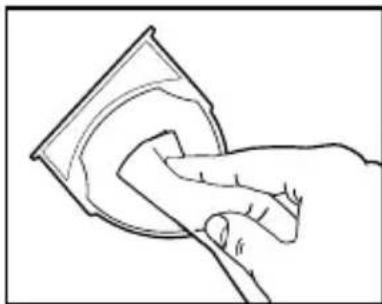
- Open the oil tray and remove the pad.
- Rinse the oil tray with water and wipe dry with a soft cloth. DO NOT clean with detergent or liquid cleaners.
NOTE: If continuing to use the same scent, set the oil pad aside for reuse.
DO NOT leave a used pad in the oil tray if the air purifier will be out of use for a long period of time.
FOR BEST PERFORMANCE:
- NEVER use water or any household cleaners or detergents to clean the True HEPA filter.
- Clean off the outside of the unit with a soft, dry cloth as needed.
- NEVER use water, wax, polish, or any chemical solution to clean the outside of the unit.
- Clean the grille cover using a damp cloth or the brush attachment of your vacuum as needed.
Vacuum the prefilter monthly under normal usage conditions. - Replace the True HEPA filter every 12 months under normal usage conditions.
Always use a genuine Homedics replacement filter for optimal performance.
HOW TO REPLACE THE UV-C BULB
The UV-C bulb is designed to last for approximately 10,000 hours of use. The replace UV-C bulb indicator will flash for a few seconds and turn off. This repeats each time the air purifier is turned on until the UV-C bulb is replaced.
NOTE: The air purifier will continue to operate without the UV-C function when the UV-C bulb burns out.
CAUTION: Do not operate the air purifier without the UV-C light cap.
CAUTION: Unplug the power cord before servicing or replacing the UV-C bulb.
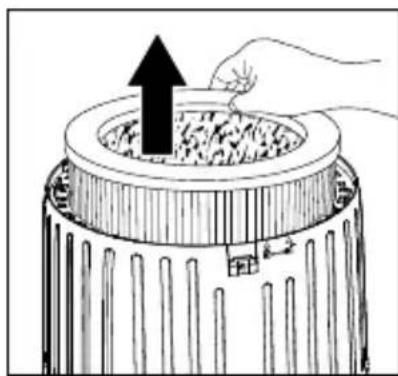
1. Unplug the air purifier and remove the True HEPA filter.
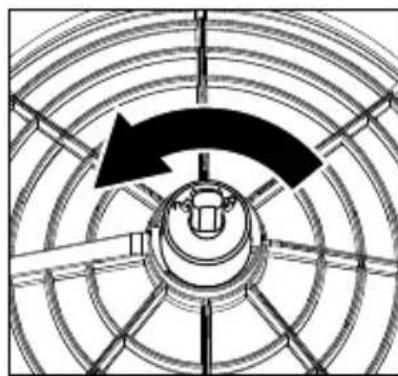
2. Turn the UV-C light cap to the left to remove.
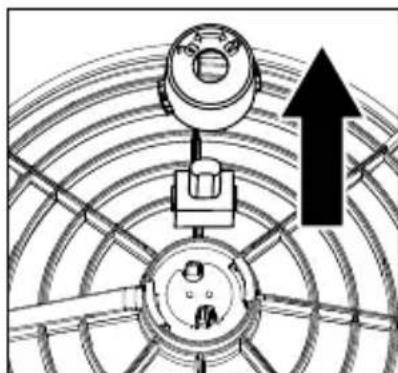
3. Gently pull to remove the UV-C bulb.
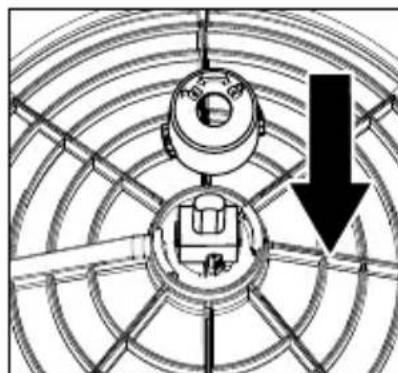
4. Replace the UV-C bulb. Reinstall the light cap, True HEPA filter, and base.
NOTE: The UV-C bulb contains mercury (Hg). Dispos of according to local, state, and federal law / www.lamprecycle.org.
SPECIFICATIONS
THREE-IN-ONE TRUE HEPA FILTRATION SYSTEM
- TRUE HEPA FILTRATION
Removes up to 99.97% of airborne particles as small as 0.3 microns, such as allergens, pollen, dust, germs, pet dander, odor, mold spores, and smoke that pass through the filter media.
- ACTIVATED CARBON ODOR FILTRATION
Reduces formaldehyde and toluene in the air as shown by independent laboratory testing. Reduces common household odors such as pet, bathroom, laundry, diaper pail, cooking, and smoke as shown by independent laboratory testing.
- PREFILTER
Captures large particles.
UV-C TECHNOLOGY
UV-C Technology reduces E. coli bacteria, Phi-X174 virus, A. niger mold, and P. citrinum fungus in the air with UV-C on. Shown by independent laboratory testing.
SUGGESTED ROOM SIZE
324 ft²/30.1 m². Portable air purifiers will be more effective in rooms where all the doors and windows are closed. Suggested room size is based on AHAM AC-1 test results.
AIR CHANGES PER HOUR
This air purifier will purify the air in a 324ft^2 / 30.1m^2 room (assuming an 8 ft/2.43 m ceiling) every 12.5 minutes or up to 1570 ft²/145.8 m² once an hour on the highest speed setting in a closed room.
QUIET OPERATION
26-60 dBA
ELECTRICAL RATING
24VDC 2.5A 60W
WI-FI ENABLED
Works with Homedics Home app
VOICE CONTROL
Control your smart air purifier using just your voice with Amazon Alexa or Google Assistant-enabled devices.
REPLACEMENT PARTS
To purchase genuine Homedics Replacement parts, go to the retailer where you purchased your Homedics Smart Air Purifier, or visit www.homedics.com (US), www.homedics.ca (CAN).
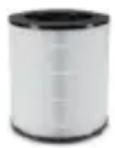
TRUE HEPA FILTER
Model #: AP-T200FL
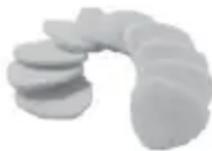
AROMA PADS
Model #: UHE-PAD1
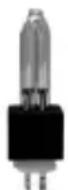
UV-C BULB
Model #: PP-APT200UVBLB
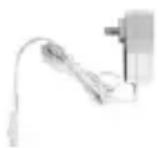
AC ADAPTER
Model #: PP-APT200ADPT
This product earned the ENERGY STAR label by meeting strict energy efficiency guidelines set by the U.S. EPA. Room air cleaners have demonstrated the potential for improving air quality and providing health benefits. EPA does not endorse manufacturer claims regarding the degree to which a specific product will produce healthier indoor air. The energy efficiency of this ENERGY STAR certified model is measured based on a ratio between the model's CADR for smoke and the electrical energy it consumes, or CADR/Watt.
TROUBLESHOOTING
| PROBLEM POSSIBLE CAUSE SOLUTION | ||
| Unit will not operate • Unit is not plugged in | • Power button not pressed • No power to unit • True HEPA filter not installed correctly • Base not installed correctly | • Plug unit in • Press the power button to turn the power on • Check circuits, fuses, try a different outlet • Reinstall the True HEPA filter • Reinstall the Base |
| Reduced airflow • The grille may be blocked | • Prefilter needs to be vacuumed • The True HEPA filter needs to be replaced | • Check to make sure nothing is blocking the grille and air outlet • Vacuum the prefilter with the brush attachment of your vacuum cleaner • Replace the True HEPA filter |
| Reduced odor removal • The True HEPA filter needs to be replaced | • Replace the True HEPA filter needs to be replaced | • Replace the True HEPA filter |
| Excessive noise • The unit is not level | Place the unit on a flat, level surface | |
| Replace filter light remains lit after filter replacement | • The replace filter indicator needs to be reset | • Press and hold the filter reset button until the replace filter light turns off |
| Control Panel lights are off • Light ON/OFF selection • Sleep setting | • Press the Light ON/OFF button to turn lights on • Press the fan button to select another fan speed | |
| Smart air purifier is not connecting to the Homedics Home App | • Bluetooth® not turned on. • Wi-Fi name and password not entered | • Make sure your phone has Bluetooth® turned on. • Enter Wi-Fi name and password |
| Air purifier not pairing with App • Not in pairing mode | • Press and hold the Light/Wi-Fi button for 3-seconds to enter pairing mode. You will hear a beep | |
| Air purifier not connecting to Wi-Fi • Wi-Fi network not entered correctly • Password not entered correctly | • Enter Wi-Fi name • Be sure the password is entered correctly | |
| Amazon Alexa or Google Assistant voice control not working | • Not set-up properly • In the Homedics Home App tap “Me” in the lower right-hand corner of the screen. Select Alexa or Google Assistant under “Voice Assistants” and follow the in-app instructions. | |
SUPPLIER'S DECLARATION OF CONFORMITY
Product Description: SMART AIR PURIFIER
Model Number: AP-T200
Trade Name: Homedics
FCC Compliance Statement
This device complies with Part 15 of the FCC Rules. This device contains license-exempt transmitter/ receiver that complies with Innovation, Science and Economic Development Canada's license-exempt RSS(s). Operation is subject to the following two conditions: (1) This device may not cause harmful interference, and (2) This device must accept any interference received, including interference that may cause undesired operation.
U.S. Contact Information
Company: Homedics, LLC.
Address: 3000 N. Pontiac Trail, Commerce Township, MI 48390
8:30am-7:00pm EST Monday-Friday 1-800-466-3342
Homedics is not responsible for any radio or TV interference caused by unauthorized modifications to this equipment. Such modifications could void the user authority to operate the equipment.
This equipment has been tested and found to comply with the limits for a Class B digital device, pursuant to Part 15 of the FCC Rules. These limits are designed to provide reasonable protection against harmful interference in a residential installation. This equipment generates, uses, and can radiate radio frequency energy and, if not installed and used in accordance with the instructions, may cause harmful interference to radio communications. However, there is no guarantee that interference will not occur in a particular installation. If this equipment does cause harmful interference to radio or television reception, which can be determined by turning the equipment off and on, the user is encouraged to try to correct the interference by one or more of the following measures:
- Reorient or relocate the receiving antenna.
- Increase the separation between the equipment and receiver.
- Connect the equipment to an outlet on a circuit different from that to which the receiver is connected.
- Consult the dealer or an experienced radio/TV technician for help.
CANICES-003(B)/NMB-003(B)
RF Exposure Statement
This equipment complies with FCC and ISED RF radiation exposure limits set forth for an uncontrolled environment. This equipment should be installed and operated with a minimum distance of 20 cm between the radiator and your body. This transmitter must not be co-located or operated in conjunction with any other antenna or transmitter.
Homedics
3-YEAR LIMITED WARRANTY
Homedics sells its products with the intent that they are free of defects in manufacture and workmanship for a period of 3 years from the date of original purchase, except as noted below. Homedics warrants that its products will be free of defects in material and workmanship under normal use and service. This warranty extends only to consumers and does not extend to Retailers.
To obtain warranty service on your Homedics product, contact a Consumer Relations representative for assistance. Please make sure to have the model number of the product available.
Homedics does not authorize anyone, including, but not limited to, Retailers, the subsequent consumer purchaser of the product from a Retailer or remote purchasers, to obligate Homedics in any way beyond the terms set forth herein. This warranty does not cover damage caused by misuse or abuse; accident; the attachment of any unauthorized accessory; alteration to the product; improper installation; unauthorized repairs or modifications; improper use of electrical/power supply; loss of power; dropped product; malfunction or damage of an operating part from failure to provide manufacturer's recommended maintenance; transportation damage; theft; neglect; vandalism; or environmental conditions; loss of use during the period the product is at a repair facility or otherwise awaiting parts or repair; or any other conditions whatsoever that are beyond the control of Homedics.
This warranty is effective only if the product is purchased and operated in the country in which the product is purchased. A product that requires modifications or adoption to enable it to operate in any other country than the country for which it was designed, manufactured, approved and/or authorized, or repair of products damaged by these modifications is not covered under this warranty.
THE WARRANTY PROVIDED HEREIN SHALL BE THE SOLE AND EXCLUSIVE WARRANTY. THERE SHALL BE NO OTHER WARRANTYES EXPRESS OR IMPLIED INCLUDING ANY IMPLIED WARRANTY OF MERCHANTABILITY OR FITNESS OR ANY OTHER OBLIGATION ON THE PART OF THE COMPANY WITH RESPECT TO PRODUCTS COVERED BY THIS WARRANTY. HOMEDICS SHALL HAVE NO LIABILITY FOR ANY INCIDENTAL, CONSEQUENTIAL, OR SPECIAL DAMAGES. IN NO EVENT SHALL THIS WARRANTY REQUIRE MORE THAN THE REPAIR OR REPLACEMENT OF ANY PART OR PARTS WHICH ARE FOUND TO BE DEFECTIVE WITHIN THE EFFECTIVE PERIOD OF THE WARRANTY. NO REFUNDS WILL BE GIVEN. IF REPLACEMENT PARTS FOR DEFECTIVE MATERIALS ARE NOT AVAILABLE, HOMEDICS RESERVES THE RIGHT TO MAKE PRODUCT SUBSTITUTIONS IN LIEU OF REPAIR OR REPLACEMENT.
This warranty does not extend to the purchase of opened, used, repaired, repackaged and/or resealed products, including but not limited to sale of such products on internet auction sites and/or sales of such products by surplus or bulk resellers. Any and all warranties or guarantees shall immediately cease and terminate as to any products or parts thereof which are repaired, replaced, altered, or modified, without the prior express and written consent of Homedics.
This warranty provides you with specific legal rights. You may have additional rights which may vary from state to state and country to country. Because of individual state and country regulations, some of the above limitations and exclusions may not apply to you.
For more information regarding our product line in the USA, please visit www.Homedics.com. For Canada, please visit www.Homedics.ca.
FOR SERVICE IN THE USA
CSERVICE@HOMEDICS.COM
8:30AM-7:00PM EST MONDAY-FRIDAY
1-800-466-3342
FOR SERVICE IN CANADA
CSERVICE@HOMEDICSGROUP.CA
8:30AM-5:00PM EST MONDAY-FRIDAY
1-888-225-7378
©2023 Homedics, LLC. All rights reserved. Homedics is a registered trademark of Homedics, LLC.
Amazon, Alexa, and all related logos are trademarks of Amazon.com, Inc. or its affiliates. Google, Google Play and Google Home are
trademarks of Google LLC. Google Assistant is not available in certain languages and countries. App Store 串 is a service mark of Apple Inc.
Wi-Fi is a registered trademark of Wi-Fi Alliance. The Bluetooth word mark and logos are registered trademarks owned by Bluetooth SIG, Inc.
and any use of such marks by Homedics is under license. Other trademarks and trade names are those of their respective owners.
Distributed by Homedics, LLC, 3000 N Pontiac Trail, Commerce Township, MI 48390
IB-APT200A
Made in China
Homedics
AP-T200 | L-03031, Rev 2
INSTRUCTIONS DE SECURITE IMPORTANTES:
LORS DE L'UTILISATION D'APPAREILS ÉLECTRIQUES, EN PARTICULIER LORSQUE DES ENFANTS SONT PRÉSENTS, DES MESURES DE SECURITE DE BASE DOIVENT TOUJOURS ÉTRE SUIVIES, DON'T LES SUIVANTES: LIRE TOUTES LES INSTRUCTIONS AVANT L'UTILISATION.
DANGER -POUR RÉDUIRE LE RISQUE DE CHOC ÉLECTRIQUE:
REEMPLACEMENT DES FILTRES
BOUTON DE L'INDICATEUR DE REMPLACEMENT DU FILTRE
REEMPLACEMENT DE L'AMPOULE UV-C
Adresse: 3000 N. Pontiac Trail, Commerce Township, MI 48390
AP-T200 | L-03031, Rev 2
LUCES ON/OFF, EMPAREJAMIENTO WI-FI
CÓMOr REEMPLAZAR LA LÁMPARA DE LUZ UV-C
Empresa: Homedics, LLC.
Dirección: 3000 N. Pontiac Trail, Commerce Township, MI 48390
De 8:30 a.m. a 7:00 p.m., de lunes a viernes 1-800-466-3342
CSERVICE@HOMEDICS.COM
8:30 A. M. A7:00 P. M. EST DE LUNES A VIERNES 1-800-466-3342
PARASERVICIOENCANADÁ
CSERVICE@HOMEDICS.COM
8:30 A. M. A 5:00 P. M. EST DE LUNES A VIERNES
1-888-225-7378

- smart air purifier T200
- INSTRUCTION MANUAL AND WARRANTY INFORMATION
- IMPORTANT SAFETY INSTRUCTIONS:
- DANGER - TO REDUCE THE RISK OF ELECTRIC SHOCK:
- WARNING - TO REDUCE THE RISK OF BURNS, ELECTRIC SHOCK, FIRE, OR INJURY TO PERSONS:
- HOW TO OPERATE
- BEFORE TURNING THE AIR PURIFIER ON
- POWER BUTTON
- LIGHTS ON/OFF, WI-FI PAIRING
- FAN SPEED
- REPLACE FILTER RESET
- HOW TO CONNECT THE MOBILE APP
- LINK TO AMAZON ALEXA OR GOOGLE ASSISTANT
- HOW TO USE THE OIL TRAY
- ARE ESSENTIAL OILS SAFE TO USE AROUND PETS?
- HOW TO REPLACE THE FILTER
- REPLACE FILTER LIGHT
- REPLACING THE TRUE HEPA FILTER
- HOW TO CLEAN AND CARE HOW TO CLEAN THE PARTICLE SENSOR
- HOW TO CLEAN THE PREFILTER
- HOW TO CLEAN THE OIL TRAY
- FOR BEST PERFORMANCE:
- HOW TO REPLACE THE UV-C BULB
- SPECIFICATIONS
- THREE-IN-ONE TRUE HEPA FILTRATION SYSTEM
- - TRUE HEPA FILTRATION
- - ACTIVATED CARBON ODOR FILTRATION
- - PREFILTER
- UV-C TECHNOLOGY
- SUGGESTED ROOM SIZE
- AIR CHANGES PER HOUR
- QUIET OPERATION
- ELECTRICAL RATING
- WI-FI ENABLED
- VOICE CONTROL
- REPLACEMENT PARTS
- SUPPLIER'S DECLARATION OF CONFORMITY
- FCC Compliance Statement
- U.S. Contact Information
- RF Exposure Statement
- Homedics
- 3-YEAR LIMITED WARRANTY
- INSTRUCTIONS DE SECURITE IMPORTANTES:
- DANGER -POUR RÉDUIRE LE RISQUE DE CHOC ÉLECTRIQUE:
- REEMPLACEMENT DES FILTRES
- BOUTON DE L'INDICATEUR DE REMPLACEMENT DU FILTRE
- REEMPLACEMENT DE L'AMPOULE UV-C
- LUCES ON/OFF, EMPAREJAMIENTO WI-FI
- CÓMOr REEMPLAZAR LA LÁMPARA DE LUZ UV-C
Brand : HOMEDICS
Model : AP-T200
Category : Air purifier