
AF-10 - Air purifier HOMEDICS - Free user manual and instructions
Find the device manual for free AF-10 HOMEDICS in PDF.


| Product Type | Air Purifier |
| Brand | HoMedics |
| Model | AF-10 |
| Dimensions (approx.) | 7 x 7 x 10 inches |
| Weight (approx.) | 3.5 lbs |
| Power Supply | 120V, 60Hz |
| Power Consumption | 30W |
| Filtration Type | HEPA-type filter |
| Coverage Area | Up to 100 sq. ft. |
| Fan Speeds | 2 speeds (Low/High) |
| Noise Level | Low 40 dB / High 55 dB |
| Timer | No timer |
| Ionizer | Not included |
| Filter Replacement Indicator | No indicator |
| Filter Life | Approximately 6 months |
| Cleaning | Wipe exterior with dry cloth; replace filter as needed |
| Safety Features | Automatic shut-off when cover is removed |
| Warranty | 1 year limited |
| Included Accessories | 1 replacement filter |
| Recommended Use | Bedroom, small office |
Frequently Asked Questions - AF-10 HOMEDICS
User questions about AF-10 HOMEDICS
0 question about this device. Answer the ones you know or ask your own.
Ask a new question about this device
Download the instructions for your Air purifier in PDF format for free! Find your manual AF-10 - HOMEDICS and take your electronic device back in hand. On this page are published all the documents necessary for the use of your device. AF-10 by HOMEDICS.
USER MANUAL AF-10 HOMEDICS
8:30 a.m. a 7:00 p.m. (EST)
1-800-466-3342
Distributed by HOMEDICS®
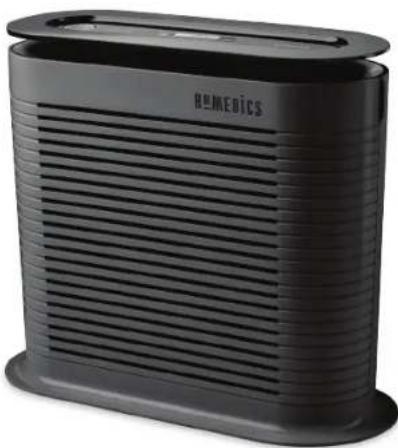
True HEPA Air Cleaner

natural_image
Black GE M E BICS brand air purifier with horizontal slats and a flat top (no visible text or symbols on body)Instruction Manual and Warranty Information
AF-10
2year limited warranty
Distributed by HOMEDICS®
IMPORTANT SAFETY INSTRUCTIONS:
WHEN USING ELECTRICAL PRODUCTS, ESPECIALLY WHEN CHILDREN ARE PRESENT, BASIC SAFETY PRECAUTIONS SHOULD ALWAYS BE FOLLOWED, INCLUDING THE FOLLOWING:
READ ALL INSTRUCTIONS BEFORE USING
DANGER - TO REDUCE THE RISK OF ELECTRIC SHOCK:
- Always unplug the air cleaner from the electrical outlet immediately after using and before cleaning.
- Keep cord away from heated surfaces.
• Always place the air cleaner on a firm, level surface. - Always place the air cleaner at least six (6) inches away from walls and three (3) feet from heat sources such as stoves, radiators, or heaters.
- DO NOT operate where aerosol (spray) products are being used or where oxygen is being administered.
- DO NOT reach for an appliance that has fallen into water. Unplug it immediately.
- DO NOT place or store appliance where it can fall or be pulled into a tub or sink.
- DO NOT place in or drop into water or other liquid.
- Keep dry - DO NOT operate in wet or moist conditions.
- Check your air cleaner cord and plug connections. Faulty wall outlet connections or loose plugs can cause the outlet or plug to overheat. Be sure the plug fits tightly in the outlet.
WARNING - TO REDUCE THE RISK OF BURNS, FIRE, ELECTRIC SHOCK OR INJURY TO PERSONS:
- Extreme caution is necessary when any air cleaner is used by or near children or invalids and whenever the air cleaner is left operating and unattended.
• Always unplug the air cleaner when not in use. - Do not operate the air cleaner with a damaged cord or plug, or after the air cleaner malfunctions, or has been dropped or damaged in any manner. Return to HoMedics Consumer Relations for examination, electrical or mechanical adjustment, or repair.
- This air cleaner is not intended for use in bathroom, laundry areas and similar moist indoor locations. Never locate air cleaner where it may fall into a bathtub or other water container.
- Do not run cord under carpeting. Do not cover cord with throw rugs, runners or similar coverings. Do not route cord under furniture or appliances. Arrange cord away from traffic areas where it can be tripped over.
- To disconnect the air cleaner, first turn controls to the OFF position, then remove plug from outlet.
- Do not tilt or move the air cleaner while it is in operation. Shut off and remove plug from outlet before moving.
- Do not insert or allow foreign objects to enter any ventilation or exhaust opening as this may cause an electric shock or fire, or damage the air cleaner.
- To prevent a possible fire, do not block air intakes or exhaust in any manner. Do not use on any soft surface, like a bed, where openings may become blocked.
- Use this air cleaner only for its intended use as described in this manual. Any other use not recommended by the manufacturer may cause fire, electric shock, or injury to persons.
• DO NOT use outdoors.

This product earned the ENERGY STAR by meeting strict energy efficiency guidelines set by the US EPA. US EPA does not endorse any manufacturer claims of healthier indoor air from the use of this product.
The energy efficiency of this ENERGY STAR qualified model is measured based on a ratio between the model's CADR for Dust and the electrical energy it consumes, or CADR/Watt.
SAVE THESE IMPORTANT INSTRUCTIONS FOR EASY REFERENCE
Technical Specifications
| Input voltage 120 V | |
| Rated Frequency 60 HZ | |
| Power 38 Watts | |
| Weight 8.50 lbs | |
| Noise Level <60 dB | |
| Unit Height 13.5" |
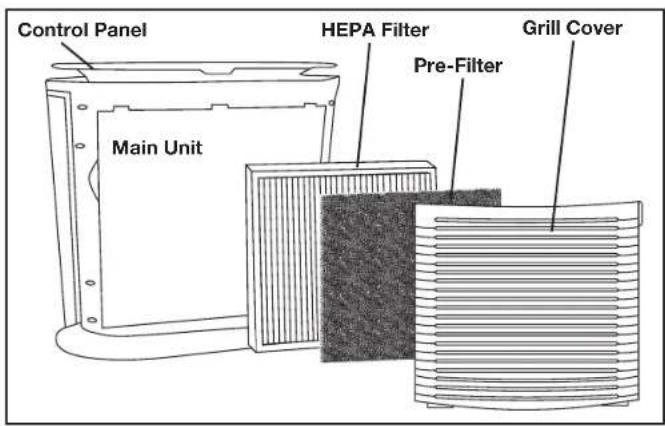
Main Features of the HoMedics True HEPA Air Cleaner
NOTE: This appliance has a polarized plug (one blade is wider than the other). To reduce the risk of shock, this plug is intended to fit only one way in a polarized outlet. If the plug does not fit fully in the outlet, reverse the plug. If it still does not fit, contact a qualified electrician. DO NOT attempt to defeat this safety feature. To do so could result in an electric shock hazard.
Control Panel
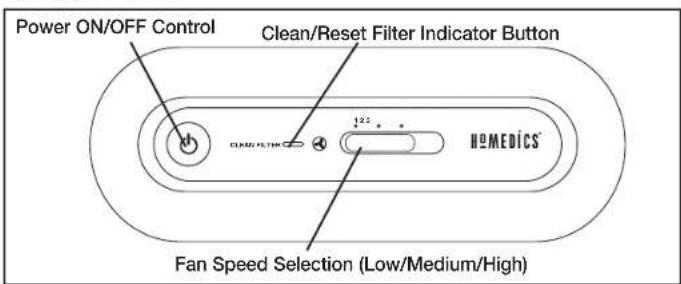
NOTE: The Clean/Reset Filter Indicator MUST be pressed to reset the indicator after you have cleaned and replaced the filter.
Operating Instructions
Turning the Unit On
• Take the air cleaner out of the box and remove the clear protective plastic bag.
- Place the air cleaner on a firm level surface.
- Before turning the air cleaner ON, you need to check that the True HEPA filter is firmly in place and did not become loose during shipping. You may also choose to install the optional odor reducing pre-filter.
natural_image
Line drawing of a device with hands holding a tray (no text or symbols)Fig. 1
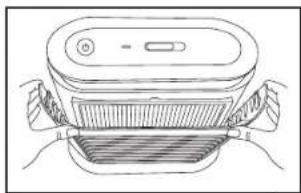
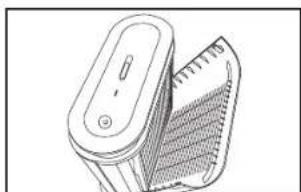
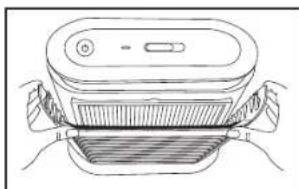
- To check the True HEPA filter, open the front grill by pulling on the tabs on either side of the top of the grill cover. Fig. 1
natural_image
Line drawing of a handheld device with a gridded handle and control knob (no text or symbols)Fig. 2
- Open the cover outward until the tabs at the bottom of the grill cover easily slide away from the unit. Fig. 2
natural_image
Line drawing of hands holding a rectangular panel with vertical bars, no text or symbols presentFig. 3
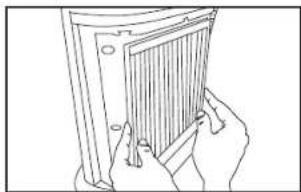
- The True HEPA filter will be resting inside the unit. Make sure that the filter is firmly sealed inside of the unit. Fig. 3
natural_image
Simple line drawing of a cylindrical container with horizontal ridges (no text or symbols)Fig. 4
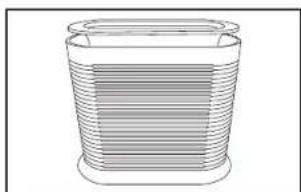
- Place the tabs at the bottom of the grill cover into the base of the unit. Gently push the grill cover back into place until you hear a click sound indicating that the grill is firmly latched. Fig. 4
Plug the power cord into a standard AC outlet.
To Install Optional Odor Reducing Pre-Filter
Pre-Filter
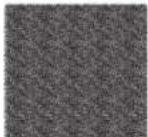
- Remove optional pre-filter from plastic bag.
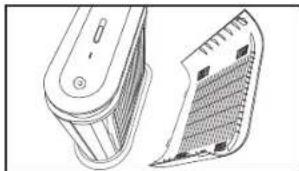
- Remove front cover from air cleaner unit. Fig 5-6
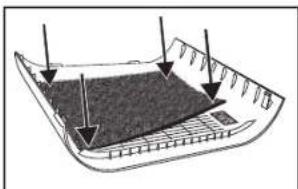
- Attach pre-filter to adhesive on inside of front grill cover. Press firmly. Fig 7
- Replace front grill cover on air cleaner unit. Fig 8
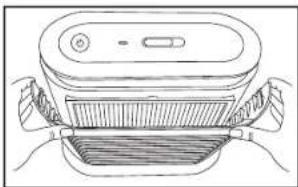
natural_image
Line drawing of a device with handle and control panel (no text or symbols)Fig. 5
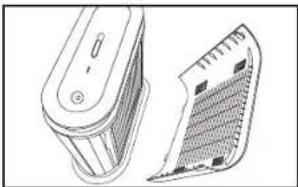
natural_image
Technical line drawing of a device with two views: top shows internal structure, bottom shows textured surface (no text or symbols)Fig. 6
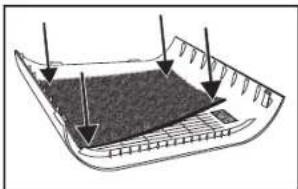
natural_image
Diagram of a boat hull with arrows indicating direction of movement or force (no text or symbols present)Fig. 7 Fig. 8
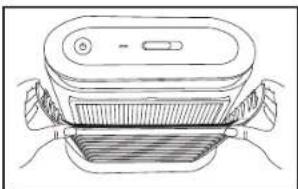
natural_image
Line drawing of a device with handles and a central panel (no text or symbols)8
NOTE: Unit will not operate unless True HEPA filter and grill are properly installed.
1. On/Off and Fan Speed Settings
- To turn the air cleaner on, press the ON/OFF Control. When the air cleaner is on, the ON/OFF Control will illuminate and the air cleaner will start to operate on LOW speed.
- This air cleaner has 3 fan speed settings: LOW (1), MEDIUM (2), and HIGH (3). The higher the fan speed setting, the faster the air will be cleaned. To select or change fan speed, slide the FAN SPEED control until desired speed is reached.
• To turn the air cleaner off, press the ON/OFF ⏻ Control.
Clean Filter Indicator Button
This air cleaner is equipped with a CLEAN FILTER indicator button to let you know when the True HEPA filter requires cleaning. Generally this is every 480 hours of use. When the True HEPA filter requires cleaning, the CLEAN FILTER indicator button on the control panel will illuminate.
If the air cleaner is used daily, we recommend cleaning the True HEPA filter more frequently.
Replacing True HEPA Filter
With regular cleaning the life of the True HEPA filter is approximately 12-18 months under typical household usage and conditions. We recommend replacing your filter every year. To purchase replacement True HEPA filters, model # AF-10FL, go back to your retailer (where you purchased your air cleaner), or visit www.homedics.com.
After cleaning or replacing the True HEPA filter, be sure to reset the filter indicator by pressing the CLEAN/RESET FILTER INDICATOR BUTTON for several seconds until an audible chime sounds and the light turns off.
Cleaning the True HEPA Filter
Make sure that the air cleaner is turned OFF and unplugged from the outlet before cleaning.
natural_image
Line drawing of a smart device with a flat top and side-mounted buttons (no text or symbols)Fig. 9
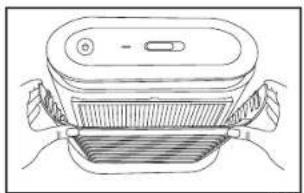
- Open the front grill cover by gently pulling on the tabs on either side of the top of the grill cover. Fig. 9
natural_image
Line drawing of a handheld device with a mesh grille and handle (no text or symbols)Fig. 10
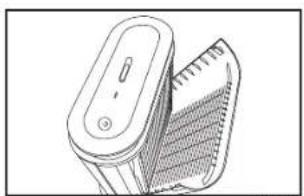
- Open the grill cover outward until the tabs at the bottom of the grill cover easily slide away from the unit. Fig. 10
natural_image
Line drawing of a hand holding a grater or filter device (no text or symbols visible)Fig. 11
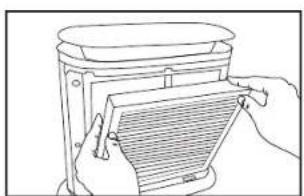
- Remove the True HEPA filter from the main unit. Fig. 11
natural_image
Diagram of a tool interacting with a textured surface (no text or symbols)Fig. 12
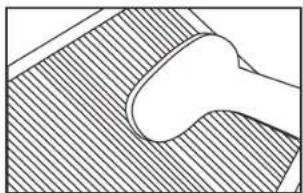
- Use the brush attachment with your vacuum cleaner. Run the attachment along both sides of the True HEPA filter, cleaning thoroughly between the accordion folds of the filter. Fig. 12
natural_image
Line drawing of hands holding a rectangular panel with vertical slots (no text or symbols)Fig. 13
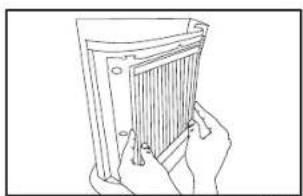
- Place the clean True HEPA filter back in the main unit, making sure it is firmly sealed inside the unit. Fig. 13
natural_image
Line drawing of a device with a lid and side connectors (no text or symbols)Fig. 14
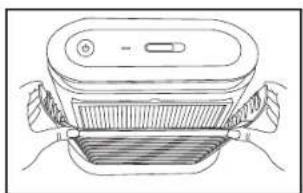
- Place the tabs at the bottom of the grill cover into the base of the unit. Gently push the grill cover back into place until you hear a click sound indicating that the grill cover is firmly latched. Fig. 14
Cleaning and Maintenance
For best performance, we recommend:
- Vacuum the True HEPA filter and pre-filter using the brush attachment of your vacuum cleaner once a month.
- NEVER use water or any household cleaners or detergents to clean the True HEPA filter or pre-filter.
- Clean off the outside of the unit with a dry cloth once a month.
- NEVER use water, wax, polish, or any chemical solution to clean the outside of the unit.
- Clean off the grill cover using a damp cloth or the brush attachment of your vacuum once a month.
- NEVER use wax, polish, or any chemical solution to clean the grill cover.
- Replace the True HEPA filter every 12-18 months.
Troubleshooting
| Problem Possible | Cause Solution | |
| Unit will not operate • Unit | it is not plugged in• No power to unit | • Plug unit in• Press the ON/OFF button to turn the power on• Check circuits, fuses, try a different outlet |
| Reduced airflow or poor filtering | • The front grill may be blocked• True HEPA filter may be clogged | • Check to make sure nothing is blocking the front grill and air outlet• Check and clean filter• Replace the filter |
| Excessive noise • The unit | it is not level • Place the unit | on a flat, level surface |
| CLEAN FILTER indicator light will not go off | • The filter needs to be cleaned• The filter needs to be replaced• CLEAN/RESET FILTER INDICATOR has not been reset | • Remove filter from unit and clean using brush attachment on your vacuum• Replace filter – Model # AF-10FL• Press and hold the CLEAN/RESET FILTER INDICATOR BUTTON until an audible chime sounds and the light turns off |
Distributed by HOMEDICS®
e-mail:
cservice@homedics.com
Monday-Friday
8:30 am - 7:00 pm (EST)
1-800-466-3342
LIMITED TWO YEAR WARRANTY
HoMedics sells its products with the intent that they are free of defects in manufacture and workmanship for a period of two years from the date of original purchase, except as noted below. HoMedics warrants that its products will be free of defects in material and workmanship under normal use and service. This warranty extends only to consumers and does not extend to Retailers.
To obtain warranty service on your HoMedics product, contact a Consumer Relations Representative by telephone at 1-800-466-3342 for assistance. Please make sure to have the model number of the product available.
No COD's will be accepted.
HoMedics does not authorize anyone, including, but not limited to, Retailers, the subsequent consumer purchaser of the product from a Retailer or remote purchasers, to obligate HoMedics in any way beyond the terms set forth herein. This warranty does not cover damage caused by misuse or abuse, accident, the attachment of any unauthorized accessory, alteration to the product; improper installation; unauthorized repairs or modifications; improper use of electrical/power supply; loss of power; dropped product; malfunction or damage of an operating part from failure to provide manufacturers recommended maintenance; transportation damage; theft; neglect; vandalism; or environmental conditions; loss of use during the period the product is at a repair facility or otherwise awaiting parts or repair; or any other conditions whatsoever that are beyond the control of HoMedics.
This warranty is effective only if the product is purchased and operated in the country in which the product is purchased. A product that requires modifications or adoption to enable it to operate in any other country than the country for which it was designed, manufactured, approved and/or authorized, or repair of products damaged by these modifications is not covered under this warranty.
THE WARRANTY PROVIDED HEREIN SHALL BE THE SOLE AND EXCLUSIVE WARRANTY. THERE SHALL BE NO OTHER WARRANTIES EXPRESS OR IMPLIED INCLUDING ANY IMPLIED WARRANTY OF MERCHANTABILITY OR FITNESS OR ANY OTHER OBLIGATION ON THE PART OF THE COMPANY WITH RESPECT TO PRODUCTS COVERED BY THIS WARRANTY. HOMEDICS SHALL HAVE NO LIABILITY FOR ANY INCIDENTAL, CONSEQUENTIAL OR SPECIAL DAMAGES. IN NO EVENT SHALL THIS WARRANTY REQUIRE MORE THAN THE REPAIR OR REPLACEMENT OF ANY PART OR PARTS WHICH ARE FOUND TO BE DEFECTIVE WITHIN THE EFFECTIVE PERIOD OF THE WARRANTY. NO REFUNDS WILL BE GIVEN. IF REPLACEMENT PARTS FOR DEFECTIVE MATERIALS ARE NOT AVAILABLE. HOMEDICS RESERVES THE RIGHT TO MAKE PRODUCT SUBSTITUTIONS IN LIEU OF REPAIR OR REPLACEMENT.
This warranty does not extend to the purchase of opened, used, repaired, repackaged and/or resaleated products, including but not limited to sale of such products on Internet auction sites and/or sales of such products by surplus or bulk resellers. Any and all warranties or guarantees shall immediately cease and terminate as to any products or parts thereof which are repaired, replaced, altered, or modified, without the prior express and written consent of HoMedics.
This warranty provides you with specific legal rights. You may have additional rights which may vary from state to state. Because of individual state regulations, some of the above limitations and exclusions may not apply to you.
For more information regarding our product line in the USA, please visit: www.homedics.com
HoMedics® is a registered trademark of HoMedics, LLC.
© 2014 HoMedics, LLC. All rights reserved.
IB-AF10
Distribuido por
HOMEDICS®
natural_image
Black Humetics air purifier with horizontal slats and a flat top (no visible text or symbols on body)natural_image
Line drawing of a device with a lid and side connectors (no text or symbols)Fig. 1
natural_image
Line drawing of a handheld electric shaver with mesh grille (no text or symbols)Fig. 2
natural_image
Line drawing of hands holding a panel with a grid pattern (no text or symbols)Fig. 3
natural_image
Simple line drawing of a cylindrical container with horizontal ridges (no text or symbols)Fig. 4
natural_image
Line drawing of a device with handle and side arm (no text or symbols)Fig. 5
natural_image
Technical line drawing of a device with a curved panel and a rectangular component (no text or symbols)Fig. 6
natural_image
Diagram of a boat hull with marked structural elements and arrows indicating depth or force (no text or symbols)Fig. 7 Fig. 82 23
natural_image
Line drawing of a device with hands holding a tray and a lid (no text or symbols)natural_image
Line drawing of a smart air purifier device with handle and control panel (no text or symbols)Fig. 9
natural_image
Line drawing of a handheld device with a mesh handle and control panel (no text or symbols)Fig. 10
natural_image
Line drawing of hands holding a gridded metal tray (no text or symbols)Fig. 11
natural_image
Simple line drawing of a curved object on a textured surface (no text or symbols)Fig. 12
natural_image
Line drawing of hands holding a closed folder (no text or symbols visible)Fig. 13
natural_image
Line drawing of a device with a lid and side connectors (no text or symbols)Fig. 14
- Distributed by HOMEDICS®
- True HEPA Air Cleaner
- IMPORTANT SAFETY INSTRUCTIONS:
- DANGER - TO REDUCE THE RISK OF ELECTRIC SHOCK:
- WARNING - TO REDUCE THE RISK OF BURNS, FIRE, ELECTRIC SHOCK OR INJURY TO PERSONS:
- SAVE THESE IMPORTANT INSTRUCTIONS FOR EASY REFERENCE
- Operating Instructions
- Turning the Unit On
- To Install Optional Odor Reducing Pre-Filter
- On/Off and Fan Speed Settings
- Clean Filter Indicator Button
- Replacing True HEPA Filter
- Cleaning the True HEPA Filter
- Cleaning and Maintenance
- LIMITED TWO YEAR WARRANTY
- Distribuido por
- HOMEDICS®
Brand : HOMEDICS
Model : AF-10
Category : Air purifier