
TotalClean AP-T30WT-AU - Air purifier HOMEDICS - Free user manual and instructions
Find the device manual for free TotalClean AP-T30WT-AU HOMEDICS in PDF.


| Product Type | Air Purifier |
| Model | TotalClean AP-T30WT-AU |
| Brand | Homedics |
| Dimensions (L x W x H) | Approx. 10.6 x 10.6 x 18.5 inches (27 x 27 x 47 cm) |
| Weight | Approx. 11.5 lbs (5.2 kg) |
| Power Supply | AC 120V / 60Hz |
| Power Consumption | 50 Watts (Max) |
| Fan Speeds | 3 (Low, Medium, High) plus Sleep Mode |
| Coverage Area | Up to 300 sq ft (28 m²) |
| Filter Type | True HEPA + Activated Carbon Pre-filter |
| CADR (Smoke/Dust/Pollen) | 150 / 140 / 160 CFM (approx.) |
| Noise Level (Max) | 55 dB |
| Timer | 2, 4, 8 hours |
| Display | LED touch panel with filter replacement indicator |
| Air Quality Sensor | Yes, with color indicator (Blue/Green/Red) |
| Auto Mode | Yes (adjusts fan based on air quality) |
| Night Mode | Yes (dimmed lights, low noise) |
| Filter Replacement | Every 6-12 months (depending on usage) |
| Filter Part Number | AP-T30WT-Filter (check manual) |
| Maintenance | Vacuum pre-filter monthly; replace HEPA filter annually |
| Safety Features | Overheat protection, auto shut-off when cover opened |
| Warranty | 2 years limited |
| Includes | Air purifier, pre-filter, HEPA filter, user manual |
Frequently Asked Questions - TotalClean AP-T30WT-AU HOMEDICS
User questions about TotalClean AP-T30WT-AU HOMEDICS
0 question about this device. Answer the ones you know or ask your own.
Ask a new question about this device
Download the instructions for your Air purifier in PDF format for free! Find your manual TotalClean AP-T30WT-AU - HOMEDICS and take your electronic device back in hand. On this page are published all the documents necessary for the use of your device. TotalClean AP-T30WT-AU by HOMEDICS.
USER MANUAL TotalClean AP-T30WT-AU HOMEDICS
natural_image
White Humidics air purifier with perforated grille and control panel (no visible text or symbols)TOTALCLEAN™
5IN1 AIRPURIFIER
instruction manual
READ ALL INSTRUCTIONS BEFORE USE. SAVE THESE INSTRUCTIONS FOR FUTURE REFERENCE.
- ALWAYS unplug the appliance from the electrical outlet immediately after using and before cleaning. To disconnect, turn all controls to the 'OFF' position, then remove plug from outlet.
- Unplug from the mains outlet when not in use and before putting on or taking off parts or attachments.
- This appliance can be used by children aged from 8 years and above and persons with reduced physical, sensory or mental capabilities or lack of experience and knowledge if they have been given supervision or instruction concerning use of the appliance in a safe way and understand the hazards involved. Children shall not play with the appliance. Cleaning and user maintenance shall not be made by children without supervision.
- DO NOT reach for an appliance that has fallen in water or other liquids. Switch off at the mains and unplug it immediately. Keep dry – DO NOT operate in wet or moist conditions.
- NEVER insert pins or other metallic fasteners into the appliance.
-
Use this appliance for the intended use as described in this booklet. DO NOT use attachments not recommended by HoMedics.
-
NEVER operate the appliance if it has a damaged cord or plug, if it is not working properly, if it has been dropped or damaged, or dropped into water. Return it to the HoMedics Service Centre for examination and repair.
- Keep cord away from heated surfaces.
- Excessive use could lead to the product's excessive heating and shorter life. Should this occur, discontinue use and allow the unit to cool before operating.
- NEVER drop or insert any object into any opening.
- DO NOT operate where aerosol (spray) products are being used or where oxygen is being administered.
- DO NOT operate under a blanket or pillow. Excessive heating can occur and cause fire, electrocution or injury to persons.
- DO NOT carry this appliance by the cord or use cord as a handle.
- DO NOT use outdoors.
- This product requires a 240 V AC power supply.
- DO NOT attempt to repair the appliance. There are no user serviceable parts. For service, send to a HoMedics Service Centre. All servicing of this appliance must be performed by authorised HoMedics service personnel only.
-
Never block the air openings of the appliance or place it on a soft surface, such as a bed or couch. Keep air openings free of lint, hair etc.
-
Do not place or store appliance where it can fall or be pulled into a bath or sink. Do not place in or drop into water or other liquid.
- Failure to follow the above may result in the risk of fire or injury.
- This appliance should NEVER be used by any individual suffering from any physical ailment that would limit the user's capacity to operate the controls.
- If the product feels excessively hot, switch off at mains and contact the HoMedics Service Centre.
- Do not run cord under carpeting. Do not cover cord with throw rugs, runners or similar coverings. Do not route cord under furniture or appliances. Arrange cord away from traffic areas where it can be tripped over.
- This appliance is not intended for use by persons (including children) with reduced physical, sensory or mental capabilities, or lack of experience and knowledge, unless they have been given supervision or instruction concerning use of the appliance by a person responsible for their safety.
• Children should be supervised to ensure that they do not play with the appliance. - If the supply cord is damaged, it must be replaced by the manufacturer, its service agent or similarly qualified persons in order to avoid a hazard.
PRODUCT FEATURES
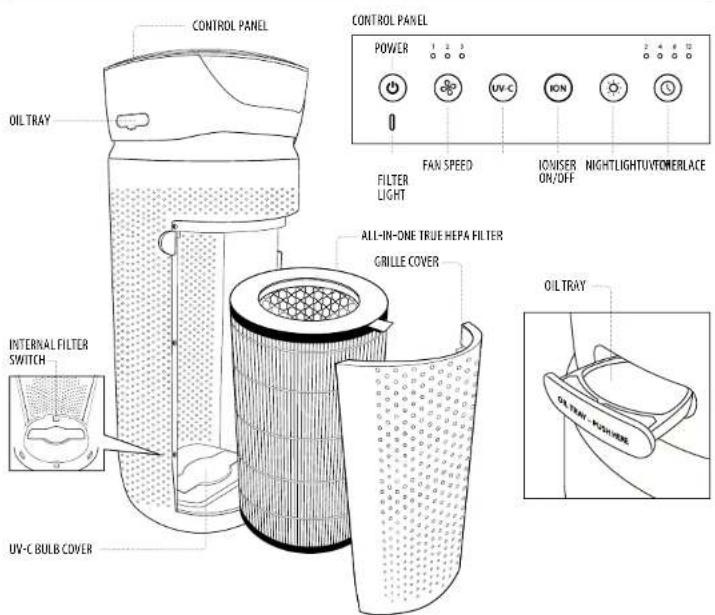
ALL-IN-ONE TRUE HEPA FILTRATION SYSTEM
TRUE HEPA FILTRATION
Removes up to 99.97% of airborne particles as small as 0.3 microns, such as allergens, pollen, dust, germs, pet dander, odour, mould spores, and smoke from air that passes through the filter.
CARBON ODOUR FILTRATION
Reduces household odours and VOCs (volatile organic compounds)/gases as shown by independent laboratory testing.
PRE-FILTER
Captures large particles.
UV-C TECHNOLOGY WITH ON/OFF
When on, the UV-C technology light kills germs, viruses, and bacteria.
IONISER WITH ON/OFF
When on, the ioniser assists in the air purification process.
3 SPEEDS
Low, medium, and high.
BUILT-IN TIMER
Choose from 2, 4, 8, or 12 hours.
REPLACE FILTER INDICATOR
Illuminates when it is time to replace the filter.
SUGGESTED ROOM SIZE
84 M ^2 /H / 888 FT ^2 /H. Portable air purifiers will be more effective in rooms where all the doors and windows are closed.
AIR CHANGES PER HOUR
This air purifier will purify the air in a 84 M ^2 /888 FT ^2 room (assuming an 2.43 M/8 FT ceiling) once per hour on high speed in a closed room. The airflow rate is 204.1M ^2 /H / 7140FT ^2 /H.
OIL TRAY
Includes 3 essential oil pads. Use with essential oil (not included) to deliver scent into the air.
OPERATING INSTRUCTIONS
BEFORE TURNING THE UNIT ON
- Take the air purifier out of the box and remove the clear protective plastic bag.
- Place the air purifier on a firm, level surface.
- Plug the power cord into a standard AC outlet.
POWER BUTTON AND FAN SPEED SETTINGS
- To turn the air purifier on, press the power button. - This air purifier has 3 fan speed settings: low (1), medium (2), and high (3). The higher the fan speed setting, the faster the air will be purified. To select or change fan speed, press the fan speed button until the desired setting is reached.
UV-C TECHNOLOGY WITH ON/OFF
The optional UV-C technology kills germs, viruses, and bacteria by penetrating its DNA, resulting in the microorganism's death or the inability to reproduce. Press the UV-C button to turn the UV-C technology on. The blue LED will glow. Press the UV-C button again to turn the UV-C technology off.
IONISER SETTING WITH ON/OFF
Ion particles have a positive or negative charge that attach to airborne particles, making them easier to be captured by the filtration system. Press the ioniser ION button to turn the ioniser on. The blue light will glow to indicate the ioniser is in use. Press the ioniser ION button again to turn the ioniser off.
NOTE: Dust particles may accumulate on surfaces around the air purifier when the ioniser is in use. These dust particles can be vacuumed or wiped away with a soft, damp cloth.
NOTE: You may hear occasional popping sounds when the ioniser is used. This is normal.
NOTE: The ioniser produces less ozone than the UL-established limits of 0.05 ppm. Ozone may be harmful around birds and small pets. To prevent ozone buildup, use the ioniser feature in a well-ventilated area.
NIGHTLIGHT
The nightlight has 3 options. Press the nightlight ⚙ button once to turn the blue nightlight on. Press again to turn the blue nightlight ring and the display lights off. Press a third time to turn the display lights on.
TIMER
Press the timer ⏻ button until the desired timer setting is lit on the display. The timer ⏻ button will cycle through the following settings: 2 hours, 4 hours, 8 hours, 12 hours, and off. To cancel the timer at any time, press the timer ⏻ button until all timer LEDs are off. The air purifier will run continuously when the timer function is
att.
OIL TRAY
Use essential oil (not included) to deliver scent into the air.
NOTE: For use with the included HoMedics essential oil pads only. Do not add essential oils anywhere else in the unit as it may cause damage.
NOTE: Do not leave a filled essential oil pad in the air purifier if it will be out of use for a long period of time.
ARE ESSENTIAL OILS SAFE TO USE AROUND PETS?
We should always exercise caution when using essential oils around our pets. Keep all essential oil and aromatherapy products (like diffusers) out of reach of pets. Keep open bottles away from pets to avoid internal consumption. We do not recommend the topical use of essential oils on pets, as they have a strong sense of smell and cannot get rid of the oil if they don't like it or it is disturbing them. When diffusing essential oils around pets, always diffuse in a well-ventilated area and leave an option for them to remove themselves from the space, such as leaving a door open. Every animal is different, so carefully observe how each animal responds when introducing an essential oil for the first time. If irritation occurs, discontinue the use of the essential oil. We recommend seeking medical attention if ingestion of essential oil occurs.
ADDING ESSENTIAL OILS
WARNING: Putting oil anywhere but the oil tray will damage the air purifier.
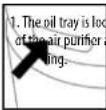
ated on the side
bove the nightlight
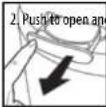
remove the tray.
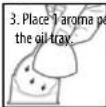
d (3 included) into
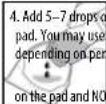
essential oil to the more or less
onal preference.
WARNING: Only place essential oil directly into the tray.
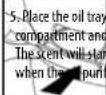
back in its push to close.
automatically er is turned on.
FILTER REPLACEMENT
REPLACE FILTER LIGHT
The replace filter light illuminates when it is time to replace the True HEPA filter based on the air purifier's hours of use.
REPLACING THE TRUE HEPA FILTER
For optimal performance, replace every 12 months under normal usage conditions.
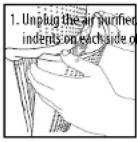
Pull the
the grille
cover.
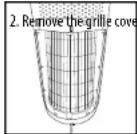
aside.
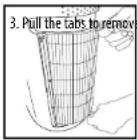
the old filter.
-
With the filter tabs fading outward, insert the new True HEP A filter.
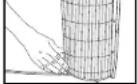
-
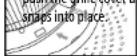
Place the tabs at the bottom of the grille cover into the base of the air purifier. Gently push the grille cover until it
- Plug the power cord in AC outlet and press the button Press and hold
to a standard power the ioniser
ION button for 3 seconds to reset
UV-C BULB REPLACEMENT
REPLACING THE UV-C BULB
The UV-C bulb is designed to last for approximately 10,000 hours of use. The UV-C button on the control panel will flash RED when the UV-C bulb burns out and needs to be replaced. The UV-C button will change to blue once the bulb has been replaced.
NOTE: The air purifier will continue to operate without the UV-C function when the UV-C bulb burns out.
CAUTION: Do not operate the air purifier without the protective UV-C bulb cover.
CAUTION: Unplug the power cord before servicing or replacing the UV-C bulb.
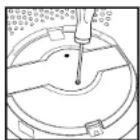
- Unplug the air purifier and remove the True HEPA filter. Using a Phillips-head screwdriver (not included), unscrew the 2 screws located on the UV-C bulb cover.
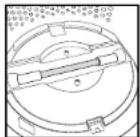
- Remove the cover to expose the UV-C bulb.
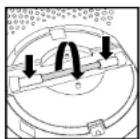
- Gently push from the sides and rotate the UV-C bulb to remove.
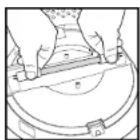
- Remove and replace the UV-C bulb. Re-install the UV-C bulb cover, True HEPA filter, and grille cover.
NOTE: The UV-C bulb contains mercury (Hg).
CLEANING & MAINTENANCE
CLEANING THE PRE-FILTER
NOTE: For best performance, vacuum the pre-filter once a month under normal usage. 1. Unplug the air purifier.
-
Remove the True HEPA filter as described in the Replacing the True HEPA Filter section.
-
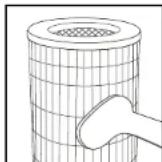
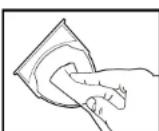
Vacuum the outside of the True HEPA filter using the brush attachment of your vacuum cleaner, cleaning it thoroughly.
-
Place the True HEPA filter back into the air purifier and close grille.
-
Plug the power cord into a standard AC outlet.
TO CLEAN THE OIL TRAY
Open the oil tray and remove the pad. Essential oil pads should be changed when switching to a different essential oil scent. If continuing to use the same scent, set the essential oil pad aside for reuse. Wipe down the inside of the oil tray with a soft cloth. Place tray and close.
NOTE: Leave the essential oil pad out of the oil tray when storing.
The Ground Truth image displays a single, solid horizontal line. According to Rule 2 (UNDERSCORE & LINE RULES), this is a stylistic or background line, not a placeholder underscore. Therefore, the OCR result must ignore it and output nothing or only meaningful text. The provided OCR content is "____", which consists of four underscores. This is an incorrect interpretation of the line as a placeholder, violating the rule that stylistic lines must be ignored. The OCR has hallucinated underscores where none should exist based on the GT's visual context. Hence, the OCR result is inconsistent with the Ground Truth.
n attachment of your vacuum
Attachment of your vacuum
(1)基因通过控制 通过控制____,____的合成来控制代谢过程,进而控制生物体的性状。
to the squarefacer and close
to the all purifier and close
[Non-Text]
and NC outlet
and AC outlet.
[Non-Text]
FOR BEST PERFORMANCE
- NEVER use water or any household cleaners or detergents to clean the True HEPA filter.
- Clean off the outside of the unit with a dry cloth as needed.
- NEVER use water, wax, polish, or any chemical solution to clean the outside of the unit.
- Clean off the grille cover using a damp cloth or the brush attachment of your vacuum as needed.
• Vacuum the pre-filter monthly under normal usage conditions. - Replace the True HEPA filter every 12 months under normal usage conditions.
- Always use a genuine HoMedics replacement filter for optimal performance.
To purchase genuine HoMedics replacement/spare parts please visit www.homedics.com.au
- Pack of aroma pads - ARM-PAD3
Aroma tray - AP-T30WTARM
HEPA filter - AP-T30FL
UV-C Bulb - AP-UVC1
Cover & screws - APUVCCV
TROUBLESHOOTING
| PROBLEM POSSIBLE CAUSE SOLUTION | ||
| Unit will not operate - Unit is not plugged inPower button not pressedNo power to unitTrue HEPA filter is not installed correctlyGrille cover is not installed correctly | Plug unit inPress the power button to turn the power onCheck fuses, try a different outletReinstall the True HEPA filterReinstall the grille cover | |
| Reduced airflow - The back grille may be blockedPre-filter needs vacuumingThe True HEPA filter needs to be replaced | Check to make sure nothing is blocking the back grille and air outletVacuum the pre-filter with the brush attachment of your vacuum cleanerReplace the True HEPA filter | |
| Reduced odour removal | The True HEPA filter needs to be replaced | Replace the True HEPA filter |
| Excessive noise - The unit is not level - Place the unit on a flat, level surface | ||
| Replace filter light remains lit after filter replacement | The replace filter indicator needs to be reset | Press and hold the ioniser button for 3 seconds until the replace filter light turns off |
| Display lights are off - Nightlight setting - Press the nightlight button until the desired lights are on/off | ||
HOMEDICS®
One year limited warranty
We or us means HoMedics Australia Pty Ltd ABN 31 103 985 717 and our contact details are set out at the end of this warranty; You means the purchaser or the original end-user of the Goods. You may be a domestic user or a professional user; Supplier means the authorised distributor or retailer of the Goods that sold you the Goods in Australia and New Zealand; and Goods means the product or equipment which was accompanied by this warranty and purchased in Australia and New Zealand.
For Australia:
Our Goods come with guarantees that cannot be excluded under the Australian Consumer Law. You are entitled, subject to the provisions of the Australian Consumer Law, to a replacement or refund for a major failure and for compensation for any other reasonably foreseeable loss or damage. You are also entitled, subject to the provisions of the Australian Consumer Law, to have the Goods repaired or replaced if the goods fail to be of acceptable quality and the failure does not amount to a major failure. This is not a complete statement of your legal rights as a consumer.
For New Zealand:
Our Goods come with guarantees that cannot be excluded under the Consumer Guarantees Act 1993. This guarantee applies in addition to the conditions and guarantees implied by that legislation.
The Warranty
HoMedics sells its products with the intent that they are free of defects in manufacture and workmanship under normal use and service. In the unlikely event that your HoMedics product proves to be faulty within 1 year from the date of purchase due to workmanship or materials only, we will replace it at our own expense, subject to the terms and conditions of this guarantee. The warranty period is limited to 3 months from the date of purchase for products used commercially/professionally.
Terms and Conditions:
In addition to the rights and remedies that you have under the Australian Consumer Law, Consumer Guarantees Act of New Zealand or any other applicable law and without excluding such rights and remedies warranty against defects:
- The Goods are designed to withstand the rigors of normal household use and are manufactured to the highest standards using the highest quality components. Whilst unlikely, if, during the first 12 months (3 months commercial use) from their date of purchase from the Supplier (Warranty Period), the Goods prove defective by reason of improper workmanship or materials and none of your statutory rights or remedies apply, we will replace the Goods, subject to the terms and conditions of this warranty.
- We do not have to replace the Goods under this Additional Warranty if the Goods have been damaged due to misuse or abuse, accident, the attachment of any unauthorised accessory, alteration to the product, improper installation, unauthorised repairs or modifications, improper use of electrical/power supply, loss of power, malfunction or damage of an operating part from failure to provide manufacturer's recommended maintenance, transportation damage, theft, neglect, vandalism, environmental conditions or any other conditions whatsoever that are beyond the control of HoMedics.
- This Warranty does not extend to the purchase of used, repaired or second-hand products or to products not imported or supplied by HoMedics Australia Pty Ltd, including but not limited to those sold on offshore internet auction sites.
- This Warranty extends only to consumers and does not extend to Suppliers.
- Even when we do not have to replace the Goods, we may decide to do so anyway. In some cases, we may decide to substitute the Goods with a similar alternative product of our choosing. All such decisions are at our absolute discretion.
- All such replaced or substituted Goods continue to receive the benefit of this Additional Warranty for the time remaining on the original Warranty Period (or three months, whichever is the longest).
- This Additional Warranty does not cover items damaged by normal wear and tear including but not limited to chips, scratches, abrasions, discolouration and other minor defects, where the damage has negligible effect on the operation or performance of the Goods.
- This Additional Warranty is limited to replacement or substitution only. As far as the law permits, we will not be liable for any loss or damage caused to property or persons arising from any cause whatsoever and shall have no liability for any incidental, consequential or special damages.
- This warranty is only valid and enforceable in Australia and New Zealand.
Making a Claim:
In order to claim under this Warranty you must return the Goods to the Supplier (place of purchase) for replacement. If this is not possible, please contact our customer service department at the address below.
- A returned Goods must be accompanied by satisfactory proof of purchase which clearly indicates the name and address of the Supplier, the date and place of purchase and identifies product. It is best to provide an original, legible and unmodified receipt or sales invoice.
• You must bear any expense for return of the Goods or otherwise associated with making your claim under this Additional Warranty.
- TOTALCLEAN™
- 5IN1 AIRPURIFIER
- READ ALL INSTRUCTIONS BEFORE USE. SAVE THESE INSTRUCTIONS FOR FUTURE REFERENCE.
- ALL-IN-ONE TRUE HEPA FILTRATION SYSTEM
- TRUE HEPA FILTRATION
- CARBON ODOUR FILTRATION
- PRE-FILTER
- UV-C TECHNOLOGY WITH ON/OFF
- IONISER WITH ON/OFF
- SPEEDS
- BUILT-IN TIMER
- REPLACE FILTER INDICATOR
- SUGGESTED ROOM SIZE
- AIR CHANGES PER HOUR
- OIL TRAY
- OPERATING INSTRUCTIONS
- BEFORE TURNING THE UNIT ON
- POWER BUTTON AND FAN SPEED SETTINGS
- IONISER SETTING WITH ON/OFF
- NIGHTLIGHT
- TIMER
- ARE ESSENTIAL OILS SAFE TO USE AROUND PETS?
- ADDING ESSENTIAL OILS
- FILTER REPLACEMENT
- REPLACE FILTER LIGHT
- REPLACING THE TRUE HEPA FILTER
- UV-C BULB REPLACEMENT
- REPLACING THE UV-C BULB
- CAUTION: Do not operate the air purifier without the protective UV-C bulb cover.
- CLEANING & MAINTENANCE
- CLEANING THE PRE-FILTER
- TO CLEAN THE OIL TRAY
- FOR BEST PERFORMANCE
- To purchase genuine HoMedics replacement/spare parts please visit www.homedics.com.au
- HOMEDICS®
- One year limited warranty
- For Australia:
- For New Zealand:
- The Warranty
- Terms and Conditions:
- Making a Claim:
Brand : HOMEDICS
Model : TotalClean AP-T30WT-AU
Category : Air purifier