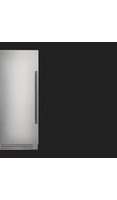
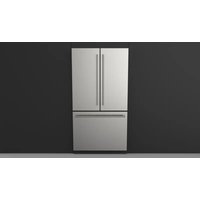
F7SRC36S1-R - Refrigerator Fulgor Milano - Free user manual and instructions
Find the device manual for free F7SRC36S1-R Fulgor Milano in PDF.


| Brand | Fulgor Milano |
| Model | F7SRC36S1-R |
| Product type | Built-in refrigerator |
| Climate class | SN (10°C to 32°C), N (16°C to 32°C), ST (18°C to 38°C), T (18°C to 43°C) |
| Power supply | 115 V AC, 60 Hz, 15 A on dedicated circuit |
| Refrigerator temperature range | +1°C to +7°C (+33°F to +44°F) |
| Control panel | Electronic touch with display |
| Lighting | Interior LED |
| Special functions | Max Cool, Vacation Mode, Sabbath Mode |
| Settings | Date, time, unit (°F/°C), language, demo mode, maintenance |
| Internal equipment | Adjustable glass shelves, stainless steel vegetable drawers, adjustable door bins, magnetic ventilation grille |
| Defrost | Automatic |
| Refrigerant | Flammable (type not specified) |
| Condenser maintenance | Every 12 months (reminder can be activated) |
| Warranty | 2 years parts and labor, 5 years for sealed system |
| Included accessories | Cleaning kit (microfiber cloth, sponge) |
Frequently Asked Questions - F7SRC36S1-R Fulgor Milano
User questions about F7SRC36S1-R Fulgor Milano
0 question about this device. Answer the ones you know or ask your own.
Ask a new question about this device
Download the instructions for your Refrigerator in PDF format for free! Find your manual F7SRC36S1-R - Fulgor Milano and take your electronic device back in hand. On this page are published all the documents necessary for the use of your device. F7SRC36S1-R by Fulgor Milano.
USER MANUAL F7SRC36S1-R Fulgor Milano
1.1 For your safety.. 6
1.2 Important information when using the appliance 6
1.3 Caring for the environment 7
2 INSTALLATION 7
2.1 Installation 7
2.2 Connection to electrical power supply 7
3 BEFORE STARTING 8
3.1 Know your appliance 8
3.2 Model / serial identification 8
3.3 Main components 11
3.4 Electronic Control 1
3.5 Main control panel 1
4 APPLIANCE SWITCHING ON AND OFF 12
4.1 Turning the appliance on and off 12
4.2 How to adjust the temperature for different requirements 13
4.3 Messages and alarms 1
5 CUSTOMIZE FUNCTIONS AND SETTINGS 14
5.1 Functions 14
5.2 Settings 18
6 INTERNAL LAYOUT 24
6.1 Internal layout (positioning, adjustment, removal) 24
7 LIGHTING 25
7.1 Lighting 25
8 FOOD STORAGE 25
8.1 General directions 25
8.2 How to maintain good food quality 24
9 CARE AND CLEANING 27
9.1 Care and Cleaning 2
9.2 Internal cleaning 21
9.3 Cleaning of the toe kick cover and condenser 21
0 TROUBLESHOOTING GUIDE 29
10.1 Troubleshooting Guide 29
10.2 Error messages appearing on the display 38

This is the safety alert symbol. This symbol alerts you to potential hazards that can kill or hurt you and others. All safety messages will follow the safety alert symbol and either the word "DANGER" or "WARNING." These words mean:

You can be killed or seriously injured if you don't follow instructions.
You can be killed or seriously injured if you don't immediately follow instructions.
All safety messages will tell you what the potential hazard is, tell you how to reduce the chance of injury, and tell you what can happen if the instructions are not followed.
SAVE THESE INSTRUCTIONS!

IMPORTANT SAFETY INSTRUCTIONS
This manual contains operational instructions for the users of the appliance. Keep this manual in an easily accessible place for future reference.
Improper installation, adjustment, alteration, service or maintenance can cause property damage, injury, or death.
Read the installation, operating, and maintenance instructions thoroughly before installing or servicing this equipment.
To reduce risk of fire, electric shock, or injury to persons when using your appliance, follow basic precautions, including the following:
Children should be supervised to ensure that they do not play with the appliance.
This appliance is not intended for use by persons (including children) with reduced physical, sensory or lack of experience and knowledge unless they have been given supervision or instruction concerning use of the appliance by a person responsible for their safety.
This appliance is designed to refrigerate beverages and foods and is intended for domestic use.
This appliance is intended to be used in household and similar applications such as: staff kitchen areas in shops, offices, and other working environments; farm houses and by clients in hotels, motels, and other residential-type environments; bed and breakfast-type environments; and catering and similar non-retail applications.
Do NOT use an extension cord or adapter.
Plug into a grounded 3 prong outlet.
Do not remove ground prong.
A qualified installer / plumber must complete the water connection (if available).
The appliance should be supplied only with drinkable water (if water connection is present).

In the event of a power failure, do not attempt to operate this appliance.

Keep the appliance area free and clear from combustibles or flammable materials and vapors.

Keep ventilation openings, in the appliance enclosure or in the built-in structure, clear of obstruction. Do not obstruct the air intake or exhaust openings of the appliance.

Do not store explosive substances such as aerosol cans with a flammable propellant in this appliance.

Do not use electrical appliances inside the food storage compartments of the appliance.
IMPORTANT SAFETY INSTRUCTIONS FOR PROPER DISPOSAL OF YOUR OLD REFRIGERATOR
WARNING
Suffocation Hazard
Remove doors and / or drawers from your old appliance.
Failure to do so can result in death or brain damage.
WARNING Risk of child entrapment. Before you throw away your old refrigerator or freezer:
Take off the doors and cut off the power cord.
Leave the shelves in place so that children may not easily climb inside.
IMPORTANT: Child entrapment and suffocation are not problems of the past. Junked or abandoned refrigerators are still dangerous, even if they will sit for "just a few days." If you are getting rid of your old refrigerator, please follow these instructions to help prevent accidents.
Important information to know about disposal of refrigerants:
Dispos of refrigerator in accordance with federal and local regulations. Refrigerants must be evacuated by a licensed. EPA-certified refrigerant technician in accordance with established procedures.
IMPORTANT SAFETY INSTRUCTIONS FOR MAINTENANCE AND CARE
DANGER
Risk of fire or explosion due to puncture of refrigerant tubing; follow handling instructions carefully. Flammable refrigerant used.
WARNING
To be repaired only by trained service personnel.
Use only manufacturer-authorized service parts. Do not use replacement parts that have not been recommended by the manufacturer (e.g, parts made at home using a 3D printer). If power supply cord is damaged, it must be replaced by the manufacturer, its service agent, or a similarly qualified person in order to avoid a hazard. Any repair equipment used must be designed for flammable refrigerants. Follow all manufacturer repair instructions. Use nonflammable cleaner.
WARNING
Do not puncture refrigerant tubing, do not damage the refrigerant circuit.
WARNING
Do not use mechanical devices or other means to accelerate the defrosting process, other than those recommended by the manufacturer.
TIP OVER HAZARD
WARNING
Refrigerator is top heavy and tips easily when not completely in hazard due to instability of the appliance, it must be fixed in the instructions (see installation manual provided).
installed; to avoid a hazard due to instability of the appliance, it must be fixed in accordance with the instructions (see installation manual provided).
Keep doors taped closed until refrigerator is completely installed.
Use two or more people to move and install refrigerator.
Failure to do so can result in death or serious injury.
1.1 For your safety
If this appliance is replacing an existing appliance which must be removed or disposed of, makesure that it does not become a dangerous trap for children by cutting its power supply cable and rendering it impossible to close the door. Use the same caution at the end of the lifespan of the new appliance.
This appliance is designed to refrigerate beverages and foods and is intended for domestic use.
The appliance must be installed by following the instructions in the Installation Guide, particular care should be taken not to obstruct the vent openings of the appliance and of the built-in units.
The appliance features a concentrated lighting system with LED lamps. Do not stare into these lamps when they are on to avoid possible eyesight damage.
This warning is also contained on the label attached to the inside of the refrigerator door.
Do not use any type of electrical equipment inside of the food conservation compartments.
When positioning the shelves, do not place fingers in the shelf slide guides.
Do not position containers of flammable liquids near the appliance.
Completely switch off the appliance and disconnect the appliance from power during cleaning operations. If the plug is not easily reached, it is a good idea to turn off the breaker or remove the fuse that controls the socket that the appliance is connected to.
The packaging material can be dangerous for children: do not allow children to play with the plastic bags, plastic film or Styrofoam.
Any repairs must be performed by a qualified appliance technician.
This appliance is not intended for use by persons (including children) with reduced physical, sensory or lack of experience and knowledge unless they have been given supervision or instruction concerning use of the appliance by a person responsible for their safety. Children should be supervised to ensure that they do not play with the appliance.
Do not damage the appliance refrigerant circuit pipes.
Do not store explosive substances such as aerosol cans with a flammable propellant in this appliance.
If the power cord of this appliance is damaged, it must be replaced by the manufacturer, service company or a similarly qualified person. Improper installations and repairs may put the user at
considerable risk.
Repairs may be performed by the manufacturer, service company or a similarly qualified person only.
Plug into a grounded 3 prong outlet.
Do not remove ground prong.
Do not use an adapter.
Do not use an extension cord.
Disconnect power to all units before servicing.
If the SUPPLY CORD is damaged, it must be replaced by the manufacturer, its service agent or similar qualified person in order to avoid a hazard.
Children should be supervised to ensure that they do not play with the appliance.
1.2 Important information when using the appliance
Never use electrical appliances inside the appliance (e.g. heater, electric ice maker, etc.). Explosion hazard!
Never defrost or clean the appliance with a steam cleaner! The steam may penetrate electrical parts and cause a short-circuit. Risk of electric shock!
Do not use pointed and sharp-edged implements to remove frost or layers of ice. You could damage the refrigerant tubes. Leaking refrigerant may cause eye injuries or ignite.
Do not store products which contain flammable propellants (e.g. spray cans) or explosive substances in the appliance.
Explosion hazard!
Do not stand on or lean heavily against base of appliance, drawers or doors, etc.
Before cleaning the appliance, pull out the power cord plug or switch off the breaker. Do not pull out the power cord plug by tugging on the power cord.
Keep plastic parts and the door seal free of oil and grease. Otherwise, parts and door seal will deteriorate.
Never cover or block the ventilation openings for the appliance.
Symbols used in the Guide:

Note
Recommendations for correct use of the appliance

Important
Directions for avoiding appliance damage

Warning
Indications for avoiding injury to people

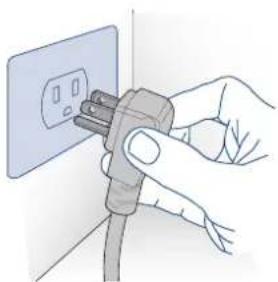
Do not use extension cords and/or multiple adapters for the power supply connection.
1.3 Caring for the environment

Pay special attention to correct disposal procedure for all the packaging materials.
The appliance must not be disposed of with urban waste. Contact local waste disposal centers for on how to dispose of recyclable waste.
Prior to disposal, cut the power supply cord and make it impossible to close the door.
During disposal, avoid damage to the refrigeration circuit.
The appliance does not contain hazardous substances for the atmospheric ozone layer, neither in the refrigeration circuit nor in the insulation.
3.1 Know your appliance
This manual will answer most of your questions about the product's features. Should you require further information, please check our website
call us 1-855-4FULGOR (1-855-438-5467)
visit fulgor-milano.com/us/en/assistance

Before calling, write down the model type and serial number which are available on the warranty certificate and on the rating plate, and any messages which may have appeared on the display. Built In refrigerators come with 2 years parts & labor warranty, and 5 year parts & labor for sealed system only.
2.1 Installation
Make sure that installation is performed correctly, adhering to all directions in the specific installation manual provided with the appliance.
The rating plate is located into the appliance, on side cabinet, close to the shelves.
Before calling, please make sure to have the following information ready:
Model code, serial number and proof of purchase (date and dealer).
2.2 Connection to the electrical power supply
The appliance operates at 115 V AC, 60 Hz and is equipped with a power supply cord with a 3-prong grounded plug, which must be connected to a corresponding 3-prong grounding-type wall receptacle on a dedicated 15A circuit.
3.2 Model / serial identification
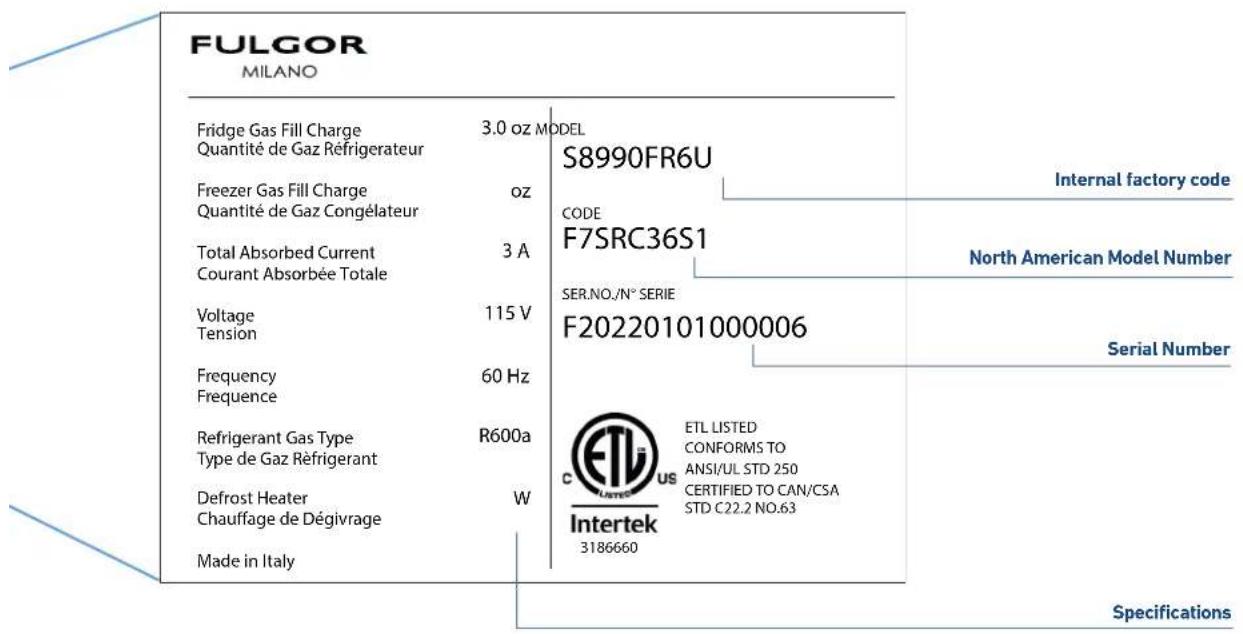
The model / serial identification tag shows the technical data, the serial number and the model. The product plate must never be removed.
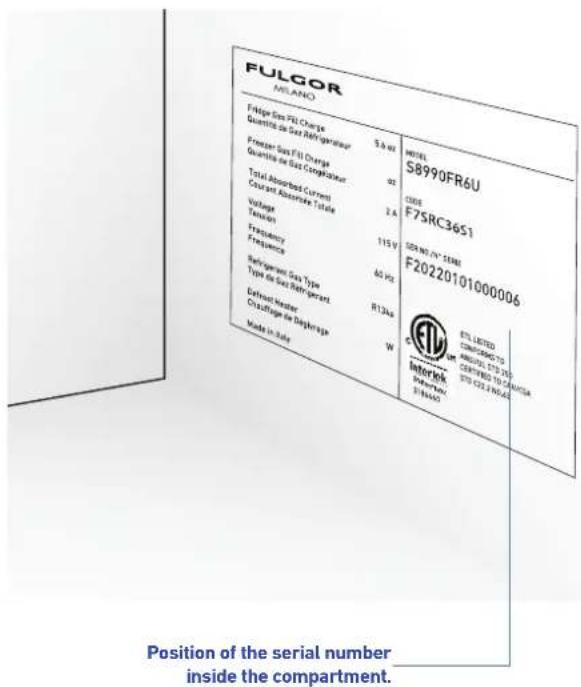
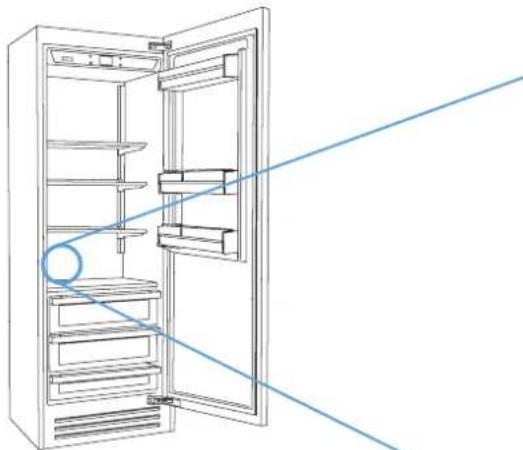
The model / serial identification tag is located on the interior side wall above the separator glass shelf above the crisper drawers opposite the door hinges.
Climate Classes
SN (Subnormal) from +50^ to +90^ (+10^ to +32^)
N (Normal) from +61°F to +90°F (+16°C to +32°C)
ST (Subtropical) from +64^ to +100^(+18^ to +38^)
T (Tropical) from +64°F to +109°F (+18°C to +43°C)
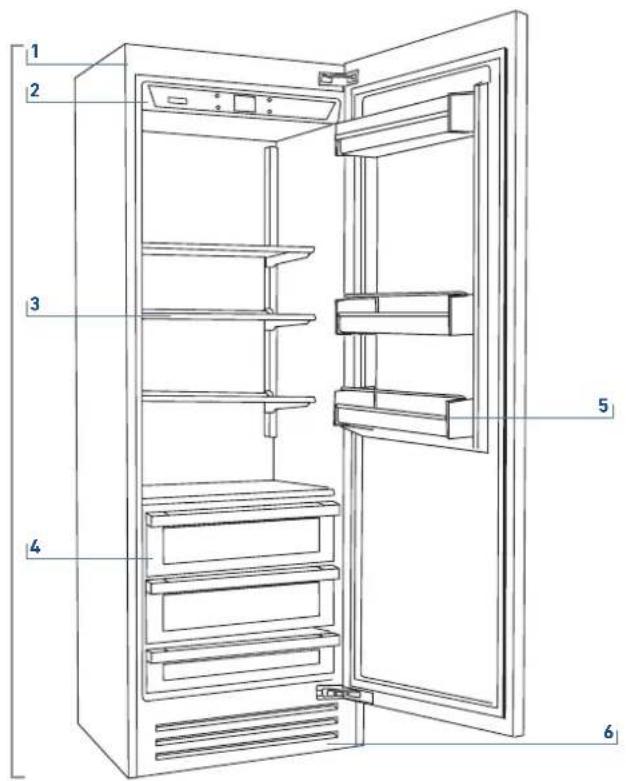
3.3 Main components
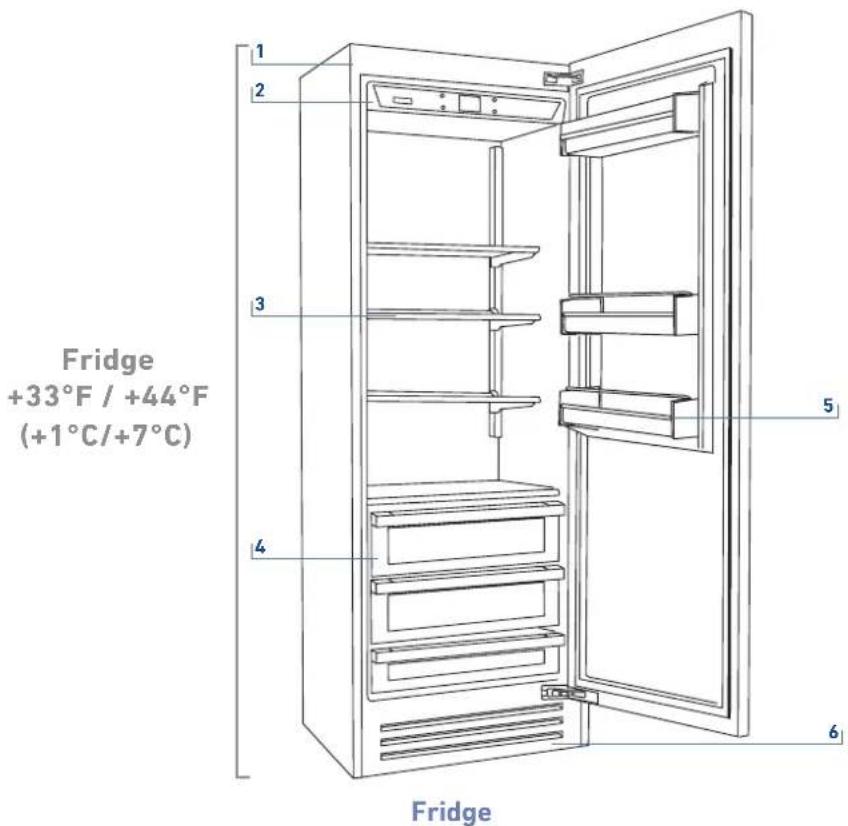
1) Appliance body.
2) Interactive control panel.
3) Ajustable height shelf.
4) Stainless steel crisper drawers.
5) Adjustable door bins.
6) Magnetic toe kick.
3.4 Electronic Control
The innovative electronic control system maintains constant temperature of the refrigeration compartment shown on the control panel display. It also allows user interaction making it possible to personalize settings of the various functions and to receive sound and/or visual messages should any malfunction occur in the appliance.
3.5 Main control panel


On/Off:
Touch the icon to turn the unit on or off.

Home
Touch the Home icon for going back to the main display screen.
Alarm
Touch the icon to view the alarm message and temporarily deactivate the audible alarm..
Back
Touch the arrow icon for going back to the previous display screen.
4.1 Turning the appliance on and off
First time starting the unit
Touch the icon . The display shows the following launch screens:

1) Logo.
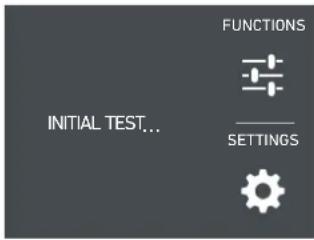
2) Initial test (lasts 2-3 minutes).
3) The main display shows a rolling average of the actual temperature of each compartment. Automatically the unit starts to cool down until reaching the set temperatures.
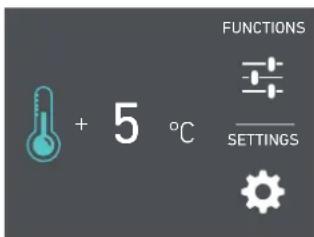
4) Home screen.
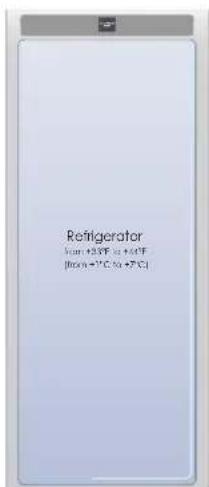
- fridge compartment
+41°F (+5°C)
When the appliance is first switched on it is recommended to wait at least 12 hours without opening the doors and before placing any food inside the unit. During the initial cooling period after switching on, alarms will be disabled.
Shutdown.
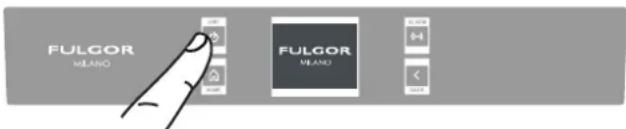
1) Touch the Unit Power icon for 3 seconds.

When the fridge is off there are no indicators that prove that the fridge is plugged to a socket.
Switching off for long periods
During long absence periods it is recommended to switch off the refrigerator by following the procedure for turning the unit off described on the previous page and disconnecting the electrical breaker controlling the socket. Completely empty the refrigerator, clean and dry it and leave the doors and drawers partially open to prevent unpleasant odors.

During the first startup, it will not be possible to use the Menu to modify the factory settings until the preset temperature has been reached.

Each time the appliance is switched on it goes through a self-diagnosis procedure lasting up to three minutes before completely starting up.
4.2 How to adjust the temperature for different requirements.
Each model has been carefully tested before leaving the factory and is adjusted in such a way to ensure high performance and efficient operation.
Usually, it is not necessary on modify the settings.
How it looks on the home screen:
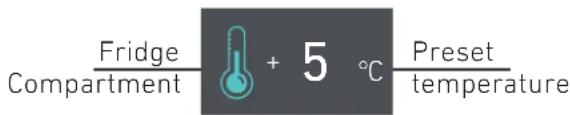
Modify the temperatures compartment
How to modify the Fridge compartment temperature.
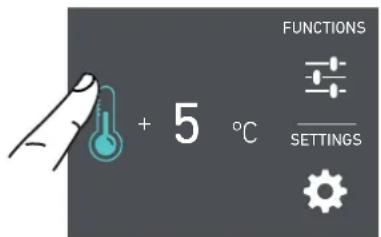
1) Home screen. Touch the icon of fridge compartment.
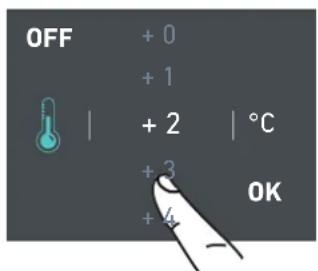
2) Scoll up/down to select the desired temperature of the fridge
from +33^ to +44^ (from +1^ to +7^ )
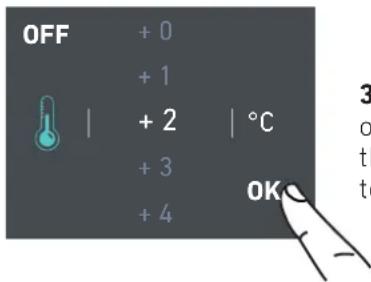
3) Touch the icon ok to confirm the desidered temperature.

The temperature shown can vary slightly in respect to the set temperature following frequent openings of the doors or insertion of room temperature foods or large quantities of foods.
6 to 12 hours are necessary to reach the selected temperature in some cases.
Padlock icon.
The padlock icon shows up when the temperatures are set up.
The padlock open/close shows that the compartment's temperatures can or can not be modified by the user.


Usually a grey padlock will show, in that case you can scroll up or down with a finger on the display, select the desired temperature and press OK to confirm.
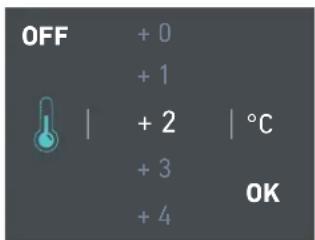
Whereas a white closed padlock will be seen if the user has activated a function that overrides the settings of the refrigerator and prevents the user from changing the temperature of the compartment until the overriding function has completed or been canceled.
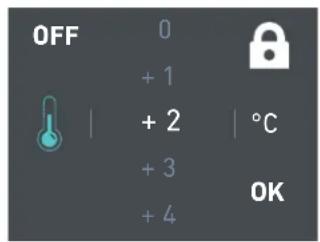
If the icon function is touched and a specific function is set (such as Holiday Mode, Max Cool Fridge, etc...), the white padlock will be seen closed and it won't be possible to change the temperature of the compartments as long as the function won't be completed or if it is manually deactivated as long as the function is active.
4.3 Messages and alarms
An integrated control system will give information through highlighted messages you will see on the display.
The audible signal that goes along with some of the alarm signals can be turned off by touching the alarm icon on the main control panel.
You can find the list of the alarms at the end of this manual.

INFORMATION FOR THE USE OF THE DISPLAY.
It is possible to personalize the operation of your Fulgor Milano unit in order to adapt it to the different ways you might want to use it.
5.1 Functions.
After touching the Function icon on the home screen, the user you can access some or all of the functions shown below depending on your model and how it is equipped.
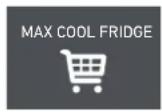
1) Max Cool Fridge.
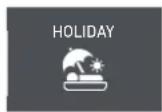
2) Holiday Mode.
1) Max Cool Fridge
The function lowers the refrigerator temperature to +36^ (+2^) a factory default of 12 hours, permitting more rapid cooling of food that has just been placed in. Once the 12 hours have expired, the function deactivates automatically, returning to the previously set temperature. It is possible to program a timed activation of the function. If the power goes out during this function's operation the unit will resume operation in normal mode and this function will be canceled.
2) Holiday Mode
This function (recommended in case of prolonged absences since it allows considerable energy savings) brings the refrigerator compartment temperature to +57^ (+14^) .
It is possible to program the duration, or it can be manually deactivated upon re-entry after a period of absence. This function remains active even if during the period of absence there is a prolonged interruption of electrical power.
It is possible to program a period from 1 to 90 days.
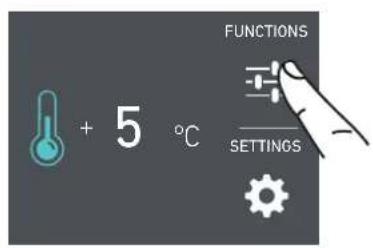
A) Home screen. Touch the icon functions.
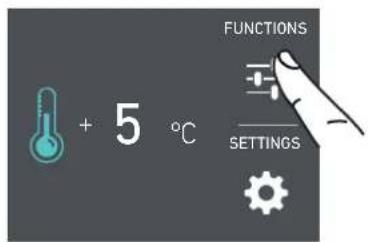
A) Home screen. Touch FUNCTIONS.
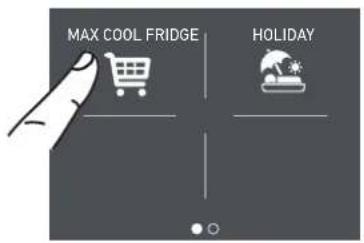
B) Touch the icon Max Cool Fridge.
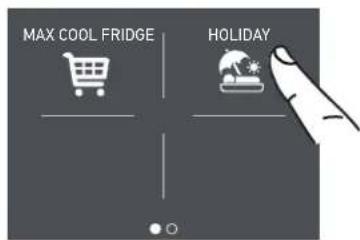
B) Touch the icon Holiday Mode.
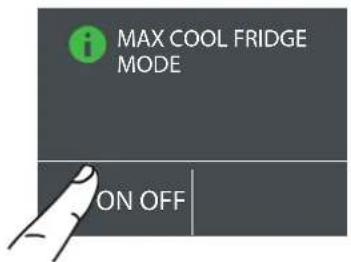
C) Touch the icon On to activate the function.
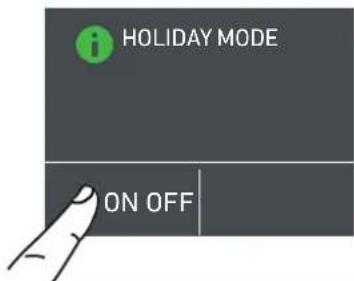
c) Touch ON to activate the function.
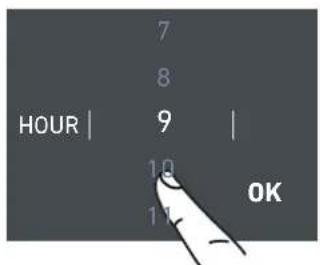
D) Scroll up / down to setting the desired start time delay and then press OK.
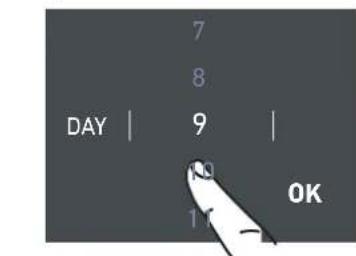
D) Scroll up / down to set the desired duration (in days) and then press OK.
It is possible to program the activation of this function in advance between 1 and 24 hours.
5.2 Settings.
It is possible to personalize the settings of your Fulgor Milano fridge for adapting it to the different ways you might want to use it.
1) Date.
2) Time.
3) Fahrenheit or Celsius (Display units).
4) Language:
5) Sabbath Mode.

6) Reset.
7) Demo Mode.
8) Maintenance.
9) Service.
10) Info System.
1) Date
The display will show the date in the format (day:month:year).
By touching the display you can modify the settings.
2) Time
The display shows the hours and minutes in the format hh:mm.
This function selects the display at 12 or 24h
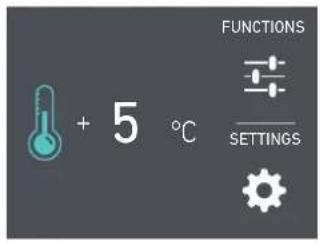
A) Home screen. Touch SETTINGS.

c) Scroll up or down until the desired year appears and press OK.
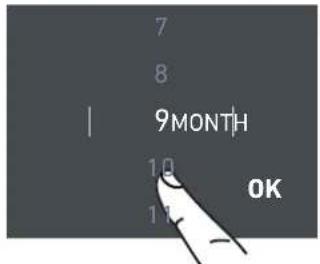
D) Scroll up or down until the desired month appears and press OK.
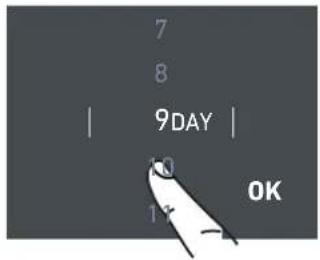
E) Scroll up or down until the desires date appears and press OK.
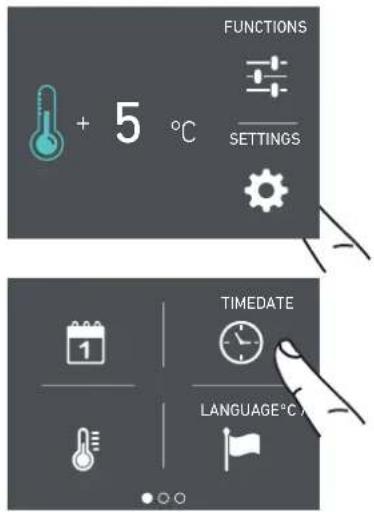
A) Home screen. Touch SETTINGS.
c) Choose which way you want to see the time: 12 hour or 24 hours.
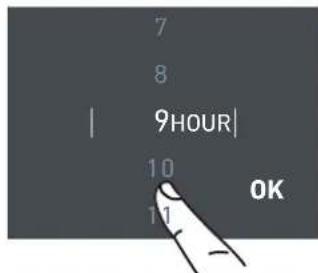
D) Scroll up / down to set the hour and press OK.
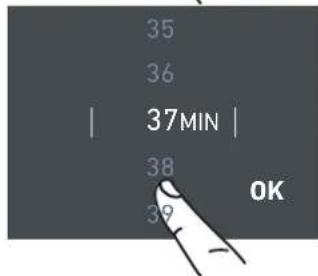
E) Scroll up / down to set the minutes and press OK.
3) Set F / ^
This setting shows the temperatures displayed in Fahrenheit or Centigrade degrees. By default, the appliance is set for Fahrenheit.
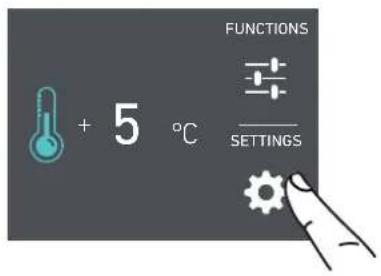
A) Home screen. Touch SETTINGS.
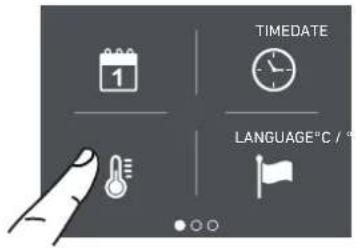
B) Touch the ^ F / ^ icon.
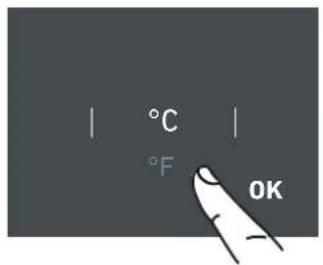
C) Scroll up / down to select either Fahrenheit or Centigrade degrees and press OK.
4) Language
To set the language of the display.
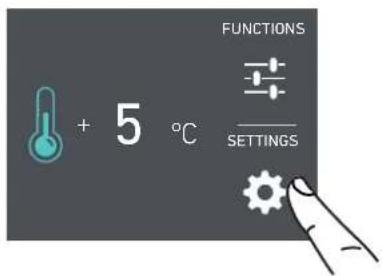
A) Home screen. Touch SETTINGS.
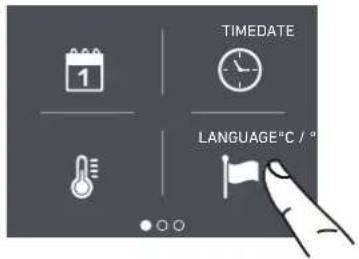
B) Touch the LANGUAGE icon.
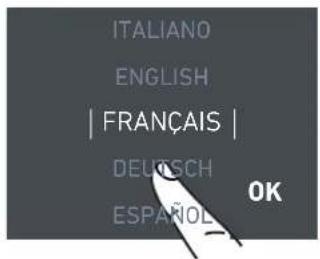
C) Scroll up / down to select the desired language and press OK.
5) Sabbath Mode
This setting makes it possible to comply to certain religious observances requiring the operation of the appliance to not be affected by the opening or closing of the doors. The control, inner lighting and ice maker are deactivated.
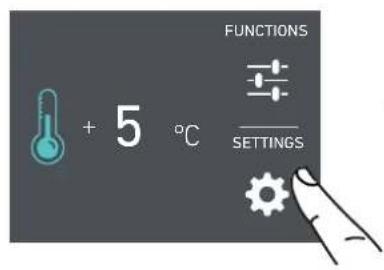
A) Home screen. Touch SETTINGS.
6) Reset
It gives the possibility to restore the default settings that were set in the factory, cancelling any changes that have been made by the user.
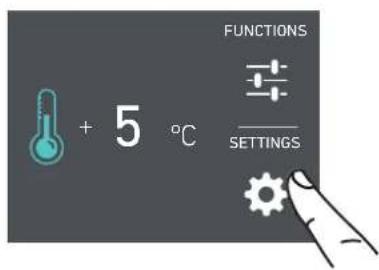
A) Home screen. Touch SETTINGS.
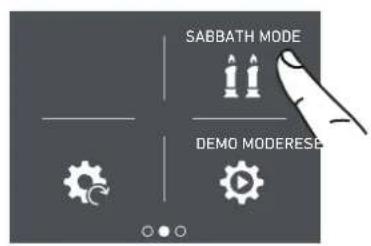
B) Swipe left until you see the SABBATH MODE icon and press it.
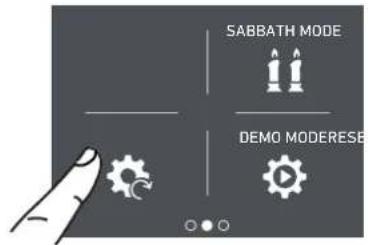
B) Swipe left until you see the RESET icon and press it.
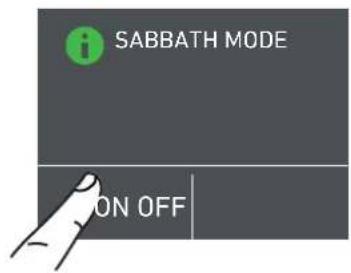
C) Touch ON to confirm the Sabbath Mode.
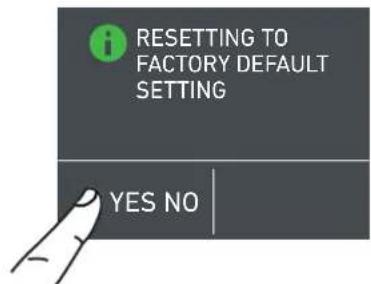
c) Touch YES to confirm the selection of the resetting of factory default settings.
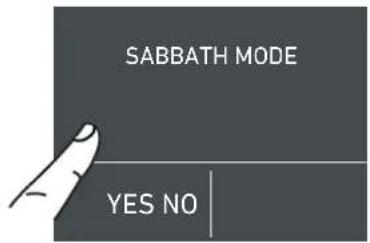
D) Touch YES to confirm.
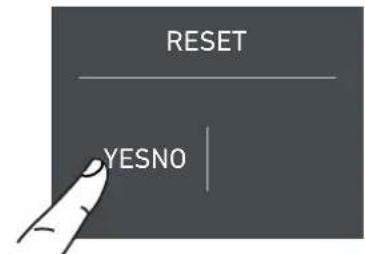
D) Touch YES to confirm.
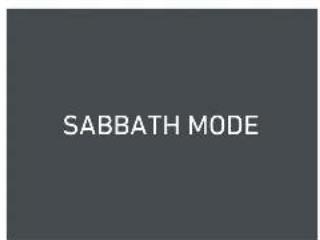
E) The fridge will work accordingly to this configuration.
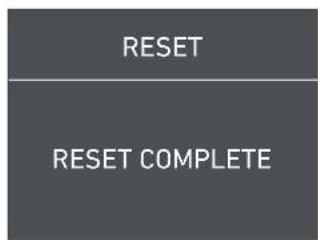
E) The reset has been performed. The fridge's factory settings have been restored.
Note: Sabbath mode automatically expires after 72 hours. To deactivate prior to this, touch the display to wake it up and choose the 'OFF' option.
7) Demo Mode
It is possible to simulate the functioning of the fridge, for showroom display or for tradeshows.
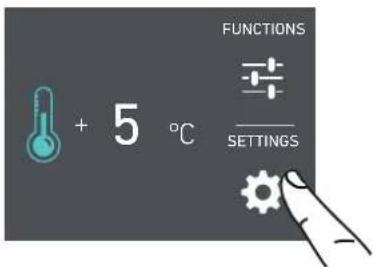
A) Home screen. Touch SETTINGS.

B) Swipe left until you see the DEMO MODE icon and press it.
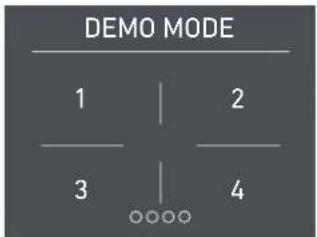
D) Insert the password for the activation.
Default password 1-2-3-4
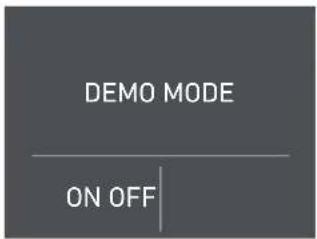
E) Press the desired choice: ON to activate Demo Mode or OFF to deactivate Demo Mode.
8) Maintenance
For efficient operation of the appliance, the condenser needs to be cleaned (vacuumed) periodically to keep it free of dust and pet hair. This setting enables a 12 month countdown timer reminding the user to clean the condenser.
The default of this setting is "Warning disabled". Once enabled, it is possible to disable the warning signal or see the time left before the next cleaning that has to be done.
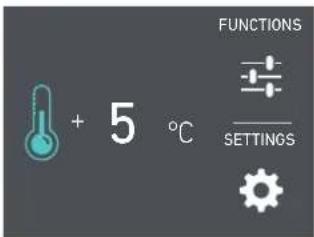
A) Home screen. Touch SETTINGS.
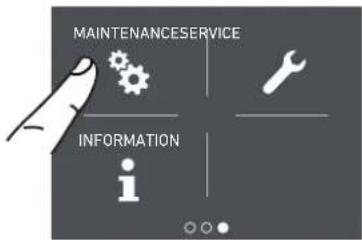
B) Swipe left until you see the MAIN- TENANCE icon and press it.
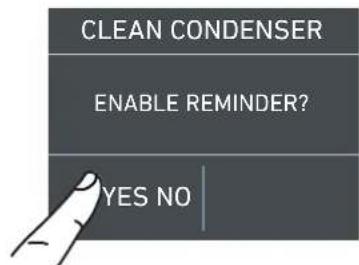
C) To enable it, touch YES.
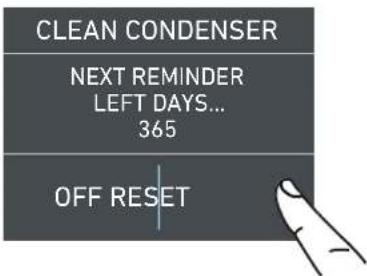
D) Instead, if you want to disable the warning previously set, touch the icon reset.
If you want to disable the reminder, at step D touch Off, then touch Yes as below.
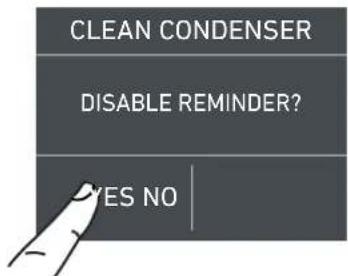
E) To disable the warning, touch the Yes button
9) Service
The service function is reserved for the Fulgor Milano service technicians.
10) Info System
The Info System function shows the product data, for example the software code, serial number and the factory code of the refrigerator.
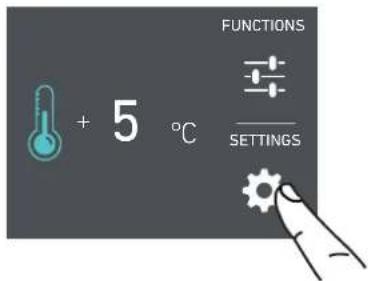
A) Home screen. Touch the Settings icon.
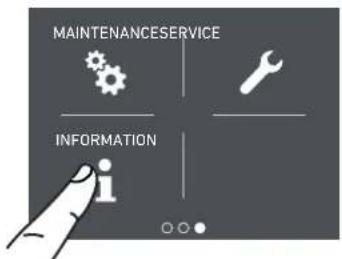
B) Touch the Info System icon.
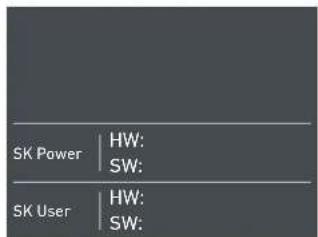
c) Here are shown the data of the appliance.
6.1 Internal Layout (positioning, adjustment, removal).
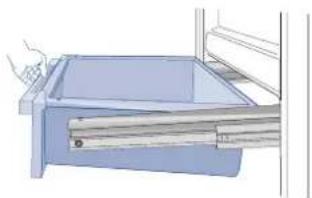
Drawer
Fixed to the slide guides with two thumbscrews.
to remove the drawer, unscrew the thumbscrews, lift slightly at the front and pull forward. Be sure to support the rear of the drawer when removing.
Shelves
The shelves are positioned on the left and right by two pins engaged in the shelf supports.
To reposition a shelf it is recommended to removed contents for safety and ease of movement.
Lift the shelf slightly and pull towards you to disengage the pins from the support geometry in the guides.
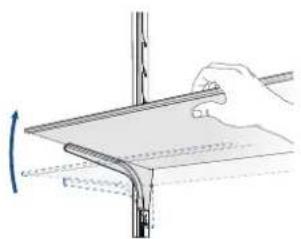
Slide the shelf to the new position and engage the support pins in the corresponding regions of the shelf support guides. Prior to loading the shelf with goods in the new position, test the positioning for secure support by applying moderate pressure down on the top surface with a hand while keeping the other hand in a supporting position in case the shelf is not properly seated.
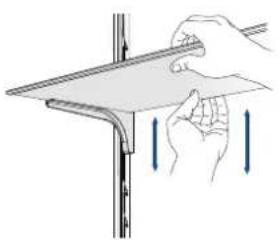
Door Bins adjustment
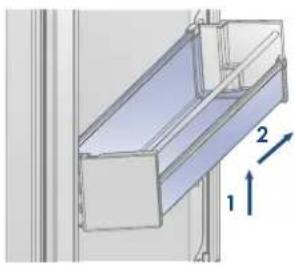
To adjust the position of the door bins, push up slightly and pull the bottom forward giving it a slightly tipped back positioning and slide up or down the rail to the desired position. Push in the bottom and allow it to seat into the designated slots on the guide rails.
7.1 Lighting
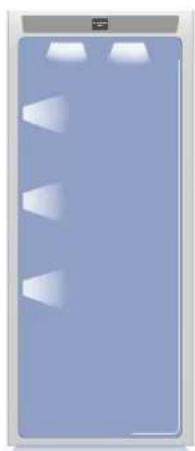
To provide optimum interior lighting, LED strips illuminate the refrigerator compartment from the top and sets of LED lights directly illuminate different areas of the refrigerator compartment.
In case of malfunction and/or wearing out of the lighting system, the repair should be carried out by a qualified Fulgor Milano Service technician.
8.1 General directions
Your appliance is designed to ensure precise, constant temperatures and appropriate humidity levels in all compartments (where applicable).
Nevertheless, to properly preserve all of your foods, it is not enough to have an excellent refrigerator. It is also necessary to know the rules for correct food preservation.
Do bear in mind that all foods will inevitably change their characteristics over the passage of time. This change begins long before the food is consumed, since foods contain micro organisms which multiply and can cause deterioration. This process occurs more rapidly due to improper handling, preservation temperatures and humidity levels.
It is therefore recommended to follow the directions presented below which will permit using your refrigerator in the most effective and safe manner to keep your foods in the best way for as long as possible.
Periodically check that all foods are in a perfect state of preservation. It is usually quite clear when a food item is deteriorated, due to mold, unpleasant odor and unpleasant aspect. Nevertheless, there are cases in which these conditions are not so evident. If you believe that a food item was kept for an excessive period of time and may be deteriorated, do not consume this item or even taste it, even if it seems to still be healthy, since the bacteria that cause deterioration of food can also cause poisoning and illness.
When in doubt, throw the food away.
8.2 How to maintain good food quality
When buying groceries
Always take the following precautions:
Place any packages of raw meat, fish or poultry in plastic bags so that they do not drip on other foods.
Purchase meat, poultry and fish last. Do not leave your groceries in a warm car. Keep an insulated bag in your car and use it in case of very high temperatures or long trips.
Check the production dates and "best before" times on foods to be sure that they are fresh.
Be very careful when buying fresh foods, and only buy a quantity that can be consumed during your planned preservation period.
When possible, let warm foods adjust to room temperature for at least two hours before placing them in the refrigerator, unless you have activated the Max Cool function before.
When placing foods in the appliance
Check the refrigeration temperature of the various compartments on the control panel:
The refrigerator temperature must be +45^ (+8^) or lower.
Follow the recommendations regarding the preservation times and temperatures indicated in the tables to follow.
Keep raw meat, fish and poultry separate from other foods and avoid any possible drippings.
When placing your meat, fish or poultry in the refrigerator, leave them in the original packaging, unless the packaging is ripped or punctured. Repeated handling could introduce bacteria into these foods.
Label and date the packages
Be careful to correctly position the food items on the shelves in a way that does not obstruct the air circulation vents inside the compartment.

After a prolonged interruption of electrical power, once the electrical power is reactivated, an audible signal will indicate if the temperature has been raised above normal levels. In addition to this the display will show for one minute the highest temperature detected inside the compartments, to allow the user to decide how to better use the food items. After one minute the display will resume normal operation, while the Alarm button will continue to blink.
Press the Alarm button to display the highest recorded temperatures.
9.1 Care and Cleaning
To clean the parts made of steel use a microfiber cloth and the sponge provided in the kit with the appliance. Always use the cloth and sponge in the direction of the steel's satin finish.
Every now and then, to polish the steel, wipe with a slightly damp microfiber cloth.
Do not use the sponge on aluminium parts, such as the handles and the profiles of the glass shelves.
You should use special care to keep the ventilation openings in the appliance or in the cabinet that houses it free of obstructions.

Scrupulously follow the detailed directions that can be found in the provided kit and never use abrasive or metallic products which could scratch and damage the satin finishing on the appliance permanently.
Before performing any sort of cleaning, disconnect the appliance from the electrical power supply.
Make sure you do not damage the refrigerant circuit in any way.

The use of chlorine-based detergents or similar that contains it should be avoided (bleach, hypochlorite, etc).
9.2 Internal cleaning
Clean the internal and removable parts by washing them with a solution of lukewarm water, a small amount of dishwashing detergent.
Rinse and dry right away.
Do not use mechanical devices or other methods to speed up defrosting.

Do not use water on the electrical parts, lights and control panel.

Do not use chlorine-based detergents or cleaning agents.

Do not bring cold glass parts into contact with boiling water.
Do not wash any parts of the refrigerator in a dishwashing machine since this could damage or irreparably deform the parts.
9.3 Cleaning of the toe kick cover, filter and condenser.
The unit requires, for a correct operation, the cleaning of the toe kick cover, filter and condenser.
It is recommended to perform the following cleaning steps every 12 months. A message on the display will serve as a reminder.
Behind the frontal toe kick cover is the condenser.
To clean it use a vacuum cleaner with a soft brush attachment at maximum power, sweeping it along the vent slits.
On the maintenance settings, after the installation of the unit and after it has been turned on, you can set the condenser cleaning warning.
In the case the warning is enabled, there will be a message every 12 months, that informs that is time to clean the condenser.
After cleaning it, touch the reset icon in order to reactivate the warning signal in another 12 months.
Lower condenser.
For cleaning the condenser follow the instructions:
Open the door or bottom drawer and remove the magnetic grille.
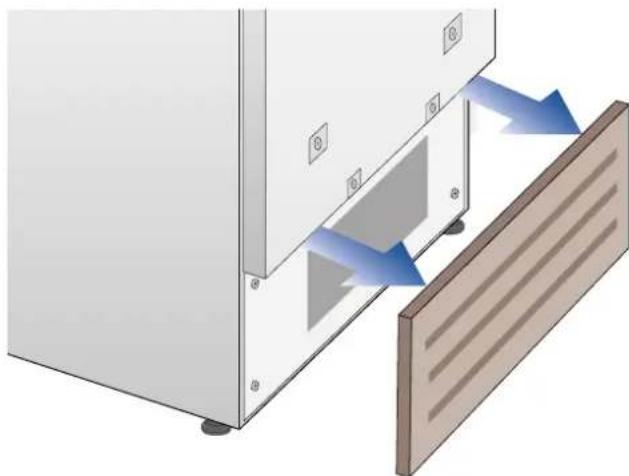
Clean it thoroughly of any dust build up as shown in the picture, taking care not to damage the condenser.
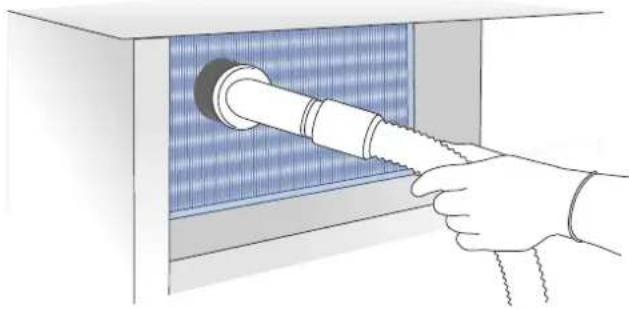

The edges of the condenser can be sharp, therefore use adequate protection for hands and arms when cleaning the condenser.
10.1 Troubleshooting Guide
If you notice malfunctions in your appliance, use this guide before calling for service: this guide can help you personally resolve the problem or could provide important information to be conveyed to the service technician to ensure rapid and effective repair.
Display message and audible alarms.
A malfunction is usually indicated by the display.
Problems that cannot be solved by the user are reported through a fault code. Keep in mind, however, that in messages or alarms they may appear for particular conditions of use or during start-up. In these cases, deactivate the audible alarm by pressing the Alarm button and leave the appliance running and limit the opening of the doors to the maximum for about 10-12 hours.
The refrigerator does not work.
Is the appliance connected to the electrical power supply?
Is electrical power available at the electricity socket?
Is the Unit button activated?
Is the unit in 'Demo' Mode?
The
refrigerator
is
warmer
than
usual.
Does the display show a malfunction code?
Is the temperature adjusted correctly?
Were the doors or drawers open for a long period of time?
Were large quantities of food recently inserted?
Is the unit in 'Demo' Mode?
Is there something preventing the door or drawer from closing / sealing properly?
The compressor is running for a long time period.
Bear in mind that during very hot weather and with very high temperatures in the room it is normal that the compressor remains on for prolonged periods of time.
Were the doors or drawers open for a long period of time?
Were large quantities of food recently inserted?
Check that the doors are closed and that the food or containers do not obstruct the perfect closure of the door.
Is one or more compartments in Max Cool Mode?
If you hear unusual noises.
It is normal to hear noises from the fans or compressors during operation or during the defrost phase.
Noise could be more marked depending on the position of the appliance and the surrounding
environment.
Condensation inside and outside of the refrigerator.
If the climate is very humid, the formation of condensation is normal. Opening the door or drawers for prolonged periods of time can contribute to the formation of condensation.
In any case, make sure that the doors are always completely closed.
Ice or frost build up inside the refrigerator.
Did you leave the doors open for a long period of time?
Do the doors close completely?
If the doors do not close completely, contact your installer.
Unpleasant odors inside the refrigerator.
Clean the appliance completely according to the instructions.
Hermetically cover all the food. Do not conserve food for prolonged periods of time.
The doors are difficult to open.
The appliance is designed to ensure a fully hermetic closure. When the door is closed, a vacuum condition can occur: in this case it is necessary to wait a few seconds until the pressure balances before opening the door.
Appliance is cooling but lights and display are not working.
Check to see if the appliance was accidentally placed into Sabbath Mode.

If the unit you purchased was used as a showroom model it may be in a special energy-saving mode called Demo Mode where the appliance appears to be operating (lights work and false temperatures are displayed) but no cooling actually takes place. If you suspect your appliance is in Demo Mode follow the procedure for disabling Demo Mode described in this manual.
10.2 Malfunction messages appearing on the display
Display message Malfunction description
| Power Failure!! | Prolonged interruption of electrical power the appliance resumes work automatically, the display shows the warmest temperatures achieved. |
| Door Fridge OPEN | Fridge door open the message appears after few minutes from the door opening. |
| Fridge too warm | Fridge too warm see Troubleshooting Guide. |
| Fridge too cold | Fridge too cold wait for 12 hours: if malfunction persists call Customer Care for advice. |
| Error Code... | Functional problems contact Customer Care who may help you to salvage the problem or put you in contact with the nearest Service Agent may help you solve the problem. |
| Check condenser | Check Condenser Every 12 months the display shows the message “Check Cond”, clean the condenser and follow the instructions above about how to clean the condenser. |
In case of errors, touch the button Alarm and the display will show the error message with its error number code.
The message will be shown for 3 seconds, then it will go back to the home screen.
For longer viewing of the message on the screen, navigate to the INFORMATION menu item (i). The message will be on the screen for 30 seconds, then it will go back to the home screen.
In the case there is more than one error message, the display will show each message in sequence.
1 INDICATIONS IMPORTANTES CONCERNANT LA SECURITE 4
CONSERVEZ CES INSTRUCTIONS!
ATTENTION CONSIGNES DE SECURITE IMPORTANTES
SN (Subnormal) from +50^ to +90^ (+10^ to +32^)
N (Normal) from +61°F to +90°F (+16°C to +32°C)
ST (Subtropical) from +64^ to +100^(+18^ to +38^)
T (Tropical) from +64°F to +109°F (+18°C to +43°C)
3.3 Componentes principales
Refrigerador +33^ / +44^ (+1^ / +7^)
Refrigerador
Las puertas se cierran Completely?


- INSTALLATION 7
- BEFORE STARTING 8
- APPLIANCE SWITCHING ON AND OFF 12
- CUSTOMIZE FUNCTIONS AND SETTINGS 14
- INTERNAL LAYOUT 24
- LIGHTING 25
- FOOD STORAGE 25
- CARE AND CLEANING 27
- TROUBLESHOOTING GUIDE 29
- SAVE THESE INSTRUCTIONS!
- IMPORTANT SAFETY INSTRUCTIONS
- IMPORTANT SAFETY INSTRUCTIONS FOR PROPER DISPOSAL OF YOUR OLD REFRIGERATOR
- WARNING
- WARNING Risk of child entrapment. Before you throw away your old refrigerator or freezer:
- Important information to know about disposal of refrigerants:
- IMPORTANT SAFETY INSTRUCTIONS FOR MAINTENANCE AND CARE
- DANGER
- TIP OVER HAZARD
- For your safety
- Important information when using the appliance
- Note
- Important
- Warning
- Caring for the environment
- Know your appliance
- Installation
- Connection to the electrical power supply
- Model / serial identification
- Climate Classes
- Main components
- Electronic Control
- Main control panel
- On/Off:
- Home
- Alarm
- Back
- Turning the appliance on and off
- First time starting the unit
- Shutdown.
- Switching off for long periods
- How to adjust the temperature for different requirements.
- Modify the temperatures compartment
- Padlock icon.
- Messages and alarms
- INFORMATION FOR THE USE OF THE DISPLAY.
- Functions.
- 1) Max Cool Fridge
- 2) Holiday Mode
- Settings.
- 1) Date
- 2) Time
- 3) Set F / °C
- 4) Language
- 5) Sabbath Mode
- 6) Reset
- 7) Demo Mode
- 8) Maintenance
- 9) Service
- 10) Info System
- Internal Layout (positioning, adjustment, removal).
- Drawer
- Shelves
- Door Bins adjustment
- Lighting
- General directions
- How to maintain good food quality
- When buying groceries
- When placing foods in the appliance
- Care and Cleaning
- Internal cleaning
- Cleaning of the toe kick cover, filter and condenser.
- On the maintenance settings, after the installation of the unit and after it has been turned on, you can set the condenser cleaning warning.
- Lower condenser.
- For cleaning the condenser follow the instructions:
- Troubleshooting Guide
- Display message and audible alarms.
- The refrigerator does not work.
- usual.
- The compressor is running for a long time period.
- If you hear unusual noises.
- Condensation inside and outside of the refrigerator.
- Ice or frost build up inside the refrigerator.
- Unpleasant odors inside the refrigerator.
- The doors are difficult to open.
- Appliance is cooling but lights and display are not working.
- Malfunction messages appearing on the display
- INDICATIONS IMPORTANTES CONCERNANT LA SECURITE 4
- CONSERVEZ CES INSTRUCTIONS!
- ATTENTION CONSIGNES DE SECURITE IMPORTANTES
- Componentes principales
Brand : Fulgor Milano
Model : F7SRC36S1-R
Category : Refrigerator