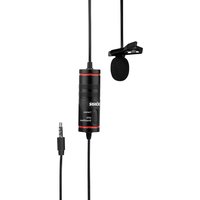
LV-30 - Microphone Dörr - Free user manual and instructions
Find the device manual for free LV-30 Dörr in PDF.


| Brand | Dörr |
| Model | LV-30 |
| Product type | Electret condenser lavalier microphone (mono) |
| Directional characteristic | Omnidirectional (spherical) |
| Frequency range | 50 Hz - 15 kHz |
| Sensitivity | -38 dB ± 3 dB (0 dB = 1 V/Pa @ 1 kHz) |
| Self-noise | 25 dB-A |
| Maximum sound pressure level | 120 dB |
| Signal-to-noise ratio | >76 dB |
| Output impedance | 1000 Ω |
| Connector | TRRS 3.5 mm plug + 6.3 mm adapter |
| Cable length | 8 m |
| Power supply | 1 LR44 button cell battery (included) |
| Power module dimensions | 5.1 cm x ø 1.8 cm |
| Weight | 89 g |
| Included accessories | Mounting clip, windscreen, LR44 battery, 6.3 mm adapter, storage pouch |
| Compatible with | Smartphones, tablets, computers, DSLR cameras, video cameras, camcorders |
| Care and cleaning | Slightly damp microfiber cloth, no harsh chemicals |
| Safety instructions | Do not open, keep out of reach of children, avoid moisture and extreme temperatures, observe battery polarity |
Frequently Asked Questions - LV-30 Dörr
User questions about LV-30 Dörr
0 question about this device. Answer the ones you know or ask your own.
Ask a new question about this device
Download the instructions for your Microphone in PDF format for free! Find your manual LV-30 - Dörr and take your electronic device back in hand. On this page are published all the documents necessary for the use of your device. LV-30 by Dörr.
USER MANUAL LV-30 Dörr
10.3 ROHS KONFORMITÄT
THANK YOU for choosing this DÖRR quality product.
Please read the instruction manual and safety hints carefully before first use.
Keep this instruction manual together with the device for future use. If other people use this device, make this instruction manual available. This instruction manual is part of the device and must be supplied with the device in case of sale.
DÖRR is not liable for damages caused by improper use or the failure to observe the instruction manual and safety hints.
01 | SAFETY HINTS
- Make sure to use the device only with appropriate, high-quality batteries. Please remove batteries when device is not in use for a long period of time.
- Protect the device from rain, moisture, direct sunlight and extreme temperatures.
- Do not operate or touch the device with wet hands.
- Protect the device against impacts. Do not use the device if it has been dropped. In this case a qualified electrician should inspect the device before you use it again.
- Do not attempt to repair the device by yourself. Risk of electric shock! When service or repair is required, contact qualified service personnel.
• People with physical or cognitive disabilities should use the device with supervision. - People with cardiac pacemakers, defibrillators or any other electrical implants should maintain a minimum distance of 30 cm, as the device generates magnetic fields.
- Do not use the device nearby devices that generate strong electromagnetic fields.
- This device is not a toy. To prevent accidents and suffocation keep the device, the accessories and the packing materials away from children and pets.
- Protect the device against dirt. Never use aggressive cleansing agents or benzine to clean the device. We recommend a soft, slightly damp microfiber cloth to clean the outer parts of the device. Before cleaning make sure to switch off the device and to remove the batteries!
- Store the device in a dust-free, dry and cool place.
- If the device is defective or without any further use, dispose of the device according to the Waste Electrical and Electronic Equipment Directive WEEE. For further information, please contact your local authorities.
02 | SAFETY HINTS FOR BATTERIES
Only use high-quality batteries of popular brands. When inserting the batteries, please respect the correct polarity (+/-). Do not insert batteries of different types and always replace all batteries at the same time. Do not combine used batteries with fresh batteries. Please remove batteries when device is not in use for a longer period. Do not throw the batteries into fire, do not short-circuit and do not disassemble them! Never charge non-rechargeable batteries – risk of explosion! Remove empty batteries immediately from the device to avoid the leaking of battery acid. Remove leaking batteries from the device immediately. Clean the contacts before inserting fresh batteries. Risk of battery acid burn! In case of contact with battery acid, rinse the affected area immediately with water and contact a doctor. Batteries can be dangerous to life if swallowed. Keep batteries away from small children and pets. Do not dispose of batteries in household waste (see also capture „Disposal of Batteries/Accumulators”).
03 | PRODUCT DESCRIPTION
Compact clip-on microphone for use with smartphones, tablets, laptops, PCs, DSLR, system and compact cameras, camcorders etc.
- Provides optimal sound quality for recordings of social media contents, webinars, reports, presentations
- Insensitive to wind and ambient noise
- Discreet attachment to the tie or collar
• Extra-long cord 8 m for a large range of motion - 3,5 mm TRRS mini jack plug, with adapter 6,3 mm
- Supplied with clip, windshield, button cell and storage bag
04 | NOMENCLATURE
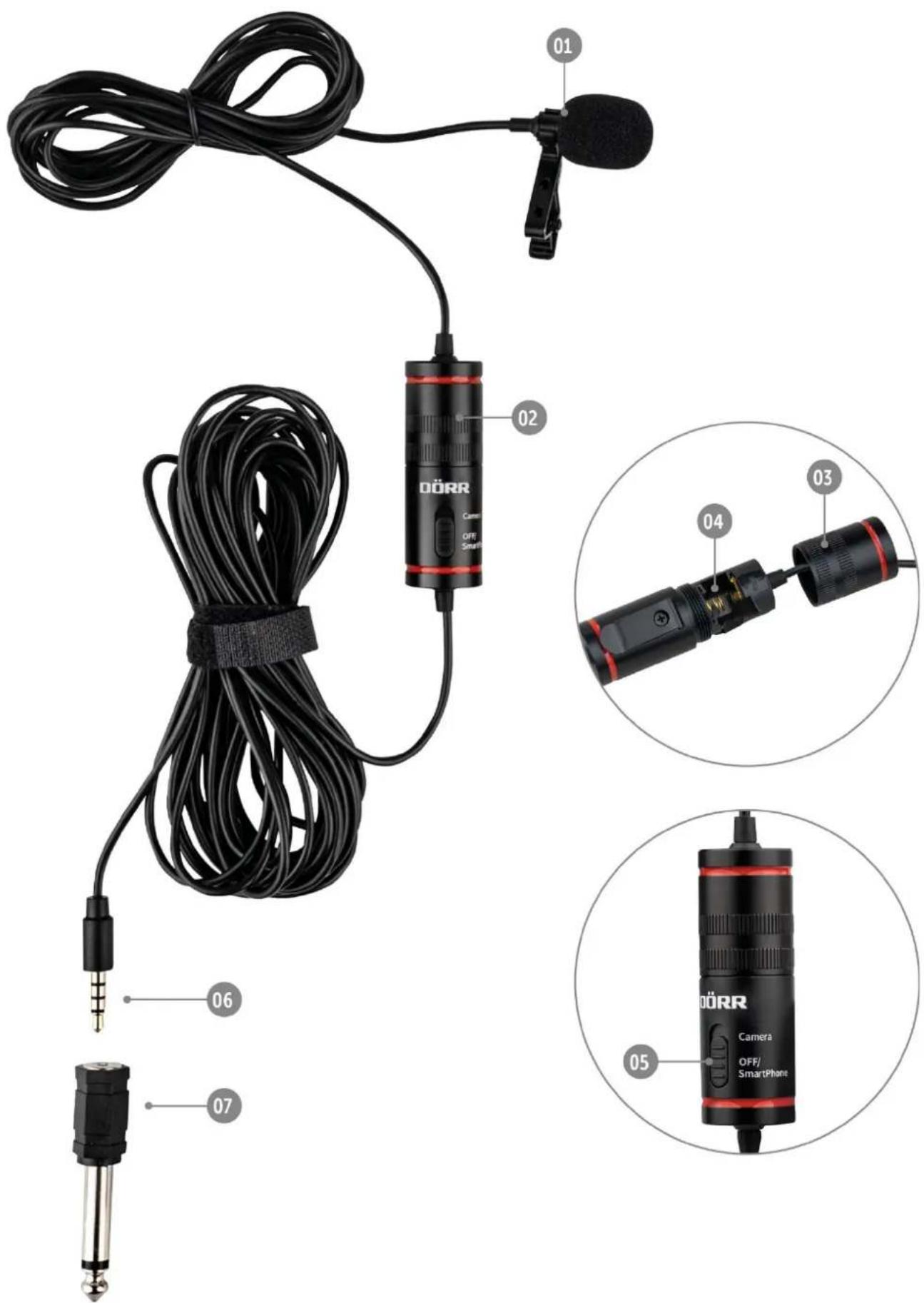
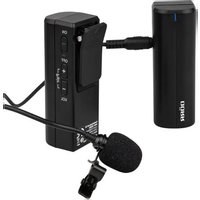
01 Microphone with tie clip and windshield
02 Power module with belt clip
03 Screw cap power module
04 Battery compartment
05 On/Off switch
06 3,5 mm TRRS mini jack plug
07 Adapter plug 6,3 mm
05 | FIRST STEPS
05.1 Inserting/replacing the battery
Unscrew the cap of the power module (03). Insert 1 pc button cell LR44 into the battery compartment (04) according to correct polarity +/- . Screw the cap of the power module (03) back on.
05.2 Attachment
Clip the microphone (01) to your tie or to the collar of your jacket, blazer, shirt or blouse. After switching on (see next chapter 06), attach the power module (02) to a discreet position, e.g. at the belt, in the back pocket, in the inside pocket of the jacket etc.
06 | OPERATION
06.1 With smartphone/tablet
- Slide the On/Off switch (05) to position "Off/Smartphone".
- Insert the 3,5 mm TRRS mini jack plug (06) into the headphone socket of your smartphone.
- Start the video recording or voice recording on your smartphone and speak into the microphone (01).
NOTE: To hear the sound while playing the video or audio recording, please unplug the cable from your smartphone/tablet.
06.2 With DSLR, system and compact cameras, camcorders etc.
- Slide the On/Off switch (05) to position "Camera".
- Insert the 3,5 mm TRRS mini jack plug (06) into the microphone socket of your recording device. If necessary, use the supplied adapter plug 6,3 mm to connect the microphone with the recording device.
- Start the video recording and speak into the microphone (01).
07 | CLEANING AND STORAGE
Never use aggressive cleansing agents or benzine to clean the device. We recommend a soft, slightly damp microfiber cloth to clean the outer parts of the device. Remove batteries before cleaning! Store the device in a dust-free, dry and cool place. This device is not a toy - keep it out of reach of children. Keep away from pets.
08 | TECHNICAL SPECIFICATIONS
08.1 Specifications
| Type | Electret condenser microphone (mono) |
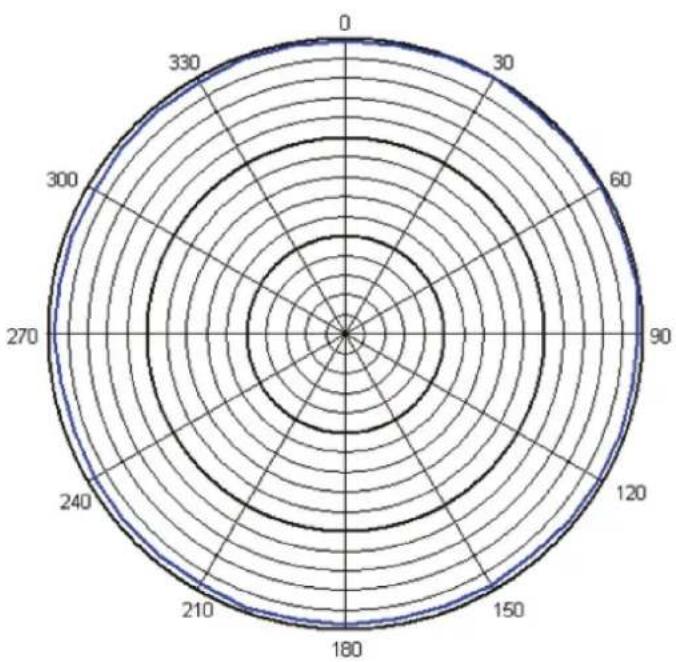
| Polar pattern | omnidirectional |
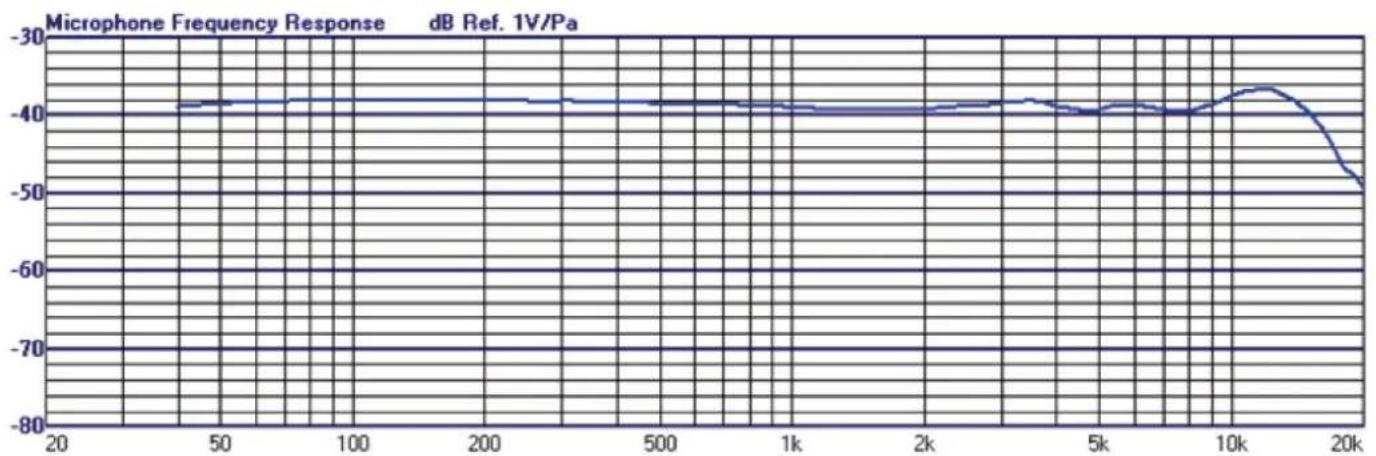
| Frequency response | 50 Hz - 15 kHz |
| Sensitivity | -38 dB ± 3 dB (0 dB = 1 V/Pa @ 1 kHz) |
| Equivalent noise | 25 dB-A |
| Maximum Sound Pressure Level (Max SPL) | 120 dB |
| Signal-To-Noise ratio | >76 dB |
| Output impedance | 1000 Ω |
| Connection | 3,5 mm TRRS mini jack plug, with adapter 6,3 mm |
| Cable length approx. | 8 m |
| Power supply | 1x LR44 button cell (included) |
| Dimensions power module approx. | 5,1 cm x ø 1,8 cm |
| Weight approx. | 89 g |
08.2 Polar Pattern
08.3 Frequency response
DÖRR GmbH reserves the right to make technical changes without notice.
09 | SCOPE OF DELIVERY
1x Microphone
1x Foam windshield
10 | DISPOSAL, CE MARKING

10.1 DISPOSAL OF BATTERIES/ACCUMULATORS
Batteries are marked with the symbol of a crossed-out bin. This symbol indicates that empty batteries or accumulators which can no longer be charged should not be disposed of with household waste. Waste batteries may contain harmful substances that can cause damage to health and to the environment. Please use the return and collection systems available in your country for the disposal of the waste batteries.

10.2 WEEE INFORMATION
The Waste Electrical and Electronic Equipment Directive (WEEE Directive) is the European community directive on waste electrical and electronic equipment, which became European law in February 2003. The main purpose of this directive is to prevent electronic waste. Recycling and other forms of waste recovery should be encouraged to reduce waste. The symbol (trash can) on the product and on the packing means that used electrical and electronic products should not be disposed of with general household waste. It is your responsibility to dispose of all your electronic or electrical waste at designated collection points. Disposing of this product correctly will help to save valuable resources and it is a significant contribution to protect our environment as well as human health. For more information about the correct disposal of electrical and electronic equipment, recycling and collection points please contact your local authorities, waste management companies, your retailer or the manufacturer of this device.

10.3 ROHS CONFORMITY
This product is compliant with the European RoHS directive for the restriction of use of certain hazardous substances in electrical and electronic equipment and its amendments.

10.4 CE MARKING
The CE marking complies with the European standards and indicates that the product meets the requirements of the applicable EU directives.
10.4 MARQUAGE CONFORMITÉ EUROPÉENNE CE
10.3 CONFORMITÀ A ROHS
- 10.3 ROHS KONFORMITÄT
- PLEASE READ THE INSTRUCTION MANUAL AND SAFETY HINTS CAREFULLY BEFORE FIRST USE
- 01 | SAFETY HINTS
- 02 | SAFETY HINTS FOR BATTERIES
- 03 | PRODUCT DESCRIPTION
- 04 | NOMENCLATURE
- 05 | FIRST STEPS
- 05.1 INSERTING/REPLACING THE BATTERY
- 05.2 ATTACHMENT
- 06 | OPERATION
- 06.1 WITH SMARTPHONE/TABLET
- 06.2 WITH DSLR, SYSTEM AND COMPACT CAMERAS, CAMCORDERS ETC
- 07 | CLEANING AND STORAGE
- 08 | TECHNICAL SPECIFICATIONS
- 09 | SCOPE OF DELIVERY
- 10 | DISPOSAL, CE MARKING
- 10.1 DISPOSAL OF BATTERIES/ACCUMULATORS
- 10.2 WEEE INFORMATION
- 10.3 ROHS CONFORMITY
- 10.4 CE MARKING
- 10.4 MARQUAGE CONFORMITÉ EUROPÉENNE CE
- 10.3 CONFORMITÀ A ROHS
Brand : Dörr
Model : LV-30
Category : Microphone