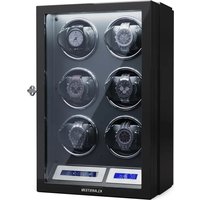
Sarthe 6 - Watch accessory Klarstein - Free user manual and instructions
Find the device manual for free Sarthe 6 Klarstein in PDF.


| Product type | Watch winder |
| Brand | Klarstein |
| Model | Sarthe 6 (10045659 / 10045660) |
| Maximum watch diameter | 53 mm |
| Maximum watch thickness | 20 mm |
| Bracelet circumference | 35 - 62 mm |
| Power supply | 100-240 V AC, 50/60 Hz |
| Power adapter (output) | 5 V / 1 A (10045659) or 5 V / 2 A (10045660) |
| Number of programs | 4 (10045659) / 6 (10045660) |
| Turns per day (programs) | 650, 750, 850, 1000 (10045659); 650, 750, 850, 1000, 1950 (10045660) |
| Rotation direction | Clockwise, counterclockwise, bidirectional |
| LED lighting | Yes |
| Remote control | Yes (model 10045660 only) |
| Pause switch | Yes |
| Operating temperature | 0 °C to 40 °C |
| Housing material | Not specified (estimated: plastic or wood) |
| Safety instructions | Use only the provided adapter, do not turn the winder manually, avoid direct light and humidity |
| Care and cleaning | Clean with a soft, dry cloth; do not use abrasive products |
| Recycling | Do not dispose of with household waste; take to a collection point for electrical devices |
| Warranty | Consult the manufacturer's terms |
Frequently Asked Questions - Sarthe 6 Klarstein
User questions about Sarthe 6 Klarstein
0 question about this device. Answer the ones you know or ask your own.
Ask a new question about this device
Download the instructions for your Watch accessory in PDF format for free! Find your manual Sarthe 6 - Klarstein and take your electronic device back in hand. On this page are published all the documents necessary for the use of your device. Sarthe 6 by Klarstein.
USER MANUAL Sarthe 6 Klarstein
INHALTSVERZEICHNIS
Programme
Berlin Brands Group UK Limited
PO Box 42
272 Kensington High Street
London, W8 6ND
United Kingdom
Dear customer,
Congratulations on your purchase. Please read the following instructions carefully and follow them to prevent potential damage. We accept no liability for damage caused by disregarding the instructions and improper use. Please scan the QR code to access the latest operating instructions and further information about the product.

CONTENTS
Safety Instructions 14
Switches and connections 14
Fixing the watch in place 15
Operation model 10045659 16
Operation model 10045660 17
Disposal Considerations 20
Manufacturer & importer (UK) 20
TECHNICAL DATA
| Article number 10045659 1 | 0045660 | |
| Power supply (power adapter) | 100-240 V AC, 50/60 Hz5 V / 1 A | 100-240 V AC, 50/60 Hz5 V / 2 A |
| Maximum watch diameter | 53 mm 53 mm | |
| Maximum circumference (strap) | 62 mm 62 mm |
SAFETY INSTRUCTIONS
• Children from the age of 8 years and mentally, sensory and physically impaired persons may only use the device if they have been informed in detail about the functions and safety precautions by a supervisor responsible for them beforehand and understand the associated risks.
- Only use the supplied power adapter.
- Do not rotate the watch winder manually as this could damage the watch winder.
• To avoid damaging the box, do not place the watch winder in direct sunlight and do not expose it to water, moisture or extreme temperatures.
SWITCHES AND CONNECTIONS
| 1 On/off switch 3 LED switch | ||
| 2 Power connection 4 Pause switch |
- If you press the pause button and open the front cover, all watch holders will stop.
- If you press the pause button again and open the front cover, all watch holders will continue to work.
- When you press the LED switch, the LED light bar will turn on so that you can see the status of the watches better.
FIXING THE WATCH IN PLACE
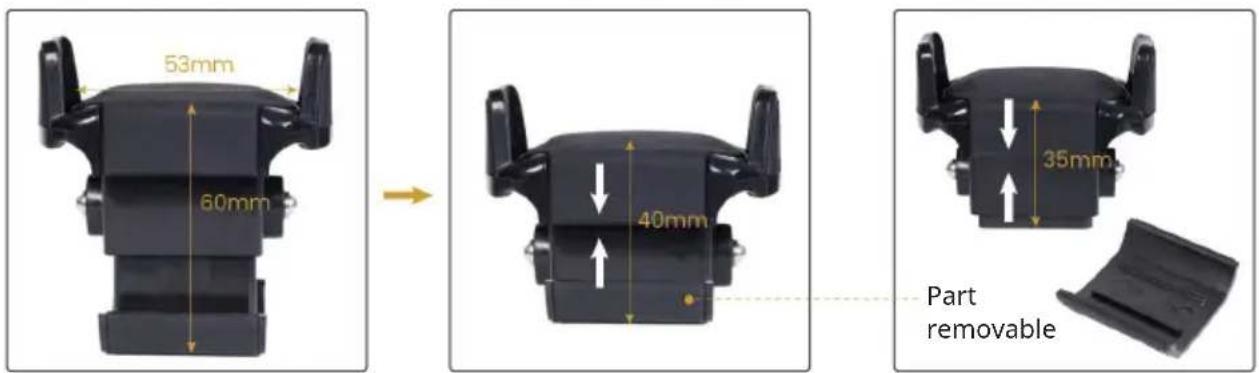
The watch holder can accommodate watches with a maximum diameter of 53 mm. The watch may be a maximum of 20 mm thick. The circumference of the strap must be between 35-62 mm.
Note: If the strap is too short, you can push out the detachable part at the bottom and then put the watch in place.
How to fix the watch in place
| 1 Remove the watch holder from the device by pulling the two tabs on the side. |
| 2 Close the strap of your watch. |
| 3 Pinch the watch mount and slide your watch over the mount. |
| 4 Slide the watch holder into the device until you hear a click. |
OPERATION MODEL 10045659
The different programs can be set using the controller.
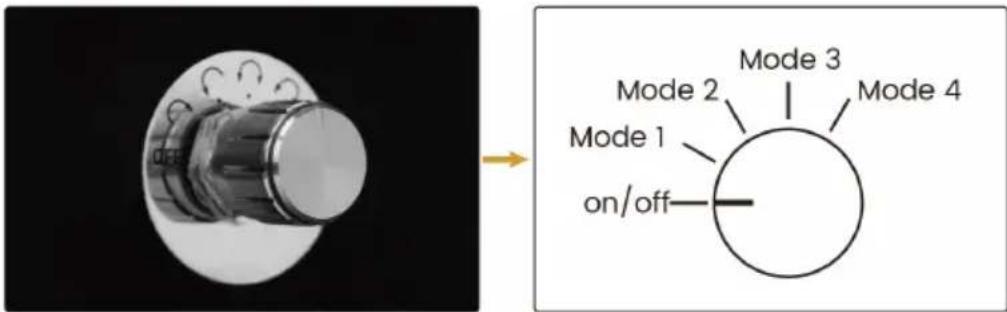
Programs
| On/off Device on/off |
| Mode 1 The watch holder rotates clockwise. The watch holder rotates for 2 minutes and then rests for 6 minutes. Then the process is repeated (approx. 650 revolutions per day). |
| Mode 2 The watch holder rotates anti-clockwise. The watch holder rotates for 2 minutes and then rests for 6 minutes. Then the process is repeated (approx. 750 revolutions per day). |
| Mode 3 The watch holder rotates in both directions. The watch holder first rotates in one direction for 2 minutes and then rests for 6 minutes. After that, the watch holder rotates in the opposite direction for 2 minutes, and then rests for 6 minutes. Then the whole process is repeated (approx. 850 revolutions per day). |
| Mode 4 The watch holder rotates in both directions. The watch holder only rotates in one direction for 5 minutes. After that, the watch holder rotates in the opposite direction for 5 minutes. This process is repeated for 3 hours. The watch winder then rests for 9 hours before the entire process is repeated (approx. 1000 revolutions per day). |
OPERATION MODEL 10045660
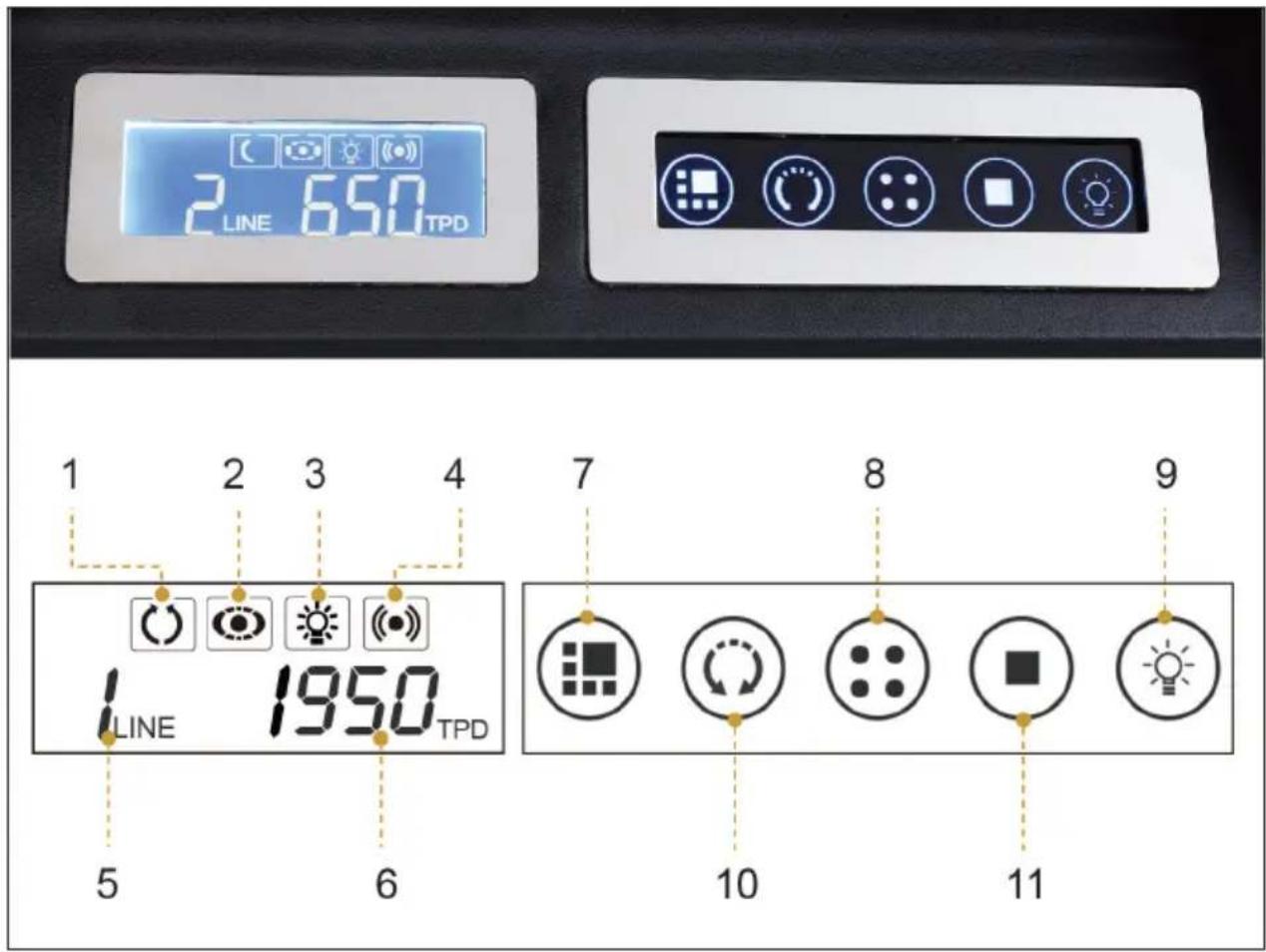
| 1 Direction of rotation 7 Program selection | ||
| 2 Rotate/stop 8 Watch selection | ||
| 3 LED light 9 LED light on/off | ||
| 4 Remote control signal 10 Direction selection | ||
| 5 Selected watch 11 Rotate/stop | ||
| 6 Revolutions per day |
Note: The blue backlight makes it easier for the user to read the display. It is activated when the device is switched on, the lid is opened or a program is changed. To save power, the backlight turns off automatically after 10 seconds.
Programs
| TPD Functionality in 12-hour operation | |
| 650 Duration | 1 minute rotation, 571 seconds stop |
| Direction: Clockwise/anti-clockwise /both directions | |
| 750 Duration | 1 minute rotation, 487 seconds stop |
| Direction: Clockwise/anti-clockwise /both directions | |
| 850 Duration | 1 minute rotation, 423 seconds stop |
| Direction: Clockwise/anti-clockwise /both directions | |
| 1000 Duration | 1 minute rotation, 350 seconds stop |
| Direction: Clockwise/anti-clockwise /both directions | |
| 1950 Duration | 1 minute rotation, 150 seconds stop |
| Direction: Clockwise/anti-clockwise /both directions | |
There is no specific program with which your watch can be optimally wound. Factors such as number of watch functions, frequency of use of the chronograph function, frequency of wear, brand, time since last service, and many other variables affect what program your watch needs to stay wound.
The watch winder cannot wind a watch that has stopped completely. Therefore, you must first manually wind the watch to get it running. Then try different programs until you have found the right program for your watch.
Important notes on operation
- Do not remove or insert a watch during operation.
- Never move the turntables by hand.
- Switch off the device and pull the plug out of the socket if you will not be using the watch winder for a long period of time.
- The working temperature of the watch winder is between 0-40 °C.
- Place the watch winder far away from magnetic objects.
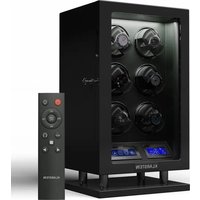
Remote control
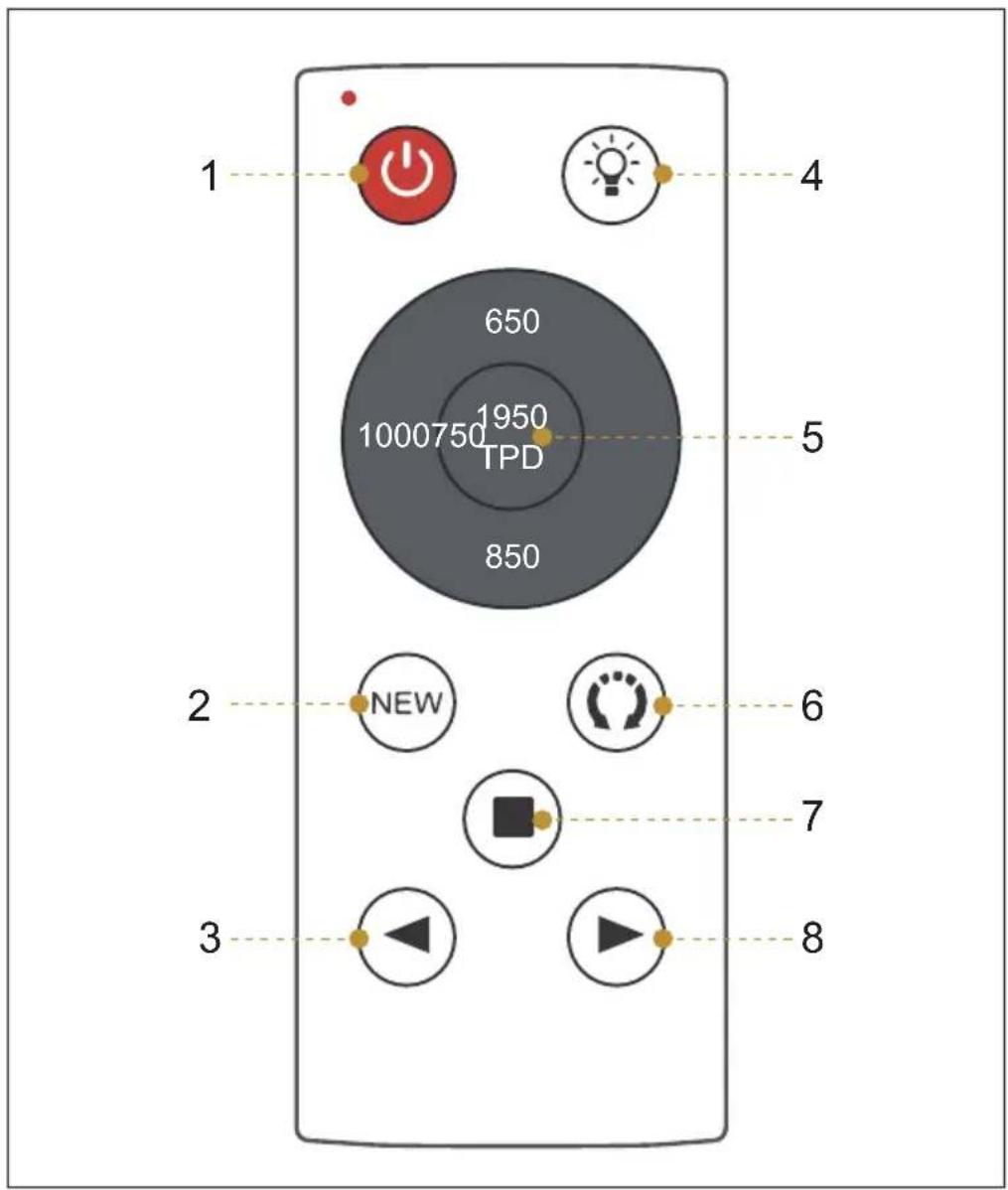
| 1 Device on/off 5 Revolutions per day | ||
| 2 New watch mode 6 Direction of rotation | ||
| 3 Watch selection (left) 7 Rotate/stop | ||
| 4 LED light on/off 8 Watch selection (right) |
DISPOSAL CONSIDERATIONS
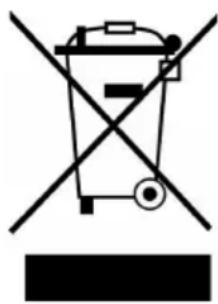
If there is a legal regulation in your country regarding the disposal of electrical and electronic equipment, this symbol on the product or on the packaging indicates that this product must not be disposed of with household waste. Instead, it must be taken to a collection point for the recycling of electrical and electronic equipment. By disposing of this product in accordance with the regulations, you protect the environment and the health of those around you from negative consequences. For information on recycling and disposal of this product, contact your local government or household waste disposal service.
This product contains batteries. If there is a legal regulation in your country regarding the disposal of batteries, the batteries must not be disposed of in household waste. Consult your local regulations for the disposal of batteries. By disposing of this product in accordance with the regulations, you protect the environment and the health of those around you from negative consequences.
MANUFACTURER & IMPORTER (UK)
Manufacturer:
Chal-Tec GmbH, Wallstrasse 16, 10179 Berlin, Germany.
Importer for Great Britain:
Berlin Brands Group UK Limited
PO Box 42
272 Kensington High Street
London, W8 6ND
United Kingdom
Estimado cliente:
ÍNDICE
Programas
Berlin Brands Group UK Limited
PO Box 42
272 Kensington High Street
London, W8 6ND
Reino Unido
Cher client, chère cliente,
SOMMAIRE
Programmes
Berlin Brands Group UK Ltd
PO Box 42
272 Kensington High Street
London, W8 6ND
United Kingdom
Gentile cliente,
INDICE
Programmi
PRODUTTORE E IMPORTATORE (UK)
Produttore:
Chal-Tec GmbH, Wallstraße 16, 10179 Berlino, Germania.
Berlin Brands Group UK Limited
PO Box 42
272 Kensington High Street
London, W8 6ND
United Kingdom


KLARSTEIN
- INHALTSVERZEICHNIS
- DEAR CUSTOMER
- CONTENTS
- SAFETY INSTRUCTIONS
- SWITCHES AND CONNECTIONS
- FIXING THE WATCH IN PLACE
- HOW TO FIX THE WATCH IN PLACE
- OPERATION MODEL 10045659
- OPERATION MODEL 10045660
- IMPORTANT NOTES ON OPERATION
- DISPOSAL CONSIDERATIONS
- MANUFACTURER & IMPORTER (UK)
- MANUFACTURER
- IMPORTER FOR GREAT BRITAIN
- ESTIMADO CLIENTE
- ÍNDICE
- SOMMAIRE
- GENTILE CLIENTE
- INDICE
- PRODUTTORE E IMPORTATORE (UK)
- PRODUTTORE
- KLARSTEIN
Brand : Klarstein
Model : Sarthe 6
Category : Watch accessory