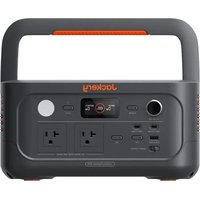
Explorer 600 v2 - Battery charger Jackery - Free user manual and instructions
Find the device manual for free Explorer 600 v2 Jackery in PDF.


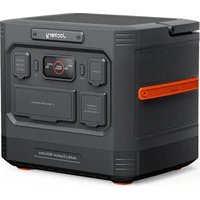
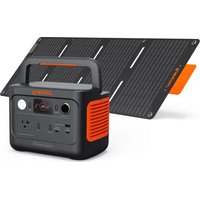
| Product type | Portable power station (battery charger) |
| Brand | Jackery |
| Model | Explorer 600 v2 (JE-600A) |
| Battery capacity | 640 Wh (20 Ah / 32 V) |
| Battery chemistry | LiFePO4 (Lithium Iron Phosphate) |
| Dimensions | 31.1 × 20.5 × 15.7 cm |
| Weight | Approximately 6.4 kg |
| Lifespan | 6000 cycles at 70% capacity |
| AC Input | 100-120 V ~ 60 Hz, 15 A max |
| DC Input (solar/car) | 11-16 V = 8 A max / 16-60 V = 10.5 A, 200 W max |
| AC Outputs | 2 × 120 V ~ 60 Hz, 4.2 A each, 500 W nominal (1000 W peak) |
| USB-C1 Output | 100 W max (5-20 V, 3-5 A) |
| USB-C2 Output | 30 W max (5-20 V, 1.5-3 A) |
| USB-A Output | 18 W max (5-12 V, 1.5-3 A) |
| Cigarette Lighter Port | 12 V = 10 A max |
| Charging Temperature | -20 °C to 45 °C |
| Discharging Temperature | -20 °C to 45 °C |
| Main Features | Uninterruptible Power Supply (UPS) < 10 ms, energy saving mode, LED lamp (lighting/SOS), LCD display, dual input, multiple outputs |
| Safety | Protection against overvoltage, undervoltage, overheating, short circuit, overload; FCC Class B certification |
| Warranty | 3 years (extensible by registration) |
Frequently Asked Questions - Explorer 600 v2 Jackery
User questions about Explorer 600 v2 Jackery
0 question about this device. Answer the ones you know or ask your own.
Ask a new question about this device
Download the instructions for your Battery charger in PDF format for free! Find your manual Explorer 600 v2 - Jackery and take your electronic device back in hand. On this page are published all the documents necessary for the use of your device. Explorer 600 v2 by Jackery.
USER MANUAL Explorer 600 v2 Jackery
Congratulations on your new Jackery Explorer 600. Please read this manual carefully before using the product, particularly the relevant precautions to ensure proper use. Keep this manual in an accessible place for frequent reference.
In compliance with laws and regulations, the right of final interpretation of this document and all related documents of this product resides with the Company.
Please kindly notice that no further notifications will be given in case of any update, revision or termination.
FR IMPORTANT
MEANING OF SYMBOLS 02
WHAT'S IN THE BOX 03
PRODUCT OVERVIEW 03
LCD DISPLAY 04
OPERATIONS 06
UNINTERRUPTIBLE POWER SUPPLY (UPS) .... 09
CHARGING 10
STOCKAGE 12
TROUBLESHOOTING ....12
SPECIFICATIONS 13
WARRANTY 14
FR Français
15-28
INFORMATIONS DE SÉCURITÉ IMPORTANTES .. 15
SIGNIFICATION DES SYMBOLES ...... 16
CONTENU DE LA BOÎTE .....17
APERÇU DU PRODUIT ....17
AFFICHAGE LCD 18
FONCTIONNEMENT 20
ALIMENTATION SANS INTERRUPTION (ASI) ....23
CHARGE 24
STOCKAGE 26
DÉPANNAGE 26
CARACTÉRISTIQUES ......27
GARANTIE 28
ES Español
29-42
IMPORTANT SAFETY INFORMATION

INSTRUCTIONS PERTAINING TO RISK OF FIRE, ELECTRIC SHOCK, OR INJURY TO PERSONS

WARNING
Always follow these basic precautions when using this product.
- Read all the instructions before using the product.
- Do not allow children to play on the product. Close supervision of children is necessary when the product is used near children.
- Avoid placing hands or fingers inside the product.
- Stop using the product immediately if it has been physically damaged or modified. Improper use of the product may cause unpredictable behavior, leading to fire, explosion, or injury.
- If any of the following are observed, including but not limited to overheats, emits unusual odors or smoking, leaks, or burns, stop using the product immediately and contact the dealer or our Customer Support.
- Never attempt to open, repair, or modify the product. Any tampering, reassembly, or modification of the
product can result in electric shock, fire, or battery damage.
- Be aware that liquid ejected from the product may cause irritation or burns. Inappropriate or abusive use may lead to battery leakage. Avoid direct contact with leaking liquid. If the liquid contacts your eyes, seek medical help immediately. If it contacts other body parts, flush with running water and consult a medical professional without delay.
- Do not expose the product to fire or excessive temperatures. Doing so may result in an explosion if the temperature exceeds 130°C (265°F).
- Any use of unrecommended or non-supplied materials or parts with the product may result in a risk of fire, electric shock, or personal injury.
- Do not leave the battery charging unattended for long periods. Always monitor the charging process to ensure safe operation.
- To reduce the risk of electric shock, unplug the product from any power source before attempting any technical service or troubleshooting.
OPERATING INSTRUCTIONS
SAVE THESE INSTRUCTIONS
- Make sure to review your local battery recycling guidelines and find a certified recycling center or collection point near you for defective battery disposal. Never dispose of batteries in regular household waste, as they may leak hazardous chemicals or cause fires.
- Stop using the product immediately if it shows signs of damage. Discontinue use and contact customer support for assistance.
- Do not charge the battery in extremely hot or cold environments and strictly adhere to the product's specified operating temperature ranges:
-Charging temperature: -4^ to 113^ / -20^ to 45^ ; -Discharging temperature: -4^ to 113^ / -20^ to 45^ - To ensure proper air circulation, keep the product vents uncovered. The area where the product is used must have adequate airflow in a cool, dry environment to prevent overheating.
-Charging in damp or poorly ventilated spaces may cause safety hazards. -Water can cause short circuits or damage to the charger, leading to safety risks. -
Unplug the power cord from a power outlet during a storm.
-
Immediately turn off the product by pressing the power button if it has fallen, been dropped, or exposed to vibrations.
- Ensure the device(s) are powered off before connecting it to the product.
- Do not charge the product using a damaged or broken charging cord or plug.
- Do not use the product to charge any device with a damaged or broken cable or plug.
• Always unplug the charging cord by pulling the plug, not the cord, to reduce the risk of damage. - Ensure the product is properly secured when transporting it in a moving vehicle.
- DO NOT place the unit upside down or on its side during use or storage.
- DO NOT place the product on the floor or at a height less than 18 inches (457 mm) above the floor during operation in a workshop or repair facility.
- DO NOT use the product's accessories with other devices or equipment.
• Solar charge time depends on weather conditions, place your solar panel where it will get as much direct sunlight as possible.

DANGER
This device is intended for indoor use only (Please place this device in a similar indoor environment when using it outdoors, e.g. Home RVs, tents, cabins, etc.). This device is not waterproof or dustproof. Keep away from rain and humid environments during use.
USER MAINTENANCE INSTRUCTIONS
During the lifecycle of energy storage products, a certain degree of capacity and energy degradation is expected. As the number of charge and discharge cycles increases and storage time extends, this degradation will gradually intensify, which is a normal phenomenon consistent with the natural aging of battery cells.
MEANING OF SYMBOLS
| Symbol Meaning | |
 | Hazardous practices that may result in severe injury, death, and/or property damage. |
 | Hazardous practices that may result in personal injury and/or property damage. |
 | Hazardous practices that may result in equipment damage, data loss, performance deterioration, or unanticipated results. |
 | Supplements the important information or operation tips in the text. |
| Symbol | Meaning |
 | Warning and Caution Symbols. Must read to alert individuals to potential hazards or risks. |
 | Read the user manual before operation. |
 | Do not dismantle the product. |
 | Keep the product away from fire. |
 | Keep away from children. |
| Symbol | Meaning |
 | This symbol indicates that a lithium-ion (Liion) battery is inside the product and should be disposed of or recycled properly. |
 | This symbol indicates that the product shall not be disposed of as household waste, and should be delivered to a designated collection facility for recycling. Proper disposal and recycling can help protect the environment. For more information about the disposal and recycling of this product, contact your local community, disposal service, or dealer. |

NOTE: This equipment has been tested and found to comply with the limits for a Class B digital device, pursuant to part 15 of the FCC Rules. These limits are designed to provide
reasonable protection against harmful interference in a residential installation. This equipment generates, uses and can radiate radio frequency energy and, if not installed and used in accordance with the instructions, may cause harmful interference to radio communications. However, there is no guarantee that interference will not occur in a particular installation. If this equipment does cause harmful interference to radio or television reception, which can be determined by turning the equipment off
and on, the user is encouraged to try to correct the interference by one or more of the following measures:
-- Reorient or relocate the receiving antenna. -- Increase the separation between the equipment and receiver. -- Connect the equipment into an outlet on a circuit different from that to which the receiver is connected. -- Consult the dealer or an experienced radio/TV technician for help.
MODIFICATION: Any changes or modifications not expressly approved by the grantee of this device could void the user's authority to operate the device.
WHAT'S IN THE BOX
1
2
natural_image
Simple line drawing of a U-shaped electrical plug with two connectors (no text or symbols)3
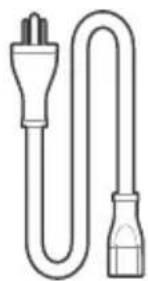
AC Charging CableJackery Explorer Manual

TIP
The car charging cable is not included but is available for purchase separately on our website. For assistance, please contact Jackery customer service.
PRODUCT OVERVIEW
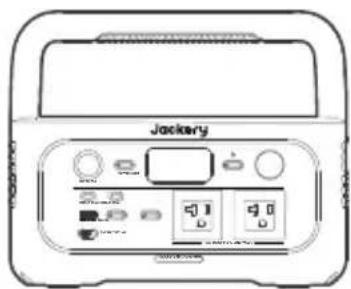
FRONT VIEW
Cigarette Lighter Port
12V=10A Max
Main Power Button
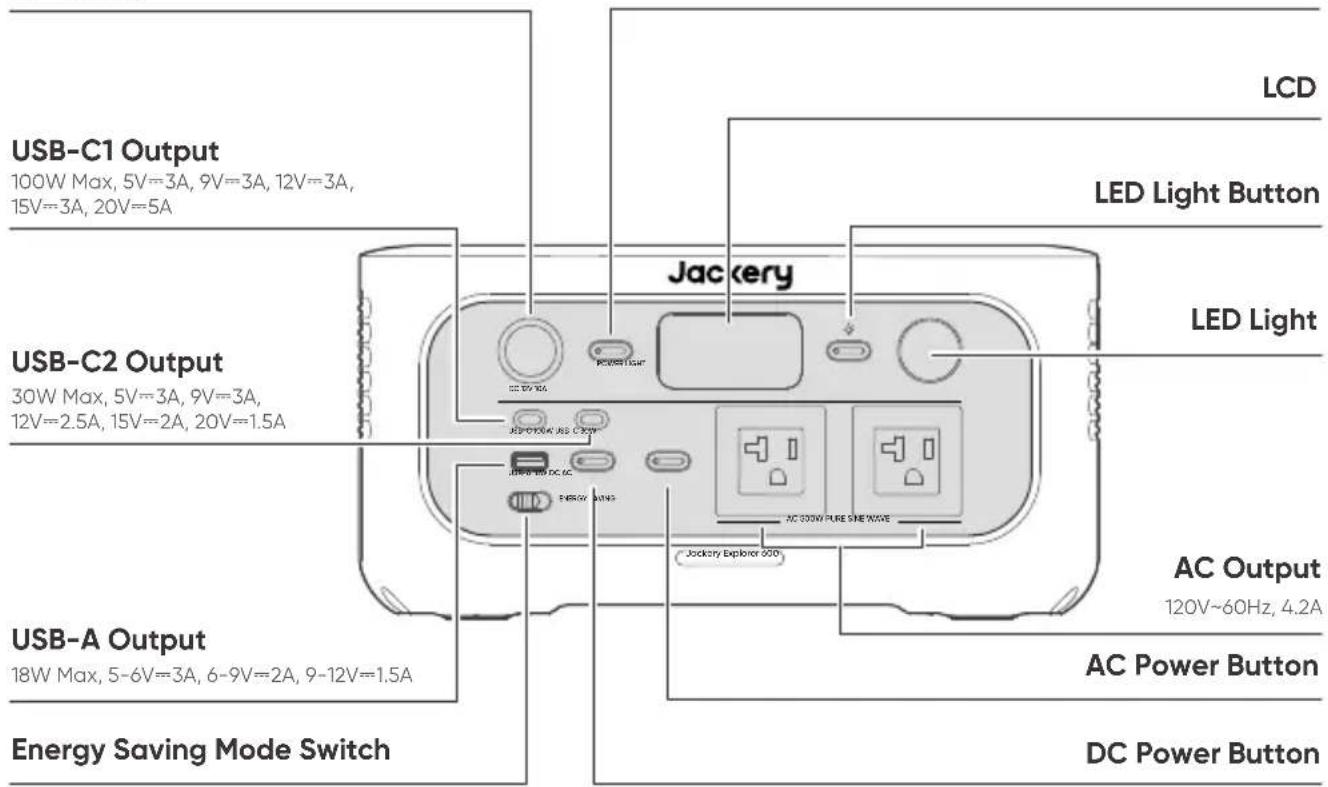
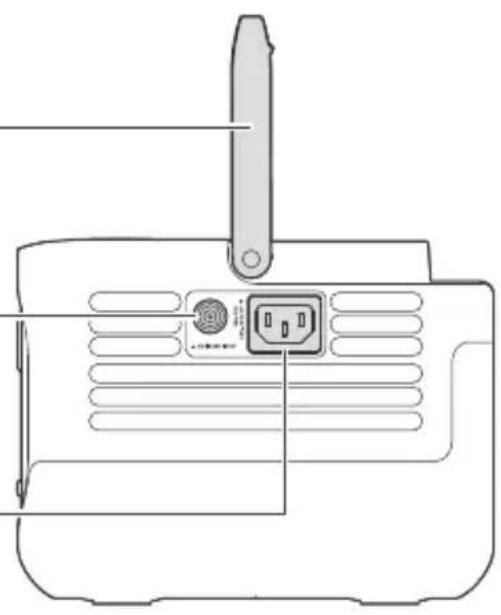
RIGHT SIDE VIEW
Handle
DC Input (8020)
1×DC8020 Port: 11V-16V=8A Max
16V-60V (Working Voltage) = 10.5A 200W Max
AC Input
100-120V\~60Hz, 15A Max
natural_image
Line drawing of a device rear panel with ventilation slots and a switch (no text or symbols)LCD DISPLAY
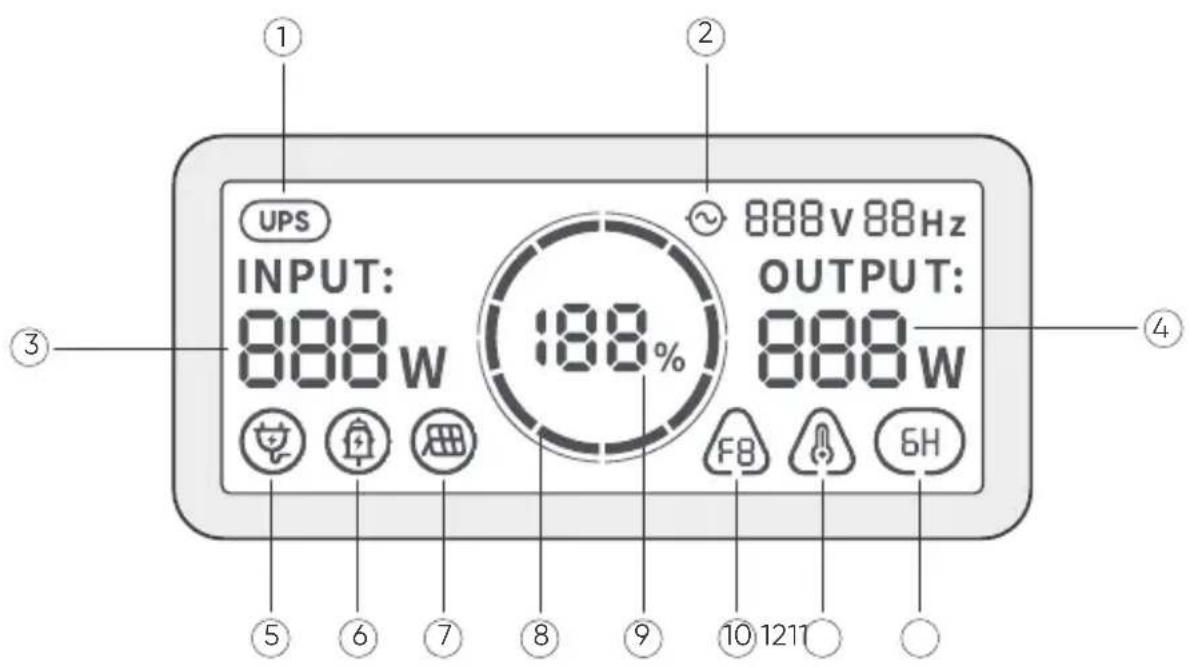
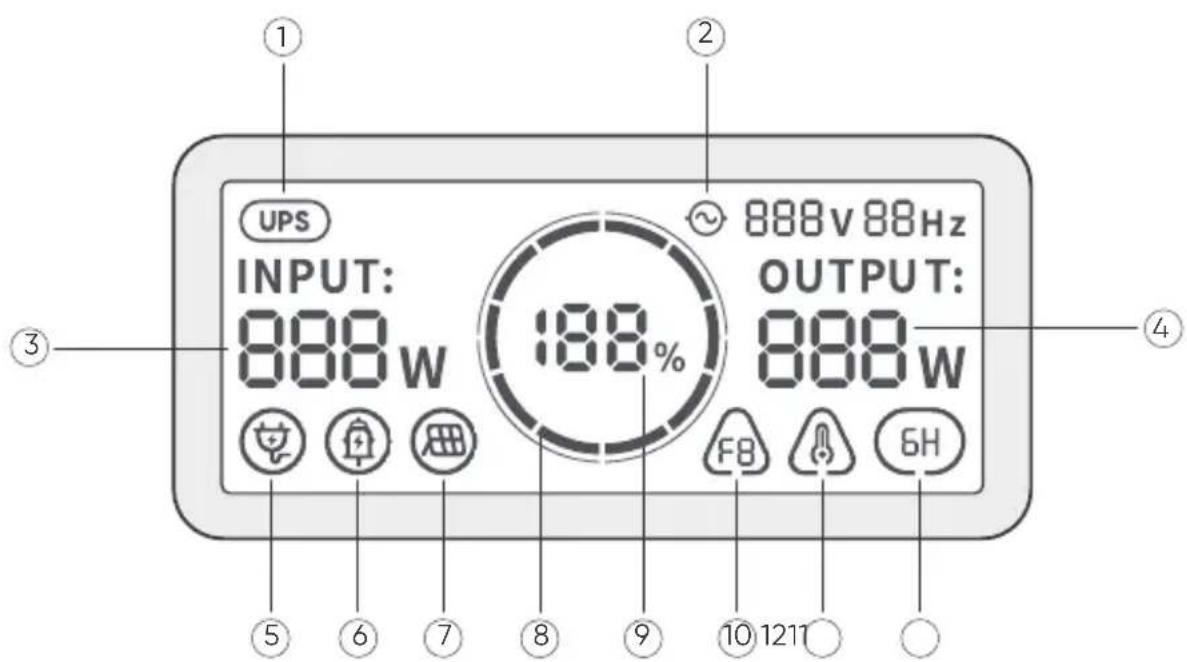
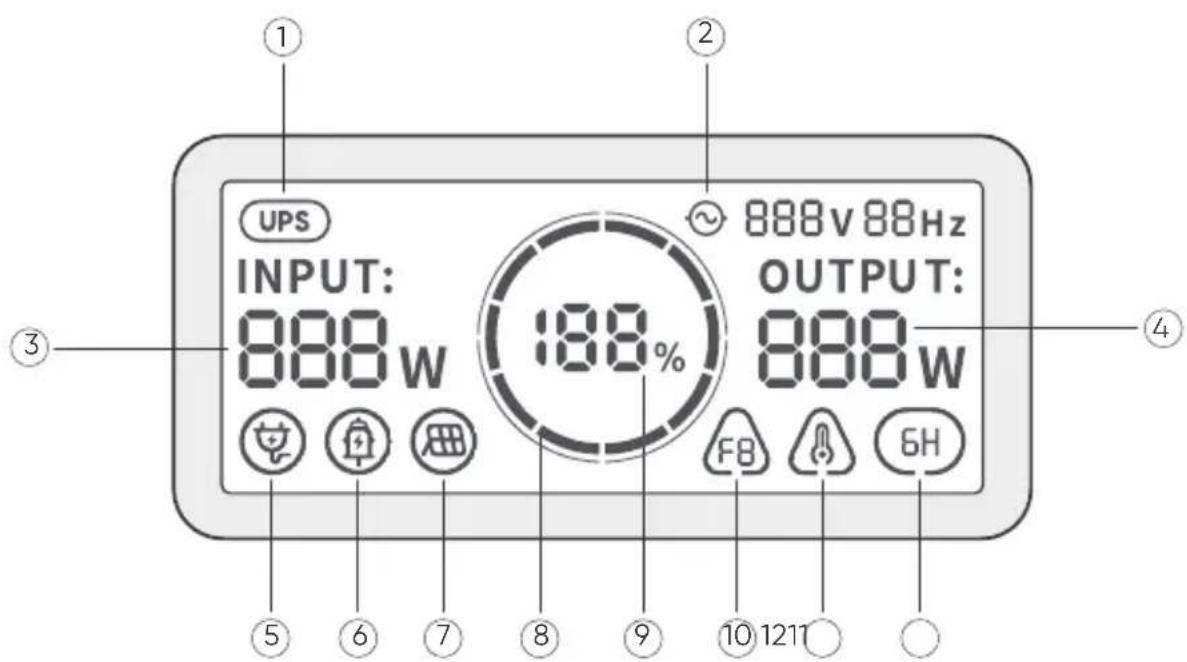
| 1 |  | UPS | On: The product is in bypass mode, and the switchover time from grid power to the internal battery is 10 ms.Off: The product is not in bypass mode. |
| 2 |  | AC Power Indicator | The AC output (pure sine wave) is on. |
| 3 | INPUT:888w | Input Power | Displays the input power in watts. |
| 4 | OUTPUT:888w | Output Power | Displays the output power in watts. |
| 5 |  | AC Wall Charging Indicator | The product is charged via the AC Input using grid power. |
| 6 |  | Car Charging Indicator | The product is charged via the DC Input (8020) using DC 12V (car charging). |
| 7 |  | Solar Charging Indicator | The product is charged via the DC Input (8020) using solar panel(s). |
| 8 |  | Battery Power Indicator | When the product is being charged, the orange circle around the battery percentage will light up in sequence.When charging other devices, the orange circle will stay on. |
| 9 | 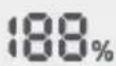 | Remaining Battery Percentage | Displays the remaining battery percentage. |
| 10 |  | Fault Code | A product error has occurred. Please refer to the Troubleshooting section for details. |
| 11 |  | High Temperature Indicator | High temperature protection is triggered. The product may stop functioning until its temperature returns to the normal operating range. |
| Low Temperature Indicator | Low temperature protection is triggered. The product may stop functioning until its temperature returns to the normal operating range. | ||
| 12 |  | Energy Saving Mode | On: Energy Saving Mode is enabled.Off: Energy Saving Mode is disabled. |
OPERATIONS
POWER ON/OFF
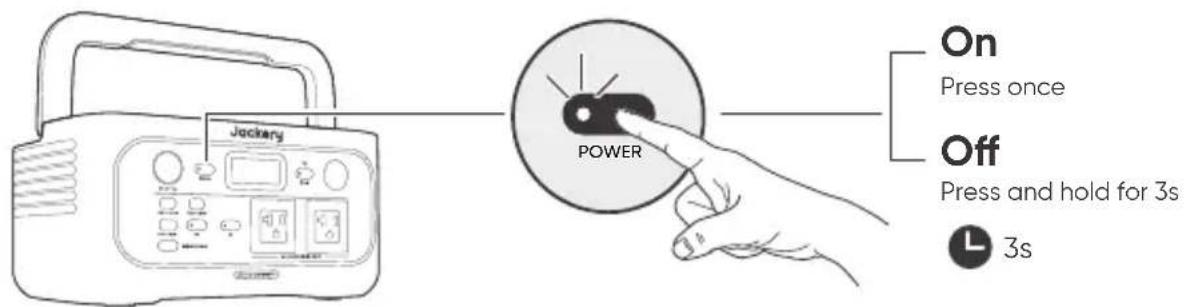
Default standby time: 2 hours
If the AC or DC button is turned off, the product will automatically shut down after 2 hours of inactivity, with no charging or discharging.
* When Energy Saving Mode is enabled and either the AC or DC power button is turned on, the system will automatically turn off all outputs and shut down if there is no charging or discharging activity, or if the power consumption of connected devices remains below the defined thresholds for 6 hours (25W or less on the AC output, and 2W or less on the USB ports and cigarette lighter port).
AC OUTPUT ON/OFF
Prerequisite: Ensure the Main Power Button is on.
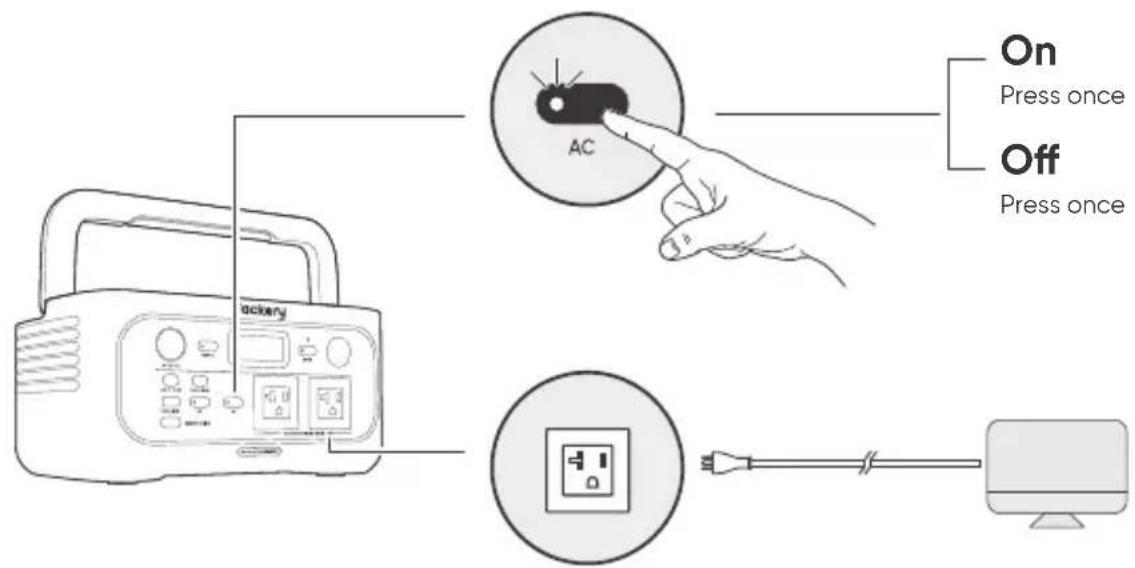
DC OUTPUT ON/OFF
Prerequisite: Ensure the Main Power Button is on.
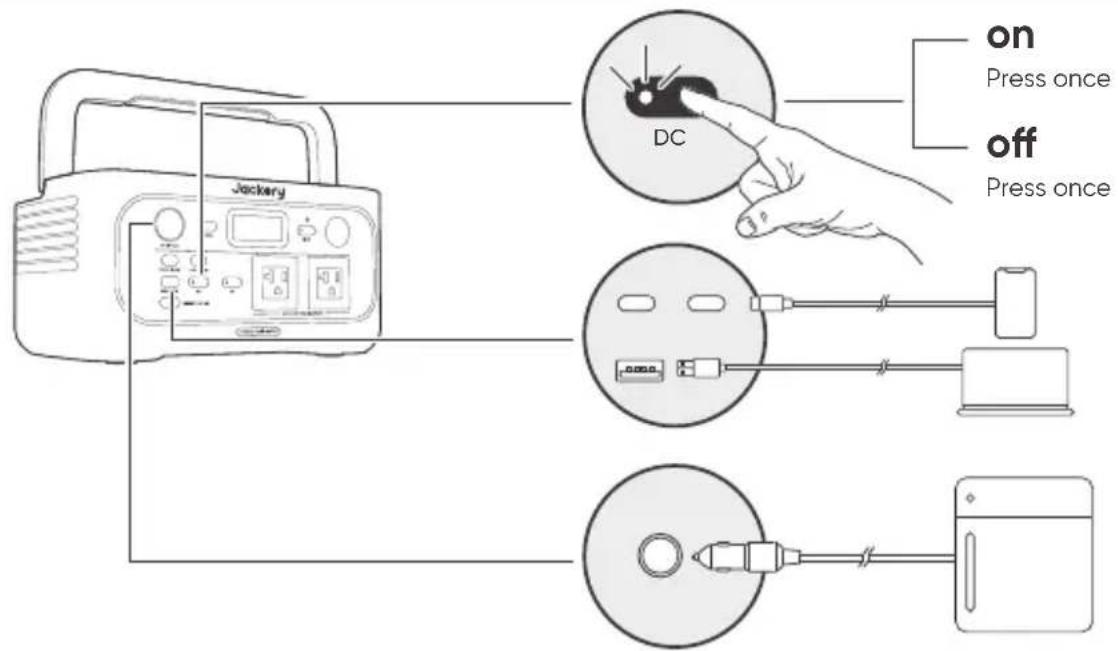
* The product can charge your car battery using the Jackery 12V automobile batterycharging cable, which is sold separately and available on our website.
CAUTION
- The cigarette lighter port is only compatible with 12V car batteries and not suitable for 24V systems.
- Do not start the car while the product is charging the car battery through the 12V DC output port (cigarette lighter port), as this may damage the product.
- This feature is intended for emergency use only and cannot charge a dead or damaged car battery.
ENERGY SAVING MODE
To prevent unnecessary battery consumption due to forgetting to turn off the output, please manually enable Energy Saving Mode. Once enabled, if the connected device's power consumption is below a certain threshold (AC output ≤ 25W; USB output + cigarette lighter port ≤ 2W), the device will automatically turn off all outputs after 6 hours.
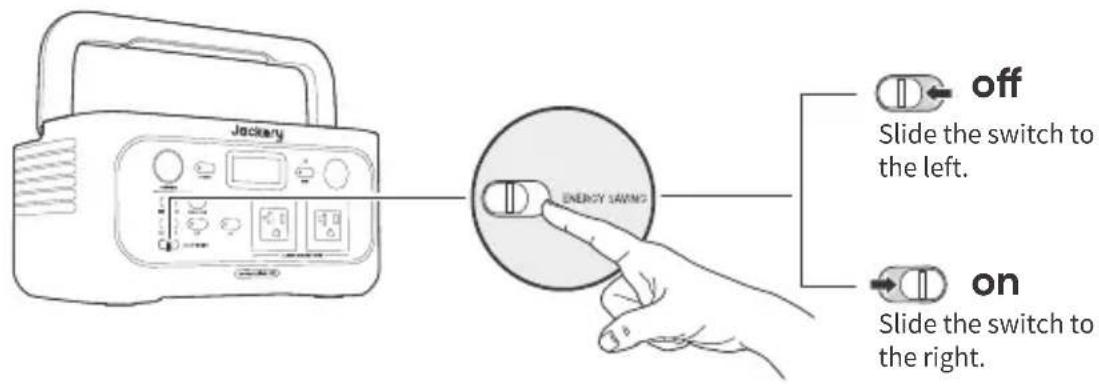
LED LIGHT ON/OFF
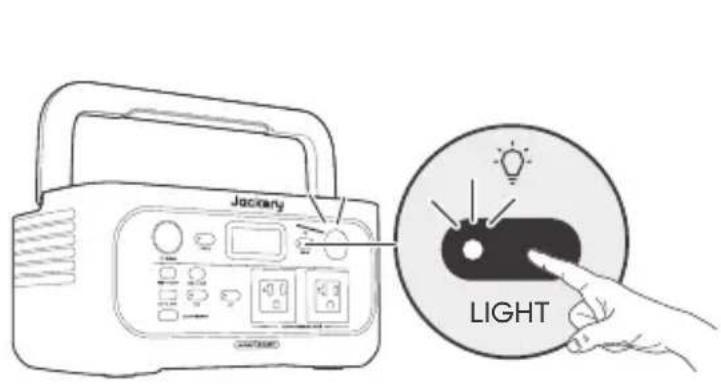
The LED light has two modes: Light mode and SOS mode.
1.

Press the LED Light button once to turn on the light.

Press it again to switch to SOS mode.

Press it a third time to turn off the light.
* The default setting is Light mode.
* In any mode, press and hold the LED light button to turn off the light.
LCD SCREEN ON/OFF
| LCD Screen | Turn on | Press the Main Power Button or when the product is charging. |
| Turn off | Press the Main Power Button. | |
| Auto-off | The LCD turns off automatically and enters sleep mode after 2 minutes of inactivity. | |
| Always-on Display Mode (under charging or discharging state) | Turn on | Double-click the Main Power Button when the LCD screen is ON. |
| Turn off | Press the Main Power Button. | |
| Auto-off | The Always-on Display Mode turns off automatically after 2 hours of inactivity. |
UNINTERRUPTIBLE POWER SUPPLY (UPS)
An uninterruptible power supply (UPS) is a type of continual power system that provides automated backup electric power to a load when the mains grid power fails.
In the event of a sudden loss of grid power, the Explorer 600 will automatically switch to stored power within 10 ms to keep your appliances running.
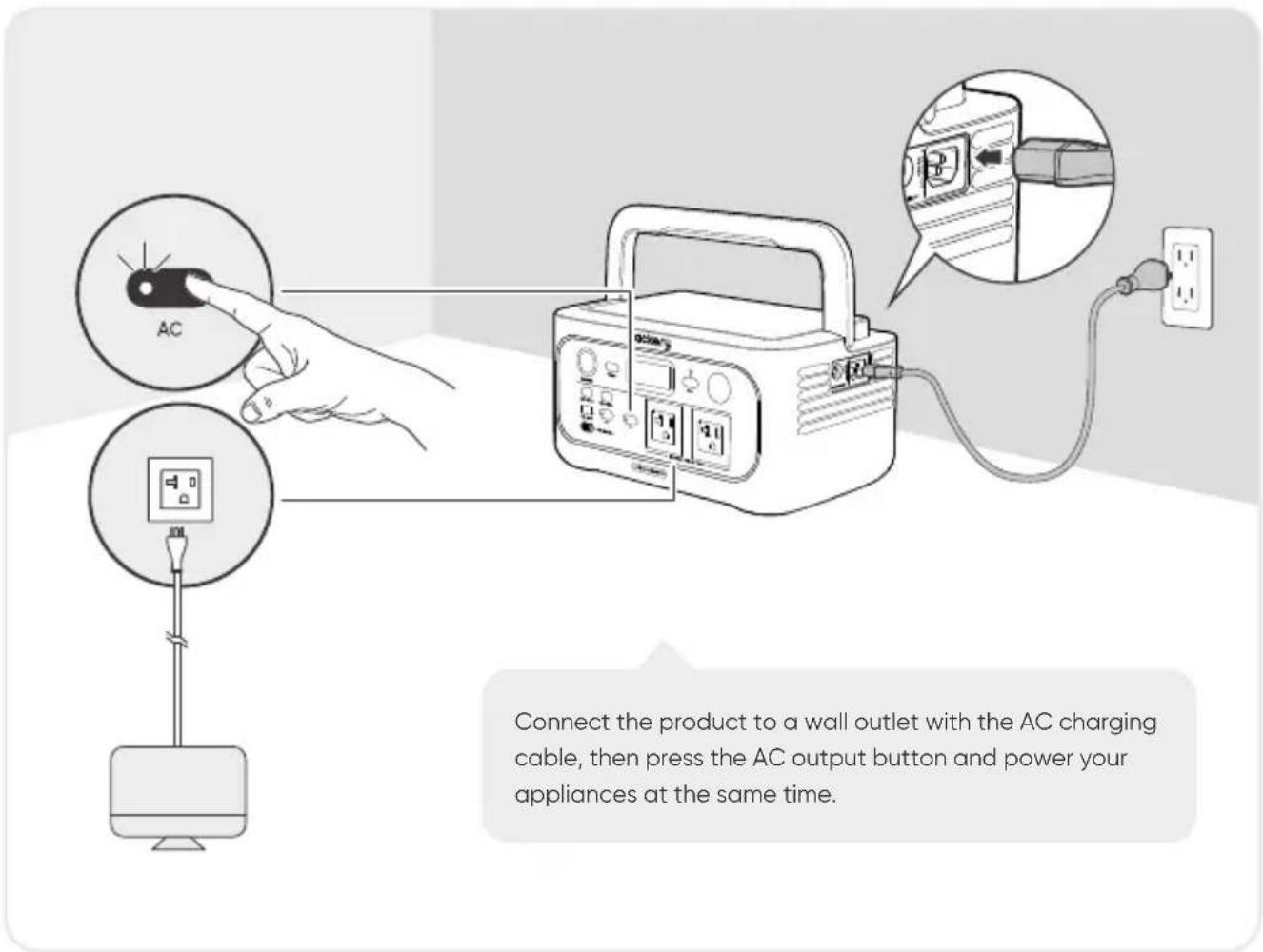
Important Notes:
- This product does not support 0 ms switching. Do not connect it to equipment that requires an uninterrupted power supply, such as data servers or workstations.
- Before use, please test compatibility with your device multiple times.
- It is recommended to connect one device at a time. Do not use multiple devices simultaneously, as this may trigger overload protection.
CHARGING
Green energy first: We advocate to use the green energy first. This product supports two modes of charging at the same time: solar charging and AC wall charging.
When AC wall charging and solar charging are turned on at the same time, the product will give priority to solar charging and both methods will be used to charge the battery at the maximum permissible power.
Fully charge the product before its first use.
Note
- The recommended charging temperature for the product is between -4^ to 113^ / -20^ to 45^ , and the discharging temperature is between -4^ to 113^ / -20^ to 45^ . Operating the product outside this temperature range may restrict its charging and discharging capabilities, prevent it from charging or discharging.
- The charging power and battery capacity of the product may vary due to temperature fluctuations.
● CHARGING VIA AC WALL OUTLET
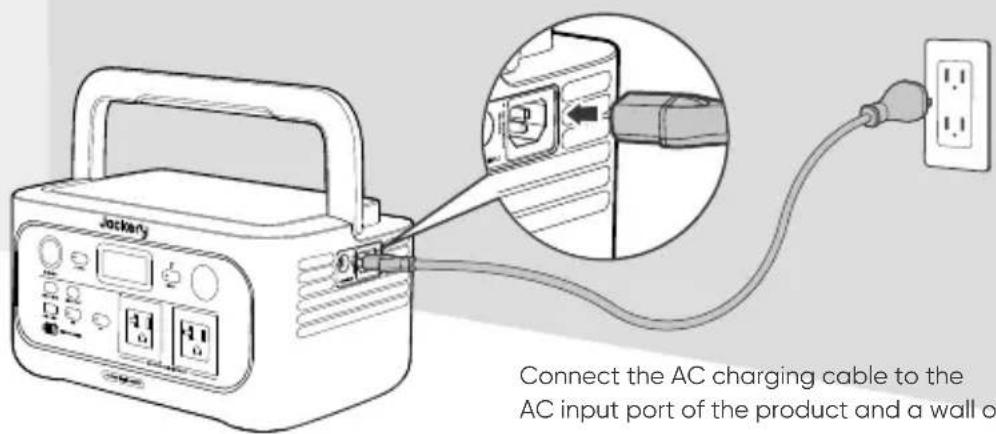
Connect the AC charging cable to the AC input port of the product and a wall outlet.
* Make sure the AC charging cable is fully and securely plugged into the AC input port. An incomplete connection may cause unstable current, overheating, poor contact, or device malfunction.
● CHARGING WITH SOLAR PANELS
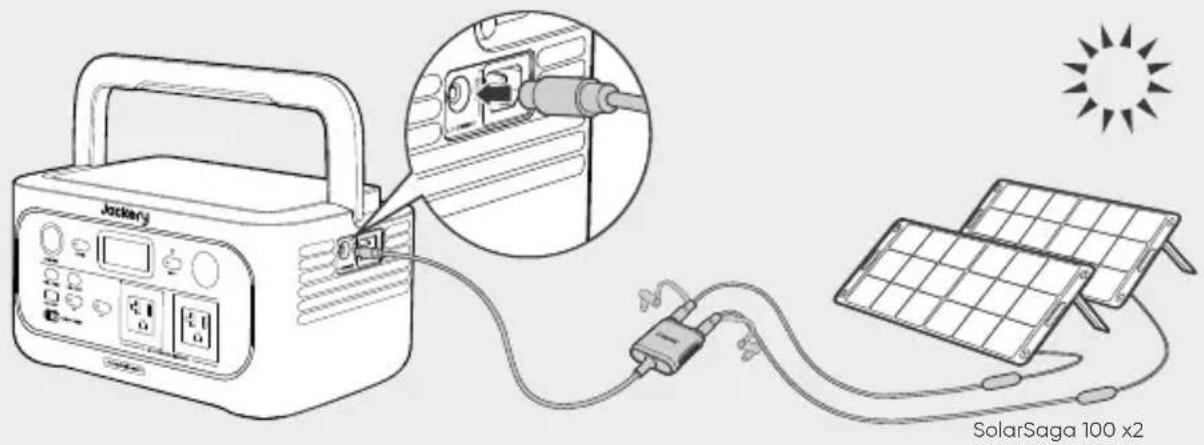
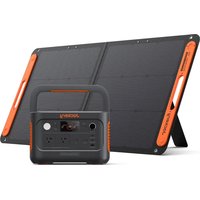
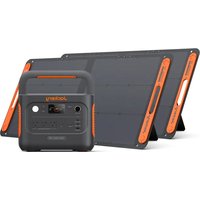
The Jackery Explorer 600 has one DC8020 input port, which supports direct connection of either one 100W or one 200W solar panel. If you need to connect two 100W solar panels simultaneously to a DC8020 input port, please use a solar panel connector (sold separately, not included). Please refer to the diagram below for connection details.
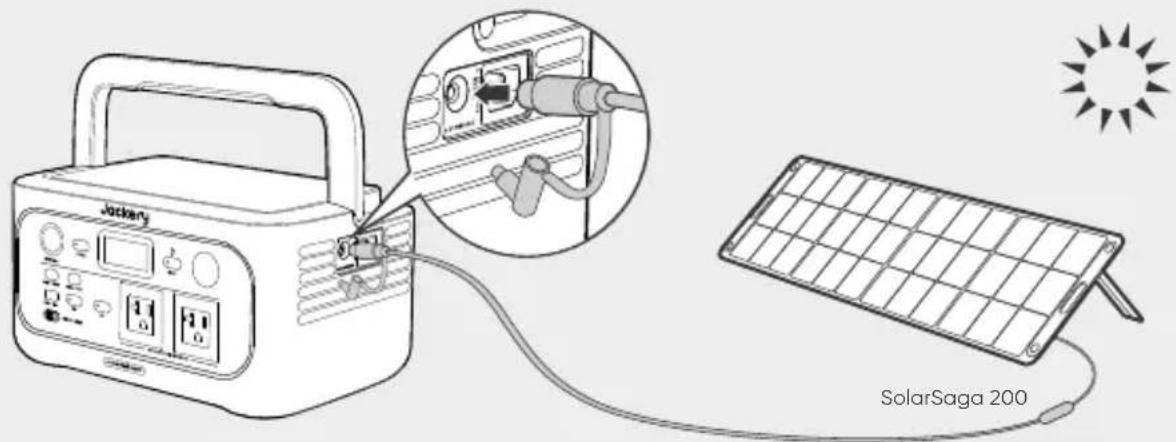
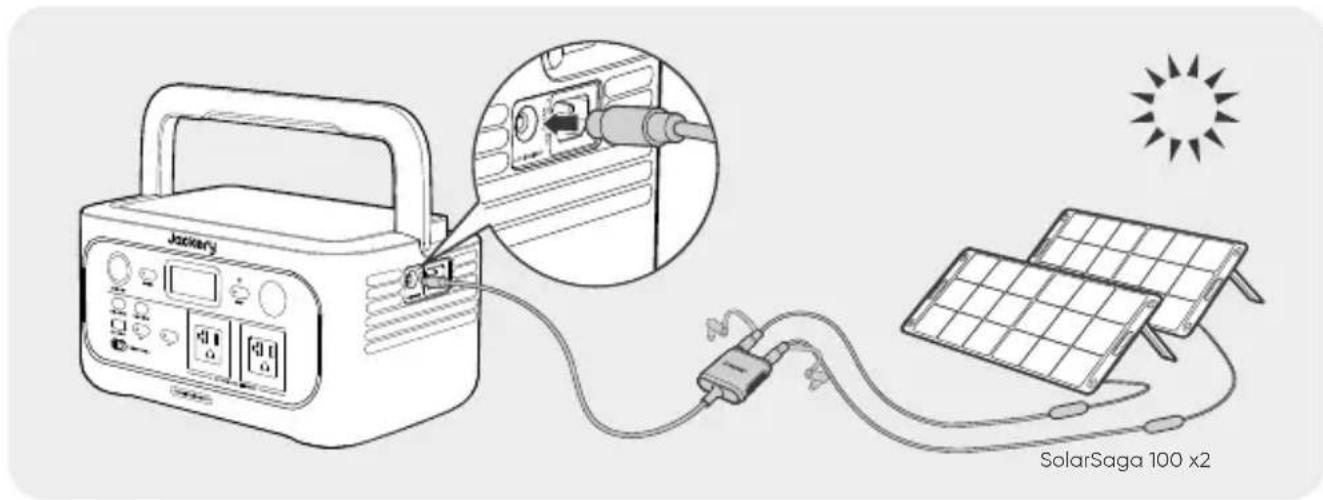
CAUTION
It is recommended to use the Jackery solar panel to charge the Jackery Explorer 600. Ensure that the open-circuit voltage ( V_oc ) of the solar panel falls within the Jackery Explorer 600's DC input voltage range (16V–60V). Jackery is not responsible for any damage or loss resulting from the use of third-party solar panels.
● CHARGING WITH A CAR CHARGER
This product can be charged using a 12V car charger. Ensure that the car charger and the car cigarette lighter provide a good connection.
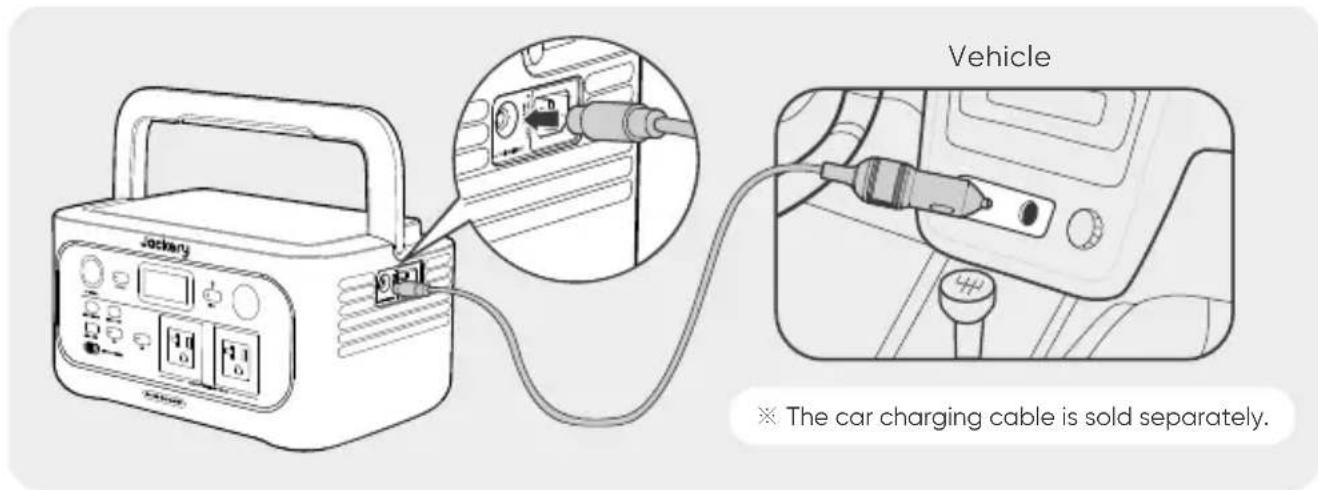
CAUTION
- Please start the vehicle before charging your product.
- If the vehicle is running on bumpy roads, it is forbidden to use the car charger in case it burns due to a poor connection. The Company will not be responsible for any loss caused by non-standard operation.
- Vehicle charging is only applicable to vehicles with 12V DC, not 24V DC. Please do not charge this product in 24V vehicle to avoid personal injury and property loss.
- It is recommended to use the Jackery Solar Panel to charge the Explorer 600. Jackery is not responsible for any losses caused by using solar panels from other brands.
STORAGE
Store the product in a dry clean place with proper ventilation. Storage temperature and humidity:
• 1 month: -4^ to 113^ / -20^ to 45^ (0-60%RH)
• 3 months: 32^ F to 113^ F / 0^ C to 45^ C (0–60%RH)
• 12 months: 32°F to 77°F / 0°C to 25°C (0-60%RH)
If this product is stored for a long period of time (3 months – 6 months) with the power depleted, it may become unchargeable. To prevent this and maintain battery health, it is recommended to check and recharge the product every three months and perform a full charge and discharge cycle at least once every 6 to 12 months.
TROUBLESHOOTING
| Error Code | Name Description (For Internal Fault Maintenance Only) | |
| F0 | BMS Data Communication Error | Data communication failure between the BMS and mainboard |
| F1 | Inverter Data Communication Error | Data communication failure between the inverter and mainboard |
| F2 | DC Input Data Communication Error | Data communication failure between the DC charging module and BMS |
| F3 | BMS or Battery Failure | BMS or battery failuare |
| F4 | Battery Overvoltage | Battery overvoltage |
| F5 | Battery Undervoltage | Battery undervoltage |
| F6 | Inverter Failure | AC output overcurrent / overload / short circuit protection triggeredGrid input over-voltage / undervoltage / overfrequency / underfrequency protection triggeredInverter over-temperature protection triggeredInsulation detection failure |
| F7 | DC Charging Module (PV) Failure | PV input overvoltage;DC charging module overtemperature protection on/triggered;Output overcurrent protection of the DC charging module on/triggered |
| F8 | Battery Charging / Discharging Overcurrent / Short Circuit | BMS overcurrent / short circuit protection triggered |
| F9 | DC Output Overcurrent / Short Circuit | USB short circuit protection triggered |
SPECIFICATIONS
GENERAL INFO
| Product Name | Jackery Explorer 600 |
| Model No. | JE-600A |
| Capacity | 20Ah/32V DC(640Wh) |
| Cell Chemistry | LiFePO_4 |
| Weight | About 14.11 lbs / 6.4kg |
| Dimensions | 12.2×8.1×6.2in / 31.1×20.5×15.7 cm |
| Cycle Life | 6000 cycles to 70%+ capacity |
- INPUT PORTS
| Charge Mode AC Input | 100V-120V~ 60Hz, 15A Max |
| DC Input | 1×DC8020 Port: 11V-16V==8A Max16V-60V (Working Voltage)==10.5A 200W Max |
OUTPUT PORTS
| 2 × AC Output | 120V~ 60Hz, 4.2A |
| Bypass Mode AC Output | 100V-120V~ 60Hz, 500W |
| AC Total Output | 500W Rated, 1000W Surge Peak |
| USB-C1 Output | 100W Max, 5V---3A, 9V---3A, 12V---3A, 15V---3A, 20V---5A |
| USB-C2 Output | 30W Max, 5V---3A, 9V---3A, 12V---2.5A, 15V---2A, 20V---1.5A |
| USB-A Output | 18W Max, 5-6V---3A, 6-9V---2A, 9-12V---1.5A |
| Cigarette Lighter Port | 12V---10A Max |
● ENVIRONMENTAL OPERATING TEMPERATURE
| Charge Temperature | -4°F to 113°F / -20°C to 45°C |
| Discharge Temperature | -4°F to 113°F / -20°C to 45°C |
※ USB Type-C® and USB-C® are registered trademarks of USB Implementers Forum.
WARRANTY
We only provide our warranty to customers who purchase from the official Jackery website, Jackery-branded third-party platforms, or local authorized dealers.
* Warranty period and details may vary according to local laws, regulations, and authorized dealers.
Limited Warranty
Jackery Inc. warrants to the original consumer purchaser that the Jackery product will be free from defects in workmanship and material under normal consumer use during the applicable warranty period identified in the 'Warranty Period' section below, subject to the exclusions set forth below.
This warranty statement sets forth Jackery's total and exclusive warranty obligation. We will not assume, nor authorize any person to assume for us, any other liability in connection with the sale of our products.
Warranty Period

YEARS
Standard Warranty
The standard warranty period for Jackery Explorer 600 is 36 months. In each case, the warranty period is measured starting on the date of purchase by the original consumer purchaser. The sales receipt from the first consumer purchase, or other reasonable documentary proof, is required in order to establish the start date of the warranty period.

YEARS
Extended Warranty
To activate the Warranty Extension, you must register your product online or contact our customer service team at hello@jackery.com to extend the standard warranty runtime.
Repair or replacement
Jackery will repair or replace (at Jackery's expense) any Jackery product that fails to operate during the applicable warranty period due to a defect in workmanship or material. The repaired/replaced product assumes the remaining warranty of the original date of purchase.
Limited to Original Consumer Buyer
The warranty on Jackery's product is limited to the original consumer purchaser and is not transferable to any subsequent owner.
Exclusions
Jackery's warranty does not apply to:
Misused, abused, modified, damaged by accident, or used for anything other than normal consumer use as authorized in Jackery's current product literature.
Attempted repair by anyone other than an authorized facility.
Any product purchased through an online auction house.
Jackery's warranty does not apply to the battery cell unless the battery cell is fully charged by you within seven days after you purchase the product and at least once every 6 months thereafter.
Interpretation Rights
Jackery reserves the right to final interpretation of the above customers' after-sales policy.
INFORMATIONS DE SÉCURITÉ IMPORTANTES

INSTRUCTIONS CONCERNANT LES RISQUES D'INCENDIE, DE CHOC ÉLECTRIQUE OU DE BLESSURE AUX PERSONNES

AVERTISSEMENT
natural_image
Simple line drawing of a U-shaped electrical plug with two connectors (no text or symbols)Câble de charge CA
3
natural_image
Line drawing of a device with a clip attached to the top panel, showing internal components and a small electronic component (no text or symbols)AFFICHAGE LCD
LAMPE LED MARCHE/ARRÊT
ÉCRAN LCD MARCHE/ARRÊT
ATTENTION
natural_image
Simple line drawing of a U-shaped electrical plug with two leads (no text or symbols)3
natural_image
Line drawing of a device with a clip attached to the top panel, showing internal components and a small electronic component (no text or symbols)PANTALLA LCD
natural_image
Illustration of a jack machine connected to a power outlet via cable, showing internal components and connection (no text or symbols)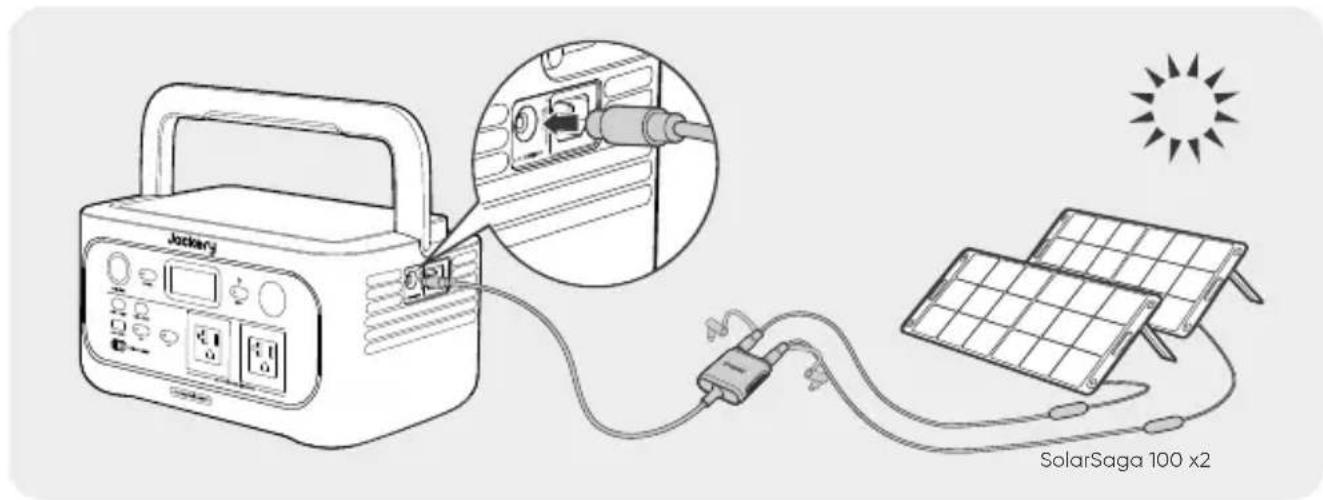
PRECAUCIÓN
- FR IMPORTANT
- FR Français
- 15-28
- ES Español
- 29-42
- IMPORTANT SAFETY INFORMATION
- INSTRUCTIONS PERTAINING TO RISK OF FIRE, ELECTRIC SHOCK, OR INJURY TO PERSONS
- WARNING
- OPERATING INSTRUCTIONS
- SAVE THESE INSTRUCTIONS
- DANGER
- USER MAINTENANCE INSTRUCTIONS
- MEANING OF SYMBOLS
- WHAT'S IN THE BOX
- PRODUCT OVERVIEW
- FRONT VIEW
- RIGHT SIDE VIEW
- Handle
- DC Input (8020)
- AC Input
- LCD DISPLAY
- OPERATIONS
- POWER ON/OFF
- AC OUTPUT ON/OFF
- DC OUTPUT ON/OFF
- CAUTION
- ENERGY SAVING MODE
- LED LIGHT ON/OFF
- LCD SCREEN ON/OFF
- UNINTERRUPTIBLE POWER SUPPLY (UPS)
- Important Notes:
- CHARGING
- Fully charge the product before its first use.
- Note
- ● CHARGING VIA AC WALL OUTLET
- ● CHARGING WITH SOLAR PANELS
- ● CHARGING WITH A CAR CHARGER
- STORAGE
- SPECIFICATIONS
- WARRANTY
- Limited Warranty
- Warranty Period
- YEARS
- Standard Warranty
- Extended Warranty
- Repair or replacement
- Limited to Original Consumer Buyer
- Exclusions
- Interpretation Rights
- INFORMATIONS DE SÉCURITÉ IMPORTANTES
- INSTRUCTIONS CONCERNANT LES RISQUES D'INCENDIE, DE CHOC ÉLECTRIQUE OU DE BLESSURE AUX PERSONNES
- AVERTISSEMENT
- AFFICHAGE LCD
- LAMPE LED MARCHE/ARRÊT
- ÉCRAN LCD MARCHE/ARRÊT
- ATTENTION
- PANTALLA LCD
- PRECAUCIÓN
Brand : Jackery
Model : Explorer 600 v2
Category : Battery charger