DOC344 - Deep fryer LIVOO - Free user manual and instructions
Find the device manual for free DOC344 LIVOO in PDF.


| Product type | Oil-free fryer (air fryer) |
| Brand | Livoo |
| Model | DOC344 |
| Total capacity | 11 L (2 independent baskets) |
| Power supply | 220-240 V ~ 50/60 Hz |
| Power | 2800 W |
| Standby consumption | 0.41 W (goes into standby after 5 min of inactivity) |
| Off consumption | 0 W |
| Maximum temperature | 200 °C |
| Number of cooking functions | 12 preset menus |
| Special functions | Synchronized cooking (SYNC), menu copy (MATCH), turnover (TURN), memory |
| Display | Digital screens for each basket |
| Material | Stainless steel, non-stick coating on baskets and racks |
| Included accessories | 2 baskets, 2 racks |
| Cleaning | Baskets and racks washable with soapy water; do not immerse the appliance |
| Safety | Automatic shutdown in case of overheating, protection against contact with heating elements |
| Weight | Approximately 6.5 kg |
| Dimensions (W x D x H) | Approximately 40 x 35 x 32 cm |
| Color | Black with coral accents (Marmiton edition) |
| Warranty | 2 years |
Frequently Asked Questions - DOC344 LIVOO
User questions about DOC344 LIVOO
0 question about this device. Answer the ones you know or ask your own.
Ask a new question about this device
Download the instructions for your Deep fryer in PDF format for free! Find your manual DOC344 - LIVOO and take your electronic device back in hand. On this page are published all the documents necessary for the use of your device. DOC344 by LIVOO.
USER MANUAL DOC344 LIVOO
natural_image
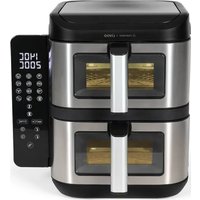
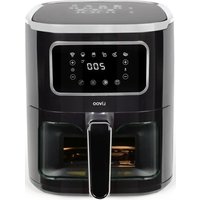
Exterior view of a modern air fryer with digital display and control panel (no visible text or symbols)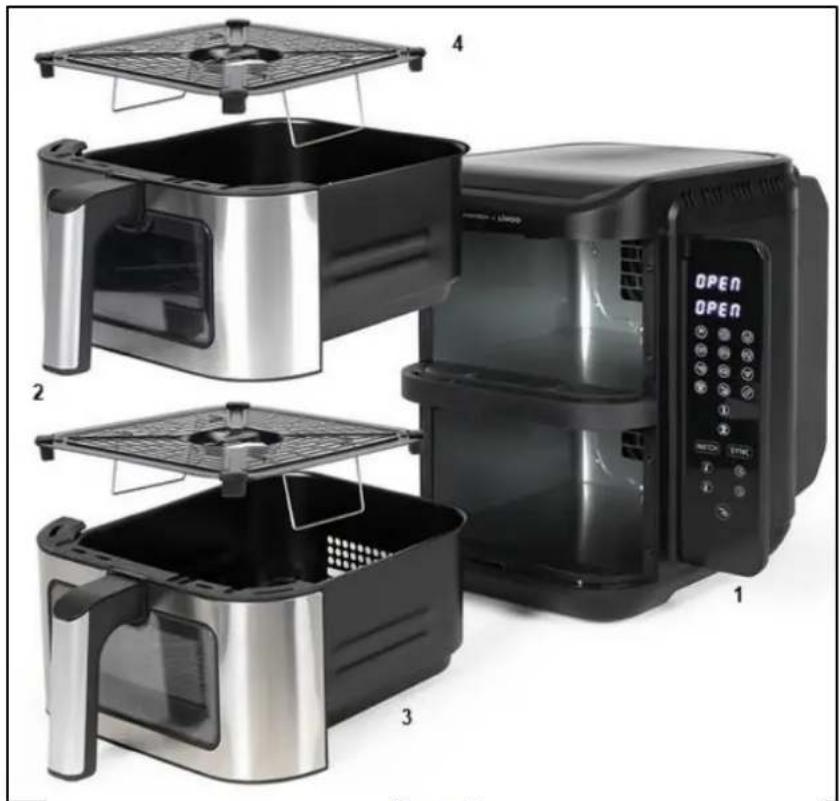
natural_image
Exploded view of a modern air fryer with four labeled views (1-4), showing internal components and interior layout (no text or symbols on main objects)Figure 1
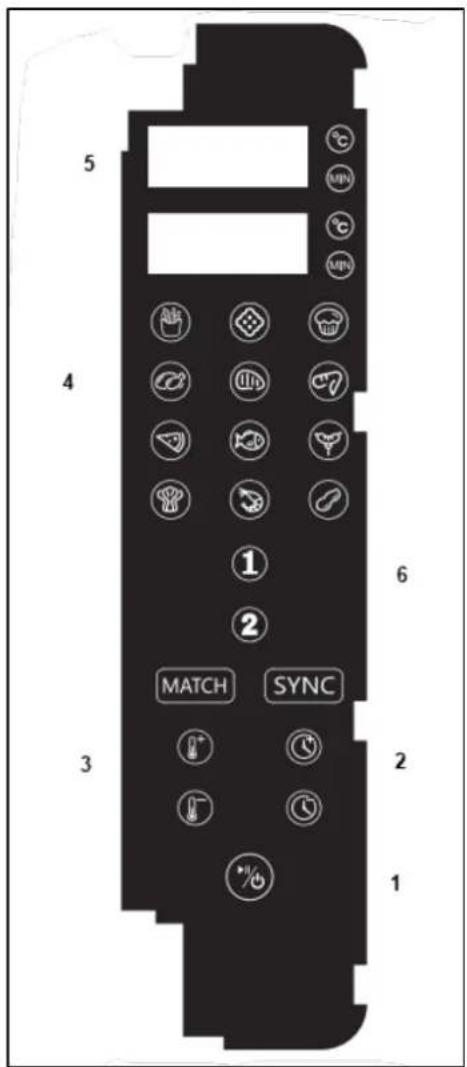
Figure 2
natural_image
Symbol of a trash bin crossed with a diagonal line and a horizontal bar below (no text or labels)Thank you for choosing a Livoo and Marmiton product!
EN
The collaboration between Marmiton and Livoo is a breath of fresh air. By exploring our shared expertise, we've come up with a product that will simplify your life in the kitchen. How do we do it? By slipping you 30 ready-to-use recipes with your new oil-free fryer. Simply scan the Qr code on the product to access the recipes at any time. With its 12 functions, you'll be able to prepare a wide range of meat and fish recipes, and even bake cakes. Find our entire collection on our website www.livoo.en.
Livoo, your daily companion till social networks

@Livoo

@livoo_officiel

@Livoo
Safety Instructions
Please, take time to read well the instruction sheet before the first use and keep them for a future use.
A misuse of the appliance can damage it or hurt the user. Assure that you use the appliance for the use for which it is designed. We refuse any responsibilities as for the damages by an incorrect use or a bad manipulation.
-
Please check the voltage of the unit corresponds to the voltage of your installation before connecting the appliance.
-
Never immerse the appliance. Never clean the appliance by placing it under the tap. Do not allow water or liquids enter the unit. The appliance contains electronic components. Risk of electric shock!
- Do not cover the air inlet or the air outlet when the unit is running.
- Do not fill the oil drawer. Fire hazard!
- Do not touch the inside of the fryer when the unit is running. Instruction Manual 2 Risk of burns!
- If the supply cord is damaged, it must be replaced by the manufacturer, its service agent or similarly qualified persons in order to avoid a hazard (*).
- This appliance can be used by children aged from 8 years and above and by people with reduced physical, sensory or mental capabilities or lack of experience and knowledge if they have been given supervision or instruction concerning use of the appliance in a safe way and understand the hazards involved.
-
Children shall not play with the appliance.
-
Cleaning and user maintenance shall not be made by children unless they are older than 8 and supervised.
- Keep the appliance and its cord out of reach of children less than 8 years.
- Keep the power cord away from the hot surface of the appliance and any other heat sources.
- Make sure the appliance is plugged into your power outlet.
- This appliance is not intended to be operated by means of an external timer or separate remote-control system.
- Do not place the unit on or near flammable materials such as a tablecloth or curtain.
- Do not place the appliance against the wall or other appliances. Keep a distance of at least 10 cm of free space at the back and sides and a clearance of 10 cm above the unit. Never place an object on top of the unit. Instruction Manual 3
- Never use the appliance for other purposes than those described in this manual.
-
Surfaces are liable to get hot during use. Always use thermal gloves.
-
Turn off the power immediately and unplug the unit if you see black smoke coming out of the unit. Wait smoke emission stop before removing the drawer.
- Always place the unit on a level surface or a stable surface.
- Make sure to always unplug the appliance after use.
- Let cool for about 30 minutes before cleaning.
- Always keep the appliance clean as it comes in contact with food.
- Regarding the details on how to clean the surfaces come in contact with food or oil, refer to the following paragraph of the leaflet.
- The temperature of accessible surfaces may be high when the appliance is operating.
- Appliance must not be immersed.
- Cooking appliances should be positioned in a stable situation with the handles (if any) positioned to avoid spillage of the hot liquids.
-
This appliance is intended to be used in household and similar applications such as:
-
staff kitchen areas in shops, offices and other working environments,
- farm houses,
- by clients in hotels, motels and other residential type environments,
• bed and breakfast type environments.
(*) Competent qualified electrician: after sales department of the producer or importer or any person who is qualified, approved and competent to perform this kind of repairs in order to avoid all danger. In any case you should return the appliance to this electrician.
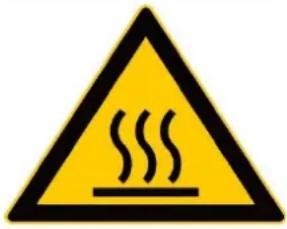
Warning: Hot surface! - Do not cover the air inlet and the air outlet when the appliance is working.
Technical Specifications
Voltage: 220-240V\~50-60Hz Power: 2800W
Power consumption in off mode: 0W - power consumption in standby mode: 0.41W switches to standby mode after 5 minutes
Device Diagram: Figure 1
| 1 | Control Panel |
| 2 | Handful |
| 3 | Trays |
| 4 | Grids |
Control Panel Diagram: Figure 2
| 1 | On/off button |
| 2 | Cooking time setting |
| 3 | Temperature adjustment |
| 4 | Menus |
| 5 | Screens |
| 6 | Trays 1 and 2 keys |
Control panel functions
Set a menu
When the unit is switched on, all indicators and digital displays light up for 1 second and then go out. At the same time, the buzzer sounds and the power LED lights up. Press the ON/OFF button (button 1 – figure 2) for 0.5 seconds to switch the machine on. Once the machine has started up, the power button indicator remains permanently lit, as do the other indicators.
Select tray 1 or 2 as required (button 6 – figure 2). If you have chosen tray 1, the display for this tray lights up, and the default cooking time is 180^ C/15 min.
Temperature and time are displayed alternately, the corresponding LEDs light up, while the display for tray 2 shows “----”.
Press the menu button to select a menu( button 4 - figure 2). The LED for the selected menu flashes, while the others remain lit. The display shows the temperature of the selected menu.
Once the setting is complete, press the on/off button to start cooking. The LEDs of the selected menu remain lit, the others go out, and the appliance starts to operate.
If necessary, do the same for tray 2.
Your own setting:
If you want to change the temperature or time setting in the menu (button 2-3 - figure 2), or define the temperature/time yourself without selecting a menu, press the temperature and time buttons.
If you wish to set bin 1 while bin 2 is cooking, first press the button for bin 1, make the necessary adjustments, then press the on/off button to restart both bins simultaneously.
While the appliance is running, if you press any button, the LEDs, menu and bin indicators flash. The unit interrupts the launched menu, and the fan continues to run for 60 seconds before stopping.
To pause bin 1 or 2 only, select bin 1 or 2, then press the on/off button. The display alternates between the temperature and time of the selected menu.
To stop cooking, hold down the on/off button for 2 seconds while the appliance is running. An acoustic signal sounds and both bins stop working simultaneously. The display shows "OFF" and all other lights go out.
If you wish to switch off bin 1 or bin 2 only, select bin 1 or 2 and hold down the on/off button for 2 seconds. The display will show "OFF".
In operating mode, if you need to change the temperature or cooking time, first select the relevant tray, then make the adjustment.
Note: After 5 seconds without operation, the unit exits setting mode.
After selecting tray 1 or tray 2, hold down the tray 1 or 2 button to cancel selection.
Memory function:
This unit has a memory function. For example, if the "Chicken wings" menu is selected when using tray 2, it will be saved for the next use, as long as the power supply is not switched off.
The memory is erased after 1 hour.
Synchronized end of cooking:
After switching on the appliance, if you want to select different menus or temperatures/cooking times for each tray, press the tray 1 button, set the menu or temperature/cooking time, press the tray 2 button, the display shows SYNC, press SYNC, you can set the menu or temperature/cooking time for tray 2.
Then press the on/off button: the pan with the longer cooking time starts to run, while the other displays "HOLD" and waits.
When both pans reach the same remaining time, they continue cooking simultaneously.
Copying a menu:
After switching on the appliance, if you want to choose identical menus or cooking temperatures/times for each bin, press the button on bin 1, set the menu or cooking temperature/time, the display shows MATCH, press MATCH, the other bin automatically adopts the same settings. Press the on/off button and both bins operate under the same menu or cooking temperature/time you have set.
Once in operation, the MATCH display goes out and this function can no longer be modified.
Turning function :
For certain recipes requiring food to be turned halfway through cooking, a beep sounds 5 times and the display shows TURN.
The table below will help you select the optimal amount, temperature, and cooking time for different foods. As the ingredients differ in their origin, size, and shape, these settings may vary.
| Ingredients | Min-max Qtys (g) | Time (min) | Temperature (°C) |
| Vegetables | 100-400 | 10 | 160 |
| Pisces | 200-500 | 18 | 200 |
| Fresh fries | 200-400 | 24 | 200 |
| White meats | 200-800 | 22 | 200 |
| Red meats | 100-600 | 17 | 200 |
| Dessert | 200-500 | 18 | 170 |
Before First Use
Remove all packaging materials. Thoroughly clean the inside of the drawer and the grate with warm soapy water and a non-abrasive sponge. Wipe the inside and outside of the device with a lint-free cloth. Plug in the unit and let it heat up without ingredients for a few minutes. It may emit a slight smoke or odor. This is normal for many devices. This does not affect the security of your device.
Using the device
Plug in your oil-free fryer, remove the tray(s), and make sure the rack(s) are in the right position. Add the food with a little oil. Put the tray back in place. Never use the tray without the grid.
Caution : Do not touch the sides of the trays and appliance during and after use as they become very hot. Use the handle and potholders.
Set the oil-free fryer according to the ingredients chosen.
Halfway through cooking, mix the food in the tray so that it is evenly fried.
Once cooking is complete, remove the tray. Empty it carefully as the food and grill are hot. Steam can also escape depending on the type of food in the oil-free fryer.
Unplug the appliance and wait at least 30 minutes before cleaning.
Advice
Always preheat your appliance before using it to make cooking easier.
Depending on the size of your ingredients, the cooking time will be longer or shorter.
Add a little oil to the fresh potatoes for a crispier result.
The optimal amount for making crispy fries is 500 grams.
Do not cook very fatty foods, such as sausages, in the appliance.
Place a baking pan or dish in the air fryer basket without hot oil if you want to bake a cupcake or if you want to fry fragile foods or filled preparations.
You can also use the oil-free fryer to heat food or preparations.
Cleaning and maintenance
Clean the trays and grids after each use. Do not use metal cookware or abrasive cleaning products as this may damage the non-stick coating.
Unplug the plug from the wall outlet and allow the unit to cool. Clean the outside of the unit with a damp cloth and dry it with a dry cloth.
Clean the trayss and grids with warm soapy water and a non-abrasive sponge.
Clean the heating element with a soft, non-metallic brush to remove any food residue.
Problems and solutions
| Trouble | Reasons | Solution |
| The oil-free fryer won't start | It is not plugged in. | Plug in the oil-free fryer |
| The cooking time is not set. | Set the cooking time | |
| The food is undercooked. | There is too much food in the bin | Put less food |
| The temperature chosen is too low | Choose a higher temperature | |
| The cooking time is too short | Increase cooking time | |
| Food is fried unevenly | Some foods need to be stirred | Mix food halfway through cooking |
| White smoke escapes from the device | The foods used are too fatty | Excess fat overheats and causes this smoke to be released. This does not affect the operation of the device. |
| Fresh fries are cooked unevenly. | You didn't use the right type of potatoes | Choose special frying potatoes |
| You didn't rinse the potato sticks well before frying. | Rinse the fresh fries | |
| Fresh fries are not crispy when they come out of the fryer without oil. | The crispiness of fries depends on how much oil and water they contain. | Be sure to dry the potato sticks thoroughly before adding the oil. |
| Cut the potato sticks smaller for a crispier result. | ||
| Add a little more oil for a crispier result. |


LIVOO
BP 61071
67452 Mundolsheim - FRANCE
www.livoo.fr

RMITON 2025

- Thank you for choosing a Livoo and Marmiton product!
- Livoo, your daily companion till social networks
- Safety Instructions
- Technical Specifications
- Device Diagram: Figure 1
- Control Panel Diagram: Figure 2
- Control panel functions
- Set a menu
- Your own setting:
- Memory function:
- Copying a menu:
- Before First Use
- Using the device
- Advice
- Cleaning and maintenance
Brand : LIVOO
Model : DOC344
Category : Deep fryer