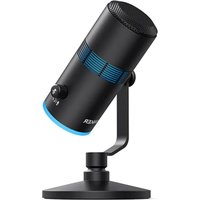
PowerCast M300 - Phone Anker - Free user manual and instructions
Find the device manual for free PowerCast M300 Anker in PDF.


| Product Type | USB Condenser Microphone |
| Brand | Anker |
| Model | PowerCast M300 |
| Power Supply | 5 V / 0.2 A (max) via USB |
| Microphone Capsule | 16 mm Condenser |
| Polar Pattern | Cardioid |
| Audio Resolution | 24-bit / 96 kHz |
| Frequency Response | 20 Hz - 20 kHz |
| Compatibility | Windows® 7 or later, macOS® 10.11 or later |
| Connectivity | USB-C (microphone), 3.5 mm headphone jack |
| Included Cables | USB-C to USB-C, USB-C to USB-A |
| Angle Adjustment | Vertical pivot with tightening screw |
| Volume Control | Knob (mic or headphone volume depending on mode) |
| Mute Function | Push button (blue LED = active, red = muted) |
| RGB Lighting | Dedicated button to change effect; hold for 2 seconds to turn off |
Frequently Asked Questions - PowerCast M300 Anker
User questions about PowerCast M300 Anker
0 question about this device. Answer the ones you know or ask your own.
Ask a new question about this device
Download the instructions for your Phone in PDF format for free! Find your manual PowerCast M300 - Anker and take your electronic device back in hand. On this page are published all the documents necessary for the use of your device. PowerCast M300 by Anker.
USER MANUAL PowerCast M300 Anker
natural_image
Line drawing of a vintage-style microphone with adjustable arm and base (no text or symbols)Anker PowerCast M300
USER MANUAL
| English01 | |
| Čeština | 04 |
| Dansk | 07 |
| Deutsch | 10 |
| Español | 13 |
| Suomi | 16 |
| Français | 19 |
| Italiano | 22 |
| Nederlands | 25 |
| Norsk | 28 |
| Język polski | 31 |
| Portugues do Brasil | 34 |
| Русский | 37 |
| Svenska | 40 |
| Türkçe | 43 |
| 日本語 | 46 |
| 한국어 | 49 |
| 简体中文 | 52 |
| 繁體中文 | 55 |
| لعربية | 58 |
| لاوي | 61 |
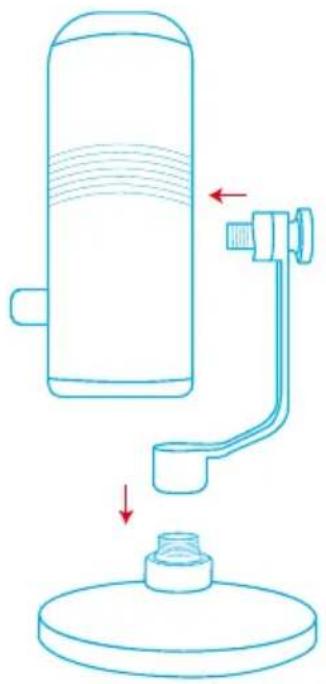
Assembly
-
Securely tighten the base to the thread mount of your microphone.
-
Adjust the angle of the microphone by swiveling the microphone up and down, then tighten the screw.
natural_image
Line drawing of a cylindrical device with a connecting rod and base, showing fluid flow direction (no text or symbols)Connecting
-
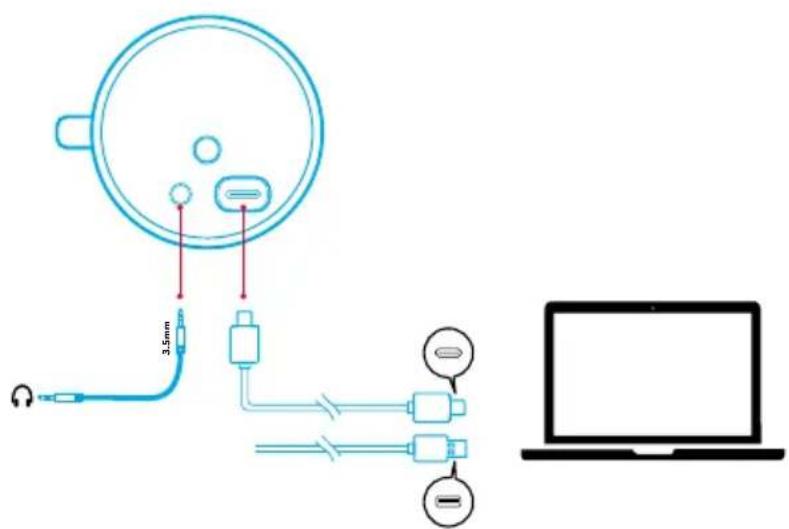
Connect the microphone to your PC via the provided USB-C to USB-C cable or USB-C to USB-A cable.
-
Connect to your headphones via a 3.5mm audio cable.
You might need to manually select PowerCast M300 for your PC system.
- macOS
System Preferences > Sound > Input
- Windows
Right-click on the sound icon > Open Sound settings > Choose your input device
Light Show
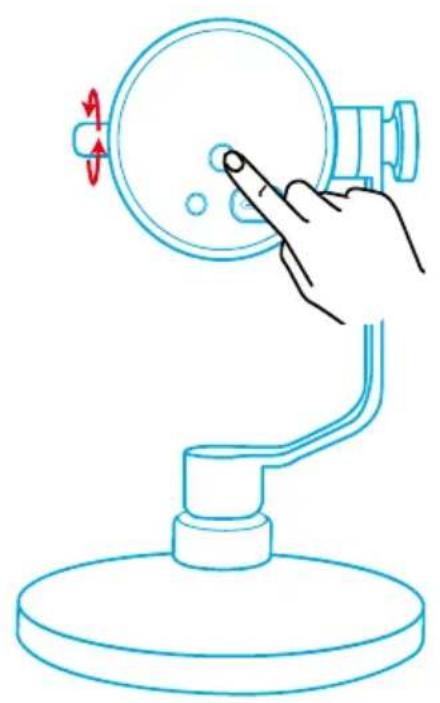
Press the RGB button on the bottom of the microphone to switch light effects. To turn off the light effects, press and hold the RGB button for 2 seconds.
natural_image
Line drawing of a hand pressing a button on a desk lamp (no text or symbols)Controls
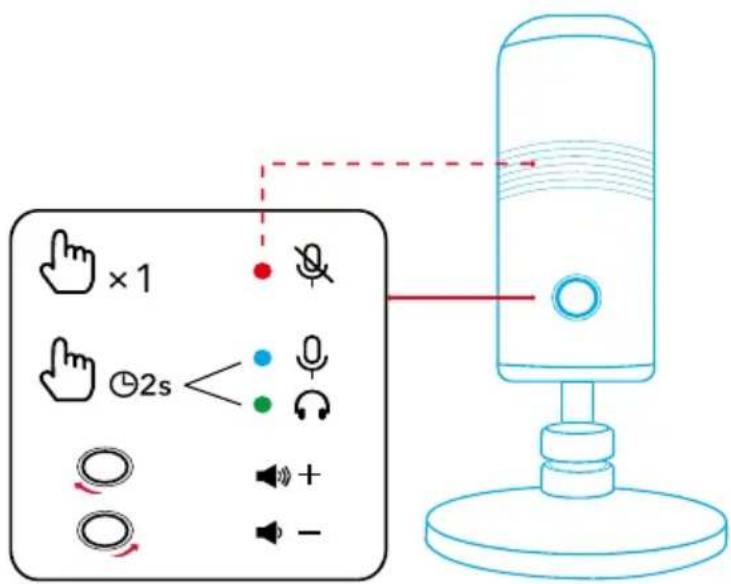
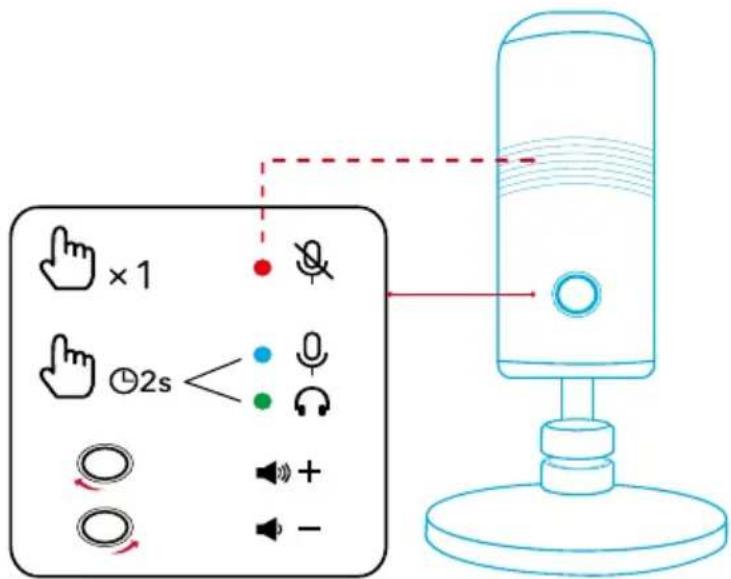
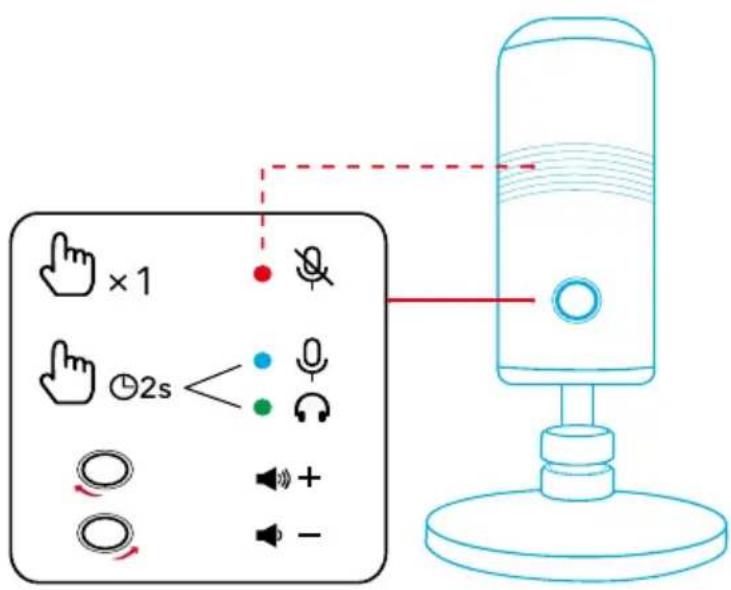
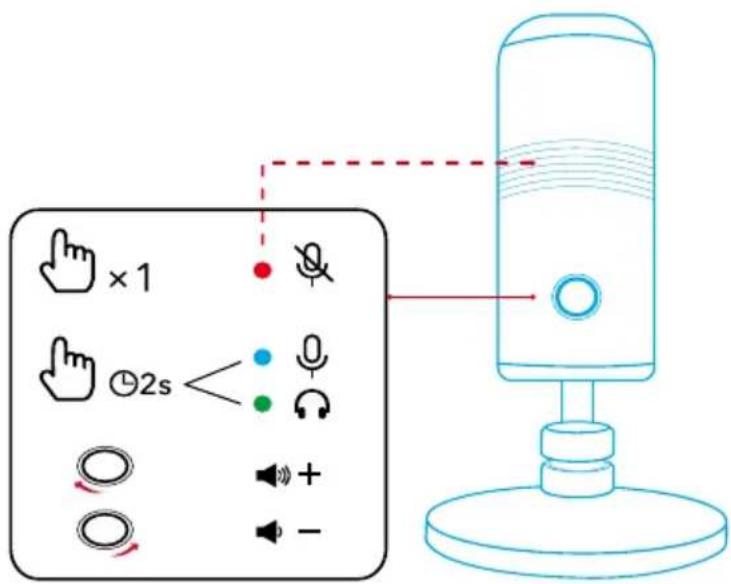
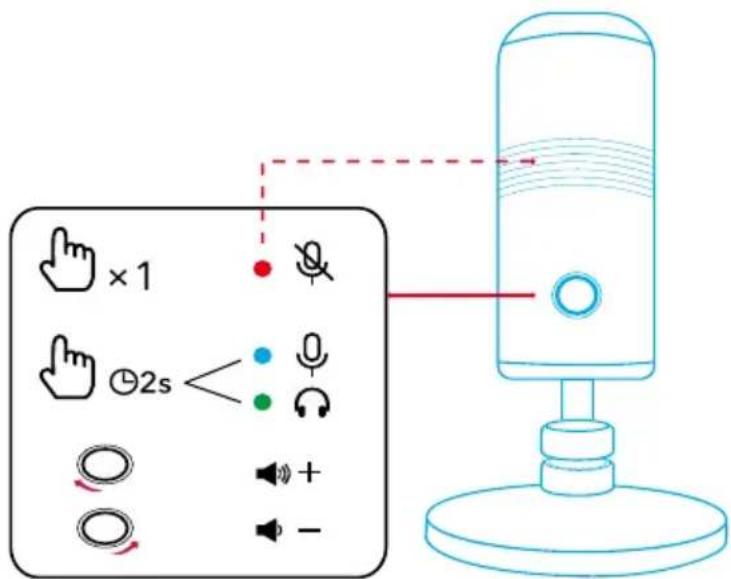
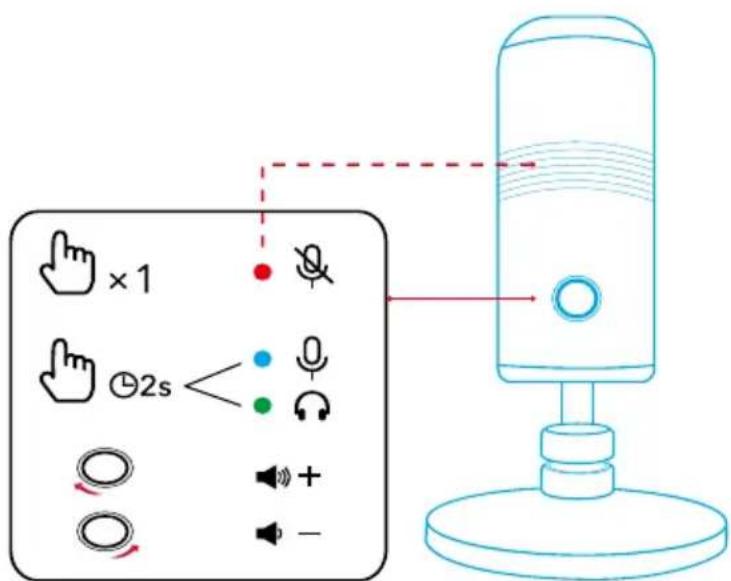
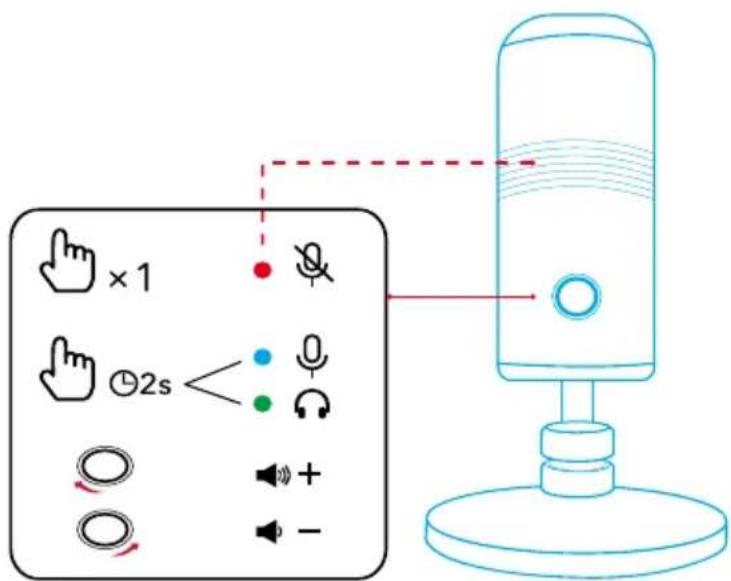
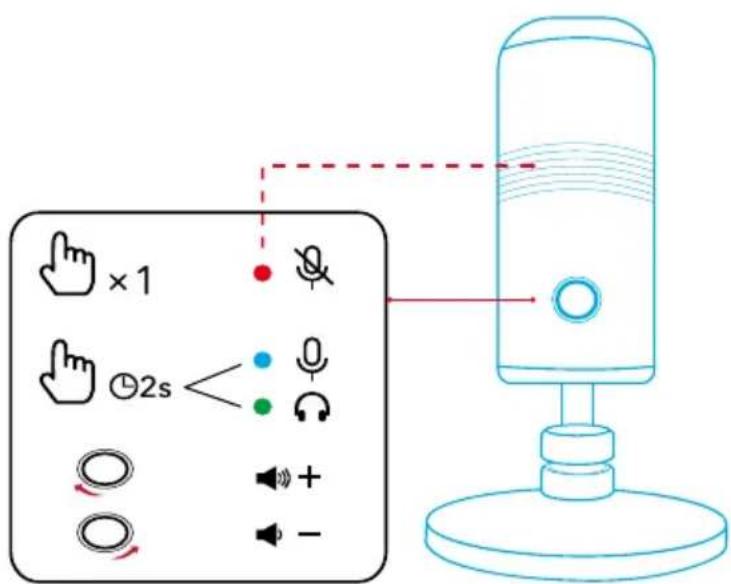
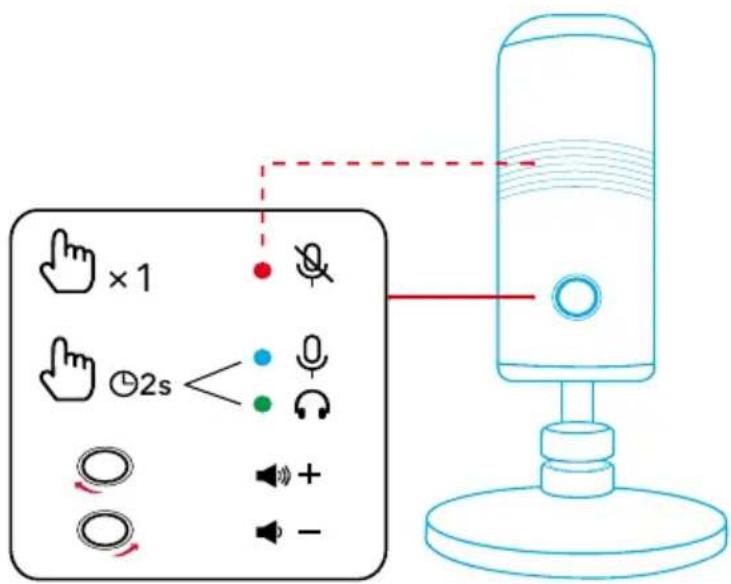
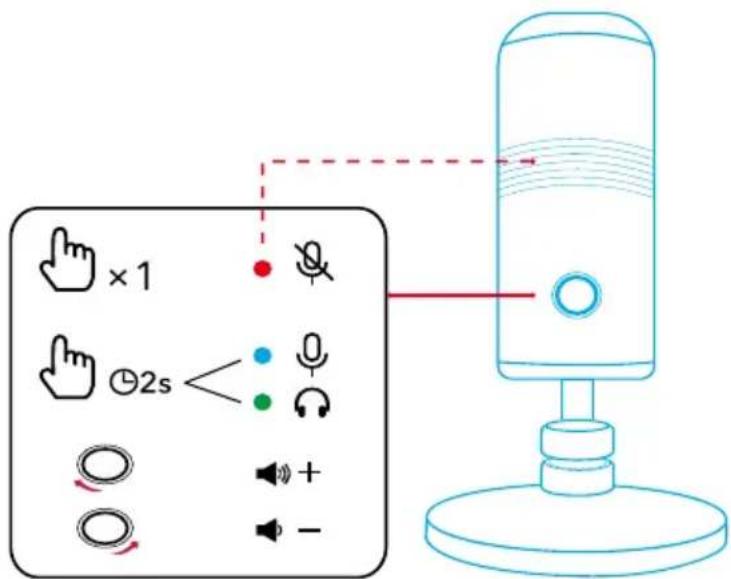
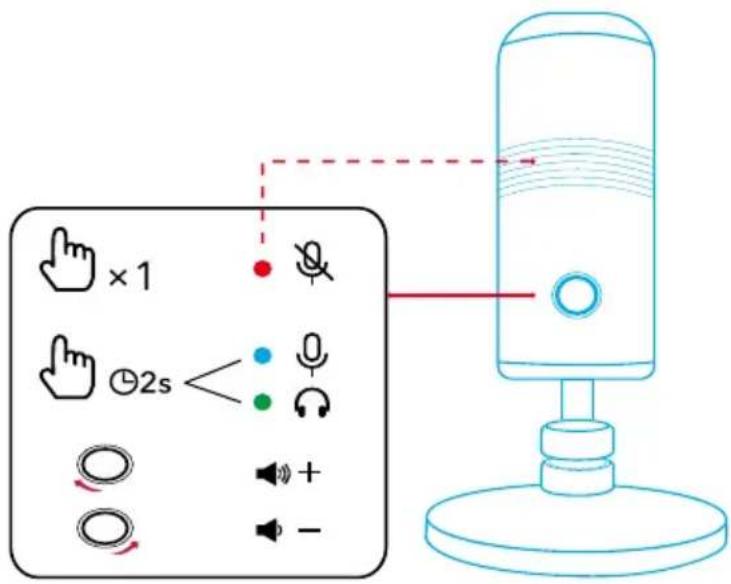
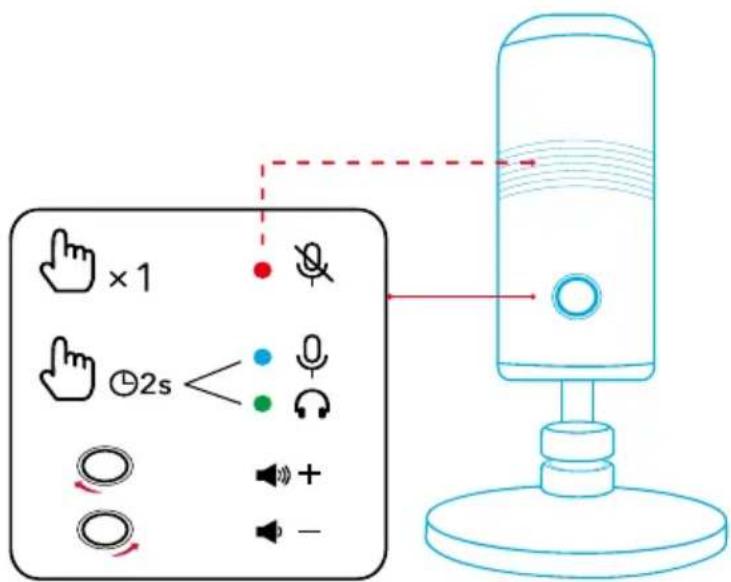
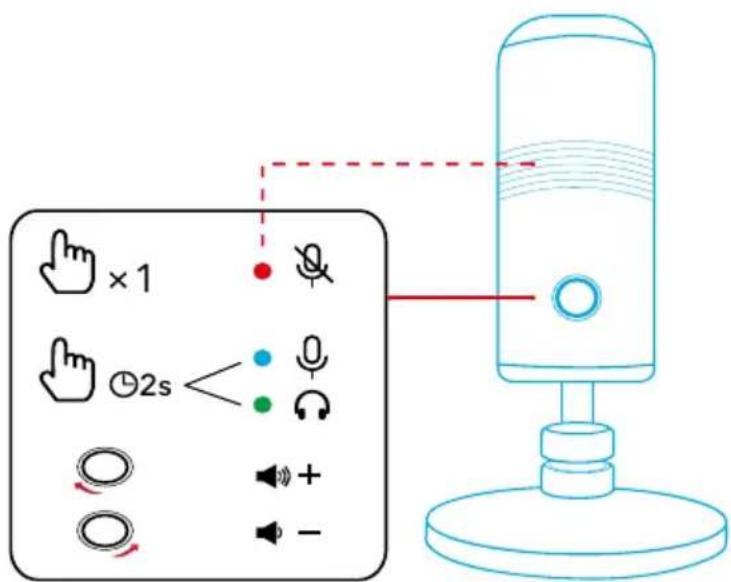
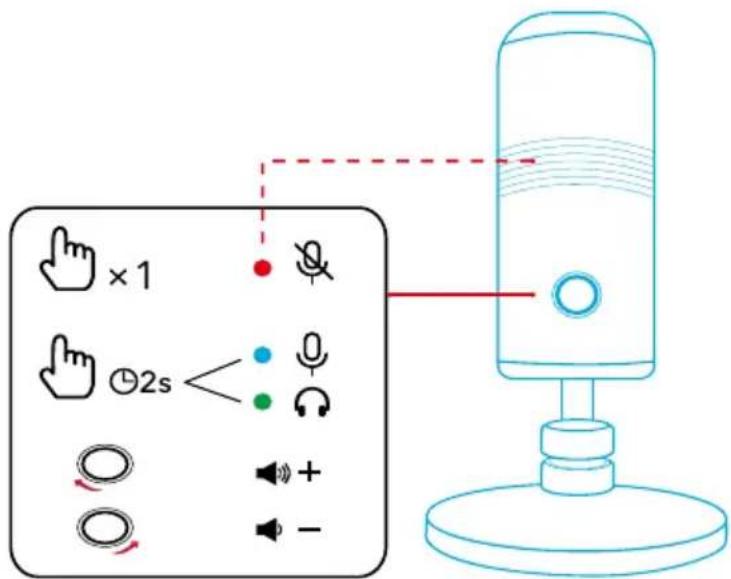
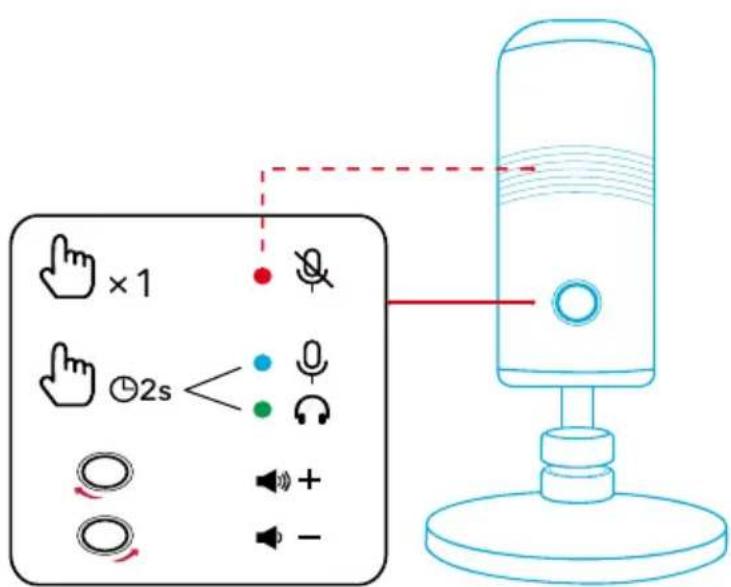
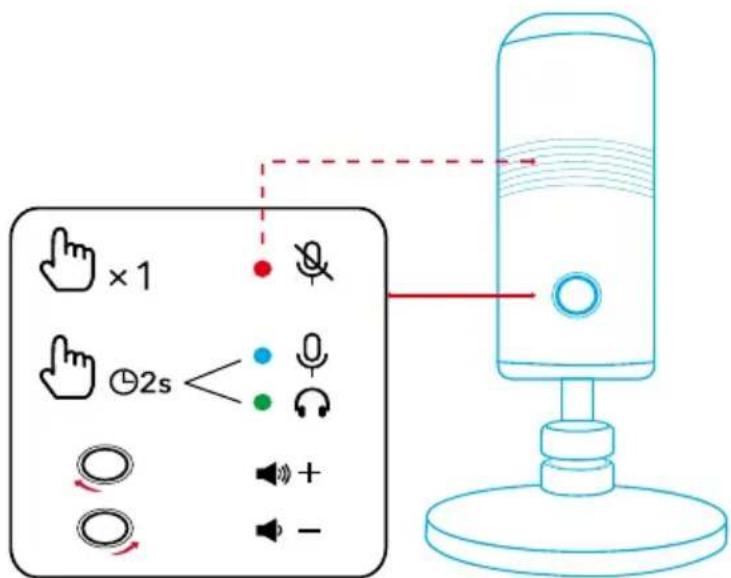
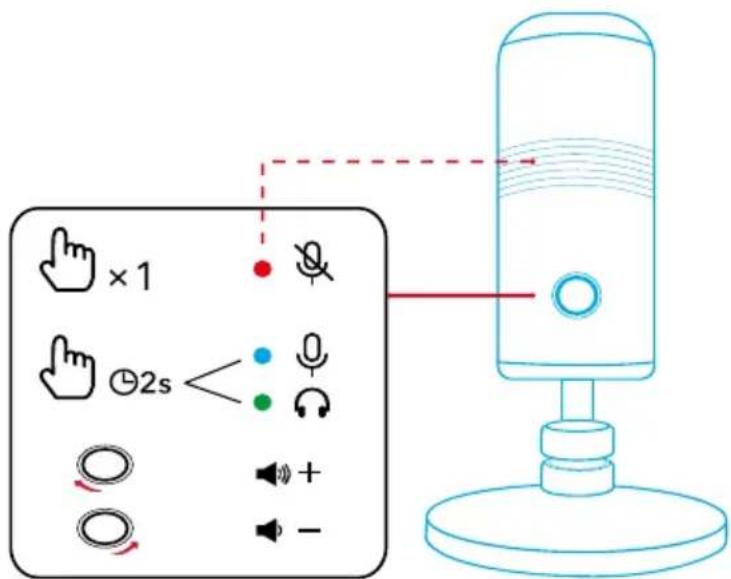
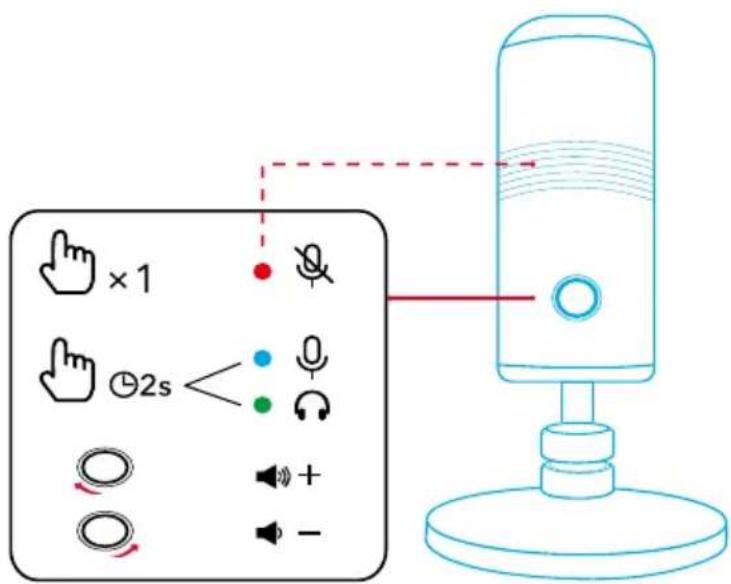
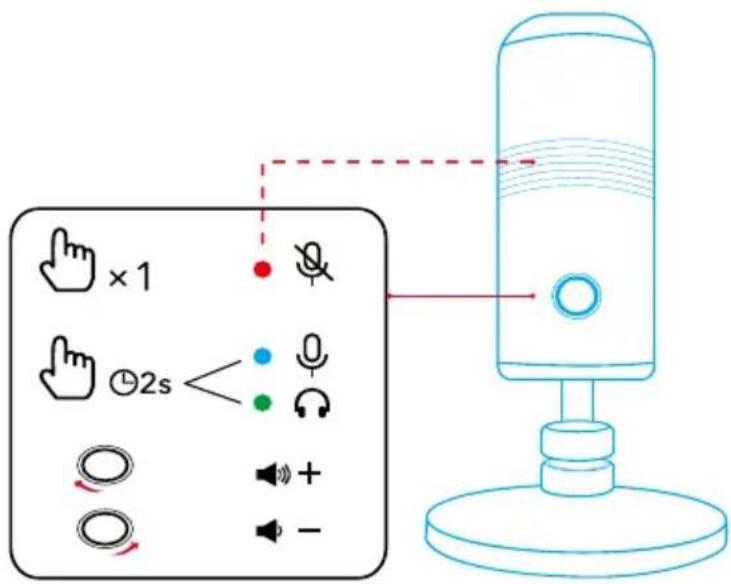
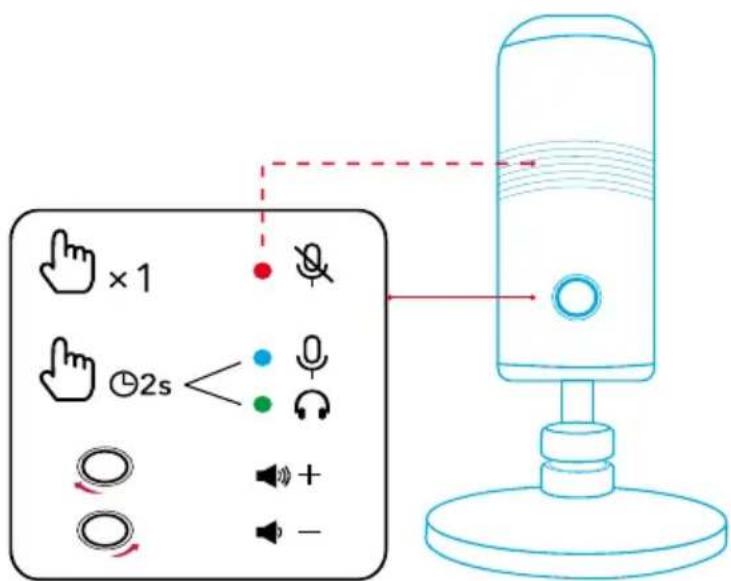
| Microphone on Press once Solid | blue | |
| Microphone off Press once Solid | red | |
| Switch to microphone control status | Press and hold for 2 seconds | Solid blue |
| Microphone volume up / down | Rotate in microphone control status | Solid blue; brightness varying with volume |

| Switch to headphone control status | Press and hold for 2 seconds | Solid green |
| Headphone volume up / down | Rotate in headphone control status | Solid green |
Specifications
| Input 5V 0.2A (Max) | --- |
| Microphone 16mm condenser | capsule |
| Polar pattern Cardioid | |
| Bit depth 24 bit / 96 kHz | |
| Frequency response 20 Hz - 20 kHz | |
| Compatibility Windows® 7 or later, macOS® 10.11 or later |
Montáž
natural_image
Line drawing of a cylindrical device with a stand and a connecting rod, showing fluid flow direction (no text or symbols)Připojení
natural_image
Line drawing of a hand pressing a button on a mechanical device (no text or symbols)Ovládání

natural_image
Diagram of a cylindrical device with a stand and a connecting rod, showing fluid flow direction (no text or symbols)natural_image
Line drawing of a hand operating a circular device with a pointer, mounted on a base (no text or symbols)Kontroller
natural_image
Diagram of a cylindrical device with a stand and attached piping, showing fluid flow direction (no text or symbols)Verbinden
natural_image
Line drawing of a hand operating a remote control device on a stand (no text or symbols)Steuerung

natural_image
Line drawing of a cylindrical device with a stand and a connecting rod, showing fluid flow direction (no text or symbols)Conexión
natural_image
Line drawing of a hand pressing a button on a mechanical device (no text or symbols)Controles
natural_image
Diagram of a cylindrical device with a connecting rod and base, showing fluid flow direction (no text or symbols)natural_image
Line drawing of a hand pressing a button on a mechanical device (no text or symbols)Säätimet
natural_image
Diagram of a cylindrical device with a connecting rod and base, showing fluid flow direction (no text or symbols)Connexion en cours
natural_image
Line drawing of a hand pressing a circular component on a stand, with no text or symbols present.Commandes

natural_image
Line drawing of a cylindrical device with a stand and a connecting rod, showing fluid flow direction (no text or symbols)natural_image
Line drawing of a hand pressing a button on a mechanical device (no text or symbols)Comandi

natural_image
Diagram of a cylindrical device with a stand and attached piping, showing fluid flow direction (no text or symbols)Verbinden
natural_image
Line drawing of a hand pressing a button on a mechanical device (no text or symbols)Bedieningselementen

natural_image
Line drawing of a cylindrical device with a connecting rod and base, showing fluid flow direction (no text or symbols)Kobler til
natural_image
Line drawing of a hand operating a vintage camera on a stand with a curved handle (no text or symbols)Kontroller
natural_image
Line drawing of a cylindrical device with a stand and a connecting rod, showing fluid flow direction (no text or symbols)Łaczenie
natural_image
Line drawing of a hand pressing a circular component on a stand, with no text or symbols present.Sterowanie
natural_image
Diagram of a cylindrical device with a connecting rod and base, showing fluid flow direction (no text or symbols)Conectando
natural_image
Line drawing of a hand pressing a circular component on a stand, with no text or symbols present.Controles
natural_image
Line drawing of a cylindrical device with a stand and a separate base, showing fluid flow direction (no text or symbols)Подключение
natural_image
Line drawing of a hand interacting with a circular device mounted on a base, showing motion arrows (no text or symbols)Элементы управления
natural_image
Line drawing of a cylindrical device with a stand and a connecting rod, showing fluid flow direction (no text or symbols)Ansluter
natural_image
Line drawing of a hand pressing a circular component on a stand, with no text or symbols present.Kontroller

natural_image
Diagram of a cylindrical device with a stand and a connecting rod, showing fluid flow direction (no text or symbols)Bağlantı
natural_image
Line drawing of a hand pressing a button on a mechanical device (no text or symbols)Kontroller
natural_image
Line drawing of a cylindrical device with a stand and a connecting rod, showing fluid flow direction (no text or symbols)接続
natural_image
Line drawing of a hand pressing a button on a mechanical device (no text or symbols)操作方法

natural_image
Diagram of a cylindrical device with a connecting rod and base, showing fluid flow direction (no text or symbols)연결 중
natural_image
Line drawing of a hand pressing a button on a mechanical device (no text or symbols)컨트롤

natural_image
Line drawing of a cylindrical device with a stand and a valve, showing fluid flow direction (no text or symbols)连接
natural_image
Line drawing of a hand pressing a button on a mechanical device (no text or symbols)控制

natural_image
Line drawing of a cylindrical device with a connecting rod and base, showing fluid flow direction (no text or symbols)連線
natural_image
Line drawing of a hand pressing a button on a mechanical device (no text or symbols)控制項
麥克風開啟 按一下 持續亮起藍燈
麥克風關閉 按一下 持續亮起紅燈
natural_image
Line drawing of a cylindrical device with a stand and a separate support, showing fluid flow direction (no text or symbols)الاتصال
natural_image
Line drawing of a hand pressing a circular component on a stand, with no text or symbols present.عناصر التحكم
natural_image
Line drawing of a cylindrical device with a stand and a separate arm, showing fluid flow direction (no text or symbols)תָרְשָׁ
USB-C 721 USB-C-7 USB-C 721 USB-C-721 USB-C-721 USB-C-721 USB-C-721 USB-C-721 USB-C-721 USB-C-721 USB-C-721 USB-C-721 USB-C-721 USB-C-721 USB-C-721 USB-C-721 USB-C-721 USB-C-7
.הכלה USB-A-7
PowerCast M300
•mac(
natural_image
Line drawing of a hand operating a circular device mounted on a base, with no text or symbols present.תַלְרָה
| הכלההוּרָהוּרָהוּרָהוּרָהוּרָהוּרָהוּרָהוּרָהוּרָהוּרָהוּרָהוּרָהוּרָהוּרָהוּרָה�ּרָהוּרָהוּרָהוּרָהוּרָהוּרָהוּרָהוּרָהוּרָהוּרָהוּרָהוּרָהוּרָהוּרָהוֱרָהוּרָהוּרָהוּרָהוּרָהוּרָהוּרָהוּרָהוּרָהוּרָהוּרָהוּרָהוּרָהוּרָהוּר |

| הכלההוּרָהעַרְהעַרְהעַרְהעַרְהעַרְהעַרְהעַרְהעַרְהעַרְהעַרְהעַרְהעַרְהעַרְהעַרְהעַרְהפֹרִי | הכלההוּרָהעַרְהעַרְהעַרְהעַרְהעַרְהעַרְהעַרְהעַרְהעַרְהעַרְהעַרְהעַרְהעַשְׁהעַשְׁהעַשְׁהעַשְׁהעַשְׁהעַשְׁהעַשְׁהעַשְׁהעַשְׁהעַשְׁהעַשְׁהעַשְׁ | הכלההוּרָהעַשְׁהעַשְׁהעַשְׁהעַשְׁהעַשְׁהעַשְׁהעַשְׁהעַשְׁהעַשְׁהעַשְׁהעַשְׁ |
בְרַעָה