
MD200E-P - Musical instrument Vevor - Free user manual and instructions
Find the device manual for free MD200E-P Vevor in PDF.
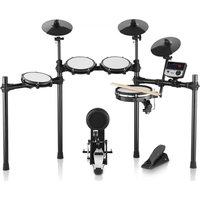


| Product type | Electronic drum set (digital percussion kit) |
| Brand | Vevor |
| Model | MD200E-P |
| Number of pieces | 32 drum kits, 480 sounds, 30 demo songs |
| Power supply | 9 V DC power adapter (included), 100-240 V AC power input |
| Maximum dimensions (stand extended) | Width not exceeding 1.2 meters |
| Connectivity | USB-MIDI port, audio input (3.5 mm), audio output (6.35 mm), headphone (6.35 mm), cymbal expansion port, DC power input |
| Built-in metronome | Yes, 9 types of beats, BPM adjustment 30-250 |
| Training modes | 3 modes: accuracy (C-1), silent strike (C-2), speed endurance (C-3) |
| Recording function | Yes, record and playback of a sequence |
| Display | 3-digit LED |
| Per-drum settings | Sensitivity, trigger threshold, crosstalk, repeat (except toms set together) |
| MIDI compatibility | Yes, via USB-MIDI for interaction with music software |
| Maintenance | Clean with a slightly damp soft cloth; avoid heat, humidity, direct sunlight |
| Safety | Compliant with FCC Part 15; do not expose to RF interference sources (radio, TV, router...) |
| Package contents | Sound module, snare, cymbals (3), toms (3), stand, hi-hat pedal, bass drum, drumsticks, cables, power adapter, screwdriver, drum key |
| Country of origin / Importer | Manufacturer: Shanghai... (China); imported in Australia, USA, EU |
| Warranty / Support | Technical support and electronic warranty certificate available at vevor.com/support |
Frequently Asked Questions - MD200E-P Vevor
User questions about MD200E-P Vevor
0 question about this device. Answer the ones you know or ask your own.
Ask a new question about this device
Download the instructions for your Musical instrument in PDF format for free! Find your manual MD200E-P - Vevor and take your electronic device back in hand. On this page are published all the documents necessary for the use of your device. MD200E-P by Vevor.
USER MANUAL MD200E-P Vevor
Technical Support and E-Warranty Certificate
www.vevor.com/support
ELECTRONIC DRUM SET
USER MANUAL
MODEL: MD200E-P
We continue to be committed to providing you with tools at competitive prices.
"Save Half", "Half Price", or any other similar expressions used by us only represent an estimate of savings you might benefit from buying certain tools with us compared to the major top brands and do not necessarily mean to cover all categories of tools offered by us. You are kindly reminded to verify carefully when placing an order with us if you are actually saving half in comparison with the top major brands.
MODEL: MD200E-P
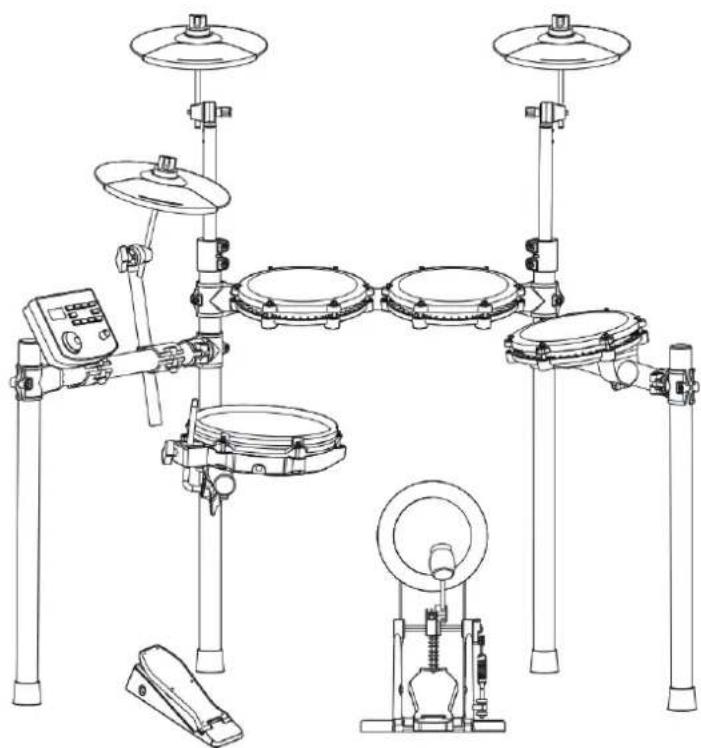
(The picture is for reference only, please refer to the actual object)
NEED HELP? CONTACT US!
Have product questions? Need technical support? Please feel free to contact us:
Technical Support and E-Warranty Certificate www.vevor.com/support
This is the original instruction. Please read all manual instructions carefully before operating. VEVOR reserves a clear interpretation of our user manual. The appearance of the product shall be subject to the product you received. Please forgive us that we won't inform you again if there are any technology or software updates on our product.
Thank you for choosing our electronic drum. Elegant and delicate electronic drum is the perfect combination of modern new electronic technology.
Before using this product, you must read the instructions in detail.
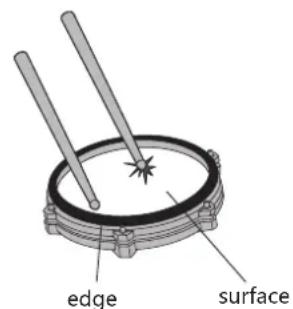
- 32 sets of drums, 480 timbres, 30 songs
- Support the adjustment of sensitivity parameters of each drum
- Three teaching modes
- Speed control: 30 to 250 beats per minute
- Metronome: 1-9 types
- Other functions: parameter storage, reset and recording;
- Three-digit LED display;
- Interfaces: power supply DC, USB, earphone, audio input, audio output
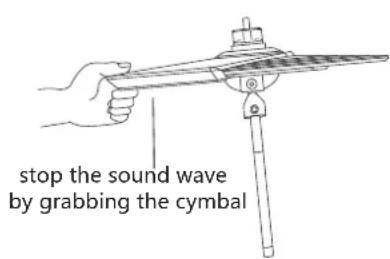
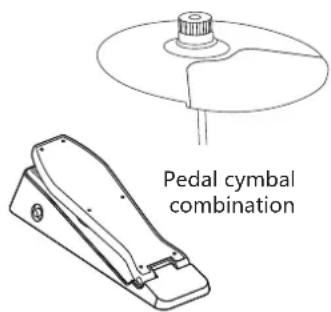
REMARK!
- This product is an electro-acoustic instrument product. It is normal that there is a little current sound in the speaker or earphone after power-on.
Keep away from "radio, TV, antenna receiver, router, refrigerator, TV, motor and other RF electrical interference sources" during use.
FUNCTION INTRODUCTION 1
CONTENTS 2
INSTALLATION GUIDE 3
CHECK THE ATTACHED ITEMS 3
LRON PIPE HOLDER 4
TYMPANIC INTUBATION 4
MOUNTING STAND 5
INSTALL THE DRUM MODULE 5
INSTALL HITTING PARTS AND SOUND MODULE 6
INSTALL THE KICK DRUM
INSTALL THE HAMMER BAR 7
THE KICK DRUM IS FIXED WITH THE STEP HAMMER
PLUG IN THE STRIKING PART CONNECTION CABLE 7
ILLUSTRATION OF SOUND MODULE PORT 8
POWER CORD CONNECTION 8
USB MIDI PORT 8
AUDIO OUTPUT PORT 8
AUDIO INPUT PORT 8
EARPHONE PORT 8
INCREASE PORT 8
BT MODE 8
OPERATION GUIDE 9
POWER 9
DRUM KIT SELECTION 9
METRONOME 9
PRACTICE FUNCTION 9
COACH MODE 9
DEMO SONGS 10
DRUM PARAMETERS 10
RECORDING FUNCTION 10
SAVE/RESET 10
USB MIDI 11
APPENDIX 11
TIMBRE 11
PRESET DRUM KITS 11
USER DEFINED DRUM KITS 11
DEMONSTRATION SONG 11
PRODUCT MAINTENANCE 12
SAFETY PRECAUTIONS 13
REMARK!
- Please follow the instructions and read the "safety precautions" in the User Manual carefully before using.
- This product must be installed by an adult; please do not let minors install it independently.
01
Check the attached items
- After opening the package, please check whether it contains all the items immediately. If there are any omissions, please contact your dealer.
Sound module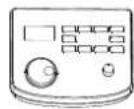

Module bracket, Snare, Cymbal *3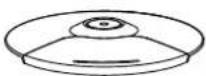
Tom (3 pcs)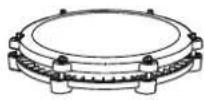
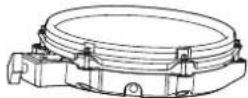
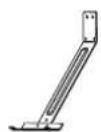

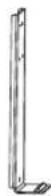
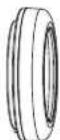
2 PCS, 2 PCS, 6 PCS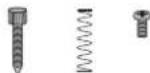
Kick front bracket, connecting bracket, rear support pedal
Cymbal arm (3 pcs)
Hi-hat pedal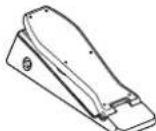
Drum srm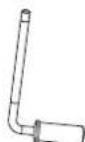
Bolt driver
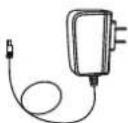
Signal connection cable, power adapter, drum key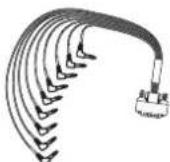

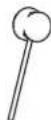
Drum stick, stick hammer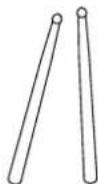
02
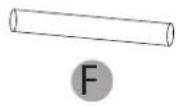
Iron pipe holder
The stand is located in a small individual package inside the box.
A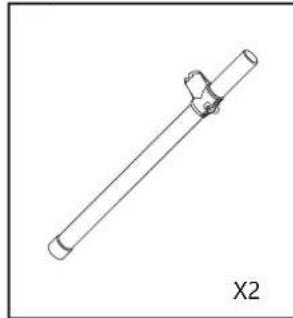
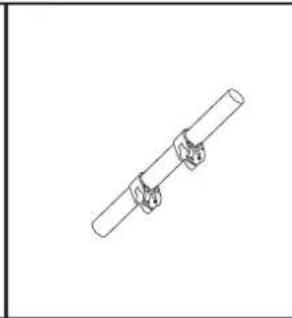
C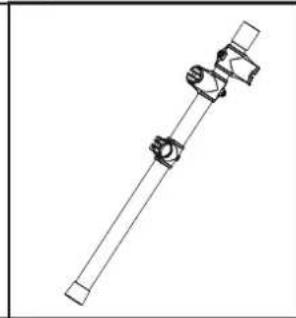
D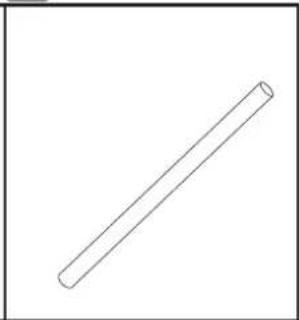
E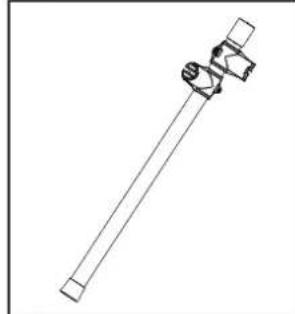
F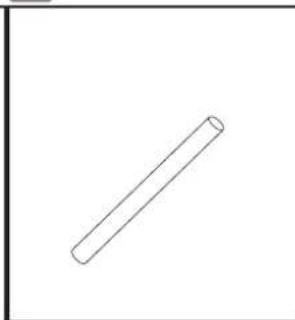
G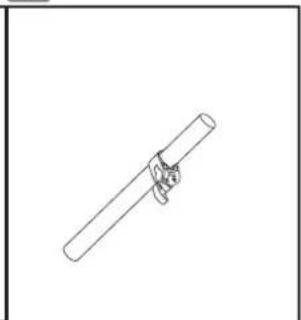
03
Tympanic intubation
Install the drum on the drum support bar.
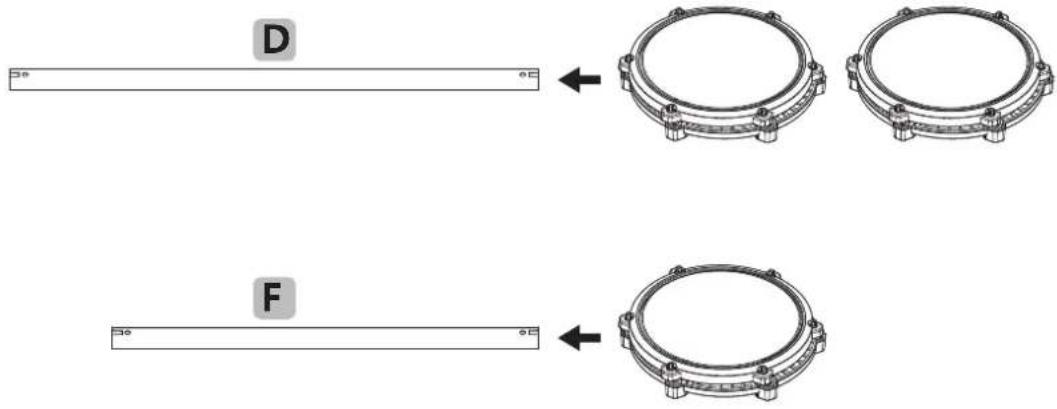
04
Mounting stand
- During installation, tighten the screws and be careful not to pinch your fingers.
- Assemble the bracket in the specified direction.

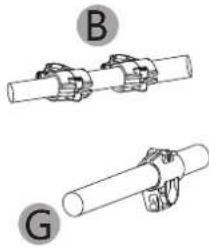

D
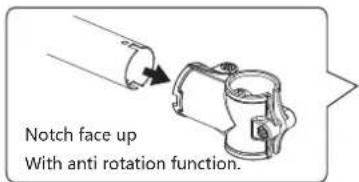


For safety reasons, the expansion width of the support should not exceed 1.2 meters.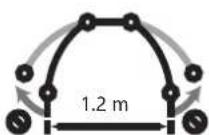
05
Install the Drum module
- Insert it fully into place during installation.
←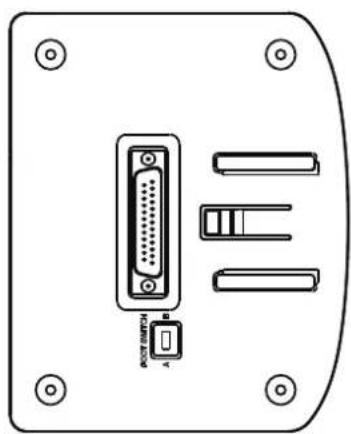
Align the mainframe drum module with the mainframe box track and insert it. After inserting it to the bottom, you will hear the snap pieces pop up.
06
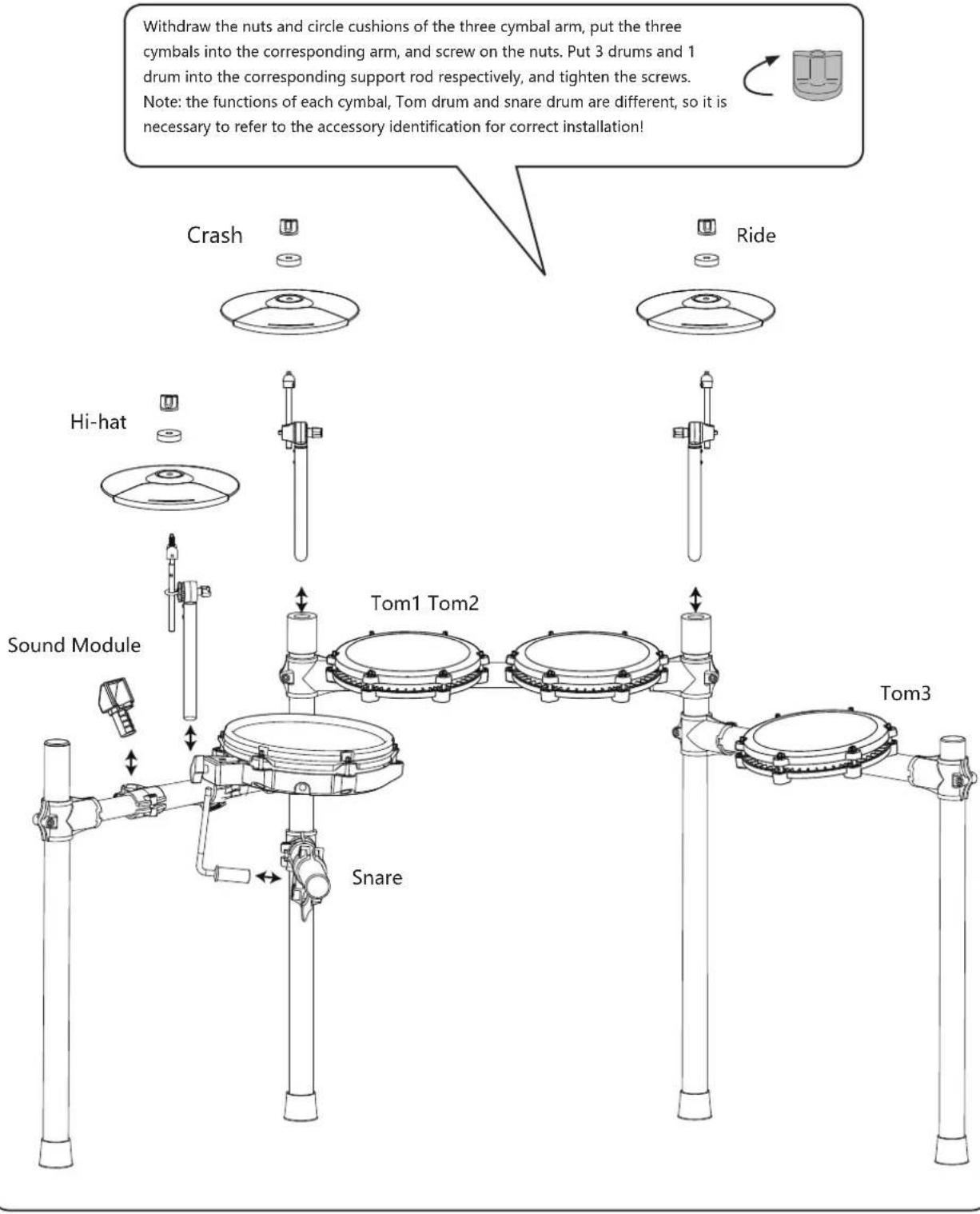
Install hitting parts and sound module
- Tighten the screws after the drum is inserted to avoid loosening.
- Be sure not to tighten the cymbal too tightly, leave some space for them to move up and down.
07
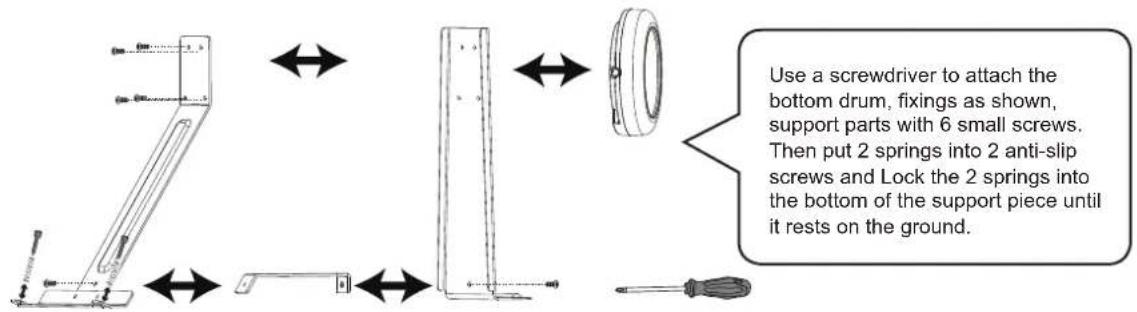
Install the kick drum
- When installing, please tighten the screws and be careful not to pinch your fingers.
08
Install the hammer bar
The pole should be inserted in place and the screws should be tightened to avoid loosening.
Insert the hammer rod into the round hole as shown in the figure, rotate the wool hammer to align it with the drum surface, and then tighten it with the drum key.
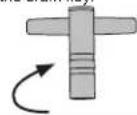
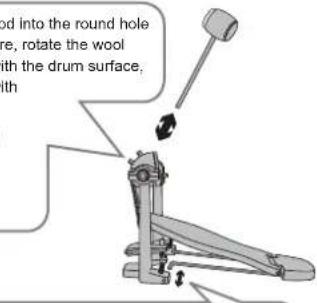
Insert the fixed iron bar into the hole as shown in the figure.
09
The kick drum is fixed with the step hammer
- The bottom drum and the step hammer should be fixed and tightened to avoid falling off.
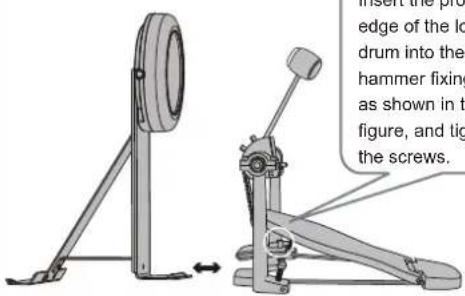
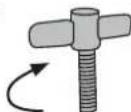
Insert the protruding edge of the low drum into the hammer fixing clip as shown in the
figure, and tighten the screws.
10
Plug in the striking part connection cable
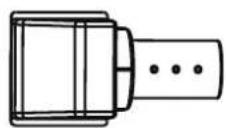
- Please insert the connection cable in place to avoid poor contact and insert it correctly as shown in the diagram.
Please check whether the bottom drum makes sound. If there is no sound, please turn the switch: Switch in A: mechanical kick drum mode. Switch in B: pedal mode.
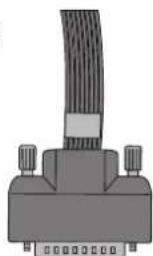
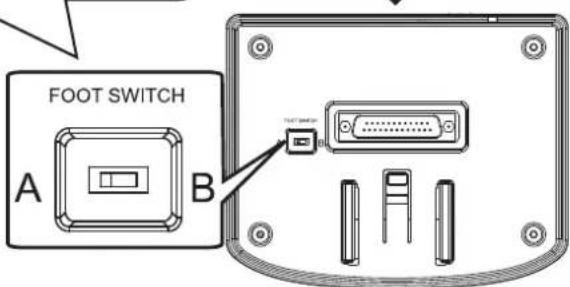

ILLUSTRATION OF SOUND MODULE PORT
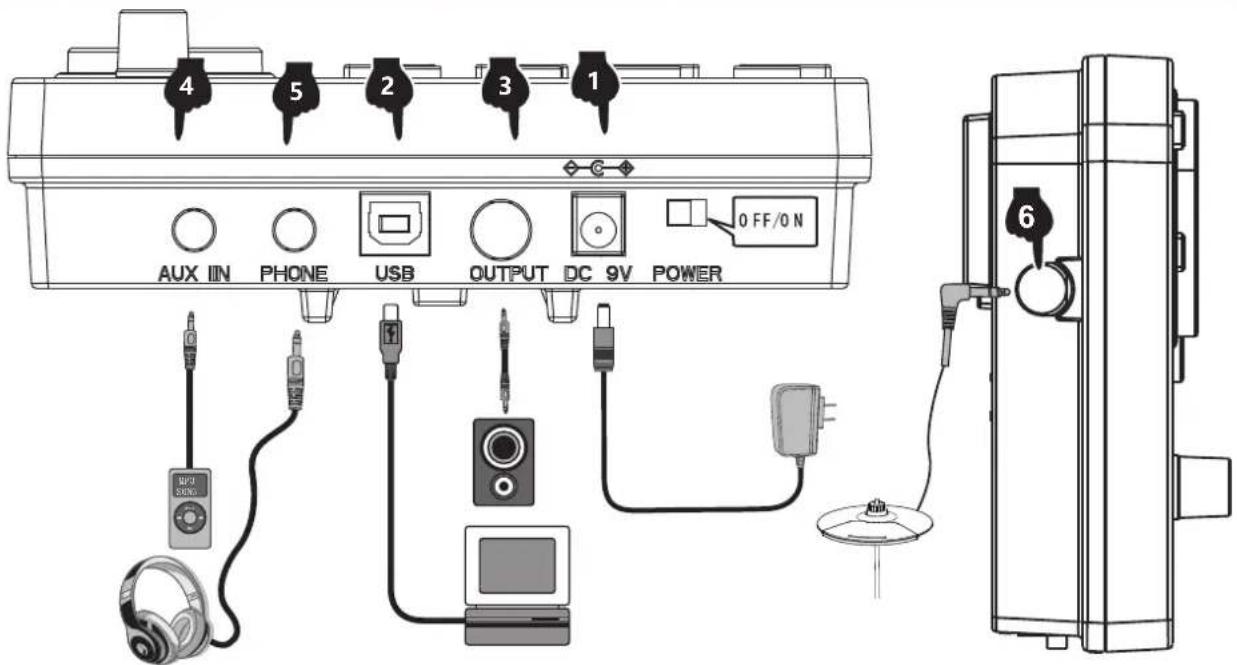

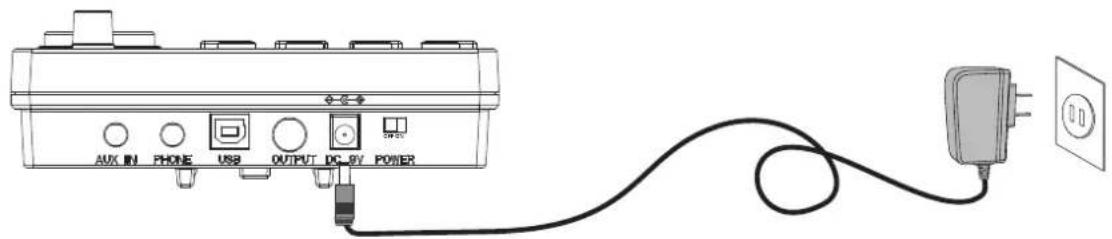
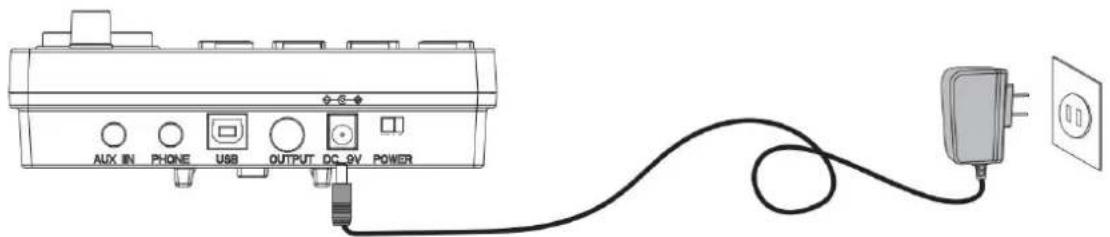
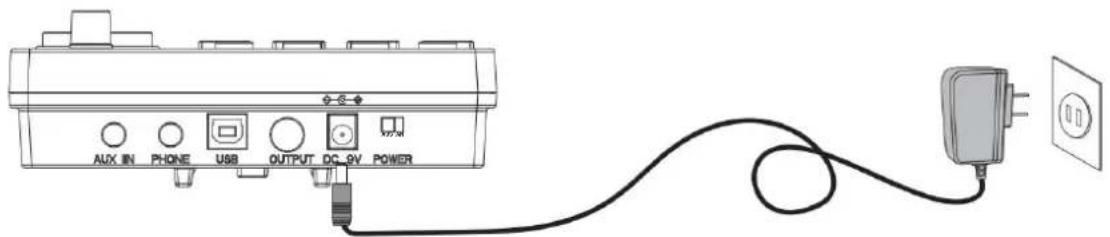
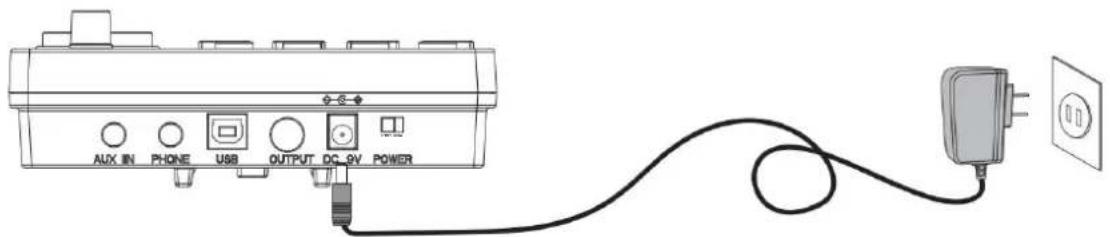
POWER CORD CONNECTION
- When in use, connect the power terminal according to the diagram. Insert the power outlet of the sound module at one end and a 100-240V household power outlet at the other end. (Fig. 1)
- If you do not use this product for a long time, please pull out the power plug and keep it properly.

USB MIDI PORT
The use of the electronic drum MIDI USB interface can interact with music devices with MIDI.
- Through the pre-installed music software on computers and mobile phones, we can learn to play, compose music, store, and other functions. (Fig. 2)
- When connected to a computer or mobile phone, the audio output of the device needs to be connected to the audio input socket of the module box in order to synchronize the sound effects on the device. (Fig. 5)

AUDIO OUTPUT PORT
Audio output port can be connected with active speaker (special electronic drum speaker) and large audio equipment. (Fig. 3)

AUDIO INPUT PORT
Audio input port can connect the sound source playback device to the module box for playback (such as MP3, mobile phone and other audio signal input). (Fig. 4)

EARPHONE PORT
Connecting headphones monitors the details of percussion and does not disturb others when playing without connecting speakers. (Fig. 5)

INCREASE PORT
This port allows you to add a cymbal for easy expansion. (Figure 6)
1 POWER
Insert the DC plug into the DC 9V port on the top of the control unit. Slide the POWER switch to the right (viewed from the front) to power up the drum kit. To turn the drum kit off slide the switch to the left.
2 DRUMKITSELECTION
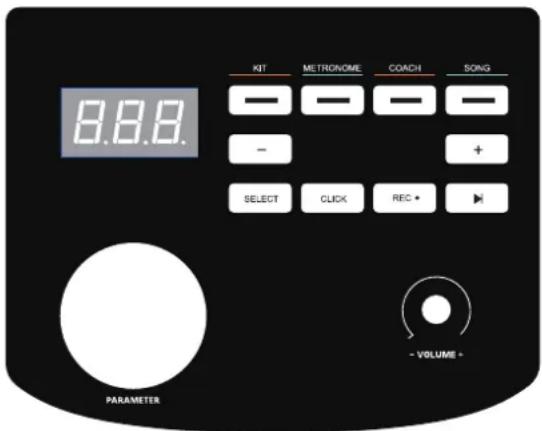
Press the KIT button to show the current drum kit. Turn the parameter wheel or use the < - / + > buttons to select the desired drum kit.There are 32 drum kits to choose from - see drum kit list on page 11.
3 METRONOME
- Press the METRONOME button to enter the metronome mode.
- The screen will display the speed value(120 BPM default speed). Turn the parameter wheel or use the +/- buttons to change the metronome speed. Press the CLICK button to start the metronome.
- Press the SELECT button in metronome mode, and the screen will jump to the metronome parameter adjustment interface. You can press the +/- buttons to select the parameter you want to adjust:
A. r (beat type: 2, 4, 8, 16) B. b (beat number: 01-09) C. L (metronome volume: 00 (off) - 31), and then turn the parameter wheel to adjust the parameter settings.
- Once the parameters have been adjusted, press the SELECT button to confirm and exit the parameter interface. Then use the Click button to start and stop the metronome as desired.
4 PRACTICE FUNCTION
The "coach" mode of this product can help establish speed, accuracy, and endurance, and help cultivate a better sense of rhythm through practice. Make progress under the supervision of the "coach" mode! Press the "coach" button to enter the coach mode. In this mode, there are three practice modes. Select the practice mode through the data wheel or the < + > < -> button.
- Exercise mode 1: C-1 beat detection exercise: beat the drum at a fixed speed to train the accuracy of the blow.
- Practice mode 2: C-2 silent strike mode: the metronome will sound one section and mute one section to train strike accuracy without a metronome prompt. It is an advanced version of practice mode 1.
- Practice mode 3: C-3 speed strike practice: the metronome will automatically change the speed, increasing from the slowest to the fastest, and then decreasing from the fastest to the slowest, so as to practice strike endurance.
5 COACH MODE
- The "coach" training mode of this product can help establish speed, accuracy, and endurance. Press the COACH button to enter the coach mode. In this mode, there are three practice modes. Use the parameter wheel to select which practice mode.
A. Exercise mode 1: C-1 beat detection exercise - beat the drum at a fixed speed to train the accuracy of the blow. B. Practice mode 2: C-2 silent strike mode - the metronome will sound one section and mute one section to train when there is no beat. C. Practice mode 3: C-3 speed strike practice - the metronome will automatically change the speed from the slowest to the fastest and then from the fastest to the slowest.
- Once the coaching mode has been chosen, press the CLICK button. The metronome beats will start and you can play along on the drum for practice.
- After four preliminary beats, the display will show:
(too slow)
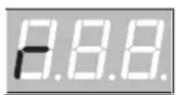
(good)
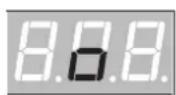
(too fast)
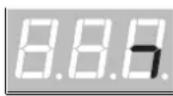
- Once you have completed the coaching mode, a score will be displayed from 0-100 evaluating the accuracy of the exercise. C-1 mode: Press the SELECT button to enter the parameter setting interface. You can adjust the number of practice sessions as required (01-32). The number of sessions to practice determines the length of this exercise. C-2 mode: Press the SELECT button to enter the parameter setting interface. You can adjust the number of practice sessions as required (04-32). The number of sessions to practice determines the length of this exercise. C-3 mode: Press the SELECT button to enter the parameter setting interface. You can adjust the rate at which the BPM changes (01-09 BPM).
- Press the Click button again to end the coach mode.
6 DEMO SONGS
- Press the SONG button to enter the demo mode. There are 30 demos to choose from. The screen will display the current demo song number (01-30).
- Press the < button to start playing the demo songs. To stop playing, press the < button again.
- Turn the parameter wheel or press the +/- buttons to select a demo song.
- Press the SELECT button in song mode to jump to the song parameter setting interface. You can turn the drum sound on or off by turning the parameter wheel (the drum sound is on by default).
- Press the SELECT button to confirm and exit the parameter interface.
7 DRUM PARAMETERS
- Press the KIT button and the screen will display 01 (drum kit number). Press SELECT to enter the drum parameter adjustment mode.
- Tap the drum you want to adjust, and then press the +/- buttons to select the parameter for adjustment. Sensitivity
A. S (01-06). Trigger threshold t (01-32). Crosstalk threshold c (01-32). B. Repeated trigger r (01-32). Drum Force V (01-03). Drum volume L (00-31).
- Change the parameters by rotating the parameter wheel and long press the - button to save. The screen will display SAV to indicate the parameter adjustment has been saved successfully.
- To restore the drum parameters back to factory settings, long press the + button until the screen displays RES.
- PLEASE NOTE: The parameters for the 3 tom drums cannot be set individually.
- Press the REC button when the indicator light is in the "KIT" and "CLICK" states, and the screen displays the word "REC" in a breathing flashing state, entering the recording preparation state.
- Tap any drum and the metronome sounds. At this time, the screen displays "---" in a flashing state of breathing and starts recording.
- Press the REC key or PLAY key again, the recording stops and "A-1" is displayed on the screen.
- Press PLAY to start playing the current recording, and press again to stop playback.
- If you enter the recording preparation state again without any knocking, the "A-1" recorded last time is played back.
SAVE/RESET
- To save parameters, long press the -> button and the screen will display SAV.
- To reset parameters, long press the + button and the screen will display RES.
10 USB MIDI
To use the drum kit's MIDI function, plug a USB-B data cable (not included with this drum kit) into the control unit and connect to a PC or smartphone.
Timbre
Kick.
- Pop Kick
- Funk Kick
- Hard Kick
- Original Kick
- PopRock Kick
- Rock Kick
7. Metal Kick
- PowerMetal Kick
- SpeedMetal Kick
- PopJazz Kick
- Jazz Kick
12.808
13.909
- Songo Kick
- Standard Kick
- Acoustic Kick
- Session Kick
18. Modern Kick
- Blues Kick
- Classic Kick
- Synthgaze Kick
- Freak Kick
- Sticks Kick
- Grunge Kick
25.70's Kick
26.80's Kick
- Popular Kick
- Slam Kick
- Attack Kick
- Old Kick
- Fairfax Kick
- Military Kick
Snare.
- Pop Snare
- Funk Snare
- Hard Snare
- Original Snare
- PopRock Snare
- Rock Snare
Metal Snare
- PowerMetal Snare
- SpeedMetal Snare
- PopJazz Snare
- Jazz Snare
44.808
45.909
- Songo Snare
47.Standard Snare
- Acoustic Snare
- Session Snare
50.Modern Snare
- Blues Snare
- Classic Snare
- Synthgaze Snare
- Freak Snare
- Sticks Snare
- Grunge Snare
57.70's Snare
- 80's Snare
- Popular Snare
- Slam Snare
- Attack Snare
- Old Snare
- Fairfax Snare
- Military Snare
- Pop Snare Rim
- Fuck Snare Rim
67. Hard Spare Rims
- Original Snare Rim
- PopRock Snare Rim
- Rock Snare Rim
71. Metal Snare Rim
- PowerMetal Snare Rim
- SpeedMetal Snare Rim
- PopJazz Snare Rim
- Jazz Snare Rim
76.808
77,909
- Songo Snare Rim
- Standard Snare Rim
- Acoustic Snare Rim
- Session Snare Rim
- Modern Snare Rim
- Blues Snare Rim
- Classic Snare Rim
- Synthgaze Snare Rim
- Freak Snare Rim
- Sticks Snare Rim
- Grunge Snare Rim
89.70's Snare Rim
90.80's Snare Rim
- Popular Snare Rim
- Slam Snare Rim
- Attack Snare Rim
- Old Snare Rim
- Fairfax Snare Rim
96.Military Snare Rim
Tom
- Pop Tom1
- Fuck Tom1
- Hard Tom1
- Original Tom1
- PopRock Tom1
- Rock Tom1
103.Metal Tom1
- PowerMetal Tom1
- SpeedMetal Tom1
- PopJazz Tom1
- Jazz Tom1
108.808
109.909
- Songo Tom1
111.Standard Tom1
- Acoustic Tom1
- Session Tom1
114.Modem Tom1
- Blues Tom1
- Classic Tom1
- Synthgaze Tom1
- Freak Tom1
- Sticks Tom1
- Grunge Tom1
121.70's Tom1
122.80's Tom1
- Popular Tom1
- Siam Tom1
- Attack Tom1
- Old Tom1
- Fairfax Tom1
- Military Tom1
- Pop Tom2
- Fuck Tom2
- Hard Tom2
- Original Tom2
- PopRock Tom2
- Rock Tom2
135.Metal Tom2
- PowerMelai Tom2
- SpeedMetal Tom2
- PopJazz Tom2
- Jazz Tom2
140.808
141.909
- Songo Tom2
143. Standard Tom2
- Acoustic Tom2
- Seesson Tom2
- Modern Tom2
- Blues Tom2
- Classic Tom2
- Synthgaze To
- Freak Tom2 214. Freak Crash1
- Sticks Tom2
- Grunge Tom2
153.70's Tom2
154.80's Tom2
- Popular Tom2
156.Slam Tom2 220.Slam Crash1
- Attack Tom2
- Old Tom2
- Fairfax Tom2
- Military Tom2
- Pop Tom3
- Fuck Tom3
- Hard Tom3
- Original Tom3
- PopRock Tom3
- Rock Tom3
- Metal Tom3
- PowerMetal Tom3
- SpeedMetal Tom3
- PopJazz Tom3
- Jazz Tom3
172.808
173.909
- Songo Tom3
- Standard Tom3
- Acoustic Tom3
- Seesson Tom3
178.Modern Tom3
- Blues Tom3
- Classic Tom3
- Synthgaze Tom3
- Freak Tom3
- Sticks Tom3
- Grunge Tom3
185.70's Tom3
186.80's Tom3
- Popular Tom3
- Slam Tom3
- Attack Tom3
- Old Tom3
- Fairfax Tom3
- Military Tom3
Crash
- Pop Crash1
- Funk Crash1
- Hard Crash
- Original Crash1
- PopRock Crash
- Rock Crash1
199.Metal Crash1
- PowerMetal Crash1
- SpeedMetal Crash
- PopJazz Crash1
- Jazz Crash1
204.808
205.909
- Songo Crash1
- Standard Crash1
- Acoustic Crash1
- Session Crash1
210.ModemCrash1
- Blues Crash
- Classic Crash1
- Synthgaze Crash1
- Freak Crash1
- Sticks Crash1
- Grunge Crash1
217 70's Crash1
218 80's Crash
- Popular Crash1
- Slam Crash1
- Attack Crash1
- Old Crash1
- Fairfax Crash1
- Military Crash1
- Pop Crash1 Rim
- Funk Crash1 Rim
- Hard Crash1 Rim
- Original Crash1 Rim
- PopRock Crash1 Rim
- Rock Crash1 Rim
- Metal Crash1 Rim
- PowerMetal Crash1 Rim
- SpeedMetal Crash1 Rim
- PopJazz Crash1 Rim
- Jazz Crash1 Rim
236.808
237.909
- Songo Crash1 Rim
- Standard Crash1 Rim
- Acoustic Crash1 Rim
- Seesion Crash1 Rim
242. Modem Crash1 Rim
- Blues Crash1 Rim
- Classic Crash1 Rim
- Synthgaze Crash1 Rim
- Freak Crash1 Rim
- Sticks Crash1 Rim
- Grunge Crash1 Rim
249. 70's Crash1 Rim
250.80's Crash1 Rim
- Popular Crash1 Rim
- Slam Crash1 Rim
- Attack Crash1 Rim
- Old Crash1 Rim
- Fairfax Crash1 Rim
- Military Crash1 Rim
Ride
- Pop Ride
- Fuck Ride
- Hard Ride
- Original Ride
- PopRock Ride
- Rock Ride
263.Metal Ride
- PowerMetal Ride
- SpeedMetal Ride
- PopJazz Ride
- Jazz Ride
268.808
269.909
- Songo Ride
271.Standard Ride
- Acoustic Ride
- Session Ride
- Modern Ride
- Blues Ride
- Classic Ride
- Synthaze Ride
- Freak Ride
- Sticks Ride
- Grunge Ride
281.70's Ride
- 80's Ride
- Popular Ride
284. Slam Ride
- Attack Ride
- Old Ride
- Fairfax Ride
- Military Ride
- Pop Ride Rim
- Fuck Ride Rim
- Hard Ride Rim
- Original Ride Rim
- PopRock Ride Rim
- Rock Ride Rim
295.Metal Ride Rim
- PowerMetal Ride Rim
- SpeedMetal Ride Rim
- PopJazz Ride Rim
- Jazz Ride Rim
300.808
301.909
302. Songo Ride Rim
303. Standard Ride Rim
- Acoustic Ride Rim
- Session Ride Rim
- Modern Ride Rim
- Blues Ride Rim
- Classic Ride Rim
- Synthgaze Ride Rim
- Freak Ride Rim
- Sticks Ride Rim
- Grunge Ride Rim
313.70's Ride Rim
314.80's Ride Rim
- Popular Ride Rim
- Slam Ride Rim
- Attack Ride Rim
- Old Ride Rim
- Fairfax Ride Rim
- Military Ride Rim
Hi-Hat.
- Pop Hi-Hat Open
- Funk Hi-Hat Open
- Hard Hi-Hat Open
- Original Hi-Hat Open
- PopRock Hi-Hat Open
- Rock Hi-Hat Open
- Metal Hi-Hat Open
- PowerMetal Hi-Hat Open
- SpeedMetal Hi-Hat Open
- PopJazz Hi-Hat Open
- Jazz Hi-Flat Open 200, 200
332.808
000.000
- Songo Hi-Hat Open
- Standard Hi-Hat Open
- Acoustic Hi-Hat Open
- Session Hi-Hat Open
Modern Hi-Hat Open
- Blues Hi-Hat Open
- Classic Hi-Hat Open
- Synthgaze Hi-Hat Open
- Fraak Hi-Hat Open
- Sticks Hi-Hat Open
- Grunge Hi-Hat Open
70's Hi-Hat Open
80's Hi-Hat Open
- Popular Hi-Hat Open
- Slam Hi-Hat Open
- Attack Hi-Hat Open
- Old Hi-Hat Open
- Fairfax Hi-Hat Open
- Military Hi-Hat Open
- Pop Hi-Hat Close
- Fuck Hi-Hat Close
- Hard Hi-Hat Close
- Original Hi-Hat Close
- PopRock Hi-Hat Close
- Rock Hi-Hat Close
Metal Hi-Hat Close
- PowerMetal Hi-Hat Close
- SpeedMetal Hi-Hat Close
- PopJazz Hi-Hat Close
- Jazz Hi-Hat Close
808
365.909
- Songo Hi-Hat Close
367 Standard Hi-Hat Close
- Acoustic Hi-Hat Close
- Session Hi-Hat Close
370. Modern Hi-Hat Close
- Blues Hi-Hat Close
- Classic Hi-Hat Close
- Synthgaze Hi-Hat Close
- Fraak Hi-Hat Close
- Sticks Hi-Hat Close
- Grunge Hi-Hat Close
377.70's Hi-Hat Close
378.80's Hi-Hat Close
- Popular Hi-Hat Close
- Slam Hi-Hat Close
- Attack Hi-Hat Close
- Old Hi-Hat Close
- Fairfax Hi-Hat Close
- Military Hi-Hat Close
- Pop Hi-Hat Pedal
- Funk Hi-Hat Pedal
- Hard Hi-Hat Pedal
- Original Hi-Hat Pedal
- PopRock Hi-Hat Pedal
Rock Hi-Hat Pedal
- Metal Hi-Hat Pedal
- PowerMetal Hi-Hat Pedal
- SpeedMetal HI-Hat Pedal
- PopJazz Hi-Hat Pedal
- Jazz Hi-Hat Pedal
396.808
397.909
- Songo Hi-Hat Pedal
399.Standard Hi-Hat Pedal

APPENDIX
| 400 . Acoustic Hi-Hat Pedal | 433 . Session Crash2 | 450 . Fuck Crash2 Rim | 467 . Blues Crash2 Rim | |
| 401 . Seesion Hi-Hat Pedal | 417 . Pop Crash2 | 434 . Modem Crash2 | 451 . Hard Crash2 Rim | 468 . Classic Crash2 Rim |
| 402 . Modern Hi-Hat Pedal | 418 . Fuck Crash2 | 435 . Blues Crash2 | 452 . Original Crash2 Rim | 469. Syntgaze Crash2 Rim |
| 403 . Blues Hi-Hat Pedal | 419 . Hard Crash2 | 436 . Classic Crash2 | 453 . PopRock Crash2 Rim | 470 . Freak Crash2 Rim |
| 404 . Classic Hi-Hat Pedal | 420 . Original Crash2 | 437 . Synthgaze Crash2 | 454 . Rock Crash2 Rim | 471 . Sticks Crash2 Rim |
| 405 . Synthgaze Hi-Hat Pedal | 421 . PopRock Crash2 | 438 . Freak Crash2 | 455 . Metal Crash2 Rim | 472 . Grunge Crash2 Rim |
| 406 . Freak Hi-Hat Pedal | 422 . Rock Crash2 | 439 . Sticks Crash2 | 456 . PowerMetal Crash2 Rim | 473 . 70's Crash2 Rim |
| 407 . Sticks Hi-Hat Pedal | 423 . Metal Crash2 | 440 . Grunge Crash2 | 457 . SpeedMetal Crash2 Rim | 474 . 80's Crash2 Rim |
| 408 . Grunge Hi-Hat Pedal | 424 . PowerMetal Crash2 | 441 . 70's Crash2 | 458 . PopJazz Crash2 Rim | 475 . Popular Crash2 Rim |
| 409 . 70's Hi-Hat Pedal | 425 . SpeedMetal Crash2 | 442 . 80's Crash2 | 459 . Jazz Crash2 Rim | 476 . Slam Crash2 Rim |
| 411 . Popular Hi-Hat Pedal | 426 . PopJazz Crash2 | 443 . Popular Crash2 | 460 . 808 | 477. Attack Crash2 Rim |
| 412 . Slam Hi-Hat Pedal | 427 . Jazz Crash2 | 444 . Slam Crash2 | 461 . 909 | 478 . Old Crash2 Rim |
| 413 . Attack Hi-Hat Pedal | 428 . 808 | 445 . Attack Crash2 | 462 . Songo Crash2 Rim | 479. Fairfax Crash2 Rim |
| 414 . Old Hi-Hat Pedal | 429 . 909 | 446 . Old Crash2 | 463 . Standard Crash2 Rim | 480 . Military Crash2 Rim |
| 415 . Fairfax Hi-Hat Pedal | 430 . Songo Crash2 | 447 . Fairfax Crash2 | 464 . Acoustic Crash2 Rim | |
| 416 . Military Hi-Hat Pedal | 431 . Standard Crash2 | 448 . Military Crash2 | 465 . Seesion Crash2 Rim | |
| Crash 2 | 432 . Acoustic Crash2 | 449 . Pop Crash2 Rim | 466 . Modem Crash2 Rim |
Drum combination timbre
| 01 | Pop | 09 | SpeedMetal | 17 | Session | 25 | 70's |
| 02 | Fuck | 10 | PopJazz | 18 | Modern | 26 | 80's |
| 03 | Hard | 11 | Jazz | 19 | Blues | 27 | Popular |
| 04 | Original | 12 | 808 | 20 | Classic | 28 | Slam |
| 05 | PopRock | 13 | 909 | 21 | Synthgaze | 29 | Attack |
| 06 | Rock | 14 | Songo | 22 | Freak | 30 | Old |
| 07 | Metal | 15 | Standard | 23 | Sticks | 31 | Fairfax |
| 08 | PowerMetal | 16 | Acoustic | 24 | Grunge | 32 | Military |
| Demonstration music | |||||||
| Song | 001 | Song | 007 | Song | 013 | Song | 019 |
| Song | 002 | Song | 008 | Song | 014 | Song | 020 |
| Song | 003 | Song | 009 | Song | 015 | Song | 021 |
| Song | 004 | Song | 010 | Song | 016 | Song | 022 |
| Song | 005 | Song | 011 | Song | 017 | Song | 023 |
| Song | 006 | Song | 012 | Song | 018 | Song | 024 |

PRODUCT MAINTENANCE
Careful maintenance and protection of this product plays a very important role in prolonging the service life of the product and reducing faults.
Avoid heat, moisture or direct sunlight
Do not over expose the product to direct sunlight, or place it near the air conditioner or extremely hot place.
2 Do not use near TV or radio
This product may cause video or audio interference to the reception of TV and radio. If this happens, remove the product from the TV or radio.
3 Do not use paint, thinner or similar chemicals for cleaning
Please use a soft and dirt free cleaning cloth dipped in a small amount of water or special detergent to clean the surface stains of this product.
4 Do not shake to avoid collision
The product should be handled with care when moving. Violent vibration and collision are strictly prohibited to avoid damage to the shell or internal electronic components.
SAFETY PRECAUTIONS
POWER SUPPLY
This product can be powered by standard indoor wall sockets. Please only use the power cord specified in this product. When not in use, please turn off the power supply. When not in use for a long time, pull out the power cord and keep it properly.
SIGN
To ensure that you use this product safely and correctly, to prevent harm to users and others and financial damage, this manual and products are marked with a series of safety signs. The various signs and their meanings are as follows:
WARNING
This sign indicates that there is a potential risk of death or serious injury if this mark is ignored and the product is mishandled.
BE CAREFUL
This sign indicates that there is a potential danger of injury to personnel or other financial damage if this sign is ignored and the product is operated incorrectly.
EXAMPLE OF LOGO

This triangle sign (\triangle) indicates what users should pay attention to. (The left example is careful shocks)

A circular sign (\odot) with an oblique line indicates prohibitions. The icons in or beside the logo indicate the contents specifically prohibited. (The example on the left is no disassembly)

The round black bottom sign (\text{念}) indicates what must be observed. The diagrams in this sign indicate the contents of the specific matters that must be observed. (The example on the left is that the power plug must be pulled out of the socket)

WARNING
Smoke, odor, overheating
When the product smokes, smells or overheats, there is a danger of fire and electric shock when it is used continually. In case of the above situation, the following operations should be performed immediately:
- Turn off the power supply.
- Pull the plug out of the power outlet.
- Contact your dealer.
Power cord
- The improper use of power cord may cause fire and electric shock. The following precautions must be observed:
- The special power cord designated for this product must be used. The AC power supply with output voltage within the rated voltage range for household use must be used.
- Do not overload power sockets and extension lines.
- The improper treatment of power line will lead to its damage or breakage, which will cause fire and electric shock hazards. The following precautions must be observed:
- Do not place or heat heavy objects on power lines.
- Do not attempt to alter or bend the power cord too much.
- Do not twist or pull the power cord.
- If the power cord or plug is damaged, please replace the same type of power cord.
- Do not touch the power cord and plug with wet hands, otherwise there is a danger of electric shock.
- Please use the power cord where water will not splash. Water is in danger of causing fire and electric shock.
- Never place vases or any other container containing water on this product. Water is dangerous of causing fire and electric shock.
- Do not allow minors to unplug and touch power lines or connection boards. Minors have no common sense of electricity safety, which may cause electric shock.


BE CAREFUL
The improper use of power cord may cause fire and electric shock. The following precautions must be observed:
- Never put the power cord near the oven or other heat source.
- Do not pull the cable when pulling out of the power socket. The main body of the plug must be grasped.
- The power cord plug must be inserted in the socket to the end.
- Make sure the power supply is off before connecting or disconnecting it.
- When thunderstorms occur or before traveling or other long-term departure, disconnect the power cord from the wall outlet.
- At least once a year, remove the power cord from the wall outlet and clean the dust accumulated around the plug.
Do not burn this product
Do not put this product in the fire, otherwise it will lead to product combustion and explosion of internal electronic components, which will cause fire and personnel injury.
Water and foreign bodies
Water, other liquids, and foreign objects (such as metal sheets) entering this product can cause fire and electric shock. If this happens, take the following actions immediately:
- Turn off the power supply.
- If you are using a power cord for power supply, unplug it from the wall outlet.
- Contact your distributor.
Disassembly and modification
Do not disassemble or modify the product in any way, as this may result in electric shock, burns, or other personal injury. All internal inspections, adjustments, and maintenance should be entrusted to your distributor.


SAFETY PRECAUTIONS
Falling or impact
If the product falls or is damaged by a strong impact, it may cause fire or electric shock. If this happens, take the following actions immediately:
- Turn off the power supply.
- If you are using a power cord for power supply, unplug it from the wall outlet.
- Contact your distributor.
Plastic bag
Do not allow anyone to place the plastic bags used with this product over their head or in their mouth. This could cause suffocation. Families with young children should pay special attention to this.

Keep a distance from the product and the bracket.
Climbing the bracket is dangerous and may cause overturning or damage. Families with young children should pay special attention to this.

Put
Avoid placing the product on an uneven surface or any other unstable place. Otherwise, it may cause the product to fall, leading to a risk of injury.

Product Mobility
Before moving this product, you must unplug the power cord from the wall outlet and pull out all other cables and connecting wires. Otherwise, it may lead to damage of power or connection wires, resulting in fire and electric shock.

Clean
Before cleaning this product, you must unplug the power cord from the wall outlet; otherwise, there is a risk of fire and electric shock.

Jack
The socket of this product can only be connected to designated equipment and devices. Connecting non-designated equipment or devices is dangerous and may cause fire and electric shock.


Location selection
Avoid placing the product in the following places; otherwise, there is a risk of fire and electric shock.

- High temperature or dusty places.
- Kitchen or other places with lampblack.
- Where the product is exposed to direct sunlight, or any other place where the product will produce high temperature.
Volume
Don't play music long and loud. Pay special attention when using headphones. Excessive volume can damage your hearing.

Heavy
Do not place heavy objects on this product. Otherwise, the top of the product will be overweight, causing the product to overturn or drop objects on it, which will lead to the risk of injury.

Correct assembly of scaffolds
The incorrect assembly of the bracket may overturn, causing the product to fall off and posing a risk of injury to personnel. Therefore, it must be assembled according to the instructions in the attached installation guide to ensure that the product is properly mounted on its bracket.

| Warning-To reduce the risk of injury, user must read instructions manual carefully. | |
| This device complies with Part 15 of the FCC Rules. Operation is subject to the following two conditions:(1)This device may not cause harmful interference, and (2)this device must accept any interference received, including interference that may cause undesired operation. | |
| This product is subject to the provision of European Directive 2012/19/EC. The symbol showing a wheelie bin crossed through indicates that the product requires separate refuse collection in the European Union. This applies to the product and all accessories marked with this symbol. Products marked as such may not be discarded with normal domestic waste, but must be taken to a collection point for recycling electrical and electronic devices |
Manufacturer: Shanghaiuxinmuyeyouxiangonsi
Address: Shuangchenglu 803nong11hao1602A-1609shi, baoshanqu, shanghai 200000 CN.
Imported to AUS: SIHAO PTY LTD, 1 ROKEVA STREETEASTWOOD NSW 2122 Australia
Imported to USA: Sanven Technology Ltd., Suite 250, 9166 Anaheim Place, Rancho Cucamonga, CA 91730
E-CrossStu GmbH
Mainzer Landstr.69, 60329 Frankfurt am Main.

YH CONSULTING LIMITED.
K/O YH Consulting Limited Office 147, Centurion House,
London Road. Staines-upon-Thames. Surrey. TW18 4AX
VEVOR®
TOUGH TOOLS, HALF PRICE
Technical Support and E-Warranty Certificate www.vevor.com/support
VEVOR®
TOUGH TOOLS, HALF PRICE
Technical Assistance and Warranty Certificate
www.vevor.com/support
INTRODUCTION OF FUNCTIONS
INTRODUCTION OF FUNCTIONS
CONTENTS 2
INSTALLATION GUIDE 3
CHECK THE ENCLOSED ITEMS 3
IRON PIPE SUPPORT 4
TYMPANIC INTUBATION 4
MOUNTING SUPPORT 5
INSTALLING THE DRUM MODULE 5
INSTALLING THE PADS AND SOUND MODULE
INSTALLING THE KICK DRUM 7
INSTALLING THE HAMMER BAR 7
THE KICK DRUM IS FIXED WITH THE STEP HAMMER 7
CONNECT THE PAD CABLE
ILLUSTRATION OF THE SOUND MODULE PORT 8
CONNECTING THE POWER CORD 8
MIDI USB PORT 8
AUDIO OUTPUT PORT 8
AUDIO INPUT PORT 8
HEADPHONE PORT 8
INCREASE THE PORT 8
MODEBT 8
OPERATION GUIDE 9
POWER 9
BATTERY KIT SELECTION 9
METRONOME 9
PRACTICAL FUNCTION 9
TRAINER MODE 9
DEMO SONGS
S.Coup do pod SpeedMetal
- Goup cooed arbella
- fioe on and annel
23.Coup cibton
2.506.416,000.00万元
1
27.0000000000000000
3.508.5926
40. Cause cause Pausse/etal
- Calss calse SpeedMetal
1. Shareholder registration method
43. Csnn Chm Jnz
44. 80%
45. 509
- Sonoo Cekaa Chins
- Calssse calre standard
50. Cause care modems
1. Introduction of counterparty
- Esterer, Ismail
- M@i Tom 1
194 Power Metal Total
- Poc022 101
TJF. JAZZ term
108.808
109.909
- Songo Tomi
- Iung saccardl
113.
- 15.
- 2458 1011
- Caeusque Tom1
- Synthgase Tom
- Monstro Tom1
- Patern Yumi
- Isam amrass
- Tum1 das arnne 79
10.2.1.4.3.1.1.1
- 000001
125.768006 10
- Vmax Temp
- Fairfax Tom1
128.Milaine Tom1, 129
Pm Tom
- Datalo Temoi
131.27605,Top3
- Tom2 133 dorghe
PopSock Tom2
134.Rochar Tom2
135. Metal Tom2
- Pnwnrnt Tm2
- SpeedMai Long 138
Pep Jezz Tom3
136 127 Tom?
- 805
142.57992Ism3
- Torm 2 sIaed
11
146.1012 mccm
- Power and Power
- SpeedMeas Tori 170
- Grunwurm, I., 2
106
1
- Mllaro Tom3
Accident
- Progr 1
1.
2018 Group of Figures 367
(一)投资策略
- Crash accutique
- Gnu 1
- Grasmodium
- Crash of Synthgazol 214
Couch experiment
- Börsz Krush1
- Cnwn-ynnn1, 317
Gnth nss 701
218.00000000000000
- Graph connectivity 100
Bian Groot
223.088169999
224.Csah milsbina1 225.
P
- Jente Herd, Crago1
377 Balance accounting
- Distributions of distances
27.104
278.10492749
∴ m = 3/11 ;
24.104.3d
105
- Tour de Farfax
288. Tour mibins
- JARO EPOH
200. BuaB RieR
711
Therefore m = 3/11 ;
- Compi nfo Poprock Rcc
- Jane Rock Ride
- Janae en metal
286-JaneepowerMetalSld
Therefore m - 1 ≠ 0 ;
Monday, April 16, 2017
- 054960127880
200.80
301.808
302.JaneSorgoFida
the order 70,346,Chetage
currents
P
Chakrson ouer 345, Attnoe
chongqing
chaoanrpoae 351
Chakron querd 372. Chakron
rre 15
Factor
- Fennun in 1900s
- Cnreterne eded Fomr 37
Charlesson Papeck Fennar
- Charlesston Rock Farm
308.Charactersen.com
- Chirninae Powntbnd Fmnes
361 Choroeo Sceotylo Fcrer 362
Chapter 10.2.4.
- Chongqing, jzzz, Fm#
364.805
365.89
- Chareston Scopo Femmer
- Charitea standard
- Charleston Acoustique Fennec
- Session Chetodan Fumner
370.Chareston maxsema
- Charieson Duss
- Christian da Silva
12.2008年1月16日
- Frenk Cribbald Fenn
- Baeuoties H-ol Form
- Value choice
T
- Pabon de plesale de shapccto
- Pediie de chiroedn rup
Fedalo do chantosion PopJazz
- Pediie de cheberdinn Jezr
- 80
387.809
- Pada de chelbatn Sarga
- Pcdak dc charkeston standard

APPENDIX
- Pecide de challescnnnng
- 306 to 307, Section 4.
- Pecale de drapeux modres
- Pnale nndesion
- Cniz Cissie
- Synthaze Cressb2
439.Crash.bizam2
- Palour Corp2
440.Crashmgone2
-31. PofRCK Chniz Atnk:
- Jente Rock Crash2
455Jante Metal Crash2
- Janle Power Metal Crash2
- Jante Speed Metal Crash2
45JndleEpaJzCrash?
460、B08
461808
463 Inde Soren Corgb?
63.10%
- 2016 2016-003
- Jante Crash2 moderna
- Inn, Phor, Grph?
- Jane Crash2 classique
- Janis Eneak, Cash2
Therefore m = 3/11 ;
- Janlo Crash2 ccs annos 80
- Jarde Crash2 populaire
This product can be powered by standard indoor wall sockets. Please only use the power cord specified in this product. When not in use, please turn off the power supply. When not in use for a long time, pull out the power cord and keep it properly.
To ensure that you use this product safely and correctly, to prevent harm to users and others and financial damage, this manual and products are marked with a series of safety signs. The various signs and their meanings are as follows:
WARNING
This sign indicates that there is a potential risk of death or serious injury if this mark is ignored and the product is mishandled.
BE CAREFUL
This sign indicates that there is a potential danger of injury to personnel or other financial damage if this sign is ignored and the product is operated incorrectly.
EXAMPLE OF LOGO

This triangle sign (△) indicates what users should pay attention to. (The left example is careful shocks)

A circular sign (⊙) with an oblique line indicates prohibitions. The icons in or beside the logo indicate the contents specifically prohibited. (The example on the left is no disassembly)

The round black bottom sign (●) indicates what must be observed. The diagrams in this sign indicate the contents of the specific matters that must be observed. (The example on the left is that the power plug must be pulled out of the socket)
SAFETY PRECAUTIONS

WARNING
Smoke, odor, overheating
When the product smokes, smells, or overheats, there is a danger of fire and electric shock if it is used continuously. In case of the above situation, the following operations should be performed immediately:
- Turn off the power supply.
- Pull the plug out of the power outlet.
- Contact your dealer.
Power cord
- The improper use of the power cord may cause fire and electric shock. The following precautions must be observed:
- The special power cord designated for this product must be used. The AC power supply with output voltage within the rated voltage range for household use must be used.
- Do not overload power sockets and extension lines.
- The improper treatment of the power line will lead to its damage or breakage, which will cause fire and electric shock hazards. The following precautions must be observed:
- Do not place or heat heavy objects on power lines.
- Do not attempt to alter or bend the power cord too much.
- Do not twist or pull the power cord.
- If the power cord or plug is damaged, please replace it with the same type of power cord.
- Do not touch the power cord or plug with wet hands, as this may cause electric shock.
- Use the power cord in a location where water will not splash on it. Water can cause fire and electric shock.
- Never place vases or any other containers holding water on this product. Water can cause fire and electric shock.
- Do not allow minors to unplug or touch power cords or connection boards. Minors lack awareness of electrical safety, which may lead to electric shock.


CAUTION
Improper use of the power cord may cause fire and electric shock. The following precautions must be observed:
- Never place the power cord near an oven or other heat source.
- Do not pull the cable when unplugging from the power outlet. Grasp the plug body firmly.
- Insert the power cord plug fully into the socket.
- Ensure the power supply is off before connecting or disconnecting the power cord.
- During thunderstorms, or before traveling or other long absences, disconnect the power cord from the wall outlet.
- At least once a year, remove the power cord from the wall outlet and clean the dust accumulated around the plug.
Do not burn this product
Do not put this product into fire, as it may cause combustion and explosion of internal electronic components, leading to fire and personal injury.
Water and foreign objects
If water, other liquids, or foreign objects (such as metal sheets) enter this product, there is a risk of fire and electric shock. In such cases, immediately perform the following steps:
- Turn off the power supply.
- If you are using a power cord for power supply, unplug it from the wall outlet.
- Contact your distributor.
Disassembly and modification
Do not disassemble or modify the product in any way, as this may result in electric shock, burns, or other personal injury. All internal inspections, adjustments, and maintenance should be entrusted to your distributor.


SAFETY PRECAUTIONS
Falling or impact
If the product falls or is damaged by strong impact, there is a risk of fire and electric shock. In such cases, immediately perform the following steps:
- Turn off the power supply.
- If you are using a power cord for power supply, unplug it from the wall outlet.
- Contact your distributor.
Plastic bag
Do not let anyone put plastic bags for this product on his head or in his mouth. Otherwise, there is a risk of asphyxia. Families with young children should pay special attention to it.

Keep a distance from the product and the bracket
Climbing the bracket is dangerous of overturning or damage. Families with young children should pay special attention to it.

Put
Avoid placing the product on an uneven surface or any other unstable place. Otherwise, it will cause the product to fall down, which will lead to the risk of injury.

Product Mobility
Before moving this product, you must unplug the power cord plug from the wall outlet and pull out all other cables and connecting wires. Otherwise, it will lead to damage of power or connection wires, resulting in fire and electric shock.

clean
Before cleaning this product, you must unplug the power cord plug from the wall outlet, otherwise there is a risk of fire and electric shock.

Jack
The socket of this product can only be connected to the designated equipment and devices. Connecting non-designated equipment or devices is dangerous of causing fire and electric shock.


Location selection
It should be avoided to place the product in the following places, otherwise there is a risk of fire and electric shock.

- High temperature or dusty places.
- Kitchen or other places with lampblack.
- Where the product is exposed to direct sunlight, or any other place where the product will produce high temperature.
Volume
Don't play music long and loud. Pay special attention when using headphones.

Excessive volume can damage your hearing.

Heavy
Do not place heavy objects on this product. Otherwise, the top of the product will be overweight, causing the product to overturn or drop objects on it, which will lead to the risk of injury.

Correct assembly of scaffolds
The incorrect assembly of the bracket may overturn, causing the product to fall off and posing a risk of injury to personnel.
Therefore, it must be assembled according to the instructions in the attached installation guide to ensure that the product is properly mounted on its bracket.
C/O YH Consulting Limited Bureau 147, Centurion House, London Road, Staines-upon-Thames, Surrey, TW18 4AX
VEVOR
TOUGH TOOLS, HALF PRICE
Technical assistance and electronic warranty certificate www.vevor.com/support
VEVOR®
TOUGH TOOLS, HALF PRICE
2 STK 2 STK 6 STK screws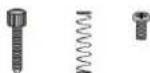
Floor machine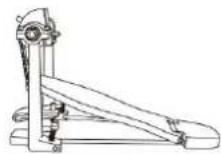
Basin arm (3 pieces)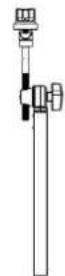
Hi-hat pedal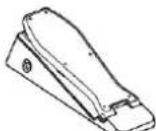
Drum smr
Bolt driver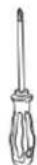
PocRock Kick 6, Park
Kick
- Metal kick
- PowerMetal Kick
9.SocodMetal Kick 10
Papalay, Kick 11
Jazz Kick
12.000
15.90%
- Serge Kink, 16
Standard Kick
SpeedMetal Hi-Hat often 330
PopJazz Hi-Hat often 331. Jazz
Hi-Hat often
332.695
- Songo Hi-Hat often 335.
Standard Hi-Hat often 336 Accurate
Hi-Hat often 327. Session Hi-Hat
often 338. Modern Hi-Hat often
- Blues Hi-Hat 341.
C9556 H-1016 619341.
Symphage Hi-Hat often 342. Presic
Hi Hat cffon 343. Sticks Hi Hat cffon
- Grunge Hi-Hat often 345.
7or Hi Hat ofen 346.8or Hi
Hat ollen 347. Poplar Hi-Hat
often 348. Flam Hi-Hat often
- Attack Hi Hat offen 350.
Old HI-Kai, offen 351. Fairfax HI
Hat oHan 352. Military Hi-Hat
401.SesioN Hi-Hai Pedal
1
402.Modern AI-HAI P8031
403.Buos Hi-HaH-Poal 104.
Synthgaze Hi-Hai-Pedal
606EmakHiHotPdnl
207. Sicke Hi-Hat Pedal
- Grunge Hi-Hat Pedal
608. 70er Hi-Hat Pedal
410. 80er Hi-Hat Pedal
- Bolisbts Hi-Hat Pedal
412. Sian Hi-Hat Pedal
4.10. Antibody Preparation
414. Altes Hi-Hat Pedal
415. Fairfax Hi-Hat Pedal
- Mllrttschoa Hi-Hat Pedal
417. Poe Creahg
418. Sch9 auf Cash?
419. Haner AoeiLR22
420. Original Crash 2
100
424.POWERSCA CRASH
425.SpedMetalCrash2
- PopJazz Crash2
- Jazz Crash 2
478.805
130
This product can be powered by standard indoor wall sockets. Please only use the power cord specified in this product. When not in use, please turn off the power supply. When not in use for a long time, pull out the power cord and keep it properly.
To ensure that you use this product safely and correctly, to prevent harm to users and others and financial damage, this manual and the product are marked with a series of safety signs. The various signs and their meanings are as follows:

WARNING
This sign indicates that there is a potential risk of death or serious injury if this mark is ignored and the product is mishandled.

CAUTION
This sign indicates that there is a potential danger of injury to personnel or other financial damage if this sign is ignored and the product is operated incorrectly.
EXAMPLE OF LOGO

This triangle sign (△) indicates what users should pay attention to. (The left example is caution against electric shock.)

A circular sign (⊙) with an oblique line indicates prohibitions. The icons in or beside the logo indicate the contents specifically prohibited. (The example on the left is no disassembly.)

The round black bottom sign (●) indicates what must be observed. The diagrams in this sign indicate the contents of the specific matters that must be observed. (The example on the left is that the power plug must be pulled out of the socket.)
SAFETY PRECAUTIONS

WARNING
Smoke, odor, overheating
When the product smokes, smells, or overheats, there is a danger of fire and electric shock if it is used continually. In case of the above situation, the following operations should be performed immediately:
- Turn off the power supply.
- Pull the plug out of the power outlet.
- Contact your dealer.
Power cord
- The improper use of power cord may cause fire and electric shock. The following precautions must be observed: The special power cord designated for this product must be used. The AC power supply with output voltage within the rated voltage range for household use must be used.
- Do not overload power sockets and extension lines.
- The improper treatment of power line will lead to its damage or breakage, which will cause fire and electric shock hazards. The following precautions must be observed:
- Do not place or heat heavy objects on power lines.
- Do not attempt to alter or bend the power cord too much.
- Do not twist or pull the power cord.
- If the power cord or plug is damaged, please replace the same type of power cord.
- Do not touch the power cord and plug with wet hands, otherwise there is a danger of electric shock.
- Please use the power cord where water will not splash. Water can cause fire and electric shock.
- Never place vases or any other container containing water on this product. Water can cause fire and electric shock.
- Do not allow minors to unplug or touch power lines or connection boards. Minors lack common sense about electrical safety, which may cause electric shock.


BE CAREFUL
Improper use of the power cord may cause fire and electric shock. The following precautions must be observed:
- Never place the power cord near the oven or other heat sources.
- Do not pull the cable when unplugging from the power socket. Grasp the plug body.
- The power cord plug must be inserted fully into the socket.
- Make sure the power supply is off before connecting or disconnecting it.
- When thunderstorms occur, or before traveling or other long-term departure, disconnect the power cord from the wall outlet.
- At least once a year, remove the power cord from the wall outlet and clean the dust accumulated around the plug.
Do not burn this product.
Do not put this product in the fire, otherwise it will lead to product combustion and explosion of internal electronic components, which will cause fire and personal injury.
Water and foreign objects
Water, other liquids, and (metal sheets, etc.) entering this product are in danger of causing fire and electric shock. In case of the above situation, the following operations shall be performed immediately:
- Turn off the power supply.
- If you are using a power cord for power supply, unplug it from the wall outlet.
- Contact your distributor.
Disassembly and transformation
Do not disassemble or transform the product in any way, otherwise there is a risk of electric shock, scald or other personal injury. All internal inspection, adjustment and maintenance operations should be entrusted to your distributor.


SAFETY PRECAUTIONS
Falling or colliding
If the product falls or is damaged by strong impact, it will be in danger of causing fire and electric shock. In case of the above situation, the following operations shall be performed immediately:
- Turn off the power supply.
- If you are using a power cord for power supply, you need to unplug it from the wall outlet.
- Contact your distributor.
Plastic bag
Do not let anyone put plastic bags for this product on his head or in his mouth. Otherwise, there is a risk of asphyxia. Families with young children should pay special attention to it.

Keep a distance from the product and the bracket
Climbing the bracket is dangerous of overturning or damage. Families with young children should pay special attention to it.

Put
Avoid placing the product on an uneven surface or any other unstable place.
Otherwise, it will cause the product to fall down, which will lead to the risk of injury.

Product Mobility
Before moving this product, you must unplug the power cord plug from the wall outlet and pull out all other cables and connecting wires. Otherwise, it will lead to damage of power or connection wires, resulting in fire and electric shock.


Clean
Before cleaning this product, you must unplug the power cord plug from the wall outlet, otherwise there is a risk of fire and electric shock.

Jack
The socket of this product can only be connected to the designated equipment and devices. Connecting non-designated equipment or devices is dangerous of causing fire and electric shock.

Location selection
It should be avoided to place the product in the following places, otherwise there is a risk of fire and electric shock.

- High temperature or dusty places.
- Kitchen or other places with lampblack.
- Where the product is exposed to direct sunlight, or any other place where the product will produce high temperature.
Volume
Don't play music long and loud. Pay special attention when using headphones.

Excessive volume can damage your hearing.

Heavy
Do not place heavy objects on this product. Otherwise, the top of the product will be overweight, causing the product to overturn or drop objects on it, which will lead to the risk of injury.

Correct assembly of scaffolds
The incorrect assembly of the bracket may overturn, causing the product to fall off and posing a risk of injury to personnel.
Therefore, it must be assembled according to the instructions in the attached installation guide to ensure that the product is properly mounted on its bracket.
C/O YH Consulting Limited Office 147, Centurion House, London Road, Staines-upon-Thames, Surrey, TW18 4AX
VEVOR
TOUGH TOOLS, HALF PRICE
elettronica www.vevor.com/support
BATTERIA ELETTRONICA
MANUALE D'USO
MODELLO: MD200E-P
3.1. Proportions and limits
- Tom's purslane
100
(4) 9.03
- Tom standard2
- Tom scuslice2
- Consultation Lom?
- Tom modems2
- Buses Top2
- Old Tcm2
159.Felkfax Tom2
100 Tom purlers3 161
Psp Tpm3
- Fencub Tom3
- Tsm dgs3
- Tom3 155 original
PcpFock Tom3
- DruR Tum3
167 Tom di mettio3
168.PowerMetal Tom
PopJazz Tom3
- Jazz Terms
172 808
173.909
- 8000 Ioo
- Tom standard3
- Tom acsulice3
- AT009, Tom 3
- Grunag Tom9
- Tom's digi ani 70
15, Tcmkand
- Poplar Tom3
188. Sam Tom3
189. Aaoppa Tom3
- Vecchio Tom3
- Fairfax Tom3
- Tom pills3
Incident.
- Pog Graph 1
- Farsulp Crash
- Grave incidental
- Cnash original 197
PopRock Crash1
190.Shiaripruee1
198.Crash metallicoot
- PowerMetal Crash1
- SpeedMeas Crash 202
PooJazz Crash 203, Jazz
Graph
204.808
205.909
- Songo Crash 207
Crea standard
- Cras acuioo1
- Session Graph
- Crash modalno1
- Bluss Crash1
212.Crash classio
- Synthgase Crash 214
Strange incidents
Ferscula Crash Bim
- Coroio Hard Crash 1
- Cercho origne Crash 1 229
PopRack Crash 1 Cercio 230. Cerchio
Rock Crash
- Cerro in metallo Crash
- Cercho Power/etal Crash 1
233. Cerocho Speed Metal Crash 1 234
PopJazz Crash 1 Rim 235. Jazz
3.2 (independent)
306. Cerchio Season Role
SpeedMetal Hi-Hi, aspero 300. PopJazz
- Pedale charleston ann
70410. Podda charleston
arrr 80 411. Papokra padale
charleston 412. Pedale
chadzao Sham 13, Pedale Hi
Hs. 411, Yenbo
pepla dal chadason #15, Pedale
chadssn Eae 416. Pedale gllar a i chadssoc
- Poo, Cnash?
- Euro,Carry?
- Cash flow
420. Crash originals 2
421. Pop Box Cran 2
- Schianlo di racee 2
423. Schisrtn metalicoe
121
- Specificity Criteria
- Pop Jazz Crash 2
- Jazz Crash 2
478.803
400-600pQ-600A2
431.Cash balance/2
- Crash Sauisio2
- Session Crash2
43%Crashrodipno2
455 Blue Graph 2
- Graab claaapoo
- Synthgse Cressn2
- Straro incidento2
Therefore, m - 1 ≠ 0;
This product can be powered by standard indoor wall sockets. Please only use the power cord specified in this product. When not in use, please turn off the power supply. When not in use for a long time, pull out the power cord and keep it properly.
To ensure that you use this product safely and correctly, to prevent harm to users and others and financial damage, this manual and products are marked with a series of safety signs. The various signs and their meanings are as follows:

WARNING
This sign indicates that there is a potential risk of death or serious injury if this mark is ignored and the product is mishandled.

BE CAREFUL
This sign indicates that there is a potential danger of injury to personnel or other financial damage if this sign is ignored and the product is operated incorrectly.
EXAMPLE OF LOGO

This triangle sign (△) indicates what users should pay attention to. (The left example is careful shocks)

A circular sign (⊙) with an oblique line indicates prohibitions. The icons in or beside the logo indicate the contents specifically prohibited. (The example on the left is no disassembly)

The round black bottom sign (●) indicates what must be observed. The diagrams in this sign indicate the contents of the specific matters that must be observed. (The example on the left is that the power plug must be pulled out of the socket)
SAFETY PRECAUTIONS

WARNING
Smoke, odor, overheating
When the product smokes, smells or overheats, there is a danger of fire and electric shock when it is used continually. In case of the above situation, the following operations should be performed immediately:
- Turn off the power supply.
- Pull the plug out of the power outlet.
- Contact your dealer.
Power cord
- The improper use of power cord may cause fire and electric shock. The following precautions must be observed: The special power cord designated for this product must be used. The AC power supply with output voltage within the rated voltage range for household use must be used.
- Do not overload power sockets and extension lines.
- The improper treatment of power line will lead to its damage or breakage, which will cause fire and electric shock hazards. The following precautions must be observed:
- Do not place or heat heavy objects on power lines.
- Do not attempt to alter or bend the power cord too much.
- Do not twist or pull the power cord.
- If the power cord or plug is damaged, please replace the same type of power cord.
- Do not touch the power cord and plug with wet hands, otherwise there is a danger of electric shock.
- Please use the power cord where the water will not splash. Water is in danger of causing fire and electric shock.
- Never place vases or any other container containing water on this product. Water is dangerous of causing fire and electric shock.
- Do not allow minors to unplug and touch power lines or connection boards. Minors have no common sense of electricity safety, which may cause electric shock.


BE CAREFUL
The improper use of power cord may cause fire and electric shock. The following precautions must be observed:
- Never put the power cord near the oven or other heat source.
- Do not pull the cable when pulling out of the power socket. The main body of the plug must be grasped.
- The power cord plug must be inserted in the socket to the end.
- Make sure the power supply is off before connecting or disconnecting it.
- When thunderstorms occur or before traveling or other long-term departure, disconnect the power cord from the wall outlet.
- At least once a year, remove the power cord from the wall outlet and clean the dust accumulated around the plug.
Do not burn this product
Do not put this product in the fire, otherwise it will lead to product combustion and explosion of internal electronic components, which will cause fire and personnel injury.
Water and foreign bodies
Water, other liquids and (metal sheets, etc.) entering this product are in danger of causing fire and electric shock. In case of the above situation, the following operations shall be performed immediately:
- Turn off the power supply.
- If you are using a power cord for power supply, unplug it from the wall outlet.
- Contact your distributor
Disassembly and transformation
Do not disassemble or transform the product in any way, otherwise there is a risk of electric shock, scalding, or other personal injury. All internal inspection, adjustment, and maintenance operations should be entrusted to your distributor.


SAFETY PRECAUTIONS
Falling or colliding
If the product falls or is damaged by strong impact, it may cause fire and electric shock. In case of the above situation, the following operations shall be performed immediately:
- Turn off the power supply.
- If you are using a power cord for power supply, unplug it from the wall outlet.
- Contact your distributor.
Plastic bag
Do not let anyone put plastic bags for this product on his head or in his mouth. Otherwise, there is a risk of asphyxiation. Families with young children should pay special attention to it.

Keep a distance from the product and the bracket
Climbing the bracket is dangerous and may cause overturning or damage. Families with young children should pay special attention to it.

Placement
Avoid placing the product on an uneven surface or any other unstable place. Otherwise, it may cause the product to fall down, leading to the risk of injury.

Product Mobility
Before moving this product, you must unplug the power cord plug from the wall outlet and pull out all other cables and connecting wires. Otherwise, it will lead to damage of power or connection wires, resulting in fire and electric shock.

Cleaning
Before cleaning this product, you must unplug the power cord plug from the wall outlet, otherwise there is a risk of fire and electric shock.

Jack
The socket of this product can only be connected to the designated equipment and devices. Connecting non-designated equipment or devices is dangerous of causing fire and electric shock.


Location selection
It should be avoided to place the product in the following places, otherwise there is a risk of fire and electric shock.

- High temperature or dusty places.
- Kitchen or other places with lampblack.
- Where the product is exposed to direct sunlight, or any other place where the product will produce high temperature.
Volume
Don't play music long and loud. Pay special attention when using headphones.

Excessive volume can damage your hearing.

Heavy
Do not place heavy objects on this product. Otherwise, the top of the product will be overweight, causing the product to overturn or drop objects on it, which will lead to the risk of injury.

Correct assembly of scaffolds
The incorrect assembly of the bracket may overturn, causing the product to fall off and posing a risk of injury to personnel.
Therefore, it must be assembled according to the instructions in the attached installation guide to ensure that the product is properly mounted on its bracket.
Imported in AUS: SIHAO PTY LTD, 1 ROKEVA STREETEASTWOOD NSW 2122Australia
YH CONSULTING LIMITED. C/O YH Consulting Limited Office 147, Centurion House, London Road, Staines-upon-Thames, Surrey, TW18 4AX
VEVOR®
TOUGH TOOLS, HALF PRICE
www.vevor.com/support
Rima da caja poprock
- Barde de caja de roca
- Bards de caja de meto
- Barde de caja PowerMetal
- Borde caja SpeedMetal
- Barde de saja Popaz
- Burde se rai de jacc
76.908
77.809
- Sorda, ce cale 5000
- Bards de saja catandar
B. bade on aie
- Erod n. 2n.
- Borde de caja moderno
83 Bardo de caja de bluss
- pop tam1
- Joder Iom1
- Tom's mum
- Tom1 original
- poprock born
112.Bosa Tom1
- Tom1 de metal
104.PovarMatel Tom1
105 SpeedNo
106 Poojazz Tnp1
- jazz tan
108.808
109.809
110.sangoitem
- Tom1 de Ics 60
- Poplar Toml
- agpe jem1
- Alsque Tom
- yep taml
- FairfaxTm1
- Tom militar 129.
141.908
142.soonc tom2
- Tcr2 calendar
- Tom2 acclivities
- Session Tom2
- Tom2 modern
147.buaa tom2
- Tcm2 clasic
- Synthege Teom2
- old torn2
- FairfaxTom2
- Tnp.mijx2.181
pos tom3
162.Jodar tam3
- Tom3 hard
- Originals Tom3
- poprock jam3
168.Roc8 Tom3
- Tom3 metalco
- Power Metal Tom3
- SpeedMetal Tarn3 170
PooJazz Tom3
- j227 tom3
172.608
173.908
- song: ton3
- Tom3 extend
- Tom3 popular
- golpa tom3
- Ataque Tom3
- waja born3
191.FairfaxTcm2
- Tom milks
Chocar.
- Choque pop
194.JoderCrain
- Choque duoi
- Acciderte original
- Choque de poprock
- Choque de rccat
- Choque de metal
- Choque de Pomerleuil
- Choque de SpeedMats
- PopJazz Crash 203
Jazz Crash
204.808
205.809
- Dream Crash
- Standard Crash
- Sci-Fi Crash
- Session Crash
- Modern Crash
- Blues Crash
- Choque d'italica
- Synthpase Creh1 214
Accidents extrahot
- Choque de palos
- Accidentsgunga
- Accidente de los 701
- Academic co los 801
- Associeite papuan
Llanta PopRock Crash1 230. Lianta
Rock Crazh1
- Lanta metàlica Crash1
- Lianta PowerMetal Chead1
- Larta SpeedMetal Crash 234
Llanta PopJazz Cressh1 235. Llanta
Jazz Crash!
236.806
237.809
- Llanta Sorga Crash1 239
Llanta Crash1 estndar
- Crash1 acoustic tire
- Session Crash1 tire
- Crash1 modems tire
- Breda Blues Crash
- Crash1 class tire
- Synthgazr Crsh1 246 tire
Freak Crash1 tire
- Slices Crecht tire
- Grunge Crash tire 249.
256. Farfax Crash tire 1
- Milter Crash tire 1
Conduct
- Pop walk
258 yoder walk
- Dura walk
- Original walk 281.
Pop-rod page
- Walk in roos
- Meccalco weight
- PowerMetab passage
- Base Speed/total
- Pares poy jizz
- Pasego de la jaz
268.808
289.909
Session Charles Ablerto 338
CHARTS MODINSE ABRETO JUUL
E
Pn
Hilb1, 243
HI-Hat abiles 344 HI-Hat
This product can be powered by standard indoor wall sockets. Please only use the power cord specified in this product. When not in use, please turn off the power supply. When not in use for a long time, pull out the power cord and keep it properly.
SIGN
To ensure that you use this product safely and correctly, to prevent harm to users and others and financial damage, this manual and products are marked with a series of safety signs. The various signs and their meanings are as follows:

WARNING
This sign indicates that there is a potential risk of death or serious injury if this mark is ignored and the product is mishandled.

BE CAREFUL
This sign indicates that there is a potential danger of injury to personnel or other financial damage if this sign is ignored and the product is operated incorrectly.
EXAMPLE OF LOGO

This triangle sign (△) indicates what users should pay attention to. (The left example is careful shocks)

A circular sign (⊙) with an oblique line indicates prohibitions. The icons in or beside the logo indicate the contents specifically prohibited. (The example on the left is no disassembly)

The round black bottom sign (●) indicates what must be observed. The diagrams in this sign indicate the contents of the specific matters that must be observed. (The example on the left is that the power plug must be pulled out of the socket)
SAFETY PRECAUTIONS

WARNING
Smoke, odor, overheating
When the product smokes, smells, or overheats, there is a danger of fire and electric shock if it is used continuously. In case of the above situation, the following operations should be performed immediately:
- Turn off the power supply.
- Pull the plug out of the power outlet.
- Contact your dealer.
Power cord
- Improper use of the power cord may cause fire and electric shock. The following precautions must be observed:
- The special power cord designated for this product must be used. The AC power supply with output voltage within the rated voltage range for household use must be used.
- Do not overload power sockets and extension lines.
- Improper treatment of the power line will lead to its damage or breakage, which will cause fire and electric shock hazards. The following precautions must be observed:
- Do not place or heat heavy objects on power lines.
- Do not attempt to alter or bend the power cord too much.
- Do not twist or pull the power cord.
- If the power cord or plug is damaged, replace it with the same type of power cord.
- Do not touch the power cord or plug with wet hands, as this may cause electric shock.
- Use the power cord in a location where water will not splash on it. Water can cause fire and electric shock.
- Never place vases or other containers holding water on this product. Water can cause fire and electric shock.
- Do not allow minors to unplug or touch power cords or connection boards. Minors lack awareness of electrical safety, which may lead to electric shock.


CAUTION
Improper use of the power cord may cause fire and electric shock. The following precautions must be observed:
- Never place the power cord near an oven or other heat source.
- Do not pull the cable when unplugging from the power socket. Grasp the plug body firmly.
- Insert the power cord plug fully into the socket.
- Ensure the power supply is off before connecting or disconnecting the power cord.
- During thunderstorms, or before traveling or other long absences, disconnect the power cord from the wall outlet.
- At least once a year, remove the power cord from the wall outlet and clean the dust accumulated around the plug.
Do not burn this product.
Do not put this product in the fire, otherwise it will lead to product combustion and explosion of internal electronic components, which will cause fire and personnel injury.


Water and foreign bodies
Water, other liquids and (metal sheets, etc.) entering this product are in danger of causing fire and electric shock. In case of the above situation, the following operations shall be performed immediately:
- Turn off the power supply.
- If you are using a power cord for power supply, unplug it from the wall outlet.
- Contact your distributor.
Disassembly and transformation
Do not disassemble or transform the product in any way, otherwise there is a risk of electric shock, scald or other personal injury. All internal inspection, adjustment and maintenance operations should be entrusted to your distributor.

SAFETY PRECAUTIONS
Falling or colliding
If the product falls or is damaged by strong impact, it will be in danger of causing fire and electric shock. In case of the above situation, the following operations shall be performed immediately:
- Turn off the power supply.
- If you are using a power cord for power supply, you need to unplug it from the wall outlet.
- Contact your distributor.
Plastic bag
Do not let anyone put plastic bags for this product on his head or in his mouth. Otherwise, there is a risk of asphyxia. Families with young children should pay special attention to it.

Keep a distance from the product and the bracket
Climbing the bracket is dangerous of overturning or damage. Families with young children should pay special attention to it.

Put
Avoid placing the product on an uneven surface or any other unstable place. Otherwise, it will cause the product to fall down, which will lead to the risk of injury.

Product Mobility
Before moving this product, you must unplug the power cord plug from the wall outlet and pull out all other cables and connecting wires. Otherwise, it will lead to damage of power or connection wires, resulting in fire and electric shock.

Clean
Before cleaning this product, you must unplug the power cord plug from the wall outlet, otherwise there is a risk of fire and electric shock.

Jack
The socket of this product can only be connected to the designated equipment and devices. Connecting non-designated equipment or devices is dangerous of causing fire and electric shock.


Location selection
It should be avoided to place the product in the following places, otherwise there is a risk of fire and electric shock.

- High temperature or dusty places.
- Kitchen or other places with lampblack.
- Where the product is exposed to direct sunlight, or any other place where the product will produce high temperature.
Volume
Don't play music long and loud. Pay special attention when using headphones.

Excessive volume can damage your hearing.

Heavy
Do not place heavy objects on this product. Otherwise, the top of the product will be overweight, causing the product to overturn or drop objects on it, which will lead to the risk of injury.

Correct assembly of scaffolds
The incorrect assembly of the bracket may overturn, causing the product to fall off and posing a risk of injury to personnel.
Therefore, it must be assembled according to the instructions in the attached installation guide to ensure that the product is properly mounted on its bracket.
Imported to AUS: SIHAO PTY LTD, 1 ROKEVA STREETEASTWOOD NSW 2122 Australia
Imported to USA: Sanven Technology Ltd., Suite 250, 9166 Anaheim Place, Rancho Cucamonga, CA 91730
E-CrossStu GmbH
Mainzer Landstr.69, 60329 Frankfurt am Main.
YH CONSULTING LIMITADO.
C/O YH Consulting Limited, Office 147, Centurion House, London Road, Staines upon Thames, Surrey, TW18 4AX
VEVOR®
TOUGH TOOLS, HALF PRICE
Technical support and electronic warranty certificate www.vevor.com/support
VEVOR®
TOUGH TOOLS, HALF PRICE
- Metacowhy hi h t owery
328. Hi-Hat PowerMetal open 329
SpeedMetal Hi-Hat cover 330. PapJazz
79.346. Open Hi-Hat 2 let
80.347. Popularmy III-lat
Open 348. Slam Hi-Hat open
- Akh HHat countly 350.
Stary hi-hat open 351. Hi-Hat
Fairfax atwarty 352.
hat 405, Pedal Hi-Hat Synthgazc
- Freak HiHat pedal
407.Kjpepedaru Hi-Hat 408
Pedal hi hatu grunge 409
Pedal Hill-Hatz Iat 70.410.
Pondal Hi-Hatz Jan 80,411
Popularny penal HiHt 412.
Pedal HI-Hat413.Pedal
ataku Hi Hat 414, Stary pedal
hi-hatu415.PedalFairfax
Hi-Hat416, Wojskowy podal
hi-hatu
Avaria 2
- Pop Csgab2
- jebac Cresta 2
419.Closteros 2
- Originaly Crash2
- Popflock Crash2
- Udozenio skaly 2
- Uozenie melu2
424.Awara PowerMetal2
- Avaria SpeedMetal2
426 Popjazz Cresh2
- Jazowy knch 2
428.809
429.908
430-Katastrefa Sponpa2
- Slanterdowwewaris 2
- Akustycny krach 2
433.Avatoria Sasji 2
434.NewscresryCrash2
- Bluespy krach 2
436.KiauzyceCai2
437.Awara Syntghate2
- Ongcst Military Crash2
Drum combination timbre
User drum group
This product can be powered by standard indoor wall sockets. Please only use the power cord specified in this product. When not in use, please turn off the power supply. When not in use for a long time, pull out the power cord and keep it properly.
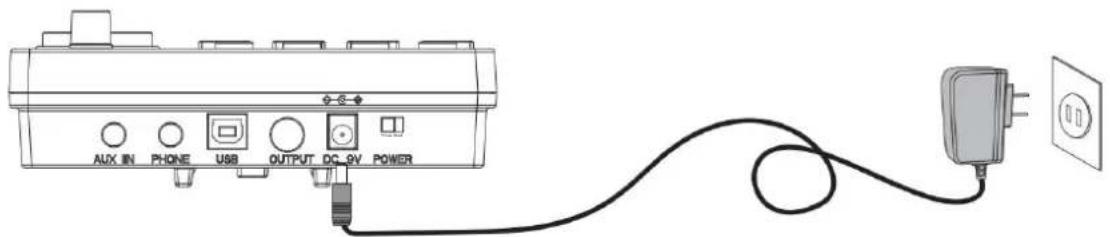
SIGN
To ensure that you use this product safely and correctly, to prevent harm to users and others and financial damage, this manual and products are marked with a series of safety signs. The various signs and their meanings are as follows:

WARNING
This sign indicates that there is a potential risk of death or serious injury if this mark is ignored and the product is mishandled.

BE CAREFUL
This sign indicates that there is a potential danger of injury to personnel or other financial damage if this sign is ignored and the product is operated incorrectly.
EXAMPLE OF LOGO

This triangle sign () indicates what users should pay attention to. (The left example is careful shocks)

A circular sign () with an oblique line indicates prohibitions. The icons in or beside the logo indicate the contents specifically prohibited. (The example on the left is no disassembly)

The round black bottom sign (飞) indicates what must be observed. The diagrams in this sign indicate the contents of the specific matters that must be observed. (The example on the left is that the power plug must be pulled out of the socket)
SAFETY PRECAUTIONS

WARNING
Smoke, odor, overheating
When the product smokes, smells, or overheats, there is a danger of fire and electric shock if it is used continuously. In case of the above situation, the following operations should be performed immediately:
- Turn off the power supply.
- Pull the plug out of the power outlet.
- Contact your dealer.
Power cord
- Improper use of the power cord may cause fire and electric shock. The following precautions must be observed: The special power cord designated for this product must be used. The AC power supply with output voltage within the rated voltage range for household use must be used.
- Do not overload power sockets and extension lines.
- Improper treatment of the power line will lead to its damage or breakage, which will cause fire and electric shock hazards. The following precautions must be observed:
- Do not place or heat heavy objects on power lines.
- Do not attempt to alter or bend the power cord too much.
- Do not twist or pull the power cord.
- If the power cord or plug is damaged, please replace it with the same type of power cord.
- Do not touch the power cord or plug with wet hands, as this may cause electric shock.
- Use the power cord in a location where water will not splash on it. Water can cause fire and electric shock.
- Never place vases or any other containers holding water on this product. Water can cause fire and electric shock.
- Do not allow minors to unplug or touch power lines or connection boards. Minors lack awareness of electrical safety, which may lead to electric shock.


CAUTION
Improper use of the power cord may cause fire and electric shock. Observe the following precautions:
- Never place the power cord near an oven or other heat source.
- Do not pull the cable when unplugging from the power outlet. Grasp the plug body firmly.
- Insert the power cord plug fully into the socket.
- Ensure the power is off before connecting or disconnecting the power cord.
- During thunderstorms, or before traveling or other long absences, disconnect the power cord from the wall outlet.
- At least once a year, remove the power cord from the wall outlet and clean dust accumulated around the plug.
Do not incinerate this product.
Do not put this product in the fire, otherwise it will lead to product combustion and explosion of internal electronic components, which will cause fire and personnel injury.
Water and foreign bodies
Water, other liquids and (metal sheets, etc.) entering this product are in danger of causing fire and electric shock. In case of the above situation, the following operations shall be performed immediately:
- Turn off the power supply.
- If you are using a power cord for power supply, unplug it from the wall outlet.
- Contact your distributor
Disassembly and transformation
Do not disassemble or transform the product in any way, otherwise there is a risk of electric shock, scald or other personal injury. All internal inspection, adjustment and maintenance operations should be entrusted to your distributor.


SAFETY PRECAUTIONS
Falling or colliding
If the product falls or is damaged by strong impact, it will be in danger of causing fire and electric shock. In case of the above situation, the following operations shall be performed immediately:
- Turn off the power supply.
- If you are using a power cord for power supply, you need to unplug it from the wall outlet.
- Contact your distributor.
Plastic bag
Do not let anyone put plastic bags for this product on his head or in his mouth. Otherwise, there is a risk of asphyxia. Families with young children should pay special attention to it.

Keep a distance from the product and the bracket
Climbing the bracket is dangerous of overturning or damage. Families with young children should pay special attention to it.

Put
Avoid placing the product on an uneven surface or any other unstable place. Otherwise, it will cause the product to fall down, which will lead to the risk of injury.

Product Mobility
Before moving this product, you must unplug the power cord plug from the wall outlet and pull out all other cables and connecting wires. Otherwise, it will lead to damage of power or connection wires, resulting in fire and electric shock.

clean
Before cleaning this product, you must unplug the power cord plug from the wall outlet, otherwise there is a risk of fire and electric shock.

Jack
The socket of this product can only be connected to the designated equipment and devices. Connecting non-designated equipment or devices is dangerous of causing fire and electric shock.


Location selection
It should be avoided to place the product in the following places, otherwise there is a risk of fire and electric shock.

- High temperature or dusty places.
- Kitchen or other places with lampblack.
- Where the product is exposed to direct sunlight, or any other place where the product will produce high temperature.
Volume
Don't play music long and loud. Pay special attention when using headphones.

Excessive volume can damage your hearing.

Heavy
Do not place heavy objects on this product. Otherwise, the top of the product will be overweight, causing the product to overturn or drop objects on it, which will lead to the risk of injury.

Correct assembly of scaffolds
The incorrect assembly of the bracket may overturn, causing the product to fall off and posing a risk of injury to personnel.
Therefore, it must be assembled according to the instructions in the attached installation guide to ensure that the product is properly mounted on its bracket.
Importer for Australia: SIHAO PTY LTD, 1 ROKEVA STREET, EASTWOOD NSW 2122, Australia
Importer for USA: Sanven Technology Ltd., Suite 250, 9166 Anaheim Place, Rancho Cucamonga, CA 91730
| REPREZENT KE |
E-CrossStu GmbH
Mainzer Landstr. 69, 60329 Frankfurt am Main, Germany
C/O YH Consulting Limited, Office 147, Centurion House, London Road, Staines-upon-Thames, Surrey, TW18 4AX
VEVOR®
TOUGH TOOLS, HALF PRICE
NEED HELP? CONTACT US!
- Rock, snare-rim
- Melsalen smarand
- PowerMetal spare card
- SpeedMetal smar-rand
- PooJazz spere-rand
- Jazz, sports and
76808
77.80%
78. Sanso Sparedrum
- Standards and standards
- Acoustic snare and
- See also Spreading
3.2. Model uncertainty
B5. Synthgaze snare-rand
- Fresh share-rand
B7. Slicks snare ranr
- Grunge snae-ter
89 Sereodum ut de jnen 70
- 1
30 Actual Gains/Losses
- Order reviewed
- See Tom
- Modern Tom1
- BluesTom1
- Classic Tom
- Synthgaze Tom
- FreakTom1
- Plakt Tom1
- GrungeTorn1
- fcm 1a de jne 70
- Tont ui de jure 80
- Populaire Top1
- Sia Tomi
- Val Tom1 aan
126.Cude Tom!
- FairfaxTom1
- Militaire Tom1
- SpeedMetal Tom2 138.
PopJazz Tom2
- Jazzport2
140.808
141.909
142.Songo Tom2
- Standard Tom2
- Akoesische Tom
- Ze Tom2
- Moderne Tom2
- BluesTom2
- Classic Tom2
- Synthgaze Tom2
- FreekTom2
- Plaki Tom2
- GrunpeTom2
- 1m2 u dpren 70
300.808
301.909
302. Songe Rids-rand
- Standard Ride-v
- Akosetische rtrand
- Session Ride-velg
306. Modern Rldo-vol
- Populaire, Slide-wel
- Slam Rida-veg
- Aarvalsriland
- Cude Hilde-wolg
- Fairfax Ride-volg
- Milltale ttrand
Halo hoed.
- Pop hhat open
- Funk hi-hat open
323. Hard rock hi-hat open
- Original hi-hat open
- PopRock hi-hat open
- Rock hi-hat open 327
Metalen hi-hat open 328.
PowerMetal Hi-Hat Open 329.
SpeedMetal Hi-Hat Open 330
PopJazz Hi-Hat Open 331. Jazz
hi-hat open
332.808
333.909
- Sango hi-hat open 335
Standard hi-hat open 338.
Acoustic hi-hat open 337
Session hi-hat open 338.
Modern hi-hat open 339
Blues hi-hat open 340
Classic hi-hat open 341.
Synth jazz hi-hat open 342. Frog
Hi-hat Open 343. Sticks H
Hat Open 344. Grunge hi
hat open 345. Hi-hat Open 346
Hi-Hat Open 349. Aanwal
hi-hat open 350. Old hi-hat
Open 351. Fairfax hi-hat
Open 352. Military hi-hat open
- Pop Hi-Hat Slitten
- Funk hi-hat close
- Hardcore hi-hat ghost note
- Original Hi-Hat Close
- PopRock Hi-Hat Sluhton
- Rock hi-hat close
- Metal hi-hat ghost note
- PowerMetal Hi-Hat Solution
- SpeedMetal Hi-Hat Slitten 382
PopJazz Hi-Hat Solution
363. Jazz Hi-Hat Sutton
364. 808
365. 909
- Songo Hi-Hat Solution
- Standard hi-hat geskten
- Akostische hiltat gesoton
- Session Hi-Hat Sluiter
370. Moderna hi-hat close
- Blues Hi-Hat Sluitten
- Klassieke Hi-Hat Close
- Syntbgezo Hi-Hat Suite
- Frenk Hi-Hat Sluiten
- Houd de hi-hat dicht
- Grunge Hi-Hat Sluiten
- Hi-hat from the 70s
- Hi-hat from the 20s
- Popular Hi-Hat Gloss
- Hit the hi-hat hard
- Attack Hi-Hat Solution
- Old hi-hat close
- Fairfax Hi-Hat Sluiten
- Military hi-hat Solution
- Pop hi-hat pedal
- Funk hi-hat pedal
- Hand hi-hat pedal
- Original hi-hat pedal
- Pop/Rock hi-hat pedal
- Rock hi-hat pedal
- Metal hi-hat pedal
- PowerMetal hihat pedal
- SpeedMetal hihat pedal 394
PopJazz hihat pedal
- Jazz hihat pedal
396.808
- 909
- Sango hihat pedal
- Standard hihat pedal

APPENDIX
400. Acoustic hihat pedal
- Session hi-hat pedal
- Modern bibliographic
- Blue hi-hat pedal 494
Classic hi-hat pedal 405
Synthgaze hi-hat pedal
- Freak hi-hat pedal
407. Slicks Hi-Hat pedal
- Grunge hi-hat pedal
409. Hi-hat pedal 410 out
Bipolaroid 415, Eddex
Hi-hat pedal 416. Millhal hi-hat pedal
- Popcrash 2
- Fuck Crash2
12 1
420.OrigineleCrssb2
421.PopRock-crash2
422.Rotscrash2
- Metalscrash2
424PowerMolal graph3
- SpeedMetal Crash2
- PopJazz Crash2
- Jazzcrash2
428.808
629.909
- Songo-crash 2
- Standard crash2
- Akoesbische crash2
433.Ziesiecrash 2
434.Modeme crash2
- Bluescrash2
102
- Synthage-gram 2
- Freakcrash2
- Sticks-crash2
- Grunge-crash 2
- Crash all oen 702
- Cnsh al de aen 803
- Populaire Crash2
- Slam-crash 2
445.Aanvalscrash2
- Oude crash2
- Pop Crash2-rand
- Fuck Crash2 Rim
- Harde Crash2-rand
452OriginaleCrash2velg
- Rock Crash2-rand
- Metalen Crash2 velg
- PowerMetal Crash2 velg
- SpeedMetal Crash2 rim
- PopJazz Crash2 Rim
- Jazz Crash2 rim
460.808
461.909
- Soppo, Crash2 rim
- Standard Crash2 rim
464. Acoustic Crash2 Rim
- Session Crash2 rim
- Modern Crash2-rim
- Blues, Crash2-rim
- Classic Crash2-rim
- Synthgaze, Crash2-rim
- Freak Crash2-rim
- Sticks Crash2-rim
- Grunge Crash2-rim
473.Crash2-rim70s
This product can be powered by standard indoor wall sockets. Please only use the power cord specified in this product. When not in use, please turn off the power supply. When not in use for a long time, pull out the power cord and keep it properly.
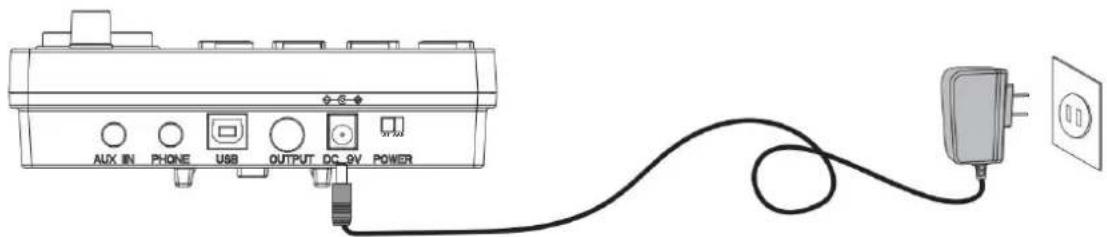
To ensure that you use this product safely and correctly, to prevent harm to users and others and financial damage, this manual and products are marked with a series of safety signs. The various signs and their meanings are as follows:

WARNING
This sign indicates that there is a potential risk of death or serious injury if this mark is ignored and the product is mishandled.

BE CAREFUL
This sign indicates that there is a potential danger of injury to personnel or other financial damage if this sign is ignored and the product is operated incorrectly.
EXAMPLE OF LOGO

This triangle sign (△) indicates what users should pay attention to. (The left example is careful shocks)

A circular sign (⊙) with an oblique line indicates prohibitions. The icons in or beside the logo indicate the contents specifically prohibited. (The example on the left is no disassembly)

The round black bottom sign (●) indicates what must be observed. The diagrams in this sign indicate the contents of the specific matters that must be observed. (The example on the left is that the power plug must be pulled out of the socket)
SAFETY PRECAUTIONS

WARNING
Smoke, odor, overheating
When the product smokes, smells or overheats, there is a danger of fire and electric shock when it is used continually. In case of the above situation, the following operations should be performed immediately:
- Turn off the power supply.
- Pull the plug out of the power outlet.
- Contact your dealer.
Power cord
- The improper use of power cord may cause fire and electric shock. The following precautions must be observed:
- The special power cord designated for this product must be used. The AC power supply with output voltage within the rated voltage range for household use must be used.
- Do not overload power sockets and extension lines.
- The improper treatment of power line will lead to its damage or breakage, which will cause fire and electric shock hazards. The following precautions must be observed:
- Do not place or heat heavy objects on power lines.
- Do not attempt to alter or bend the power cord too much.
- Do not twist or pull the power cord.
- If the power cord or plug is damaged, please replace the same type of power cord.
- Do not touch the power cord or plug with wet hands, as this may cause electric shock.
- Use the power cord where water will not splash. Water can cause fire and electric shock.
- Never place vases or any other containers holding water on this product. Water can cause fire and electric shock.
- Do not allow minors to unplug or touch power lines or connection boards. Minors lack awareness of electrical safety, which may lead to electric shock.


BE CAREFUL
Improper use of the power cord may cause fire and electric shock. The following precautions must be observed:
- Never place the power cord near an oven or other heat source.
- Do not pull the cable when unplugging from the power socket. Grasp the plug body.
- Insert the power cord plug fully into the socket.
- Ensure the power supply is off before connecting or disconnecting it.
- During thunderstorms, or before traveling or other long absences, disconnect the power cord from the wall outlet.
- At least once a year, remove the power cord from the wall outlet and clean dust accumulated around the plug.
Do not burn this product.
Do not put this product in the fire, otherwise it will lead to product combustion and explosion of internal electronic components, which will cause fire and personnel injury.
Water and foreign bodies
Water, other liquids and (metal sheets, etc.) entering this product are in danger of causing fire and electric shock. In case of the above situation, the following operations shall be performed immediately:
- Turn off the power supply.
- If you are using a power cord for power supply, unplug it from the wall outlet.
- Contact your distributor.
Disassembly and transformation
Do not disassemble or transform the product in any way, otherwise there is a risk of electric shock, scald or other personal injury. All internal inspection, adjustment and maintenance operations should be entrusted to your distributor.


SAFETY PRECAUTIONS
Falling or colliding
If the product falls or is damaged by strong impact, it will be in danger of causing fire and electric shock. In case of the above situation, the following operations shall be performed immediately:
- Turn off the power supply.
- If you are using a power cord for power supply, you need to unplug it from the wall outlet.
- Contact your distributor.
Plastic bag
Do not let anyone put plastic bags for this product on his head or in his mouth. Otherwise, there is a risk of asphyxia. Families with young children should pay special attention to it.

Keep a distance from the product and the bracket
Climbing the bracket is dangerous of overturning or damage. Families with young children should pay special attention to it.

Put
Avoid placing the product on an uneven surface or any other unstable place. Otherwise, it will cause the product to fall down, which will lead to the risk of injury.

Product Mobility
Before moving this product, you must unplug the power cord plug from the wall outlet and pull out all other cables and connecting wires. Otherwise, it will lead to damage of power or connection wires, resulting in fire and electric shock.

clean
Before cleaning this product, you must unplug the power cord plug from the wall outlet, otherwise there is a risk of fire and electric shock.

Jack
The socket of this product can only be connected to the designated equipment and devices. Connecting non-designated equipment or devices is dangerous of causing fire and electric shock.


Location selection
It should be avoided to place the product in the following places, otherwise there is a risk of fire and electric shock.

- High temperature or dusty places.
- Kitchen or other places with lampblack.
- Where the product is exposed to direct sunlight, or any other place where the product will produce high temperature.
Volume
Don't play music long and loud. Pay special attention when using headphones.

Excessive volume can damage your hearing.

Heavy
Do not place heavy objects on this product. Otherwise, the top of the product will be overweight, causing the product to overturn or drop objects on it, which will lead to the risk of injury.

Correct assembly of scaffolds
The incorrect assembly of the bracket may overturn, causing the product to fall off and posing a risk of injury to personnel.
Therefore, it must be assembled according to the instructions in the attached installation guide to ensure that the product is properly mounted on its bracket.
C/O YH Consulting Limited Kantoor 147, Centurion House, London Road, Staines-upon-Thames, Surrey, TW18 4AX
VEVOR®
TOUGH TOOLS, HALF PRICE
Technical support and e-warranty certificate www.vevor.com/support
VEVOR®
TOUGH TOOLS, HALF PRICE
INSTALLATION GUIDE 3
CHECK THE INCLUDED ITEMS 3
EAR ROD HOLDER 4
TYMPANIC INTUBATION 4
MOUNTING STAND 5
INSTALL THE DRUM MODULE 5
INSTALL THE STRIKING PARTS AND SOUND MODULE
INSTALL THE KICK DRUM 7
INSTALL THE HAMMER HOLDER 7
THE KICK DRUM IS FIXED WITH THE STEP HAMMER 7
CONNECT THE CABLE FOR THE STRIKING PART
ILLUSTRATION OF SOUND MODULE PORT 8
Switch in B: pedal.
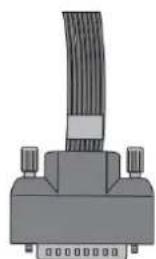
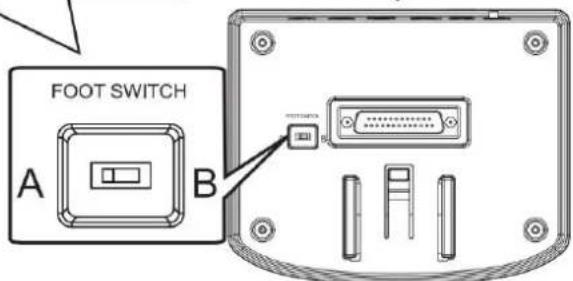

ILLUSTRATION OF SOUND MODULE PORT
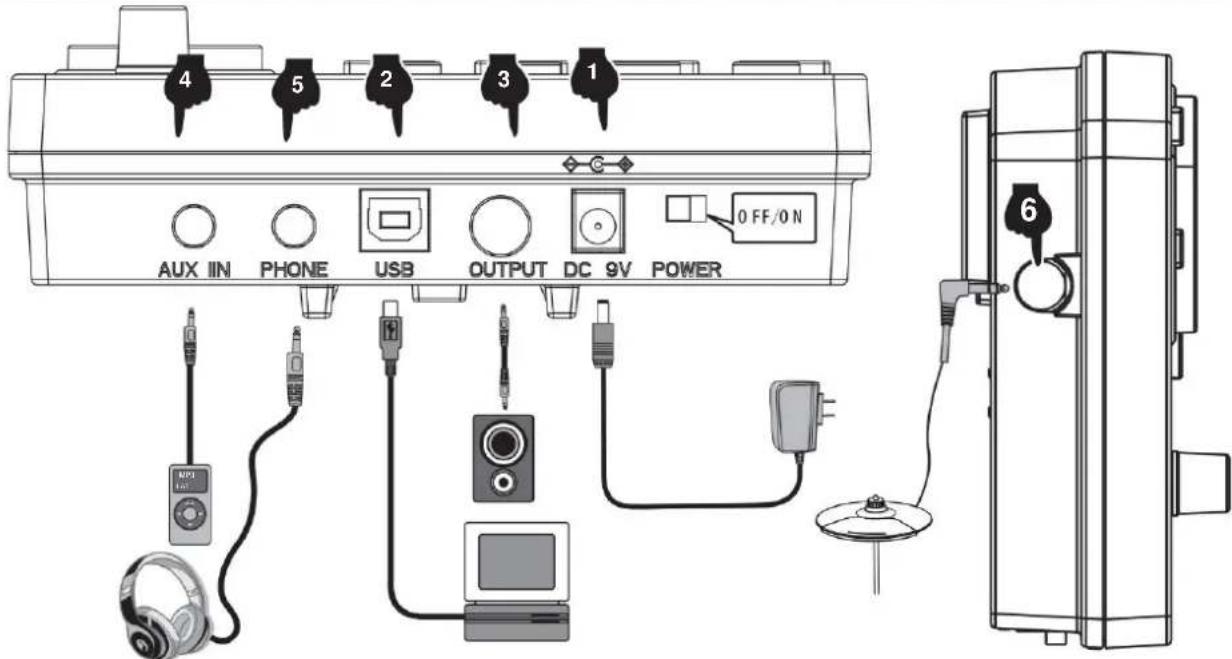

CONNECTION OF POWER CORD
- Fairfax Ride Rim
- Military Ride Rim
Hi-Hat
- Pop Hi-Hat Open
- Funk Hi-Hat Open
Hard Hi-Hat Open
- Original Hi-Hat Open
- PopRock Hi-Hat Open
- Rock Hi-Hat Open
Metal Hi-Hat Open 328
PowerMetal Hi-Hat Open 329.
SpockMetal Hi-Hat Open 330
Pop1572 Hi-Hat Open 331
Jazz Hi-Hat Open
332.908
333.909
- Songo Hi-Hat Open
335.Standard Hi-Hat Open
- Acoustic Hi-Hat Open
- Session Hi-Hat Open
- Modern Hi-Hat Open
- Blues Hi-Hat Open
340. Classic Hi-Hat Open
- Synthgaze Hi-Hat Open 342.
Fraak Hi-Hat Open 343
Sticks Hi-Hat Open 344
Grunge Hi-Hat Open 345.70
Talcts Hi-Hat Open 346
50 Talies Hi-Hat Open
- Populara Hi-Hat Open
- Siam Hi-Hat Open
- Attack Hi-Hat Open
350. Old Hi-Hat Opt
351 Fairfax Hi-Hat Open
- Military Hi-Hat Open
- Pop Hi-Hat Close
- Funk Hi-Hat Close
- Hard Hi-Hat Close
- Original Hi-Hat Close
- PopRock Hi-Hat Stang
- Rock Hi-Hat Close
- Metal Hi-Hat Stang
- PowerMetal Hi-Hat Stang
- SpeedMetal Hi-Hat Close 362
PopJazz Hi-Hat Stang
- Jazz Hi-Hat Close
364.808
365.909
366.Songo Hi-Hat Close
367.Standard Hi-Hat Stang
370.Modern Hi-Hat Close
- Blues Hi-Hat Open
- Classic Hi-Hat Close
- Synthgeze Hi-Hat Close
- Freak Hi-Hat Close
- Sticks Hi-Hat Close
- Grungo Hi-Hat Open
377.70-tails Hi-Hat Goo
- 80 falls Hi-Hat Close
- Popular Hi-Hat Closure
- Sham Hi-Hat Close
- Attackera Hi-Hat Close
- Old Hi-Hat Close
- Fairfax Hi-Hat Stand
- Mllr Hi-Hat Close 385.
Pop Hi-Hat Pedal
- Fuck Hi-Hat Pedal
- Hard Hi-Hat pedal
- Original Hi-Hat pedal
- PopRock Hi-Hat pedal
Rock Hi-Hat pedal
Metal Hi-Hat pedal
PowerMetal Hi-Hat pedal
- SpeedMetal Hi-Hat pedal
PopJazz Hi-Hat pedal
- Jazz Hi-Hat pedal
808
- 909
- Songo Hi-Hat Pedal
399. Standard Hi-Hat Pedal

APPENDIX
- Acoustic Hi-Hat Pedal
401. Session Hi-Hat Pedal
[27] Motion, bi-haloideal.
10
(1) Overview of the investment target
General Hi-Hat Pedal
415. Fairfax Hi-Hat Pedal
- Military Hi-Hat Pedal
- Pookresch 2
- Fucx.Crash2
100 111 111 112
- Original Crash2
- PopRock Crash2
- Rock Crash2
423.MetalCrash2
- PowerMetal, Grob3
- SpeedMetal Crash2
- PopJazz Crash2
427Jazzbrash 2
425805
429.909
- Soree Grob2
131 Standard Graph 2
480MilitaryCrash2Bim
Krasch 2
Drum combination timbre
| 01 Pop | 09 SpeedMetal | 17 Session | 25 70-talet |
| 02 Fan | 10 PopJazz | 18 Modern | 26 80-talet |
| 03 Svårt | 11 Jazz | 19 Blues | 27 Popular |
| 04 Original | 12 808 | 20 Klassisk | 28 Slam |
| 05 Poprock | 13 909 | 21 Synthgaze | 29 Attack |
| 06 Rock | 14 Songo | 22 Freak | 30 gammad |
| 07 Metall | 15 Standard | 23 pinnar | 31 Fairfax |
| 08 PowerMetal | 16 Akustisk | 24 Grunge | 32 Militär |
Demonstration music
This product can be powered by standard indoor wall sockets. Please only use the power cord specified for this product. When not in use, turn off the power supply. If you do not use the product for a long time, unplug the power cord and store it properly.
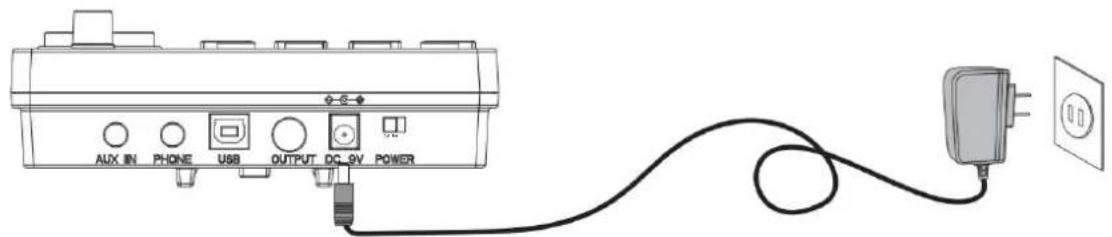
SIGN
To ensure that you use this product safely and correctly, and to prevent harm to users and others as well as financial damage, this manual and the product are marked with a series of safety signs. The various signs and their meanings are as follows:

WARNING
This sign indicates that there is a potential risk of death or serious injury if this mark is ignored and the product is mishandled.

BE CAREFUL
This sign indicates that there is a potential danger of injury to personnel or other financial damage if this sign is ignored and the product is operated incorrectly.
EXAMPLE OF LOGO

This triangle sign () indicates what users should pay attention to. (The left example is careful shocks)

A circular sign () with an oblique line indicates prohibitions. The icons in or beside the logo indicate the contents specifically prohibited. (The example on the left is no disassembly)

The round black bottom sign (飞) indicates what must be observed. The diagrams in this sign indicate the contents of the specific matters that must be observed. (The example on the left is that the power plug must be pulled out of the socket)
SAFETY PRECAUTIONS

WARNING
Smoke, odor, overheating
When the product smokes, smells or overheats, there is a danger of fire and electric shock when it is used continually. In case of the above situation, the following operations should be performed immediately:
- Turn off the power supply.
- Pull the plug out of the power outlet.
- Contact your dealer.
Power cord
- The improper use of power cord may cause fire and electric shock. The following precautions must be observed: The special power cord designated for this product must be used. The AC power supply with output voltage within the rated voltage range for household use must be used.
- Do not overload power sockets and extension lines.
- The improper treatment of power line will lead to its damage or breakage, which will cause fire and electric shock hazards. The following precautions must be observed:
- Do not place or heat heavy objects on power lines.
- Do not attempt to alter or bend the power cord too much.
- Do not twist or pull the power cord.
- If the power cord or plug is damaged, please replace the same type of power cord.
- Do not touch the power cord and plug with wet hands, otherwise there is a danger of electric shock.
- Please use the power cord where the water will not splash. Water is in danger of causing fire and electric shock.
- Never place vases or any other container containing water on this product. Water is dangerous of causing fire and electric shock.
- Do not allow minors to unplug and touch power lines or connection boards. Minors have no common sense of electricity safety, which may cause electric shock.


BE CAREFUL
The improper use of power cord may cause fire and electric shock. The following precautions must be observed:
- Never put the power cord near the oven or other heat source.
- Do not pull the cable when pulling out of the power socket. The main body of the plug must be grasped.
- The power cord plug must be inserted in the socket to the end.
- Make sure the power supply is off before connecting or disconnecting it.
- When thunderstorms occur or before traveling or other long-term departure, disconnect the power cord from the wall outlet.
- At least once a year, remove the power cord from the wall outlet and clean the dust accumulated around the plug.
Do not burn this product
Do not put this product in the fire, otherwise it will lead to product combustion and explosion of internal electronic components, which will cause fire and personnel injury.


Water and foreign bodies
Water, other liquids and (metal sheets, etc.) entering this product are in danger of causing fire and electric shock. In case of the above situation, the following operations shall be performed immediately:
- Turn off the power supply.
- If you are using a power cord for power supply, unplug it from the wall outlet.
- Contact your distributor
Disassembly and transformation
Do not disassemble or transform the product in any way, otherwise there is a risk of electric shock, scalding, or other personal injury. All internal inspection, adjustment, and maintenance operations should be entrusted to your distributor.

SAFETY PRECAUTIONS
Falling or colliding
If the product falls or is damaged by strong impact, it may cause fire or electric shock. In such cases, immediately perform the following operations:
- Turn off the power supply.
- If you are using a power cord for power supply, unplug it from the wall outlet.
- Contact your distributor.
Plastic bag
Do not let anyone put plastic bags for this product on their head or in their mouth. Otherwise, there is a risk of asphyxiation. Families with young children should pay special attention to this.

Keep a distance from the product and the bracket
Climbing the bracket is dangerous and may cause overturning or damage. Families with young children should pay special attention to this.

Placement
Avoid placing the product on an uneven surface or any other unstable place. Otherwise, the product may fall, leading to the risk of injury.

Product Mobility
Before moving this product, you must unplug the power cord plug from the wall outlet and pull out all other cables and connecting wires. Otherwise, it will lead to damage of power or connection wires, resulting in fire and electric shock.

Cleaning
Before cleaning this product, you must unplug the power cord plug from the wall outlet, otherwise there is a risk of fire and electric shock.

Jack
The socket of this product can only be connected to the designated equipment and devices. Connecting non-designated equipment or devices is dangerous of causing fire and electric shock.


Location selection
It should be avoided to place the product in the following places, otherwise there is a risk of fire and electric shock.

- High temperature or dusty places.
- Kitchen or other places with lampblack.
- Where the product is exposed to direct sunlight, or any other place where the product will produce high temperature.
Volume
Don't play music long and loud. Pay special attention when using headphones.

Excessive volume can damage your hearing.

Heavy
Do not place heavy objects on this product. Otherwise, the top of the product will be overweight, causing the product to overturn or drop objects on it, which will lead to the risk of injury.

Correct assembly of scaffolds
The incorrect assembly of the bracket may overturn, causing the product to fall off and posing a risk of injury to personnel.
Therefore, it must be assembled according to the instructions in the attached installation guide to ensure that the product is properly mounted on its bracket.
YH CONSULTING LIMITED. C/O YH Consulting Limited Office 147, Centurion House, London Road, Staines-upon-Thames, Surrey, TW18 4AX
VEVOR
TOUGH TOOLS, HALF PRICE
www.vevor.com/support




- ELECTRONIC DRUM SET
- USER MANUAL
- MODEL: MD200E-P
- NEED HELP? CONTACT US
- REMARK
- FUNCTION INTRODUCTION
- CONTENTS
- INSTALLATION GUIDE
- CHECK THE ATTACHED ITEMS
- LRON PIPE HOLDER
- TYMPANIC INTUBATION
- MOUNTING STAND
- INSTALL THE DRUM MODULE
- INSTALL HITTING PARTS AND SOUND MODULE
- INSTALL THE KICK DRUM
- INSTALL THE HAMMER BAR
- THE KICK DRUM IS FIXED WITH THE STEP HAMMER
- PLUG IN THE STRIKING PART CONNECTION CABLE
- ILLUSTRATION OF SOUND MODULE PORT
- POWER CORD CONNECTION
- USB MIDI PORT
- AUDIO OUTPUT PORT
- AUDIO INPUT PORT
- EARPHONE PORT
- INCREASE PORT
- BT MODE
- OPERATION GUIDE
- POWER
- DRUM KIT SELECTION
- METRONOME
- PRACTICE FUNCTION
- COACH MODE
- DEMO SONGS
- DRUM PARAMETERS
- RECORDING FUNCTION
- SAVE/RESET
- USB MIDI
- APPENDIX
- TIMBRE
- PRESET DRUM KITS
- USER DEFINED DRUM KITS
- DEMONSTRATION SONG
- PRODUCT MAINTENANCE
- SAFETY PRECAUTIONS
- IRON PIPE HOLDER
- DRUMKITSELECTION
- KICK
- SNARE
- TOM
- CRASH
- RIDE
- HI-HAT
- DRUM COMBINATION TIMBRE
- AVOID HEAT, MOISTURE OR DIRECT SUNLIGHT
- DO NOT USE NEAR TV OR RADIO
- DO NOT USE PAINT, THINNER OR SIMILAR CHEMICALS FOR CLEANING
- DO NOT SHAKE TO AVOID COLLISION
- POWER SUPPLY
- SIGN
- WARNING
- BE CAREFUL
- EXAMPLE OF LOGO
- SMOKE, ODOR, OVERHEATING
- POWER CORD
- DO NOT BURN THIS PRODUCT
- WATER AND FOREIGN BODIES
- DISASSEMBLY AND MODIFICATION
- FALLING OR IMPACT
- PLASTIC BAG
- KEEP A DISTANCE FROM THE PRODUCT AND THE BRACKET
- PUT
- PRODUCT MOBILITY
- CLEAN
- JACK
- LOCATION SELECTION
- VOLUME
- HEAVY
- CORRECT ASSEMBLY OF SCAFFOLDS
- VEVOR®
- TOUGH TOOLS, HALF PRICE
- INTRODUCTION OF FUNCTIONS
- CAUTION
- WATER AND FOREIGN OBJECTS
- VEVOR
- DISASSEMBLY AND TRANSFORMATION
- FALLING OR COLLIDING
- BATTERIA ELETTRONICA
- MANUALE D'USO
- INCIDENT
- PLACEMENT
- CLEANING
- USER DRUM GROUP
- DO NOT INCINERATE THIS PRODUCT
- HALO HOED
- CHECK THE INCLUDED ITEMS
- EAR ROD HOLDER
- INSTALL THE STRIKING PARTS AND SOUND MODULE
- INSTALL THE HAMMER HOLDER
- CONNECT THE CABLE FOR THE STRIKING PART
- CONNECTION OF POWER CORD
- DEMONSTRATION MUSIC
Brand : Vevor
Model : MD200E-P
Category : Musical instrument