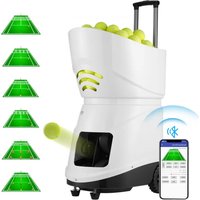
USER MANUAL TS-08 Vevor
Technical Support and E-Warranty Certificate www.vevor.com/support
Tennis Ball Machine
MODEL: TS-06/TS-08/TS-06M/TS-08M
We continue to be committed to providing you with tools at competitive prices. "Save Half", "Half Price", or any other similar expressions used by us only represent an estimate of savings you might benefit from buying certain tools with us compared to top brands, and does not necessarily mean to cover all categories of tools offered. We kindly remind you to verify carefully when placing an order with us to ensure you are actually saving half in comparison with the top major brands.
MODEL: TS-06/TS-08/TS-06M/TS-08M
Have product questions? Need technical support? Please feel free to contact us:
Technical Support and E-Warranty Certificate
www.vevor.com/support
This is the original instruction. Please read all manual instructions carefully before operating. VEVOR reserves a clear interpretation of the user manual. The appearance of the product shall be subject to the product you received. Please forgive us that we won't inform you of any technology or software updates on our product.
 | Warning-To reduce the risk of injury, user must read in manual carefully. |
 | This product is of protection class III. |
 | CORRECT DISPOSALThis product is subject to the provision of european Dir 2012/19/EU. The symbol showing a wheelie bin crossed through indicates that the product requires separate refus collection in the European Union. This applies to the pr and all accessories marked with this symbol. Products r as such may not be discarded with normal domestic w must be taken to acollection point for recycling electrical electronic devices. |
SAFETY WARNINGS AND PRECAUTIONS
Thank you for using this product. In order to ensure that you can operate the machine correctly, read this instruction carefully before operation and keep it properly for future reference. Please be sure to follow the precautions and safety rules in this manual to ensure your safe use. This manual will outline safety warnings and precautions, operating, and maintenance. The warnings and instructions reviewed in this manual cannot cover all possible conditions and situations that may occur. Common sense is not built into this product, since we believe users will comply with these codes.
Please read ALL the instructions before using your machine.
- Assembly needs to follow these instructions. Incorrect assembly can be a hazard.
- Do not assemble when tired or when under the influence of alcohol, drugs, or medication.
- Weight and elastic and other product properties are only applicable to correctly and completely assembled products.
- Keep the assembly area clean and well-lit.
- Keep bystanders out of the area during assembly.
- This is equipment, not a toy. It needs to be used under the guidance of a professional. Do not allow children and pets to play alone or approach this item.
- Use as intended only. Do not sit or stand on the product.
- Inspect before every use. Do not use it if parts are loose or damaged.
- Do not apply this unit to any other purposes than the indicated use.
- Do not use it for commercial purposes.
- Do not clean it with any abrasive material.
- Never leave it unattended while in use.
- Pet urine and feces can damage the product, please keep away.
- Do not place the product on or near hot air, electric burners or

WARNING:
- Young children should be supervised to ensure that they do not play with the product. Pets should stay away from the product.
Do not use outdoors in rainy and cloudy days, avoid lightning strikes and falls. People or pets hanging on the product will cause injury or death.
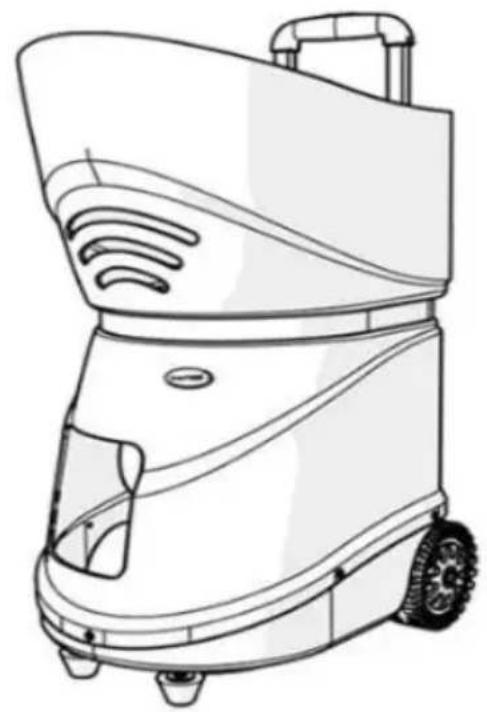
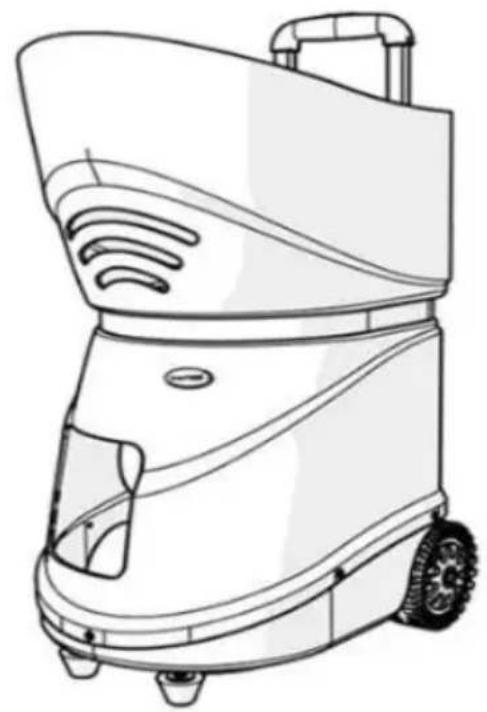
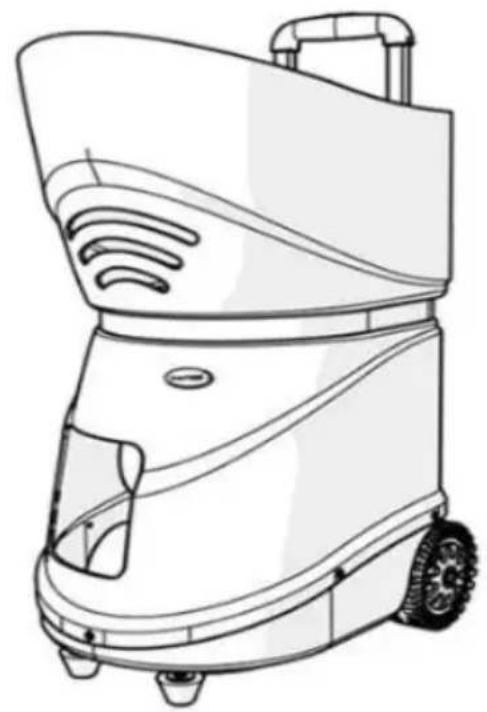
Model: TS-06/TS-08
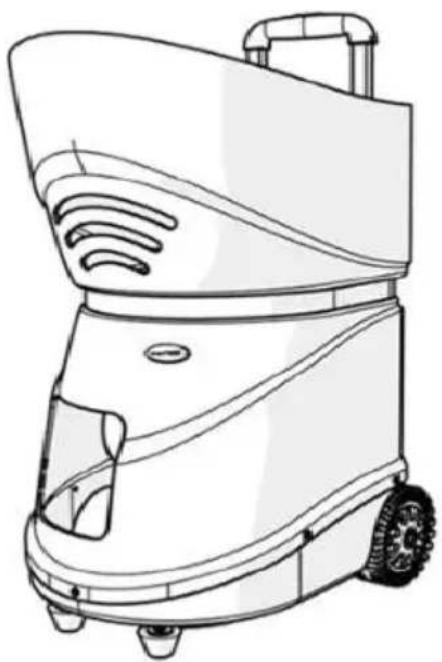
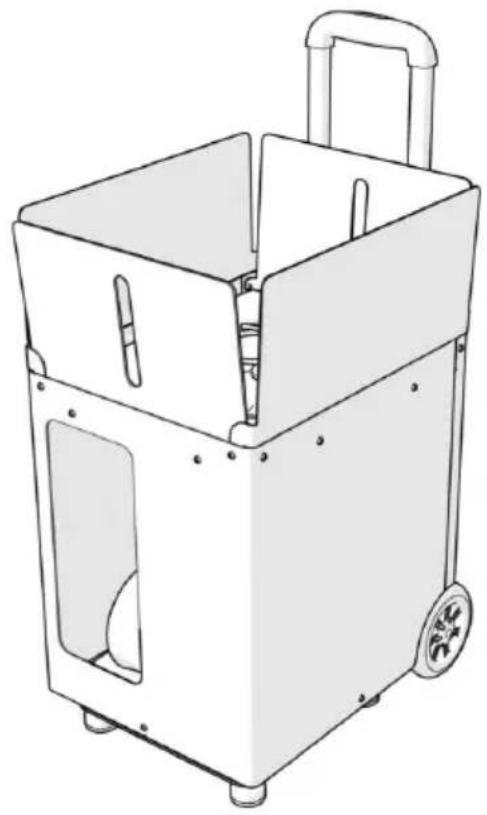
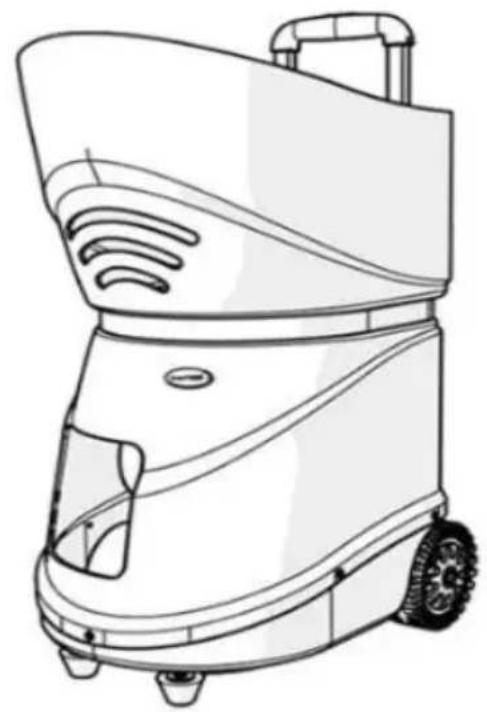
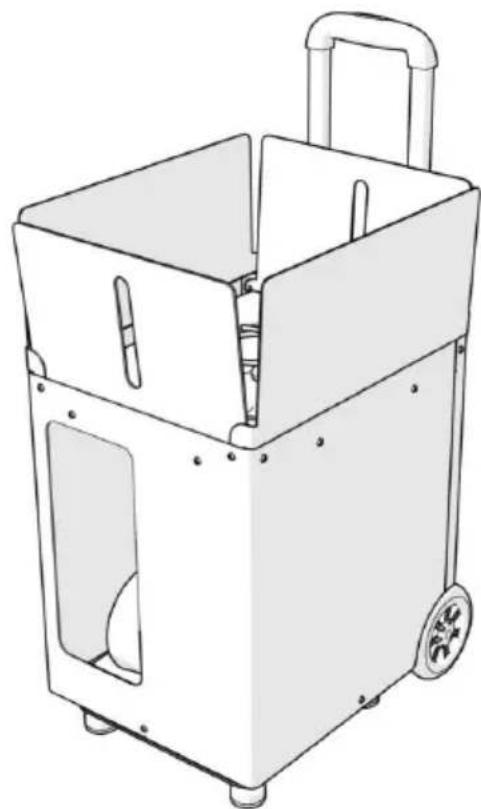
PRODUCT DETAILS
| Model No. | TS-08/TS-06/TS-06M/TS-08M |
| Rated Voltage(V) | DC12 |
| Ball Capacity(Pcs) | TS-08/TS-06:150 & TS-06M/TS-08M:100 |
| Speed ( Km/h ) | 20 ~ 125±10 |
| Feed rate (second) | 2 ~ 10 |
| Battery Life ( Hour ) | 4-5 hours (normal use);≥2 hours (Set 5 gears, continuous service) |
PACKING LIST
| Tennis Ball Machine | 1pcs |
| Charger | 1pcs |
| User Manual | 1pcs |
| Fuse (back-up) | 2pcs |
CAUTION
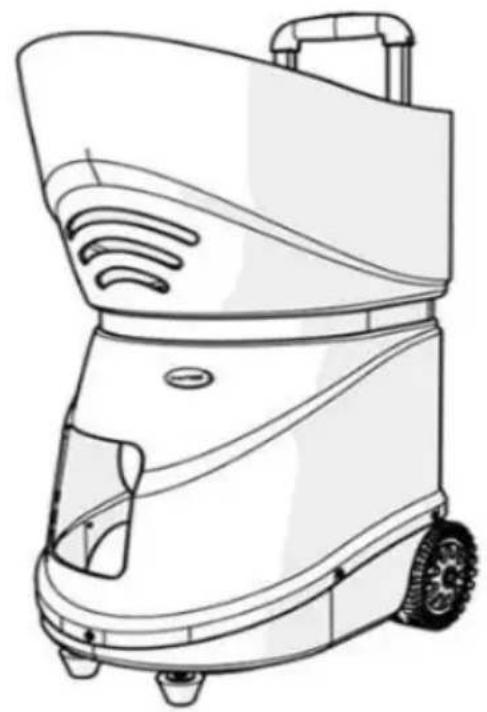
This machine was designed to be used on a tennis court and in these circumstances. Only tennis balls must be used; no other balls should be ejected from the machine. Never stand in front of the machine unless you are on the other side of the net (more than 7 meters (8 yards) away). When the machine is paused, never stand in front of it as balls can eject at any time. Children should be supervised at all times and taught to never stand in front of the machine.
Do not use the machine in rain and avoid using wet balls. We recommend the use of pressureless balls to give your machine the best performance. Using a combination of new and old balls will give inconsistent results.
Step 1: Install the software
1. Android OS
Download and install the mobile APP software
Download link:
Search for “tennismash remote” in the app store to install the APP software.
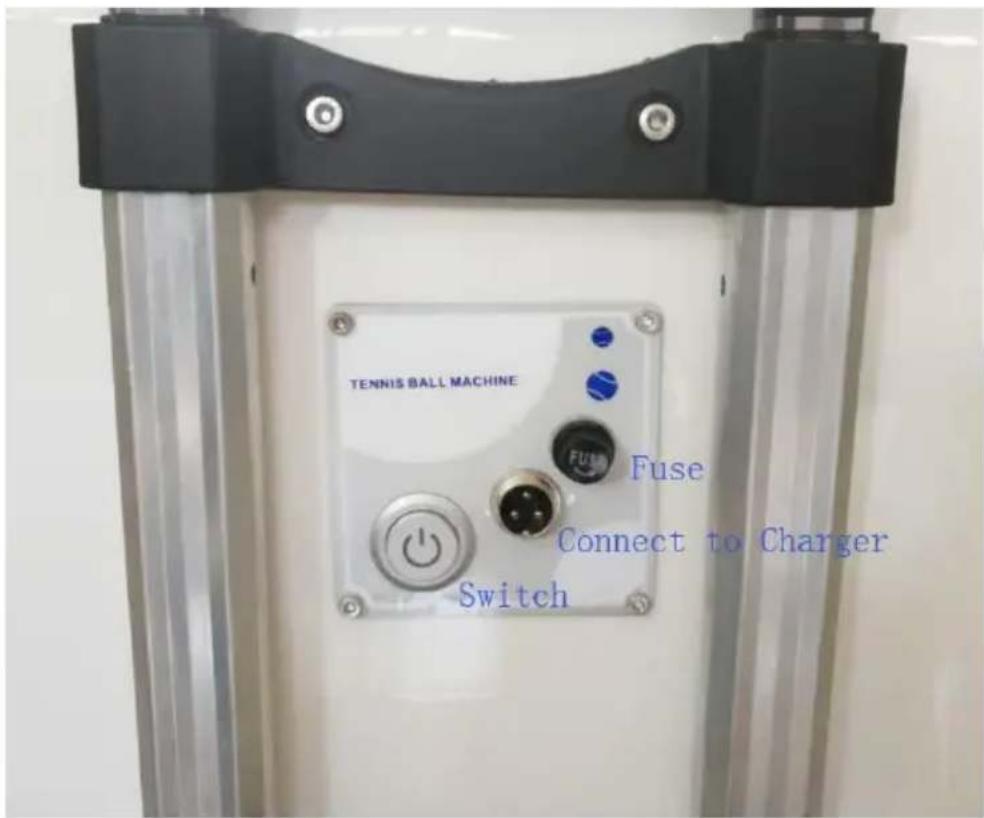
Step 2: Turn on the switch
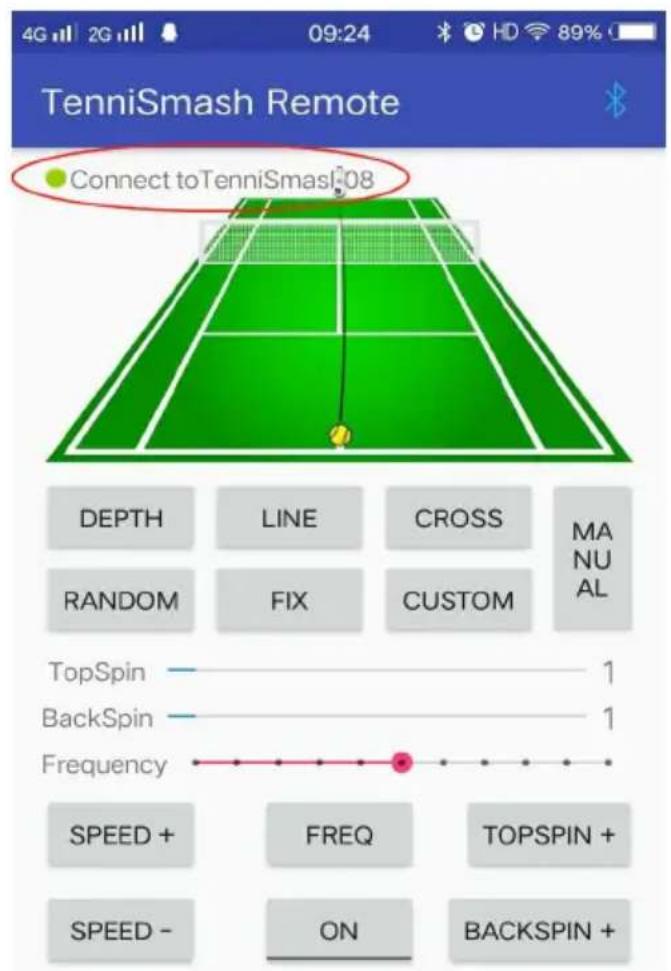
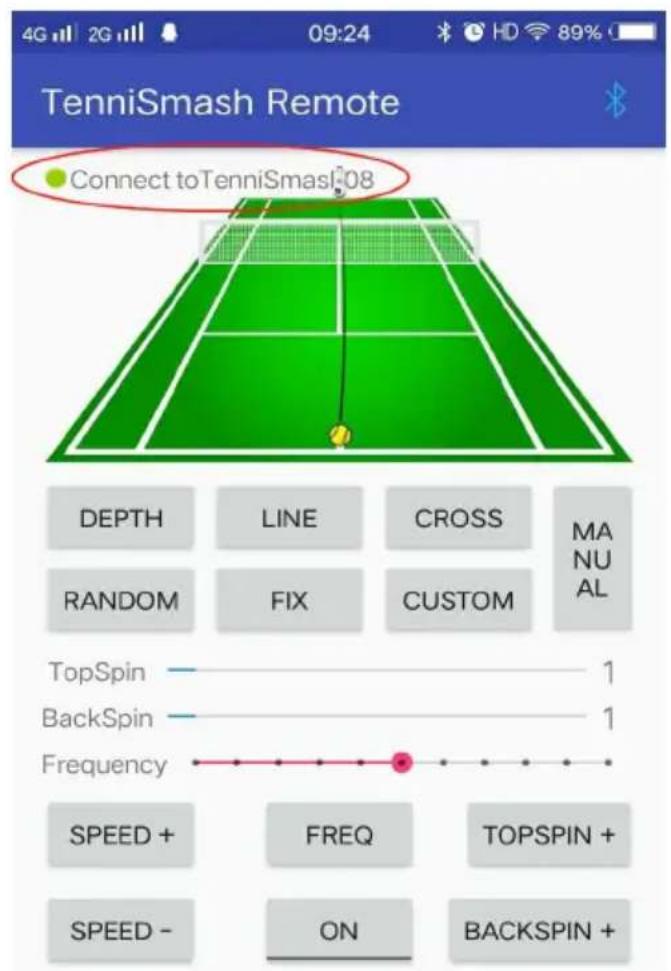
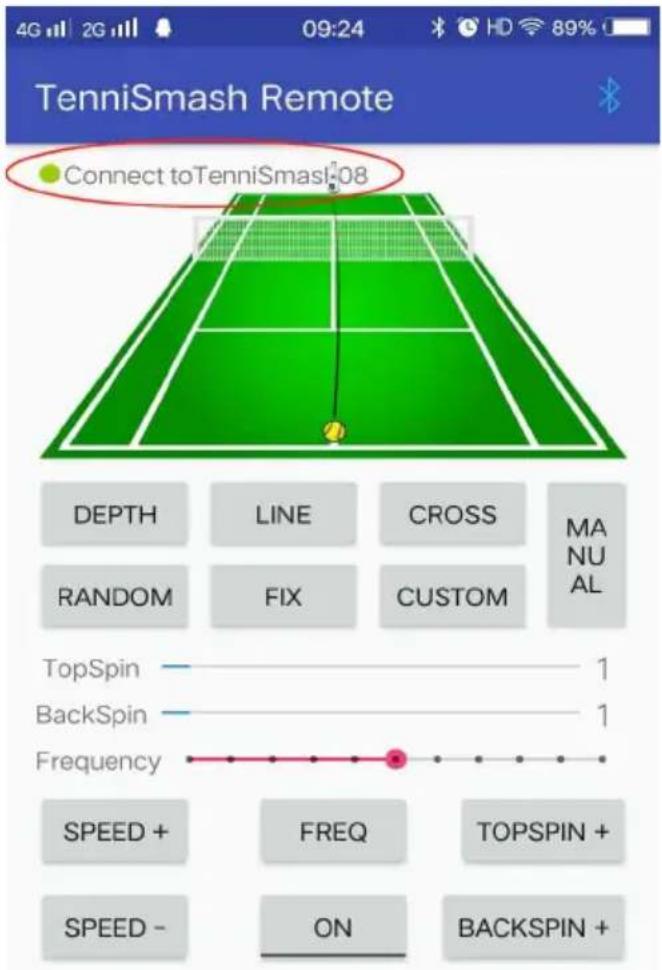
Step 3: Mobile phone and machine Bluetooth match, set up and run
software.
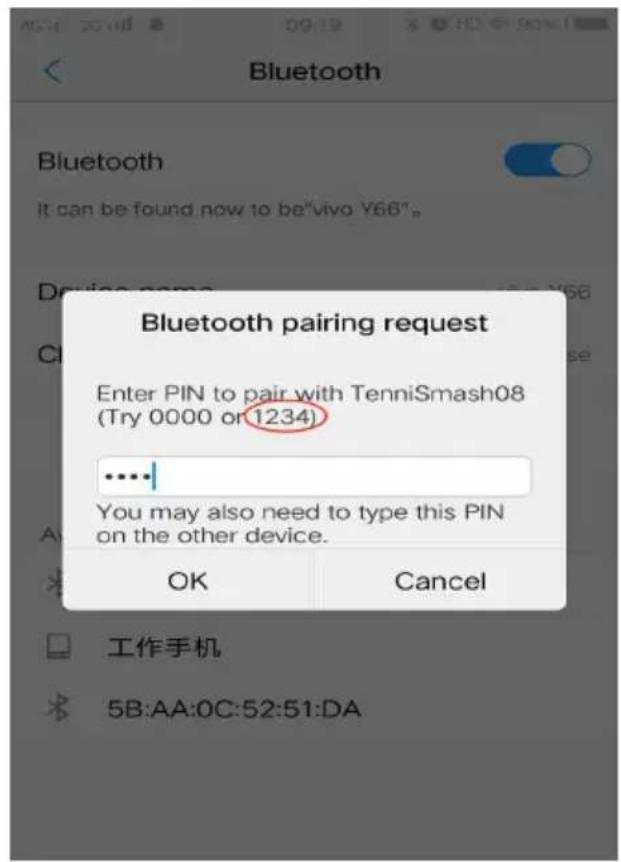
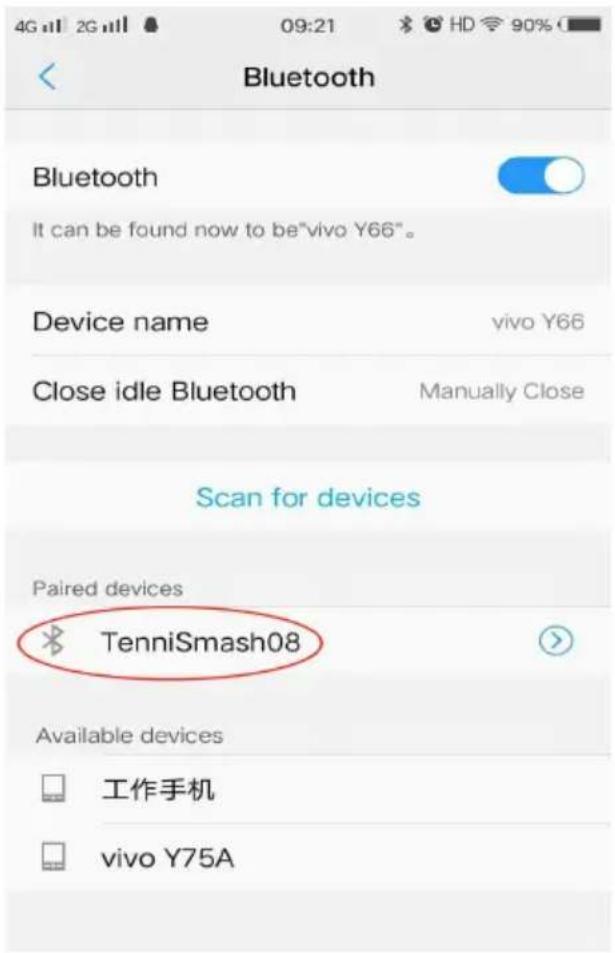
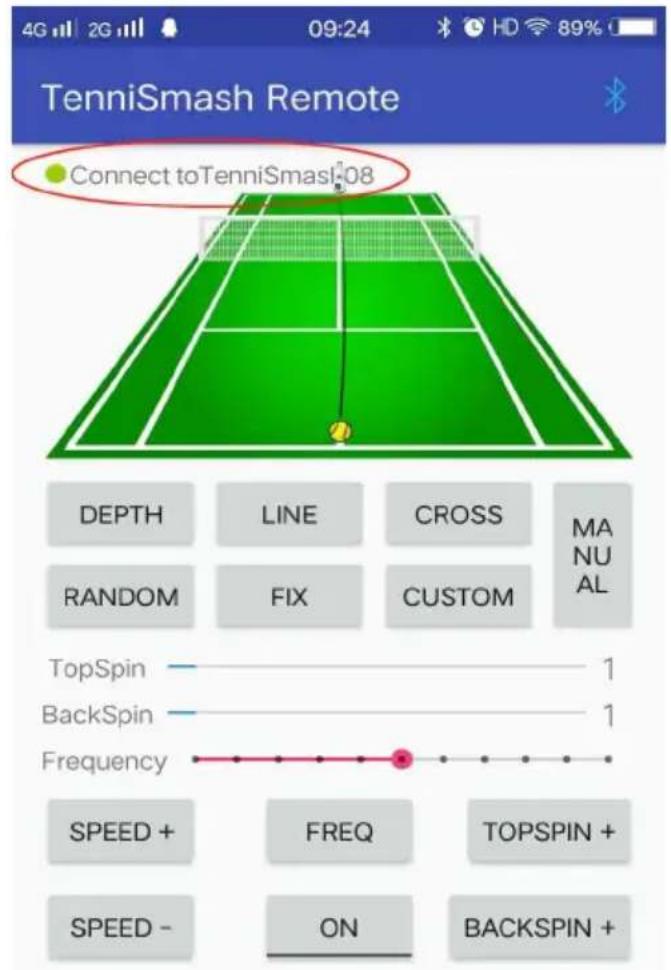
From the mobile phone settings, go into the Bluetooth settings, scan for devices (TenniSmash08 or TenniSmash06). Input PIN Code: 1234 (iPhone users skip this step.)
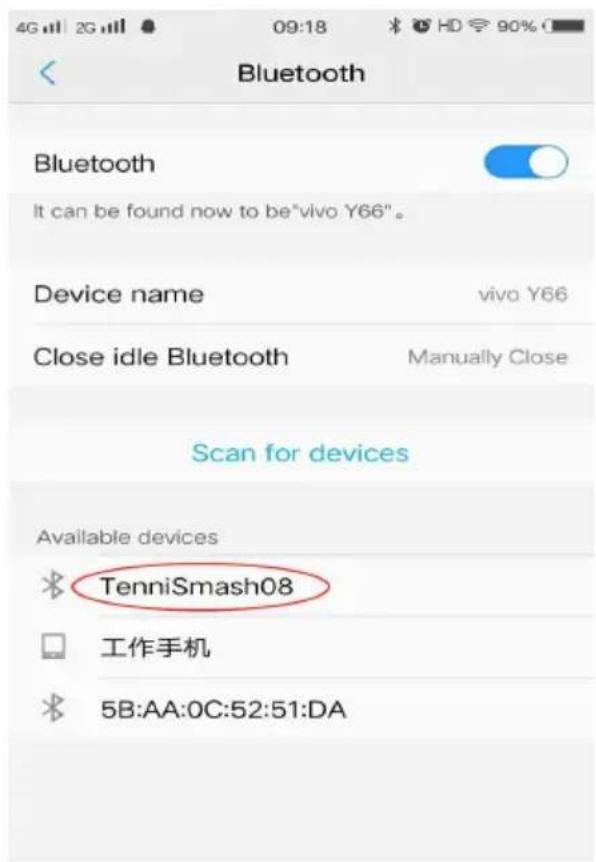
Paired Connection Successful
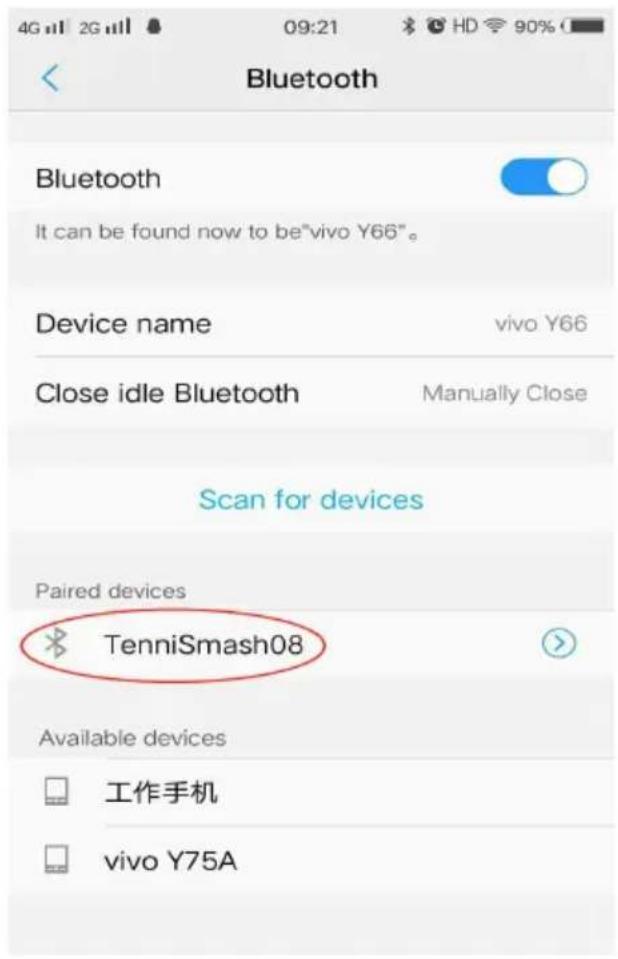
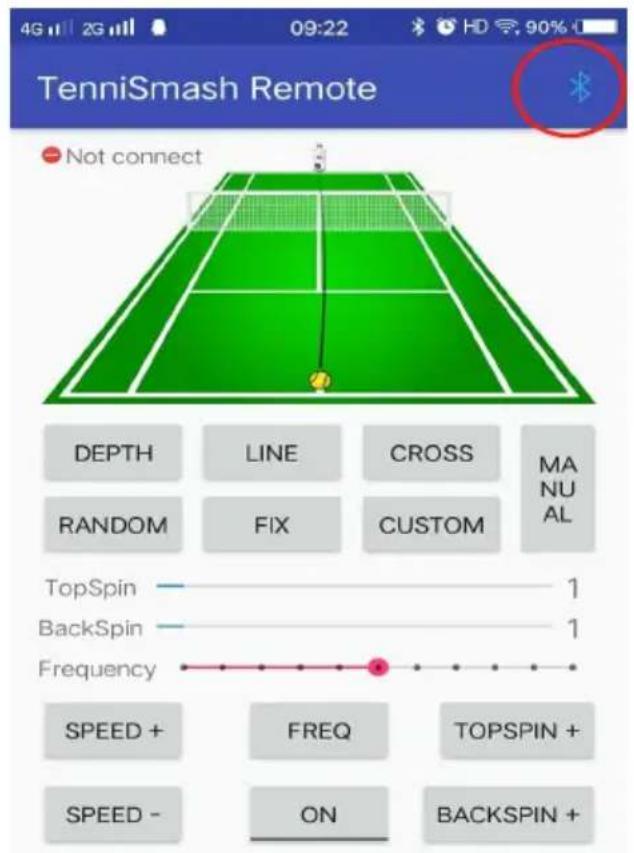
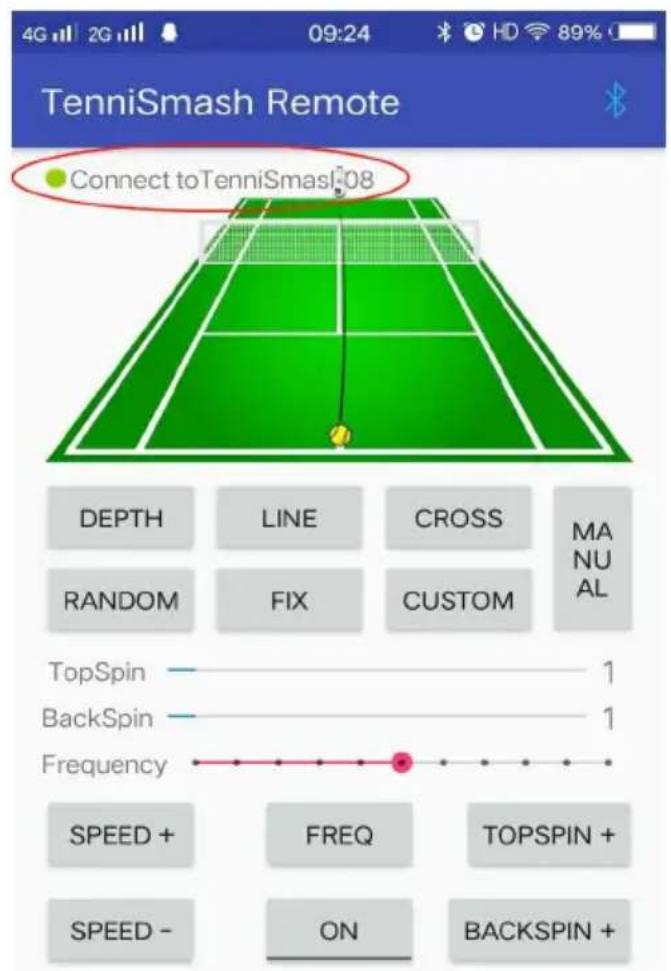
Run the App, click on the Bluetooth icon, and select the machine that has been paired.
Then select the machine (TenniSmash08 or TenniSmash06)
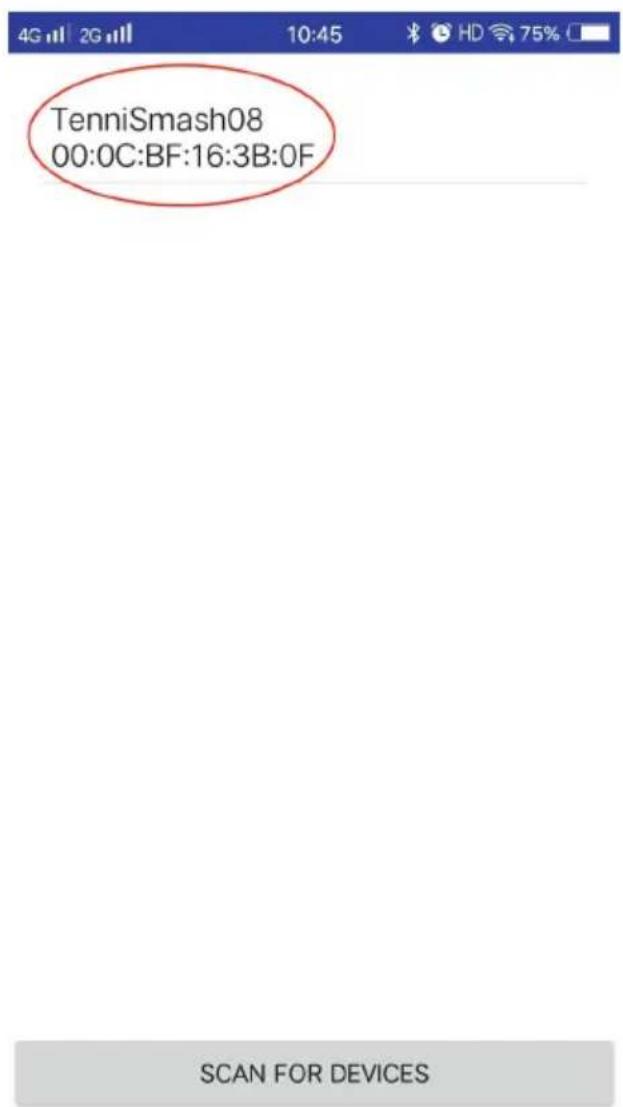
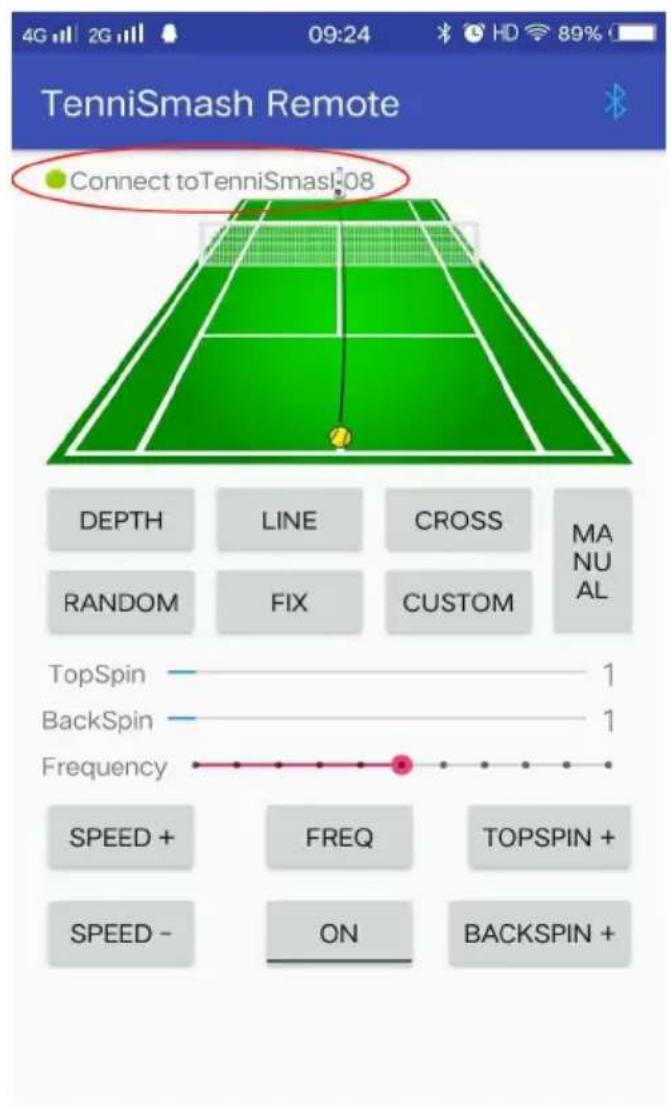
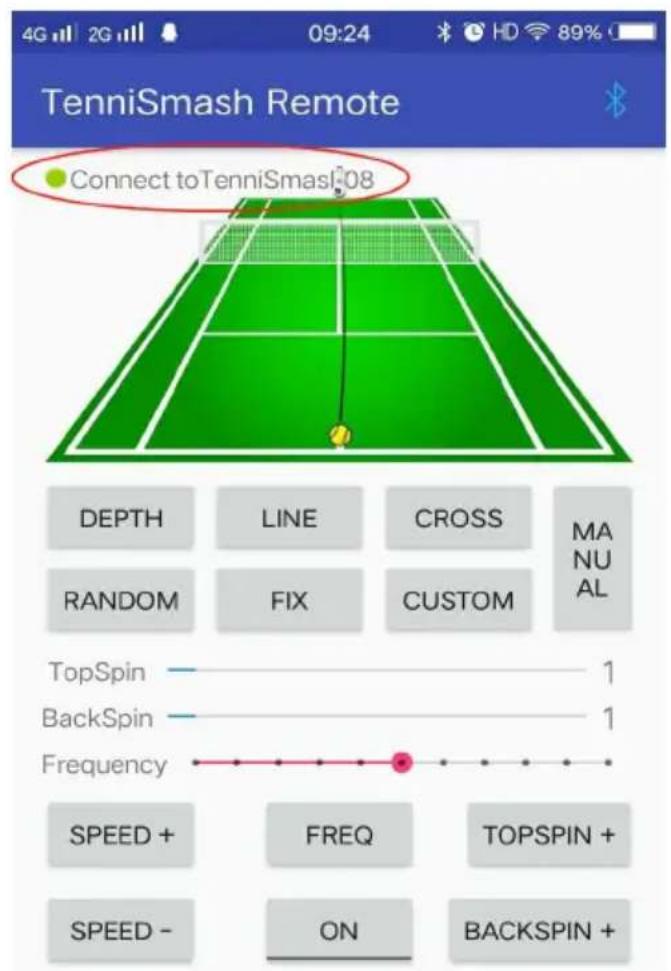
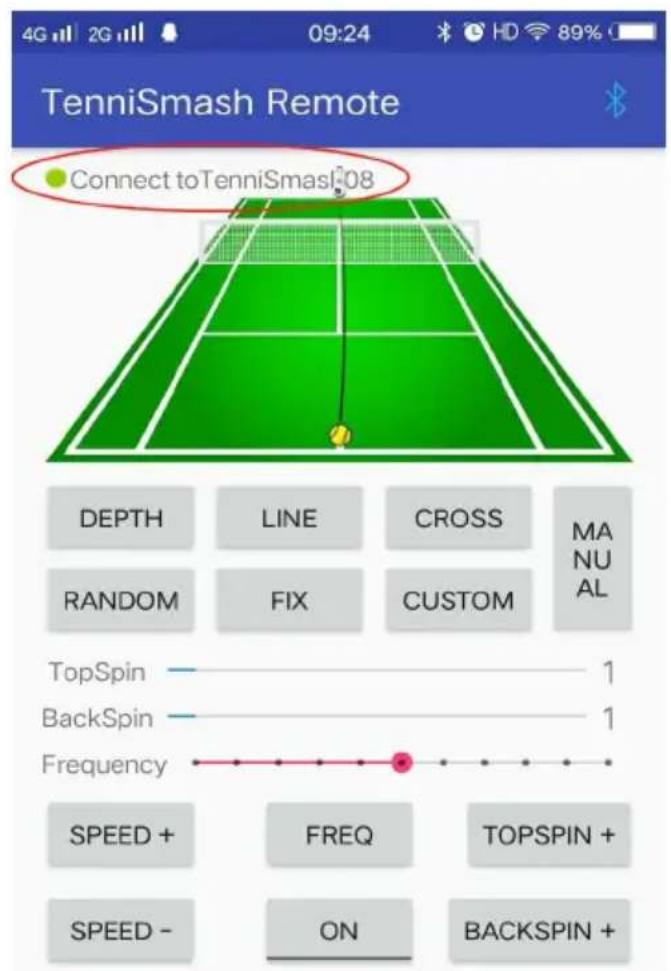
When the connect to TenniSmash08 (TenniSmash06) is displayed on the
upper left corner, the connection is successful.
Click "ON" to run the machine.
* If the mobile phone can't find the machine through Bluetooth or there is a problem with Bluetooth pairing, you can try restarting the mobile phone and the machine.
Operation panel diagram
CHARGING BATTERIES
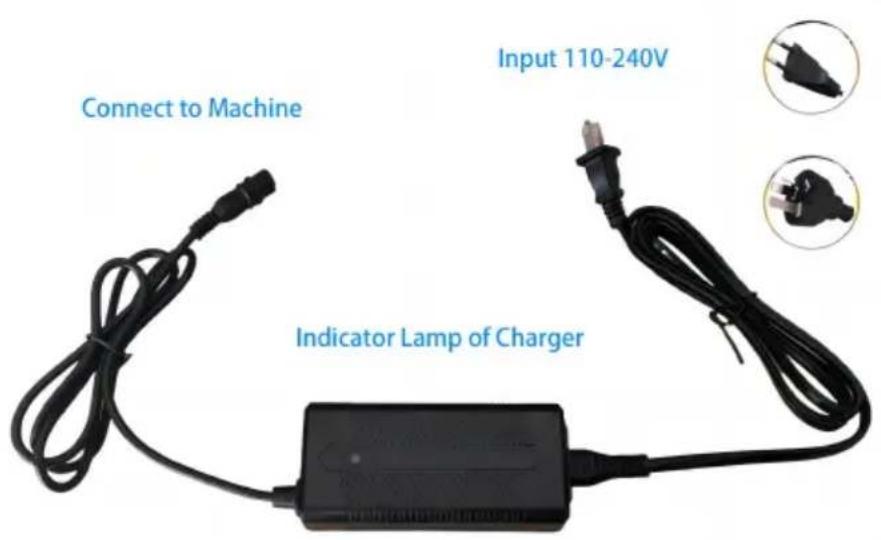
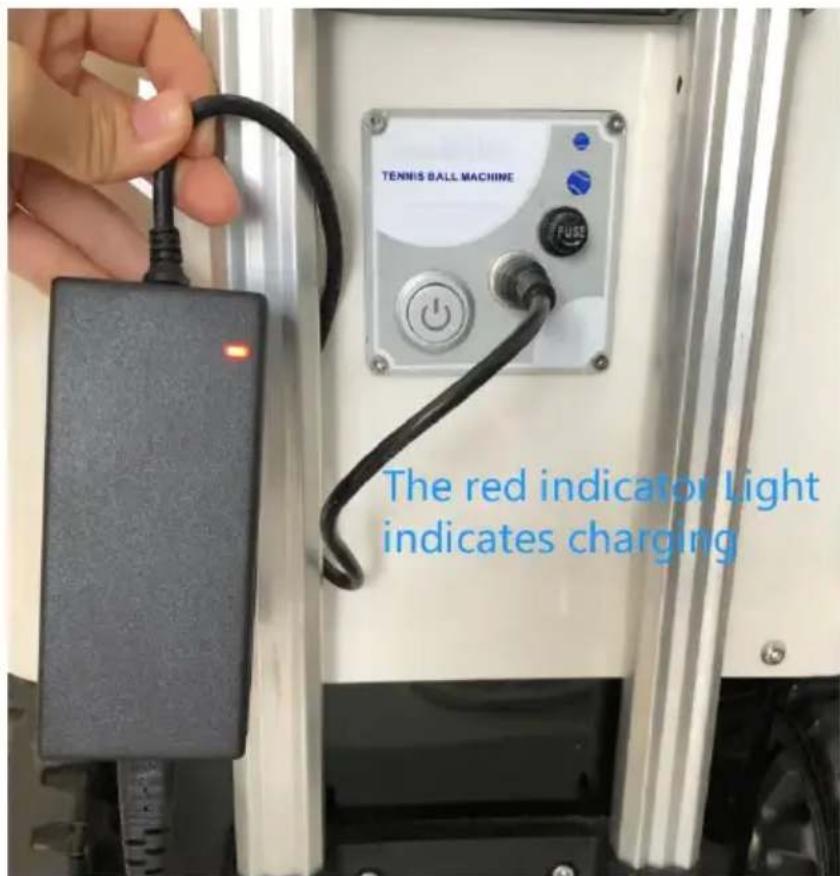
This product is equipped with an 8AH large capacity lithium battery. The battery is fully charged after the normal working time is about 4~5 hours. Please charge before use. While charging, the charger indicator is displayed in red, and fully charged turns green. When the battery is exhausted, the charging time is about 8 hours.
STEPS
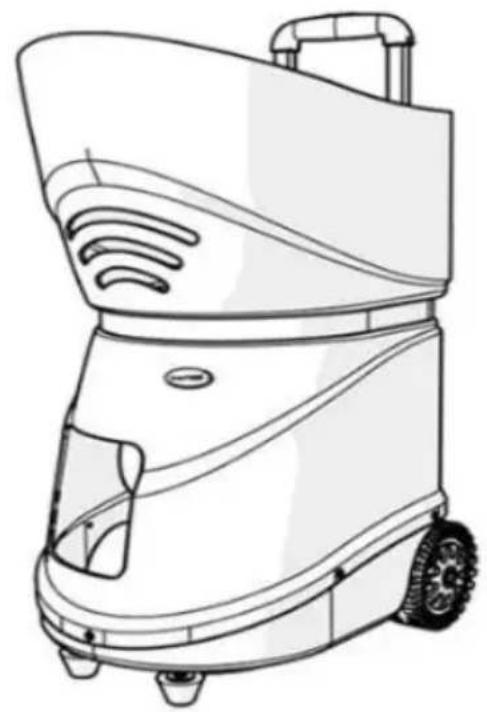
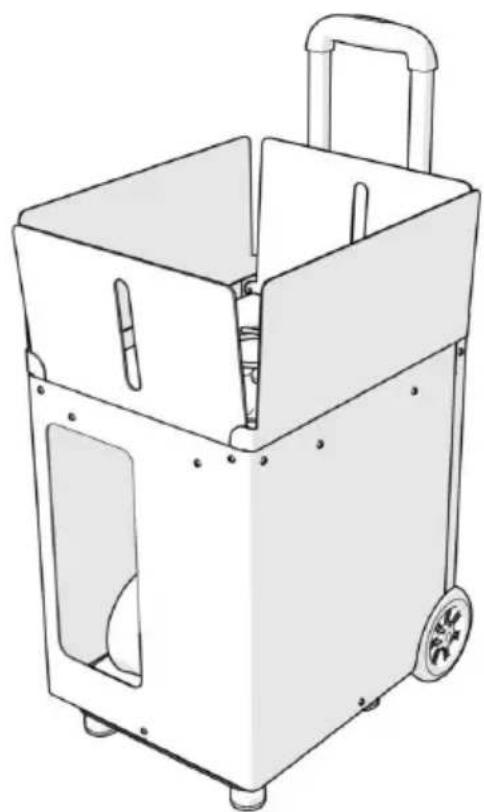
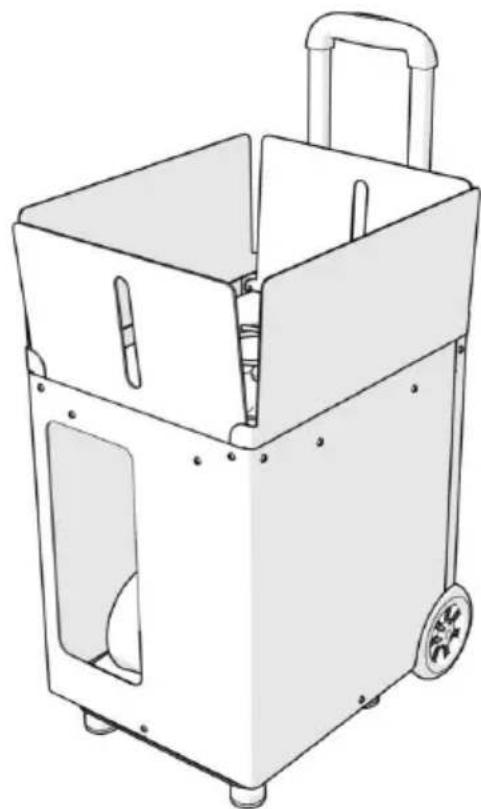
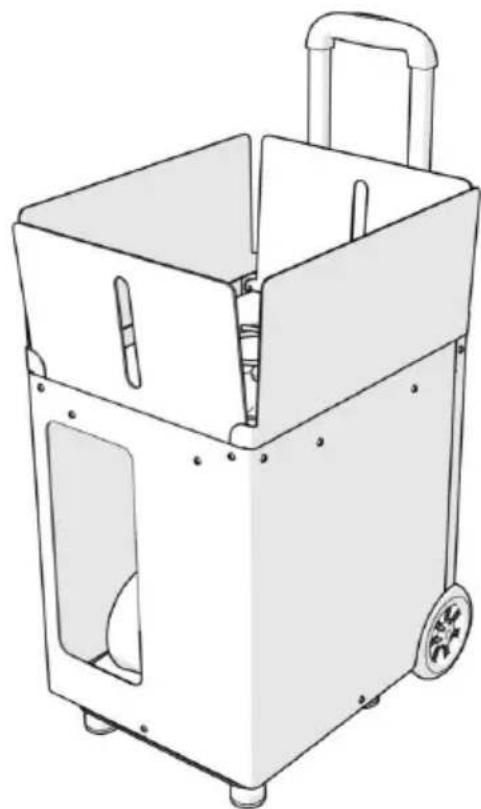
- Place the ball machine in the right place on the tennis court; fasten the ball-loading frame back on the serve machine.
- Adjust the direction of the ball.
- Adjust the ball speed and mode.
- Enjoy the Tennis
MAINTENANCE
You can vacuum out the inside of your machine to remove balls. The outside of the machine can be wiped down with a mild detergent, however, please be careful not to get water inside the machine. The throwing wheels should be wiped down after every use to prevent a buildup of residue from the balls.
TROUBLESHOOTING
- When the power button is pressed and the power is off, follow the below:
A) Check that the battery is charging.
B) Check if the fuse is blown.
- Press the power button, the power light does not light, may be due to excessive current, battery start protection.
If the battery protection lock occurs, the switch indicator light does not. Please turn off your machine, charge the battery for 5 minutes can be the battery.
- Clearing Ball Jams
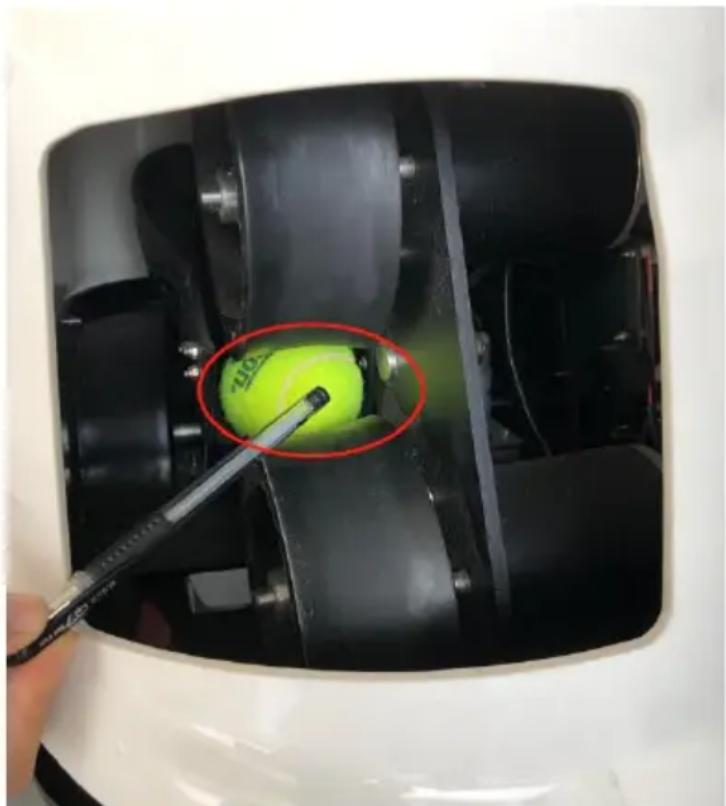
If you find that a ball gets stuck behind the two throwing wheels, the machine may shut down to prevent damage to the circuit board. Please turn the machine off and clear the ball jam.
- Does the battery of the new machine have electricity?
Generally, the stored power of the new battery is less than 30%.
leaves the factory. When you receive the machine, the battery is almost fully charged. If you need to try the machine or play ball, you should charge the battery to avoid inconvenience caused by lack of power. After the battery is fully charged, the normal working time is about 6 hours. If the battery is completely drained, the charging time is about 8 hours.
First, check whether the fuse tube is burnt out. If the fuse tube is burnt out, you need to take out our spare fuse tube at the side of the battery and replace it; If the fuse tube is in good condition, we need to check if the battery is charged. The charger indicator light is green when standard, red when charging, and green when full.
First, check whether the fuse tube is burnt out. If the fuse tube is burnt out, you need to take out the spare fuse tube at the side of the battery and replace it. If the fuse tube is in good condition, we need to check whether the battery is charged. The charger indicator light is green when standard, red when charging, and green when full.
Note: check whether our charger and socket are successfully connected. If the socket is loose, the charger will display green, creating the illusion that charging has been completed.
First check whether there is a ball stuck in the machine; Then you can adjust speed to the minimum and restart.
First check whether there is a ball stuck in the machine; then you can adjust the speed to the minimum and restart.
- The ball missed the net
Set the ball speed above 6 and place the machine at the midpoint of the court.
- Can children's balls be used?
You can use two kinds of children's balls: orange ball and green ball. The red ball can't be used because it's too big.
9. How to deal with ball jamming?
Turn off the power immediately to prevent the fuse from burning out; Then locate where the ball is stuck and empty the ball in the machine in time. If the ball is between the two wheels and it is difficult to take it out directly, we can use hands, pens, sticks, and other things to move the ball to the chassis and then take it out. During the use of the serve machine, avoid using wet balls or airless balls to avoid ball jamming.
- In the manual mode of TS08 and TS06, the mobile phone screen is not displayed when it is adjusted up, down, left, and right.
The software interface is not displayed. You can observe the change of the position of the serving wheel. The adjustment is set circularly: adjust the serving wheel up and down to reach the highest point, then down, reach the lowest and then up. The left and right adjustment is also that the serving wheel reaches the left and then right, and the wheel reaches the right and then left.
- Other fault conditions:
If you cannot personally troubleshoot, or if any of the above problems occur, please call our customer service hotline for further processing.
- Differences between TS-06 and TS-08
TS-06 can adjust any landing point of the tennis court through mobile app, with left-right swing and vertical swing functions.
TS-08 is remotely controlled by mobile app. It has 6 fixed landing points and various kinds of ball delivery lines. It can compile and set a combined ball line with landing points, and can define up to 20 landing points for circular ball delivery.
It can be switched to TS06 mode (manual mode) to cover all functions of TS06.
CAUTION: Changes or modifications not expressly approved by the party responsible for compliance could void the user's authority to operate the equipment!
This device complies with Part 15 of the FCC Rules. Operation is subject to the following two conditions:
1) This product may cause harmful interference.
2) This product must accept any interference received, including interference that may cause undesired operation.
WARNING: Changes or modifications to this product not expressly approved by the party responsible for compliance could void the user's authority to operate the product.
Note: This product has been tested and found to comply with the limits for a Class B digital device pursuant to Part 15 of the FCC Rules. These limits are designed to provide reasonable protection against harmful interference in a residential
installation.
This product generates, uses and can radiate radio frequency energy, and if installed and used in accordance with the instructions, may cause harmful interference to radio communications. However, there is no guarantee that interference will not occur in a particular installation. If this product does cause harmful interference to radio or television reception, which can be determined by turning the product off and on, the user is encouraged to try to correct the interference by one or more of the following measures.
- Reorient or relocate the receiving antenna.
- Increase the distance between the product and receiver.
- Connect the product to an outlet on a circuit different from that to which the receiver is connected.
- Consult the dealer or an experienced radio/TV technician for assistance.
Manufacturer: Shanghai Muxin Muye Youxian Gongsi
Address: Shuangcheng Road 803 Nong 11 Hao 1602A-1609 Shi, Baoshan District, Shanghai 200000 CN.
Imported to AUS: SIHAO PTY LTD. 1 ROKEVA STREET EASTWOOD NSW 2122 Australia
Imported to USA: Sanven Technology Ltd. Suite 250, 9166 Anaheim Place, Rancho Cucamonga, CA 91730
E-CrossStu GmbH
Mainzer Landstr.69, 60329
Frankfurt am Main.
YH CONSULTING LIMITED.
C/O YH Consulting Limited Office 147,
Centurion House, London Road,
Staines-upon-Thames. Surrey. TW18 4AX
VEVOR®
TOUGH TOOLS, HALF PRICE
Technical Support and E-Warranty Certificate
www.vevor.com/support
VEVOR®
We continue to be committed to provide you tools with competitive price. "Save Half", "Half Price" or any other similar expressions used by us only represent estimate of savings you might benefit from buying certain tools with us compared to top brands and does not necessarily mean to cover all categories of tools offered. We kindly remind you to verify carefully when you are placing an order with us to ensure you are actually saving half in comparison with the top major brands.
MODEL: TS-0 6/ TS-0 8/ TS-0 6M/ TS-0 8M
Have product questions? Need technical support? Please feel free to contact us:
Technical Support and E-Warranty Certificate
www.vevor.com/support
This is the original instruction. Please read all manual instructions carefully before operating. VEVOR reserves a clear interpretation of the user manual. The appearance of the product shall be subject to the product you received. Please forgive us that we won't inform you of any technology or software updates on our product.
SAFETY WARNINGS AND PRECAUTIONS
Model: TS-0 6M/ TS-0 8M
PRODUCT DETAILS
SCAN FOR DEVICES
CHARGING BATTERIES
STEPS
C/O YH Consulting Limited Office 147,
Centurion House, London Road,
Staines-upon-Thames, Surrey, TW18 4AX
VEVOR®
TOUGH TOOLS, HALF PRICE
www.vevor.com/support
VEVOR®
We continue to be committed to providing you with tools at competitive prices. "Save Half", "Half Price", or any other similar expressions used by us only represent an estimate of savings you might benefit from when buying certain tools from us compared to top brands, and do not necessarily mean that all categories of tools offered are covered. We kindly remind you to verify carefully when placing an order with us whether you are actually saving half in comparison with the top major brands.
MODEL: TS-06 / TS-08 / TS-06M / TS-08M
Have product questions? Need technical support? Please feel free to contact us:
Technical Support and E-Warranty Certificate
www.vevor.com/support
This is the original instruction. Please read all manual instructions carefully before operating. VEVOR reserves a clear interpretation of the user manual. The appearance of the product shall be subject to the product you received. Please forgive us that we won't inform you if there are any technology or software updates on our product.
SAFETY WARNINGS AND PRECAUTIONS
Model: TS-06M / TS-08M
PRODUCT DETAILS
SCAN FOR DEVICES
CHARGING BATTERIES
STEPS
C/O YH Consulting Limited Office 147,
Centurion House, London Road,
Staines-upon-Thames. Surrey. TW18 4AX
VEVOR®
TOUGH TOOLS, HALF PRICE
We continue to be committed to providing you with tools at competitive prices. "Save Half", "Half Price", or any other similar expressions used by us only represent an estimate of savings you might benefit from buying certain tools with us compared to top brands and does not necessarily mean to cover all categories of tools offered. We kindly remind you to verify carefully when placing an order with us whether you are actually saving half in comparison with the top major brands.
MODEL: TS-06 / TS-08 / TS-06M / TS-08M
Have product questions? Need technical support? Please feel free to contact us:
Technical Support and E-Warranty Certificate
www.vevor.com/support
This is the original instruction. Please read all manual instructions carefully before operating. VEVOR reserves a clear interpretation of the user manual. The appearance of the product shall be subject to the product you received. Please forgive us that we won't inform you of any technology or software updates on our product.
SAFETY WARNINGS AND PRECAUTIONS
PRODUCT DETAILS
SCAN FOR DEVICES
CHARGING BATTERIES
STEPS
C/O YH Consulting Limited Office 147,
Centurion House, London Road,
Staines-upon-Thames, Surrey, TW18 4AX
VEVOR®
TOUGH TOOLS, HALF PRICE
We continue to be committed to provide you tools with competitive price. "Save Half", "Half Price" or any other similar expressions used by us only represent savings you might benefit from buying certain tools with us compared to top brands and does not necessarily mean to cover all categories of tools offered. We kindly remind you to verify carefully when placing an order with us that you are actually saving half in comparison with the top major brands.
MODEL: TS-06 / TS-08 / TS-06M / TS-08M
Have product questions? Need technical support? Please feel free to contact us:
Technical Support and E-Warranty Certificate
www.vevor.com/support
This is the original instruction. Please read all manual instructions carefully before operating. VEVOR reserves a clear interpretation of the user manual. The appearance of the product shall be subject to the product you received. Please forgive us that we won't inform you of any technology or software updates on our product.
SAFETY WARNINGS AND PRECAUTIONS
Model: TS-06M / TS-08M
PRODUCT DETAILS

SCAN FOR DEVICES
CHARGING BATTERIES
STEPS
C/O YH Consulting Limited Office 147,
Centurion House, London Road,
Staines-upon-Thames, Surrey, TW18 4AX
VEVOR®
TOUGH TOOLS, HALF PRICE
Technical Support and e-warranty certificate
www.vevor.com/support
VEVOR®
We continue to be committed to provide you tools with competitive price. "Save Half", "Half Price" or any other similar expressions used by us only represent estimate of savings you might benefit from buying certain tools with us compared to top brands and does not necessarily mean to cover all categories of tools offered. We kindly remind you to verify carefully when you are placing an order with us that you are actually saving half in comparison with the top major brands.
MODEL: TS-06 / TS-08 / TS-06M / TS-08M
Have product questions? Need technical support? Please feel free to contact us:
Technical Support and E-Warranty Certificate
www.vevor.com/support
This is the original instruction. Please read all manual instructions carefully before operating. VEVOR reserves a clear interpretation of the user manual. The appearance of the product shall be subject to the product you received. Please forgive us that we won't inform you of any technology or software updates on our product.
SAFETY WARNINGS AND PRECAUTIONS
Model: TS-0 6M/ TS-0 8M
PRODUCT DETAILS
SCAN FOR DEVICES
CHARGING BATTERIES
STEPS
check
charger and
correct
If the outlet
will show
which
illusion of
illusion av
the charging
is complete.
C/O YH Consulting Limited Office 147,
Centurion House, London Road,
Staines-upon-Thames, Surrey, TW18 4AX
VEVOR®
TOUGH TOOLS, HALF PRICE
We continue to be committed to providing you with tools at competitive prices. "Save Half", "Half Price", or any other similar expressions used by us only represent an estimate of savings you might benefit from buying certain tools with us compared to top brands and does not necessarily mean to cover all categories of tools offered. We kindly remind you to verify carefully when placing an order with us whether you are actually saving half in comparison with the top major brands.
MODEL: TS-06 / TS-08 / TS-06M / TS-08M
Have product questions? Need technical support? Please feel free to contact us:
Technical Support and E-Warranty Certificate
www.vevor.com/support
This is the original instruction. Please read all manual instructions carefully before operating. VEVOR reserves the right to interpret the user manual. The appearance of the product shall be subject to the product you received. Please forgive us that we won't inform you of any technology or software updates on our product.
SAFETY WARNINGS AND PRECAUTIONS
MODEL: TS-06M / TS-08M
PRODUCT DETAILS
SCAN FOR DEVICES
CHARGING BATTERIES
STEPS
C/O YH Consulting Limited Office 147,
Centurion House, London Road,
Staines-upon-Thames, Surrey, TW18 4AX
VEVOR®
TOUGH TOOLS, HALF PRICE
We continue to be committed to providing you with tools at competitive prices. "Save Half", "Half Price", or any other similar expressions used by us only represent an estimate of savings you might benefit from buying certain tools with us compared to top brands and does not necessarily mean that all categories of tools offered are covered. We kindly remind you to verify carefully when placing an order with us whether you are actually saving half in comparison with the top major brands.
MODEL: TS-06 / TS-08 / TS-06M / TS-08M
Have product questions? Need technical support? Please feel free to contact us:
Technical Support and E-Warranty Certificate
www.vevor.com/support
This is the original instruction. Please read all manual instructions carefully before operating. VEVOR reserves a clear interpretation of the user manual. The appearance of the product shall be subject to the product you received. Please forgive us that we won't inform you of any technology or software updates on our product.
SAFETY WARNINGS AND PRECAUTIONS
Model: TS-06M/ TS-08M
PRODUCT DETAILS
SCAN FOR DEVICES
CHARGING BATTERIES
STEPS
Imported into AUS: SIHAO PTY LTD. 1 ROKEVA STREET EASTWOOD NSW 2122 Australia
C/O YH Consulting Limited Office 147,
Centurion House, London Road,
Staines-upon-Thames, Surrey, TW18 4AX
VEVOR®
TOUGH TOOLS, HALF PRICE