
SGPE-2000W - Power inverter Vevor - Free user manual and instructions
Find the device manual for free SGPE-2000W Vevor in PDF.
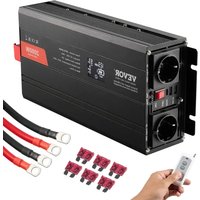


| Brand | Vevor |
| Model | SGPE-2000W |
| Product type | Modified sine wave power inverter |
| Rated power | 2000 W |
| Surge power | 4000 W |
| Output voltage | AC 230 V (Europe/Australia) |
| Output frequency | 50 Hz |
| Input voltage | DC 12 V |
| Output wave | Modified sine wave |
| Efficiency | ≥ 85% |
| No load loss | 1.2 A DC |
| Voltage regulation (THD) | < 6 % (linear load) |
| Soft start | Yes |
| Overload protection | Shutdown at 125% after 20s |
| Short circuit protection | Yes |
| Overheat protection | Shutdown at >80°C |
| Low voltage protection | Alarm at ≤10V DC, auto shutdown |
| Over voltage protection | Shutdown at ≥15.5V DC |
| Reverse connection protection | Built-in fuse |
| Wireless remote control | Yes, range ≤100m |
| Remote control battery | 23A 12V |
| Operating temperature | -10°C to +45°C |
| Included accessories | Battery cables, spare fuse, manual, remote control |
| Certification | ISO 9001:2000 |
Frequently Asked Questions - SGPE-2000W Vevor
User questions about SGPE-2000W Vevor
0 question about this device. Answer the ones you know or ask your own.
Ask a new question about this device
Download the instructions for your Power inverter in PDF format for free! Find your manual SGPE-2000W - Vevor and take your electronic device back in hand. On this page are published all the documents necessary for the use of your device. SGPE-2000W by Vevor.
USER MANUAL SGPE-2000W Vevor
Technical Support and E-Warranty Certificate
www.vevor.com/support
POWER INVERTER
We continue to be committed to providing you with tools at competitive prices. "Save Half", "Half Price", or any other similar expressions used by us only represent an estimate of savings you might benefit from buying certain tools with us compared to top brands and does not necessarily mean to cover all categories of tools offered. We kindly remind you to verify carefully when placing an order with us that you are actually saving half in comparison with the top major brands.
VEVOR®
TOUGH TOOLS, HALF PRICE
POWER INVERTER
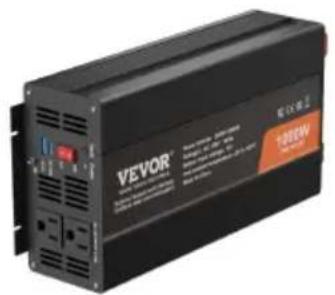
SGPE-1000W SGM-1500W
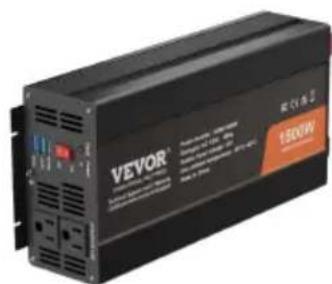

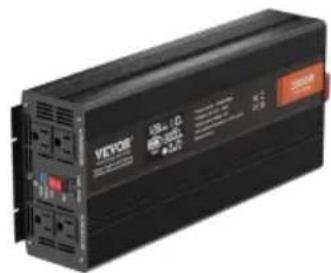
SGPE-2000W SGM-3000W/SGPE-3000W
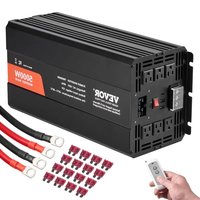
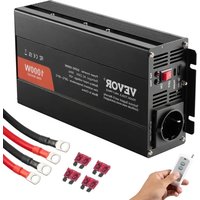
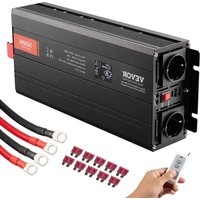
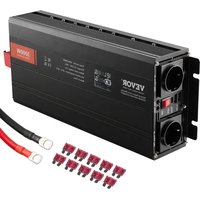
(The picture is for reference only, please refer to the actual object)
NEED HELP? CONTACT US!
Have product questions? Need technical support? Please feel free to contact us:
Technical Support and E-Warranty Certificate www.vevor.com/support
This is the original instruction. Please read all manual instructions carefully before operating. VEVOR reserves a clear interpretation of the user manual. The appearance of the product shall be subject to the product you received. Please forgive us that we won't inform you of any technology or software updates on our product.
 | Warning-To reduce the risk of injury, user must read instructi manual carefully. |
 | This product is subject to the provision of European Directive 2012/19/EC. The symbol showing a wheelie bin crossed throu indicates that the product requires separate refuse collection i European Union. This applies to the product and all accesso marked with this symbol. Products marked as such may not discarded with normal domestic waste, but must be taken to collection point for recycling electrical and electronic devices |
INSTRUCTIONS
- Please read this manual carefully before using the products.
- Thank you for choosing the power inverter we provide. We hope that our products can bring you the most satisfactory service.
- The load (appliances) power, also known as the output of the inverter, shall not be greater than the rated power, as this could cause the inverter to malfunction.
- The load power of the appliances, also known as the output of the inverter, should not exceed the rated power, as this could cause the inverter to malfunction.
- When connected to an inductive or capacitive load, the inverter power should be 4-6 times greater than the load power (i.e., 4-6 times the starting power).
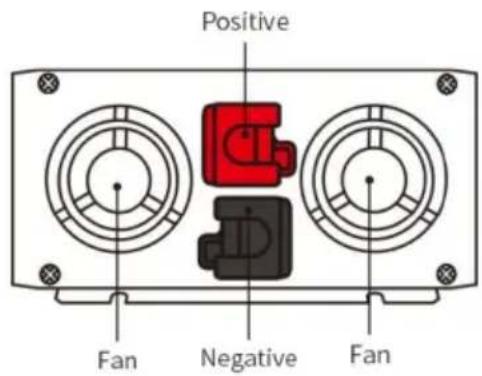
- Connect red to the positive pole and black to the negative pole. Please connect it properly. Reversing the connection would melt the fuse; it can work normally after replacing the fuse and connecting properly.
- Forbidden: plugging the inverter into mains power.
● Product Description.
This high-frequency inverter has adopted SPWM technology, and it is highly efficient and reliable. The product has passed ISO9001:2000. However, improper operation or misuse may still cause injury or loss; the instructions and information provided in this manual must be followed at all times.
● Technical Parameters.
| Model | SGM-1500W | SGM-3000W | SGPE-1000W | SGPE-2000W | SGPE-3000W |
| Output voltage North America:AC120V Europe/Australia:AC230V | |||||
| Output frequency North America:60Hz Europe/Australia:50Hz | |||||
| Input voltage DC12V | |||||
| Loss when no load | <1.2A DC | ||||
| Output wave Modified wave Sine wave | |||||
| Rated power | 1500W | 3000W | 1000W | 2000W | 3000W |
| Surge Power | 3000W | 6000W | 2000W | 4000W | 6000W |
| Soft Start | YES | ||||
| Efficiency | ≥85% | ||||
| AC Regulation | THD 6%(Linear Load) | ||||
| Over voltage shutting | ≥15.5V DC | ||||
| Low voltage shutting | ≤10V DC | ||||
| Over temperature shutting | Greater than 80°C | ||||
| Ambient temperature | -10°C --- +45°C | ||||
Note: Keep the power supply in a ventilated, dry area. Within 1 meter, there must be no flammable items; strictly prevent the risk of fire.
● Protective Functions.
- Overload protection: when overloading 125%, the inverter will send an alarm, and stop working after 20 seconds.
- Short circuit protection: When there is a short circuit in the output of the inverter, the inverter will automatically turn off the output until the short circuit problem is resolved, and the output can be restored.
- Over-temperature protection: when the inside temperature of the inverter reaches 80°C, the RED indication light will be on. The inverter will stop working. Once the temperature drops to an accepted level, the inverter will automatically resume working.
- Low voltage protection: when the battery voltage is below the setting level, the inverter will send an alarm by beeping. When the battery voltage keeps dropping to its shutting level, the inverter will beep, and the RED LED will light. The inverter will stop working. When the battery voltage is increased to its restoration level, the inverter will automatically resume working.
- Over voltage protection: when the input voltage is higher than the setting level, the inverter will stop working. When the input voltage is normal, it will automatically resume working.
- Reverse connection protection: once there is a reverse connection, the inverter fuse will be burnt. In this case, please switch off the inverter, disconnect the power source, and change the fuse.
Note: REVERSE CONNECTION IS STRICTLY PROHIBITED.
● Installation.
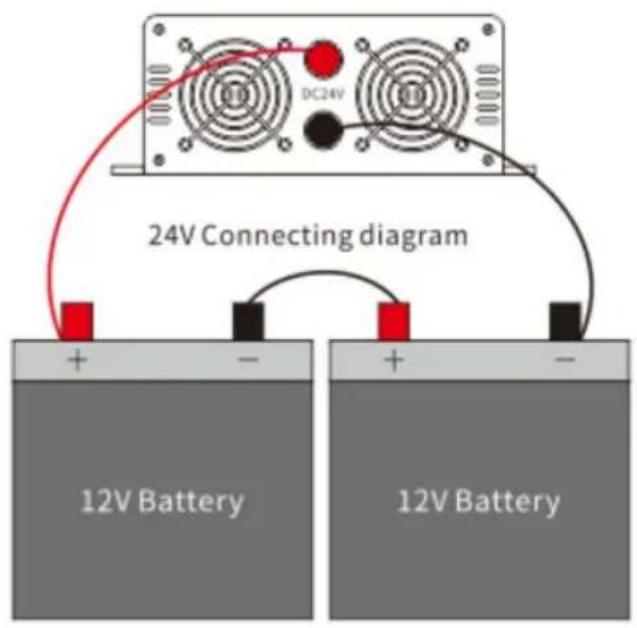
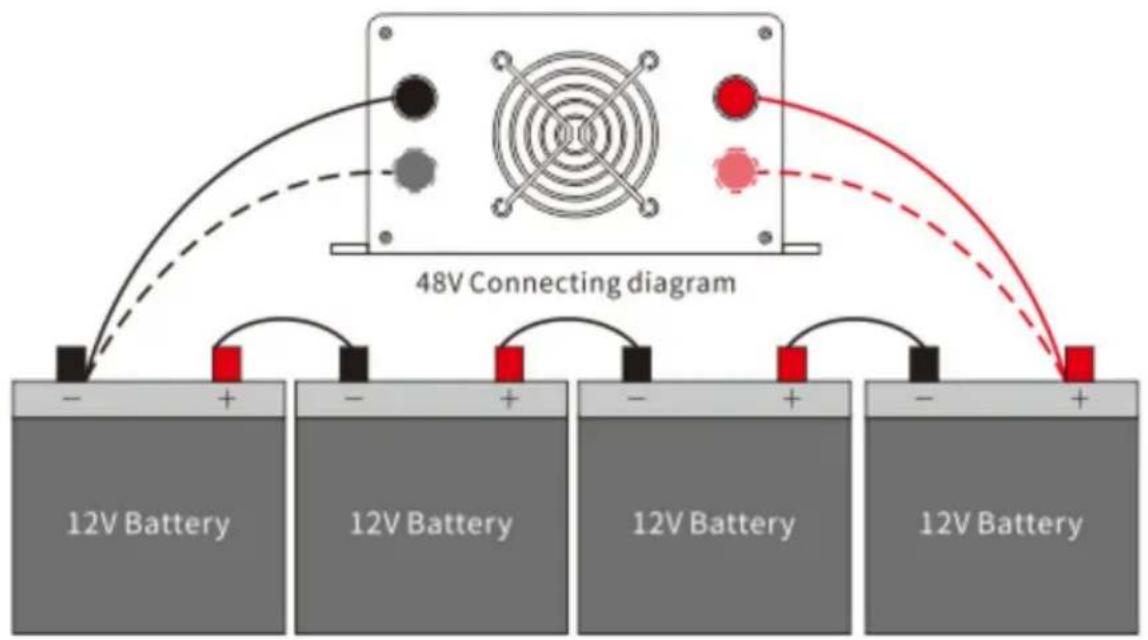
- The function of the inverter is to convert the DC 12V voltage into AC120V/230V. Before connection, please make sure the inverter is switched off.
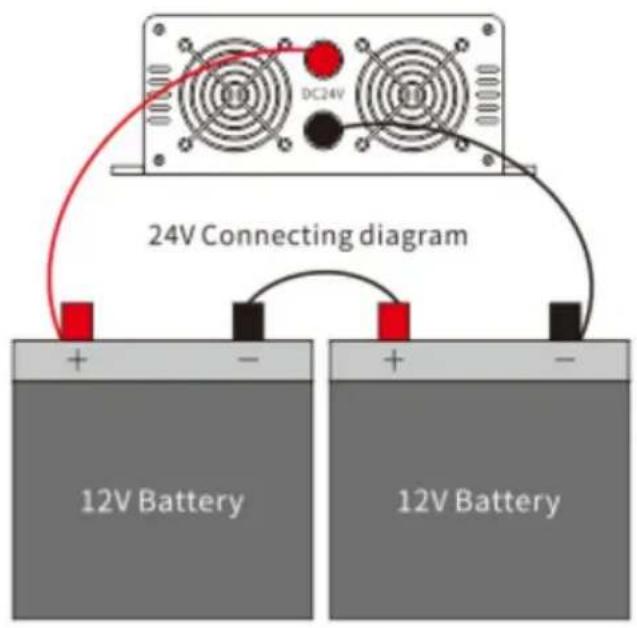
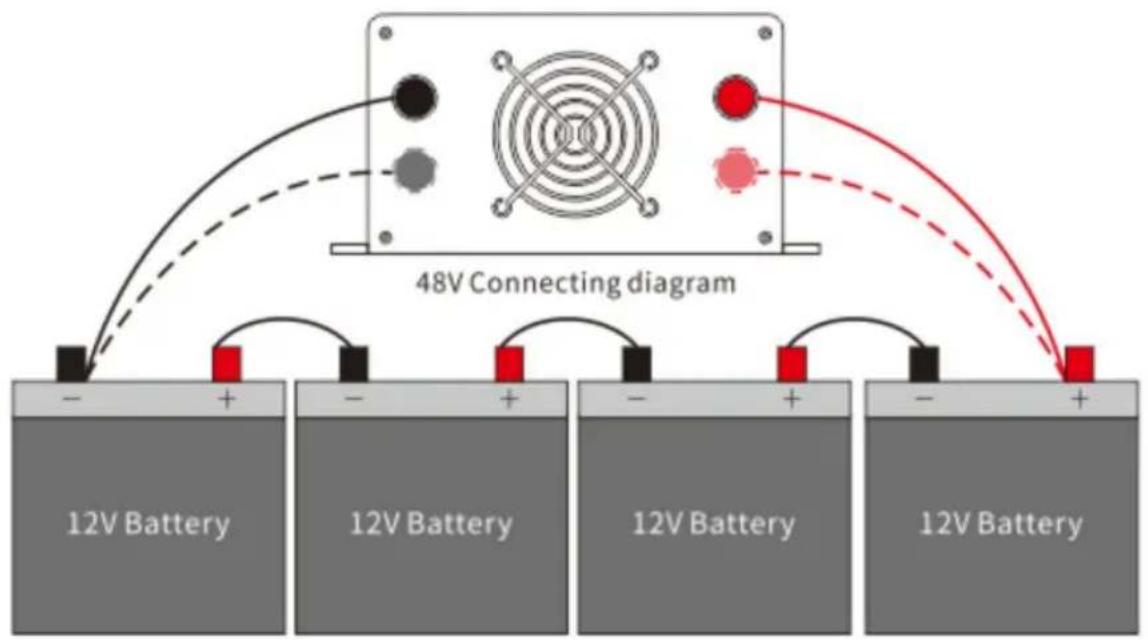
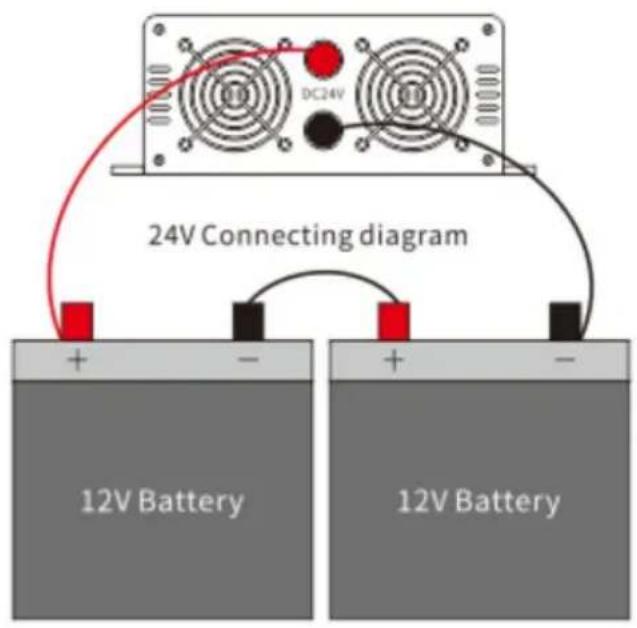
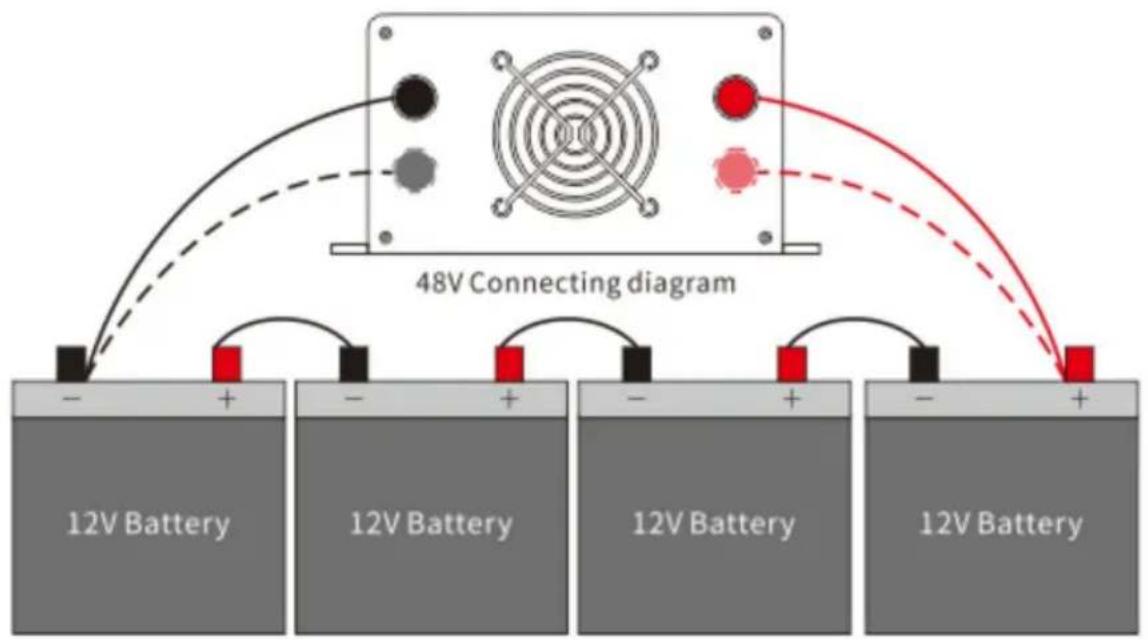
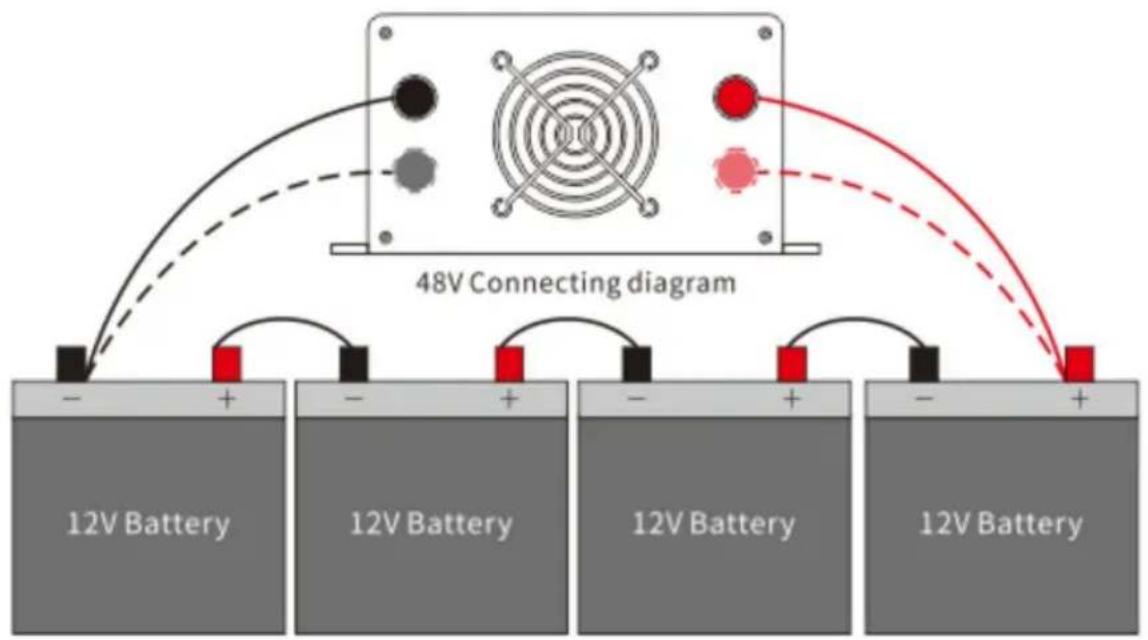
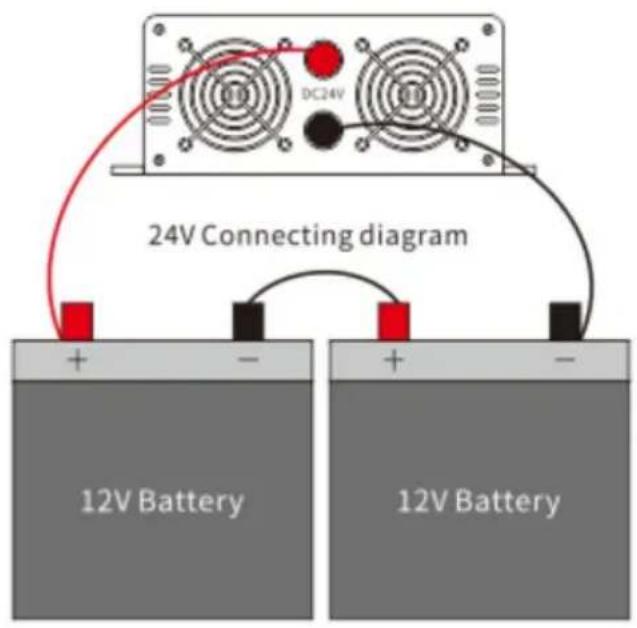
- When connecting the inverter to the battery, make sure that the battery voltage is consistent with the inverter reference voltage! ! !
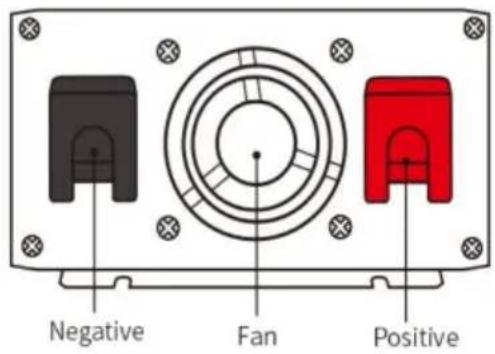
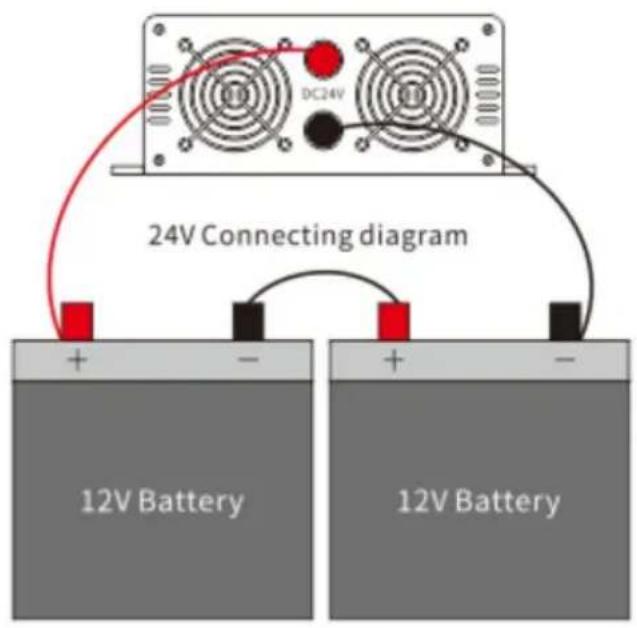
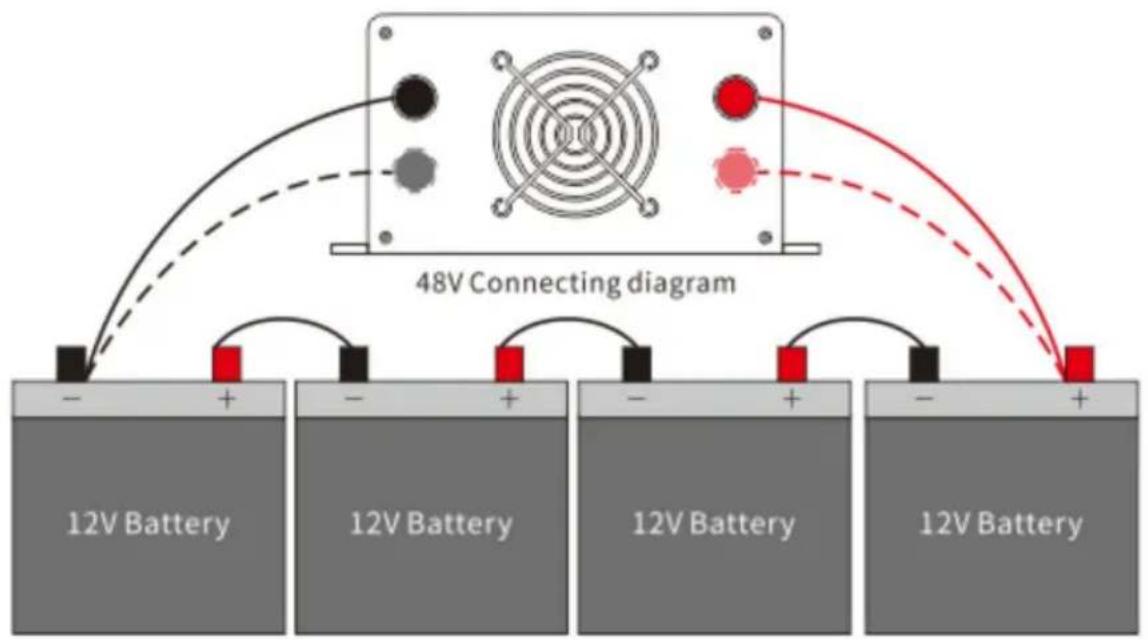
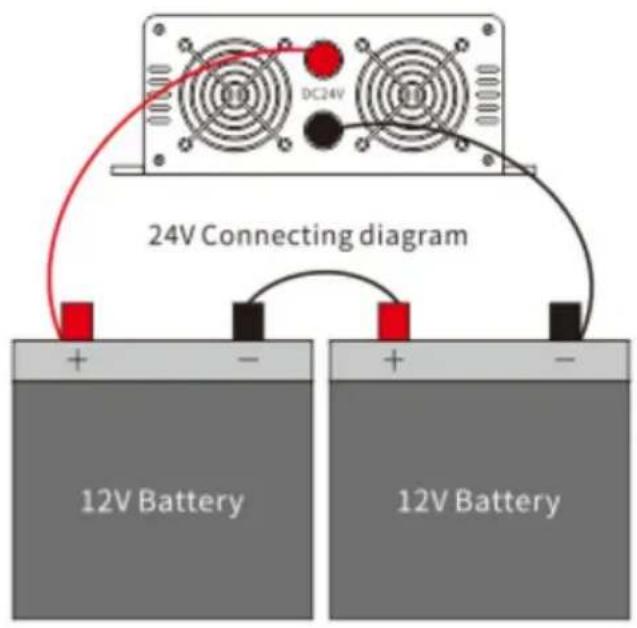
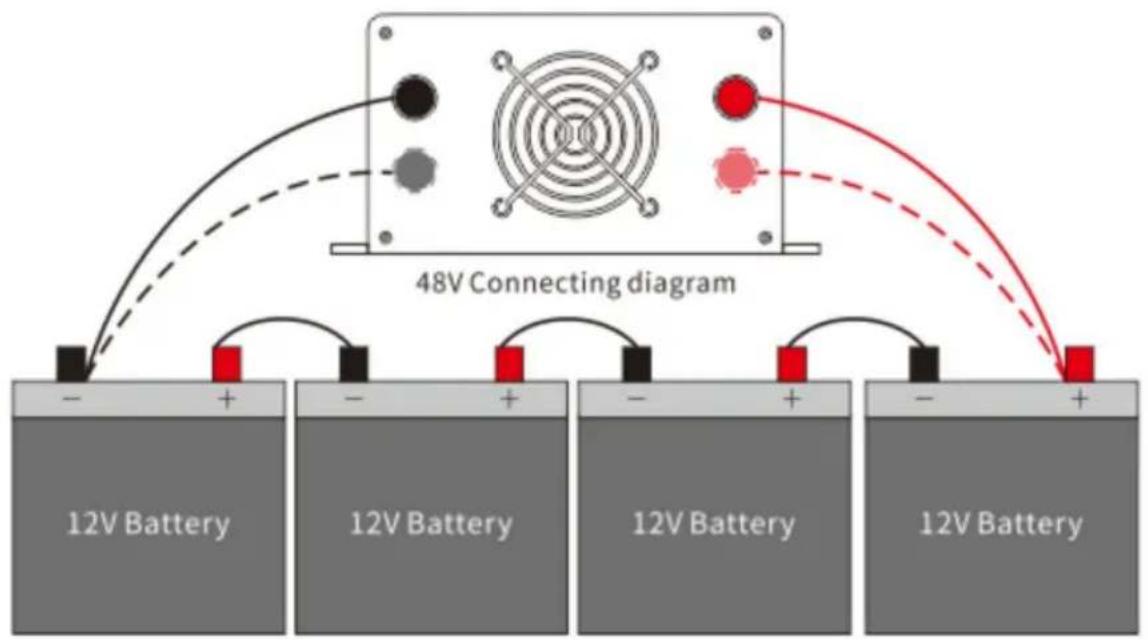
- Connect the Red cable of the inverter to the Positive pole of the battery, and connect the Black cable of the inverter to the Negative pole of the battery. Do not connect the cables reversely, otherwise the inverter fuse will be burnt.
- Turn on the inverter power switch, at which point the green (blue) indicator light is on, indicating that the inverter is working properly.
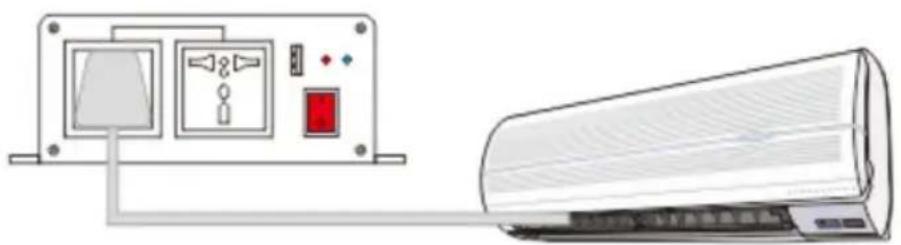
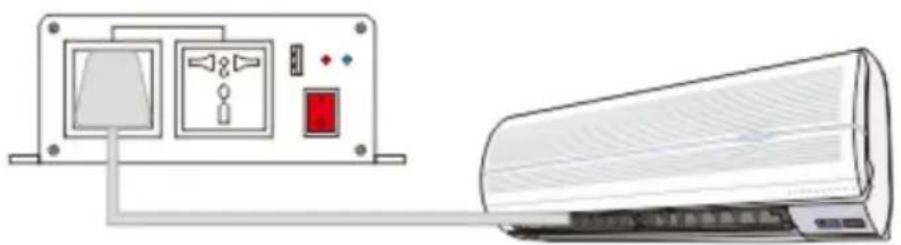
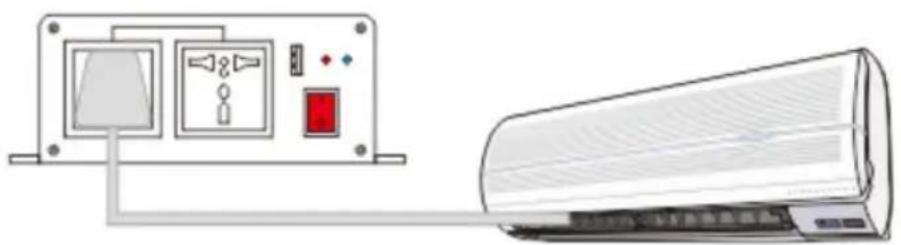
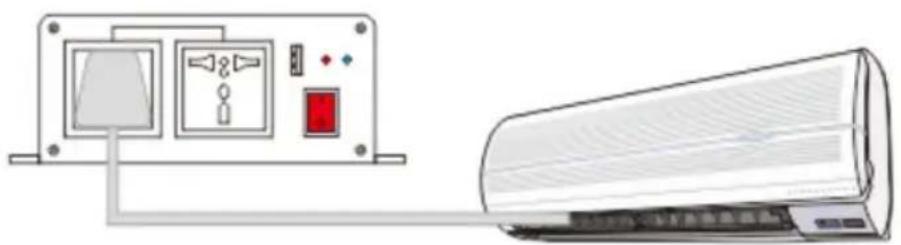
- Please connect the loads to the AC output of the inverter, and please do not overload. In the case of overloading, the inverter will send an alarm and stop working. To restart the inverter, please first switch off the inverter for 5 seconds, reduce the load, and switch it on again.
SAFETY PRECAUTION
The inverter interior has high temperature and pressure. Please read and comply with the safety code and operating instructions before using the inverter; otherwise, it could cause personal injury and equipment damage.
Warning: Our company is not responsible for any violation of safety operation and security standards.
Different brands and sizes of batteries have different DC voltages. Please make sure the input voltage matches the battery. Please contact the manufacturer if you need more details. Because changing the configuration structure and sub-units of the system could affect performance, please contact the manufacturer before doing so.
Immediate touching or indirect touching with humid things could put you in danger.
The inverters are designed, manufactured, and tested according to safety standards. However, as an electrical and electronic product, it must be installed, operated, and maintained strictly in accordance with the following safety instructions:
- Reverse connection between the inverter and battery is strictly prohibited; it will burn the fuse of the inverter.
- Please double-check if the voltage of the battery matches the inverter input DC voltage. Mismatched connection between the inverter and battery can cause serious damage.
- Double-check if the connections are correct, and make sure the connections are tight and firm.
- Do not extend the inverter power cable.
- When the inverter is not in use, please switch it off and disconnect it from the system.
- Avoid contact with any foreign objects or fluids. Do not touch the inverter with wet hands. Keep the product away from children. Avoid using it in dusty, high-temperature areas. Do not use this product in flammable or combustible areas.
- Install the product in a well-ventilated place. Avoid using this product on or near hot objects such as electrical heaters. Do not cover the inverter. Avoid direct sunshine, moisture, and water.
- This inverter cannot be connected in parallel.
- It is strictly prohibited to connect this product to the city grid.
- Do not attempt to repair the inverter. Once the inverter is opened, the warranty is void.
● Troubleshooting.
When there is no output, please check the following:
- Excessive use of electrical appliances, too heavy load. Solution: Reduce electrical appliances. The total power of the appliances used should be less than the inverter's rated power.
- Overheat protection. Workaround: Reduce load, cool down, and restart after 15 minutes. (In summer, when temperatures are high or heat dissipation conditions are poor, the total power of appliances should be appropriately reduced.)
- After the fuse blows, a fuse of the same capacity must be used as a replacement.
- Make sure that the cable connecting the battery is firmly and securely connected.
- Low voltage of battery; please charge the battery.
- Battery exhausted: Please change battery, battery can be exhausted over the years.
●Random Accessories.
Products are carefully tested and inspected prior to shipment, but it is still possible to receive damage in transit, please carefully check the equipment by installation. If there is any damage, contact the distributor in time.
- Battery connection cable * 2 2.A copy of the product instruction manual * 1 3.A copy of the car spare fuse:
SGM-1500W * 6
SGM-3000W * 10
SGPE-1000W * 4
SGPE-2000W * 6
SGPE-3000W * 10
- External screen set (Only the models listed are available):
SGPE-1000W/SGPE-2000W/SGPE-3000W *1
- Panel diagram.
1. 1000W
Side panel introduction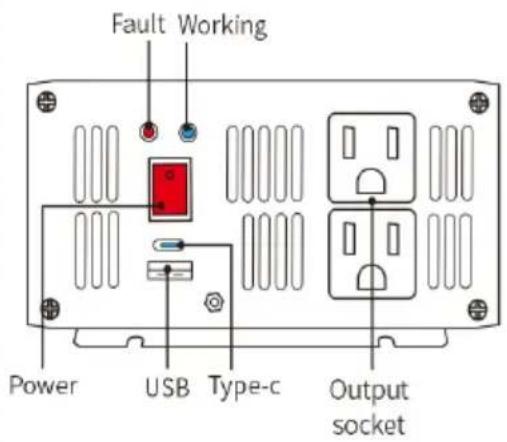
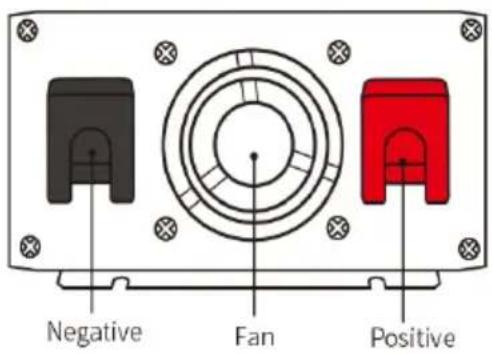
2. 1500W
Side panel introduction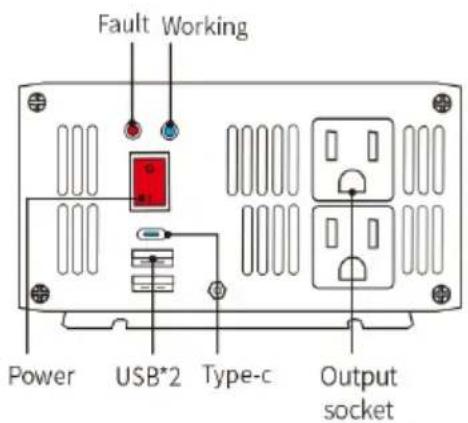
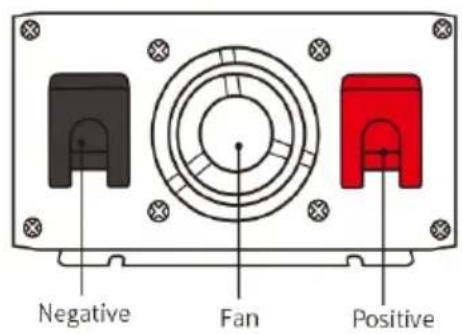
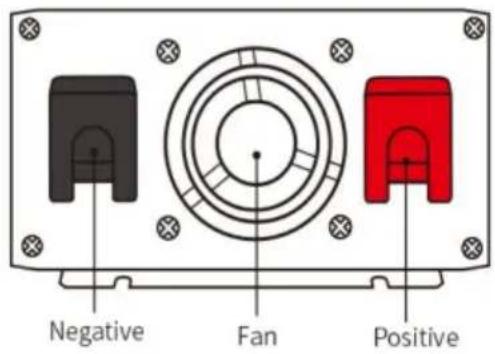
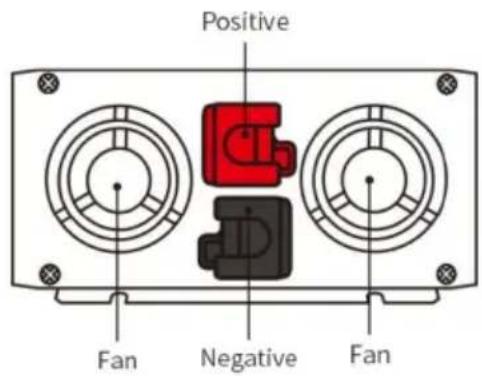
3. 2000W
Side panel introduction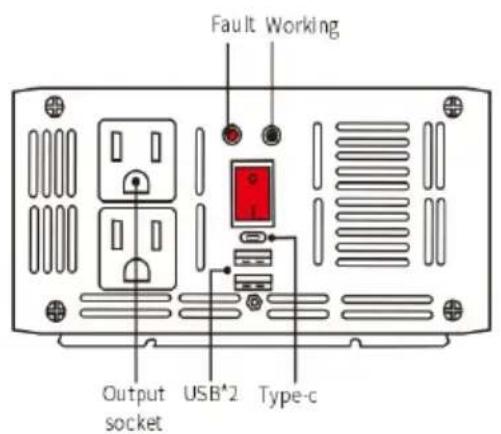
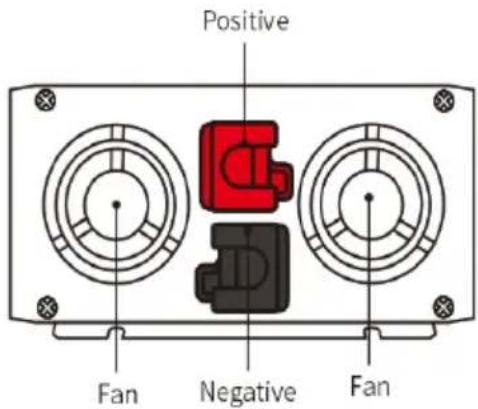
4. 3000W
Side panel introduction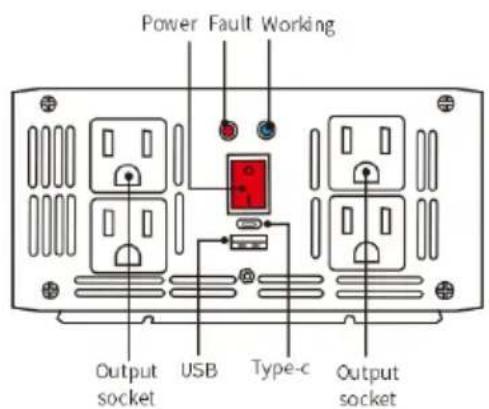
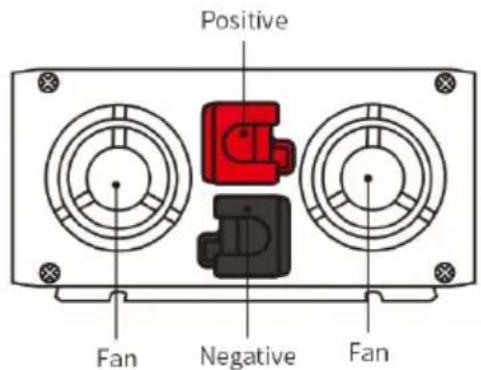
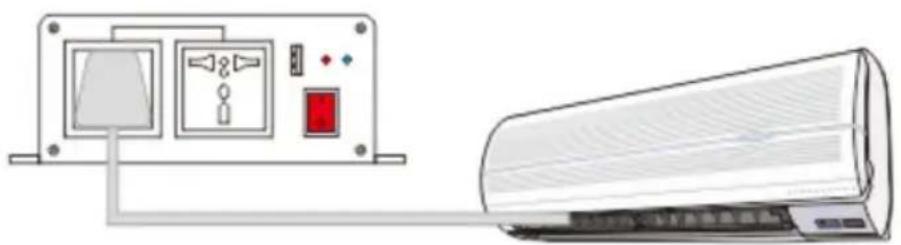
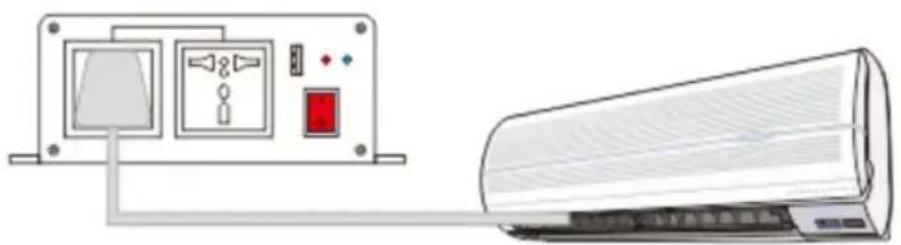
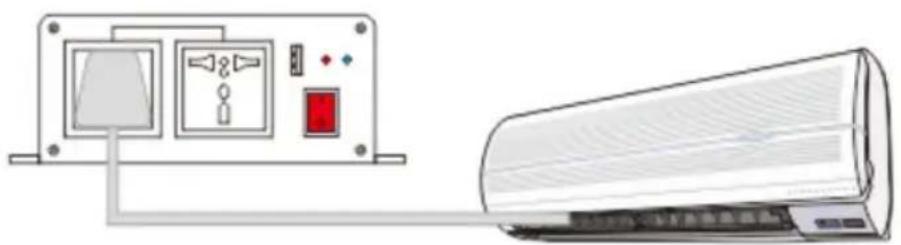
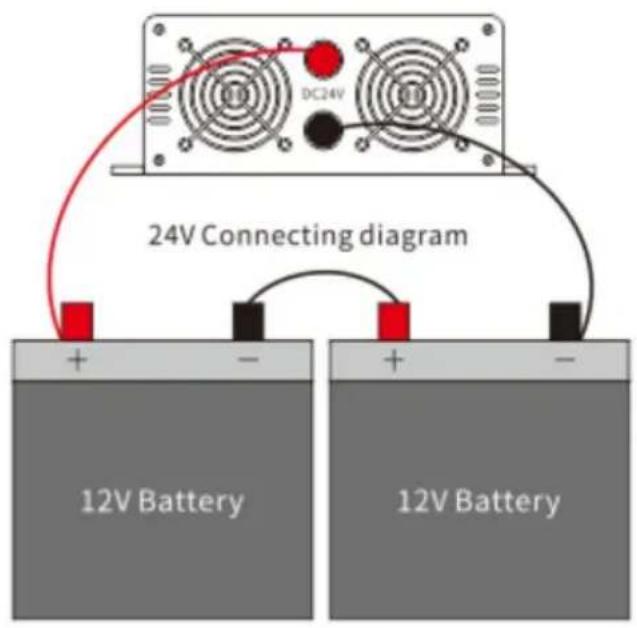
3. Connecting diagram
Connecting diagram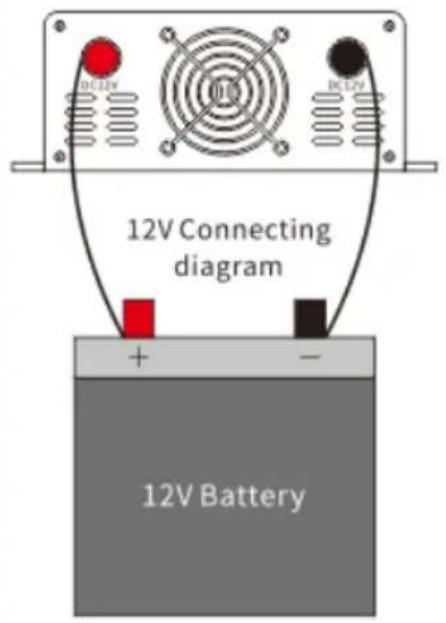
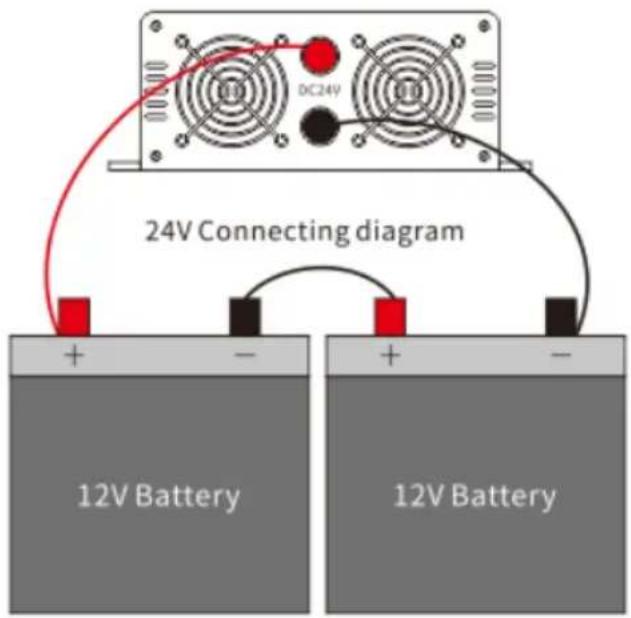
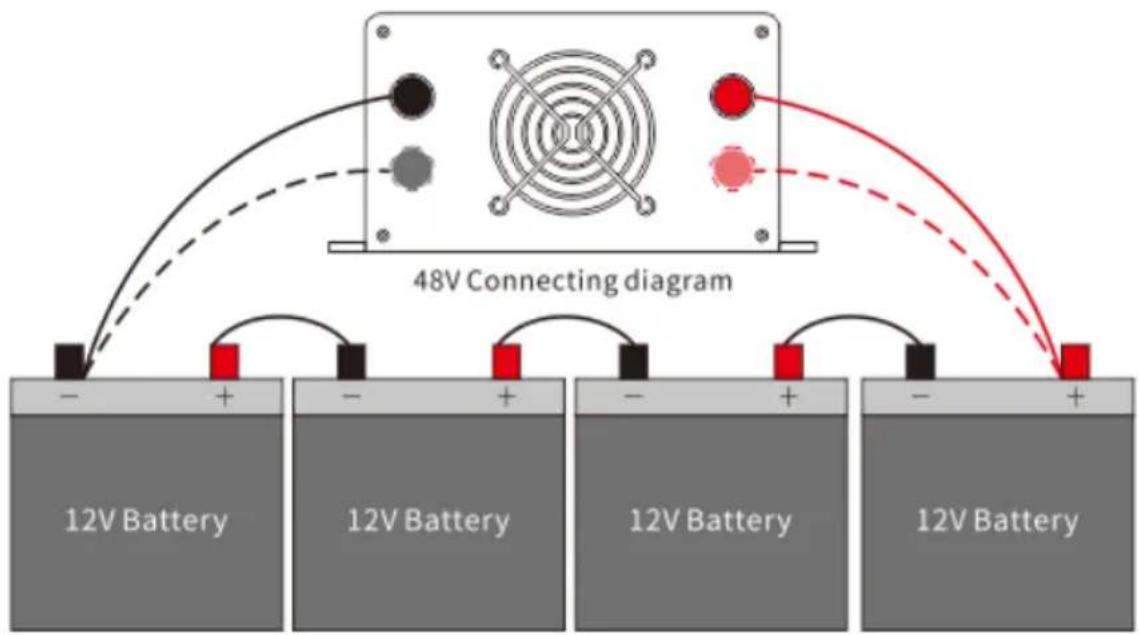
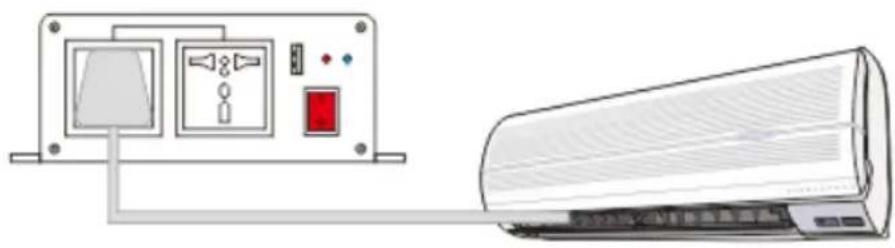
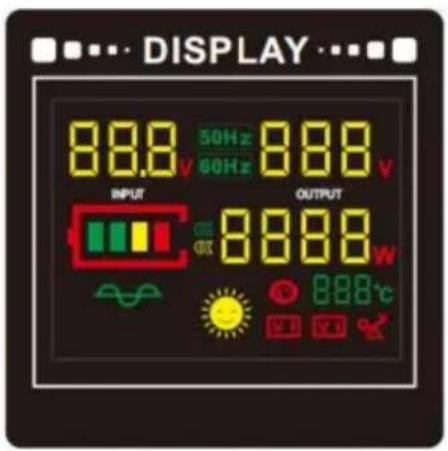
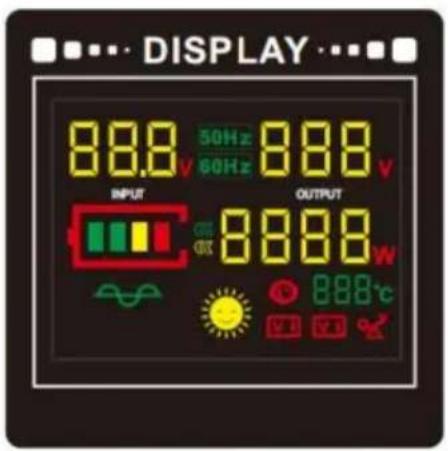
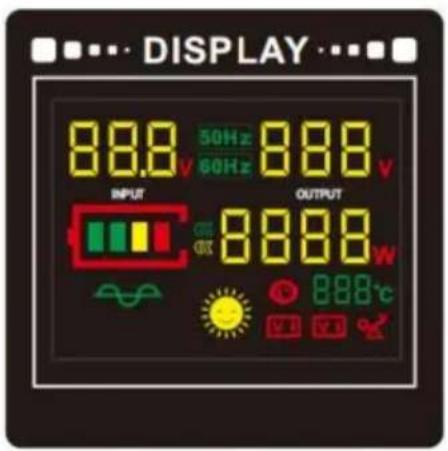
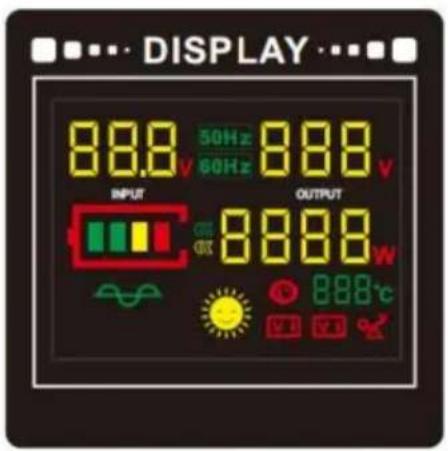
● Display screen
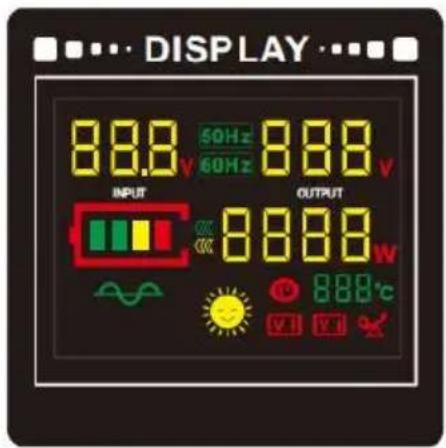

Input voltage

AC output voltage

Loads power

Battery level

Frequency

Working temperature

Low voltage protection

Over voltage protection

Over temperature protection

Overload protection
●Instructions for use of the wireless remote control.
The inverter can be switched on and off remotely via a wireless remote control.
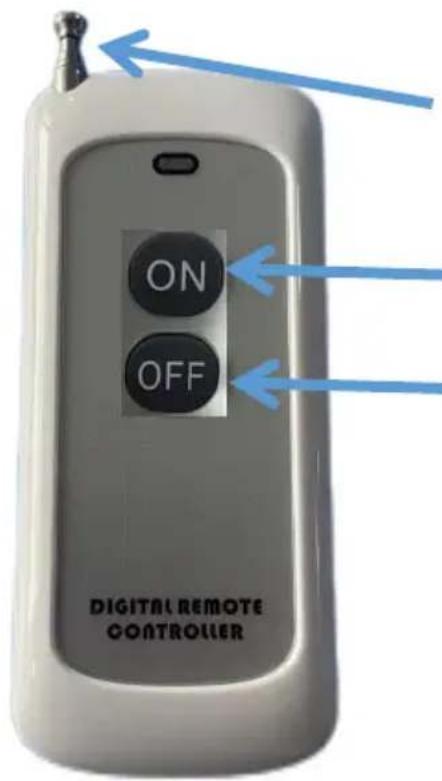
Retract the antenna, pull out all the antennas when in use, and push the antenna when not in use.
Press A to turn on the inverter output.
- Button B turns off the inverter output.
Note:
The recommended distance for remote control is 100 meters or less, please stretch out all the antennas of the remote control during use!
When the remote control does not work, replace the battery inside the remote control.
The internal battery model is: 23A 12V.
Manufacturer: Shanghaimuxinmuyeyouxiangongsi
Address: Shuangchenglu 803nong11hao1602A-1609shi, baoshanqu, shanghai 200000 CN.
Imported to AUS: SIHAO PTY LTD, 1 ROKEVA STREET, EASTWOOD NSW 2122 Australia
Imported to USA: Sanven Technology Ltd., Suite 250, 9166 Anaheim Place, Rancho Cucamonga, CA 91730
| EC | REP |
E-CrossStu GmbH
Mainzer Landstr. 69, 60329 Frankfurt am Main
| UK | REP |
YH CONSULTING LIMITED.
C/O YH Consulting Limited, Office 147, Centurion House
London Road, Staines-upon-Thames, Surrey, TW18 4
VEVOR®
TOUGH TOOLS, HALF PRICE
Technical Support and E-Warranty Certificate www.vevor.com/support
VEVOR®
TOUGH TOOLS, HALF PRICE
Technical assistance and warranty certificate
SGM-3000W/SGPE-3000W
Side panel introduction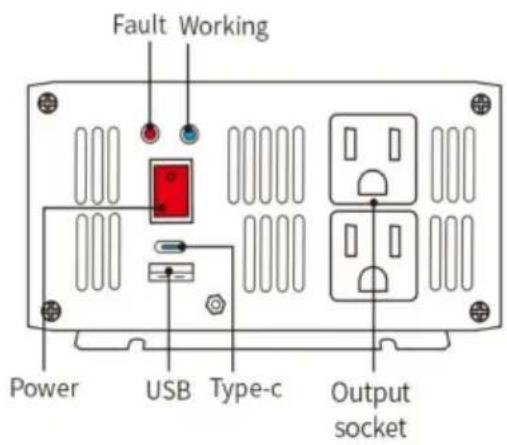
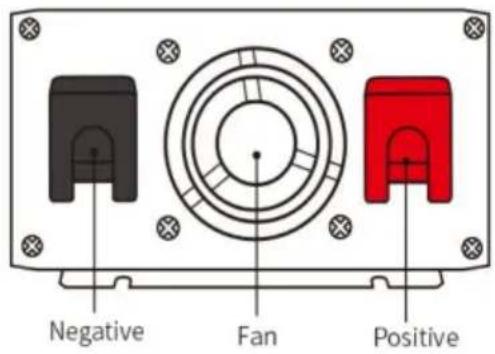
2. 1500W
Side panel introduction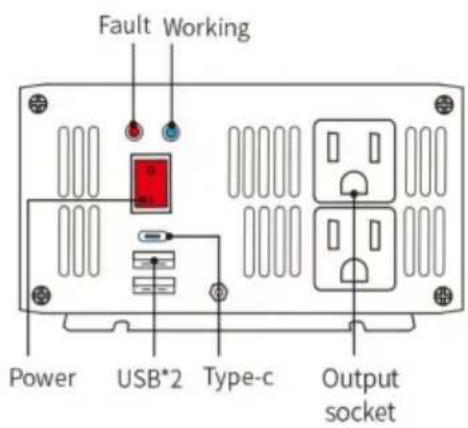
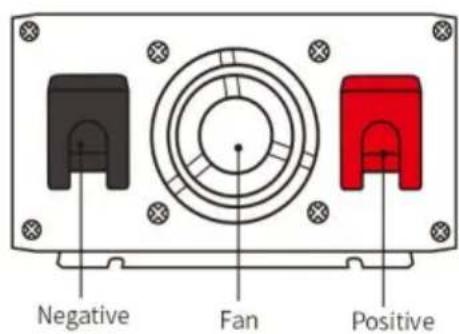
3. 2000W
Side panel introduction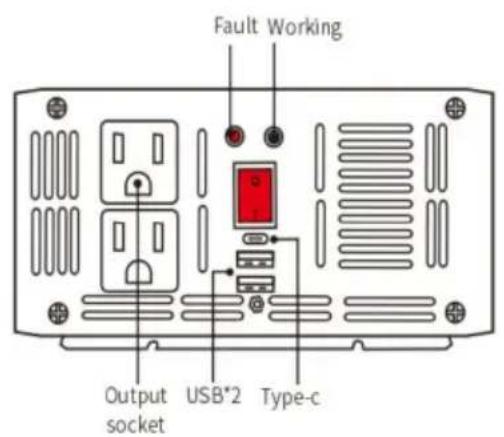
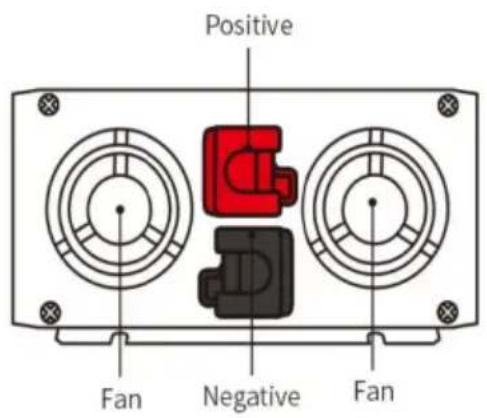
4. 3000W
Side panel introduction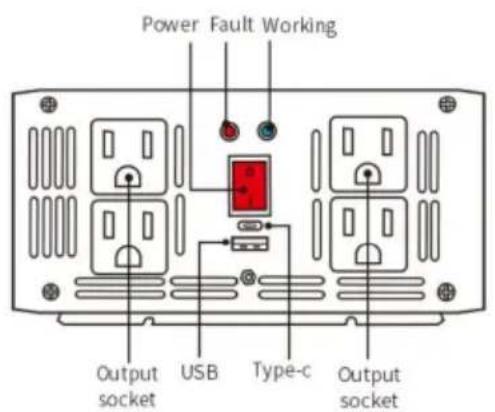
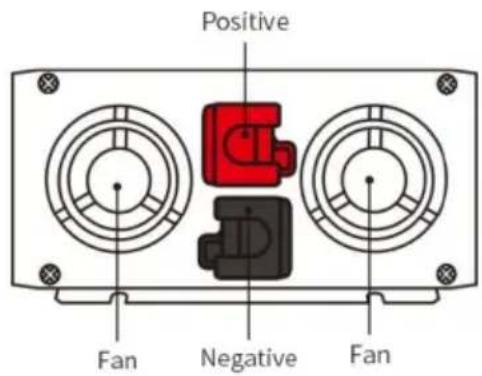
Display screen

Input voltage

Working temperature

AC output voltage

Low voltage protection

Loads power

Over voltage protection

Battery level

Over temperature protection

Frequency

Overload protection
C/O YH Consulting Limited Bureau 147, Centurion House, London Road, Staines-upon-Thames, Surrey, TW18 4AX
VEVOR®
TOUGH TOOLS, HALF PRICE
www.vevor.com/support
INVERTER
MODEL: SGM-1500W/SGM-3000W
SGPE-1000W/SGPE-2000W/SGPE-3000W
SGM-3000W/SGPE-3000W
Side panel introduction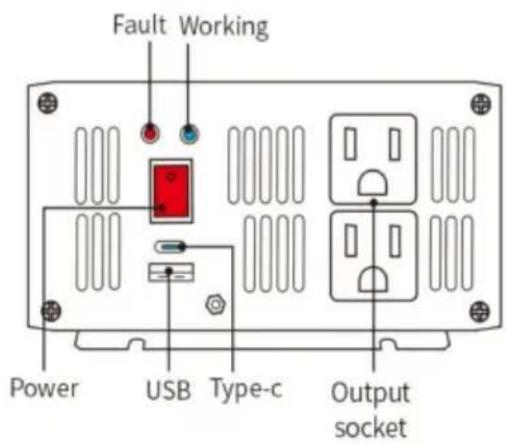
2. 1500 W
Side panel introduction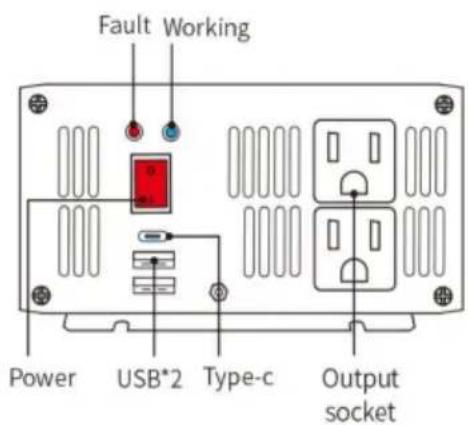
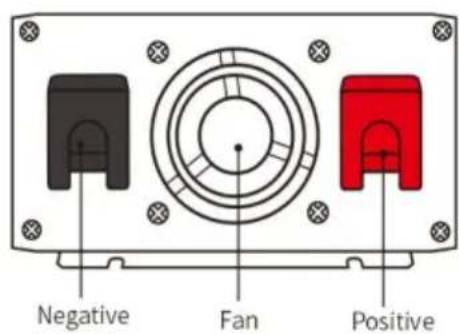
3. 2000W
Side panel introduction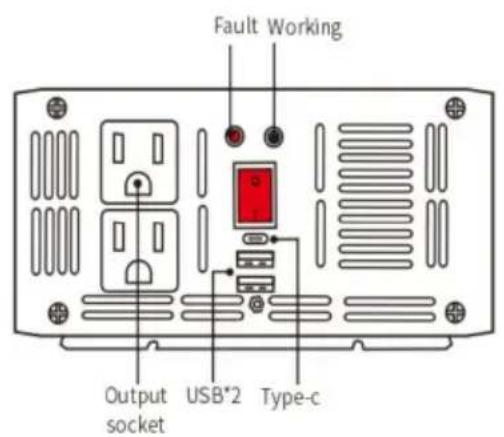
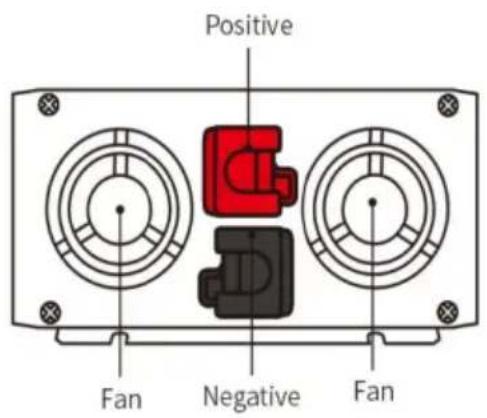
4.3000 W
Side panel introduction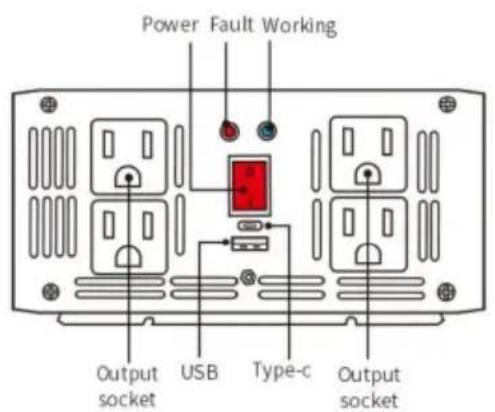
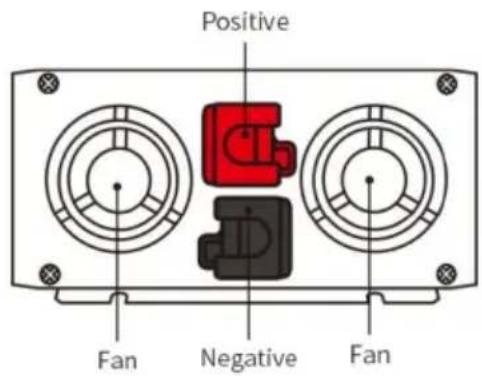
Display screen

Input voltage

Working temperature

AC output voltage

Low voltage protection

Loads power

Over voltage protection

Battery level

Over temperature protection

Frequency

Overload protection
C/O YH Consulting Limited, Office 147, Centurion House, London Road, Staines-upon-Thames, Surrey, TW18 4AX
VEVOR®
TOUGH TOOLS, HALF PRICE
www.vevor.com/support
VEVOR®
TOUGH TOOLS, HALF PRICE
electronics www.vevor.com/support
POWER INVERTER
SGM-3000W/SGPE-3000W
Side panel introduction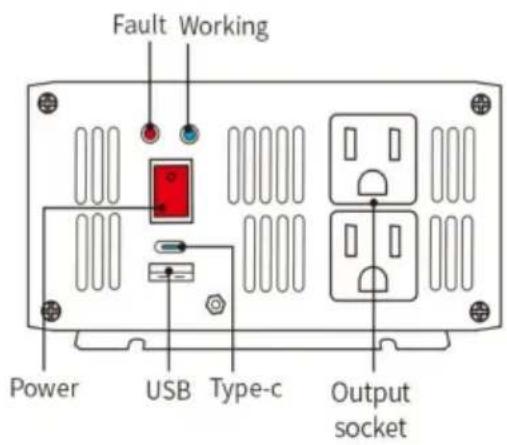
- 1500 W
Side panel introduction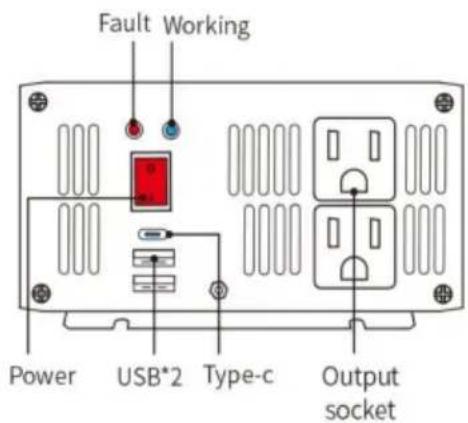
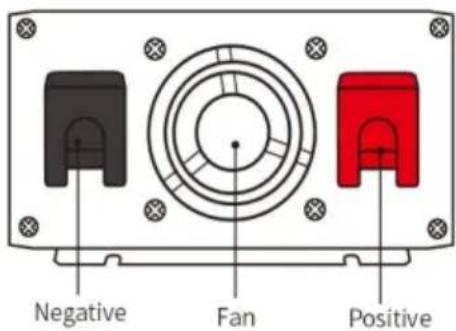
Side panel introduction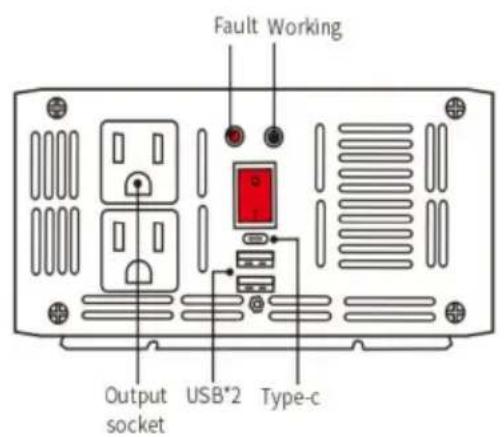
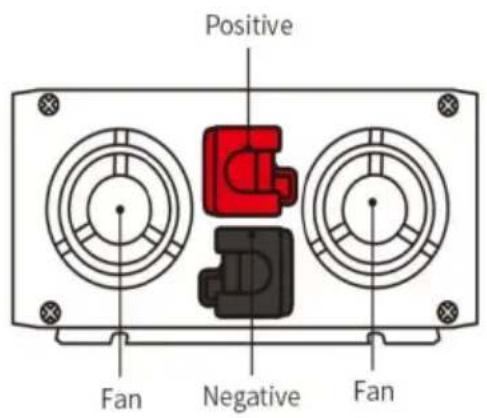
4.3000W Side panel introduction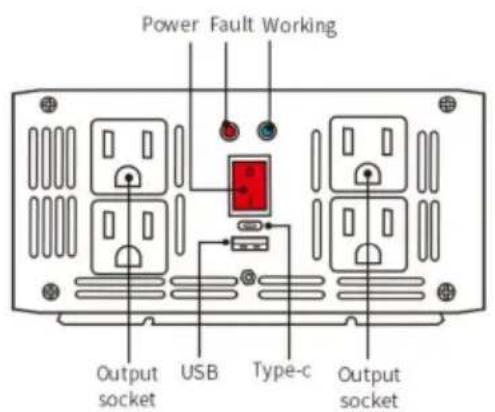

Input voltage

Working temperature

AC output voltage

Low voltage protection

Loads power

Over voltage protection

Battery level

Over temperature protection

Frequency

Overload protection
Imported into Australia: SIHAO PTY LTD, 1 ROKEVA STREETEASTWOOD NSW 2122Australia
C/O YH Consulting Limited Office 147, Centurion House, London Road, Staines-upon-Thames, Surrey, TW18 4AX
VEVOR®
TOUGH TOOLS, HALF PRICE
SGPE-2000W SGM-3000W/SGPE-3000W
Side panel introduction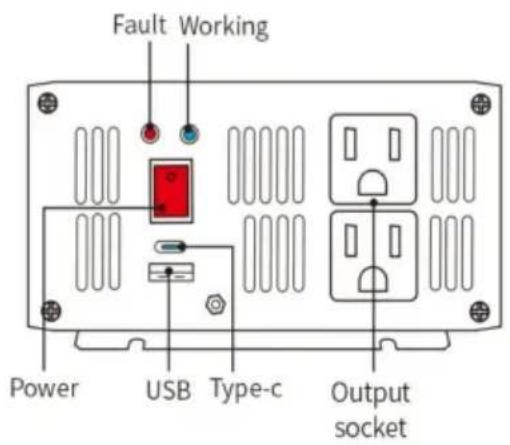
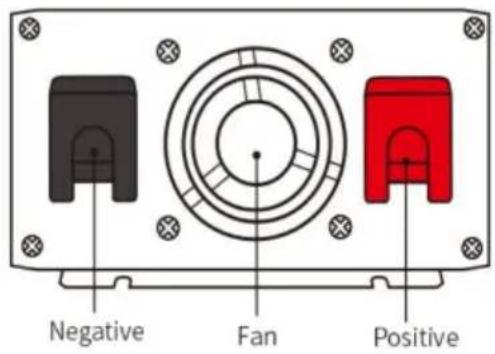
2. 1500 W
Side panel introduction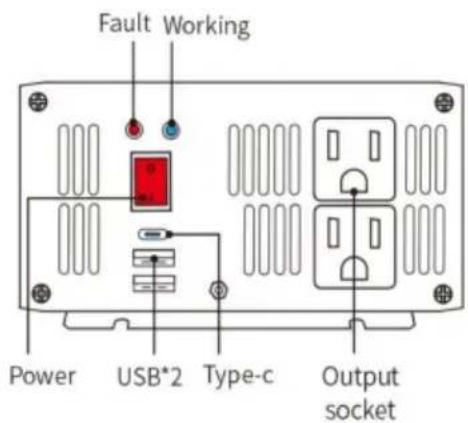
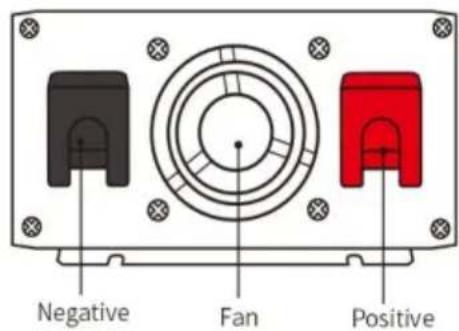
3. 2000W
Side panel introduction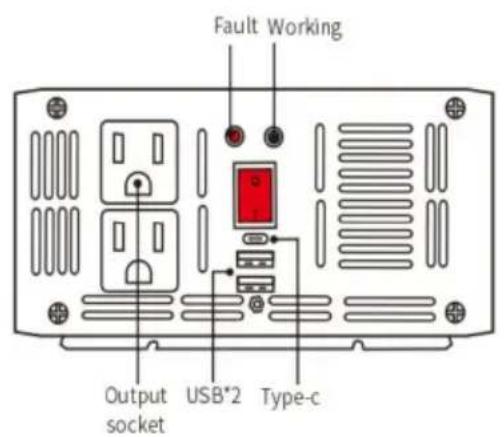
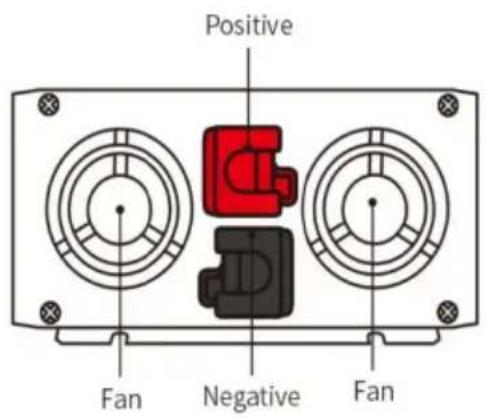
4. 3000W
Side panel introduction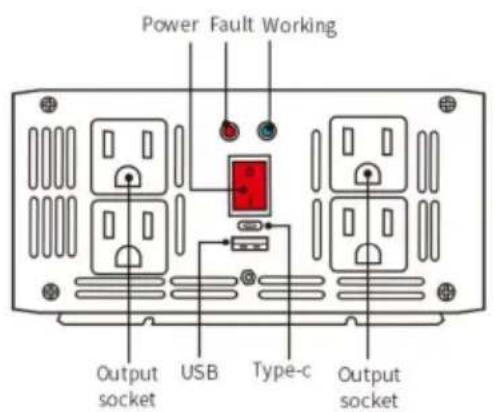

Input voltage

Working temperature

AC output voltage

Low voltage protection

Loads power

Over voltage protection

Battery level

Over temperature protection

Frequency

Overload protection
C/O YH Consulting Limited, Oficina 147, Centurion House, London Road, Staines upon Thames, Surrey, TW18 4AX
VEVOR®
TOUGH TOOLS, HALF PRICE
SGPE-2000W SGM-3000W/SGPE-3000W
Side panel introduction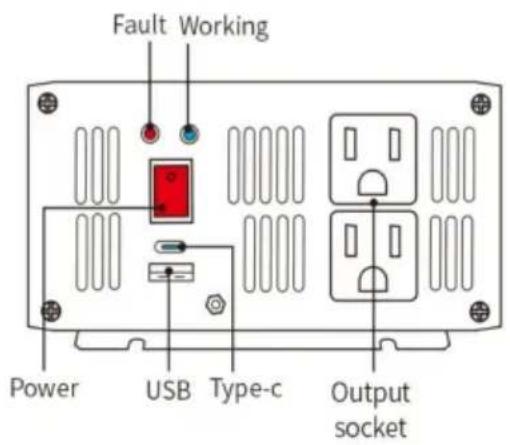
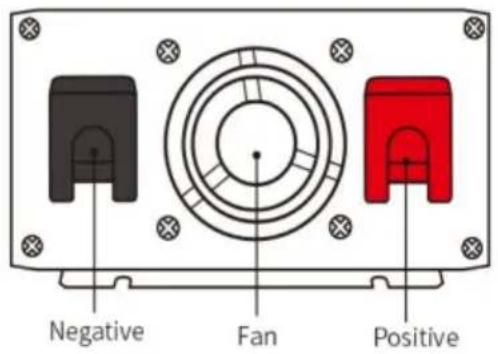
- 1500 W
Side panel introduction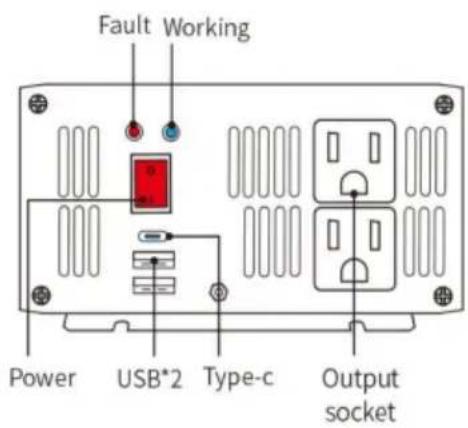
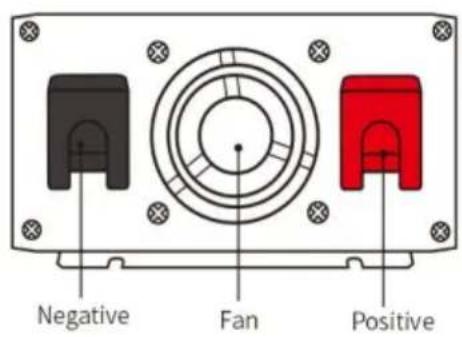
3. 2000 W
Side panel introduction
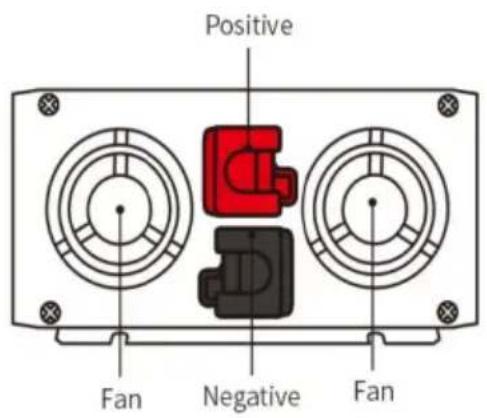
4,3000 W
Side panel introduction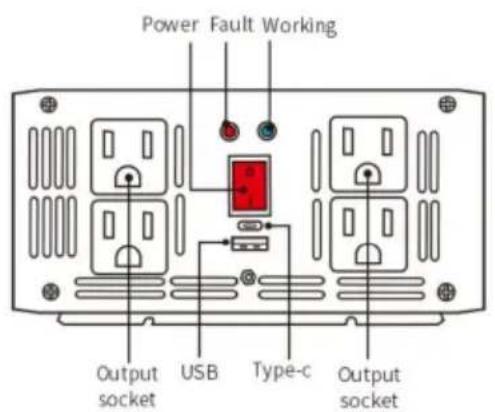
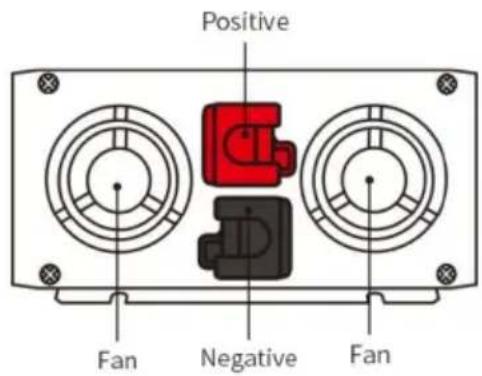
Connecting diagram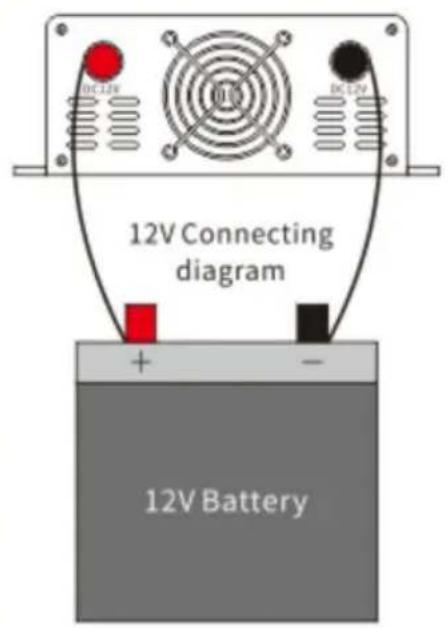
display screen.

Input voltage

AC output voltage

Loads power

Battery level

Frequency

Working temperature

Low voltage protection

Over voltage protection

Over temperature protection

Overload protection
Import to AUS: SIHAO PTY LTD, 1 ROKESTREETEASTWOOD
C/O YH Consulting Limited Office 147, Centurion House, London Road, Staines-upon-Thames, Surrey, TW18 4AX
VEVOR®
TOUGH TOOLS, HALF PRICE
www.vevor.com/support
VEVOR®
TOUGH TOOLS, HALF PRICE
Technical support and warranty certificate www.vevor.com/support
POWER INVERTER
MODEL: SGM-1500W/SGM-3000W SGPE-1000W/SGPE-2000W/SGPE-3000W
SGPE-2000W SGM-3000W/SGPE-3000W
NEED HELP? CONTACT US!
Side panel introduction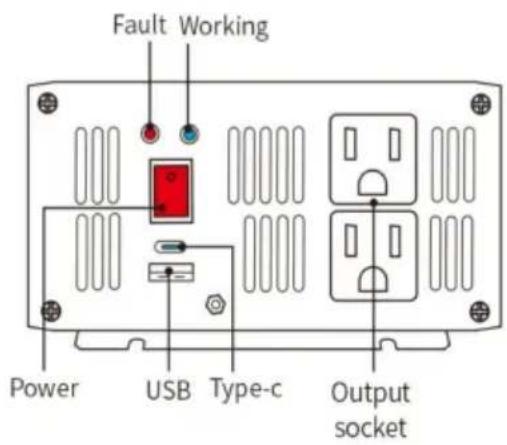
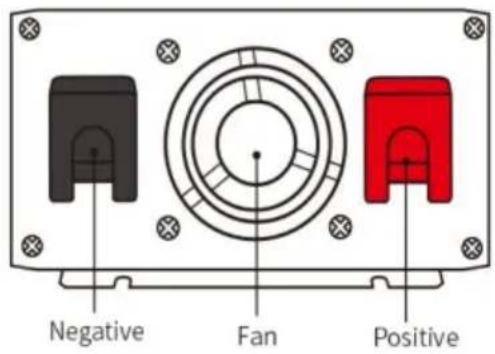
2. 1500 W
Side panel introduction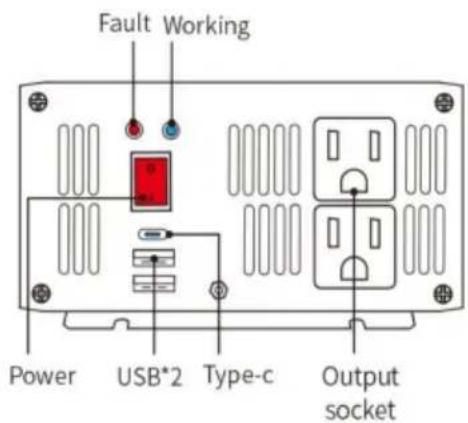
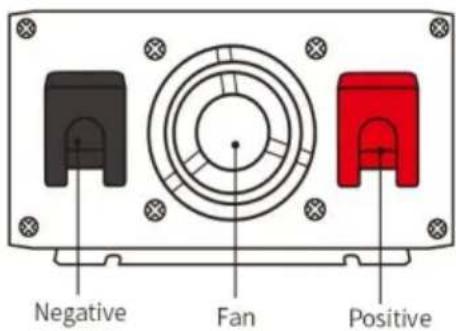
3. 2000W
Side panel introduction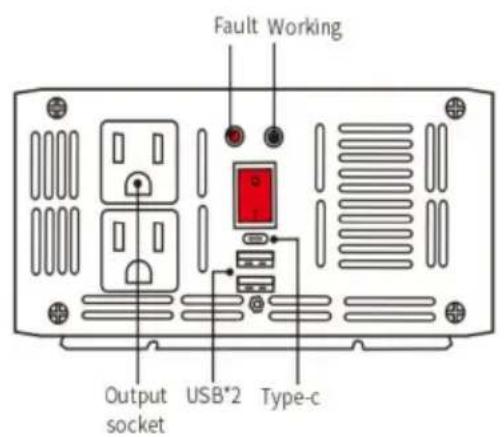
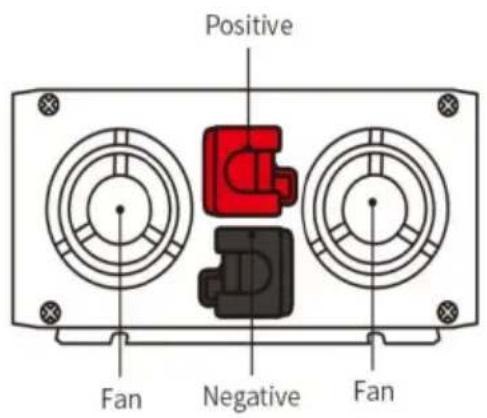
4.3000W
Side panel introduction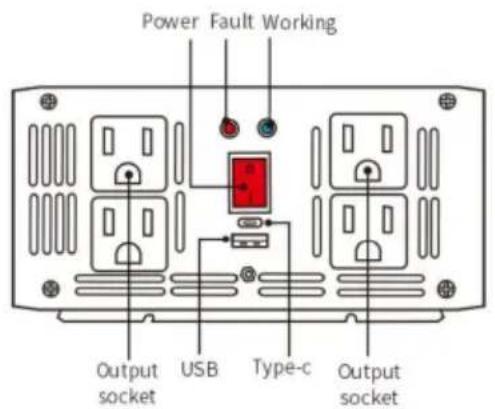
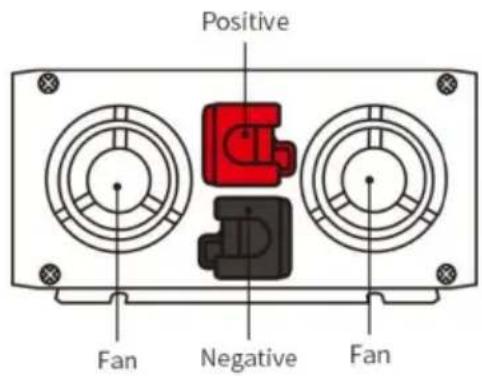
3. Connection diagram
Connecting diagram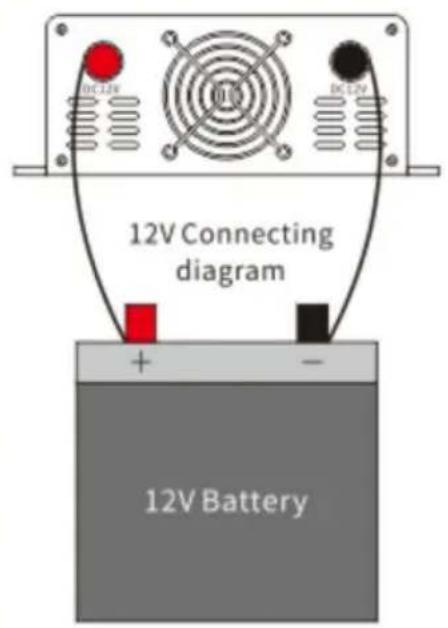

Screen
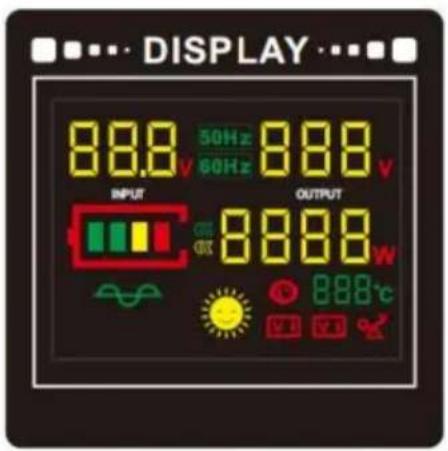

Input voltage

AC output voltage

Loads power

Battery level

Frequency

Working temperature

Low voltage protection

Over voltage protection

Over temperature protection

Overload protection
C/O YH Consulting Limited Kantoor 147, Centurion House, London Road, Staines-upon-Thames, Surrey, TW18 4AX
VEVOR®
TOUGH TOOLS, HALF PRICE
Technical support and e-warranty certificate www.vevor.com/support
VEVOR®
TOUGH TOOLS, HALF PRICE
www.vevor.com/support
POWER INVERTER
MODEL: SGM-1500W/SGM-3000W
SGPE-1000W/SGPE-2000W/SGPE-3000W
SGPE-2000W SGM-3000W/SGPE-3000W
Side panel introduction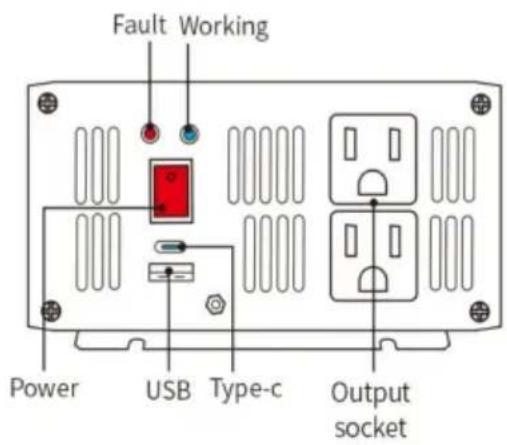
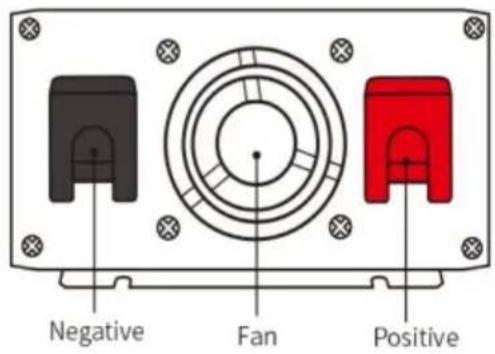
2. 1500W
Side panel introduction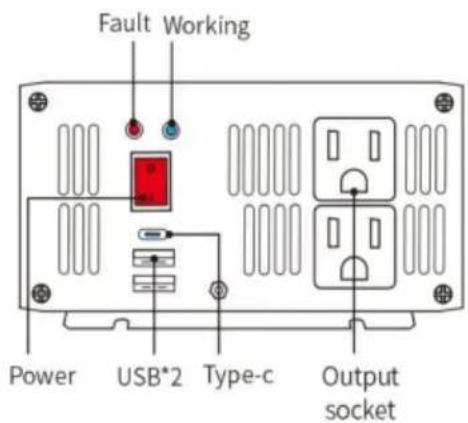
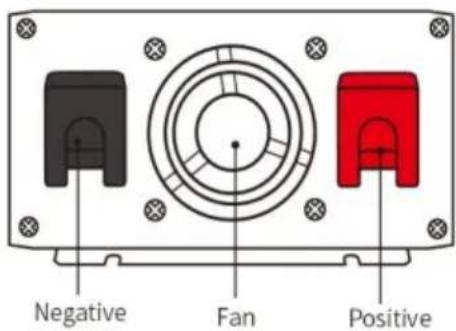
3. 2000W
Side panel introduction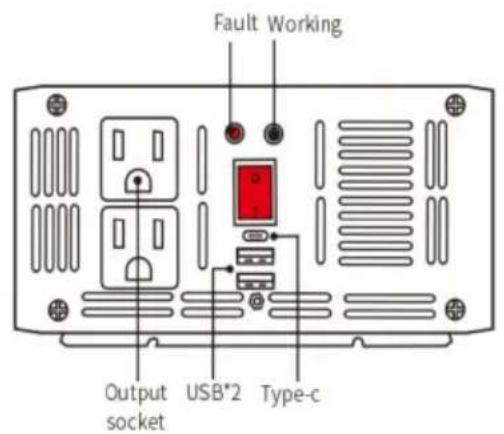

4. 3000W
Side panel introduction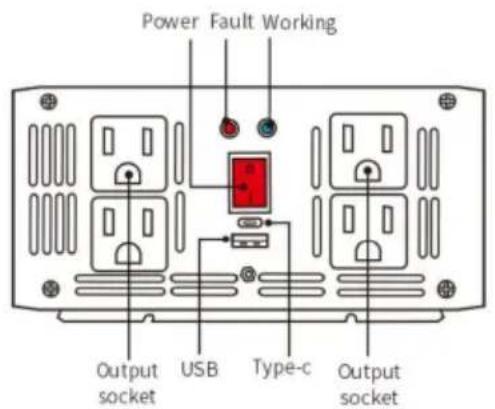
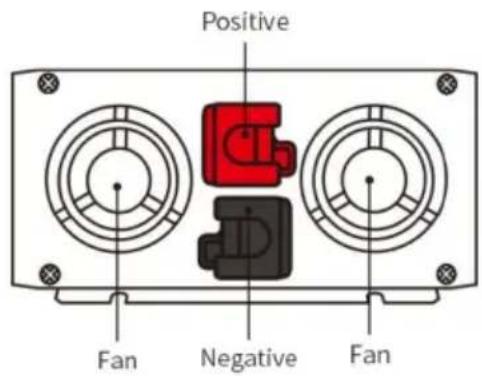
Display screen.

Input voltage

Working temperature

AC output voltage

Low voltage protection

Loads power

Over voltage protection

Battery level

Over temperature protection

Frequency

Overload protection
C/O YH Consulting Limited Office 147, Centurion House, London Road, Staines-upon-Thames, Surrey, TW18 4AX
VEVOR®
TOUGH TOOLS, HALF PRICE
www.vevor.com/support
- POWER INVERTER
- VEVOR®
- NEED HELP? CONTACT US
- INSTRUCTIONS
- ● PRODUCT DESCRIPTION
- ● PROTECTIVE FUNCTIONS
- ● INSTALLATION
- SAFETY PRECAUTION
- ● TROUBLESHOOTING
- ●RANDOM ACCESSORIES
- PANEL DIAGRAM
- W
- CONNECTING DIAGRAM
- ● DISPLAY SCREEN
- ●INSTRUCTIONS FOR USE OF THE WIRELESS REMOTE CONTROL
- NOTE
- TOUGH TOOLS, HALF PRICE
- INVERTER
- DISPLAY SCREEN
- MODEL: SGM-1500W/SGM-3000W SGPE-1000W/SGPE-2000W/SGPE-3000W
- SGPE-2000W SGM-3000W/SGPE-3000W
- CONNECTION DIAGRAM
- SCREEN
Brand : Vevor
Model : SGPE-2000W
Category : Power inverter