
HC-1000Y - Choppers Vevor - Free user manual and instructions
Find the device manual for free HC-1000Y Vevor in PDF.



| Product type | Electric grain mill |
| Brand | Vevor |
| Model | HC-1000Y |
| Power supply | 120 V (US) / 230 V (EU), 50/60 Hz |
| Power | 1000 W (estimated) |
| Grinding bowl capacity | Approximately 2/3 of the tank (quantity not specified) |
| Blade material | Stainless steel |
| Functions | Grinding grains, spices, herbs, dry materials |
| Switch type | Timer and on/off switch |
| Safety | Grounding, overload protection, automatic shutdown in case of jamming |
| Cleaning | Hand wash removable parts (bowl, lid, blades); do not use dishwasher; do not immerse motor |
| Maintenance | Dry completely after cleaning; replace worn carbon brushes and blades |
| Included spare parts | Spare carbon brushes, mesh sieve, cleaning brush, socket wrench |
| Repairability | Replacement of carbon brushes and blades possible by user |
| Operating conditions | Indoor only; stable surface; do not use with an extension cord |
| Usage warnings | Do not grind wet materials; take 5-10 minute breaks after 3 minutes of operation |
| Recommended grinding duration | 30 seconds to 2 minutes depending on the material |
| Warranty | Electronic warranty at www.vevor.com/support |
| Standards | Compliant with Part 15 of the FCC rules (United States) |
| Additional accessories | Mesh sieve for finer powder |
Frequently Asked Questions - HC-1000Y Vevor
User questions about HC-1000Y Vevor
0 question about this device. Answer the ones you know or ask your own.
Ask a new question about this device
Download the instructions for your Choppers in PDF format for free! Find your manual HC-1000Y - Vevor and take your electronic device back in hand. On this page are published all the documents necessary for the use of your device. HC-1000Y by Vevor.
USER MANUAL HC-1000Y Vevor
Technical Support and E-Warranty Certificate www.vevor.com/support
GRAIN GRINDER USER MANUAL
MODEL: HC-150 HC300 HC-550 HC-750 HC-300Y HC-500Y HC-750Y HC-1000Y HC-2000Y HC-2500Y
We continue to be committed to provide you tools with competitive price. "Save Half", "Half Price" or any other similar expressions used by us only represent the estimate of savings you might benefit from buying certain tools with us compared to top brands and does not necessarily mean to cover all categories of tools offered. Are kindly reminded to verify carefully when you are placing an order with us actually saving half in comparison with the top major brands.
VEVOR®
GRAIN GRINDER

NEED HELP? CONTACT US!
Have product questions? Need technical support? Please feel free to contact us:
Technical Support and E-Warranty Certificate www.vevor.com/support
This is the original instruction, please read all manual instruction carefully before operating. VEVOR reserves a clear interpretation user manual. The appearance of the product shall be subject to product you received. Please forgive us that we won't inform you there are any technology or software updates on our product.
| Warning-To reduce the risk of injury, user must re instructions manual carefully. | |
| CORRECT DISPOSAL This product is subject to the provision of European 2012/19/EC. The symbol showing a wheelie bin cross through indicates that the product requires separate r collection in the European Union. This applies to the and all accessories marked with this symbol. Produce marked as such may not be discarded with normal o waste, but must be taken to a collection point for r electrical and electronic devices |
Note: Before beginning assembly of product, make sure all parts are present. Compare parts with package content list and hardware content. Do not attempt to assemble the unit if any parts are missing or damaged. Contact customer service for replacement parts.
Warnings
When using electrical appliances, basic safety precautions should always be followed including the following:
SAVE THIS INSTRUCTION!
- READ ALL OPERATING INSTRUCTIONS AND PRODUCT SAFETY LABELS! FAILURE TO FOLLOW ALL INSTRUCTIONS MAY RESULT IN SERIOUS INJURY OR PROPERTY DAMAGE!
2. CHECK FOR DAMAGED PARTS: Before using the grinder, check whether all parts work normally and perform the expected functions. Check for alignment, binding, and installation of moving parts, and any other conditions that may affect the operation. If any parts, the power cord, or the grinder are damaged, call the Customer Service number shown in this manual.
- Always unplug the power cord from the outlet when not in use, before putting on or taking off parts or accessories, and before cleaning. After unplugging the unit, turn the power switch ON, then OFF to ensure that all power has been discharged from the grinder.
- This appliance can be used by children aged from 8 years and above and persons with reduced physical, sensory, or mental capabilities or lack of experience and knowledge if they have been given supervision or instruction concerning use of the appliance in a safe way and understand the hazards involved. Children shall not play with the appliance. Cleaning and user maintenance shall not be made by children without supervision. 5. NEVER LEAVE GRINDER UNATTENDED WHILE IT IS RUNNING! 6. Wait until all moving parts have stopped and turn off power before removing any part from the grinder. 7. DO NOT use outdoors; this product is intended for INDOOR USE. 8. DO NOT pull the power cord to disconnect. 9. DO NOT USE WITH EXTENSION CORD. Always plug directly into a grounded wall receptacle.
- This grinder uses a grounded, three-prong plug (hot, neutral, and ground). The grounding plug is used for electrical appliances with a metal shell to prevent electric shock. DO NOT change or alter the plug in any way. NEVER break off a grounding prong from a 3-conductor plug. Doing so will invalidate the warranty and may cause electric shock.
- Place the grinder on a firm and stable surface. Ensure that the grinder is not placed near the edge of the worktop, where it can be easily pushed off or fall.
- The Gear Housing and the Motor Cover may become HOT during operation. This is normal. DO NOT TOUCH these parts while operating.
- To reduce the risk of unintentional starting, check that the control is OFF before plugging the cord into the wall outlet. To disconnect, turn the controller to OFF, then remove the plug from the wall outlet.
- DO NOT operate your grinder under a wall cabinet. Always unplug the unit from the electrical outlet when storing it. Not doing so could create a risk of fire, especially if the appliance touches
the walls of the garage or the door touches the unit as it closes.
15. NEVER plug the grinder in where water may flood the area.
- To protect against risk of electrical shock, DO NOT submerge the grinder in water or other liquids. Be sure the grinder is disconnected from the power source before cleaning. NEVER rinse the Grinding Motor under running water; only use a moist cloth to clean the Grinding Motor Unit.
- The use of attachments or parts not specifically recommended or sold by the manufacturer for this grinder will void the warranty and may cause fire, electric shock or injury.
18. HANDS WASH ALL PARTS! DO NOT USE DISHWASHER. Never put the unit near a hot burner, in an oven, or in a dishwasher.
19. NEVER use abrasive cleaning agents or abrasive cloths when cleaning the grinder.
- The Manufacturer disclaims any responsibility in the case of improper use of Grinding. Improper use of the Grinding voids the warranty.
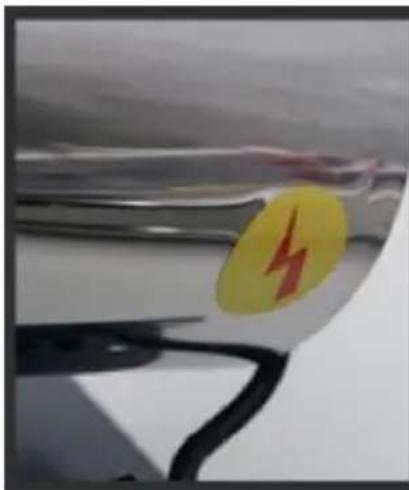
21. DO NOT REMOVE WARNING LABELS FROM THE GRINDER. Doing so will void the product warranty and may result in serious personal injury. 22. This appliance must be grounded while in use to protect the operator from electrical shock. This grinder uses a grounded, three prong plug and should be connected directly to a grounded 120V (US) / 230V (EC), three prong grounded wall outlet receptacle. Grounded plugs are used on metal-encased electric appliances in order to provide protection from electric shock. DO NOT change or alter the plug in any way. NEVER cut off a grounding prong from a 3-conductor plug. Doing so voids the warranty and may result in electric shock.
23. Type X attachment: If the supply cord is damaged, it must be replaced by a special cord or assembly available from the manufacturer or its service agent.
- 24. Do not fill the grinding tank to full, otherwise it will cause overload. The material you are going to grind at one time must cover the long blade in the middle and no more than 2/3 of the tank. Because this machine needs space to complete the cycle of the blades and the material to be ground. 25. Even if grinding stone, it only takes 2 minutes, so don't use it for
long. It takes 5-10 minutes to rest after every 3 minutes of work. If grinding some hard items, there should be an interval which is to prevent bearing overheating, damage to the motor. General grains only need to be ground into powder. If you are not satisfied with the grinding, you can sieve out the coarse particles with a mesh screen and grind again for finer powder.
- To ensure safety, the nut should be tightened before grinding. After long-term use, blades and carbon brushes need to be replaced if they are worn.
- The motor of the grinder is the brush motor, the sparks and the odor are normal during the first several uses. The sparks and the brush friction odor will disappear after you use the machine some times later.
You can grind some rice or tea leaves first for several times to eliminate the odor.
PRODUCT STRUCTURE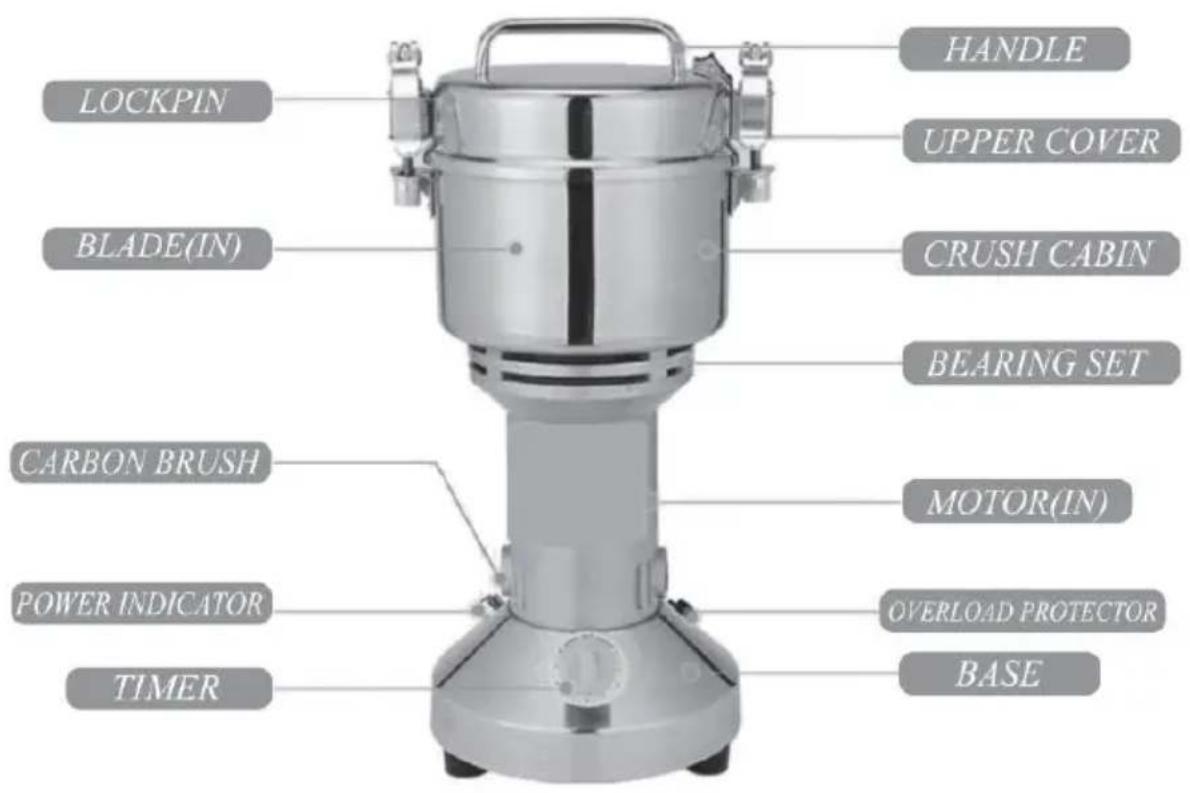
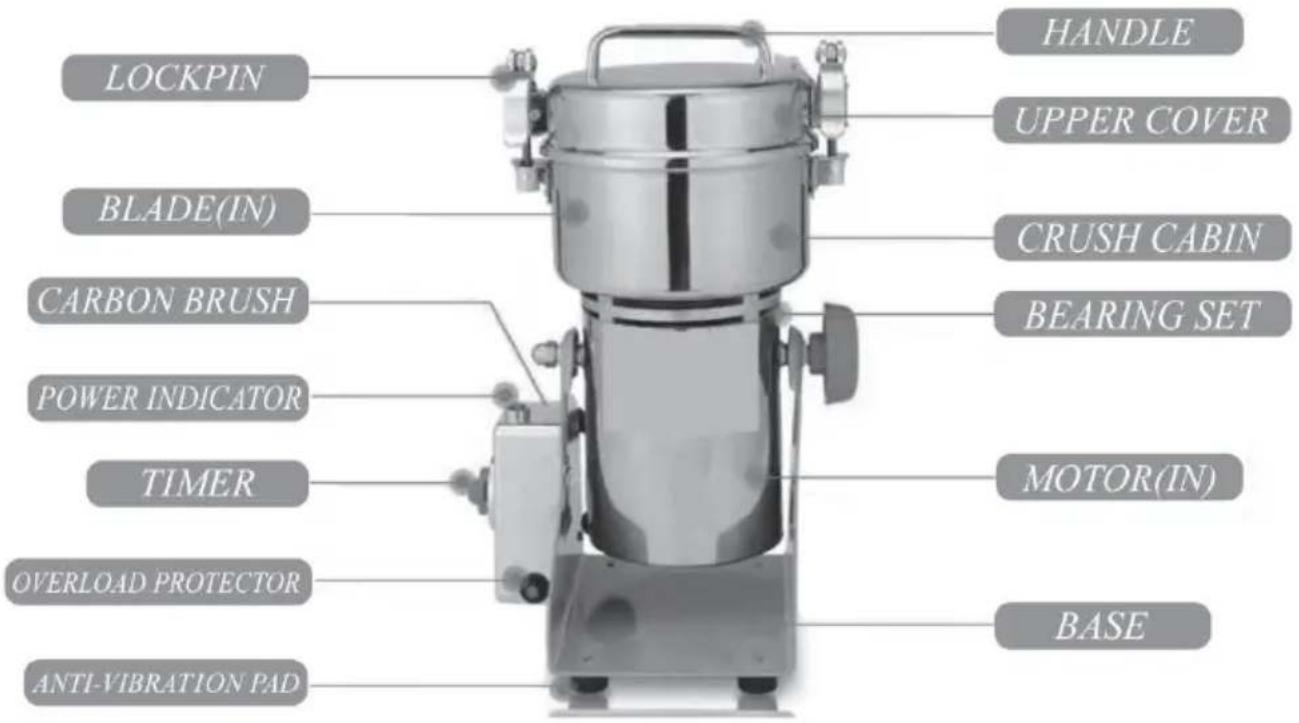
1. Operations Guide:
1) Open the upper cover and put the dried material inside. 2) Close the upper cover tightly. (Please make sure the lid is rotated and locked tightly on the top.) 3) Plug in and turn on the timer switch, then turn on the switch for grinding (a rolling sound will be heard). 4) Turn off the switch. (When you hear the sound rolling evenly, the material has been ground into powder, then you can turn off the switch.) 5) Disconnect power supply before opening. 6) Open the upper cover and brush the powder out.
2. Grinding Cautions:
Wet or water-containing materials cannot be ground; only dry materials. Grinding time varies depending on the type of material used, and different types of materials require different grinding methods for better results.
1) Before using the grinder for the first time, put some rice and dried tea leaves to grind for about 30 seconds to clean the inner wall and remove stains. 2) For seasonings, it is generally recommended to grind for about 20 seconds and do not grind for too long. (Chili, Pepper, Fennel, etc.) 3) For ordinary grains, it is recommended to set the timer for about 3 seconds; if the desired effect is not achieved, grind again. (Soybeans, Millet, Black rice, Corn, etc.) 4) For general materials, it is recommended to set the timer for about 1 minute. (Ginseng, Astragalus, Asparagus, etc.) 5) For greasy materials, it is recommended to first dry and de-oil the materials, and then grind them intermittently. Grind for about 10 seconds and pause 5 seconds. Check the grinding effect during the process to avoid the machine getting overheated, causing the materials to become burnt. (Sesame, Peanuts, Walnuts, etc.) 6) For super hard materials, it is recommended to first break the material into small pieces and then grind them, pause for 10 seconds after grinding for about 1 minute. The grinding can be completed after about 2-3 minutes. (Crystal sugar, Cumin, Cinnamon, etc.) 7) For fibrous materials, the material itself has a fibrous structure, so instead of being ground into powder, it will appear fluffy. It is recommended to grind these materials intermittently. (Barley, Ganoderma lucidum, etc.)
Notice: When you first use the machine, you'd better clean the machine with a cloth moistened with vinegar or medical alcohol, and then put some rice and dried tea leaves into the grinding bin, grind them for 30~50 seconds, then pour the powder out, and clean the grinding bin.
3. Common Questions:
*Why cannot the grinder be started?
First check whether the indicator light is on.
If the indicator light is not on, check whether the power supply is plugged in tightly and whether the power cord is damaged (you can replace the power cord of other household appliances).
If the indicator light is on, the possible reason is that the two buckles of the cover have not been triggered yet.
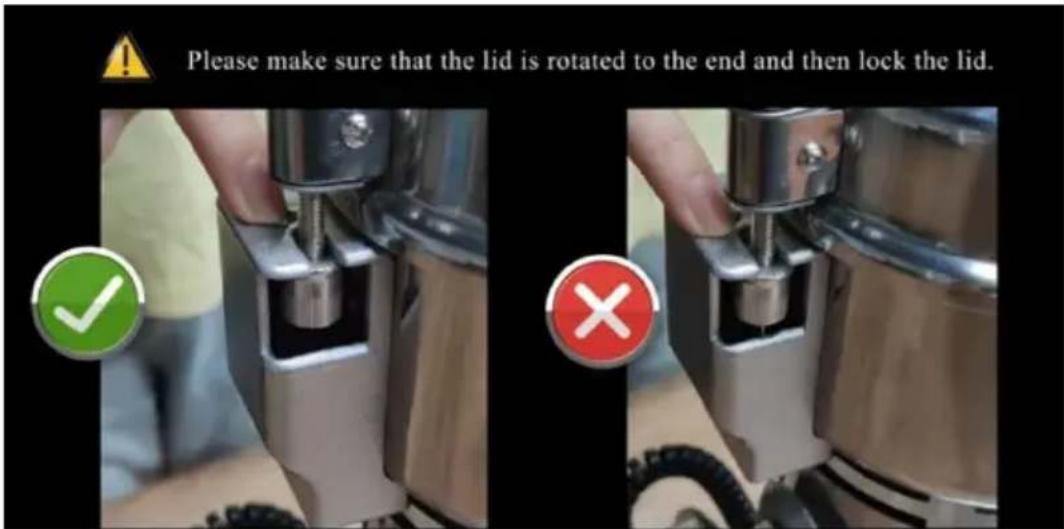
*What to do if the grinder suddenly stops working?
If the grinder stopped working, the reason may be that the blades are stuck, or the overload protector function works because of overload, or the carbon brush is worn. It's easy to solve this problem.
You just need to clean the blades bottom or re-install the carbon brush on both sides again and then press the overload protector button again, the grinder could work well. Please see the overload protector and carbon brush in the attached pictures, please check that.
*Why does the motor become hot?
It is normal for the grinding machine to be slightly hot, because the working principle of the machine is to pulverize the material into powder through the high-speed rotation of the blades. The whole process is carried out in the closed grinding bin, which will generate heat and cause the machine to heat up.
There may be several reasons for machine overheating:
1) The materials ground are wet, with moisture.
Please dry the materials as much as possible before grinding, and then grind it when it is completely cool.
2) Grinding time is too long.
The machine must take 5-10 minutes to rest after every 3 minutes of use. If you are grinding some hard items, there should be an interval which is
to prevent bearing overheating and damage to the motor.
3) Put too much material into the grinding bin at one time.
The material you are going to grind at one time must cover the long blade middle and no more than 2/3 of the tank. Because this machine needs space to complete the cycle of the blades and the material to be ground. If the machine overheats and stops working, you can also solve it by re-installing the carbon brushes on both sides again and then pressing the overload protector button again, then the grinder could work well.
INSTRUCTIONS OF AIR OVERLOAD PROTECTOR
When blades are jammed in the grinding bin, the overload protector may pop up and the machine will automatically cut off the power supply. If this happens, turn off the power and check the grinding belt. Just clean the blades at the bottom and press the overload protector again, then the grinder can work well.
* Upright type grinder: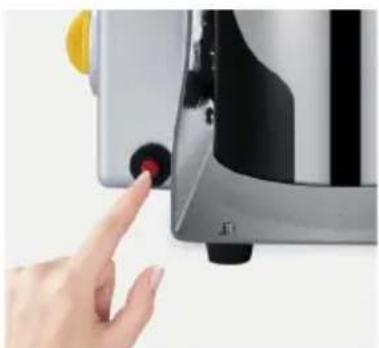

* Swing type grinder:
HOW TO CLEAN UP THE GRINDING BIN
You can clean the grinding bin of the grinder with a brush first, and then clean it with a dry cloth.

After using the blades for a long time, you can remove them and clean them with water. (The blades of a new grinder are very tight; you need to use it for a long time before the blades can be removed.)
- Firstly, loosen the nut using a pincer and remove the blade.
- Secondly, wipe the grinding bin with a dry rag after removal of the blade, and please do not clean it with water directly.
Please Note: If you clean the blades with a wet rag or with water directly, please make sure the grinding bin and the blades are dry enough before re-installing the blades.
- Lastly, install the blades and tighten the nut. It is finished.
HOW TO REPLACE THE BLADE
OPERATING PROCEDURES FOR REPLACING BLADES
The machine has been upgraded to a three-blade one.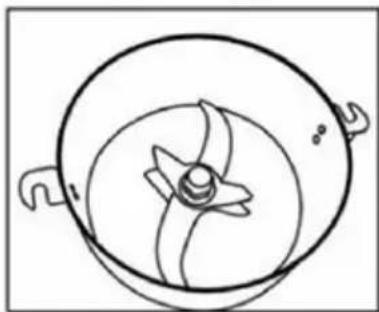
Use a screwdriver to fix the screw under the crushing chamber, stick the blade to prevent slipping, and use a professional tool to unscrew the nut counterclockwise.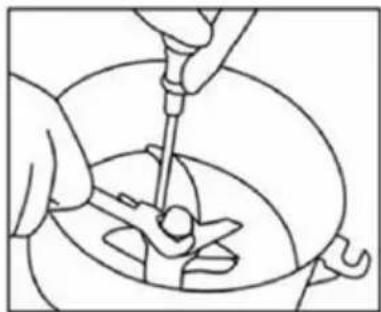
After loosening the nut, as shown in the picture, remove the pad and the two blades above.
Remove the blade and install a new one in the original order.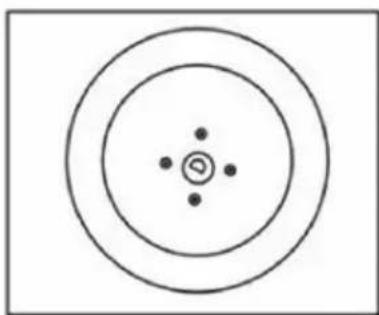
When installing the blade, use a screwdriver to hold the blade in place to prevent slipping, and tighten it clockwise with the professional tool.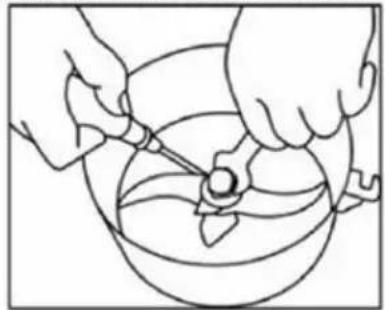
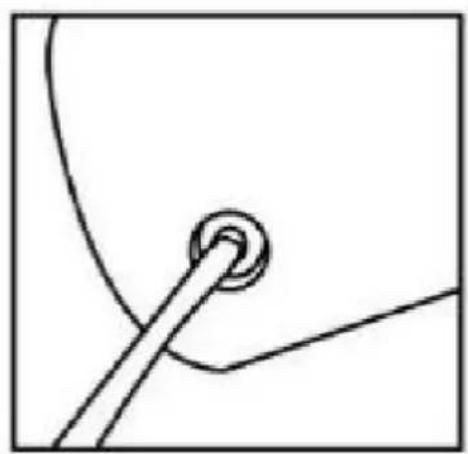
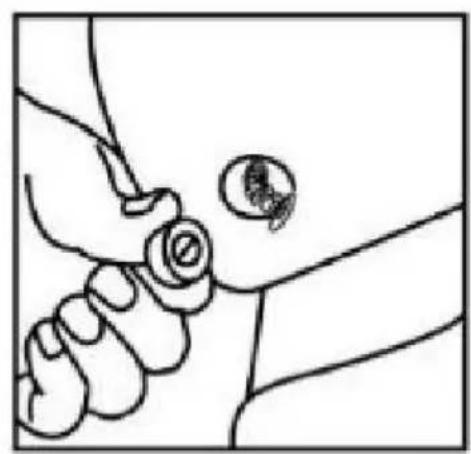
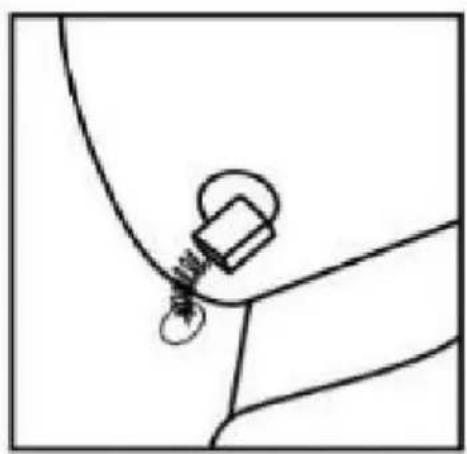
HOW TO REPLACE CARBON BRUSHES
- The upright type grinder:
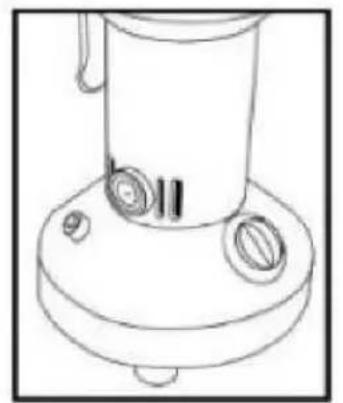
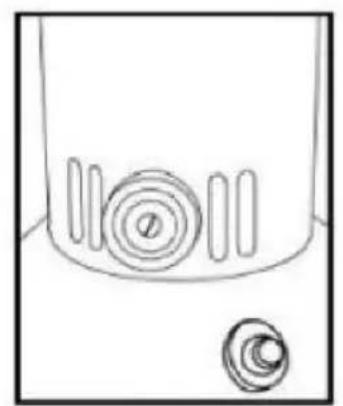
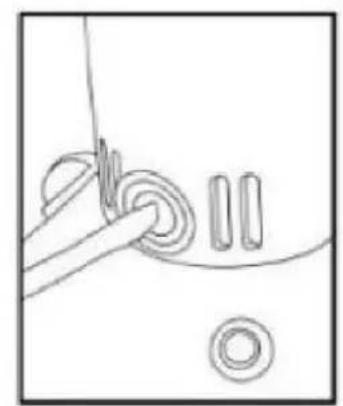
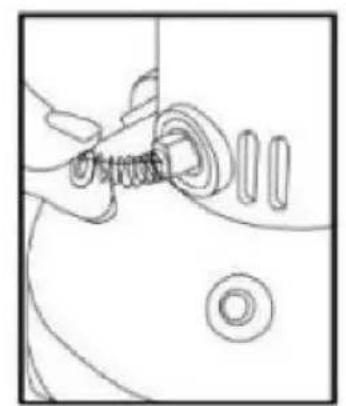
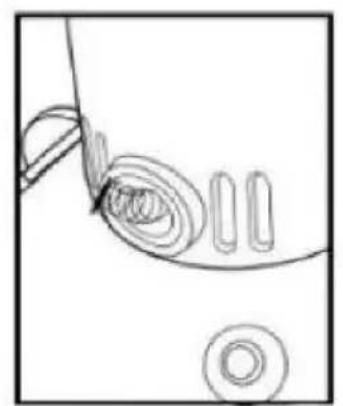
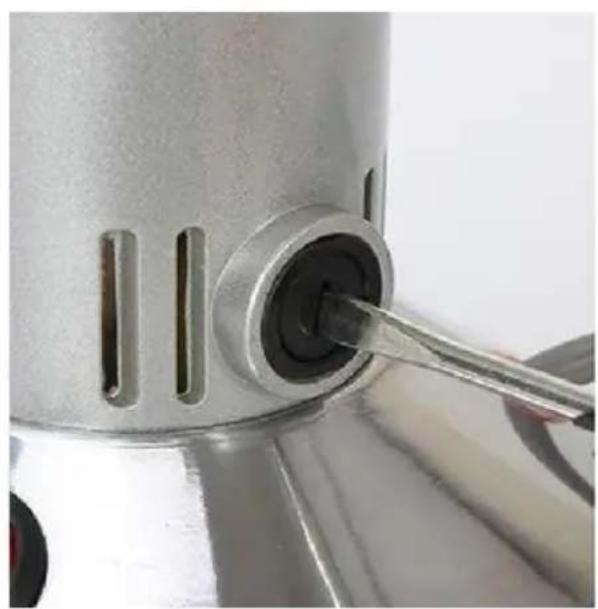
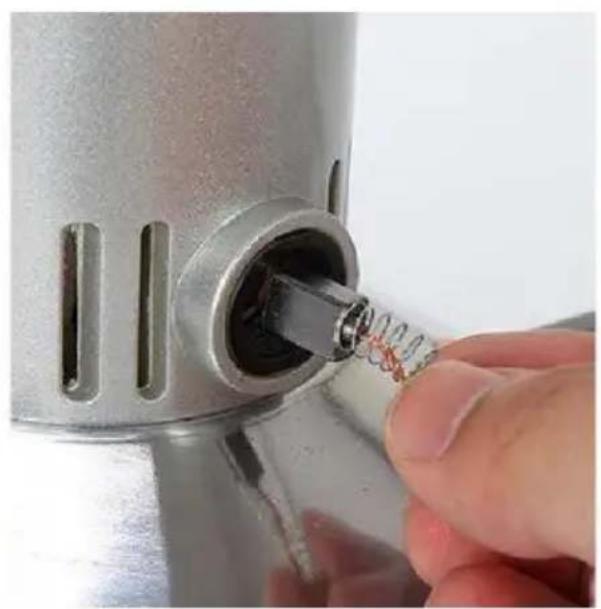
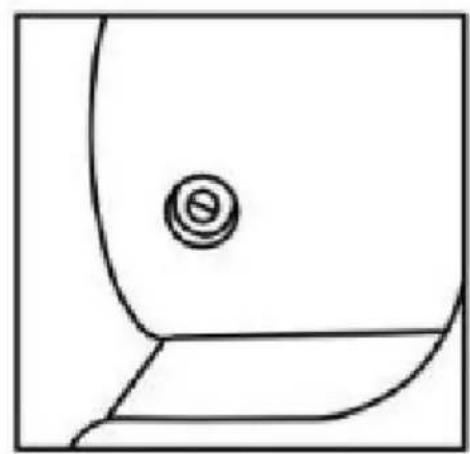
- The swing type grinder:
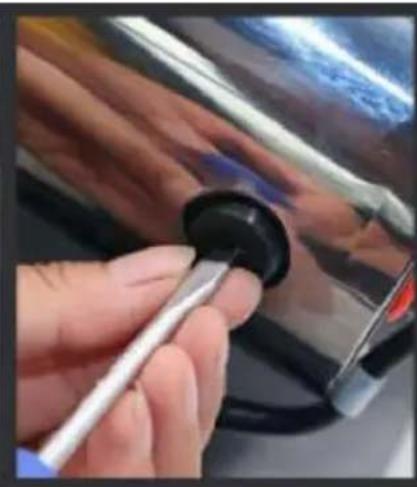
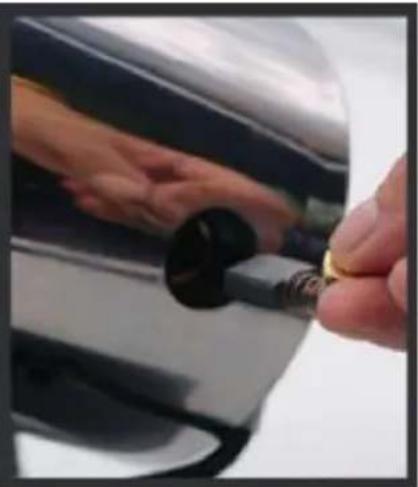
TROUBLESHOOTING
| Trouble | Cause | Elimination method (*Please cut off the power when do following) |
| The machine does not operate after power on. | Poor contact between the plug and socket. | repair or change the plug socket. |
| Poor contact between the lid and induction switched. | Adjust the position of the screws on both sides of the in advance so that they can trigger the induction switch in the ears when close the | |
| Air over-load protector protecting. | Press the air over-load protector to restart. | |
| Carbon brush ware out. | Change the carbon brush. | |
| Motor run slowly,o not runs, even vibrates,making noise. | Stuck inside of crus cabin by material, o foreign subject. | Remove the stuck stuff. |
| Low power voltage. | Insert the plug directly wall socket instead of the termin block. Then try another pla to see if the machine can turned on. | |
| Motor cabin over heat. | Over load capacity. | Reducing the amount of grinding and decreasing the working pressure. |
| Material not dry enough. | Dry the material in the sun bake it. | |
| Low power voltage. | Insert the plug directly into wall socket instead of the terminal block. Then try another place to see if the machine can be turned on. | |
| Spark on the carbon brush surface. | Carbon brush is no smooth. | remove the stuff on the surface |
PACKING LIST
| No. | Item | Qty | Remark |
| 1 | Grain Grinding | 1 set | |
| 2 | Manual | 1 pcs | |
| 3 | carbon brush | 1 pcs | |
| 4 | hairbrush | 1 pcs | |
| 5 | blade | 1 set | |
| 6 | mesh sieve | 1 pcs | |
| 7 | socket spanner | 1 pcs |
FCC Information
CAUTION: Changes or modifications not expressly approved by the party responsible for compliance could void the user's authority to operate the equipment!
This device complies with Part 15 of the FCC Rules. Operation is subject to the following two conditions:
1) This product may cause harmful interference. 2) This product must accept any interference received, including interference that may cause undesired operation.
WARNING: Changes or modifications to this product not expressly approved by the party responsible for compliance could void the user's authority to operate the product.
Note: This product has been tested and found to comply with the limits for a Class B digital device, pursuant to Part 15 of the FCC Rules. These limits are designed to provide reasonable protection against harmful interference in a residential installation.
This product generates, uses, and can radiate radio frequency energy. If not installed and used in accordance with the instructions, it may cause harmful interference to radio communications. However, there is no guarantee that interference will not occur in a particular installation. If this product does cause harmful interference to radio or television reception, which can be determined by turning the product off and on, the user is encouraged to try to correct the interference by one or more of the following measures:
- Reorient or relocate the receiving antenna.
- Increase the distance between the product and receiver.
- Connect the product to an outlet on a circuit different from that to which the receiver is connected.
- Consult the dealer or an experienced radio/TV technician for assistance.
VEVOR
TOUGH TOOLS, HALF PRICE
Technical Support and E-Warranty Certificate
www.vevor.com/support
VEVOR®
TOUGH TOOLS, HALF PRICE
Technical assistance and electronic warranty certificate www.vevor.com/support
GRAIN MILL USER MANUAL
MODEL: HC-150 HC300 HC-550 HC-750 HC-300Y HC-500Y
HC-750Y HC-1000Y HC-2000Y HC-2500Y
PRODUCT STRUCTURE
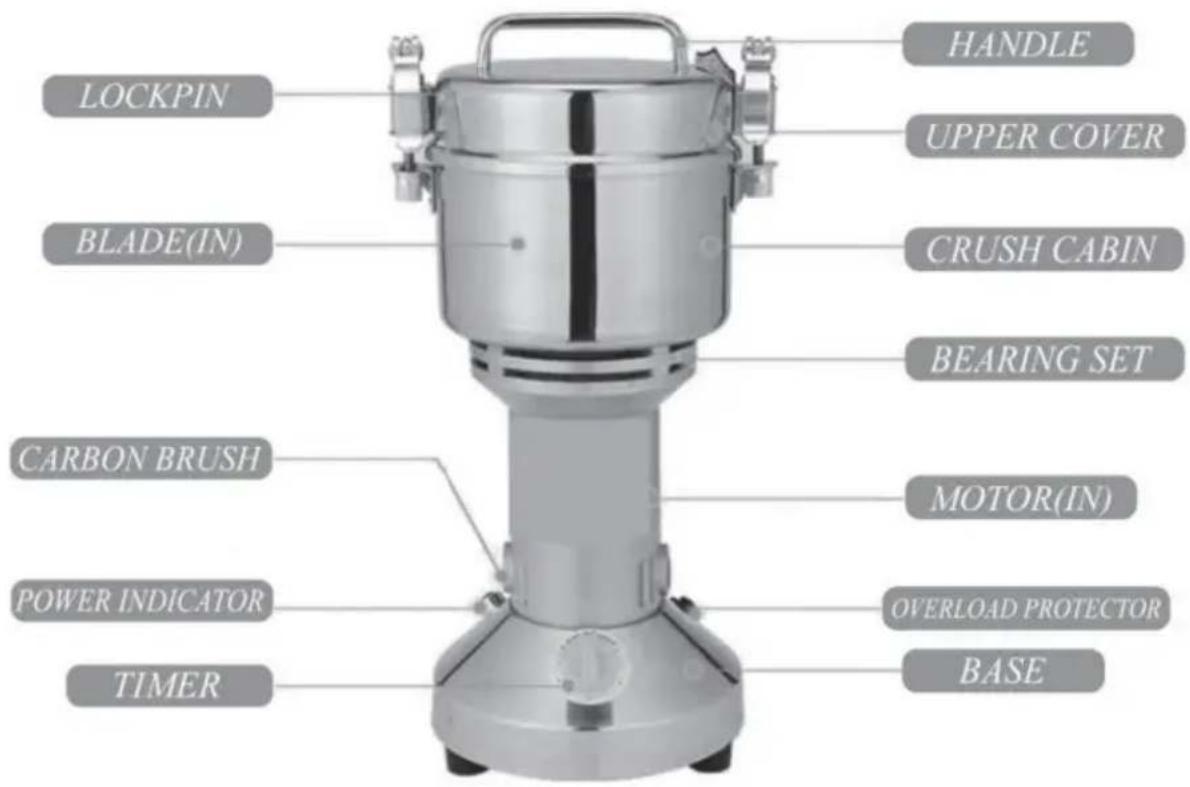
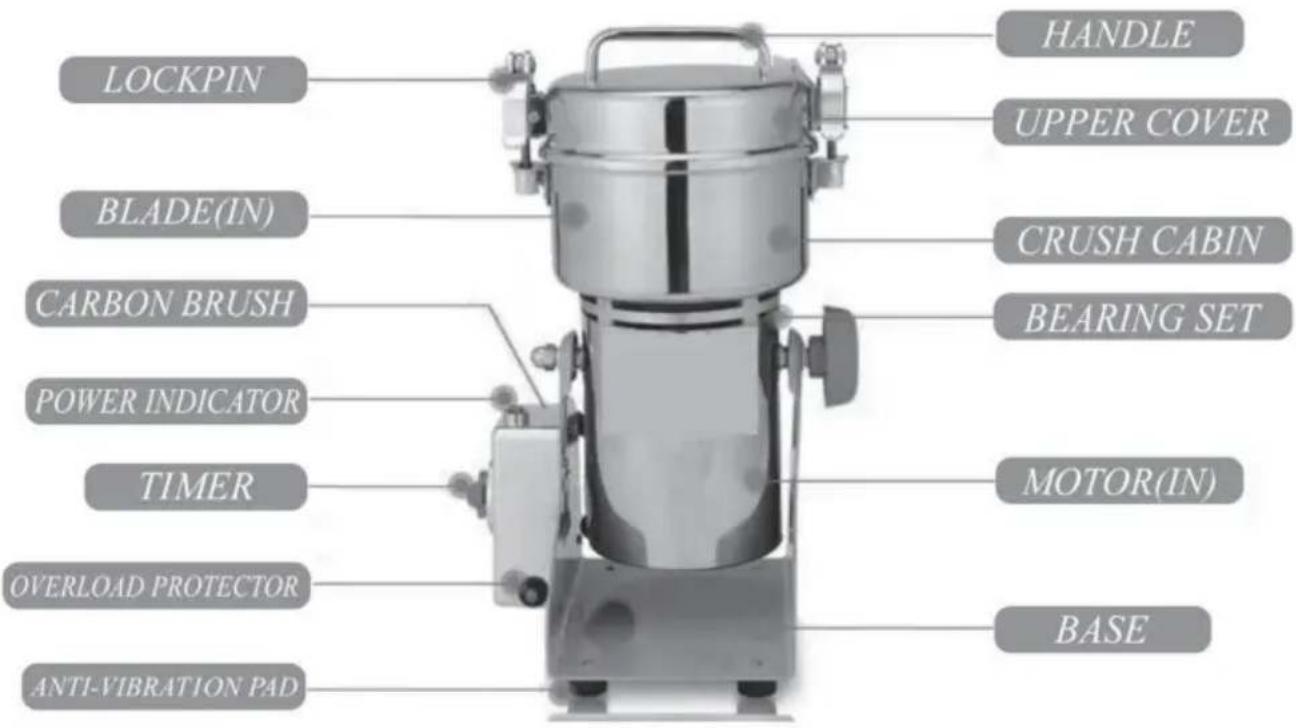
INSTRUCTIONS FOR USE
HOW TO REPLACE THE BLADE
OPERATIONAL PROCEDURES FOR BLADE REPLACEMENT
The machine has been upgraded to a three-blades one.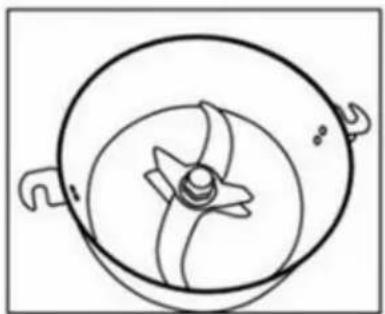
Use a screwdriver to fix the screw under the crushing warehouse, stick the blade to prevent slipping, use a professional tool counterclockwise to unscrew the nut.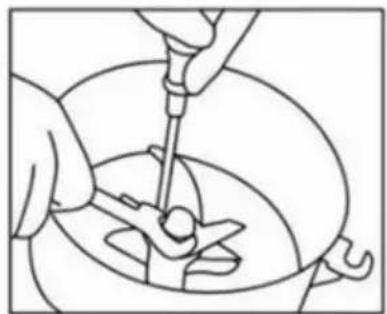
After losing the nut, as the state is shown in the picture, remove the pad and two above blade.
Remove the blade and install with a new one according to the original order.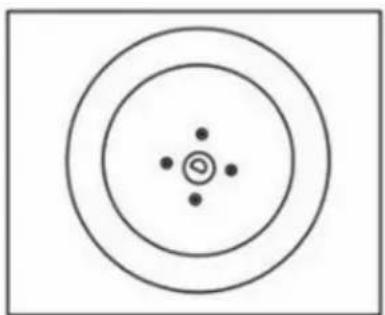
When installing the blade, you need to use a screwdriver to stick the blade to prevent slipping and tighten it clockwise by the professional tool.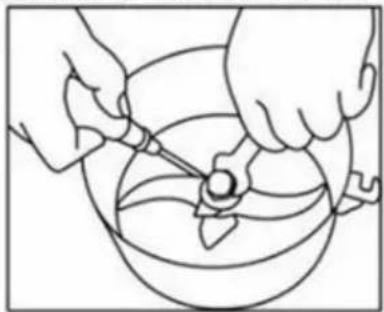
HOW TO REPLACE THE CARBON BRUSHES
MODEL: HC-150 HC300 HC-550 HC-750 HC-300Y HC-500Y HC-750Y HC-1000Y HC-2000Y HC-2500Y
The machine has been upgraded to a three-blades one.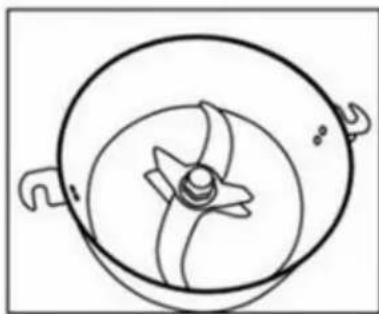
Use a screwdriver to fix the screw under the crushing warehouse, stick the blade to prevent slipping, use a professional tool counterclockwise to unscrew the nut.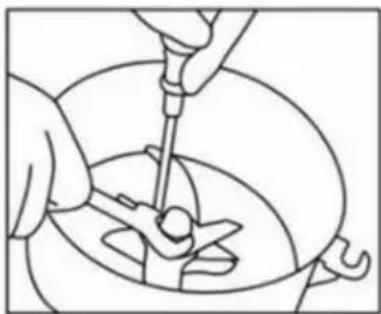
After losing the nut, as the state is shown in the picture, remove the pad and two above blade.
Remove the blade and install with a new one according to the original order.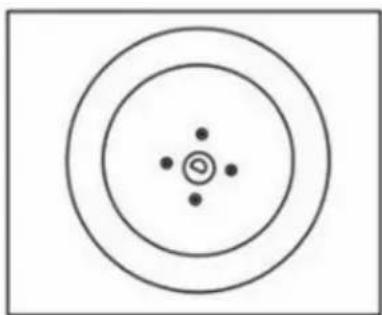
When installing the blade, you need to use a screwdriver to stick the blade to prevent slipping and tighten it clockwise by the professional tool.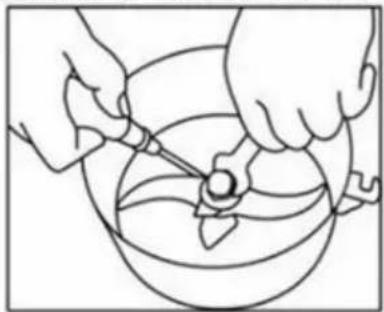
HOW TO REPLACE THE CARBON BRUSHES
www.vevor.com/support
VEVOR®
TOUGH TOOLS, HALF PRICE
MODEL: HC-150 HC300 HC-550 HC-750 HC-300Y HC-500Y
Model HC-750Y Model HC-1000Y Model HC-2000Y Model HC-2500Y
The machine has been upgraded to a three-blades one.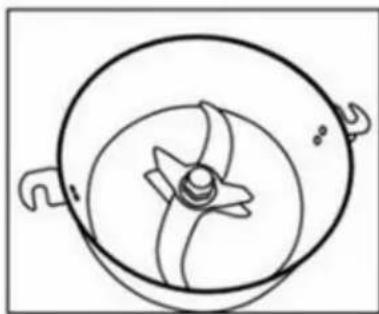
Use a screwdriver to fix the screw under the crushing warehouse, stick the blade to prevent slipping, use a professional tool counterclockwise to unscrew the nut.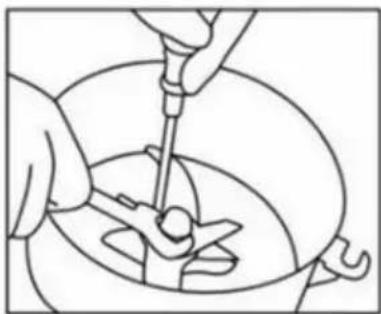
After losing the nut, as the state is shown in the picture, remove the pad and two above blade.
Remove the blade and install with a new one according to the original order.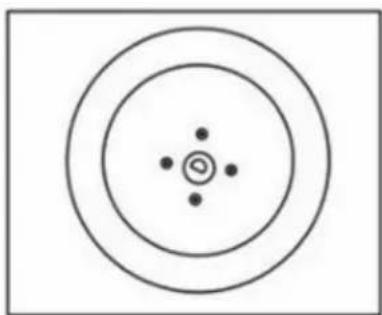
When installing the blade, you need to use a screwdriver to stick the blade to prevent slipping and tighten it clockwise by the professional tool.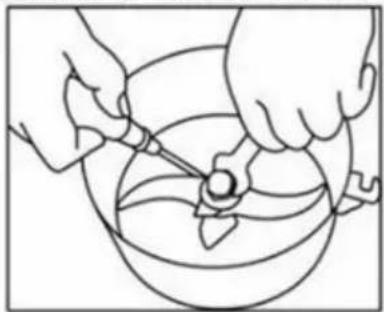
HOW TO REPLACE THE CARBON BRUSHES
electronics www.vevor.com/support
VEVOR®
TOUGH TOOLS, HALF PRICE
Technical support and electronic warranty certificate www.vevor.com/support
MODEL: HC-150 HC-300 HC-550 HC-750 HC-300Y HC-500Y HC-750Y HC-1000Y HC-2000Y HC-2500Y
We remain committed to providing tools at competitive prices.
| Advertencia: Para reducir el riesgo de lesiones, el usuario debe leer atentamente el manual de instruciones. | ||
| ELIMINACION CORRECTA Este producto está sujeto a las disponeciones de la Directiva Europea 2012/19. El síbolo que mystra un contentedor de basura tachado indica que el producto requires una recogida selectiva de residuos en la Unión Europea. Este se aplicá al producto y a todos los accesos marcados con este símblo Los productos marcados como tales noSEOSEOSEOSEOSEOSEOSEOSEOSEOSEOSEOSEOSEOSEOSEOSEOSEOSEOSEOSEOSEOSEOSEOSEOSEOSEOSEOSEOSEOSEOSEOSEOSEOSEOSEOSEOSEOSEOSEOSEOSEOSEOSEOSEOSEOSEOSEOSEOSEOSEOSEOSEOSEOSEOSEOSEOSEOSEOSEOSEOSEOSEOSEOSEOSEOSEOSEOSEOSEOSEOSEOSEOSEOSEOSEOSEOSEOSEOSEOSEOSEOSEOSEOSEOSEOSEOSEOSEOSEOSEOSEOSEOSEOSEOSEOSEOSEOSEOSEOSEO SEOSEOSEOSEOSEOSEOSEOSEOSEOSEOSEOSEOSEOSEOSEOSEOSEOSEOSEOSEOSEOSEOSEOSEOSEOSEOSEOSEOSEOSEOSEOSEOSEOSEOSEOSEOSEOSEOSEOSEOSEOSEOSEOSEOSEOSEOSEOSEOSEOSEOSEOSEOSEOSEOSEOSEOSEOSEOSEOSEOSEOSEOSEOSEOSEOSEOSEOSEOSEOSEOSEOSEOSEOSEOSEOSEOSEOSEOSEOSEOSEOSEOSEOSEOSEOSEOSEOSEOSEOSEOSEOSEOSEOSEOSEOSEOSEOSEOSEOSEOEOSEOSEOSEOSEOSEOSEOSEOSEOSEOSEOSEOSEOSEOSEOSEOSEOSEOSEOSEOSEOSEOSEOSEOSEOSEOSEOSEOSEOSEOSEOSEOSEOSEOSEOSEOSEOSEOSEOSEOSEOSEOSEOSEOSEOSEOSEOSEOSEOSEOSEOSEOSEOSEOSEOSEOSEOSEOSEOSEOSEOSEOSEOSEOSEOSEOSEOSEOSEOSEOSEOSEOSEOSEOSEOSEOSEOSEOSEOSEOSEOSEOSEOSEOSEOSEOSEOSEOSEOSEOSEOSEOSEOSEOSEOSEOSEOSEOSEOSEOseoSEOSEOSEOSEOSEOSEOSEOSEOSEOSEOSEOSEOSEOSEOSEOSEOSEOSEOSEOSEOSEOSEOSEOSEOSEOSEOSEOSEOSEOSEOSEOSEOSEOSEOSEOSEOSEOSEOSEOSEOSEOSEOSEOSEOSEOSEOSEOSEOSEOSEOSEOSEOSEOSEOSEOSEOSEOSEOSEOSEOSEOSEOSEOSEOSEOSEOSEOSEOSEOSEOSEOSEOSEOSEOSEOSEOSEOSEOSEOSEOSEOSEOSEOSEOSEOSEOSEOSEOSEOSEOSEOSEOSEOSEOSEOSEOSEOSEOSEOSEQEOSEOSEOSEOSEOSEOSEOSEOSEOSEOSEOSEOSEOSEOSEOSEOSEOSEOSEOSEOSEOSEOSEOSEOSEOSEOSEOSEOSEOSEOSEOSEOSEOSEOSEOSEOSEOSEOSEOSEOSEOSEOSEOSEOSEOSEOSEOSEOSEOSEOSEOSEOSEOSEOSEOSEOSEOSEOSEOSEOSEOSEOSEOSEOSEOSEOSEOSEOSEOSEOSEOSEOSEOSEOSEOSEOSEOSEOSEOSEOSEOSEOSEOSEOSEOSEOSEOSEOSEOSEOSEOSEOSEOSEOSEOSEOSEOSEOSEOSEQEQEOSEOSEOSEOSEOSEOSEOSEOSEOSEOSEOSEOSEOSEOSEOSEOSEOSEOSEOSEOSEOSEOSEOSEOSEOSEOSEOSEOSEOSEOSEOSEOSEOSEOSEOSEOSEOSEOSEOSEOSEOSEOSEOSEOSEOSEOSEOSEOSEOSEOSEOSEOSEOSEOSEOSEOSEOSEOSEOSEOSEOSEOSEOSEOSEOSEOSEOSEOSEOSEOSEOSEOSEOSEOSEOSEOSEOSEOSEOSEOSEOSEOSEOSEOSEOSEOSEOSEOSEOSEOSEOSEOSEOSEOSEOSEOSEOSEOSEOEO | ||
The machine has been upgraded to a three-blade one.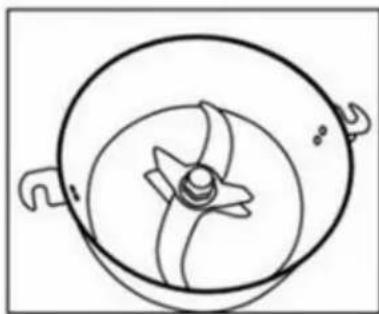
Use a screwdriver to fix the screw under the crushing chamber, stick the blade to prevent slipping, and use a professional tool counterclockwise to unscrew the nut.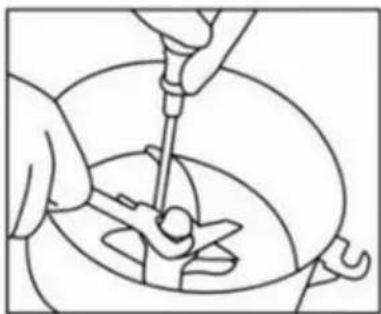
After removing the nut, as shown in the picture, remove the pad and the two blades above.
Remove the blade and install a new one according to the original order.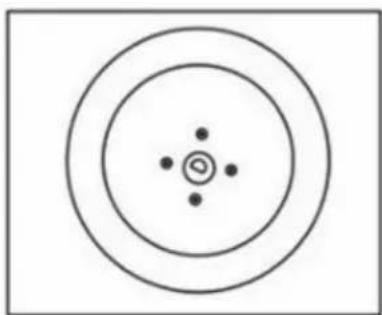
When installing the blade, you need to use a screwdriver to stick the blade to prevent slipping and tighten it clockwise with the professional tool.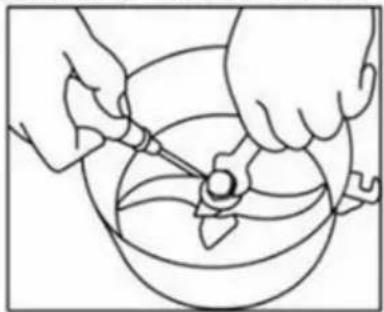
HOW TO REPLACE THE CARBON BRUSHES
MODEL: HC-150 HC-300 HC-550 HC-750 HC-300Y HC-500Y HC-750Y HC-1000Y HC-2000Y HC-2500Y
The machine has been upgraded to a three-blade one.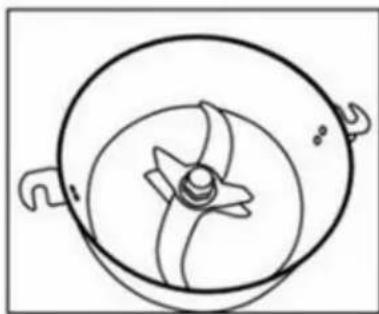
Use a screwdriver to fix the screw under the crushing chamber, stick the blade to prevent slipping, and use a professional tool counterclockwise to unscrew the nut.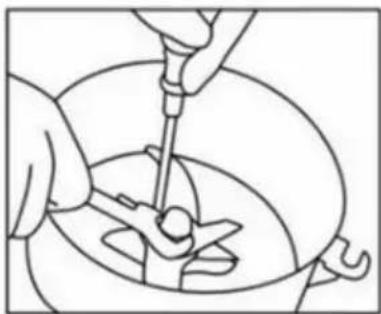
After removing the nut, as shown in the picture, remove the pad and the two blades above.
Remove the blade and install a new one according to the original order.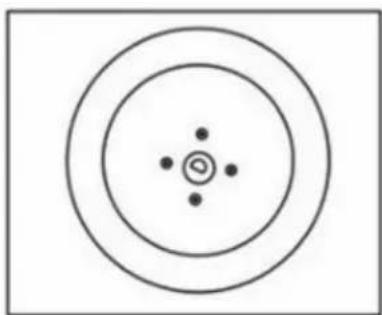
When installing the blade, you need to use a screwdriver to stick the blade to prevent slipping and tighten it clockwise with the professional tool.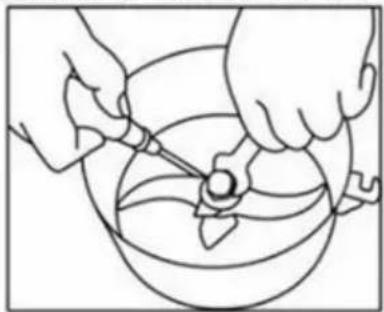
HOW TO REPLACE THE CARBON BRUSHES
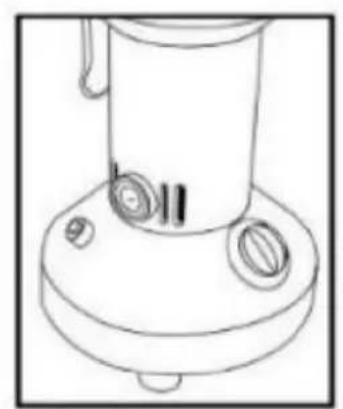
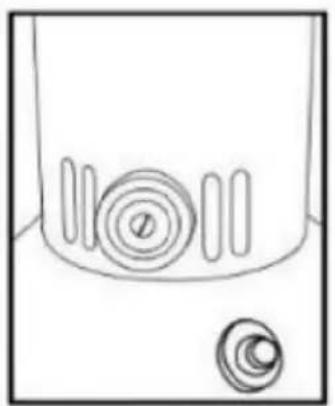
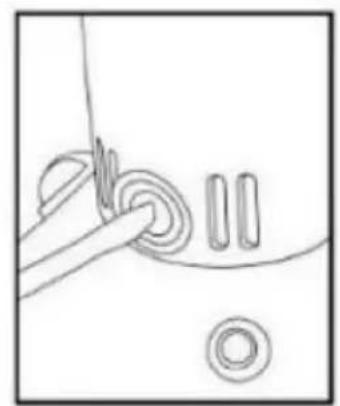
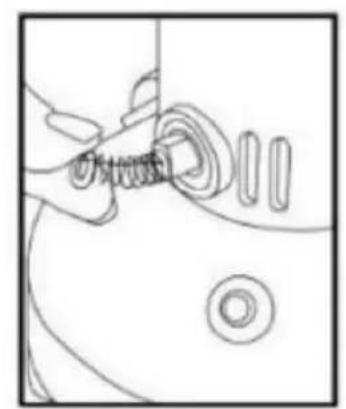
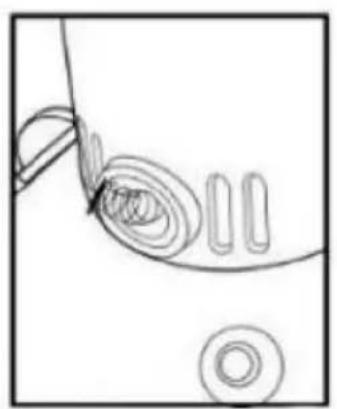
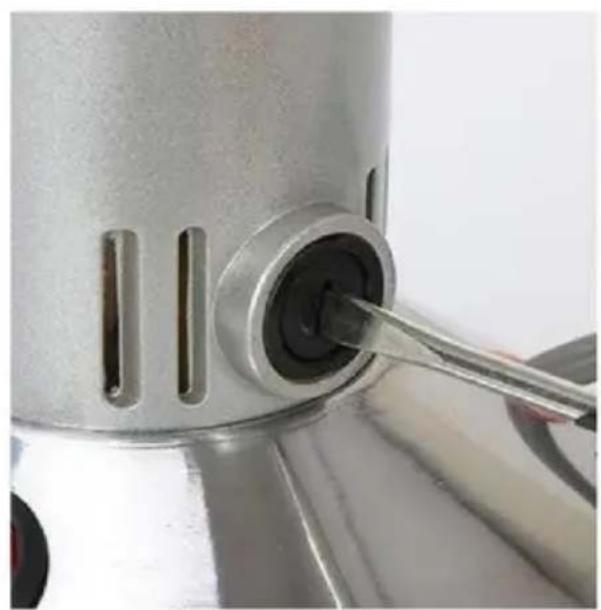
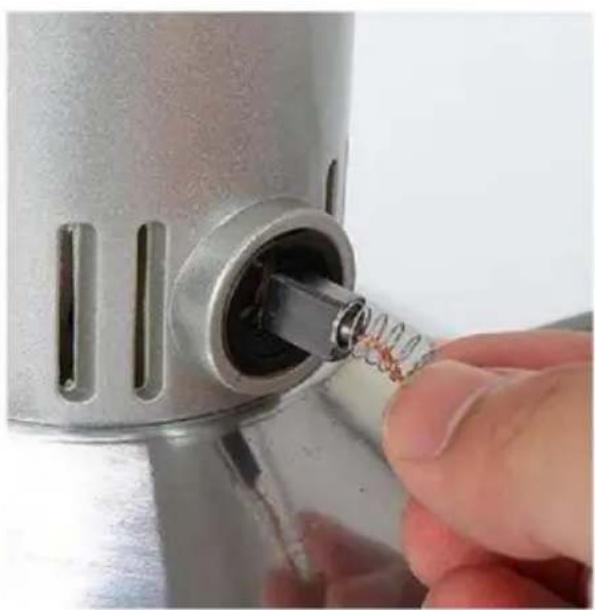
- Vertical grinder:
MODEL: HC-150 HC300 HC-550 HC-750 HC-300Y HC-500Y HC-750Y HC-1000Y HC-2000Y HC-2500Y
The machine has been upgraded to a three-blades one.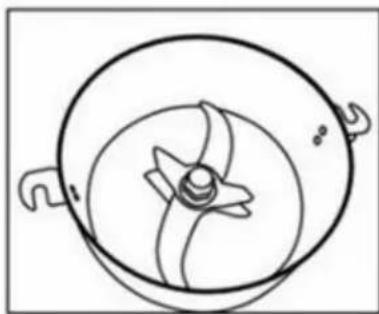
Use a screwdriver to fix the screw under the crushing warehouse, stick the blade to prevent slipping, use a professional tool counterclockwise to unscrew the nut.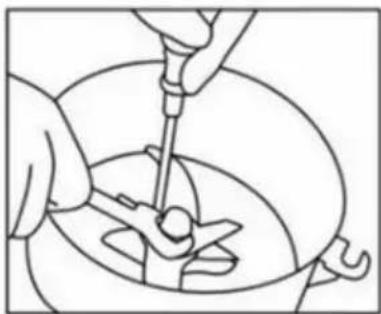
After losing the nut, as the state is shown in the picture, remove the pad and the two blades above.
Remove the blade and install a new one according to the original order.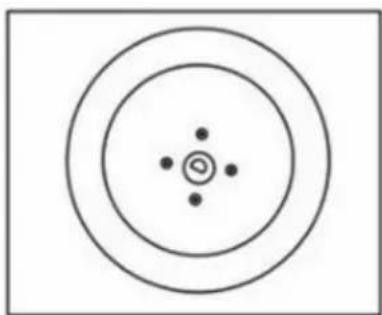
When installing the blade, you need to use a screwdriver to stick the blade to prevent slipping and tighten it clockwise with the professional tool.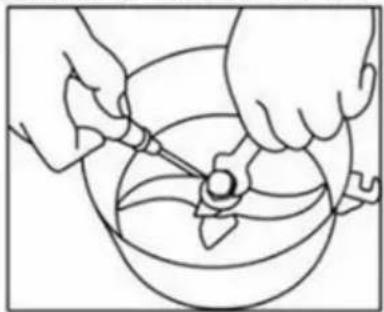
HOW TO REPLACE CARBON BRUSHES
www.vevor.com/support
VEVOR®
TOUGH TOOLS, HALF PRICE
Technical support and e-warranty certificate www.vevor.com/support
MODEL: HC-150 HC300 HC-550 HC-750 HC-300Y HC-500Y HC-750Y HC-1000Y HC-2000Y HC-2500Y
NEED HELP? CONTACT US!
The machine has been upgraded to a three-blades one.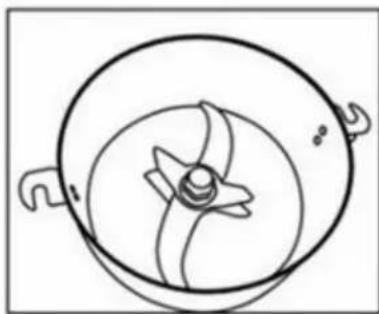
Use a screwdriver to fix the screw under the crushing warehouse, stick the blade to prevent slipping, and use a professional tool counterclockwise to unscrew the nut.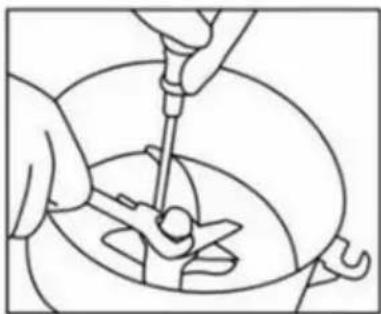
After losing the nut, as the state is shown in the picture, remove the pad and the two blades above.
Remove the blade and install a new one according to the original order.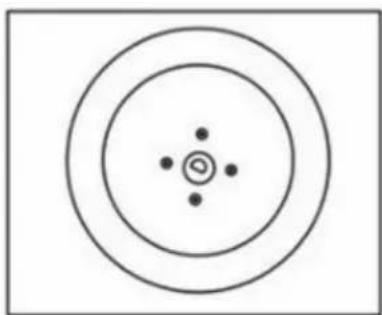
When installing the blade, you need to use a screwdriver to stick the blade to prevent slipping and tighten it clockwise with the professional tool.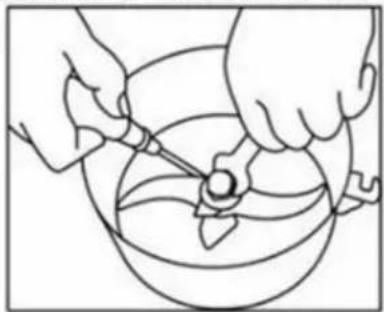
HOW TO REPLACE CARBON BRUSHES
- GRAIN GRINDER USER MANUAL
- MODEL: HC-150 HC300 HC-550 HC-750 HC-300Y HC-500Y HC-750Y HC-1000Y HC-2000Y HC-2500Y
- VEVOR®
- NEED HELP? CONTACT US
- WARNINGS
- OPERATIONS GUIDE
- GRINDING CAUTIONS
- COMMON QUESTIONS
- WHY CANNOT THE GRINDER BE STARTED
- PUT TOO MUCH MATERIAL INTO THE GRINDING BIN AT ONE TIME
- INSTRUCTIONS OF AIR OVERLOAD PROTECTOR
- HOW TO CLEAN UP THE GRINDING BIN
- HOW TO REPLACE THE BLADE
- OPERATING PROCEDURES FOR REPLACING BLADES
- HOW TO REPLACE CARBON BRUSHES
- FCC INFORMATION
- VEVOR
- TOUGH TOOLS, HALF PRICE
- GRAIN MILL USER MANUAL
- PRODUCT STRUCTURE
- INSTRUCTIONS FOR USE
- OPERATIONAL PROCEDURES FOR BLADE REPLACEMENT
- HOW TO REPLACE THE CARBON BRUSHES
- MODEL: HC-150 HC-300 HC-550 HC-750 HC-300Y HC-500Y HC-750Y HC-1000Y HC-2000Y HC-2500Y
Brand : Vevor
Model : HC-1000Y
Category : Choppers