
EC3016C - Iron Vevor - Free user manual and instructions
Find the device manual for free EC3016C Vevor in PDF.



| Product type | Steam iron |
| Brand | Vevor |
| Model | EC3016C |
| Power supply | 120 V~60 Hz (UL model) / 220-240 V~50 Hz (GS model) |
| Power | 1700 W (UL) / 1400-1800 W (GS) |
| Maximum temperature | 170 °C |
| Temperature settings | 4 positions (70, 100, 140, 170 °C) |
| Steam functions | Burst steam, water spray, continuous steam |
| Auto-off | 30 seconds in horizontal position, 8 minutes in vertical position |
| Anti-drip | Prevents water dripping below 115 °C |
| Automatic descaling | Built-in De-calc box releasing ions into the water |
| Self-cleaning function | Clean mode to clean the inside of the iron |
| Included accessories | Measuring cup |
| Weight | Approximately 1.5 kg |
| Dimensions | Approximately 30 x 15 x 20 cm |
| Cord length | Approximately 2 m |
| Standards | Compliant with FCC Part 15 |
| Technical support | www.vevor.com/support |
Frequently Asked Questions - EC3016C Vevor
User questions about EC3016C Vevor
0 question about this device. Answer the ones you know or ask your own.
Ask a new question about this device
Download the instructions for your Iron in PDF format for free! Find your manual EC3016C - Vevor and take your electronic device back in hand. On this page are published all the documents necessary for the use of your device. EC3016C by Vevor.
USER MANUAL EC3016C Vevor
Technical Support and E-Warranty Certificate www.vevor.com/support
STEAM IRON
We continue to be committed to provide you tools with competitive price. "Save Half", "Half Price" or any other similar expressions used by us only represents an estimate of savings you might benefit from buying certain tools with us compared to the major top brands and does not necessarily mean to cover all categories of tools offered by us. You are kindly reminded to verify carefully when you are placing an order with us if you are actually saving half in comparison with the top major brands.
MODEL: EC3016-UL / EC3016-GS
NEED HELP? CONTACT US!
Have product questions? Need technical support? Please feel free to contact us:
Technical Support and E-Warranty Certificate www.vevor.com/support
This is the original instruction. Please read all manual instructions carefully before operating. VEVOR reserves a clear interpretation of the user manual. The appearance of the product shall be subject to the product you received. Please forgive us that we won't inform you again if there are any technology or software updates on our product.
| Symbol | Symbol Description |
 | Warning: To reduce the risk of injury, the user must read the instructions manual carefully. |
 | This symbol, placed before a safety comment, indicates a kind of precaution, warning, or danger. Ignoring this warning may lead to an accident. To reduce the risk of injury, fire, or electrocution, please always follow the recommendation shown below. |
 | CORRECT DISPOSAL:This product is subject to the provision of European Directive 2012/19/EC.The symbol showing a wheelie bin crossed through indicates that the product requires separate refuse collection in the European Union.This applies to the product and all accessories marked with this symbol. Products marked as such may not be discarded with normal domestic waste, but must be taken to a collection point for recycling electrical and electronic devices. |
WARNING
- Read all instructions.
- Before using, check that the voltage of the wall outlet corresponds to the one shown on the rating plate.
- Do not use the appliance if the main cord, plug, light, or the appliance itself shows visible damage, or if the appliance has been dropped or is leaking. Take it to the nearest authorized service facility or a qualified serviceman for examination and repair in order to avoid a hazard.
- Do not allow the cord to come into contact with the soleplate when hot.
- Burns may occur from touching hot metal parts, hot water, or steam.
- Do not let the cord hang over the edge of a table or hot surface.
- To protect against a risk of electric shock, never immerse the iron
in water or other liquids. If this has happened, do not use this appliance anymore; dispose of it.
- Keep the appliance out of the reach of children.
- Do not leave the iron unattended while it is connected to the power supply or while it is on an ironing board.
- Always place or use the appliance on a stable, level, and horizontal surface.
- The use of accessories not recommended by the manufacturer may cause injury to persons or damage to the appliance.
- When placing the iron on its stand, ensure that the surface on which the stand is placed is stable.
- Never fill the water reservoir with hot water, scent, vinegar, starch descaler, fabric softener, or other chemical reagents.
- Unplug from the outlet when not in use or before cleaning. Ensure it cools down completely before cleaning.
- This appliance can be used by children aged from 8 years and above and persons with reduced physical, sensory, or mental capabilities or lack of experience and knowledge if they have been given supervision or instruction concerning use of the appliance in a safe way and understand the hazards involved. Children shall not play with the appliance. Cleaning and user maintenance shall not be made by children without supervision.
- Keep the iron and its cord out of reach of children less than 8 years of age when it is energized or cooling down.
- The plug must be removed from the socket-outlet before the water reservoir is filled with water.
- The iron is not to be used if it has been dropped, if there are signs of damage, or if it is leaking.
- Do not use the appliance for other than its intended use.
- Do not use outdoors.
- Type Y attachment: If the supply cord is damaged, it must be replaced by the manufacturer, its service agent or similarly qualified persons in order to avoid a hazard.
Save these instructions.
HOUSEHOLD USE ONLY
FCC INFORMATION
CAUTION: Changes or modifications not expressly approved by the party responsible for compliance could void the user's authority to operate the equipment!
This device complies with Part 15 of the FCC Rules. Operation is subject to the following two conditions:
1) This product may cause harmful interference. 2) This product must accept any interference received, including interference that may cause undesired operation.
WARNING: Changes or modifications to this product not expressly approved by the party responsible for compliance could void the user's authority to operate the product.
Note: This product has been tested and found to comply with the limits for a Class B digital device pursuant to Part 15 of the FCC Rules. These limits are designed to provide reasonable protection against harmful interference in a residential installation.
This product generates, uses and can radiate radio frequency energy, and if not installed and used in accordance with the instructions, may cause harmful interference to radio communications. However, there is no guarantee that interference will not occur in a particular installation. If this product does cause harmful interference to radio or television reception, which can be determined by turning the product off and on, the user is encouraged to try to correct the interference by one or more of the following measures.
- Reorient or relocate the receiving antenna.
- Increase the distance between the product and receiver.
- Connect the product to an outlet on a circuit different from that to which the receiver is connected.
- Consult the dealer or an experienced radio/TV technician for assistance.
SPECIFICATION
| Model | EC3016-UL | EC3016-GS |
| Voltage | 120V~ 60Hz | 220-240V~ 50Hz |
| Power | 1700W | 1400-1800W |
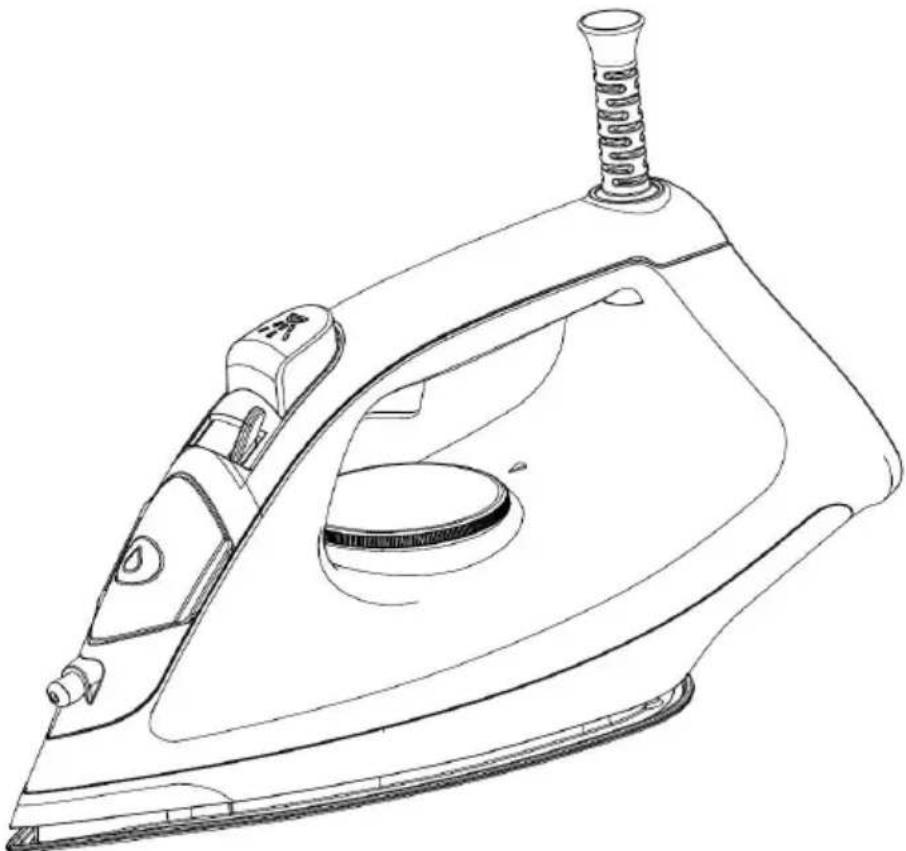
INTRODUCTION FOR PARTS
| NO. | Part name | Function |
| 1 | Cord bushing | To prevent the power cord from beibroken |
| 2 | Top cover | For covering the lead wires to avoidelectric shock |
| 3 | Burst steam button | To provide burst steam for removingtough wrinkle |
| 4 | Indicator | To indicate the working status ofsoleplate |
| 5 | Dial knob | To adjust the temperature of solepla |
| 6 | Water tank | For storing the water used for ironir |
| 7 | Base | For heat insulation |
| 8 | Soleplate | For ironing clothes |
| 9 | Spray button | To spray water for wetting the cloth |
| 10 | Steam knob | To make switch among the functionsDry iron, Steam iron and Clean |
| 11 | Water inlet cover | To prevent the water in the waterfrom overfilling |
| 12 | Nozzle | For spraying mist |
| 13 | De-calc Box (inside appliance, not shown) | For descaling |
- Remove any sticker, protective foil or storage cover from the soleplate.
- Fill the water tank with water, heat up the iron at the maximum temperature setting and iron over a piece of cloth for several minutes to remove any residue on the soleplate.
NOTE: It is normal that a strange odor comes out from the unit for the first use. This will cease after a short while.
IRONING OPERATION
- Before connecting the appliance to the power source, ensure that the voltage used corresponds to that marked on the rating label of the appliance.
- Open the water inlet cover (see Fig.1) and tilt the iron for 30°. Pour an appropriate amount of water into the water tank using a measuring cup (Fig.2). It is best to use pure water or distilled water with less calcium particles, and ensure that the water does not exceed the maximum water level line marked on the water tank. Press the water inlet cover to close. A sound of "Click" can be heard if the water inlet cover is closed in position.
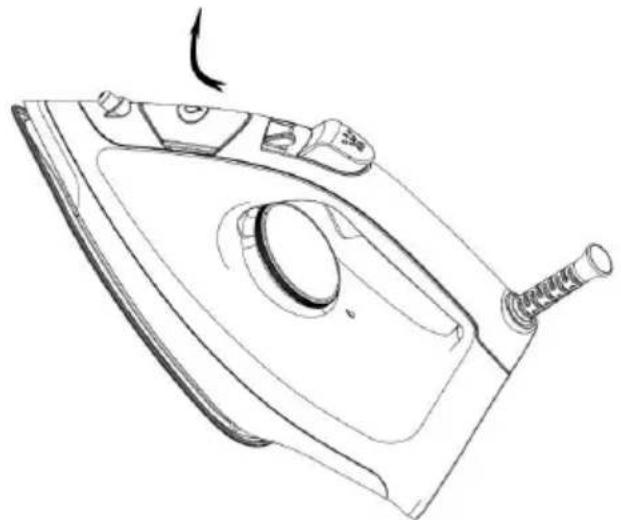
Fig.1
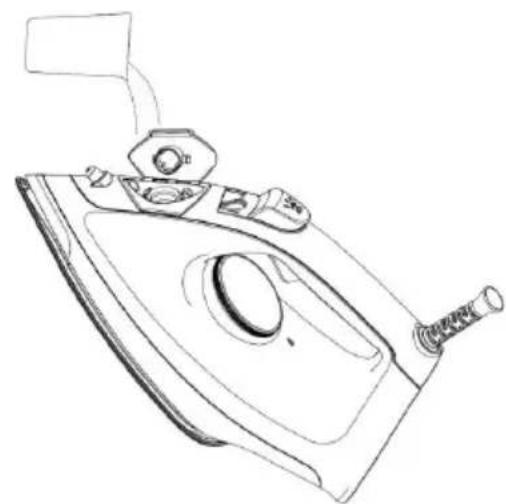
Fig.2
- Connect the appliance to the power source (see Fig.3) and select the appropriate temperature according to the material of the clothes to be ironed (see Fig.4). Refer to the sections of "IRONING TIPS" and "ADDITIONAL LABEL" when selecting the temperature. The indicator lights up, indicating that the iron is preheating. And the indicator will illuminate solidly during preheating. After the preheating is completed, the indicator will turn off and the iron is ready for use.
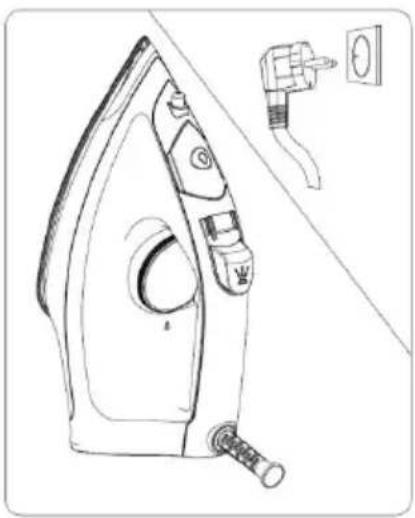
Fig.3
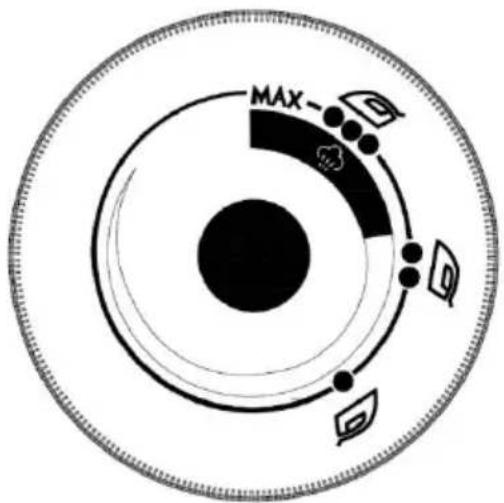
Fig.4
- Select the desired function by the Steam knob according to your demand (see Fig.5). Turn the Steam knob to the "Steam iron" setting and the iron will keep releasing steam. If you need to activate the dry iron, turn the steam knob to the "Dry iron" setting.
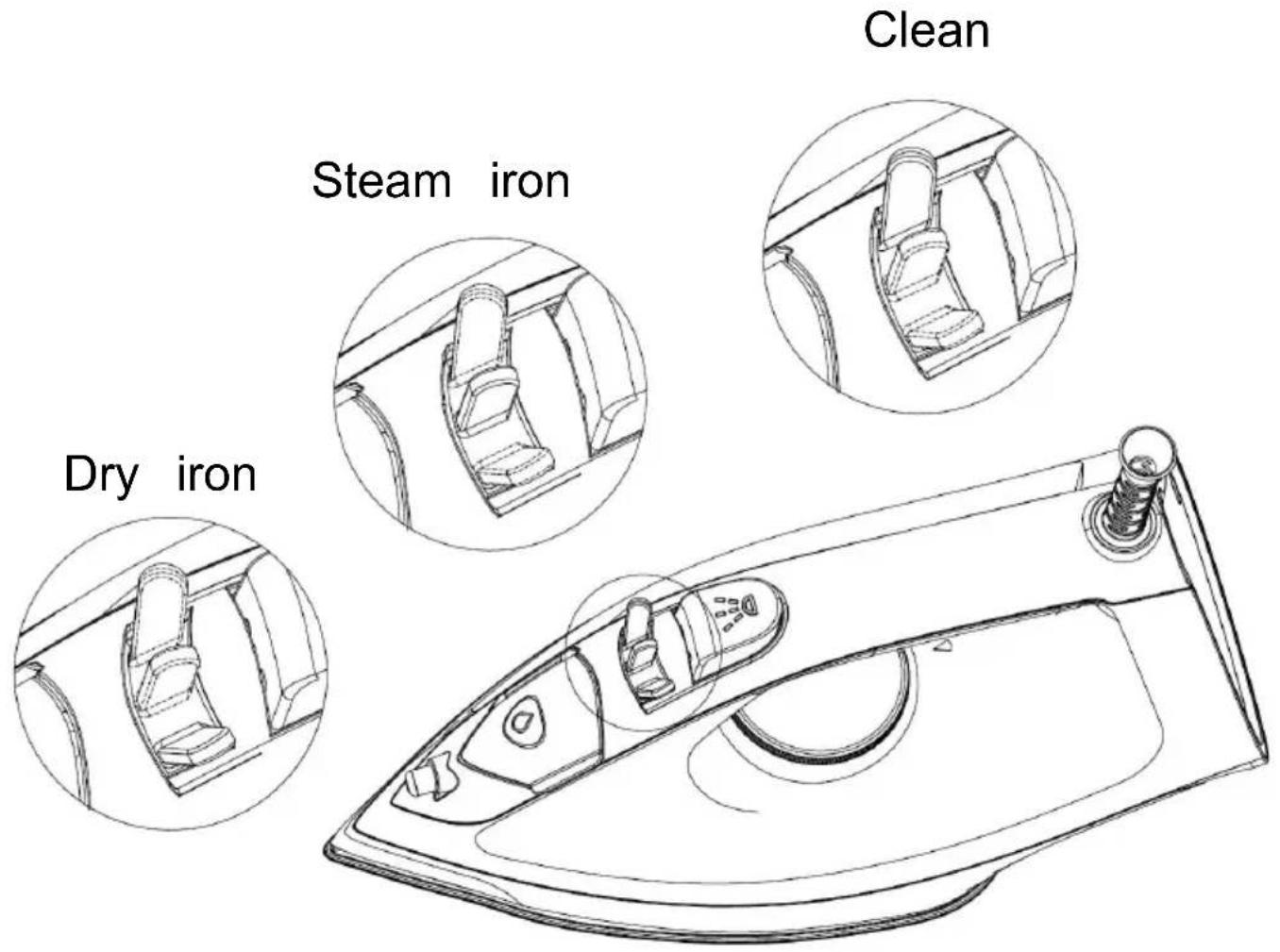
Fig.5
NOTE: When the indicator illuminates, it means that the temperature of the iron is low and the iron is being heated. At that time, it is normal that there will be little water spraying out when releasing steam.
- You can spray mist by pressing the Spray button once (see Fig.6).
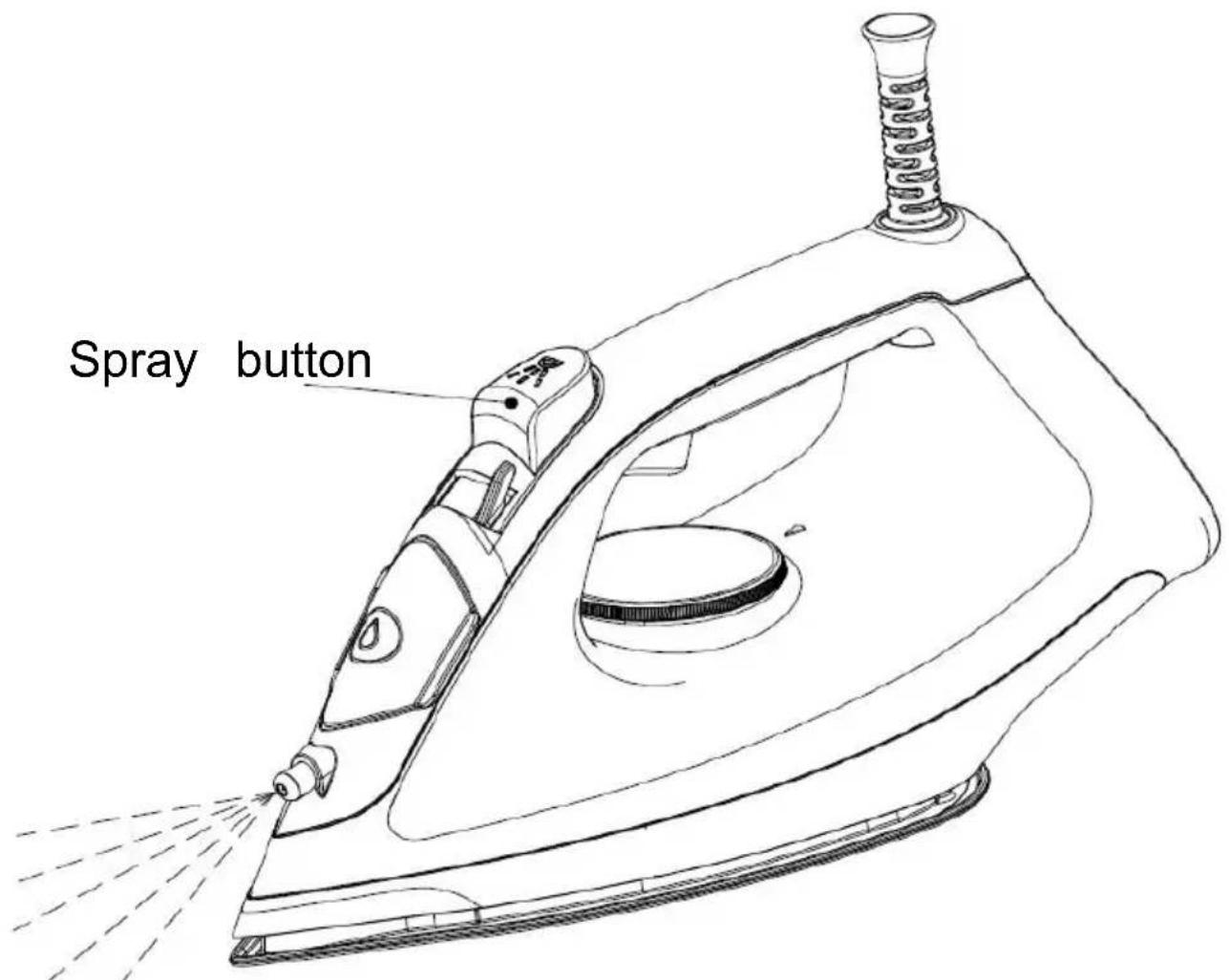
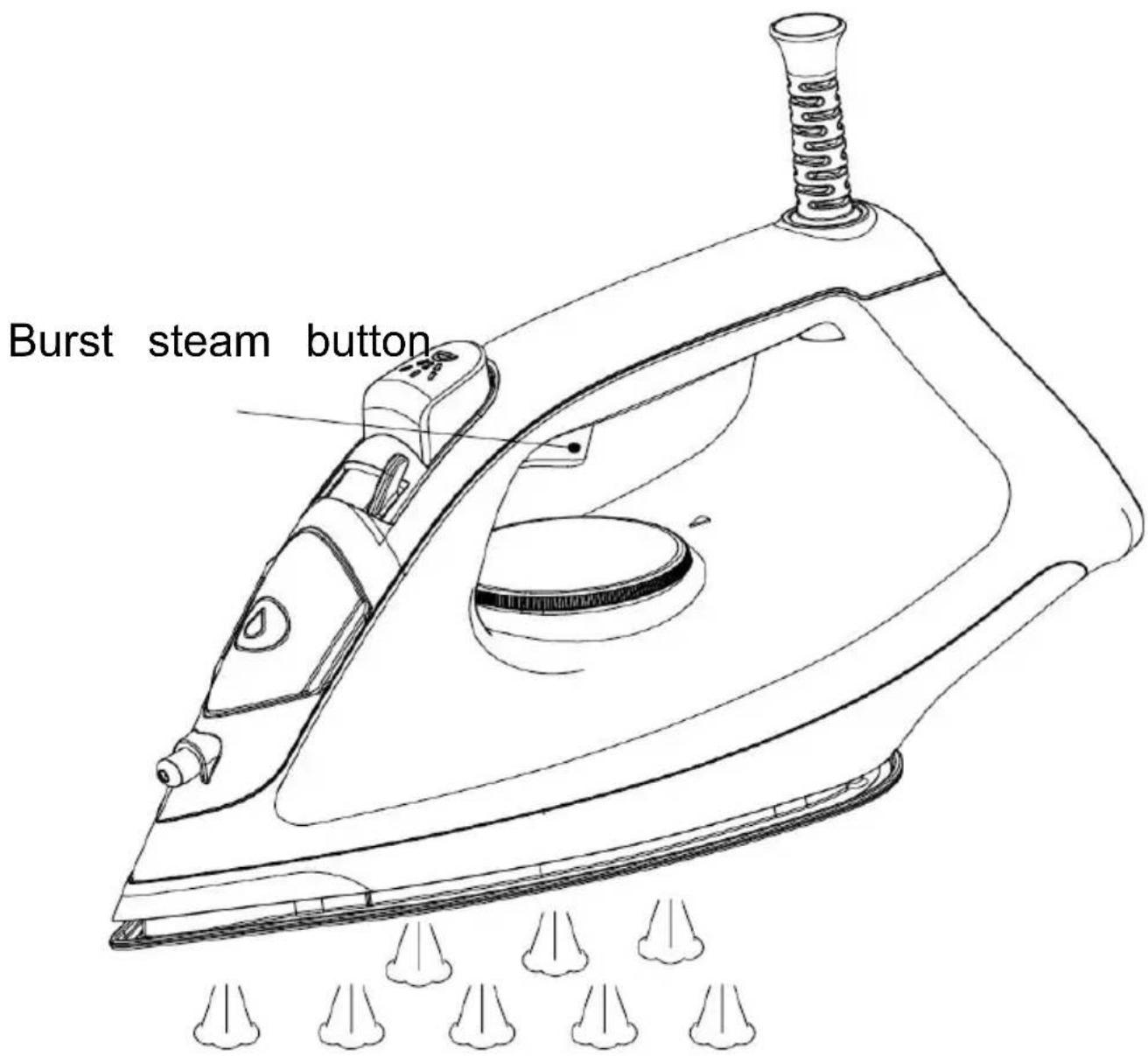
- When you need to remove tough wrinkles, activate the burst steam function by pressing the Burst steam button once (see Fig.7). It is recommended to activate the burst steam function at the maximum temperature setting for a good ironing effect.
NOTE: When the temperature decreases during the ironing process, the iron will heat up automatically and the indicator will light up. After the heating is completed, the indicator will turn off automatically.
- After finishing ironing, turn off the appliance by the Dial knob and unplug.
- Automatic power-off function: The appliance will turn off automatically and enter into the sleep mode when it is placed horizontally for 30 seconds or placed vertically for 8 minutes. If there is any operation during this period, the appliance will wake up automatically and can be operated again.
- Descaling function: The water tank is equipped with a De-calc box which will release ions into the water automatically for descaling during the ironing process.
- Anti-drip function: There will be no water flow out of the water tank when operating the steam knob under the cold state. And there will be water flow out of the water tank and then produce steam only when the temperature reaches 115°C.
- We should clean the appliance regularly according to the water hardness and the frequency of use. To activate the Clean function, turn the Steam knob to the Clean setting and hold it (see Fig.8), then the appliance enters into the clean mode. And the appliance will enter into the steam mode after releasing the Steam knob.

Fig.8
NOTE: Before activating the clean function, make sure that the water in the water tank is sufficient, and prepare a high temperature-resistant container.
Then place it under the soleplate to hold the dirty water sprayed from the soleplate during cleaning.
CLEANING AND MAINTENANCE
After ironing
- Disconnect the power supply and empty the water left in the water tank.
- To make the soleplate dry, connect the appliance to the power supply again and turn it on using the dial knob. When the indicator turns off, turn off and unplug the appliance.
- Let the iron cool down completely, then wipe off flakes and any other deposits on the soleplate with a damp cloth or a non-abrasive (liquid) cleaner.
WARNINGS:
(1) Never touch the hot soleplate at any time before it has cooled down! (2) To keep the soleplate smooth, prevent it from contacting metal objects. Never use a scouring pad, vinegar, or other chemicals to clean the soleplate. 4. Clean the upper part of the iron with a damp cloth. 5. Regularly clean the inside of the appliance by activating the Clean function (see Fig.8). 6. Always store the iron horizontally on a stable surface with a mat underneath to protect the soleplate.
IRONING TIPS
- Always check first whether a label with ironing instructions is attached to the article. Follow these ironing instructions in any case.
- The iron heats up quicker than it cools down, so you should start ironing articles that require lower temperatures, such as those made of synthetic fiber.
- If the fabric consists of various kinds of fibers, you must always
the lowest ironing temperature to iron the composition of those fibers.
- Synthetic fibre and silk fabrics should be ironed on their inner side, avoid being shone.
- Velvet and other textures that rapidly become shiny should be iron one direction with light pressure applied. Always keeps the iron moving any moment.
- Pure wool fabrics (100% wool) may be ironed with the steam iron dry cloth as a mat and then select the corresponding fabric setting for ironing.
- Never iron over zip, rivet in the cloth. This will damage the solep Iron around any such object.
NOTE: When ironing woolen fabrics, shining of the fabric may occur. is suggested that you should turn the article inside out and iron the side.
ADDITIONAL TABLE
| Setting | Temperature | Fabric |
| The first setting | 70Acetate, elastane,polyamide,polypropyleneAcetate, elastane,polyamide,polypropylene | Acetate, elastane,polyamide,polypropylene |
| The second setting | 100Cupro,polyester,silk | Cupro,polyester,silk |
| The third setting | 140Triacetate, viscose, wool | Triacetate, viscose, wool |
| Maximum | 170Cotton, flax | Cotton, flax |
TROUBLESHOOTING
| PROBLEM | THINGS TO CHECK | REMEDY |
Manufacturer: FOSHAN CITY SHUNDE DISTRICT DONLIM
INTELLIGENT ELECTRICAL APPLIANCES TECHNOLOGY CO.,LTD
Address: NO,26 SHUNYE EAST ROAD ,XINGTAN TOWN,SHUNDE
DISTRICT, FOSHAN CITY, GUANGDONG, CHINA
Imported to AUS: SIHAO PTY LTD. 1 ROKEVA STREETEASTWOOD
NSW 2122 Australia
Imported to USA: Sanven Technology Ltd. Suite 250, 9166 Anaheim
Place, Rancho Cucamonga, CA 91730
| UK | REP |
YH CONSULTING LIMITED. C/O YH Consulting
Limited Office 147, Centurion House, London
Road, Staines-upon-Thames, Surrey, TW18 4AX
| EC | REP |
E-CrossStu GmbH
Mainzer Landstr.69,
60329 Frankfurt am Main.
VEVOR®
TOUGH TOOLS, HALF PRICE
Technical Support and E-Warranty Certificate
www.vevor.com/support
VEVOR®
TOUGH TOOLS, HALF PRICE
NEED HELP? CONTACT US!
INTRODUCTION TO PARTS
Fig. 1
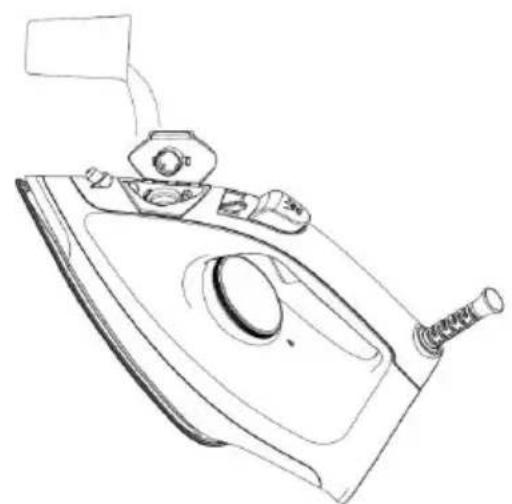
Fig. 2
Fig. 3
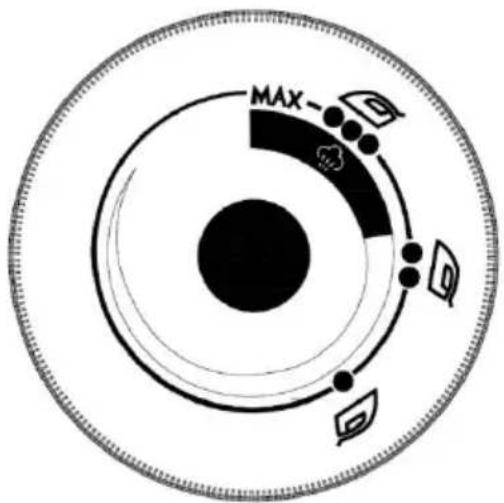
Fig. 4
Fig. 5
Fig. 7
Fig. 8
Place, Rancho Cucamonga, CA 91730
| UK | REP |
YH CONSULTING LIMITED. C/O YH Consulting
Limited Office 147, Centurion House, London
Road, Staines-upon-Thames, Surrey, TW18 4AX
| EC | REP |
E-CrossStu GmbH
Mainzer Landstr.69,
60329 Frankfurt am Main.
VEVOR®
TOUGH TOOLS, HALF PRICE
www.vevor.com/support
VEVOR®
TOUGH TOOLS, HALF PRICE
KNOW YOUR STEAM IRON
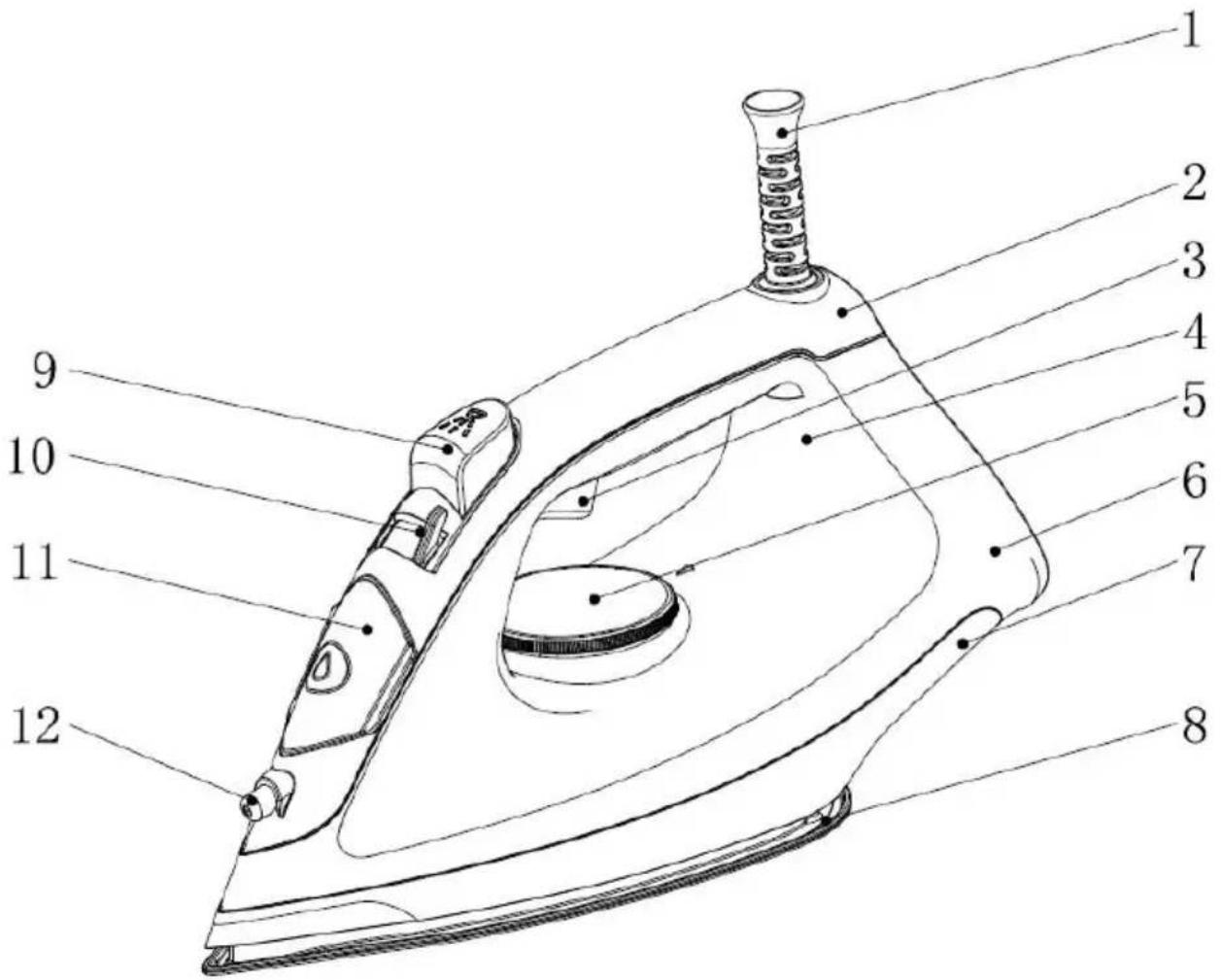
Fig.1
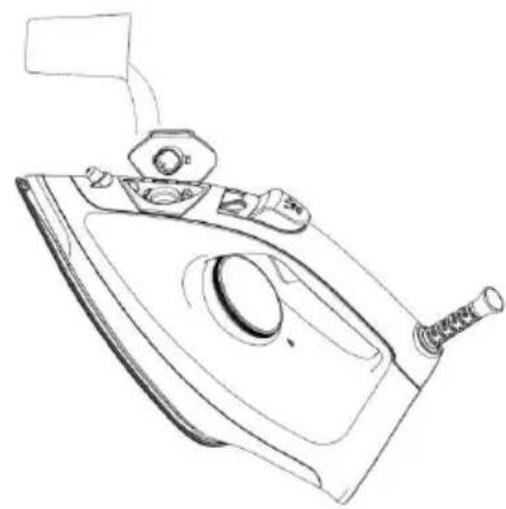
Fig.2
Fig.3
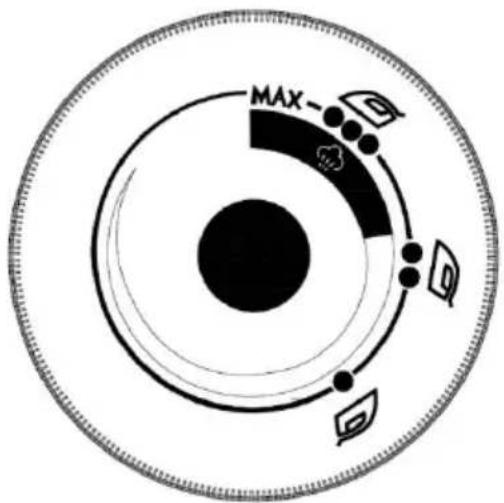
Fig.4
Fig.5
Fig.7
Fig.8
Foshan, Guangdong, China
YH CONSULTING LIMITED. C/O YH Consulting
Limited Office 147, Centurion House, London
Road, Staines-upon-Thames, Surrey, TW18 4AX
| EC | REP |
E-CrossStu GmbH
Mainzer Landstr.69,
60329 Frankfurt am Main.
VEVOR®
TOUGH TOOLS, HALF PRICE
www.vevor.com/support
VEVOR®
TOUGH TOOLS, HALF PRICE
Fig. 1
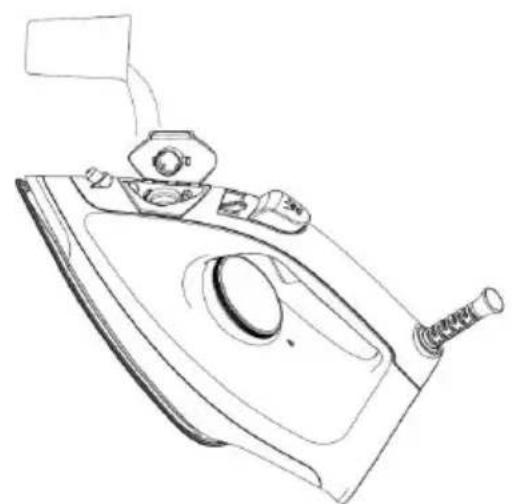
Fig.2
Fig.3
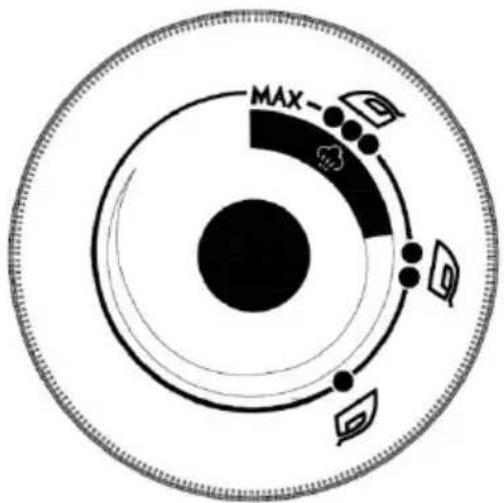
Fig.4
Fig.5
Fig.7
Fig.8
YH CONSULTING LIMITED. C/O YH Consulting
Limited Office 147, Centurion House, London
Road, Staines-upon-Thames, Surrey, TW18 4AX
| EC | REP |
E-CrossStu GmbH
Mainzer Landstr.69,
60329 Frankfurt am Main.
VEVOR®
TOUGH TOOLS, HALF PRICE
www.vevor.com/support
VEVOR®
TOUGH TOOLS, HALF PRICE
Fig. 1
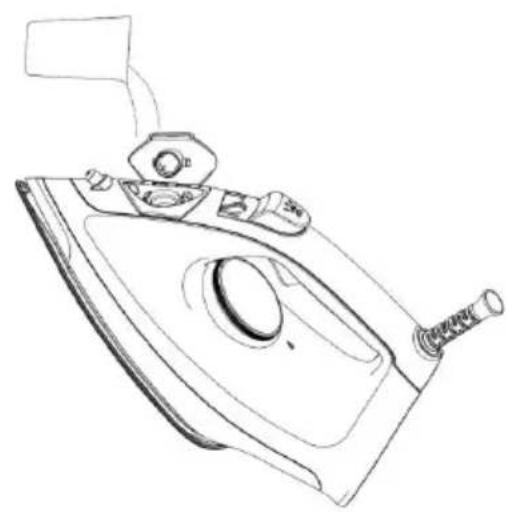
Fig.2
Fig.3
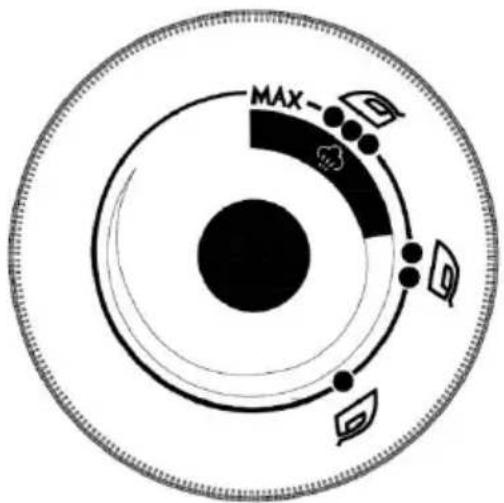
Fig.4
Fig.5
Fig.7
Fig.8
| PROBLEMA | COSAS A REVISAR | RECURSO |
YH CONSULTING LIMITED. C/O YH Consulting
Limited Office 147, Centurion House, London
Road, Staines-upon-Thames, Surrey, TW18 4AX
| EC | REP |
E-CrossStu GmbH
Mainzer Landstr.69,
60329 Frankfurt am Main.
VEVOR®
TOUGH TOOLS, HALF PRICE
www.vevor.com/support
VEVOR®
TOUGH TOOLS, HALF PRICE
NEED HELP? CONTACT US!
INTRODUCTION TO PARTS
Fig.1
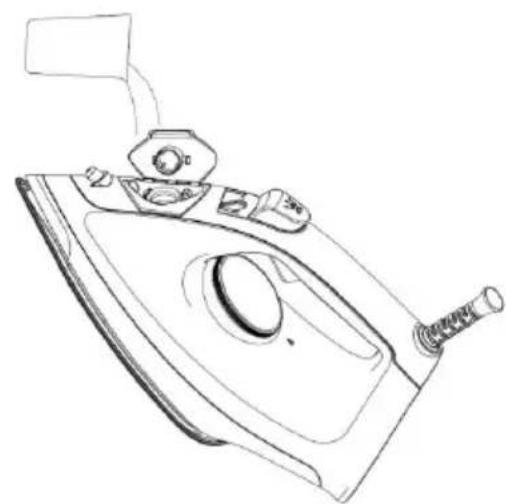
Fig.2
Fig.3
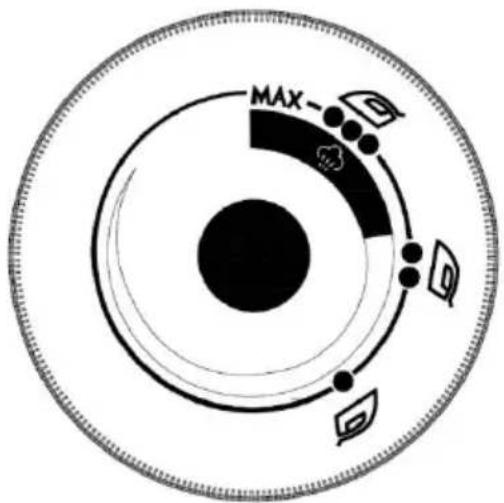
Fig.4
Fig.5
Fig.7
Fig.8
Address: NR, 26 SHUNYE EAST ROAD, XINGTAN TOWN, SHUNDE DISTRICT, FOSHAN CITY, GUANGDONG, CHINA
Imported into AUS: SIHAO PTY LTD. 1 ROKEVA
STREET EASTWOOD
NSW 2122 Australia
YH CONSULTING LIMITED. C/O YH Consulting
Limited Office 147, Centurion House, London
Road, Staines-upon-Thames, Surrey, TW18 4AX
| EC | REP |
E-CrossStu GmbH
Mainzer Landstr.69,
60329 Frankfurt am Main.
VEVOR®
TOUGH TOOLS, HALF PRICE
www.vevor.com/support
VEVOR®
TOUGH TOOLS, HALF PRICE
Technical Support and E-warranty certificate www.vevor.com/support
STOOM IK RON
NEED HELP? CONTACT US!
INTRODUCTION TO PARTS
Fig.1
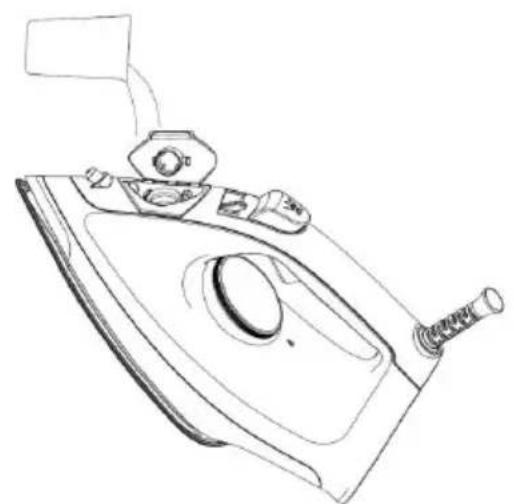
Fig.2
Fig.3
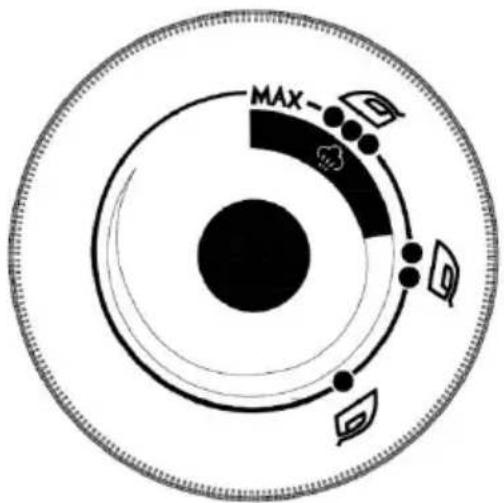
Fig.4
Fig.5
Fig.7
Fig.8
YH CONSULTING LIMITED. C/O YH Consulting
Limited Office 147, Centurion House, London
Road, Staines-upon-Thames, Surrey, TW18 4AX
| EC | REP |
E-CrossStu GmbH
Mainzer Landstr.69,
60329 Frankfurt am Main.
VEVOR®
TOUGH TOOLS, HALF PRICE
www.vevor.com/support
VEVOR®
TOUGH TOOLS, HALF PRICE
NEED HELP? CONTACT US!
PARTS INTRODUCTION
Fig. 1
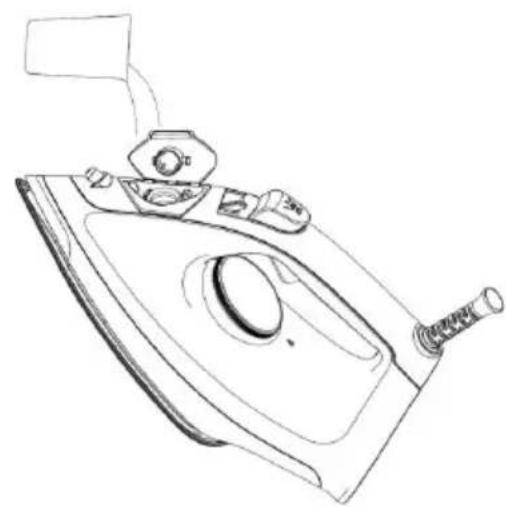
Fig. 2
Fig. 3
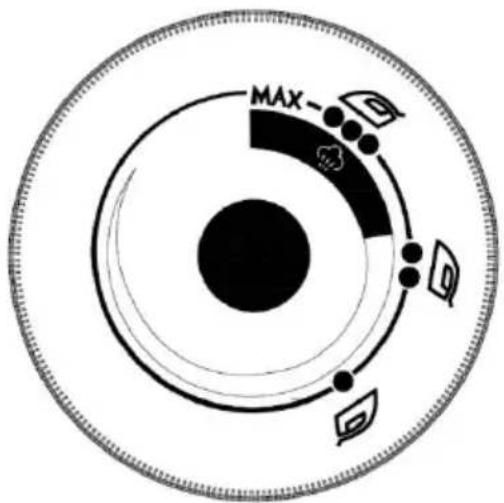
Fig. 4
Fig. 5
Fig. 7
Fig. 8
Address: NO. 26 SHUNYE EAST ROAD, XINGTAN TOWN, SHUNDE DISTRICT, FOSHAN CITY, GUANGDONG, CHINA
Imported to AUS: SIHAO PTY LTD. 1 ROKEVA STREET EASTWOOD NSW 2122 Australia
Imported to USA: Sanven Technology Ltd. Suite 250, 9166 Anaheim Place, Rancho Cucamonga, CA 91730
| UK | REP |
YH CONSULTING LIMITED. C/O YH Consulting
Limited Office 147, Centurion House, London
Road, Staines-upon-Thames, Surrey, TW18 4AX
| EC | REP |
E-CrossStu GmbH
Mainzer Landstr.69,
60329 Frankfurt am Main.
VEVOR®
TOUGH TOOLS, HALF PRICE
www.vevor.com/support

Brand : Vevor
Model : EC3016C
Category : Iron