
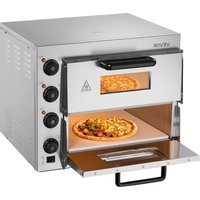
FY-P0-2 - Pizza oven Vevor - Free user manual and instructions
Find the device manual for free FY-P0-2 Vevor in PDF.
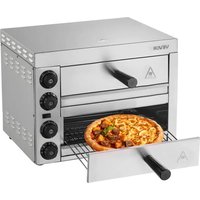


| Product Type | Electric Pizza Oven |
| Brand | Vevor |
| Model | FY-P0-2 |
| Power Supply Voltage | 120 V~ (1700 W) or 220-240 V~ (2260 W) depending on version |
| Power | 1700 W (120 V) or 2260 W (220-240 V) |
| Dimensions (L × W × H) | 475 × 560 × 335 mm |
| Temperature Range | Adjustable from 200 °C to 350 °C |
| Timer | Adjustable countdown with audible alarm |
| Indicator Lights | Power indicator and heating indicator |
| Protection | Overheat protection with manual reset |
| Usage Type | Commercial use (restaurants, fast food, hotels) |
| Recommended Preheating | 10 to 13 minutes at 350 °C |
| Pizza Cooking Time | Approximately 12 minutes at 350 °C |
| Included Accessories | Cooking grid, grid support, carrying bag |
| Maintenance | Clean with a damp cloth and mild detergent; do not immerse |
| Safety | Grounding required; do not touch hot surfaces |
| Warranty | Technical support and electronic warranty certificate at www.vevor.com/support |
| Spare Parts Available | Yes (lid, panels, heating tubes, thermostat, timer, etc.) |
| Wiring Diagram | Provided in the manual |
Frequently Asked Questions - FY-P0-2 Vevor
User questions about FY-P0-2 Vevor
0 question about this device. Answer the ones you know or ask your own.
Ask a new question about this device
Download the instructions for your Pizza oven in PDF format for free! Find your manual FY-P0-2 - Vevor and take your electronic device back in hand. On this page are published all the documents necessary for the use of your device. FY-P0-2 by Vevor.
USER MANUAL FY-P0-2 Vevor
Technical Support and E-Warranty Certificate www.vevor.com/support
Electric Pizza Oven
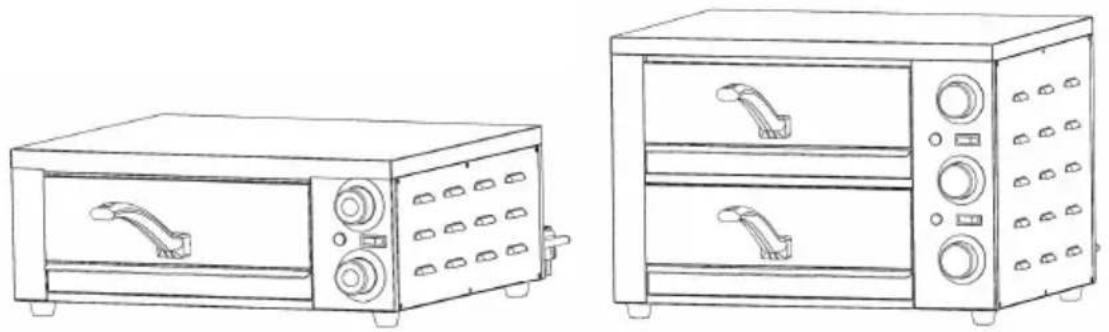
MODEL: FY-P0-1, FY-P0-2
We continue to be committed to providing you with tools at competitive prices. "Save Half", "Half Price", or any other similar expressions used by us only represent an estimate of savings you might benefit from buying certain tools with us compared to top brands, and does not necessarily mean to cover all categories of tools offered. We kindly remind you to verify carefully when placing an order with us that you are actually saving half in comparison with the top major brands.
MODEL: FY-P0-1, FY-P0-2
NEED HELP? CONTACT US!
Have product questions? Need technical support? Please feel free to contact us:
Technical Support and E-Warranty Certificate www.vevor.com/support
This is the original instruction. Please read all manual instructions carefully before operating. VEVOR reserves a clear interpretation of the user manual. The appearance of the product shall be subject to the product you received. Please forgive us that we won't inform you if there are any technology or software updates on our product.

Warning - To reduce the risk of injury, user must read the instructions manual carefully.

This product is subject to the provisions of European Directive 2012/19/EC. The symbol showing a wheelie bin crossed through indicates that the product requires separate recycling collection in the European Union. This applies to the product and all accessories marked with this symbol. Products such as these may not be discarded with normal domestic waste and must be taken to a collection point for recycling electric and electronic devices.
A. Important Safety Instructions
Before using this product, please read the safety instructions carefully and operate in accordance with the regulations:
- Please read carefully before use
- This equipment must use a socket with a safety ground!
- For commercial use only!
- Do not touch the heating surface!
- To prevent electric shock, please ensure that the power cord, plug and other electrical components do not come into contact with water or other liquids!
- Please disconnect the plug before cleaning!
- Before loading or unloading parts, please let the appliance cool down to prevent burns!
- Do not use electrical appliances if the power cord is damaged!
- Do not use the machine if it is damaged or malfunctions!
- Not suitable for outdoor use!
- Do not place it near electrical appliances or gas heat sources!
- Turn off the thermostat and timer first, and then unplug it!
- Do not use electrical appliances for purposes other than those for which they were designed!
- Do not put metal objects or oversized food in the pizza oven, as this can cause fire alarms and electrical short circuits!
- Do not place task items on the top of the pizza oven during use.
- Do not let the pizza oven come into contact with any flammable
materials during use, such as curtains, rags, wooden boards, etc.!
- Do not use metal-based rags to clean the pizza oven, as they may damage electrical components and cause an electric shock!
- Never put paper, cardboard, or plastic in the pizza oven!
- Do not wrap the inner pot with tin foil, as it may cause overheating.
- Resetting the timer to zero can cut off the power of the pizza oven.
- Note: Parts not recommended by the manufacturer may cause damage to the pizza oven!
- Children over eight years old or people with disabilities can use the pizza oven under correct guidance and supervision and fully understand the dangers of use. Do not let children use the pizza oven as a toy. Children cannot use it without supervision. Clean or maintain this pizza oven.
- If the power cord is damaged, you must contact the manufacturer or after-sales agency for replacement to avoid possible dangers. The break may be burnt or even catch fire, so do not let the pizza oven near flammable objects such as curtains!
- When using the pizza oven in public places such as shops, fast food restaurants, hotels, etc., check the voltage and socket to ensure that it matches the electrical specifications of the pizza oven!
- Place the pizza oven on a horizontal surface to allow for air flow. Please pay attention during use. Do not leave the pizza oven unsupervised while it is working!
- Please unplug the plug before cleaning, and wipe the plug dry before plugging it back in to prevent ignition and short circuit.
- It is normal for the door and shell of the pizza oven to heat up during use. Please pay attention to safety and avoid burns.
Instructions before use:
B. Before using your pizza oven for the first time, please follow the instructions.
- Use a small amount of detergent to clean the handle and grilling (note: do not use salt water or corrosive detergents).
- Gently wipe the inner pot with a damp cloth. When cleaning the oven, be careful not to touch the electrical components, and do not immerse the pizza oven in water.
- After cleaning, dry all the above parts, put them back in the pizza oven, close it, and preheat at the highest temperature for 5 minutes.
- Turn off the electric heating tube and open the pizza oven to expel remaining smoke. The heating tube is lubricated and rust-proofed. The residual grease can be burned off after first use. Slight smoke is normal.
C. Technical Parameters
| Product Name | Pizza oven | Pizza oven |
| Number | FY-PO-1 | FY-PO-2 |
| Voltage/Power | 120V /1500W | 120V / 1700W |
| 220-240V/1500W | 220-240V / 2260W | |
| Dimensions | 475*560*210mm | 475*560*335mm |
D. Things to note during use:
Before turning on the pizza oven, first turn the thermostat to set the cooking temperature, and then turn the thermostat to set the desired cooking time.
This pizza oven cannot be used with external temperature control or remote control systems.
Note: During cooking, make sure no metal objects come into contact with electrical components to avoid electric shock and short circuit.
Note: The heated food is very hot. Wear protective gloves before touching it to avoid burns.
Operating procedures
- Plug in the power supply, turn on the power switch, and the switch indicator light will light up.
- Rotate the thermostat to the required temperature. At this time, the heating indicator light turns on and the machine enters the heating mode. When the temperature in the furnace rises to the set temperature, the thermostat disconnects, the machine stops heating, and the heating indicator light goes out. When the temperature in the furnace is lowered below the set temperature, the thermostat will automatically enter the heating mode and the heating indicator light will light up. This cycle is repeated to ensure that the temperature in the furnace is constant within the set range.
- When the heating indicator light turns on, you can put the food in the oven for baking, and set the timer to the required time. At this time, the machine starts counting down. When the time reaches the set time, the machine will issue a "ding" sound to remind you that the baking is up and the food needs to be removed. Note: The temperature in the furnace is very high, please wear protective gloves to avoid burns!
- Please note that the timer only serves as a reminder and will not cut off the power supply. Therefore, when the time is up, the food should be taken out in time to avoid burning or fire.
- After use, turn off the thermostat, then turn off the power switch, finally pull out the power plug from the socket.
- This machine is equipped with an overheating protection device. When the thermostat fails, the overheating protection device will automatically cut off the power supply. If the machine's overheating protection device is turned on, please be sure to find a professional maintenance personnel for inspection, and wait until the fault is eliminated before proceeding. Make reset action.
- The manual reset method is to unscrew the black cover of the red device and press the red pointer inside.
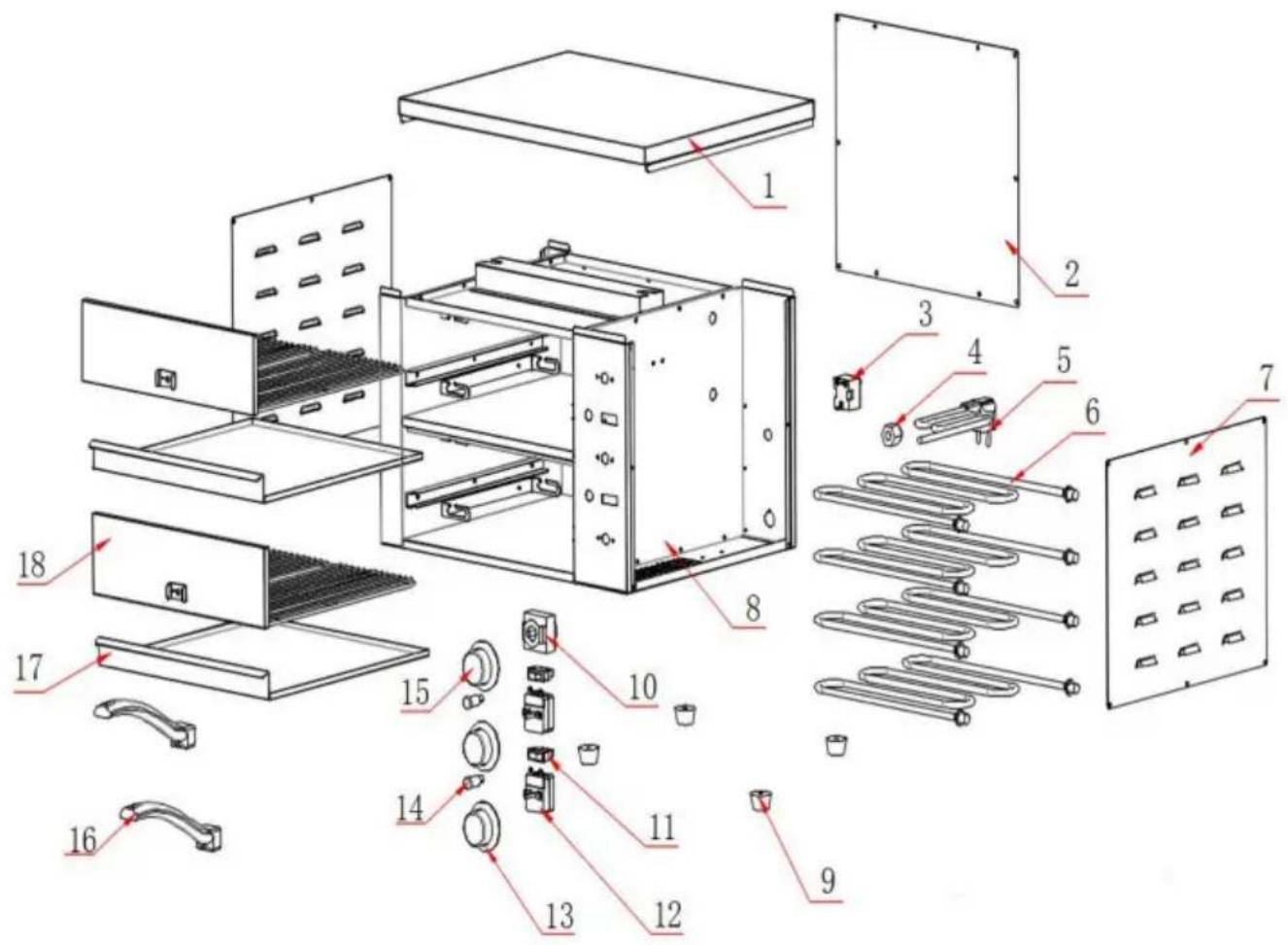
E. Product exploded view
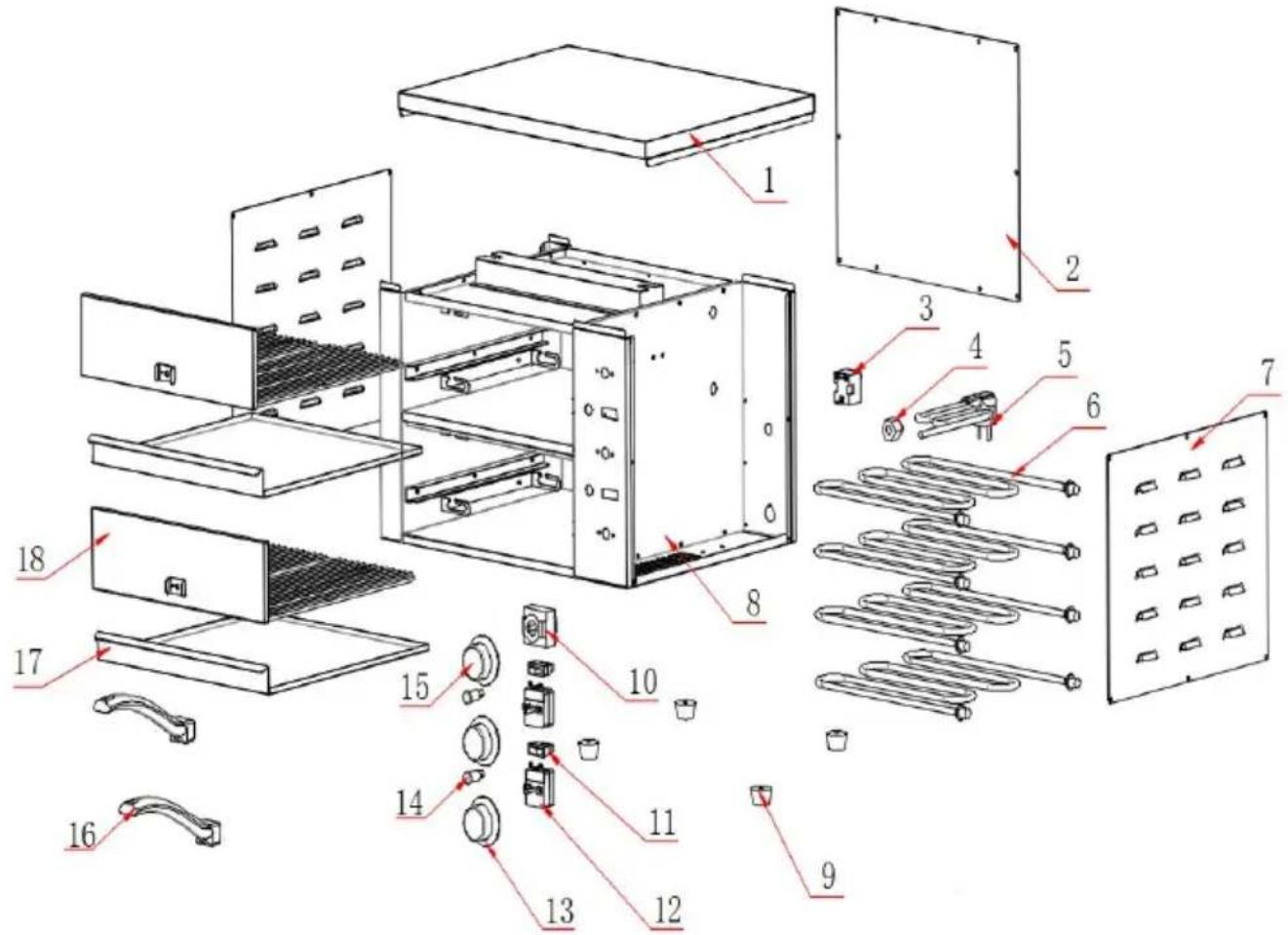
| No. | Spare parts name | No. | Spare parts name |
| 1 | Top cover | 10 | Timer |
| 2 | Rear panel | 11 | Switch |
| 3 | Temperature limiter | 12 | Temperature controller |
| 4 | Ply-yarn drill | 13 | Temperature control knob |
| 5 | Power cord | 14 | Indicator light |
| 6 | Heating tube | 15 | Timer knob |
| 7 | Side panel | 16 | Handle |
| 8 | Outer shell | 17 | Ditty-bag |
| 9 | Under-chassis | 18 | Net rack |
F. Electrical schematic diagram
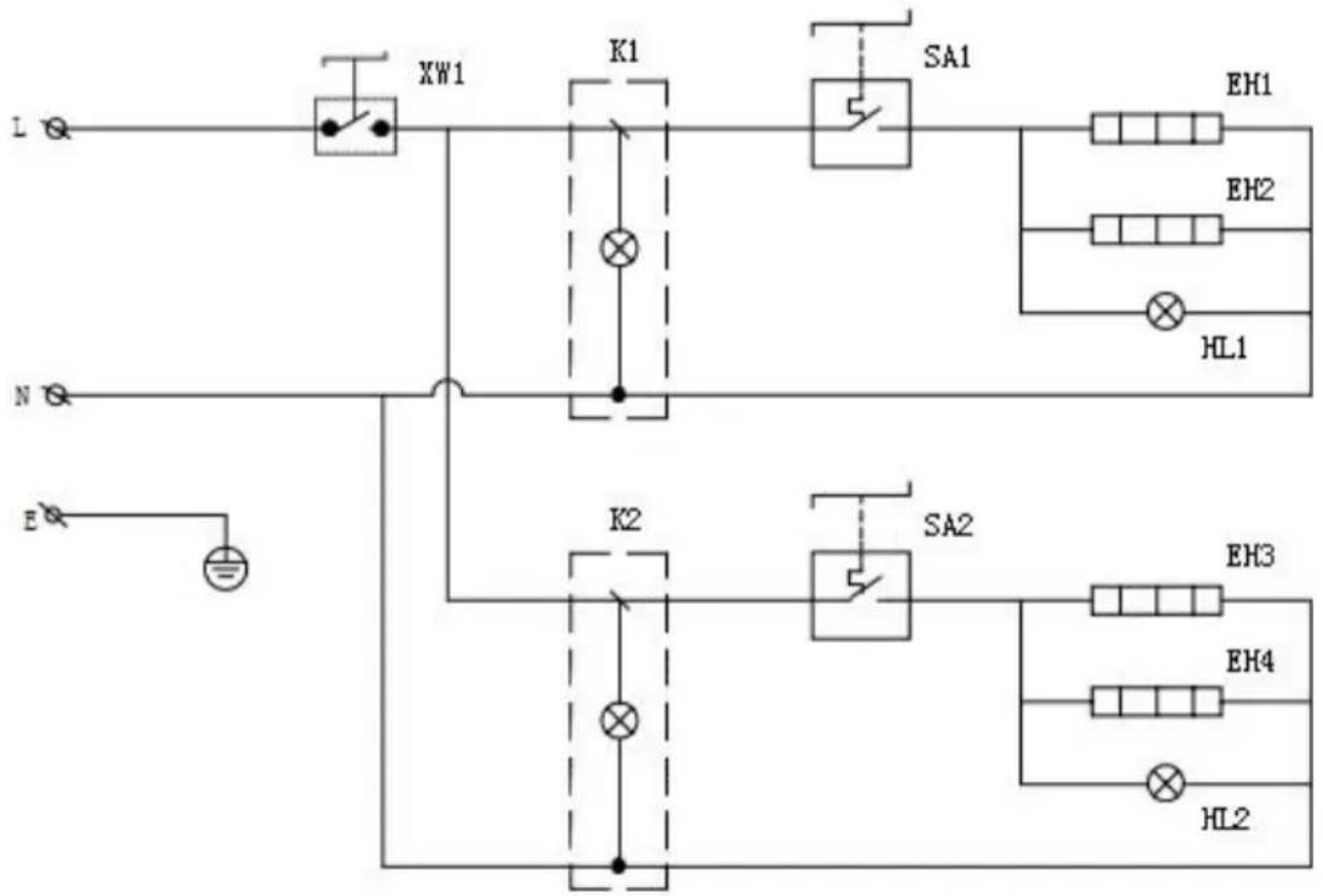
XW1----Temperature Limiter
K1, K2----Power Switch
SA1, SA2----Thermostat
EH1, EH2----Lower Heating Tube
HL1, HL2----Heating Indicator Light
EH3, EH4----Upper Heating Tube
G. General troubleshooting:
| Fault Phenomenon | Reason | Method Of Exclusion |
| Turn on the power, turn of the power switch, the swit light is on, the heating indicator light is not on, a the temperature inside the machine does not rise. | 1.The thermostat is damaged | 1.Replace thermostat |
| Turn on the power, turn of the power switch, the swit light is on, turn the thermostat, the indicator is always on, the temperature rises and the heating can be controlled. | 1. Thermostat failure | 1. Replace thermostat |
| Turn on the power and tu on the switch. The switch light does not light up and machine does not heat up | 1. The power cord is not plugged in properly;2. The power switch is broken; | 1. Check the power socket and plug in the plug;2. Replace the power switch; |
| When the power is turned the switch light is on and heating indicator light is or but no heating occurs. | 1. The heating pipe wiring is loose;2. The heating tube is burned out; | 1. Check the heating pipe connection line;2. Replace the heating tube. |
H. Bake pizza temperature reference
| Model | Preheating temperature | Preheating time | Adjust the temperature after the pizza is in | Pizza time | Voltage |
| FY-PO -1 | 200°C | 8 minutes | 350°C | 12 minutes | 220-240V |
| 200°C | 10 minutes | 350°C | 12 minutes | 120V | |
| FY-P0 -2 | 200°C | 10 minutes | 350°C | 12 minutes | 220-240V |
| 200°C | 13 minutes | 350°C | 12 minutes | 120V |
VEVOR®
TOUGH TOOLS, HALF PRICE
Technical Support and E-Warranty Certificate
www.vevor.com/support
VEVOR®
TOUGH TOOLS, HALF PRICE
NEED HELP? CONTACT US!
XW1----Temperature limiter
www.vevor.com/support
VEVOR®
TOUGH TOOLS, HALF PRICE
electronics www.vevor.com/support
VEVOR®
TOUGH TOOLS, HALF PRICE
XW1----Temperature limiter
K1, K2----Ignition switch
SA1, SA2----Thermostat
EH1, EH2----Lower heating tube
NEED HELP? CONTACT US!
SA1, SA2----Thermostat
EH1, EH2----Lower heating tube
E. Product exploded view
XW1----Temperature limiter
K1, K2----On/off switch
SA1, SA2----Thermostat
EH1, EH2----Lower heating tube
HL1, HL2----Heating indicator light
EH3, EH4----Upper heating tube
G. General troubleshooting:
warranty certificate www.vevor.com/support
VEVOR®
TOUGH TOOLS, HALF PRICE
XW1----Temperature limiter
K1, K2----Power switch
SA1, SA2----Thermostat
www.vevor.com/support
- ELECTRIC PIZZA OVEN
- MODEL: FY-P0-1, FY-P
- NEED HELP? CONTACT US
- IMPORTANT SAFETY INSTRUCTIONS
- BEFORE USING YOUR PIZZA OVEN FOR THE FIRST TIME, PLEASE FOLLOW THE INSTRUCTIONS
- TECHNICAL PARAMETERS
- THINGS TO NOTE DURING USE
- OPERATING PROCEDURES
- PRODUCT EXPLODED VIEW
- ELECTRICAL SCHEMATIC DIAGRAM
- GENERAL TROUBLESHOOTING
- VEVOR®
- TOUGH TOOLS, HALF PRICE
Brand : Vevor
Model : FY-P0-2
Category : Pizza oven