
SS-1090QR - Safe Vevor - Free user manual and instructions
Find the device manual for free SS-1090QR Vevor in PDF.
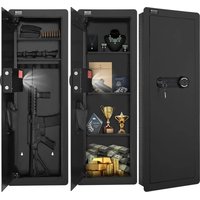


| Product Type | Electronic Safe |
| Brand | Vevor |
| Model | SS-1090QR |
| Dimensions (L × H × D) | 1090 × 380 × 100 mm |
| Power Supply | 4 AA alkaline batteries (1.5 V) |
| Operating Voltage | 4.2 – 6.8 VDC |
| Opening Methods | Fingerprint, password, emergency key |
| Fingerprint Capacity | Up to 30 fingerprints |
| Password Capacity | 1 admin + 1 user, 3 to 12 digits |
| Alarm | Yes, after 3 or 5 incorrect attempts or upon vibration |
| Alarm Duration | 30 seconds, then automatic stop |
| Emergency Power Supply | External power box or emergency key |
| Low Battery Warning | Beeps when opening |
| Silent Function | Disable sounds via code 11# |
| Factory Reset | Hold green button 5 seconds - clears all data |
| Wall Mounting | Expansion bolts provided (wall or floor mounting) |
| Package Contents | 2 emergency keys, 4 expansion bolts, 1 external power box, 12 diaphragm loops |
| Ambient Temperature | Not specified, indoor use recommended |
| Country of Origin | China (Shanghai) |
| After-Sales Service | 90 days no-reason return/exchange, 24h online support |
Frequently Asked Questions - SS-1090QR Vevor
User questions about SS-1090QR Vevor
0 question about this device. Answer the ones you know or ask your own.
Ask a new question about this device
Download the instructions for your Safe in PDF format for free! Find your manual SS-1090QR - Vevor and take your electronic device back in hand. On this page are published all the documents necessary for the use of your device. SS-1090QR by Vevor.
USER MANUAL SS-1090QR Vevor
Technical Support and E-Warranty Certificate www.vevor.com/support
SAFE BOX
USER MANUAL
MODEL:SS-1090QR
We continue to be committed to provide you tools with competitive price. "Save Half", "Half Price" or any other similar expressions used by us only represent the estimate of savings you might benefit from buying certain tools with us compared to top brands and does not necessarily mean to cover all categories of tools offered. Are kindly reminded to verify carefully when you are placing an order with us actually saving half in comparison with the top major brands.
MODEL:SS-1090QR
NEED HELP? CONTACT US!
Have product questions? Need technical support? Please feel free to contact us:
Technical Support and E-Warranty Certificate www.vevor.com/support
This is the original instruction, please read all manual instruction carefully before operating. VEVOR reserves a clear interpretation user manual. The appearance of the product shall be subject to product you received. Please forgive us that we won't inform you there are any technology or software updates on our product.
| Warning-To reduce the risk of injury, user must read instructions manual carefully. | |
| This device complies with Part 15 of the FCC Rules. Operat subject to the following two conditions:(1)This device may not harmful interference, and (2)this device must accept any inter received, including interference that may cause undesired oper | |
| This product is subject to the provision of European Directive 2012/19/EC. The symbol showing a wheelie bin crossed throu indicates that the product requires separate refuse collection i European Union. This applies to the product and all accesso marked with this symbol. Products marked as such may not discarded with normal domestic waste, but must be taken to collection point for recycling electrical and electronic devices |
INSTRUCTIONS
Thank you very much for choosing this safe box. Please read all of instructions before using it. The information will help you achieve the best possible results.
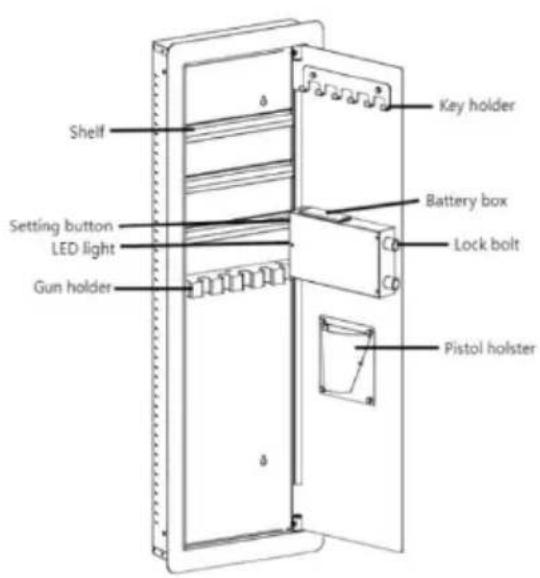
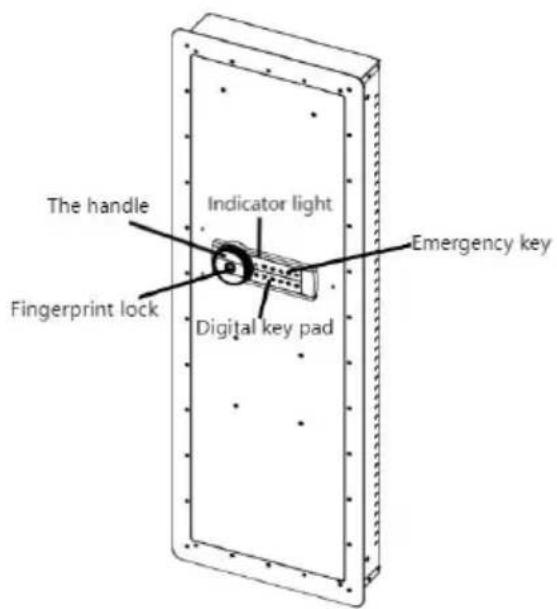
TECHNICAL PARAMETERS
| Model | SS-1090QR |
| Working Voltage Range | 4.2-6.8Vdc |
| Product Size | 1090*380*100 mm |
| Working Power | 4 x AA(1.5V) batteries |
PARTS LIST
| Built-in Storage Key*2 | |
| Expansion Bolt*4 | |
| External Power Box*1 | |
| Diaphragm Buckle*12 |
OPENING YOUR SAFE FOR THE FIRST TIME
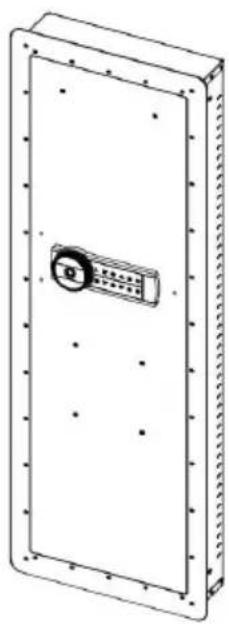
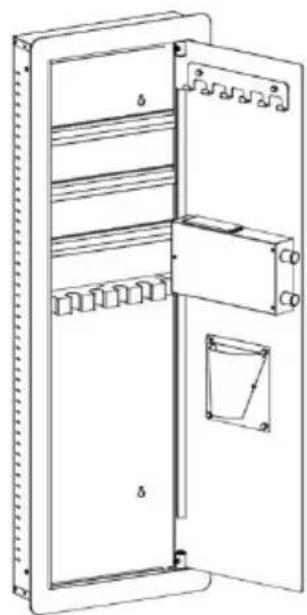
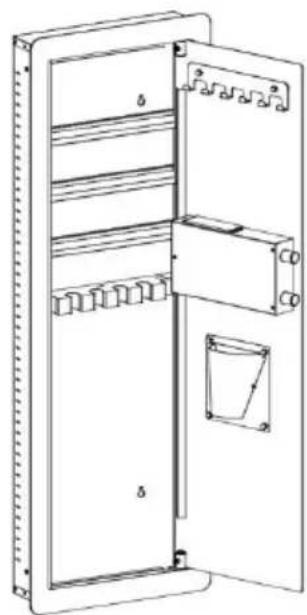
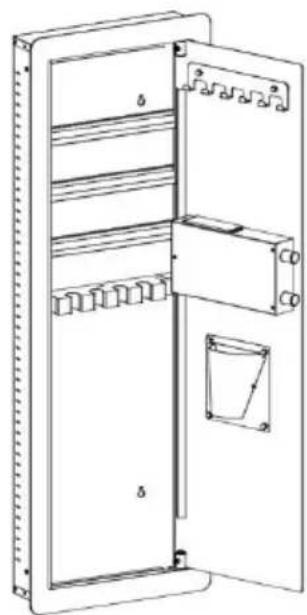
Open the door for the first time, use the configured emergency key in the door. The operation steps are as follows:
| 1. Slide down to open the emergency lock cover. | 4. Install batteries into battery box. | |
| 2. Insert the emergency key in the keyhole and rotate it 65° counterclockwise. | 5.Make sure the battery matches ‘+’ and ‘-’. (not including 4 alkalin 1.5V batteries) | |
| 3.Turn the handle clockwise to open the door. | 6.Weak power, emergency method: Emergency key | |
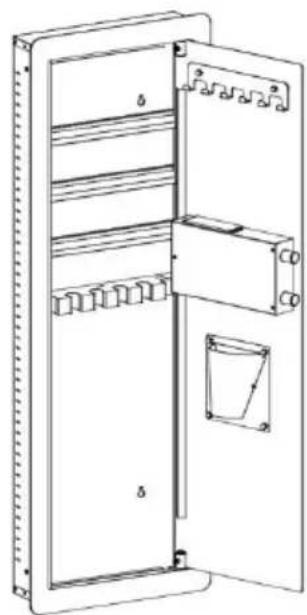
DESCRIPTION:
- This product has 2 sets of passwords. Factory original password "123456", factory management you need set it up yourself.
- Yellow light: normal indicator, or wrong password indicator.
- Green light: unlock and light up for 6-7 seconds.
- Red light: low battery indicator.
PERSONAL PASSWORD SETTING
- Register fingerprint: After the safe door is opened, press the green button (fingerprint login key) in the box. After hearing two short sounds of "drop" status light is on. At this time, fingerprints are collected four times at the collector location. Hear a "drop" sound, then hear a "drop" a long sound, indicating that the fingerprint registration is successful, (such as "beep", "b "beep" three short sounds, the registration fails.) Other fingerprints can be
registered in this way. Up to 30 pieces can be registered (can be increased according to user needs).
- Register administrator password: After opening the safe, touch the wake touch screen. Press the number 00, then press the green button (code switch) in the box, enter the new password and end with the # key. Password digits.
- Register common user password: After opening the safe, touch the wake touch screen. Press the number 11, then press the green button in the (code switch), enter the new password and end with the # key. Password digits.
Notice: Do not set personal password same with management code.
DELETE FINGERPRINTS AND PASSWORDS
In the standby state, hold down the green button (fingerprint delete key) on the chassis for about 5 seconds. You will hear a long "drip" sound, indicating that fingerprints and passwords have been deleted successfully and the factory settings have been restored. Any fingerprint can then open the lock.
FINGERPRINT UNLOCKING
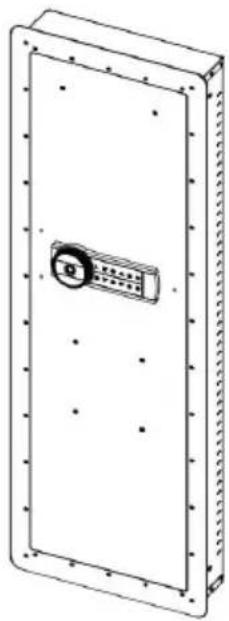
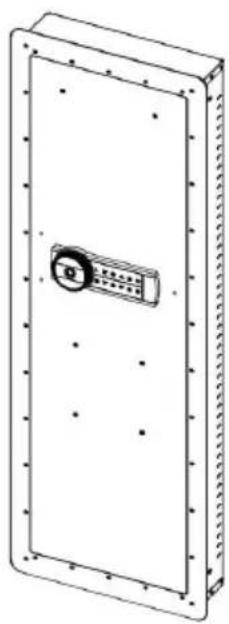
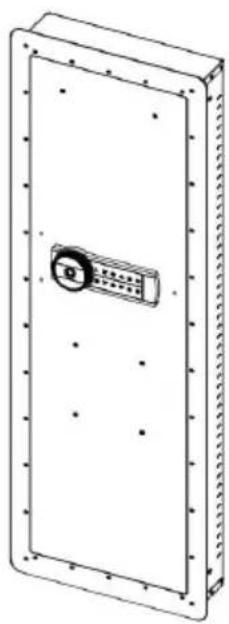
1. Verify with a registered fingerprint. Place your finger on the fingerprint module. 2. If the identification is successful, you will hear a long "drop" sound, the electromagnet will be activated, and the panel will display that the lock is open. 3. If the identification is not successful, you will hear mismatched jingles, and the panel will show that the lock is not opened.
PASSWORD UNLOCKING
- 1. Touch the wake-up touch screen and enter the 3-12 digit password set by the user. 2. If the identification is successful, you will hear a long "drop" sound, the electromagnet will be activated, and the panel will display that the lock is open. 3. If the identification is not successful, you will hear mismatched jingles, and the panel will show that the lock is not opened.
ALARM OPERATION
- 1. In the sleep state, touch the touch screen to wake up. Press the * key, you will hear a "drip" sound, and the digital key light will turn off, indicating that it has entered the alert state. The safe will alarm if it vibrates. After the alarm, enter the correct fingerprint or password. The electromagnet is closed for 5 seconds, and the alarm state is automatically lifted. If the correct fingerprint is not entered, the alarm will automatically stop after 30 seconds, but the alarm will not be triggered again. 2. Fingerprint and password input error 3 (5) times or more will trigger an alarm for 30 seconds.
SOUND ON AND OFF
Touch the touch screen to wake up and type "11#" to turn all sounds on or off.
LOW PRESSURE WARNING
- 1. The system uses four 1.5V alkaline batteries. If the voltage is insufficient after opening the door, the buzzer will remind with "drip, drip, drip" or "drip, drip" twice, reminding the user to replace the battery in time. 2. If the battery voltage is insufficient, the emergency power supply or mechanical emergency key can be used to open the door.
Press and hold the green button on the mechanism for 5 seconds, and the system will restore the initial settings and clear all fingerprints and passwords.
IMPORTANT NOTE
- In order to improve the accuracy of fingerprint recognition, users can refer to the following suggestions:
- It is recommended that each user register 2-3 fingerprints.
- Women and children are advised to register their thumbs and middle fingers as much as possible.
- Press the finger with as even a force as possible; it should not be too heavy or too light. It is recommended to press with light force.
- It is recommended to register fingerprints from multiple angles.
- When selecting batteries, it is recommended to use high-quality, high-performance alkaline batteries. Do not use inferior or counterfeit batteries, or any carbon batteries.
HOW TO WALL OR FLOOR MOUNTING
- Drill holes of the appropriate size for the anchors you are using.
- Mount the safe by running screws from inside the safe and securing the anchors.
- Use proper drill tools depending on the type of floor you are mounting the safe on (wood, tile, or concrete).
SAFETY AND COMPLIANCE
- To reduce the risk of theft, the safe must be fixed to the wall or floor securely.
- Please take good care of the emergency key and store it in a secret place away from the safe. Do not put the emergency key into the safe, as the emergency key will not be used to open the safe when the battery runs out.
- Do not place the product on an unsafe overhead surface, so as to avoid falling, damaging the product, or injuring people.
- Do not spill liquid on the control panel, as it may cause electric shock, damage internal electronic components, and prevent them from working properly.
WARMLY REMINDER
- Because it is purely handmade, inside solder joint or rust stains are a normal phenomenon.
- Please keep emergency keys, secret cabinet keys and external power supply box safe.
- The emergency key cannot open the safe of other brands or the same which is unique.
(Please do not try, to avoid damage to the safe and the unmatched key be taken out)
4. The protective film on the knob cover can be torn off. 5. Before closing the door, do not remove the emergency key or adjust direction, which can avoid the lock bolt from jamming, and knob operation be more smooth. 6. The door won't shut: Make sure there are no obstructions. If the door are extended, re-enter the user code and turn the knob clockwise to retrieve them.
AFTER-SALES SERVICE
- If the product you received has other problems such as usage problem, please feel free to contact us, and reply to online customer service within hours to serve you.
- Our products support 90 days for no reason to return or exchange.
- I wish you a happy online shopping.
Manufacturer: Shanghaiuxinmuyeyouxianggsi
Address: Shuangchenglu 803nong11hao1602A-1609shi, baoshanqu, shanghai 200000 CN.
Imported to AUS: SIHAO PTY LTD. 1 ROKEVA STREETEASTWOOD NSW 2122 Australia
Imported to USA: Sanven Technology Ltd. Suite 250, 9166 Anaheim Place, Rancho Cucamonga, CA 91730
| EC | REP |
E-CrossStu GmbH
Mainzer Landstr.69, 60329 Frankfurt am Main
| UK | REP |
YH CONSULTING LIMITED.
C/O YH Consulting Limited Office 147, Centurion House, London Road, Staines-upon-Thames, Surrey TW18 4AX
VEVOR
TOUGH TOOLS, HALF PRICE
Technical Support and E-Warranty Certificate
www.vevor.com/support
VEVOR
TOUGH TOOLS, HALF PRICE
Technical Assistance and Electronic Warranty Certificate www.vevor.com/support
SAFE
USER MANUAL
MODEL: SS-1090QR
We continue to be committed to provide you tools with competitive price. "Save Half", "Half Price" or any other similar expressions used by us only represent the estimate of savings you might benefit from buying certain tools with us compared to top brands and does not necessarily mean to cover all categories of tools offered. Are kindly reminded to verify carefully when you are placing an order with us actually saving half in comparison with the top major brands.
MODEL: SS-1090QR
NEED HELP? CONTACT US!
Have product questions? Need technical support? Please feel free to contact us:
Technical Support and E-Warranty Certificate www.vevor.com/support
This is the original instruction. Please read all manual instructions carefully before operating. VEVOR reserves the right to interpret the user manual. The appearance of the product shall be subject to the product you received. Please forgive us that we won't inform you of any technology or software updates on our product.
OPENING YOUR SAFE FOR THE FIRST TIME
- This product has 2 sets of passwords. Factory original password is "123456", factory management password you need to set up yourself.
- Yellow light: normal indicator, or wrong password indicator.
- Green light: unlock and light up for 6-7 seconds.
- Red light: low battery indicator.
PERSONAL PASSWORD SETTING
HOW TO WALL OR FLOOR MOUNTING
SAFETY AND COMPLIANCE
Anaheim Place, Rancho Cucamonga, CA 91730
| EC | REP |
E-CrossStu GmbH
Mainzer Landstr.69, 60329 Frankfurt am Main
| UK | REP |
YH CONSULTING LIMITED.
C/O YH Consulting Limited Office 147, Centurion
House, London Road, Staines-upon-Thames, Surrey
TW18 4AX
VEVOR
TOUGH TOOLS, HALF PRICE
Technical Assistance and Electronic Warranty Certificate www.vevor.com/support
VEVOR®
TOUGH TOOLS, HALF PRICE
We continue to be committed to provide you tools with competitive price. "Save Half", "Half Price" or any other similar expressions used by us only represent the estimate of savings you might benefit from buying certain tools with us compared to top brands and does not necessarily mean to cover all categories of tools offered. Are kindly reminded to verify carefully when you are placing an order with us actually saving half in comparison with the top major brands.
MODEL: SS-1090QR
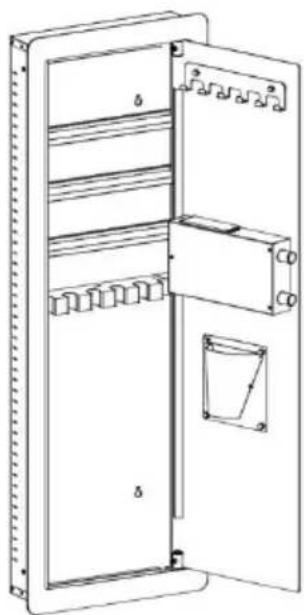
NEED HELP? CONTACT US!
Have product questions? Need technical support? Please feel free to contact us:
Technical Support and E-Warranty Certificate www.vevor.com/support
This is the original instruction, please read all manual instruction carefully before operating. VEVOR reserves a clear interpretation user manual. The appearance of the product shall be subject to product you received. Please forgive us that we won't inform you there are any technology or software updates on our product.
OPENING YOUR SAFE FOR THE FIRST TIME
- This product has 2 sets of passwords. Factory original password is "123456", factory management password you need to set it up yourself.
- Yellow light: normal indicator, or wrong password indicator.
- Green light: unlock and light up for 6-7 seconds.
- Red light: low battery indicator.
PERSONAL PASSWORD SETTING
HOW TO WALL OR FLOOR MOUNTING
SAFETY AND COMPLIANCE
C/O YH Consulting Limited Office 147, Centurion House, London Road, Staines-upon-Thames, Surrey TW18 4AX
VEVOR®
TOUGH TOOLS, HALF PRICE
www.vevor.com/support
VEVOR®
TOUGH TOOLS, HALF PRICE
We continue to be committed to provide you tools with competitive price. "Save Half", "Half Price" or any other similar expressions used by us only represent the estimate of savings you might benefit from buying certain tools with us compared to top brands and does not necessarily mean to cover all categories of tools offered. Are kindly reminded to verify carefully when you are placing an order with us actually saving half in comparison with the top major brands.
MODEL: SS-1090QR
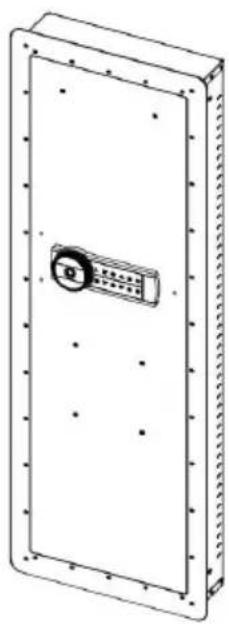
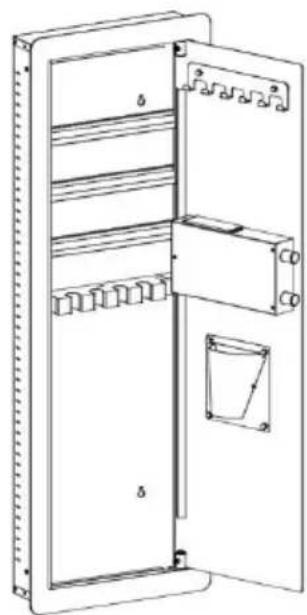
NEED HELP? CONTACT US!
Have product questions? Need technical support? Please feel free to contact us:
Technical Support and E-Warranty Certificate www.vevor.com/support
This is the original instruction. Please read all manual instructions carefully before operating. VEVOR reserves a clear interpretation of the user manual. The appearance of the product shall be subject to the product you received. Please forgive us that we won't inform you of any technology or software updates on our product.
OPENING YOUR SAFE FOR THE FIRST TIME
- This product has 2 sets of passwords. Factory original password is "123456", factory management password you need to set it up yourself.
- Yellow light: normal indicator, or wrong password indicator.
- Green light: unlock and light up for 6-7 seconds.
- Red light: low battery indicator.
PERSONAL PASSWORD SETTING
HOW TO WALL OR FLOOR MOUNTING
SAFETY AND COMPLIANCE
Imported in AUS: SIHAO PTY LTD. 1 ROKEVA STREET EASTWOOD NSW 2122 Australia
C/O YH Consulting Limited Office 147, Centurion House, London Road, Staines-upon-Thames, Surrey TW18 4AX
VEVOR®
TOUGH TOOLS, HALF PRICE
We continue to be committed to providing you tools with competitive prices. "Save Half", "Half Price" or any other similar expressions used by us only represent the estimate of savings you might benefit from buying certain tools with us compared to top brands and does not necessarily mean to cover all categories of tools offered. We kindly remind you to verify carefully when placing an order with us that you are actually saving half in comparison with the top major brands.
MODEL: SS-1090QR
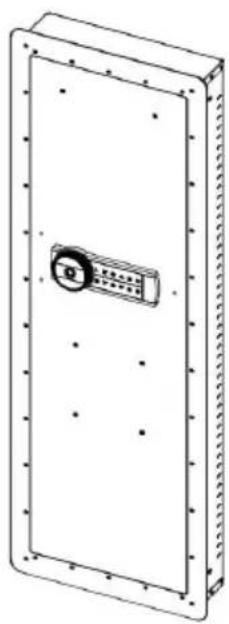
NEED HELP? CONTACT US!
Have product questions? Need technical support? Please feel free to contact us:
Technical Support and E-Warranty Certificate www.vevor.com/support
This is the original instruction. Please read all manual instructions carefully before operating. VEVOR reserves the right to interpret the user manual. The appearance of the product shall be subject to the product you received. Please forgive us that we won't inform you of any technology or software updates on our product.
OPENING YOUR SAFE FOR THE FIRST TIME
- This product has 2 sets of passwords. Factory original password is "123456". Factory management password you need to set up yourself.
- Yellow light: normal indicator, or wrong password indicator.
- Green light: unlock and light up for 6-7 seconds.
- Red light: low battery indicator.
PERSONAL PASSWORD SETTING
HOW TO WALL OR FLOOR MOUNTING
SAFETY AND COMPLIANCE
Place, Rancho Cucamonga, CA 91730
| EC | REP |
E-CrossStu GmbH
Mainzer Landstr.69, 60329 Frankfurt am Main
| UK | REP |
YH CONSULTING LIMITED.
C/O YH Consulting Limited Office 147, Centurion
House, London Road, Staines-upon-Thames, Surrey
TW18 4AX
VEVOR
TOUGH TOOLS, HALF PRICE
www.vevor.com/support
VEVOR
TOUGH TOOLS, HALF PRICE
We continue to be committed to provide you tools with competitive price. "Save Half", "Half Price" or any other similar expressions used by us only represent the estimate of savings you might benefit from buying certain tools with us compared to top brands and does not necessarily mean to cover all categories of tools offered. Are kindly reminded to verify carefully when you are placing an order with us actually saving half in comparison with the top major brands.
MODEL:SS-1090QR
NEED HELP? CONTACT US!
Have product questions? Need technical support? Please feel free to contact us:
Technical Support and E-Warranty Certificate www.vevor.com/support
This is the original instruction. Please read all manual instructions carefully before operating. VEVOR reserves the right to interpret the user manual. The appearance of the product shall be subject to the product you received. Please forgive us that we won't inform you of any technology or software updates on our product.
OPENING YOUR SAFE FOR THE FIRST TIME
- This product has 2 sets of passwords. Factory original password is "123456", factory management password you need to set up yourself.
- Yellow light: normal indicator, or wrong password indicator.
- Green light: unlock and light up for 6-7 seconds.
- Red light: low battery indicator.
PERSONAL PASSWORD SETTING
HOW TO WALL OR FLOOR MOUNTING
SAFETY AND COMPLIANCE
C/O YH Consulting Limited Office 147, Centurion House, London Road, Staines-upon-Thames, Surrey TW18 4AX
VEVOR
TOUGH TOOLS, HALF PRICE
www.vevor.com/support
VEVOR®
TOUGH TOOLS, HALF PRICE
Technical Support and E-Warranty Certificate www.vevor.com/support
SAFE
USER MANUAL
MODEL: SS-1090QR
We continue to be committed to provide you tools with competitive price. "Save Half", "Half Price" or any other similar expressions used by us only represent the estimate of savings you might benefit from buying certain tools with us compared to top brands and does not necessarily mean to cover all categories of tools offered. Are kindly reminded to verify carefully when you are placing an order with us actually saving half in comparison with the top major brands.
MODEL: SS-1090QR
NEED HELP? CONTACT US!
Have product questions? Need technical support? Please feel free to contact us:
Technical Support and E-Warranty Certificate www.vevor.com/support
This is the original instruction, please read all manual instruction carefully before operating. VEVOR reserves a clear interpretation user manual. The appearance of the product shall be subject to product you received. Please forgive us that we won't inform you there are any technology or software updates on our product.
OPENING YOUR SAFE FOR THE FIRST TIME
- This product has 2 sets of passwords. Factory original password "123456", factory management you need set it up yourself.
- Yellow light: normal indicator, or wrong password indicator.
- Green light: unlock and light up for 6-7 seconds.
- Red light: low battery indicator.
PERSONAL PASSWORD SETTING
HOW TO WALL OR FLOOR MOUNTING
SAFETY AND COMPLIANCE
C/O YH Consulting Limited Office 147, Centurion House, London Road, Staines-upon-Thames, Surrey TW18 4AX
VEVOR
TOUGH TOOLS, HALF PRICE
www.vevor.com/support
VEVOR®
TOUGH TOOLS, HALF PRICE
We continue to be committed to provide you tools with competitive price. "Save Half", "Half Price" or any other similar expressions used by us only represent the estimate of savings you might benefit from buying certain tools with us compared to top brands and does not necessarily mean to cover all categories of tools offered. Are kindly reminded to verify carefully when you are placing an order with us actually saving half in comparison with the top major brands.
MODELL: SS-1090QR
NEED HELP? CONTACT US!
Have product questions? Need technical support? Please feel free to contact us:
Technical Support and E-Warranty Certificate www.vevor.com/support
This is the original instruction. Please read all manual instructions carefully before operating. VEVOR reserves a clear interpretation of the user manual. The appearance of the product shall be subject to the product you received. Please forgive us that we won't inform you if there are any technology or software updates on our product.
OPENING YOUR SAFE FOR THE FIRST TIME
- This product has 2 sets of passwords. Factory original password is "123456", factory management password you need to set up yourself.
- Yellow light: normal indicator, or wrong password indicator.
- Green light: unlock and light up for 6-7 seconds.
- Red light: low battery indicator.
PERSONAL PASSWORD SETTING
HOW TO WALL OR FLOOR MOUNTING
SAFETY AND COMPLIANCE
C/O YH Consulting Limited Office 147, Centurion House, London Road, Staines-upon-Thames, Surrey TW18 4AX
VEVOR
TOUGH TOOLS, HALF PRICE
www.vevor.com/support
- SAFE BOX
- USER MANUAL
- MODEL:SS-1090QR
- NEED HELP? CONTACT US
- INSTRUCTIONS
- TECHNICAL PARAMETERS
- PARTS LIST
- OPENING YOUR SAFE FOR THE FIRST TIME
- DESCRIPTION
- PERSONAL PASSWORD SETTING
- DELETE FINGERPRINTS AND PASSWORDS
- FINGERPRINT UNLOCKING
- PASSWORD UNLOCKING
- ALARM OPERATION
- SOUND ON AND OFF
- LOW PRESSURE WARNING
- IMPORTANT NOTE
- HOW TO WALL OR FLOOR MOUNTING
- SAFETY AND COMPLIANCE
- WARMLY REMINDER
- AFTER-SALES SERVICE
- VEVOR
- SAFE
- VEVOR®
- MODEL: SS-1090QR
Brand : Vevor
Model : SS-1090QR
Category : Safe