AFB-100 - Speaker Axxion - Free user manual and instructions
Find the device manual for free AFB-100 Axxion in PDF.


User questions about AFB-100 Axxion
0 question about this device. Answer the ones you know or ask your own.
Ask a new question about this device
Download the instructions for your Speaker in PDF format for free! Find your manual AFB-100 - Axxion and take your electronic device back in hand. On this page are published all the documents necessary for the use of your device. AFB-100 by Axxion.
USER MANUAL AFB-100 Axxion
natural_image
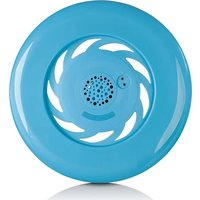
Blue circular object with a petal-like pattern and central dot grid, resembling a mechanical or decorative component (no text or symbols visible)User manual - Music Frisbee with built-in Bluetooth Speaker Gebruikshandleiding - Muziek Frisbee Met ingebouwde Bluetooth Luidspreker Bedienungsanleitung - Musikfrisbee Mit eingebaute Bluetooth-Lautsprecher Mode d'emploi - Frisbee musical avec enceinte bluetooth intégrée Manual de usuario - Frisbee con Altavoz Bluetooth
Index
English....3
Nederlands....9
Deutsch....16
Français....23
Español....30
CAUTION:
Usage of controls or adjustments or performance of procedures other than those specified herein may result in hazardous radiation exposure.
This unit should not be adjusted or repaired by anyone except qualified service personnel.
KEEP THESE INSTRUCTIONS IN MIND:
- Do not use this device under the water.
- Clean only with a slightly damp cloth.
- Do not cover or block any ventilation openings. When placing the device on a shelf, leave 5 cm (2") free space around the whole device.
- Install in accordance with the supplied user manual.
- * Don't step on or pinch the power adaptor. Be very careful, particularly near the plugs and the cable's exit point. Do not place heavy items on the power adaptor, which may damage it. Keep the entire device out of children's reach! When playing with the power cable, they can seriously injure themselves.
- * Unplug this device during lightning storms or when unused for a long period.
- Keep the device away from heat sources such as radiators, heaters, stoves, candles and other heat-generating products or naked flame.
- Avoid using the device near strong magnetic fields.
- Electrostatic discharge can disturb normal usage of this device. If so, simply reset and restart the device following the instruction manual. During file transmission, please handle with care and operate in a static-free environment.
- Warning! Never insert an object into the product through the vents or openings. High voltage flows through the product and inserting an object can cause electric shock and/or short circuit internal parts. For the same reason, do not spill water or liquid on the product.
- Do not use in wet or moist areas such as bathrooms, steamy kitchens or near swimming pools.
- Do not use this device when condensation may occur.
- Although this device is manufactured with the utmost care and checked several times before leaving the factory, it is still possible that problems may occur, as with all electrical appliances. If you notice smoke, an excessive build-up of heat or any other unexpected phenomena, you should disconnect the plug from the main power socket immediately.
- This device must operate on a power source as specified on the specification label. If you are not sure of the type of power supply used in your home, consult your dealer or local power company.
- * The socket outlet must be installed near the equipment and must be easily accessible.
- * Do not overload ac outlets or extension cords. Overloading can cause fire or electric shock.
- * Devices with class 1 construction should be connected to a main socket outlet with a protective earthed connection.
- * Devices with class 2 construction do not require a earthed connection.
- Keep away from rodents. Rodents enjoy biting on power cords.
- * Always hold the plug when pulling it out of the main supply socket. Do not pull the power cord. This can cause a short circuit.
- Avoid placing the device on any surfaces that may be subject to vibrations or shocks.
- To clean the device, use a soft dry cloth. Do not use solvents or petrol based fluids. To remove severe stains, you may use a damp cloth with dilute detergent.
- The supplier is not responsible for damage or lost data caused by malfunction, misuse, modification of the device or battery replacement.
- Do not interrupt the connection when the device is formatting or transferring files. Otherwise, data may be corrupted or lost.
-
If the unit has USB playback function, the usb memory stick should be plugged into the unit directly. Don't use an usb extension cable because it can cause interference resulting in failing of data.
-
The apparatus shall not be exposed to dripping or splashing and make sure that no objects filled with liquids, such as vases, are placed on or near the apparatus.
- * To completely disconnect the power input, the mains plug of the apparatus shall be disconnected from the mains, as the disconnect device is the mains plug of apparatus.
- If the unit works with battery, Battery shall not be exposed to excessive heat such as sunshine, fire or the like.
- Attention should be drawn to the environmental aspects of battery disposal.
- The apparatus can only be used in moderate extremely cold or climates warm environments should be avoided.
- The rating label has been marked on the bottom or back panel of the apparatus.
- This device is not intended for use by people (including children) with physical, sensory or mental disabilities, or a lack of experience and knowledge, unless they're under supervision or have received instructions about the correct use of the device by the person who is responsible for their safety.
- This product is intended for non-professional use only and not for commercial or industrial use.
- Make sure the unit is adjusted to a stable position. Damage caused by using this product in an unstable position or by failure to follow any other warning or precaution contained within this user manual will not be covered by warranty.
- Never remove the casing of this apparatus.
- Never place this apparatus on other electrical equipment.
- Do not use or store this product in a place where it is subject to direct sunlight, heat, excessive dust or vibration.
- Do not allow children access to plastic bags.
- Only use attachments/accessories specified by the manufacturer.
- Refer all servicing to qualified service personnel. Servicing is required when the apparatus has been damaged in any way, such as the power supply cord or the plug, when liquid has been spilled or objects have fallen into the apparatus, when the apparatus has been exposed to rain or moisture, does not operate normally, or has been dropped.
- *Do not use a damaged power cord or plug or a loose outlet. Doing so may result in fire or electric shock.
- Prolonged exposure to loud sounds from personal music players may lead to temporary or permanent hearing loss.
- This Frisbee speaker has a projectile function.
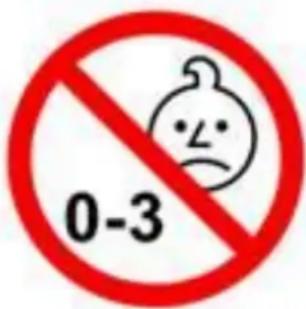
- This Frisbee speaker is not suitable for children with an age under 36 months.
text_image
0-3INSTALLATION
- Unpack all parts and remove protective material.
- *Do not connect the unit to the mains before checking the mains voltage and before all other connections have been made.
*Those instructions are related only to products using power cable or AC power adaptor.
1. About the Frisbee Bluetooth Speaker
The built-in Bluetooth technology makes it possible to connect a Bluetooth device wirelessly to the Frisbee within a distance of 20 meters. You can enjoy your music while you play with the Frisbee. This Frisbee is ideal to use as a Bluetooth speaker and is easy to carry.
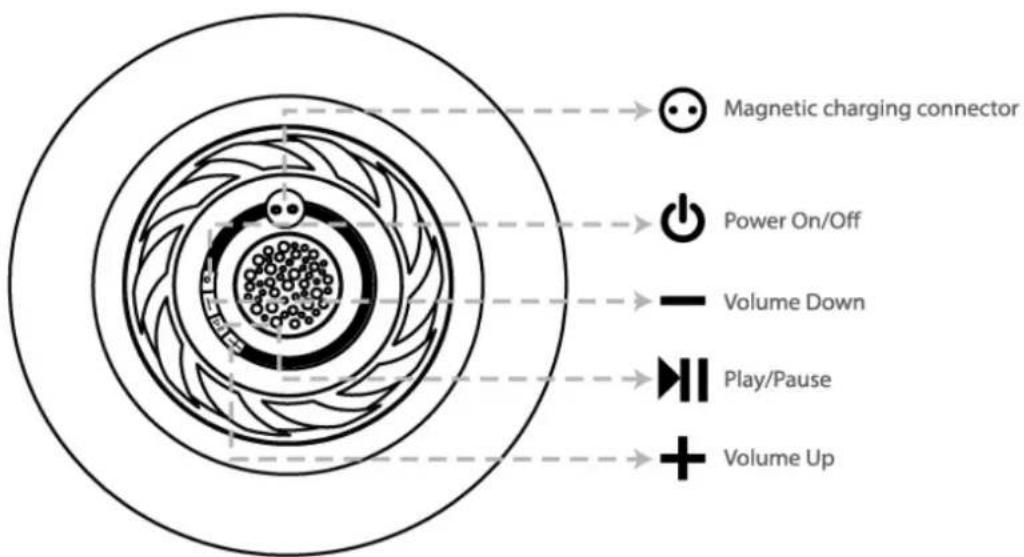
2. Getting to know your music Frisbee Bluetooth speaker
text_image
Magnetic charging connector Power On/Off Volume Down Play/Pause Volume Up| EN | EN |
| Magnetic charging connector | Magnetic charging connector |
| Power On/Off | Power On/Off |
| Volume Down | Volume Down |
| Play/Pause | Play/Pause |
| Volume Up | Volume Up |
3. Getting started
To use the Bluetooth speaker, please follow these simple steps:
(a) Before using the speaker, it is recommended that you fully charge the battery for 4 hours for the first time.
(b) Use the supplied magnetic charging cable to connect the speaker to a USB home charger (not included) or a device with a USB charging function. NOTE: first connect the magnetic charge connector to the Frisbee before connecting the charger.
(c) Ensure that the speaker and your Bluetooth-enabled device such as your smart phone or tablet is no more than 1 meter away for the initial pairing process.
(d) If the pairing has been successful, ensure that the Frisbee and the Bluetooth device are no further than 20 meters apart. Environmental influences can influence the quality of the connection and distance.
Note:
- Charge indication: The indicators show a red light when the Frisbee is being charged. When the charge is completed, the charging indicator will turn off.
- Low battery indication: you will hear a tone when the battery is low. It's recommended to charge the speaker immediately to prolong durability of battery and standby time. When the speaker has a low battery status, if the battery is not charged within a certain time, the speaker will switch itself off.
4. Turning the speaker On/Off
Power On: Press and hold the power button for 4 seconds, you will hear a beep
The standby indicator light will flash.
Power Off: Press and hold the power button for 4 seconds, you will hear a beep, all standby indicator lights will be turned off.
5. Pairing
Before using the speaker for the first time, you must pair it with a Bluetooth device. The following steps describe the pairing process for Bluetooth devices. Turn on the speaker and it's ready for pairing automatically.
(a) Activate the Bluetooth function of your Bluetooth device; The Bluetooth device is now searching for accessible devices.
(b) Select "AXXION AFB-100" from the searching list of bluetooth devices and press to pair the Frisbee speaker.
(c) Some bluetooth smart phones or devices will ask for a passkey, please enter "0000" and press "OK" to pair the Frisbee speaker.
(d) When pairing is complete, you will hear 1 beep and the LED lights will change from blinking to steady light. The speaker is now ready for use.
(e) You should now be able to use the wireless speaker to play the music, Please place your bluetooth device within 20 meter of the speaker. (Obstructions could cause shorter sensing distance.)
6. Operate the speaker
Once pairing is completed and battery is fully charged, you may access the following functions.
(a) Play/Pause the music: Short press the ▶ button to pause and play the music, Of course you can also perform this operation on your Bluetooth device in the way you are used to.
(b) Adjusting the volume: While playing music, press the “—” button to decrease the volume and the “+” button to increase volume. If your Bluetooth device is provided with a volume control, you can use this to adjust the master volume to the desired level
NOTE:
(a) Volume level of your smartphone is controlled by the smartphone, volume control button of speaker will not control your smartphone volume level.
(b) The Frisbee speaker has an IPX6 standard (splash-proof/rainproof). Do not immerse it in water
| Specification | ||
| Bluetooth | SpecificationSupported Profile | V5.0A2DP, AVRCP, |
| Connection Distance | In 20 meters (open area) | |
| Built-In Battery | Lithium 3.7V, 450 mAh, Charging time 0.5 hour | |
| Playing Time: up to 4 hours | ||
| Operating Temperature | 0 to 40°C | |
7. Safety cautions & Maintenance
(a) Do not charge the speaker with other unsuitable AC/DC power adaptor, it may cause damage to the speaker. The speaker must be charged by USB ports or by a AC/DC adaptor with Input: AC100-240V, 50-60Hz, Output: DC5V (not included)
(b) Stop using the speaker and switch off the speaker immediately, if you find any overheating situation, strange noise and strange working performance during use.
(c) Do not use abrasive cleaning solvents to clean the speaker.
(d) Do not place the speaker in high temperature, as it will result in an exposition.
(e) Do not expose the speaker to contact with sharp objects as this will cause scratching and damage.
(f) Do not stick anything inside the speaker or front panel as this may damage internal components
(g) Do not attempt to disassemble the speaker, as it does not contain seviceable components.
(h) If you do not use the speaker for long periods, be sure to store it in a dry place, free from extreme temperature, humidity and dust.
SAFETY REMINDER:
(a) Observe all signs that require an electrical device or RF radio product to be switched off in the designated areas. These could include hospitals, blasting areas, and potentially explosive atmospheres.
(b) Turn off your speaker and bluetooth signal prior to boarding an aircraft, do not use your speaker in an aircraft
(c) Never mount or store your speaker over any air bag deployment area. Serious injury may be resulted when an air bag deploys
(d) First connect the magnetic charge connector to the Frisbee before connecting the charger to prevent an electrical breakdown.
8. Troubleshooting
If you are unable to connect your speaker and your smartphone, please try the following:
(a) Ensure the speaker is paired with your smartphone by the steps in section 5, "Pairing"
(b) Ensure your smartphone's bluetooth feature is activated, please refer to your smartphone user guide for specific instruction.
(c) Ensure the speaker is within a maximum of 20 meter of your mobile device and there are no obstructions, such as thick solid wall or other electronic devices in between as it may cause shorter or interference transmission.
(d) If all the above steps do not resolve your problem, please turn off the speaker for a while.
(e) If you are not able to link up with bluetooth, please check whether any other devices are connecting with the bluetooth speaker, or the speaker did not link up the audio media
channel of the devices after pairing.
GUARANTEE
Lenco offers service and warranty in accordance with the European law, which means that in case of repairs (both during and after the warranty period) you should contact your local dealer.
Important note: It is not possible to send products that need repairs to Lenco directly.
Important note: If this unit is opened or accessed by a non-official service center in any way, the warranty expires.
This device is not suitable for professional use. In case of professional use, all warranty obligations of the manufacturer will be voided.
DISCLAIMER
Updates to Firmware and/or hardware components are made regularly. Therefore some of the instruction, specifications and pictures in this documentation may differ slightly from your particular situation. All items described in this guide for illustration purposes only and may not apply to a particular situation. No legal right or entitlements may be obtained from the description made in this manual.
DISPOSAL OF THE OLD DEVICE
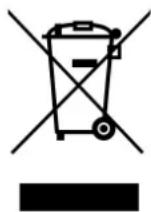
This symbol indicates that the relevant electrical product or battery should not be disposed of as general household waste in Europe. To ensure the correct waste treatment of the product and battery, please dispose them in accordance to any applicable local laws of requirement for disposal of electrical equipment or batteries In so doing, you will help to conserve natural resources and improve standards of environmental protection in treatment and disposal of electrical waste (Waste Electrical and Electronic Equipment Directive).
SERVICE
For more information and helpdesk support, please visit www.lenco.com
Lenco Benelux BV, Thermiekstraat 1a, 6361 HB Nuth, The Netherlands.
LET OP:
AFVOER VAN HET OUDE APPARAAT
Lenco Benelux BV, Thermiekstraat 1a, 6361 HB Nuth, The Netherlands.