
HT-SBW310 - Soundbar SHARP - Free user manual and instructions
Find the device manual for free HT-SBW310 SHARP in PDF.
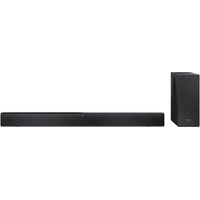


| Product type | Soundbar with wireless subwoofer |
| Brand | Sharp |
| Model | HT-SBW310 |
| Power supply | 100-240 V AC, 50/60 Hz |
| Connections | HDMI (eARC/ARC), optical, auxiliary (3.5 mm), USB, Bluetooth |
| Supported audio formats (USB) | MP3, WAV, FLAC |
| Audio technologies | Dolby Atmos, DTS Virtual:X |
| Equalization modes | Voice, Movie, Sport, Game, Night, Music, Custom |
| Controls | On the device and remote control |
| Wall mounting | Possible (kit included) |
| Package contents | Soundbar, subwoofer, remote control (batteries included), power cables (x2), HDMI cable, wall mount kit, rubber pads, manual, warranty card |
| Safety | Double insulation (Class II), overcurrent protection |
| Maintenance | Unplug before cleaning, use a soft dry cloth |
| Auto standby | After 15 minutes without signal (user enable/disable) |
Frequently Asked Questions - HT-SBW310 SHARP
User questions about HT-SBW310 SHARP
0 question about this device. Answer the ones you know or ask your own.
Ask a new question about this device
Download the instructions for your Soundbar in PDF format for free! Find your manual HT-SBW310 - SHARP and take your electronic device back in hand. On this page are published all the documents necessary for the use of your device. HT-SBW310 by SHARP.
USER MANUAL HT-SBW310 SHARP
User manual
HT-SBW310, HT-SBW312
Dolby Atmos® / DTS Virtual:X® Soundbar with Wireless Subwoofer

Product images are for illustration purposes only. Actual product may vary.
Trademarks:
Dolby Atmos
Dolby, Dolby Atmos, and the double-D symbol are registered trademarks of Dolby Laboratories Licensing Corporation. Manufactured under license from Dolby Laboratories. Confidential unpublished works. Copyright © 2012-2024 Dolby Laboratories. All rights reserved.


For DTS patents, see http://xperi.com/dts-patents/. Manufactured under license from DTS, Inc. and its affiliates. DTS, the DTS logo, Digital Surround, Virtual:X, and the DTS Virtual:X logo are registered trademarks or trademarks of DTS, Inc. and its affiliates in the United States and/or other countries. © DTS, Inc. and its affiliates. All rights reserved.

The terms HDMI, HDMI High-Definition Multimedia Interface, HDMI Trade dress and the HDMI Logos are trademarks or registered trademarks of HDMI Licensing Administrator, Inc.
Bluetooth®
The Bluetooth® word mark and logos are registered trademarks owned by Bluetooth SIG, Inc. and any use of such marks by Sharp Consumer Electronics is under license. Other trademarks and trade names are those of their respective owners.

Roku TV, Roku TV Ready, and the Roku TV Ready logo are trademarks of Roku, Inc. This product is Roku TV Ready-supported in the United Kingdom and Germany. Countries are subject to change. For the most current list of countries in which this product is Roku TV Ready-supported, please email rokutvready@roku.com
![graph TD A["EU"] -->|USB cable routing| B["Device"] C["UK"] -->|USB cable routing| B B --> D["AC IN Icon"] B --> E["AC IN Icon"] style A fill:#f9f,stroke:#333 style C fill:#f9f,stroke:#333 style B fill:#ccf,stroke:#333](/content/2026/04/733235/images/2a936371a32e3953e253b49f588a9b332c9a4050d02be39196c5c3e98115bd60.jpg)
ENGLISH
Important safety instructions
Please follow all safety instructions and warnings. Keep this manual for reference.

Consult user manual for safety, operation, and maintenance information.

Class II equipment: Double insulation, no need for electrical earth (ground) connection.

Alternating current (AC): Voltage marked is AC.

Indoor use only.

Energy efficiency marking with level VI
Precautions
Damage
Inspect the product after unpacking; if damaged, do not use and consult your dealer.

User should not attempt repair nor expose the internal parts; this action can be hazardous and will void your warranty. Contact only authorized service centers for repairs.
Power connection and accessibility
- Do not handle the power cord with wet hands. Do not force the plug into the outlet. Turn off and unplug the product when not in use. Keep the power plug accessible, without using extension cables.
Power source
- Use only AC 100-240V 50/60Hz outlets. Higher voltages can cause malfunction or fire.
- The AC power adapter should be removed from the power outlet if not in use for an extended period of time.
- Only use the supplied mains adapter. Failure to do this may result in a safety risk and/or damage to the product.
Power cord protection
- Protect the power cord from damage; do not overload, stretch, or bend it. If damaged, it can result in fire or electric shock. Damaged cords must be replaced by the manufacturer or a qualified technician.
Fused moulded power plug (non-rewireable) - UK, Malta, Cyprus and Ireland only.
- The power lead includes a 3A Amp fuse. Replace only with a BS1362 approved fuse of the same rating.
Child safety
- Use basic safety precautions around children to prevent misuse of the product.
Location
- Place on a flat, stable surface without overhang. If wall mountable, refer to the wall-mounting instructions in this user manual.
Ventilation
- Do not block, cover or insert objects into the ventilation slots. Do not insert objects into the product's openings. Doing so may result in a safety risk and/or damage to the product. Ensure a minimum distance of 5 cm around the product for sufficient ventilation to avoid overheating.
Heat and operating temperature
- Do not place the product near heat sources or direct sunlight for prolonged periods.
Naked flames
- Keep open flames away from the product to prevent fire.
Water, moisture, and liquid entry
- Do not expose the product to liquids; keep away from rain, water, and objects filled with liquids to prevent fire or electric shock.
Storms and lightning
- Disconnect all cables during storms or lightning to prevent damage.
Maintenance
- Disconnect power cords from the product before cleaning and use a soft, dry cloth without chemicals or detergents. If using a vacuum cleaner, use the soft brush attachment.
Batteries
Installation
- Use only specified batteries; do not mix types or new with old. Use the correct polarity upon battery insertion.
Use and maintenance
- Keep batteries away from heat, such as near fire or in direct sunshine. Remove batteries if unused for over a month to prevent leaking. Replace leaking batteries inside the battery compartment.
Child safety
- Ensure battery compartment is secure. Keep batteries away from children's reach. Seek immediate medical help if swallowed.
Environmental conditions
- Keep batteries away from low pressure or high heat to avoid explosion or leakage.
Disposal
- Dispose of the battery pack according to the manual (see "Disposal: equipment and batteries"). Do not throw into fire, disassemble or recharge non-rechargeable batteries, as it may leak or explode.
Disposal: equipment and batteries
Information for users on collection and disposal of old equipment.

Symbol indicates product contains batteries per EU Directive 2023/1542/EU; cannot be disposed with household waste. Cd, Hg, or Pb shows battery contains cadmium, mercury, or lead.

This symbol means that the product is designed and manufactured so that it can be recycled and reused.
These symbols on the products, packaging, and/or accompanying documents mean that used electrical and electronic products and batteries should not be mixed with general household waste. Household users should contact either the retailer where they purchased this product, or their local government office, for details of where and how they can take these items for environmentally safe recycling.
CE and UKCA statement:
- Hereby, Sharp Consumer Electronics Poland sp. z o.o. declares that this audio device is in compliance with the essential requirements and other relevant provisions of RED Directive 2014/53/EU and UK Radio Equipment Regulations 2017.
- The full CE text and UKCA declaration of conformity are available at sharpconsumer.com and then entering download section of your model and choosing "Declaration of Conformity".
What is included in the box:
• HT-SBW310 / HT-SBW312 Soundbar - Wireless subwoofer - Remote control (inc. batteries) • Power cable (EU 2 pin) x2 • Power cable (UK 3 pin) x2 – HT-SBW310 only - HDMI cable - Wall-mounting kit • Rubber pads (for Subwoofer) - User manual - Warranty card
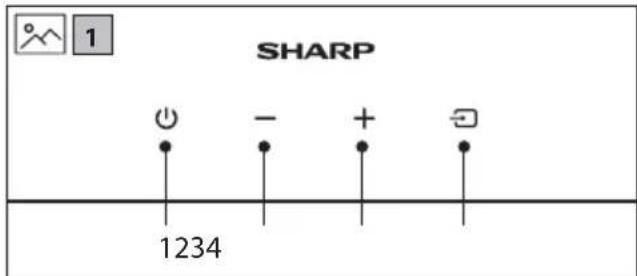
Controls
Soundbar
(Refer to 1 on page 2)
- ⏻ - Switch the unit between ON and STANDBY.
- — - Volume down.
- +Volume up.
- Select the audio source (TV (HDMI), Bluetooth, Optical, Aux in or USB).
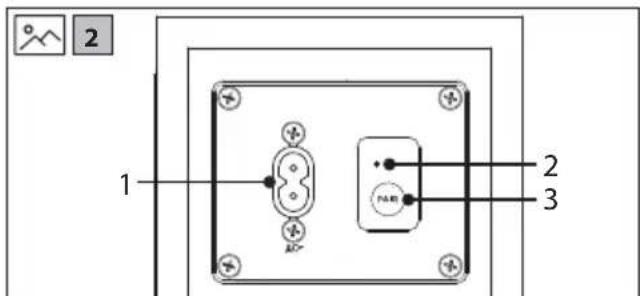
Subwoofer
(Refer to 2 on page 2).
- AC IN power input.
- PAIR indicator.
- PAIR button – Please refer to section "Subwoofer pairing".
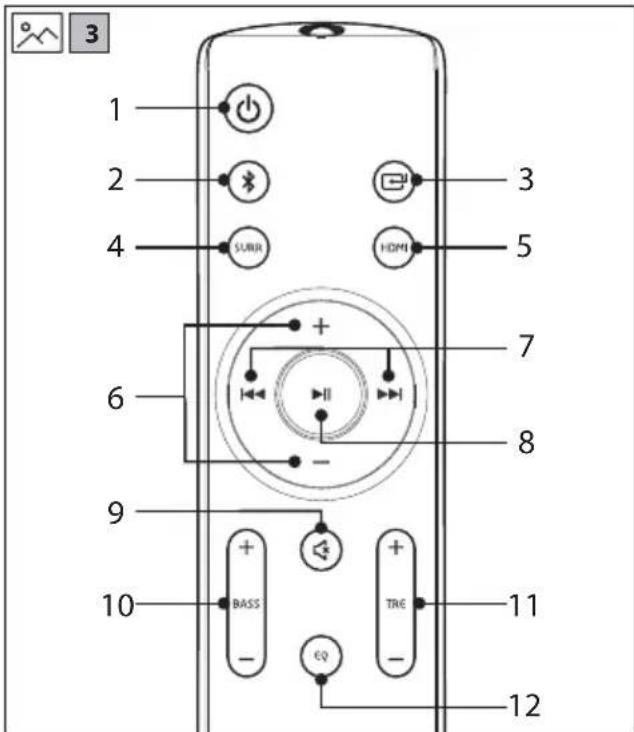
Remote
(Refer to 3 on page 2).
- ⏻ - Switch the unit between ON and STANDBY mode.
- Ⓧ – Select Bluetooth mode. Press and hold to activate the pairing function in Bluetooth mode or disconnect the existing paired Bluetooth device.
- Short press to change between HDMI eARC/ARC, USB, BT (BLUETOOTH), OPTICAL and AUX IN.
- SURR – Turn the surround mode ON/OFF.
- HDMI – Select the HDMI (TV eARC/ARC) source
- /+ Increase/decrease the volume level.
- /←Skip to previous/next track in Bluetooth or USB mode.
- -Play/pause/resume playback in Bluetooth or USB mode.
- ✿ - Mute or resume the sound.
- BASS Adjust bass level. This only changes custom EQ settings.
- TRE +/–: Adjust treble level. This only changes custom EQ settings.
- EQ: Press repeatedly to switch between EQ off, voice, movie, sport, game, night, music and custom equaliser modes.
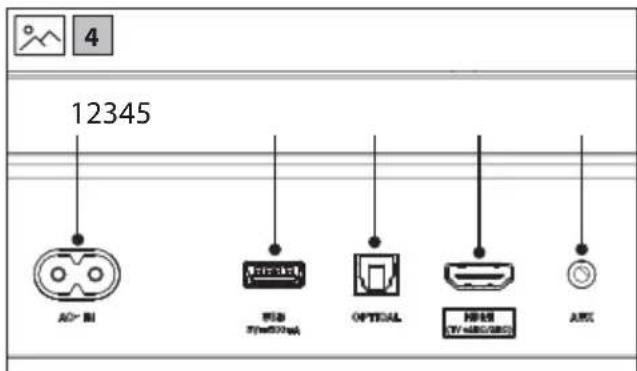
Inputs/outputs
(Refer to 4 on page 2).
- AC IN
Connect power cable.
- USB
Insert USB flash drive to play music.
- OPTICAL
Optical input jack.
- HDMI (TV eARC/ARC)
Connect to your TV's HDMI (eARC/ARC) port.
- AUX IN
Connect to an external audio device.
Initial set up
Remote control operation
The provided remote control allows the unit to be operated from a distance.
- Even if the remote control is operated within the effective range of 6m, operation may be impossible if there are any obstacles between the unit and the remote control.
- If the remote control is operated near other products which generate infrared rays, or if other remote control devices using infrared rays are used near the unit, it may operate incorrectly. Conversely, the other products may operate incorrectly.
Battery installation
- To open the battery compartment, push your thumb down on to the battery compartment cover and slide it down.
- Fit two AAA batteries observing polarity +/- as shown. When replacing the batteries, use only the same type of battery supplied.
- Re-fit the battery cover and clip it in place.
First time installation
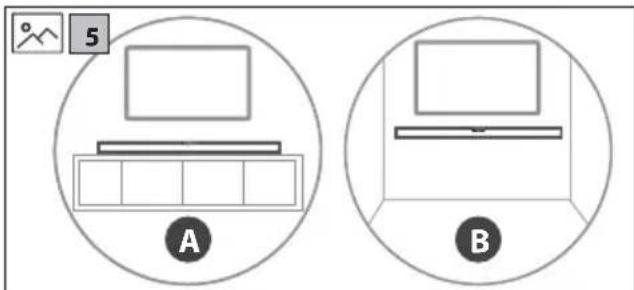
Placement - Soundbar
(Refer to 5 on page 2).
A: Normal placement
B: Wall mounting
Wall mounting
NOTES:
Installation must be carried out by qualified personnel only. Incorrect assembly can result in severe personal injury and property damage (if you intend to install this product yourself, you must check for installations such as electrical wiring and plumbing that may be buried inside the wall). It is the installer's responsibility to verify that the wall will safely support the total load of the soundbar and wall brackets. Additional tools (not included) are required for the installation. Do not overtighten screws. Keep this instruction manual for future reference. Use an electronic stud finder to check the wall type before drilling and mounting.
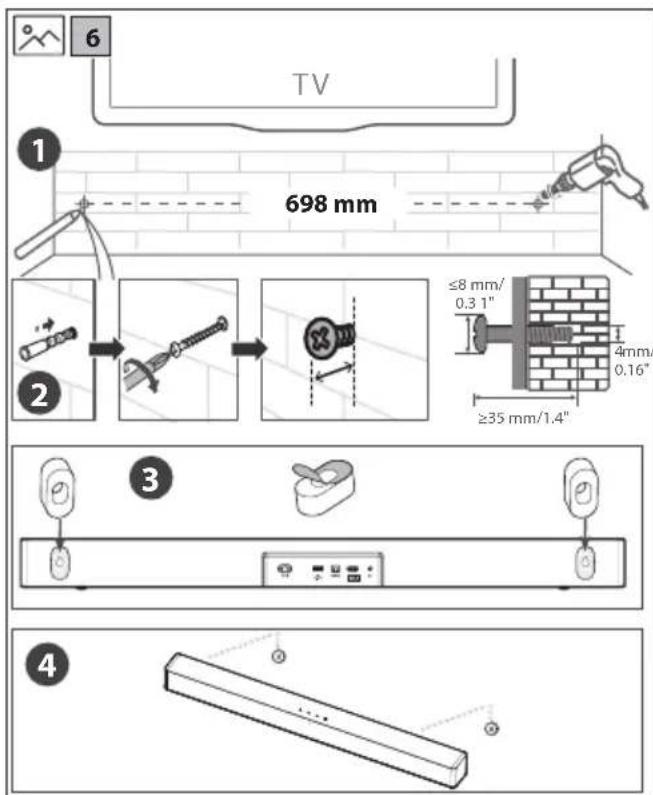
(Refer to 6 on page 3).
- Drill 2 parallel holes into the wall (∅ 5.5-6 mm each according to the wall type). The distance between the holes should be 698 mm.
- Firmly fix 1 plug into each hole in the wall. Screw in the supplied screw into the plug ensuring you leave a gap between the screw head and the wall enough for the foam mounting spacers.
- Place the supplied foam mounting spacers on the soundbar's wall mounting holes. Ensure the paper-backing is fully removed.
- Align the mounting bracket holes over the screw heads, then slide the unit down to secure it in place.
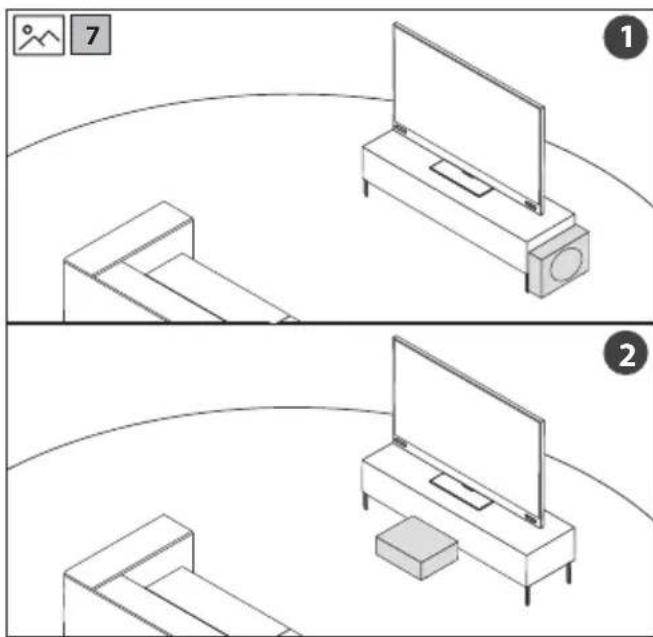
Placement - subwoofer
(Refer to 7 on page 3).
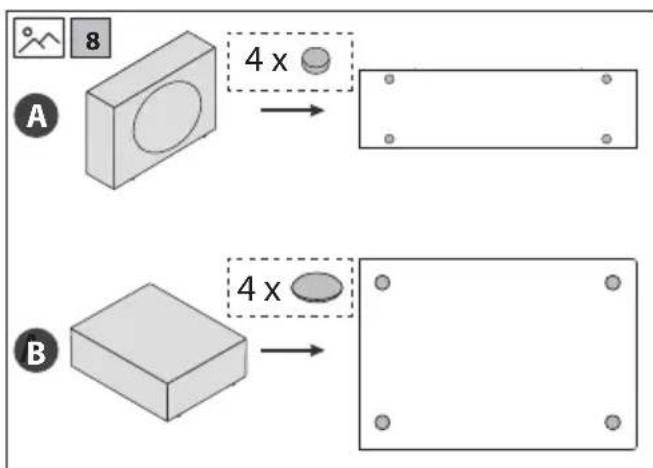
- Place the subwoofer upright on the floor close to your TV (Refer to 7 on page 3). If you choose to place the subwoofer like this, ensure the x4 rubber pads match the positions marked in option A (Refer to 8 on page 3).
- Place the subwoofer on the floor under some furniture like a sofa (Refer to 7 on page 3). If you choose to place the subwoofer like this, ensure the included x4 large rubber pads match the positions marked in option B (Refer to 8 on page 3).
The subwoofer should be placed in the same room as the soundbar and within 6 meters range of the soundbar. This is to ensure a good wireless connection at all times.
Ideal locations for the subwoofer include:
Room corners: Placing the subwoofer in a corner amplifies bass but can lead to boomy or muddy sound.
Front of the room: Positioning the subwoofer near the front with the soundbar provides clearer and balanced bass.
Away from walls: Leave a few inches between the subwoofer and the wall to reduce vibrations and distortions.
Avoid enclosed spaces: Do not place the subwoofer in cabinets or enclosed spaces to maintain sound quality.
Connections
Dolby Atmos and DTS Virtual:X™
Dolby Atmos delivers an unparalleled audio experience, featuring overhead sound and the signature richness, clarity, and power of Dolby audio.
To listen to Dolby Atmos audio through your soundbar, you will need Dolby Atmos content delivered to your TV.
Dolby Atmos content is available via some broadcast services, streaming services or via external devices connected by HDMI e.g. a Dolby Atmos compatible games console or Blu-ray player.
For more information on Dolby Atmos content availability visit dolby.com.
DTS Virtual:X™ technology creates an immersive home theater experience with sound that appears to emerge from all around
Designed to perform in any room regardless of size, layout, or acoustics, DTS Virtual:X™ technology enhances content so you can experience your movies, music and games like never before.
Dolby Atmos is available only on the HDMI source. For the details of the connection, please refer to "HDMI connection".
To experience Dolby Atmos through HDMI eARC/ARC, ensure your TV or source device HDMI audio output is set to PASS THROUGH, AUTO, BITSTREAM or other equivalent mode.
This setting is usually adjusted via the menu of your TV or source device.
Using eARC
The "e" in eARC stands for "enhanced". AV equipment with eARC HDMI ports enjoy greater bandwidth and speed compared to regular ARC
ports. This allows a wider frequency range and uncompressed audio resulting in more detailed, rich and vibrant sound delivery. Using eARC HDMI ports and compatible cables also allows audio formats such as Dolby Atmos and DTS:X to be played at their full capacity. Your soundbar comes with a high-speed HDMI cable to take advantage of the extra bandwidth offered by eARC.
HDMI connection
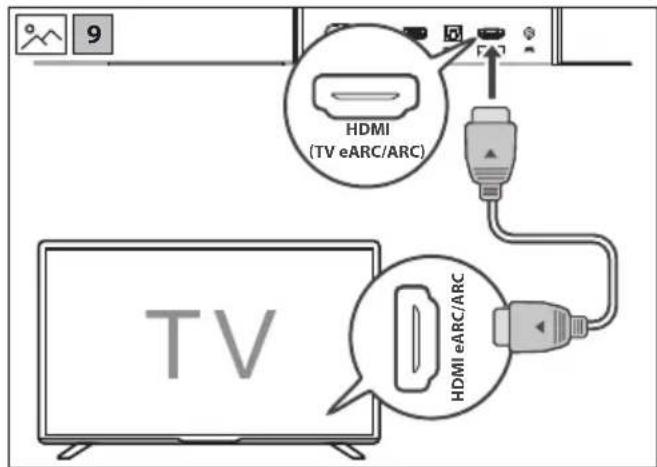
(Refer to 9 on page 3).
Using HDMI to connect the soundbar, AV equipment and TV.
Connect the HDMI cable (included) from the soundbar's HDMI (TV eARC/ARC) port to the HDMI (eARC/ARC) port on your eARC/ARC compliant TV or AV equipment.
TIPS:
ū Your TV must support the HDMI-CEC and eARC/ARC function. HDMI-CEC and eARC/ARC must be set to On in the TVs settings. The setting method of HDMI-CEC and eARC/ARC may differ depending on the TV. For details about eARC/ARC function, please refer to the owner's manual.
NOTE:
ū If your TV does not have/support eARC/ARC, no audio sources connected directly to the TV will be sent to the soundbar.
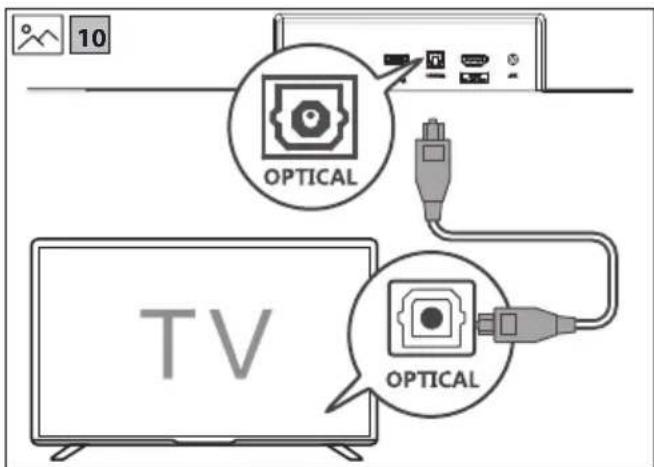
Optical
(Refer to 10 on page 3).
- Connect an OPTICAL cable (not included) to the TV's OPTICAL OUT socket and the OPTICAL socket on the unit.
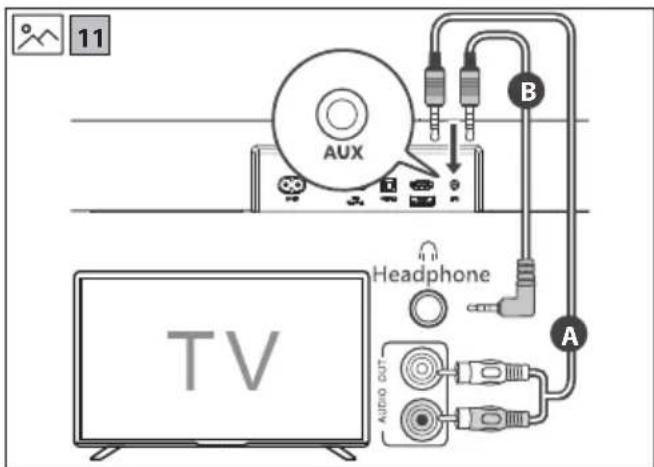
Aux in
(Refer to 11 on page 3).
A:
Use a RCA to 3.5mm audio cable (not included) to connect the TV's or external audio device's audio output sockets to the AUX IN socket on the unit.
B: Use a 3.5mm to 3.5mm audio cable (not included) to connect the TV's or external audio device headphone socket to the AUX IN socket on the unit.
TIP:
When you use the headphone output on the TV set, you will be able to adjust the volume level directly using the TV remote control.
Connect to power
(Refer to 12 on page 3).
- Before connecting the power cables, ensure you have completed all other connections.
- Risk of product damage! Ensure that the power supply voltage corresponds to the voltage printed on the back or the underside of the unit.
- Connect the power cable to the unit and then into a power socket.
Subwoofer pairing
Automatic pairing
The subwoofer and soundbar will pair automatically when both are plugged into the mains supply. Connection is wireless, so there is no need for any cables to connect the two units.
- When the subwoofer is connecting with the soundbar, the indicator will blink slowly.
- When the subwoofer is connected with the soundbar, the Indicator will light up.
NOTES:
Only press the button on the rear of the subwoofer if pairing manually.
If the automatic pairing fails, pair the subwoofer with the soundbar manually.
Manual pairing
- Ensure that all the cables are securely connected and the soundbar is in STANDBY.
- Press and hold the PAIR button on the rear of the subwoofer for 3 seconds. The subwoofer will enter pairing mode and the PAIR indicator will blink quickly.
- Press the ⏻ button on the soundbar or on the remote control to switch the system on.
- When the subwoofer is paired with the soundbar, the PAIR indicator will light up.
- If the PAIR indicator flashes slowly, the wireless connection has failed. Unplug the power cable from the subwoofer and then reconnect the power cable after 4 minutes. Repeat steps 1 ~ 3.
NOTE:
If the wireless connection fails again, check if there is conflict or strong interference (for example, interference from an electronic device) around your location. Remove these conflicts or strong interferences and repeat the above procedures.
Basic operation
Standby/ON
- When you first connect the unit to the power socket, the unit will be in STANDBY mode.
- Press ⏻ on the remote control or the unit to switch the unit ON or OFF.
- Disconnect the plug from the power wall socket if you want to switch the unit off completely.
Change source
- Short press to change between HDMI (TV eARC/ARC), OPTICAL, AUX IN, BLUETOOTH and USB. The unit's LED will light up as shown below to signal which source is selected.
| SOURCE LED COLOUR | |
| HDMI (TV eARC/ARC) Cyan | |
| OPTICAL Yellow | |
| BLUETOOTH Blue | |
| AUX IN Green | |
| USB Purple |
Volume control
- Press the + buttons on the unit or on the remote control to adjust the volume.
- If you wish to turn the sound off, press 📁 on the remote control or press the — and + buttons on the unit at the same time. Press again or press the +/— on the unit or on the remote control to resume normal listening.
- While adjusting the volume, the LED will flash quickly. When maximum or minimum volume levels are achieved, the flashing will stop.
- With HDMI CEC control, you can use your TV remote to increase/decrease the volume.
Equaliser
During playback, press the EQ button on the remote control to cycle through the preset equaliser modes. Each time you press the button, the unit's LED will blink a specific colour to indicate the selected mode, as shown below:
| EQUALISER LED COLOUR | |
| EQ OFF Off | |
| VOICE Cyan | |
| MOVIE Purple | |
| SPORT Blue | |
| GAME Yellow | |
| NIGHT Red | |
| MUSIC Green | |
| CUSTOM White |
Adjust Bass and treble
Press BASS + or TREBLE / on the remote control to enter
Custom EQ mode.
- The white LED will blink twice to indicate Custom EQ mode is active. • The LED will then show the current value of Bass or Treble:
| Custom EQ Level LED COLOUR | |
| +3 Red – fast blink | |
| +2 Red – medium blink | |
| +1 Red – slow blink | |
| 0 White - Steady | |
| -1 Green – slow blink | |
| -2 Green – medium blink | |
| -3 Green – fast blink |
While the LED is displaying the current value (within 3 seconds), press the same button again to adjust the setting.
If no button is pressed within 3 seconds, the current value is saved.
- The white LED will blink twice (1.5 seconds total) to confirm the new value has been saved. • The unit will return to normal operation.
Auto standby
By default, the unit will go into standby if no signal is detected for 15 minutes on Optical, Bluetooth and Audio In sources.
To turn auto-standby on or off, long press the ⏻ button on the unit or on the remote control for 5 seconds.
| AUTO-STANDBY LED COLOUR | |
| OFF Red – blinks 3 times | |
| ON | Green – blinks 3 times |
Roku TV Ready™ operation
For UK and Germany only.
If you have a Roku TV™ model, setup is easy. Just use a cable to connect your soundbar to the HDMI eARC/ARC port on your TV and follow the on-screen instructions.

√ Simple setup √ One remote √ Quick settings
Bluetooth operation
The first time you connect your Bluetooth device to this player, you need to pair your device to this player.
NOTE:
ū Compatibility with all Bluetooth devices is not guaranteed. - Any obstacle between this unit and a Bluetooth device can reduce the operational range. ū If the signal strength is weak, your unit may disconnect, but it will re-enter pairing mode automatically.
- Long press (3 seconds) the ⏻/§ button on the unit or the § on the remote control to start the pairing process. The LED will turn blue and start blinking.
- Activate your Bluetooth device and select the search mode. "SHARP HT-SBW310" or "SHARP HT-SBW312" will appear on your Bluetooth device list.
- Select "SHARP HT-SBW310" or "SHARP HT-SBW312" from the list of devices. Once connected, the LED will turn solid blue.
- Begin playing music from the connected Bluetooth device.
To pause or resume play, press the ▶/|| button on the remote control. To skip to the previous/next file, press the ◀◀◀ /▶▶▶ buttons on the remote control. Some mobile device applications will not allow you to press and hold ◀◀/▶▶ to skip parts of a track.
USB operation
- Insert the USB device into the soundbar's USB socket.
- Press the ⬆ button repeatedly on the soundbar or the remote control to select the USB source.
- You can navigate different folders stored on the USB device. Press + / — to change the folder.
- Press ▶|| to play the selected track.
- During playback:
To pause or resume play, press the ▶|| button on the remote control.
To skip to the previous/next file, press the ◀◀/▶▶ buttons on the remote control. Press and hold ◀◀/▶▶ to fast rewind / fast forward a track.
TIPS:
USB devices up to 64GB are supported. Only MP3/WAV/FLAC files can be played back. The USB port is for playback or upgrading the software of the soundbar. It is not for charging purposes.
Troubleshooting
Perform a factory reset
To perform a factory reset, press and hold the ⏻ and the ⏱ on the unit for 5 seconds. When complete, the unit will go into standby.
No power
Ensure that the plug is properly connected.
Ensure that there is power at the AC outlet.
Press standby button on the remote control or unit to turn the unit ON.
No sound
For HDMI ARC to work, ensure you are using a version 1.4 or higher HDMI cable.
For HDMI eARC to work, ensure you are using a High Speed HDMI cable (one is included with this unit).
Because of the extra bandwidth needed for some audio formats over eARC, it's possible that very old cables could struggle to fully transmit audio data.
Increase the volume. Press + on the remote control or on the unit.
Press on the remote control to ensure the unit is not muted. Press to select a different input source.
When connected to a digital source (HDMI or Optical), if there is no audio:
- Try setting the TV output to PCM or your TV may be set to variable audio output. Confirm that the audio output setting is set to FIXED or STANDARD, not VARIABLE. Consult your TV's user manual for more detailed information.
If using Bluetooth, ensure that the volume on your source device is turned up and that the device is not muted.
Remote control does not work
Before you press any playback control button, first select the correct source.
Reduce the distance between the remote control and the unit. Insert the battery with its polarities (+/-) aligned as indicated.
Replace the battery.
Aim the remote control directly at the sensor on the front of the unit.
I hear buzzing or humming
Ensure all cables and wires are securely connected.
Connect a different source device to see if the buzzing persists. If it does not, the problem may be with the original device.
Connect your device to a different input on the unit.
I can't find the Bluetooth name of this unit on my Bluetooth device
Ensure the Bluetooth function is activated on your Bluetooth device.
Re-pair the unit with your Bluetooth device.
This device is set to standby after 15 minutes of no source signal.
When the unit's external input signal level is too low, the unit will be turned off automatically in 15 minutes. Please increase the volume level of your external device. This feature is a requirement of ERPII and is designed to save energy when the unit is not in use.
The subwoofer is idle or the pairing LED is not solid.
Please unplug the power cable. After four minutes, plug it in again to reset the subwoofer.
√ Simple setup √ One remote √ Quick settings
Bluetooth operation
√ Simple setup √ One remote √ Quick settings
Bluetooth operation
Roku TV Ready™ operation
For UK and Germany only.
√ Simple setup √ One remote √ Quick settings
Bluetooth usage
√ Simple setup √ One remote √ Quick settings
Bluetooth operation
√ Simple setup √ One remote √ Quick settings
Important safety instructions
√ Simple setup √ One remote √ Quick settings
Using Bluetooth
√ Simple setup √ One remote √ Quick settings
Bluetooth use
Connect the HDMI cable (included) from the soundbar's HDMI (TV eARC/ARC) port to the HDMI (eARC/ARC) port on your eARC/ARC compliant TV or AV equipment.
TIPS:
√ Simple setup √ One remote √ Quick settings
Bluetooth function
√ Simple setup √ One remote √ Quick settings
Using the Bluetooth function
The Bluetooth device must be paired with this Soundbar before first use.
WARNING:
We do not guarantee compatibility with all Bluetooth devices. Any obstacles between this unit and the Bluetooth device may reduce the operating range. If the signal strength is weak, your device may disconnect automatically, but it will re-enter pairing mode.
- Press and hold (3 seconds) the 📄/ ✗ button on the unit or ✗ on the remote control to start the pairing process. The LED will turn blue and start blinking.
- Activate the Bluetooth device and select the search mode. "SHARP HT-SBW310" or "SHARP HT-SBW312" will appear on the list of Bluetooth devices.
- Select "SHARP HT-SBW310" or "SHARP HT-SBW312" from the device list. After connecting, the LED will become solid blue.
- Start playing music from the connected Bluetooth device. To pause or resume playback, press the ▶/|| button on the remote control. To skip to the previous/next track, press the ◀◀/▶▶ buttons on the remote control. Some mobile device apps will not allow you to press and hold ◀◀/▶▶ to skip parts of a recording.
USB Operation
Using Bluetooth
Bluetooth Operation
Bluetooth operation
√ Simple setup √ One remote √ Quick settings
Using Bluetooth
√ Simple setup √ One remote √ Quick settings
√ Simple setup √ One remote √ Quick settings
√ Simple setup √ One remote √ Quick settings
Bluetooth operation
√ Simple setup √ One remote √ Quick settings
Bluetooth operation
√ Simple setup √ One remote √ Quick settings
Bluetooth operation
When you connect your device to this player via Bluetooth for the first time, you need to pair it.
WARNING:
√ Simple setup √ One remote √ Quick settings
Bluetooth operation
The first time you connect a Bluetooth device to this unit, you need to pair your device with this unit.
WARNING:
Compatibility with all Bluetooth devices is not guaranteed. Any obstacle between this unit and the Bluetooth device may reduce the operating range. If the signal strength is weak, your unit may turn off, but it will automatically re-enter pairing mode.
- Press and hold (3 seconds) the 📄/✗ button on the unit or ✘ on the remote control to start the pairing process. The LED will turn blue and start blinking.
- Activate your Bluetooth device and select the search mode. "SHARP HT-SBW310" or "SHARP HT-SBW312" will appear on the list of your Bluetooth devices.
- Select "SHARP HT-SBW310" or "SHARP HT-SBW312" from the device list. After connecting, the LED will become solid blue.
- Start playing music from the connected Bluetooth device. To pause or resume playback, press the ▶/Ⅱ button on the remote control. To skip to the previous/next track, press the 🖌/▶▶ buttons on the remote control. Some applications on mobile devices will not allow you to press and hold ◀◀/▶▶ to skip parts of a song.
USB operation
- Insert a USB device into the USB port on the sound bar.
- Press the ← button repeatedly on the sound bar or remote control to select the USB source.
- You can navigate through different folders stored on the USB device. Press + / - to change folders.
- Press ▶ to play the selected track.
- During playback: - To pause or resume playback, press the ▶|| button on the remote control. - To skip to the previous/next file, press the /▶/▶ buttons on the remote control. - Press and hold ◀◀ / ▶▶ for fast rewind/forward of the track.
TIPS:
- USB devices up to 64GB are supported.
- Only MP3/WAV/FLAC files can be played.
Bluetooth function
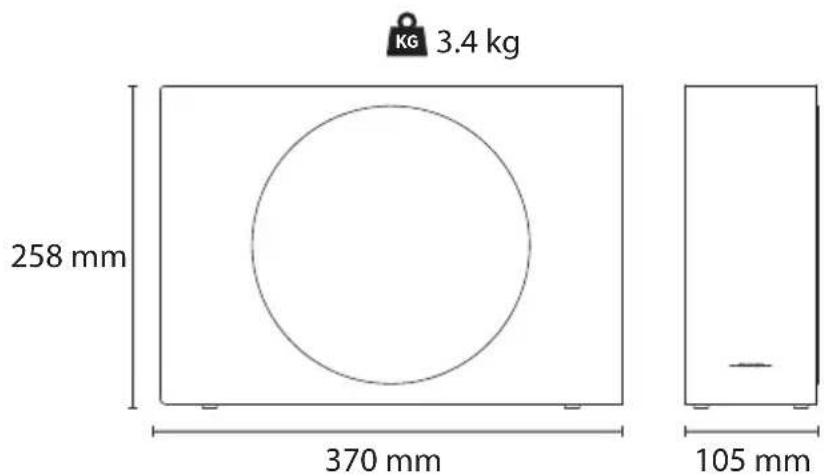
| Model | Model | Model | Modell | Модель | HT-SBW310, HT-SBW312 |
| soundbar soundbar soundbar soundbar soundbar soundbar soundbar soundbar soundbar soundbar soundbar soundbar soundbar soundbar soundbar soundbar soundbar soundbar soundbar soundbar soundbar soundbar soundbar soundbar soundbar soundbar soundbar soundbar soundbar soundbar soundbar soundbar soundbar soundbar soundbar soundbar soundbar soundbar soundbar soundbar soundbar soundbar soundbar soundbar soundbar soundbar soundbar soundbar soundbar soundbar soundbar Sound | Napajalnik | Dovod napajanja | Strömförsörjning | Джерело живлення | AC 100-240V ~ 50/60Hz |
| Spotreba energie | Poraba električne energije | Potrošnja napajanja | Strömförbrukning | Споживана потужність | 30W |
| Spotreba v pohotovostnom režime | Poraba energije v načinu pripravljenosti | Potrošnja napajanja u pripravnosti | Strömförbrukning i standby-läge | Споживання електроенергії в режимі очікування | <0.5W |
| Výstupný výkon | Izhodna moč | Izlaz napajanja | Uteffekt | Вихідна потужність | 165W Max 60W (2 x 30W) RMS |
| Frekvenčná odozva | Frekvenčno odzivanje | Odgovor frekvencije | Frekvensomfång | Частотна характеристика | 120Hz - 20KHz |
| Bezdrótový subwoofer | Brezžični subwoofer | Bežični subvufer | Trădlös subwoofer | Бездротовий сабвуфер | |
| Napájanie | Napajalnik | Dovod napajanja | Strömförsörjning | Джерело живлення | AC 100-240V ~ 50/60Hz |
| Spotreba energie | Poraba električne energije | Potrošnja napajanja | Strömförbrukning | Споживана потужність | 30W |
CE UK CA
Sharp Consumer Electronics Poland sp. z o.o.
Ostaszewo 57B, 87-148 Łysomice, Poland
Made in China
SAU/MAN/0211 V3
www.sharpconsumer.com
SHARP


- USER MANUAL
- TRADEMARKS
- DOLBY ATMOS
- BLUETOOTH®
- ENGLISH
- IMPORTANT SAFETY INSTRUCTIONS
- PLEASE FOLLOW ALL SAFETY INSTRUCTIONS AND WARNINGS. KEEP THIS MANUAL FOR REFERENCE
- PRECAUTIONS
- DAMAGE
- POWER CONNECTION AND ACCESSIBILITY
- POWER SOURCE
- POWER CORD PROTECTION
- FUSED MOULDED POWER PLUG (NON-REWIREABLE) - UK, MALTA, CYPRUS AND IRELAND ONLY
- CHILD SAFETY
- LOCATION
- VENTILATION
- HEAT AND OPERATING TEMPERATURE
- NAKED FLAMES
- WATER, MOISTURE, AND LIQUID ENTRY
- STORMS AND LIGHTNING
- MAINTENANCE
- BATTERIES
- INSTALLATION
- USE AND MAINTENANCE
- ENVIRONMENTAL CONDITIONS
- DISPOSAL
- DISPOSAL: EQUIPMENT AND BATTERIES
- CE AND UKCA STATEMENT
- WHAT IS INCLUDED IN THE BOX
- CONTROLS
- SOUNDBAR
- SUBWOOFER
- REMOTE
- INPUTS/OUTPUTS
- INITIAL SET UP
- REMOTE CONTROL OPERATION
- BATTERY INSTALLATION
- FIRST TIME INSTALLATION
- PLACEMENT - SOUNDBAR
- WALL MOUNTING
- NOTES
- PLACEMENT - SUBWOOFER
- CONNECTIONS
- DOLBY ATMOS AND DTS VIRTUAL:X™
- USING EARC
- HDMI CONNECTION
- TIPS
- NOTE
- OPTICAL
- AUX IN
- A
- TIP
- CONNECT TO POWER
- SUBWOOFER PAIRING
- AUTOMATIC PAIRING
- MANUAL PAIRING
- BASIC OPERATION
- STANDBY/ON
- CHANGE SOURCE
- VOLUME CONTROL
- EQUALISER
- ADJUST BASS AND TREBLE
- AUTO STANDBY
- ROKU TV READY™ OPERATION
- BLUETOOTH OPERATION
- USB OPERATION
- TROUBLESHOOTING
- PERFORM A FACTORY RESET
- NO POWER
- NO SOUND
- REMOTE CONTROL DOES NOT WORK
- I HEAR BUZZING OR HUMMING
- I CAN'T FIND THE BLUETOOTH NAME OF THIS UNIT ON MY BLUETOOTH DEVICE
- THIS DEVICE IS SET TO STANDBY AFTER 15 MINUTES OF NO SOURCE SIGNAL
- THE SUBWOOFER IS IDLE OR THE PAIRING LED IS NOT SOLID
- BLUETOOTH USAGE
- USING BLUETOOTH
- BLUETOOTH USE
- BLUETOOTH FUNCTION
- USING THE BLUETOOTH FUNCTION
- WARNING
Brand : SHARP
Model : HT-SBW310
Category : Soundbar