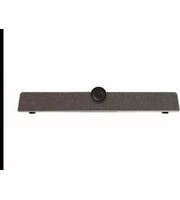
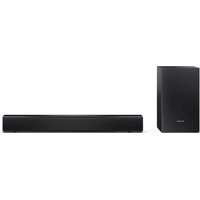
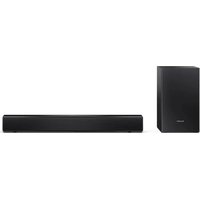
PN-ZCMS1 - Soundbar SHARP - Free user manual and instructions
Find the device manual for free PN-ZCMS1 SHARP in PDF.


| Product Type | Soundbar |
| Brand | Sharp |
| Model | PN-ZCMS1 |
| Dimensions (W x H x D) | Approx. 900 x 70 x 100 mm |
| Weight | Approx. 2.5 kg |
| Power Supply | AC 100-240V, 50/60Hz |
| Power Consumption | 30 W (standby: <0.5 W) |
| Connectivity | Bluetooth, Optical, AUX, USB |
| Audio Output | 2.0 channel, 40W total |
| Remote Control | Included |
| Wall Mountable | Yes, with included brackets |
| Maintenance | Wipe with a soft dry cloth |
| Safety | Do not expose to moisture or heat sources |
| Spare Parts Availability | Contact Sharp support for remote and brackets |
| Compatibility | Most TVs with optical or AUX output |
| Included Accessories | Remote, optical cable, power adapter, wall mount kit |
Frequently Asked Questions - PN-ZCMS1 SHARP
User questions about PN-ZCMS1 SHARP
0 question about this device. Answer the ones you know or ask your own.
Ask a new question about this device
Download the instructions for your Soundbar in PDF format for free! Find your manual PN-ZCMS1 - SHARP and take your electronic device back in hand. On this page are published all the documents necessary for the use of your device. PN-ZCMS1 by SHARP.
USER MANUAL PN-ZCMS1 SHARP
To aid reporting in case of loss or theft, please record the product's model and serial numbers in the space provided. The numbers are located in the rear of the product.
Model No.:
Serial No.:
U.S.A. ONLY
SHARP
SHARP CORPORATION
Printed in China (2)
Supplier's Declaration of Conformity
SHARP VIDEO-CONFERENCING SOUNDBAR, PN-ZCMS1
This device complies with Part 15 of the FCC Rules. Operation is subject to the following two conditions: (1) This device may not cause harmful interference, and (2) this device must accept any interference received, including interference that may cause undesired operation.
Responsible Party:
SHARP ELECTRONICS CORPORATION
100 Paragon Drive, Montvale, NJ 07645 TEL: 1-800-BE-SHARP www.sharpusa.com
U.S.A. ONLY
- EN 1 -
IMPORTANT INFORMATION
WARNING: TO REDUCE THE RISK OF FIRE OR ELECTRIC SHOCK, DO NOT EXPOSE THIS PRODUCT TO RAIN OR MOISTURE.

CAUTION
RISK OF ELECTRIC
SHOCK DO NOT OPEN

CAUTION: TO REDUCE THE RISK OF ELECTRIC SHOCK, DO NOT REMOVE COVER. NO USER-SERVICEABLE PARTS INSIDE. REFER SERVICING TO QUALIFIED SERVICE PERSONNEL.

The lightning flash with arrowhead symbol, within a triangle, is intended to alert the user to the presence of uninsulated "dangerous voltage" within the product's enclosure that may be of sufficient magnitude to constitute a risk of electric shock to persons.

The exclamation point within a triangle is intended to alert the user to the presence of important operating and maintenance (servicing) instructions in the literature accompanying the product.
WARNING:
FCC Regulations state that any unauthorized changes or modifications to this equipment not expressly approved by the manufacturer could void the user's authority to operate this equipment.
NOTE:
This equipment has been tested and found to comply with the limits for a Class A digital device, pursuant to Part 15 of the FCC Rules. These limits are designed to provide reasonable protection against harmful interference when the equipment is operated in a commercial environment. This equipment generates, uses, and can radiate radio frequency energy and, if not installed and used in accordance with the instruction manual, may cause harmful interference to radio communications. Operation of this equipment in a residential area is likely to cause harmful interference in which case the user will be required to correct the interference at his own expense.
This product utilizes a CR coin Lithium battery which contains a Perchlorate material.
Special handling for this material may apply,
California residents, See www.dtsc.ca.gov/hazardouswaste/perchlorate/
Others, consult local environmental officers.
U.S.A. ONLY
"BATTERY DISPOSAL"
PLEASE CONTACT YOUR LOCAL AUTHORITY FOR THE CORRECT METHOD OF DISPOSAL OF THE USED BATTERY.
U.S.A. AND CANADA ONLY
DEAR SHARP CUSTOMER
Thank you for your purchase of a SHARP product. To ensure safety and many years of trouble-free operation of your product, please read the Safety Precautions carefully before using this product.
- EN 2 -- EN 7 -
Specifications
| Model PN-ZCMS1 | ||
| Audio input/output terminal x 1 | ||
| USB port USB2.0 Type-C x 1 | ||
| Supported operating system | Windows 10 / Windows 11mac OS v10.15 / v11 / v12 | |
| Applicable models(APPLICATION mode, "Web Browser" only)* | LCD MONITOR PN-L652B / PN-L752B / PN-L862B | |
| Camera | Number of pixels | 12,000,000 pixels |
| Format H.264 / MJPG / YUY2 | ||
| Resolution | H.264 / MJPG:3840x2160 / 2560x1440 / 1920x1080 / 1280x720 / 1024x576 / 960x540 / 800x600 /640x480 / 640x360 / 480x270 / 352x288 / 320x240 / 320x180 / 176x144 / 160x120 / 160x90YUY2:640x480 / 640x360 / 480x270 / 352x288 / 320x240 / 320x180 / 176x144 / 160x120 / 160x90 | |
| Viewing angle 120° | ||
| Angle of movement | 15° up/down | |
| Focus mode Fixed focus (6.6 feet (2m)) | ||
| Zoom Max. 5 times | ||
| Mic | Number of internal mics | 6 |
| Effective range 26. 2feet (8m) | ||
| Speaker x 1 | ||
| Power requirement | AC 100 V - 240 V, 50/60 Hz(When using the supplied power cord (AC adapter)), DC 12 V | |
| Operating temperature | 32°F to 104°F (0°C to 40°C) | |
| Operating humidity | 10% to 90% (no condensation) | |
| Power consumption | 36 W | |
| Dimensions (excluding protrusions) | inch (mm) | Approx. 18-3/16 (W) x 3-11/16 (D) x 3 (H)(462 x 93 x 76) |
| Weight | Ibs. (kg) | Approx. 2.1 (0.95) |
* As of August 2022 (Available models differ according to region.)
As a part of our policy of continuous improvement, SHARP reserves the right to make design and specification changes for product improvement without prior notice. The performance specification figures indicated are nominal values of production units. There may be some deviations from these values in individual units.
Mounting Precautions (For SHARP dealers and service engineers)
When used by mounting on the wall
• Install on a vertical wall having enough strength that is free from vibrations.
- Do not apply any other load on the
- Do not use other than this product. - The wall mount bracket anchors (supplied) are for concrete walls. They cannot be used for other materials.
• Depending on the wall, the wall mount bracket screws (supplied) and wall mount bracket anchors (supplied) may not be
-
This company will not have a position in the current state of the company, or any other person, nor any other person is available. The work must be performed by an authorized SHARP dealer. Our company will bear no responsibility for accidents or injuries caused by improper mounting or mishandling.
-
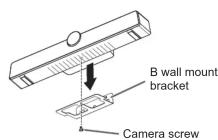
Fix the A wall mount bracket (supplied) on the wall with wall mount bracket screws (supplied) (x3).
- If necessary, use the wall mount bracket anchors (supplied).
-
Fix this product and the B wall mount bracket (supplied) with the camera screw (supplied).
-
Suspend the B wall mount bracket (supplied) to the A wall mount bracket (supplied).

A wall mount bracket

Remote Control Unit
Operate the remote control unit while facing the front of this product.
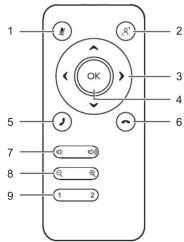
- Mic button
Used to switch the mic to ON/OFF.
- Auto framing button
Used to switch the auto framing function to ON/OFF.
8:ON
TOX : OFF
.Off
when ON, framing is performed automatically in accordance with the speaker.
- Cursor button
Used to move the display range of the camera after zooming the camera.
- OK button
Used to return the zoomed or moved state of the camera to the initial state.
- Call button
Answer the communication *
-
End Call Button
-
End Call button
Hang up communication.
- Volume button
Used to adjust the speaker volume.
- Zoom button
Used to zoom-in or zoom-out the camera display.
- Preset (1/2) button
Used to change the display to the preset magnification rate or display position
during camera display. This button cannot be used if the auto framing function is
ON.
• To register the preset, adjust the camera display to the state that you want to
register, and then press and hold preset "1" or "2" for 2 seconds or longer.
* Depending on the application used, the button may not function.
Preparing the remote control unit
- Pull the cover off.

- Put in the lithium battery (CR2032) with their plus (+) and minus (-) sides oriented correctly.

- Close the cover.
TIPS
- When the battery becomes exhausted, replace it with new (commercially available) battery.
- The supplied battery may become exhausted quickly depending on how it is stored.
- EN 6 -- EN 3 -
SAFETY PRECAUTIONS
Electricity is used to perform many useful functions, but it can also cause personal injuries and property damage if improperly
handled. This product has been engineered and manufactured with the highest priority on safety. However, improper use can result in electric shock and/or fire. In order to prevent potential danger, please observe the following instructions when installing, operating and cleaning the product. To ensure your safety and prolong the service life of your product, please read the following precautions carefully before using the product.
-
Read instructions — All operating instructions must be read and understood before the product is operated.
-
Keep this manual in a safe place — These safety and operating instructions must be kept in a safe place for future reference.
-
Observe warnings — All warnings on the product and in the instructions must be observed closely.
-
Follow instructions — All operating instructions must be followed.
-
Cleaning — Unplug the power cord from the power outlet before cleaning the product. Use a dry cloth to clean the product.
Do not use liquid cleaners or aerosol cleaners. Do not use dirty cloths. Doing so may damage the product.
-
Attachments — Do not use attachments not recommended by the manufacturer. Use of inadequate attachments can result in accidents.
-
Water and moisture — Do not use the product near water. Do not install the product in a place where water may splash onto it. Be careful of equipment which drains water such as an air-conditioner.
-
Ventilation — The vents and other openings in the cabinet are designed for ventilation.
Do not cover or block these vents and openings since insufficient ventilation can cause overheating and/or shorten the life of the product. Do not place the product on a sofa, rug or other similar surface, since they can block ventilation openings. Do not place the product in an enclosed place such as a bookcase or rack, unless proper ventilation is provided or the manufacturer's instructions are followed.
-
Power cord protection — The power cords must be routed properly to prevent people from stepping on them or objects from resting on them.
-
Overloading — Do not overload power outlets or extension cords. Overloading can cause fire or electric shock.
-
Entering of objects and liquids — Never insert an object into the product through vents or openings. High voltage flows in the product, and inserting an object can cause electric shock and/or short internal parts.
For the same reason, do not spill water or liquid on the product.
-
Servicing — Do not attempt to service the product yourself. Removing covers can expose you to high voltage and other dangerous conditions. Request a qualified service person to perform servicing.
-
Repair — If any of the following conditions occurs, unplug the power cord from the power outlet, and request a qualified service person to perform repairs.
a. When the power cord or plug is damaged.
b. When a liquid was spilled on the product or when objects have fallen into the product.
c. When the product has been exposed to rain or water.
d. When the product does not operate properly as described in the operating instructions.
Do not touch the controls other than those described in the operating instructions. Improper adjustment of controls
not described in the instructions can cause damage, which often requires extensive adjustment work by a qualified technician.
e. When the product has been dropped or damaged.
f. When the product displays an abnormal condition. Any noticeable abnormality in the product indicates that the product needs servicing.
-
Replacement parts — In case the product needs replacement parts, make sure that the service person uses replacement parts specified by the manufacturer, or those with the same characteristics and performance as the original parts. Use of unauthorized parts can result in fire, electric shock and/or other danger.
-
Safety checks — Upon completion of service or repair work, request the service technician to perform safety checks to ensure that the product is in proper operating condition.
-
Wall mounting — When mounting the product on a wall, be sure to install the product according to the method recommended by the manufacturer.
-
Heat sources — Keep the product away from heat sources such as radiators, heaters, stoves and other heat-generating products (including amplifiers).
-
Coin batteries — Incorrect use of batteries may cause the batteries to burst or ignite. A leaky battery may corrode the equipment, dirty your hands or spoil your clothing. In order to avoid these problems, make sure to observe the precautions below:
- Use the specified batteries only.
- Install the batteries with due attention to the plus (+) and minus (-) sides of the batteries according to the instructions in the compartment.
- Do not short the terminals.
- Do not throw into water or fire. Do not disassemble.
- Replace an exhausted battery with a new one promptly.
• If you will not use the remote control for a long time, remove the batteries.
- If leaked battery fluid gets on your skin or clothing, rinse immediately and thoroughly. If it gets into your eye, bathe your eye well rather than rubbing and seek medical treatment immediately. Leaked battery fluid that gets into your eye or your clothing may cause a skin irritation or damage your eye.
- Do not swallow battery. Chemical burn hazard.
• If the battery is swallowed, it can cause severe internal burns in just 2 hours and can lead to death.
- If you think batteries might have been swallowed or placed inside any part of the body, seek immediate medical attention. - Keep the battery away from children
- If the battery compartment does not close securely, stop using the product and keep it away from children.
-
Usage of this product must not be accompanied by fatal risks or dangers that, could lead directly to death, personal injury, severe physical damage or other loss, including nuclear reaction control in nuclear facility, medical life support system, and missile launch control in a weapon system.
-
Do not stay in contact with the parts of the product that become hot for long periods of time. Doing so may result in
low-temperature burns. 21. Do not modify this produ
WARNING:
This is a Class A product. In a domestic environment this product may cause radio interference in which case the user may be required to take adequate measures.

WARNING:
- Keep the battery away from children. Chemical burn hazard.
- If the battery is swallowed, it can cause severe internal burns in just 2 hours and can lead to death.
- If you think batteries might have been swallowed or placed inside any part of the body, seek immediate medical attention.
- If the battery compartment does not close securely, stop using the product and keep it away from children.
Australian Poisons Information Centre
Call this number if you think someone has swallowed a button/coin battery.
You can call 24 hours a day, 7 days a week from anywhere in Australia.
Phone: 131 126

Warnings for safe disposal of Batteries
- Place non-conductive adhesive tape around both sides of the battery and dispose/recycle
immediately and safely out of reach of children.
- Safely dispose/recycle used button/coin batteries following local council/government guidelines
• Information about these guidelines can be found at the following link.
https://www.sharp.net.au/battery
Australia Only
SAFETY INSTRUCTION
- Do not use this product where there is a lot of dust, where humidity is high, or where this product may come into contact with oil or steam. Do not use in an environment where there are corrosive gases (sulfur dioxide, hydrogen sulfide, nitrogen dioxide, chlorine, ammonia, ozone, etc.). As this could lead to fire.
- Ensure that this product does not come into contact with water or other fluids. Ensure that no objects such as paper clips or pins enter this product as this could lead to fire or electric shock.
- Do not place this product on top of unstable objects or in unsafe places. Do not allow this product to receive strong shocks or to strongly vibrate. Causing this product to fall or topple over may damage it.
- Do not place this product upside down. Do not place
anything on this product. As this could lead to overheating, fire, or malfunction. - Do not use this product near heating equipment or in places where there is likelihood of high temperature, as this may lead to generation of excessive heat and outbreak of fire.
- Do not use this product in places where it may be exposed to direct sunlight. Risk of cabinet deformation and failure if this product is used in direct sunlight.
- The power outlet shall be installed near the equipment and shall be easily accessible.
- For a complete electrical disconnection, pull out the main plug.
- Provide enough space around this product to prevent heat from accumulating inside.
- Use only the specified bracket and camera screw to secure this product. Do not use anything other than the items specified.
- Mounting this product on the wall requires special expertise and the work must be performed by an authorized SHARP dealer. You should never attempt to perform any of this work yourself. Our company will bear no responsibility for accidents or injuries caused by improper mounting or mishandling.
Please understand that SHARP CORPORATION bears no responsibility for errors made during use by the customer or a third party, nor for any other malfunctions or damage to this product arising during use, except where indemnity liability is recognized under law.
- This product and its accessories may be upgraded without advance notice.
The Power Cord
- Use only the power cord supplied with this product.
- Observe the following. Incorrect handling may result in fire, electric shock, or injury.
- Do not drop the power cord or subject it to impact.
- Never disassemble the power cord. It contains high voltage parts that are dangerous to touch.
- The power cord is for indoor use only. Do not use it outside. - Do not use the supplied power cord with other devices.
- Do not damage the power cord nor place heavy objects on it, stretch it or over bend it. Also, do not add extension cords. Damage to the cord may result in fire or electric shock.
- Do not use the power cord with a power tap. Adding an extension cord may lead to fire as a result of overheating.
- Do not remove or insert the power plug with wet hands. Doing so could result in electric shock.
- Unplug the power cord if it is not used for a long time.
- Do not attempt to repair the power cord if it is broken or malfunctioning. Refer the servicing to the service representative.
- EN 4 -- EN 5 -
Supplied Components
If any component should be missing, please contact your dealer.
□ Remote control unit: 1
□ Coin lithium battery (for remote control unit, CR2032): 1
□ Camera screw
□ A/B wall mount bracket: 1 each
□ Wall mount bracket anchor: 4*2
□ Power cord (AC adapter): 1
□ USB cable:
□ Lens cap: 1
□ Wall mount bracket screw: 4 ^*2
□ Operation Manual (this manual): 1
* For environmental protection!
Do not dispose of batteries in household waste. Follow the disposal instructions for your area.
^*1 The camera screw is for fixing this product and the B wall mount bracket (supplied). Do not use it for other bracket.
*2 1 item is a spare.
Part Names

- Camera
The upper and lower angle can be adjusted. - Camera LED
White lit: camera on
Off: camera off - Power / Mic LED
White lit: power on, mic on
Red lit: power on, mic off
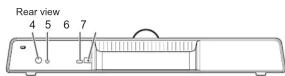
Off: power off - Mic mute button
The mic switches between ON/OFF each time the button is pressed. - Audio input/output terminal
Used to connect to external earphone/mic/speaker
conforming to the CTIA standard.
When connected, the internal speaker will be disabled. Both the internal and external mic will be enabled. - USB2.0 port (Type-C shape)
Use the supplied USB cable to connect to the USB port of the monitor or computer.
Can be used as an external camera, mic, or speaker of the monitor (APPLICATION mode, "Web Browser" only) or computer. For details on the connection destination when a connection is established to the USB port of the monitor, refer to the manual of the monitor. - DC input terminal
Connected to a power outlet via the supplied power cord.
!Caution
• Power is supplied at all times as long as the power cord is connected.
If this product is not going to be used for a long time, remove the power cord from the power outlet.
- Before using this product, confirm the plug is secured to the AC adapter
- Do not press the button (*) on the AC adapter during use. It is dangerous because the plug will remove.

TIPS
- This product has a noise reduction function that is constantly running, so noise reduction function in the settings of application should be switched off.
- The resolution of the camera images depends on the application. In addition, the resolution of the transmitted camera images may be low due to network conditions.


- SHARP
- SHARP CORPORATION
- IMPORTANT INFORMATION
- CAUTION
- WARNING:
- NOTE:
- DEAR SHARP CUSTOMER
- Mounting Precautions (For SHARP dealers and service engineers)
- When used by mounting on the wall
- Remote Control Unit
- Preparing the remote control unit
- SAFETY PRECAUTIONS
- SAFETY INSTRUCTION
- The Power Cord
- Supplied Components
- Part Names
- !Caution
- TIPS
Brand : SHARP
Model : PN-ZCMS1
Category : Soundbar