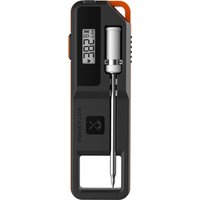
ARMEATOR A1 - Cooking thermometer 4smarts - Free user manual and instructions
Find the device manual for free ARMEATOR A1 4smarts in PDF.


User questions about ARMEATOR A1 4smarts
0 question about this device. Answer the ones you know or ask your own.
Ask a new question about this device
Download the instructions for your Cooking thermometer in PDF format for free! Find your manual ARMEATOR A1 - 4smarts and take your electronic device back in hand. On this page are published all the documents necessary for the use of your device. ARMEATOR A1 by 4smarts.
USER MANUAL ARMEATOR A1 4smarts
ARMEATOR ONE USER MANUAL [EN]
BENUTZERHANDBUCH [DE]
MODE D'EMPLOI [FR]
GEBRUIKERSHANDLEIDING [NL]
INSTRUCCIONES DE USO [ES]
natural_image
Close-up of a screwdriver with a white caliper and metallic shaft, mounted on a black plastic housing (no visible text or symbols)SMART WIRELESS
MEAT THERMOMETER
A101
EN English 1
DE Deutsch 9
FR Français 17
NL Nederlands 25
ES Español 33
PT Português 41
PL Polski 49
CZ Čeština 57
IT Italiano 65
DK Dansk 73
GR Ελληνικά 81
Get to know the device
text_image
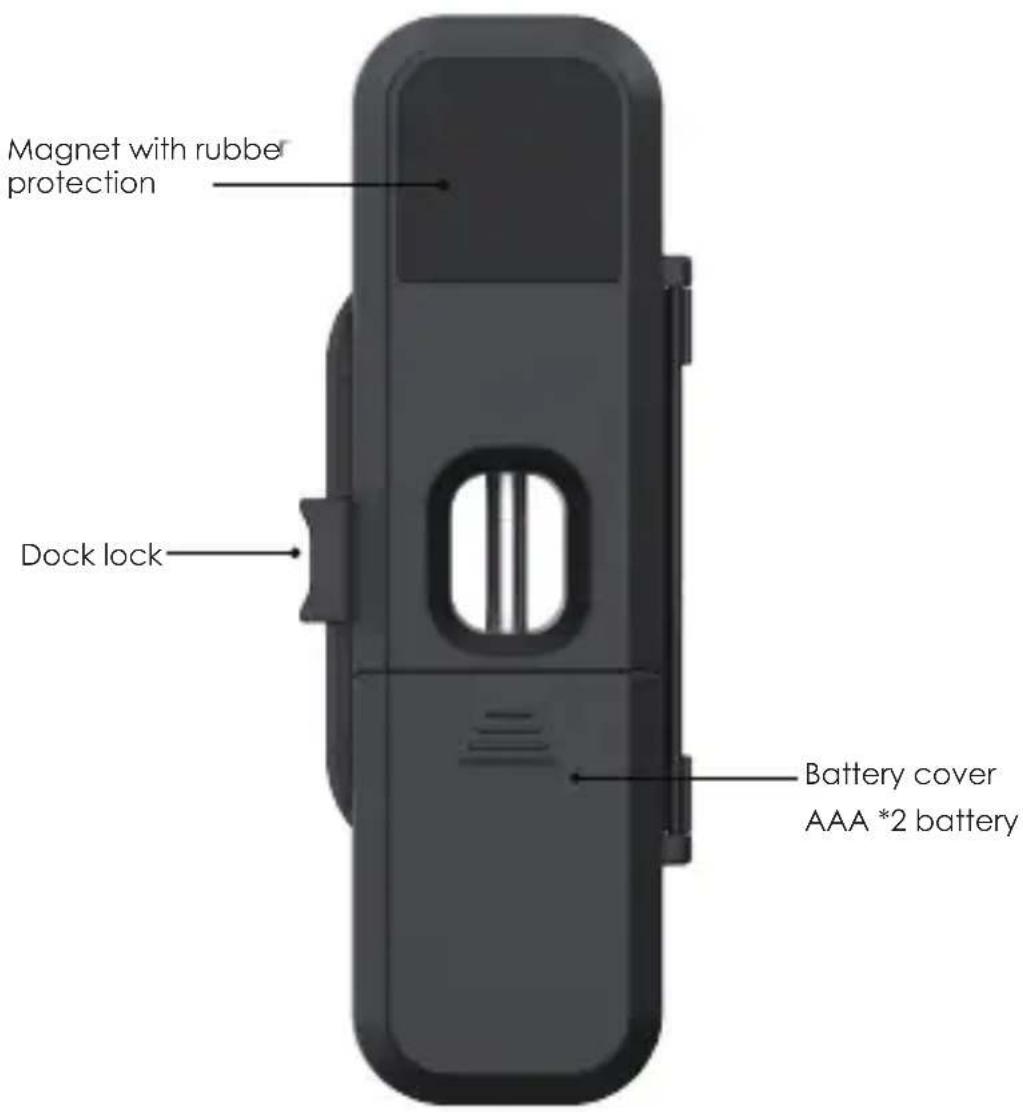
Magnet with rubber protection Dock lock Battery cover AAA *2 battery2*AAA size batteries are needed for this charging case. Make sure they are put in the right direction on the unit.
Wireless frequency range: 2400MHz-2483.5MHz
Average current: 2.4V/22uA
Max wireless transmission power: 2.5dbm
EN
text_image
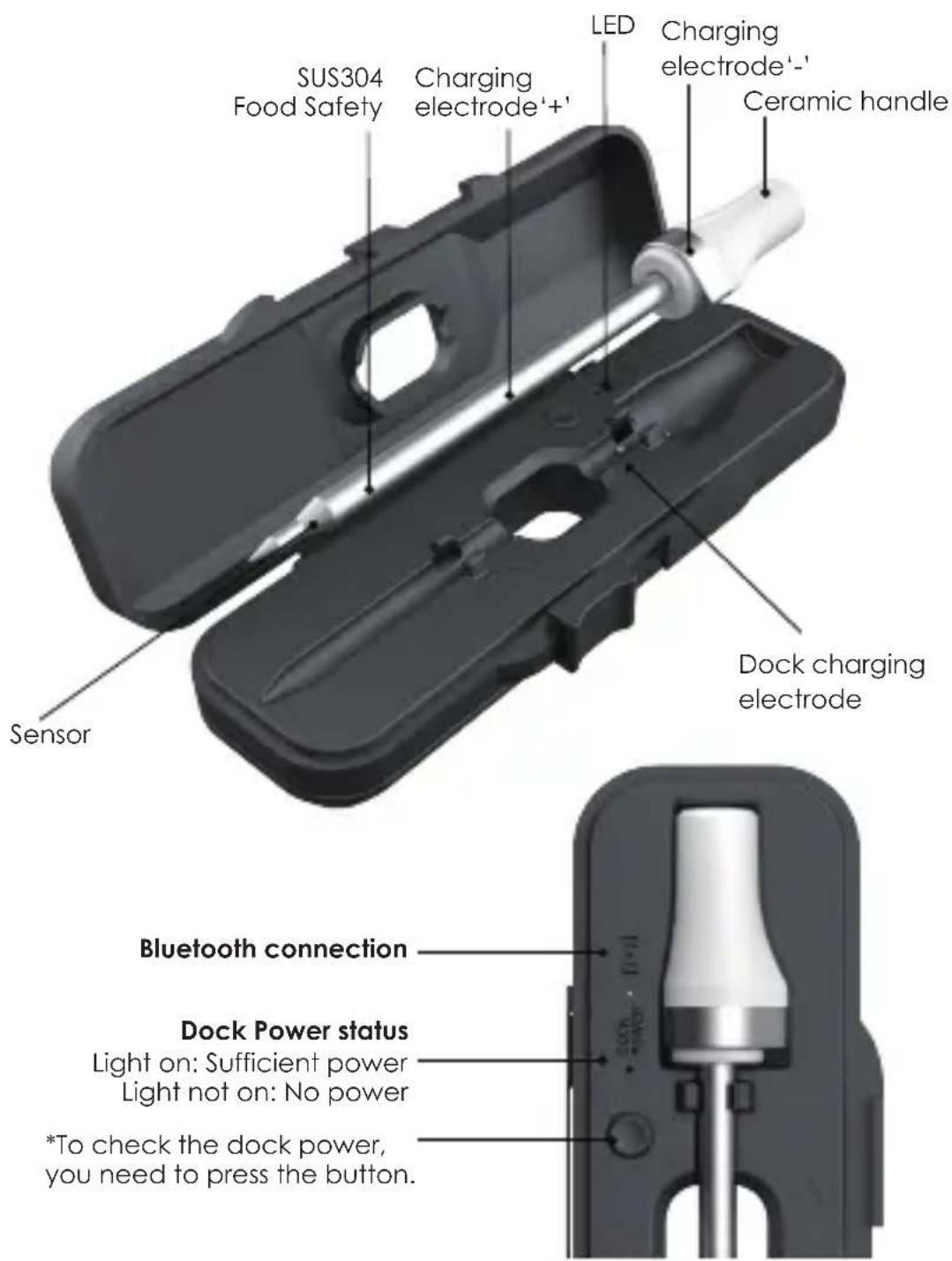
SUS304 Food Safety Charging electrode'+' LED Charging electrode'- Ceramic handle Sensor Dock charging electrode Bluetooth connection Dock Power status Light on: Sufficient power Light not on: No power *To check the dock power, you need to press the button.How to charge the probe:
The probe will automatically charge when placed in the dock.
Download the APP
Search the keyword 'ARMEATOR' in Appstore or Google Play, or scan the following QR code with your phone. Download and install it for free.
Make sure your phone meets the requirements:
iOS devices running version 11.0 or later.
Android devices running version 5.0 or later with blue-tooth 4.0 module or later.
text_image
QR code image containing encoded data, no visible human-readable text
text_image
QR code image containing encoded data, no visible human-readable text
Pair with your phone

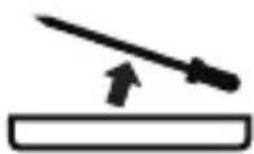
- Take the probe out of the dock and click the Dock Power Button for pairing.
If it has not been used for a long time, please charge the probe first to ensure sufficient power.
- keep the blue-tooth switch of your phone on.

- Launch the "ARMEATOR" app.
- Follow the instructions in the app.
- Choose the ARMEATOR device you want to add.
Once dock is paired with your phone, you don't need to do it again, unless you change to other phones.

Connected successfully.
Note: Please ensure that the app has access to Bluetooth on your mobile phone and that Bluetooth is enabled. For Android phones, you may also need to grant the app location permission and keep location enabled before establishing a connection with the ARMEATOR device for the first time.
HOW TO USE
① Insert the probe
natural_image
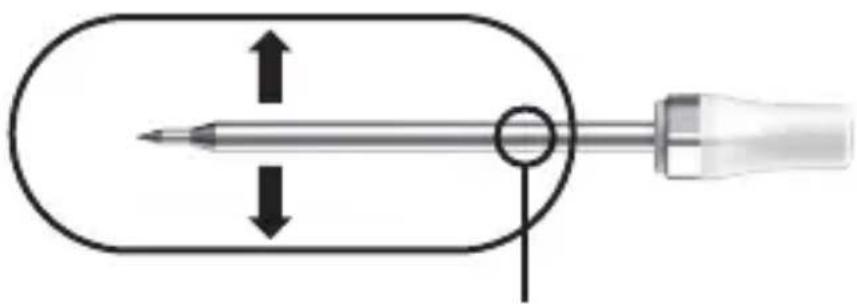
Diagram of a screwdriver with a pointed tip and circular head, showing internal movement (no text or symbols)Keep the safety line covered by the meat
Insert the probe into the thickest part of the meat, and ensure the notch on the probe is fully covered by the meat while the tip of the probe is inside the meat.
Notes: If you wrap your meat in aluminum foil, you must puncture the probe into the meat through the foil. If you wrap the probe and meat in foil, the probe will lose connectivity.
② Start a New Cook
text_image
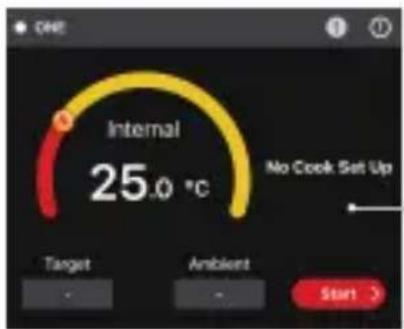
ONE Internal 25.0 °C No Cook Set Up Target Ambient Start >Choose food type and preference for the food where each probe is inserted, the app and the device will display its current and target temperature. When the food is ready, the app will alarm you.
* The user interface of the app may be changed when upgraded. Please follow the instructions in the app.
WARNING
The heat resistance varies in different components of the probe, DO NOT put the probe needle part directly in fire flame. And probes are NOT dishwasher safe. Kindly avoid submerging the probe in any liquid.
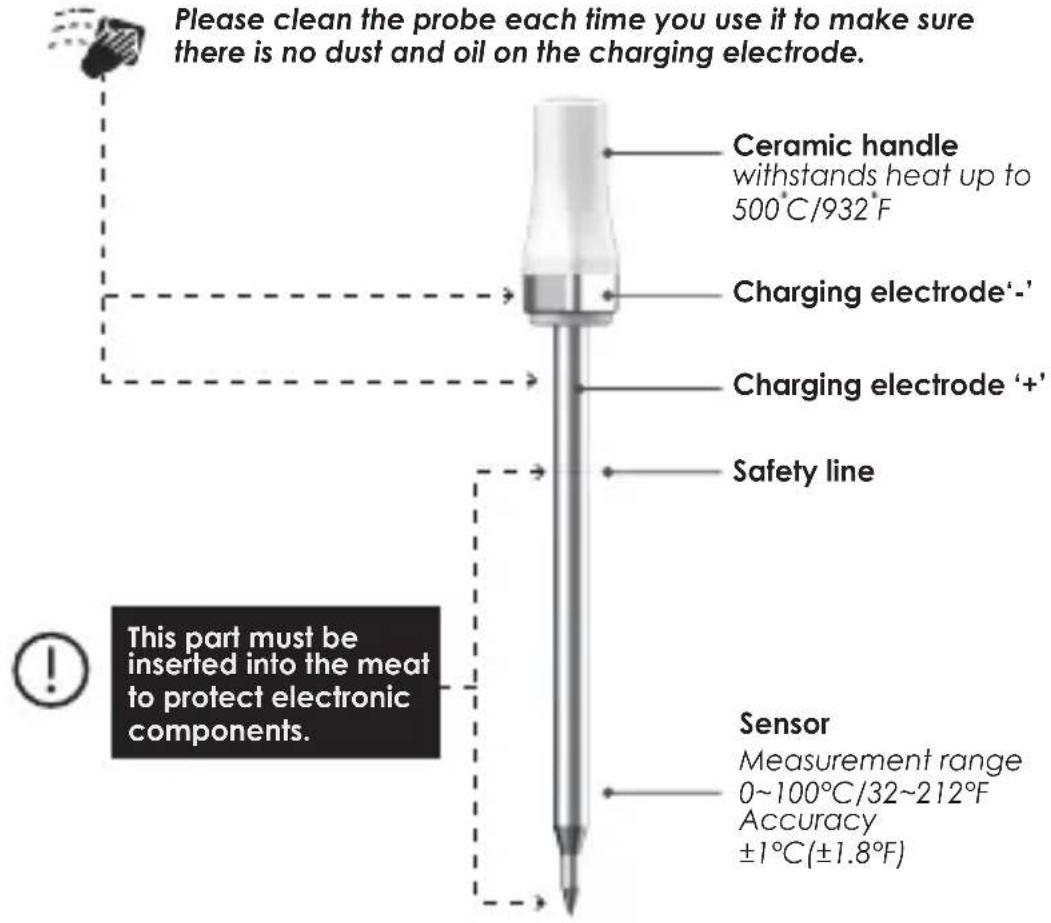
text_image
Please clean the probe each time you use it to make sure there is no dust and oil on the charging electrode. Ceramic handle withstands heat up to 500°C/932°F Charging electrode'-' Charging electrode '+' Safety line This part must be inserted into the meat to protect electronic components. Sensor Measurement range 0~100°C/32~212°F Accuracy ±1°C(±1.8°F)App Store is a service mark of Apple Inc. Google Play is a service mark of Google Inc.






SPECIFICATIONS
| Probe to Dock Wireless Range (Unobstructed) | 70m / 229 ft |
| Dock to Phone Wireless Range (Unobstructed) | 70m / 229ft |
| Probe to Dock Wireless Range (Close the oven lid) | 10m / 32ft |
| Bluetooth | Bluetooth LE 5.2 wireless connection |
| Probe Working Time | 72 hours of continuous cooking |
| Ceramic Handle | 500°C / 932°F (can be used in flames) |
| Probe Temp.Range | 0~100°C / 32~212°F (meat) |
| Measurement Error | ±1°C / ±1.8°F |
| Water-Resistance | IP65 |
| Probe Material | SUS304 Stainless Steel (Food Safety) & Ceramic |
| Magnetic Backing | Built-in magnet |
| Battery | AAA*2 |
| Charging Time | 15 min |
| Probe Diameter | 5.5mm / 0.22in |
| Probe Size | 129*15*15mm / 5.08*0.59*0.59in |
| Charging Dock Size | 47*140*27.5mm / 1.85*5.51*1.08in |
| App Requirement | iPhone and iPad apps for iOS 11 and later Android app for versions 5.0 and later |
FCC Caution.
This device complies with part 15 of the FCC Rules. Operation is subject to the following two conditions:(1) This device may not cause harmful interference, and (2) this device must accept any interference received, including interference that may cause undesired operation.
15.21 Information to user.
Any Changes or modifications not expressly approved by the party responsible for compliance could void the user's authority to operate the equipment.
15.105 Information to the user.
Note: This equipment has been tested and found to comply with the limits for a Class B digital device, pursuant to part 15 of the FCC Rules. These limits are designed to provide reasonable protection against harmful interference in a residential installation. This equipment generates uses and can radiate radio frequency energy and, if not installed and used in accordance with the instructions, may cause harmful interference to radio communications. However, there is no guarantee that interference will not occur in a particular installation. If this equipment does cause harmful interference to radio or television reception, which can be determined by turning the equipment off and on, the user is encouraged to try to correct the interference by one or more of the following measures:
- Reorient or relocate the receiving antenna.
- Increase the separation between the equipment and receiver.
- Connect the equipment into an outlet on a circuit different from that to which the receiver is connected.
- Consult the dealer or an experienced radio/TV technician for help.
This equipment complies with FCC radiation exposure limits set forth for an uncontrolled environment. This equipment should be installed and operated with minimum distance 20cm between the radiator & your body.
SUPPORT
Website: www.armeator.com
Email: support@armeator.com
App Store is a service mark of Apple Inc.
Google Play is a service mark of Google Inc.
Importer:
4smarts GmbH
P.O. Box 102306
86013 Augsburg
https://4smarts.com
Warranty
The 4smarts GmbH assumes no liability and provides no warranty for damage resulting from improper use of the product or from failure to observe the operating instructions and/or safety notes.
Disposal Notification
Electric and electronic devices as well as batteries must not be disposed of with household waste. Consumers are obliged by law to return electric and electronic devices as well as batteries at the end of their service lives to public collecting points set up for this purpose or point of sale.
Service and Support
If the product is defective or in case of problems during installation, please consult your dealer or the 4smarts product consulting via:
https://www.4smarts.com/contact
Service Hotline
Monday - Friday: 9 - 17h
+ 49 (0)821 20708444
E-Mail: customer-service@4smarts.com
Attestation of Conformity
Hereby, 4smarts GmbH, declares that this device is in compliance with the essential requirements and other relevant provisions of Directive 2014/53/EU.
The declaration of conformity may be consulted at www.4smarts.com.
text_image
QR code image containing encoded data, no visible human-readable text
text_image
QR code image containing encoded data, no visible human-readable text
natural_image
Diagram of a screwdriver with a pointed tip and circular head, showing internal movement (no text or symbols)text_image
QR code image containing encoded data, no visible human-readable text
text_image
QR code image containing encoded data, no visible human-readable text
natural_image
Diagram of a screwdriver with a pointed tip and circular head, showing internal movement (no text or symbols)Service client et assistance
text_image
QR code image containing encoded data, no visible human-readable text
text_image
QR code image containing encoded data, no visible human-readable text
natural_image
Diagram of a screwdriver with a pointed tip and circular head, showing internal movement (no text or symbols)https://www.4smarts.com/contact
Service Hotline
Corriente media: 2,4V/22uA
text_image
QR code image containing encoded data, no visible human-readable text
text_image
QR code image containing encoded data, no visible human-readable text
natural_image
Diagram of a screwdriver with a pointed tip and circular end cap, showing internal movement (no text or symbols)text_image
QR code image containing encoded data, no visible human-readable text
text_image
QR code image containing encoded data, no visible human-readable text
natural_image
Diagram of a screwdriver with a pointed tip and circular head, showing internal movement (no text or symbols)text_image
QR code image containing encoded data, no visible human-readable text
text_image
QR code image containing encoded data, no visible human-readable text
natural_image
Simple line drawing of a tool with an arrow pointing to it, no text or symbols presentnatural_image
Diagram of a screwdriver with a pointed tip and circular head, showing directional arrows (no text or symbols)https://www.4smarts.com/contact
Infolinia serwisowa
text_image
QR code image containing encoded data, no visible human-readable text
text_image
QR code image containing encoded data, no visible human-readable text
natural_image
Diagram of a screwdriver with a pointed tip and circular end cap, showing internal movement (no text or symbols)text_image
QR code image containing encoded data, no visible human-readable text
text_image
QR code image containing encoded data, no visible human-readable text
natural_image
Diagram of a screwdriver with a pointed tip and circular head, showing internal movement (no text or symbols)text_image
QR code image containing encoded data, no visible human-readable text
text_image
QR code image containing encoded data, no visible human-readable text
natural_image
Diagram of a screwdriver with a pointed tip and circular head, showing internal movement (no text or symbols)https://www.4smarts.com/contact
Service Hotline
Mandag - fredag: 9 – 17
+49 (0)821 20708444
E-mail: customer-service@4smarts.com
text_image
QR code image containing encoded data, no visible human-readable text
text_image
QR code image containing encoded data, no visible human-readable text
natural_image
Diagram of a screwdriver with a pointed tip and circular head, showing internal movement (no text or symbols)https://www.4smarts.com/contact.
Γραμμή εξυπηρέτησης