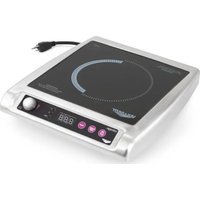
59652 - Cooker Mirage - Free user manual and instructions
Find the device manual for free 59652 Mirage in PDF.


| Product type | Induction cooktop (countertop plate) |
| Brand | Mirage |
| Model | 59652 |
| Recommended use | Commercial foodservice (not household) |
| Number of cooking zones | 1 induction zone |
| Compatible zone diameter | 12.1 to 30.5 cm (4¾" to 12") |
| Maximum power | 2000 W (estimated) |
| Power range | 1 - 100 |
| Temperature range | Display in °F or °C |
| Integrated timer | Yes, 1 to 180 minutes |
| Power supply | 230 V / 50-60 Hz, Schuko plug, dedicated circuit |
| Dimensions (L x W x H) | Approximately 35 x 40 x 6 cm |
| Weight | Approximately 4 kg |
| Surface material | Non-porous glass ceramic |
| Compatible cookware | Flat bottom ferrous metal (cast iron, stainless steel); incompatible with aluminum, copper, glass |
| Installation conditions | Flat surface, rear clearance ≥ 10 cm, bottom clearance ≥ 1.3 cm |
| Safety | Automatic shut-off after 10 min without pan, overheat protection, pan detection |
| Cleaning and maintenance | Clean with clear water and a damp cloth, without abrasive products |
| Spare parts and repairability | Parts available at Vollrath.com; repair by a professional only |
| Warranty | Manufacturer's warranty by Vollrath, according to general terms |
Frequently Asked Questions - 59652 Mirage
User questions about 59652 Mirage
0 question about this device. Answer the ones you know or ask your own.
Ask a new question about this device
Download the instructions for your Cooker in PDF format for free! Find your manual 59652 - Mirage and take your electronic device back in hand. On this page are published all the documents necessary for the use of your device. 59652 by Mirage.
USER MANUAL 59652 Mirage
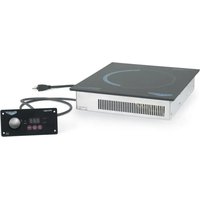
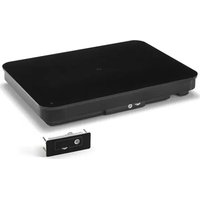
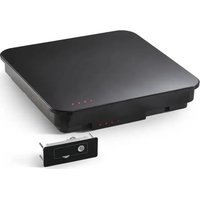
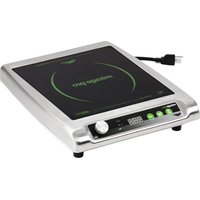
Mirage® CountertopandDrop-inInductionRanges
ThankyouforpurchasingthisVollrathequipment.Beforeoperatingthe equipment,readandfamiliarizeyourselfwiththefollowingoperating andsafetyinstructions.SAVETHESEINSTRUCTIONSFORFUTURE REFERENCE.Savetheoriginalboxandpackaging.Usethispackaging toshipthecquipmenttifrepairsareneeded.
SAFETYPRECAUTIONS
Toensuresafeoperation, read the following statements and understand their meaning. This manual contains safety precautions which are explained below. Please read carefully.

WARNING
Warningisusedtoindicatethepresenceofahazardthatwillorcauseseverepersonaljuryordeath.

CAUTION
Cautionisusedtoindicate the presence ofahazardthatwillcause minormajorpersonalinjuryifthecautionisignored.
NOTICE:Noticeisusedtonoteinformationthatisimportantbutnot hazard-related.
Toreduceriskofinjuryordamageototheequipment:
- Plugonlyintogroundedelectricaloutletsthatmatchthevoltage on theratinglabel.
- Thisequipmentrequiresadedicatedcircuit.
- Donotusextensioncords, powerstripsorsurgeprotectorswith thisequipment.
- Unplugthisequipmentfromthewalloutletwhennotinuse.
-Usethisequipmentonlyinaflat,levelposition. - Toprotectagainstelectricalshockdonotimmersethecordorplug inwater.Keeprecordawayfromheatedsurface.Donotletthe cordhangovertheedgeoftableorcounter.
- Asaprecaution,personsusingapacemakersshouldstandback12* (30cm)fromanoperatingunit.Studieshaveshownthatthe inductionelementwillnotdisruptapacemaker.
- Keepallcreditcards, driver licenses and other items with magnetic stripawayfromanoperatingunit. Theunit'smagneticfieldwill damagetheinformationonthesestrips.
- Theheatingsurfaceismadeofastrong,non-porousmaterial. However,shoulditcrackorbreak,stopusingandimmediately unplugtheunit.Cleaning solutionsandspillscouldpenetratethe brokencook-topandcreateariskofelectricalshock.
- Donotoperatethisequipmentwithadamagedcordorplugifitis notfunctioningproperly.
- Donotoperateunattended.Closelysuperviseunitsoperating in publicareasand/oraroundchildren.
- Donotplaceanyobjectsinsidetheairintakeorexiaustpanels.
- Donotattachanyaccessoryobjectstothisequipment.
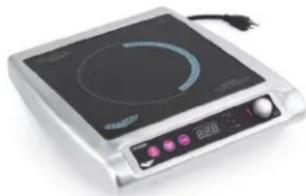
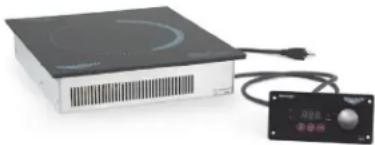
| ItemNo.Description | Plug | |
| 59500 | Mirage® CountertopInductionRange,US | NEMA5-15P |
| 59510 | Mirage® CountertopInductionRange,US,Canada | |
| 59650 | Mirage® CountertopInductionRange | Schuko |
| 59651UK | ||
| 59652China | ||
| 59655AU | ||
| 59501 | Mira \( \text{oge}^{\circledR } \) Drop-inInductionRange | NEMA5-15P |
| 59601Schuk | ||
| 59602UK | ||
| 59603China | ||
| 59605AU | ||
FUNCTIONANDPURPOSE
Thisequipmentisintendedforuseincommercialfoodservice operationsonly.Itsnotintendedforhousehold,industrialor laboratoryuse.Itsis intended to be used with induction-ready cookware.
COOKWARE REQUIREMENTS
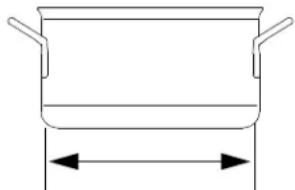
Compatible
-Drop-inRanges:Flatbase 43 / 4^ to12"(12.1to30.5cm)in diameter
- CountertopRanges: Flatbase 43% to 101% (12.1to26.0cm) indiameter
-Ferrousstainlesssteel,iron, castiron
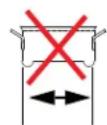
Incompatible
lessthan4
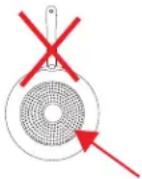
-Baseisnotflat
-Baseislessthan4% (12.1cm) indiameter
Pottery, glass, aluminum, bronzeorcoppercookware
-Metaldiskonbottomofpan
Note: Cookware within inferior construction material may not perform well. Cookware with larger based diameter can be used, however only the area of the cookware above the induction coil will heat. The more cookware extends past the coil, themore the overall performance will be reduced.
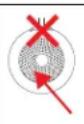
NOTICE:EquipmentDamageHazard
Notintendedforusewithaluminumpanswithametaldisk onthebottom. Underhighheat,themetaldiskwillseparate fromthepan.Thesepansmaydamageyourunitandvoid yourwarranty.
FCCSTATEMENT
ThisequipmenthasbeentestedandfoundtocomplywithPart18of FCCRules.Theselimitsaredesigntodoprovidereasonableprotection againstharmfulinterferenceinaresidentialinstallation.Thisequipment generates,usesandcanradiateradiofrequencyenergyand,ifnot installedandusedinaccordancewiththeinstructions,maycause harmfulinterferencetoradiocommunications.However,thereisno guaranteeethatinterferencewillnotoccurinparticularinstallation.If thisequipmentdoescauseharmfulinterferencetoradioortelevision reception,whichcanbedeterminedbyturningthequipmentoffand on,theuserisencouragedtotrytocorrecttheinterferencebyoneormoreofthefollowingmeasures:
-Reorientorrelocatethereceivingantenna
- Increase the separation between the equipment and receiver
Connectthequipmentintoanoutletonacircuitdifferentfromthat towhichthereceiverisconnected
- Consultthedealeroranexperiencedradio/TVtechnicianforhelp Toassurecontinuedcompliance,anychangesormodificationsnot expresslyapprovedbythepartyResponsibleforcompliancecouldvoid theuser'sauthoritytooperatethisequipment.
COUNTERTOPRANGEINSTALLATION
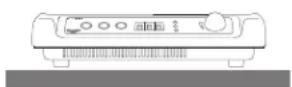
ClearanceandEnvironmentRequirements
NOTICE: This unit is not designed to be enclosed or built into any area. Sufficient airflow must be allowed around the unit. Blocking the air flow could cause the unit to overheat.
Rearotherangetoanysurroundingsurface: 4^ (10cm)
-Bottomoftherangeanysurroundingsurface: 1 / 2^ (2cm)
-Indooruseonly.
- Donotplatzehequipmentnornearheat-producingequipment.
Installation
- Placetheinductionrange/warmeronaflatstablesurface.
2.Plugthepowercordintoagroundedelectricaloutletsthatmatchthevoltageontheratinglabel.
NOTICE: This equipment requires dedicated circuit.
NOTICE:Usingavoltageotherthannameplateratedvoltage willcausedamagetotheunit.Incorrectvoltage, modificationtothepowercordorelectricalcomponents candamageunitandwillvoidthewararranty.
DROP-INSRANGEINSTALLATION
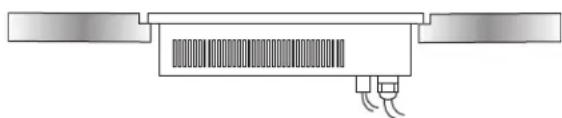
Beforeyoubegin
- Downloadthespecificationsheetforyourdrop-infrom Vollrath.com.Youwillneedtofertothisdocumentfor dimensions,clearance,ventingandpowerrequirements.
2.Verifytheproperelectricaloutletisavailableattheinstallationsite.
NOTICE: This equipment requires dedicated circuit.
NOTICE:DoNOTmodifythecordorplugonthedrop-in.Modifying anycomponentmaydamagethedrop-inorcauseinjury, andwillvoidthewarranty.Seethespecificationsheeton Vollrath.comforelectricalspecifications.
3.Knowthecountertopmanufacturer'srequirementsforpreparing and installingequipmentinto thecountertoppriortostartinginstallation.
PreparetheCountertopandCabinet
NOTICE:Refertothedrop-inspecificationsheetforcutout dimensions,airflowandventingrequirements,minimum clearedistancesandenvironmentrequirements.
NOTICE: Countertopmaterials requires specific preparation. Refer to the countertopmanufacturer for instructions regarding proper installation of equipment into the material.
NOTICE: Exposed woodor particleboardedgesmustbesealed with an appropriate waterproofingmaterial. Sealtheedge between the glass and the countertop with silicone or similar material. Failure to dosomy result in damage to the countertop.
1.Cutrequiredopeningsinthecountertopandcabinet.
2.Cleandebrisfromthecutoutarea(s).
3. Reinforcethecountertopsupportasneededperthecountertop manufacturer guidelinesandtheweightoftheequipment.
MounttheDrop-in
1.Chooseaflat,levelcountertopforthemountingsurface.
2.Measuretheareaforthecutout,includingthecountersinkarea.The unitisdesignedtobecountersunk.Thedepthofthesurfacearound thecutoutmustbereducedtoallowforthecountersink.Seethe specificationsheet.
MounttheControlBox
1.Measuretheareaforthecontrolboxcutout.
2. Apply sealant to the space between the control box and the mountingsurface to prevent moisture penetration.
3.Securethecontrolboxtohemountingsurface.
4.PlugtheUSBcablefromthecontrolboxtothebottomofth range.
FEATURESANDCONTROLS
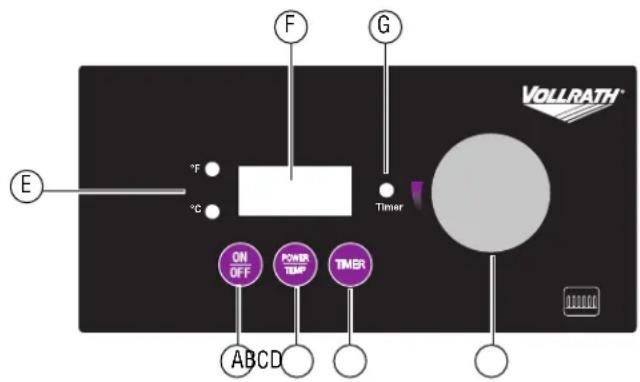
Drop-inRangeControlPanel
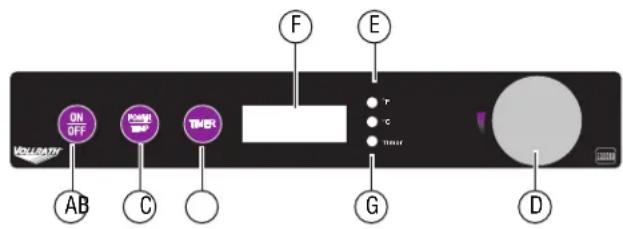
CountertopRangeControlPanel
AOn/Offbutton.
BPower/Tempbutton.Presstotoglebetweenpowerlevel(1-100) andtemperaturecontrol,andFahrenheitandCelsius.
CTimerbutton.Startsthetimer.
DControlknob.Selectsthemperature, powerlevelortime, dependingonthemode.
E°Fand°CLEDs. Illuminatetoindicatewhichtemperatureis displaying.
FDisplaypanel.Displaysthepowerlevel,temperature,timertime oranerrorcode.
GTimerLED. Illuminateswhentimerfunctionisoperating.
OPERATION


WARNING
Electrical Shock Hazard
Keepwaterandotherliquidsfromenteringtheinsideofthe equipment.Liquidinsidethequipmentcouldcauseanelectricalshock.


CAUTION
BurnHazard
Don't touch hot food, liquidor heating surfaces while equipment isheating or operating.
NOTICE: Donotpreheatemptycookware. Because of the speed and efficiency of the induction range, cookware can very quickly overheat and bedamaged.
NOTICE: Donotdropcookingutensilsorotherobjectsothe cookingsurface. Thestrong, non-poroussurface will break. Thewarrantydoesn'tcoverthistypeofabuse.
NOTICE: Don'tleaveanemptytanoperatingunit.
NOTICE: Dontheatsealedcansorcontainersastheymay explode.
TurnontheInductionRange
Pressandrelease.

AdjustthePowerLevelorTemperature Increaseordecrease
Rotatethecontrolknob.
- Clockwise increasesthenumbers.
- Counterclockwise decreasesesthenumbers.
Switchbetweenpowerandtemperaturemodes
Pressandrelease.

SwitchbetweenFahrenheitandCelsius
Pressandrelease.

CookFood
TheDISPLAYSHouldremainconstantduringoperation.Ifthedisplayis flashing,seetheTroubleshootingsectioninthismanual.
Removingcookwarefromthecookingsurfaceformorethanten minuteswillcausetheunittoautomaticallyturnoff.Removing cookwareforlessthantenminuteswillnotinterruptoperation.
UsetheTimer
1.Pressandrelease.TheIeLEDwillflash.
2.Rotatethecontrolknobtosethetimeinfullminutes(1-180).
3. Whenthetimecycleiscomplete,therangeturnoff.
4.Tocancelthetimer,press.Theatigewillreturntopowerortemperaturemode.
CLEANING
Tomaintaintheappearanceand increasethesservicelife, clean your inductionrangedaily.


WARNING
ElectricalShockHazard
Donotspraywatercleaningproducts.Liquidcouldcontact theelectricalcomponentsandcauseashortcircuitoran electricalshock.


CAUTION
BurnHazard
Allowequipmentntocoolbeforemovingorcleaning.
NOTICE: The cookingsurfacer remainshot even when the equipment is turned off.
NOTICE: Donotuseabrasivematerials, scratchingcleansorsor scouringpadstocleantheequipment. Thesecandamage thefinish.
- Pressandrelease.

2.Unplugthecordfromthewalloutlet.
3.Allowthequipmenttocool.
4.Wipethexteriorwithacleandampcloth.
- Thoroughly wipeoffanymildsoaporchemicalcleaners.
NOTICE:Residuecouldcorrodethesurfaceoftheunit.
TROUBLESHOOTING
| ProblemMightbeCausedByCourseofAction | ||
| Theunitturnedoffafter10minute(s). | Thereisnotapot/panontheinductionrange orthepot/panisnotinduction-readycookware.Theinductionrangeturnedoff.This is normal. | Makesurethrop/panisinductionready.SeetheFunctionand Purposesectionofthismanual. |
| Theunitison,butnoheating. | Thecookwaremaybetoosmallormaynot beinduction-ready. | Makesurethrop/panisinductionready.SeetheFunctionand Purposesectionofthismanual. |
| ThedigitaldisplayisflashingF2. | Theoverheat-protectionfeaturemayhave activated. | Removecookware.Letcookingsurfacecool. |
| Theunitsuddenlystoppedworking. | Theunitmaybetoooclosetoanexternalheat sourceorthearintakemayberestricted. | Relocatetheunitawayfromanyexternalheatsource.Clearany obstructionstotheairintake. |
SERVICEANDREPAIR
ServiceablepartsareavailableonVollrath.com.
To avoid serious injury or damage, never attempt to repair the unit or replace a damaged power cord yourself. Do not send units directly to TheVollrathCompanyLLC. Please contact Vollrath Technical Services for instructions.
When contacting Vollrath Technical Services, please be ready with the item number, model number (if applicable), serial number, and proof of purchaseshowingthedatetheunitwaspurchased.
WARRANTYSTATEMENTFORTHEVOLLRATHCO.L.L.C.
This warranty does not apply to products purchased for personal, family or household use, and The Vollrath Company LLC does not offer a written warrantytopurchasersforsuchuses.
The Vollrath Company LLC warrants the products it manufactures or distributes against defects in materials and workmanship as specifically described in our full warranty statement. In all cases, the warranty runs from the date of the end user's original purchase date found on the receipt. Any damages from improper use, abuse, modification or damage resulting from improper packaging during return shipment for warranty repair will not be covered under warranty.
Forcompletewarrantyinformation,productregistrationandnewproductannouncement,visitwww.vollrath.com.
TheVollrathCompany.L.L.C. Headquarters
1236North18thStreet
Sheboyan Wisconsin
53081,3201LSA
MainTel:800-624-2051or920-457-4851
MainEax:800-752-5620or920-459-6573
CanadaCustomerService:800-695-8560
TechServices.techserviceregps@vollrathco.com
www.vollrath.com
Puiadas
Ctra.deCastanyet.
132P.O.Box121
17430SantaColomadeFarmers
(Girona)-Spain
Tel. +34972843201
info@pujadas.es
VollrathofChina
VollrathShanghaiTrading
Limited
23A.TimeSquarePlaza500
ZhangYangRoad
Pudong.Shanghai200122
Tel:86-21-50589580
FONCTIONSETCOMMANDES
Panneauecommandedelaplaqueencastrable

1236North 18th Street
Sheboynan Wisconsin
53081,3201LSA
MainTel:800-624-2051or920-457-4851
MainEax:800-752-5620or920-459-6573
CanadaCustomerService:800-695-8560
TechServices.techserviceregps@vollrathco.com
www.vollrath.com
Puiadas
Ctra.deCast:
132P.O.Box121
17430SantaColomadeEarners
(Girona)-Spain
Tel. +34972843201
info@pujadas.es
VollrathofChina
VollrathShanghaiTrading
Limited
23A TimeSquarePlazal500
ZhangYangRoad
Pudong.Shanghai200122
Tel:86-21-50589580
Col. SantaMaria Tequepexpan
45600Tlaquequeque.Jalisco
Mexico
Tel:(52)333-133-6767
Tel: (52)333-133-6769
Fax:(52)333-133-6768
ABotondeencendido/apagado(On/Off).
- Mirage® CountertopandDrop-inInductionRanges
- SAFETYPRECAUTIONS
- WARNING
- CAUTION
- NOTICE:Noticeisusedtonoteinformationthatisimportantbutnot hazard-related.
- Toreduceriskofinjuryordamageototheequipment:
- FUNCTIONANDPURPOSE
- COOKWARE REQUIREMENTS
- NOTICE:EquipmentDamageHazard
- FCCSTATEMENT
- COUNTERTOPRANGEINSTALLATION
- ClearanceandEnvironmentRequirements
- Installation
- DROP-INSRANGEINSTALLATION
- Beforeyoubegin
- PreparetheCountertopandCabinet
- MounttheDrop-in
- MounttheControlBox
- FEATURESANDCONTROLS
- AOn/Offbutton.
- OPERATION
- TurnontheInductionRange
- AdjustthePowerLevelorTemperature Increaseordecrease
- Switchbetweenpowerandtemperaturemodes
- SwitchbetweenFahrenheitandCelsius
- CookFood
- UsetheTimer
- CLEANING
- NOTICE: The cookingsurfacer remainshot even when the equipment is turned off.
- NOTICE: Donotuseabrasivematerials, scratchingcleansorsor scouringpadstocleantheequipment. Thesecandamage thefinish.
- TROUBLESHOOTING
- SERVICEANDREPAIR
- WARRANTYSTATEMENTFORTHEVOLLRATHCO.L.L.C.
- FONCTIONSETCOMMANDES
- Panneauecommandedelaplaqueencastrable
- ABotondeencendido/apagado(On/Off).
Brand : Mirage
Model : 59652
Category : Cooker