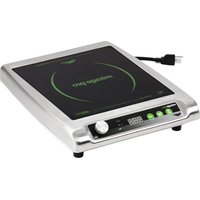
59500P - Cooker Mirage - Free user manual and instructions
Find the device manual for free 59500P Mirage in PDF.


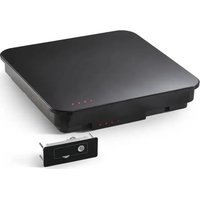
| Product type | Induction hot plate |
| Brand | Mirage |
| Model | 59500P |
| Cooking surface | Non-porous full vitroceramic |
| Compatible cookware diameter | 12.1 to 26 cm (4¾ to 10¼ in) |
| Compatible cookware types | Ferrous stainless steel, iron, cast iron, flat bottom |
| Incompatible cookware types | Earthenware, glass, aluminum, bronze, copper, stainless steel with metal disc on bottom |
| Main functions | Induction cooking, power and temperature adjustment, timer, digital display |
| Controls | Rotary knob, On/Off, Power/Temperature, Timer buttons |
| Power supply | Grounded outlet, dedicated circuit (rated voltage on label) |
| Safety | Overheat protection, automatic shut-off after 10 min without pan, pan detection |
| Cleaning | Wipe with a damp cloth, do not use abrasive products |
| Spare parts | Available at Vollrath.com |
| Warranty | Vollrath warranty for commercial use (see terms on Vollrath.com) |
| Intended use | Commercial restaurant only, not for domestic use |
| Installation condition | On a stable, flat surface, rear clearance 10 cm, bottom clearance 2 cm |
Frequently Asked Questions - 59500P Mirage
User questions about 59500P Mirage
0 question about this device. Answer the ones you know or ask your own.
Ask a new question about this device
Download the instructions for your Cooker in PDF format for free! Find your manual 59500P - Mirage and take your electronic device back in hand. On this page are published all the documents necessary for the use of your device. 59500P by Mirage.
USER MANUAL 59500P Mirage
Mirage® ProInductionRange
ThankyouforpurchasingthisVollrathequipment.Beforeoperatingthe equipment,readandfamiliarizeyourselfwiththefollowingoperating andsafetyinstructions.SAVETHESEINSTRUCTIONSFORFUTURE REFERENCE.Savetheoriginalboxandpackaging.Usethispackaging toshiptheequipmentifrepairsareneeded.
SAFETYPRECAUTIONS
Toensuresafeoperation, read the following statements and understand their meaning. This manual contains safety precautions which are explained below. Pleaseread carefully.

WARNING
Warningisusedtoindicatethepresenceofahazardthatwillorcan causeseverepersonalinjuryordeath.

CAUTION
Cautionisusedtoindicatethepresenceofahazardthatwillorcan causeminorormajorpersonalinjuryifthecautionisignored.
NOTICE: Notice is used to note information that is important but not hazard-related.
Toreduceriskofinjuryordamagetotheequipment:
- Plugonlyintogroundedelectricaloutletsthatmatchthevoltageon theratinglabel.
• This equipment requiresadedicated circuit.
- Donotuseextensioncords, powerstripsorsurgeprotectors with this equipment.
- Unplugthisequipmentfromthewalloutletwhennotinuse.
• Use this equipment only in a flat, level position.
- Toprotectagainstelectricalshockdonotimmersethecordorplug inwater.Keepthecordawayfromheatedsurface.Donotletthe cordhangovertheedgeoftableorcounter.
- Asaprecaution, persons using apacemakers should standback 12" (30cm) from an operating unit. Studies have shown that the induction element will not disrupt apacemaker.
- Keepallcreditcards, driverlicenses and other items with electromagnetic strip away from an operating unit. The unit's magnetic field will damage the information on these strips.
•Theheatingsurfaceismadeofastrong,non-porousmaterial. However,shoulditcrackorbreak,stopusingandimmediately unplugtheunit. Cleaningsolutionsandspillscouldpenetratethe brokencook-topandcreateariskofelectricalshock.
- Donotoperatethisequipmentwithadamagedcordorplugorifitis notfunctioningproperly.
- Donotoperateunattended.Closelysuperviseunitsoperatingin publicareasand/oraroundchildren.
- Donotplaceanyobjectsinsidetheairintakeorexhaustpanels.
- Donotattachanyaccessoryobjectstothisequipment.
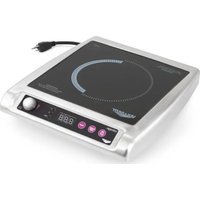
natural_image
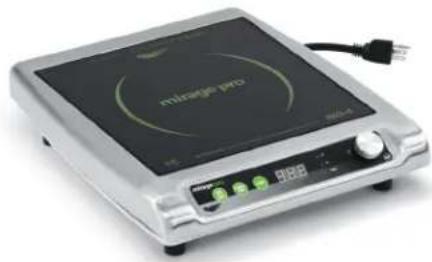
Exterior view of a silver portable induction cooktop appliance with control panel and power cord (no visible text or symbols)ModelDescription
59500PCountertopInductionRange,1800watts
59510PCountertopInductionRange,1440watts
FUNCTIONANDPURPOSE
This equipment is intended to cook food in commercial food service operations only. It is not intended for household, industrial or laboratory use. It is intended to be used with induction-ready cookware.
COOKWAREREQUIREMENTS
Compatible
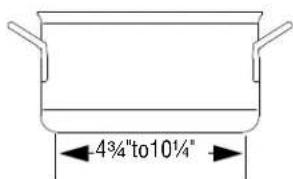
- Flatbase4 ^3/4 "to10 ^1/4 " (12.1to26cm)indiameter
•Ferrousstainlesssteel,iron, castiron
Incompatible
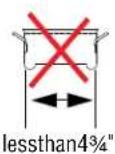
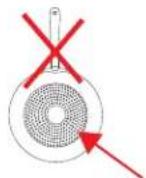
- Baseisnotflat
-Baseislessthan 4^3/4 " (12.1cm) indiameter
•Pottery, glass, aluminum, bronzeorcoppercookware
•Metaldiskonbottomofpan
Note: Cookware with inferior construction or material may not perform well. Cookware with larger based diameter can be used, however only the area of the cookware above the induction coil will heat. Themore cookware extends past the coil, them more overall performance will be reduced.
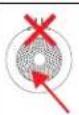
NOTICE:EquipmentDamageHazard
Notintendedforusewithaluminumpanswithametaldisk onthebottom.Underhighheat,themetaldiskwillseparate fromthepan.Thesepansmaydamageyourunitandvoid yourwarranty.
FCCSTATEMENT
This equipment has been tested and found to comply with Part 18 of FCC Rules. These limits are designed to provide reasonable protection against harmful interference in a residential installation. This equipment generates, uses and can radiate radio frequency energy and, if not installed and used in accordance with the instructions, may cause harmful interference or radiocommunications. However, there is no guarantee that interference will not occur in particular installation. If this equipment does cause harmful interference or radio television reception, which can be determined by turning the equipment off and on, the user is encouraged to try to correct the interference by one or more of the following measures:
•Reorientorrelocatethereceivingantenna
- Increase these separation between the equipment and receiver
- Connecttheequipmentintoanoutletonacircuitdifferentfromthat towhichthereceiverisconnected
- Consultthedealeroranexperiencedradio/TVtechnicianforhelp Toassurecontinuedcompliance,anychangesormodificationsnot expresslyapprovedbythepartyResponsibleforcompliancecouldvoid theuser'sauthoritytooperatethisequipment.
INSTALLATION
ClearanceandEnvironmentRequirements
NOTICE: This unit is not designed to be enclosed or built into any area. Sufficient airflow must be allowed around the unit. Blocking the airflow could cause the unit to overheat.
•Rearoftherangetoanysurroundingsurface:4"(10cm)
- Bottomotherangetoanysurroundingsurface: 12 " ( 2 c m )
- Indooruseonly.
- Donotplacetheequipmentonornearheat-producingequipment.
Installation
NOTICE: This equipment requiresadedicated circuit.
NOTICE: Usingavoltageotherthanthenameplateratedvoltagewill causedamagetotheunit. Incorrect voltage, modification to the power cordorelectrical componentscandamage unit and will void the warranty
- Placetheinductionrange/warmeronaflatstablesurface.
- Plug the power cord into a grounded electrical outlet that match the voltage on the rating label.
FEATURESANDCONTROLS
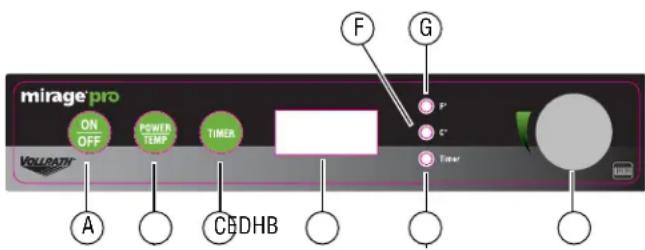
AOn/OffButton.Presstoturnontherange.
BPower/TempButton.PresstotogglebetweenPowerand Temperaturecontrol,andFahrenheitandCelsius.
CTimerButton.Presstosetthetimer.
DDisplayPanel.Displaysthepowerlevel,settemperature,ortime dependingupontheselectedmode.
ETimerLEDLight. Illuminateswhentimerfunctionisoperating.
F°CLEDLight. Illuminateswhenthetemperatureinbeing displayedindegreesCentigrade.
G°FLEDLight. Illuminateswhenthetemperatureinbeing displayedindegreesFahrenheit.
HControlKnob. Rotatetosettemperature, powerlevelortime,
OPERATION


WARNING
ElectricalShockHazard
Keepwaterandotherliquidsfromenteringtheinsideofthe equipment. Liquidinsidethequipmentcouldcausean electricalshock.


CAUTION
BurnHazard
Donottouchhotfood, liquidorheatingsurfaceswhile equipmentisheatingoroperating.
NOTICE: Donotpreheatemptycookware. Because of the speed and efficiency of the induction range, cookware can very quickly overheat and bedamaged.
NOTICE: Donotdropcookingutensilsorotherobjectsontothe cookingsurface. Thestrong, non-porous surface will break. Thewarranty does not cover this type of abuse.
NOTICE: Donotleaveanemptypanonoperatingunit.
NOTICE: Donotheatsealed cansorcontainers, they may explode.
TurnontheInductionRange
Pressandrelease. Thedisplaypanelwillshowapowerlevel. Thisindicatestheunitisheating.
AdjustPowerorTemperature
ToSwitchBetweenPowerandTemperatureModes
Pressandrelease.

ToSwitchBetweenFahrenheitandCelsius
Pressandreleasetwotimes.
ToAdjustthePowerLevelorTemperature
- PressandreleasetoselectPowerorTemperaturemode.
- Rotatethe control knob to increase or decrease the power or temperature.
CookFood
Thedisplaywindowshouldremainconstantduringoperation.Ifthe displayisflashingorshowinganerrormessage,seethe Troubleshootingsectioninthismanual.
Removingcookwarefromthecookingsurfaceformorethanten minuteswillcausetheunittoautomaticallyturnoff.Removing cookwareforlessthantenminuteswillnotinterruptoperation.
UsetheTimer
- Pressandrelease. ThetimerLEDwillilluminate.
- Rotatethe control knob to set the timer in full-minute increments.
-
Whenthetimercycleiscomplete,therangewillbeepthreetimes andthenturnoff.
-
Tocancelthetimer, press. Therangewillreturntopoweror temperaturemode.
OverheatProtection
This induction range is equipped with an over-heat protection feature. If the temperature of the cookings surface becomes too hot, the unit will turn off. The display will flash "F5" or "F6" to indicate the equipment is in "over-heating protection" mode. After the equipment has cooled, press the ON/OFF button. If display does not show "F5" or "F6", the equipment has cooled and it is ready to resume cooking.
CLEANING
Tomaintaintheappearanceandincreasetheservicelife,cleanyour inductionrangedaily.


WARNING
ElectricalShockHazard
Keepwaterandotherliquidsfromenteringtheinsideofthe equipment. Liquidinsidetheequipmentcouldcausean electricalshock.


CAUTION
BurnHazard
Donottouchhotfood, liquidorheatingsurfaceswhile equipmentisheatingoroperating.
NOTICE: The cookingsurfaceremainshotevenwhenthisequipment isturnedoff.
NOTICE: Donotuseabrasivematerials, scratchingcleansersor scouringpadtocleantheequipment. Thesecandamage thefinish.
- Pressandrelease.

- Unplugthecordfromthewalloutlet.
- Allow the equipment to cool.
- Wipethe exterior with a cleandamp cloth.
- Thoroughly wipe off an mild soap or chemical cleaners.
NOTICE: Residue could corrode the surface of the unit.
TROUBLESHOOTING
| ProblemMightbeCausedByCourseofAction | ||
| Theunitturnedoffafter10minutes. | Thereisnotapot/panontheinductionrange orthepot/panisnotinduction-ready cookware.Theinductionrangeturnedoff.Thisisnormal. | Verifythepot/panisinductionready.SeetheFUNCTIONand PURPOSESectionofthismanual. |
| Theunitison,butnotheating. | Thecookwaremaybetoosmallormaynot beinduction-ready. | Verifythepot/panisinductionready.SeetheFUNCTIONand PURPOSEofthismanual. |
| Thedigitaldisplaylightsare flashing. | Theoverheat-protectionfeaturemayhave activated. | Removecookware.Letcookingsurfacecool. |
| Theunitsuddenlystoppedworking. | Theunitmaybetooclosetoanexternalheat sourceortheairintakemayberestricted. | Relocatetheunitawayfromanyexternalheatsource.Clearany obstructionstotheairintake. |
| ADDPAN | Apot/panhasnotbeendetectedonthe inductionrange. | Placeinduction-readycookwareontheheatingsurface. |
| BADPAN,F9 | Thecookwaremaybetoosmallormaynot beinduction-ready. | Verifythepot/panisinductionready.SeetheFUNCTIONand PURPOSEofthismanual. |
| TOOHOT,F2 | Theoverheat-protectionfeaturemayhave activated. | Removecookware.Letcookingsurfacecool.Clearany obstructionstotheairintake. |
| BADFLO,F8 | Theunitmaybetooclosetoanexternalheat sourceortheairintakemayberestricted. | Relocatetheunitawayfromanyexternalheatsource.Clearany obstructionstotheairintake. |
| HTSNC,F4 | Theoverheat-protectionfeaturemayhave activated. | Removecookware.Letcookingsurfacecool.Clearany obstructionstotheairintake. |
| HTTH,F5 | Theoverheat-protectionfeaturemayhave activated. | Removecookware.Letcookingsurfacecool.Clearany obstructionstotheairintake. |
| HOT | Nodefect.Indicatesthecookingsurfaceis hotafteraheatingcyclehascompleted. | Restartwithpanonsurface.Allowtimeforthecookingsurface tocool. |
SERVICEANDREPAIR
ServiceablepartsareavailableonVollrath.com.
To avoid serious injury or damage, never attempt to repair the unit or replace a damaged power cord yourself. Do not send units directly to TheVollrathCompanyLLC.PleasecontactVollrathTechnicalServicesforinstructions.
When contacting Vollrath Technical Services, please be ready with the item number, model number (if applicable), serial number, and proof of purchaseshowingthedatetheunitwaspurchased.
WARRANTYSTATEMENTFORTHEVOLLRATHCO.L.L.C.
This warranty does not apply to products purchased for personal, family or household use, and The Vollrath Company LLC does not offer a written warranty top purchasersforsuchuses.
The Vollrath Company LLC warrants the products it manufactures or distributes against defects in materials and workmanship as specifically described in our full warranty statement. In all cases, the warranty runs from the date of the end user's original purchase date found on the receipt. Any damages from improper use, abuse, modification or damage resulting from improper packaging during return shipment for warranty repair will not be recovered under warranty.
Forcompletewarrantyinformation,productregistrationandnewproductannouncement,visitwww.vollrath.com.

www.vollrath.com
The VollrathCompany, L.L.C.
1236North18thStreet
Sheboygan, WI53081-3201U.S.A.
MainTel:800.624.2051or920.457.4851
MainFax:800.752.5620or920.459.6573
CustomerService:800.628.0830
CanadaCustomerService:800.695.8560
TechnicalServices
techservicereps@vollrathco.com
InductionProducts:800.825.6036
CountertopWarmingProducts:800.354.1970
Toasters:800-309-2250
AllOtherProducts:800.628.0832
PlaqueàinductionMirage
® Pro
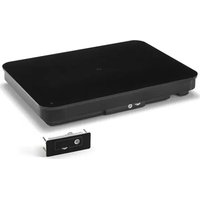
natural_image
Exterior view of a metallic portable appliance with a black dome and control panel (no visible text or symbols)ModèleDescription
| 59500PPlaqueaînductiondecomptoir,1800watts |
| 59510PPlaqueàinductiondecomptoir,1440watts |
FONCTIONETOBJET
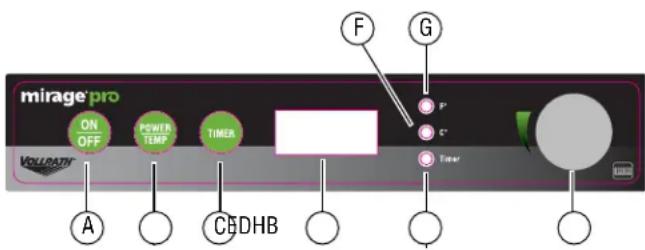
FONCTIONSETCOMMANDES
Standard:800.624.2051ou920.457.4851
Télécopieur:800.752.5620ou920.459.6573
Serviceclientèle:800.628.0830
ServiceclientèleCanada:800.695.8560
Servicestechniques
techservicereps@vollrathco.com
Grillespains:800.309.2250
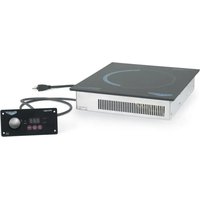
natural_image
Exterior view of a vintage portable induction cooktop (no visible text or symbols on the appliance body)Núm.art.Descripción
- Mirage® ProInductionRange
- SAFETYPRECAUTIONS
- WARNING
- CAUTION
- NOTICE: Notice is used to note information that is important but not hazard-related.
- Toreduceriskofinjuryordamagetotheequipment:
- ModelDescription
- FUNCTIONANDPURPOSE
- COOKWAREREQUIREMENTS
- NOTICE:EquipmentDamageHazard
- FCCSTATEMENT
- INSTALLATION
- ClearanceandEnvironmentRequirements
- FEATURESANDCONTROLS
- OPERATION
- TurnontheInductionRange
- AdjustPowerorTemperature
- ToSwitchBetweenFahrenheitandCelsius
- ToAdjustthePowerLevelorTemperature
- CookFood
- UsetheTimer
- OverheatProtection
- CLEANING
- SERVICEANDREPAIR
- WARRANTYSTATEMENTFORTHEVOLLRATHCO.L.L.C.
- PlaqueàinductionMirage
- ® Pro
- FONCTIONETOBJET
- FONCTIONSETCOMMANDES
- Núm.art.Descripción
Brand : Mirage
Model : 59500P
Category : Cooker