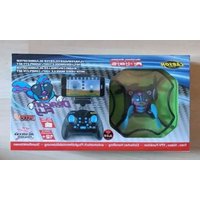
X4 Quadcopter Dragon Fly - Drone Carson - Free user manual and instructions
Find the device manual for free X4 Quadcopter Dragon Fly Carson in PDF.


| Product type | Quadcopter drone |
| Brand | Carson |
| Model | X4 Quadcopter Dragon Fly |
| Quadcopter power supply | Rechargeable lithium battery (LiPo, non-removable) |
| Remote control power supply | 4 AA batteries (not included) |
| Charging time | Approximately 60 minutes (estimated) |
| Flight time | Approximately 7 minutes (estimated) |
| Maximum range | 30 meters (recommended safety zone) |
| Main functions | Hover, rotation, takeoff/landing, direction controls |
| Recommended age | From 8 years (adult supervision required) |
| Maintenance and cleaning | Clean with a dry cloth; check propeller condition before each flight |
| Spare parts and repairability | Available at www.carson-modelsport.com |
| Warranty | 24 months from purchase date (see conditions) |
| Standards and certifications | Compliant with directive 2014/53/EU |
| Weight (quadcopter) | Approximately 80 g (estimated) |
| Dimensions (quadcopter) | Approximately 20 x 20 x 5 cm (estimated) |
Frequently Asked Questions - X4 Quadcopter Dragon Fly Carson
User questions about X4 Quadcopter Dragon Fly Carson
0 question about this device. Answer the ones you know or ask your own.
Ask a new question about this device
Download the instructions for your Drone in PDF format for free! Find your manual X4 Quadcopter Dragon Fly - Carson and take your electronic device back in hand. On this page are published all the documents necessary for the use of your device. X4 Quadcopter Dragon Fly by Carson.
USER MANUAL X4 Quadcopter Dragon Fly Carson
Before using your product for the first time or ordering any spare parts, check that your manual is fully up-to-date. This manual contains the technical appendices, important instructions for correct start-up and use and product information, all fully up-to-
date before going to press. The contents of this manual and the technical data of the product can change without prior notice. For the latest version of your manual, see: www.carson-modelsport.com
FR // Remarque importante
natural_image
Simple line drawing of a USB cable and three oval-shaped objects (no text or symbols)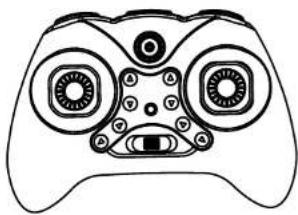
natural_image
Line drawing of a game controller with multiple round exclamationers and a stylized face (no text or symbols)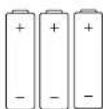

natural_image
Diagram of a game controller with directional arrows indicating movement or force (no text or symbols)natural_image
Line drawing of a stylized face with eyes, nose, mouth, and mouthparts (no text or symbols)natural_image
Line drawing of a game controller head with multiple round buttons and a square button (no text or symbols)natural_image
Line drawing of a stylized game controller head with large eyes and control buttons (no text or symbols)natural_image
Front view of a game controller head with visible buttons and a black arrow pointing to the right side (no text or symbols)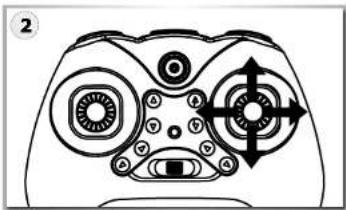
natural_image
Line drawing of a game controller with multiple buttons and a central eye (no text or symbols)HEADLESS-FUNKTION
natural_image
Line drawing of a stylized game controller head with no text or symbols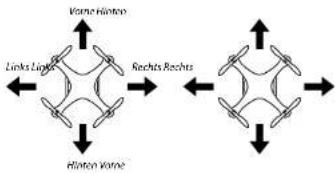
flowchart
graph TD
    A["Varme"] --> B["Linkes Luggage"]
    B --> C["Rechts Rechts"]
    C --> D["Erlinton Varme"]
    D --> A
Headless Mode aktivieren:
natural_image
Pure mechanical diagram showing a component with a downward arrow and circular feature (no text or symbols)natural_image
Pure mechanical diagram showing a lever mechanism with no text or symbolsnatural_image
Grayscale photo of a snowy landscape with circular overlays and UI icons (no readable text or symbols)natural_image
Cartoon illustration of a car on a road with buildings and a cross symbol (no text or symbols present)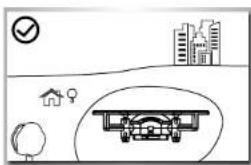
natural_image
Illustration of an airplane flying under storm clouds with lightning bolts (no text or symbols)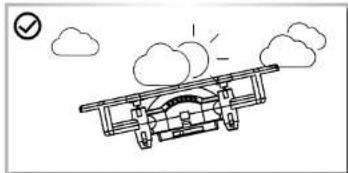
natural_image
Simple line drawing of an airplane flying with clouds and a checkmark (no text or symbols)We congratulate you for buying this CARSON product, which is designed and manufactured using state of the art technology. According to our policy of continued development and product improvement we reserve the right to make changes in specifications regarding equipment, material and design at any time without notice.
Limited Warranty
This product is warranted by CARSON against manufacturing defects in materials and workmanship under normal use for 24 months from the date of purchase from authorised franchisees and dealers. In the event of a product defect during the warranty period, return the product along with your receipt as proof of purchase to any CARSON store.
CARSON will, at its option, unless otherwise provided by law: (a) Correct the defect by repairing the product without charging for parts and labour:
(b) Replace the product with one of the same or similar design. All replacement parts and products, and products on which a refund is made, become the property of CARSON. New or reconditioned parts and products may be used in the performance of warranty services.
Repaired or replaced parts and products are warranted for the remainder of the original warranty period. You will be charged for repair or replacement of the product made after the expiration of the warranty period.
Declaration of conformity
TAMIYA-CARSON Modellbau GmbH & Co. KG hereby declares that the radio equipment type 500S07137 conforms to Directive 2014/53/EU. The complete text for the EU declaration of conformity is available at the following Internet address.
Before use, read this manual carefully!
Specifications or designs of the actual product may vary from those shown in this manual or on the box.
The manual forms part of this product. Should you ignore the operating and safety instructions, the warranty will be void.
Keep this guide for future reference.
The Warranty does not cover:
- Damage or failure caused by or attributable to acts of God, abuse, accident, misuse, improper or abnormal usage, failure to follow instructions, improper installation or maintenance, alteration,
lightning or other incidence of excess voltage or current:
• Damage caused by losing control of your model; - Any repairs other than those provided by a CARSON authorised service facility;
- Consumables such as fuses or batteries:
- Cosmetic damage;
• Transportation, shipping or insurance costs; or - Costs of product removal, installation, set-up service adjustment or reinstallation;
- Any changes to plugs and cables, open the housing and damage the sticker.
This warranty gives you specific legal rights, and you may also have other rights which may vary according to the country of purchase.

The explanation of the symbol on the product, packaging or instructions: Electronic devices are valuable products and should not be disposed of with the household waste when they reach the end of their service life! Help us to protect the environment and respect our resources by delivering this appliance to the relevant recycling point.
We wish you a lots of fun using your CARSON product!
CONTENTS
Preface 16
Technical data 17
Included Items 17
Safety Precautions 18
Safety Precautions Lithium batteries....19
The quadcopter with more functions....20
Installation of rotor blades 20
Your 4-channel RC transmitter....21
Inserting batteries....21
Charging the TIPo flight battery....21
Getting the quadcopter ready for take-off....22
Lift-off and Landing function....22
Emergency stop function 22
Contrailing the model 23
Trim function 24
Reset function....24
Beginner / Pro mode 24
Flips and loops 25
Headless-function 25
Foto/Video function....28/27
Trouble shooting 28
TECHNICAL DATA
- Model with 2.4 GHz channel radio control (maximum
transmitter power 10 mW
• Transmitter operating voltage: 3/6 4.5V - Max. range: 15 m
- Flying time 5 min
-
Camera 480p resolution
-
Function:
- Flight functions
- Stunt functions
2 lever power function USB charging function - USB charging function on the transmitter
- Intelligent cycling electronics
- Camera/video function
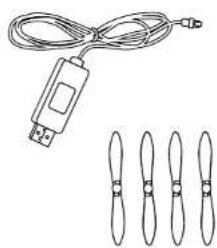
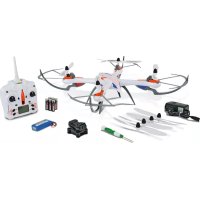
INCLUDED ITEMS
• 2.4-GHz, 4-channel, hand
transmitter
- LiPo charger unit (USB)
- Spare rotor blades
- Batteries for transmitter
natural_image
Pure electrical circuit lines without any symbols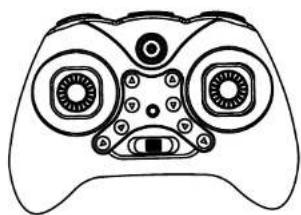
natural_image
Line drawing of a classic game controller with no text or symbols
Scope of delivery includes a rechargeable LiPo battery (lithium-polymer). This battery is recyclable. Scope of delivery includes alkaline batteries. These batteries are not rechargeable. Do not dispose of used batteries/rechargeable batteries in the domestic waste. Dispose of the batteries at the provided collection points in accordance with the applicable regulations.
SAFETY PRECAUTIONS (PLEASE KEEP!)
- WARNING! Not suitable for children under 8 years. Please keep these instructions for possible correspondence. Right reserved to change colours and make technical changes. Help from adults is required to remove the transport protection.
- Before first use: Please read the user information together with your child.
- Operation and safe handling must be explained (preferably with graphical displays).
- Flying the quadcopter requires practice, and children must be taught under the supervision of adults.
- Note for adult supervisor: Check whether the toy has been assembled in accordance with the instructions. Assembly must be carried out under the supervision of an adult.
- Hands, hair and loose clothing must be kept away from the propeller (rotor).
- Do not change or modify anything on the quadcopter!
- In order to ensure that the toy is used safely, the room in which the quadcopter is used must be of a sufficient size. The room must be free of obstructions.
- This toy is only intended for use in private areas (house and garden). (And in windless conditions!!!)
- Caution! The quadcopter should not be started if persons, animals or obstructions are present in the flying area of the helicopter. (30m)
- Caution: Risk of eye injuries! Do not fly the quadcopter in the vicinity of your face in order to avoid injuries.
-
Never pick up the quadcopter while the propellers are still turning.
-
To avoid unexpected operation, the batteries must be removed from the toy when it is not being used.
- First switch on the transmitter, then the quadcopter to avoid unexpected operation. When you are switching off, switch the quadcopter off first, then the transmitter.
- Always use the stipulated types of battery! Insert the batteries so that the positive and negative poles are in the correct position! Do not throw used batteries in the domestic rubbish - take them to a collection point or dispose of them at a hazardous waste depot. Remove empty batteries from the quadcopter. Do not attempt to charge non-rechargeable batteries. Rechargeable batteries must be removed from the quadcopter before charging. Rechargeable batteries must only be recharged under the supervision of an adult. Do not use different types of battery, and do not insert new and used batteries at the same time. Do not short-circuit the crosspieces. Do not mix old and new batteries. Do not mix alkaline, standard (carbon zinc) and rechargeable batteries.
- Please do not insert any cables into plug-in socket connections.
- We do not accept reliability for data loss, damage to software or other damage to computers or accessories caused by charging the battery.
- Check charger for damage at regular intervals. In the event of damage, the charger may not be used until it has been properly repaired. Only carry out charging in dry rooms, protect device from moisture.
SAFETY PRECAUTIONS LITHIUM BATTERIES
1. General
Lithium batteries (accumulators) are energy storage devices with a high energy density and can present risks. For this reason, particular care is needed when charging, discharging, storing and handling.
Read these instructions very carefully before first using the battery. Do not fail to take note of the warning notices and instructions for use.
Misuse can lead to risks such as explosion, overheating or fire. Failure to observe the instructions for use leads to early failure and other defects.
The instructions should therefore be kept in a safe place and it is essential that they are handed over to the second user if the batteries are passed on.
2. Warning notices
- Avoid short-circuits. A short-circuit may well destroy the product. Cables and connections must be well insulated
- It is essential when connecting the battery to ensure that the polarity is correct.
- Original plug connectors and cables may not be cut off or changed - if need be, use an adapter cable.
- Do not expose the battery to excessive heat or cold or to direct sunlight. Do not throw in the fire. Do not place the battery in contact with water or other liquids.
- Charge the battery only with charging units intended for the purpose and always use the balancer connection. It is only by using the balancer connection that optimum charging can be ensured. If this connection is not used, charging is subject to the risks mentioned above. Before charging, always first allow the battery to cool to ambient temperature. Never charge while hot.
- When charging, place the battery on a non-flammable, heat-resistant support. There should be no flammable or readily ignited objects in the vicinity of the battery.
- During charging or operation, never leave the battery unsupervised.
- Do not fail to keep to the recommended charge/discharge current.
- The battery casing must not be damaged. It is essential to avoid damage by sharp objects such as knives or the like, from dropping, impact, bending etc. Damaged batteries may no longer be used.
- Batteries are not toys. They should be kept away from children.
3. Charging instructions
Lithium batteries are charged according to the CC-CV procedure. CC stands for "constant current", which is applied during the first
phase of charging. Once the battery reaches the maximum voltage configured in the charger, it switches to CV (constant voltage) for the second phase of charging. The battery voltage no longer increases. The charging current now falls continuously until the battery is fully charged. The maximum charging current for the battery is 1°C (C=nominal capacity of the battery, e.g. for a battery with a nominal capacity of 2700 mA, the maximum charging current for the battery is 2700 mA (2.7 A)). Never charge several batteries together from a single charger. Differing states of charge and capacities can lead to overcharging and destruction.
4. Storage instructions
Lithium batteries should be stored charged to 20-50% of their capacity and at a temperature of 15-18 °C. If the cell voltage falls below 3 V, they should be recharged. Deep discharge and storage when discharged (call voltage <3 V) will render the battery unusable.
5. General terms of guarantee
There is a legal guarantee for production and material faults as applicable at the time of dispatch. No liability is accepted for normal wear and tear. This guarantee does not apply for defects attributable to improper use, inadequate maintenance, third-party interference or mechanical damage. This applies, in particular, to used batteries and batteries clearly showing signs of use.
Damage and loss of performance due to improper handling and/or overload are not product faults. Batteries are consumables and subject to a certain ageing. This is influenced by factors such as the charge/discharge currents, the charging procedure, the operating and storage temperatures and the state of charge during storage. The ageing shows itself in, among other things, an irreversible loss of capacity. In the model field, where batteries are frequently used to supply motors, very high currents can flow from time to time.
6. Exclusion of liability
Since we are unable to have any control over charge/discharge, handling, compliance with assembly and operating instructions, battery replacement and its care and maintenance, TAMIYA / CARSON can accept no liability for loss, damage or costs incurred.
Any claim for damages that may result from operation, failure or faulty operation or that is in any way related thereto will therefore be refused. We accept no liability for personal injury or material damage and their consequences that arise from our delivery.
7.Disposal instructions
Batteries are hazardous waste. Damaged or unusable cells must be disposed of in the correct manner.
No liability for printing errors, we reserve the right to make changes!


THE QUADCOPTER WITH MORE FUNCTIONS
Control your quadcopter with all the functions
Features:
• Stable flight characteristics
• Fully assembled, ready to fly
- With 2.4 GHz RC system
• Includes gyro (stabilisation function)
• Includes LiPo battery and LiPo charger (USB)
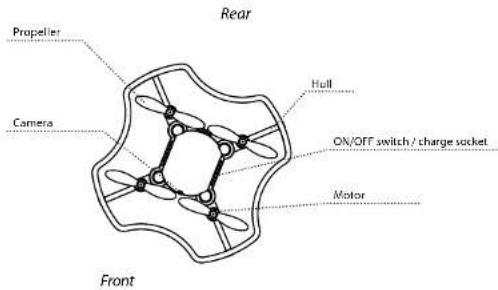
INSTALLATION OF ROTOR BLADES
- Remove protective cage
- Change rotor blades (take note the exact A/B designation!)
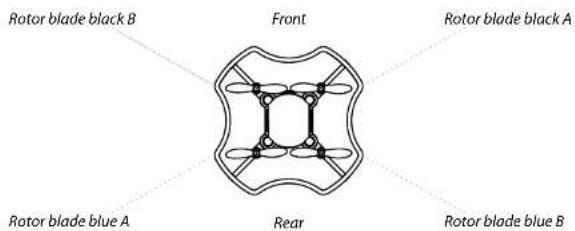
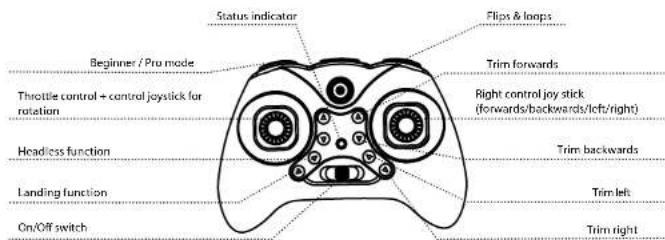
YOUR 4-CHANNEL RC TRANSMITTER
Explanation of transmitter (max, transmitter power: 10 mW)
INSERTING BATTERIES
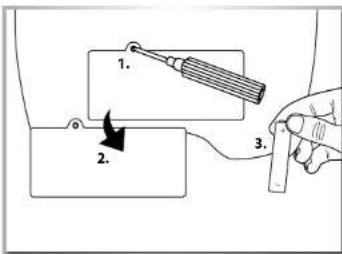
Attention
- Never mix used and new batteries.
- Never use batteries of different types together.
- Do not attempt to charge non-rechargeable batteries.
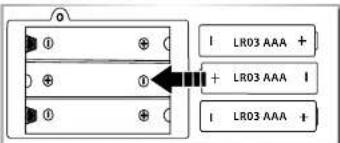
Insert fresh AA Mignon batteries with the correct polarity in the battery compartment.
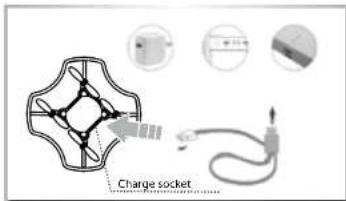
CHARGING THE LIPO FLIGHT BATTERY
The quadcopter is fitted with a LIPo battery.
- The supplied LiPo battery is stored in the body of the quad-copter.
- Connect the battery of the quadcopter to the connector of the USB charger. The indicator light on the USB plug is glowing during the charging process. The light goes out again once charging has finished.
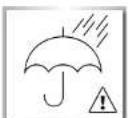
Do not leave the copter or the charger unattended during the charging process and always disconnect the battery from the charger after completion! While charging, place the battery and charger on a fireproof basel
- Charging time is about 45-60 min.


GETTING THE QUADCOPTER READY FOR TAKE-OFF
Now we're good to go! But before lift off, make sure that you have read this manual through completely.
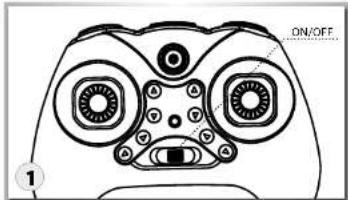
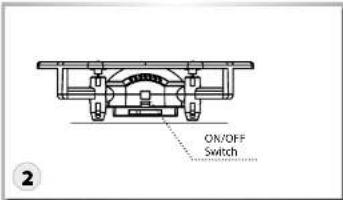
Switch on the transmitter. Switch on the copter and place it on a flat surface. (LED flashes)
natural_image
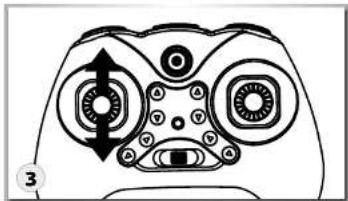
Top-down schematic of a game controller with directional arrows and labeled ports (no text or symbols beyond basic diagram)Now move the throttle lever completely up and then back down.
The quadcopter is now ready to launch. (LED are on continuously)
LIFT-OFF AND LANDING FUNCTION / EMERGENCY STOP FUNCTION
natural_image
Line drawing of a stylized device face with no text or symbols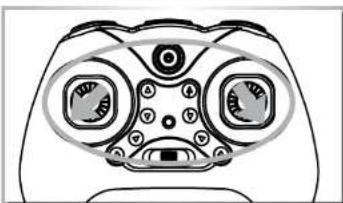
natural_image
Line drawing of a stylized robot face with large eyes and a mouth (no text or symbols)- The model copter is activated by pressing the lift-off/landing button (rotor blades start to turn)
- The quadcopter is ready to lift off and is operated using the control lever
- Press the lift-off/landing button - automatic landing (the copter lands on its own with no help)
Should a hazardous situation arise during the flight, please activate the "emergency stop function" immediately (Fig.). As illustrated, move the left control lever towards the lower left-hand corner and the right control lever towards the lower right-hand corner.
All rotor blades will stop immediately!
To avoid losing control: ALWAYS move the control lever S L O W L YI The throttle control increases/reduces your quadcopter's flying height.
Automatic hovering
- bring the model copter to the required altitude
- flight altitude will be maintained without any additional remote commands
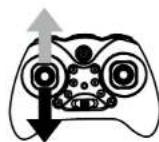
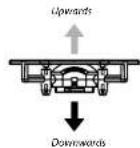
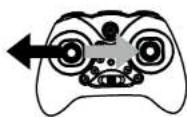
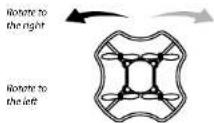
Use the control lever to rotate the quadcopter to the left/right.
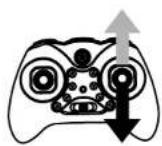
Forwards
Backwards
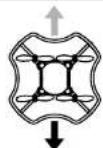
The control lever for nick moves your quadcopter forwards/backwards.
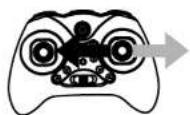
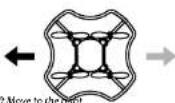
CAUTION: The control levers behave inversely when the model is flying towards you! The control lever for roll moves your quadcopter "sideways" to the left/right.
GB // 22 23 // GB


TRIM FUNCTION
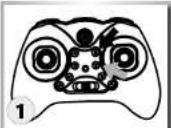
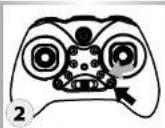
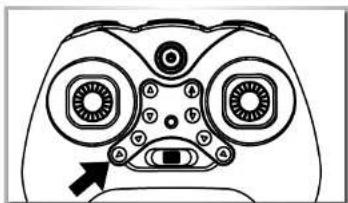
If, while flying, the model tends to drift in a particular direction, this can be corrected with the trim function.
Trim function (see fig.):
-
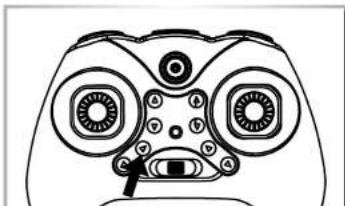
Use the two buttons (trim forward/backward) on the remote control for this function
-
Use the two buttons (trim left/right) on the remote control for this for this function
RESET FUNCTION
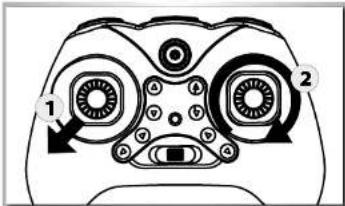
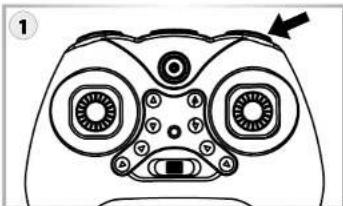
If, after a crash, the model will no longer fly, even after calibration, it must be fully reset.
- Place the model on a level surface. Move the left control lever fully towards the lower left hand corner. (Fig.)
- Move the control lever in a circle (Quadcopter LED flashes)
- Calibration is completed (Quadcopter LED is on continuously)
BEGINNER / PRO MODE
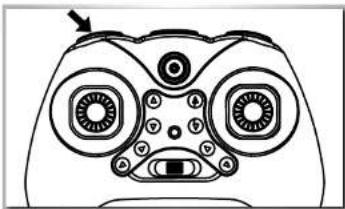
natural_image
Line drawing of a stylized face mask with large eyes and a small mouth, no text or symbols presentThis function allows you to choose between two speed levels. This changes the model's agility.
Level 1 (xspecies) - beginner
Level 2 (2x peep) - advanced
FLIPS AND LOOPS
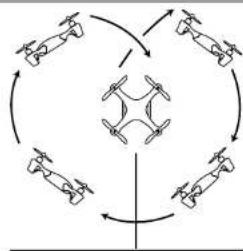
When you have familiarised yourself with the basic flight manoeuvres and are moving safely in the air, you can then check out the aerobatic characteristics of the X4 quadcopter. Manoeuvre the model at a height of at least 3 m. Press the aerobatics button (see fig.). Now move the right control stick (forwards, backwards, right or left). The model performs a loop in the given direction.
flowchart
graph TD
    A["Drone 1"] --> B["Drone 2"]
    B --> C["Drone 3"]
    C --> D["Drone 4"]
    D --> E["Drone 5"]
    E --> F["Drone 6"]
    F --> A
    style A fill:#f9f,stroke:#333
    style B fill:#f9f,stroke:#333
    style C fill:#f9f,stroke:#333
    style D fill:#f9f,stroke:#333
    style E fill:#f9f,stroke:#333
    style F fill:#f9f,stroke:#333
natural_image
Line drawing of a stylized game controller head with no text or symbols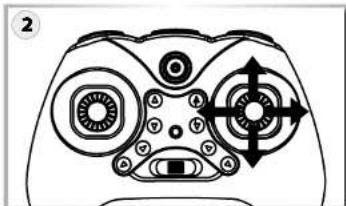
natural_image
Diagram of a game controller head with multiple circular buttons and directional arrows (no text or symbols)HEADLESS-FUNCTION
The headless function allows for a more simplified control of the Quadcopter, where all control commands use the position of the pilot as their reference point. Therefore, the Quadcopter always operates from the pilot's perspective, i.e. left and right cannot be swapped around when the model turns.
This simplification makes the control much easier for beginners.
natural_image
Line drawing of a stylized face mask with large eyes and decorative patterns (no text or symbols)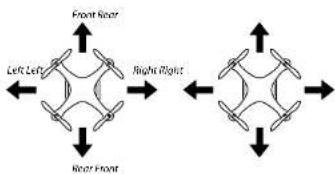
flowchart
graph TD
    A["Left Left"] --> B["Right Right"]
    B --> C["Right Front"]
    C --> D["Left Right"]
    style A fill:#f9f,stroke:#333
    style B fill:#f9f,stroke:#333
    style C fill:#f9f,stroke:#333
    style D fill:#f9f,stroke:#333
activateHeadless Mode
- After switch on, the standard control function is always activated.
- Press the headless button / LEDs on quadcopter flash
• Headless function is activated
De-activateHeadless Mode:
- Press headless button again / LEDs are continuously lit
- Headless function is de-activated


FOTO / VIDEO FUNCTION
Installation the Smartphone:
Attention!!!
Always ensure that your mobile phone is securely placed in the holder!
We shall assume no liability for any damage to your mobile phone as the result of incorrect assembly!!!
Use is at your own risk!
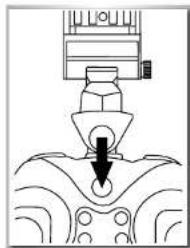
natural_image
Pure mechanical diagram showing a tool interacting with a component, no text or symbols presentPlace the holder on the transmitter..
natural_image
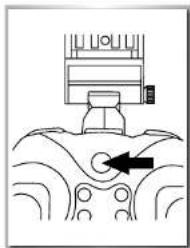
Pure mechanical diagram showing a component with an arrow indicating direction, no text or symbols present...snap securely into place...

-
Fasten with a screw
-
Adjust for required mobile phone size
-
Adjust for required viewing angle
FPV App for Smartphone - Download and Installation
In order to transmit the video signal to the Smartphone, you must load and install the respective mobile phone app. Please install the app on your mobile phone and go to the next step.
Install using a QR code scanner:
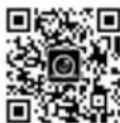
Install using "App Store" / "Google Play":
Search: ,FYD-FPV...

GB//26
Establishing the connection
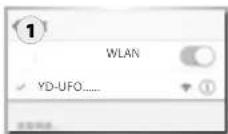
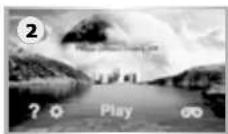
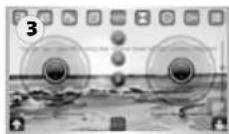
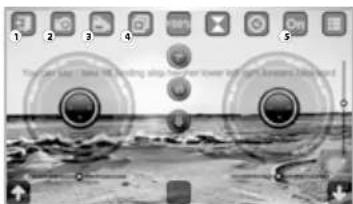
Switch in the transmitter first as usual, then the quadcopter. You can now connect your mobile phone to the model using Wlan. Open the settings in your mobile phone menu and select "YD-UFO....." in the Wlan search list of your Smartphone. Wait for the connection to be established. After successfully connecting, start the FPV app and then press the „Play" (see fig. 1) button on the user interface (see Fig. 2). The image from the camera should now be visible on the screen (see fig. 3). If this is not the case, repeat the procedure.
Explanation of icons on the display
natural_image
Grayscale photo of a landscape with circular elements and camera lens (no text or symbols)- Back - start screen
- Photo - press button to create a photo
- Video - press button to start video recording, press again to end the recording
- Display photo/video - allows all images to be replayed
- ON/OFF - "ON" - all screen symbols visible / "OFF" - no screen symbols visible (touch the screen - symbols are visible again)
Attention!!!
Always keep the copter in your direct line of vision when flying it!
App functions:
This is an app that can be used for a number of copters. Therefore, only the symbols that are described in the Dragon Fly Quadcopter instruction manual are to be used.
27//GB
natural_image
Cartoon illustration of a car on a road with buildings and decorative elements (no text or symbols)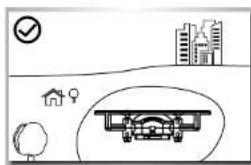
natural_image
Simple line drawing of a flying aircraft under storm clouds with lightning bolts (no text or symbols)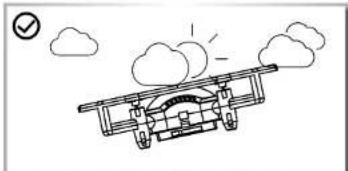
natural_image
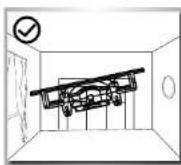
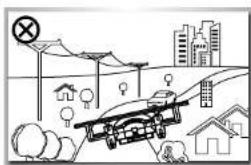
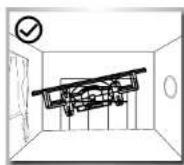
Simple line drawing of an airplane flying with clouds and a checkmark (no text or symbols)It is best to fly only in closed rooms
- With sufficient free space in all directions
- On flat ground
- Without standing (furniture) or moving obstacles (persons, animals)
• In rooms without air draught
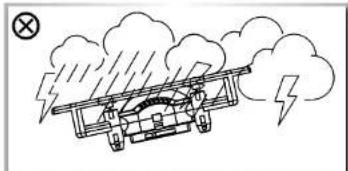
If you want to fly outdoors, do this
• Only when there is no wind
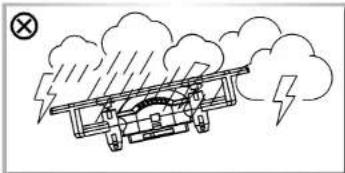
Do not fly
- If you are exhausted or your reaction is impaired in any way.
- At wind-force 1 or greater.
- Keep your model away from high-voltage cables or radio masts. Never use the model in lightning storms. Atmospheric
disturbances can affect the signals of your remote controlling transmitter.
- Near any obstacles such as buildings, furniture, persons and animals.
- On public roads
TROUBLESHOOTING
| Problem Cause Reparation | ||
| The model does not move Check, if the transmitter and the model are switched Ok. | Switch on the Transmitter and the Model. | |
| Check the battery voltage of transmitter and model | ||
| Motor does not turn Motor is too hot. Allow the motor to cool down | ||
| The model reacts incorrectly to the con -trol commands or flies choppily | Check the state of the transmitter and receiver battery charges | Employ completely charged batteries |
| The model does not take off | Rotor blades are twisted | Exchange the rotor blades |
| Motor is too hot. Allow the motor to cool down. | ||
| Batteries are empty Charge the batteries or exchange them | ||
| The model moves forward/ backward and sidewise, but does not hover | Check whether the Helicopter is exposed to a draught, e.g. by an opened window or an air conditioner. Hover flight is not possible when there is a draught | Close the window/door, switch off the air conditioner or select a more suitable room |
| The model vibrates severely | Check whether the rotors run true | Possibly change the rotor blades |
| Transmitter and Helicopter can not be blinded | Throttle control not set to minimum Throttle need to be minimized to zero | |
Cher client
- FR // Remarque importante
- HEADLESS-FUNKTION
- Headless Mode aktivieren:
- Limited Warranty
- Declaration of conformity
- The Warranty does not cover:
- CONTENTS
- TECHNICAL DATA
- INCLUDED ITEMS
- SAFETY PRECAUTIONS (PLEASE KEEP!)
- SAFETY PRECAUTIONS LITHIUM BATTERIES
- General
- Warning notices
- Charging instructions
- Storage instructions
- General terms of guarantee
- Exclusion of liability
- 7.Disposal instructions
- THE QUADCOPTER WITH MORE FUNCTIONS
- Features:
- INSTALLATION OF ROTOR BLADES
- YOUR 4-CHANNEL RC TRANSMITTER
- Attention
- CHARGING THE LIPO FLIGHT BATTERY
- The quadcopter is fitted with a LIPo battery.
- GETTING THE QUADCOPTER READY FOR TAKE-OFF
- LIFT-OFF AND LANDING FUNCTION / EMERGENCY STOP FUNCTION
- TRIM FUNCTION
- Trim function (see fig.):
- RESET FUNCTION
- BEGINNER / PRO MODE
- FLIPS AND LOOPS
- HEADLESS-FUNCTION
- activateHeadless Mode
- De-activateHeadless Mode:
- FOTO / VIDEO FUNCTION
- Attention!!!
- FPV App for Smartphone - Download and Installation
- Establishing the connection
- It is best to fly only in closed rooms
- Do not fly
- Cher client
Brand : Carson
Model : X4 Quadcopter Dragon Fly
Category : Drone