
Triplex - Audio Amplifier HUGHES & KETTNER - Free user manual and instructions
Find the device manual for free Triplex HUGHES & KETTNER in PDF.


| Product Type | Guitar Audio Amplifier |
| Brand | Hughes & Kettner |
| Model | Triplex |
| Output Power | 50 watts RMS at 8 ohms |
| Speaker | Celestion RockDriver Junior 12", 8 ohms |
| Channels | Clean and Overdrive |
| Built-in Effects | Reverb, Delay, Chorus (selectable per channel) |
| Effects Loop | Yes, series (LINE OUT / LINE IN) |
| Input | 6.35 mm jack for guitar (active/passive pickups) |
| Outputs | LINE OUT, PHONES (headphone), connector for footswitch |
| Compatible Footswitch | Hughes & Kettner FS-2 (channel and effect on/off switching) |
| Power Supply | 230 V (European model), 117 V (US model) |
| Max. Power Consumption | 70 VA |
| External Fuse | 250 mA slow-blow (230 V) / 500 mA slow-blow (117 V) |
| Dimensions (H x W x D) | 490 x 445 x 270 mm |
| Weight | 14.5 kg |
| Frequency Response | 20 Hz - 30 kHz at 8 ohms |
| Maintenance | Clean with a damp cloth; no special maintenance required |
| Safety | Check mains voltage before connecting; ensure adequate ventilation |
| Spare Parts and Repairability | Internal fuses must be replaced by qualified technician; contact Hughes & Kettner dealer |
Frequently Asked Questions - Triplex HUGHES & KETTNER
User questions about Triplex HUGHES & KETTNER
0 question about this device. Answer the ones you know or ask your own.
Ask a new question about this device
Download the instructions for your Audio Amplifier in PDF format for free! Find your manual Triplex - HUGHES & KETTNER and take your electronic device back in hand. On this page are published all the documents necessary for the use of your device. Triplex by HUGHES & KETTNER.
USER MANUAL Triplex HUGHES & KETTNER
triplex Guitar Amplifier

ENGLISH
DEUTSCH
FRANÇAIS
ITALIANO
ESPANOL
illustrations
technical data
Hughes & Kettner® TECHNOLOGY OF TONE

flowchart
graph TD
    A["FOOTSWITCH FS-2"] --> B["INPUT"]
    B --> C["PHONES"]
    C --> D["RED BOX"]
    D --> E["LINE OUT LINE IN"]
    E --> F["FX-UNIT"]
    F --> G["IN OUT"]
    G --> C
    C --> H["PHONES & Hughes & Kettner"]
ENGLISH
DEUTSCH
FRANÇAIS
ITALIANO
ESPAÑOL

HOME

CONGRATULATIONS AND THANK YOU FOR CHOOSING THE HUGHES & KETTNER TRIPLEX AMP!
Men and women with a mission, our team of guitarists and engineers developed the TRIPLEX with the goal of putting a powerful musical tool into your hands: an amp that is easy to handle, delivers top-notch tone, and gives you features that make musical sense in the real world.
The TRIPLEX is the ideal workhorse for demanding guitarists who want an amp that provides a broad range of great sounds and the essential effects in an all-in-one package. Its efficient Current Feedback power amp not only pumps out 50 watts of power, it also delivers the sought-after characteristics of vacuum tubes.
The Celestion® RockDriver Junior 12" speaker is a key component in the signal chain and the quality tone that distinguishes this amp. Delivering vintage-style sound, the speaker's efficiency is also remarkable. Equipped with these high-quality components, your TRIPLEX is far louder than other amps bearing the same output rating.
With an ingenious on-board digital effects section, the TRIPLEX allows you to dial in all the essential effects, quickly and without a lot of fuss. In designing the processing section, we focused on implementing pure, crystal-clear effects of the highest quality rather than everything-but-the-kitchen combinations of cheesy, cheap -sounding presets.
In terms of tone, versatility and fine features, the TRIPLEX delivers the goods on stage, in the studio and in rehearsal rooms. Designed for easy, intuitive handling, the TRIPLEX is a true plug & play amp. In no time at all, you'll be dialing in the sounds you've always wanted to have at your disposal. This operating manual points out the amp's many interesting aspects, so you can effortlessly make the most of the possibilities and features of the TRIPLEX.
WE WISH YOU A LOT OF FUN AND SUCCESS WITH YOUR NEW TRIPLEX!
BEFORE POWERING UP...
- Check that the local current and the amp's AC power rating are identical before you plug the power cord into an AC outlet.
- Ensure that air can circulate freely around your amp's ventilation ducts.
- Place the amp on a stable platform where it is not exposed to mechanical shocks and temperature extremes which may damage the amp or endanger the safety of bystanders.
- Hughes & Kettner is not liable for damages due to improper use.

HOME

1.0 CHANNELS
The TRIPLEX features a newly developed preamp that not only produces authentic harmonic overdrive but also responds dynamically to your picking style. Based on semiconductors, this innovative circuitry simulates the sound-shaping elements of tube amps and delivers sound quality unparalleled in this price range. It also provides the dynamics demanding guitarists require for musical expression.
CLEAN:
Depending on the preamp control settings, the TRIPLEX delivers a variety of contemporary and vintage clean tones. At higher VOLUME settings, the "SoftClick" circuitry delivers that slight edge you would expect from a vintage tube amp. If desired, the CLEAN channel can put out plenty of crunch.
OVERDRIVE:
This channel delivers direct, in-your-face classic rock sounds with a very British feel. The MID control is a very effective sound-shaping tool; it lets you dial in many different lead sounds. If you drastically taper off the mids, the TRIPLEX will produce the unmistakable sound of modern tube amps - ideal for tapping and heavy-duty power chord riffing.
2.0 EFFECTS SECTION
You can select reverb, delay or chorus individually for each of the two channels of the TRIPLEX. The tweaking options are streamlined for no-fuss handling, putting the most important functions at your fingertips.
REVERB:
The reverb section of the TRIPLEX generates a clean room simulation. Use the FX-Mix knob to dial in the desired effects level.
DELAY:
This classic effect lets you dial in anything from short slap-back delay to lengthy tape-style delays. You can vary the Delay Time, Feedback and FX-Mix knobs as you see fit.
CHORUS:
Featuring a variable Chorus Rate, the chorus section of the TRIPLEX gives you a vast range of subtle variations to chose from—anything from a slight shimmer to Univibe-like effects à la Hendrix.
3.0 JACKS AND CONTROL FEATURES
FRONT PANEL:
INPUT: Input sensitivity is broad enough to handle guitars equipped with humbuckers, active pickups, or single coils.
CLEAN VOL: Determines the CLEAN channel's volume. Depending on the type of pickups in your instrument, the amp will begin to clip somewhere around the 12 o'clock setting (SoftClick).
FX SELECT: One three-position toggle switch for each channel lets you preselect the desired effect (reverb, delay or chorus).

CHANNEL SELECT: This channel selector switch activates either the CLEAN or OVERDRIVE channel. The OVERDRIVE channel is active when the button is pressed.
RED OVERDRIVE LED: The red LED illuminates when the OVERDRIVE channel is active.
MODE: Overdrive Mode button; it allows you to switch back and forth between two distinct overdrive characteristics.
OVERDRIVE GAIN: Controls the amount of distortion in the OVERDRIVE channel.
OVERDRIVE MASTER: Determines the OVERDRIVE channel volume level in relation to the CLEAN channel volume level.
EQ SECTION: Common BASS, MID and TREBLE controls for the both channels. MID and TREBLE controls influence each other, as is standard in tube amps: if you boost the treble, the mids are cut and vice versa. This sound-shaping feature allows you to dial in a wide variety of subtle tonal variations.
FX-MIX: Controls the amount of reverb or delay depending on which effect was preselected.
DELAY: Varies the delay time.
FEEDBACK: This knob controls the amount of feedback for the delay effect.
CHORUS RATE: Controls the rate or speed of the chorus effect.
REVERB: Controls how much integrated reverb is added to the signal. Reverb is automatically adjusted for each channel when you switch channels.
MASTER: Controls the amp's master volume level. The LINE OUT signal is unaffected by the MASTER control.
REAR PANEL:
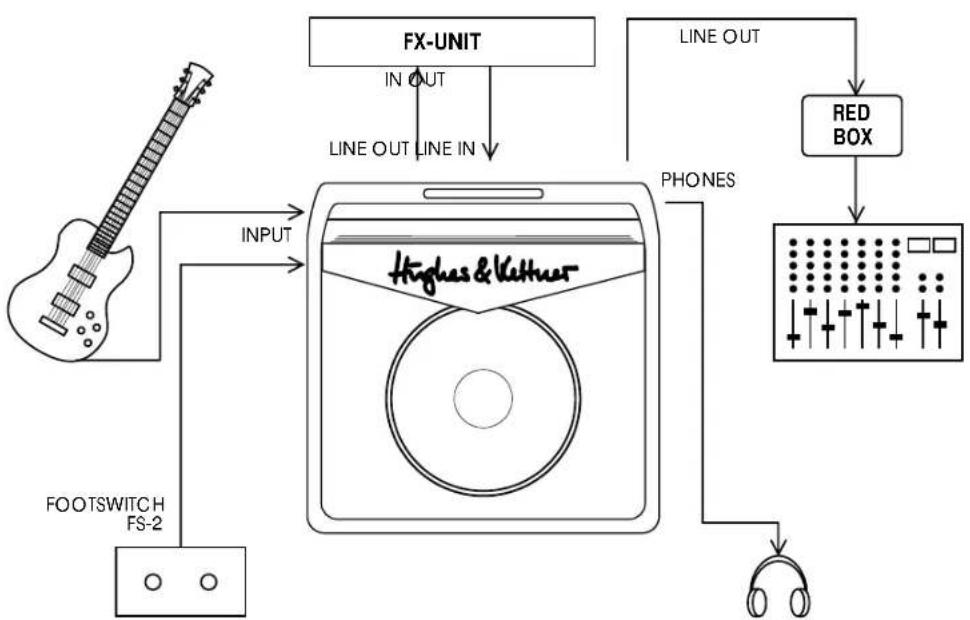
LINE OUT: Use this jack to feed the signal to the input of an FX processor. You can also route the signal to a second power amp or through a RED BOX to a mixing console.
LINE IN: If you are sending the LINE OUT signal to an FX processor, connect the output from that processor to this jack.
FOOTSWITCH: This jack is for a standard footswitch (e.g. Hughes & Kettner FS-2) and it allows you to switch back and forth between the CLEAN and OVERDRIVE channels and to switch the effects on/off. When using a footswitch, ensure the CHANNEL SELECT switch on the amp's front panel is set to CLEAN.
PHONES: Headphone jack. The speaker is automatically switched off when a plug is inserted into this jack.
MAINS: Connect the included Euro-norm mains cord to this socket. Ensure the amp's voltage rating matches your local AC voltage rating before you plug the cord into the wall socket.
4.0 STANDARD SETUP/ CABLE CONNECTIONS

Use the CHANNEL SELECT switch or an external footswitch to change channels. NOTE: Before using a footswitch, set the CHANNEL SELECT switch on front panel of the amp itself to the CLEAN position.
5.2 THE TRIPLEX AND SIGNAL PROCESSORS
The effects loop on the TRIPLEX is a serial effects loop, meaning that the entire preamp signal is routed to the FX device and processed there.
TO CONNECT A SIGNAL PROCESSOR:
- Connect the processor's INPUT to the TRIPLEX LINE OUT jack and the processor's OUTPUT to the TRIPLEX LINE IN jack.
- To avoid noise, signal degradation, and interrupted signals, only use high-quality patch cables.
- Make sure the processor is not distorting the signal. Check the processor's gain LEDs (if it is equipped with this type of display) and use the input and output controls to dial in a suitable level.
- Distortion devices are not designed for use in an FX loop. As a rule of thumb, any kind of device that compresses the signal should be connected first in the signal chain. Depending on the type of effect you want to achieve, you may want to connect your compressor directly between the instrument and the amp's input.
- If you are using several processors or stomp boxes, ensure you connect them in the proper order.
5.3 THE TRIPLEX AND MIXING CONSOLES
If you want to feed the TRIPLEX ' signal to a mixing console, we recommend you route it through a Hughes & Kettner RED BOX. Patch the signal from the LINE OUT jack, as this signal path's level is not influenced by the MASTER setting. The RED BOX balances the signal and simulates a speaker cabinet.
6.0 SERVICE AND PREVENTIVE MAINTENANCE
The TRIPLEX does not require service of any type. However, there are a few precautions you should heed to ensure your amp lasts for many years.
- Ensure all peripheral devices, cords and cables are in a state of good repair. Defective speaker cables are the most common cause of power amp failure. Poor-quality cables will cause hum and undesirable noise.
- Make certain your amp's ventilation ducts are not blocked or covered. Proper cooling will prolong the life of your amp.
- Avoid mechanical shocks and exposure to extreme heat, dust and especially moisture.
- When connecting peripheral devices, always pay close attention to their specifications. Never connect devices with high output signal levels (e.g. power amps) to your amp's input.
- Ensure you have the correct AC power rating available before you plug in the amp. If in doubt, ask the venue's sound technician or the custodian of the building you are rehearsing in.

- Refrain from do-it-yourself repairs! Have a qualified service technician replace internal fuses.
With the unit off and unplugged, use a soft damp cloth to clean the exterior surface of the TRIPLEX.
7.0 TROUBLESHOOTING
1) The TRIPLEX will not switch on:
- The amp is not getting any AC power. Check the mains cable to see if it is connected properly.
- The mains fuse is defective. Replace the fuse with another identical fuse. If this fuse also trips, consult your Hughes & Kettner dealer.
2) The TRIPLEX is connected properly, but no sound is audible.
- One or several GAIN and MASTER controls may be turned all the way down. Dial in a higher setting.
- A short circuit in the speaker signal chain may have tripped an internal fuse. Make sure none of the connections are shorted out and have a qualified service technician replace the fuse (identical specifications are a must).
3) The footswitch does not switch channels:
- The front panel selector switch may be in the OVERDRIVE position. Set it to CLEAN (in this case, CLEAN = off).
- The footswitch is not connected to the TRIPLEX. Plug it into the appropriate jack.
4) When accessed, the LINE OUT/LINE IN jacks cause annoying hum.
- An electrical or magnetic field is causing interference. Use higher-quality cables or re-arrange the cables you are using to reduce interference to a minimum. If this still doesn't improve the situation, use a DI box.
- The grounding of the connected devices may be causing a ground loop. DO NOT SEVER THE GROUND OF THE CONNECTED DEVICES UNDER ANY CIRCUMSTANCES! Try plugging all devices into the same socket via an AC power distributor/power strip. If this doesn't eliminate the noise, you must ensure the connection is galvanically separated by routing the signal through a DI box.
5) You have connected an FX processor to the LINE OUT jack and the signal is totally distorted, even when you have dialed in a clean sound.
- The LINE OUT signal is overloading the input of the FX processor. Reduce the processor's input sensitivity ("INPUT" or "GAIN").
6) You have connected an FX processor to the LINE OUT Jack of the TRIPLEX and the signal's volume level is way too low.
- The FX processor's output level is set incorrectly. Turn it up.

TECHNICAL DATA
PREAMP SECTION:
CLEAN + OVERDRIVE solid state channels
INPUT: -10 dBV/ 1 M ohm
LINE IN: 0 dBV/25 k ohms
LINE OUT: 0 dBV/ 220 ohm
POWER AMP SECTION::
'CURRENT FEEDBACK' solid state power amp
Output Power:
50 watts rms into 8 ohms
Frequency response:
20 Hz - 30 kHz (into 8 ohms)
SPEAKER:
CELESTION® RockDriver Junior, 12", 8 ohms
Headphones:
100 mW into 4 - 600 ohms
GENERAL FEATURES:
Voltage:
230 V\~ (European model)
117 V\~ (North American model)
100 V\~ (Japanese model)
Max. power consumption:
70 VA
Mains Fuse:
slo-blo 250 mA (230 V model)
slo-blo 500 mA (117 V model)
slo-blo 630 mA (100 V model)
Dimensions: (W x H x D)
490 x 445 x 270 mms
19.2" x 17.3" x 10.5"
Weight:
approx. 32 Lbs./approx.14,5 kgs

WIR FREUEN UNS, DASS DU DICH FÜR EINEN HUGHES & KETTNER TRIPLEX AMP ENTSCHIEDEN HAST!
5.3 DER TRIPLEX AM MISCHPULT
ENTREE: -10 dB / 1 M ohms
SORTIE LIGNE: 0 dBV / 25 Kohms
ENTREE LIGNE: 0 dBV / 220 ohms
SECTION ETAGE DE PUISSANCE:
INPUT: -10 dBV/ 1 M ohm
LINE IN: 0 dBV/ 25 Kohm
LINE OUT: 0 dBV/ 220 ohm
SEZIONE FINALE
Dimensioni (L x A x P):
490 x 445 x 270 mm
Peso:
14,5 kg (circa)

solid state power amplifier
POTENCIA DE SALIDA:
50 W RMS a 8 Ohmios.
ALTAVOZ:
CELESTION® RockDriver Junior, 12", 8 Ohmios
Auricularez:
100 mW a 4-600 Ohmios
DATOS GENERALES:
Tensión:
230 V - (modelo europeo)
117 V - (modelo norteamericano)