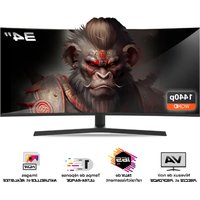
EPIC 34 - Monitor SPIRIT OF GAMER - Free user manual and instructions
Find the device manual for free EPIC 34 SPIRIT OF GAMER in PDF.


User questions about EPIC 34 SPIRIT OF GAMER
0 question about this device. Answer the ones you know or ask your own.
Ask a new question about this device
Download the instructions for your Monitor in PDF format for free! Find your manual EPIC 34 - SPIRIT OF GAMER and take your electronic device back in hand. On this page are published all the documents necessary for the use of your device. EPIC 34 by SPIRIT OF GAMER.
USER MANUAL EPIC 34 SPIRIT OF GAMER
text_image
34" 1440p WQHD
PRECISE and DEEP black levels
text_image
165 HzREFRESH rate
ULTRA-FAST
response time
NATURAL et REALISTIC
images

The manual is available in your language in page 17

text_image
200mm M ← E Qtext_image
DP1 Input Source Brightness/Contrast Color setting Picture Quality Setting Display Audio Multi-Window OSD Other DP2 DP1 HDMI2 HDMI1 Window1: InputSource: DP1 Resolution: 3440x1440@165Hz Window2: InputSource: Resolution:text_image
DP1 Resolution: 3440x1440@165Hz Input Source Brightness 87 Brightness/Contrast Contrast 50 Color setting DCR Off Picture Quality Setting Display Audio Multi-Window OSD Other Window1: InputSource: DP1 Resolution: 3440x1440@165Hz Window2: InputSource: Resolution:text_image
DP1 Resolution: 3440x1440@165Hz Input Source Brightness 87 Brightness/Contrast Contrast 50 Color setting DCR Off Picture Quality Setting Display Audio Multi-Window OSD Other Window1: InputSource: DP1 Resolution: 3440x1440@165Hz Window2: InputSource: Resolution:text_image
DP1 Resolution: 3440x1440@165Hz Input Source Sharpness 50 Brightness/Contrast Response Time Off Color setting Noise Reduction Off Picture Quality Setting Super Resolution Off Display Dynamic Luminous Control Off Audio Multi-Window OSD Other Window1: InputSource: DP1 Window2: Resolution: 3440x1440@165Hz InputSource: Resolution:text_image
DP1 Resolution: 3440x1440@165Hz Input Source Aspect Ratio 21:9 Brightness/Contrast Color setting Picture Quality Setting Display Audio Multi-Window OSD Other Window1: InputSource: DP1 Resolution: 3440x1440@165Hz Window2: InputSource: Resolution:text_image
DP1 Resolution: 3440x1440@165Hz Input Source Mute Off Brightness/Contrast Volume 50 Color setting Audio Source HDMI1 Picture Quality Setting Display Audio Multi-Window OSD Other Window1: InputSource: DP1 Window2: Resolution: 3440x1440@165Hz InputSource: Resolution:text_image
DP1 Resolution: 3440x1440@165Hz Input Source Brightness/Contrast Color setting Picture Quality Setting Display Audio Multi-Window OSD Other Multi-Window Window1: InputSource: DP1 Resolution: 3440x1440@165Hz Off DP2 Medium TopRight Window2: InputSource: Resolution:text_image
DP1 Resolution: 3440x1440@165Hz Input Source Language English Brightness/Contrast OSD H-Position 50 Color setting OSD V-Position 50 Picture Quality Setting OSD Transparency 20 Display OSD Time Out 20 Audio OSD Rotation Normal Multi-Window OSD Other Window1: InputSource: DP1 Window2: Resolution: 3440x1440@165Hz InputSource: Resolution:text_image
DP1 Resolution: 3440x1440@165Hz Input Source FreeSync (Adaptive Sync) Off Brightness/Contrast HDR Off Color setting MPRT Off Picture Quality Setting Flicker Free Off Display LightEffect Off Audio Reset Multi-Window OSD Other Window1: InputSource: DP1 Resolution: 3440x1440@165Hz Window2: InputSource: Resolution:- Use the supplied power supply to power the display. Check the network power before plugging in the power supply.
- NOTDo not pull on the cable to disconnect the screen.
- Keep the screen away from rain and moisture to avoid the risk of fire and electric shock.
- Do not introduce any material (solid or liquid) inside the screen. In the event of an accident, unplug it and have it checked by qualified personnel.
- Never attempt to open the screen yourself. For any repairs, contact qualified personnel or an approved center.
- Keep the device out of the reach of children to avoid accidental damage.
- Avoid touching the screen with wet hands to prevent electric shock or mechanical damage.
- If the screen falls or the power supply is damaged, do not use it to avoid the risk of electric shock. Contact the authorized dealer or installer.
- Unplug the power cable when the display is not used for a while.
- This screen is not designed to remain on 24 hours a day, 7 days a week.
PRECAUTIONS FOR USE:
- Make sure the display is well ventilated by placing it in a location where air flows freely through the slots in the case. Leave a free space of at least 5 cm around when installing in a small space.
- Avoid installing the display near heat sources such as radiators or hot air ducts, as well as in places that are dusty, vibrating or subject to shock.
- Place the screen on a stable surface, avoid wobbly or tilted tables to prevent any risk of falling and mechanical failure.
- Avoid direct exposure to sunlight, moisture or water, and do not direct water at the screen to avoid the risk of fire, electric shock or malfunction.
- If water or materials enter the display, discontinue use immediately and contact your authorized dealer or installer.
- Do not block the screen ventilation slots and avoid placing heavy or heat-generating objects on the screen to avoid malfunction and damage.
- Do not cover the screen with a cloth while it is on, as this may cause overheating and result in fire, electric shock, or mechanical failure.
- Avoid the presence of magnets or magnetized objects near the screen to prevent breakdowns.
- Do not use the display in the presence of smoke (including cigarette and vape smoke), steam, humidity, dust, or strong vibrations.
- If you move the display from a cold to a warm location (or vice versa), wait about three hours for it to adjust to the new ambient temperature.
- Make sure the screen is securely mounted on a horizontal surface and avoid placing it on unstable stands to avoid falls and damage.
- Adjust the brightness and contrast to obtain an optimal image adjusted to your preferences.
- If you wish to wall mount the display, use a suitable VESA mount (not included) for secure installation.
PACKAGE CONTENTS:
| Ref.: SOG-E34V165 / Epic 34" screen | Check the contents of the package: |
| Screen | 1 |
| Foot + Base | 1 |
| Anti-slip pads | 4 |
| DP 1.4 cable | 1 |
| Food | 1 |
| Power cable | 1 |
| Cable storage clip | 1 |
| Installation guide | 1 |
NOTES ON LCD SCREENS:
The following symptoms do not indicate that there is a problem with your screen: this is normal!
When you turn on the screen for the first time, the image may be poorly framed on the screen depending on the type of computer and the configuration used. It's up to you to make the settings in the display settings of your computer, graphics card
- Brightness may be slightly uneven depending on the desktop setup used.
Due to the nature of the LCD screen, an afterimage may remain after a display change (e.g. image displayed for hours. The display will recover slowly or by turning off your screen for a few hours.
CARE OF YOUR SCREEN:
For safety reasons, follow the cleaning instructions below:
Before you begin, turn off the display and unplug it from the power source.
Use a lint-free, non-abrasive cloth to gently clean the screen surface. For stubborn stains, you can lightly damp the cloth with a cleaning product specific for LCD screens.
Avoid using cleaning products containing alcohol or acetone, as they may damage the screen. Instead, opt for a cleaning product specifically designed for LCD screens. Never spray cleaner directly on the screen but on your cloth. Use a soft cloth to avoid scratching the surface of the screen, do not use tissue paper (tissue paper) for cleaning.
To clean the case, use a slightly damp cloth, always without detergent. Then wipe it carefully with a clean, dry cloth.
Do not insert any object or spill any liquid inside the screen. Follow these guidelines to maintain the safety and performance of your display.
SPECIFICATIONS
SCREEN :
Size : 34 inches
Screen format: 21/9th
Curvature: R1500
Backlight: LED
Panel: VA
WQHD resolution: 3440x1440
Frequency : 165Hz
Response time: 1ms MPRT
Colors: 16.7 million colors (8 bit)
Brightness: 400 cd/m ^2
Contrast: 4000:1
Angle of vision: Horizontal/vertical 178° (CR>10)
Frameless: Yes
DISPLAY :
OSD language: English (default), French, Dutch, German, Italian, Spanish, Portuguese, Hungarian
HDR: Yes
OD: Yes
FreeSync: Yes
FlickerFree: Yes
Anti-blue light: Yes
CONNECTIONS:
DisplayPort 1.4: 2 + 1 DP 1.4 cable included
HDMI 2.0: 2
3.5mm jack: 1
FOOT & FIXATION:
Tilt/Pivot/Height Adjustment: +5° to -20° / +45° to -45° / 11.5 cm max
VESA mount: 100 x 100mm
Kensington: Location to attach an anti-theft device
EXTERNAL POWER SUPPLY:
Food : DC 12V output=5A / AC input 100\~240V, 50/60 Hz
Consumption: 50 kWh Typical, <0.5 W standby/off
Energy class: F
FEATURES :
Dimensions with foot and weight: 80.74 x 43.56 x 22.89 cm / 6.5 Kg
Dimensions without stand and weight: 80.74 x 36.18 cm / 4.35 Kg
WORKING CONDITIONS
Storage temperature: -20^ to 60^
Operating temperature : 0^ C to 40^ C
Humidity: 10 to 90% RH
YOUR MONITOR
ASSEMBLY :
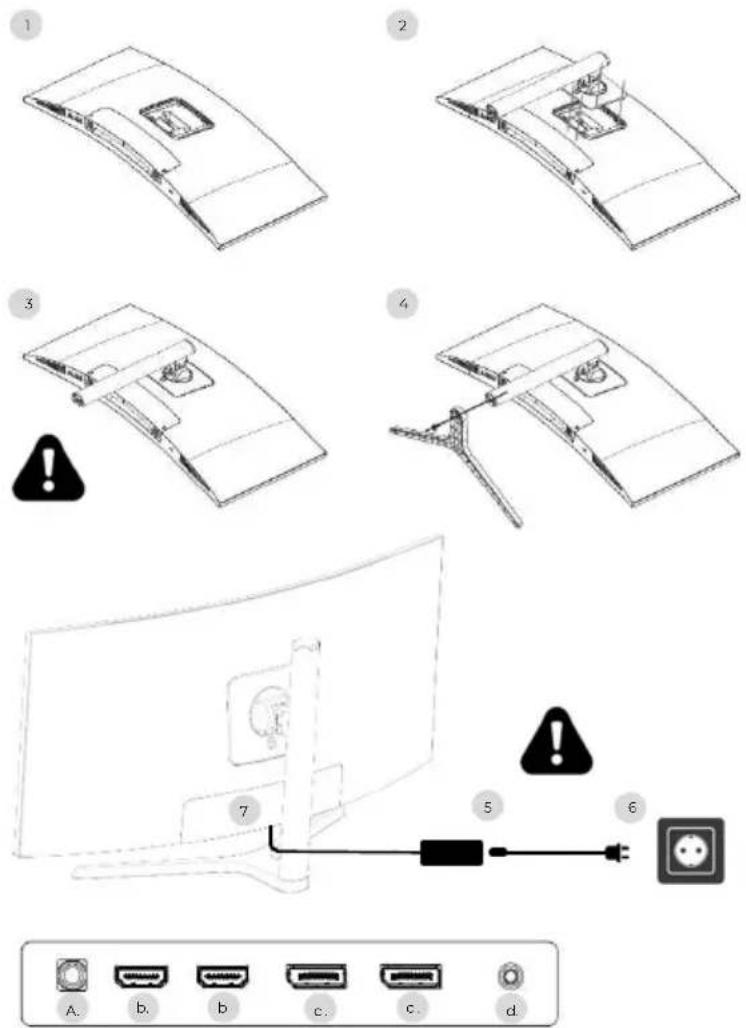
- On a stable surface, place the screen protector and place the screen on it to prevent it from being scratched.
- Clip the foot onto using the lever button.
- Check that the foot is correctly attached
- Secure the base of the foot using the hand screw and put on the non-slip pads.
Make sure everything is secure one last time before safely lifting your screen.
- Plug the power cable into the adapter
- Plug the power supply into a wall outlet
- Remove the plastic cover and plug the adapter cable into the socket on your screen.
a. DC 12V power socket=5A
b. HDMI video output
c. DisplayPort video output
d. 3.5mm jack audio output
SETTINGS:
text_image
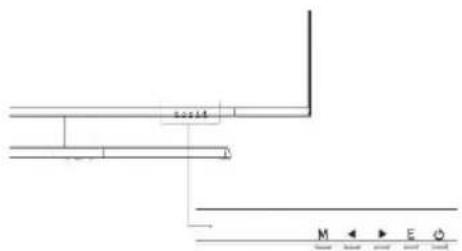
2.05±4 M ← E QM Access the OSD menu and submenu.
Navigate up in the OSD menu / Also change the value of a menu item.
▶ Navigate down in the OSD menu / Also change the value of a menu item.
E Select source/exit from OSD menu.
Power to turn your screen on/off
Start-up:
- Press the POWER button on the screen to turn it on (the indicator will be blue).
- Connect the corresponding cable to the corresponding input on the monitor. The source will be automatically detected.
- To switch between inputs, press the "Source" button to access the menu. Use the "◀ »And" ▶ »to choose the input sourcee
OSO MENU
Note: By default the OSD menu is in English. To select another language, go to the OSD tab. (Menus may vary depending on models and their updates!)
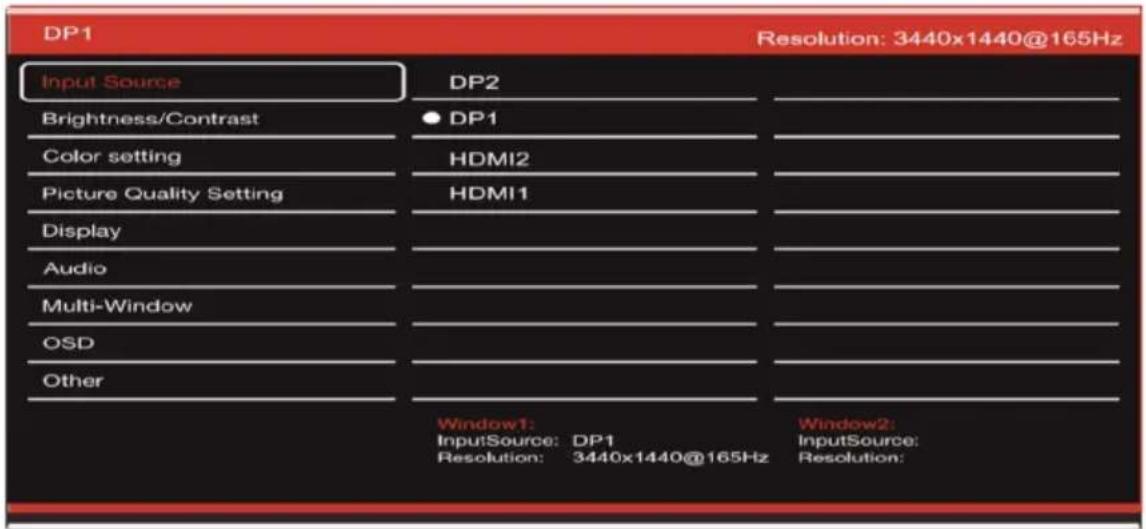
INPUT SOURCE:
text_image
DP1 Input Source Brightness/Contrast Color setting Picture Quality Setting Display Audio Multi-Window OSD Other DP2 DP1 HDMI2 HDMI1 Window1: InputSource: DP1 Resolution: 3440x1440@165Hz Window2: InputSource: Resolution:Source :Switch signal input to DP1, DP2, HDMI1, HDMI2 or select source automatically.
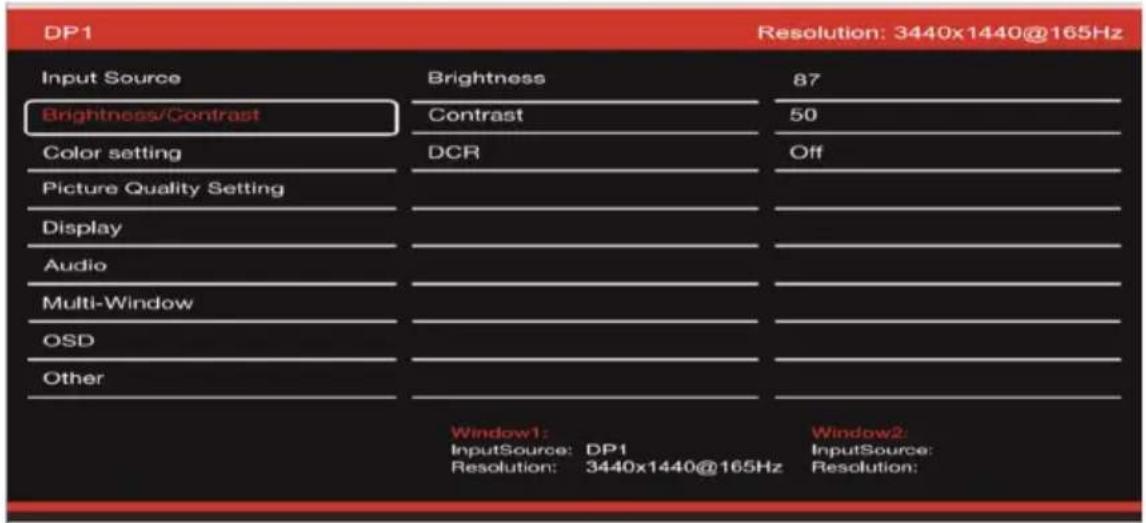
CONTRAST AND BRIGHTNESS
text_image
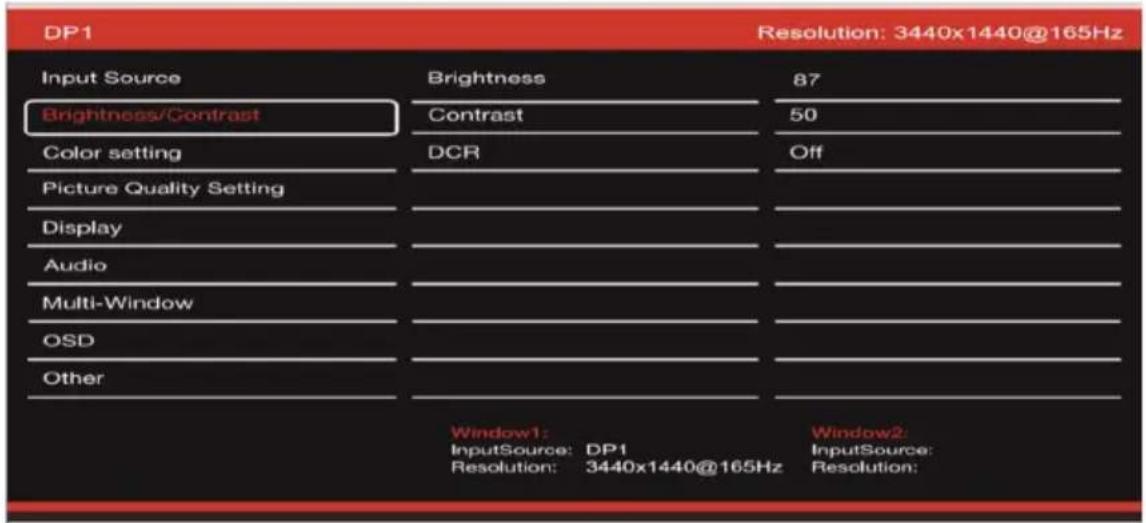
DP1 Resolution: 3440x1440@165Hz Input Source Brightness 87 Brightness/Contrast Contrast 50 Color setting DCR Off Picture Quality Setting Display Audio Multi-Window OSD Other Window1: InputSource: DP1 Resolution: 3440x1440@165Hz Window2: InputSource: Resolution:Brightness: Change the screen brightness value from 0 to 100.
Contrast: Adjust the display contrast value from 0 to 100.
DCR: Enable or disable the dynamic contrast ratio function.
OSO MENU
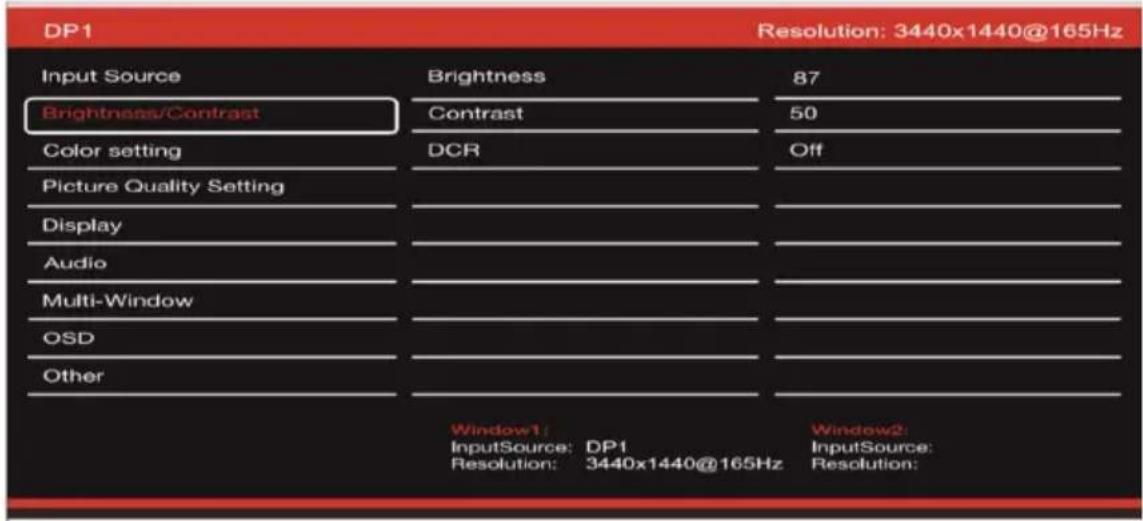
COLORS
text_image
DP1 Resolution: 3440x1440@165Hz Input Source Brightness 87 Brightness/Contrast Contrast 50 Color setting DCR Off Picture Quality Setting Display Audio Multi-Window OSD Other Window1: InputSource: DP1 Resolution: 3440x1440@165Hz Window2: InputSource: Resolution:Gamma: change the display Gamma value to: 2.0,2.2,2.4.
FashionPicture: change the preset mode to: Standard, Photo, Game, Movie, FRS, PTS.
Color temperature: Change the temperature to: Normal, Warm, Cool, User.
Tint: change the display tint value from o to 100.
Saturation: change the saturation value displayed from 0 to 100.
Low blue light: change the display saturation value from 0 to 100.
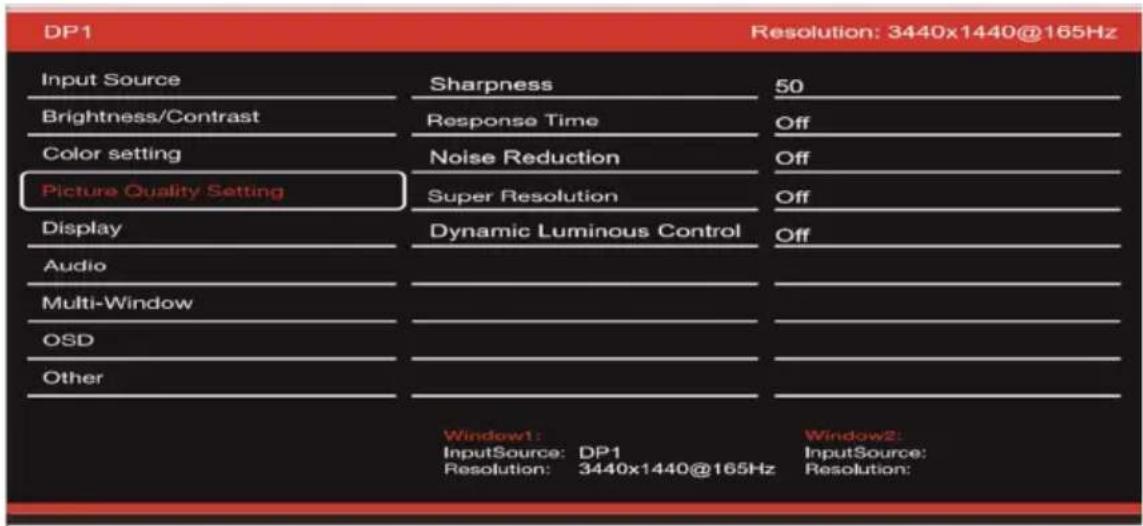
IMAGE QUALITY
text_image
DP1 Resolution: 3440x1440@165Hz Input Source Sharpness 50 Brightness/Contrast Response Time Off Color setting Noise Reduction Off Picture Quality Setting Super Resolution Off Display Dynamic Luminous Control Off Audio Multi-Window OSD Other Window1: InputSource: DP1 Window2: Resolution: 3440x1440@165Hz InputSource: Resolution:Sharpness: Change the displayed sharpness value from 0 to 100.
Response time: Select the response time value from: Low, Medium, High or turn it off.
Noise Reduction: Select the noise reduction value from: Low, Medium, High or turn it off.
Super resolution: select the super resolution value from: Low, Medium, High or turn it off.
Dynamic luminance control: Enable or disable the dynamic luminance control function.
OSO MENU
DISPLAY
text_image
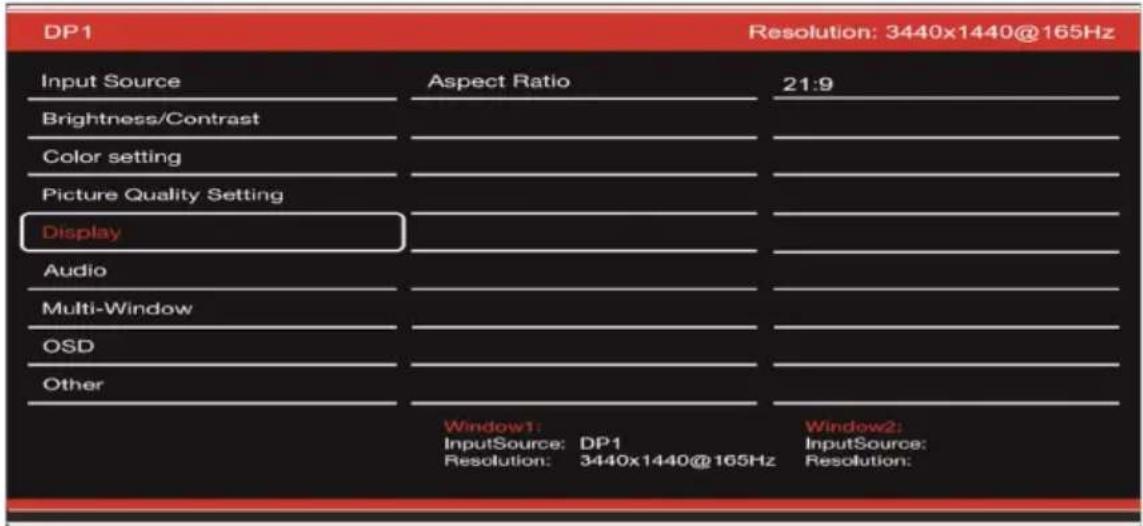
DP1 Resolution: 3440x1440@165Hz Input Source Aspect Ratio 21:9 Brightness/Contrast Color setting Picture Quality Setting Display Audio Multi-Window OSD Other Window1: InputSource: DP1 Resolution: 3440x1440@165Hz Window2: InputSource: Resolution:Aspect ratio: Change the aspect ratio of the image to 21:9, 4:3 or 1:1.
AUDIO
text_image
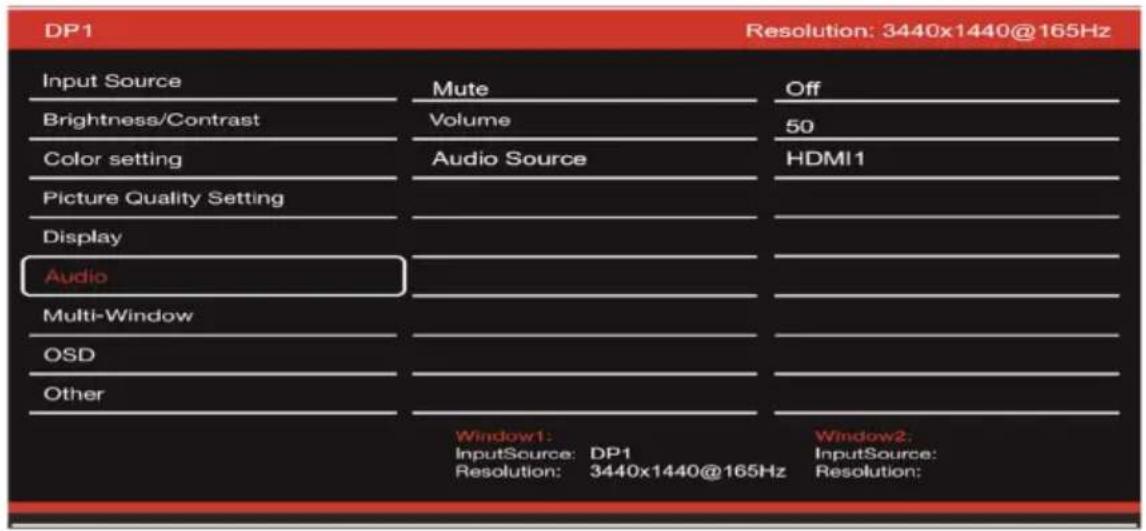
DP1 Resolution: 3440x1440@165Hz Input Source Mute Off Brightness/Contrast Volume 50 Color setting Audio Source HDMI1 Picture Quality Setting Display Audio Multi-Window OSD Other Window1: InputSource: DP1 Window2: Resolution: 3440x1440@165Hz InputSource: Resolution:Mute : enable or disable to mute the audio source.
Volume: Change the audio source volume from 0 to 100.
Audio source: audio source interface switching HDMI1, HDMI2, DP1, DP2.
OSO MENU
MULTI-WINDOW
text_image
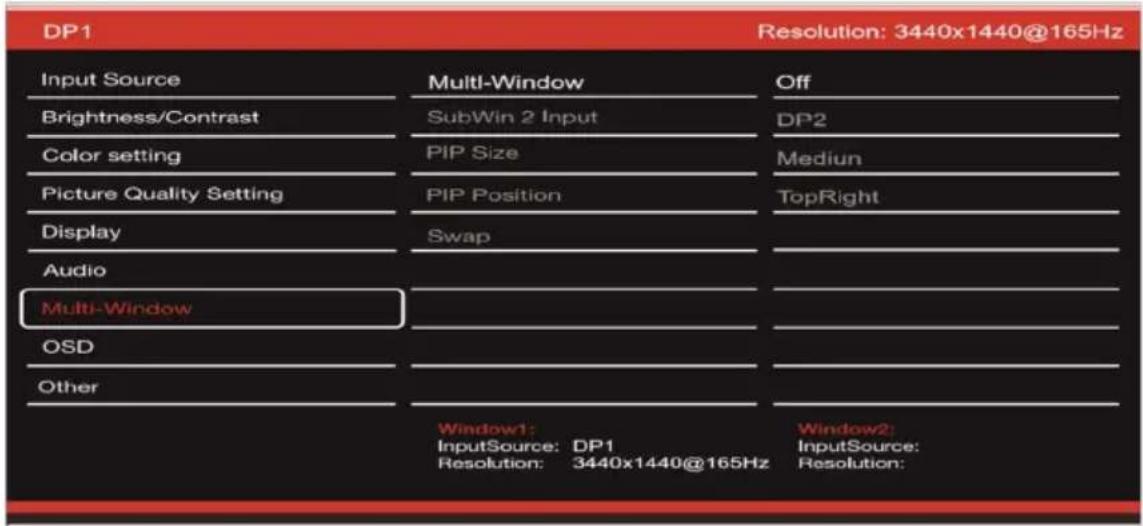
DP1 Resolution: 3440x1440@165Hz Input Source Brightness/Contrast Color setting Picture Quality Setting Display Audio Multi-Window OSD Other Multi-Window Window1: InputSource: DP1 Resolution: 3440x1440@165Hz Off DP2 Medium TopRight Window2: InputSource: Resolution:Multi-window: Set multi window to off / PIP / PBP.
OSD
text_image
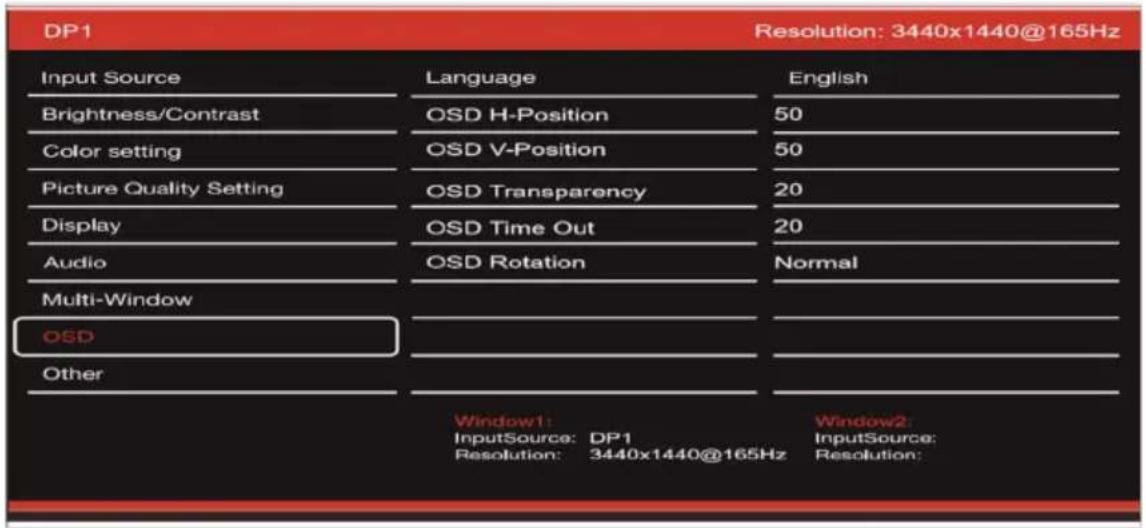
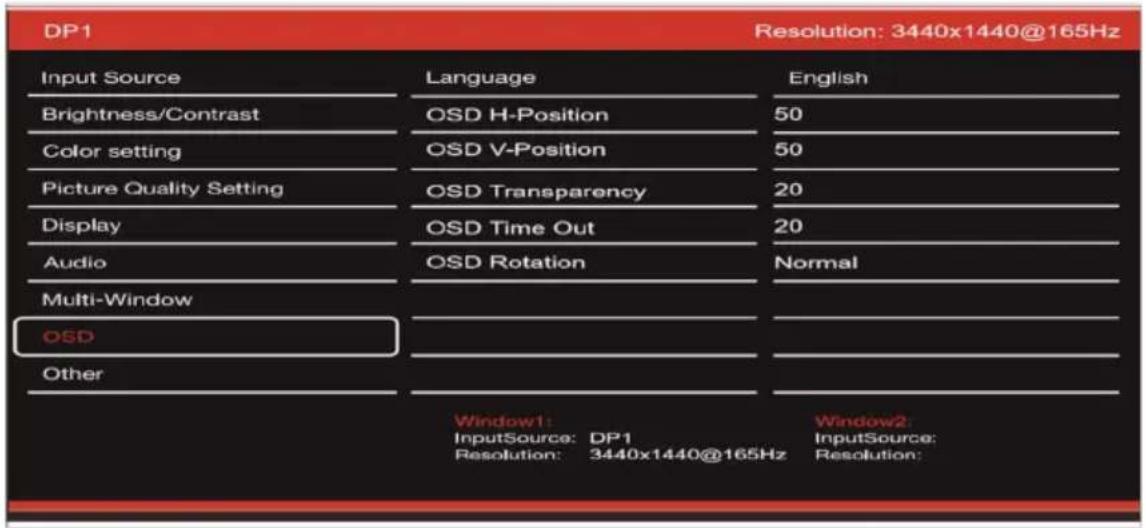
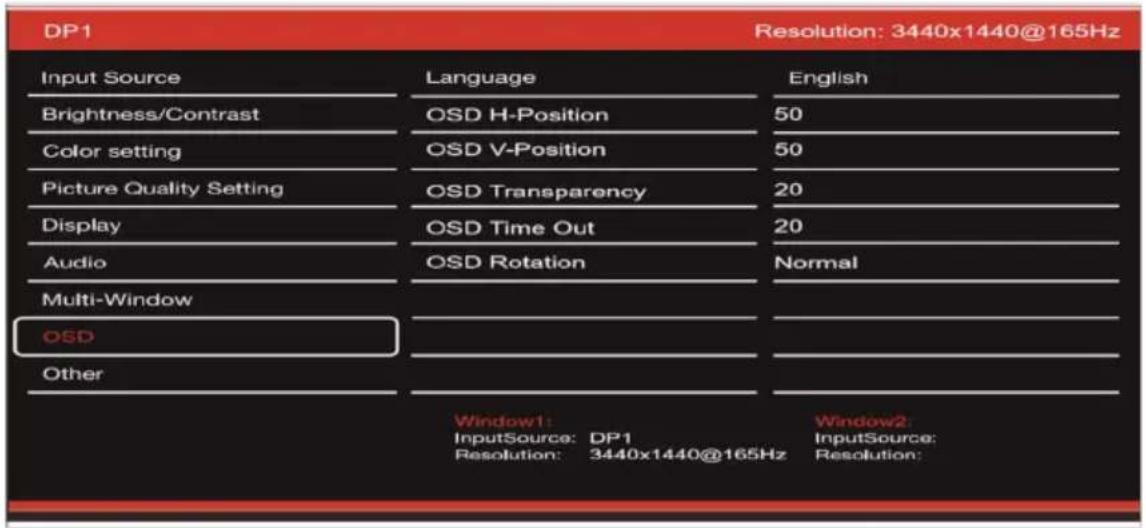
DP1 Resolution: 3440x1440@165Hz Input Source Language English Brightness/Contrast OSD H-Position 50 Color setting OSD V-Position 50 Picture Quality Setting OSD Transparency 20 Display OSD Time Out 20 Audio OSD Rotation Normal Multi-Window OSD Other Window1: InputSource: DP1 Window2: Resolution: 3440x1440@165Hz InputSource: Resolution:Language: Change the OSD menu display language.
OSD Position H: Change the horizontal position of the OSD menu.
OSD Position V: Change the vertical position of the OSD menu.
OSD transparency: Change the OSD menu transparency value from 0 to 100.
OSD Timer: Change the amount of time the OSD menu remains active before it automatically closes.
OSD rotation: Rotate the OSD menu.
OSO MENU
OTHER
text_image
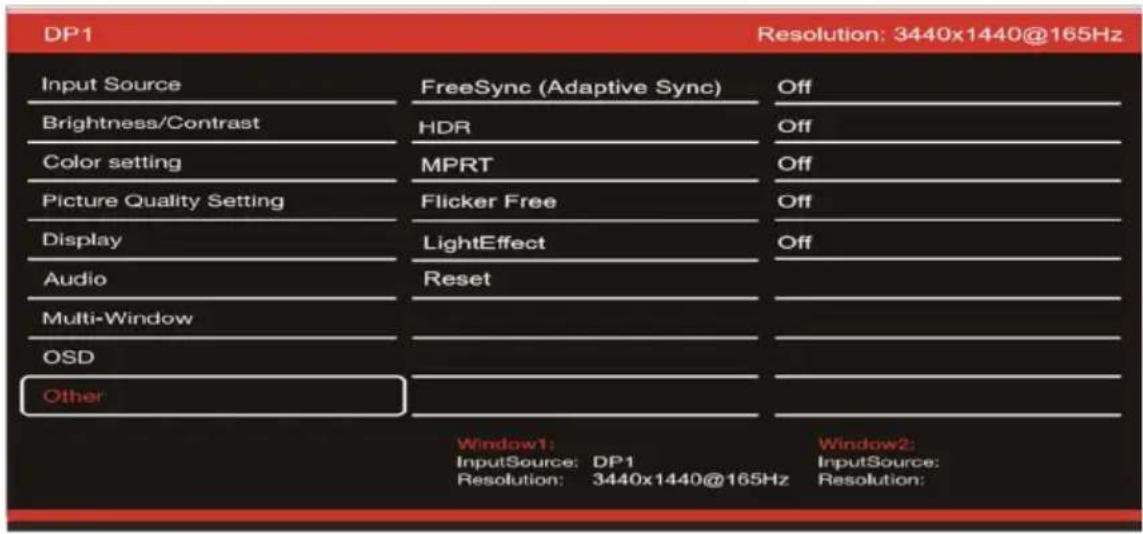
DP1 Resolution: 3440x1440@165Hz Input Source FreeSync (Adaptive Sync) Off Brightness/Contrast HDR Off Color setting MPRT Off Picture Quality Setting Flicker Free Off Display LightEffect Off Audio Reset Multi-Window OSD Other Window1: InputSource: DP1 Resolution: 3440x1440@165Hz Window2: InputSource: Resolution:FreeSync mode: enable or disable FreeSync.
HDR: Enable HDR (requires HDMI 2.0 input).
MPRT: enabled or disabled.
Flicker-free: enabled or disabled.
LightEffect: enabled or disabled.
Reset: Press this function to restore the original settings.
FAQ:
My screen is white!
- Press the start button to turn on your screen.
- Check that brightness and contrast are set normally.
- Check if the indicator light is flashing. If yes, there is no incoming video signal.
- If the source is a laptop or notebook, check that it is turned on and set to mirror or extension mode.
My screen is flashing!
- Plug the display into a different power source. An insufficient power source can cause this problem.
Check that equipment such as unshielded speakers, lights, fans, power supply/... are placed at a sufficient distance from your screen to avoid electromagnetic disturbances.
My screen seems to scroll, roll, or move in unusual ways!
- Check that the source frequency is between 48 and 100Hz.
- Reconnect the cable and check that it is held securely.
The colors bleed or the visual effects seem unusual!
- If the screen is all blue, red or random colors, check that the cable is inserted correctly. A poor connection may be the cause of a poor signal.
- Try connecting with another video source to compare.
My image is blurry! dark ! jump! Colors are not optimized!
- Check that the HDMI cable is inserted correctly.
- Adjust brightness and contrast via OSD menu.
- Nearby electronic equipment may interfere with your screen.
- Adjust RGB levels or color temperature via OSD menu
The position of the image is not centered correctly or its size is not correct!
- Adjust image positioning or size via OSD menu
The LED indicator does not work!
- Check that the power is on.
- Check that the power is connected.
The LED indicator flashes but there is no image on the screen!
- Check that the screen is powered on and turned on.
- Check that the graphics card is installed correctly
This screen is not Plug & Play!
- Check the prerequisites of your computer and your graphics card and that they are compatible with those of your screen.
SUPPORT:
You need help!? We are here:
Log in to the www.spiritofgamer.com and access online help at the bottom right of your screen, button: SUPPORT
- Send your request by email to the address support@spiritofgamer.com
DEFINITION :
VSEach pixel is made up of a red, green and blue sub-pixel.
When a subpixel is in a fixed state, the visible result is a tiny black, white, or colored dot that appears on the screen.
There are three types of defective subpixels:
- Defective sub-pixels clear: white, bright, always on,
- Defective sub-pixels dark: black, always off,
- Defective red, green or blue subpixels: stuck, on or off
During the LCD manufacturing process, it is not uncommon for one or more sub-pixels to remain fixed to the point of forming a bright or dead pixel. A display with 1 to 5 frozen subpixels is considered normal and meets industry standards.
NOTICE CONCERNING DEAD PIXELS:
Spirit of Gamer does not guarantee 0 dead pixels on Epic Series screens.
As of August 2, 2023, Spirit of Gamer supports defective pixels according to the standard:
ISO 9241-307 Class 1
To deal with the case of a defective pixel during the standard warranty period, you must provide 3 photos:
○ A photo showing the screen in its entirety, with an indication of where the dead pixels are located,
- Another photo zooming in on the pixels
- A photo of the product identification label located on the back of the screen.
The photos will be accompanied by the purchase invoice and sent by email to epic@spiritofgamer.com
The policy regarding dead pixels is purely informative and has no contractual value. They may be modified at any time, without notice. Check out our latest Dead Pixel Policy on the www.spiritofgamer.com
Please read the general warranty conditions carefully.
GENERAL WARRANTY CONDITIONS:
Standard Warranty:
Lasting 2 years, it starts from the date of purchase. Please note, the user must be a person (or company) who acquires the product for personal use, without the intention of subsequent resale.
Return/Workshop Guarantee:
Applicable only to screens purchased in France. Warranty repairs are only processed for France. For other countries, please contact your reseller for the services offered.
Warranty support: This includes repair, replacement of defective parts or exchange of the screen for a model with equivalent characteristics and performance, at no additional cost. A warranty intervention does not extend its duration.
In the event of a breakdown, contact our France Hotline at:
0812 102 102
(0.10€/minute + Price of a call, excluding any additional costs depending on your operator)
THE WARRANTY IS NOT VALID IN THE FOLLOWING CASES:
o Defective pixel(s): defective pixels according to the ISO standard followed by Spirit of Gamer
o Foreign body embedded under the slab: insects such as Thysanoptera, Thripsand other foreign bodies, such as dust, hair, etc.
o Damage or destruction due to force majeure or environmental influences (humidity, electric shock, dust, etc.)
Improper storage or operation, especially failure to follow instructions for use, missing items evidenced by faulty software or faulty installation.
o Damage caused by opening by an unauthorized person.
o Mechanical damage, not caused by hidden transport damage.
Image "burned in", reducing backlight brightness in LCD displays for continuous operation (for details, see product specifications and user manual).
- Customer misuse.
o Repair on any unit that has had its serial number removed.
If any of the above exclusions apply, Spirit of Gamer reserves the right to subject the customer to the corresponding fees.
The customer ensures that the defective screen is correctly packaged in its original packaging.
- No liability is assumed for loss of use or consequential damages.
o Damage caused by inadequate packaging is the responsibility of the sender.
WARRANTY TERMS AND CONDITIONS FOR WORKSHOP RECOVERY AND RETURN:
The original packaging (cardboard box, protections) must be available for any warranty request. If necessary, packaging can be ordered for €50.00 including tax.
- The defective screen must be returned to the designated carrier.
o Pickup, repair and return usually takes 3 weeks to 1 month.
DECLARATION OF CONFORMITY :
EPIC Series displays comply with the specifications of Directives 2014/30/EU, EMC and Low Voltage Directives (LVD) 2014/35/EU, Directives (EU) 2019/2013, as well as RoHS Directives 2011/65/EU.
Models:
| References : | EAN: | Designation |
| SOG-E241165 | 3700104434141 | Epic 23.8" flat screen |
| SOG-E27V240 | 3700104434158 | Epic 27" curved screen |
| SOG-E34V165 | 3700104434165 | Epic 34" curved screen |

Spirit of Gamer declares that this device complies with all of the essential requirements listed above.

There European directive RoHS (Restriction of Hazardous Substances) aims to limit the use of ten hazardous substances in electrical and electronic equipment. This device complies with the European directive.

The Waste Electrical and Electronic Equipment (WEEE) Directive and the Batteries Directive require all electrical and electronic equipment (EEE) to be marked with the crossed out wheeled bin symbol. This symbol indicates that this product and/or its battery should not be disposed of with household waste. They must be taken to a specialized establishment for the recovery and recycling of their components.
TRADEMARKS:

text_image
SPIRIT OF GAMER© 2024 Spirit Of Gamer® - All rights reserved. Spirit Of Gamer, its logos are registered trademarks.
The specifications of Spirit of Gamer products described or illustrated in the following documents: packaging, user guide, documents are subject to change without notice. Images are for illustration purposes only. Spirit of Gamer is exclusively distributed and manufactured by Suza International (Parc d'Activités du Bel Air, 11 avenue Joseph Froëlicher, CS 40591 Ferrières-en-Brie, 77164 Marne-la-Vallée Cedex 3, France). FG080823

The terms HDMI and High -Definition Multimedia Interface and the HDMI logo are trademarks or registered trademarks of HDMI Licensing Administrator, Inc. in the United States and other countries.
VEILIGHEIDSMAATREGELEN:
text_image
200mm M ← E Qtext_image
DP1 Input Source Brightness/Contrast Color setting Picture Quality Setting Display Audio Multi-Window OSD Other DP2 DP1 HDMI2 HDMI1 Window1: InputSource: DP1 Resolution: 3440x1440@165Hz Window2: InputSource: Resolution:text_image
DP1 Resolution: 3440x1440@165Hz Input Source Brightness 87 Brightness/Contrast Contrast 50 Color setting DCR Off Picture Quality Setting Display Audio Multi-Window OSD Other Window1: InputSource: DP1 Resolution: 3440x1440@165Hz Window2: InputSource: Resolution:text_image
DP1 Resolution: 3440x1440@165Hz Input Source Brightness 87 Brightness/Contrast Contrast 50 Color setting DCR Off Picture Quality Setting Display Audio Multi-Window OSD Other Window1: InputSource: DP1 Window2: Resolution: 3440x1440@165Hz InputSource: Resolution:text_image
DP1 Resolution: 3440x1440@165Hz Input Source Sharpness 50 Brightness/Contrast Response Time Off Color setting Noise Reduction Off Picture Quality Setting Super Resolution Off Display Dynamic Luminous Control Off Audio Multi-Window OSD Other Window1: InputSource: DP1 Window2: Resolution: 3440x1440@165Hz InputSource: Resolution:text_image
DP1 Resolution: 3440x1440@165Hz Input Source Aspect Ratio 21:9 Brightness/Contrast Color setting Picture Quality Setting Display Audio Multi-Window OSD Other Window1: InputSource: DP1 Resolution: 3440x1440@165Hz Window2: InputSource: Resolution:text_image
DP1 Resolution: 3440x1440@165Hz Input Source Mute Off Brightness/Contrast Volume 50 Color setting Audio Source HDMI1 Picture Quality Setting Display Audio Multi-Window OSD Other Window1: InputSource: DP1 Window2: Resolution: 3440x1440@165Hz InputSource: Resolution:text_image
DP1 Resolution: 3440x1440@165Hz Input Source Multi-Window Off Brightness/Contrast SubWin 2 Input DP2 Color setting PIP Size Medium Picture Quality Setting PIP Position TopRight Display Swap Audio Multi-Window OSD Other Window1: InputSource: DP1 Resolution: 3440x1440@165Hz Window2: InputSource: Resolution:text_image
DP1 Resolution: 3440x1440@165Hz Input Source Language English Brightness/Contrast OSD H-Position 50 Color setting OSD V-Position 50 Picture Quality Setting OSD Transparency 20 Display OSD Time Out 20 Audio OSD Rotation Normal Multi-Window OSD Other Window1: InputSource: DP1 Window2: Resolution: 3440x1440@165Hz InputSource: Resolution:text_image
DP1 Resolution: 3440x1440@165Hz Input Source FreeSync (Adaptive Sync) Off Brightness/Contrast HDR Off Color setting MPRT Off Picture Quality Setting Flicker Free Off Display LightEffect Off Audio Reset Multi-Window OSD Other Window1: InputSource: DP1 Resolution: 3440x1440@165Hz Window2: InputSource: Resolution:text_image
200mm M ← E Qtext_image
DP1 Input Source Brightness/Contrast Color setting Picture Quality Setting Display Audio Multi-Window OSD Other DP2 DP1 HDMI2 HDMI1 Window1: InputSource: DP1 Resolution: 3440x1440@165Hz Window2: InputSource: Resolution:text_image
DP1 Resolution: 3440x1440@165Hz Input Source Brightness 87 Brightness/Contrast Contrast 50 Color setting DCR Off Picture Quality Setting Display Audio Multi-Window OSD Other Window1: InputSource: DP1 Resolution: 3440x1440@165Hz Window2: InputSource: Resolution:text_image
DP1 Resolution: 3440x1440@165Hz Input Source Brightness 87 Brightness/Contrast Contrast 50 Color setting DCR Off Picture Quality Setting Display Audio Multi-Window OSD Other Window1: InputSource: DP1 Resolution: 3440x1440@165Hz Window2: InputSource: Resolution:text_image
DP1 Resolution: 3440x1440@165Hz Input Source Sharpness 50 Brightness/Contrast Response Time Off Color setting Noise Reduction Off Picture Quality Setting Super Resolution Off Display Dynamic Luminous Control Off Audio Multi-Window OSD Other Window1: InputSource: DP1 Window2: Resolution: 3440x1440@165Hz InputSource: Resolution:text_image
DP1 Resolution: 3440x1440@165Hz Input Source Aspect Ratio 21:9 Brightness/Contrast Color setting Picture Quality Setting Display Audio Multi-Window OSD Other Window1: InputSource: DP1 Resolution: 3440x1440@165Hz Window2: InputSource: Resolution:text_image
DP1 Resolution: 3440x1440@165Hz Input Source Mute Off Brightness/Contrast Volume 50 Color setting Audio Source HDMI1 Picture Quality Setting Display Audio Multi-Window OSD Other Window1: InputSource: DP1 Window2: Resolution: 3440x1440@165Hz InputSource: Resolution:text_image
DP1 Resolution: 3440x1440@165Hz Input Source Multi-Window Off Brightness/Contrast SubWin 2 Input DP2 Color setting PIP Size Medium Picture Quality Setting PIP Position TopRight Display Swap Audio Multi-Window OSD Other Window1: InputSource: DP1 Resolution: 3440x1440@165Hz Window2: InputSource: Resolution:text_image
DP1 Resolution: 3440x1440@165Hz Input Source Language English Brightness/Contrast OSD H-Position 50 Color setting OSD V-Position 50 Picture Quality Setting OSD Transparency 20 Display OSD Time Out 20 Audio OSD Rotation Normal Multi-Window OSD Other Window1: InputSource: DP1 Window2: Resolution: 3440x1440@165Hz InputSource: Resolution:text_image
DP1 Resolution: 3440x1440@165Hz Input Source FreeSync (Adaptive Sync) Off Brightness/Contrast HDR Off Color setting MPRT Off Picture Quality Setting Flicker Free Off Display LightEffect Off Audio Reset Multi-Window OSD Other Window1: InputSource: DP1 Resolution: 3440x1440@165Hz Window2: InputSource: Resolution:NOTE SUGLI SCHERMI LCD:
text_image
200mm M ← E Qtext_image
DP1 Input Source Brightness/Contrast Color setting Picture Quality Setting Display Audio Multi-Window OSD Other DP2 DP1 HDMI2 HDMI1 Window1: InputSource: DP1 Resolution: 3440x1440@165Hz Resolution: 3440x1440@165Hz Window2: InputSource: Resolution:text_image
DP1 Resolution: 3440x1440@165Hz Input Source Brightness 87 Brightness/Contrast Contrast 50 Color setting DCR Off Picture Quality Setting Display Audio Multi-Window OSD Other Window1: InputSource: DP1 Resolution: 3440x1440@165Hz Window2: InputSource: Resolution:text_image
DP1 Resolution: 3440x1440@165Hz Input Source Brightness 87 Brightness/Contrast Contrast 50 Color setting DCR Off Picture Quality Setting Display Audio Multi-Window OSD Other Window1: InputSource: DP1 Resolution: 3440x1440@165Hz Window2: InputSource: Resolution:text_image
DP1 Resolution: 3440x1440@165Hz Input Source Sharpness 50 Brightness/Contrast Response Time Off Color setting Noise Reduction Off Picture Quality Setting Super Resolution Off Display Dynamic Luminous Control Off Audio Multi-Window OSD Other Window1: InputSource: DP1 Window2: Resolution: 3440x1440@165Hz InputSource: Resolution:text_image
DP1 Resolution: 3440x1440@165Hz Input Source Aspect Ratio 21:9 Brightness/Contrast Color setting Picture Quality Setting Display Audio Multi-Window OSD Other Window1: InputSource: DP1 Resolution: 3440x1440@165Hz Window2: InputSource: Resolution:text_image
DP1 Resolution: 3440x1440@165Hz Input Source Mute Off Brightness/Contrast Volume 50 Color setting Audio Source HDMI1 Picture Quality Setting Display Audio Multi-Window OSD Other Window1: InputSource: DP1 Window2: Resolution: 3440x1440@165Hz InputSource: Resolution:text_image
DP1 Resolution: 3440x1440@165Hz Input Source Brightness/Contrast Color setting Picture Quality Setting Display Audio Multi-Window OSD Other Multi-Window Window1: InputSource: DP1 Resolution: 3440x1440@165Hz Off DP2 Medium TopRight Window2: InputSource: Resolution:Multifinestra: imposta la multischerma su disattivata / PIP / PBP.
OSD
text_image
DP1 Resolution: 3440x1440@165Hz Input Source Language English Brightness/Contrast OSD H-Position 50 Color setting OSD V-Position 50 Picture Quality Setting OSD Transparency 20 Display OSD Time Out 20 Audio OSD Rotation Normal Multi-Window OSD Other Window1: InputSource: DP1 Window2: Resolution: 3440x1440@165Hz InputSource: Resolution:text_image
DP1 Resolution: 3440x1440@165Hz Input Source FreeSync (Adaptive Sync) Off Brightness/Contrast HDR Off Color setting MPRT Off Picture Quality Setting Flicker Free Off Display LightEffect Off Audio Reset Multi-Window OSD Other Window1: InputSource: DP1 Resolution: 3440x1440@165Hz Window2: InputSource: Resolution:Soporte VESA: 100x100mm
text_image
100mm M ← → E ◯text_image
DP1 Input Source Brightness/Contrast Color setting Picture Quality Setting Display Audio Multi-Window OSD Other DP2 DP1 HDMI2 HDMI1 Window1: InputSource: DP1 Resolution: 3440x1440@165Hz Window2: InputSource: Resolution:text_image
DP1 Resolution: 3440x1440@165Hz Input Source Brightness 87 Brightness/Contrast Contrast 50 Color setting DCR Off Picture Quality Setting Display Audio Multi-Window OSD Other Window1: InputSource: DP1 Resolution: 3440x1440@165Hz Window2: InputSource: Resolution:text_image
DP1 Resolution: 3440x1440@165Hz Input Source Brightness 87 Brightness/Contrast Contrast 50 Color setting DCR Off Picture Quality Setting Display Audio Multi-Window OSD Other Window1: InputSource: DP1 Resolution: 3440x1440@165Hz Window2: InputSource: Resolution:text_image
DP1 Resolution: 3440x1440@165Hz Input Source Sharpness 50 Brightness/Contrast Response Time Off Color setting Noise Reduction Off Picture Quality Setting Super Resolution Off Display Dynamic Luminous Control Off Audio Multi-Window OSD Other Window1: Window2: InputSource: DP1 InputSource: Resolution: 3440x1440@165Hz Resolution:text_image
DP1 Resolution: 3440x1440@165Hz Input Source Aspect Ratio 21:9 Brightness/Contrast Color setting Picture Quality Setting Display Audio Multi-Window OSD Other Window1: InputSource: DP1 Resolution: 3440x1440@165Hz Window2: InputSource: Resolution:text_image
DP1 Resolution: 3440x1440@165Hz Input Source Mute Off Brightness/Contrast Volume 50 Color setting Audio Source HDMI1 Picture Quality Setting Display Audio Multi-Window OSD Other Window1: InputSource: DP1 Window2: Resolution: 3440x1440@165Hz InputSource: Resolution:text_image
DP1 Resolution: 3440x1440@165Hz Input Source Brightness/Contrast Color setting Picture Quality Setting Display Audio Multi-Window OSD Other Multi-Window Window1: InputSource: DP1 Resolution: 3440x1440@165Hz Off DP2 Medium TopRight Window2: InputSource: Resolution:Multi-ventana: Desactiva la ventana múltiple / PIP / PBP.
OSD
text_image
DP1 Resolution: 3440x1440@165Hz Input Source Language English Brightness/Contrast OSD H-Position 50 Color setting OSD V-Position 50 Picture Quality Setting OSD Transparency 20 Display OSD Time Out 20 Audio OSD Rotation Normal Multi-Window OSD Other Window1: InputSource: DP1 Window2: Resolution: 3440x1440@165Hz InputSource: Resolution:text_image
DP1 Resolution: 3440x1440@165Hz Input Source FreeSync (Adaptive Sync) Off Brightness/Contrast HDR Off Color setting MPRT Off Picture Quality Setting Flicker Free Off Display LightEffect Off Audio Reset Multi-Window OSD Other Window1: InputSource: DP1 Resolution: 3440x1440@165Hz Window2: InputSource: Resolution:Montagem VESA: 100x100mm
text_image
M ← E O Direction: Direction: Direction: Direction: Direction:M Acesse o menu e submenu OSD.
text_image
DP1 Input Source Brightness/Contrast Color setting Picture Quality Setting Display Audio Multi-Window OSD Other DP2 DP1 HDMI2 HDMI1 Window1: InputSource: DP1 Resolution: 3440x1440@165Hz Window2: InputSource: Resolution:Fonte :Mude a entrada de sinal para DP1, DP2, HDMI1, HDMI2 ou selecione a fonte automaticamente.
CONTRASTE E BRILHO
text_image
DP1 Resolution: 3440x1440@165Hz Input Source Brightness 87 Brightness/Contrast Contrast 50 Color setting DCR Off Picture Quality Setting Display Audio Multi-Window OSD Other Window1: InputSource: DP1 Resolution: 3440x1440@165Hz Window2: InputSource: Resolution:text_image
DP1 Resolution: 3440x1440@165Hz Input Source Brightness 87 Brightness/Contrast Contrast 50 Color setting DCR Off Picture Quality Setting Display Audio Multi-Window OSD Other Window1: InputSource: DP1 Resolution: 3440x1440@165Hz Window2: InputSource: Resolution:Gama: altere o valor Gamma do display para: 2.0,2.2,2.4.
text_image
DP1 Resolution: 3440x1440@165Hz Input Source Sharpness 50 Brightness/Contrast Response Time Off Color setting Noise Reduction Off Picture Quality Setting Super Resolution Off Display Dynamic Luminous Control Off Audio Multi-Window OSD Other Window1: InputSource: DP1 Window2: Resolution: 3440x1440@165Hz InputSource: Resolution:Nitidez: Altere o valor de nitidez exibido de 0 a 100.
text_image
DP1 Resolution: 3440x1440@165Hz Input Source Aspect Ratio 21:9 Brightness/Contrast Color setting Picture Quality Setting Display Audio Multi-Window OSD Other Window1: InputSource: DP1 Resolution: 3440x1440@165Hz Window2: InputSource: Resolution:text_image
DP1 Resolution: 3440x1440@165Hz Input Source Mute Off Brightness/Contrast Volume 50 Color setting Audio Source HDMI1 Picture Quality Setting Display Audio Multi-Window OSD Other Window1: InputSource: DP1 Window2: Resolution: 3440x1440@165Hz InputSource: Resolution:Silenciar:ativar ou desativar para silenciar a fonte de áudio.
text_image
DP1 Resolution: 3440x1440@165Hz Input Source Brightness/Contrast Color setting Picture Quality Setting Display Audio Multi-Window OSD Other Multi-Window Window1: InputSource: DP1 Resolution: 3440x1440@165Hz Off DP2 Medium TopRight Window2: InputSource: Resolution:text_image
DP1 Resolution: 3440x1440@165Hz Input Source Language English Brightness/Contrast OSD H-Position 50 Color setting OSD V-Position 50 Picture Quality Setting OSD Transparency 20 Display OSD Time Out 20 Audio OSD Rotation Normal Multi-Window OSD Other Window1: InputSource: DP1 Window2: Resolution: 3440x1440@165Hz InputSource: Resolution:text_image
DP1 Resolution: 3440x1440@165Hz Input Source FreeSync (Adaptive Sync) Off Brightness/Contrast HDR Off Color setting MPRT Off Picture Quality Setting Flicker Free Off Display LightEffect Off Audio Reset Multi-Window OSD Other Window1: InputSource: DP1 Resolution: 3440x1440@165Hz Window2: InputSource: Resolution:Modo FreeSync:ativar ou desativar o FreeSync.
HDR: Habilite HDR (requer entrada HDMI 2.0).
MPRT: ativado ou desativado.
text_image
Technical diagram illustrating the installation and connection of a device with labeled components and warning indicators.text_image
DP1 Input Source Brightness/Contrast Color setting Picture Quality Setting Display Audio Multi-Window OSD Other DP2 DP1 HDMI2 HDMI1 Window1: InputSource: DP1 Resolution: 3440x1440@165Hz Window2: InputSource: Resolution:text_image
DP1 Resolution: 3440x1440@165Hz Input Source Brightness 87 Brightness/Contrast Contrast 50 Color setting DCR Off Picture Quality Setting Display Audio Multi-Window OSD Other Window1: InputSource: DP1 Resolution: 3440x1440@165Hz Window2: InputSource: Resolution:text_image
DP1 Resolution: 3440x1440@165Hz Input Source Brightness 87 Brightness/Contrast Contrast 50 Color setting DCR Off Picture Quality Setting Display Audio Multi-Window OSD Other Window1: InputSource: DP1 Resolution: 3440x1440@165Hz Window2: InputSource: Resolution:text_image
DP1 Resolution: 3440x1440@165Hz Input Source Sharpness 50 Brightness/Contrast Response Time Off Color setting Noise Reduction Off Picture Quality Setting Super Resolution Off Display Dynamic Luminous Control Off Audio Multi-Window OSD Other Window1: InputSource: DP1 Window2: Resolution: 3440x1440@165Hz InputSource: Resolution:text_image
DP1 Resolution: 3440x1440@165Hz Input Source Aspect Ratio 21:9 Brightness/Contrast Color setting Picture Quality Setting Display Audio Multi-Window OSD Other Window1: InputSource: DP1 Resolution: 3440x1440@165Hz Window2: InputSource: Resolution:text_image
DP1 Resolution: 3440x1440@165Hz Input Source Mute Off Brightness/Contrast Volume 50 Color setting Audio Source HDMI1 Picture Quality Setting Display Audio Multi-Window OSD Other Window1: InputSource: DP1 Window2: Resolution: 3440x1440@165Hz InputSource: Resolution:| DP1 | Resolution: 3440x1440@165Hz | |
| Input Source | Multi-Window | Off |
| Brightness/Contrast | SubWin 2 Input | DP2 |
| Color setting | PIP Size | Medium |
| Picture Quality Setting | PIP Position | TopRight |
| Display | Swap | |
| Audio | ||
| Multi-Window | ||
| OSD | ||
| Other | ||
| Window1: | Window2: | |
| InputSource: DP1 | InputSource: | |
| Resolution: 3440x1440@165Hz | Resolution: | |
| DP1 | Resolution: 3440x1440@165Hz | |
| Input Source | Language | English |
| Brightness/Contrast | OSD H-Position | 50 |
| Color setting | OSD V-Position | 50 |
| Picture Quality Setting | OSD Transparency | 20 |
| Display | OSD Time Out | 20 |
| Audio | OSD Rotation | Normal |
| Multi-Window | ||
| OSD | ||
| Other | ||
| Window1: InputSource: DP1 Resolution: 3440x1440@165Hz | Window2: InputSource: Resolution: | |
text_image
DP1 Resolution: 3440x1440@165Hz Input Source FreeSync (Adaptive Sync) Off Brightness/Contrast HDR Off Color setting MPRT Off Picture Quality Setting Flicker Free Off Display LightEffect Off Audio Reset Multi-Window OSD Other Window1: InputSource: DP1 Resolution: 3440x1440@165Hz Window2: InputSource: Resolution:Immerse yourself in the action with our High-Definition monitors.