
CRISPi FNST2REC - Deep fryer NINJA - Free user manual and instructions
Find the device manual for free CRISPi FNST2REC NINJA in PDF.


| Product type | Oil-free fryer |
| Brand | NINJA |
| Model | CRISPi FNST2REC (FN101 series) |
| Voltage | 220-240 V, 50-60 Hz |
| Power | 1700 W |
| Standby consumption | 0.2 W |
| Automatic standby | After 10 minutes of inactivity |
| Cooking modes | Air Fry (oil-free frying), Recrisp (re-crisp/roast), Roast, Keep Warm |
| Container capacities | Large container: 4 servings; Small container: 2.5 servings |
| Included accessories | Crispi power unit, Ninja large glass container, Ninja small glass container, Large cooking tray, Small cooking tray, Large container lid, Small container lid, Adapter |
| Container material | TempWare glass with heat-protective base and Safe-to-Touch handles |
| Cleaning | Containers, trays, lids and adapter are dishwasher safe; Power unit wipe with a damp cloth (do not immerse) |
| Safety | Automatic shut-off when power unit is removed, automatic standby, protections against overheating and electric shocks |
| Commercial warranty | 2 years from the date of purchase (subject to registration) |
| Customer service | +33 (800) 908874, serviceclients.fr@sharkninja.com |
| Website | ninjakitchen.fr |
| Use | Indoor household use only |
| Do not use for | Traditional deep frying (oil bath) |
Frequently Asked Questions - CRISPi FNST2REC NINJA
User questions about CRISPi FNST2REC NINJA
0 question about this device. Answer the ones you know or ask your own.
Ask a new question about this device
Download the instructions for your Deep fryer in PDF format for free! Find your manual CRISPi FNST2REC - NINJA and take your electronic device back in hand. On this page are published all the documents necessary for the use of your device. CRISPi FNST2REC by NINJA.
USER MANUAL CRISPi FNST2REC NINJA
natural_image
Line drawing of a kitchen appliance with a lid and side panel (no text or symbols)ninjakitchen.eu/registerguarantee

ninjakitchen.eu/registerguarantee

THANK YOU for purchasing the Ninja Crispi Air Fryer

REGISTER YOUR PURCHASE

ninjakitchen.co.uk/registerguarantee

n QR code using mobile device
RECORD THIS INFORMATION
Model Number:
Serial Number:
Date of Purchase:
(Keep receipt)
Store of Purchase:
TECHNICAL SPECIFICATIONS
Voltage: 220-240V-50-60Hz
Watts: 1700W
The Standby power consumption is 0.2W. The appliance reaches standby mode automatically after 10 minutes of inactivity
TIP: You can find the model and serial numbers on the QR code label on the back of the unit by the power cord.

This marking indicates this product should not be disposed of with other household waste. To prevent possible harm to the environment or human health from uncontrolled waste disposal, recycle responsibility to promote the sustainable reuse of maternal resources. To return your used device, please use the return and collect on systems or contact the retailer where this product was purchased. They can take this product for environmentally safe recycling.
NINJA CRISPi
FN101 Series | Owner's Guide
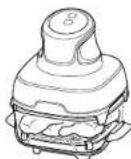
IMPORTANT SAFETY INSTRUCTIONS INDOOR HOUSEHOLD USE ONLY. READ ALL INSTRUCTIONS BEFORE USE

Read and review instructions to understand operation and use of product.

Indicates the presence of a hazard that can cause personal injury, death or substantial property damage if the warning included with this symbol is ignored.

Avoid contact with hot surface. Always use hand protection to avoid burns.

For indoor and household use only
⚠ WARNING
Failure to follow these instructions could result in electric shock, fire or burn hazard which could cause property damage, personal injury, or death. When using electrical appliances, basic safety precautions should always be followed, including the following:
1 This appliance can be used by persons with reduced physical, sensory or mental capabilities or lack of experience and knowledge if they have been given supervision or instruction concerning use of the appliance in a safe way and understand the hazards involved.
2 Keep the appliance and its cord out of reach of children. DO NOT allow the appliance to be used by children. Close supervision is necessary when used near children.
3 To eliminate a choking hazard for young children, remove and discard the protective cover filled on the power plug of this appliance.
4 Children shall not play with the appliance.
5 Glass will be hot during and after use. Risk of burns if touched while hot. ALWAYS use Safe-to-Touch handles when interacting with hot Ninja Glass Containers.
6 To prevent fire, DO NOT place appliance on hot surfaces or near a hot gas or electric burner or in a healed oven.
7 The glass container, adapter, and crisper plate became extremely hot during the cooking process. Avoid physical contact while removing the glass container, adapter, or plate from the appliance. DO NOT touch accessories during or immediately after cooking.
8HEVER use electrical socket below counter.
9 NEVER connect this appliance to an external timer switch or separate remote control system.
10 DO NOT use an extension cord. A short power-supply cord is used to reduce the risk of children grabbing the cord or becoming entangled and to reduce the risk of people tripping over a longer cord.
11 To protect against electrical shock DO NOT immerse cord, plugs, or main unit housing in water or other liquid. Cook only in the glassware containers provided.
12 Regularly inspect the appliance and power cord. DO NOT use the appliance if there is damage to the power cord or plug. If the appliance malfunctions or has been damaged in any way, immediately stop use and call Customer Service.
13 ALWAYS ensure the appliance is properly assembled before use.
14 DO NOT cover the air intake vent or air socket vent while unit is operating. Doing so will prevent even cooking and may damage the unit or cause it to overheat. Keep all objects 15cm away from vent while unit is in use.
15 ALWAYS ensure CrispI PowerPod is properly secured on a Ninja glass container before operating.
16 DO NOT use the appliance if Crispi PowerPod is not properly secured on a Ninja glass container.
17 This appliance is for household use only. DO NOT use this appliance for anything other than its intended use. DO NOT use in moving vehicles on boats. DO NOT use outdoors. Misuse may cause injury.
18 Intended for worktop use only. Ensure the surface is level, clean and dry. DO NOT move the appliance when in use.
19 DO NOT place the appliance near the edge of a worktop during operation.
IMPORTANT SAFETY INSTRUCTIONS
INDOOR HOUSEHOLD USE ONLY. READ ALL INSTRUCTIONS BEFORE USE
WARNING
Failure to follow these instructions could result in electric shock, fire or burn hazard which could cause property damage, personal injury, or death. When using electrical appliances, basic safety precautions should always be followed, including the following:
20 DO NOT use accessory attachments not recommended or sold by SharkNinja. The use of accessory attachments not recommended by SharkNinja may cause fire, electric shock, or injuries.
21 DO NOT place the appliance in or near a microwave, loaster oven, convection oven, or conventional oven or on a ceramic cooktop, electrical coil, gas burner range, or outdoor grill.
22 When using this appliance, provide at least 15um of space above and on all sides for adequate air circulation.
23 DO NOT use this appliance for deep-frying.
24 Prevent food contact with heating elements. DO NOT overhill when cooking. Overfilling may cause personal injury or property damage or affect the safe use of the appliance.
25 Socket voltages can vary, affecting the performance of your product. To prevent possible illness, use a thermometer to check that your food is cooked to the temperatures recommended.
26 Should the unit emit black smoke, unplug immediately. Wait for smoking to stop before removing any cooking accessories.
27 DO NOT touch hot surfaces. Appliance surfaces are hot during and after operation. To prevent burns or personal injury, ALWAYS use protective hot pads or insulated oven mills and use available handles.
28 EXTREME CAUTION must be used when the appliance contains hot food. Improper use may result in personal injury.
29 Spilled food can cause serious burns. Keep appliance and cord away from children. DO NOT let cord hang over edges of tables or counters or touch hot surfaces.
30 Cleaning and user maintenance shall not be made by children.
31 To disconnect, hold START/POWER button for 2 seconds, then unplug from socket when not in use and before cleaning. Allow to cool before cleaning, disassembly, putting in or taking off parts, and for storage.
32 DO NOT clean with metal scouring pads. Pieces can break off the pad and touch electrical parts, creating a risk of electric shock.
33 NEVER remove finger guard from Crisp PowerPod.
34 Please refer to the Cleaning & Maintenance section for regular maintenance of the appliance.
35 Extreme caution must be used when moving an appliance containing hot oil or other hot liquids.
36 Sudden temperature changes can break glassware.
- DO NOT add cool or cold liquid or food to hot glassware. Do not add hot liquids or food to cold glassware.
- DO NOT allow hot glass to directly contact cool or wet surfaces or items. Allow glassware to cool before putting in a sink, washing, refrigerating, or freezing.
37 The containers are not oven, broiler, or stovetop safe. DO NOT use with any heating appliances or heat sources except for the Crisp PowerPod or a microwave. DO NOT place empty containers in the microwave.
38 Physical damage or impacts can break glassware, or make it more likely to break from temperature changes.
- Use care to not scratch glass when using metal utensils and knives.
• DO NOT use abrasive cleaning tools.
• DO NOT drop or hit glassware against a hard object or strike ulensils against it.
• DO NOT use or repair any glassware that has been drouped, chipped, cracked or severely scratched.
- If a glass container chips or breaks, use thick gloves and caution while cleaning up the glass. Pieces may be sharp and difficult to locate.
- Throw away the broken glass; DO NOT recycle.
39 Ninja TempWare Glass containers are dishwasher safe. They may also be washed by hand using hot, soapy water and non-abrasive cleaners and plastic or nylon cleaning pads if scouring is necessary.
- Plastic lids are for microwave and storage use only and are BPA free
SAVE THESE INSTRUCTIONS
PARTS & ACCESSORIES
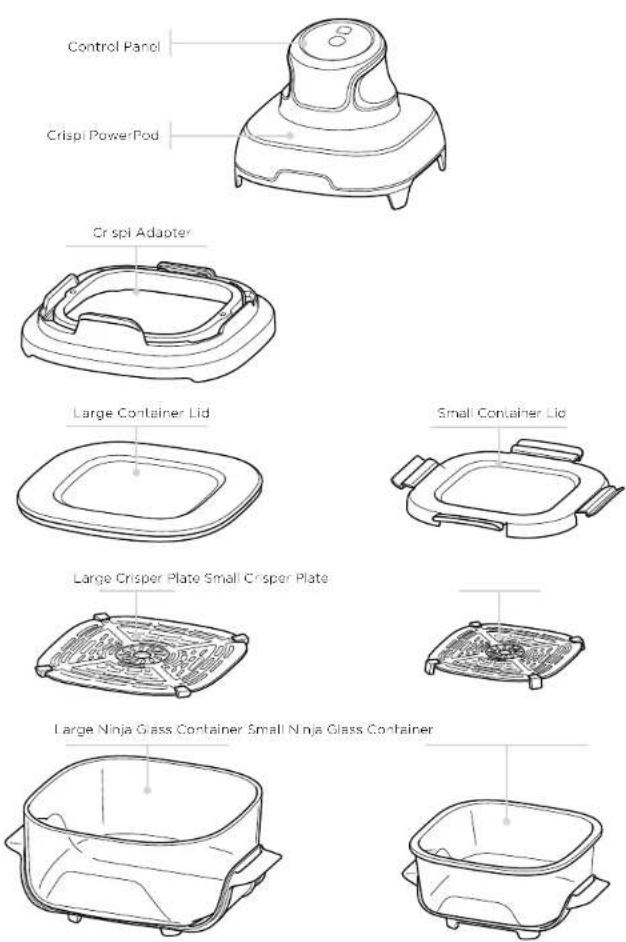
GETTING TO KNOW YOUR NINJA CRISPI
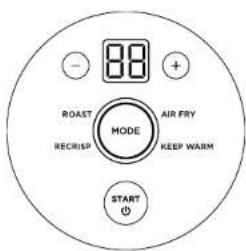
To resume cooking, place the Crisp PowerPod back on the Ninja glass container and press the START/POWER button.
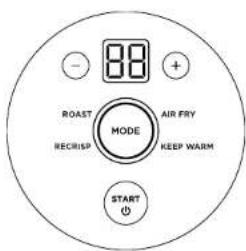
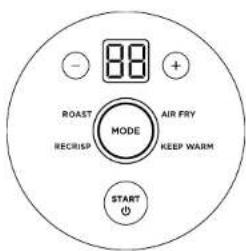
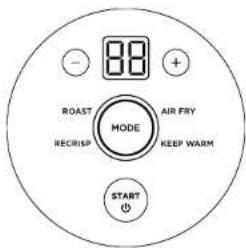
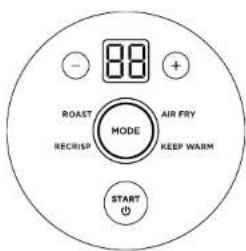
FUNCTION BUTTONS
KEEP WARM: Ensure your meals stay hot until it's time to enjoy.
AIR FRY: Air Iry your favorite foods to perfection with little to no oil.
RECRISP: Revive leftovers by gently warming them, leaving you with or spy results.
ROAST: Best for roasting large cuts of meat.
NOTE: Functions may vary by mode.
OPERATING BUTTONS
START/POWER button: Press to turn the Crispi PowerPod on. When the PowerPod is attached to a container, press to start or stop cooking. Press and hold for 2 seconds to turn off the PowerPod.
MODE button: Press to cycle through to des red function.
TIME - and + buttons: Use to adjust the cook time in any function before or during cooking
BEFORE FIRST USE
1 Remove and discard any packaging material, stickers, and tape from the unit.
2 Remove all accessories from the package and read this manual carefully. Please pay particular attention to operational instructions, warnings, and important safeguards to avoid any injury or property damage.
3 Wash the containers, adapter, onspor plates, and lios in hot, soapy water, then rinse and dry thoroughly. NEVER clean the Crisp PowerPod in the dishwasher.
4 When using this appliance, provide at least 15cm of space above and on all sides for adequate air circulation.
USE & CARE GUIDE
CRISPI POWERPOD
1 The Crisol PowerPod should NEVER be used on any container or vessel other than the Ninja glass container.
2 The Crisp PowerPod should NEVER be used when not on a Ninja glass container.
3 When placing Crispi PowerPod on the Ninja glass container. A LWAYS ensure Safe-to-Touch handles are aligned with the sides of the pod, NOT the front and back.
4 Crisp PowerPod will pause automatically when removed from the Ninja glass container. To resume cooking, place the Crisp PowerPod back on the Ninja glass container and press the START/POWER button.
5 NEVER remove the finger guard from the CrispI PowerPod.
6 All items should be kept 15cm away from the Crispil PowerPool vent when the unit is in use.
7 Crisp PowerPod foot allow you to place the Crisp PowerPod directly on any countertop after use.
NOTE: Cease all use of Crispi PowerPool if any feel are broken or damaged.
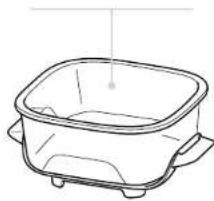
NINJA GLASS CONTAINERS
1 Heat-protectant base and Safe-to-Touch hancles are fixed permanently to the Ninja glass containers and should NEVER be removed.
2 Cease using Ninja glass container if Safe-to Touch handles or heat protectant base are broken or damaged.
3 Ninja glass containers are freezer safe, microwave safe, and dishwasher safe.
4 Ninja glass containers are NOT oven/stovetop/grill safe.
5 Handle Ninja glass containers with care. They can break if dropped, hit hard against a surface, or struck with a hard utensil. Discard immediately if any damage occurs.
6 If a Ninja glass container becomes chipped, cracked, or deeply scratched, DO NOT use, as container strength may be compromised and the container could break or shatter.
NOTE If a piece of a Ninja glass container chios or breaks off, use thick gloves and caution while cleaning up the glass, as pieces may be sharp. Dispose of glass in a standard waste bin; DO NOT recycle.
CONTAINER LIDS
1 Lids are freezer safe, microwave safe (ensur lid is NOT sealed on Nin a glass container when in the microwave), and dishwasher safe (top rack only).
2 DO NOT seal lid on Ninja glass container directly after cooking.
3 NEVER place Crisp PowerPod, Ninja glass container, or crisper plate directly on lid after cocking
CRISPER PLATES
1 Crisper plates are dishwasher safe, but they are NOT microwave or oven safe.
ADAPTER
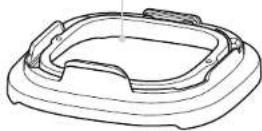
1 Adaptor should be used with the Crisp PowerPod ONLY when cooking in the 3.8L Ninja glass containers.
2 Adapter is dishwasher safe, but it is NOT microwave or oven safe.
NOTE Adaptor should NEVER be used when cooking with the 1.4L Ninja glass container.
3 Adapter will be hot after use; allow it to cool for 10 minutes before handling it.
USING YOUR NINJA CRISPI
USING THE COOKING FUNCTIONS
To turn on the Crisp PowerPod, first plug the power cord into a wall outlet. Press the START/POWER button.
NOTE: For best results, DO NOT combine raw, frozen, and/or pre-cooked ingredients. Cook ONLY one type of food at a time.
AIR FRY
1 install a cisper plate in a Ninja glass container 2 Add Ingredients to the Ninja glass contain
NOTE: For best results, DO NOT use the Air Fry function for frozen foods.
3 Place the Crispil PowerPod on top of the Ninja glass container, ensuring Safe-to-Touch handles are aligned with the sides of the PowerPod, NOT the front and back. "LID" will display on the control panel if not properly secured.
NOTE: The adapter must be used when cooking with the large Ninja Glass Container. Insert the PowerPod into the adapter until it clicks into place, then place the adapter on top of the glass container.
4 Press the MODE button to cycle through the functions and select AIR FRY. Default, time will display.
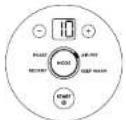
5 Use the TIME - and + buttons to select desired cooking time.
6 Press the START/POWER button to begin cooking. Unit will beep when cooking cycle starts.
7 To toss or flip ingredients during cooking, take PowerPod off container (it will stop automatically when removed) or press the START/POWER button to pause cooking. Shake container using Safe-to-Touch handles or flip foods with a sill cone-tipped utensil. Place PowerPod back on container and press the START/POWER button to continue cooking.
8When cooking is complete, the PowerPod will beep and "END" will appear on the display. The PowerPod will start cooling down and is safe to be removed from the container and placed directly on a countertop surface.
9 Eat right out of the container or remove ingredients using silicone lioped tongs/ulensil or dump out using Safe-to-Touch handles.
RECRISP
1 Install a crisper plate in a Ninja glass container. 2 Add ingredients to the Ninja glass container.
NOTE: For best results, DO NOT use the Recrisp function for frozen foods.
NOTE: If recrisping multiple food types at once, place a layer of ingredients in the bottom of the container. Then install the crisper plate and set a second layer of ingredients on the crisper plate.
3 Place the Crisp PowerPod on top of the Ninja glass container, ensuring Safe-to-Touch handles are aligned with the sides of the PowerPod, NOT the front and back. "L D" will display on the control panel if not properly secured.
NOTE: The adapter must be used when cooking with the large Ninja Glass Container. Insert the PowerPod into the adapter until it clicks into place, then place the adapter on top of the glass container.
4 Press the MODE button to cycle through the functions and select KEEP WARM. Default cook time will display.
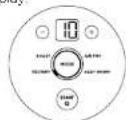
5 Use the TIME - and + buttons to select desired cooking time.
6 Press the START/POWER button to begin cooking. Unit will beep when cooking cycle starts
7 To toss or flip ingredients during cooking, take PowerPod off container (it will stop automatically when removed) or press the START/POWER button to ouse cooking. Shake container using Safe-to-Touch handles or flip foods with a silcone-tipped utensil. Place PowerPod back or container and press the START/POWER button to continue cooking.
8 When cooking is complete, the PowerPod will beep and "END" will appear on the display. The PowerPod will start cooling down and is safe to be removed from the container and placed directly on a countertop surface.
9 Eat right out of the container or remove ingredients using silicone-tloped tongs/utons I or dump out using Sale-to-Touch handles.
KEEP WARM ROAST
1 Install a crisper plate in a Ninja glass container
2 Add ingredients to the Ninja glass container
3Place the Crisp PowerPod on top of the Ninja glass container, ensuring Safe-to-Touch hand os are aligned with the sides of the PowerPod, NOT the front and back. "LID" will display on the control panel if not properly secured.
NOTE: The adapter must be used when cooking with the large Ninja Glass Container. Insert the PowerPod into the adapter until it clicks into place, then place the adapter on top of the glass container.
4 Press the MODE button to cycle through the functions and select: MAX CRISP. Default Time will display.
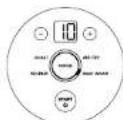
5 Use the TIME - and + buttons to select desired cooking time.
6 Press the START/POWER button to begin cooking. Unit will beep when cooking cycle starts.
8 When cooking is complete, the PowerPod will beep and "END" will appear on the display. The PowerPod will start cooling down and is safe to be removed from the container and placed directly on a countertop surface.
9 Eat right out of the container or remove ingredients using silicone lipped longs/uensil or dump out using Safe-to-Touch handles.
1 Install a crisper plate in a Ninja glass container
2 Add ingredients to the Ninja glass container.
3 Place the Crisp PowerPod on top of the Ninja glass container, ensuring Safe-to-touch handles are aligned with the sides of the PowerPod, NOT the front and back. "LID" will display on the control panel if not properly secured.
NOTE: The adapter must be used when cooking with the large Ninja Glass Container. Insert the PowerPod into the adapter until it clicks into place, then place the adapter on top of the glass container.
4 Press the MODE button to cycle through the functions and select ROAST. Default time will display.
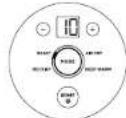
5 Use the TIME - and + buttons to select desired cooking time.
6 Press the START/POWER button to begin cooking. Unit will beep when cooking cycle starts.
7 When cooking is complete, the PowerPod will beep and "END" will appear on the display. The PowerPod will start cooling down and is safe to be removed from the container and placed directly on a countertop surface.
8 Eat right out of the container or remove ingredients using silicone-tioped longs/ultersi or dump out using Safe-to-Touch handlos.
CLEANING & MAINTENANCE
CLEANING YOUR NINJA CRISPI
The PowerPod should be cleaned thoroughly after each use. ALWAYS let the appliance cool completely before cleaning
| Part/ Accessory | Cleaning Method | Dishwasher Safe? |
| Crispl PowerPod | To clean the PowerPod and the control panel, wipe them clear with a demo cloth.NOTE: NEVER immerse the PowerPod in water or any other liquid. NEVER clean the PowerPod in a dishwasher. | No |
| Ninja Glass Containers | The containers can be washed in the dishwasher or by hand. If hand-washing, thoroughly air-dry or towel-dry all parts after use.Be sure to allow glass to cool gradually to room temperature before placing it in water, sink, or dishwasher. | Yes |
| Crisper Plates | The crisper plates can be washed in the dishwasher or by hand. If hand-washing, thoroughly air-dry or towel-dry all parts after use. | Yes |
| Lids | The lids can be washed in the dishwasher (top rack only) or by hand. If hand-washing, thoroughly air-dry or towel-dry all parts after use. | Yes |
| Adapter | The adapter can be washed in the dishwasher or by hand. If hand-washing, thoroughly air-dry or towel-dry after use. | Yes |
HELPFUL TIPS
1 Heat-protectant base on Ninja glass containers allows you to safely cook on any countertop surface with no heat damage.
2 Sale-to-Touch handles on Ninja glass containers allow you to safely handle containers after cooking.
3 For consistent browning, make sure ingredients are arranged in an oven layer on the bottom of the glass with no overlapping. If ingredients are overlapping, make sure to shake them halfway through the set cock time.
4 Cook time and function can be adjusted at any time during cooking. Press the TIME - and + buttons or MODE button to adjust the time and function
5 Check food frequently to avoid overcooking
6 Cr spi PowerPod will pause automatically when removed from the Ninja glass container. To resume cooking, place the Cr spi PowerPod back on the Ninja glass container and press the START/POWER button.
7 Crisp PowerPod feet allow you to place the Crisp PowerPod directly on a countertop after use
NOTE Cease a I use of Crisp PowerPod if any feet are broken or damaged.
8 Occasionally, the fan from the air fryer will blow lightweight foods around. To alleviate this, secure foods (like the top slice of bread on a sandwich) with toothpicks.
9 For quicker cooking, cut protein in 1-inch pieces.
10 The crisper plate elevates ingredients in the basket so air can circulate under and around them for consistent, crisp results.
11 For best results, remove food immediately after the cook time is complete to avoid overcooking.
12 For best results with fresh vegetables and potatoes, use at least 1 tablespoon of oil. Add more oil as desired to achieve the preferred level of crispiness.
13 For best results, check progress throughout cooking, and remove food when desired level of brownness has been achieved. We recommend using an instant-read thermometer to monitor internal temperature of proteins. After the cook time is complete, remove food immediately to avoid overcooking.
REPLACEMENT PARTS
To order additional parts and accessories, visit ninjakitchen.eu or contact Customer Service.
ACCESSORIES FOR PURCHASE
We offer a suite of custom-made accessories for your Ninja Crisp
Visit ninjakitchen.eu to expand your capabilities and take your cooking to the next level.
TROUBLESHOOTING GUIDE
- Does my unit need to preheat?
No. the unit does not need to be preneated.
- When should I use Max Crisp instead of Air Fry?
For best results, use Max Crisp when cooking prepackaged frozen foods such as French fries or chicken nuggets.
• Why is LID appearing on the display screen?
Crispi PowerPod is not secured properly on Ninja glass container. Make sure PowerPod is aligned and leveled on the container. If using the adapter, ensure PowerPod is fully inserted into the adapter.
• How do I pause the countdown?
Pressing START/POWER button or lifting the Crisp PowerPod off the container during cooking will pause the cooking function.
• Is the Crispi PowerPod safe to put on my countertop?
Yes, the poo with or without the adapter on can safely be placed on any counter/op during or after cooking.
- Are the Crispi glass containers safe to put on my countertop?
Yes, the heat protectant base on the Ninja glass containers allows them to be placed on any counterlop during or after cooking.
• How do I know when to use the crisper plate?
Use the crisoor plate when you want food to come out crisoy. The plate elevates the food in the basket so that air can flow under it to cook ingredients evenly.
• My food didn't cook.
Make sure the Crispil PowerPod is properly secured on Ninja glass container during cooking. For consistent browning, make sure ingredients are arranged in an even layer on the bottom of the basket with no overlapping. Use Safe-to-Touch handles on glass containers to shake to toss loose ingredients for consistent crispiness. Cook lime and function can be adjusted at any time during cooking. Simply press the TIME arrows or MODE button.
• My food is burned.
For best results, check progress throughout cooking, and remove food when desired level of brownness has been achieved. Remove food immediately after the cook time is complete to avoid overcooking.
• Why do some Ingredients blow around when air frying?
Occasionally, the fan from the air fryer will blow lightweight foods around. Use toothpicks to secure loose lightweight food, like the top slice on a sandwich.
• Can I air fry fresh battered ingredients?
Yes, but use the proper breacing technique. It is important to coat foods first with flour, then with egg, and then with breadcrumbs. Be sure to press the breadcrumbs onto the food so they stick in place. Loose breacing may be blown off by the unit's powerful fan
• Why is the unit beeping?
The unit beeps when the cooking function starts and again when the cooking function is complete.
• The screen went black.
The unit is in standby mode. Press the START/POWER button to turn it back on.
• A Lid error is showing on display screen.
Ensure the adaptor is fully connected if using the large container, and check if the Cr spi Pod is sitting on the container correctly.
• An "E" message appears on display screen.
The unit is not functioning properly. Please contact Customer Service.
NINJA
TWO (2) YEAR LIMITED GUARANTEE
When a consumer buys a product in Europe, they get the benefit of legal rights relating to the quality of the product (your statutory rights). You can enforce these rights against your retailer. We give you an additional manufacturer's guarantee of two years. These terms and conditions relate to our manufacturer's guarantee only - your statutory rights are unaffected.
The conditions below describe the prerecursites and scope of our guarantee. They do not affect your statutory rights or the obligations of your retailer and your contract with them.
Ninja® Guarantees
Every Ninja machine comes with a free parts and labour guarantee. You'll also find online support at www.ninjakitchen.eu
How do I register my Ninja guarantee?
You can register your guarantee online within 28 days of purchase. To save time, you'll need the following information about your product.
- Date you purchased the unit (receipt or delivery note).
• To register online, please visit
www.ninjakitchen.eu
IMPORTANT
• The guarantee will only cover your product from the date of purchase.
- Please keep your receipt at all times. Should you need to use your guarantee we will need your receipt to verify the information you have supplied to us is correct. The inability to produce a valid receipt may invalidate your guarantee.
What are the benefits of registering my free Ninja guarantee?
When you register your guarantee we'll have your data is to hand if we ever hood to get in touch. You can also receiveips and advice on how to get the best out of your Ninja unit and near the latest news about new Ninja® technology and launches. If you register your guarantee online, you'll get instant confirmation that we've received your details.
What is covered by the free Ninja guarantee?
Repair or replacement of your Ninja machine (at Ninja's discretion), including all parts and labour. A Ninja guarantee is in addition to your legal rights as a consumer.
What is not covered by the free Ninja guarantee?
-
Normal wear and tear of wearable parts (such as accessories). Replacement parts are available for purchase at www.ninjakitchen.eu
-
Damage caused by misuse, abuse, negligent handling, failure to perform required maintenance or damage due to mishandling in transit.
-
Damage caused by maintenance not authorised by Ninja.
Where can I buy genuine Ninja spares and accessories?
You'll find a full range of Ninja spares and replacement parts/accessories for all Ninja machinos at www.ninjakitchen.eu
Please remember that damage caused by the use of non-Ninja spares may not be covered under your guarantee.
ninjakitchen.eu/registerguarantee

Adaptador de Crispi
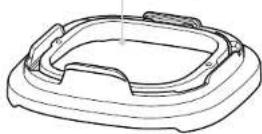
Tapa grande del recipiente
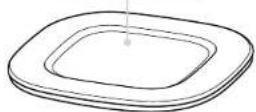
Rejilla grande para gratinar
natural_image
Line drawing of a rectangular container with side handles and a handle, no text or symbols present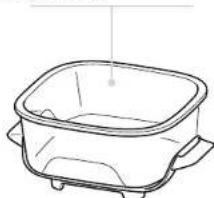
natural_image
Line drawing of a rectangular container with side legs and a small outlet (no text or symbols)CARACTERÍSTICAS DE NINJA CRISPI
natural_image
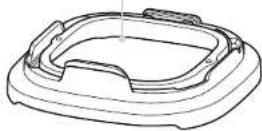
Line drawing of a mechanical component with a circular top and four protruding legs (no text or symbols)Acaptateur de Crisp
natural_image
Line drawing of a rectangular container with side handles and a small outlet (no text or symbols)ninjakitchen.eu/register-guarantee

natural_image
Line drawing of a mechanical component with a circular top and four protruding legs (no text or symbols)Adattatore Crispi
natural_image
Line drawing of a rectangular container with side handles and a curved lid (no text or symbols)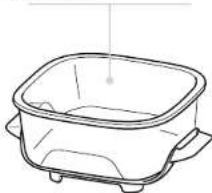
natural_image
Line drawing of a rectangular container with side handles and a small dot on top (no text or symbols)www.ninjakitchen.eu/register-guarantee

natural_image
Line drawing of a rectangular container with side handles and a curved lid (no text or symbols)natural_image
Line drawing of a rectangular container with side handles and a small protrusion (no text or symbols)UW NINJA CRISPI LEREN KENNEN
KEEP WARM (WARMHOUDEN) ROAST (BRADEN)
www.ninjakitchen.eu/registerguarantee

NINJA-GLASSBEHOLDERE
1 En varmebeskyttence base og et Safe-to-Touch-händtak er permanent festet til Ninja-glassboholdemoog skal ALDRI førnes.
2 Ikke bruk Ninja-glassbeholderen hvis Sale-to-Touch-händtakene eller den varmoboskyttonde bason or ødolagt oller skadel.
3 Ninja-glassbeholdere tåler både fryser, mikrobalgeovn og oppvaskmaskin.
4 Ninja-gassbeholdere kan IKKE settes inn i ovnen eller direkte på en platetopp / Grill (Grill).
5 Vær forsiktig når du håndterer Ninja-glassbenolderne. De kan gå i stykker hvis de slippes, slås hardt mot en overfiate eller med et hardt redskap. Avhend umiddelbart hvis det oppstår skade.
ninjakitchen.eu/registerguarantee

natural_image
Line drawing of a rectangular container with side handles and a small outlet (no text or symbols)natural_image
Line drawing of a rectangular container with side handles and a small hole, no text or symbols presentPOZNAJ NINJA CRISPI
KEEP WARM (PODGRZEWANIE) ROAST (PIECZENIE)
ninjakitchen.eu/registerguarantee

ninjakitchen.eu/registerguarantee


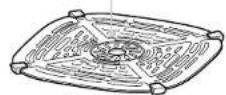
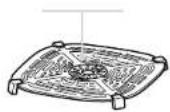
Suuri rapeutuslevy Pieni rapeutuslevy
natural_image
Line drawing of a rectangular container with side handles and internal compartments (no text or symbols)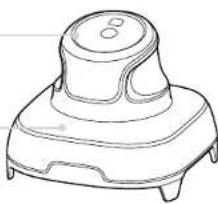
natural_image
Line drawing of a mechanical component with a circular top and four base (no text or symbols)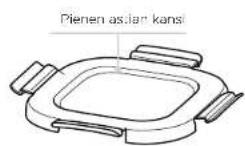
natural_image
Line drawing of a rectangular basin with side legs and a small outlet (no text or symbols)NINJA CRISPI TUTUKSI
ninjakitchen.eu/registerguarantee

natural_image
Line drawing of a rectangular container with side handles and a curved lid (no text or symbols)natural_image
Line drawing of a rectangular container with side handles and a small dot on top (no text or symbols)natural_image
Five black-and-white icons representing open books, a house, dining table, credit card, and a bicycle (no text or symbols)DANSK
© 2024 SharkNinja Operating LLC. TRYKT I KINA
DEUTSCH
© 2024 SharkNinja Operating LLC. GEDRUCKT IN CHINA
ENGLISH
Illustrations may differ from actual product. We are constantly striving to improve our products, therefore the specifications contained herein are subject to change without notice.
NINJA is a registered trademark in the European Union of SharkNinja Operating LLC.
© 2024 SharkNinja Operating LLC. PRINTED IN CHINA
ESPAÑOL
© 2024 SharkNinja Operating LLC. IMPRESO EN CHINA
FRANÇAIS
© 2024 SharkNinja Operating LLC. IMPRIMÉ EN CHINE
ITALIANO
© 2024 SharkNinja Operating LLC. STAMPATO IN CINA
SharkNinja Germany GmbH, Rotfeder-Ring 9,
60327 Frankfurt am Main, Germany
ninjakitchen.eu
FN101EUSeries_IB_MP_Mv1_240602
NEDERLANDS
© 2024 SharkNinja Operating LLC.
GEDRUKT IN CHINA
NORSK
© 2024 SharkNinja Operating LLC. TRYKKET I KINA
PORTUGUÊS
© 2024 SharkNinja Operating LLC. IMPRESSO NA CHINA
POLSKI
© 2024 SharkNinja Operating LLC. WYDRUKOWANO W CHINACH
SUOMI
© 2024 SharkNinja Operating LLC. PAINETTU KIINASSA
SVENSKA
SharkNinja Europe Ltd,
1st/2nd Floor Building 3150,
Thorpe Park, Century Way,
Leeds, England, LS15 8ZB
ninjakitchen.co.uk