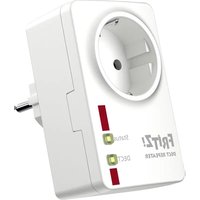
FRITZ!DECT Repeater 100 - Other phone accessories AVM - Free user manual and instructions
Find the device manual for free FRITZ!DECT Repeater 100 AVM in PDF.


User questions about FRITZ!DECT Repeater 100 AVM
0 question about this device. Answer the ones you know or ask your own.
Ask a new question about this device
Download the instructions for your Other phone accessories in PDF format for free! Find your manual FRITZ!DECT Repeater 100 - AVM and take your electronic device back in hand. On this page are published all the documents necessary for the use of your device. FRITZ!DECT Repeater 100 by AVM.
USER MANUAL FRITZ!DECT Repeater 100 AVM
Installation and Operation


DEUTSCH 3
ENGLISH 13
FRANÇAIS 23
ESPANOL 33
ITALIANO 43
NEDERLANDS 53
Lieferumfang
- FRITZ!Box with DECT functionality or DECT base station from another manufacturer (with the DECT-GAP standard)
Function
-
The FRITZ!DECT Repeater extends the range of your cordless telephone and your Smart Home devices with DECT ULE/HAN FUN.
-
In the extended reception area you can use all functions of FRITZ!Fon and FRITZ!DECT Smart Home devices. During telephone calls, the FRITZ!Fon switches automatically between the transmission ranges of the FRITZ!Box and the FRITZ!DECT Repeater.
-
The integrated outlet can be used for other devices.
Safety instructions

Do not subject the FRITZ!DECT Repeater 100 to a load higher than its limit of 2300 W/10 A (ohmic load). Overloading can damage the FRITZ!DECT 100, or cause malfunctions or an electrical accident.
- Only use the FRITZ!DECT Repeater 100 indoors.
- Only operate the FRITZ!DECT Repeater 100 in a dry location that is free of dust, protected from direct sunlight, and well ventilated.
- Only plug the FRITZ!DECT Repeater 100 into easily accessible outlets.
-
Do not connect multiple FRITZ!DECT Repeater 100 devices with each other.
-
Never let liquids get inside the FRITZ! DECT Repeater 100.
- Do not operate any devices that present a risk of fire (for instance, electric irons, radiant heaters) on the FRITZ!DECT Repeater 100.
- Do not modify the FRITZ!DECT Repeater 100. The FRITZ!DECT Repeater 100 may not be opened, converted, modified or repaired except by a qualified technician.
- Avoid obstacles. Between the FRITZ!Box and the FRITZ!DECT Repeater 100 there should be no thick walls, radiators or high-humidity zones (damp walls, drying racks).
Device Features
Name Function Action/Meaning
| Status | Press the button Switch LEDs on and off | |
| off LEDs are off | ||
| on At least one cordless telephone is connected | ||
| flashing Update | ||
| DECT | Press the button Reg | ster with FRITZ!Box |
| Hold button down for at least 6 sec. | Deregister from FRITZ!Box | |
| off LEDs are off | ||
| on Connected with FRITZ!Box | ||
| flashing Registering | with FRITZ!Box | |
| flashes briefly at regular intervals | no connection to the FRITZ!Box, FRITZ!DECT Repeater is not registered or is outside the range of your FRITZ!Box, see page 17. | |
Log In
- Insert the FRITZ!DECT Repeater into an outlet near your FRITZ!Box.
- Press the DECT button on the FRITZ!DECT Repeater.
The DECT LED flashes.
- Press the Connect button on the FRITZ!Box or
Press the DECT button on your FRITZ!Box and hold it down for 6 seconds.


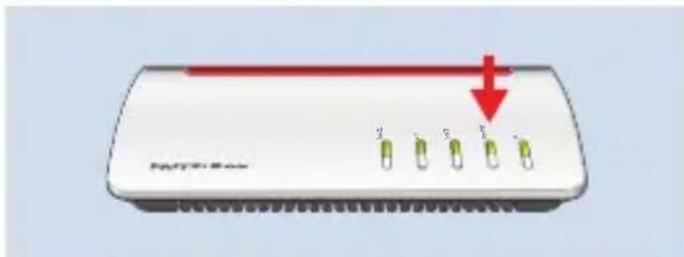
The connection is established when the DECT LED on the repeater lights up. Then reposition the repeater; see page 17.
Positioning
Connect the FRITZ!DECT Repeater to an outlet located about halfway between your FRITZ!Box and the DECT devices for which the reception area is to be extended. The FRITZ!Box and the FRITZ!DECT Repeater reestablish the configured connection automatically.
DECT

Connection status after reconnecting
| on | The FRITZ!DECT Repeater is connected with the FRITZ!Box. The FRITZ!DECT Repeater is ready for operation. |
| flashes briefly at regular intervals | The FRITZ!DECT Repeater is out of range. Select an outlet closer to your FRITZ!Box.Use a FRITZ!Fon to test the range in which the connection to the FRITZ!Box is strong enough without the FRITZ!DECT Repeater so that phone calls are possible without interference. Then position the FRITZ!DECT Repeater on the edge of this range. |
Multiple FRITZ!DECT Repeaters
- You can register up to 6 FRITZ!DECT Repeaters with your FRITZ!Box
- If multiple FRITZ!DECT Repeaters are to be used, we recommend maintaining a distance of at least 10 meters between the devices.
- Each FRITZ!DECT repeater is registered with the base station. It is not possible to connect multiple repeaters with each other directly.

Registering a FRITZ!DECT Repeater does not reduce the number of telephones you can register with your FRITZ!Box.

Other DECT Base Station
If you would like to register the FRITZ!DECT Repeater 100, with another DECT base station, the DECT PIN 0000 must be preset in the DECT base station, regardless of the manufacturer.

For detailed information, you may need to consult the documentation of your DECT base station.
Log Off
If you would like to register the FRITZ!DECT Repeater with another FRITZ!Box, deregister it from the current FRITZ!Box:
- Open a web browser and enter http://fritz.box.
- Open the Smart Home / Devices and Groups menu.
- Click on Delete Device.
appears behind your FRITZ!DECT Repeater.
- Click on

The FRITZ!DECT Repeater is deregistered from your FRITZ!Box.
Help
No Connection to FRITZ!Box
The DECT LED flashes briefly at regular intervals. The FRITZ!DECT Repeater does not have a radio connection to the FRITZ!Box.
- Insert the FRITZ!DECT Repeater into an outlet near your FRITZ!Box.
- If the DECT LED lights up, the previous outlet was located outside the range of your FRITZ!Box, or the radio connection was faulty. Note the the instructions at page 14 and page 17.
If the DECT LED continues flashing, the FRITZ!DECT Repeater is not registered with
the FRITZ!Box. Register the FRITZ!DECT Repeater again.
A FRITZ!Box may not be configured as a DECT Repeater if one or more FRITZ!DECT Repeaters are to be registered with it.
Technical Specifications
| Dimensions (W x H x D) 93 x 59 x 41 mm | |
| Weight 135 g | |
| Range up to 40 m | |
| Operating temperature | 0 °C to 40 °C (not in damp locations) |
| Wi-Fi standard DECT | |
| Frequency Range 1880 – 1902 MHz | |
| Transmitter power (max.) 250 mW | |
| Total power consumption: Max. 1.5 W; standby: 0.9 W | |
| Maximum load for connected devices up to 2300 W/10 A | |
| Supply voltage 230 V / 50 Hz |
Declaration of CE Conformity
AVM declares herewith that the device is compliant with directive 2014/53/EU. The full text of the declaration of EU conformity is available at en.avm.de/service/declarations.

Declaration of EU Conformity
AVM declares herewith that the device is compliant with the Radio Equipment Regulations 2017 (S.I. 2017/1206). The full text of the declaration of UK conformity is available at en.avm.de/service/declarations.


Contenu du pack
en.avm.de/service/declarations.


Contenuo
en.avm.de/service/declarations.