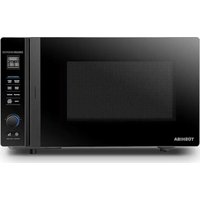
MV-TC25T(BK) - Microwave Oven TOSHIBA - Free user manual and instructions
Find the device manual for free MV-TC25T(BK) TOSHIBA in PDF.


| Product type | Multifunction microwave oven with air fryer |
| Brand | Toshiba |
| Model | MV-TC25T(BK) |
| Capacity | 25 liters |
| External dimensions (W x D x H) | 513 x 513 x 310 mm |
| Net weight | Approximately 18.2 kg |
| Rated voltage | 230-240 V ~ 50 Hz |
| Microwave power | 1000 W (output), 1520 W (input) |
| Grill power | 1100 W (input) |
| Convection power | 2100 W (input) |
| Turntable diameter | 315 mm |
| Main functions | Microwave, Grill, Convection, Combi, Air fryer, Crisp grill, Low temperature, Defrost, Auto menu |
| Included accessories | Glass tray, Turntable ring, Turntable shaft, Wire rack, Baking tray, User manual |
| Care and cleaning | Clean the interior with a damp cloth after each use; do not use a steam cleaner; regular cleaning recommended |
| Safety | Child lock, automatic shut-off, overheat protection, mandatory grounding |
| Warranty | 24 months (domestic), 12 months (commercial) |
| Customer service | Midea Europe GmbH, email: service-meg@midea.com (DE), service-es@midea.com (ES) |
Frequently Asked Questions - MV-TC25T(BK) TOSHIBA
User questions about MV-TC25T(BK) TOSHIBA
0 question about this device. Answer the ones you know or ask your own.
Ask a new question about this device
Download the instructions for your Microwave Oven in PDF format for free! Find your manual MV-TC25T(BK) - TOSHIBA and take your electronic device back in hand. On this page are published all the documents necessary for the use of your device. MV-TC25T(BK) by TOSHIBA.
USER MANUAL MV-TC25T(BK) TOSHIBA
natural_image
TOSHIBA microwave oven with a glass of liquid inside, displayed on a dark screen (no visible text or symbols on the main device body)INHALT
PRODUKTSICHERHEIT
natural_image
Symbol of a trash bin crossed with a diagonal line, representing no waste or discharge (no text or labels)
Homepage: www.midea-home.com
service-fr@midea.com [FR]
assistenza@midea.com [IT]
65760 Eschborn, Germany
Stand 9/2020
natural_image
TOSHIBA microwave oven with a glass of liquid inside, displayed on a dark screen (no visible text or symbols on the main device body)CONTENIDOS
natural_image
Symbol of a trash bin crossed out by two diagonal lines (no text or numbers present)
service-fr@midea.com [FR]
assistenza@midea.com [IT]
natural_image
TOSHIBA microwave oven with digital display showing a glass of liquid, no visible text or symbols on the main device.SOMMAIRE
SÉCURITÉ DU PRODUIT
CONSIGNES DE SÉCURITÉ IMPORTANTES ...... EN-4
PRÉSENTATION DU PRODUIT
PRÉCAUTIONS POUR ÉVITER L'EXPOSITION POSSIBLE À L'ÉNERGIE EXCESSIVE DES MICRO-ONDES.....EN-7
CARACTÉRISTIQUES ...... EN-7
POUR RÉDUIRE LE RISQUE DE BLESSURE CORPORELLE, CONNECTER L'INSTALLATION A LA TERREEN-8
NETTOYAGE EN-9
USTENSILES......EN-10
INSTRUCTIONS D'UTILISATION
CONFIGURATION ET INSTALLATION......EN-13
PANNEAU DE CONTRÔLE......EN-16
FONCTIONNEMENT......EN-17
-
RÉGLAGE DE L'HORLOGE......EN-17
-
CUISSON AU MICRO-ONDES....EN-17
-
CUISSON AU GRIL (ACCESSOIRES SUGGÉRÉS : GRILLE) ......EN-18
-
CUISSON COMBINÉE (ACCESSOIRES SUGGÉRÉS : GRILLE)......EN-18
-
CUISSON À CONVECTION (AVEC FONCTION DE PRÉCHAUFFAGE)......EN-19
-
CUISSON À CONVECTION (SANS MODE DE PRÉCHAUFFAGE)......EN-19
-
TEMP. BASSE......EN-20
-
FRITEUSE SAINE À AIR......EN-20
-
GRILLADE CROUSTILLANTE......EN-21
-
MENU COMBINÉ ......EN-21
-
CUISSON EN PLUSIEURS PHASES ......EN-22
-
MINUTERIE DE CUISINE......EN-23
-
CUISSON RAPIDE AU MICRO-ONDES......EN-23
-
MENU AUTO ......EN-24
-
DÉCONGÉLATION EN POIDS......EN-24
-
DÉCONGÉLATION EN DURÉE......EN-24
-
FONCTION D'INFORMATION ......EN-25
-
COUPURE DU SON....EN-25
-
FONCTION DE VERROUILLAGE POUR LES ENFANTS......EN-25
- CARACTÉRISTIQUES......EN-25
- FONCTION DE RÉINITIALISATION DE LA PLAQUE TOURNANTE ....EN-25
TABLEAU DE MENU AUTO......EN-26
MAINTENANCE
DÉPANNAGE......EN-28
CLAUSES DE GARANTIE/SERVICE......EN-29

REMARQUE
AVANT DE FAIRE FONCTIONNER CE PRODUIT, LIRE, COMPRENDRE ET SUIVRE CES INSTRUCTIONS.
ASSUREZ-VOUS DE GARDER CE MANUEL POUR Y FAIRE RÉFÉRENCE À L'AVENIR
ATTENTION
| Puissance combinée Micro-ondes Grill Convection | |||
| C-01 | ● | ● | |
| C-02 | ● | ● | |
| C-03 | ● | ● | |
| C-04 | ● | ● | ● |
FONCTIONNEMENT
natural_image
Symbol of a trash bin crossed with a diagonal line, no text or numbers presentservice-fr@midea.com [FR]
assistenza@midea.com [IT]
natural_image
TOSHIBA microwave oven with digital display showing temperature and control buttons (no readable text on main body)CONTENTS
PRODUCT SAFETY
IMPORTANT SAFETY INSTRUCTIONS ......EN-4
PRODUCT INTRODUCTION
PRECAUTIONS TO AVOID POSSIBLE EXPOSURE TO EXCESSIVE MICROWAVE ENERGY ......EN-7
SPECIFICATIONS EN-7
GROUNDING INSTALLATION ......EN-8
CLEANING EN-9
UTENSILS EN-10
INSTRUCTION FOR USE
SET UP & INSTALLATION ......EN-13
CONTROL PANEL EN-16
-
CLOCK SETTING EN-17
-
MICROWAVE COOKING ......EN-17
-
GRILL COOKING EN-18
-
COMBINATION COOKING ......EN-18
-
CONVECTION COOKING (WITH PREHEATING FUNTION) ......EN-19
-
CONVECTION COOKING (WITHOUT PRE-HEATING FUNTION) EN-19
-
LOW TEMP EN-20
-
HEALTHY AIR FRY EN-20
-
CRISPY GRILL EN-21
10.COMBI MENU EN-21
-
MULTI-STAGE COOKING EN-22
-
KITCHEN TIMER ......EN-23
-
MICRO QUICK COOKING EN-23
-
AUTO MENU EN-24
-
DEFROST BY WEIGHT ......EN-24
-
DEFROST BY TIME EN-24
-
INQUIRING FUNCTION ......EN-25
-
MUTE FUNCTION ......EN-25
-
LOCK-OUT FUNCTION FOR CHILDREN ......EN-25
- SPECIFICATION ......EN-25
- TURNTABLE RESET FUNCTION ......EN-25
AUTO MENU CHART ......EN-26
MAINTENANCE
TROUBLE SHOOTING EN-28
WARRANTY CONDITIONS / SERVICE ......EN-29

BEFORE OPERATING THIS PRODUCT, READ, UNDERSTAND, AND FOLLOW THESE INSTRUCTIONS. BE SURE TO SAVE THIS BOOKLIST FOR FUTURE REFERENCE
WARNING
To reduce the risk of fire, electric shock, injury to persons or exposure to excessive microwave oven energy when using your appliance, follow basic precautions, including the following:
- Read and follow the specific: "PRECAUTIONS TO AVOID POSSIBLE EXPOSURE TO EXCESSIVE MICROWAVE ENERGY".
- This appliance can be used by children and persons with reduced physical, sensory or mental capabilities or lack of experience and knowledge if they have been given supervision or instruction concerning use of the appliance in a safe way and understand the hazards involved. Children shall not play with the appliance. Cleaning and user maintenance shall not be made by children unless they are supervised.
- Keep the appliance and its cord away from children unless they are continuously supervised.
- If the supply cord is damaged, it must be replaced by the manufacturer, its service agent or similarly qualified persons in order to avoid a hazard.
- WARNING: Ensure that the appliance is switched off before replacing the lamp to avoid the possibility of electric shock.
- WARNING: It is hazardous for anyone other than a competent person to carry out any service or repair operation that involves the removal of a cover which gives protection against exposure to microwave energy.
IMPORTANT SAFETY INSTRUCTIONS

SAFETY WARNING
-
WARNING: Liquids and other foods must not be heated in sealed containers since they are liable to explode.
-
When heating food in plastic or paper containers, keep an eye on the oven due to the possibility of ignition.
-
Only use utensils that are suitable for use in microwave ovens.
-
If smoke is emitted, switch off or unplug the appliance and keep the door closed in order to stifle any flames.
-
Microwave heating of beverages can result in delayed eruptive boiling, therefore care must be taken when handling the container.
-
The contents of feeding bottles and baby food jars shall be stirred or shaken and the temperature checked before consumption, in order to avoid burns.
-
Eggs in their shell and whole hard-boiled eggs should not be heated in microwave ovens since they may explode, even after microwave heating has ended.
-
The oven should be cleaned regularly and any food deposits removed.
-
Failure to maintain the oven in a clean condition could lead to deterioration of the surface that could adversely affect the life of the appliance and possibly result in a hazardous situation.
-
Only use the temperature probe recommended for this oven. (for ovens provided with a facility to use a temperature- sensing probe.)
-
The microwave oven shall not be placed in a cabinet unless it has been tested in a cabinet.
-
This appliance is intended to be used in household and similar applications such as:
-staff kitchen areas in shops, offices and other working environments;
-by clients in hotels, motels and other residential type environments;
-farm houses;
-bed and breakfast type environments. - The microwave oven is intended for heating food and beverages. Drying of food or clothing and heating of warming pads, slippers, sponges, damp cloth and similar may lead to risk of injury, ignition or fire.
- Metallic containers for food and beverages are not allowed during microwave cooking.
- The appliance shall not be cleaned with a steam cleaner.
- The appliance is intended to be used freestanding.
- The rear surface of appliances shall be placed against a wall.
- The appliances are not intended to be operated by means of an external timer or separate remote-control system.
- The temperature of accessible surfaces may be high when the appliance is operating.
- WARNING: When the appliance is operated in the combination mode, children should only use the oven under adult supervision due to the temperatures generated.
READ CAREFULLY AND KEEP FOR FUTURE REFERENCE
PRECAUTIONS TO AVOID POSSIBLE EXPOSURE TO EXCESSIVE MICROWAVE ENERGY
(a) Do not attempt to operate this oven with the door open since this can result in harmful exposure to microwave energy. It is important not to break or tamper with the safety interlocks.
(b) Do not place any object between the oven front face and the door or allow cleaner residue to accumulate on sealing surfaces.
(c) WARNING: If the door or door seals are damaged, the oven must not be operated until it has been repaired by a competent person.
ADDENDUM
If the apparatus is not maintained in a good state of cleanliness, its surface could be degraded and affect the life span of the apparatus and lead to a dangerous situation.
SPECIFICATIONS
| Model: | MV-TC25T(BK) |
| Rated Voltage: | 230-240V~50Hz |
| Power Consumption (Microwave): | 1520 W |
| Rated Output Power(Microwave): | 1000 W |
| Rated Input Power (Grill): | 1100 W |
| Rated Input Power (Convection): | 2100 W |
| Oven Capacity: | 25 L |
| Turntable Diameter: | 315 mm |
| Outside Dimensions (W x D x H): | 513x513x310 mm |
| Net Weight: | Approx. 18.2 kg |
TO REDUCE THE RISK OF INJURY TO PERSONS GROUNDING INSTALLATION
DANGER-Electric Shock Hazard
Touching some of the internal components can cause serious personal injury or death. Do not disassemble this appliance.
WARNING-Electric Shock Hazard
Improper use of the grounding can result in electric shock.
Do not plug into an outlet until appliance is properly installed and grounded.
This appliance must be grounded. In the event of an electrical short circuit, grounding reduces the risk of electric shock by providing an escape wire for the electric current.
This appliance is equipped with a cord having a grounding wire with a grounding plug. The plug must be plugged into an outlet that is properly installed and grounded.
Consult a qualified electrician or serviceman if the grounding instructions are not completely understood or if doubt exists as to whether the appliance is properly grounded.
If it is necessary to use an extension cord, use only a 3-wire extension cord.
TO REDUCE THE RISK OF INJURY TO PERSONS GROUNDING INSTALLATION
- A short power-supply cord is provided to reduce the risks resulting from becoming entangled in or tripping over a longer cord.
- If a long cord set or extension cord is used:
1) The marked electrical rating of the cord set or extension cord should be at least as great as the electrical rating of the appliance.
2) The extension cord must be a grounding-type 3-wire cord.
3) The long cord should be arranged so that it will not drape over the counter top or tabletop where it can be pulled on by children or tripped over unintentionally.
CLEANING
Be sure to unplug the appliance from the power supply.
- Clean the cavity of the oven after using with a slightly damp cloth.
- Clean the accessories in the usual way in soapy water.
- The door frame and seal and neighboring parts must be cleaned carefully with a damp cloth when they are dirty.
- Do not use harsh abrasive cleaners or sharp metal scrapers to clean the oven door glass since they can scratch the surface, which may result in shattering of the glass.
- Cleaning Tip--For easier cleaning of the cavity walls that the food cooked can touch: Place half a lemon in a bowl, add 300ml (1/2 pint) water and heat on 100% microwave power for 10 minutes. Wipe the oven clean using a soft, dry cloth.
UTENSILS
CAUTION-Personal Injury Hazard
It is hazardous for anyone other than a competent person to carry out any service or repair operation that involves the removal of a cover which gives protection against exposure to microwave energy.
See the instructions on "Materials you can use in microwave oven or to be avoided in microwave oven." There may be certain non-metallic utensils that are not safe to use for microwaving. If in doubt, you can test the utensil in question following the procedure below.
Utensil Test:
- Fill a microwave-safe container with 1 cup of cold water (250ml) along with the utensil in question.
- Cook on maximum power for 1 minute.
- Carefully feel the utensil. If the empty utensil is warm, do not use it for microwave cooking.
- Do not exceed 1 minute cooking time.
MATERIALS YOU CAN USE IN MICROWAVE OVEN
UTENSILS REMARKS
| Browning dish | Follow manufacturer's instructions.The bottom of browning dish must be at least 3/16 inch (5mm) above the turntable. Incorrect usage may cause the turntable to break. | √ |
| Dinnerware | Microwave-safe only. Follow manufacturer's instructions.Do not use cracked or chipped dishes. | √ |
| Glass jars | Always remove lid. Use only to heat food until just warm. Most glass jars are not heat resistant and may break. | √ |
| Glassware | Heat-resistant oven glassware only. Make sure there is no metallic trim. Do not use cracked or chipped dishes. | √ |
| Oven cooking bags | Follow manufacturer's instructions. Do not close with metal tie. Make slits to allow steam to escape. | √ |
| Paper plates and cups | Use for short-term cooking/warming only. Do not leave oven unattended while cooking. | √ |
| Paper towels | Use to cover food for reheating and absorbing fat. Use with supervision for a short-term cooking only. | √ |
| Parchment paper | Use as a cover to prevent splattering or a wrap for steaming. | √ |
| Plastic | Microwave-safe only. Follow the manufacturer's instructions. Should be labeled "Microwave Safe". Some plastic containers soften, as the food inside gets hot. "Boiling bags" and tightly closed plastic bags should be slit, pierced or vented as directed by package. | √ |
| Plastic wrap | Microwave-safe only. Use to cover food during cooking to retain moisture. Do not allow plastic wrap to touch food. | √ |
| Wax paper | Use as a cover to prevent splattering and retain moisture. | √ |
MATERIALS TO BE AVOIDED IN MICROWAVE OVEN
UTENSILS REMARKS
| Aluminum tray May cause arcing. Transfer food into microwave-safe dish. | ✕ | |
| Food carton with metal handle | May cause arcing. Transfer food into microwave-safe dish. | ✕ |
| Metal or metal-trimmed utensils | Metal shields the food from microwave energy. Metal trim may cause arcing. | ✕ |
| Metal twist ties | May cause arcing and could cause a fire in the oven. | ✕ |
| Paper bags | May cause a fire in the oven. | ✕ |
| Plastic foam | Plastic foam may melt or contaminate the liquid inside when exposed to high temperature. | ✕ |
| Wood | Wood will dry out when used in the microwave oven and may split or crack. | ✕ |
SET UP & INSTALLATION
SETTING UP YOUR OVEN
Names of Oven Parts and Accessories
Remove the oven and all materials from the carton and oven cavity.
Your oven comes with the following accessories:
Glass tray 1
Turntable ring assembly 1
Turntable Shaft 1
Grill Rack 1
Baking tray 1
Instruction Manual 1
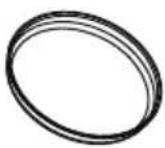
Baking tray
Grill Rack (Can not be used in microwave function and must be placed on the glass tray)
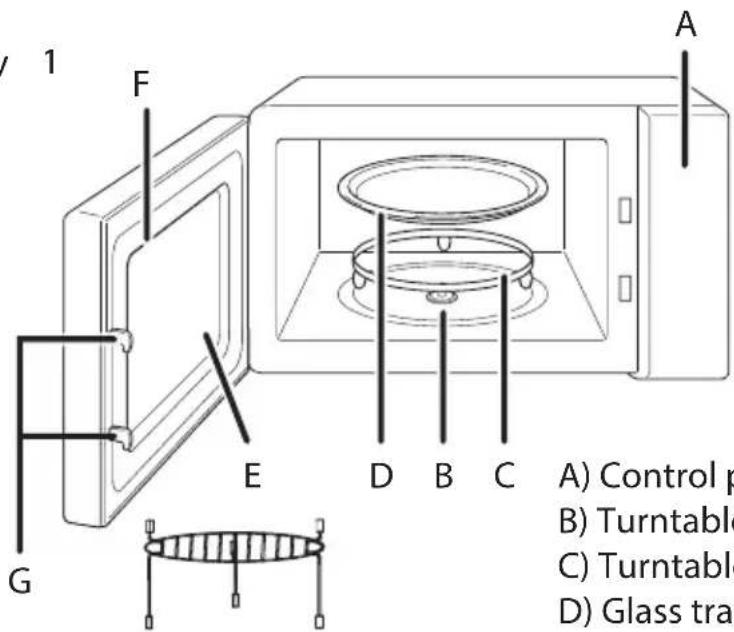
A) Control panel
B) Turntable shaft
C) Turntable ring assembly
D) Glass tray
E) Observation window
F) Door assembly
G) Safety interlock system
Turntable Installation
Glass tray
Turntable shaft
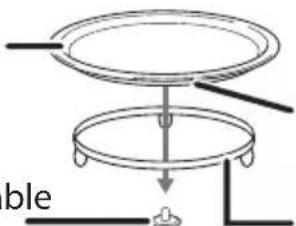
Hub (underside)
Turntable ring assembly
a. Never place the glass tray upside down. Follow the instruction to place the glass tray on the turntable ring with correct direction. The glass tray should rotate smoothly.
b. Both glass tray and turntable ring assembly must always be used during cooking.
C. All food and containers of food are always placed on the glass tray for cooking.
d. If glass tray or turntable ring assembly cracks or breaks, contact your nearest authorized service center.
SET UP & INSTALLATION
COUNTERTOP INSTALLATION
Remove all packing material and accessories. Examine the oven for any damage such as dents or broken door. Do not install if oven is damaged.
Cabinet: Remove any protective film found on the microwave oven cabinet surface.
Do not remove the light brown Mica cover that is attached to the oven cavity to protect the magnetron.
INSTALLATION
- Select a level surface that provide enough open space for the intake and/or outlet vents.
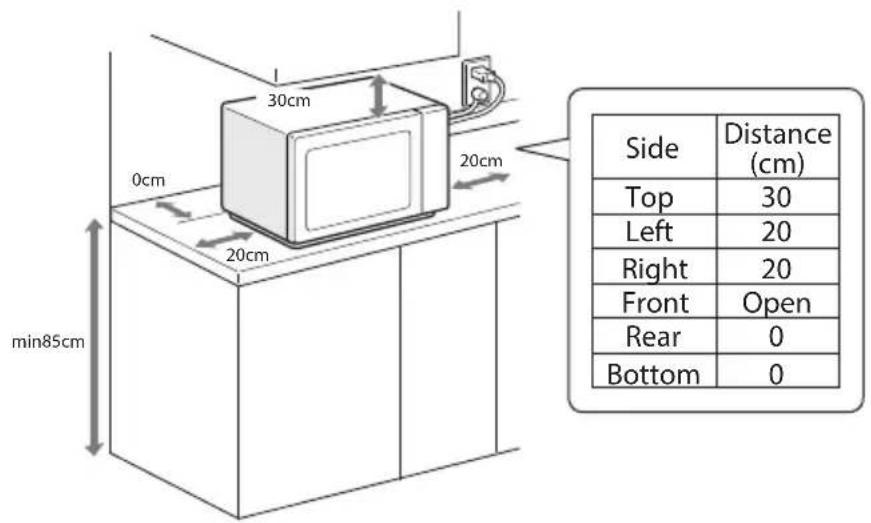
(1) The minimum installation height is 85cm.
(2) The rear surface of appliance shall be placed against a wall.
Leave a minimum clearance of 30cm above the oven, a minimum clearance of 20cm is required between the oven and any adjacent walls.
(3) Do not remove the legs from the bottom of the oven.
(4) Blocking the intake and/or outlet openings can damage the oven.
(5) Place the oven as far away from radios and TV as possible. Operation of microwave oven may cause interference to your radio or TV reception.
SET UP & INSTALLATION
- Plug your oven into a standard household outlet. Be sure the voltage and the frequency is the same as the voltage and the frequency on the rating label.
Do not install oven over a range cooktop or other heat-producing appliance. If installed near or over a heat source, the oven could be damaged and the warranty would be void.
The accessible surface may be hot during operation.
CONTROL PANEL
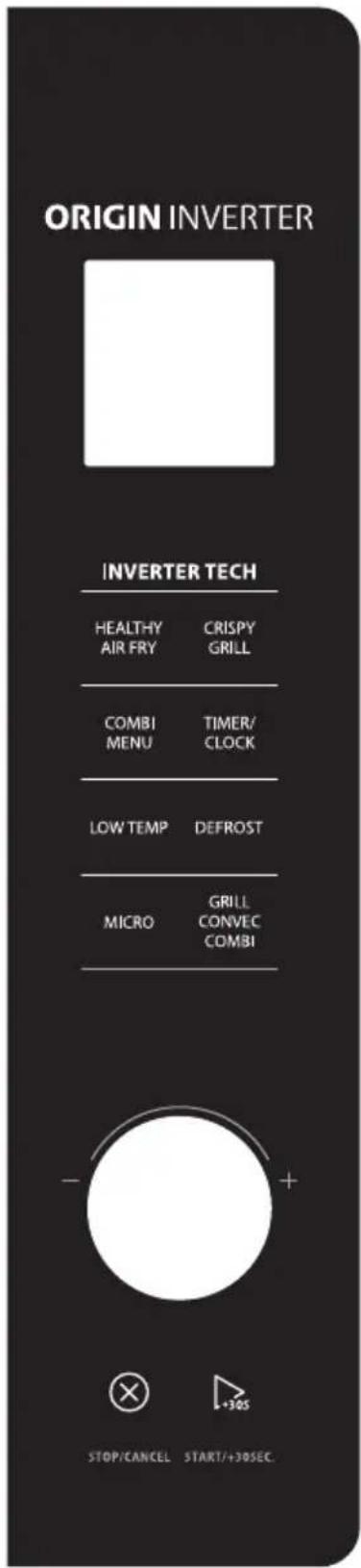
OPERATION
When the oven is electrified, the screen will display "0:00". If no operation in 30 seconds, the buzzer will sound once and the oven will enter the waiting state.
1. Clock Setting
1) In waiting state, press" TIMER/ CLOCK "twice,"0:00" displays.
The hour figures flash.
2) Turn " 🔍" to adjust the hour figures, the input time should be within 0--23.
3) Press " START/+30SEC. " to confirm, the minute figures will flash.
4) Turn " 🔍" to adjust the minute figures, the input time should be within 0--59.
5) Press " START/+30SEC." to finish clock setting. ":" will flash.
NOTE
• 1) The clock will not work if is not set when powered.
- 2) During the process of clock setting, if " START/+30SEC." is not press, and no operation within 1 minute, the buzzer sounds once and the oven turns back to former setting state.
2. Microwave Cooking
1) Press the "MICRO" key once, "1000W" displays, meanwhile "0:00" display.
2) Press "MICRO" for times or turn " 🔍" to select the microwave power from 100% to 10%. "1000W", "800W", "500W", "300W", "100W" will display in order.
3) Press " START/+30SEC." to confirm.
4)Turn " 🔍" to adjust the cooking time. (The time setting should be 0:05- 95:00.)
5) Press " START/+30SEC." to start cooking.
NOTE
the step quantities for the adjustment time of the coding switch are as follow:
Microwave Power Chart
| Press | Once | Twice | Thrice | 4 times | 5 times |
| Display | 1000W | 800W | 500W 300W | 100W |
3. Grill Cooking (Suggested accessories: Grill rack)
1) Press the "GRILL CONVEC COMBI" key once, and "G-01" displays.
2) Press " START/+30SEC." to confirm and "0:00" flashes to remind you input cooking time.
3) Turn " 🔍" to adjust the cooking time. (The time setting should be 0:05- 95:00.)
4) Press " START/+30SEC." to start cooking.
NOTE
If half the grill time passes, the oven will sound twice to tell you turn over the food. You can just leave it continue. But in order to have a better effect of grilling food, you should turn the food over, close the door, and then press" START/+30SEC." to continue cooking.
4. Combination Cooking (Suggested accessories: Grill rack)
1) Press the "GRILL CONVEC COMBI" key once, and "G-01" displays.
2) Press " GRILL CONVEC COMBI " for times or turn " 🔍 " to select the combination power. Stop turning when "C-01","C-02","C-03","C-04" displays.
3) Press " START/+30SEC." to confirm.
4) Turn " 🔍" to adjust the cooking time. (The time setting should be 0:05- 95:00.)
5) Press " START/+30SEC." to start cooking.
Combination instructions
| Combination power | Microwave | Grill | Convection |
| C-01 | ● | ● | |
| C-02 | ● | ● | |
| C-03 | ● | ● | |
| C-04 | ● | ● | ● |
OPERATION
5. Convection Cooking(With preheating funtion) (Suggested accessories: Grill rack/Baking tray)
The convection cooking can let you to cook the food as a traditional oven. Microwave is not used. It is recommended that you should preheat the oven to the appropriate temperature before placing the food in the oven.
1) Press the "GRILL CONVEC COMBI" key twice, and "150 °C" flashes. And "0:00" is displayed.
2) Press " GRILL CONVEC COMBI " for times or turn " 🔍 " to select the convection temperature. The temperature can be chosen from 150 degrees to 220 degrees.
3) Press the "START/+30SEC." to confirm the temperature.
4) Press the "START/+30SEC." to start preheating. When the preheating temperature arrives, the buzzer will sound twice to remind you to put the food into the oven. And the preheated temperature is displayed and flashed.
5) Put the food into the oven and close the door.
Turn " 🔍" to adjust the cooking time. (The maximum setting time is 95 minutes.)
6) Press the " START/+30SEC." key to start cooking.
NOTE
- Cooking time cannot be input until the preheating temperature arrives. If the temperature arrives, door must be opened to input the cooking time.
- If the time not input in 5 minutes, the oven will stop preheating. The buzzer sound five times and turn back to waiting states.
6. Convection Cooking( Without pre-heating function) (Suggested accessories: Grill rack/Baking tray)
1) Press the "GRILL CONVEC COMBI" key twice, and "150 °C" flashes. And "0:00" is displayed.
2) Press " GRILL CONVEC COMBI " for times or turn " " to select the convection temperature. The temperature can be chosen from 150 degrees to 220 degrees.
3) Press the "START/+30SEC." to confirm the temperature.
4) Turn " 🔍" to adjust the cooking time. (The maximum setting time is 95 minutes.)
5) Press the " START/+30SEC." key to start cooking.
7.Low Temp
1) In waiting state, press "LOW TEMP" once, the screen will display "35 °C". And "0:00" is also displayed.
2) Press " LOW TEMP " for times or turn " 🔍 " to select the temperature; The temperature can be chosen from 35 degrees to 90 degrees.
3) Press" START/+30SEC. " to confirm;
4) Turn " 🔍" to adjust the cooking time, the maximum setting time is 12 hours;
5) Press the " START/+30SEC." key to start cooking.
8. Healthy air fry
1) In waiting state, press "HEALTHY AIR FRY" once, the screen will display "H-1".
2) Press "HEALTHY AIR FRY" for times or turn " 🔍" to select the menu you need; The screen will display "H-1", "H-2", "H-3" .... "H-8" in turn.
3) Press" START/+30SEC. " to confirm;
4) Press the "START/+30SEC." key to start cooking.
Healthy air fry menu chart:
| Menu | Weight | Display | Cooking time | Suggested accessories |
| H-1 Frozen french fries | 300g | 300g | 40 min | Baking tray & Short grill rack |
| H-2 Frozen potato wedges | 300g | 300g | 40 min | Baking tray & Short grill rack |
| H-3 Frozen onion rings | 200g | 200g | 25 min | Baking tray & Short grill rack |
| H-4 Frozen prawns | 200g | 200g | 25 min | Baking tray & Short grill rack |
| H-5 Fried squid | 200g | 200g | 30 min | Baking tray & Short grill rack |
| H-6 Fish cutlet | 300g | 300g | 30 min | Baking tray & Short grill rack |
| H-7 Frozen potato croquettes | 500g | 500g | 25 min | Baking tray & Short grill rack |
| H-8 Frozen chicken nuggets | 400g | 400g | 30 min | Baking tray & Short grill rack |
OPERATION
9.Crispy grill
1) In waiting state, press "CRISPY GRILL" once, the screen will display "G-1".
2) Press "CRISPY GRILL" for times or turn " 🔍" to select the menu you need; The screen will display "G-1", "G-2", "G-3" ..... "G-8" in turn.
3) Press" START/+30SEC." to confirm;
4) Turn " 🔍" to adjust the weight of menu;
5) Press the " START/+30SEC." key to start cooking.
Crispy grill menu chart:
| Menu | Weight | Display | Cooking time | Suggested accessories |
| G-1 Crostini | 100g | 100g | 8 min | Baking tray & Tall grill rack |
| G-2 Grilled pizza | 340g | 340g | 18 min | Baking tray & Tall grill rack |
| G-3 Grilled bread | 100g | 100g | 6 min | Baking tray & Tall grill rack |
| G-4 French Fries | 250g | 250g | 40 min | Baking tray & Tall grill rack |
| G-5 French pancake | 150g | 150g | 15 min | Baking tray & Tall grill rack |
| G-6 Baked tomatoes | 450g | 450g | 18 min | Baking tray & Tall grill rack |
| G-7 Grilled sausages | 350g | 350g | 15 min | Baking tray & Tall grill rack |
| G-8 Grilled vegetables gratin | 500g | 500g | 60 min | -- |
10.Combi menu
1) In waiting state, press " COMBI MENU " once, the screen will display "C-1".
2) Press " COMBI MENU " for times or turn " 🔍" to select the menu you need; The screen will display "C-1", "C-2", "C-3" ..."C-8" in turn.
3) Press" START/+30SEC. " to confirm;
4) Turn " 🔍" to adjust the weight of menu;
5) Press the "START/+30SEC." key to start cooking.
Combi menu chart:
| Menu | Weight | Display | Power | Cooking time | Suggested accessories |
| C-1 Chicken wings | 500g | 500g | C-04 | 15 min | Short grill rack |
| C-2 Roast fish | 500g | 500g | C-04 | 20 min | Short grill rack |
| C-3 Roast beef | 500g | 500g | C-04 | 20 min | Short grill rack |
| C-4 Cookies | 225g | 225g | 180°C preheat | 30 min | Baking tray & Short grill rack |
| C-5 Baked apple | 300g | 300g | C-04 | 30 min | Short grill rack |
| C-6 Casserole | 500g | 500g | C-01 | 30 min | Short grill rack |
| C-7 Cup cakes | 500g | 500g | 170°C preheat | 30 min | Short grill rack |
| C-8 Grilled sweet potato | 500g | 500g | C-04 | 30 min | Baking tray & Short grill rack |
11.Multi-Stage Cooking
Two stages can be maximally set. If one stage is defrosting, it will be put in the first stage automatically. The buzzer will ring once after each stage and the next stage will begin.
Example: if you want to defrost the food for 5 minutes, then to cook with 80% microwave power for 7 minutes. The steps are as following:
1) Press "DEFROST" key twice, the defrost power "300W" will light, and "0:00" will flash to remind you input defrost weight.
2) Turn " 🔍" to select the cooking time, stop until the screen display "5:00".
3) Press the "MICRO" key once, "1000W" displays, meanwhile "0:00" display.
4) Press "MICRO" for times or turn " [icon] " to select the microwave power stop until "800W" display.
5) Press " START/+30SEC." to confirm.
6) Turn " 🔥" to adjust the cooking time, stop until the screen display "7:00".
7) Press " START/+30SEC." to start cooking.
OPERATION
NOTE
• (1) Auto menu and kitchen timer cannot be set as one of the multi-stage.
• (2) During multi-stage cooking, pressing "START/+30SEC." can increase cooking time.
• (3) Defrosting can only be set as one stage of multi-stage cooking.
12. KITCHEN TIMER
1) In waiting state, press "TIMER/CLOCK" once, "0:00" displays.
2) Turn " 🔍" to adjust the timer. The MAX.time is 95 minutes.
3) Press " START/+30SEC." to confirm.
NOTE
• 1) The Kitchen timer is for you to count down the cooking time, when the cooking is not doing by the oven
- 2) When the timer time is reached, the buzzer will sound 5 times and the screen will display "End".
• 3) During kitchen timer, current time cannot be inquired.
13. Microwave quick cooking
1) In waiting state, press " START/+30SEC." key to cook with 1000W power level for 30 seconds. Each press on the same key can increase 30 seconds. The maximum cooking time is 95 minutes.
NOTE
this function cannot work under defrost by weight or auto menu cooking.
2) In waiting state, turn " 🔥" left to choose cooking time directly then press " START/+30SEC." key to cook with 1000W microwave power. This program can be set as one of multi-stage.
14. Auto Menu
1) In waiting state, turn " 🔍" right to choose the function wanted, and "A-1", "A-2", "A-3".... "A-12" will be displayed.
2) Press " START/+30SEC." to confirm the menu you need.
3) Turn " 🔍" to choose the weight of menu, and "g" indicator will light.
4) Press " START/+30SEC." to start cooking.
15. Defrost by Weight
1) Press "DEFROST" pad once, the defrost indicator and "g" will light, "100" will flash to remind you input defrost weight.
2) Turn " 🔍" to select the weight of food. At the same time, "g" will light, The weight should be 100-1000g.
3) Press " START/+30SEC." key to start defrosting.
NOTE
If 20% of the time passes, the oven sounds twice, and this is normal. In order to have a better effect of defrosting, you should turn the food over, door, and then press" START/+30SEC." to continue cooking. If no operation, the oven will continue working.
16. Defrost by Time
1) Press "DEFROST" key twice, the defrost power "300W" will light, and "0:00" will flash to remind you input defrost time.
2) Turn " 🔍" to select the cooking time. The maximum setting time is 95 minutes.
3) Press "START/+30SEC." key to start defrosting.
The defrosting power is 300W and it cannot be changed.
OPERATION
17. Inquiring Function
During cooking state, press "TIMER/CLOCK" to check the current time.
18. Mute Function
1) In waiting state, press "MICRO" and "GRILL CONVEC COMBI" at the same time, the buzzer will sound once and the screen will display "OFF" for 3 seconds. The oven enters mute state.
2) In waiting state, press "MICRO" and "GRILL CONVEC COMBI" at the same time, the buzzer will sound once and the screen will display "ON" for 3 seconds. All the sound can be activated along with operation.
19. Lock-out Function for Children
Lock: In waiting state, press " STOP/CANCEL " for 3 seconds, there will be a long "beep" denoting entering into the children-lock state and locked indicator will light. Screen will display current time or 0:00.
Lock quitting: In locked state, press " STOP/CANCEL " for 3 seconds, there will be a long "beep" denoting that the lock is released, and the locked indicator will disappear.
20. Specification
1) The buzzer will sound once when turning the knob at the beginning;
2) " START/+30SEC. " must be pressed to continue cooking if the door is opened during cooking;
3) Once the cooking programme has been set, "START/+30SEC." is not pressed in 1 minutes. The current time will be displayed. The setting will be cancelled.
4) The buzzer sounds once by efficient press, inefficient press will be no response.
5) The buzzer will sound five times to remind you when cooking is finished.
21. Turnable reset function
When cooking finished, if the turntable is not at the initial position, it will enter the turntable reset function. At this time, the lamp, fan and turntable are working, "[]" will dynamic display. After the turntable has reset, the oven stops cooking and reminds cooking is finished.
NOTE
• 1. This function only works for one completed cooking. If pause or open the oven door during cooking, the current cooking cannot enter the turntable reset function.
- 2. Under the reset state, opening the door or " STOP/CANCEL button is pressed, the oven will go back to waiting state.
Auto menu Chart
| Menu Weight | Display Power Cooking time | |||
| A-1 Reheat cup | 1 cup (about 200g) 1 | 100% | 1: 10 min | |
| 2 cup (about 400g) | 2 | 2: 30 min | ||
| 3 cup (about 600g) | 3 | 3: 30 min | ||
| A-2 Dinner plate | 250g | 250 | 100% | 2: 00 min |
| 350g | 350 | 3: 00 min | ||
| 500g | 500 | 4: 00 min | ||
| A-3 Reheat burgers | 1 (about 100g) 1 | 100% | 0: 40 min | |
| 2 (about 200g) | 2 | 1: 00 min | ||
| 3 (about 300g) | 3 | 1: 30 min | ||
| A-4 Scrambled eggs | 1 (about 50g) 1 | 100% | 1: 40 min | |
| 2 (about 100g) | 2 | 3: 00 min | ||
| 3 (about 150g) | 3 | 4: 00 min | ||
| A-5 Bacon | 1 | 1 | 100% | 1: 10 min |
| 2 | 2 | 2: 10 min | ||
| 3 | 3 | 3: 00 min | ||
| 4 | 4 | 3: 50 min | ||
| 5 | 5 | 4: 40 min | ||
| 6 | 6 | 5: 30 min | ||
| A-6 Lasagna | 250g 250 | C-01 | 10: 00 min | |
| 500500g | 20: 00 min | |||
OPERATION
| A-7 Fish and chips | 250g(fish 100g+ chips 150g) | 250 | 220°C without preheat | 40:00 min |
| A-8 Roast chicken | 1000g | 1000 | C-04 | 35:00 min |
| 1200g | 1200 | 38:00 min | ||
| 1400g | 1400 | 41:00 min | ||
| A-9 Jacket potato | 1 (about 230g) 1 | 100% | 5:00 min | |
| 2 (about 460g) | 2 | 10:00 min | ||
| 3 (about 690g) | 3 | 15:00 min | ||
| A-10 Frozen pizza | 340g 340 C-04 | 12:00 min | ||
| A-11 Vegetables | 150g | 150 | 100% | 2:30 min |
| 350g | 350 | 4:30 min | ||
| 500g | 500 | 5:30 min | ||
| A-12 Popcorn | 100g 100 | 100% | 2:40 min |
TROUBLE SHOOTING
| Normal | |
| Microwave oven interfering TV reception | Radio and TV reception may be interfered when microwave oven operating.It is similar to the interference of small electrical appliance, like mixer, vacuum cleaner, and electric fan. It is normal. |
| Dim oven light | In low power microwave cooking, oven light may become dim. It is normal. |
| Steam accumulating on door, hot air out of vents | In cooking, steam may come out of food. Most will get out from vents. But some may accumulate on cool place like oven door. It is normal. |
| Oven started accidentally with no food in. | It is forbidden to run the microwave oven without any food inside. It is very dangerous. |
| Possible Cause Remedy | Trouble | |
| Oven can not be started. | (1) Power cord not plugged in tightly. | Unplug. Then plug again after 10 seconds. |
| (2) Fuse blowing or circuit breaker works. | Replace fuse or reset circuit breaker (repaired by professional personnel of our company) | |
| (3) Trouble with outlet. | Test outlet with other electrical appliances. | |
| Oven does not heat. | (4) Door not closed well. Close door well. | |
natural_image
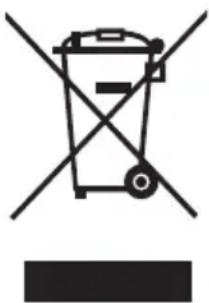
Symbol of a trash bin crossed with a diagonal line, no text or numbers presentAccording to Waste of Electrical and Electronic Equipment (WEEE) directive, WEEE should be separately collected and treated. If at any time in future you need to dispose of this product please do NOT dispose of this product with household waste. Please send this product to WEEE collecting points where available.
WARRANTY CONDITIONS / SERVICE
We congratulate you on the new device and hope you enjoy it.
Should you find a problem for the product, please contact our customer service:
Midea Europe GmbH
Tel.: 06196 90 20 0
In case of service:
Homepage: www.midea-home.com
Email: service-meg@midea.com [DE]
service-es@midea.com [ES]
service-fr@midea.com [FR]
assistenza@midea.com [IT]
In case of a malfunction, enter your exact address, telephone number, sales contract number and device type (from the rating plate of the device).
A precise description of the error saves you and us time and money. If you have any special questions, please contact the customer service center.
Before you contact the service:
Please check whether it is not an operating error or a cause that has nothing to do with the function of your device.
Please note the information in the operating instructions and check whether:
- The power plug is connected
- The power plug may be damaged
- The door (s) of the device is / are firmly closed
Guarantee conditions
This device was manufactured and tested using the most modern methods. The manufacturer fulfills independently of the statutory warranty obligation of the seller / dealer for a period of 24 months, valid from the day of purchase, 12 months for commercial use, guarantee of flawless material and flawless manufacturing.
The warranty claim expires if the buyer or a third party intervenes. Damage caused by improper handling or operation through incorrect installation or storage, through improper installation or connection, as well as due to force majeure or other external influences, are not covered by the guarantee.
We reserve the right to repair, replace the defective parts or exchange the device in the event of a complaint. Replaced parts and devices become our property.
Only when the manufacturer's intended use through rework or replacement of the device cannot be achieved, can the buyer within 6 months of warranty period, apply from the day of purchase, get a reduction in the purchase price or extension of the purchase contract.
WARRANTY CONDITIONS / SERVICE
Claims for damages, also with regard to consequential damage, are excluded, if they are intentional or based on gross negligence.
If the customer service is used unnecessarily or without authorization, we will charge this for our customer services usual time and reward. Complaints are closed immediately after detection.
The buyer must prove the warranty claim by presenting the purchase receipt. This guarantee promise is valid within the Federal Republic of Germany.
Imported by
Midea Europe GmbH
65760 Eschborn, Germany
Stand 9/2020